Home / MAD2 / Week 3 / Real questions
MAD2 week 3 - real exam questions
60 questions pulled from past papers whose wording matches this week's topics, newest first, duplicates removed. Pick your answers, then press Check answers. Figures and answer keys are the originals.
Elapsed 00:00
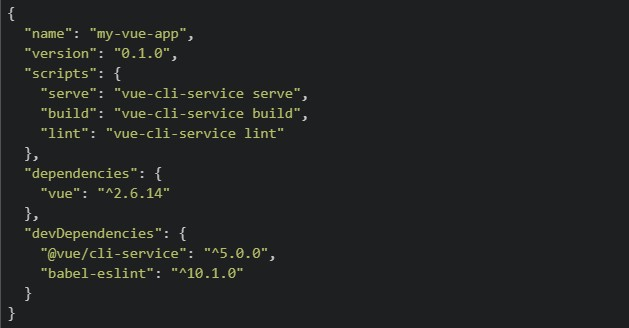
A developer has just created a new Vue 2 project using Vue CLI and the following package.json was generated. package.json
 The developer wants to view the app in the browser locally for development. They run the following command: bash:
 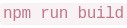 Which of the following best describes what happens and what the developer should have run instead?
The developer wants to view the app in the browser locally for development. They run the following command: bash: Which of the following best describes what happens and what the developer should have run instead?Text of the picture (copyable)
```json
{
  "name": "my-vue-app",
  "version": "0.1.0",
  "scripts": {
    "serve": "vue-cli-service serve",
    "build": "vue-cli-service build",
    "lint": "vue-cli-service lint"
  },
  "dependencies": {
    "vue": "^2.6.14"
  },
  "devDependencies": {
    "@vue/cli-service": "^5.0.0",
    "babel-eslint": "^10.1.0"
  }
}
```
```
npm run build
```- launches the app on
 ; the developer should have run npm start to compile for production instead.
text
```
npm run build
```
```
localhost:8080
```
- and
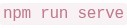 do the same thing — both launch the app at
 text
```
npm run build
```
```
npm run serve
```
```
localhost:8080
```
- is correct for local development; is only used for deploying to a server.
text
```
npm run build
```
```
npm run serve
```
- compiles and bundles the app for production into a
 folder — it does not start a local server. The developer should have run instead.
text
```
npm run build
```
/dist
```
npm run serve
```
Which of the following is/are the advantage(s) of client-side storage?
- Saving web generated documents for offline use.
- The data can be stored across devices.
- Storing personalized site preferences.
- IndexedDB API is a kind of client-side storage which can be used for audio/video files.
Pratham builds a Flask route that generates a PDF report and sends it to the user via email, all inside the route handler without using Celery. A tester notices that the browser takes about 12 seconds to respond, and during that time other users are unable to use the app normally. Which of the following correctly explain this behaviour and what Celery would change?
- Flask handles one request at a time per worker, so the long-running task blocks the entire process until it finishes.
- Other users' requests are queued and only served after the heavy task completes, making the app feel unresponsive.
- Using Celery's
 would make the task run faster by giving it more CPU cores.
text
```
.delay()
```
- With Celery, Flask immediately returns a response to the user while the report generation and email sending happen inside a separate Celery worker process in the background.
A developer runs the following code in Tab 1 of a browser, then opens the same website in a new Tab 2 (not a duplicate, but a fresh tab typed into the address bar).
 Which of the following statements correctly describes what happens in Tab 2?
Which of the following statements correctly describes what happens in Tab 2?Text of the picture (copyable)
```javascript
// Executed in Tab 1
localStorage.setItem("theme", "dark");
sessionStorage.setItem("cart", "3-items");
```- Both
 and
and  return their respective values.
text
```javascript localStorage.getItem("theme") ``` ```javascript sessionStorage.getItem("cart") ``` - returns "dark", but returns null.
text
```javascript localStorage.getItem("theme") ``` ```javascript sessionStorage.getItem("cart") ``` - Both return null
- returns "3-items", but returns null.
text
```javascript
sessionStorage.getItem("cart")
```
```javascript
localStorage.getItem("theme")
```
A developer opens the Node.js REPL and runs the following line:
 Why does this fail?
Why does this fail?Text of the picture (copyable)
```javascript
const heading = document.querySelector("h1")
```- Node.js cannot execute JavaScript from the terminal.
- The Node.js runtime does not provide browser DOM APIs like

text
document
 works only after using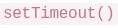
text
```javascript
document.querySelector()
```
```
setTimeout()
```
- V8 can execute only arithmetic expressions, not DOM code.
Consider the following javascript code:
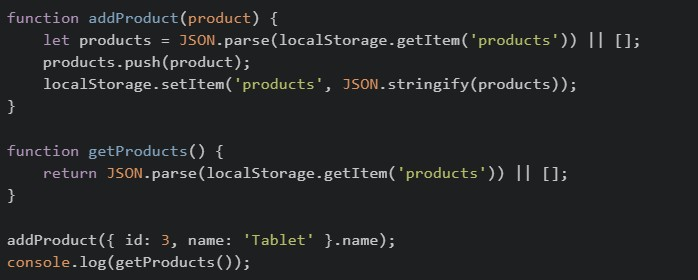 The above code is initially loaded on the browser and then the browser is refreshed two times. What will be the final output?
The above code is initially loaded on the browser and then the browser is refreshed two times. What will be the final output?Text of the picture (copyable)
```javascript
function addProduct(product) {
    let products = JSON.parse(localStorage.getItem('products')) || [];
    products.push(product);
    localStorage.setItem('products', JSON.stringify(products));
}

function getProducts() {
    return JSON.parse(localStorage.getItem('products')) || [];
}

addProduct({ id: 3, name: 'Tablet' }.name);
console.log(getProducts());
```- ['Tablet', 'Tablet']
- ['Tablet', 'Tablet', 'Tablet']
- [{ id: 3, name: 'Tablet' }]
- [undefined]
A Vue frontend, a mobile app, and another backend service all call the same Flask API deployed on multiple servers. The team chooses JWT authentication. Which of the following statements are correct?
- Each request can carry the token, so any server can validate it without storing a per-user session in memory.
- JWT is API-friendly because clients can send it using the
 header.
text
```
Authorization: Bearer <token>
```
- In Flask-JWT-Extended,
 can read the identity stored in the token.
text
```
get_jwt_identity()
```
- Session-based authentication is usually easier to scale across multiple servers because no shared storage is needed. The team should have chosen this.
Consider running the following in Browser console:
 Which of the following statements are correct?
Which of the following statements are correct?Text of the picture (copyable)
```javascript
console.log(typeof setTimeout)
console.log(typeof document)
```
- The first line prints
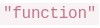 .
.text
"function"
- The second line prints
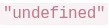 .
.text
"undefined"
- will work in Browser by default because V8 provides the DOM.
text
```javascript
document.querySelector()
```
- Different runtimes (browser, Node.js, etc.) can provide different APIs even if they use the same JavaScript engine.
Which of the following are advantages of component-based frontend frameworks like Vue.js?
- Code reusability
- Better maintainability
- Automatic SQL query optimization
- Easier UI management
In a Single Page Application (SPA), what are the benefits of client-side routing over server-side routing?
- Slower navigation between pages
- Reduced load on the backend server
- Better SEO performance by default
- Seamless page transitions without full reloads
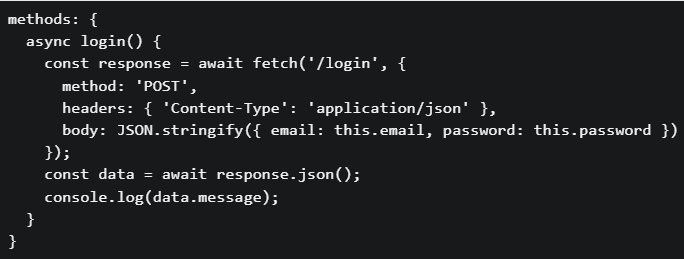
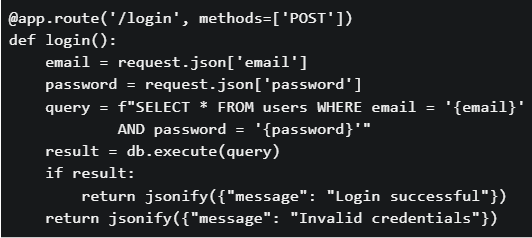
You are building a login feature for a web application. The frontend sends the user’s email and password to the backend API. The backend validates credentials against a database. Which security issues exist in the code given below? Frontend: script.js
 Backend: app.py
Backend: app.py
Text of the picture (copyable)
```javascript
methods: {
  async login() {
    const response = await fetch('/login', {
      method: 'POST',
      headers: { 'Content-Type': 'application/json' },
      body: JSON.stringify({ email: this.email, password: this.password })
    });
    const data = await response.json();
    console.log(data.message);
  }
}
```
```python
@app.route('/login', methods=['POST'])
def login():
    email = request.json['email']
    password = request.json['password']
    query = f"SELECT * FROM users WHERE email = '{email}'" \
            f" AND password = '{password}'"
    result = db.execute(query)
    if result:
        return jsonify({"message": "Login successful"})
    return jsonify({"message": "Invalid credentials"})
```- The SQL query is vulnerable to SQL injection attacks
- Passwords are stored and compared in plain text
- No authentication token (session/JWT) mechanism is implemented
- All of these.
Consider a scenario involving localStorage, Promise chains, and Vue lifecycle hooks: Scenario: A user authentication system where: On app initialization, the app checks localStorage for a stored user token• If a token exists, it validates the token asynchronously (via a Promise)• Based on validation, different UI components are rendered• The user navigates between different views• Code in mounted() hook:
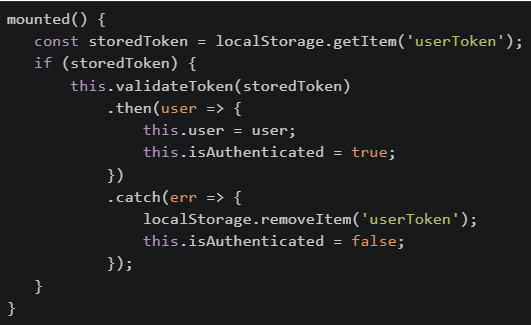 Which of the following statements is/are CORRECT about this implementation?
Which of the following statements is/are CORRECT about this implementation?Text of the picture (copyable)
```javascript
mounted() {
  const storedToken = localStorage.getItem('userToken');
  if (storedToken) {
    this.validateToken(storedToken)
      .then(user => {
        this.user = user;
        this.isAuthenticated = true;
      })
      .catch(err => {
        localStorage.removeItem('userToken');
        this.isAuthenticated = false;
      });
  }
}
```- If the page is refreshed while the Promise is pending, the token will be lost because localStorage is cleared on refresh
- If token validation fails, the token is removed from storage, preventing automatic login on future page loads
- The isAuthenticated flag might be false even though a storedToken exists, until the Promise validation completes
- sessionStorage should be used instead of localStorage because user tokens should not persist across browser sessions
- If the user navigates to a different route while validation is pending, the Promise will still complete and update the user data
Consider the following JavaScript code:
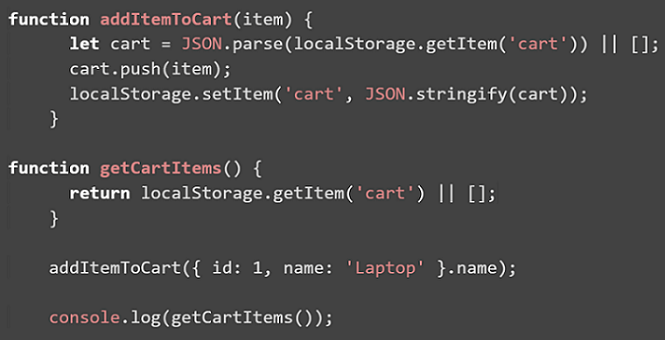 The above code is initially loaded in the browser, and then the browser is refreshed two times. What will be the final output printed in the console?
The above code is initially loaded in the browser, and then the browser is refreshed two times. What will be the final output printed in the console?Text of the picture (copyable)
```javascript
function addItemToCart(item) {
    let cart = JSON.parse(localStorage.getItem('cart')) || [];
    cart.push(item);
    localStorage.setItem('cart', JSON.stringify(cart));
}

function getCartItems() {
    return localStorage.getItem('cart') || [];
}

addItemToCart({ id: 1, name: 'Laptop' }.name);

console.log(getCartItems());
```
text
```
[]
```

text
```
['Laptop', 'Laptop', 'Laptop']
```

text
```
[{ id: 1, name: 'Laptop' }]
```
text
[undefined]
Which of the following best describes UI State (Ephemeral State) in frontend applications?
- It includes all data stored permanently in the database and is shared across users
- It represents the complete system data such as users, products, and transactions
- It refers to short-lived interface elements like loading indicators or selected tabs
- It handles complex application logic and long-term session management
Given that HTTP is stateless, which approach is commonly used to manage application state between the client and the server?
- Storing all state permanently in frontend memory across sessions
- Allowing the frontend to handle complex business logic and data storage
- Client or server maintaining state and explicitly exchanging it through requests
- Eliminating state entirely from web applications
Consider the following Vue app with html and javascript file given below: File: index.html
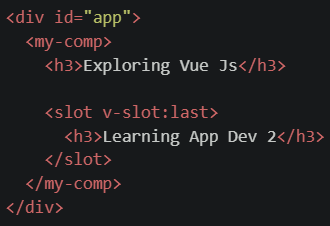 File: script.js
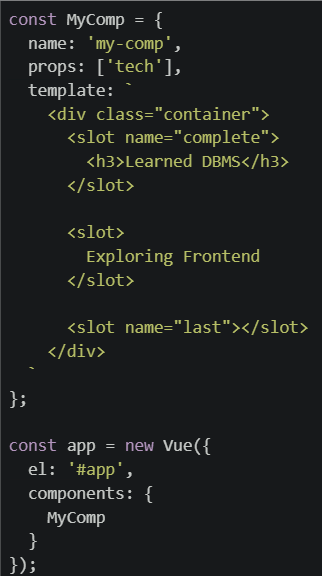 What will be rendered on the browser for the code setup given above ?
File: script.js
What will be rendered on the browser for the code setup given above ?Text of the picture (copyable)
```html
<div id="app">
  <my-comp>
    <h3>Exploring Vue Js</h3>

    <slot v-slot:last>
      <h3>Learning App Dev 2</h3>
    </slot>
  </my-comp>
</div>
```
```javascript
const MyComp = {
  name: 'my-comp',
  props: ['tech'],
  template: `
    <div class="container">
      <slot name="complete">
        <h3>Learned DBMS</h3>
      </slot>

      <slot>
        Exploring Frontend
      </slot>

      <slot name="last"></slot>
    </div>
  `
};

const app = new Vue({
  el: '#app',
  components: {
    MyComp
  }
});
```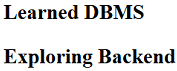
text
Learned DBMS
Exploring Backend
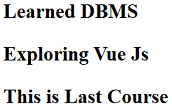
text
Learned DBMS

Exploring Vue Js

This is Last Course
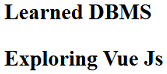
text
Learned DBMS
Exploring Vue Js
- None of these.
Consider the following JavaScript code snippet where a web application manages user preferences using localStorage. A user opens the application, sets their theme preference to "dark", refreshes the page once, closes the browser tab, and opens a new tab to reload the page. What will be the behavior of the theme preference?
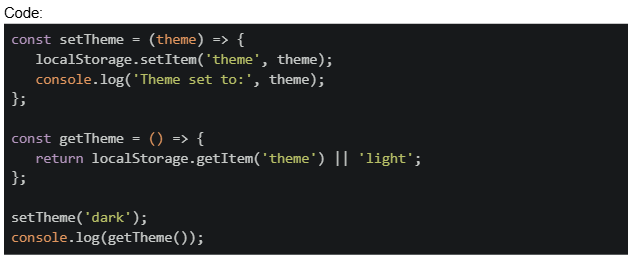
Text of the picture (copyable)
Code:
```javascript
const setTheme = (theme) => {
  localStorage.setItem('theme', theme);
  console.log('Theme set to:', theme);
};

const getTheme = () => {
  return localStorage.getItem('theme') || 'light';
};

setTheme('dark');
console.log(getTheme());
```- The theme will be lost because closing the browser tab clears localStorage
- The theme will be preserved as "dark" because localStorage persists across browser sessions
- The theme will be undefined because localStorage is cleared on refresh
- The theme will be reset to "light" when a new tab is opened
A developer uses sessionStorage to store authentication tokens in a web application. The user logs in, the token is stored, and then they close the browser window completely. When they reopen the browser later, what will happen? Code:
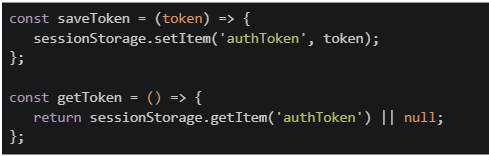
Text of the picture (copyable)
```javascript
const saveToken = (token) => {
  sessionStorage.setItem('authToken', token);
};

const getToken = () => {
  return sessionStorage.getItem('authToken') || null;
};
```- The token will be preserved and available in the new browser session.
- The token will be cleared because sessionStorage is cleared when the browser is closed.
- The token will be partially available but require re-authentication.
- The token will move to localStorage automatically.
What does "reactivity" mean in the context of frontend frameworks like Vue.js?
- The component will reload when data changes
- All function calls become asynchronous
- It disables direct access to state
- The DOM updates automatically when the underlying reactive data changes
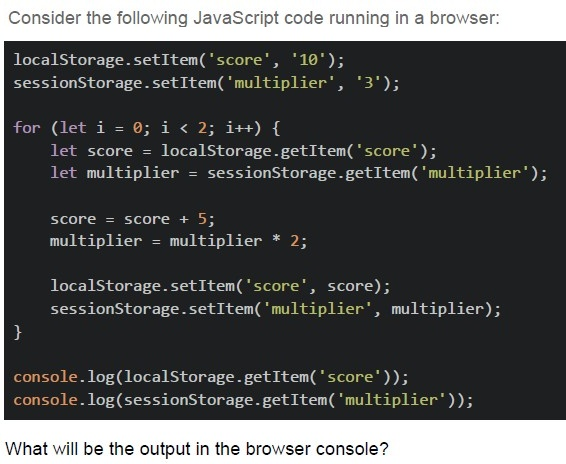
Text of the picture (copyable)
Consider the following JavaScript code running in a browser:

```javascript
localStorage.setItem('score', '10');
sessionStorage.setItem('multiplier', '3');

for (let i = 0; i < 2; i++) {
    let score = localStorage.getItem('score');
    let multiplier = sessionStorage.getItem('multiplier');

    score = score + 5;
    multiplier = multiplier * 2;

    localStorage.setItem('score', score);
    sessionStorage.setItem('multiplier', multiplier);
}

console.log(localStorage.getItem('score'));
console.log(sessionStorage.getItem('multiplier'));
```

What will be the output in the browser console?
text
20
12

text
20
NaN

text
NaN
12

text
None of these
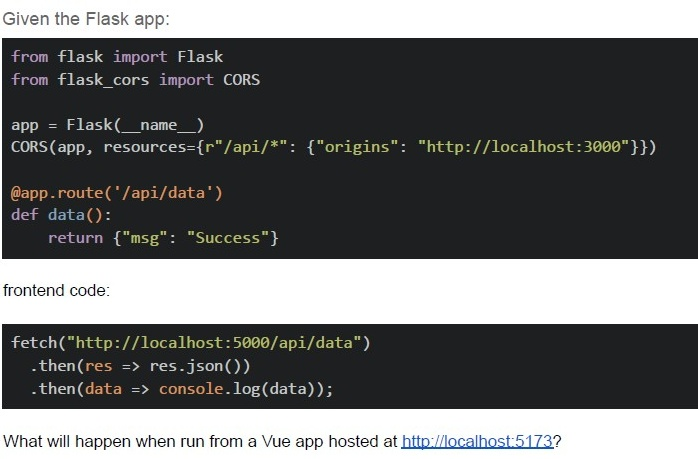
Text of the picture (copyable)
Given the Flask app:

```python
from flask import Flask
from flask_cors import CORS

app = Flask(__name__)
CORS(app, resources={r"/api/*": {"origins": "http://localhost:3000"}})

@app.route('/api/data')
def data():
    return {"msg": "Success"}
```

frontend code:

```javascript
fetch("http://localhost:5000/api/data")
    .then(res => res.json())
    .then(data => console.log(data));
```

What will happen when run from a Vue app hosted at http://localhost:5173?- Request succeeds
- CORS error occurs
- 404 error
- The server crashes
Which of the following statement(s) about Web Storage APIs is/are correct?

text
The `localStorage` object stores data with no expiration date, even after the browser is closed.

text
The `sessionStorage` object keeps data only for the duration of the page session.

text
Both `localStorage` and `sessionStorage` can store data in key-value pair format.

text
Data stored in `sessionStorage` is available across different browser tabs.
Which of the following statement(s) is/are true regarding Single Page Applications (SPA) and Progressive Web Apps (PWA)?
- SPAs use client-side routing to dynamically update content without full pagereloads.
- PWAs can work offline using service workers.
- SPAs always require a server-side language to handle routing.
- PWAs can be added to a device’s home screen like native apps.
In Vue 2, what happens when you update a data property?
- DOM is immediately updated without virtual DOM
- The page reloads
- The virtual DOM detects changes and updates efficiently
- A full component re-renders from scratch
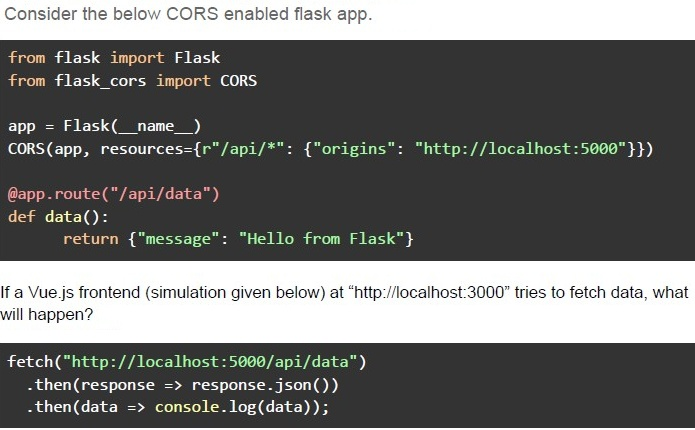
Text of the picture (copyable)
Consider the below CORS enabled flask app.

```python
from flask import Flask
from flask_cors import CORS

app = Flask(__name__)
CORS(app, resources={r"/api/*": {"origins": "http://localhost:5000"}})

@app.route("/api/data")
def data():
    return {"message": "Hello from Flask"}
```

If a Vue.js frontend (simulation given below) at "http://localhost:3000" tries to fetch data, what will happen?

```javascript
fetch("http://localhost:5000/api/data")
    .then(response => response.json())
    .then(data => console.log(data));
```- The request will be blocked due to CORS policy.
- The request will succeed and return { "message": "Hello from Flask" }.
- The request will fail because Vue.js does not support CORS.
- The server will crash due to incorrect CORS settings.
Consider the following Vue apps in script.js and the index.html file.
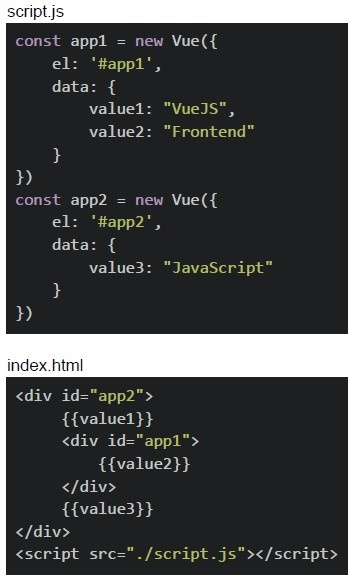 Consider the following Vue apps in script.js and the index.html file.
What will be rendered on the browser?
Consider the following Vue apps in script.js and the index.html file.
What will be rendered on the browser?
Consider the following Vue apps in script.js and the index.html file.
What will be rendered on the browser?Text of the picture (copyable)
script.js
```javascript
const app1 = new Vue({
  el: '#app1',
  data: {
    value1: "VueJS",
    value2: "Frontend"
  }
})
const app2 = new Vue({
  el: '#app2',
  data: {
    value3: "JavaScript"
  }
})
```

index.html
```html
<div id="app2">
  {{value1}}
  <div id="app1">
    {{value2}}
  </div>
  {{value3}}
</div>
<script src="./script.js"></script>
```- Frontend
- VueJSFrontend
- VueJSJavaScript
- FrontendJavaScript
Consider the following Vue App and the HTML document given below.
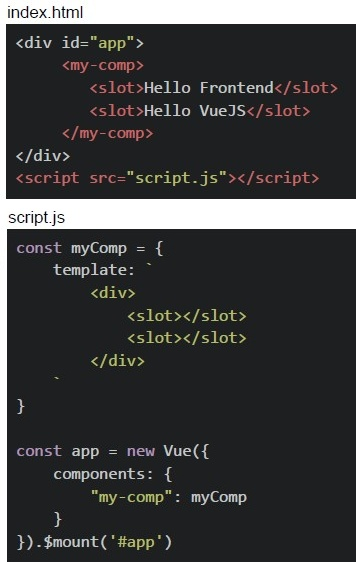 Consider the following Vue App and the HTML document given below.
What will be the output on the browser?
Consider the following Vue App and the HTML document given below.
What will be the output on the browser?
Consider the following Vue App and the HTML document given below.
What will be the output on the browser?Text of the picture (copyable)
index.html
```html
<div id="app">
    <my-comp>
        <slot>Hello Frontend</slot>
        <slot>Hello VueJS</slot>
    </my-comp>
</div>
<script src="script.js"></script>
```

script.js
```javascript
const myComp = {
    template: `
        <div>
            <slot></slot>
            <slot></slot>
        </div>
    `
}

const app = new Vue({
    components: {
        "my-comp": myComp
    }
}).$mount('#app')
```- Hello Frontend Hello Frontend
- Hello VueJS Hello VueJS
- Hello Frontend Hello Vue JS
- Hello Frontend Hello Vue JS Hello Frontend Hello Vue JS
Comprehension passage for this question
Consider the following Vue app with the Vue Router shown below and answer the given subquestions.
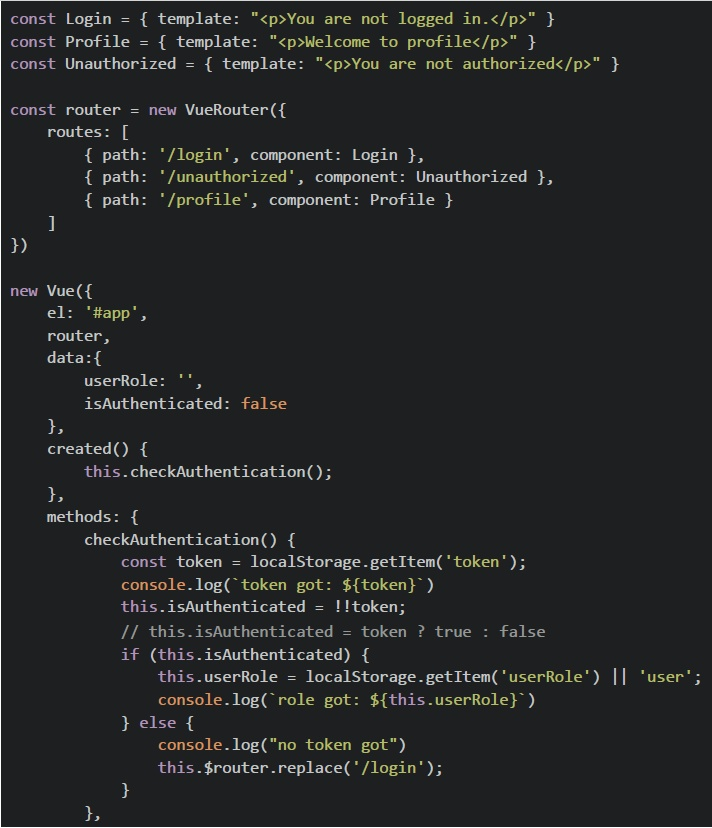 Consider the following Vue app with the Vue Router shown below and answer the given subquestions.
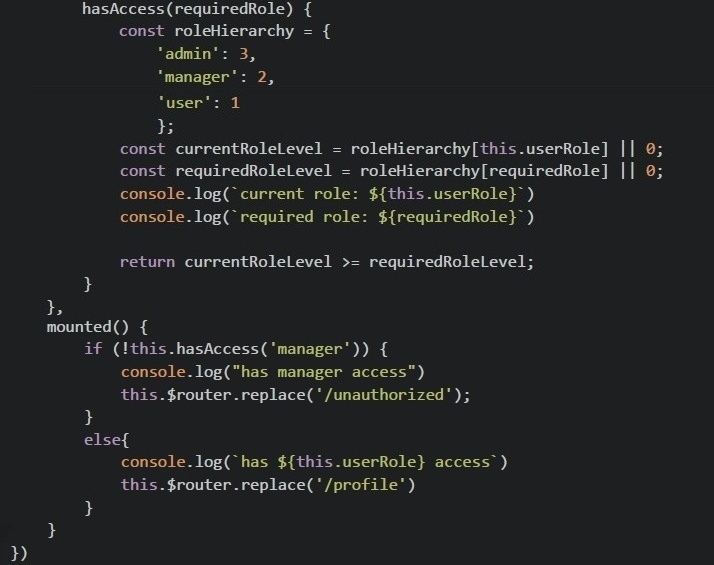 Consider the following Vue app with the Vue Router shown below and answer the given subquestions.
What will be rendered on the browser for the given value of localStorage?
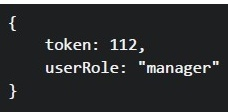 What will be rendered on the browser for the given value of localStorage?
What will be rendered on the browser for the given value of localStorage?
Text of the picture (copyable)
```
{
  token: 112,
  userRole: "manager"
}
```- You are not logged in.
- Welcome to profile
- You are not authorized.
- None of these.
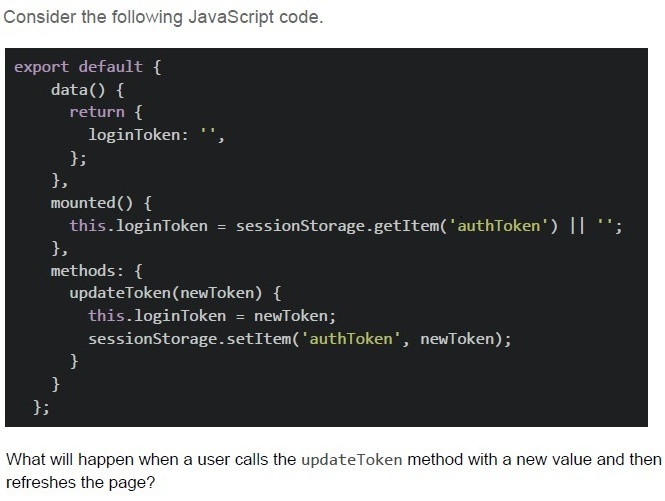
Text of the picture (copyable)
Consider the following JavaScript code.

```javascript
export default {
  data() {
    return {
      loginToken: '',
    };
  },
  mounted() {
    this.loginToken = sessionStorage.getItem('authToken') || '';
  },
  methods: {
    updateToken(newToken) {
      this.loginToken = newToken;
      sessionStorage.setItem('authToken', newToken);
    }
  }
};
```

What will happen when a user calls the updateToken method with a new value and then refreshes the page?
text
The new token will be lost, and the "loginToken" data property will be reset to an empty string.

text
The new token will be preserved in session storage, and the "LoginToken" data property will be populated with the stored value on page refresh.

text
The method will throw an error because sessionStorage cannot be modified directly.

text
The "loginToken" data property will be updated, but the session storage will remain unchanged.
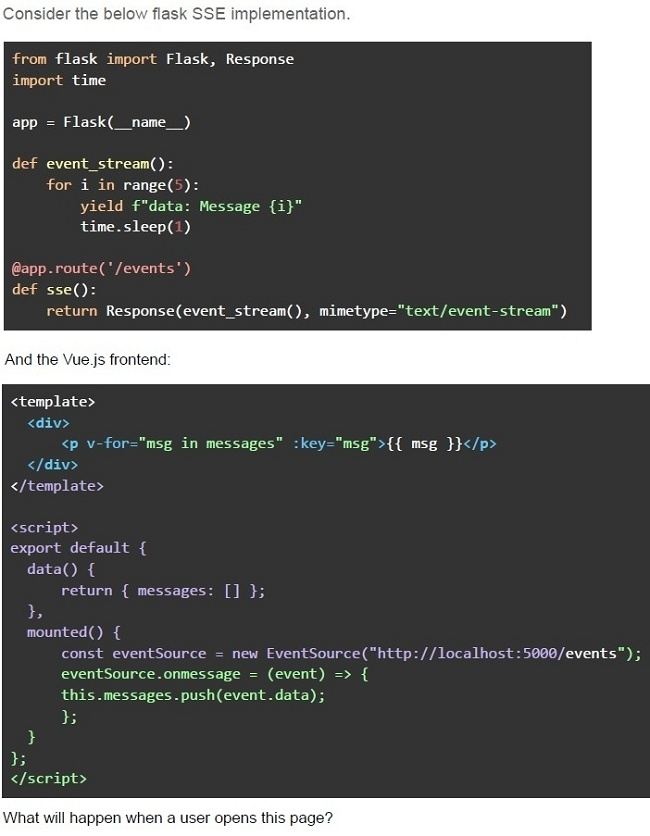
Text of the picture (copyable)
Consider the below flask SSE implementation.

```python
from flask import Flask, Response
import time

app = Flask(__name__)

def event_stream():
    for i in range(5):
        yield f"data: Message {i}"
        time.sleep(1)

@app.route('/events')
def sse():
    return Response(event_stream(), mimetype="text/event-stream")
```

And the Vue.js frontend:

```html
<template>
  <div>
    <p v-for="msg in messages" :key="msg">{{ msg }}</p>
  </div>
</template>

<script>
export default {
  data() {
    return { messages: [] };
  },
  mounted() {
    const eventSource = new EventSource("http://localhost:5000/events");
    eventSource.onmessage = (event) => {
      this.messages.push(event.data);
    };
  },
};
</script>
```

What will happen when a user opens this page?- The client will receive 5 messages, one per second.
- The client will receive all 5 messages instantly.
- The client will not receive any messages due to CORS issues.
- The server will crash because Flask cannot handle SSE.
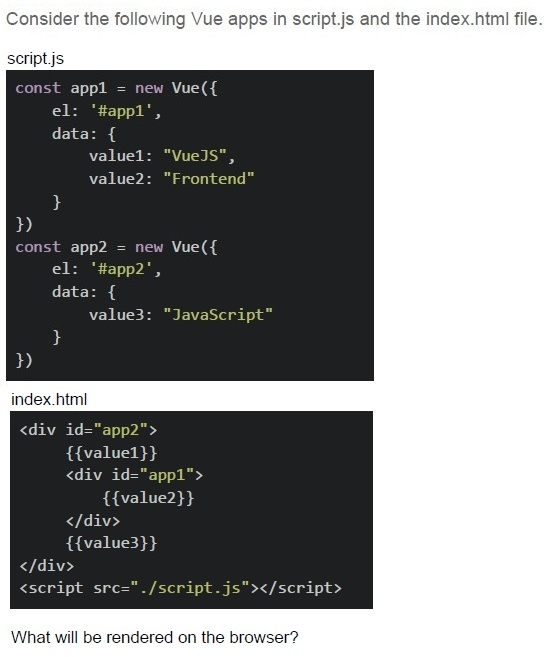
Text of the picture (copyable)
Consider the following Vue apps in script.js and the index.html file.

script.js

```javascript
const app1 = new Vue({
  el: '#app1',
  data: {
    value1: "VueJS",
    value2: "Frontend"
  }
})

const app2 = new Vue({
  el: '#app2',
  data: {
    value3: "JavaScript"
  }
})
```

index.html

```html
<div id="app2">
  {{value1}}
  <div id="app1">
    {{value2}}
  </div>
  {{value3}}
</div>
<script src="./script.js"></script>
```

What will be rendered on the browser?- Frontend
- VueJSFrontend
- VueJSJavaScript
- FrontendJavaScript
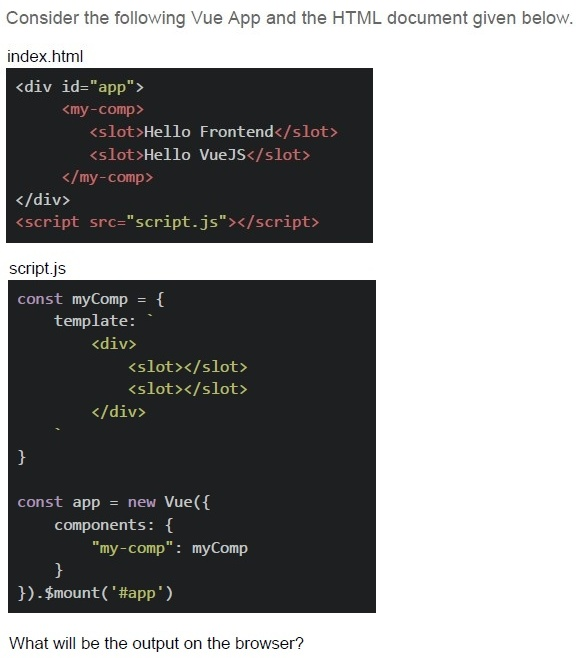
Text of the picture (copyable)
Consider the following Vue App and the HTML document given below.

index.html
```html
<div id="app">
  <my-comp>
    <slot>Hello Frontend</slot>
    <slot>Hello VueJS</slot>
  </my-comp>
</div>
<script src="script.js"></script>
```

script.js
```javascript
const myComp = {
  template: `
    <div>
      <slot></slot>
      <slot></slot>
    </div>
  `
}

const app = new Vue({
  components: {
    "my-comp": myComp
  }
}).$mount('#app')
```

What will be the output on the browser?- Hello Frontend Hello Frontend
- Hello VueJS Hello VueJS
- Hello Frontend Hello Vue JS
- Hello Frontend Hello Vue JS Hello Frontend Hello Vue JS
Comprehension passage for this question
Consider the following Vue app with the Vue Router shown below and answer the given subquestions.
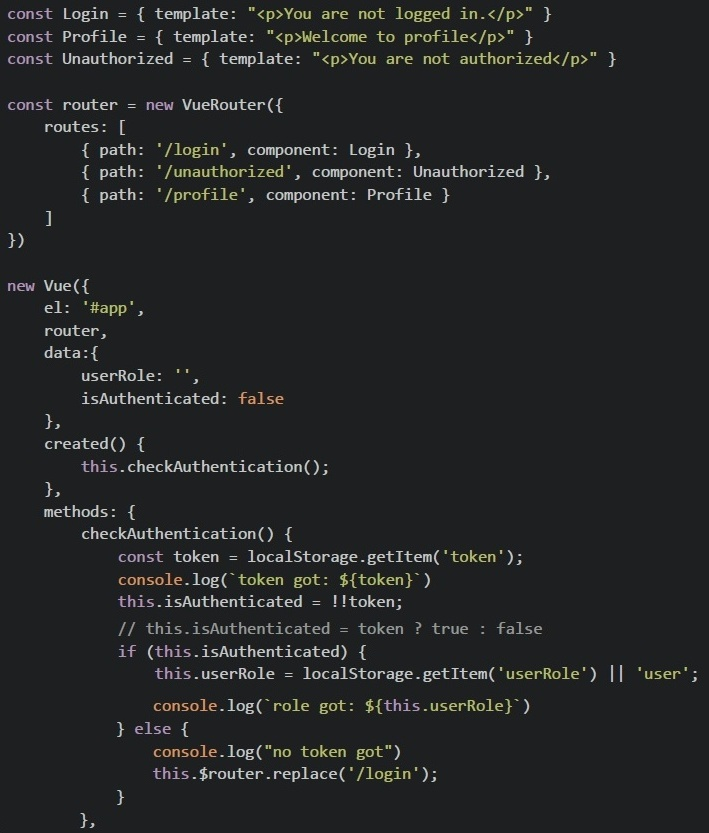 Consider the following Vue app with the Vue Router shown below and answer the given subquestions.
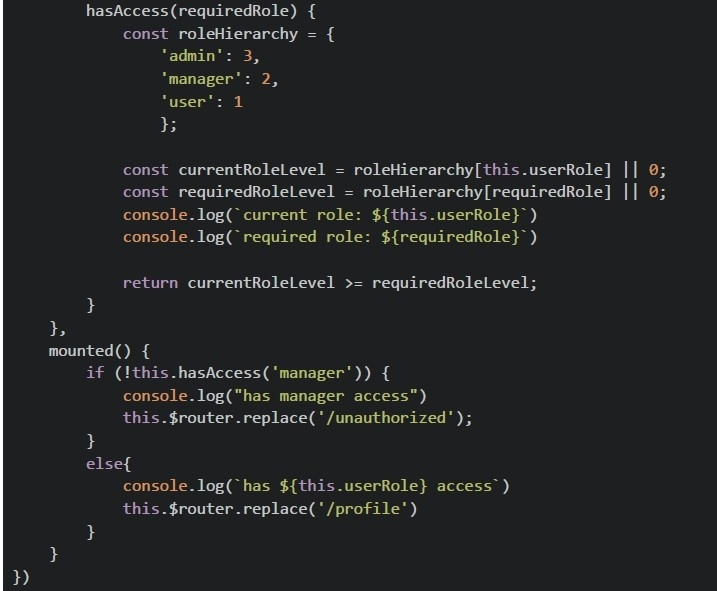 Consider the following Vue app with the Vue Router shown below and answer the given subquestions.
What will be rendered on the browser for the given value of localStorage?
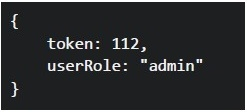 What will be rendered on the browser for the given value of localStorage?
What will be rendered on the browser for the given value of localStorage?
Text of the picture (copyable)
```json
{
  "token": 112,
  "userRole": "admin"
}
```- You are not logged in.
- Welcome to profile
- You are not authorized.
- None of these.

Text of the picture (copyable)
What distinguishes a Progressive Web App (PWA) from a traditional web application?
- PWAs must be downloaded from an app store
- PWAs only work on mobile devices
- PWAs can work offline and be installed on the home screen
- PWAs require native mobile code
What will be the visited pages history when the user navigates between pages and refreshes the page?
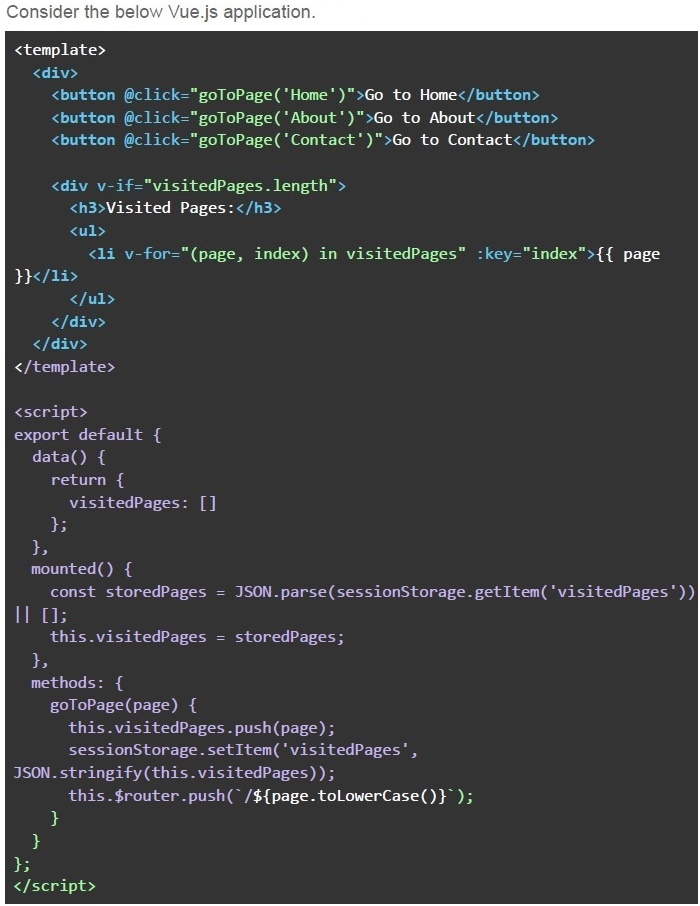
Text of the picture (copyable)
Consider the below Vue.js application.

```html
<template>
  <div>
    <button @click="goToPage('Home')">Go to Home</button>
    <button @click="goToPage('About')">Go to About</button>
    <button @click="goToPage('Contact')">Go to Contact</button>

    <div v-if="visitedPages.length">
      <h3>Visited Pages:</h3>
      <ul>
        <li v-for="(page, index) in visitedPages" :key="index">{{ page }}</li>
      </ul>
    </div>
  </div>
</template>

<script>
export default {
  data() {
    return {
      visitedPages: []
    };
  },
  mounted() {
    const storedPages = JSON.parse(sessionStorage.getItem('visitedPages')) || [];
    this.visitedPages = storedPages;
  },
  methods: {
    goToPage(page) {
      this.visitedPages.push(page);
      sessionStorage.setItem('visitedPages',
        JSON.stringify(this.visitedPages));
      this.$router.push(`/${page.toLowerCase()}`);
    }
  }
};
</script>
```- The list of visited pages will reset to empty after the page is refreshed.
- The list of visited pages will be updated with the current page after everynavigation and will not reset even after reload.
- The navigation history will not be stored in sessionStorage.
- All of these
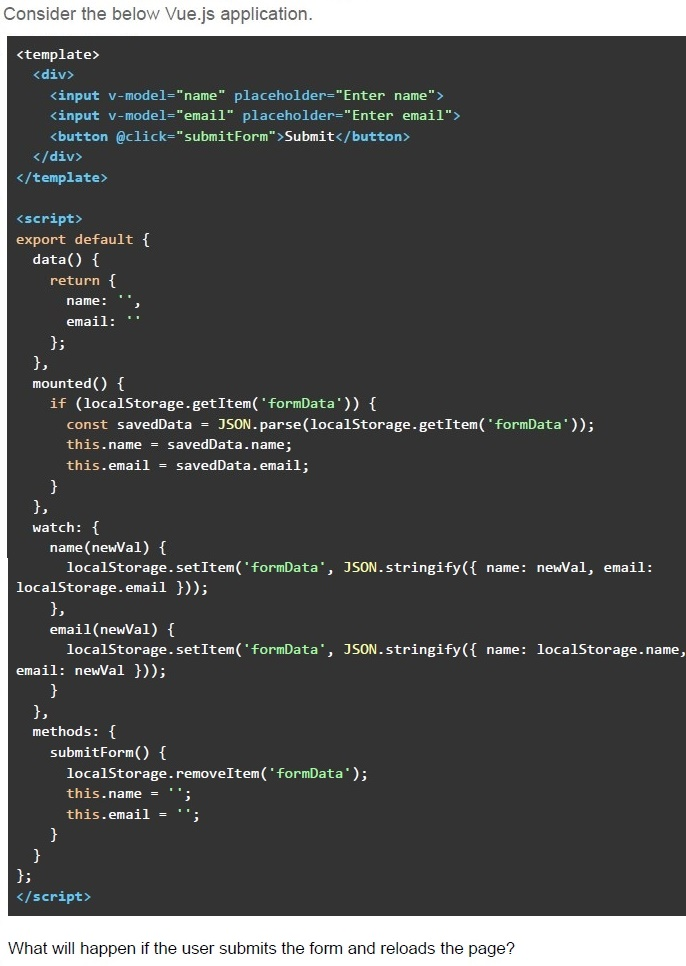
Text of the picture (copyable)
Consider the below Vue.js application.

```html
<template>
  <div>
    <input v-model="name" placeholder="Enter name">
    <input v-model="email" placeholder="Enter email">
    <button @click="submitForm">Submit</button>
  </div>
</template>

<script>
export default {
  data() {
    return {
      name: '',
      email: ''
    };
  },
  mounted() {
    if (localStorage.getItem('formData')) {
      const savedData = JSON.parse(localStorage.getItem('formData'));
      this.name = savedData.name;
      this.email = savedData.email;
    }
  },
  watch: {
    name(newVal) {
      localStorage.setItem('formData', JSON.stringify({ name: newVal, email: localStorage.email }));
    },
    email(newVal) {
      localStorage.setItem('formData', JSON.stringify({ name: localStorage.name, email: newVal }));
    }
  },
  methods: {
    submitForm() {
      localStorage.removeItem('formData');
      this.name = '';
      this.email = '';
    }
  }
};
</script>
```

What will happen if the user submits the form and reloads the page?- The form data will persist in the input fields even after submission and pagereload.
- The form data will be cleared after submission, and no data will appear after apage reload.
- The form data will appear in the inputs after submission and page reload, butonly until the user starts typing again.
- The page will go blank.
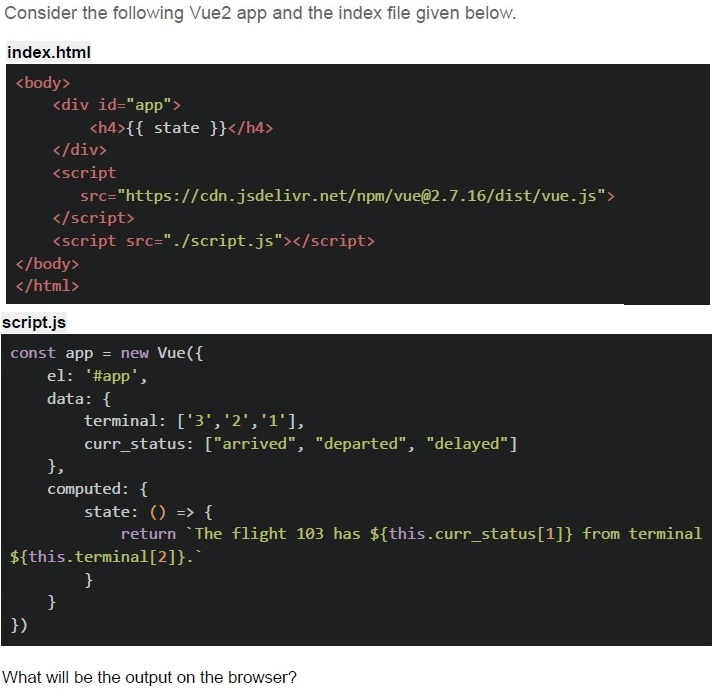
Text of the picture (copyable)
Consider the following Vue2 app and the index file given below.

index.html

```html
<body>
    <div id="app">
        <h4>{{ state }}</h4>
    </div>
    <script
        src="https://cdn.jsdelivr.net/npm/vue@2.7.16/dist/vue.js"
    ></script>
    <script src="./script.js"></script>
</body>
</html>
```

script.js

```javascript
const app = new Vue({
    el: '#app',
    data: {
        terminal: ['3', '2', '1'],
        curr_status: ["arrived", "departed", "delayed"]
    },
    computed: {
        state: () => {
            return `The flight 103 has ${this.curr_status[1]} from terminal ${this.terminal[2]}.`
        }
    }
})
```

What will be the output on the browser?- The flight 103 has departed from terminal 1.
- The flight 103 has arrived from terminal 2.
- The flight 103 has delayed from terminal 3.
- The flight 103 has from terminal.
- ReferenceError
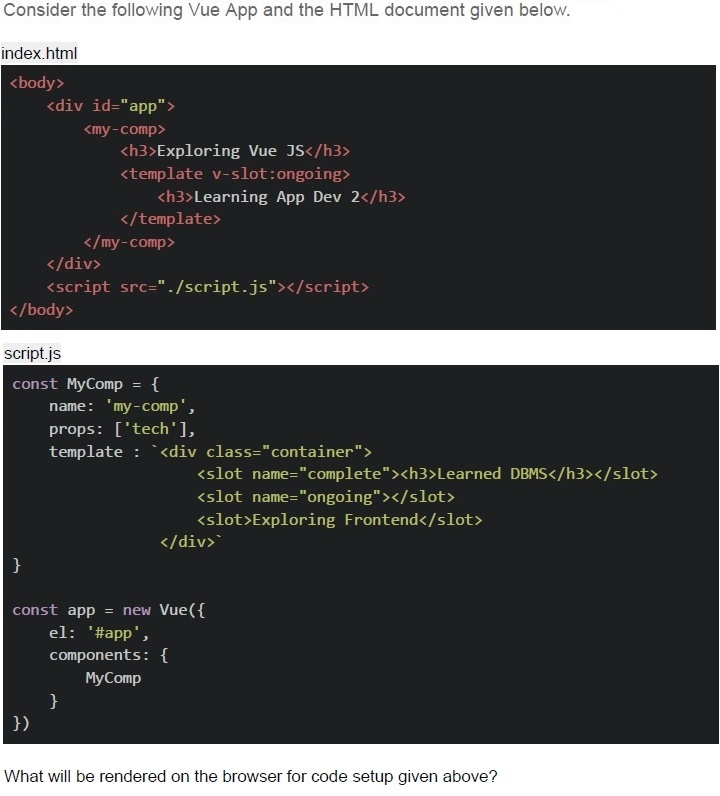
Text of the picture (copyable)
Consider the following Vue App and the HTML document given below.

index.html
```html
<body>
    <div id="app">
        <my-comp>
            <h3>Exploring Vue JS</h3>
            <template v-slot:ongoing>
                <h3>Learning App Dev 2</h3>
            </template>
        </my-comp>
    </div>
    <script src="./script.js"></script>
</body>
```

script.js
```javascript
const MyComp = {
    name: 'my-comp',
    props: ['tech'],
    template: `<div class="container">
        <slot name="complete"><h3>Learned DBMS</h3></slot>
        <slot name="ongoing"></slot>
        <slot>Exploring Frontend</slot>
    </div>`
}

const app = new Vue({
    el: '#app',
    components: {
        MyComp
    }
})
```

What will be rendered on the browser for code setup given above?- Learning App Dev 2Exploring Vue JS
- Learning App Dev 2Exploring Frontend
- Learned DBMSLearning App Dev 2 Exploring Frontend
- Learned DBMSLearning App Dev 2 Exploring Vue JS
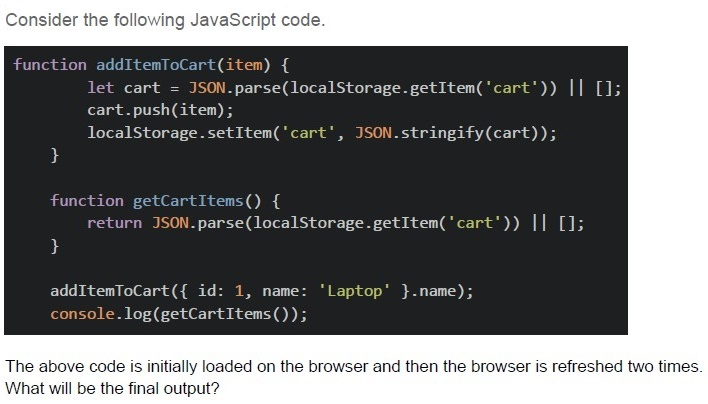
Text of the picture (copyable)
Consider the following JavaScript code.

```javascript
function addItemToCart(item) {
  let cart = JSON.parse(localStorage.getItem('cart')) || [];
  cart.push(item);
  localStorage.setItem('cart', JSON.stringify(cart));
}

function getCartItems() {
  return JSON.parse(localStorage.getItem('cart')) || [];
}

addItemToCart({ id: 1, name: 'Laptop' }.name);
console.log(getCartItems());
```

The above code is initially loaded on the browser and then the browser is refreshed two times.
What will be the final output?- []
- ['Laptop', ‘Laptop’, ‘Laptop’]
- [{ id: 1, name: 'Laptop' }]
- [undefined]
Which of the following statements is FALSE?
- Cache-Control: no-store prevents caching
- ETag helps validate cache freshness
- Data stored in sessionStorage remains available even after the browser isclosed and reopened.
- localStorage has larger storage limit than cookies
Text of the picture (copyable)
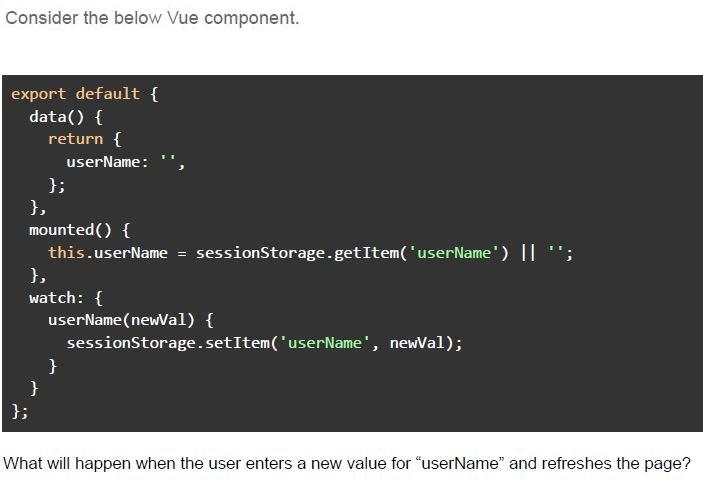
Consider the below Vue component.

```javascript
export default {
  data() {
    return {
      userName: '',
    };
  },
  mounted() {
    this.userName = sessionStorage.getItem('userName') || '';
  },
  watch: {
    userName(newVal) {
      sessionStorage.setItem('userName', newVal);
    }
  }
};
```

What will happen when the user enters a new value for "userName" and refreshes the page?- The new value will be stored in session storage, and the “userName” dataproperty will be updated.
- The new value will be stored in session storage, but the “userName” dataproperty will be reset to an empty string on page refresh.
- The “userName” data property will be reset to an empty string, and thesession storage value will be ignored on refresh.
- The “userName” data property will not be updated in session storage becausesession storage doesn't persist across refreshes.
Text of the picture (copyable)
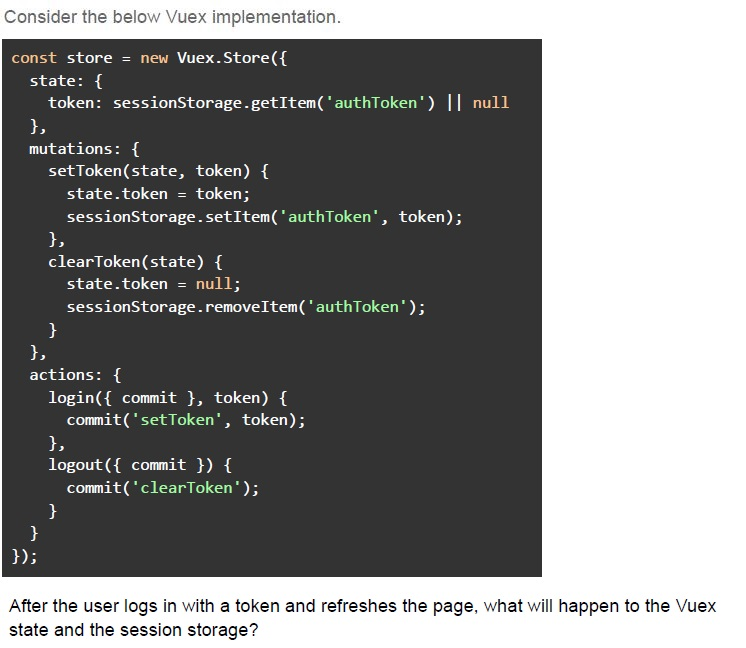
Consider the below Vuex implementation.

```javascript
const store = new Vuex.Store({
  state: {
    token: sessionStorage.getItem('authToken') || null
  },
  mutations: {
    setToken(state, token) {
      state.token = token;
      sessionStorage.setItem('authToken', token);
    },
    clearToken(state) {
      state.token = null;
      sessionStorage.removeItem('authToken');
    }
  },
  actions: {
    login({ commit }, token) {
      commit('setToken', token);
    },
    logout({ commit }) {
      commit('clearToken');
    }
  }
});
```

After the user logs in with a token and refreshes the page, what will happen to the Vuex state and the session storage?- The session storage will reset, but the Vuex state will still contain the“authToken”.
- Both the Vuex state and the sessionStorage will retain the token after the pagerefresh.
- The Vuex state will load the token from sessionStorage after the page refresh.
- The token will be lost from both the Vuex state and sessionStorage after thepage refresh.
Text of the picture (copyable)
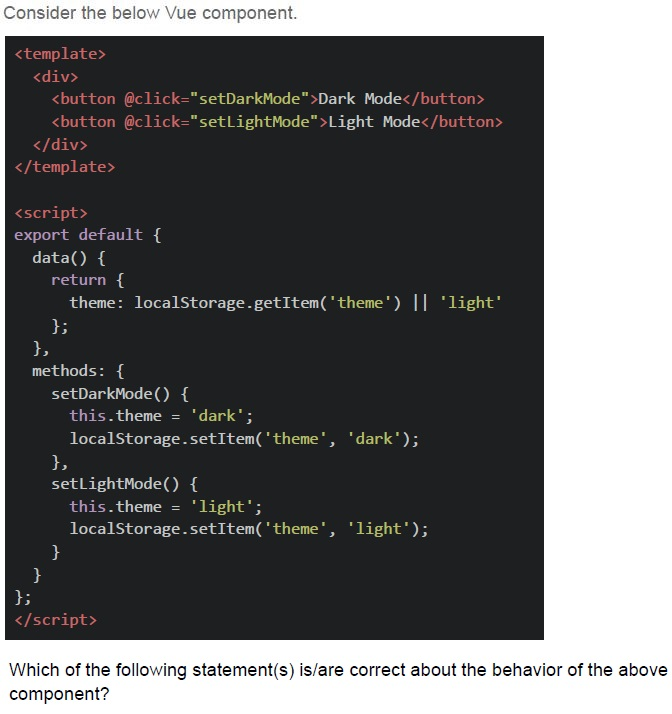
Consider the below Vue component.

```html
<template>
  <div>
    <button @click="setDarkMode">Dark Mode</button>
    <button @click="setLightMode">Light Mode</button>
  </div>
</template>

<script>
export default {
  data() {
    return {
      theme: localStorage.getItem('theme') || 'light'
    };
  },
  methods: {
    setDarkMode() {
      this.theme = 'dark';
      localStorage.setItem('theme', 'dark');
    },
    setLightMode() {
      this.theme = 'light';
      localStorage.setItem('theme', 'light');
    }
  }
};
</script>
```

Which of the following statement(s) is/are correct about the behavior of the above component?- The theme will persist across page reloads because it is stored in localStorage.
- If the user opens a new tab, the theme will reset to 'light' in that new tab.
- The theme will reset to 'light' every time the page is refreshed.
- The theme will be shared across all open tabs, as localStorage is accessibleacross tabs of the same origin.
Which of the following scenario(s) represent ephemeral state(s) in a web application?
- The user's current scroll position on a webpage.
- The user's authentication token, saved in localStorage.
- The temporary state of a dropdown menu.
- All of these
Text of the picture (copyable)
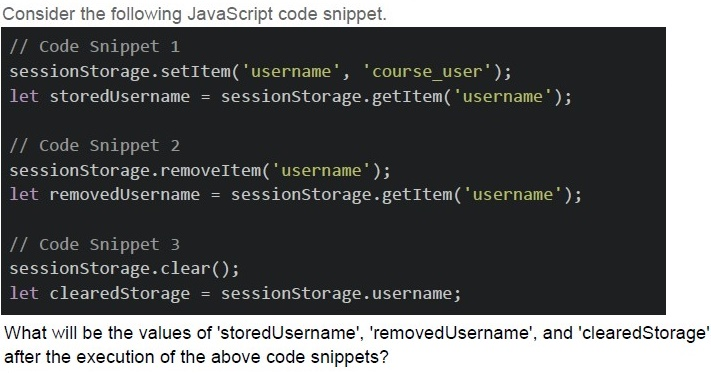
Consider the following JavaScript code snippet.

```javascript
// Code Snippet 1
sessionStorage.setItem('username', 'course_user');
let storedUsername = sessionStorage.getItem('username');

// Code Snippet 2
sessionStorage.removeItem('username');
let removedUsername = sessionStorage.getItem('username');

// Code Snippet 3
sessionStorage.clear();
let clearedStorage = sessionStorage.username;
```

What will be the values of 'storedUsername', 'removedUsername', and 'clearedStorage' after the execution of the above code snippets?- storedUsername: 'course_user', removedUsername: null, clearedStorage: null
- storedUsername: 'course_user', removedUsername: undefined,clearedStorage: null
- storedUsername: 'course_user', removedUsername: null, clearedStorage:undefined
- storedUsername: 'course_user', removedUsername: undefined,clearedStorage: undefined
Consider the following Vue.js 2 component using CDN.
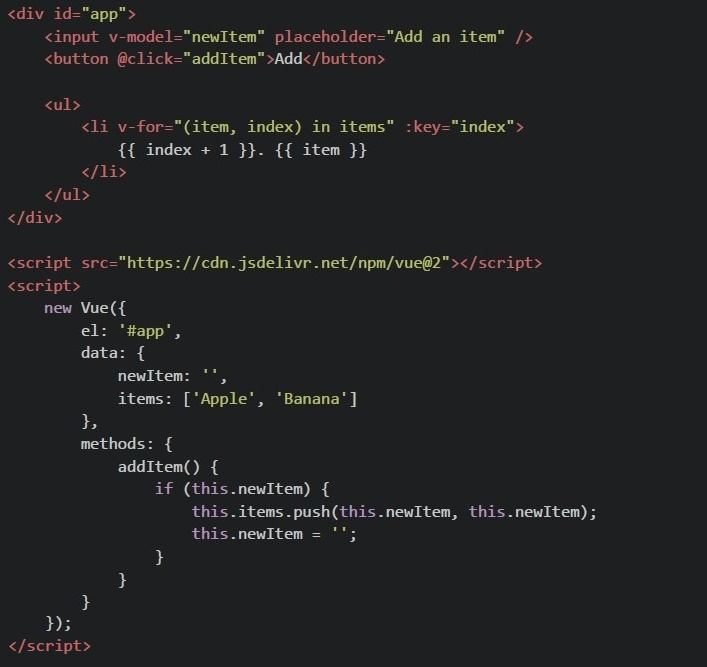 Consider the following Vue.js 2 component using CDN. After entering "Orange" in the input box and clicking the "Add" button, what will be seen in the browser?
Consider the following Vue.js 2 component using CDN. After entering "Orange" in the input box and clicking the "Add" button, what will be seen in the browser?Text of the picture (copyable)
```html
<div id="app">
  <input v-model="newItem" placeholder="Add an item" />
  <button @click="addItem">Add</button>

  <ul>
    <li v-for="(item, index) in items" :key="index">
      {{ index + 1 }}. {{ item }}
    </li>
  </ul>
</div>

<script src="https://cdn.jsdelivr.net/npm/vue@2"></script>
<script>
  new Vue({
    el: '#app',
    data: {
      newItem: '',
      items: ['Apple', 'Banana']
    },
    methods: {
      addItem() {
        if (this.newItem) {
          this.items.push(this.newItem, this.newItem);
          this.newItem = '';
        }
      }
    }
  });
</script>
```- 1. Apple2. Banana 3. Orange 4. Orange
- 1. Apple2. Banana 3. Orange
- 1. Apple2. Banana 3. Orange 3. Orange
- 1. Apple2. Banana
Consider the following javascript code running on browser
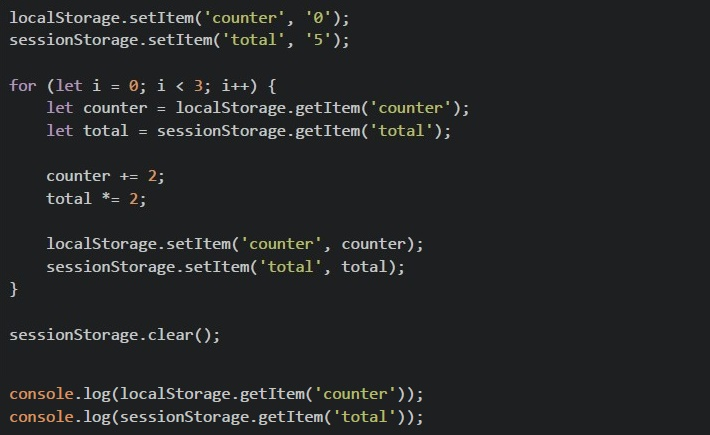 Consider the following javascript code running on browser What will be the output in the browser console?
Consider the following javascript code running on browser What will be the output in the browser console?Text of the picture (copyable)
```javascript
localStorage.setItem('counter', '0');
sessionStorage.setItem('total', '5');

for (let i = 0; i < 3; i++) {
    let counter = localStorage.getItem('counter');
    let total = sessionStorage.getItem('total');

    counter += 2;
    total *= 2;

    localStorage.setItem('counter', counter);
    sessionStorage.setItem('total', total);
}

sessionStorage.clear();

console.log(localStorage.getItem('counter'));
console.log(sessionStorage.getItem('total'));
```- 640
- null40
- 6null
- 0222null
In a Vue CLI project with Vuex, you have the following configuration:
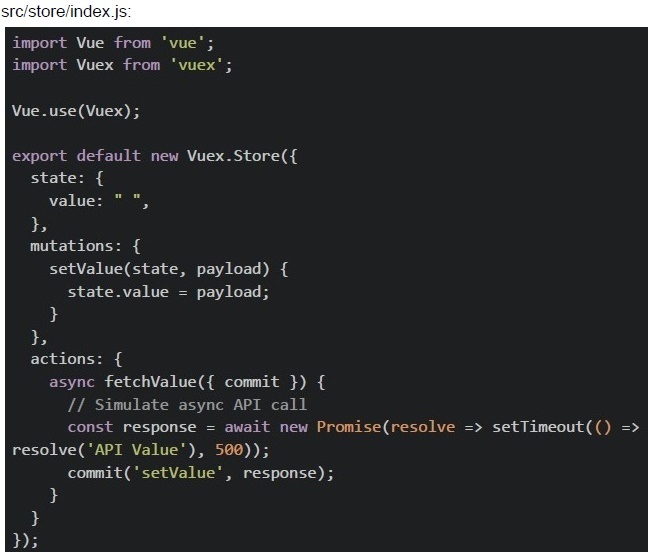 In a Vue CLI project with Vuex, you have the following configuration:
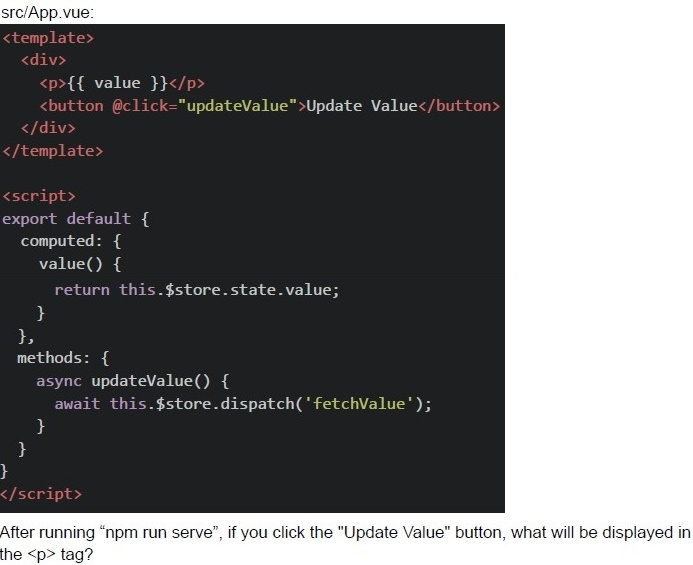 In a Vue CLI project with Vuex, you have the following configuration:
In a Vue CLI project with Vuex, you have the following configuration:
In a Vue CLI project with Vuex, you have the following configuration: Text of the picture (copyable)
src/store/index.js:
```javascript
import Vue from 'vue';
import Vuex from 'vuex';

Vue.use(Vuex);

export default new Vuex.Store({
  state: {
    value: "",
  },
  mutations: {
    setValue(state, payload) {
      state.value = payload;
    }
  },
  actions: {
    async fetchValue({ commit }) {
      // Simulate async API call
      const response = await new Promise(resolve => setTimeout(() =>
        resolve('API Value'), 500));
      commit('setValue', response);
    }
  }
});
```
src/App.vue:
```html
<template>
  <div>
    <p>{{ value }}</p>
    <button @click="updateValue">Update Value</button>
  </div>
</template>

<script>
export default {
  computed: {
    value() {
      return this.$store.state.value;
    },
  },
  methods: {
    async updateValue() {
      await this.$store.dispatch('fetchValue');
    },
  },
};
</script>
```
After running "npm run serve", if you click the "Update Value" button, what will be displayed in the `<p>` tag?
text
API Value

text
"" ""

text
undefined

text
null
Text of the picture (copyable)
Consider the following Vue application with markup "index.html" and JavaScript file "app.js".

index.html:

```html
<div id = "app">
    <input v-model = "phrase" @input = "compute_marks">
    <p>{{marks}}</p>
</div>
<script scr = "app.js"></script>
```

app.js:

```javascript
new Vue({
    el : "#app",
    data : {
        phrase : "AppDev",
        marks : 50,
    },

    mounted() {
        this.phrase = "Bravo";
        this.marks = 50;

        if (localStorage.marks) {
            this.phrase += "2";
            this.marks = parseInt(localStorage.marks) + 20;
        }
        else {
            this.phrase += "1";
            this.marks += 10;
        }
    },

    methods : {
        compute_marks() {
            localStorage.setItem("phrase", this.phrase);
            localStorage.setItem("marks", this.marks + 10);
        }
    }
})
```

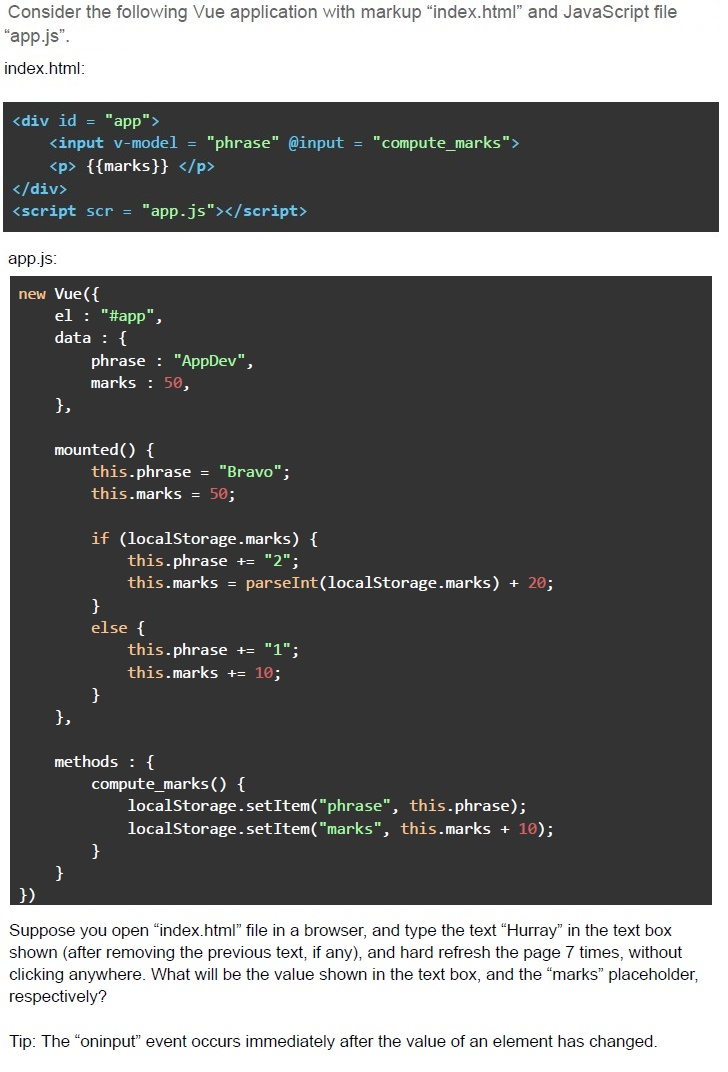
Suppose you open "index.html" file in a browser, and type the text "Hurray" in the text box shown (after removing the previous text, if any), and hard refresh the page 7 times, without clicking anywhere. What will be the value shown in the text box, and the "marks" placeholder, respectively?

Tip: The "oninput" event occurs immediately after the value of an element has changed.- Bravo1, 70
- Bravo2, 90
- Bravo1, 60
- Bravo2, 70
- Bravo1, 80
Text of the picture (copyable)
Consider the following Vue application with markup index.html and JavaScript file app.js.
File: index.html

```html
<div id = "app">
    <div>Welcome to Frontend Development</div>
    <new>Vue is a Frontend Framework</new>
</div>
<script src="script.js"></script>
```

File: script.js

```javascript
Vue.component('new', {
    template : `<div>
        <slot>Vue is JS Framework</slot>
        <div>Learn Vue 2 and Vue 3</div>
    </div>`
});

new Vue({
    el : "#app",
})
```

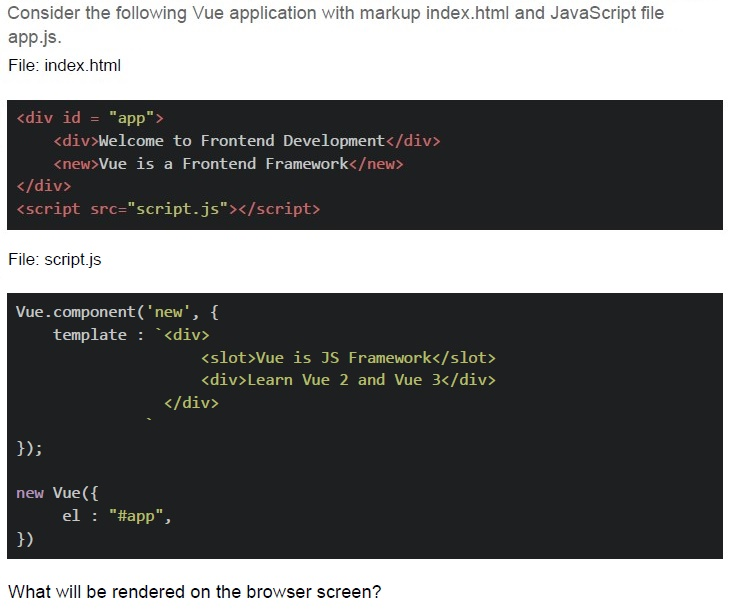
What will be rendered on the browser screen?
text
Welcome to Frontend Development
Vue is a JS Framework
Vue is a Frontend Framework
Learn Vue 2 and Vue 3

text
Welcome to Frontend Development
Vue is a Frontend Framework
Vue is a JS Framework
Learn Vue 2 and Vue 3

text
Welcome to Frontend Development
Vue is a Frontend Framework
Learn Vue 2 and Vue 3

text
Welcome to Frontend Development
Vue is a JS Framework
Learn Vue 2 and Vue 3
Text of the picture (copyable)
Consider the following Vue application with markup "index.html" and JavaScript file "app.js".

index.html:

```html
<div id = "app">
  <input v-model = "subject" @input = "compute_marks">
  <p> {{marks}} </p>
</div>
<script scr = "app.js"></script>
```

app.js:

```javascript
new Vue({
  el : "#app",
  data : {
    subject : "AppDev",
    marks : 50,
  },

  mounted () {
    this.subject = "AppDev";
    this.marks = 50;
    if (localStorage.marks) {
      this.subject += "1";
      this.marks = parseInt(localStorage.marks) + 20;
      localStorage.marks = this.marks;
      localStorage.subject = this.subject;
    }
    else {
      this.subject += "2";
      this.marks += 20;
    }
  },

  methods : {
    compute_marks() {
      localStorage.setItem("subject", this.subject);
      localStorage.setItem("marks", this.marks + 10);
    }
  }
})
```

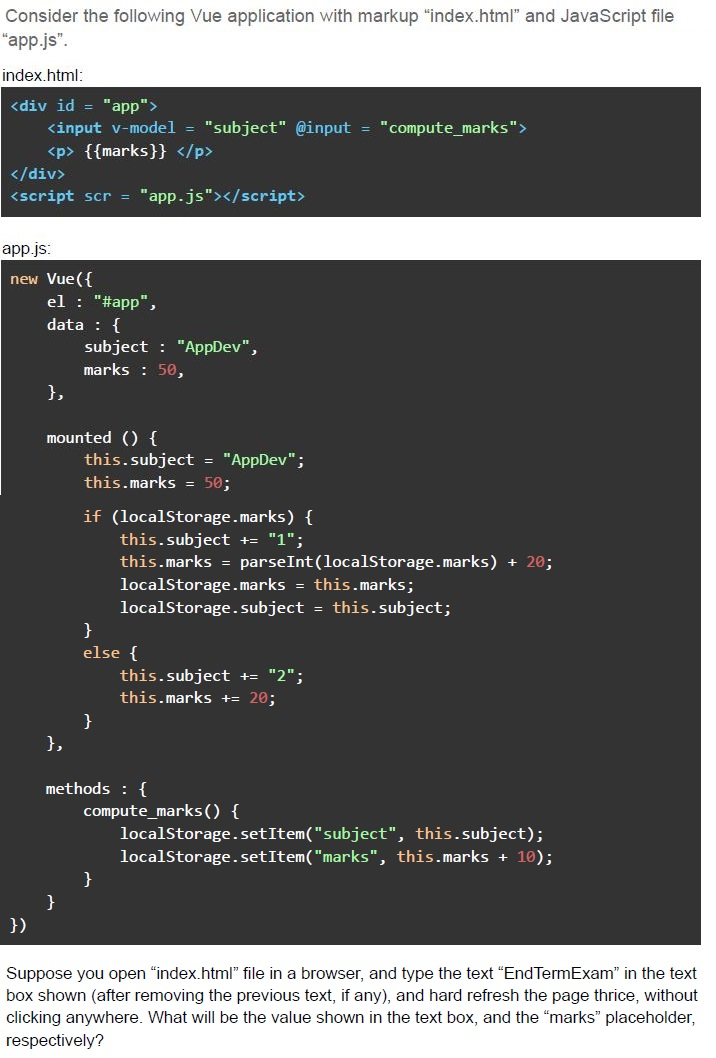
Suppose you open "index.html" file in a browser, and type the text "EndTermExam" in the text box shown (after removing the previous text, if any), and hard refresh the page thrice, without clicking anywhere. What will be the value shown in the text box, and the "marks" placeholder, respectively?- AppDev1, 120
- AppDev2, 120
- AppDev1, 140
- AppDev2, 140
Consider the following JavaScript code snippet.
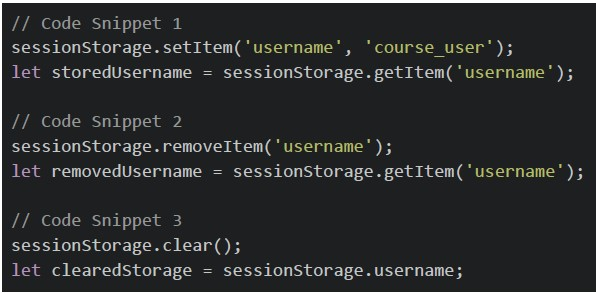 Consider the following JavaScript code snippet. What will be the values of 'storedUsername', 'removedUsername', and 'clearedStorage' after the execution of the above code snippets?
Consider the following JavaScript code snippet. What will be the values of 'storedUsername', 'removedUsername', and 'clearedStorage' after the execution of the above code snippets?Text of the picture (copyable)
```javascript
// Code Snippet 1
sessionStorage.setItem('username', 'course_user');
let storedUsername = sessionStorage.getItem('username');

// Code Snippet 2
sessionStorage.removeItem('username');
let removedUsername = sessionStorage.getItem('username');

// Code Snippet 3
sessionStorage.clear();
let clearedStorage = sessionStorage.username;
```
text
```
storedUsername: 'course_user', removedUsername: null, clearedStorage: null
```

text
```
storedUsername: 'course_user', removedUsername: null, clearedStorage:
undefined
```

text
```
storedUsername: 'course_user', removedUsername: undefined, clearedStorage:
null
```

text
```
storedUsername: 'course_user', removedUsername: undefined, clearedStorage:
undefined
```
Consider the following Vue application with markup “index.html” and JavaScript file “app.js”.
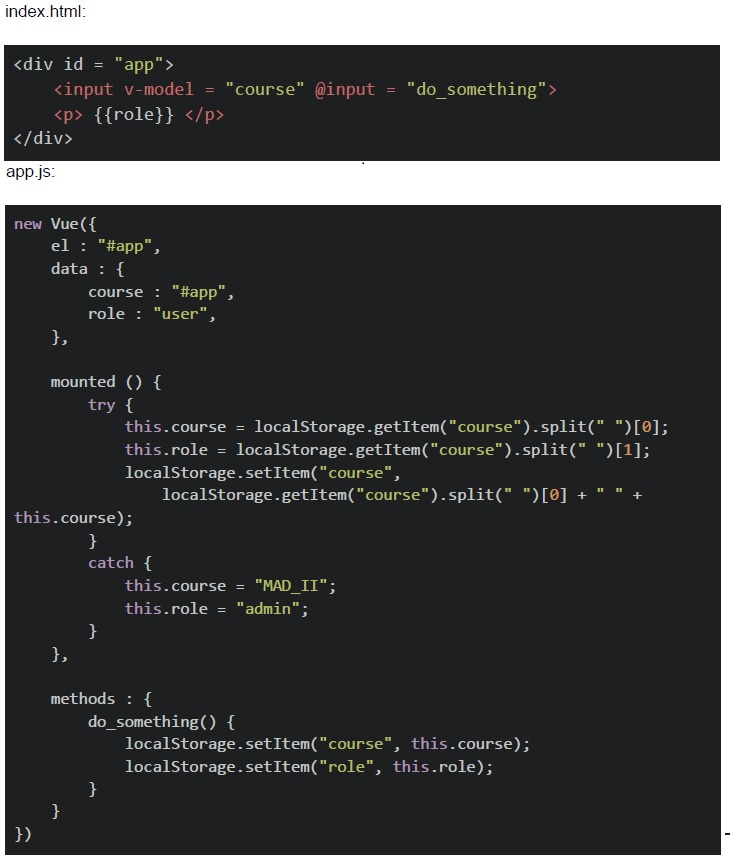 Consider the following Vue application with markup “index.html” and JavaScript file “app.js”. Suppose you open “index.html” file in a browser, and type the text “App Dev” in the text box shown (after removing the previous text, if any), and hard refresh the page twice, without clicking anywhere. What will be the value shown in the text box, and the “age” placeholder, respectively?
Consider the following Vue application with markup “index.html” and JavaScript file “app.js”. Suppose you open “index.html” file in a browser, and type the text “App Dev” in the text box shown (after removing the previous text, if any), and hard refresh the page twice, without clicking anywhere. What will be the value shown in the text box, and the “age” placeholder, respectively?Text of the picture (copyable)
index.html:
```html
<div id = "app">
    <input v-model = "course" @input = "do_something">
    <p> {{role}} </p>
</div>
```
app.js:
```javascript
new Vue({
    el : "#app",
    data : {
        course : "#app",
        role : "user",
    },

    mounted () {
        try {
            this.course = localStorage.getItem("course").split(" ")[0];
            this.role = localStorage.getItem("course").split(" ")[1];
            localStorage.setItem("course",
                localStorage.getItem("course").split(" ")[0] + " " +
                this.course);
        }
        catch {
            this.course = "MAD_II";
            this.role = "admin";
        }
    },

    methods : {
        do_something() {
            localStorage.setItem("course", this.course);
            localStorage.setItem("role", this.role);
        }
    }
})
```- MAD_II, admin
- App, Dev
- App, App
- Dev, App
Which of the following statement(s) is/are correct regarding web storage APIs?
- Web Storage APIs provide a way to store key-value pairs persistently on theclient side.
- Web Storage APIs include “localStorage” and “sessionStorage”.
- Data stored in “localStorage” is automatically cleared when the browsersession ends.
- The “sessionStorage” allows data to persist across browser sessions.
Consider the below application with markup “index.html” and JavaScript file “app.js”.
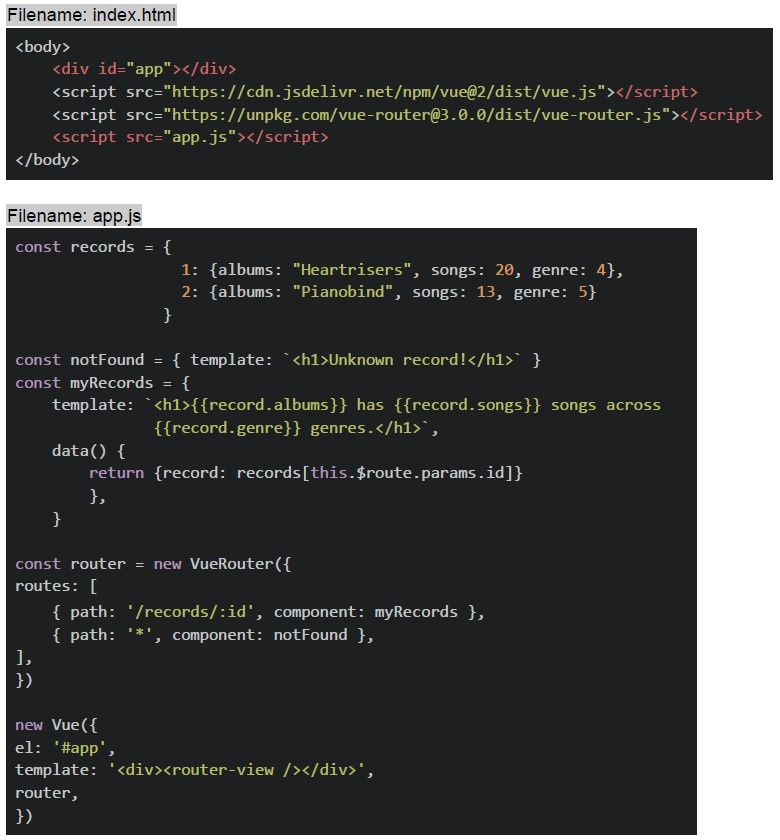 Consider the below application with markup “index.html” and JavaScript file “app.js”. Suppose the application is running on “http://127.0.0.1:8080”, select the correct option(s)?
Consider the below application with markup “index.html” and JavaScript file “app.js”. Suppose the application is running on “http://127.0.0.1:8080”, select the correct option(s)?Text of the picture (copyable)
Filename: index.html
```html
<body>
    <div id="app"></div>
    <script src="https://cdn.jsdelivr.net/npm/vue@2/dist/vue.js"></script>
    <script src="https://unpkg.com/vue-router@3.0.0/dist/vue-router.js"></script>
    <script src="app.js"></script>
</body>
```

Filename: app.js
```javascript
const records = {
    1: {albums: "Heartrisers", songs: 20, genre: 4},
    2: {albums: "Pianobind", songs: 13, genre: 5}
}

const notFound = { template: `<h1>Unknown record!</h1>` }
const myRecords = {
    template: `<h1>{{record.albums}} has {{record.songs}} songs across
    {{record.genre}} genres.</h1>`,

    data() {
        return {record: records[this.$route.params.id]}
    },
}

const router = new VueRouter({
    routes: [
        { path: '/records/:id', component: myRecords },
        { path: '*', component: notFound },
    ],
})

new Vue({
    el: '#app',
    template: '<div><router-view /></router-view></div>',
    router,
})
```
text
For the endpoint, http://127.0.0.1:8080/records/1, The browser will render:
**Heartrisers has 20 songs across 4 genres.**

text
For the endpoint, http://127.0.0.1:8080/#/records/2, The browser will render:
**Pianobind has 13 songs across 5 genres.**

text
For the endpoint, http://127.0.0.1:8080/#/records, The browser will render:
**Unknown record!**

text
For the endpoint, http://127.0.0.1:8080/#/records/3, The browser will render:
**Unknown record!**
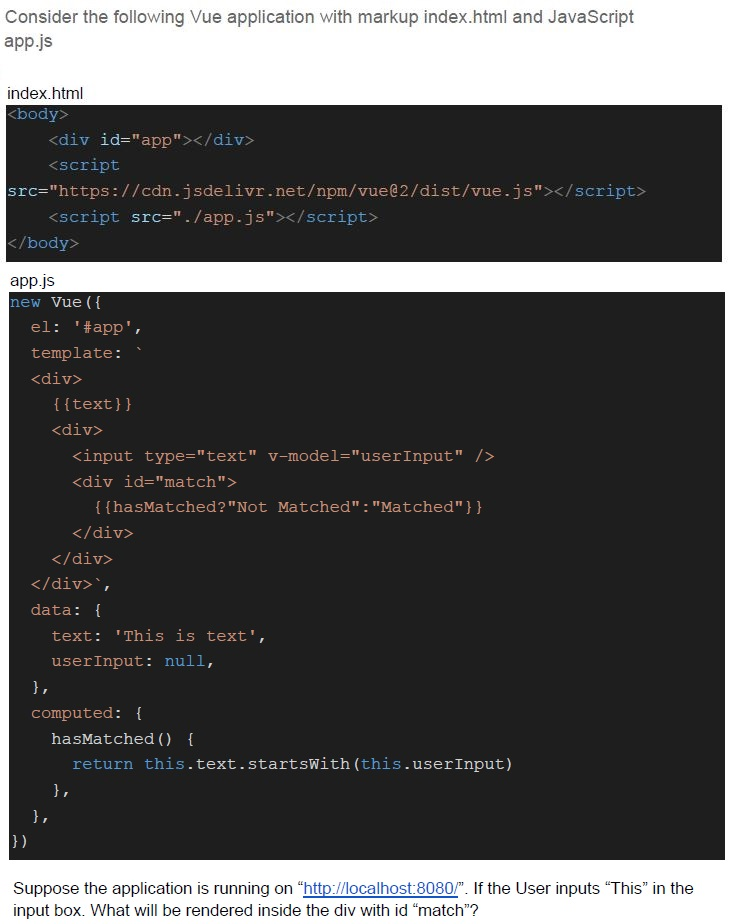
Text of the picture (copyable)
Consider the following Vue application with markup index.html and JavaScript
app.js

index.html
```html
<body>
    <div id="app"></div>
    <script
        src="https://cdn.jsdelivr.net/npm/vue@2/dist/vue.js"></script>
    <script src="./app.js"></script>
</body>
```

app.js
```javascript
new Vue({
    el: '#app',
    template: `
    <div>
        {{text}}
        <div>
            <input type="text" v-model="userInput" />
            <div id="match">
                {{hasMatched?"Not Matched":"Matched"}}
            </div>
        </div>
    </div>`,
    data: {
        text: 'This is text',
        userInput: null,
    },
    computed: {
        hasMatched() {
            return this.text.startsWith(this.userInput)
        },
    },
})
```

Suppose the application is running on "http://localhost:8080/". If the User inputs "This" in the input box. What will be rendered inside the div with id "match"?
text
Not Matched

text
Matched

text
undefined

text
null
Consider the below Vue application with markup file “index.html”, and JavaScript file “app.js”.
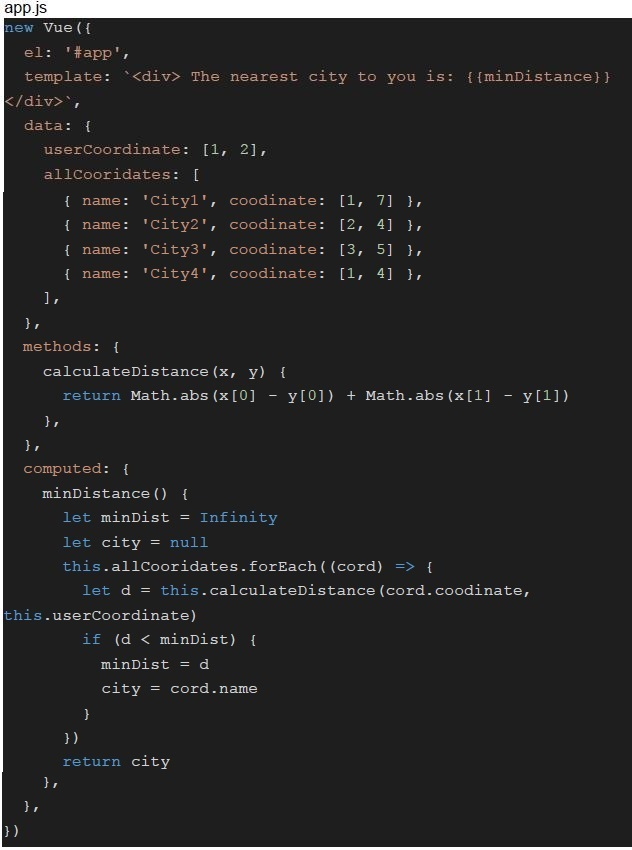 Consider the below Vue application with markup file “index.html”, and JavaScript file “app.js”.
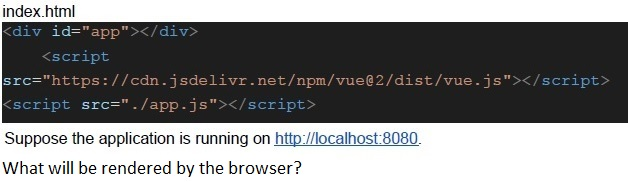 Consider the below Vue application with markup file “index.html”, and JavaScript file “app.js”.
Consider the below Vue application with markup file “index.html”, and JavaScript file “app.js”.
Consider the below Vue application with markup file “index.html”, and JavaScript file “app.js”. Text of the picture (copyable)
```javascript
app.js
new Vue({
  el: '#app',
  template: `<div> The nearest city to you is: {{minDistance}}
</div>`,
  data: {
    userCoordinate: [1, 2],
    allCooridates: [
      { name: 'City1', coodinate: [1, 7] },
      { name: 'City2', coodinate: [2, 4] },
      { name: 'City3', coodinate: [3, 5] },
      { name: 'City4', coodinate: [1, 4] },
    ],
  },
  methods: {
    calculateDistance(x, y) {
      return Math.abs(x[0] - y[0]) + Math.abs(x[1] - y[1])
    },
  },
  computed: {
    minDistance() {
      let minDist = Infinity
      let city = null
      this.allCooridates.forEach((cord) => {
        let d = this.calculateDistance(cord.coodinate,
          this.userCoordinate)
        if (d < minDist) {
          minDist = d
          city = cord.name
        }
      })
      return city
    },
  },
})
```
index.html
```html
<div id="app"></div>
<script
  src="https://cdn.jsdelivr.net/npm/vue@2/dist/vue.js"></script>
<script src="./app.js"></script>
```
Suppose the application is running on http://localhost:8080.
What will be rendered by the browser?- The nearest city to you is: City1
- The nearest city to you is: City2
- The nearest city to you is: City3
- The nearest city to you is: City4
Which of the following statement(s) is/are false regarding javascript language?
- Hoisting moves the declaration of arrow functions to the top of their scopes.
- All 3 keywords, i.e., “var”, “let” and “const” can be used to declare globalvariables.
- The functions are treated as first class citizens in the language.
- Node.js is an example of a javascript engine.
Consider the below application with markup “index.html” and javascript file “app.js”.
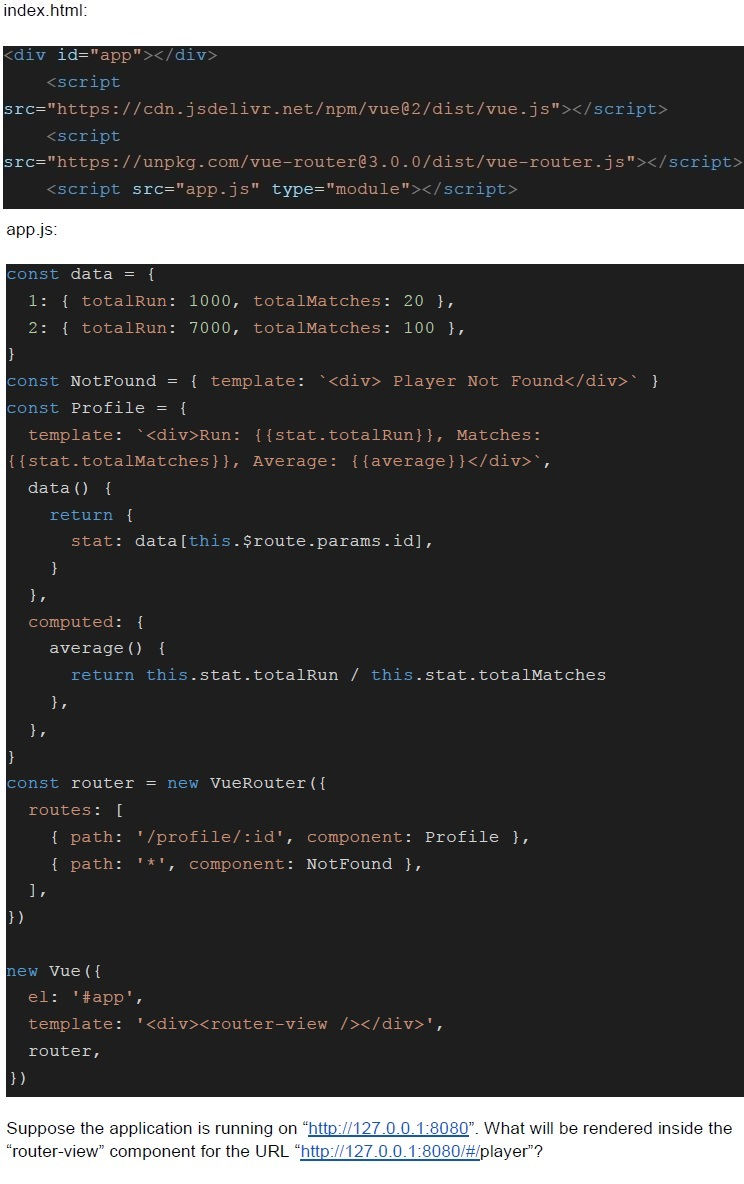 Consider the below application with markup “index.html” and javascript file “app.js”.
Consider the below application with markup “index.html” and javascript file “app.js”. Text of the picture (copyable)
index.html:
```html
<div id="app"></div>
<script
  src="https://cdn.jsdelivr.net/npm/vue@2/dist/vue.js"></script>
<script
  src="https://unpkg.com/vue-router@3.0.0/dist/vue-router.js"></script>
<script src="app.js" type="module"></script>
```

app.js:
```javascript
const data = {
  1: { totalRun: 1000, totalMatches: 20 },
  2: { totalRun: 7000, totalMatches: 100 },
}
const NotFound = { template: '<div> Player Not Found</div>' }
const Profile = {
  template: `<div>Run: {{ {stat.totalRun}}, Matches:
{{stat.totalMatches}}, Average: {{average}}</div>`,
  data() {
    return {
      stat: data[this.$route.params.id],
    }
  },
  computed: {
    average() {
      return this.stat.totalRun / this.stat.totalMatches
    },
  },
}
const router = new VueRouter({
  routes: [
    { path: '/profile/:id', component: Profile },
    { path: '*', component: NotFound },
  ],
})
new Vue({
  el: '#app',
  template: '<div><router-view /></div>',
  router,
})
```

Suppose the application is running on "http://127.0.0.1:8080". What will be rendered inside the "router-view" component for the URL "http://127.0.0.1:8080/#/player"?- Player Not Found
- Run: 1000, Matches: 20, Average: 50
- Run: 7000, Matches: 100, Average: 70
- None of these
Which of the following statements is false about VueJS framework?
- VueJS is a framework built on top of HTML, CSS and javascript.
- VueJS is built on a component based architecture.
- It cannot be installed/used via npm (node package manager).
- All of these