Home / Past papers / MAD2 End Term / this paper
Modern Application Development Ii 06 May 26 - 10 May 2026
Elapsed 00:00
Which of the following statements is true regarding the "this" keyword in JavaScript?
- "this" in an arrow function refers to the global object.
- "this" inside a regular function refers to the object that owns the function.
- Arrow functions do not have their own "this" and inherit it from the surrounding scope.
- "this" always points to the window object in browser environments.
Consider the below JavaScript program.
 What will be the output of the above program?
What will be the output of the above program?Text of the picture (copyable)
```javascript
let arr = [1, 2, 3];
let sum = arr.reduce((acc, val, idx, array) => acc + val, 0);
console.log(sum);
```
- 0
- 3
- 6
- 9
- 12
What is the main advantage of using JWT over session-based authentication?
- JWTs require server-side storage for each session.
- JWTs are stateless and eliminate the need for server-side session storage.
- JWTs are longer and contain more data than session IDs.
- JWTs automatically handle token expiration without additional logic.
Which of the following HTTP methods does WebSocket use for initial handshake?
- GET
- POST
- PUT
- DELETE
You are building a cricket analytics app. The file battingStats.js contains the following exports:
 In another file app.js, which of the following import statements will correctly import both strikeRate and playerName ? ( Assume both files are in the same directory )
In another file app.js, which of the following import statements will correctly import both strikeRate and playerName ? ( Assume both files are in the same directory )Text of the picture (copyable)
```javascript
export const strikeRate = (runs, balls) => {
  return (runs / balls) * 100;
};

export const playerName = "Virat Kohli";
```
text
```javascript
import strikeRate, playerName from "./battingStats.js";
```

text
```javascript
import { strikeRate, playerName } from "./battingStats.js";
```
text
```javascript
import * as stats from "./battingStats.js";
```

text
```javascript
require("./battingStats.js");
```
A JWT (JSON Web Token) is represented in the format:  .In authentication using Flask-JWT-Extended, what does the payload part of the JWT stores?
.In authentication using Flask-JWT-Extended, what does the payload part of the JWT stores?Text of the picture (copyable)
```
"header.payload.signature"
```
- Encryption keys used to secure the token
- User-related data (claims) such as identity and expiration time
- The algorithm used for signing the token
- The hashed signature of the token
Consider the below JavaScript program.
 What will be the output of the above program?
What will be the output of the above program?Text of the picture (copyable)
```javascript
const promise = new Promise((resolve, reject) => {
  resolve('Success!');
  reject('Error!');
});

promise.then(console.log).catch(console.log);
```- Success!
- Error!
- Success! Error!
- Error! Success!
Consider the below Vuex store configuration:
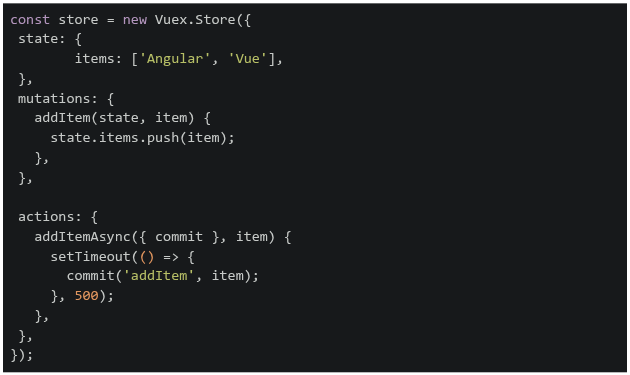 If the addItemAsync action is dispatched with the item 'React', what will be the state of items after 2 seconds?
If the addItemAsync action is dispatched with the item 'React', what will be the state of items after 2 seconds?Text of the picture (copyable)
```javascript
const store = new Vuex.Store({
  state: {
    items: ['Angular', 'Vue'],
  },
  mutations: {
    addItem(state, item) {
      state.items.push(item);
    },
  },

  actions: {
    addItemAsync({ commit }, item) {
      setTimeout(() => {
        commit('addItem', item);
      }, 500);
    },
  },
});
```- ['Angular', 'Vue']
- ['Angular', 'Vue', 'React']
- ['React']
- ['Angular']
Consider the below Vue app.
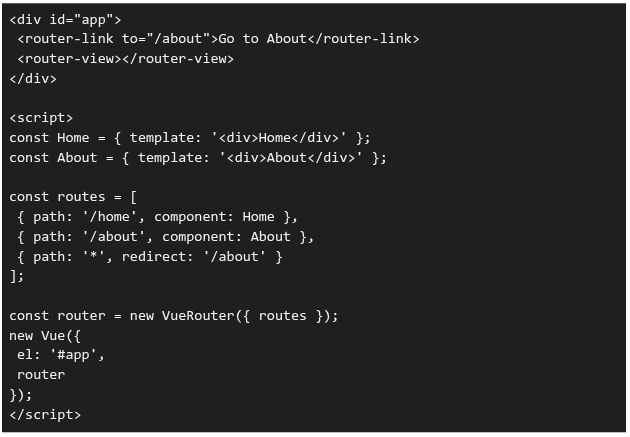 What happens when the user navigates to an undefined route like "/random"?
What happens when the user navigates to an undefined route like "/random"?Text of the picture (copyable)
```html
<div id="app">
  <router-link to="/about">Go to About</router-link>
  <router-view></router-view>
</div>

<script>
  const Home = { template: '<div>Home</div>' };
  const About = { template: '<div>About</div>' };

  const routes = [
    { path: '/home', component: Home },
    { path: '/about', component: About },
    { path: '*', redirect: '/about' }
  ];

  const router = new VueRouter({ routes });

  new Vue({
    el: '#app',
    router
  });
</script>
```- Browser navigates to /random and shows a blank page.
- Browser navigates to /random but renders nothing.
- Browser redirects to /about and displays "About".
- Error: No matching route.
What will be the output of the following JavaScript code?

Text of the picture (copyable)
```javascript
console.log(typeof NaN);
console.log(typeof null);
console.log(NaN == null);
console.log(NaN === null);
```
- number, object, false, false
- NaN, null, true, true
- number, object, true, false
- NaN, null, false, false
Consider the following JavaScript program:
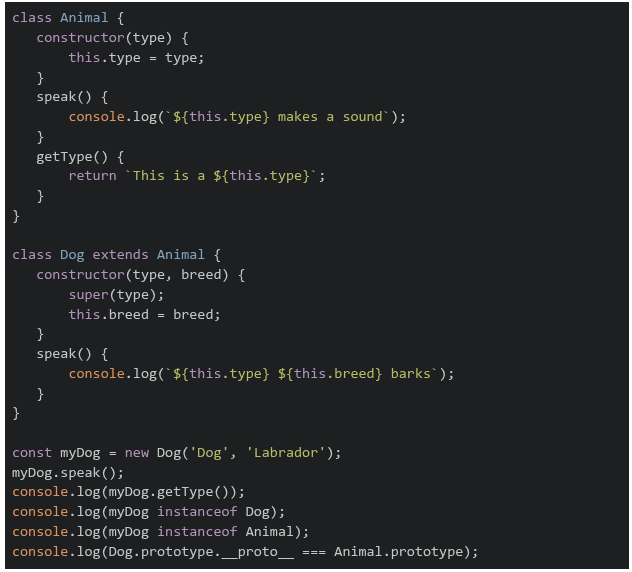 What will be the output of the above program on a browser's console?
What will be the output of the above program on a browser's console?Text of the picture (copyable)
```javascript
class Animal {
  constructor(type) {
    this.type = type;
  }
  speak() {
    console.log(`${this.type} makes a sound`);
  }
  getType() {
    return `This is a ${this.type}`;
  }
}

class Dog extends Animal {
  constructor(type, breed) {
    super(type);
    this.breed = breed;
  }
  speak() {
    console.log(`${this.type} ${this.breed} barks`);
  }
}

const myDog = new Dog('Dog', 'Labrador');
myDog.speak();
console.log(myDog.getType());
console.log(myDog instanceof Dog);
console.log(myDog instanceof Animal);
console.log(Dog.prototype.__proto__ === Animal.prototype);
```
text
```
Dog Labrador barks
This is a Dog
true
true
true
```

text
```
Dog makes a sound
This is a Dog Labrador
true
false
true
```

text
```
Dog Labrador barks
This is a Dog Labrador
true
true
false
```
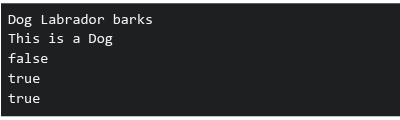
text
```
Dog Labrador barks
This is a Dog
false
true
true
```
Consider the following JavaScript program:
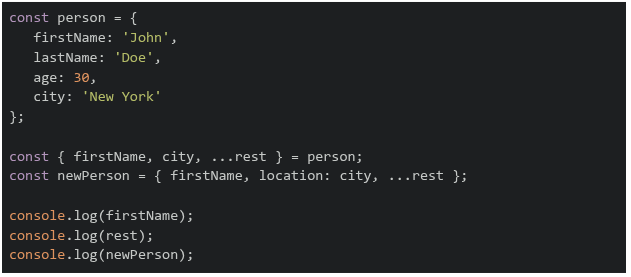 What will be the output of the above program?
What will be the output of the above program?Text of the picture (copyable)
```javascript
const person = {
  firstName: 'John',
  lastName: 'Doe',
  age: 30,
  city: 'New York'
};

const { firstName, city, ...rest } = person;
const newPerson = { firstName, location: city, ...rest };

console.log(firstName);
console.log(rest);
console.log(newPerson);
```
text
```
John
{ city: 'New York', lastName: 'Doe', age: 30 }
{ firstName: 'John', location: 'New York', city: 'New York', lastName:
'Doe', age: 30 }
```
text
```
John
{ 'lastName': 'Doe', 'age': 30 }
{ 'firstName': 'John', 'location': 'New York', 'lastName': 'Doe', 'age': 30 }
```
text
```
John
{ 'lastName': 'Doe', 'age': 30 }
{ 'firstName': 'John', 'location': 'New York', 'city': 'New York', 'lastName':
'Doe', 'age': 30 }
```
text
```
undefined
{ firstName: 'John', city: 'New York', lastName: 'Doe', age: 30 }
{ firstName: 'John', location: 'New York' }
```
What happens when this Flask caching code runs?
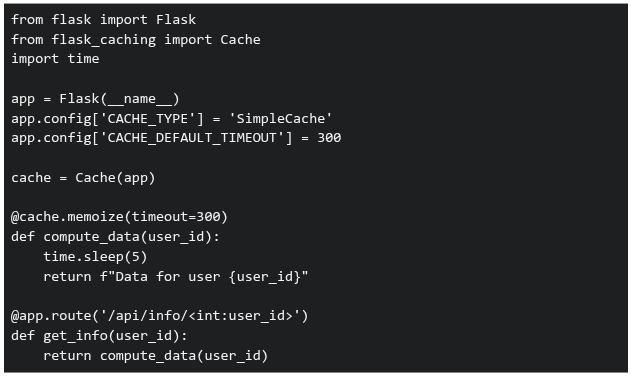 If requests for user IDs 1, 2, 1 are made within 5 minutes, what's the total response time?
If requests for user IDs 1, 2, 1 are made within 5 minutes, what's the total response time?Text of the picture (copyable)
```python
from flask import Flask
from flask_caching import Cache
import time

app = Flask(__name__)
app.config['CACHE_TYPE'] = 'SimpleCache'
app.config['CACHE_DEFAULT_TIMEOUT'] = 300

cache = Cache(app)

@cache.memoize(timeout=300)
def compute_data(user_id):
    time.sleep(5)
    return f"Data for user {user_id}"

@app.route('/api/info/<int:user_id>')
def get_info(user_id):
    return compute_data(user_id)
```- 15 seconds
- 10 seconds
- 5 seconds
- 0 seconds
Consider the following JavaScript program:
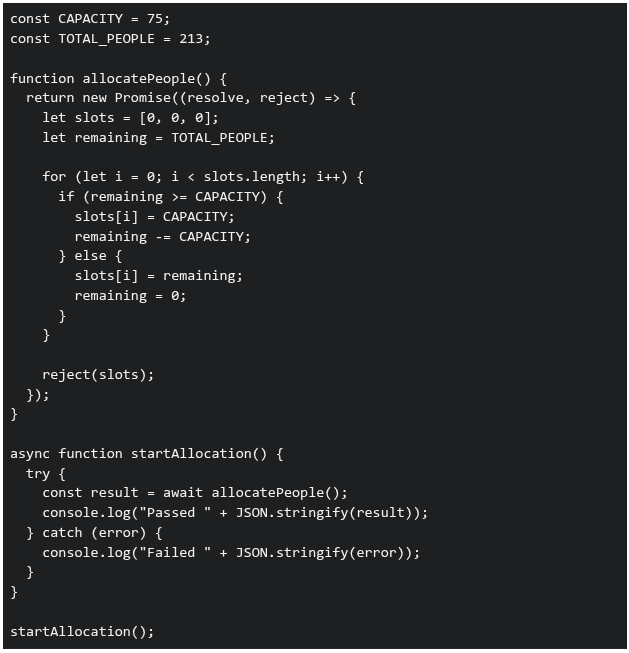 What will be printed in the console when the above code is executed?
What will be printed in the console when the above code is executed?Text of the picture (copyable)
```javascript
const CAPACITY = 75;
const TOTAL_PEOPLE = 213;

function allocatePeople() {
  return new Promise((resolve, reject) => {
    let slots = [0, 0, 0];
    let remaining = TOTAL_PEOPLE;

    for (let i = 0; i < slots.length; i++) {
      if (remaining >= CAPACITY) {
        slots[i] = CAPACITY;
        remaining -= CAPACITY;
      } else {
        slots[i] = remaining;
        remaining = 0;
      }
    }

    reject(slots);
  });
}

async function startAllocation() {
  try {
    const result = await allocatePeople();
    console.log("Passed " + JSON.stringify(result));
  } catch (error) {
    console.log("Failed " + JSON.stringify(error));
  }
}

startAllocation();
```- Passed [75,75,63]
- Failed [0,0,0]
- Failed [75,75,63]
- Passed [0,0,0]
Match the Vue directive in Directive with its correct functionality in Description using Vue.js.
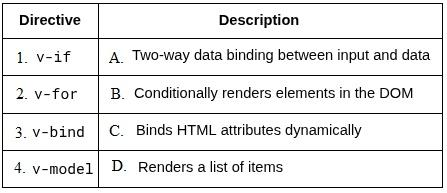
Text of the picture (copyable)
| Directive | Description |
|---|---|
| 1. v-if | A. Two-way data binding between input and data |
| 2. v-for | B. Conditionally renders elements in the DOM |
| 3. v-bind | C. Binds HTML attributes dynamically |
| 4. v-model | D. Renders a list of items |
- 1–A, 2–D, 3–C, 4–B
- 1–D, 2–B, 3–C, 4–A
- 1–B, 2–C, 3–D, 4–A
- 1–B, 2–D, 3–C, 4–A
In a Single Page Application (SPA), what are the benefits of client-side routing over server-side routing?
- Slower navigation between pages
- Reduced load on the backend server
- Better SEO performance by default
- Seamless page transitions without full reloads
Which of the following is the correct statement?
- Cookie size can impact the website performance.
- Cookie size does not affect performance in any practical/meaningful sense.
- A request to static.example.com will include cookies set for example.com.
- A request to static.example.com will not include cookies set for example.com.
Consider the following Vue application with markup index.html and JavaScript file app.js.
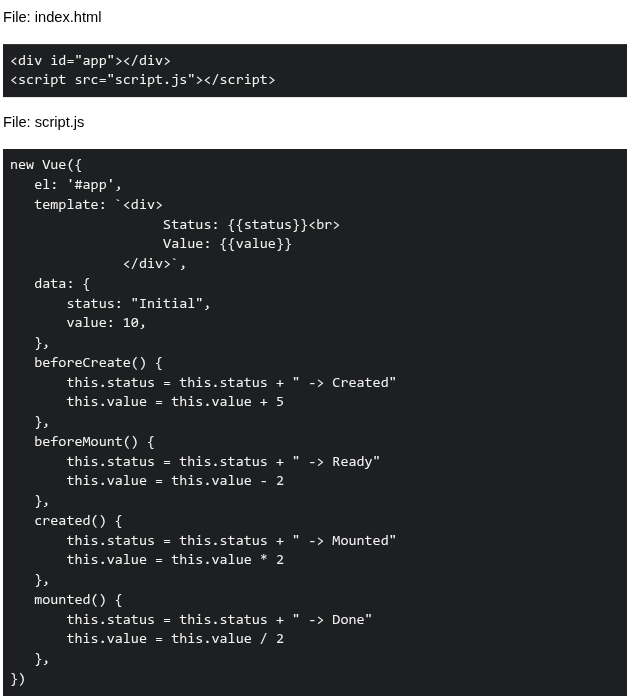 Suppose the application is running on http://127.0.0.1:8080. What will be rendered by the browser?
Suppose the application is running on http://127.0.0.1:8080. What will be rendered by the browser?Text of the picture (copyable)
File: index.html

```html
<div id="app"></div>
<script src="script.js"></script>
```

File: script.js

```javascript
new Vue({
  el: '#app',
  template: `<div>
    Status: {{status}}<br>
    Value: {{value}}
  </div>`,
  data: {
    status: "Initial",
    value: 10,
  },
  beforeCreate() {
    this.status = this.status + " -> Created"
    this.value = this.value + 5
  },
  beforeMount() {
    this.status = this.status + " -> Ready"
    this.value = this.value - 2
  },
  created() {
    this.status = this.status + " -> Mounted"
    this.value = this.value * 2
  },
  mounted() {
    this.status = this.status + " -> Done"
    this.value = this.value / 2
  },
})
```- Status: Initial -> Created -> Ready -> Mounted -> Done Value: 13
- Status: Initial -> Ready -> Mounted -> Done Value: 8
- Status: Initial -> Created -> Mounted -> Ready -> Done Value: 14
- Status: Initial -> Mounted -> Ready -> Done Value: 9
Consider the following endpoints created with a working setup of flask-security and flask-sqlalchemy.
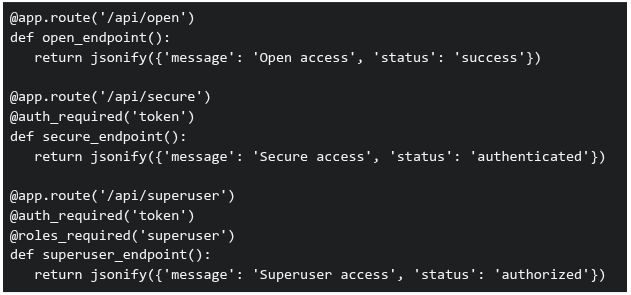 Three requests are made to this application: GET /api/open (no authentication headers)1. GET /api/secure (no authentication headers)2. GET /api/superuser with valid authentication token but user has role 'basic' (not 'superuser')3. What will be the response status codes for these requests, respectively?
Three requests are made to this application: GET /api/open (no authentication headers)1. GET /api/secure (no authentication headers)2. GET /api/superuser with valid authentication token but user has role 'basic' (not 'superuser')3. What will be the response status codes for these requests, respectively?Text of the picture (copyable)
```python
@app.route('/api/open')
def open_endpoint():
    return jsonify({'message': 'Open access', 'status': 'success'})

@app.route('/api/secure')
@auth_required('token')
def secure_endpoint():
    return jsonify({'message': 'Secure access', 'status': 'authenticated'})

@app.route('/api/superuser')
@auth_required('token')
@roles_required('superuser')
def superuser_endpoint():
    return jsonify({'message': 'Superuser access', 'status': 'authorized'})
```- 200, 200, 200
- 200, 401, 403
- 200, 403, 401
- 401, 403, 403
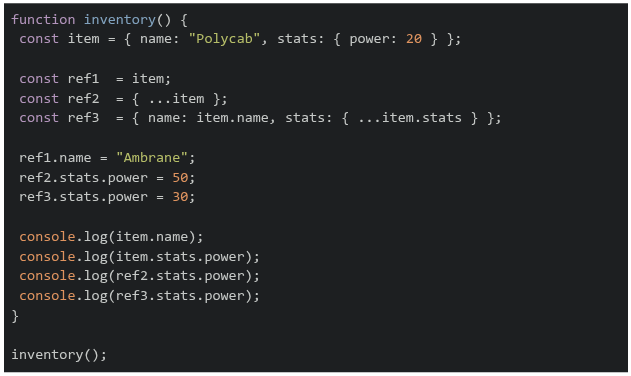
Consider the following code snippet running in a browser. What will be the output on the console?
Text of the picture (copyable)
```javascript
function inventory() {
  const item = { name: "Polycab", stats: { power: 20 } };

  const ref1 = item;
  const ref2 = { ...item };
  const ref3 = { name: item.name, stats: { ...item.stats } };

  ref1.name = "Ambrane";
  ref2.stats.power = 50;
  ref3.stats.power = 30;

  console.log(item.name);
  console.log(item.stats.power);
  console.log(ref2.stats.power);
  console.log(ref3.stats.power);
}

inventory();
```- Ambrane 20 50 30
- Polycab 50 50 30
- Ambrane 50 50 30
- Ambrane 50 30 30
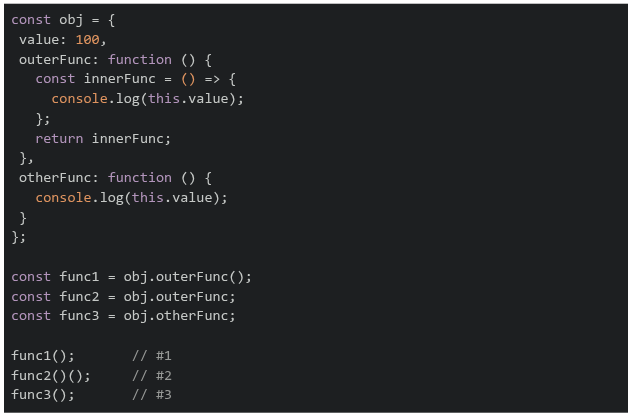
Consider the following code snippet running on a browser. What is the output on the console?
Text of the picture (copyable)
```javascript
const obj = {
  value: 100,
  outerFunc: function () {
    const innerFunc = () => {
      console.log(this.value);
    };
    return innerFunc;
  },
  otherFunc: function () {
    console.log(this.value);
  }
};

const func1 = obj.outerFunc();
const func2 = obj.outerFunc;
const func3 = obj.otherFunc;

func1();     // #1
func2()();   // #2
func3();     // #3
```- 100 100 100
- 100 undefined 100
- undefined undefined undefined
- 100 undefined undefined
Consider the flask application app.py and an HTML file index.html:
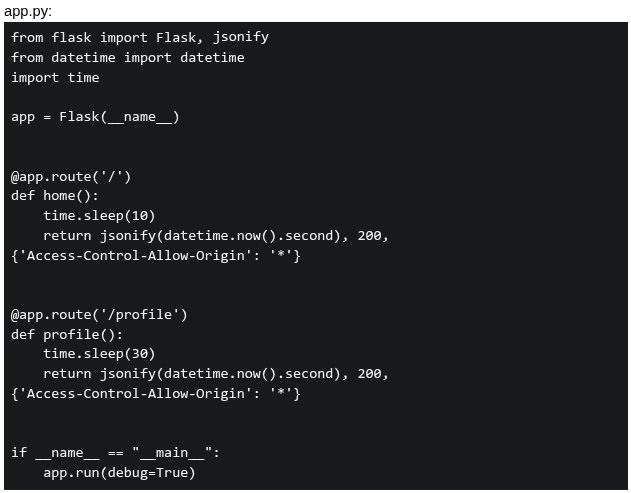 If a user visit index.html at 10:10:10 AM, what will be logged in the console?
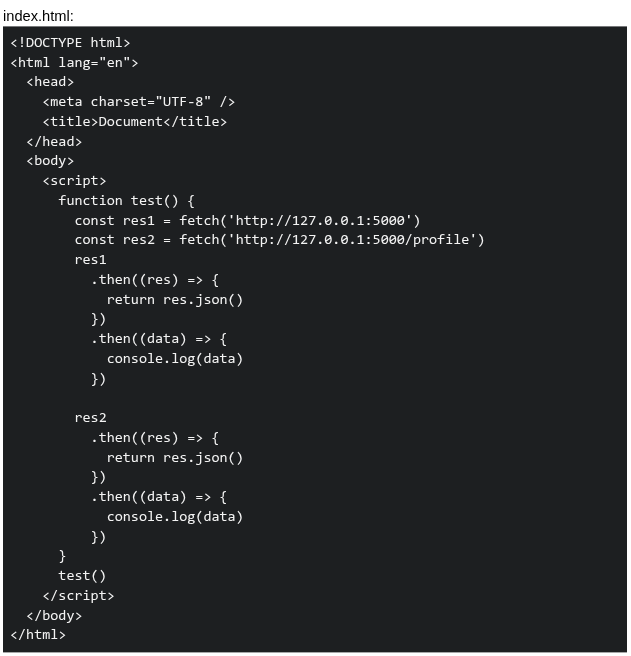
If a user visit index.html at 10:10:10 AM, what will be logged in the console?
Text of the picture (copyable)
app.py:
```python
from flask import Flask, jsonify
from datetime import datetime
import time

app = Flask(__name__)

@app.route('/')
def home():
    time.sleep(10)
    return jsonify(datetime.now().second), 200, \
        {'Access-Control-Allow-Origin': '*'}

@app.route('/profile')
def profile():
    time.sleep(30)
    return jsonify(datetime.now().second), 200, \
        {'Access-Control-Allow-Origin': '*'}

if __name__ == "__main__":
    app.run(debug=True)
```
index.html:
```html
<!DOCTYPE html>
<html lang="en">
<head>
    <meta charset="UTF-8" />
    <title>Document</title>
</head>
<body>
    <script>
        function test() {
            const res1 = fetch('http://127.0.0.1:5000')
            const res2 = fetch('http://127.0.0.1:5000/profile')
            res1
                .then((res) => {
                    return res.json()
                })
                .then((data) => {
                    console.log(data)
                })

            res2
                .then((res) => {
                    return res.json()
                })
                .then((data) => {
                    console.log(data)
                })
        }
        test()
    </script>
</body>
</html>
```- 20, 50
- 20, 40
- 40, 40
- 50, 50
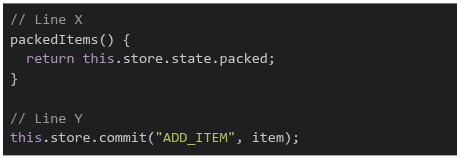
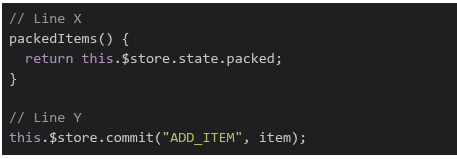
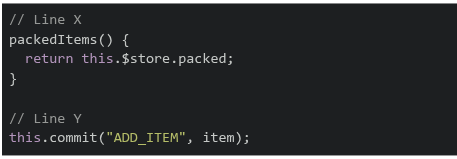
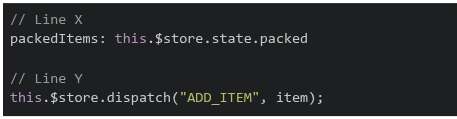
A student is going on a trip and wants to check whether all essential items are packed. The application uses Vue 2 and Vuex to manage the list of packed items.The following Vue application is incomplete. Two lines of code are missing and are marked as Line X and Line Y.
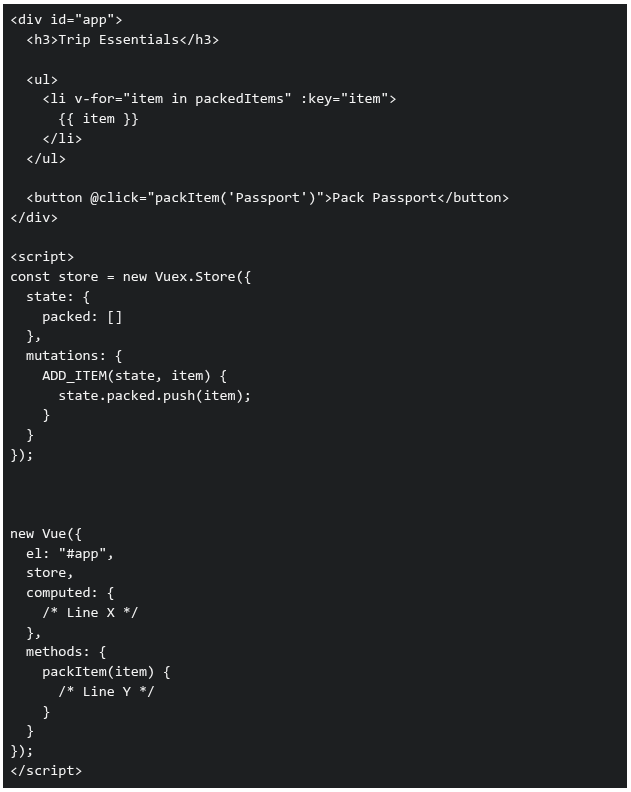 Which of the following options correctly fills Line X and Line Y so that the application works as expected?
Which of the following options correctly fills Line X and Line Y so that the application works as expected?Text of the picture (copyable)
```html
<div id="app">
  <h3>Trip Essentials</h3>

  <ul>
    <li v-for="item in packedItems" :key="item">
      {{ item }}
    </li>
  </ul>

  <button @click="packItem('Passport')">Pack Passport</button>
</div>

<script>
  const store = new Vuex.Store({
    state: {
      packed: []
    },
    mutations: {
      ADD_ITEM(state, item) {
        state.packed.push(item);
      }
    }
  });

  new Vue({
    el: "#app",
    store,
    computed: {
      /* Line X */
    },
    methods: {
      packItem(item) {
        /* Line Y */
      }
    }
  });
</script>
```
text
```javascript
// Line X
packedItems() {
  return this.store.state.packed;
}

// Line Y
this.store.commit("ADD_ITEM", item);
```
text
```javascript
// Line X
packedItems() {
  return this.$store.state.packed;
}

// Line Y
this.$store.commit("ADD_ITEM", item);
```
text
```javascript
// Line X
packedItems() {
  return this.$store.packed;
}

// Line Y
this.commit("ADD_ITEM", item);
```
text
```javascript
// Line X
packedItems: this.$store.state.packed

// Line Y
this.$store.dispatch("ADD_ITEM", item);
```
Which of the following statement(s) is/are true about GraphQL?
- Mutations in GraphQL can be used to change the underlying data store.
- GraphQL services are created by defining types and fields of those types, then providing functions for each field.
- GraphQL can only fetch data from a single source.
- GraphQL allows only GET operations.
Consider the following code:
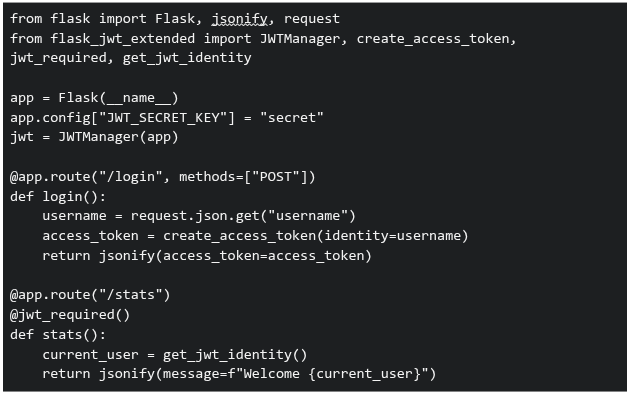 You are developing an analytics platform using Flask and Flask-JWT-Extended. A user sends a POST request to
  with:
with:  . Then tries to access
  . Which of the following statements are correct?
You are developing an analytics platform using Flask and Flask-JWT-Extended. A user sends a POST request to with: . Then tries to access . Which of the following statements are correct?Text of the picture (copyable)
```python
from flask import Flask, jsonify, request
from flask_jwt_extended import JWTManager, create_access_token, \
    jwt_required, get_jwt_identity

app = Flask(__name__)
app.config["JWT_SECRET_KEY"] = "secret"
jwt = JWTManager(app)

@app.route("/login", methods=["POST"])
def login():
    username = request.json.get("username")
    access_token = create_access_token(identity=username)
    return jsonify(access_token=access_token)

@app.route("/stats")
@jwt_required()
def stats():
    current_user = get_jwt_identity()
    return jsonify(message=f"Welcome {current_user}")
```
/login
```json
{ "username": "Jassi" }
```
/stats- The route will return "Welcome Jassi" only if a valid JWT token is sent in the Authorization header
text
/stats
- If no token is sent, accessing will result in an unauthorized error
text
/stats
- The JWT token must be sent as JSON in the request body to access
text
/stats
- None of these
Hamza is working on a project using Git and performs the following operations: Creates a new branch and switches to it1. Stages changes for commit2. Commits changes with a message3. Pushes the branch to a remote repository4. Which of the following commands are correctly used for these operations?

text
```
git checkout -b feature-branch
```

text
```
git add .
```

text
```
git commit -m "Initial commit"
```

text
```
git push origin feature-branch
```

text
```
git branch feature-branch && git checkout main
```

text
```
git push feature-branch origin
```
Prerna and Swathy are using a web application built with Vue.js for the BS Degree program. When the page loads, the sidebar content appears instantly• However, when they click on an Assignments link, the main content takes noticeable time to load • A simplified version of the component is shown below:
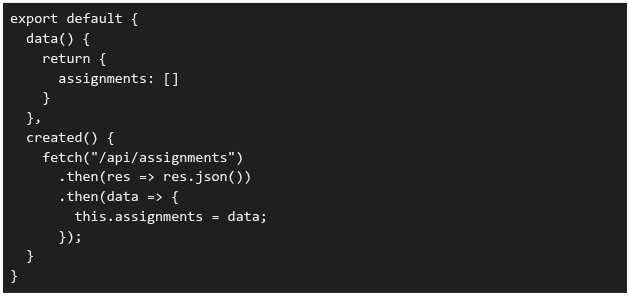 Which of the following statements correctly explain why the Assignments page takes time to load?
Which of the following statements correctly explain why the Assignments page takes time to load?Text of the picture (copyable)
```javascript
export default {
  data() {
    return {
      assignments: []
    }
  },
  created() {
    fetch("/api/assignments")
      .then(res => res.json())
      .then(data => {
        this.assignments = data;
      });
  }
}
```- The sidebar is likely part of a parent component and is already rendered before the API call
- The Assignments component waits for the API response before displaying data
- Vue blocks rendering of all components until API calls complete
- The delay is caused because data is fetched asynchronously after the component is created
Comprehension passage - the questions below it refer to this
Consider the following Vue.js application:
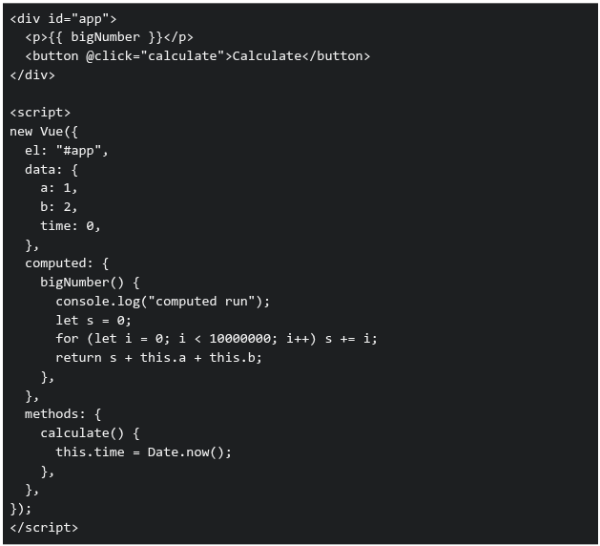 Based on the above data, answer the given subquestions.
How many times will "computed run" be logged in the console during the initial render?
- 0
- 1
- Multiple times due to the loop
- Depends on user interaction
If the 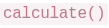 method is modified as follows:
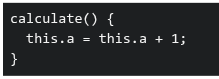 What will happen when the button is clicked?
method is modified as follows:
What will happen when the button is clicked?Text of the picture (copyable)
```
calculate()
```
```
calculate() {
this.a = this.a + 1;
}
``` will not run again
text
```
bigNumber()
```
- will run again because a dependency changed
text
```
bigNumber()
```
- Only time will update
- Vue will throw an error
Why is defined as a computed property instead of a method?
defined as a computed property instead of a method?Text of the picture (copyable)
```
bigNumber()
```
- Computed properties are always faster than methods
- Methods cannot access data properties
- Computed properties are cached based on their dependencies
- Computed properties run only once
Comprehension passage - the questions below it refer to this
Consider the following Vue 2 application:
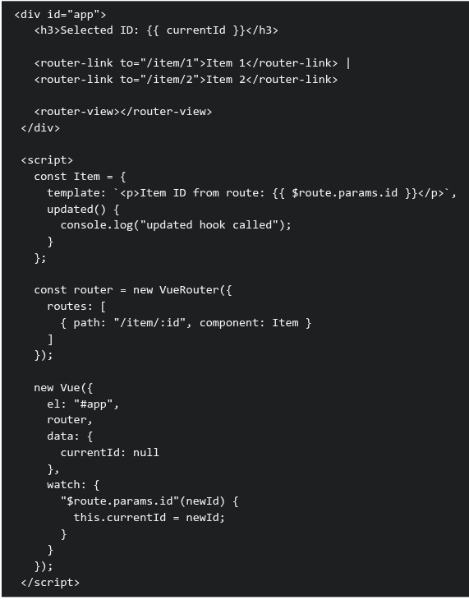 Assume the Vue application is loaded at the url
  . The user then clicks on the Item 2 router link. Based on the above data, answer the given subquestions.
What happens immediately after clicking "Item 2"?
- The Item component is destroyed and recreated, so
 is never called
text
```
updated()
```
- The route changes, the component is reused, and is called
text
```
updated()
```
- The route changes, but neither watcher nor lifecycle hooks run
- A new Vue instance is created for the route
Why is the lifecycle hook triggered in this scenario?
lifecycle hook triggered in this scenario?Text of the picture (copyable)
```
updated()
```
- Because Vue Router always recreates components on navigation
- Because lifecycle hooks run on every URL change regardless of reactivity
- Because router-view forces a full re-render of the component tree
- Because a watched route parameter updates parent reactive state, triggering a component update
Answer key
- Q1 (MCQ, 2 marks): C
- Q2 (MCQ, 2 marks): C
- Q3 (MCQ, 2 marks): B
- Q4 (MCQ, 2 marks): A
- Q5 (MCQ, 2 marks): B
- Q6 (MCQ, 2 marks): B
- Q7 (MCQ, 3 marks): A
- Q8 (MCQ, 3 marks): B
- Q9 (MCQ, 3 marks): C
- Q10 (MCQ, 3 marks): A
- Q11 (MCQ, 3 marks): A
- Q12 (MCQ, 3 marks): B
- Q13 (MCQ, 3 marks): B
- Q14 (MCQ, 3 marks): C
- Q15 (MCQ, 3 marks): D
- Q16 (MSQ, 2 marks): B, C
- Q17 (MSQ, 2 marks): B, C
- Q18 (MCQ, 4.5 marks): D
- Q19 (MCQ, 4.5 marks): B
- Q20 (MCQ, 4.5 marks): C
- Q21 (MCQ, 4.5 marks): D
- Q22 (MCQ, 4.5 marks): B
- Q23 (MCQ, 4.5 marks): B
- Q24 (MSQ, 3 marks): A, B
- Q25 (MSQ, 3 marks): A, B
- Q26 (MSQ, 3 marks): A, B, C, D
- Q27 (MSQ, 3 marks): A, B, D
- Q28 (MCQ, 3 marks): B
- Q29 (MCQ, 3 marks): B
- Q30 (MCQ, 3 marks): C
- Q31 (MCQ, 4.5 marks): B
- Q32 (MCQ, 4.5 marks): D