Home / Past papers / MAD2 Quiz 2 / this paper
Modern Application Development Ii 06 Apr 26 - 12 Apr 2026
Elapsed 00:00
You are building a login feature for a web application. The frontend sends the user’s email and password to the backend API. The backend validates credentials against a database. Which security issues exist in the code given below? Frontend: script.js
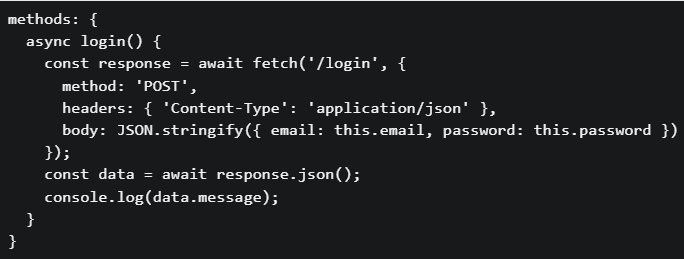 Backend: app.py
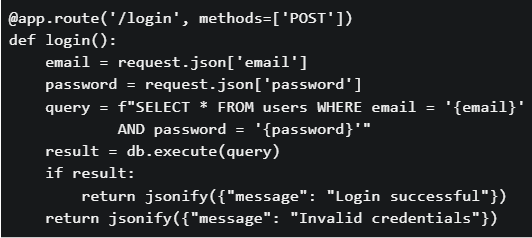
Backend: app.py
Text of the picture (copyable)
```javascript
methods: {
  async login() {
    const response = await fetch('/login', {
      method: 'POST',
      headers: { 'Content-Type': 'application/json' },
      body: JSON.stringify({ email: this.email, password: this.password })
    });
    const data = await response.json();
    console.log(data.message);
  }
}
```
```python
@app.route('/login', methods=['POST'])
def login():
    email = request.json['email']
    password = request.json['password']
    query = f"SELECT * FROM users WHERE email = '{email}'" \
            f" AND password = '{password}'"
    result = db.execute(query)
    if result:
        return jsonify({"message": "Login successful"})
    return jsonify({"message": "Invalid credentials"})
```- The SQL query is vulnerable to SQL injection attacks
- Passwords are stored and compared in plain text
- No authentication token (session/JWT) mechanism is implemented
- All of these.
Consider the following Vue.js code.
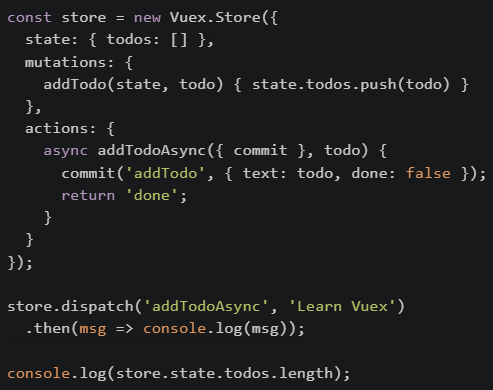 What will be printed on the console first?
What will be printed on the console first?Text of the picture (copyable)
```javascript
const store = new Vuex.Store({
  state: { todos: [] },
  mutations: {
    addTodo(state, todo) { state.todos.push(todo) }
  },
  actions: {
    async addTodoAsync({ commit }, todo) {
      commit('addTodo', { text: todo, done: false });
      return 'done';
    }
  }
});

store.dispatch('addTodoAsync', 'Learn Vuex')
  .then(msg => console.log(msg));

console.log(store.state.todos.length);
```- 0
- done
- 1
- Error
Consider the following Vue.js application with two different route scenarios and a component that uses reactive data binding: Scenario: An e-commerce application where: Product list component displays products filtered by category• Category changes through router parameters: /products/:category• When a user navigates from /products/electronics to /products/books, the product list should update • Component Code:
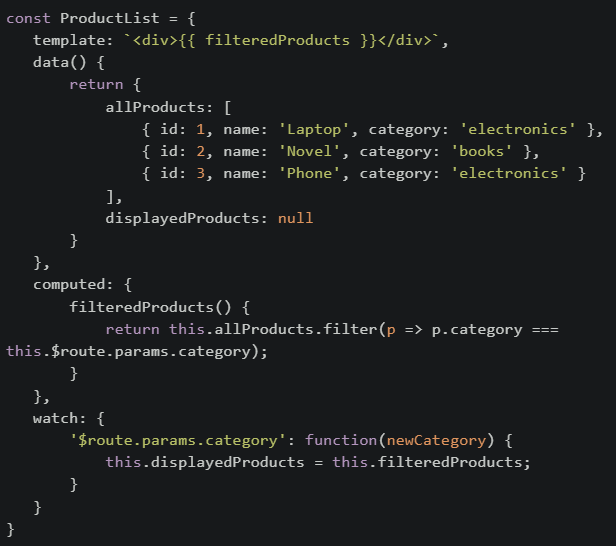 If the developer changed the template to use displayedProducts instead of filteredProducts, What would be the most likely issue?
If the developer changed the template to use displayedProducts instead of filteredProducts, What would be the most likely issue?Text of the picture (copyable)
```javascript
const ProductList = {
  template: `<div>{{ filteredProducts }}</div>`,
  data() {
    return {
      allProducts: [
        { id: 1, name: 'Laptop', category: 'electronics' },
        { id: 2, name: 'Novel', category: 'books' },
        { id: 3, name: 'Phone', category: 'electronics' }
      ],
      displayedProducts: null
    }
  },
  computed: {
    filteredProducts() {
      return this.allProducts.filter(p => p.category ===
        this.$route.params.category);
    }
  },
  watch: {
    '$route.params.category': function(newCategory) {
      this.displayedProducts = this.filteredProducts;
    }
  }
}
```- Performance would improve because computed properties are slower than data
- The initial page load would show an empty list, and only after navigation would data appear correctly
- There would be no difference because both will update at the same time
- The application would crash because displayedProducts is reactive
Consider the following JavaScript code:
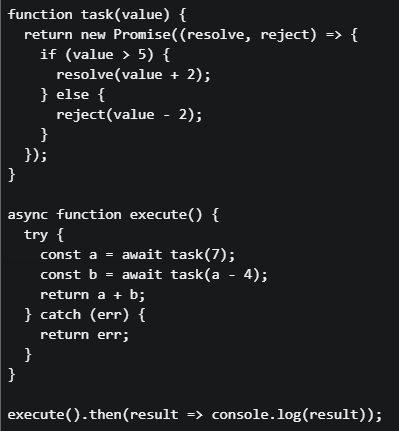 What will be printed to the console?
What will be printed to the console?Text of the picture (copyable)
```javascript
function task(value) {
  return new Promise((resolve, reject) => {
    if (value > 5) {
      resolve(value + 2);
    } else {
      reject(value - 2);
    }
  });
}

async function execute() {
  try {
    const a = await task(7);
    const b = await task(a - 4);
    return a + b;
  } catch (err) {
    return err;
  }
}

execute().then(result => console.log(result));
```- 12
- 10
- 5
- 3
Match the following web dev concept given below:
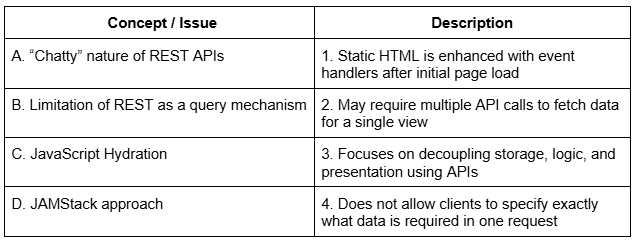 Which of the following options correctly matches Concept / Issue and Description?
Which of the following options correctly matches Concept / Issue and Description?Text of the picture (copyable)
| Concept / Issue | Description |
|---|---|
| A. "Chatty" nature of REST APIs | 1. Static HTML is enhanced with event handlers after initial page load |
| B. Limitation of REST as a query mechanism | 2. May require multiple API calls to fetch data for a single view |
| C. JavaScript Hydration | 3. Focuses on decoupling storage, logic, and presentation using APIs |
| D. JAMStack approach | 4. Does not allow clients to specify exactly what data is required in one request |
- A→2, B→4, C→1, D→3
- A→1, B→2, C→3, D→4
- A→2, B→1, C→4, D→3
- A→4, B→2, C→1, D→3
Consider the following Vuex store setup for a user management system:
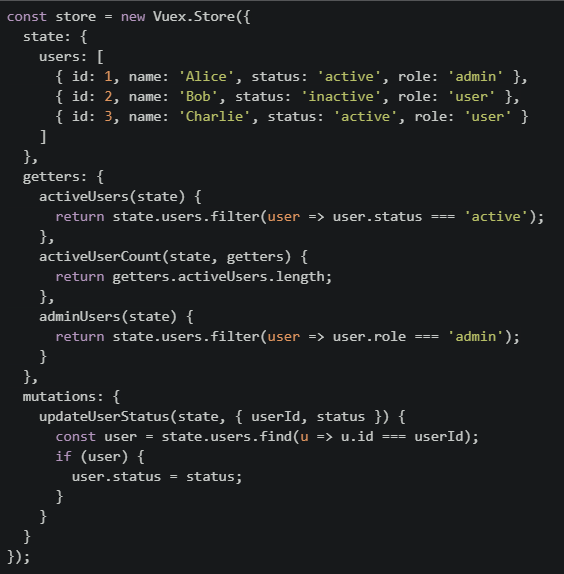 Suppose the following mutation is committed:store.commit("updateUserStatus", { userId: 2, status: "active" });. Which of the following statements is TRUE after this mutation is executed?
Suppose the following mutation is committed:store.commit("updateUserStatus", { userId: 2, status: "active" });. Which of the following statements is TRUE after this mutation is executed?Text of the picture (copyable)
```javascript
const store = new Vuex.Store({
state: {
users: [
{ id: 1, name: 'Alice', status: 'active', role: 'admin' },
{ id: 2, name: 'Bob', status: 'inactive', role: 'user' },
{ id: 3, name: 'Charlie', status: 'active', role: 'user' }
]
},
getters: {
activeUsers(state) {
return state.users.filter(user => user.status === 'active');
},
activeUserCount(state, getters) {
return getters.activeUsers.length;
},
adminUsers(state) {
return state.users.filter(user => user.role === 'admin');
}
},
mutations: {
updateUserStatus(state, { userId, status }) {
const user = state.users.find(u => u.id === userId);
if (user) {
user.status = status;
}
}
}
});
``` will return 3
text
```
activeUserCount
```
 will return two users
text
adminUsers
 will include only Alice and Charlie
text
activeUsers
- The mutation will not affect any getter output
In Vue 2 (CDN), which of the following correctly describes the timing of the beforeDestroy and destroyed lifecycle hooks?
- beforeDestroy runs after the component has been removed from the DOM, while destroyed runs before destruction.
- beforeDestroy runs just before the component is torn down and removed from the DOM, while destroyed runs after the component is fully destroyed.
- beforeDestroy runs when the component is first mounted, while destroyed runs before the component is removed.
- both hooks run only after the component is destroyed.
Consider the following HTML:
 And JavaScript code:
 What are the values of id and action respectively?
And JavaScript code:
What are the values of id and action respectively?Text of the picture (copyable)
```html
<button id="btn1" data-action="delete" data-id="42">Delete</button>
```
```javascript
const btn = document.getElementById('btn1');
const id = btn.dataset.id;
const action = btn.getAttribute('data-action');
```- id = 42 (number), action = "delete" (string)
- id = 42 (string), action = "delete" (string)
- id = undefined, action = undefined
- id = 42 (number), action = undefined
Which of the following statements best describes a permalink?
- A temporary URL generated for a single browsing session
- A stable URL that uniquely identifies a specific resource and is not expected to change
- A human-readable URL used only for navigation menus
- A URL that depends on the user’s login session or device
Consider the following code snippet running in a browser.
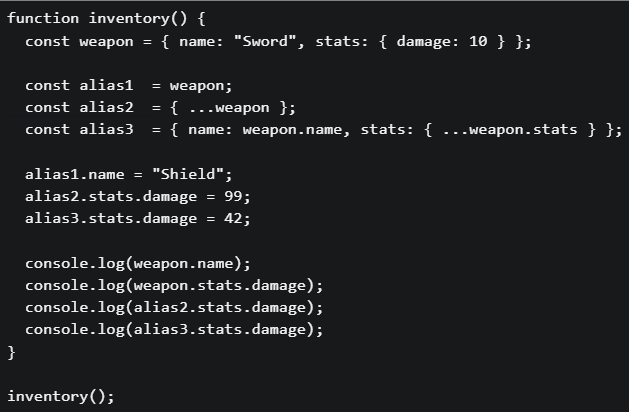 What will be the output on the console?
What will be the output on the console?Text of the picture (copyable)
```javascript
function inventory() {
  const weapon = { name: "Sword", stats: { damage: 10 } };

  const alias1 = weapon;
  const alias2 = { ...weapon };
  const alias3 = { name: weapon.name, stats: { ...weapon.stats } };

  alias1.name = "Shield";
  alias2.stats.damage = 99;
  alias3.stats.damage = 42;

  console.log(weapon.name);
  console.log(weapon.stats.damage);
  console.log(alias2.stats.damage);
  console.log(alias3.stats.damage);
}

inventory();
```- Shield 99 99 42
- Shield 10 99 42
- Sword 99 99 42
- Shield 99 42 42
Consider the following code snippet running on a browser. What is the output on the console?
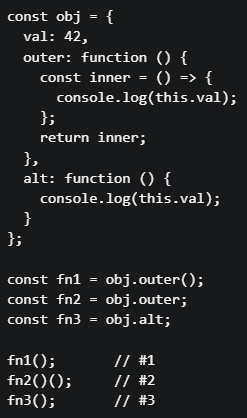
Text of the picture (copyable)
```javascript
const obj = {
  val: 42,
  outer: function() {
    const inner = () => {
      console.log(this.val);
    };
    return inner;
  },
  alt: function() {
    console.log(this.val);
  }
};

const fn1 = obj.outer();
const fn2 = obj.outer;
const fn3 = obj.alt;

fn1(); // #1
fn2()(); // #2
fn3(); // #3
```- 42 42 42
- 42 undefined undefined
- 42 undefined 42
- undefined undefined undefined
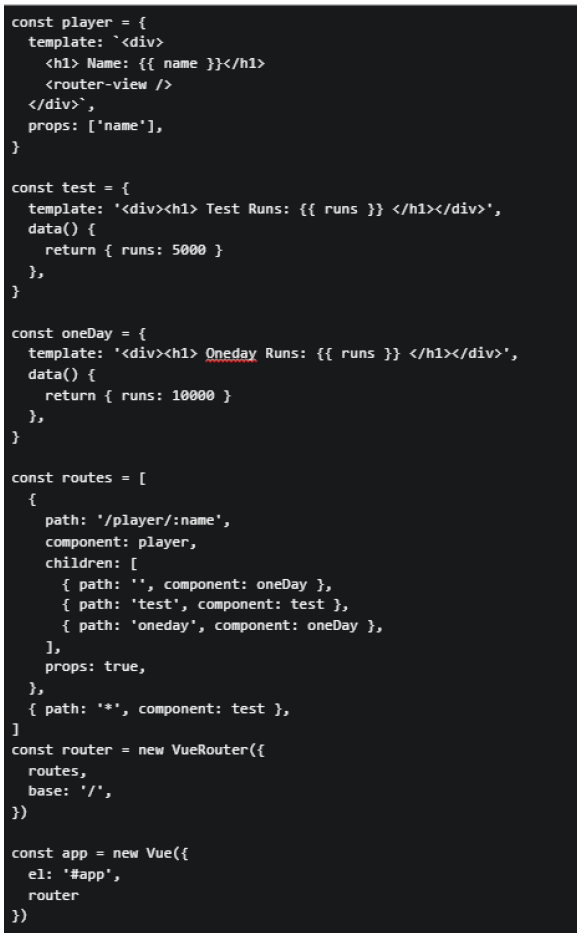
Consider the following markup index.html and JavaScript app.js for a Vue application. app.js:
 index.html:
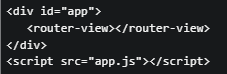 Suppose the application is running on http://localhost:8080, and the user visit the URL “http://localhost:8080/#/player/rohit/t20”. What will be rendered by the browser?
index.html:
Suppose the application is running on http://localhost:8080, and the user visit the URL “http://localhost:8080/#/player/rohit/t20”. What will be rendered by the browser?Text of the picture (copyable)
```javascript
const player = {
  template: `<div>
    <h1> Name: {{ name }}</h1>
    <router-view />
  </div>`,
  props: ['name'],
}

const test = {
  template: '<div><h1> Test Runs: {{ runs }} </h1></div>',
  data() {
    return { runs: 5000 }
  },
}

const oneDay = {
  template: '<div><h1> Oneday Runs: {{ runs }} </h1></div>',
  data() {
    return { runs: 10000 }
  },
}

const routes = [
  {
    path: '/player/:name',
    component: player,
    children: [
      { path: '', component: oneDay },
      { path: 'test', component: test },
      { path: 'oneday', component: oneDay },
    ],
    props: true,
  },
  { path: '*', component: test },
]
const router = new VueRouter({
  routes,
  base: '/',
})

const app = new Vue({
  el: '#app',
  router
})
```
```html
<div id="app">
  <router-view></router-view>
</div>
<script src="app.js"></script>
```- Name: Rohit Oneday Runs: 10000
- Test Runs: 5000
- Name: Rohit Test Runs: 5000
- Oneday Runs: 10000
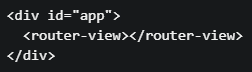
Consider the following html index.html and JavaScript app.js for a Vue application: File : index.html
 File : app.js
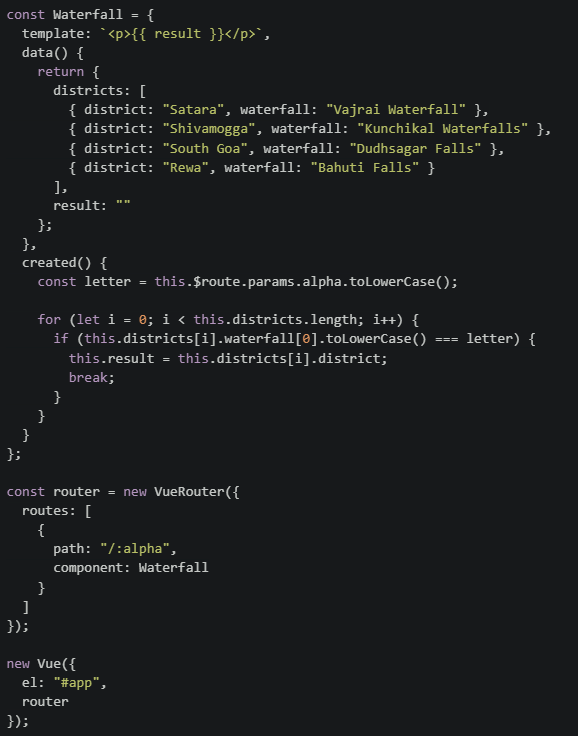 Suppose the application is running on http://localhost:8080, and the user visits the URL http://localhost:8080/#/b. What will be rendered by the browser?
File : app.js
Suppose the application is running on http://localhost:8080, and the user visits the URL http://localhost:8080/#/b. What will be rendered by the browser?Text of the picture (copyable)
```html
<div id="app">
  <router-view></router-view>
</div>
```
```javascript
const Waterfall = {
  template: `<p>{{ result }}</p>`,
  data() {
    return {
      districts: [
        { district: "Satara", waterfall: "Vajrai Waterfall" },
        { district: "Shivamogga", waterfall: "Kunchikal Waterfalls" },
        { district: "South Goa", waterfall: "Dudhsagar Falls" },
        { district: "Rewa", waterfall: "Bahuti Falls" }
      ],
      result: ""
    };
  },
  created() {
    const letter = this.$route.params.alpha.toLowerCase();

    for (let i = 0; i < this.districts.length; i++) {
      if (this.districts[i].waterfall[0].toLowerCase() === letter) {
        this.result = this.districts[i].district;
        break;
      }
    }
  }
};

const router = new VueRouter({
  routes: [
    {
      path: "/:alpha",
      component: Waterfall
    }
  ]
});

new Vue({
  el: "#app",
  router
});
```- Shivamogga
- South Goa
- Rewa
- Satara
Consider a scenario involving localStorage, Promise chains, and Vue lifecycle hooks: Scenario: A user authentication system where: On app initialization, the app checks localStorage for a stored user token• If a token exists, it validates the token asynchronously (via a Promise)• Based on validation, different UI components are rendered• The user navigates between different views• Code in mounted() hook:
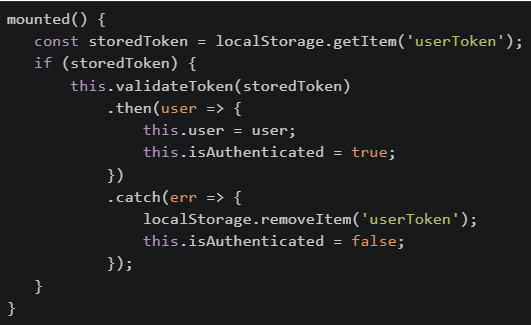 Which of the following statements is/are CORRECT about this implementation?
Which of the following statements is/are CORRECT about this implementation?Text of the picture (copyable)
```javascript
mounted() {
  const storedToken = localStorage.getItem('userToken');
  if (storedToken) {
    this.validateToken(storedToken)
      .then(user => {
        this.user = user;
        this.isAuthenticated = true;
      })
      .catch(err => {
        localStorage.removeItem('userToken');
        this.isAuthenticated = false;
      });
  }
}
```- If the page is refreshed while the Promise is pending, the token will be lost because localStorage is cleared on refresh
- If token validation fails, the token is removed from storage, preventing automatic login on future page loads
- The isAuthenticated flag might be false even though a storedToken exists, until the Promise validation completes
- sessionStorage should be used instead of localStorage because user tokens should not persist across browser sessions
- If the user navigates to a different route while validation is pending, the Promise will still complete and update the user data
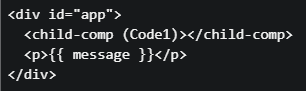
Consider the following Vue application: File: Index.html
 File: app.js
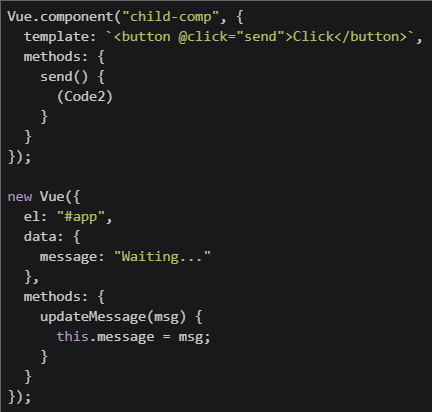 The application consists of a parent component and a child component. When the button inside the child component is clicked, the parent’s message should update and display "Hello" in the browser. Two important lines are missing and marked as (Code1) and (Code2). Which of the following options correctly completes the code?
File: app.js
The application consists of a parent component and a child component. When the button inside the child component is clicked, the parent’s message should update and display "Hello" in the browser. Two important lines are missing and marked as (Code1) and (Code2). Which of the following options correctly completes the code?Text of the picture (copyable)
```html
<div id="app">
  <child-comp (Code1)></child-comp>
  <p>{{ message }}</p>
</div>
```
```javascript
Vue.component("child-comp", {
    template: `<button @click="send">Click</button>`,
    methods: {
        send() {
            (Code2)
        }
    }
});

new Vue({
    el: "#app",
    data: {
        message: "Waiting..."
    },
    methods: {
        updateMessage(msg) {
            this.message = msg;
        }
    }
});
```
text
```
(Code1) @message="updateMessage('Hello')"
(Code2) this.$emit("message")
```
text
```
(Code1) @message="updateMessage"
(Code2) this.$emit("message", "Hello")
```
text
```
(Code1) :message="updateMessage"
(Code2) this.emit("message", "Hello")
```
text
```
(Code1) @updateMessage="message"
(Code2) this.$emit("updateMessage")
```
Consider the following HTML index.html and JavaScript app.js for a Vue application: File: index.html
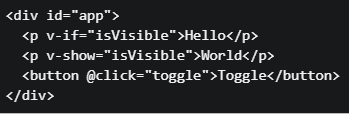 File: app.js
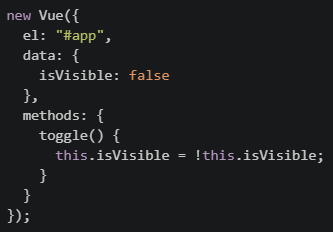 Which of the following statements is/are TRUE?
File: app.js
Which of the following statements is/are TRUE?Text of the picture (copyable)
```html
<div id="app">
  <p v-if="isVisible">Hello</p>
  <p v-show="isVisible">World</p>
  <button @click="toggle">Toggle</button>
</div>
```
```javascript
new Vue({
  el: "#app",
  data: {
    isVisible: false
  },
  methods: {
    toggle() {
      this.isVisible = !this.isVisible;
    }
  }
});
```- On initial page load, neither “Hello” nor “World” is visible in the browser.
- On initial page load, the element using v-show exists in the DOM but is hidden.
- After clicking the Toggle button once, both “Hello” and “World” become visible.
- The v-if directive hides elements using CSS.
- The v-show directive removes elements from the DOM when the condition is false.
Answer key
- Q1 (MCQ, 3 marks): D
- Q2 (MCQ, 3 marks): C
- Q3 (MCQ, 3 marks): B
- Q4 (MCQ, 3 marks): D
- Q5 (MCQ, 3 marks): A
- Q6 (MCQ, 3 marks): A
- Q7 (MCQ, 2 marks): B
- Q8 (MCQ, 2 marks): B
- Q9 (MCQ, 2 marks): B
- Q10 (MCQ, 4.5 marks): A
- Q11 (MCQ, 4.5 marks): B
- Q12 (MCQ, 4.5 marks): B
- Q13 (MCQ, 4.5 marks): C
- Q14 (MSQ, 3 marks): B, C, E
- Q15 (MSQ, 3 marks): A, B
- Q16 (MSQ, 2 marks): A, B, C