Home / Past papers / MAD2 End Term / this paper
IIT M IMPROVEMENT FN EXAM QDD1 01 Sep - 01 Sep 2024
- To encrypt the user's session
- To validate that the request comes from the authenticated user
- To store the user's password securely
- To compress the HTTP request

text
https://api.example.com

text
http://example.com/api

text
https://example.com:8080

text
https://example.com/subdir
- State → Dispatch an action → Commit a mutation → State change
- Dispatch an action → Commit a mutation → State change
- Commit a mutation → Dispatch an action → State change
- State change → Commit a mutation → Dispatch an action
- II, I, III
- III, I, II
- III, II, I
- I, II, III
- Redis is a relational database that uses SQL for querying data.
- Redis is an in-memory data structure store, commonly used as a database,cache, and message broker.
- Redis can only store string data types and does not support complex datastructures like lists or sets.
- Redis cannot handle numerous operations per second.
- A user receives an email containing a link to a phishing site that asks for theirlogin credentials.
- A user clicks on a malicious link while logged into their bank account, andwithout their knowledge, a money transfer request is sent to the bank's server using the user'sauthenticated session.
- A hacker uses a brute-force attack to guess the password of a user's onlineaccount.
- A user is tricked into downloading and installing malware that steals theirsensitive information.
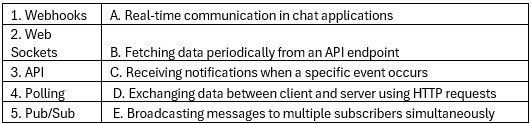 Match the following technologies with their typical use cases:
 Text of the picture (copyable)
| | |
|---|---|
| 1. Webhooks | A. Real-time communication in chat applications |
| 2. Web Sockets | B. Fetching data periodically from an API endpoint |
| 3. API | C. Receiving notifications when a specific event occurs |
| 4. Polling | D. Exchanging data between client and server using HTTP requests |
| 5. Pub/Sub | E. Broadcasting messages to multiple subscribers simultaneously |
- 1 - C, 2 - A, 3 - D, 4 - B, 5 - E
- 1 - D, 2 - E, 3 - A, 4 - C, 5 - B
- 1 - C, 2 - C, 3 - E, 4 - A, 5 - D
- 1 - D, 2 - A, 3 - C, 4 - D, 5 - B
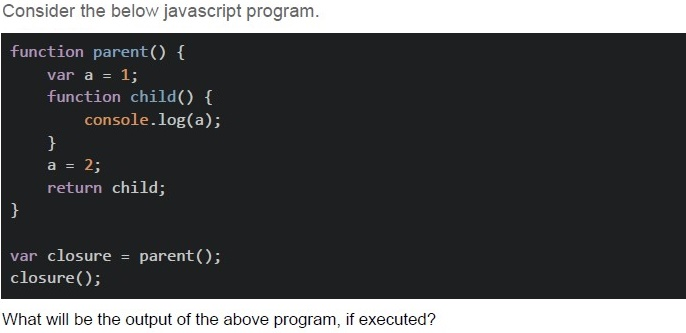
Text of the picture (copyable)
Consider the below javascript program.

```javascript
function parent() {
    var a = 1;
    function child() {
        console.log(a);
    }
    a = 2;
    return child;
}

var closure = parent();
closure();
```

What will be the output of the above program, if executed?- 2
- 1
- undefined
- Error
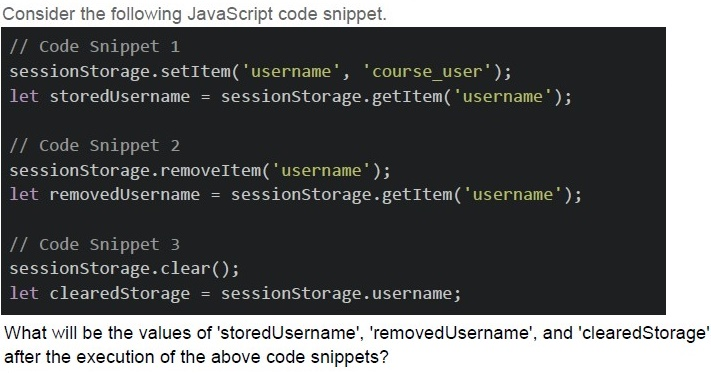
Text of the picture (copyable)
Consider the following JavaScript code snippet.

```javascript
// Code Snippet 1
sessionStorage.setItem('username', 'course_user');
let storedUsername = sessionStorage.getItem('username');

// Code Snippet 2
sessionStorage.removeItem('username');
let removedUsername = sessionStorage.getItem('username');

// Code Snippet 3
sessionStorage.clear();
let clearedStorage = sessionStorage.username;
```

What will be the values of 'storedUsername', 'removedUsername', and 'clearedStorage' after the execution of the above code snippets?- storedUsername: 'course_user', removedUsername: null, clearedStorage: null
- storedUsername: 'course_user', removedUsername: undefined,clearedStorage: null
- storedUsername: 'course_user', removedUsername: null, clearedStorage:undefined
- storedUsername: 'course_user', removedUsername: undefined,clearedStorage: undefined
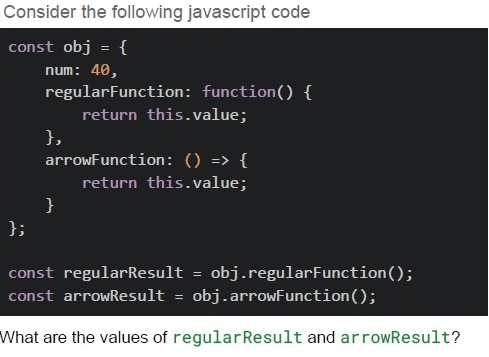
Text of the picture (copyable)
Consider the following javascript code

```javascript
const obj = {
  num: 40,
  regularFunction: function() {
    return this.value;
  },
  arrowFunction: () => {
    return this.value;
  }
};

const regularResult = obj.regularFunction();
const arrowResult = obj.arrowFunction();
```

What are the values of regularResult and arrowResult?- regularResult = 40, arrowResult = 40
- regularResult = undefined, arrowResult = undefined
- regularResult = 40, arrowResult = undefined
- regularResult = undefined, arrowResult = 40
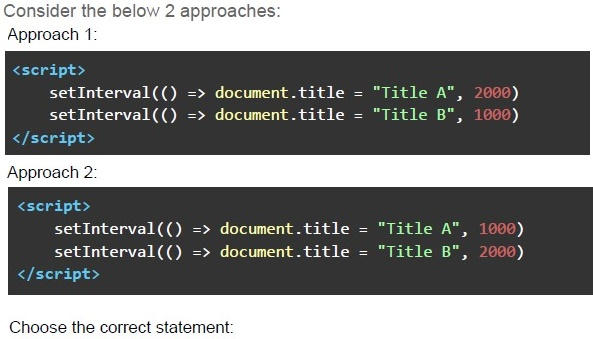
Text of the picture (copyable)
Consider the below 2 approaches:
Approach 1:

```html
<script>
    setInterval(() => document.title = "Title A", 2000)
    setInterval(() => document.title = "Title B", 1000)
</script>
```

Approach 2:

```html
<script>
    setInterval(() => document.title = "Title A", 1000)
    setInterval(() => document.title = "Title B", 2000)
</script>
```

Choose the correct statement:- The approach 1 will toggle the page title between “Title A” and “Title B” afterevery 1 second (approx).
- The approach 2 will toggle the page title between “Title A” and “Title B” afterevery 1 second (approx).
- None of the approaches will toggle the page title after every 1 second.
- None of these
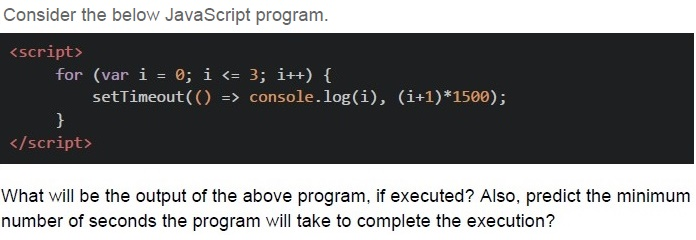
Text of the picture (copyable)
Consider the below JavaScript program.

```html
<script>
    for (var i = 0; i <= 3; i++) {
        setTimeout(() => console.log(i), (i+1)*1500);
    }
</script>
```

What will be the output of the above program, if executed? Also, predict the minimum number of seconds the program will take to complete the execution?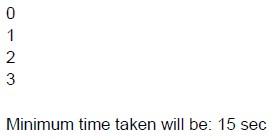
text
0
1
2
3

Minimum time taken will be: 15 sec
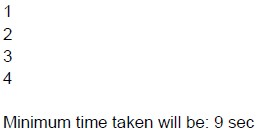
text
1
2
3
4

Minimum time taken will be: 9 sec
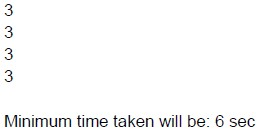
text
3
3
3
3

Minimum time taken will be: 6 sec
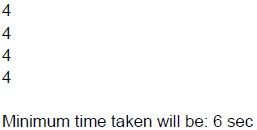
text
4
4
4
4

Minimum time taken will be: 6 sec
- Webhooks use HTTP requests to communicate events from one service toanother.
- Webhooks require the recipient service to periodically poll the sender forupdates.
- Webhooks are typically implemented using HTTP POST requests.
- Webhooks guarantee that events will be delivered in order and exactly once.
- Function declarations are hoisted along with their definitions.
- Variable declarations with var are hoisted with their initializations.
- let and const declarations are hoisted to the top of their block but remainuninitialized until execution reaches the declaration.
- Only function declarations are hoisted, not function definition.
- Handling real-time user interactions on a website.
- Sending out periodic email notifications to users.
- Generating and displaying dynamic content on a web page.
- Performing long-running data processing tasks in the background.
- Webhooks are typically used for server-to-server communication, while SSE isused for server-to-client communication.
- Webhooks require the client to maintain an open connection to receiveupdates, while SSE does not.
- Webhooks are initiated by the server, while SSE connections are initiated bythe client.
- SSE supports bidirectional communication, whereas webhooks do not.

text
```html
<div :class="[isActive ? 'activeClass' : 'errorClass']"></div>
```

text
```html
<div :class="[{ isActive : 'activeClass' }, 'errorClass']"></div>
```
text
```html
<div :class="[activeClass ? 'isActive' : '', 'errorClass']"></div>
```

text
```html
<div :class="[{'activeClass': isActive }, 'errorClass']"></div>
```
- SSE connections are established using HTTP.
- SSE supports bidirectional communication between client and server.
- SSE automatically switches to web socket if the connection is successful.
- SSE is suitable for sending updates to multiple clients simultaneously.
- Cache-Control
- Expires
- Bearer
- Content-Type
- A webhook is the same as short polling.
- The short polling can be used to know the state of an asynchronous task, andtrigger an action if the task gets completed.
- The long polling cannot be achieved using HTTP protocol.
- Long Polling can be used to achieve real time communication.
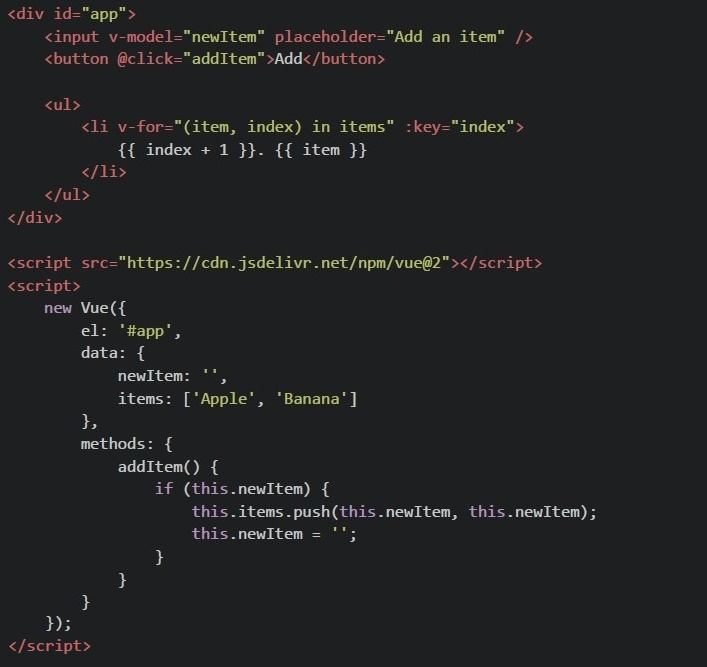 Consider the following Vue.js 2 component using CDN. After entering "Orange" in the input box and clicking the "Add" button, what will be seen in the browser?
Text of the picture (copyable)
```html
<div id="app">
  <input v-model="newItem" placeholder="Add an item" />
  <button @click="addItem">Add</button>

  <ul>
    <li v-for="(item, index) in items" :key="index">
      {{ index + 1 }}. {{ item }}
    </li>
  </ul>
</div>

<script src="https://cdn.jsdelivr.net/npm/vue@2"></script>
<script>
  new Vue({
    el: '#app',
    data: {
      newItem: '',
      items: ['Apple', 'Banana']
    },
    methods: {
      addItem() {
        if (this.newItem) {
          this.items.push(this.newItem, this.newItem);
          this.newItem = '';
        }
      }
    }
  });
</script>
```- 1. Apple2. Banana 3. Orange 4. Orange
- 1. Apple2. Banana 3. Orange
- 1. Apple2. Banana 3. Orange 3. Orange
- 1. Apple2. Banana
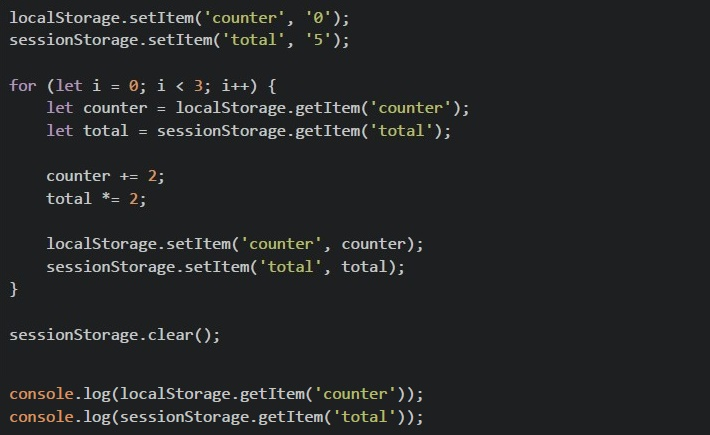 Consider the following javascript code running on browser What will be the output in the browser console?
Text of the picture (copyable)
```javascript
localStorage.setItem('counter', '0');
sessionStorage.setItem('total', '5');

for (let i = 0; i < 3; i++) {
    let counter = localStorage.getItem('counter');
    let total = sessionStorage.getItem('total');

    counter += 2;
    total *= 2;

    localStorage.setItem('counter', counter);
    sessionStorage.setItem('total', total);
}

sessionStorage.clear();

console.log(localStorage.getItem('counter'));
console.log(sessionStorage.getItem('total'));
```- 640
- null40
- 6null
- 0222null
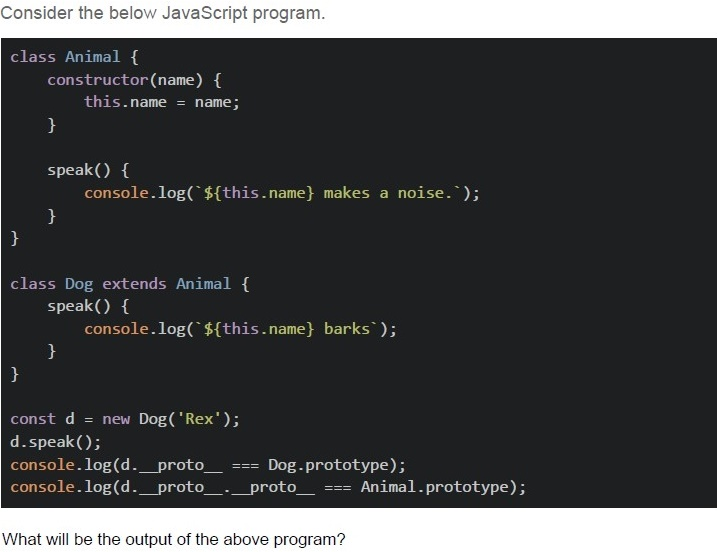
Text of the picture (copyable)
Consider the below JavaScript program.

```javascript
class Animal {
  constructor(name) {
    this.name = name;
  }

  speak() {
    console.log(`${this.name} makes a noise.`);
  }
}

class Dog extends Animal {
  speak() {
    console.log(`${this.name} barks`);
  }
}

const d = new Dog('Rex');
d.speak();
console.log(d.__proto__ === Dog.prototype);
console.log(d.__proto__.__proto__ === Animal.prototype);
```

What will be the output of the above program?- Rex barkstrue true
- Rex barksfalse true
- Rex barks.true false
- Rex barks.false false
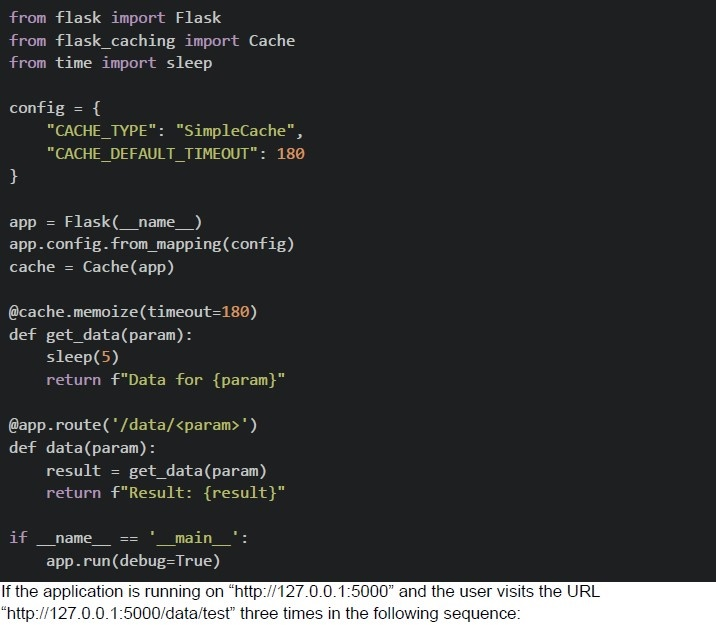 Consider the below flask application. 1. First visit 2. Second visit after 2 minutes and 30 seconds 3. Third visit after 1 minute from the second visit What will be the approximate difference in response times between the first and third requests?
Text of the picture (copyable)
```python
from flask import Flask
from flask_caching import Cache
from time import sleep

config = {
    "CACHE_TYPE": "SimpleCache",
    "CACHE_DEFAULT_TIMEOUT": 180
}

app = Flask(__name__)
app.config.from_mapping(config)
cache = Cache(app)

@cache.memoize(timeout=180)
def get_data(param):
    sleep(5)
    return f"Data for {param}"

@app.route('/data/<param>')
def data(param):
    result = get_data(param)
    return f"Result: {result}"

if __name__ == '__main__':
    app.run(debug=True)
```
If the application is running on "http://127.0.0.1:5000" and the user visits the URL "http://127.0.0.1:5000/data/test" three times in the following sequence:- 5 seconds
- 0 seconds
- 10 seconds
- 180 seconds
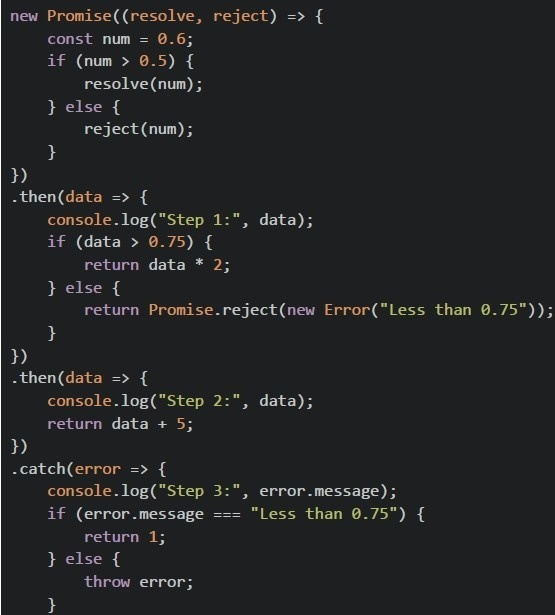 Consider the below JavaScript program.
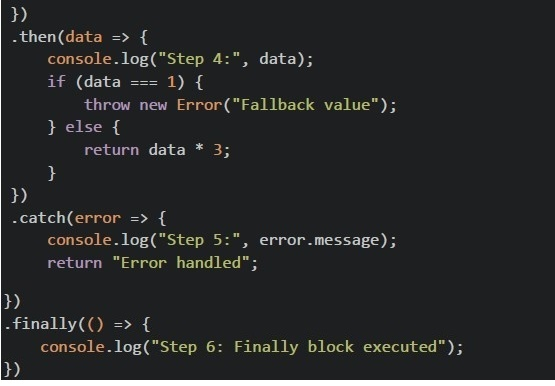 Consider the below JavaScript program. What will be the output of the above program?
Text of the picture (copyable)
```javascript
new Promise((resolve, reject) => {
  const num = 0.6;
  if (num > 0.5) {
    resolve(num);
  } else {
    reject(num);
  }
})
  .then(data => {
    console.log("Step 1:", data);
    if (data > 0.75) {
      return data * 2;
    } else {
      return Promise.reject(new Error("Less than 0.75"));
    }
  })
  .then(data => {
    console.log("Step 2:", data);
    return data + 5;
  })
  .catch(error => {
    console.log("Step 3:", error.message);
    if (error.message === "Less than 0.75") {
      return 1;
    } else {
      throw error;
    }
  });
```
```javascript
})
.then(data => {
    console.log("Step 4:", data);
    if (data === 1) {
        throw new Error("Fallback value");
    } else {
        return data * 3;
    }
})
.catch(error => {
    console.log("Step 5:", error.message);
    return "Error handled";
})
.finally(() => {
    console.log("Step 6: Finally block executed");
})
```- Step 1: 0.6Step 2: 1.2 Step 4: 6.2 Step 6: Finally block executed
- Step 1: 0.6Step 3: Less than 0.75 Step 4: 1 Step 5: Fallback value Step 6: Finally block executed
- Step 1: 0.6Step 2: 1.2 Step 3: Error Step 4: 1 Step 5: Fallback value Step 6: Finally block executed
- Step 1: 0.6Step 3: Less than 0.75 Step 4: 1 Step 6: Finally block executed
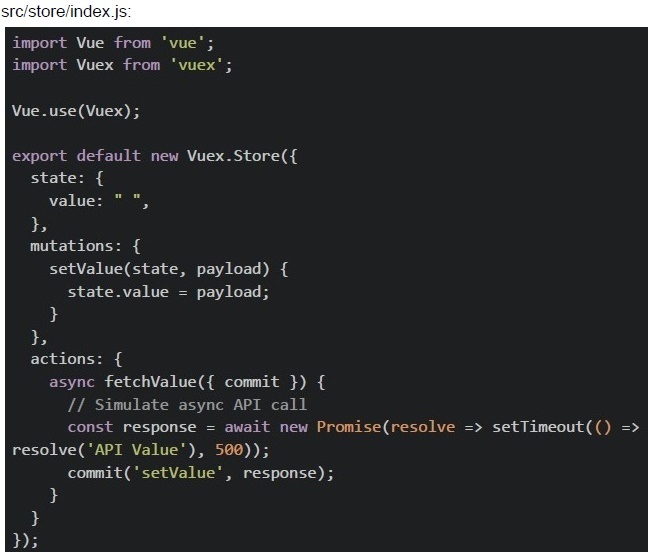 In a Vue CLI project with Vuex, you have the following configuration:
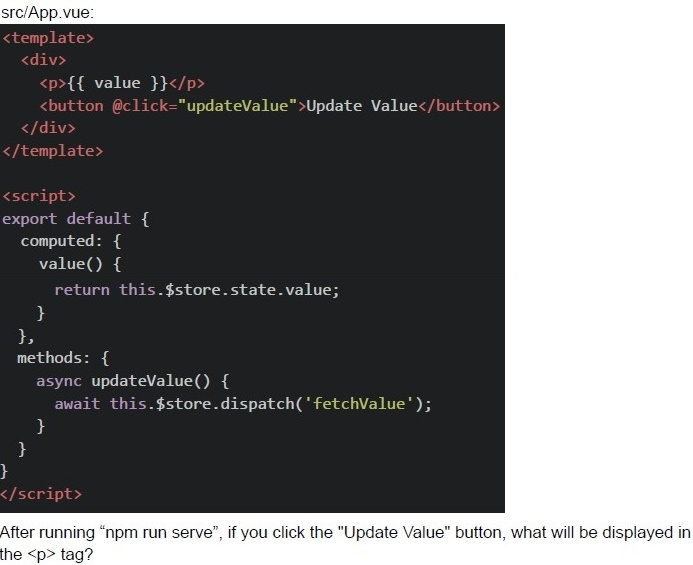 In a Vue CLI project with Vuex, you have the following configuration:
 Text of the picture (copyable)
src/store/index.js:
```javascript
import Vue from 'vue';
import Vuex from 'vuex';

Vue.use(Vuex);

export default new Vuex.Store({
  state: {
    value: "",
  },
  mutations: {
    setValue(state, payload) {
      state.value = payload;
    }
  },
  actions: {
    async fetchValue({ commit }) {
      // Simulate async API call
      const response = await new Promise(resolve => setTimeout(() =>
        resolve('API Value'), 500));
      commit('setValue', response);
    }
  }
});
```
src/App.vue:
```html
<template>
  <div>
    <p>{{ value }}</p>
    <button @click="updateValue">Update Value</button>
  </div>
</template>

<script>
export default {
  computed: {
    value() {
      return this.$store.state.value;
    },
  },
  methods: {
    async updateValue() {
      await this.$store.dispatch('fetchValue');
    },
  },
};
</script>
```
After running "npm run serve", if you click the "Update Value" button, what will be displayed in the `<p>` tag?
text
API Value

text
"" ""

text
undefined

text
null
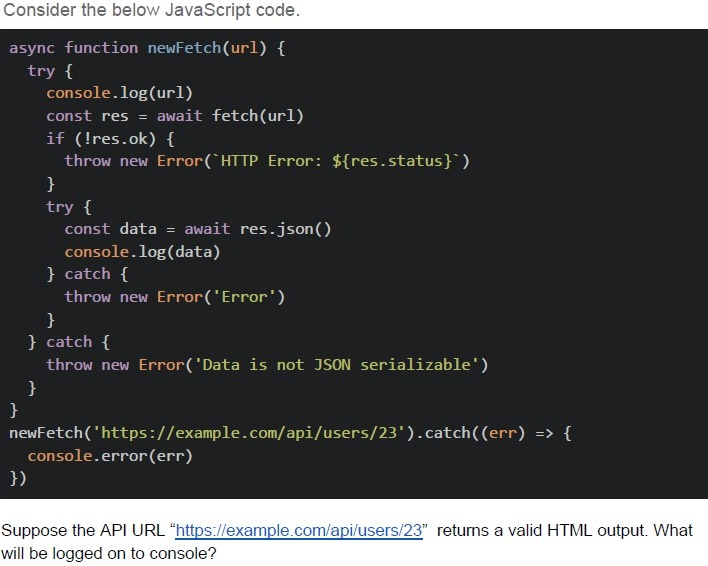
Text of the picture (copyable)
Consider the below JavaScript code.

```javascript
async function newFetch(url) {
  try {
    console.log(url)
    const res = await fetch(url)
    if (!res.ok) {
      throw new Error(`HTTP Error: ${res.status}`)
    }
    try {
      const data = await res.json()
      console.log(data)
    } catch {
      throw new Error('Error')
    }
  } catch {
    throw new Error('Data is not JSON serializable')
  }
}

newFetch('https://example.com/api/users/23').catch((err) => {
  console.error(err)
})
```

Suppose the API URL "https://example.com/api/users/23" returns a valid HTML output. What will be logged on to console?- “Network Error”
- “HTTP Error: 404”
- “Data is not JSON serializable”
- Data returned by the API
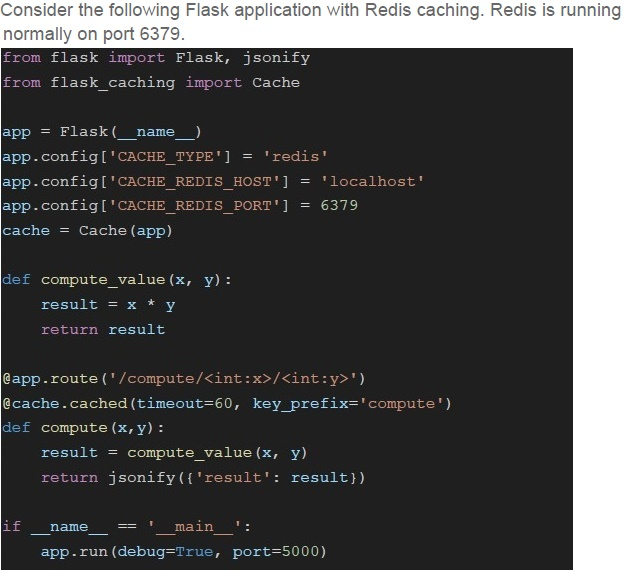
Text of the picture (copyable)
Consider the following Flask application with Redis caching. Redis is running
normally on port 6379.

```python
from flask import Flask, jsonify
from flask_caching import Cache

app = Flask(__name__)
app.config['CACHE_TYPE'] = 'redis'
app.config['CACHE_REDIS_HOST'] = 'localhost'
app.config['CACHE_REDIS_PORT'] = 6379
cache = Cache(app)

def compute_value(x, y):
    result = x * y
    return result

@app.route('/compute/<int:x>/<int:y>')
@cache.cached(timeout=60, key_prefix='compute')
def compute(x, y):
    result = compute_value(x, y)
    return jsonify({'result': result})

if __name__ == '__main__':
    app.run(debug=True, port=5000)
```- {“result” : 200} and {“result”: 50}
- {“result” : 50} and {“result”: 200}
- {“result”: 100} and {“result” : 100}
- {“result”: 200} and {“result”: 200}
 Options:
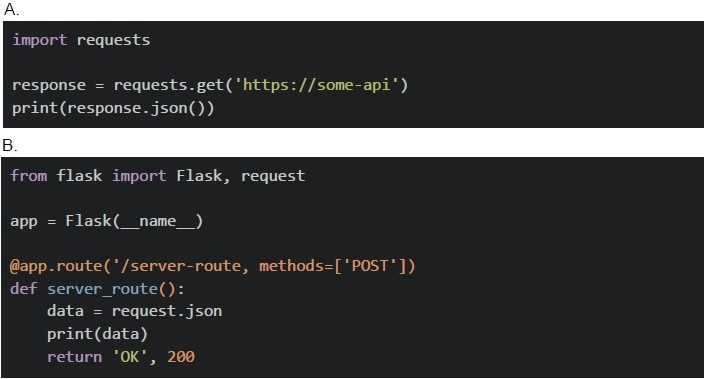 Options: Based on the above data, answer the given subquestions.
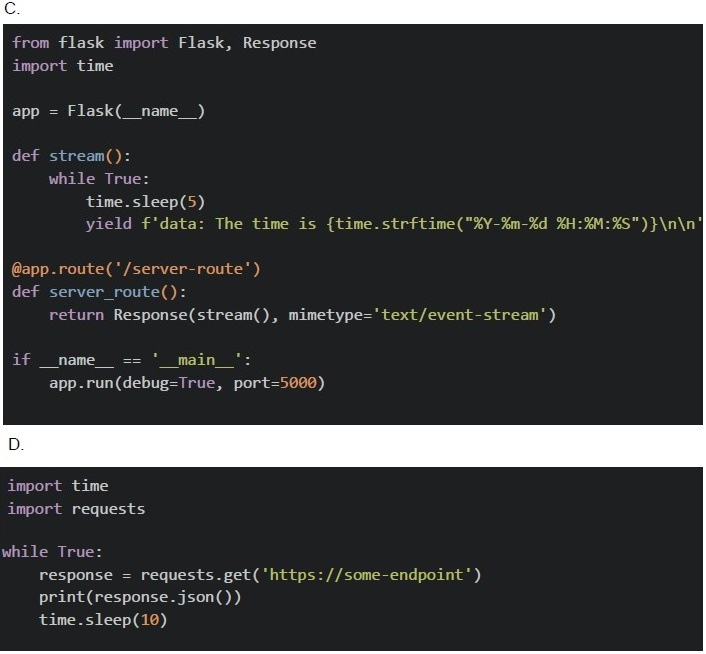
- A
- B
- C
- D
- A
- B
- C
- D
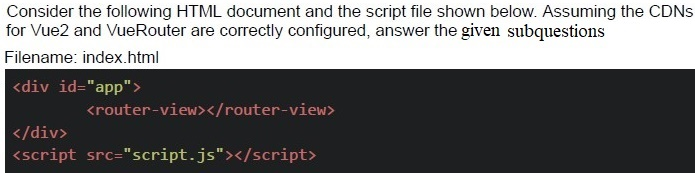
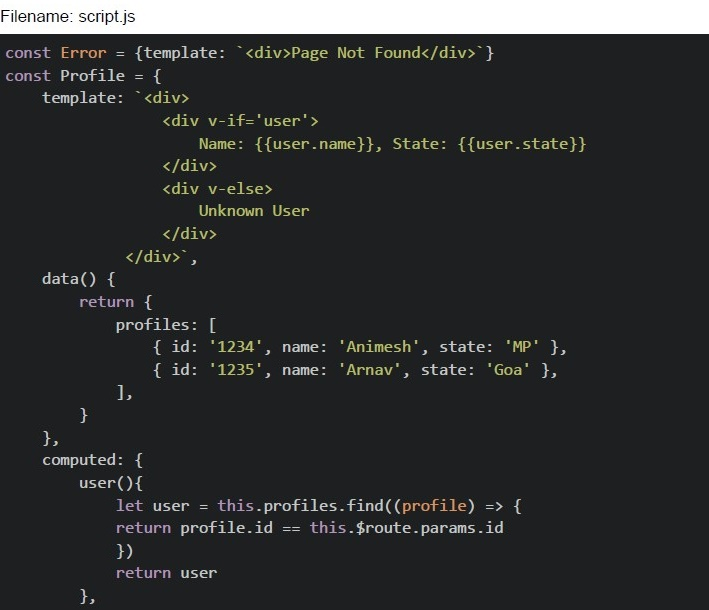
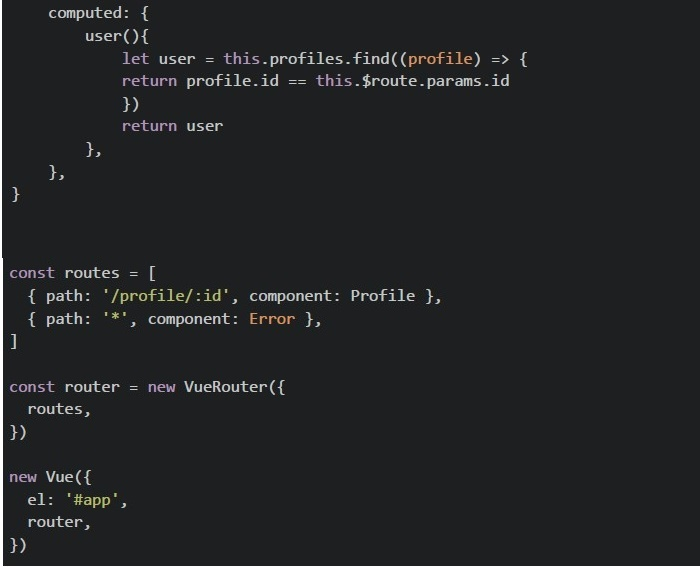
Text of the picture (copyable)
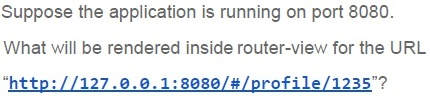
Suppose the application is running on port 8080.

What will be rendered inside router-view for the URL
"http://127.0.0.1:8080/#/profile/1235"?
- Page Not Found
- Unknown User
- Name: Animesh, State: MP
- Name: Arnav, State: Goa
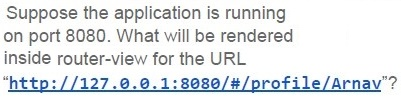
Text of the picture (copyable)
Suppose the application is running
on port 8080. What will be rendered
inside router-view for the URL
"http://127.0.0.1:8080/#/profile/Arnav"?
- Page Not Found
- Name: Animesh, State: MP
- Name: Arnav, State: Goa
- Unknown User
Answer key
- Q1 (MCQ, 2 marks): B
- Q2 (MCQ, 2 marks): D
- Q3 (MCQ, 2 marks): B
- Q4 (MCQ, 3 marks): B
- Q5 (MCQ, 3 marks): B
- Q6 (MCQ, 3 marks): B
- Q7 (MCQ, 3 marks): A
- Q8 (MCQ, 3 marks): A
- Q9 (MCQ, 3 marks): C
- Q10 (MCQ, 3 marks): C
- Q11 (MCQ, 3 marks): C
- Q12 (MCQ, 3 marks): D
- Q13 (MSQ, 3 marks): A, C
- Q14 (MSQ, 3 marks): A, C
- Q15 (MSQ, 3 marks): B, D
- Q16 (MSQ, 3 marks): A, C
- Q17 (MSQ, 3 marks): A, D
- Q18 (MSQ, 2 marks): A, D
- Q19 (MSQ, 2 marks): A, B
- Q20 (MSQ, 2 marks): B, D
- Q21 (MCQ, 4.5 marks): A
- Q22 (MCQ, 4.5 marks): D
- Q23 (MCQ, 4.5 marks): A
- Q24 (MCQ, 4.5 marks): B
- Q25 (MCQ, 4.5 marks): B
- Q26 (MCQ, 4.5 marks): A
- Q27 (MCQ, 4.5 marks): C
- Q28 (MCQ, 4.5 marks): D
- Q29 (MCQ, 3 marks): B
- Q30 (MCQ, 2 marks): C
- Q31 (MCQ, 3 marks): D
- Q32 (MCQ, 2 marks): D
Concepts this paper tests
Auto-generated summary from the source site. Handy as a checklist; the lessons above explain each idea from scratch.
Here’s a structured summary of core topics, concepts, and principles for the "Modern Application Development II" exam, along with key equations (where applicable) and Mermaid knowledge graphs to visualize relationships.
1. Core Topics & Concepts
A. Web Security
1. CSRF (Cross-Site Request Forgery)
- Objective: Validate that requests come from authenticated users (not malicious sites).
- Mechanism: CSRF tokens are embedded in forms/headers and validated server-side.
Attack Example:
- User clicks a malicious link while logged into their bank → unauthorized transfer occurs via their authenticated session.
Mitigation:
- Use CSRF tokens (e.g., Django’s
{% csrf_token %}). - SameSite cookies (restrict cookie sending to same-site requests).
- Use CSRF tokens (e.g., Django’s
2. CORS (Cross-Origin Resource Sharing)
- Default Behavior: Browsers block fetch calls to origins differing from the page’s origin (protocol + domain + port).
Allowed Origins:
- Same origin (e.g.,
https://example.com→https://example.com/subdir). - Explicitly permitted via
Access-Control-Allow-Originheader.
- Same origin (e.g.,
Key Headers:
Access-Control-Allow-Origin: Specifies allowed origins (e.g.,*orhttps://trusted.com).Access-Control-Allow-Methods: Allowed HTTP methods (e.g.,GET, POST).
3. Secure Storage
localStoragevs.sessionStorage:localStorage: Persists across sessions (until cleared).sessionStorage: Cleared when the tab closes.- Security Risk: Both are vulnerable to XSS (avoid storing sensitive data).
Methods:
setItem(key, value),getItem(key),removeItem(key),clear().
B. Asynchronous JavaScript
1. Promises & Async/Await
Promise States:
Pending→Fulfilled(resolved) orRejected.
Chaining:
.then(): Handles fulfillment..catch(): Handles rejection..finally(): Executes regardless of outcome.
Async/Await:
asyncfunctions return promises.awaitpauses execution until the promise settles.
2. Closures
- Definition: A function retains access to its lexical scope even when executed outside it.
Example:
function parent() {
  let a = 2;
  return function child() { console.log(a); };
}
const closure = parent(); // `a` is retained in `child`'s scope.
closure(); // Output: 2
3. setTimeout/setInterval
Behavior:
setTimeout(callback, delay): Executescallbackonce afterdelayms.setInterval(callback, delay): Executescallbackrepeatedly everydelayms.
Closure Pitfall:
- Loops with
setTimeoutmay reference the final loop variable value (useletor IIFE to capture values).
- Loops with
4. Event Loop
Phases:
- Call Stack: Executes synchronous code.
- Microtask Queue: Processes promises (
then/catch/finally). - Macrotask Queue: Handles
setTimeout,setInterval, I/O.
- Order: Microtasks > Macrotasks.
C. State Management (Vuex)
1. Vuex Flow
- Dispatch an Action (async operations, e.g., API calls).
- Commit a Mutation (synchronous state updates).
State Change triggers reactive updates in components.
- Key Methods:
this.$store.dispatch('actionName', payload)commit('mutationName', payload)
2. Vue Reactivity
data(): Reactive properties (tracked by Vue).computed: Cached derived data.v-model: Two-way binding (e.g.,<input v-model="message">).
D. Caching & Performance
1. Redis
Use Cases:
- In-memory cache (e.g.,
@cache.cached(timeout=60)in Flask). - Session storage, message brokering (Pub/Sub).
- In-memory cache (e.g.,
- Data Structures: Strings, lists, sets, hashes, sorted sets.
2. Flask-Caching
Decorators:
@cache.cached(timeout=180): Caches function results for 180 seconds.@cache.memoize: Caches based on function arguments.
- Backends: SimpleMemory, Redis, Memcached.
3. HTTP Caching Headers
Cache-Control:max-age=3600: Cache for 1 hour.no-store: Never cache.no-cache: Revalidate with server before using.
Expires: Absolute expiry time (e.g.,Expires: Thu, 31 Dec 2023 23:59:59 GMT).
E. Real-Time Communication
1. Webhooks
- Definition: Server-to-server HTTP callbacks (e.g., GitHub → Slack on push).
Characteristics:
- Unidirectional: Sender → Receiver.
- Event-Driven: Triggered by events (e.g., payment success).
- HTTP POST: Typically used for payload delivery.
Example:
@app.route('/webhook', methods=['POST'])
def webhook():
    data = request.json
    print("Received:", data)
    return "OK", 200
2. Server-Sent Events (SSE)
- Use Case: Server → Client updates (e.g., live scores).
Features:
- Unidirectional: Server pushes updates.
- HTTP-Based: Uses
text/event-streamMIME type. - Auto-Reconnect: Client reconnects if the connection drops.
Example:
const eventSource = new EventSource('/sse-endpoint');
eventSource.onmessage = (e) => console.log(e.data);
3. WebSockets
- Bidirectional: Full-duplex communication (e.g., chat apps).
- Protocol:
ws://orwss://(secure). Example:
const socket = new WebSocket('wss://example.com/chat');
socket.onmessage = (e) => console.log(e.data);
4. Polling vs. Long Polling vs. SSE vs. WebSockets
| Method | Direction | Protocol | Real-Time | Overhead |
|---|---|---|---|---|
| Polling | Client → Server | HTTP | ❌ No | High |
| Long Polling | Client → Server | HTTP | ✅ Yes | Medium |
| SSE | Server → Client | HTTP | ✅ Yes | Low |
| WebSockets | Bidirectional | WS/WSS | ✅ Yes | Low (after handshake) |
F. Task Queues (Celery)
Use Cases:
- Background tasks (e.g., sending emails, data processing).
- Periodic tasks (e.g., cron jobs).
Components:
- Broker: Message queue (Redis, RabbitMQ).
- Worker: Executes tasks.
- Result Backend: Stores task results (e.g., Redis).
Example:
@celery.task
def send_email(user_id):
    user = User.query.get(user_id)
    mail.send(...)
G. Vue.js
1. Dynamic Class Binding
Syntax:
<div :class="['errorClass', isActive ? 'activeClass' : '']"></div>or
<div :class="{ 'activeClass': isActive, 'errorClass': true }"></div>
2. Vue Router
Dynamic Routes:
{ path: '/profile/:id', component: Profile }Accessing Params:
this.$route.params.id // e.g., "1235"
H. HTTP & APIs
1. REST vs. Webhooks
| Feature | REST API | Webhooks |
|---|---|---|
| Initiator | Client polls server | Server pushes to client |
| Efficiency | High latency | Low latency (event-driven) |
| Use Case | Fetch data on demand | Notify on events (e.g., payments) |
2. Pub/Sub
- Definition: Message queue pattern where publishers send messages to topics, and subscribers receive them.
Example (Redis):
# Publisher
redis.publish("channel", "Hello, subscribers!")
# Subscriber pubsub = redis.pubsub() pubsub.subscribe("channel") for message in pubsub.listen(): print(message["data"]) ```
2. Key Equations (Mathematics/Algorithms)
A. Time Complexity
| Operation | Complexity |
|---|---|
Redis GET/SET | O(1) |
Array push/pop | O(1) |
Array shift/unshift | O(n) |
| Binary Search | O(log n) |
B. Caching Hit/Miss
- Hit Rate: \[ \text{Hit Rate} = \frac{\text{Number of Hits}}{\text{Total Requests}} \]
- Cache Invalidation: Strategies like TTL (Time-to-Live) or manual invalidation.