Home / Past papers / MAD2 Quiz 1 / this paper
Modern Application Development Ii 16 Jul 26 - 19 Jul 2026
 Which of the following statements are correct?
Text of the picture (copyable)
```javascript
console.log(typeof setTimeout)
console.log(typeof document)
```
- The first line prints
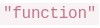 .
.text
"function"
- The second line prints
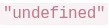 .
.text
"undefined"
 will work in Browser by default because V8 provides the DOM.
text
```javascript
document.querySelector()
```
- Different runtimes (browser, Node.js, etc.) can provide different APIs even if they use the same JavaScript engine.
- Code reusability
- Better maintainability
- Automatic SQL query optimization
- Easier UI management

text
```javascript
items.forEach(item => console.log(item))
```

text
```javascript
setTimeout(showMessage, 1000)
```

text
```javascript
const result = showMessage()
```

text
```javascript
button.addEventListener("click", handleClick)
```
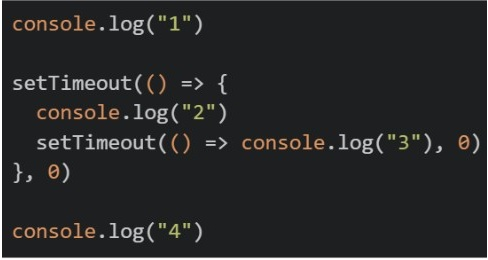
Text of the picture (copyable)
```javascript
console.log("1")

setTimeout(() => {
  console.log("2")
  setTimeout(() => console.log("3"), 0)
}, 0)

console.log("4")
```- 1 2 3 4
- 1 4 2 3
- 2 1 4 3
- 4 1 2 3
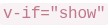 . The parent first updates a prop passed to the child, and then sets
 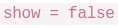 . After the child has already mounted once, which sequence can occur in the child after initial render?
Text of the picture (copyable)
```
v-if="show"
```
```
show = false
```
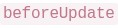 ->
->  ->
-> 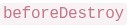 ->
-> 
text
beforeUpdate
updated
beforeDestroy
destroyed
- -> -> ->
text
beforeDestroy
destroyed
beforeUpdate
updated
 ->
->  -> ->
-> -> text
created
mounted
beforeUpdate
destroyed
- ->
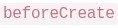 -> ->
-> -> text
updated
beforeCreate
destroyed
mounted
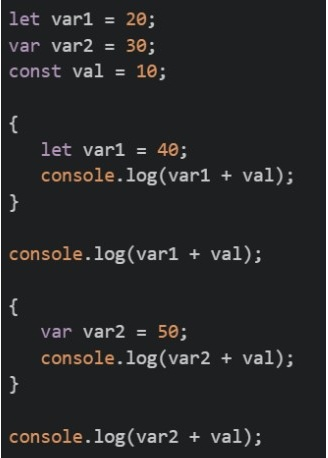 What will be the output of the above code on the browsers’ console?
Text of the picture (copyable)
```javascript
let var1 = 20;
var var2 = 30;
const val = 10;

{
    let var1 = 40;
    console.log(var1 + val);
}

console.log(var1 + val);

{
    var var2 = 50;
    console.log(var2 + val);
}

console.log(var2 + val);
```- 50 50 60 40
- 50 50 60 60
- 50 30 60 60
- 50 30 60 40
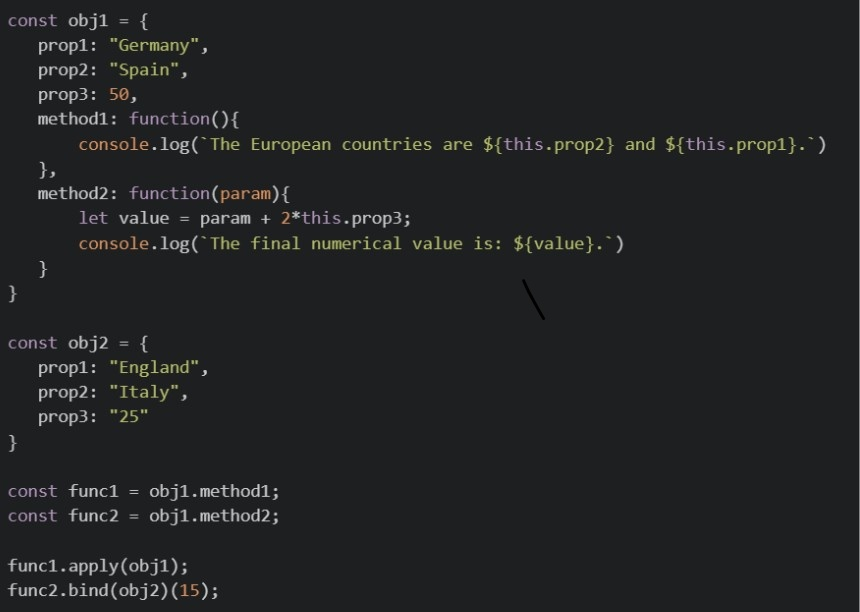 What will be the output of the above code on the browsers’ console?
Text of the picture (copyable)
```javascript
const obj1 = {
    prop1: "Germany",
    prop2: "Spain",
    prop3: 50,
    method1: function(){
        console.log(`The European countries are ${this.prop2} and ${this.prop1}.`)
    },
    method2: function(param){
        let value = param + 2*this.prop3;
        console.log(`The final numerical value is: ${value}.`)
    }
}

const obj2 = {
    prop1: "England",
    prop2: "Italy",
    prop3: "25"
}

const func1 = obj1.method1;
const func2 = obj1.method2;

func1.apply(obj1);
func2.bind(obj2)(15);
```- The European countries are Spain and Germany. The final numerical value is: 115.
- The European countries are Italy and England. The final numerical value is: 65.
- The European countries are Spain and Germany. The final numerical value is: 65.
- The European countries are Italy and England. The final numerical value is: 115.
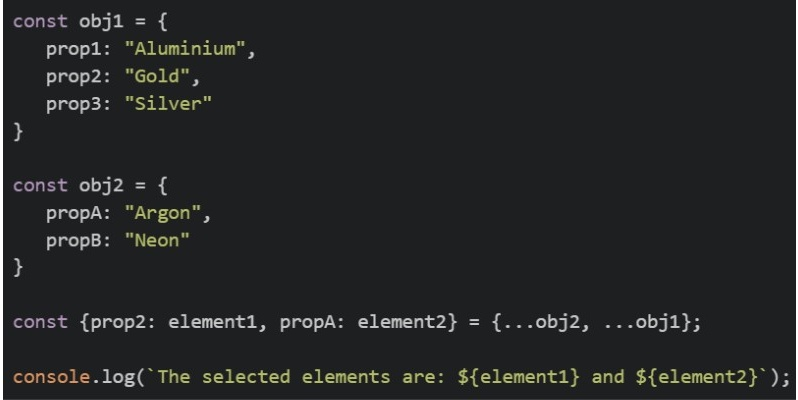 What will be the output of the above code on the browsers’ console?
Text of the picture (copyable)
```javascript
const obj1 = {
    prop1: "Aluminium",
    prop2: "Gold",
    prop3: "Silver"
}

const obj2 = {
    propA: "Argon",
    propB: "Neon"
}

const {prop2: element1, propA: element2} = {...obj2, ...obj1};

console.log(`The selected elements are: ${element1} and ${element2}`);
```- The selected elements are: Gold and Argon
- The selected elements are: Aluminium and Silver
- The selected elements are: Argon and Neon
- The selected elements are: Gold and Neon
- The selected elements are: Argon and Gold
- v-show → fetching api
- v-for → Iteration over lists
- v-bind → Conditional rendering
- v-model → Event handling only
 and inside the child:
 Which statements are correct?
Text of the picture (copyable)
```html
<child-box :message="parentMsg" @reply="handleReply"></child-box>
```
```javascript
this.$emit('reply', 'ok')
``` flows from parent to child through props.
text
message
 is a custom event sent from child to parent.
text
reply
- The child should directly change to update the parent source of truth.
text
message
- If
 changes in the parent, the child can receive the updated prop value.
text
parentMsg
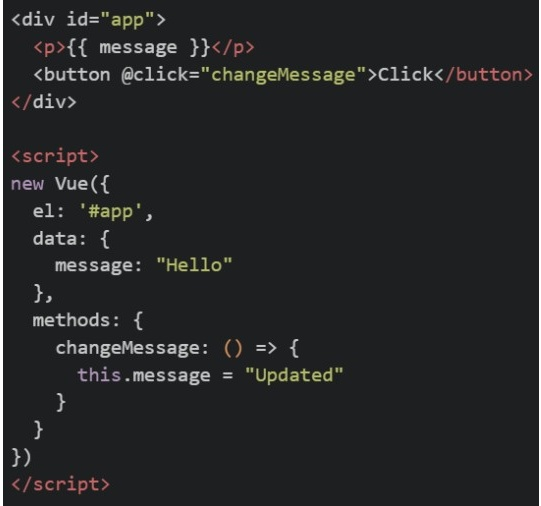 Why does the value not update correctly when the button is clicked?
Text of the picture (copyable)
```html
<div id="app">
<p>{{ message }}</p>
<button @click="changeMessage">Click</button>
</div>
<script>
new Vue({
el: '#app',
data: {
message: "Hello"
},
methods: {
changeMessage: () => {
this.message = "Updated"
}
}
})
</script>
```
message should be used instead of
text
v-on
```
@click
```
- Arrow functions do not bind their own

text
this
 should be a function in all Vue instances
text
data
- Vue.js does not support external methods
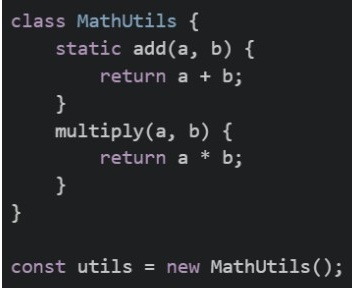 Which of the following statements is/are correct?
Text of the picture (copyable)
```javascript
class MathUtils {
static add(a, b) {
return a + b;
}
multiply(a, b) {
return a * b;
}
}
const utils = new MathUtils();
``` will work correctly and return 8
text
```
MathUtils.add(5, 3)
```
 will work correctly and return 8
text
```
utils.add(5, 3)
```
 will work correctly and return 15
text
```
utils.multiply(5, 3)
```
 will work correctly and return 15
text
```
MathUtils.multiply(5, 3)
```
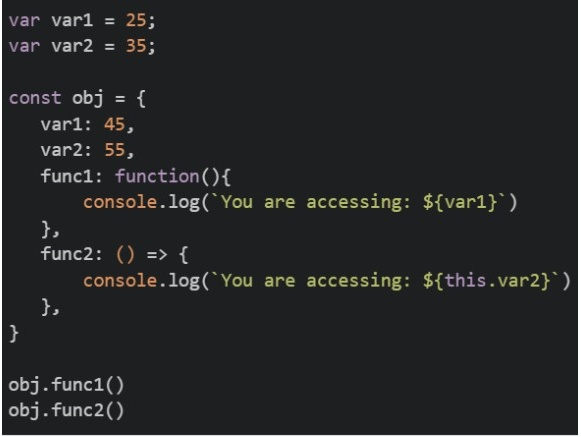 What will be the output of the above code on the browsers’ console?
Text of the picture (copyable)
```javascript
var var1 = 25;
var var2 = 35;

const obj = {
    var1: 45,
    var2: 55,
    func1: function(){
        console.log(`You are accessing: ${var1}`)
    },
    func2: () => {
        console.log(`You are accessing: ${this.var2}`)
    },
}

obj.func1()
obj.func2()
```- You are accessing: 45 You are accessing: 55
- You are accessing: 25 You are accessing: 35
- You are accessing: 25 You are accessing: 55
- You are accessing: 45 You are accessing: 35
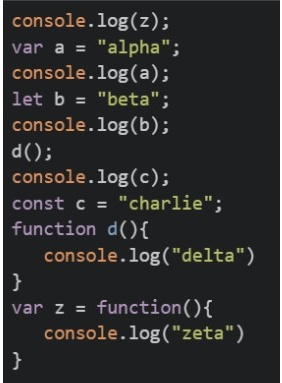 What will be the output of the above code on the browsers’ console in correct order?
Text of the picture (copyable)
```javascript
console.log(z);
var a = "alpha";
console.log(a);
let b = "beta"
console.log(b);
d();
console.log(c);
const c = "charlie"
function d(){
    console.log("delta")
}
var z = function(){
    console.log("zeta")
}
```- undefined alpha beta delta Reference Error
- zeta undefined beta delta Reference Error
- undefined Reference Error beta charlie undefined
- zeta Reference Error beta charlie undefined
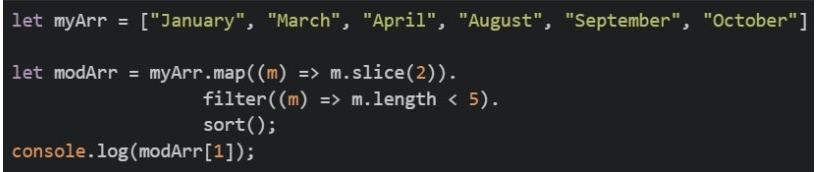 What will be the output of the above code on the browsers’ console?
Text of the picture (copyable)
```javascript
let myArr = ["January", "March", "April", "August", "September", "October"]

let modArr = myArr.map((m) => m.slice(2)).
    filter((m) => m.length < 5).
    sort();

console.log(modArr[1]);
```- ['gust', 'rch', 'ril']
- ['rch', 'ril', 'gust']
- ril
- rch
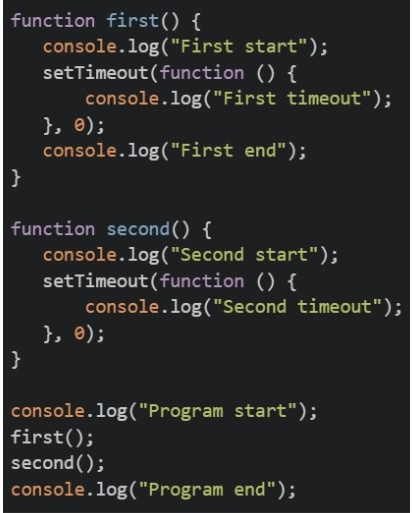 What will be the output of the above code on the browsers’ console?
Text of the picture (copyable)
```javascript
function first() {
  console.log("First start");
  setTimeout(function () {
    console.log("First timeout");
  }, 0);
  console.log("First end");
}

function second() {
  console.log("Second start");
  setTimeout(function () {
    console.log("Second timeout");
  }, 0);
}

console.log("Program start");
first();
second();
console.log("Program end");
```- Program start First start First timeout First end Second start Second timeout Program end
- Program start First start First end First timeout Second start Second timeout Program end
- Program start First timeout First start First end Second timeout Second start Program end
- Program start First start First end Second start Program end First timeout Second timeout
Answer key
- Q1 (MSQ, 2 marks): A, D
- Q2 (MSQ, 2 marks): A, B, D
- Q3 (MSQ, 2 marks): A, B, D
- Q4 (MCQ, 3 marks): B
- Q5 (MCQ, 3 marks): A
- Q6 (MCQ, 3 marks): C
- Q7 (MCQ, 3 marks): C
- Q8 (MCQ, 3 marks): A
- Q9 (MCQ, 2 marks): B
- Q10 (MSQ, 3 marks): A, B, D
- Q11 (MSQ, 3 marks): B
- Q12 (MSQ, 3 marks): A, C
- Q13 (MCQ, 4.5 marks): B
- Q14 (MCQ, 4.5 marks): A
- Q15 (MCQ, 4.5 marks): D
- Q16 (MCQ, 4.5 marks): D
Concepts this paper tests
Auto-generated summary from the source site. Handy as a checklist; the lessons above explain each idea from scratch.
The questions provided cover fundamental and advanced concepts in JavaScript and frontend development with Vue.js. No specific mathematical equations were required for solving these questions, but a strong foundation in logical reasoning and problem-solving, which are core to mathematics, is essential for software engineering.
Summary of Core Topics and Concepts
I. JavaScript Fundamentals
Variables and Scope (
var,let,const):var: Function-scoped (or global), hoisted and initialized withundefined. Accessing it before its declaration within its scope will result inundefined.letandconst: Block-scoped, not hoisted in the same way asvar. They exist in a Temporal Dead Zone (TDZ) from the start of their block until their declaration. Accessing them before declaration/initialization results in aReferenceError.constadditionally requires immediate initialization and its value cannot be reassigned.- Variable Shadowing: Declaring a variable with the same name in an inner scope, effectively hiding the outer scope's variable.
Functions and
thisContext:- Function Declarations vs. Expressions: Understanding the hoisting behavior.
- Arrow Functions (
=>): Do not bind their ownthis,arguments,super, ornew.target. They inheritthisfrom their lexical (enclosing) scope. This is a common pitfall in object methods or Vue.js methods if not used carefully. Regular Functions (
function): Thethiskeyword's value is determined by how the function is called.- Method call:
obj.method(),thisrefers toobj. - Simple call:
func(),thisrefers to the global object (e.g.,windowin browsers) orundefinedin strict mode.
- Method call:
Explicit
thisBinding (call,apply,bind):func.apply(thisArg, [argsArray]): Calls the function with a specifiedthiscontext and arguments provided as an array.func.bind(thisArg, arg1, ...): Returns a new function withthispermanently bound tothisArgand initial arguments. It does not call the function immediately.
Objects and Destructuring:
- Object Literals: Basic creation of objects.
- Object Destructuring: Extracting properties from objects into distinct variables, including renaming properties (e.g.,
{ propName: newVarName }). - Spread Syntax (
...) for Objects: Merging objects. When multiple objects are spread, properties with the same key in later objects overwrite those in earlier ones.
Arrays and Higher-Order Methods:
array.map(callbackFunction): Creates a new array populated with the results of calling a providedcallbackFunctionon every element in the calling array.array.filter(callbackFunction): Creates a new array with all elements that pass the test implemented by the providedcallbackFunction.array.sort(compareFunction): Sorts the elements of an array in place and returns the sorted array. For strings, it sorts lexicographically by default. For numbers, acompareFunctionis crucial.string.slice(startIndex, endIndex): Extracts a section of a string and returns it as a new string, without modifying the original.- Method Chaining: Combining multiple array methods sequentially.
Asynchronous JavaScript and Event Loop:
- Event Loop: The core mechanism that enables asynchronous behavior. It continuously checks if the Call Stack is empty and if the Callback Queue (or Microtask Queue) has any pending tasks to push to the Call Stack.
- Call Stack: Where synchronous JavaScript code is executed.
- Web APIs: Browser-provided APIs (like
setTimeout, DOM events) that handle asynchronous tasks. - Callback Queue (Macrotasks): Where callbacks from Web APIs (e.g.,
setTimeoutcallbacks) are placed after their asynchronous operation completes. setTimeout(callback, delay): Schedules acallbackto be executed after at leastdelaymilliseconds. Even withdelay = 0, thecallbackis placed in the Callback Queue and executes only after the current Call Stack is empty.
Classes and Object-Oriented Programming (OOP):
classSyntax: Blueprint for creating objects.staticMethods: Belong to the class itself, not to instances of the class. They are called directly on the class (ClassName.staticMethod()).- Instance Methods: Belong to individual instances of the class. They are called on an instance (
instance.method()).
JavaScript Runtimes:
- Understanding that different environments (e.g., browser, Node.js) provide different global objects and APIs (e.g.,
documentis browser-specific,setTimeoutis globally available in both but managed by different underlying mechanisms).
- Understanding that different environments (e.g., browser, Node.js) provide different global objects and APIs (e.g.,
II. Frontend Frameworks (Vue.js)
Component-Based Architecture:
- Advantages: Promotes code reusability, improves maintainability, simplifies UI management by breaking it into smaller, manageable pieces.
Vue Directives:
v-show: Toggles the CSSdisplayproperty of an element. The element is always rendered to the DOM.v-for: Used for iterating over a list (e.g., an array or object) to render multiple elements or components.v-bind(:shorthand): One-way binding for HTML attributes or component props. It binds an expression to an attribute, keeping it in sync with the component's data.v-model: Primarily used for two-way data binding on form input elements. It's a syntactic sugar forv-bind:valueandv-on:input(orv-on:changeetc.).
Component Communication:
- Props: The primary mechanism for parent-to-child communication (
:message="parentMsg"). Props are one-way data flow; child components should not directly modify a prop received from the parent. - Custom Events (
this.$emit): The mechanism for child-to-parent communication. A child component emits a named event, which the parent component can listen to (@reply="handleReply") and react to.
- Props: The primary mechanism for parent-to-child communication (
- Component Lifecycle: Understanding basic hooks (e.g.,
mountedfor when a component is attached to the DOM,updatedfor when data changes and the component re-renders). - Reactivity System: Vue's core mechanism for tracking changes to data and automatically updating the DOM. This is implicitly tested in questions about prop updates and method calls.
thisContext in Vue Methods: Within a Vue instance'smethodsobject,thistypically refers to the Vue instance itself. Using arrow functions as methods directly in a Vue instance'smethodsproperty can lead to incorrectthisbinding because arrow functions lexically bindthisto the context in which they are defined (which would be the globalwindowobject orundefinedin strict mode, not the Vue instance).
III. Mathematical Equations & Principles
No specific mathematical equations were required for these questions. The relevance of mathematics lies in the underlying logical structures of programming and problem-solving.