Home / Past papers / MAD2 End Term / this paper
IIT M DIPLOMA AN EXAM QDD4 13 Apr 2025 - 13 Apr 2025
- "this" always refers to the function it is declared in.
- Arrow functions inherit "this" from their enclosing lexical scope.
- "this" inside a class method always refers to the window object.
- None of these
- beforeCreate -> created -> beforeMount -> mounted -> beforeUpdate ->updated -> beforeUnmount -> unmounted
- beforeCreate -> created -> beforeMount -> beforeUpdate -> mounted ->updated -> beforeUnmount -> unmounted
- created -> beforeCreate -> beforeMount -> mounted -> updated ->beforeUnmount -> unmounted
- created -> beforeCreate -> beforeMount -> mounted -> beforeUnmount ->updated -> unmounted
Text of the picture (copyable)
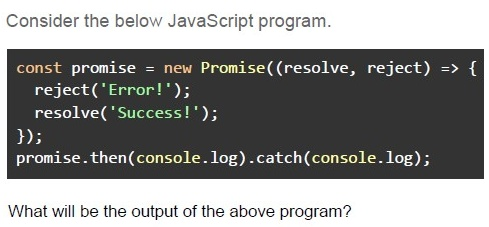
Consider the below JavaScript program.

```javascript
const promise = new Promise(((resolve, reject) => {
  reject('Error!');
  resolve('Success!');
}));
promise.then(console.log).catch(console.log);
```

What will be the output of the above program?- Success!Failed!
- Success!
- Failed!
- Error!
- JWTs require storing tokens on the server, reducing security risks.
- JWTs are stateless and do not require server-side storage.
- JWTs are shorter and more efficient than session IDs.
- JWTs automatically expire and require no further security measures.
- GET
- POST
- PUT
- PATCH
- A webhook is triggered by an event, while an API call requires a client request.
- A webhook always returns a response body, while an API call does not.
- A webhook uses WebSockets for communication, while APIs use REST.
- A webhook only supports the HTTP GET method.
- To allow browsers to make requests to any domain without restrictions.
- To prevent the server from making requests to unauthorized origins.
- To allow a web application to request resources from a different domainsecurely.
- To restrict all incoming requests to the same domain.
Text of the picture (copyable)
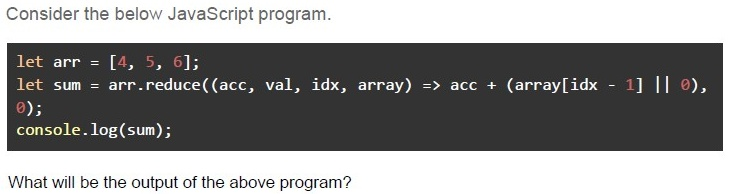
Consider the below JavaScript program.

```javascript
let arr = [4, 5, 6];
let sum = arr.reduce((acc, val, idx, array) => acc + (array[idx - 1] || 0),
0);
console.log(sum);
```

What will be the output of the above program?
- 6
- NaN
- undefined
- 9
- 15
Text of the picture (copyable)
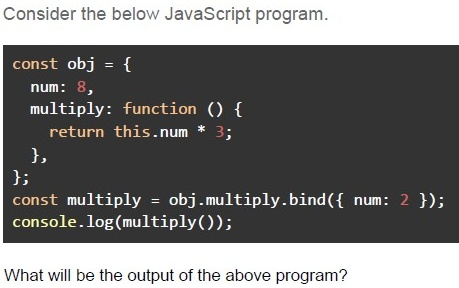
Consider the below JavaScript program.

```javascript
const obj = {
  num: 8,
  multiply: function () {
    return this.num * 3;
  },
};
const multiply = obj.multiply.bind({ num: 2 });
console.log(multiply());
```

What will be the output of the above program?- 24
- 6
- NaN
- NULL
- Error
Text of the picture (copyable)
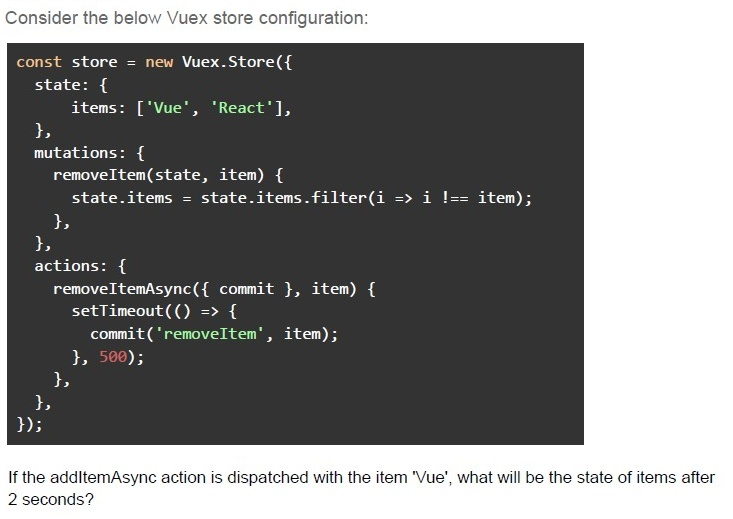
Consider the below Vuex store configuration:

```javascript
const store = new Vuex.Store({
  state: {
    items: ['Vue', 'React'],
  },
  mutations: {
    removeItem(state, item) {
      state.items = state.items.filter(i => i !== item);
    },
  },
  actions: {
    removeItemAsync({ commit }, item) {
      setTimeout(() => {
        commit('removeItem', item);
      }, 500);
    },
  },
});
```

If the addItemAsync action is dispatched with the item 'Vue', what will be the state of items after 2 seconds?- []
- [ 'Vu', 'React' ]
- [ 'React' ]
- [ object ]
Text of the picture (copyable)
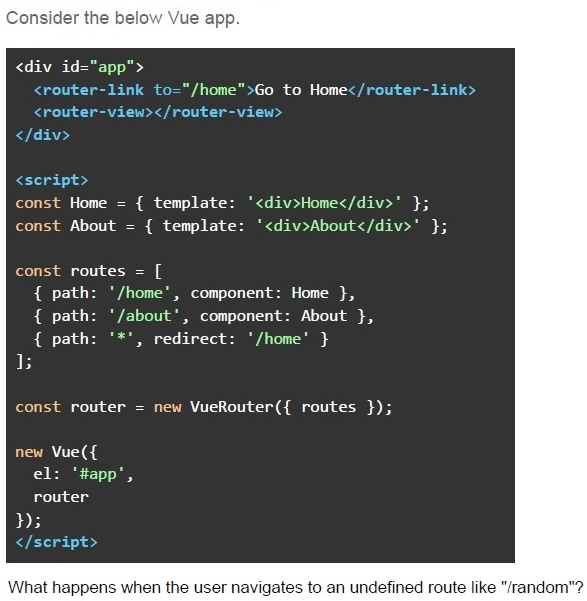
Consider the below Vue app.

```html
<div id="app">
  <router-link to="/home">Go to Home</router-link>
  <router-view></router-view>
</div>

<script>
  const Home = { template: '<div>Home</div>' };
  const About = { template: '<div>About</div>' };

  const routes = [
    { path: '/home', component: Home },
    { path: '/about', component: About },
    { path: '*', redirect: '/home' }
  ];

  const router = new VueRouter({ routes });

  new Vue({
    el: '#app',
    router
  });
</script>
```

What happens when the user navigates to an undefined route like "/random"?- Browser navigates to /random and shows a blank page.
- Browser navigates to /random but renders nothing.
- Browser redirects to /home and displays "Home".
- Error: No matching route.
Text of the picture (copyable)
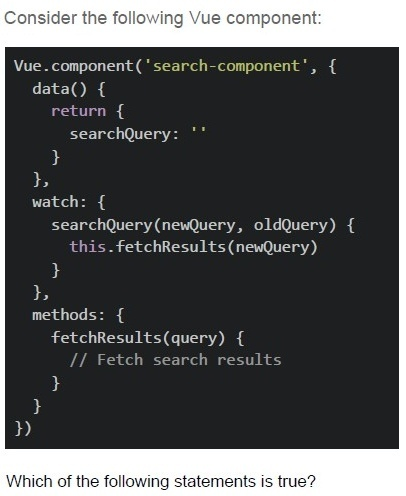
Consider the following Vue component:

```javascript
Vue.component('search-component', {
  data() {
    return {
      searchQuery: ''
    }
  },
  watch: {
    searchQuery(newQuery, oldQuery) {
      this.fetchResults(newQuery)
    }
  },
  methods: {
    fetchResults(query) {
      // Fetch search results
    }
  }
})
```

Which of the following statements is true?- The fetchResults method will be called immediately when the component iscreated.
- The fetchResults method will be called only when searchQuery changes.
- The watch property can detect changes even if the new value is the same asthe old value.
- All of these.
- A real-time chat application that requires low-latency message delivery.
- A weather API that provides instant weather data upon request.
- A system where a webhook sends an immediate notification to a client whenan event occurs.
- A system where a user uploads a video, and it needs to be processedasynchronously.
Text of the picture (copyable)
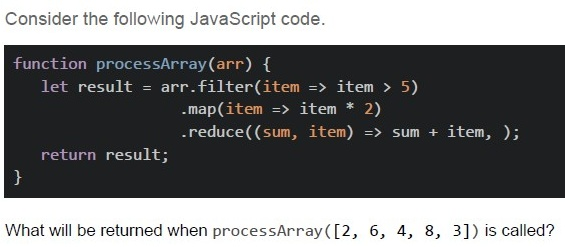
Consider the following JavaScript code.

```javascript
function processArray(arr) {
  let result = arr.filter(item => item > 5)
    .map(item => item * 2)
    .reduce((sum, item) => sum + item, );
  return result;
}
```

What will be returned when processArray([2, 6, 4, 8, 3]) is called?- [12, 16]
- 28
- 46
- [6, 8]
Text of the picture (copyable)
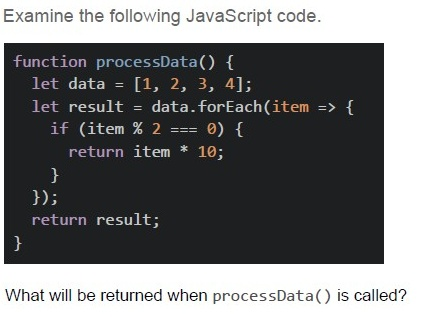
Examine the following JavaScript code.

```javascript
function processData() {
  let data = [1, 2, 3, 4];
  let result = data.forEach(item => {
    if (item % 2 === 0) {
      return item * 10;
    }
  });
  return result;
}
```

What will be returned when processData() is called?- [20, 40]
- [1, 20, 3, 40]
- [10, 20, 30, 40]
- undefined
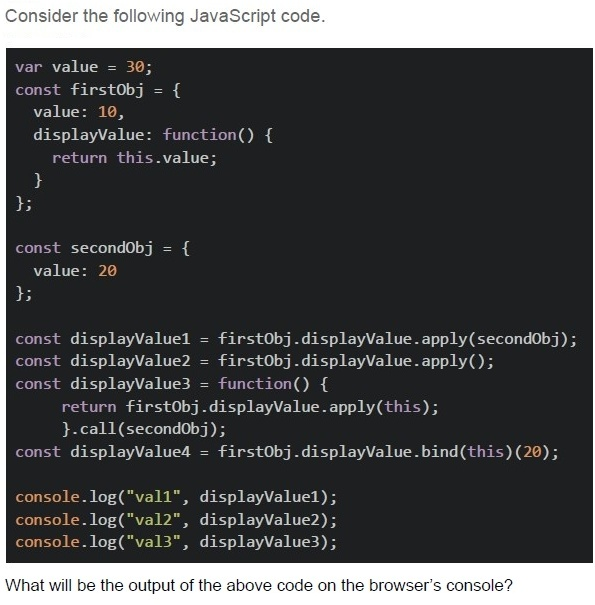
Text of the picture (copyable)
Consider the following JavaScript code.

```javascript
var value = 30;
const firstObj = {
  value: 10,
  displayValue: function() {
    return this.value;
  }
};

const secondObj = {
  value: 20
};

const displayValue1 = firstObj.displayValue.apply(secondObj);
const displayValue2 = firstObj.displayValue.apply();
const displayValue3 = function() {
  return firstObj.displayValue.apply(this);
}.call(secondObj);
const displayValue4 = firstObj.displayValue.bind(this)(20);

console.log("val1", displayValue1);
console.log("val2", displayValue2);
console.log("val3", displayValue3);
```

What will be the output of the above code on the browser's console?- 10, 30, 20
- 20, undefined, 20
- 20, 30, 20
- 20, 30, 10
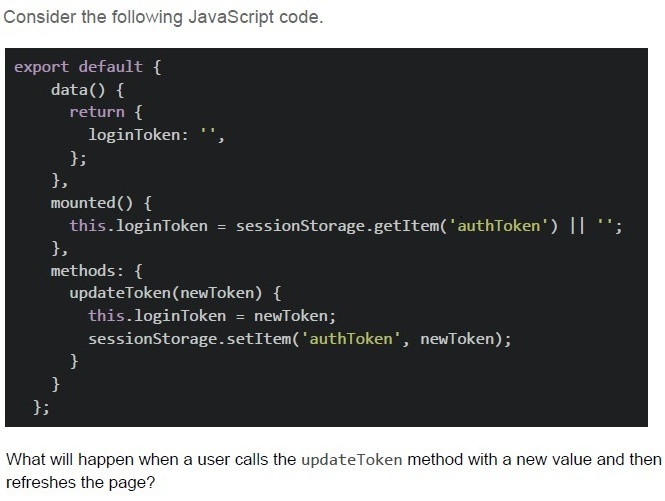
Text of the picture (copyable)
Consider the following JavaScript code.

```javascript
export default {
  data() {
    return {
      loginToken: '',
    };
  },
  mounted() {
    this.loginToken = sessionStorage.getItem('authToken') || '';
  },
  methods: {
    updateToken(newToken) {
      this.loginToken = newToken;
      sessionStorage.setItem('authToken', newToken);
    }
  }
};
```

What will happen when a user calls the updateToken method with a new value and then refreshes the page?
text
The new token will be lost, and the "loginToken" data property will be reset to an empty string.

text
The new token will be preserved in session storage, and the "LoginToken" data property will be populated with the stored value on page refresh.

text
The method will throw an error because sessionStorage cannot be modified directly.

text
The "loginToken" data property will be updated, but the session storage will remain unchanged.
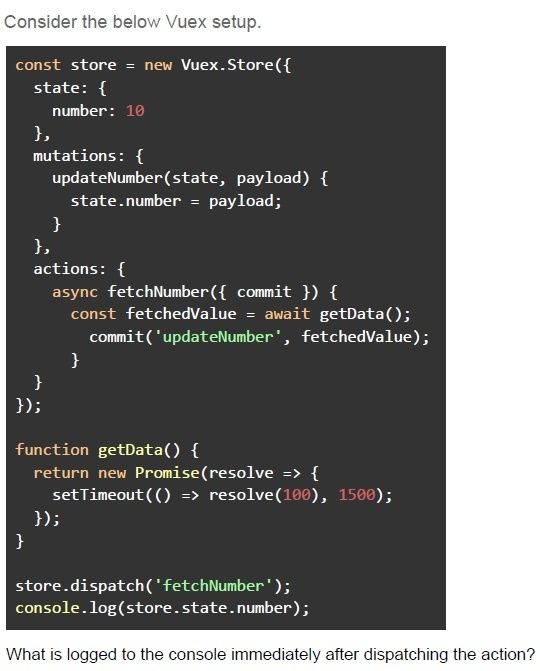
Text of the picture (copyable)
Consider the below Vuex setup.

```javascript
const store = new Vuex.Store({
  state: {
    number: 10
  },
  mutations: {
    updateNumber(state, payload) {
      state.number = payload;
    }
  },
  actions: {
    async fetchNumber({ commit }) {
      const fetchedValue = await getData();
      commit('updateNumber', fetchedValue);
    }
  }
});

function getData() {
  return new Promise(resolve => {
    setTimeout(() => resolve(100), 1500);
  });
}

store.dispatch('fetchNumber');
console.log(store.state.number);
```

What is logged to the console immediately after dispatching the action?- 0
- 10
- 100
- Undefined behavior
- Error: Action did not resolve
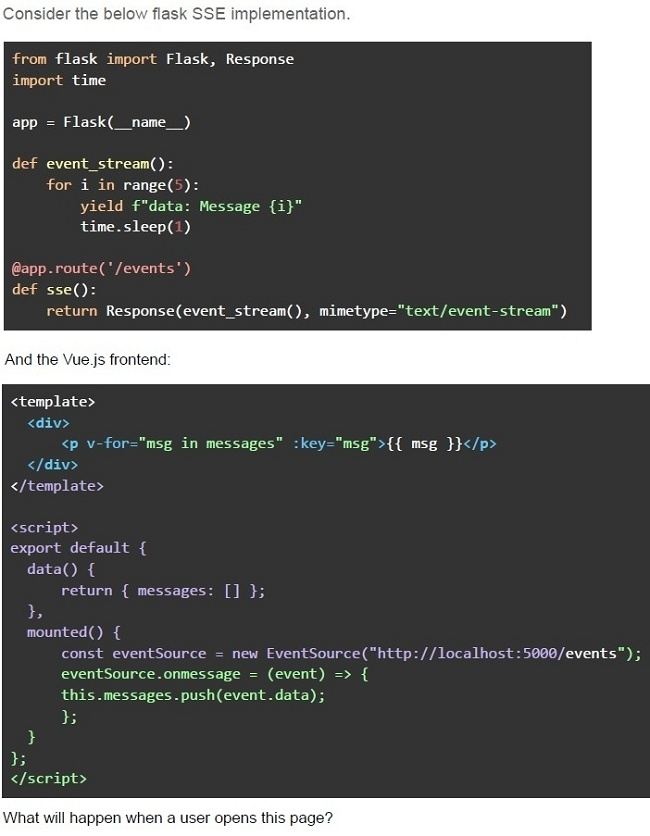
Text of the picture (copyable)
Consider the below flask SSE implementation.

```python
from flask import Flask, Response
import time

app = Flask(__name__)

def event_stream():
    for i in range(5):
        yield f"data: Message {i}"
        time.sleep(1)

@app.route('/events')
def sse():
    return Response(event_stream(), mimetype="text/event-stream")
```

And the Vue.js frontend:

```html
<template>
  <div>
    <p v-for="msg in messages" :key="msg">{{ msg }}</p>
  </div>
</template>

<script>
export default {
  data() {
    return { messages: [] };
  },
  mounted() {
    const eventSource = new EventSource("http://localhost:5000/events");
    eventSource.onmessage = (event) => {
      this.messages.push(event.data);
    };
  },
};
</script>
```

What will happen when a user opens this page?- The client will receive 5 messages, one per second.
- The client will receive all 5 messages instantly.
- The client will not receive any messages due to CORS issues.
- The server will crash because Flask cannot handle SSE.
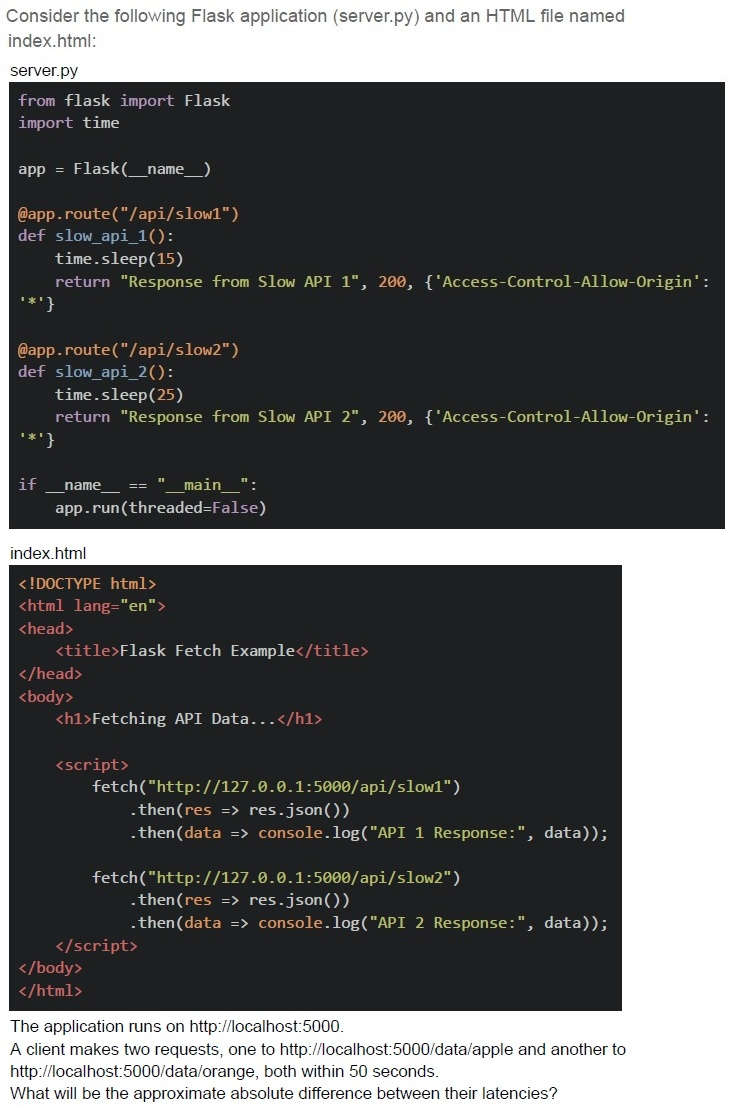
Text of the picture (copyable)
Consider the following Flask application (server.py) and an HTML file named index.html:

server.py
```python
from flask import Flask
import time

app = Flask(__name__)

@app.route("/api/slow1")
def slow_api_1():
    time.sleep(15)
    return "Response from Slow API 1", 200, {'Access-Control-Allow-Origin': '*'}

@app.route("/api/slow2")
def slow_api_2():
    time.sleep(25)
    return "Response from Slow API 2", 200, {'Access-Control-Allow-Origin': '*'}

if __name__ == "__main__":
    app.run(threaded=False)
```

index.html
```html
<!DOCTYPE html>
<html lang="en">
<head>
    <title>Flask Fetch Example</title>
</head>
<body>
    <h1>Fetching API Data...</h1>

    <script>
        fetch("http://127.0.0.1:5000/api/slow1")
            .then(res => res.json())
            .then(data => console.log("API 1 Response:", data));

        fetch("http://127.0.0.1:5000/api/slow2")
            .then(res => res.json())
            .then(data => console.log("API 2 Response:", data));
    </script>
</body>
</html>
```

The application runs on http://localhost:5000.
A client makes two requests, one to http://localhost:5000/data/apple and another to http://localhost:5000/data/orange, both within 50 seconds.
What will be the approximate absolute difference between their latencies?- 25 seconds
- 35 seconds
- 0 seconds
- 15 seconds
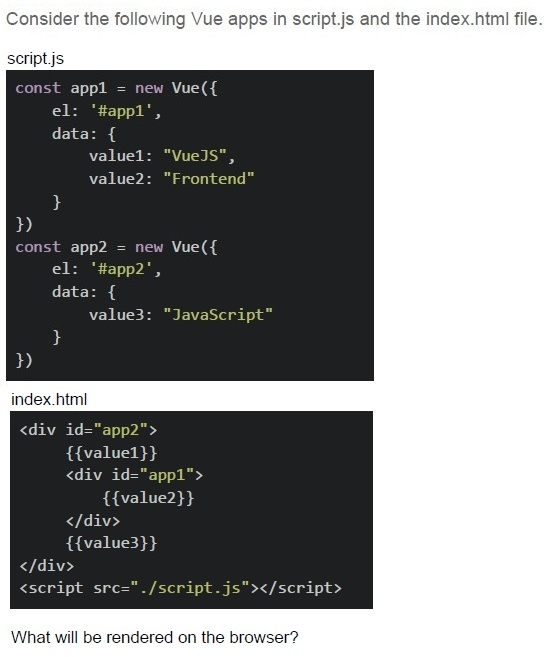
Text of the picture (copyable)
Consider the following Vue apps in script.js and the index.html file.

script.js

```javascript
const app1 = new Vue({
  el: '#app1',
  data: {
    value1: "VueJS",
    value2: "Frontend"
  }
})

const app2 = new Vue({
  el: '#app2',
  data: {
    value3: "JavaScript"
  }
})
```

index.html

```html
<div id="app2">
  {{value1}}
  <div id="app1">
    {{value2}}
  </div>
  {{value3}}
</div>
<script src="./script.js"></script>
```

What will be rendered on the browser?- Frontend
- VueJSFrontend
- VueJSJavaScript
- FrontendJavaScript
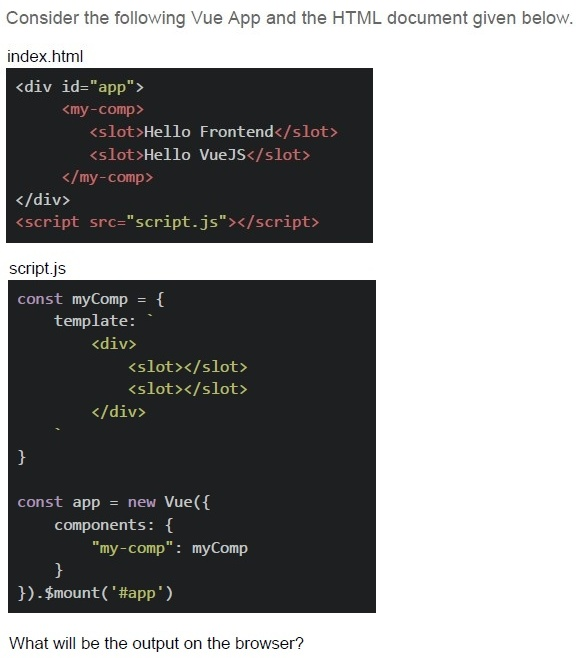
Text of the picture (copyable)
Consider the following Vue App and the HTML document given below.

index.html
```html
<div id="app">
  <my-comp>
    <slot>Hello Frontend</slot>
    <slot>Hello VueJS</slot>
  </my-comp>
</div>
<script src="script.js"></script>
```

script.js
```javascript
const myComp = {
  template: `
    <div>
      <slot></slot>
      <slot></slot>
    </div>
  `
}

const app = new Vue({
  components: {
    "my-comp": myComp
  }
}).$mount('#app')
```

What will be the output on the browser?- Hello Frontend Hello Frontend
- Hello VueJS Hello VueJS
- Hello Frontend Hello Vue JS
- Hello Frontend Hello Vue JS Hello Frontend Hello Vue JS
- item in array
- (item, index) of array
- (item, index) as array
- (item, index) in array
- Item of array
- Faster navigation between pages
- Less strain on the backend server
- Improved SEO by default
- Full-page reloads occur on every navigation
- The client polls the server at regular intervals.
- The client listens to a WebSocket stream.
- The client registers an “onmessage” event listener on the EventSource object.
- The client sends a POST request for each new event.
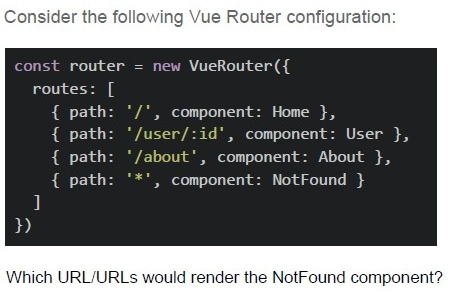
Text of the picture (copyable)
Consider the following Vue Router configuration:

```javascript
const router = new VueRouter({
  routes: [
    { path: '/', component: Home },
    { path: '/user/:id', component: User },
    { path: '/about', component: About },
    { path: '*', component: NotFound }
  ]
})
```

Which URL/URLs would render the NotFound component?- /user
- /user/123
- /contact
- /about/team
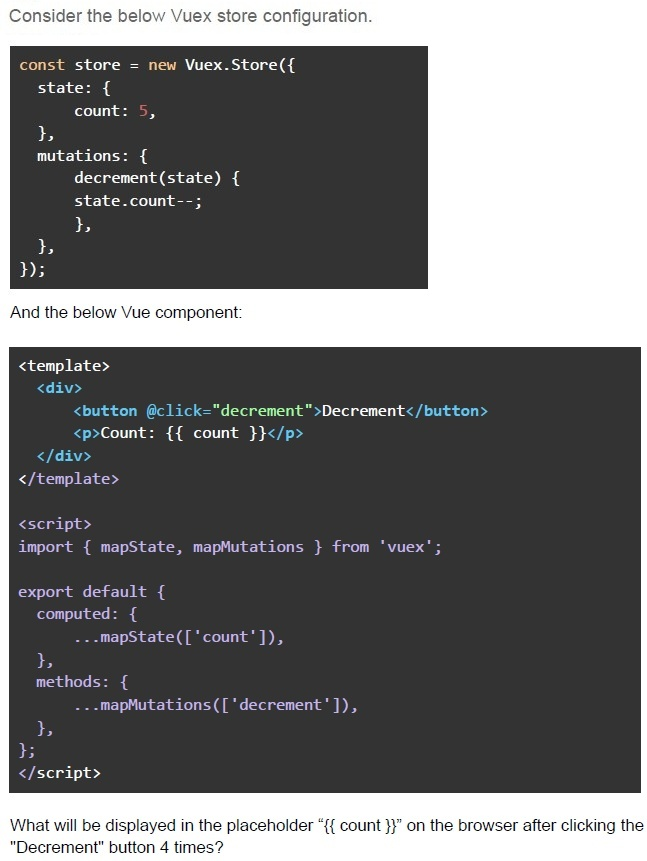
Text of the picture (copyable)
Consider the below Vuex store configuration.

```javascript
const store = new Vuex.Store({
  state: {
    count: 5,
  },
  mutations: {
    decrement(state) {
      state.count--;
    },
  },
});
```

And the below Vue component:

```html
<template>
  <div>
    <button @click="decrement">Decrement</button>
    <p>Count: {{ count }}</p>
  </div>
</template>

<script>
  import { mapState, mapMutations } from 'vuex';

  export default {
    computed: {
      ...mapState(['count']),
    },
    methods: {
      ...mapMutations(['decrement']),
    },
  };
</script>
```

What will be displayed in the placeholder "{{ count }}" on the browser after clicking the "Decrement" button 4 times?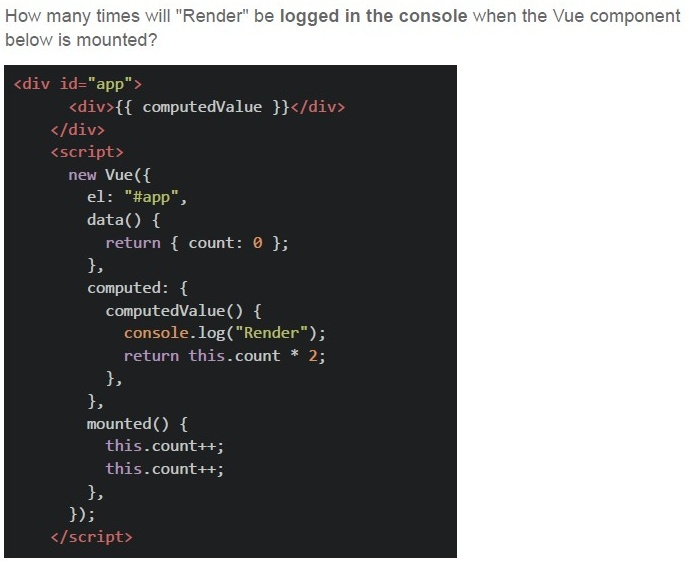
Text of the picture (copyable)
How many times will "Render" be logged in the console when the Vue component below is mounted?

```html
<div id="app">
  <div>{{ computedValue }}</div>
</div>
<script>
  new Vue({
    el: "#app",
    data() {
      return { count: 0 };
    },
    computed: {
      computedValue() {
        console.log("Render");
        return this.count * 2;
      },
    },
    mounted() {
      this.count++;
      this.count++;
    },
  });
</script>
```
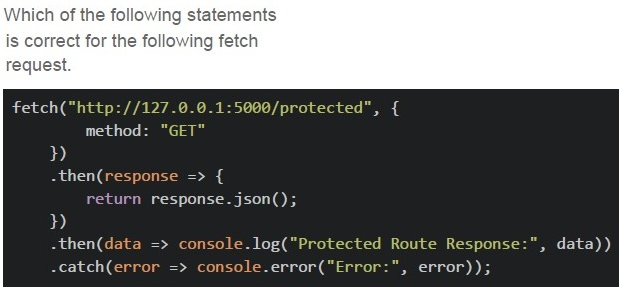
Text of the picture (copyable)
Which of the following statements
is correct for the following fetch
request.

```javascript
fetch("http://127.0.0.1:5000/protected", {
    method: "GET"
})
.then(response => {
    return response.json();
})
.then(data => console.log("Protected Route Response:", data))
.catch(error => console.error("Error:", error));
```
text
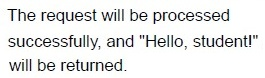
The request will be processed
successfully, and "Hello, student!"
will be returned.
text
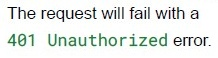
The request will fail with a
401 Unauthorized error.

text
The request will return an empty
response with a 200 OK status.
text
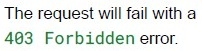
The request will fail with a
403 Forbidden error.
Text of the picture (copyable)
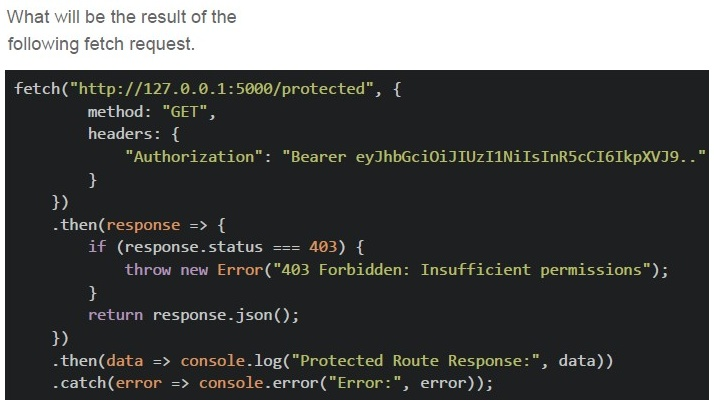
What will be the result of the
following fetch request.

```javascript
fetch("http://127.0.0.1:5000/protected", {
    method: "GET",
    headers: {
        "Authorization": "Bearer eyJhbGciOiJIUzI1NiIsInR5cCI6IkpXVCJ9.."
    }
})
.then(response => {
    if (response.status === 403) {
        throw new Error("403 Forbidden: Insufficient permissions");
    }
    return response.json();
})
.then(data => console.log("Protected Route Response:", data))
.catch(error => console.error("Error:", error));
```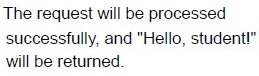
text
The request will be processed
successfully, and "Hello, student!"
will be returned.
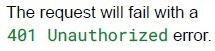
text
The request will fail with a
401 Unauthorized error.
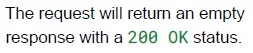
text
The request will return an empty response with a 200 OK status.
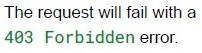
text
The request will fail with a
403 Forbidden error.
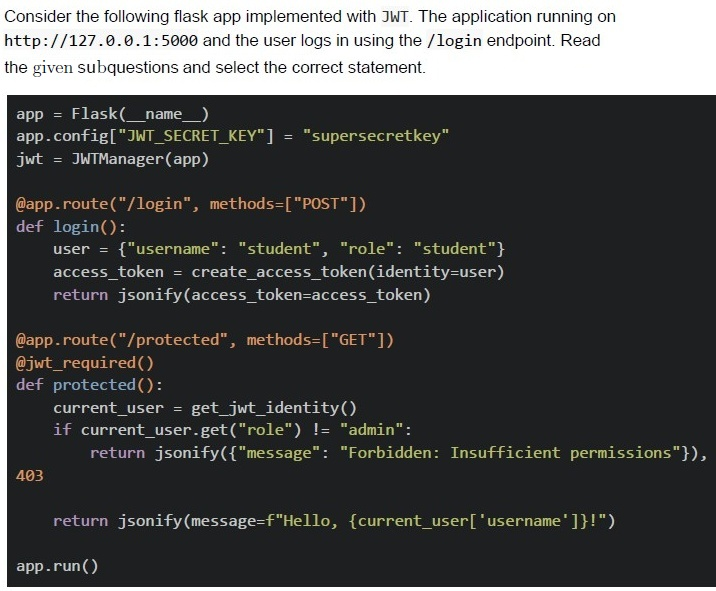
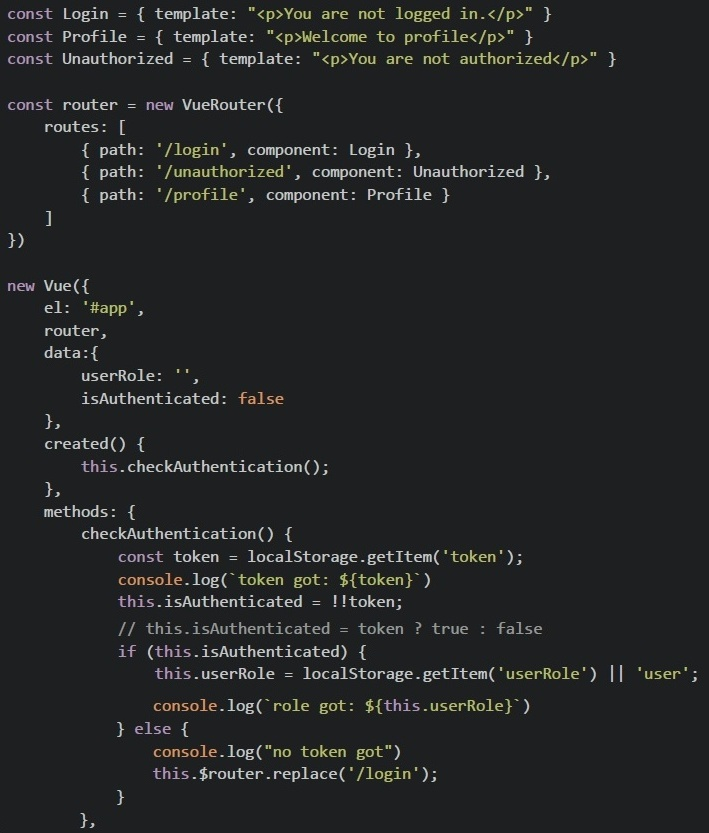 Consider the following Vue app with the Vue Router shown below and answer the given subquestions.
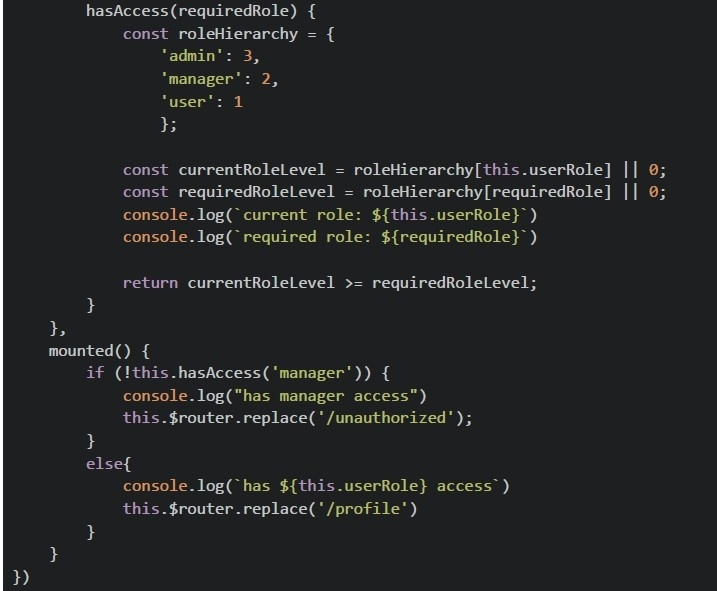 Consider the following Vue app with the Vue Router shown below and answer the given subquestions.
- You are not logged in.
- Welcome to profile
- You are not authorized.
- None of these.
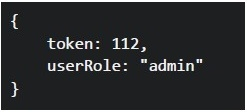 What will be rendered on the browser for the given value of localStorage?
Text of the picture (copyable)
```json
{
  "token": 112,
  "userRole": "admin"
}
```- You are not logged in.
- Welcome to profile
- You are not authorized.
- None of these.
Answer key
- Q1 (MCQ, 2 marks): B
- Q2 (MCQ, 2 marks): A
- Q3 (MCQ, 2 marks): C
- Q4 (MCQ, 2 marks): B
- Q5 (MCQ, 2 marks): A
- Q6 (MCQ, 2 marks): A
- Q7 (MCQ, 2 marks): C
- Q8 (MCQ, 3 marks): D
- Q9 (MCQ, 3 marks): B
- Q10 (MCQ, 3 marks): C
- Q11 (MCQ, 3 marks): C
- Q12 (MCQ, 3 marks): B
- Q13 (MCQ, 3 marks): D
- Q14 (MCQ, 3 marks): B
- Q15 (MCQ, 3 marks): D
- Q16 (MCQ, 3 marks): C
- Q17 (MCQ, 3 marks): B
- Q18 (MCQ, 4.5 marks): B
- Q19 (MCQ, 4.5 marks): A
- Q20 (MCQ, 4.5 marks): C
- Q21 (MCQ, 4.5 marks): D
- Q22 (MCQ, 4.5 marks): D
- Q23 (MSQ, 2 marks): A, D
- Q24 (MSQ, 3 marks): A, B
- Q25 (MSQ, 3 marks): C
- Q26 (MSQ, 3 marks): A, C, D
- Q27 (SA, 4.5 marks): 1
- Q28 (SA, 3 marks): 2
- Q29 (MCQ, 3 marks): B
- Q30 (MCQ, 4.5 marks): D
- Q31 (MCQ, 4.5 marks): C
- Q32 (MCQ, 3 marks): B
Concepts this paper tests
Auto-generated summary from the source site. Handy as a checklist; the lessons above explain each idea from scratch.
Here’s a structured summary of the core topics, concepts, and principles essential for the "Diploma Level: Modern Application Development II" exam, along with a Mermaid knowledge graph to visualize relationships.
Core Topics & Concepts
1. JavaScript Fundamentals
thisKeyword:- In regular functions: Refers to the object calling the function.
- In arrow functions: Inherits
thisfrom the enclosing lexical scope (parent scope). - In class methods: Refers to the instance of the class (unless bound otherwise).
- Key Point: Arrow functions do not have their own
this; they inherit it. Example:
const obj = { num: 2, multiply: () => this.num * 2 }; // `this` is global/window (undefined in strict mode).
Promises & Async/Await:
- A
Promiserepresents an asynchronous operation (pending/fulfilled/rejected). .then()handles fulfillment,.catch()handles rejection.- If a
Promiserejects and resolves, the first call (reject/resolve) takes precedence. Example:
const promise = new Promise((resolve, reject) => {
  reject("Error!"); // This executes first.
  resolve("Success!"); // Ignored.
});
promise.then(console.log).catch(console.log); // Output: "Error!"
- A
Array Methods:
filter(): Returns a new array with elements that pass a test.map(): Transforms each element and returns a new array.reduce(): Reduces an array to a single value (e.g., sum).- Key Point:
forEach()does not return a value (returnsundefined). Example:
[1, 2, 3].reduce((acc, val) => acc + val, 0); // 6
Closures & Scope:
- Functions retain access to their lexical scope even after execution.
Example:
function outer() {
  let x = 10;
  return function inner() { console.log(x); }; // Remembers `x`.
}
bind,call,apply:bind(): Returns a new function with a fixedthisvalue.call()/apply(): Invokes a function with a specificthisand arguments.Example:
const obj = { num: 2 };
function multiply() { return this.num * 2; }
multiply.call(obj); // 4
2. Vue.js
Component Lifecycle:
- Order:
beforeCreate→created→beforeMount→mounted→beforeUpdate→updated→beforeUnmount→unmounted. - Key Point:
createdis where you typically fetch initial data.
- Order:
Vuex (State Management):
- State: Single source of truth (reactive data).
- Mutations: Synchronous state updates (use
commit). - Actions: Asynchronous operations (use
dispatch). - Getters: Computed properties for state.
Example:
mutations: {
  updateState(state, payload) { state.value = payload; }
},
actions: {
  fetchData({ commit }) {
    api.call().then(data => commit("updateState", data));
  }
}
Vue Router:
- Dynamic routes: Use
:param(e.g.,/user/:id). - Wildcard (
*) catches all undefined routes (e.g., redirect to/home). - Navigation guards:
beforeEach,beforeEnter. Example:
routes: [
  { path: "/user/:id", component: User },
  { path: "*", redirect: "/home" }
]
- Dynamic routes: Use
Slots:
- Used for component composition (fallback content if no slot provided).
Example:
<template>
  <slot>Default Content</slot> <!-- Fallback -->
</template>
Computed Properties vs. Watchers:
- Computed: Cached, reactive dependencies (use for derived data).
- Watchers: Run side effects when data changes (e.g., API calls).
Example:
computed: {
  fullName() { return this.firstName + " " + this.lastName; }
},
watch: {
  searchQuery(newVal) { this.fetchResults(newVal); }
}
Directives:
v-for:(item, index) in array(notoforas).v-if/v-show:v-ifremoves DOM element;v-showhides it withdisplay: none.v-bind(:) andv-on(@).
3. Authentication & Security
JWT (JSON Web Tokens):
- Stateless: No server-side storage needed (unlike sessions).
- Structure:
Header.Payload.Signature(Base64-encoded). - Use cases: Authentication, secure API access.
- Key Point: Store tokens in
localStorage(persists) orsessionStorage(cleared on tab close).
CORS (Cross-Origin Resource Sharing):
- Allows restricted resources on a webpage to be requested from another domain.
Headers:
Access-Control-Allow-Origin: Specifies allowed origins.Access-Control-Allow-Methods: Allowed HTTP methods.
- Key Point: Browsers enforce CORS; servers must include proper headers.
OAuth 2.0:
- Delegated authorization (e.g., "Login with Google").
- Roles: Client, Authorization Server, Resource Server.
4. Asynchronous Communication
SSE (Server-Sent Events):
- One-way communication (server → client) over HTTP.
- Uses
EventSourceAPI in the browser. Example:
const eventSource = new EventSource("/events"); eventSource.onmessage = (e) => console.log(e.data);- Key Point: Uses
text/event-streamMIME type.
Webhooks:
- User-defined HTTP callbacks (event-driven).
- Difference from APIs: Webhooks are server-initiated; APIs are client-initiated.
Task Queues (Celery/RabbitMQ):
- Used for asynchronous background tasks (e.g., video processing).
- Key Point: Decouples task execution from the main application.
5. Flask (Python Backend)
Routes & Views:
- Decorators:
@app.route("/path", methods=["GET", "POST"]). Example:
@app.route("/data")
def get_data():
    return jsonify({"key": "value"})
- Decorators:
JWT with Flask:
- Libraries:
flask-jwt-extended. - Protected routes: Use
@jwt_required()decorator. Example:
@app.route("/protected")
@jwt_required()
def protected():
    current_user = get_jwt_identity()
    return jsonify(message=f"Hello, {current_user}!")
- Libraries:
CORS in Flask:
- Use
flask-corsextension. Example:
from flask_cors import CORS
CORS(app, resources={r"/api/*": {"origins": "*"}})
- Use
6. Single Page Applications (SPAs)
Client-Side Routing:
Advantages:
- Faster navigation (no full page reloads).
- Reduced server load.
Disadvantages:
- SEO challenges (search engines may not execute JavaScript).
- Initial load time can be higher.
State Management:
- Vuex/Pinia for Vue.js, Redux for React.
- Key Point: Avoid prop drilling by using a global store.
7. HTTP Methods
- GET: Retrieve data (idempotent, cacheable).
- POST: Submit data (non-idempotent).
- PUT: Replace resource (idempotent).
- PATCH: Partial update (non-idempotent).
- DELETE: Remove resource (idempotent).
Key Equations (Mathematics/Logic)
No direct mathematical equations were present in the questions, but here are logical patterns relevant to the exam:
Promise Resolution:
- If both
resolveandrejectare called, the first call determines the outcome. promise.then().catch()handles fulfillment/rejection.
- If both
Array Reduce:
array.reduce((acc, val) => acc + val, initialValue)- Example:
[1, 2, 3].reduce((acc, val) => acc + val, 0) // 6
Vue Reactivity:
- Computed properties are cached and only re-evaluate when dependencies change.
Graph 1: JavaScript & Vue.js Core Concepts
Graph 2: Authentication & Security
Graph 3: Asynchronous Communication
Exam Preparation Tips
JavaScript:
- Master
this, promises, and array methods (reduceis tricky!). - Practice
bind/call/applyscenarios.
- Master
Vue.js:
- Memorize the component lifecycle order.
- Understand Vuex flow (state → mutations → actions → getters).
- Know router configurations (wildcards, dynamic routes).
Authentication:
- Compare JWT vs. sessions (stateless vs. stateful).
- Know where to store tokens (
localStoragevs.sessionStorage).
Asynchronous Patterns:
- Differentiate SSE vs. WebSockets vs. Polling.
- Understand task queues for background jobs.
Flask:
- Practice JWT integration and CORS setup.
- Know how to handle asynchronous routes (e.g.,
time.sleep).
Debugging:
- For Vue.js, use Vue DevTools to inspect state and components.
- For JavaScript, use
console.logto trackthisand scope.
Final Note: Focus on practical coding scenarios (e.g., promise resolution, Vuex mutations, JWT flows) and diagram-based questions (e.g., component hierarchies, lifecycle hooks). The Mermaid graphs above should help you visualize connections between topics. Good luck!