Home / Past papers / MAD2 End Term / this paper
IIT M FOUNDATION DIPLOMA AN EXAM QDF4 28 Apr 2024 - 28 Apr 2024
Text of the picture (copyable)
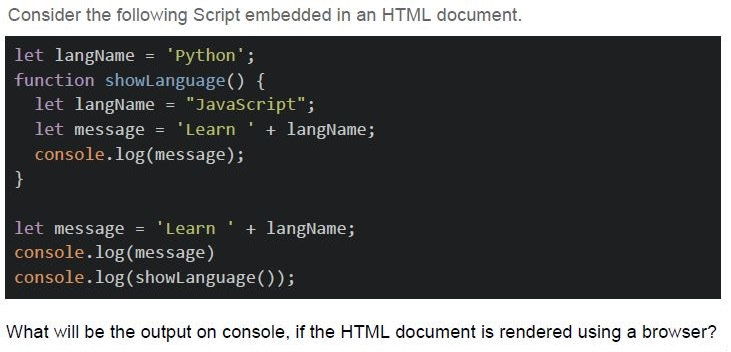
Consider the following Script embedded in an HTML document.

```javascript
let langName = 'Python';
function showLanguage() {
    let langName = "JavaScript";
    let message = 'Learn ' + langName;
    console.log(message);
}

let message = 'Learn ' + langName;
console.log(message)
console.log(showLanguage());
```

What will be the output on console, if the HTML document is rendered using a browser?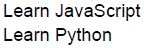
text
Learn JavaScript
Learn Python
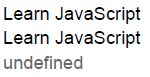
text
Learn JavaScript
Learn JavaScript
undefined
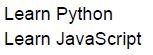
text
Learn Python
Learn JavaScript
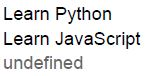
text
Learn Python
Learn JavaScript
undefined
Text of the picture (copyable)
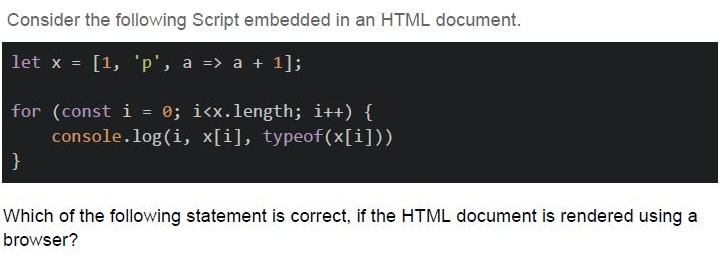
Consider the following Script embedded in an HTML document.

```javascript
let x = [1, 'p', a => a + 1];

for (const i = 0; i<x.length; i++) {
    console.log(i, x[i], typeof(x[i]))
}
```

Which of the following statement is correct, if the HTML document is rendered using a browser?- It will throw error on the console for the very first iteration.
- It will display the index, value and type of the value for the first item of arrayand then will throw error for the next value.
- It will display the indices, values and types of all the items of the array.
- None of these.
Text of the picture (copyable)
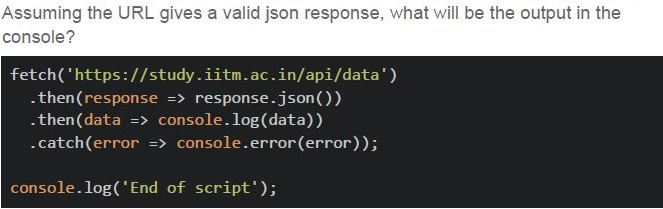
Assuming the URL gives a valid json response, what will be the output in the console?

```javascript
fetch('https://study.iitm.ac.in/api/data')
  .then(response => response.json())
  .then(data => console.log(data))
  .catch(error => console.error(error));

console.log('End of script');
```- The JSON data from the specified URL followed by “End of script”.
- "End of script" will be logged first, followed by the JSON data.
- An error will be logged, and the script will terminate.
- "End of script" will be logged, but the JSON data retrieval will fail.
- The language supports both first class and higher order functions.
- The language supports higher order functions, but not first class functions.
- A variable declared without keywords “var”, “let” or “const” is not hoisted at all.
- The variables declared using keywords “let” and “const” are also hoisted.
- Client Side local storage
- In Memory Cache
- Session Cookies
- Server Side Database
- Vue.js
- React.js
- Vuex
- Redux
- Express.js
- Angular
Text of the picture (copyable)
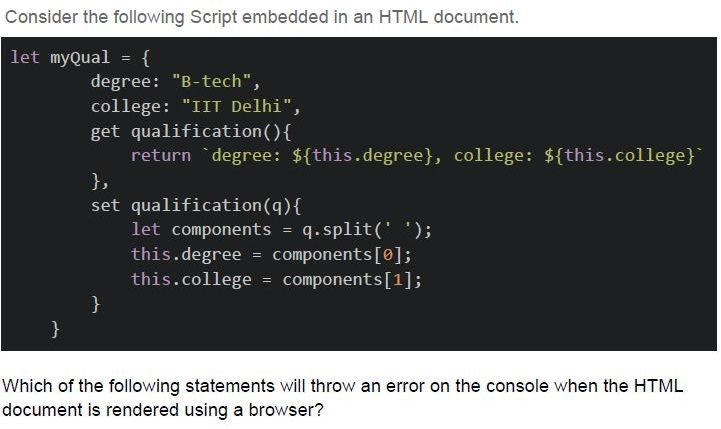
Consider the following Script embedded in an HTML document.

```javascript
let myQual = {
    degree: "B-tech",
    college: "IIT Delhi",
    get qualification(){
        return `degree: ${this.degree}, college: ${this.college}`
    },
    set qualification(q){
        let components = q.split(' ');
        this.degree = components[0];
        this.college = components[1];
    }
}
```

Which of the following statements will throw an error on the console when the HTML document is rendered using a browser?
text
```javascript
console.log(myQual.qualification())
```

text
```javascript
console.log(myQual.qualification)
```

text
```javascript
console.log(myQual.qualification = 'M-tech IIT-Madras')
```

text
```javascript
console.log(myQual.qualification('M-tech IIT-Madras'))
```
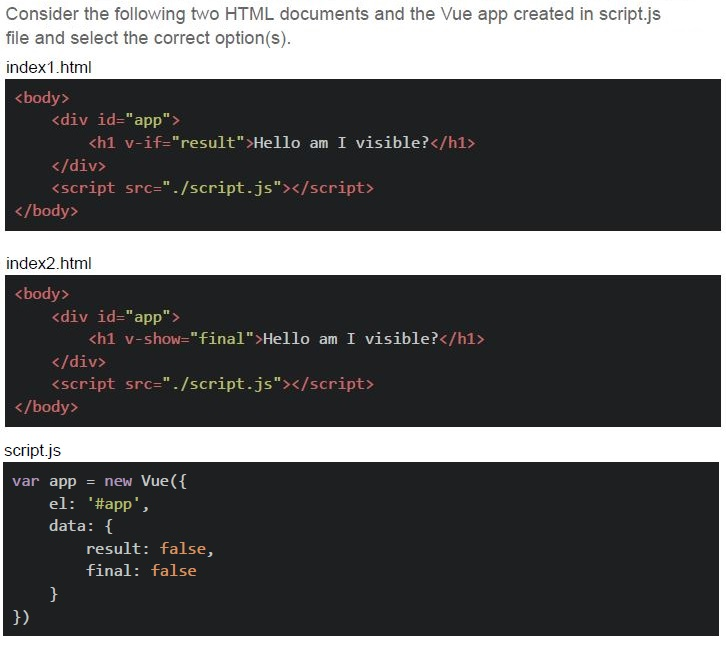
Text of the picture (copyable)
Consider the following two HTML documents and the Vue app created in script.js file and select the correct option(s).

index1.html
```html
<body>
    <div id="app">
        <h1 v-if="result">Hello am I visible?</h1>
    </div>
    <script src="./script.js"></script>
</body>
```

index2.html
```html
<body>
    <div id="app">
        <h1 v-show="final">Hello am I visible?</h1>
    </div>
    <script src="./script.js"></script>
</body>
```

script.js
```javascript
var app = new Vue({
    el: '#app',
    data: {
        result: false,
        final: false
    }
})
```
text
The raw HTML created with index1.html and index2.html will be exactly the same
for the current state of data.

text
When the directive v-if is falsy, it removes the entire element from the DOM.

text
When the directive v-show is falsy, it removes the entire element from the DOM.

text
The raw HTML created with index1.html and index2.html will be exactly the same when the values of both "result" and "final" are set to true.
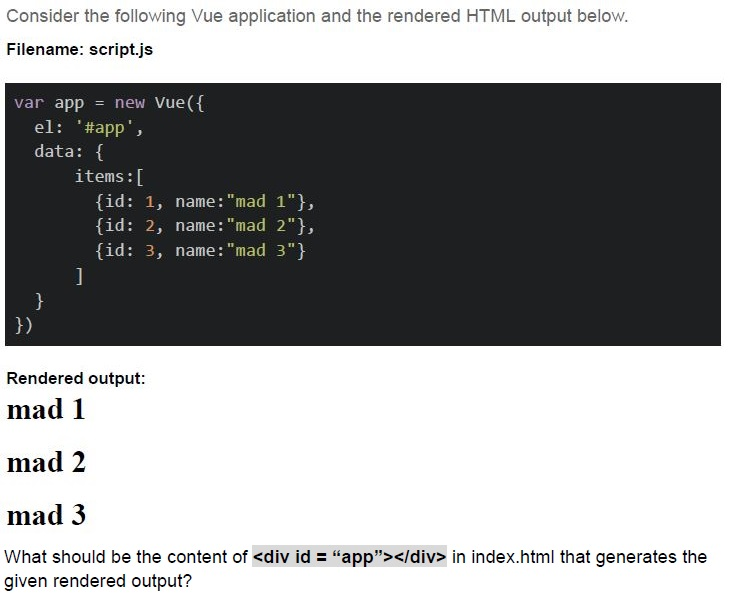
Text of the picture (copyable)
Consider the following Vue application and the rendered HTML output below.

Filename: script.js

```javascript
var app = new Vue({
  el: '#app',
  data: {
    items: [
      {id: 1, name:"mad 1"},
      {id: 2, name:"mad 2"},
      {id: 3, name:"mad 3"}
    ]
  }
})
```

Rendered output:
mad 1
mad 2
mad 3

What should be the content of `<div id = "app"></div>` in index.html that generates the given rendered output?
text
```html
<h2 v-for="item in items">{{item.name}}</h2>
```
text
```html
<h2 v-for="item in items">{{item.id}}>{{item.name}}</h2>
```
text
```html
<h2 v-for="item in items" :id="item.id">{{item.name}}</h2>
```
text
```html
<h2 v-for="items" :id="item.id">item.name</h2>
```
- 200
- 201
- 400
- 404
- 500
- Reduced latency and faster response times
- Lower server load and reduced bandwidth usage
- Improved scalability and better handling of traffic spikes
- Enhanced security and protection against DDoS attacks
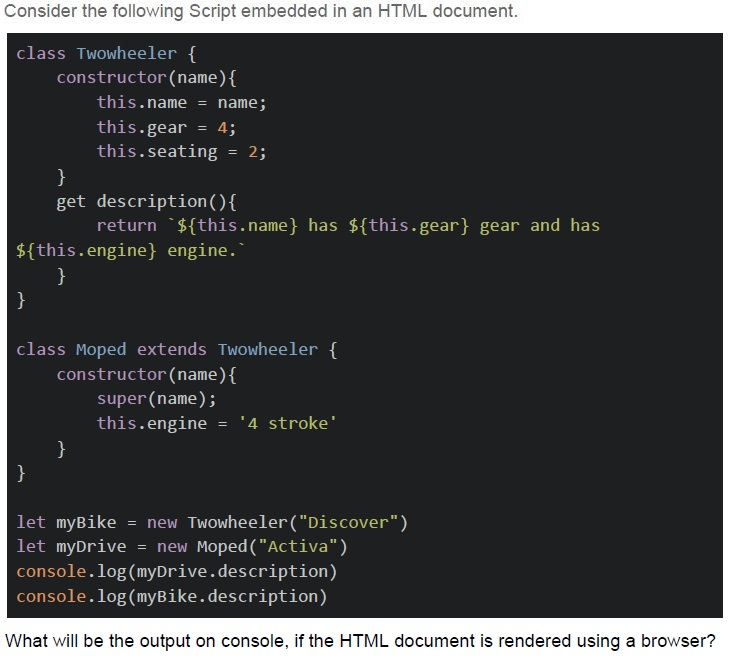
Text of the picture (copyable)
Consider the following Script embedded in an HTML document.

```javascript
class Twowheeler {
  constructor(name) {
    this.name = name;
    this.gear = 4;
    this.seating = 2;
  }

  get description() {
    return `${this.name} has ${this.gear} gear and has ${this.engine} engine.`;
  }
}

class Moped extends Twowheeler {
  constructor(name) {
    super(name);
    this.engine = '4 stroke';
  }
}

let myBike = new Twowheeler("Discover");
let myDrive = new Moped("Activa");
console.log(myDrive.description);
console.log(myBike.description);
```

What will be the output on console, if the HTML document is rendered using a browser?
text
```
Discover has 4 gear and has 4 stroke engine.
Activa has 4 gear and has 4 stroke engine.
```

text
```
Activa has 4 gear and has undefined engine.
Discover has 4 gear and has 4 stroke engine.
```

text
```text
Activa has 4 gear and has 4 stroke engine.
Discover has 4 gear and has undefined engine.
```

text
```text
Discover has 4 gear and has undefined engine.
Activa has 4 gear and has undefined engine.
```
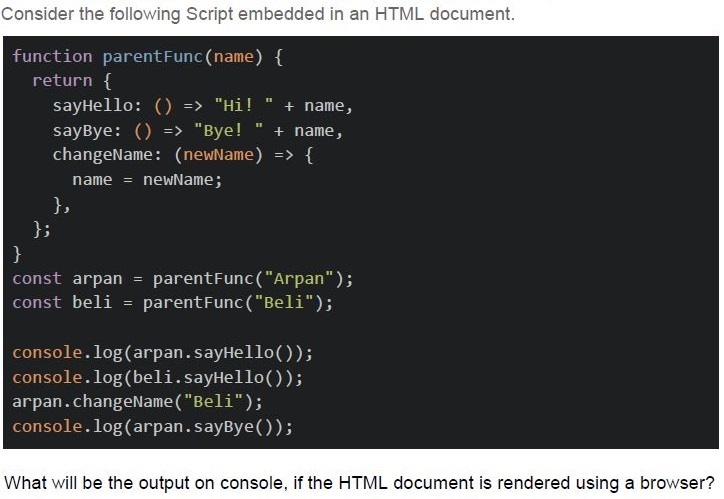
Text of the picture (copyable)
Consider the following Script embedded in an HTML document.

```javascript
function parentFunc(name) {
  return {
    sayHello: () => "Hi! " + name,
    sayBye: () => "Bye! " + name,
    changeName: (newName) => {
      name = newName;
    },
  };
}

const arpan = parentFunc("Arpan");
const beli = parentFunc("Beli");

console.log(arpan.sayHello());
console.log(beli.sayHello());
arpan.changeName("Beli");
console.log(arpan.sayBye());
```

What will be the output on console, if the HTML document is rendered using a browser?
text
```
Hi! Arpan
Bye! Arpan
```

text
```
Hi! Arpan
Hi! Beli
Bye! Beli
```

text
```
Hi! Arpan
reference Error
```

text
Reference Error
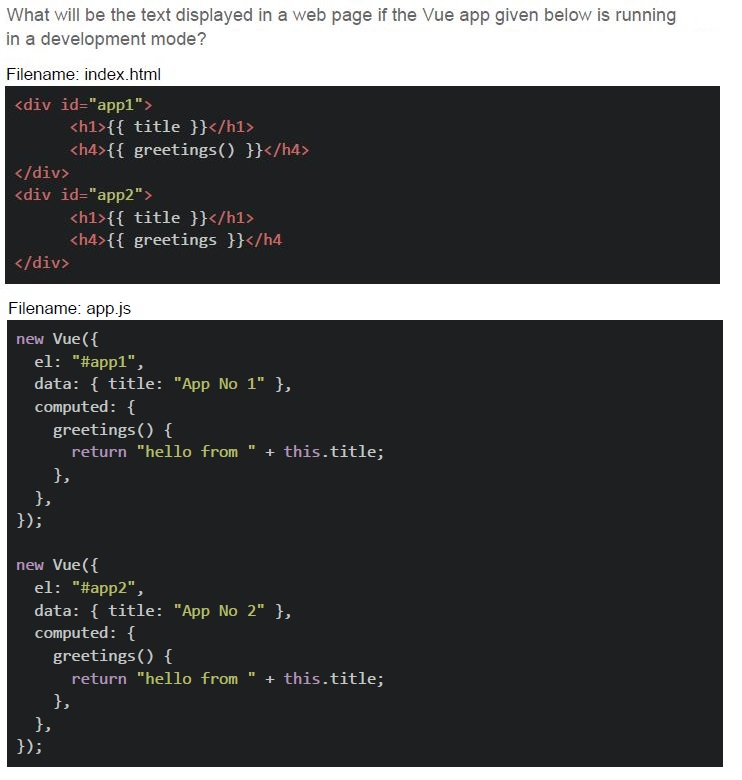
Text of the picture (copyable)
What will be the text displayed in a web page if the Vue app given below is running
in a development mode?

Filename: index.html

```html
<div id="app1">
    <h1>{{ title }}</h1>
    <h4>{{ greetings() }}</h4>
</div>
<div id="app2">
    <h1>{{ title }}</h1>
    <h4>{{ greetings }}</h4>
</div>
```

Filename: app.js

```javascript
new Vue({
    el: "#app1",
    data: { title: "App No 1" },
    computed: {
        greetings() {
            return "hello from " + this.title;
        },
    },
});

new Vue({
    el: "#app2",
    data: { title: "App No 2" },
    computed: {
        greetings() {
            return "hello from " + this.title;
        },
    },
});
```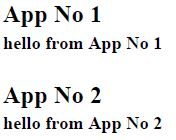
text
App No 1
hello from App No 1

App No 2
hello from App No 2
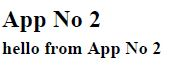
text
App No 2
hello from App No 2
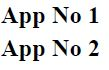
text
App No 1
App No 2

text
Blank page
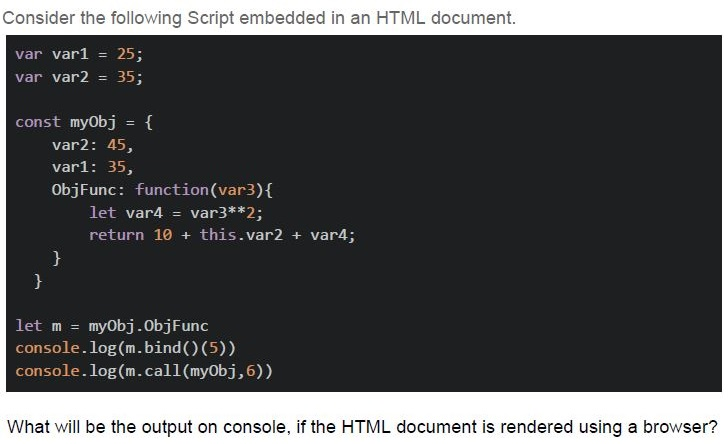
Text of the picture (copyable)
Consider the following Script embedded in an HTML document.

```javascript
var var1 = 25;
var var2 = 35;

const myObj = {
    var2: 45,
    var1: 35,
    ObjFunc: function(var3){
        let var4 = var3**2;
        return 10 + this.var2 + var4;
    }
}

let m = myObj.ObjFunc
console.log(m.bind()(5))
console.log(m.call(myObj,6))
```

What will be the output on console, if the HTML document is rendered using a browser?
text
```
70
81
```

text
```
70
91
```

text
```
80
81
```

text
```
80
91
```
- The method is executed when the promise is fulfilled.
- The method is executed when the promise is rejected.
- The method is executed regardless of whether the promise is fulfilled orrejected.
- The method can not be used with promises at all.
- Celery tasks are executed synchronously by default.
- Celery tasks can only be executed on the same machine where the flaskapplication is running.
- Celery tasks are executed asynchronously by default.
- Celery tasks can only be executed once they are defined as part of a flaskapplication.
- Eliminates the need for network communication
- Decouples producers and consumers
- Decreases CPU utilization
- Reduces the need for data serialization
- The physical location where messages are stored.
- A unique identifier for a message.
- The process of encrypting messages.
- A channel to which messages are published.
- Server-sent events support bidirectional communication.
- Server-sent events can handle larger payloads.
- Server-sent events reduce server load by eliminating the need for frequentpolling.
- Server-sent events provide lower latency compared to polling.
- HTTP
- Web Sockets
- FTP
- SMTP
- To prevent unauthorized access to confidential data
- To mitigate cross-site scripting (XSS) attacks
- To enable controlled access to resources from different origins
- To protect against SQL injection attacks
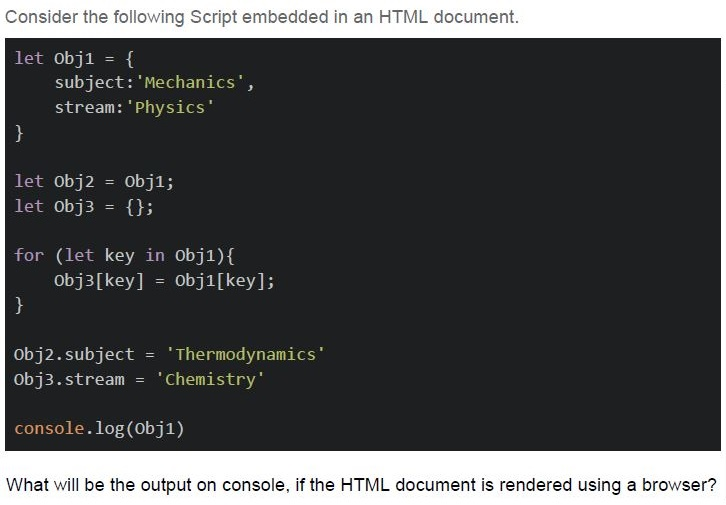
Text of the picture (copyable)
Consider the following Script embedded in an HTML document.

```javascript
let obj1 = {
    subject: 'Mechanics',
    stream: 'Physics'
}

let obj2 = obj1;
let obj3 = {};

for (let key in obj1){
    obj3[key] = obj1[key];
}

obj2.subject = 'Thermodynamics'
obj3.stream = 'Chemistry'

console.log(Obj1)
```

What will be the output on console, if the HTML document is rendered using a browser?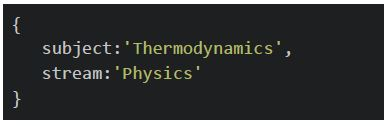
text
```
{
    subject: 'Thermodynamics',
    stream: 'Physics'
}
```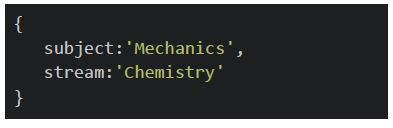
text
```
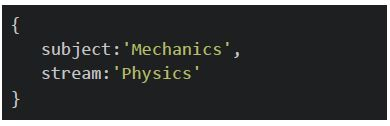
{
    subject:'Mechanics',
    stream:'Chemistry'
}
```
text
```
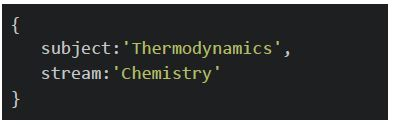
{
    subject: 'Mechanics',
    stream: 'Physics'
}
```
text
```
{
    subject:'Thermodynamics',
    stream:'Chemistry'
}
```
Text of the picture (copyable)
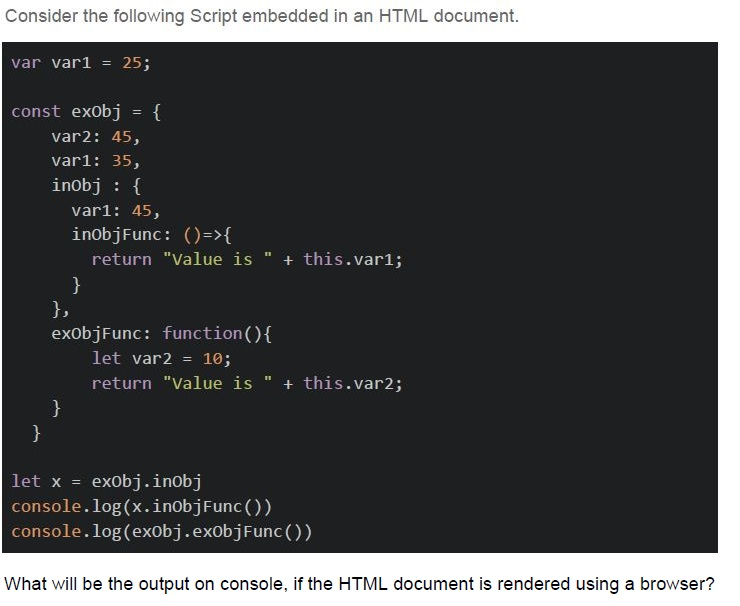
Consider the following Script embedded in an HTML document.

```javascript
var var1 = 25;

const exObj = {
    var2: 45,
    var1: 35,
    inObj : {
        var1: 45,
        inObjFunc: ()=>{
            return "Value is " + this.var1;
        }
    },
    exObjFunc: function(){
        let var2 = 10;
        return "Value is " + this.var2;
    }
}

let x = exObj.inObj
console.log(x.inObjFunc())
console.log(exObj.exObjFunc())
```

What will be the output on console, if the HTML document is rendered using a browser?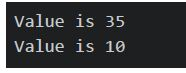
text
```
Value is 35
Value is 10
```
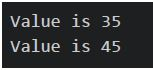
text
```
Value is 35
Value is 45
```
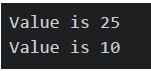
text
Value is 25
Value is 10
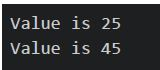
text
```
Value is 25
Value is 45
```
Text of the picture (copyable)
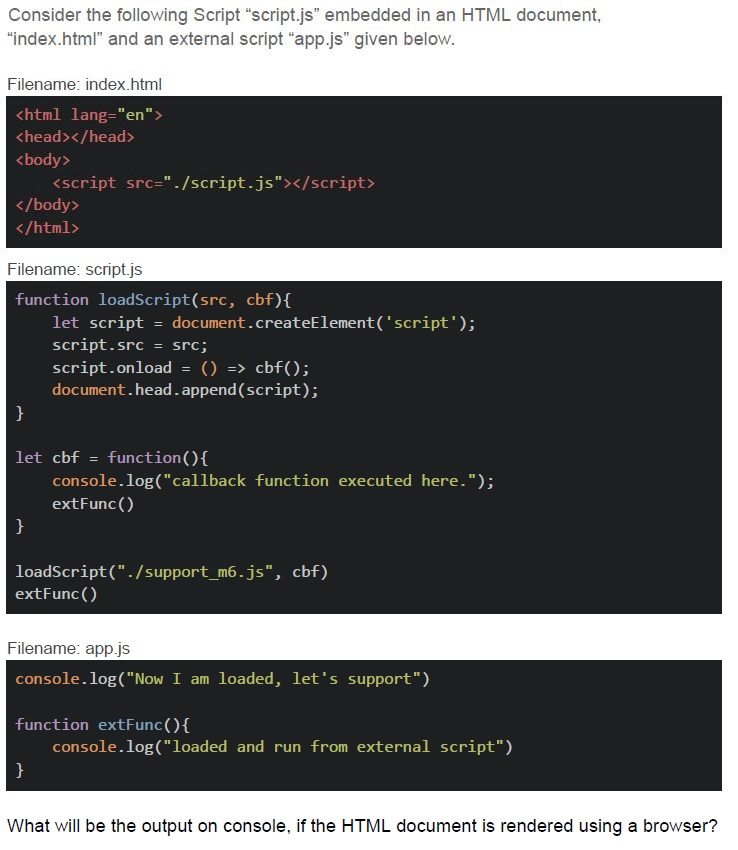
Consider the following Script "script.js" embedded in an HTML document, "index.html" and an external script "app.js" given below.

Filename: index.html
```html
<html lang="en">
<head></head>
<body>
    <script src="./script.js"></script>
</body>
</html>
```

Filename: script.js
```javascript
function loadScript(src, cbf){
    let script = document.createElement('script');
    script.src = src;
    script.onload = () => cbf();
    document.head.append(script);
}

let cbf = function(){
    console.log("callback function executed here.");
    extFunc()
}

loadScript("./support_m6.js", cbf)
extFunc()
```

Filename: app.js
```javascript
console.log("Now I am loaded, let's support")

function extFunc(){
    console.log("loaded and run from external script")
}
```

What will be the output on console, if the HTML document is rendered using a browser?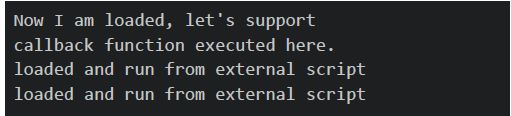
text
```
Now I am loaded, let's support
callback function executed here.
loaded and run from external script
loaded and run from external script
```
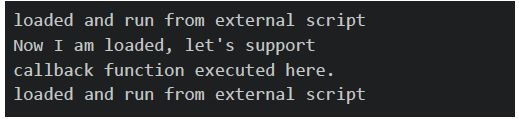
text
```
loaded and run from external script
Now I am loaded, let's support
callback function executed here.
loaded and run from external script
```
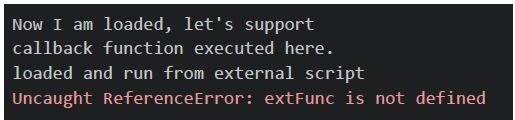
text
```
Now I am loaded, let's support
callback function executed here.
loaded and run from external script
Uncaught ReferenceError: extFunc is not defined
```
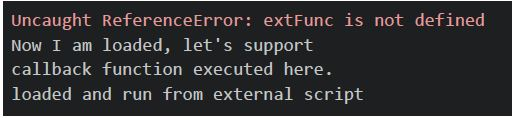
text
```
Uncaught ReferenceError: extFunc is not defined
Now I am loaded, let's support
callback function executed here.
loaded and run from external script
```
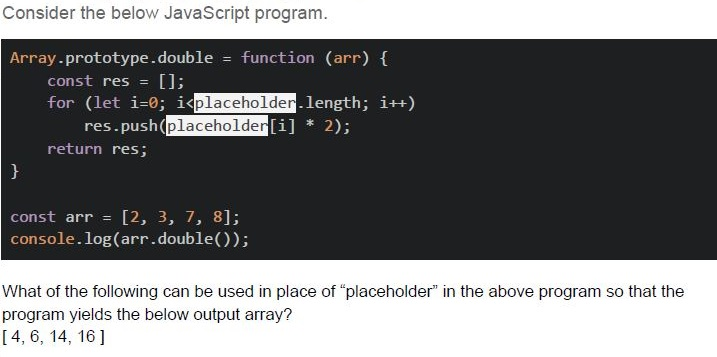
Text of the picture (copyable)
Consider the below JavaScript program.

```javascript
Array.prototype.double = function (arr) {
  const res = [];
  for (let i=0; i<placeholder.length; i++)
    res.push(placeholder[i] * 2);
  return res;
}

const arr = [2, 3, 7, 8];
console.log(arr.double());
```

What of the following can be used in place of "placeholder" in the above program so that the program yields the below output array?
[ 4, 6, 14, 16 ]- arr
- Array
- this
- The program cannot yield such an output, and is implemented in a wrong way.
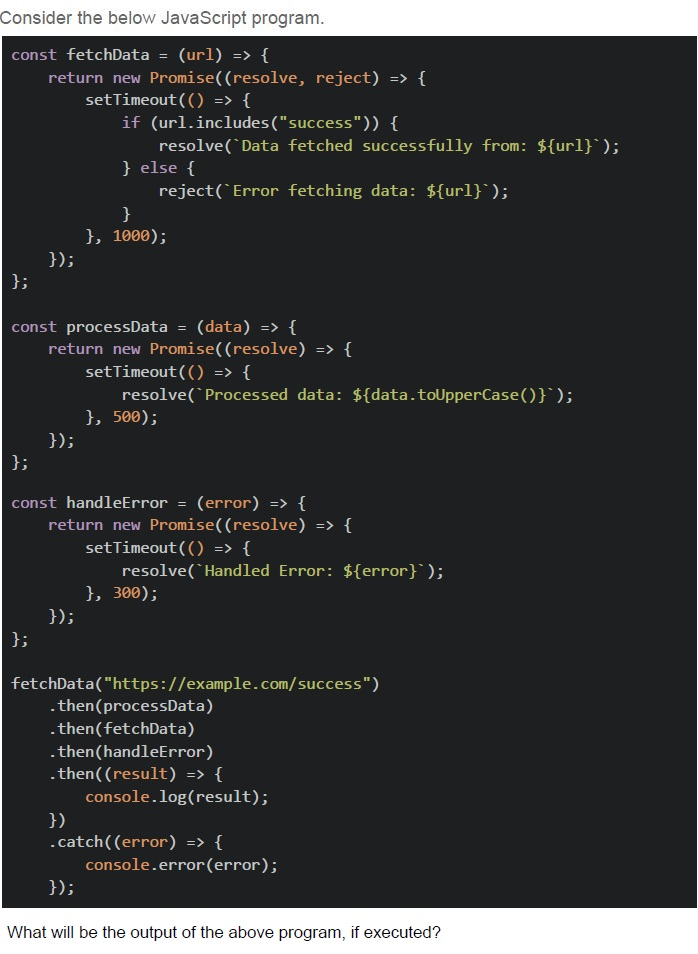
Text of the picture (copyable)
Consider the below JavaScript program.

```javascript
const fetchData = (url) => {
  return new Promise((resolve, reject) => {
    setTimeout(() => {
      if (url.includes("success")) {
        resolve(`Data fetched successfully from: ${url}`);
      } else {
        reject(`Error fetching data: ${url}`);
      }
    }, 1000);
  });
};

const processData = (data) => {
  return new Promise((resolve) => {
    setTimeout(() => {
      resolve(`Processed data: ${data.toUpperCase()}`);
    }, 500);
  });
};

const handleError = (error) => {
  return new Promise((resolve) => {
    setTimeout(() => {
      resolve(`Handled Error: ${error}`);
    }, 300);
  });
};

fetchData("https://example.com/success")
  .then(processData)
  .then(fetchData)
  .then(handleError)
  .then((result) => {
    console.log(result);
  })
  .catch((error) => {
    console.error(error);
  });
```

What will be the output of the above program, if executed?
text
Handled Error: Processed data: DATA FETCHED SUCCESSFULLY FROM:
HTTPS://EXAMPLE.COM/SUCCESS

text
Error fetching data: Processed data: DATA FETCHED SUCCESSFULLY FROM:
HTTPS://EXAMPLE.COM/SUCCESS

text
Handled Error: ERROR FETCHING DATA FROM: UNDEFINED

text
Handled Error: ERROR FETCHING DATA FROM: HTTPS://EXAMPLE.COM/SUCCESS

text
Error fetching data: Processed data: UNDEFINED
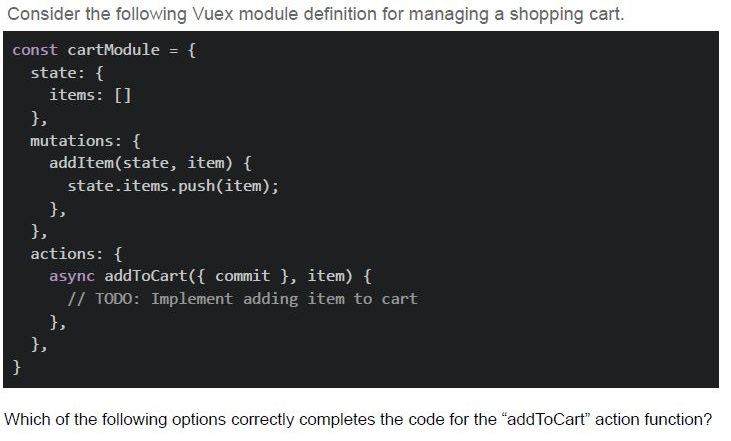
Text of the picture (copyable)
Consider the following Vuex module definition for managing a shopping cart.

```javascript
const cartModule = {
  state: {
    items: []
  },
  mutations: {
    addItem(state, item) {
      state.items.push(item);
    },
  },
  actions: {
    async addToCart({ commit }, item) {
      // TODO: Implement adding item to cart
    },
  },
}
```

Which of the following options correctly completes the code for the "addToCart" action function?
text
```javascript
addToCart({ commit }, item) {
  commit('addItem', item);
}
```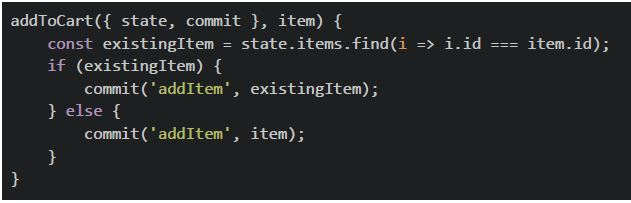
text
```javascript
addToCart({ state, commit }, item) {
  const existingItem = state.items.find(i => i.id === item.id);
  if (existingItem) {
    commit('addItem', existingItem);
  } else {
    commit('addItem', item);
  }
}
```
text
```javascript
addToCart({ commit }, item) {
  commit('addItem', { ...item });
}
```
text
All of these
Text of the picture (copyable)
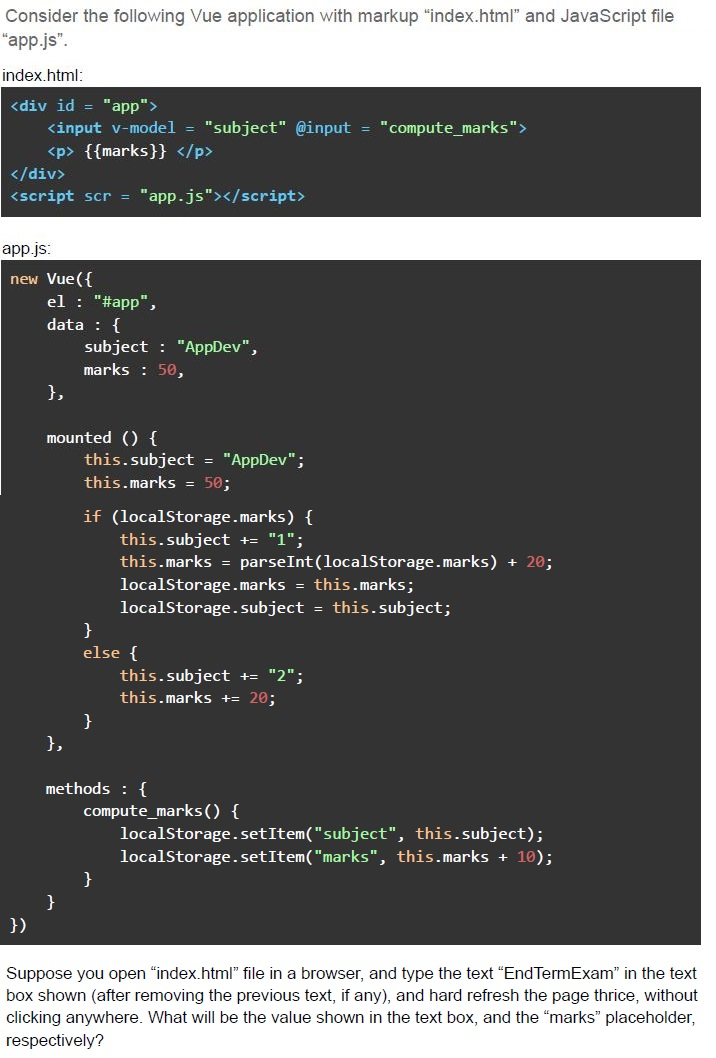
Consider the following Vue application with markup "index.html" and JavaScript file "app.js".

index.html:

```html
<div id = "app">
  <input v-model = "subject" @input = "compute_marks">
  <p> {{marks}} </p>
</div>
<script scr = "app.js"></script>
```

app.js:

```javascript
new Vue({
  el : "#app",
  data : {
    subject : "AppDev",
    marks : 50,
  },

  mounted () {
    this.subject = "AppDev";
    this.marks = 50;
    if (localStorage.marks) {
      this.subject += "1";
      this.marks = parseInt(localStorage.marks) + 20;
      localStorage.marks = this.marks;
      localStorage.subject = this.subject;
    }
    else {
      this.subject += "2";
      this.marks += 20;
    }
  },

  methods : {
    compute_marks() {
      localStorage.setItem("subject", this.subject);
      localStorage.setItem("marks", this.marks + 10);
    }
  }
})
```

Suppose you open "index.html" file in a browser, and type the text "EndTermExam" in the text box shown (after removing the previous text, if any), and hard refresh the page thrice, without clicking anywhere. What will be the value shown in the text box, and the "marks" placeholder, respectively?- AppDev1, 120
- AppDev2, 120
- AppDev1, 140
- AppDev2, 140
Text of the picture (copyable)
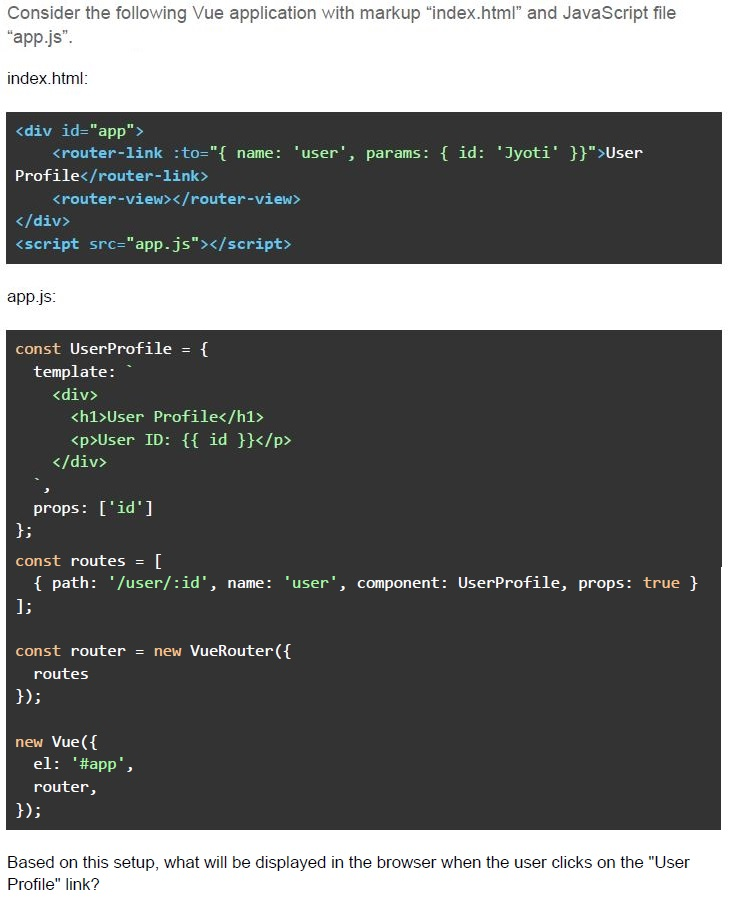
Consider the following Vue application with markup "index.html" and JavaScript file "app.js".

index.html:

```html
<div id="app">
  <router-link :to="{ name: 'user', params: { id: 'Jyoti' }}">User Profile</router-link>
  <router-view></router-view>
</div>
<script src="app.js"></script>
```

app.js:

```javascript
const UserProfile = {
  template: `
    <div>
      <h1>User Profile</h1>
      <p>User ID: {{ id }}</p>
    </div>
  `,
  props: ['id']
};

const routes = [
  { path: '/user/:id', name: 'user', component: UserProfile, props: true }
];

const router = new VueRouter({
  routes
});

new Vue({
  el: '#app',
  router,
});
```

Based on this setup, what will be displayed in the browser when the user clicks on the "User Profile" link?- An error indicating that the id prop is not defined.
- User ProfileUser ID: Jyoti
- An error indicating that the data object is not defined.
- An error indicating that the route does not exist.
- User ProfileUser ID:
- beforeLoad
- preUpdate
- mounted
- updated
- clear()
- removeItem()
- deleteItem()
- unSet()
Answer key
- Q1 (MCQ, 2 marks): D
- Q2 (MCQ, 2 marks): B
- Q3 (MCQ, 2 marks): B
- Q4 (MCQ, 2 marks): B
- Q5 (MCQ, 2 marks): D
- Q6 (MCQ, 2 marks): C
- Q7 (MSQ, 3 marks): A, D
- Q8 (MSQ, 3 marks): B, D
- Q9 (MSQ, 3 marks): A, C
- Q10 (MSQ, 3 marks): A, B
- Q11 (MSQ, 3 marks): A, B, C
- Q12 (MCQ, 3 marks): C
- Q13 (MCQ, 3 marks): B
- Q14 (MCQ, 3 marks): B
- Q15 (MCQ, 3 marks): B
- Q16 (MCQ, 3 marks): C
- Q17 (MCQ, 3 marks): C
- Q18 (MCQ, 3 marks): B
- Q19 (MCQ, 3 marks): D
- Q20 (MCQ, 3 marks): C
- Q21 (MCQ, 3 marks): A
- Q22 (MCQ, 3 marks): C
- Q23 (MCQ, 4.5 marks): A
- Q24 (MCQ, 4.5 marks): D
- Q25 (MCQ, 4.5 marks): D
- Q26 (MCQ, 4.5 marks): C
- Q27 (MCQ, 4.5 marks): B
- Q28 (MCQ, 4.5 marks): A
- Q29 (MCQ, 4.5 marks): C
- Q30 (MCQ, 4.5 marks): B
- Q31 (MSQ, 2 marks): C, D
- Q32 (MSQ, 2 marks): A, B
Concepts this paper tests
Auto-generated summary from the source site. Handy as a checklist; the lessons above explain each idea from scratch.
Here’s a structured summary of core topics, concepts, and principles essential for the exam, along with a Mermaid knowledge graph to visualize relationships.
Core Topics & Concepts
1. JavaScript Fundamentals
Key Concepts:
Variable Scoping & Hoisting
var,let,const(block vs. function scope).- Hoisting behavior (e.g.,
let/constare hoisted but not initialized). - Global vs. local scope (e.g.,
windowobject in browsers).
Closures &
thisBinding- Lexical scoping in closures.
thisin arrow functions (=>) vs. regular functions.- Explicit binding (
call,apply,bind).
Asynchronous JavaScript
- Callbacks, Promises (
then,catch,finally),async/await. - Event loop, microtask/macrotask queues.
fetchAPI and error handling.
- Callbacks, Promises (
Object Prototypes & Inheritance
- Prototype chain,
Object.prototype. thisin methods vs. arrow functions.- Shallow vs. deep copying objects.
- Prototype chain,
Error Handling
try/catch,throw.- Promise rejection handling.
Key Equations/Code Snippets:
// Hoisting Example
console.log(a); // undefined (var is hoisted)
var a = 5;

// Closure Example
function outer() {
  let x = 10;
  return function inner() { console.log(x); };
}
const innerFunc = outer();
innerFunc(); // 10

// `this` Binding
const obj = { val: 42, getVal: function() { return this.val; } };
console.log(obj.getVal.call({ val: 100 })); // 100

// Promise Example
fetch('url')
  .then(res => res.json())
  .catch(err => console.error(err))
  .finally(() => console.log("Done"));
2. Modern JavaScript (ES6+)
Key Concepts:
Arrow Functions (
=>):- No
thisbinding (lexical scoping). - Cannot be used as constructors.
- No
Destructuring & Spread/Rest Operators
- Object/array destructuring.
- Spread (
...) for copying/merging.
Classes & Inheritance
class,extends,super.- Static methods, getters/setters.
Modules
import/exportsyntax.
Template Literals
- Multi-line strings,
${expression}.
- Multi-line strings,
Key Equations/Code Snippets:
// Destructuring
const { a, b } = { a: 1, b: 2 };
const arr = [1, 2, 3];
const [x, ...rest] = arr; // x=1, rest=[2,3]

// Class Example
class Parent {
  constructor(name) { this.name = name; }
  greet() { return `Hello, ${this.name}`; }
}
class Child extends Parent {
  constructor(name) { super(name); }
}

// Module Export
export const foo = () => console.log("Foo");
3. Vue.js
Key Concepts:
Vue Instance & Lifecycle Hooks
created,mounted,updated,destroyed.
Directives
v-if(removes DOM element),v-show(togglesdisplay: none).v-for,v-bind,v-model(two-way binding).
Components & Props
- Parent-child communication (
props,$emit). - Dynamic components (
<component :is="...">).
- Parent-child communication (
State Management (Vuex)
state,getters,mutations,actions.- Asynchronous state updates.
Routing (Vue Router)
- Dynamic routes (
/user/:id). - Named routes,
router-link,router-view.
- Dynamic routes (
Key Equations/Code Snippets:
// Vue Instance
new Vue({
  el: '#app',
  data: { message: 'Hello' },
  mounted() { console.log('Mounted!'); }
});

// Vuex Store
const store = new Vuex.Store({
  state: { count: 0 },
  mutations: {
    increment(state) { state.count++; }
  },
  actions: {
    incrementAsync({ commit }) {
      setTimeout(() => commit('increment'), 1000);
    }
  }
});

// Vue Router
const routes = [
  { path: '/user/:id', component: User, props: true }
];
const router = new VueRouter({ routes });
4. Web APIs & Asynchronous Patterns
Key Concepts:
Fetch API
fetch(url).then(res => res.json()).- Error handling (network errors vs. HTTP errors like 404).
EventSource (Server-Sent Events)
- Unidirectional (server → client) communication.
- Lower overhead than polling.
WebSockets
- Bidirectional, full-duplex communication.
new WebSocket('ws://url').
- Polling vs. SSE vs. WebSockets | Method | Bidirectional | Overhead | Use Case | |--------------|---------------|----------|------------------------| | Polling | ❌ No | High | Legacy systems | | SSE | ❌ No | Low | Live updates (e.g., notifications) | | WebSockets | ✅ Yes | Medium | Real-time apps (e.g., chat) |
Key Equations/Code Snippets:
// Fetch with Error Handling
fetch('https://api.example.com/data')
  .then(res => {
    if (!res.ok) throw new Error('HTTP error');
    return res.json();
  })
  .catch(err => console.error(err));

// Server-Sent Events
const eventSource = new EventSource('/updates');
eventSource.onmessage = (e) => console.log(e.data);

// WebSocket
const socket = new WebSocket('wss://example.com');
socket.onmessage = (e) => console.log(e.data);
5. Backend & State Management
Key Concepts:
Celery (Task Queue)
- Asynchronous task execution (e.g., with Flask/Django).
- Brokers (Redis, RabbitMQ).
Message Brokers
- Decoupling producers/consumers.
- Topics vs. queues (pub/sub vs. point-to-point).
Caching
- Benefits: Reduced latency, lower server load, scalability.
- Strategies: In-memory (Redis), CDN, browser cache.
CORS (Cross-Origin Resource Sharing)
Access-Control-Allow-Originheader.- Preflight requests (
OPTIONS).
- Session Storage vs. Local Storage vs. Cookies | Feature | Session Storage | Local Storage | Cookies | |------------------|------------------|---------------|---------------| | Persistence | Tab lifetime | Permanent | Configurable | | Storage Limit | ~5MB | ~5MB | ~4KB | | Sent with Request| ❌ No | ❌ No | ✅ Yes |
Key Equations/Code Snippets:
// Local Storage
localStorage.setItem('key', 'value');
const data = localStorage.getItem('key');

// Session Storage
sessionStorage.removeItem('key');
sessionStorage.clear();

// CORS Headers (Server-Side)
response.setHeader('Access-Control-Allow-Origin', '*');
6. HTTP & RESTful APIs
Key Concepts:
HTTP Methods
GET(idempotent),POST,PUT(idempotent),DELETE(idempotent).
Status Codes
200 OK,201 Created,400 Bad Request,404 Not Found,500 Server Error.
REST Principles
- Statelessness, resource-based URLs, JSON/XML responses.
Authentication
- JWT, OAuth, Basic Auth.
Key Equations/Code Snippets:
### Successful Response
HTTP/1.1 200 OK
Content-Type: application/json

{ "id": 1, "name": "Example" }

### Error Response
HTTP/1.1 404 Not Found
Content-Type: application/json

{ "error": "Resource not found" }
7. Debugging & Error Handling
Key Concepts:
Console Methods
console.log,console.error,console.table.
Source Maps
- Debugging minified code.
Vue DevTools
- Inspecting component state/events.
Key Equations/Code Snippets:
// Debugging Objects
console.table([{ id: 1, name: 'Alice' }, { id: 2, name: 'Bob' }]);

// Error Boundaries (Vue)
new Vue({
  errorCaptured(err, vm, info) {
    console.error('Error:', err);
    return false; // Prevent propagation
  }
});