Home / Past papers / MAD2 End Term / this paper
IIT M FOUNDATION DIPLOMA FN EXAM - 22 Dec 2024
- A closure can access variables from its outer function even after the outerfunction has returned.
- A closure can be created when a function is defined inside another function.
- Closures are useful for data encapsulation and controlling access to privatedata.
- All of these.
Text of the picture (copyable)
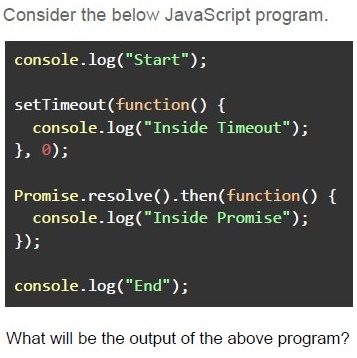
Consider the below JavaScript program.

```javascript
console.log("Start");

setTimeout(function() {
  console.log("Inside Timeout");
}, 0);

Promise.resolve().then(function() {
  console.log("Inside Promise");
});

console.log("End");
```

What will be the output of the above program?- StartInside Timeout Inside Promise End
- StartInside Promise Inside Timeout End
- StartEnd Inside Timeout Inside Promise
- StartEnd Inside Promise Inside Timeout
Text of the picture (copyable)
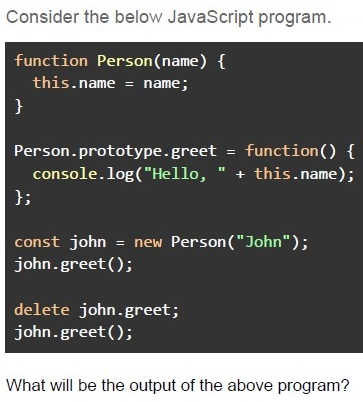
Consider the below JavaScript program.

```javascript
function Person(name) {
  this.name = name;
}

Person.prototype.greet = function() {
  console.log("Hello, " + this.name);
};

const john = new Person("John");
john.greet();

delete john.greet;
john.greet();
```

What will be the output of the above program?- Hello, JohnTypeError: john.greet is not a function
- Hello, JohnHello, undefined
- TypeError: john.greet is not a functionTypeError: john.greet is not a function
- Hello, JohnHello, John
Text of the picture (copyable)
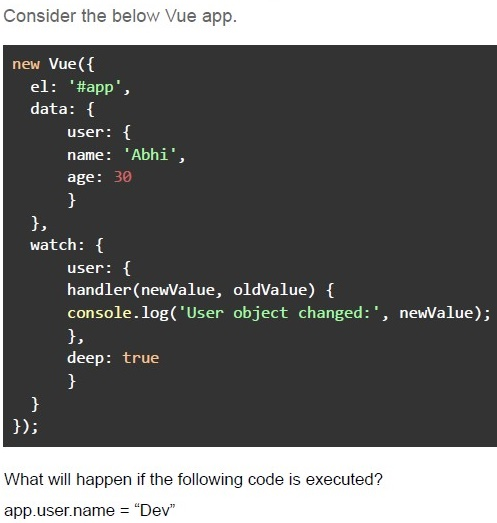
Consider the below Vue app.

```javascript
new Vue({
  el: '#app',
  data: {
    user: {
      name: 'Abhi',
      age: 30
    }
  },
  watch: {
    user: {
      handler(newValue, oldValue) {
        console.log('User object changed:', newValue);
      },
      deep: true
    }
  }
});
```

What will happen if the following code is executed?
app.user.name = "Dev"- The watcher will not be triggered because “name” is a nested property of“user” object.
- The watcher will be triggered and log "User object changed: { name: 'Bob',age: 30 }".
- The watcher will be triggered, but it will only log the new “name” value, i.e.,“Dev”, and not the entire user object.
- The watcher will throw an error because deep watching is not supported onnested objects.
Text of the picture (copyable)
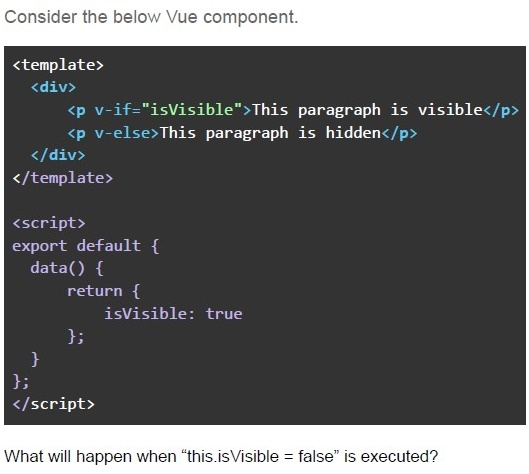
Consider the below Vue component.

```html
<template>
  <div>
    <p v-if="isVisible">This paragraph is visible</p>
    <p v-else>This paragraph is hidden</p>
  </div>
</template>

<script>
  export default {
    data() {
      return {
        isVisible: true
      };
    }
  };
</script>
```

What will happen when "this.isVisible = false" is executed?- The paragraph with the text “This paragraph is visible” will be displayed.
- The paragraph with the text “This paragraph is hidden” will be displayed.
- Both paragraphs will be displayed because of the v-if and v-else bindings.
- No change will happen since v-if and v-else do not update the DOM.

Text of the picture (copyable)
In the following code, which attributes ensure that the cookie will only be sent over HTTPS and restrict it from cross-site requests?

```
response.set_cookie('session_id', 'abc123', secure=option1, samesite=option2)
```- secure=True and samesite='Strict'
- secure=False and samesite='Strict'
- secure=True and samesite='None'
- secure=False and samesite='Lax'
Text of the picture (copyable)
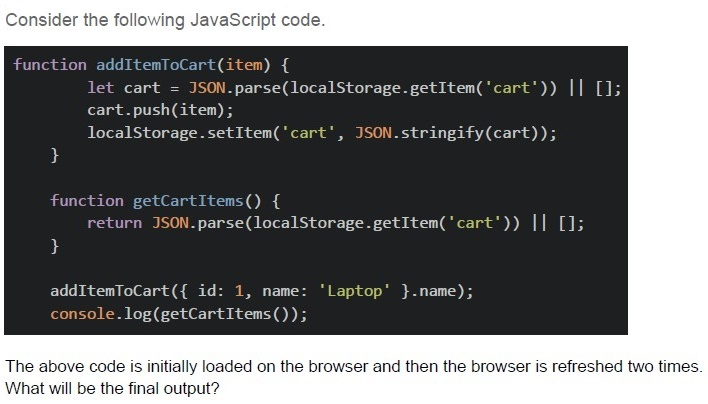
Consider the following JavaScript code.

```javascript
function addItemToCart(item) {
  let cart = JSON.parse(localStorage.getItem('cart')) || [];
  cart.push(item);
  localStorage.setItem('cart', JSON.stringify(cart));
}

function getCartItems() {
  return JSON.parse(localStorage.getItem('cart')) || [];
}

addItemToCart({ id: 1, name: 'Laptop' }.name);
console.log(getCartItems());
```

The above code is initially loaded on the browser and then the browser is refreshed two times.
What will be the final output?- []
- ['Laptop', ‘Laptop’, ‘Laptop’]
- [{ id: 1, name: 'Laptop' }]
- [undefined]
- Long polling opens multiple connections between the client and the server,and the server continuously sends updates to the client in real-time.
- Long polling involves the client repeatedly sending requests at fixed intervalsto the server to check for updates, regardless of whether new data is available.
- Long polling allows the client to make a single request to the server, where theserver holds the connection open until new data is available and then sends the response.
- Long polling uses WebSockets to maintain a persistent, bidirectionalconnection between the client and the server.
Text of the picture (copyable)
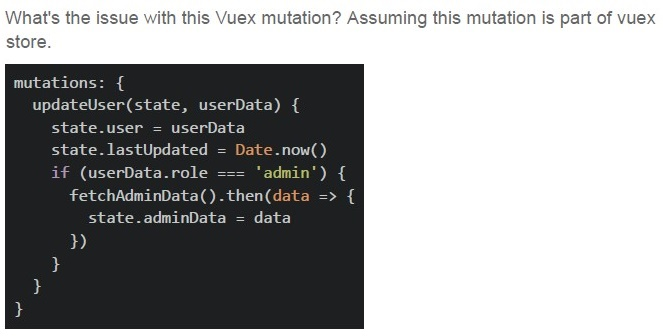
What's the issue with this Vuex mutation? Assuming this mutation is part of vuex store.

```javascript
mutations: {
  updateUser(state, userData) {
    state.user = userData
    state.lastUpdated = Date.now()
    if (userData.role === 'admin') {
      fetchAdminData().then(data => {
        state.adminData = data
      })
    }
  }
}
```- Multiple state changes in one mutation
- Async operation in mutation
- Direct state mutation
- Both Multiple state changes in one mutation and Async operation in mutation
Text of the picture (copyable)
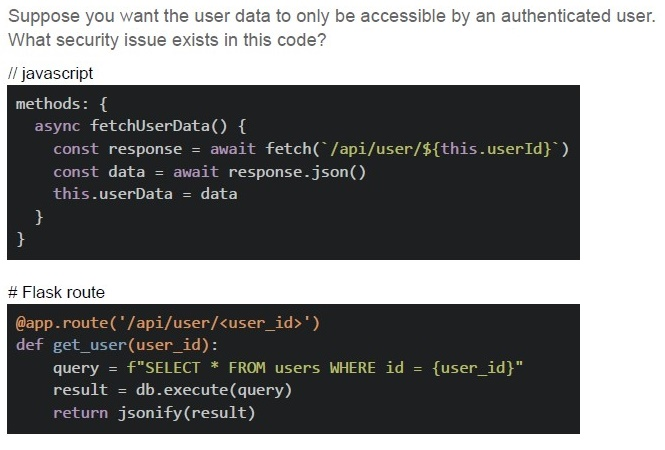
Suppose you want the user data to only be accessible by an authenticated user.
What security issue exists in this code?

// Javascript
```javascript
methods: {
  async fetchUserData() {
    const response = await fetch(`/api/user/${this.userId}`)
    const data = await response.json()
    this.userData = data
  }
}
```

# Flask route
```python
@app.route('/api/user/<user_id>')
def get_user(user_id):
  query = f"SELECT * FROM users WHERE id = {user_id}"
  result = db.execute(query)
  return jsonify(result)
```- No authentication check
- SQL injection vulnerability
- Unvalidated user input
- All of these
Text of the picture (copyable)
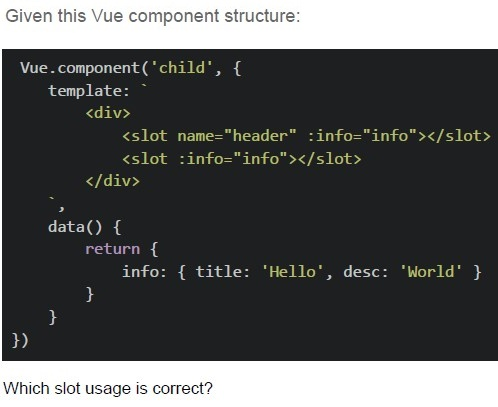
Given this Vue component structure:

```javascript
Vue.component('child', {
  template: `
    <div>
      <slot name="header" :info="info"></slot>
      <slot :info="info"></slot>
    </div>
  `,
  data() {
    return {
      info: { title: 'Hello', desc: 'World' }
    }
  }
})
```

Which slot usage is correct?
text
```html
<template v-slot:header="data">{{data.title}}</template>
```
text
```html
<template v-slot:header="{ info }">{{info.title}}</template>
```
text
```html
<template v-slot:header>{{info.title}}</template>
```
text
```html
<template v-slot:header=info>{{info.title}}</template>
```
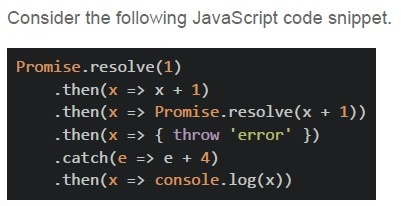
Text of the picture (copyable)
Consider the following JavaScript code snippet.

```javascript
Promise.resolve(1)
  .then(x => x + 1)
  .then(x => Promise.resolve(x + 1))
  .then(x => { throw 'error' })
  .catch(e => e + 4)
  .then(x => console.log(x))
```- error4
- 7
- error
- undefined
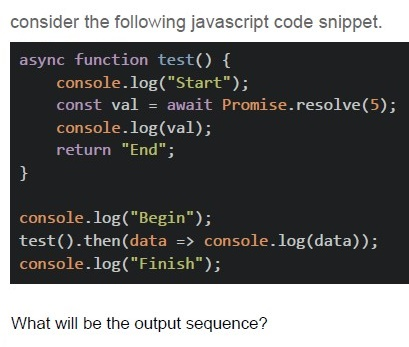
Text of the picture (copyable)
consider the following javascript code snippet.

```javascript
async function test() {
    console.log("Start");
    const val = await Promise.resolve(5);
    console.log(val);
    return "End";
}

console.log("Begin");
test().then(data => console.log(data));
console.log("Finish");
```

What will be the output sequence?- Begin, Start, 5, End, Finish
- Begin, Finish, Start, 5, End
- Begin, Finish, Start, End, 5
- Begin, Start, Finish, 5, End

text
```
@cache.memoize() caches function results based on arguments, while
@cache.cached() caches entire views.
```

text
```
@cache.cached() caches function results based on arguments, while
@cache.memoize() caches entire views.
```

text
Both cache entire views, but `@cache.memoize()` uses Redis by default.

text
Both methods are identical but use different syntax.
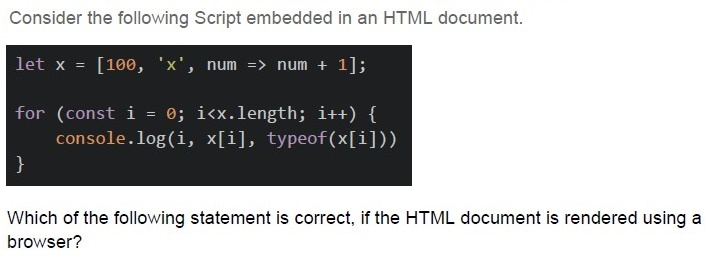
Text of the picture (copyable)
Consider the following Script embedded in an HTML document.

```javascript
let x = [100, 'x', num => num + 1];

for (const i = 0; i<x.length; i++) {
    console.log(i, x[i], typeof(x[i]))
}
```

Which of the following statement is correct, if the HTML document is rendered using a browser?- It will display the indices, values and types of all the items of the array.
- It will throw error on the console for the very first iteration.
- It will display the index, value and type of the value for the first item of arrayand then will throw error for the next value.
- None of these.
- The “await” keyword can only be used inside an async function.
- The “await” keyword pauses the execution of the surrounding async functionuntil the promise resolves.
- The async functions always return a promise, even if the return value is not apromise.
- The async functions run synchronously, but their await statements executeasynchronously.
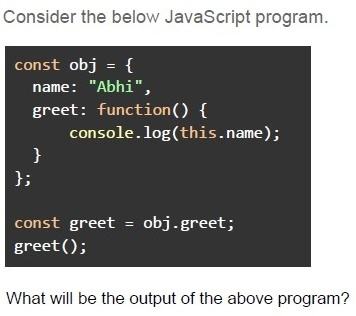
Text of the picture (copyable)
Consider the below JavaScript program.

```javascript
const obj = {
  name: "Abhi",
  greet: function() {
    console.log(this.name);
  }
};

const greet = obj.greet;
greet();
```

What will be the output of the above program?
text
Abhi

text
undefined

text
null

text
Reference Error
text
Garbage Value
Text of the picture (copyable)
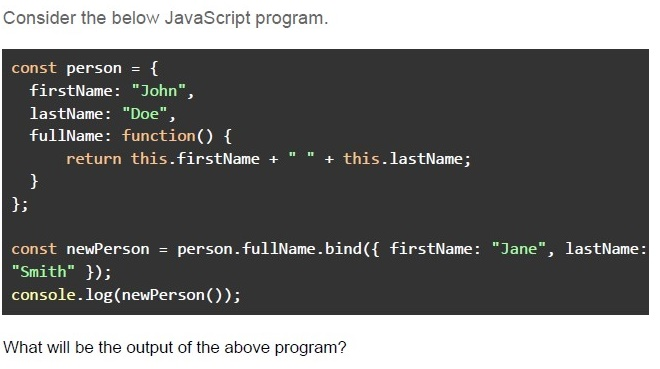
Consider the below JavaScript program.

```javascript
const person = {
  firstName: "John",
  lastName: "Doe",
  fullName: function() {
    return this.firstName + " " + this.lastName;
  }
};

const newPerson = person.fullName.bind({
  firstName: "Jane",
  lastName: "Smith"
});
console.log(newPerson());
```

What will be the output of the above program?
text
John Doe
text
Jane Smith
text
John Smith

text
Jane Doe

text
undefined

text
null
text
Reference Error
- The “beforeDestroy” hook is called after the component is removed from theDOM, and the “destroyed” hook is called before the component is destroyed.
- The “beforeDestroy” hook is called before the component is removed from theDOM, and the “destroyed” hook is called after the component is destroyed.
- The “beforeDestroy” hook is called when the component is mounted, and the“destroyed” hook is called before the component is destroyed.
- Both hooks are called after the component is destroyed.
Text of the picture (copyable)
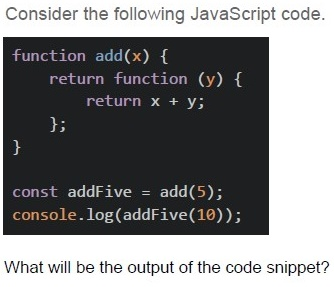
Consider the following JavaScript code.

```javascript
function add(x) {
  return function (y) {
    return x + y;
  };
}

const addFive = add(5);
console.log(addFive(10));
```

What will be the output of the code snippet?- 5
- 10
- 15
- 20
- Cache-Control: no-store prevents caching
- ETag helps validate cache freshness
- Data stored in sessionStorage remains available even after the browser isclosed and reopened.
- localStorage has larger storage limit than cookies
Text of the picture (copyable)
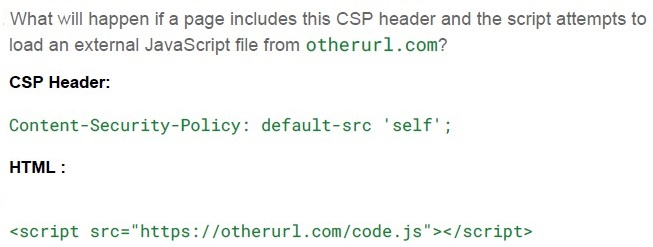
What will happen if a page includes this CSP header and the script attempts to load an external JavaScript file from otherurl.com?

**CSP Header:**

```
Content-Security-Policy: default-src 'self';
```

**HTML :**

```html
<script src="https://otherurl.com/code.js"></script>
```

text
The script from otherurl1.com will load normally.

text
The script will fail to load, and an error will be logged in the console.

text
The browser will display a warning and allow the script to load.

text
Nothing will happen; the CSP only affects inline scripts.
Text of the picture (copyable)
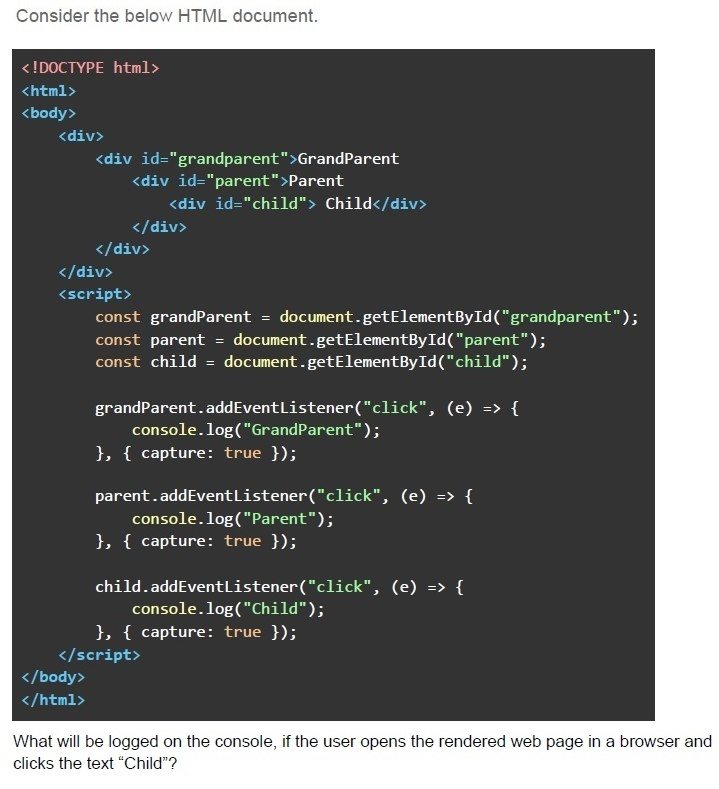
Consider the below HTML document.

```html
<!DOCTYPE html>
<html>
<body>
  <div>
    <div id="grandparent">GrandParent
      <div id="parent">Parent
        <div id="child"> Child</div>
      </div>
    </div>
  </div>
  <script>
    const grandParent = document.getElementById("grandparent");
    const parent = document.getElementById("parent");
    const child = document.getElementById("child");

    grandParent.addEventListener("click", (e) => {
      console.log("GrandParent");
    }, { capture: true });

    parent.addEventListener("click", (e) => {
      console.log("Parent");
    }, { capture: true });

    child.addEventListener("click", (e) => {
      console.log("Child");
    }, { capture: true });
  </script>
</body>
</html>
```

What will be logged on the console, if the user opens the rendered web page in a browser and clicks the text "Child"?- ChildParent GrandParent
- Child
- GrandParentParent Child
- None of these
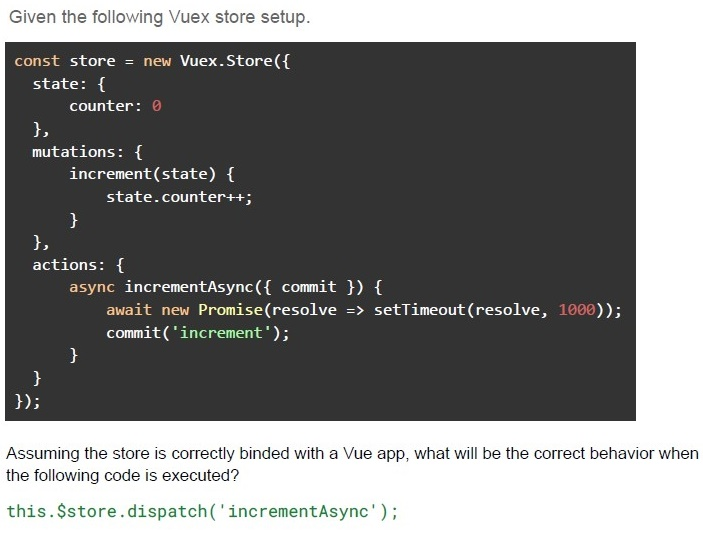
Text of the picture (copyable)
Given the following Vuex store setup.

```javascript
const store = new Vuex.Store({
  state: {
    counter: 0
  },
  mutations: {
    increment(state) {
      state.counter++;
    }
  },
  actions: {
    async incrementAsync({
      commit
    }) {
      await new Promise(resolve => setTimeout(resolve, 1000));
      commit('increment');
    }
  }
});
```

Assuming the store is correctly binded with a Vue app, what will be the correct behavior when the following code is executed?

`this.$store.dispatch('incrementAsync');`- The increment mutation will be called immediately after the dispatch.
- The state will be updated after the asynchronous operation completes.
- The incrementAsync action will be executed synchronously, and increment willbe committed before the promise resolves.
- The action will be skipped since mutations cannot be called inside actions.
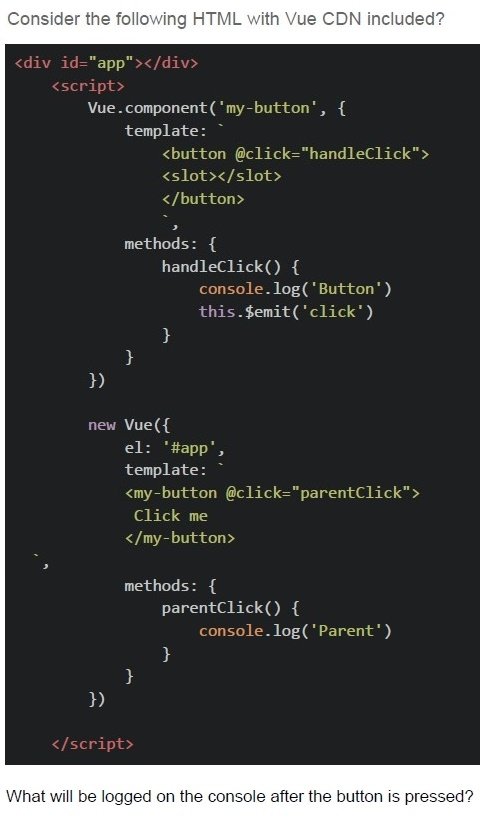
Text of the picture (copyable)
Consider the following HTML with Vue CDN included?

```html
<div id="app"></div>
<script>
    Vue.component('my-button', {
        template: `
            <button @click="handleClick">
                <slot></slot>
            </button>
        `,
        methods: {
            handleClick() {
                console.log('Button')
                this.$emit('click')
            }
        }
    })

    new Vue({
        el: '#app',
        template: `
            <my-button @click="parentClick">
                Click me
            </my-button>
        `,
        methods: {
            parentClick() {
                console.log('Parent')
            }
        }
    })
</script>
```

What will be logged on the console after the button is pressed?- Parent
- Button
- ButtonParent
- ParentButton
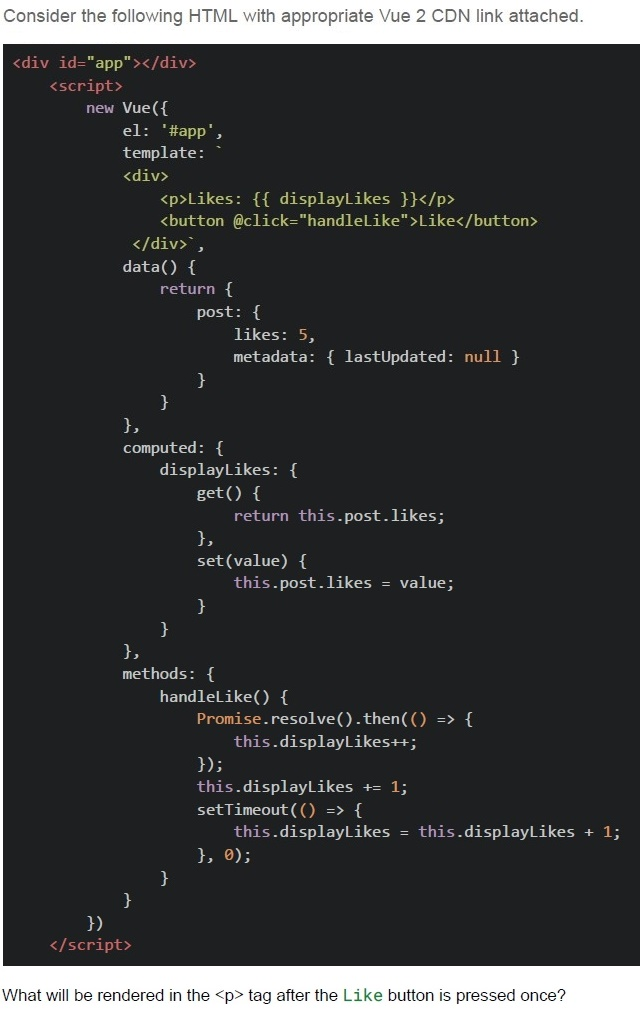
Text of the picture (copyable)
Consider the following HTML with appropriate Vue 2 CDN link attached.

```html
<div id="app"></div>
<script>
  new Vue({
    el: '#app',
    template: `
      <div>
        <p>Likes: {{ displayLikes }}</p>
        <button @click="handleLike">Like</button>
      </div>`,
    data() {
      return {
        post: {
          likes: 5,
          metadata: { lastUpdated: null }
        }
      }
    },
    computed: {
      displayLikes: {
        get() {
          return this.post.likes;
        },
        set(value) {
          this.post.likes = value;
        }
      }
    },
    methods: {
      handleLike() {
        Promise.resolve().then(() => {
          this.displayLikes++;
        });
        this.displayLikes += 1;
        setTimeout(() => {
          this.displayLikes = this.displayLikes + 1;
        }, 0);
      }
    }
  })
</script>
```

What will be rendered in the `<p>` tag after the Like button is pressed once?- Likes: 5
- Likes: 8
- Likes: 6
- Likes: 9
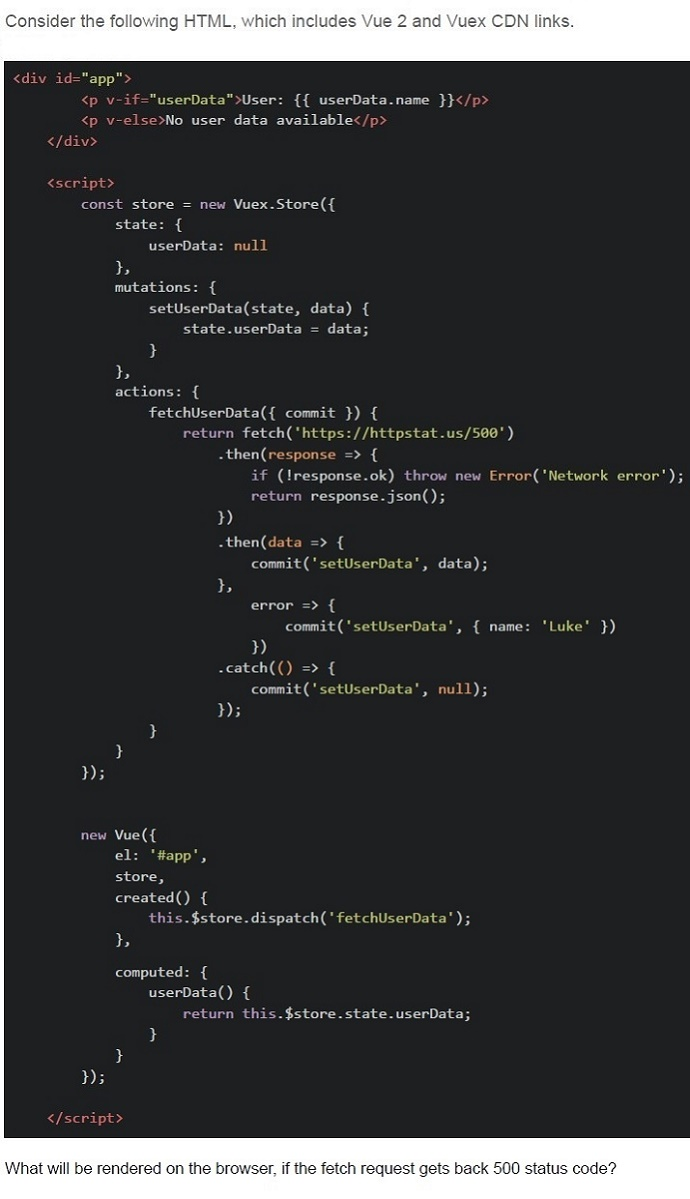
Text of the picture (copyable)
Consider the following HTML, which includes Vue 2 and Vuex CDN links.

```html
<div id="app">
  <p v-if="userData">User: {{ userData.name }}</p>
  <p v-else>No user data available</p>
</div>

<script>
  const store = new Vuex.Store({
    state: {
      userData: null
    },
    mutations: {
      setUserData(state, data) {
        state.userData = data;
      }
    },
    actions: {
      fetchUserData({ commit }) {
        return fetch('https://httpstat.us/500')
          .then(response => {
            if (!response.ok) throw new Error('Network error');
            return response.json();
          })
          .then(data => {
            commit('setUserData', data);
          },
          error => {
            commit('setUserData', { name: 'Luke' })
          })
          .catch(() => {
            commit('setUserData', null);
          });
      }
    }
  });

  new Vue({
    el: '#app',
    store,
    created() {
      this.$store.dispatch('fetchUserData');
    },
    computed: {
      userData() {
        return this.$store.state.userData;
      }
    }
  });
</script>
```

What will be rendered on the browser, if the fetch request gets back 500 status code?- The userData in the store is set to the data from the API.
- User: null
- The error will be logged, Nothing will be displayed
- User: Luke
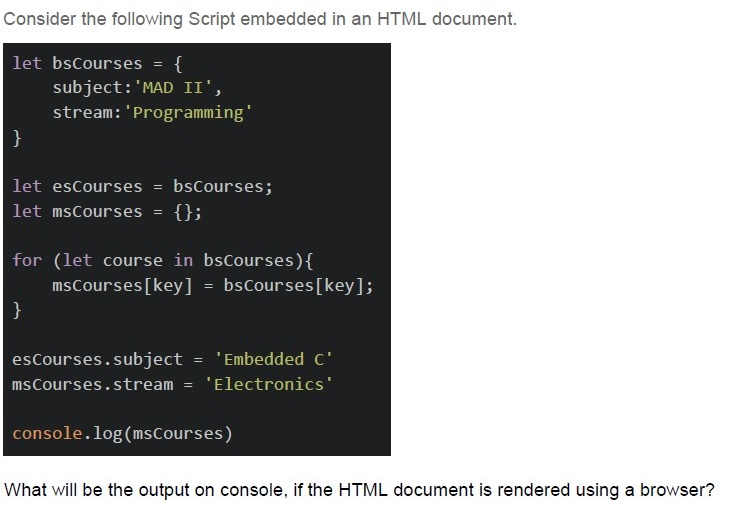
Text of the picture (copyable)
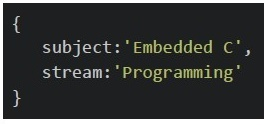
Consider the following Script embedded in an HTML document.

```javascript
let bsCourses = {
    subject: 'MAD II',
    stream: 'Programming'
}

let esCourses = bsCourses;
let msCourses = {};

for (let course in bsCourses){
    msCourses[key] = bsCourses[key];
}

esCourses.subject = 'Embedded C'
msCourses.stream = 'Electronics'

console.log(msCourses)
```

What will be the output on console, if the HTML document is rendered using a browser?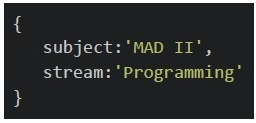
text
```
{
    subject:'MAD II',
    stream:'Programming'
}
```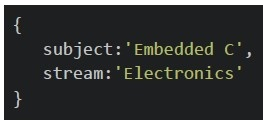
text
```
{
    subject:'Embedded C',
    stream:'Electronics'
}
```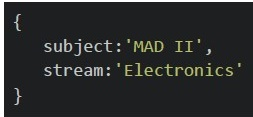
text
```
{
    subject:'MAD II',
    stream:'Electronics'
}
```
text
```
{
    subject:'Embedded C',
    stream:'Programming'
}
```
Text of the picture (copyable)
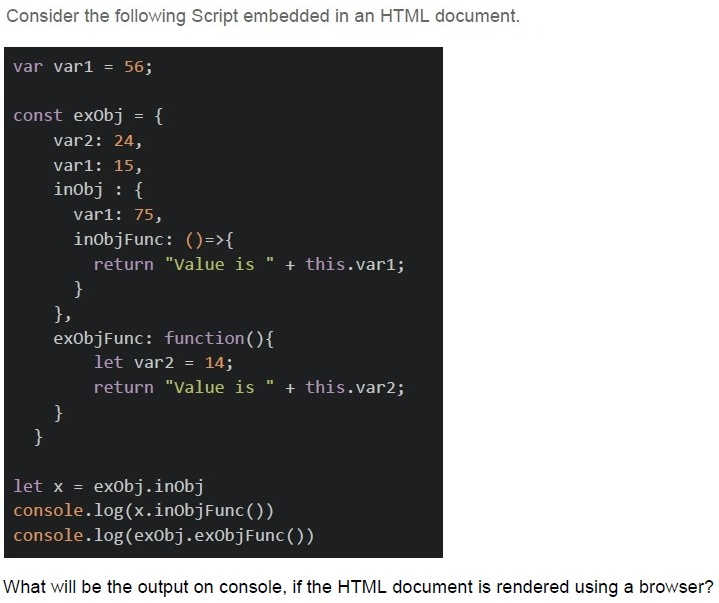
Consider the following Script embedded in an HTML document.

```javascript
var var1 = 56;

const exObj = {
    var2: 24,
    var1: 15,
    inObj : {
        var1: 75,
        inObjFunc: ()=>{
            return "Value is " + this.var1;
        }
    },
    exObjFunc: function(){
        let var2 = 14;
        return "Value is " + this.var2;
    }
}

let x = exObj.inObj
console.log(x.inObjFunc())
console.log(exObj.exObjFunc())
```

What will be the output on console, if the HTML document is rendered using a browser?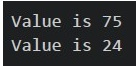
text
Value is 75
Value is 24
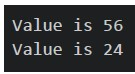
text
```
Value is 56
Value is 24
```
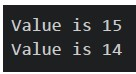
text
Value is 15
Value is 14
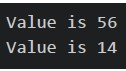
text
```
Value is 56
Value is 14
```
Text of the picture (copyable)
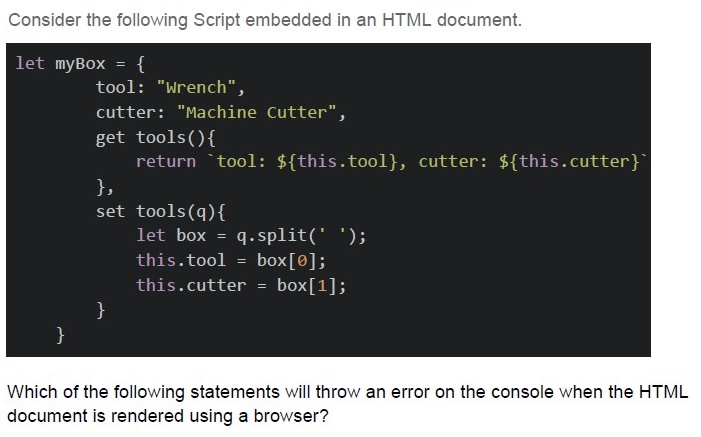
Consider the following Script embedded in an HTML document.

```javascript
let myBox = {
    tool: "Wrench",
    cutter: "Machine Cutter",
    get tools(){
        return `tool: ${this.tool}, cutter: ${this.cutter}`
    },
    set tools(q){
        let box = q.split(' ');
        this.tool = box[0];
        this.cutter = box[1];
    }
}
```

Which of the following statements will throw an error on the console when the HTML document is rendered using a browser?
text
```javascript
console.log(myBox.tools)
```

text
```javascript
console.log(myBox.tools())
```

text
```javascript
console.log(myBox.tools('ScrewDriver Grinder'))
```
text
```javascript
console.log(myBox.tools = 'ScrewDriver Grinder')
```
Text of the picture (copyable)
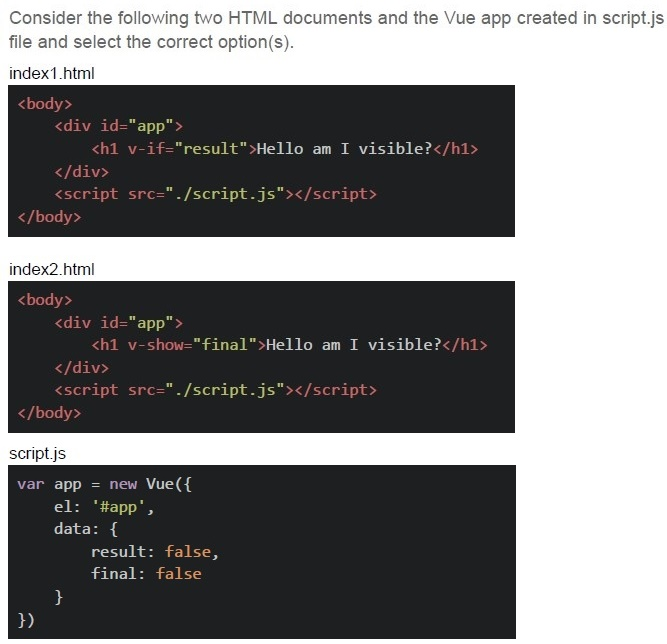
Consider the following two HTML documents and the Vue app created in script.js file and select the correct option(s).

index1.html

```html
<body>
    <div id="app">
        <h1 v-if="result">Hello am I visible?</h1>
    </div>
    <script src="./script.js"></script>
</body>
```

index2.html

```html
<body>
    <div id="app">
        <h1 v-show="final">Hello am I visible?</h1>
    </div>
    <script src="./script.js"></script>
</body>
```

script.js

```javascript
var app = new Vue({
    el: '#app',
    data: {
        result: false,
        final: false
    }
})
```
text
When the directive v-if is falsy, it removes the entire element from the DOM.

text
The raw HTML created with index1.html and index2.html will be exactly the same when the values of both "result" and "final" are set to true.

text
The raw HTML created with index1.html and index2.html will be exactly the same
for the current state of data.

text
When the directive **v-show** is falsy, it removes the entire element from the DOM.
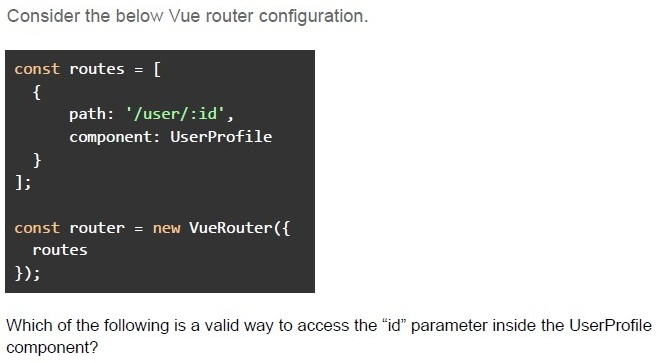
Text of the picture (copyable)
Consider the below Vue router configuration.

```javascript
const routes = [
  {
    path: '/user/:id',
    component: UserProfile
  }
];

const router = new VueRouter({
  routes
});
```

Which of the following is a valid way to access the "id" parameter inside the UserProfile component?- this.$route.params.id
- this.$router.params.id
- this.$route.query.id
- this.$route.params['id']
Answer key
- Q1 (MCQ, 3 marks): D
- Q2 (MCQ, 3 marks): D
- Q3 (MCQ, 3 marks): D
- Q4 (MCQ, 3 marks): B
- Q5 (MCQ, 3 marks): B
- Q6 (MCQ, 3 marks): A
- Q7 (MCQ, 3 marks): B
- Q8 (MCQ, 3 marks): C
- Q9 (MCQ, 3 marks): B
- Q10 (MCQ, 3 marks): D
- Q11 (MCQ, 3 marks): B
- Q12 (MCQ, 3 marks): A
- Q13 (MCQ, 3 marks): D
- Q14 (MCQ, 3 marks): A
- Q15 (MCQ, 3 marks): C
- Q16 (MCQ, 2 marks): D
- Q17 (MCQ, 2 marks): B
- Q18 (MCQ, 2 marks): B
- Q19 (MCQ, 2 marks): B
- Q20 (MCQ, 2 marks): C
- Q21 (MCQ, 2 marks): C
- Q22 (MCQ, 2 marks): B
- Q23 (MCQ, 4.5 marks): C
- Q24 (MCQ, 4.5 marks): B
- Q25 (MCQ, 4.5 marks): C
- Q26 (MCQ, 4.5 marks): B
- Q27 (MCQ, 4.5 marks): D
- Q28 (MCQ, 4.5 marks): C
- Q29 (MCQ, 4.5 marks): B
- Q30 (MSQ, 3 marks): B, C
- Q31 (MSQ, 4.5 marks): A, B
- Q32 (MSQ, 2 marks): A, D
Concepts this paper tests
Auto-generated summary from the source site. Handy as a checklist; the lessons above explain each idea from scratch.
Here’s a structured summary of core topics, concepts, and principles essential for the exam, along with key equations (where applicable) and Mermaid knowledge graphs to visualize relationships.
Core Topics & Concepts Summary
1. JavaScript Fundamentals
Key Concepts:
Closures:
- A closure gives access to an outer function’s scope from an inner function, even after the outer function has returned.
- Used for data encapsulation (private variables) and module patterns.
Example:
function outer() {
  let x = 10;
  return function inner() { console.log(x); };
}
const innerFunc = outer();
innerFunc(); // Output: 10 (x is retained via closure)
thisContext:thisrefers to the object calling the function.- Arrow functions inherit
thisfrom the surrounding scope (lexicalthis). bind()permanently setsthisfor a function.Example:
const obj = { name: "Alice", greet: function() { console.log(this.name); } };
const greet = obj.greet;
greet(); // Output: undefined (this is lost)
const boundGreet = obj.greet.bind(obj);
boundGreet(); // Output: "Alice"
Event Loop & Asynchronous JavaScript:
- Microtasks (Promise callbacks) execute before Macrotasks (
setTimeout,setInterval). - Order: Sync Code → Microtasks → Macrotasks.
Example:
console.log("Start");
setTimeout(() => console.log("Timeout"), 0);
Promise.resolve().then(() => console.log("Promise"));
console.log("End");
// Output: Start → End → Promise → Timeout
- Microtasks (Promise callbacks) execute before Macrotasks (
Promises & Async/Await:
- Promise States: Pending → Fulfilled/Rejected.
async/awaitis syntactic sugar for Promises.- Error Handling: Use
.catch()ortry/catchwithawait. Example:
async function fetchData() {
  try {
    const data = await Promise.reject("Error");
  } catch (e) {
    console.log(e + " caught"); // Output: "Error caught"
  }
}
Arrow Functions vs. Regular Functions:
Arrow functions:
- No
thisbinding (lexical scope). - Cannot be used as constructors.
- No
Regular functions:
- Dynamic
this(depends on how called). - Can be constructors (
new).
- Dynamic
Key Equations (JavaScript):
- Closure Retention: ``
InnerFunction.[[Scope]] = OuterFunction.[[Scope]] + OuterFunction.LocalVars`` - Promise Chaining: ``
Promise.resolve(value) .then(x => x + 1) .then(x => Promise.resolve(x + 1)) .catch(e => console.log(e));`` - Event Loop Priority: ``
Sync Code > Microtasks (Promises) > Macrotasks (setTimeout, I/O)``
2. Vue.js
Key Concepts:
Reactivity System:
- Vue uses getters/setters (via
Object.definePropertyorProxy) to track dependencies. data()must return an object for reactivity.Example:
data() {
  return { count: 0 }; // Reactive
}
- Vue uses getters/setters (via
- Lifecycle Hooks: | Hook | Description | |-----------------|----------------------------------------------| |
beforeCreate| Before instance initialization. | |created| After instance creation (data/props ready). | |beforeMount| Before DOM insertion. | |mounted| After DOM insertion. | |beforeDestroy| Before teardown. | |destroyed| After teardown. |
Directives:
v-ifvs.v-show:v-if: Removes/adds DOM element (expensive for toggling).v-show: Togglesdisplay: none(cheaper for frequent toggles).
v-for: Renders a list (requires:keyfor efficiency).v-model: Two-way data binding (e.g.,<input v-model="text">).
Slots:
- Default Slot:
<slot></slot>. - Named Slots:
<slot name="header"></slot>. - Scoped Slots: Pass data to slots (
<slot :data="item">). Example:
<template>
  <slot name="header" :title="title"></slot>
</template>
<child> <template v-slot:header="{ title }">{{ title }}</template> </child>
- Default Slot:
Vuex:
- State Management for large apps.
Core Concepts:
- State: Single source of truth.
- Getters: Computed properties for state.
- Mutations: Synchronous state changes.
- Actions: Asynchronous operations (commit mutations).
- Rule: Mutations must be synchronous.
Example:
actions: {
  fetchData({ commit }) {
    api.call().then(data => commit("SET_DATA", data));
  }
},
mutations: {
  SET_DATA(state, data) { state.data = data; }
}
Watchers:
watch: React to data changes (e.g., API calls on input).- Deep Watching:
deep: truefor nested objects. Example:
watch: {
  user: {
    handler(newVal) { console.log("User changed:", newVal); },
    deep: true
  }
}
Vue Router:
- Dynamic routing with
path: '/user/:id'. - Access route params via
this.$route.params.id.
- Dynamic routing with
Key Equations (Vue.js):
- Reactivity: ``
Vue.set(object, key, value) // Forces reactivity for new properties`` - Vuex Flow: ``
Action (Async) → Commit Mutation → Update State → Re-render Component`` - Slot Props: ``
<slot name="slotName" :propName="data"></slot> <template v-slot:slotName="{ propName }">{{ propName }}</template>``
3. Web APIs & Security
Key Concepts:
LocalStorage/SessionStorage:
localStorage: Persists across sessions (5MB limit).sessionStorage: Cleared when tab closes.Methods:
localStorage.setItem("key", JSON.stringify(data));
const data = JSON.parse(localStorage.getItem("key"));
Cookies:
Attributes:
secure: HTTPS-only.HttpOnly: Inaccessible to JavaScript.SameSite:Strict/Lax/None(CSRF protection).
Example:
response.set_cookie("session", "abc123", secure=True, samesite="Strict")
CSP (Content Security Policy):
- Mitigates XSS by restricting resource loading.
Example Header:
Content-Security-Policy: default-src 'self';- Blocks external scripts (e.g.,
<script src="https://evil.com">).
- Long Polling vs. WebSockets vs. SSE: | Method | Description | Use Case | |---------------|----------------------------------------------|------------------------| | Long Polling | Client holds request until server responds. | Legacy real-time apps. | | WebSockets | Persistent bidirectional connection. | Chat, gaming. | | SSE | Server pushes updates to client. | Live updates (e.g., stock prices). |
SQL Injection:
- Never concatenate user input into SQL queries.
Use parameterized queries:
cursor.execute("SELECT * FROM users WHERE id = %s", (user_id,))
CSRF (Cross-Site Request Forgery):
Mitigate with:
SameSitecookies.- CSRF tokens in forms.
Key Equations (Web APIs):
- Cookie Security: ``
Set-Cookie: name=value; Secure; HttpOnly; SameSite=Strict`` - CSP Rule: ``
default-src 'self' → Blocks all external resources.``
4. DOM & Event Handling
Key Concepts:
Event Propagation:
- Capturing Phase: Top-down (root → target).
- Bubbling Phase: Bottom-up (target → root).
stopPropagation(): Prevents further propagation.Example:
element.addEventListener("click", e => {
  e.stopPropagation(); // Stops bubbling
}, { capture: true }); // Capturing phase
Event Delegation:
- Attach a single listener to a parent for multiple child elements.
Example:
document.getElementById("parent").addEventListener("click", e => {
  if (e.target.matches(".child")) {
    console.log("Child clicked!");
  }
});
Key Equations (DOM):
- Event Flow: ``
Capturing Phase → Target Phase → Bubbling Phase`` - Event Delegation: ``
ParentListener → e.target → Child Element``
5. Modern JavaScript Patterns
Key Concepts:
Modules (ES6):
import/exportfor modular code.Example:
// math.js
export const add = (a, b) => a + b;
// app.js
import { add } from './math.js';
Destructuring:
- Extract values from objects/arrays.
Example:
const { name, age } = user;
const [first, ...rest] = [1, 2, 3];
Spread/Rest Operators:
- Spread: Expand iterables (
[...array1, ...array2]). - Rest: Collect arguments (
function(...args)).
- Spread: Expand iterables (
Optional Chaining (
?.):- Safely access nested properties.
Example:
const name = user?.profile?.name; // undefined if any step fails
2. Vue.js Ecosystem
3. Web Security
4. Asynchronous JavaScript
5. Vuex Data Flow
Exam Preparation Checklist
| Topic | Key Points to Review |
|---|---|
| Closures | Scope retention, data encapsulation. |
this in JS | Arrow vs. regular functions, bind/call. |
| Event Loop | Microtasks vs. macrotasks, setTimeout vs. Promise. |
| Vue Reactivity | data(), computed properties, watchers. |
| Vuex | Mutations (sync) vs. actions (async). |
| Slots | Default, named, scoped slots. |
| DOM Events | Capturing/bubbling, event delegation. |
| Web Security | CSP, SQL injection, CSRF, cookie attributes. |
| Async Patterns | Promises, async/await, error handling. |
| Vue Router | Dynamic routes, route params. |
Focus Areas for Equations:
- Event Loop Priority: Sync > Microtasks > Macrotasks.
- Vuex Flow: Action → Mutation → State → Component.
- CSP Rules:
default-src 'self'blocks external resources. - Cookie Security:
Secure; HttpOnly; SameSite=Strict.