Home / Past papers / MAD2 Quiz 1 / this paper
Modern Application Development Ii 15 Mar 26 - 15 Mar 2026
 is function-scoped
text
var
 and
and  are block-scoped
text
let
```
const
```
- Variables declared with are hoisted and initialized with

text
let
undefined
- variables can be declared without initialization
text
```
const
```
- Global variables are always attached to window (as a property)
- Every function in JavaScript is an object.
- Arrow functions have their own “this” binding
- Function declarations are hoisted.
- Function expressions assigned to variables are hoisted with their function value.
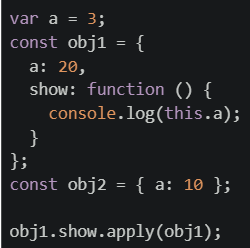 What will be printed on the console?
Text of the picture (copyable)
```javascript
var a = 3;
const obj1 = {
  a: 20,
  show: function () {
    console.log(this.a);
  }
};
const obj2 = { a: 10 };

obj1.show.apply(obj1);
```- 20
- 10
- undefined
- 3
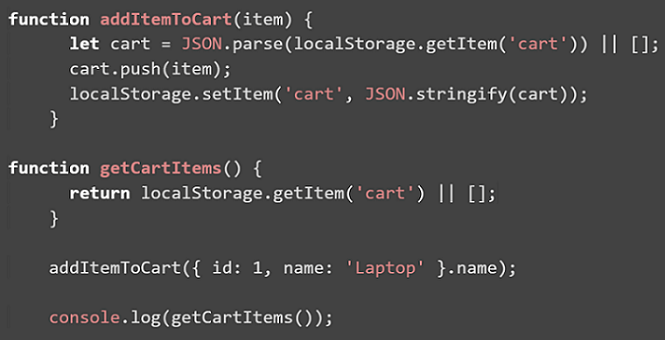 The above code is initially loaded in the browser, and then the browser is refreshed two times. What will be the final output printed in the console?
Text of the picture (copyable)
```javascript
function addItemToCart(item) {
    let cart = JSON.parse(localStorage.getItem('cart')) || [];
    cart.push(item);
    localStorage.setItem('cart', JSON.stringify(cart));
}

function getCartItems() {
    return localStorage.getItem('cart') || [];
}

addItemToCart({ id: 1, name: 'Laptop' }.name);

console.log(getCartItems());
```
text
```
[]
```

text
```
['Laptop', 'Laptop', 'Laptop']
```

text
```
[{ id: 1, name: 'Laptop' }]
```
text
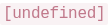
[undefined]
 Which of the following is the correct matching?
Text of the picture (copyable)
| Storage Type      | Characteristic                                                                    |
| :---------------- | :-------------------------------------------------------------------------------- |
| 1. Session Storage | A. Data automatically encrypts itself without developer intervention.             |
| 2. Token Storage   | B. Data persists only until the browser/tab is closed.                            |
| 3. Cookie Storage  | C. Often used to store authentication tokens securely on the client side.         |
|                   | D. Data persists across sessions, typically stored on the client and sent with every HTTP request. |
- 1 → B, 2 → C, 3 → A
- 1 → B, 2 → A, 3 → C
- 1 → A, 2 → C, 3 → B
- 1 → B, 2 → C, 3 → D
 app.js:
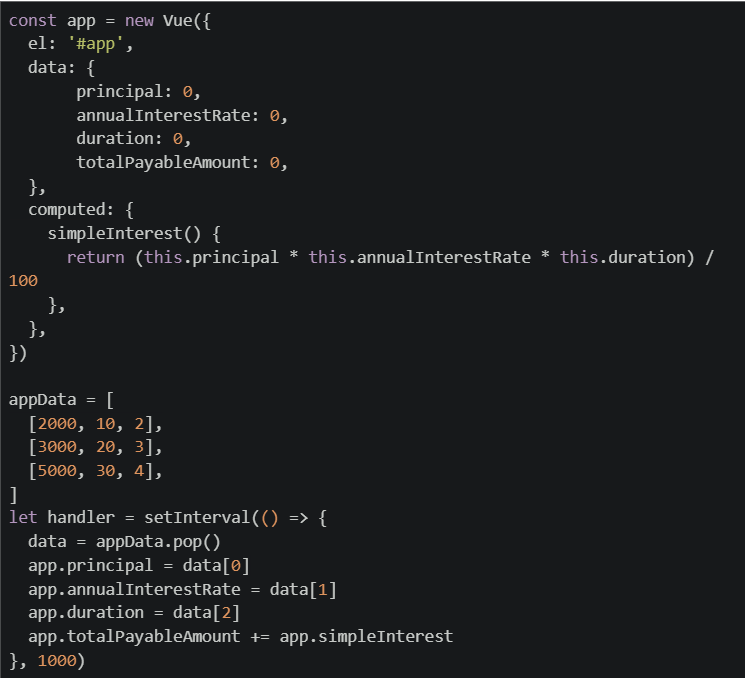 What will be rendered by the browser after 4 seconds?
Text of the picture (copyable)
```html
<div id="app">
    <h4>total payable amount is {{totalPayableAmount}}</h4>
</div>
<script src = "app.js"></script>
```
```javascript
const app = new Vue({
  el: '#app',
  data: {
    principal: 0,
    annualInterestRate: 0,
    duration: 0,
    totalPayableAmount: 0,
  },
  computed: {
    simpleInterest() {
      return (this.principal * this.annualInterestRate * this.duration) /
        100
    },
  },
})

let appData = [
  [2000, 10, 2],
  [3000, 20, 3],
  [5000, 30, 4],
]

let handler = setInterval(() => {
  data = appData.pop()
  app.principal = data[0]
  app.annualInterestRate = data[1]
  app.duration = data[2]
  app.totalPayableAmount += app.simpleInterest
}, 1000)
```- total payable amount is 6000
- total payable amount is 8200
- total payable amount is 1800
- total payable amount is 7800
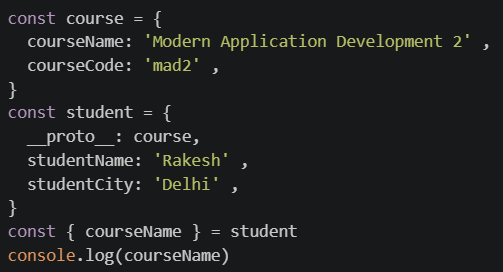
Text of the picture (copyable)
```javascript
const course = {
  courseName: 'Modern Application Development 2',
  courseCode: 'mad2',
}
const student = {
  __proto__: course,
  studentName: 'Rakesh',
  studentCity: 'Delhi',
}
const { courseName } = student
console.log(courseName)
```- Undefined
- Modern Application Development 2
- Will throw syntax error
- None of these
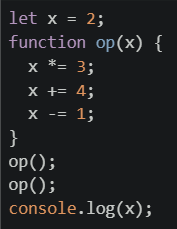 What is the final value of x, logged on the console?
Text of the picture (copyable)
```javascript
let x = 2;
function op(x) {
  x *= 3;
  x += 4;
  x -= 1;
}
op();
op();
console.log(x);
```- It includes all data stored permanently in the database and is shared across users
- It represents the complete system data such as users, products, and transactions
- It refers to short-lived interface elements like loading indicators or selected tabs
- It handles complex application logic and long-term session management
- Storing all state permanently in frontend memory across sessions
- Allowing the frontend to handle complex business logic and data storage
- Client or server maintaining state and explicitly exchanging it through requests
- Eliminating state entirely from web applications
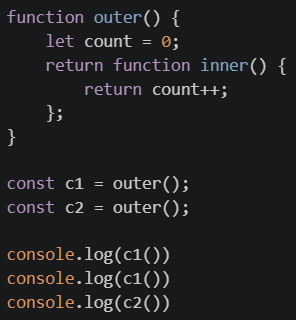 What will be the output of the above program ?
Text of the picture (copyable)
```javascript
function outer() {
  let count = 0;
  return function inner() {
    return count++;
  };
}

const c1 = outer();
const c2 = outer();

console.log(c1())
console.log(c1())
console.log(c2())
```- 1 2 1
- 0 0 0
- 1 2 3
- 0 1 0
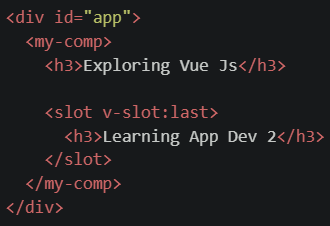 File: script.js
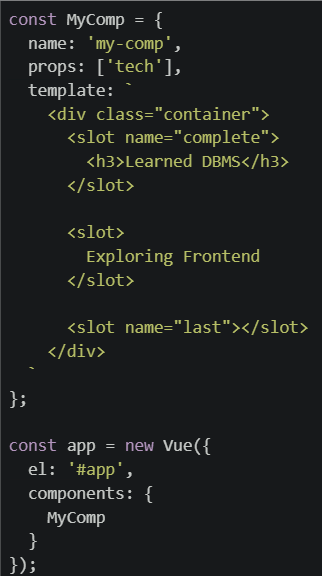 What will be rendered on the browser for the code setup given above ?
Text of the picture (copyable)
```html
<div id="app">
  <my-comp>
    <h3>Exploring Vue Js</h3>

    <slot v-slot:last>
      <h3>Learning App Dev 2</h3>
    </slot>
  </my-comp>
</div>
```
```javascript
const MyComp = {
  name: 'my-comp',
  props: ['tech'],
  template: `
    <div class="container">
      <slot name="complete">
        <h3>Learned DBMS</h3>
      </slot>

      <slot>
        Exploring Frontend
      </slot>

      <slot name="last"></slot>
    </div>
  `
};

const app = new Vue({
  el: '#app',
  components: {
    MyComp
  }
});
```
text
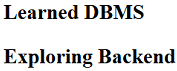
Learned DBMS
Exploring Backend
text
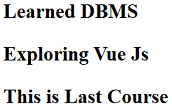
Learned DBMS

Exploring Vue Js

This is Last Course
text
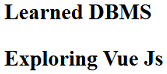
Learned DBMS
Exploring Vue Js
- None of these.
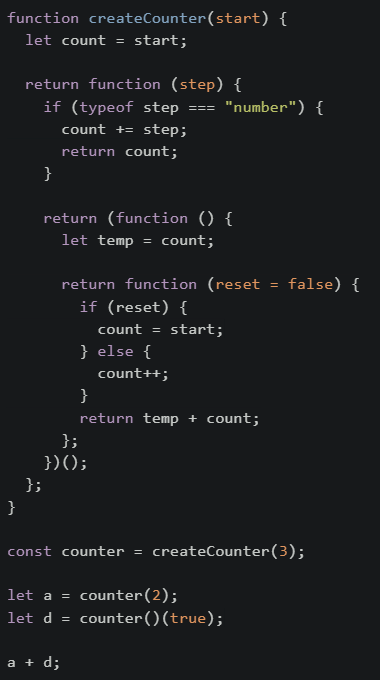 What would be the end result at the end of execution of the code?
Text of the picture (copyable)
```javascript
function createCounter(start) {
  let count = start;

  return function (step) {
    if (typeof step === "number") {
      count += step;
      return count;
    }
  }

  return (function () {
    let temp = count;

    return function (reset = false) {
      if (reset) {
        count = start;
      } else {
        count++;
      }
      return temp + count;
    };
  })();
}

const counter = createCounter(3);

let a = counter(2);
let d = counter()(true);

a + d;
```- 5
- 13
- 8
- 11
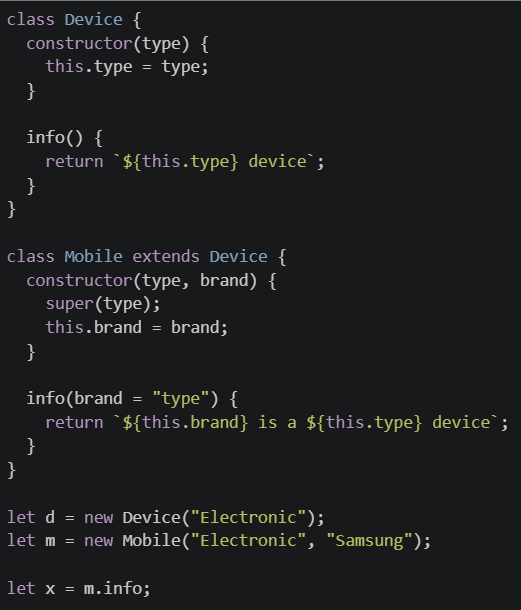 Which of the following statements are TRUE?
Text of the picture (copyable)
```javascript
class Device {
constructor(type) {
this.type = type;
}
info() {
return `${this.type} device`;
}
}
class Mobile extends Device {
constructor(type, brand) {
super(type);
this.brand = brand;
}
info(brand = "type") {
return `${this.brand} is a ${this.type} device`;
}
}
let d = new Device("Electronic");
let m = new Mobile("Electronic", "Samsung");
let x = m.info;
``` returns "Electronic device"
text
```
d.info()
```
 returns "Samsung is a Electronic device"
text
```
m.info()
```
- Calling
 throws a runtime error
text
x()
 returns "Electronic device"
text
```
d.constructor()
```
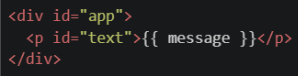 File: script.js
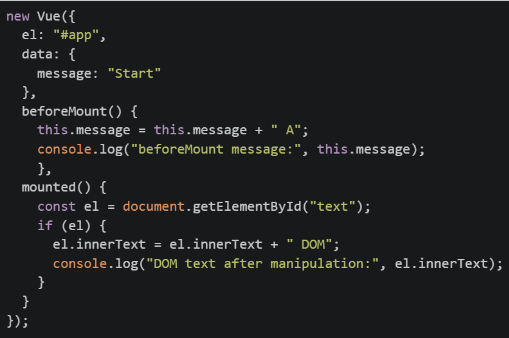
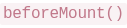 lifecycle hook is invoked, which of the following statements becomes TRUE?
Text of the picture (copyable)
```
beforeMount()
```
- The
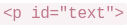 element exists in the DOM but still contains {{ message }}
text
```html
<p id="text">
```
- The DOM content already reflects the updated value "Start A"
- The
 hook has already executed
text
```
mounted()
```
- The DOM does not exist at all
 element after the component is fully mounted and all statements in the hook have executed?
Text of the picture (copyable)
`<p>`
```
mounted()
```

text
Start A

text
Start A B
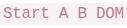
text
Start A B DOM
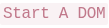
text
Start A DOM
Answer key
- Q1 (MSQ, 2 marks): A, B
- Q2 (MSQ, 2 marks): A, C
- Q3 (MCQ, 3 marks): A
- Q4 (MCQ, 3 marks): B
- Q5 (MCQ, 3 marks): D
- Q6 (MCQ, 3 marks): B
- Q7 (MCQ, 3 marks): B
- Q8 (SA, 3 marks): 2
- Q9 (MCQ, 2 marks): C
- Q10 (MCQ, 2 marks): C
- Q11 (MCQ, 4 marks): D
- Q12 (MCQ, 5 marks): C
- Q13 (MCQ, 5 marks): B
- Q14 (MSQ, 4 marks): A, B, C
- Q15 (MCQ, 3 marks): A
- Q16 (MCQ, 3 marks): D
Concepts this paper tests
Auto-generated summary from the source site. Handy as a checklist; the lessons above explain each idea from scratch.
Here's a summary of the core topics, concepts, principles, and equations essential for the exam, followed by a knowledge graph.
Core Topics and Concepts Summary
This exam primarily focuses on JavaScript fundamentals, browser APIs, web application architecture, and the Vue.js framework.
1. JavaScript Fundamentals
Variable Declaration and Scope:
var: Function-scoped or global. Declarations are hoisted and initialized withundefined. Globalvarvariables are attached as properties to the global object (e.g.,windowin browsers).letandconst: Block-scoped. Declarations are hoisted but not initialized, residing in the "Temporal Dead Zone" until their definition.constrequires immediate initialization and cannot be reassigned.let/constvariables declared globally are not attached to thewindowobject.
Functions:
- Types: Function declarations (
function name() {}) and function expressions (const name = function() {}). - Hoisting: Function declarations are fully hoisted. Function expressions only hoist the variable declaration, not the function value itself (e.g., a
varassigned function expression hoistsvar name = undefined;). - First-Class Objects: Functions in JavaScript are objects and can be assigned to variables, passed as arguments, and returned from other functions.
- Arrow Functions: Syntactic shorthand for functions. Crucially, they do not have their own
thisbinding; they lexically inheritthisfrom their enclosing scope.
- Types: Function declarations (
thisKeyword:- The value of
thisdepends on how the function is called. - Default Binding: In non-strict mode,
thistypically defaults to the global object (window). In strict mode (implicitly for classes and modules),thisisundefined. - Implicit Binding: When a function is called as a method of an object (
obj.method()),thisrefers toobj. Explicit Binding: Methods like
call(),apply(), andbind()allow explicitly setting thethiscontext.func.apply(thisArg, [argsArray]): CallsfuncwiththisArgasthisand arguments provided as an array.
- The value of
Closures:
- An inner function that retains access to variables from its outer (enclosing) function's scope, even after the outer function has finished executing.
- Each invocation of the outer function creates a new, independent lexical environment for its inner functions.
Prototypes and Classes (OOP):
- Prototype Chain (
__proto__): Objects inherit properties and methods from their prototypes. When a property is accessed, JavaScript traverses the prototype chain until it finds the property or reaches the end (null). - Classes: Provide a cleaner syntax (
class,extends,constructor,super()) for creating constructor functions and managing prototype-based inheritance, essentially syntactic sugar over the older prototype model. - Method Overriding: Subclasses can define methods with the same name as their parent class, overriding the parent's implementation.
- Prototype Chain (
Destructuring Assignment:
- A convenient way to extract values from arrays or properties from objects into distinct variables. It respects the prototype chain for object properties.
Data Types and Operators:
typeofoperator to check the type of a variable.- Arithmetic operations involving
undefinedorNaN(Not-a-Number) typically result inNaN.
JSON (JavaScript Object Notation):
JSON.parse(string): Converts a JSON string into a JavaScript object.JSON.stringify(object): Converts a JavaScript object into a JSON string.
2. Browser APIs & Web Development Concepts
Web Storage:
localStorage: Stores data with no expiration date. Data persists even after the browser is closed. Data is origin-specific.sessionStorage: Stores data for the duration of a single browser session (i.e., until the browser tab or window is closed). Data is origin-specific.- Cookies: Small text files stored on the client. Sent with every HTTP request to the domain. Can have expiration dates. Used for session management, user tracking, and storing small amounts of data.
- Token Storage: Refers to the practice of storing authentication tokens (e.g., JWTs) in client-side storage mechanisms like
localStorageorcookies. Security considerations are paramount.
HTTP Protocol:
- Statelessness: Each HTTP request is independent; the server does not retain information about previous requests from the same client.
- State Management: To maintain state in web applications, client-side (e.g., sending cookies/tokens with requests) or server-side (e.g., server-managed sessions) mechanisms are used to explicitly exchange state information.
UI State Management:
- Ephemeral (UI) State: Short-lived, local state specific to a particular UI element or component (e.g., whether a modal is open, a tab is selected, loading indicator visibility, input field values). It typically does not persist across sessions or affect the core application logic significantly.
- Application State: Broader state that affects multiple parts of the application (e.g., logged-in user, shopping cart contents).
- Server State: Data managed by the backend.
DOM Manipulation:
- Direct interaction with the Document Object Model using methods like
document.getElementById()and manipulating properties likeinnerText.
- Direct interaction with the Document Object Model using methods like
3. Vue.js Framework
Vue Instance:
- Created with
new Vue({ ... }). Theelproperty specifies the DOM element Vue will mount to.
- Created with
Data Reactivity:
- The
dataoption defines the reactive state of a Vue instance/component. Changes todataproperties automatically trigger re-renders of the template.
- The
Computed Properties:
- Defined in the
computedoption. These are functions that return a value based on reactivedata. They automatically re-evaluate only when their reactive dependencies change, and their results are cached.
- Defined in the
Components:
- Reusable Vue instances with their own
data,methods,computedproperties, andtemplate. props: Used to pass data from a parent component to a child component.
- Reusable Vue instances with their own
Slots:
- A mechanism for content distribution, allowing a component to compose content provided by its parent.
- Default Slot (
<slot></slot>): Renders any content passed between the component's opening and closing tags in the parent. Can have fallback content. - Named Slots (
<slot name="name"></slot>): Renders specific content targeted by thev-slot:namedirective in the parent. Can have fallback content. v-slotDirective: Used in the parent component's template to specify which content goes into which slot of the child component.
Lifecycle Hooks:
- Predefined functions that run at specific stages of a component's lifecycle.
beforeMount(): Called just before the component's template is rendered into the DOM. The reactive data is set up, but the actual DOM is not yet available.mounted(): Called after the component has been rendered into the DOM. The component's$el(the root DOM element) is now accessible. Direct DOM manipulation can be performed here.
Template Syntax:
{{ propertyName }}: Text interpolation to display reactive data in the template.
4. Mathematical Equations
While the exam is primarily software-focused, one question involved a basic financial calculation:
- Simple Interest Calculation (Q6): $$ \text{Simple Interest} = \frac{\text{Principal} \times \text{Annual Interest Rate} \times \text{Duration}}{100} $$ Where
Annual Interest Rateis typically given as a percentage (e.g., if the rate is 30%, use 30 in the formula, not 0.30).