Home / Past papers / MAD2 Quiz 2 / this paper
Modern Application Indian Institute Of Technology, Madras - Bs In Data Science And Applications Development Ii 14 Aug 26 - 16 Aug 2026
Elapsed 00:00
A developer opens the Node.js REPL and runs the following line:
 Why does this fail?
Why does this fail?Text of the picture (copyable)
```javascript
const heading = document.querySelector("h1")
```- Node.js cannot execute JavaScript from the terminal.
- The Node.js runtime does not provide browser DOM APIs like

text
document
 works only after using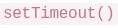
text
```javascript
document.querySelector()
```
```
setTimeout()
```
- V8 can execute only arithmetic expressions, not DOM code.
Consider the following javascript code:
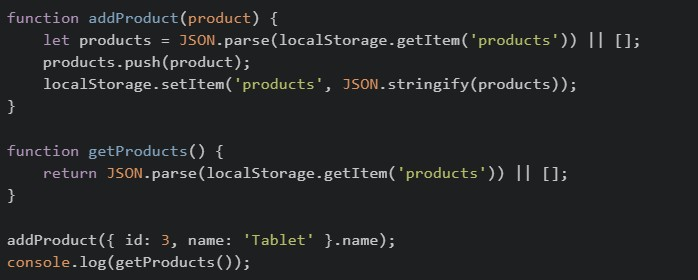 The above code is initially loaded on the browser and then the browser is refreshed two times. What will be the final output?
The above code is initially loaded on the browser and then the browser is refreshed two times. What will be the final output?Text of the picture (copyable)
```javascript
function addProduct(product) {
    let products = JSON.parse(localStorage.getItem('products')) || [];
    products.push(product);
    localStorage.setItem('products', JSON.stringify(products));
}

function getProducts() {
    return JSON.parse(localStorage.getItem('products')) || [];
}

addProduct({ id: 3, name: 'Tablet' }.name);
console.log(getProducts());
```- ['Tablet', 'Tablet']
- ['Tablet', 'Tablet', 'Tablet']
- [{ id: 3, name: 'Tablet' }]
- [undefined]
Point out the error with the following code that is used to display user data?
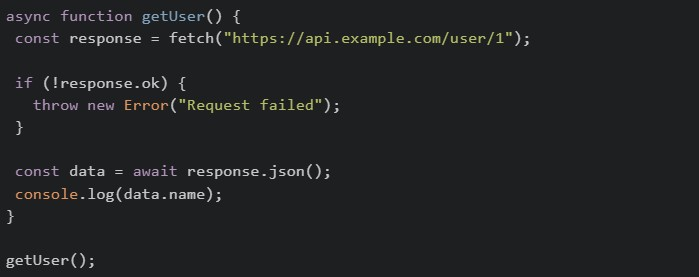
Text of the picture (copyable)
```javascript
async function getUser() {
const response = await fetch("https://api.example.com/user/1");
if (!response.ok) {
throw new Error("Request failed");
}
const data = await response.json();
console.log(data.name);
}
getUser();
``` should use POST method by default, not GET
text
```
fetch()
```
 and
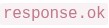
and  will throw errors because response is a
text
response.ok
```
response.json()
```
Promise
 cannot be called on a
  response; use
  instead
text
```
.json()
```
fetch
```
.text()
```
- does not work inside
 functions
text
```
fetch()
```
async
What is the correct output order for the following code?

Text of the picture (copyable)
```javascript
console.log("A")
setTimeout(() => console.log("B"), 0)
Promise.resolve().then(() => console.log("C"))
console.log("D")
```- A B C D
- C A D B
- A D C B
- A D B C
Consider the following code:
 What happens to
  ?
?
What happens to ?Text of the picture (copyable)
```javascript
const settings = { theme: "light", layout: { sidebar: true } }
const copy = { ...settings }
copy.layout.sidebar = false
```
```
settings.layout.sidebar
```- It remains
 because spread syntax always creates a deep copy.
text
true
- It becomes
 because the nested object is still shared in a shallow copy.
text
false
- It becomes
 because
  is removed from the original object.
text
undefined
layout
- The code throws an error because nested objects cannot be copied with spread syntax.
Consider the following JavaScript code snippet?
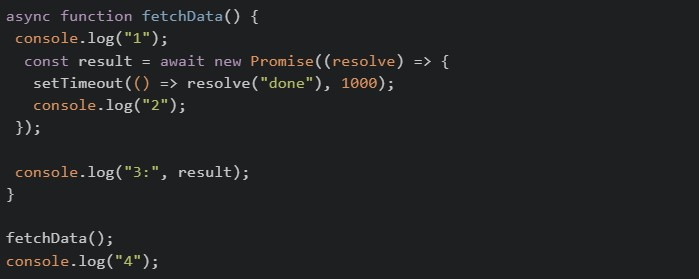 What will be the output of above code on the browser’s console?
What will be the output of above code on the browser’s console?Text of the picture (copyable)
```javascript
async function fetchData() {
  console.log("1");
  const result = await new Promise((resolve) => {
    setTimeout(() => resolve("done"), 1000);
    console.log("2");
  });

  console.log("3:", result);
}

fetchData();
console.log("4");
```- 1 → 2 → 3: done → 4
- 1 → 4 → 2 → 3: done
- 1 → 2 → 4 → 3: done
- 1 → 2 → 4 (3 never prints due to unresolved promise)
Consider the following Vuex store snippets. Which of the following demonstrates the correct usage of a mutation as per its definition?
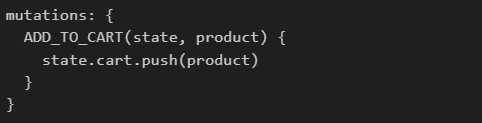
text
```
mutations: {
  ADD_TO_CART(state, product) {
    state.cart.push(product)
  }
}
```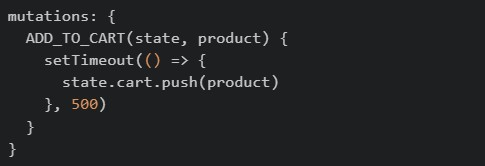
text
```javascript
mutations: {
  ADD_TO_CART(state, product) {
    setTimeout(() => {
      state.cart.push(product)
    }, 500)
  }
}
```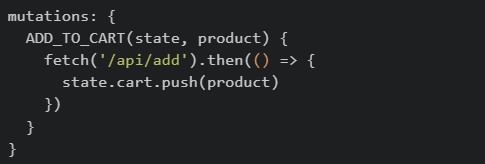
text
```javascript
mutations: {
  ADD_TO_CART(state, product) {
    fetch('/api/add').then(() => {
      state.cart.push(product)
    })
  }
}
```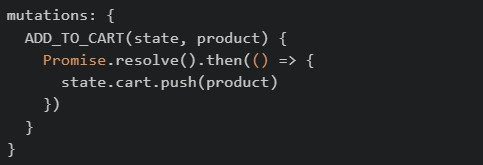
text
```javascript
mutations: {
  ADD_TO_CART(state, product) {
    Promise.resolve().then(() => {
      state.cart.push(product)
    })
  }
}
```
Suppose the following HTML exists:
 Which of the following statements are correct?
Which of the following statements are correct?Text of the picture (copyable)
```html
<div class="card" data-price="499">
<span id="title">Vue Book</span>
</div>
``` returns
  .
.text
```javascript document.querySelector(".card").dataset.price ``` "499" converts the value to numeric
  .
.text
```javascript Number(document.querySelector(".card").dataset.price) ``` 499 can read the visible text
  .
.text
```javascript document.getElementById("title").innerText ``` "Vue Book" returns a single element, not a collection.
text
```javascript
document.querySelectorAll(".card")
```
A Vue frontend, a mobile app, and another backend service all call the same Flask API deployed on multiple servers. The team chooses JWT authentication. Which of the following statements are correct?
- Each request can carry the token, so any server can validate it without storing a per-user session in memory.
- JWT is API-friendly because clients can send it using the
 header.
text
```
Authorization: Bearer <token>
```
- In Flask-JWT-Extended,
 can read the identity stored in the token.
text
```
get_jwt_identity()
```
- Session-based authentication is usually easier to scale across multiple servers because no shared storage is needed. The team should have chosen this.
A Vue 2 component does the following: •loads initial task data from an API, •starts a timer after the component appears on the page, •clears that timer before the component is removed. Which hook choices are appropriate?
 for loading initial data.
text
```
created()
```
 for starting DOM-related work or timers.
text
```
mounted()
```
 for cleanup.
text
```
beforeDestroy()
```
 for declaring reactive
  .
.text
```
destroyed()
```
data
In a Vue Router app, a developer uses: •  inside a parent route, •
  , •
, •  inside a method. Which statements are correct?
inside a parent route, • , • inside a method. Which statements are correct?Text of the picture (copyable)
children
```
{ path: '*', component: NotFound }
```
```javascript
this.$router.go(-1)
```- can be used to organize nested routes under a parent route.
text
children
 can act as a fallback for unknown routes.
text
*
- tries to go back one step in browser history.
text
```javascript
this.$router.go(-1)
```
- Vue Router removes the need for route components.
Fill in Code1, inside a mutation handler, which can be used to reduce the price of each of the products in the state by a certain discount. app.js:
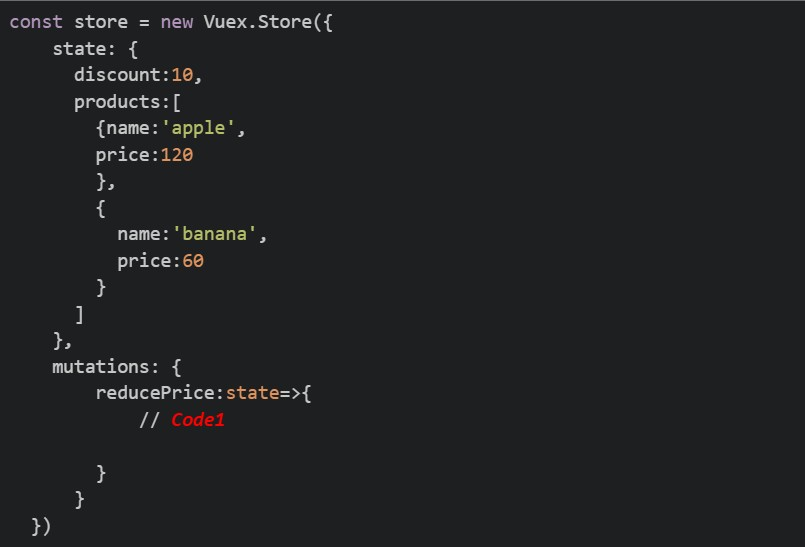
Text of the picture (copyable)
```javascript
const store = new Vuex.Store({
  state: {
    discount: 10,
    products: [
      {name: 'apple',
        price: 120
      },
      {
        name: 'banana',
        price: 60
      }
    ]
  },
  mutations: {
    reducePrice: state=>{
      // Code1
    }
  }
})
```
text
```javascript
this.$store.state.products.forEach(product => { product.price -= (state.discount)/100*product.price; })
```
text
```javascript
state.products.forEach(product => { product.price -= (state.discount)/100*product.price;})
```
text
```javascript
commit.products.forEach(product => { product.price -= (state.discount)/100*product.price;})
```
text
```javascript
dispatch.products.forEach(product => { product.price -= (state.discount)/100*product.price;})
```
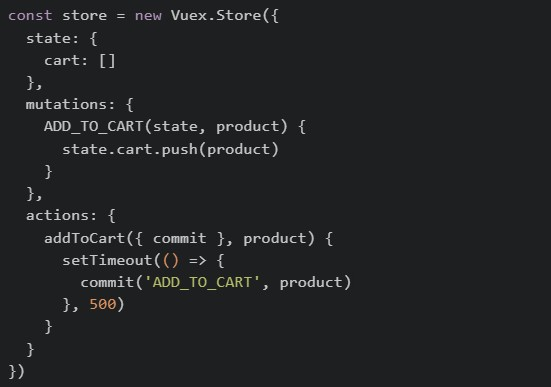
Consider the following Vuex store and component code. store.js
 Component.vue
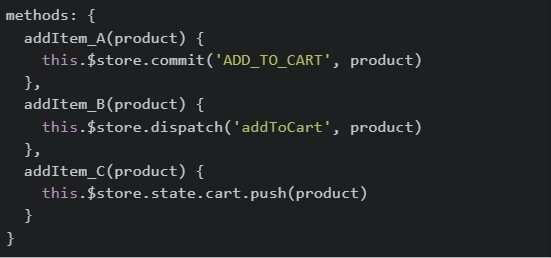 After triggering all three methods (
  ,
,  and
and  ) one by one, which of the following statements is correct?
Component.vue
After triggering all three methods ( , and ) one by one, which of the following statements is correct?Text of the picture (copyable)
```javascript
const store = new Vuex.Store({
  state: {
    cart: []
  },
  mutations: {
    ADD_TO_CART(state, product) {
      state.cart.push(product)
    }
  },
  actions: {
    addToCart({ commit }, product) {
      setTimeout(() => {
        commit('ADD_TO_CART', product)
      }, 500)
    }
  }
})
```
```javascript
methods: {
  addItem_A(product) {
    this.$store.commit('ADD_TO_CART', product)
  },
  addItem_B(product) {
    this.$store.dispatch('addToCart', product)
  },
  addItem_C(product) {
    this.$store.state.cart.push(product)
  }
}
```
addItem_A
addItem_B
addItem_C- All three methods will update the cart and all changes will be visible in Vue DevTools mutation history.
- Only and will appear in Vue DevTools mutation history, but will appear with a delay.
text
addItem_A
addItem_B
addItem_B
- Only will update the cart because mutations cannot be called directly from components.
text
addItem_B
- will throw an error because Vuex prevents direct state modification.
text
addItem_C
Read the following component carefully.
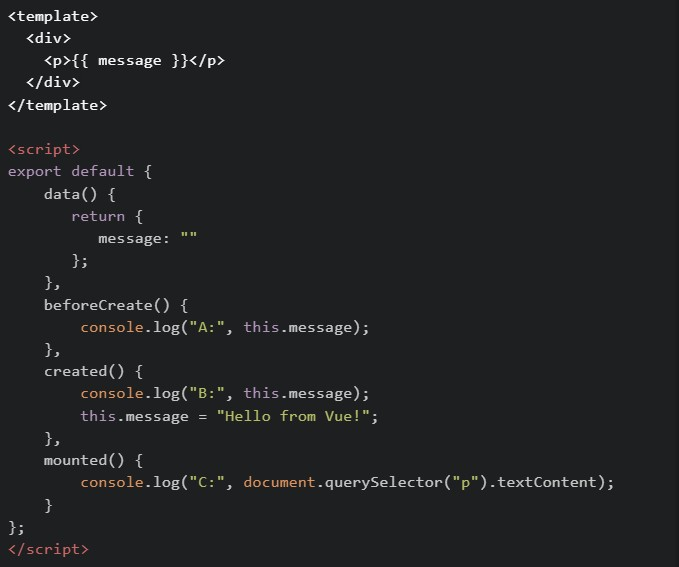 What will be logged in the console when this component first loads?
What will be logged in the console when this component first loads?Text of the picture (copyable)
```html
<template>
  <div>
    <p>{{ message }}</p>
  </div>
</template>

<script>
export default {
  data() {
    return {
      message: ""
    };
  },
  beforeCreate() {
    console.log("A:", this.message);
  },
  created() {
    console.log("B:", this.message);
    this.message = "Hello from Vue!";
  },
  mounted() {
    console.log("C:", document.querySelector("p").textContent);
  }
};
</script>
```
text
A: "" → B: Hello from Vue! → C: Hello from Vue!

text
A: undefined -> B: Hello from Vue! -> C: Hello from Vue!

text
A: undefined → B: "" → C: Hello from Vue!

text
A: undefined → B: undefined → C: Hello from Vue!

text
A: "" -> B: "" -> C: Hello from Vue!
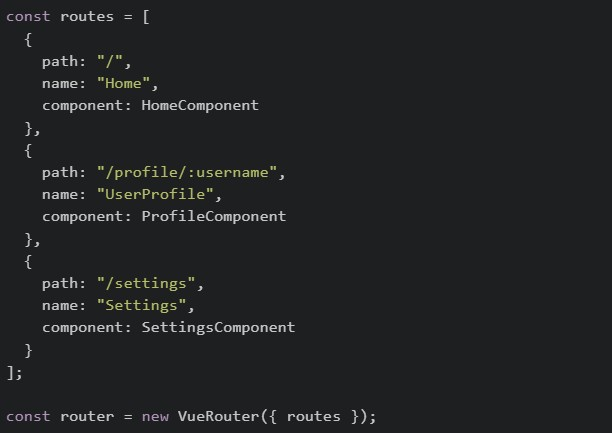
Comprehension passage - the questions below it refer to this
Read the following code carefully and answer the given sub questions: file1: router/index.js
 file2: ProfileComponent.vue
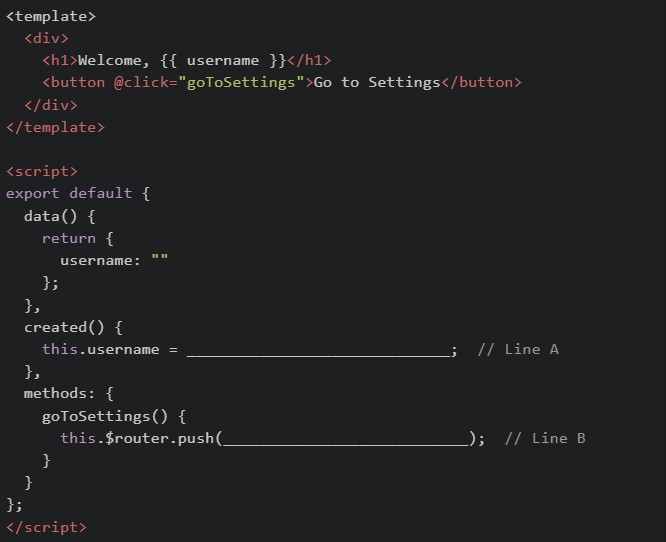
What should be filled in at Line A to correctly read the username from the URL?

text
```
this.$router.params.username
```

text
```
this.$route.params.username
```

text
```
this.$router.query.username
```

text
```
this.$route.query.username
```
What should be filled in at Line B to navigate to the Settings page?

text
```
{ path: "Settings" }
```
text
```json
{ path: "SettingsComponent" }
```
text
```json
{ "name": "Settings" }
```
text
```json
{ "name": "SettingsComponent" }
```
Answer key
- Q1 (MCQ, 2 marks): B
- Q2 (MCQ, 2 marks): B
- Q3 (MCQ, 2 marks): B
- Q4 (MCQ, 3 marks): C
- Q5 (MCQ, 3 marks): B
- Q6 (MCQ, 3 marks): C
- Q7 (MCQ, 3 marks): A
- Q8 (MSQ, 3 marks): A, B, C
- Q9 (MSQ, 3 marks): A, B, C
- Q10 (MSQ, 4.5 marks): A, B, C
- Q11 (MSQ, 2 marks): A, B, C
- Q12 (MCQ, 4.5 marks): B
- Q13 (MCQ, 4.5 marks): B
- Q14 (MCQ, 4.5 marks): C
- Q15 (MCQ, 3 marks): B
- Q16 (MCQ, 3 marks): C