Home / Past papers / MAD2 End Term / this paper
Modern Application Development Ii 13 Sep 26 (Session 2) - 13 Sep 2026
Elapsed 00:00
A JWT token contains three parts:  . Which of the following best explains the relationship between the header and the signature in JWT authentication?
. Which of the following best explains the relationship between the header and the signature in JWT authentication?Text of the picture (copyable)
```
header.payload.signature
```
- The header stores the encrypted password used to generate the signature.
- The signature only protects the payload section; changes to the header do not affect token validation.
- The signature is generated using the encoded header, encoded payload, and a secret key. If the header is modified, the signature verification fails.
- The header contains the final signature hash generated after token creation.
A news platform wants to send a morning digest email to all subscribers every day at 7 AM. Sweta sets up the beat schedule, starts Redis and Celery Beat, and then claims: "The Worker is optional here. Beat handles the scheduling and the execution of the task, so we do not need a separate Worker process." Is Sweta's claim correct? Choose the best answer.
- Yes. For tasks defined in
 , Celery Beat manages both the schedule and the execution, so running the Worker is redundant.
text
```
beat_schedule
```
- No. Celery Beat cannot trigger tasks that involve database queries or email sending. Those tasks must be triggered manually using
 from the Flask app.
text
```
.delay()
```
- No. Celery Beat is only a scheduler. At 7 AM, it pushes a task message into the Redis broker and stops there. Without a running Celery Worker to pick up that message, the digest email is never actually sent.
- Yes, but only when the task is defined with
 instead of inside .In that case, Beat handles execution too.
text
```
.apply_async()
```
```
beat_schedule
```
A startup is building a food delivery app. The customer-facing screen shows live order status updates: "Order Placed → Preparing → Out for Delivery → Delivered". Each stage is triggered by the restaurant or the delivery rider updating the status on their end. The customer's screen should reflect these changes in real time without refreshing the page. Two developers debate about the right technology: Developer A says: "Let's use Server-Sent Events. It's the right fit here." Developer B says: "No, we must use WebSockets. SSE won't work." Who is correct, and why?
- Developer B is correct. SSE cannot transmit JSON data, so structured order status objects cannot be pushed to the browser.
- Developer B is correct. SSE connections do not reconnect automatically when the network is briefly interrupted, making it unreliable for a live tracker.
- Developer A is correct, but only if WebSockets are set up as a mandatory fallback, since SSE requires HTTP/2 to function.
- Developer A is correct. The tracker only requires the server to push status updates to the customer, without the customer sending data back through the same connection. SSE is purpose-built for exactly this one-way server-to-client push scenario.
Consider the following  and JavaScript
  for a Vue application: File: index.html
 File: app.js
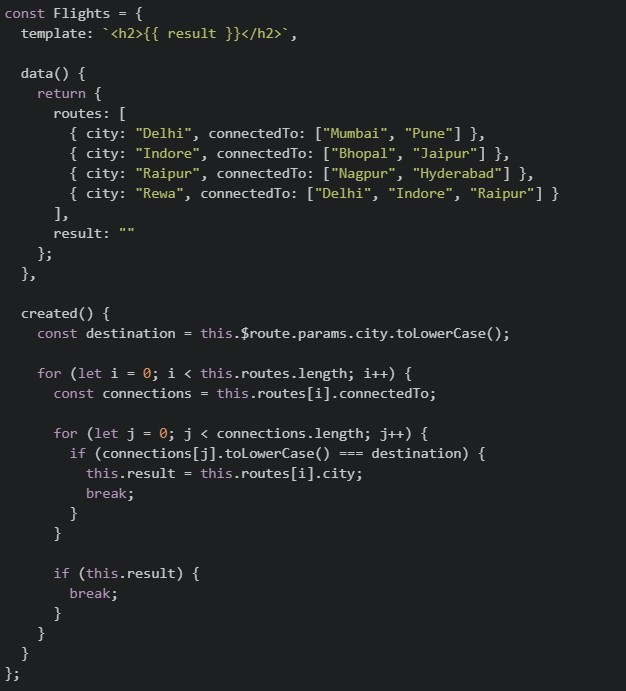 Suppose the application is running on
  , and the user visits the URL:
  What will be rendered by the browser? [NOTE: is divided in two images, consider them as one file content.]
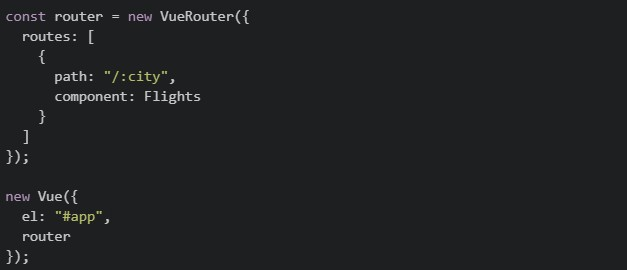
and JavaScript for a Vue application: File: index.html
File: app.js
Suppose the application is running on , and the user visits the URL: What will be rendered by the browser? [NOTE: is divided in two images, consider them as one file content.]
Text of the picture (copyable)
index.html
app.js
```html
<div id="app">
  <router-view></router-view>
</div>
```
```javascript
const Flights = {
  template: `<h2>{{ result }}</h2>`,

  data() {
    return {
      routes: [
        { city: "Delhi", connectedTo: ["Mumbai", "Pune"] },
        { city: "Indore", connectedTo: ["Bhopal", "Jaipur"] },
        { city: "Raipur", connectedTo: ["Nagpur", "Hyderabad"] },
        { city: "Rewa", connectedTo: ["Delhi", "Indore", "Raipur"] }
      ],
      result: ""
    };
  },

  created() {
    const destination = this.$route.params.city.toLowerCase();

    for (let i = 0; i < this.routes.length; i++) {
      const connections = this.routes[i].connectedTo;

      for (let j = 0; j < connections.length; j++) {
        if (connections[j].toLowerCase() === destination) {
          this.result = this.routes[i].city;
          break;
        }
      }

      if (this.result) {
        break;
      }
    }
  }
};
```
```
http://localhost:8080
```
```
http://localhost:8080/#/raipur
```
app.js
```javascript
const router = new VueRouter({
  routes: [
    {
      path: "/:city",
      component: Flights
    }
  ]
});

new Vue({
  el: "#app",
  router
});
```- Delhi
- Indore
- Raipur
- Rewa
In a Celery setup, we use two separate Redis databases:
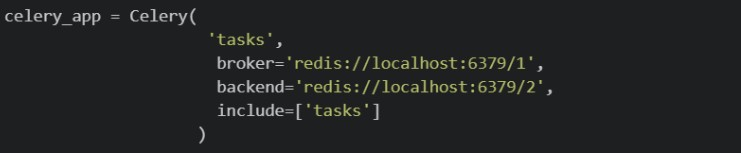 Which of the following best explains the conceptual difference between the broker and the backend?
Which of the following best explains the conceptual difference between the broker and the backend?Text of the picture (copyable)
```python
celery_app = Celery(
    'tasks',
    broker='redis://localhost:6379/1',
    backend='redis://localhost:6379/2',
    include=['tasks']
)
```- The backend is only needed when tasks involve sending emails; for tasks that only read from the database, only the broker is required.
- The broker and backend must always use different port numbers; using the same Redis port for both would cause a conflict.
- The broker distributes tasks evenly across multiple Celery workers, while the backend tracks which worker is currently processing which task.
- The broker stores task requests until a Celery worker picks and executes them, while the backend stores the task result after execution.
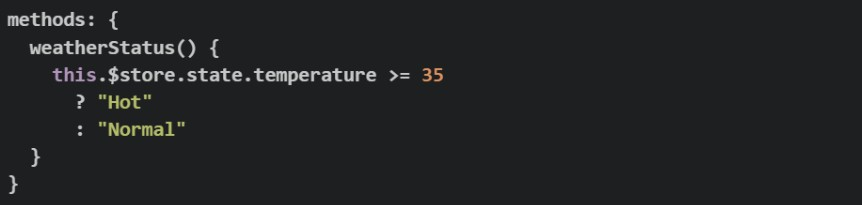
Consider the following Vuex store:
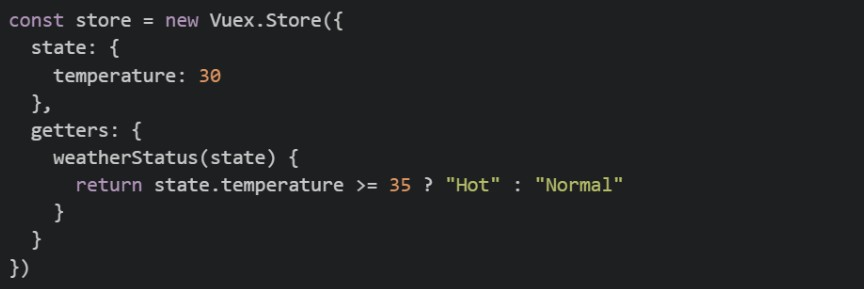 The
The  getter is used in a Vue component as shown below:
 Now suppose the Vuex getter is removed, while the temperature state continues to be updated through Vuex mutations. Which of the following implementations correctly recreates in the component so that it automatically reacts whenever the Vuex
  changes?
The getter is used in a Vue component as shown below:
Now suppose the Vuex getter is removed, while the temperature state continues to be updated through Vuex mutations. Which of the following implementations correctly recreates in the component so that it automatically reacts whenever the Vuex changes?Text of the picture (copyable)
```javascript
const store = new Vuex.Store({
  state: {
    temperature: 30
  },
  getters: {
    weatherStatus(state) {
      return state.temperature >= 35 ? "Hot" : "Normal"
    }
  }
})
```
weatherStatus
```javascript
computed: {
  weatherStatus() {
    return this.$store.getters.weatherStatus
  }
}
```
weatherStatus
weatherStatus
temperature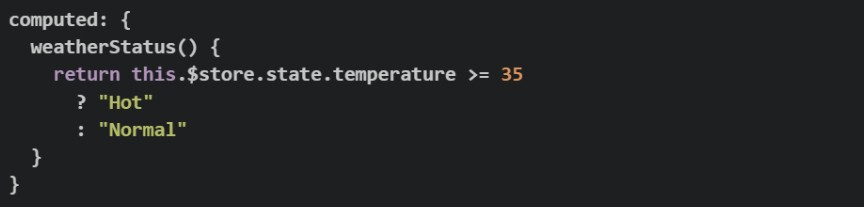
text
```javascript
computed: {
  weatherStatus() {
    return this.$store.state.temperature >= 35
      ? "Hot"
      : "Normal"
  }
}
```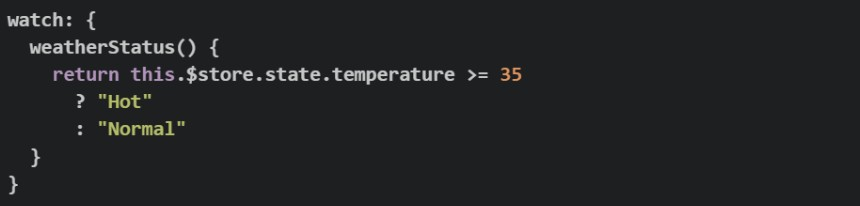
text
```javascript
watch: {
  weatherStatus() {
    return this.$store.state.temperature >= 35
      ? "Hot"
      : "Normal"
  }
}
```
text
```javascript
methods: {
  weatherStatus() {
    this.$store.state.temperature >= 35
      ? "Hot"
      : "Normal"
  }
}
```
text
```javascript
watch: {
  weatherStatus() {
    return this.$store.state.temperature >= 35
  }
}
```
A team builds an internal warehouse dashboard where multiple managers, each on a different computer, need to receive live low-stock alerts from the server in real time. They decide to use Flask-SSE with Redis. Which of the following best explains Redis's role in a Flask-SSE setup?
- Redis is used by Flask-SSE to authenticate connected users before events can be streamed to the browser.
- Redis is optional in Flask-SSE and is only recommended when the application has a very large number of concurrent users.
- Redis is only needed when SSE events must be stored permanently and replayed after reconnection.
- Flask-SSE uses Redis as a shared event channel so published messages can be delivered to connected clients.
Match the testing concept in Column I with the most appropriate description in Column II.
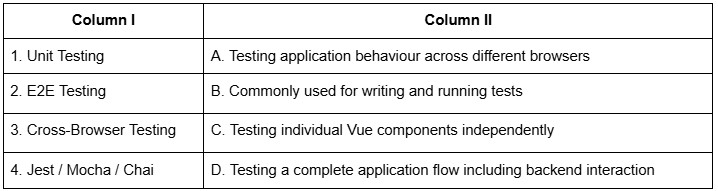
Text of the picture (copyable)
| Column I | Column II |
| :------- | :-------- |
| 1. Unit Testing | A. Testing application behaviour across different browsers |
| 2. E2E Testing | B. Commonly used for writing and running tests |
| 3. Cross-Browser Testing | C. Testing individual Vue components independently |
| 4. Jest / Mocha / Chai | D. Testing a complete application flow including backend interaction |
- 1-C, 2-B, 3-A, 4-D
- 1-B, 2-C, 3-D, 4-A
- 1-A, 2-D, 3-B, 4-C
- 1-C, 2-D, 3-A, 4-B
Match the performance metric in Column I with the most appropriate description in Column II.
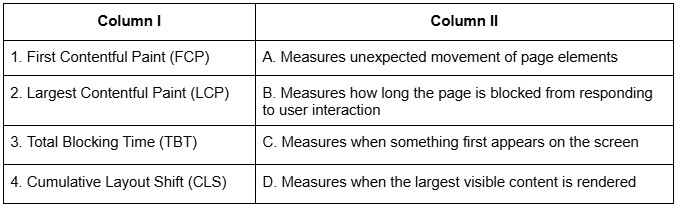
Text of the picture (copyable)
| Column I | Column II |
|---|---|
| 1. First Contentful Paint (FCP) | A. Measures unexpected movement of page elements |
| 2. Largest Contentful Paint (LCP) | B. Measures how long the page is blocked from responding to user interaction |
| 3. Total Blocking Time (TBT) | C. Measures when something first appears on the screen |
| 4. Cumulative Layout Shift (CLS) | D. Measures when the largest visible content is rendered |
- 1-C, 2-D, 3-B, 4-A
- 1-B, 2-C, 3-A, 4-D
- 1-C, 2-B, 3-D, 4-A
- 1-A, 2-B, 3-D, 4-C
A developer has just created a new Vue 2 project using Vue CLI and the following package.json was generated. package.json
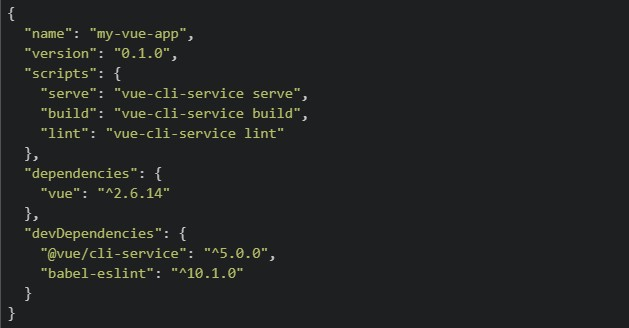 The developer wants to view the app in the browser locally for development. They run the following command: bash:
  Which of the following best describes what happens and what the developer should have run instead?
The developer wants to view the app in the browser locally for development. They run the following command: bash: Which of the following best describes what happens and what the developer should have run instead?Text of the picture (copyable)
```json
{
  "name": "my-vue-app",
  "version": "0.1.0",
  "scripts": {
    "serve": "vue-cli-service serve",
    "build": "vue-cli-service build",
    "lint": "vue-cli-service lint"
  },
  "dependencies": {
    "vue": "^2.6.14"
  },
  "devDependencies": {
    "@vue/cli-service": "^5.0.0",
    "babel-eslint": "^10.1.0"
  }
}
```
```
npm run build
```- launches the app on
 ; the developer should have run npm start to compile for production instead.
text
```
npm run build
```
```
localhost:8080
```
- and
 do the same thing — both launch the app at
 text
```
npm run build
```
```
npm run serve
```
```
localhost:8080
```
- is correct for local development; is only used for deploying to a server.
text
```
npm run build
```
```
npm run serve
```
- compiles and bundles the app for production into a
 folder — it does not start a local server. The developer should have run instead.
text
```
npm run build
```
/dist
```
npm run serve
```
Consider the following JavaScript code:
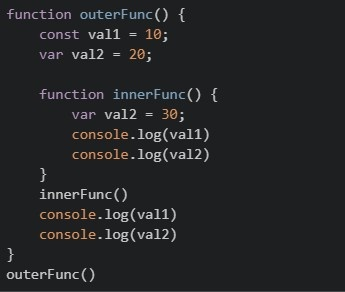 What will be output on the browser’s console?
What will be output on the browser’s console?Text of the picture (copyable)
```javascript
function outerFunc() {
  const val1 = 10;
  var val2 = 20;

  function innerFunc() {
    var val2 = 30;
    console.log(val1)
    console.log(val2)
  }
  innerFunc()
  console.log(val1)
  console.log(val2)
}
outerFunc()
```
text
```
10 20
10 30
```

text
```
10 20
10 20
```

text
```
10 30
10 20
```
- None of these.
What is logged to the console after running the following code?
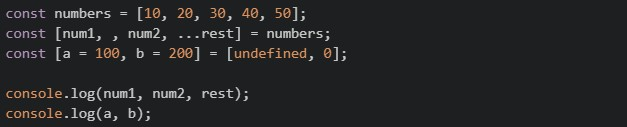
Text of the picture (copyable)
```javascript
const numbers = [10, 20, 30, 40, 50];
const [num1, , num2, ...rest] = numbers;
const [a = 100, b = 200] = [undefined, 0];

console.log(num1, num2, rest);
console.log(a, b);
```
- 10 30 [30, 40, 50] and 100 0
- 10 30 [40, 50] and 100 200
- 10 20 [30, 40, 50] and undefined 0
- 10 30 [40, 50] and 100 0
What is logged to the console after running the following code?
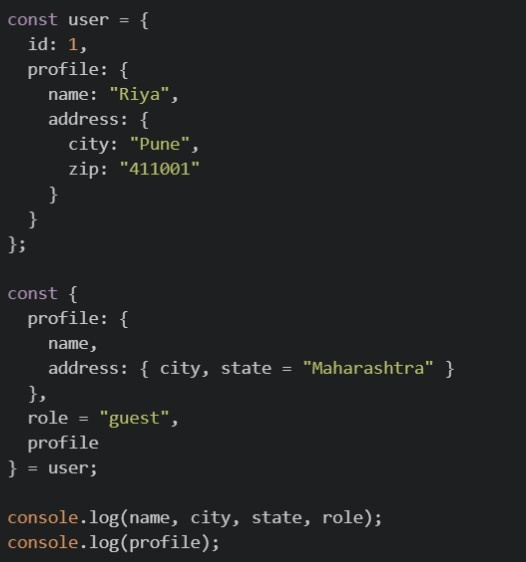
Text of the picture (copyable)
```javascript
const user = {
  id: 1,
  profile: {
    name: "Riya",
    address: {
      city: "Pune",
      zip: "411001"
    }
  }
};

const {
  profile: {
    name,
    address: { city, state = "Maharashtra" }
  },
  role = "guest",
  profile
} = user;

console.log(name, city, state, role);
console.log(profile);
```

text
Riya Pune Maharashtra guest ``` { name: "Riya", address: { city: "Pune", zip: "411001" } } ```-

text
Riya Pune Maharashtra guest
undefined


text
``` undefined undefined Maharashtra guest ``` ```json { "name": "Riya", "address": { ...} } ```- This code throws a
 , because you cannot destructure profile into nested variables and also assign it to a plain variable profile in the same statement.
text
SyntaxError
Consider the following JavaScript code:
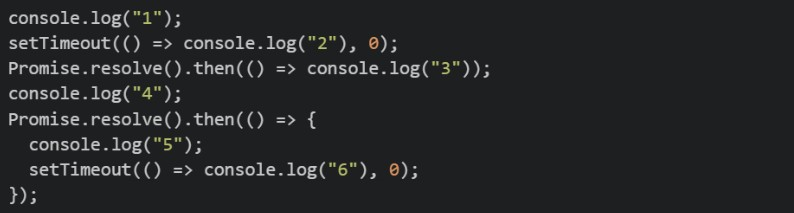 What is the order of console output?
What is the order of console output?Text of the picture (copyable)
```javascript
console.log("1");
setTimeout(() => console.log("2"), 0);
Promise.resolve().then(() => console.log("3"));
console.log("4");
Promise.resolve().then(() => {
  console.log("5");
  setTimeout(() => console.log("6"), 0);
});
```- 1, 4, 3, 5, 2, 6
- 1, 4, 3, 5, 6, 2
- 1, 3, 4, 5, 2, 6
- 1, 4, 2, 3, 5, 6
Match each Vue directive with its correct description:
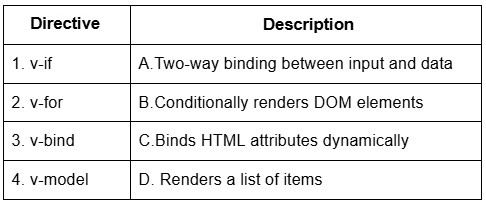
Text of the picture (copyable)
| Directive | Description |
|---|---|
| 1. v-if | A. Two-way binding between input and data |
| 2. v-for | B. Conditionally renders DOM elements |
| 3. v-bind | C. Binds HTML attributes dynamically |
| 4. v-model | D. Renders a list of items |
- 1–A, 2–D, 3–C, 4–B
- 1–D, 2–B, 3–C, 4–A
- 1–B, 2–D, 3–C, 4–A
- 1–B, 2–C, 3–D, 4–A
Which of the following is/are the advantage(s) of client-side storage?
- Saving web generated documents for offline use.
- The data can be stored across devices.
- Storing personalized site preferences.
- IndexedDB API is a kind of client-side storage which can be used for audio/video files.
Which of the following are valid capabilities of Lighthouse while analyzing a website?
- Measuring performance metrics such as FCP, LCP and TBT
- Simulating slow networks and throttled conditions
- Automatically fixing accessibility and SEO issues in the source code
- Emulating mobile and desktop devices
Given the following code, select all the statements that are TRUE about its execution if the code is run in a browser environment.
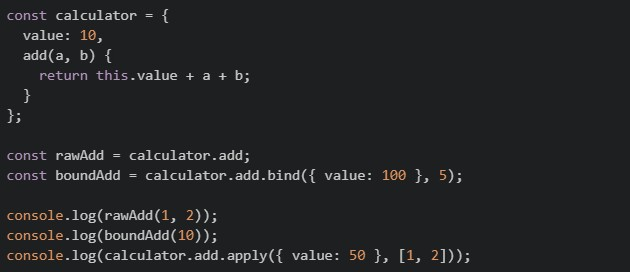
Text of the picture (copyable)
```javascript
const calculator = {
value: 10,
add(a, b) {
return this.value + a + b;
}
};
const rawAdd = calculator.add;
const boundAdd = calculator.add.bind({ value: 100 }, 5);
console.log(rawAdd(1, 2));
console.log(boundAdd(10));
console.log(calculator.add.apply({ value: 50 }, [1, 2]));
```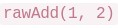 evaluates to
text
```
rawAdd(1, 2)
```
NaN
 evaluates to
text
```
boundAdd(10)
```
115
 evaluates to
text
``` calculator.add.apply({ value: 50 }, [1, 2]) ``` 53- throws a

text
```
calculator.add.apply({ value: 50 }, [1, 2])
```
TypeError
Consider the following Flask JWT code:
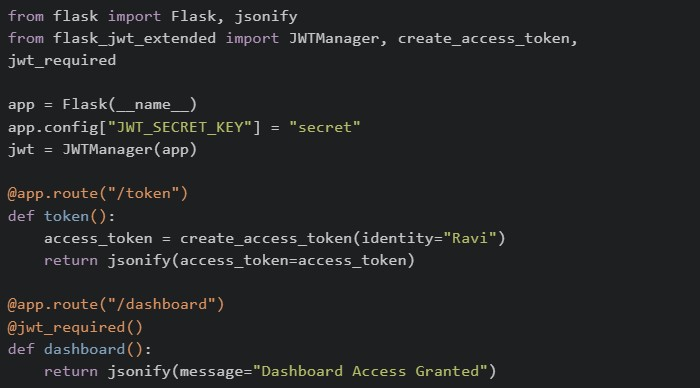 A client first accesses
  and then tries to access
  . Which of the following statements are correct?
A client first accesses and then tries to access . Which of the following statements are correct?Text of the picture (copyable)
```python
from flask import Flask, jsonify
from flask_jwt_extended import JWTManager, create_access_token, \
    jwt_required

app = Flask(__name__)
app.config["JWT_SECRET_KEY"] = "secret"
jwt = JWTManager(app)

@app.route("/token")
def token():
    access_token = create_access_token(identity="Ravi")
    return jsonify(access_token=access_token)

@app.route("/dashboard")
@jwt_required()
def dashboard():
    return jsonify(message="Dashboard Access Granted")
```
/token
/dashboard- can only be accessed if a valid JWT token is sent with the request.
text
/dashboard
- If the JWT token is missing or invalid, Flask-JWT-Extended returns an unauthorized error.
- The JWT token is typically sent in the
 header while accessing protected routes.
text
Authorization
- The token generated by is automatically stored by Flask and reused for future requests.
text
/token
Given the following code running in the browser, select all the statements that are  about its output:
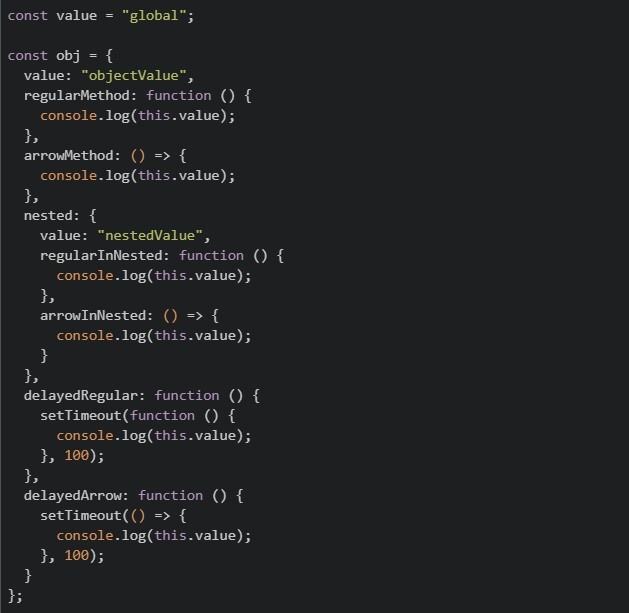
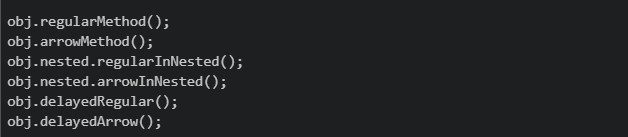
about its output:
Text of the picture (copyable)
TRUE
```javascript
const value = "global";
const obj = {
value: "objectValue",
regularMethod: function () {
console.log(this.value);
},
arrowMethod: () => {
console.log(this.value);
},
nested: {
value: "nestedValue",
regularInNested: function () {
console.log(this.value);
},
arrowInNested: () => {
console.log(this.value);
},
},
delayedRegular: function () {
setTimeout(function () {
console.log(this.value);
}, 100);
},
delayedArrow: function () {
setTimeout(() => {
console.log(this.value);
}, 100);
},
};
```
```javascript
obj.regularMethod();
obj.arrowMethod();
obj.nested.regularInNested();
obj.nested.arrowInNested();
obj.delayedRegular();
obj.delayedArrow();
``` logs "objectValue"
text
```
obj.regularMethod()
```
 logs "objectValue"
text
```
obj.arrowMethod()
```
 logs "nestedValue"
text
```
obj.nested.regularInNested()
```
 logs
logs text
```
obj.nested.arrowInNested()
```
undefined
 logs "objectValue"
text
```
obj.delayedArrow()
```
 logs "objectValue"
text
```
obj.delayedRegular()
```
Consider the following code using flask_jwt_extended:
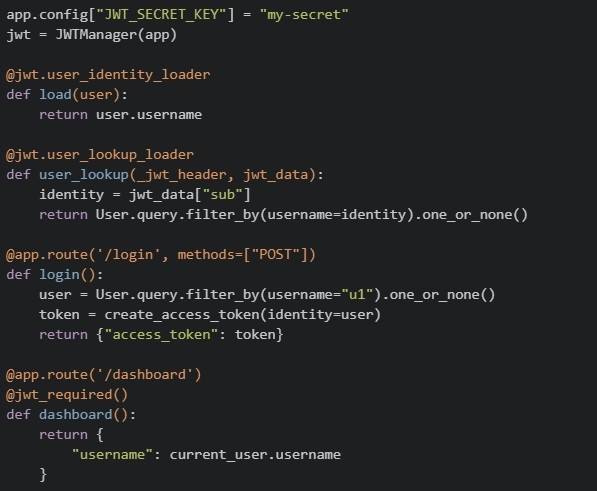 Which of the following statements are correct? (Select all that apply)
Which of the following statements are correct? (Select all that apply)Text of the picture (copyable)
```python
app.config["JWT_SECRET_KEY"] = "my-secret"
jwt = JWTManager(app)

@jwt.user_identity_loader
def load(user):
    return user.username

@jwt.user_lookup_loader
def user_lookup(_jwt_header, jwt_data):
    identity = jwt_data["sub"]
    return User.query.filter_by(username=identity).one_or_none()

@app.route('/login', methods=["POST"])
def login():
    user = User.query.filter_by(username="u1").one_or_none()
    token = create_access_token(identity=user)
    return {"access_token": token}

@app.route('/dashboard')
@jwt_required()
def dashboard():
    return {
        "username": current_user.username
    }
```- The
 decorator ensures that only requests with a valid JWT can access .
text
```
@jwt_required()
```
/dashboard
- The
 determines what value is stored in the "sub" field of the JWT.
text
```
user_identity_loader
```
- If
 is removed,
  will not be automatically populated.
text
```
user_lookup_loader
```
current_user
- The
 directly stores the entire user object inside the JWT.
text
```python
create_access_token(identity=user)
```
- If no JWT is sent in the request, will still execute but will be None.
text
/dashboard
current_user
- The object is reconstructed using the identity extracted from the JWT.
text
current_user
Comprehension passage - the questions below it refer to this
Consider the following javascript code:
 Note: Each sub question runs on its own, starting from the original 'user' object. Based on the above data, answer the given subquestions.
What will be logged in the console ?
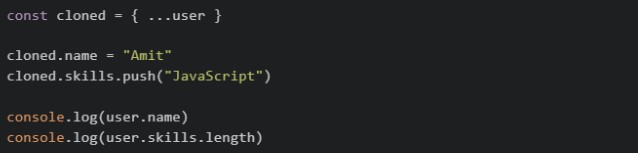
Text of the picture (copyable)
```javascript
const cloned = { ...user }

cloned.name = "Amit"
cloned.skills.push("JavaScript")

console.log(user.name)
console.log(user.skills.length)
```- Rahul 2
- Amit 3
- Rahul 3
- Amit 2
What will be logged in the console ?
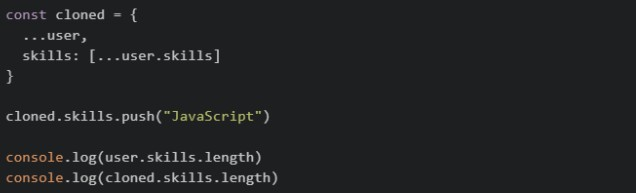
Text of the picture (copyable)
```javascript
const cloned = {
  ...user,
  skills: [...user.skills]
}

cloned.skills.push("JavaScript")

console.log(user.skills.length)
console.log(cloned.skills.length)
```- 2 3
- 3 3
- 2 2
- 3 2
Comprehension passage - the questions below it refer to this
Consider the following JavaScript code:
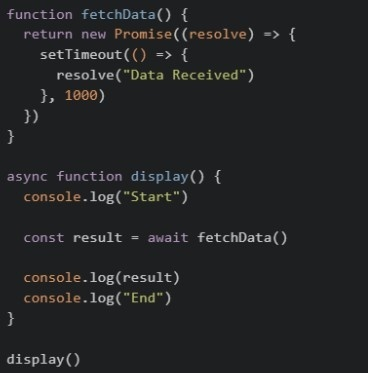 Based on the above data, answer the given subquestions.
What will be the output order?
- Start End Data Received
- Data Received Start End
- Start Data Received End
- End Start Data Received
Which of the following statements are correct?
 pauses the execution of the
  function until the Promise resolves.
text
await
```
display()
```
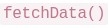 immediately returns the resolved string "Data Received".
text
```
fetchData()
```
 functions cannot return a
  .
.text
async
Promise
- Removing would cause
 to store a object instead of the resolved value.
text
await
result
Promise
Comprehension passage - the questions below it refer to this
Read the following Vue 2 component code carefully (using the Options API via CDN) and answer the given sub questions.
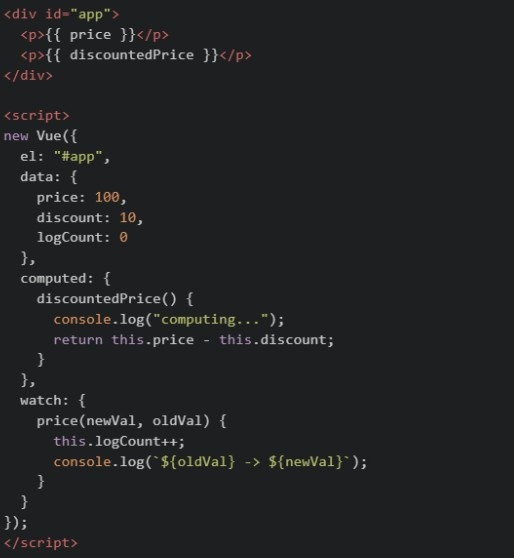
If  is accessed three times in a row in the template without price or discount changing in between, how many times does
  get logged?
is accessed three times in a row in the template without price or discount changing in between, how many times does get logged?Text of the picture (copyable)
discountedPrice
"computing..."
- 0
- 1
- 2
- 3
If  is changed twice in two separate updates (100 to 120, then 120 to 150 on a later tick), what is the value of
  afterward?
is changed twice in two separate updates (100 to 120, then 120 to 150 on a later tick), what is the value of afterward?Text of the picture (copyable)
price
```
logCount
```
- 0
- 1
- 2
- 3
Comprehension passage - the questions below it refer to this
Read the following code carefully and answer the given subquestions. tasks.py:
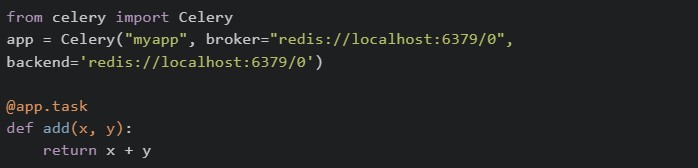 Called from a view/script:
 Checked immediately, right after delay() — worker hasn't processed it yet:
 Called separately, after waiting for the worker to finish the task:

What do the two print statements, print(result) and print(type(result)) in the first code block output?

text
10 **and** <class 'int'>

text
A task ID string and <class 'celery.result.AsyncResult'>

text
None and <class 'NoneType'>

text
10 and <class 'celery.result.AsyncResult'>
What do print(check.status) (checked immediately) and the later print(check.get(timeout=5)) (checked after the worker finishes) output?
- "PENDING" and 10
- "SUCCESS" and 10
- 10 and "SUCCESS"
- "PENDING" and "SUCCESS"
Comprehension passage - the questions below it refer to this
Read the following router and component setup carefully and answer the given sub questions: Router setup:
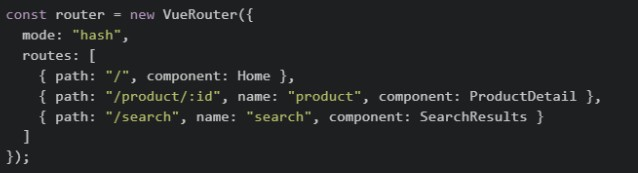 component's method:
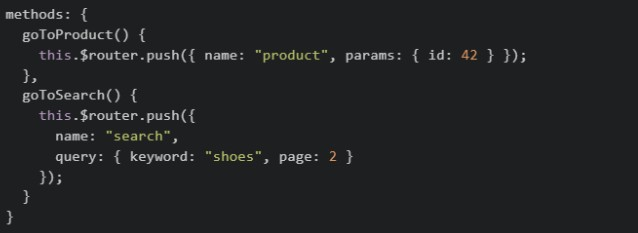
What URL does 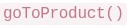 navigate the browser to?
navigate the browser to?Text of the picture (copyable)
```
goToProduct()
```
- /#/product/42
- /#/product?id=42
- /#/product/:id
- /#/42
What URL does 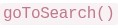 navigate the browser to?
navigate the browser to?Text of the picture (copyable)
```
goToSearch()
```
- /#/search/shoes/2
- /#/search?keyword=shoes&page=2
- /#/search:keyword=shoes:page=2
- /#/search
Inside  component, what expression correctly reads the
  value from the URL after navigation?
component, what expression correctly reads the value from the URL after navigation?Text of the picture (copyable)
SearchResults
keyword
- this.$router.query.keyword
- this.$route.query.keyword
- this.query.keyword
- this.$router.params.keyword
Answer key
- Q1 (MCQ, 2 marks): C
- Q2 (MCQ, 4.5 marks): C
- Q3 (MCQ, 4.5 marks): D
- Q4 (MCQ, 4.5 marks): D
- Q5 (MCQ, 4.5 marks): D
- Q6 (MCQ, 4.5 marks): A
- Q7 (MCQ, 3 marks): D
- Q8 (MCQ, 3 marks): D
- Q9 (MCQ, 3 marks): A
- Q10 (MCQ, 3 marks): D
- Q11 (MCQ, 3 marks): C
- Q12 (MCQ, 3 marks): D
- Q13 (MCQ, 3 marks): A
- Q14 (MCQ, 3 marks): A
- Q15 (MCQ, 3 marks): C
- Q16 (MSQ, 3 marks): A, C, D
- Q17 (MSQ, 3 marks): A, B, D
- Q18 (MSQ, 3 marks): A, B, C
- Q19 (MSQ, 4.5 marks): A, B, C
- Q20 (MSQ, 4.5 marks): A, C, D, E
- Q21 (MSQ, 4.5 marks): A, B, C, F
- Q22 (MCQ, 2 marks): C
- Q23 (MCQ, 3 marks): A
- Q24 (MCQ, 2 marks): C
- Q25 (MSQ, 3 marks): A, D
- Q26 (MCQ, 2 marks): B
- Q27 (MCQ, 3 marks): C
- Q28 (MCQ, 2 marks): B
- Q29 (MCQ, 3 marks): A
- Q30 (MCQ, 2 marks): A
- Q31 (MCQ, 2 marks): B
- Q32 (MCQ, 2 marks): B