Home / Past papers / MAD2 End Term / this paper
IIT M DIPLOMA FN EXAM QDD2 13 Apr 2025 - 13 Apr 2025
- It always refers to the global object.
- Arrow functions have their own "this" context.
- "this" in an event listener always refers to the window object.
- None of these
- beforeCreate -> created -> beforeMount -> mounted -> beforeUpdate ->updated -> beforeUnmount -> unmounted
- beforeCreate -> created -> beforeMount -> beforeUpdate -> mounted ->updated -> beforeUnmount -> unmounted
- created -> beforeCreate -> beforeMount -> mounted -> updated ->beforeUnmount -> unmounted
- created -> beforeCreate -> beforeMount -> mounted -> beforeUnmount ->updated -> unmounted
Text of the picture (copyable)
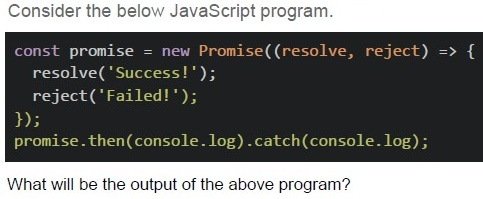
Consider the below JavaScript program.

```javascript
const promise = new Promise(((resolve, reject) => {
  resolve('Success!');
  reject('Failed!');
}));
promise.then(console.log).catch(console.log);
```

What will be the output of the above program?- SuccessFailed
- Success
- Failed
- Error
- First Contentful Paint (FCP)
- Time to Interactive (TTI)
- Total Blocking Time (TBT)
- Database Query Time (DQT)
- SSE allows bidirectional communication, while WebSockets only allow server-to-client communication.
- WebSockets maintain a persistent connection, while SSE creates a newconnection for each message.
- SSE works over HTTP and only supports server-to-client communication,whereas WebSockets provide full-duplex communication.
- WebSockets require an HTTP request for every message sent.
- GET
- POST
- DELETE
- PATCH
Text of the picture (copyable)
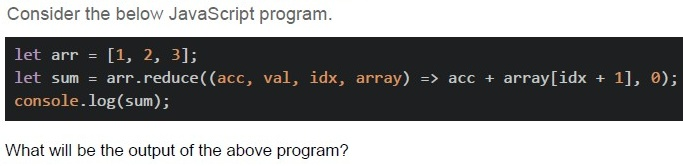
Consider the below JavaScript program.

```javascript
let arr = [1, 2, 3];
let sum = arr.reduce((acc, val, idx, array) => acc + array[idx + 1], 0);
console.log(sum);
```

What will be the output of the above program?
- 6
- NaN
- undefined
- 0
- NULL
Text of the picture (copyable)
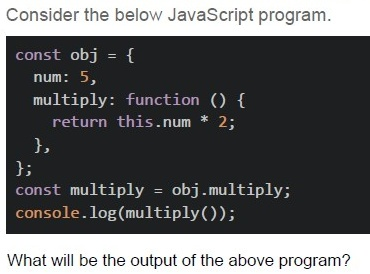
Consider the below JavaScript program.

```javascript
const obj = {
    num: 5,
    multiply: function () {
        return this.num * 2;
    }
};
const multiply = obj.multiply;
console.log(multiply());
```

What will be the output of the above program?- 10
- undefined
- NaN
- NULL
- Error
Text of the picture (copyable)
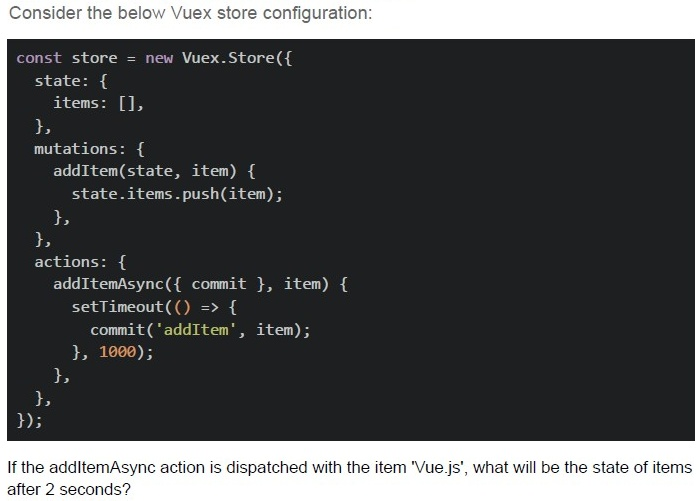
Consider the below Vuex store configuration:

```javascript
const store = new Vuex.Store({
  state: {
    items: [],
  },
  mutations: {
    addItem(state, item) {
      state.items.push(item);
    },
  },
  actions: {
    addItemAsync({ commit }, item) {
      setTimeout(() => {
        commit('addItem', item);
      }, 1000);
    },
  },
});
```

If the addItemAsync action is dispatched with the item 'Vue.js', what will be the state of items after 2 seconds?
text
The image shows a single vertical bar character.

text
```
['Vue.js', 'Vue.js']
```

text
```
['Vue.js']
```

text
[object]
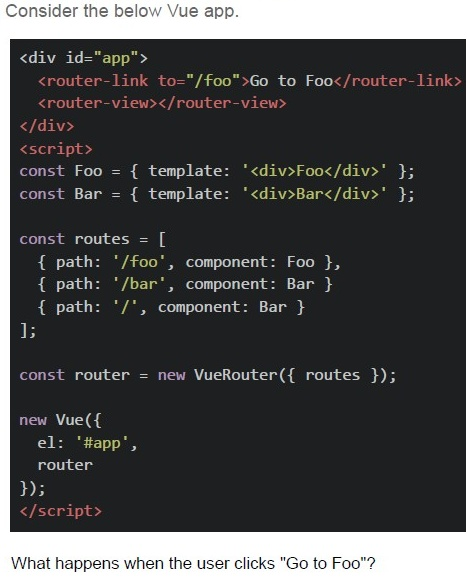
Text of the picture (copyable)
Consider the below Vue app.

```html
<div id="app">
  <router-link to="/foo">Go to Foo</router-link>
  <router-view></router-view>
</div>
<script>
  const Foo = { template: '<div>Foo</div>' };
  const Bar = { template: '<div>Bar</div>' };

  const routes = [
    { path: '/foo', component: Foo },
    { path: '/bar', component: Bar },
    { path: '/', component: Bar }
  ];

  const router = new VueRouter({ routes });

  new Vue({
    el: '#app',
    router
  });
</script>
```

What happens when the user clicks "Go to Foo"?- Browser navigates to /foo and displays "Foo".
- Browser navigates to /foo but displays nothing.
- Error: No matching route.
- None of these
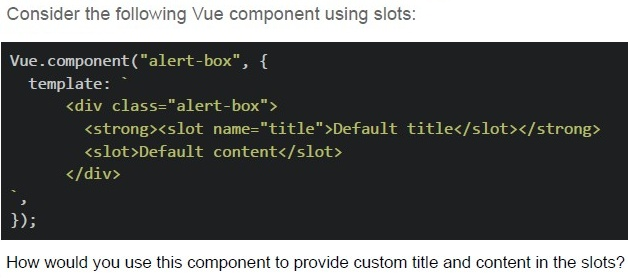
Text of the picture (copyable)
Consider the following Vue component using slots:

```
Vue.component("alert-box", {
  template: `
    <div class="alert-box">
      <strong><slot name="title">Default title</slot></strong>
      <slot>Default content</slot>
    </div>
  `,
});
```

How would you use this component to provide custom title and content in the slots?
text
```html
<alert-box title="Custom Title">Custom content</alert-box>
```

text
```html
<alert-box>
    <slot name="title">Custom Title</slot>Custom content
</alert-box>
```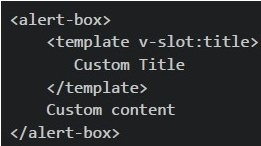
text
```html
<alert-box>
    <template v-slot:title>
        Custom Title
    </template>
    Custom content
</alert-box>
```
text
```html
<alert-box>Custom Title - Custom content</alert-box>
```
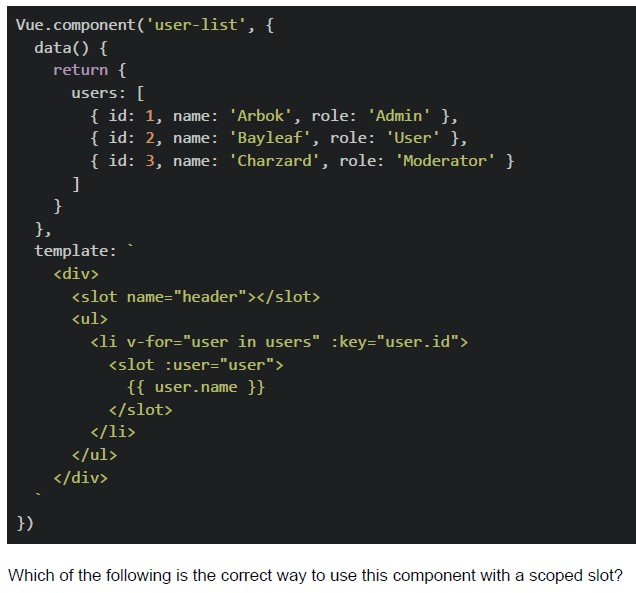 Consider the following Vue component.
Text of the picture (copyable)
```javascript
Vue.component('user-list', {
  data() {
    return {
      users: [
        { id: 1, name: 'Arbok', role: 'Admin' },
        { id: 2, name: 'Bayleaf', role: 'User' },
        { id: 3, name: 'Charzard', role: 'Moderator' }
      ]
    }
  },
  template: `
    <div>
      <slot name="header"></slot>
      <ul>
        <li v-for="user in users" :key="user.id">
          <slot :user="user">
            {{ user.name }}
          </slot>
        </li>
      </ul>
    </div>
  `
})
```
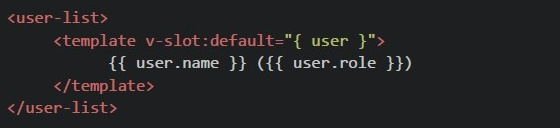
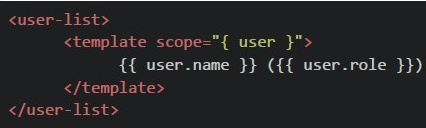
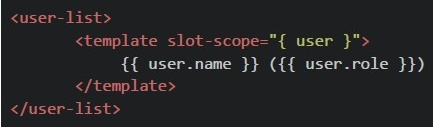
Which of the following is the correct way to use this component with a scoped slot?
text
```html
<user-list v-slot="{ user }">
  <template>{{ user.name }} ({{ user.role }})</template>
</user-list>
```
text
```html
<user-list>
  <template v-slot:default="{ user }">
    {{ user.name }} ({{ user.role }})
  </template>
</user-list>
```
text
```html
<user-list>
    <template scope="{ user }">
        {{ user.name }} ({{ user.role }})
    </template>
</user-list>
```
text
```html
<user-list>
  <template slot-scope="{ user }">
    {{ user.name }} ({{ user.role }})
  </template>
</user-list>
```
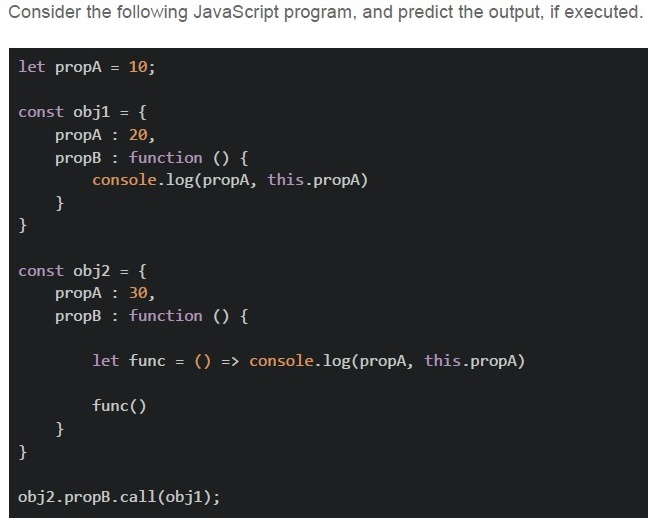
Text of the picture (copyable)
Consider the following JavaScript program, and predict the output, if executed.

```javascript
let propA = 10;

const obj1 = {
  propA: 20,
  propB: function() {
    console.log(propA, this.propA)
  }
}

const obj2 = {
  propA: 30,
  propB: function() {
    let func = () => console.log(propA, this.propA)

    func()
  }
}

obj2.propB.call(obj1);
```- 10 30
- 10 undefined
- 10 20
- The program will raise an error
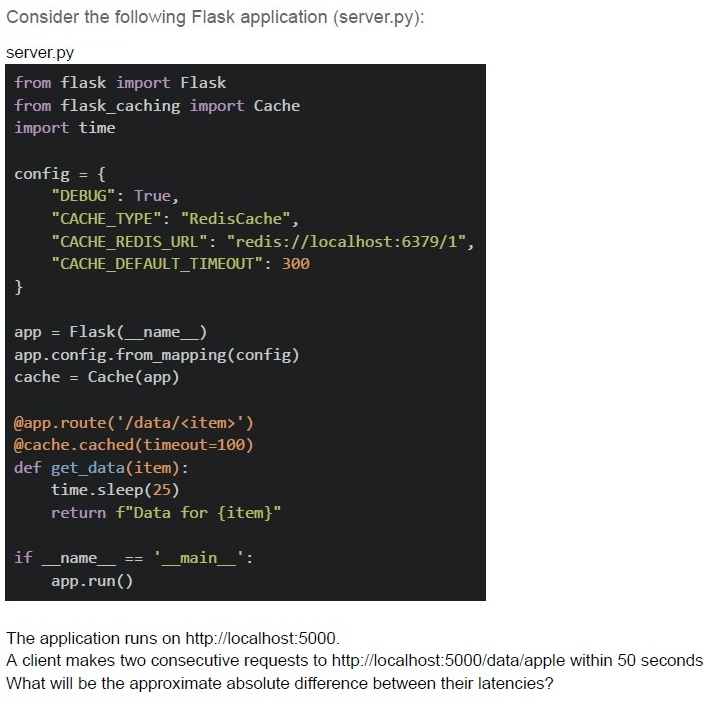
Text of the picture (copyable)
Consider the following Flask application (server.py):

server.py
```python
from flask import Flask
from flask_caching import Cache
import time

config = {
    "DEBUG": True,
    "CACHE_TYPE": "RedisCache",
    "CACHE_REDIS_URL": "redis://localhost:6379/1",
    "CACHE_DEFAULT_TIMEOUT": 300
}

app = Flask(__name__)
app.config.from_mapping(config)
cache = Cache(app)

@app.route('/data/<item>')
@cache.cached(timeout=100)
def get_data(item):
    time.sleep(25)
    return f"Data for {item}"

if __name__ == '__main__':
    app.run()
```

The application runs on http://localhost:5000.
A client makes two consecutive requests to http://localhost:5000/data/apple within 50 seconds
What will be the approximate absolute difference between their latencies?- 25 seconds
- 35 seconds
- 0 seconds
- 15 seconds
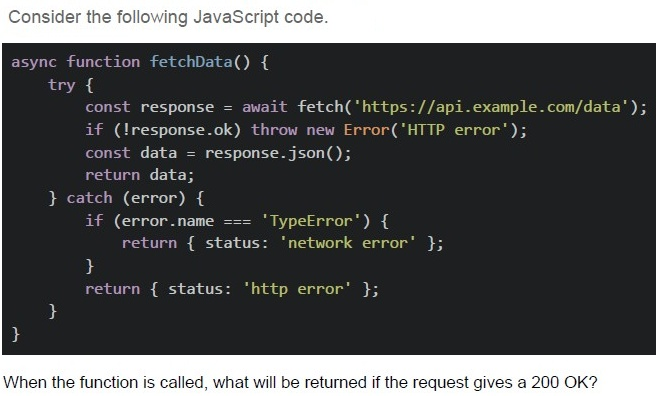
Text of the picture (copyable)
Consider the following JavaScript code.

```javascript
async function fetchData() {
  try {
    const response = await fetch('https://api.example.com/data');
    if (!response.ok) throw new Error('HTTP error');
    const data = response.json();
    return data;
  } catch (error) {
    if (error.name === 'TypeError') {
      return {
        status: 'network error'
      };
    }
    return {
      status: 'http error'
    };
  }
}
```

When the function is called, what will be returned if the request gives a 200 OK?
text
```
{ status: 'http error' }
```
text
```
{ status: 'network error' }
```
text
JSON data

text
The promise will remain pending
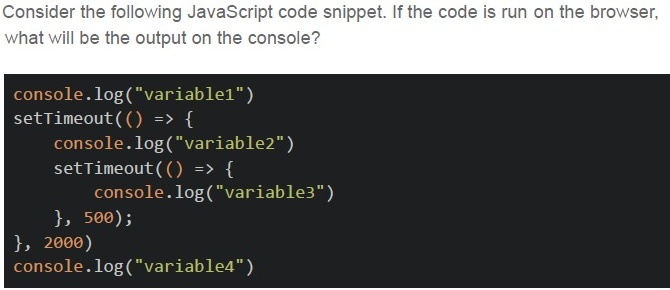
Text of the picture (copyable)
Consider the following JavaScript code snippet. If the code is run on the browser,
what will be the output on the console?

```javascript
console.log("variable1")
setTimeout(() => {
    console.log("variable2")
    setTimeout(() => {
        console.log("variable3")
    }, 500);
}, 2000)
console.log("variable4")
```
text
variable1
variable2
variable3
variable4

text
variable1
variable4
variable3
variable2

text
variable1
variable4
variable2
variable3

text
variable1
variable3
variable4
variable2
- Client sends credentials, server validates and responds with JWT, client storesJWT, client sends JWT with each request.
- Client sends credentials, server validates and stores session ID, client sendssession ID with each request.
- Client sends JWT, server validates and issues a new JWT for each request.
- Client sends JWT, server decrypts JWT and checks credentials again.
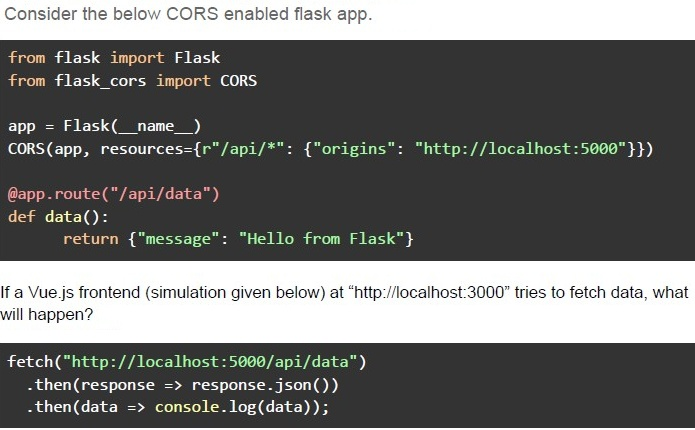
Text of the picture (copyable)
Consider the below CORS enabled flask app.

```python
from flask import Flask
from flask_cors import CORS

app = Flask(__name__)
CORS(app, resources={r"/api/*": {"origins": "http://localhost:5000"}})

@app.route("/api/data")
def data():
    return {"message": "Hello from Flask"}
```

If a Vue.js frontend (simulation given below) at "http://localhost:3000" tries to fetch data, what will happen?

```javascript
fetch("http://localhost:5000/api/data")
    .then(response => response.json())
    .then(data => console.log(data));
```- The request will be blocked due to CORS policy.
- The request will succeed and return { "message": "Hello from Flask" }.
- The request will fail because Vue.js does not support CORS.
- The server will crash due to incorrect CORS settings.
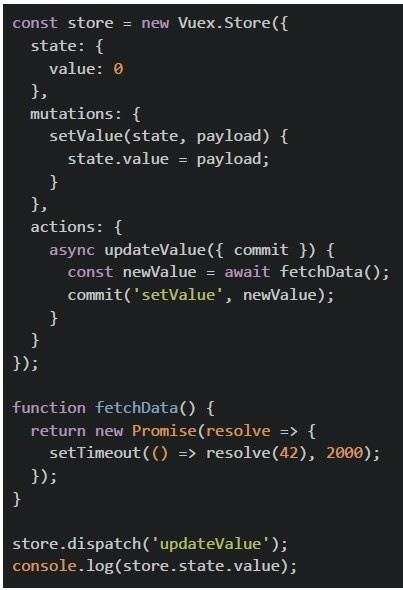 Consider the below Vuex setup.
What is logged to the console immediately after dispatching the action?
Consider the below Vuex setup.
What is logged to the console immediately after dispatching the action?Text of the picture (copyable)
```javascript
const store = new Vuex.Store({
  state: {
    value: 0
  },
  mutations: {
    setValue(state, payload) {
      state.value = payload;
    }
  },
  actions: {
    async updateValue({
      commit
    }) {
      const newValue = await fetchData();
      commit('setValue', newValue);
    }
  }
});

function fetchData() {
  return new Promise(resolve => {
    setTimeout(() => resolve(42), 2000);
  });
}

store.dispatch('updateValue');
console.log(store.state.value);
```- 0
- 42
- Undefined behavior
- Error: Action did not resolve
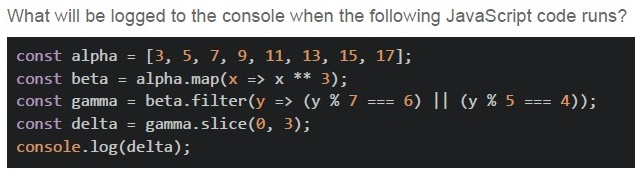
Text of the picture (copyable)
What will be logged to the console when the following JavaScript code runs?

```javascript
const alpha = [3, 5, 7, 9, 11, 13, 15, 17];
const beta = alpha.map(x => x ** 3);
const gamma = beta.filter(y => (y % 7 === 6) || (y % 5 === 4));
const delta = gamma.slice(0, 3);
console.log(delta);
```
- [27, 125, 343, 729, 1331]
- [125, 343, 729]
- [27, 125, 343]
- None of these
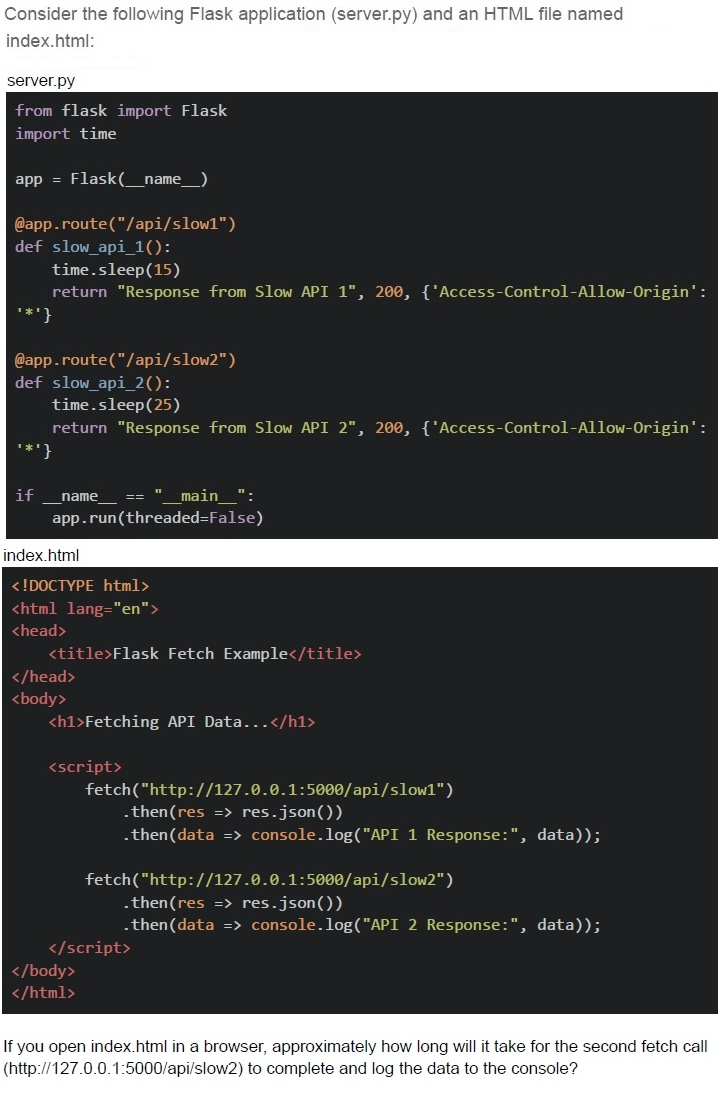
Text of the picture (copyable)
Consider the following Flask application (server.py) and an HTML file named index.html:

server.py

```python
from flask import Flask
import time

app = Flask(__name__)

@app.route("/api/slow1")
def slow_api_1():
    time.sleep(15)
    return "Response from Slow API 1", 200, {'Access-Control-Allow-Origin': '*'}

@app.route("/api/slow2")
def slow_api_2():
    time.sleep(25)
    return "Response from Slow API 2", 200, {'Access-Control-Allow-Origin': '*'}

if __name__ == "__main__":
    app.run(threaded=False)
```

index.html

```html
<!DOCTYPE html>
<html lang="en">
<head>
    <title>Flask Fetch Example</title>
</head>
<body>
    <h1>Fetching API Data...</h1>

    <script>
        fetch("http://127.0.0.1:5000/api/slow1")
            .then(res => res.json())
            .then(data => console.log("API 1 Response:", data));

        fetch("http://127.0.0.1:5000/api/slow2")
            .then(res => res.json())
            .then(data => console.log("API 2 Response:", data));
    </script>
</body>
</html>
```

If you open index.html in a browser, approximately how long will it take for the second fetch call (http://127.0.0.1:5000/api/slow2) to complete and log the data to the console?- 15 seconds
- 25 seconds
- 10 seconds
- 40 seconds
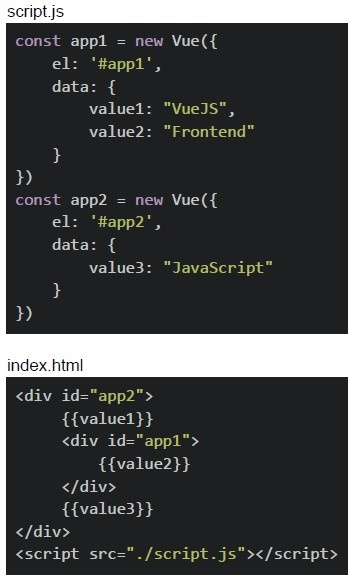 Consider the following Vue apps in script.js and the index.html file.
What will be rendered on the browser?
Consider the following Vue apps in script.js and the index.html file.
What will be rendered on the browser?Text of the picture (copyable)
script.js
```javascript
const app1 = new Vue({
  el: '#app1',
  data: {
    value1: "VueJS",
    value2: "Frontend"
  }
})
const app2 = new Vue({
  el: '#app2',
  data: {
    value3: "JavaScript"
  }
})
```

index.html
```html
<div id="app2">
  {{value1}}
  <div id="app1">
    {{value2}}
  </div>
  {{value3}}
</div>
<script src="./script.js"></script>
```- Frontend
- VueJSFrontend
- VueJSJavaScript
- FrontendJavaScript
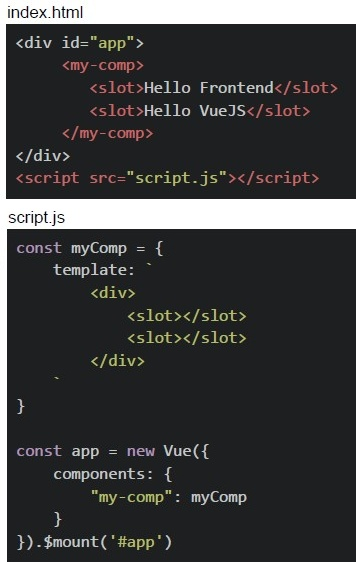 Consider the following Vue App and the HTML document given below.
What will be the output on the browser?
Consider the following Vue App and the HTML document given below.
What will be the output on the browser?Text of the picture (copyable)
index.html
```html
<div id="app">
    <my-comp>
        <slot>Hello Frontend</slot>
        <slot>Hello VueJS</slot>
    </my-comp>
</div>
<script src="script.js"></script>
```

script.js
```javascript
const myComp = {
    template: `
        <div>
            <slot></slot>
            <slot></slot>
        </div>
    `
}

const app = new Vue({
    components: {
        "my-comp": myComp
    }
}).$mount('#app')
```- Hello Frontend Hello Frontend
- Hello VueJS Hello VueJS
- Hello Frontend Hello Vue JS
- Hello Frontend Hello Vue JS Hello Frontend Hello Vue JS
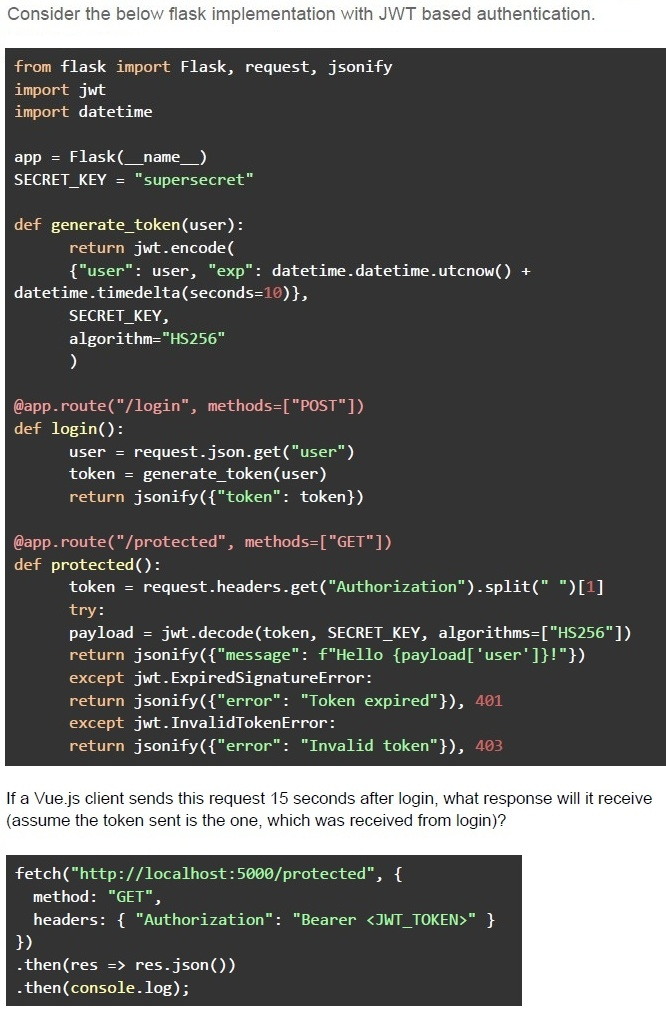
Text of the picture (copyable)
Consider the below flask implementation with JWT based authentication.

```python
from flask import Flask, request, jsonify
import jwt
import datetime

app = Flask(__name__)
SECRET_KEY = "supersecret"

def generate_token(user):
    return jwt.encode(
        {"user": user, "exp": datetime.datetime.utcnow() +
         datetime.timedelta(seconds=10)},
        SECRET_KEY,
        algorithm="HS256"
    )

@app.route("/login", methods=["POST"])
def login():
    user = request.json.get("user")
    token = generate_token(user)
    return jsonify({"token": token})

@app.route("/protected", methods=["GET"])
def protected():
    token = request.headers.get("Authorization").split(" ")[1]
    try:
        payload = jwt.decode(token, SECRET_KEY, algorithms=["HS256"])
        return jsonify({"message": f"Hello {payload['user']}!"})
    except jwt.ExpiredSignatureError:
        return jsonify({"error": "Token expired"}), 401
    except jwt.InvalidTokenError:
        return jsonify({"error": "Invalid token"}), 403
```

If a Vue.js client sends this request 15 seconds after login, what response will it receive
(assume the token sent is the one, which was received from login)?

```javascript
fetch("http://localhost:5000/protected", {
    method: "GET",
    headers: { "Authorization": "Bearer <JWT_TOKEN>" }
})
.then(res => res.json())
.then(console.log);
```
text
```json
{ "message": "Hello user!" }
```
text
```json
{ "error": "Token expired" }
```
text
```json
{
  "error": "Invalid token"
}
```
text
```json
{
  "message": "Access granted"
}
```
- item in array
- (item, index) of array
- (item, index) as array
- (item, index) in array
- Item of array
- It allows clients to fetch only the required fields, reducing over-fetching.
- It replaces the need for authentication mechanisms.
- It improves database performance automatically.
- It enforces a strict API response format.
- The event loop runs on a separate thread from the main JavaScript execution.
- The event loop allows JavaScript to perform non-blocking operations despitebeing single-threaded.
- Callbacks from setTimeout are placed in the task queue and executed after thecall stack is empty.
- All of these
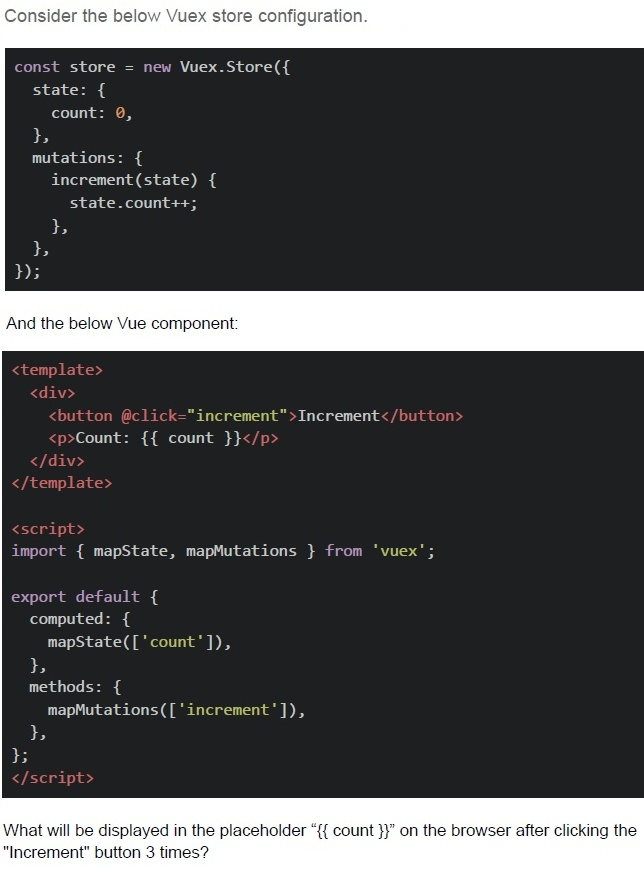
Text of the picture (copyable)
Consider the below Vuex store configuration.

```javascript
const store = new Vuex.Store({
  state: {
    count: 0,
  },
  mutations: {
    increment(state) {
      state.count++;
    },
  },
});
```

And the below Vue component:

```html
<template>
  <div>
    <button @click="increment">Increment</button>
    <p>Count: {{ count }}</p>
  </div>
</template>

<script>
import { mapState, mapMutations } from 'vuex';

export default {
  computed: {
    ...mapState(['count']),
  },
  methods: {
    ...mapMutations(['increment']),
  },
};
</script>
```

What will be displayed in the placeholder "{{ count }}" on the browser after clicking the "Increment" button 3 times?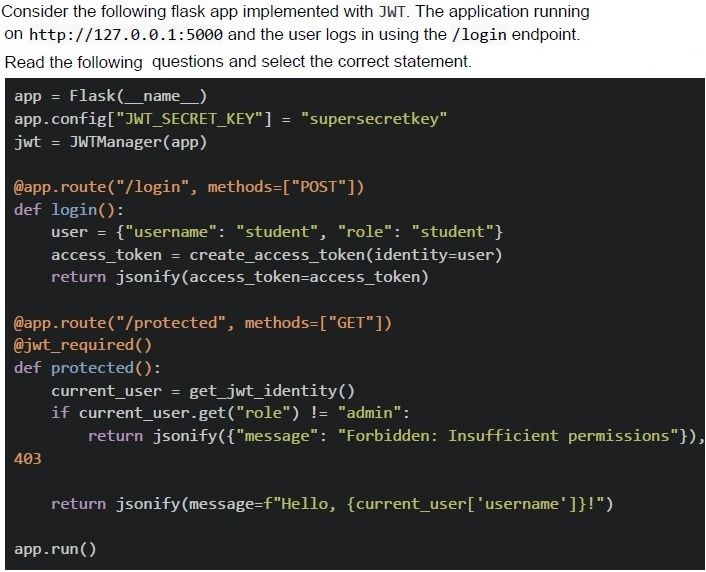
Text of the picture (copyable)
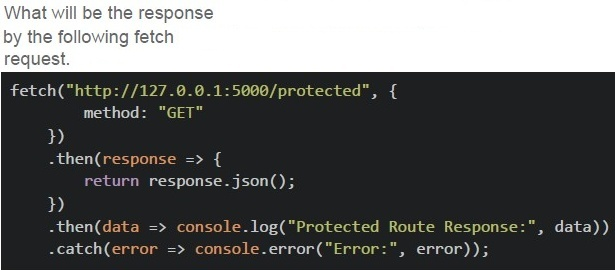
What will be the response
by the following fetch
request.

```javascript
fetch("http://127.0.0.1:5000/protected", {
    method: "GET"
})
.then(response => {
    return response.json();
})
.then(data => console.log("Protected Route Response:", data))
.catch(error => console.error("Error:", error));
```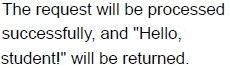
text
The request will be processed
successfully, and "Hello,
student!" will be returned.
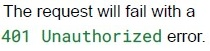
text
The request will fail with a
401 Unauthorized error.
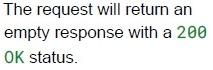
text
The request will return an
empty response with a 200
OK status.
text
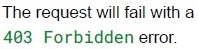
The request will fail with a
403 Forbidden error.
Text of the picture (copyable)
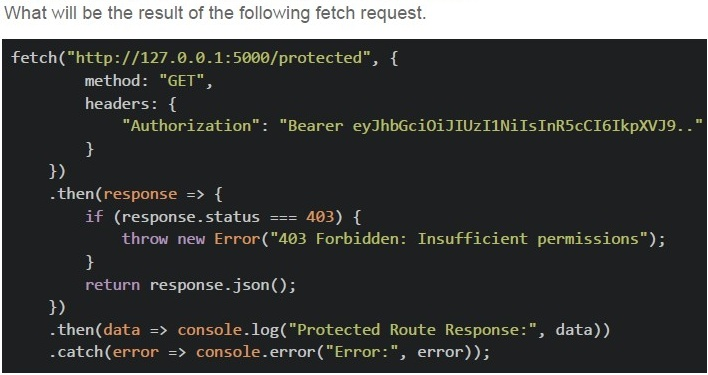
What will be the result of the following fetch request.

```javascript
fetch("http://127.0.0.1:5000/protected", {
    method: "GET",
    headers: {
        "Authorization": "Bearer eyJhbGciOiJIUzI1NiIsInR5cCI6IkpXVCJ9.."
    }
})
.then(response => {
    if (response.status === 403) {
        throw new Error("403 Forbidden: Insufficient permissions");
    }
    return response.json();
})
.then(data => console.log("Protected Route Response:", data))
.catch(error => console.error("Error:", error));
```
text
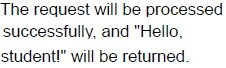
The request will be processed
successfully, and "Hello,
student!" will be returned.
text
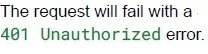
The request will fail with a
401 Unauthorized error.
text
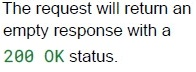
The request will return an
empty response with a
200 OK status.
text
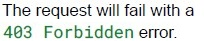
The request will fail with a
403 Forbidden error.
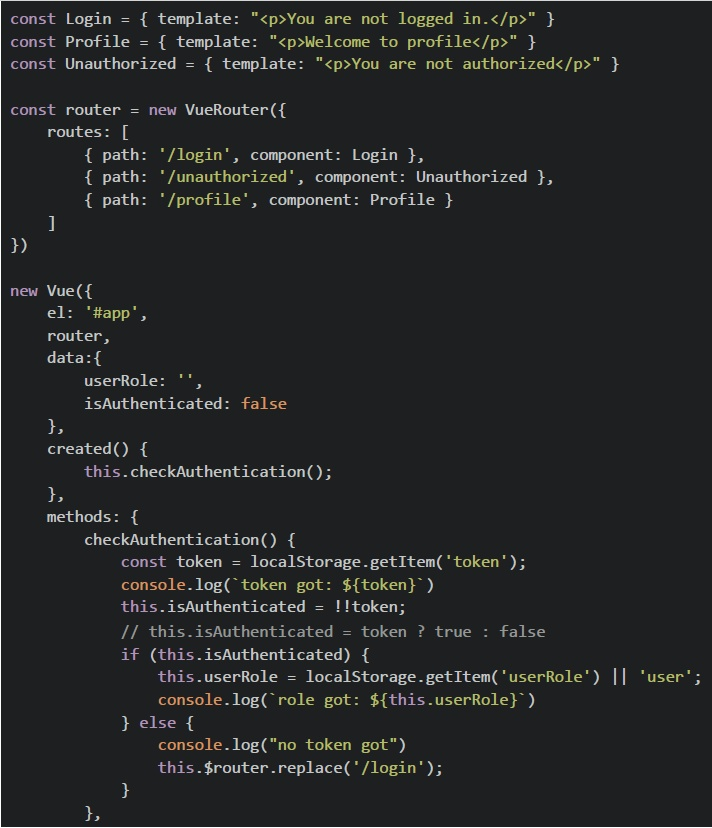 Consider the following Vue app with the Vue Router shown below and answer the given subquestions.
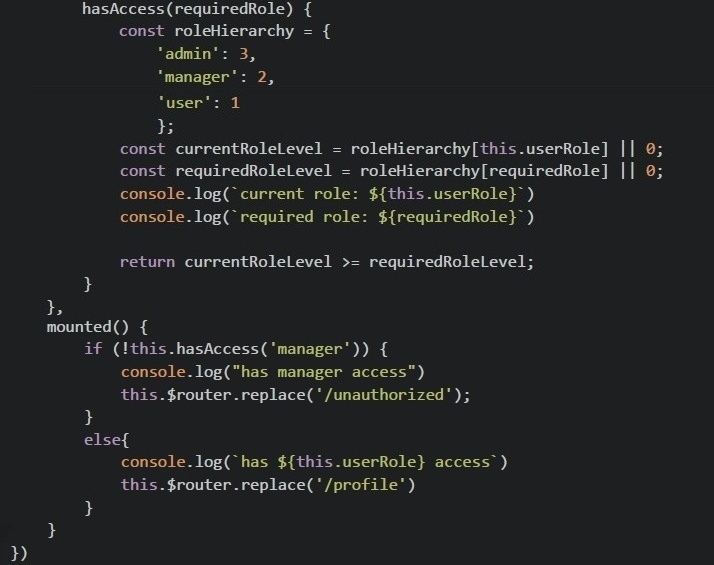 Consider the following Vue app with the Vue Router shown below and answer the given subquestions.
- You are not logged in.
- Welcome to profile
- You are not authorized.
- None of these.
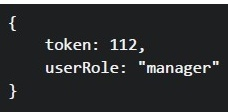 What will be rendered on the browser for the given value of localStorage?
Text of the picture (copyable)
```
{
  token: 112,
  userRole: "manager"
}
```- You are not logged in.
- Welcome to profile
- You are not authorized.
- None of these.
Answer key
- Q1 (MCQ, 2 marks): D
- Q2 (MCQ, 2 marks): A
- Q3 (MCQ, 2 marks): B
- Q4 (MCQ, 2 marks): D
- Q5 (MCQ, 2 marks): C
- Q6 (MCQ, 2 marks): B
- Q7 (MCQ, 3 marks): B
- Q8 (MCQ, 3 marks): C
- Q9 (MCQ, 3 marks): B
- Q10 (MCQ, 3 marks): A
- Q11 (MCQ, 3 marks): C
- Q12 (MCQ, 3 marks): A
- Q13 (MCQ, 3 marks): C
- Q14 (MCQ, 3 marks): A
- Q15 (MCQ, 3 marks): D
- Q16 (MCQ, 3 marks): C
- Q17 (MCQ, 3 marks): A
- Q18 (MCQ, 3 marks): A
- Q19 (MCQ, 4.5 marks): A
- Q20 (MCQ, 4.5 marks): B
- Q21 (MCQ, 4.5 marks): D
- Q22 (MCQ, 4.5 marks): D
- Q23 (MCQ, 4.5 marks): D
- Q24 (MCQ, 4.5 marks): B
- Q25 (MSQ, 2 marks): A, D
- Q26 (MSQ, 2 marks): A
- Q27 (MSQ, 3 marks): B, C
- Q28 (SA, 4.5 marks): 3
- Q29 (MCQ, 3 marks): B
- Q30 (MCQ, 3 marks): D
- Q31 (MCQ, 4.5 marks): C
- Q32 (MCQ, 3 marks): B
Concepts this paper tests
Auto-generated summary from the source site. Handy as a checklist; the lessons above explain each idea from scratch.
Here’s a structured summary of the core topics, concepts, principles, and equations (where applicable) for the "Modern Application Development II" exam, along with Mermaid knowledge graphs to visualize relationships.
1. Core Topics & Concepts
A. JavaScript Fundamentals
Key Concepts:
thisKeyword- Context depends on how a function is called (global, object method, constructor, arrow function).
- Arrow functions do not have their own
this; they inherit from the surrounding scope. - Event listeners:
thisrefers to the element that triggered the event (unless arrow functions are used).
Promises & Async/Await
- A
Promiserepresents an asynchronous operation (states: pending, fulfilled, rejected). .then()handles fulfillment,.catch()handles rejection.Example:
const promise = new Promise((resolve, reject) => resolve("Success!"));
promise.then(console.log); // Output: "Success!"
Async/Await: Syntactic sugar for promises.
async function fetchData() {
  const data = await fetch('url');
  return data.json();
}
- A
Closures & Scope
- Functions retain access to their lexical scope even after execution.
Example:
function outer() {
  let x = 10;
  return function inner() { console.log(x); };
}
const innerFunc = outer();
innerFunc(); // Output: 10
Event Loop & Asynchronous JavaScript
- JavaScript is single-threaded but uses an event loop to handle async operations.
- Task Queue (Macrotasks):
setTimeout,setInterval, I/O. - Microtask Queue:
Promisecallbacks,queueMicrotask(). Execution Order:
- Call stack executes synchronous code.
- Microtasks are processed.
- Macrotasks (from the task queue) are processed.
Array Methods
map,filter,reduce,slice,splice.Example (Reduce):
[1, 2, 3].reduce((acc, val) => acc + val, 0); // Output: 6
B. Vue.js
Key Concepts:
Component Lifecycle Hooks
- Order:
beforeCreate→created→beforeMount→mounted→beforeUpdate→updated→beforeUnmount→unmounted.
- Order:
Vuex (State Management)
- State: Single source of truth.
- Mutations: Synchronous state changes.
- Actions: Asynchronous operations (commit mutations).
- Getters: Computed properties for state.
Example:
const store = new Vuex.Store({
  state: { count: 0 },
  mutations: {
    increment(state) { state.count++; }
  },
  actions: {
    asyncIncrement({ commit }) {
      setTimeout(() => commit('increment'), 1000);
    }
  }
});
Vue Router
- Dynamic routing with
<router-link>and<router-view>. Example:
const routes = [
  { path: '/foo', component: Foo },
  { path: '/bar', component: Bar }
];
const router = new VueRouter({ routes });
- Dynamic routing with
Slots (Content Distribution)
- Default Slot:
<slot></slot> - Named Slots:
<slot name="header"></slot> Scoped Slots: Pass data to child components.
<template v-slot:default="{ user }">
  {{ user.name }}
</template>
- Default Slot:
Directives
v-for,v-if,v-show,v-bind,v-on,v-model.
C. Web Technologies
Key Concepts:
HTTP Methods
GET(retrieve),POST(create),PUT(update),DELETE(remove),PATCH(partial update).- Webhooks: Typically use
POSTto send notifications.
- WebSockets vs. Server-Sent Events (SSE) | Feature | WebSockets | SSE | |-----------------------|---------------------|----------------------| | Protocol |
ws://,wss://| HTTP | | Direction | Full-duplex | Server → Client | | Connection | Persistent | Persistent | | Binary Data | Yes | No (text-only) |
CORS (Cross-Origin Resource Sharing)
- Restricts cross-origin requests for security.
Headers:
Access-Control-Allow-Origin: Specifies allowed origins.Access-Control-Allow-Methods: Allowed HTTP methods.
JWT (JSON Web Tokens)
- Structure:
Header.Payload.Signature Flow:
- Client sends credentials.
- Server validates and returns a JWT.
- Client stores JWT (e.g.,
localStorage). - JWT is sent with each request (
Authorization: Bearer <token>).
- Structure:
Performance Metrics (Lighthouse)
- First Contentful Paint (FCP): Time until first content is rendered.
- Time to Interactive (TTI): Time until page is fully interactive.
- Total Blocking Time (TBT): Measures main thread blocking.
- Not a metric: Database Query Time (DQT).
D. Backend (Flask)
Key Concepts:
Flask Basics
- Microframework for Python.
Example:
from flask import Flask
app = Flask(__name__)
@app.route('/')
def home():
    return "Hello, World!"
Flask-Caching (Redis)
- Caches responses to improve performance.
Example:
from flask_caching import Cache
cache = Cache(app, config={'CACHE_TYPE': 'RedisCache'})
@app.route('/data')
@cache.cached(timeout=50)
def get_data():
    return "Cached Data"
Flask-JWT
- Secures APIs with JWT.
Example:
from flask_jwt_extended import JWTManager, jwt_required
app.config["JWT_SECRET_KEY"] = "secret"
jwt = JWTManager(app)
@app.route('/protected')
@jwt_required()
def protected():
    return "Authorized"
Concurrency in Flask
threaded=Trueenables multithreading.- Without threading, long-running requests block others.
E. Performance & Optimization
Key Concepts:
Lighthouse Metrics
- FCP (First Contentful Paint): Time to first render.
- TTI (Time to Interactive): Time until fully interactive.
- TBT (Total Blocking Time): Main thread blocking duration.
Caching Strategies
- Client-side:
localStorage,sessionStorage. - Server-side: Redis, CDN caching.
- Client-side:
Asynchronous Loading
- Use
async/deferfor scripts. - Code splitting in Vue.js (
import()).
- Use
Debouncing & Throttling
- Debounce: Delay execution until after a pause (e.g., search input).
- Throttle: Limit execution frequency (e.g., scroll events).
2. Key Equations (Mathematics/Algorithms)
(Not directly tested in this exam, but useful for array manipulations.)
Array Reduce ``
javascript [a1, a2, ..., an].reduce((acc, val) => acc + val, initialValue);``- Example:
[1, 2, 3].reduce((acc, x) => acc + x, 0) = 6
- Example:
Filtering Arrays ``
javascript array.filter(x => condition);``- Example:
[1, 2, 3].filter(x => x % 2 === 0) = [2]
- Example:
Modulo Operations
x % ngives the remainder ofx / n.- Used in questions like Q21 (filtering based on modulo conditions).
3. Common Pitfalls & Exam Tips
thisin JavaScript- Arrow functions do not bind their own
this. - Event listeners:
thisrefers to the element (unless arrow functions are used).
- Arrow functions do not bind their own
Promises
- Once resolved/rejected, further calls to
resolve()/reject()are ignored. Example (Q4):
const promise = new Promise((resolve, reject) => {
  resolve("Success!");
  reject("Failed!"); // Ignored
});
- Once resolved/rejected, further calls to
Vue.js Reactivity
- Directly modifying arrays (e.g.,
array[0] = x) does not trigger reactivity. - Use
Vue.setor array methods likepush,splice.
- Directly modifying arrays (e.g.,
Asynchronous Code
setTimeoutwith0delay still defers execution to the task queue.Example (Q17):
console.log("A");
setTimeout(() => console.log("B"), 0);
console.log("C");
// Output: A → C → B
CORS
- Always check
Access-Control-Allow-Originin responses. - Example (Q19, Q30, Q31): A missing or incorrect header causes
403or401errors.
- Always check
JWT Expiry
- Tokens expire based on the
expclaim. - Example (Q25, Q30, Q31): A token with
exp: 10sfails after 15s.
- Tokens expire based on the
Vuex State Updates
- Mutations must be synchronous.
- Actions can be async and commit mutations.
Slots in Vue.js
- Default slot:
<slot></slot> - Named slots:
<slot name="header"></slot> Scoped slots: Pass data to parent.
<template v-slot:default="{ user }">
  {{ user.name }}
</template>
- Default slot:
4. Summary of Key Questions
| Question | Topic | Key Takeaway |
|---|---|---|
| Q2 | this in JavaScript | Arrow functions inherit this; others depend on call context. |
| Q3 | Vue.js Lifecycle | Order: beforeCreate → created → beforeMount → mounted → ... |
| Q4 | Promises | First resolve/reject wins; others are ignored. |
| Q6 | WebSockets vs. SSE | WebSockets: full-duplex; SSE: server→client only. |
| Q7 | Webhooks | Typically use POST. |
| Q8 | Array reduce | Watch for undefined in edge cases. |
| Q9 | this in extracted methods | Loses context unless bound. |
| Q10 | Vuex Async Actions | dispatch is async; state updates after commit. |
| Q14 | this in Arrow Functions | Lexical scoping: this refers to the surrounding context. |
| Q15 | Flask Caching | First request: slow; subsequent requests: cached (faster). |
| Q16 | Async/Await | Missing return in fetch leaves the promise pending. |
| Q17 | Event Loop | setTimeout callbacks run after the call stack is empty. |
| Q18 | JWT Authentication | Flow: Credentials → JWT → Store → Send with requests. |
| Q19, Q30, Q31 | CORS & JWT | Check Access-Control-Allow-Origin and token expiry. |
| Q21 | Array Methods (map, filter) | Chaining operations: map → filter → slice. |
| Q22 | Flask Threading | Without threaded=True, requests block each other. |
| Q24 | Vue Slots | Default slots fall back to content; named slots require v-slot. |
| Q25 | JWT Expiry | Tokens expire based on exp; 403 if expired. |
| Q26 | Vue v-for | Syntax: item in array or (item, index) in array. |
| Q27 | GraphQL vs. REST | GraphQL reduces over-fetching; REST returns fixed structures. |
| Q28 | Event Loop | Single-threaded but non-blocking via event loop. |
| Q29 | Vuex Mutations | Must be synchronous; use actions for async. |
| Q32, Q33 | Vue Router & Auth | Redirects based on isAuthenticated and userRole. |