Home / MAD2 / Week 9 / Real questions
MAD2 week 9 - real exam questions
60 questions pulled from past papers whose wording matches this week's topics, newest first, duplicates removed. Pick your answers, then press Check answers. Figures and answer keys are the originals.
Elapsed 00:00
A news platform wants to send a morning digest email to all subscribers every day at 7 AM. Sweta sets up the beat schedule, starts Redis and Celery Beat, and then claims: "The Worker is optional here. Beat handles the scheduling and the execution of the task, so we do not need a separate Worker process." Is Sweta's claim correct? Choose the best answer.
- Yes. For tasks defined in
 , Celery Beat manages both the schedule and the execution, so running the Worker is redundant.
text
```
beat_schedule
```
- No. Celery Beat cannot trigger tasks that involve database queries or email sending. Those tasks must be triggered manually using
 from the Flask app.
text
```
.delay()
```
- No. Celery Beat is only a scheduler. At 7 AM, it pushes a task message into the Redis broker and stops there. Without a running Celery Worker to pick up that message, the digest email is never actually sent.
- Yes, but only when the task is defined with
 instead of inside .In that case, Beat handles execution too.
text
```
.apply_async()
```
```
beat_schedule
```
In a Celery setup, we use two separate Redis databases:
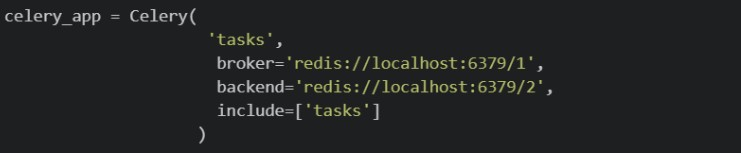 Which of the following best explains the conceptual difference between the broker and the backend?
Which of the following best explains the conceptual difference between the broker and the backend?Text of the picture (copyable)
```python
celery_app = Celery(
    'tasks',
    broker='redis://localhost:6379/1',
    backend='redis://localhost:6379/2',
    include=['tasks']
)
```- The backend is only needed when tasks involve sending emails; for tasks that only read from the database, only the broker is required.
- The broker and backend must always use different port numbers; using the same Redis port for both would cause a conflict.
- The broker distributes tasks evenly across multiple Celery workers, while the backend tracks which worker is currently processing which task.
- The broker stores task requests until a Celery worker picks and executes them, while the backend stores the task result after execution.
A team builds an internal warehouse dashboard where multiple managers, each on a different computer, need to receive live low-stock alerts from the server in real time. They decide to use Flask-SSE with Redis. Which of the following best explains Redis's role in a Flask-SSE setup?
- Redis is used by Flask-SSE to authenticate connected users before events can be streamed to the browser.
- Redis is optional in Flask-SSE and is only recommended when the application has a very large number of concurrent users.
- Redis is only needed when SSE events must be stored permanently and replayed after reconnection.
- Flask-SSE uses Redis as a shared event channel so published messages can be delivered to connected clients.
Comprehension passage for this question
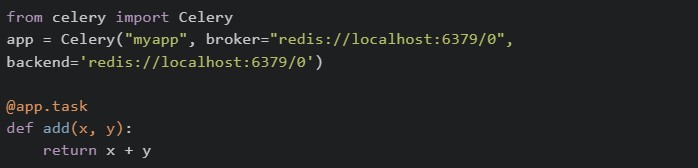
Read the following code carefully and answer the given subquestions. tasks.py:
 Called from a view/script:
 Checked immediately, right after delay() — worker hasn't processed it yet:
 Called separately, after waiting for the worker to finish the task:

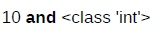
What do the two print statements, print(result) and print(type(result)) in the first code block output?
text
10 **and** <class 'int'>

text
A task ID string and <class 'celery.result.AsyncResult'>

text
None and <class 'NoneType'>

text
10 and <class 'celery.result.AsyncResult'>
Comprehension passage for this question
Read the following code carefully and answer the given subquestions. tasks.py:
Called from a view/script:
Checked immediately, right after delay() — worker hasn't processed it yet:
Called separately, after waiting for the worker to finish the task:
What do print(check.status) (checked immediately) and the later print(check.get(timeout=5)) (checked after the worker finishes) output?
- "PENDING" and 10
- "SUCCESS" and 10
- 10 and "SUCCESS"
- "PENDING" and "SUCCESS"
Pratham builds a Flask route that generates a PDF report and sends it to the user via email, all inside the route handler without using Celery. A tester notices that the browser takes about 12 seconds to respond, and during that time other users are unable to use the app normally. Which of the following correctly explain this behaviour and what Celery would change?
- Flask handles one request at a time per worker, so the long-running task blocks the entire process until it finishes.
- Other users' requests are queued and only served after the heavy task completes, making the app feel unresponsive.
- Using Celery's would make the task run faster by giving it more CPU cores.
text
```
.delay()
```
- With Celery, Flask immediately returns a response to the user while the report generation and email sending happen inside a separate Celery worker process in the background.
A Vue 2 component does the following: •loads initial task data from an API, •starts a timer after the component appears on the page, •clears that timer before the component is removed. Which hook choices are appropriate?
 for loading initial data.
text
```
created()
```
 for starting DOM-related work or timers.
text
```
mounted()
```
 for cleanup.
text
```
beforeDestroy()
```
 for declaring reactive
  .
.text
```
destroyed()
```
data
Consider the following JavaScript code:
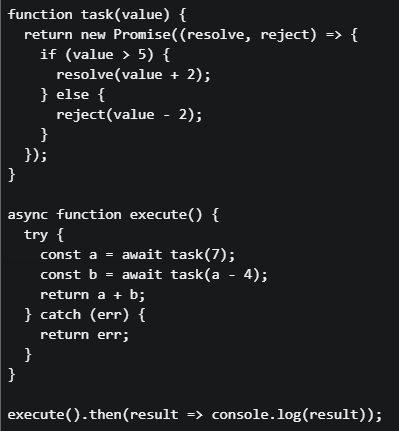 What will be printed to the console?
What will be printed to the console?Text of the picture (copyable)
```javascript
function task(value) {
  return new Promise((resolve, reject) => {
    if (value > 5) {
      resolve(value + 2);
    } else {
      reject(value - 2);
    }
  });
}

async function execute() {
  try {
    const a = await task(7);
    const b = await task(a - 4);
    return a + b;
  } catch (err) {
    return err;
  }
}

execute().then(result => console.log(result));
```- 12
- 10
- 5
- 3
When comparing Redis with a typical API data store (like a relational database accessed through REST APIs), which of the following statements is true?
- Redis can only store strings, unlike API data stores which can handle complex structures.
- Redis is an in-memory data structure store, often used as a cache or message broker to complement API-based data stores.
- Redis is a relational database and queries data using SQL, just like an API data store.
- Redis is slower than API-based databases because it stores everything in memory.
Which of the following describe Redis features correctly?
- In-memory database
- Can support publish-subscribe (pub/sub)
- Can be used as Celery result backend
- Requires SQL to query
What is the purpose of Redis in a Celery-based system?
- To automatically retry failed tasks
- To execute tasks in parallel
- To return computed results in JSON format
- To store scheduled tasks and serve as a message broker
In a web application using webhooks and Redis for real-time data synchronization: Scenario: An order management system where: • When an order is created, a webhook is sent to a notification service • Redis stores the current order cache • Multiple concurrent requests update the cache Which statements about this architecture are true?
- Webhooks guarantee that the notification service will process events in the exact order they were triggered
- Redis is suitable for this use case because it's an in-memory data structure store that provides fast access to cached data
- The webhook will automatically retry if the notification service is temporarily unavailable
- Webhooks use HTTP POST requests to communicate events asynchronously
In a message queue system, if the consumer is slower than the producer, what is likely to occur first?
- Messages will be dropped
- Messages will accumulate in the queue
- The consumer will speed up automatically
- The producer will block until the consumer is ready
Which of the following is/are the potential benefits of using a message broker?
- A message broker makes the network scalable for adding more servers to thenetwork.
- A message broker allows two servers in a network to directly communicatewith each other, without an intermediary.
- A message broker is not suited in case of traffic spikes, as messages areretained in the queue until processed.
- A message broker can be used for batch processing of messages.
Which statements are true about handling background tasks in Flask with Celery?
- Using time.sleep() blocks the event loop and is recommended for async tasks
- Celery allows long-running tasks to be executed asynchronously
- Polling is a strategy to check task status periodically
- Flask + Celery + Redis is a common stack for async task management
Comprehension passage for this question
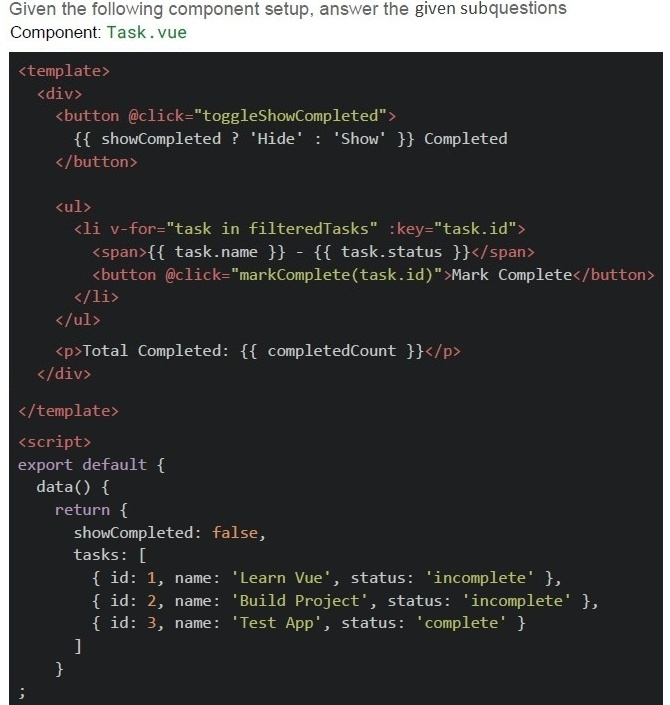 Scenario
1. The component is loaded. 2. User clicks "Mark Complete" for the task named Build Project.
3. User clicks "Show Completed" button again.
Scenario
1. The component is loaded. 2. User clicks "Mark Complete" for the task named Build Project.
3. User clicks "Show Completed" button again.
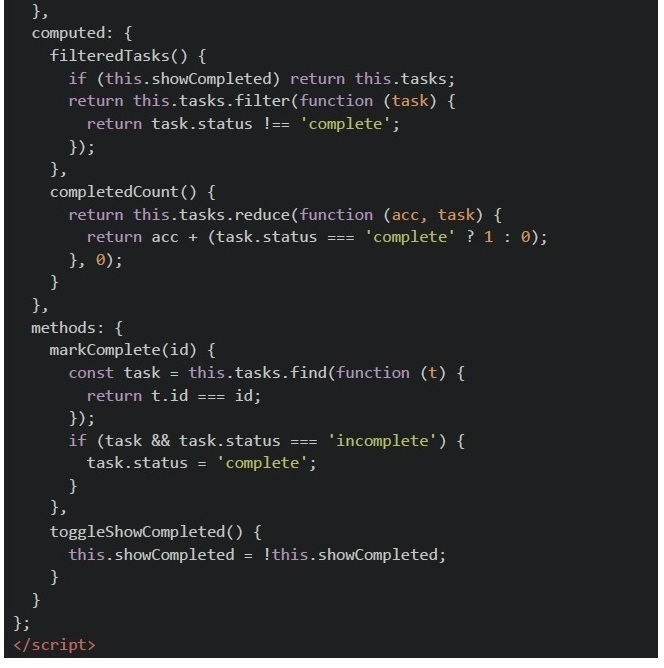
After step 2 (Mark Completed is clicked), what tasks are shown?
- Learn Vue
- Learn Vue, Build Project, Test App
- Test App only
- None
Comprehension passage for this question
Scenario
1. The component is loaded. 2. User clicks "Mark Complete" for the task named Build Project.
3. User clicks "Show Completed" button again.
After step 3 (Mark Complete is clicked on Build Project), how many completed tasks are reported in the UI?
- 1
- 2
- 3
- 0
Comprehension passage for this question
Scenario
1. The component is loaded. 2. User clicks "Mark Complete" for the task named Build Project.
3. User clicks "Show Completed" button again.
Which of the following are true about this component’s behavior?

text
The `filteredTasks` logic won't work properly if we used arrow functions for the `filter` method.

text
Using non-arrow functions in computed properties allows correct this access to Vue instance.

text
```
filteredTasks and completedCount will both update reactively when a task's
status is changed.
```

text
The `@click='markComplete(task.id)'` usage correctly preserves reactivity.
Which of the following statement(s) is/are true regarding Single Page Applications (SPA) and Progressive Web Apps (PWA)?
- SPAs use client-side routing to dynamically update content without full pagereloads.
- PWAs can work offline using service workers.
- SPAs always require a server-side language to handle routing.
- PWAs can be added to a device’s home screen like native apps.
Text of the picture (copyable)
Consider the following Flask application (server.py):

server.py
```python
from flask import Flask
from flask_caching import Cache
import time

config = {
    "DEBUG": True,
    "CACHE_TYPE": "RedisCache",
    "CACHE_REDIS_URL": "redis://localhost:6379/1",
    "CACHE_DEFAULT_TIMEOUT": 300
}

app = Flask(__name__)
app.config.from_mapping(config)
cache = Cache(app)

@app.route('/data/<item>')
@cache.cached(timeout=100)
def get_data(item):
    time.sleep(25)
    return f"Data for {item}"

if __name__ == '__main__':
    app.run()
```

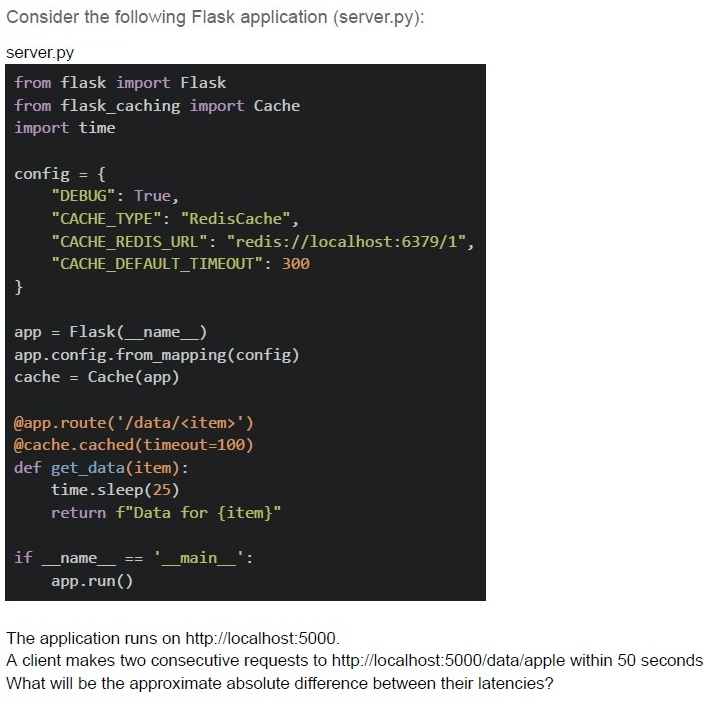
The application runs on http://localhost:5000.
A client makes two consecutive requests to http://localhost:5000/data/apple within 50 seconds
What will be the approximate absolute difference between their latencies?- 25 seconds
- 35 seconds
- 0 seconds
- 15 seconds
Which of the following statements are true regarding event loop in JavaScript?
- The event loop runs on a separate thread from the main JavaScript execution.
- The event loop allows JavaScript to perform non-blocking operations despitebeing single-threaded.
- Callbacks from setTimeout are placed in the task queue and executed after thecall stack is empty.
- All of these
Which scenario is best suited for a task queue system like Celery or RabbitMQ?
- A real-time chat application that requires low-latency message delivery.
- A weather API that provides instant weather data upon request.
- A system where a webhook sends an immediate notification to a client whenan event occurs.
- A system where a user uploads a video, and it needs to be processedasynchronously.
Which of the following best describes the difference between @cache.memoize() and @cache.cached() in Flask-Caching?

text
```
@cache.memoize() caches function results based on arguments, while
@cache.cached() caches entire views.
```

text
```
@cache.cached() caches function results based on arguments, while
@cache.memoize() caches entire views.
```

text
Both cache entire views, but `@cache.memoize()` uses Redis by default.

text
Both methods are identical but use different syntax.
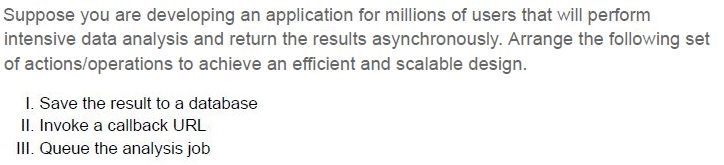
Text of the picture (copyable)
Suppose you are developing an application for millions of users that will perform intensive data analysis and return the results asynchronously. Arrange the following set of actions/operations to achieve an efficient and scalable design.

I. Save the result to a database
II. Invoke a callback URL
III. Queue the analysis job
- II, III, I
- III, I, II
- III, II, I
- I, II, III
You have a Celery task send_email that needs to run every 10 minutes. How can you schedule it?
- Using @app.task_periodic to run the task every 10 minutes.
- Using @app.on_periodic to schedule a periodic task.
- Using Celery Beat to schedule periodic tasks.
- Celery doesn't support scheduling tasks at fixed intervals; you need to use anexternal scheduler.
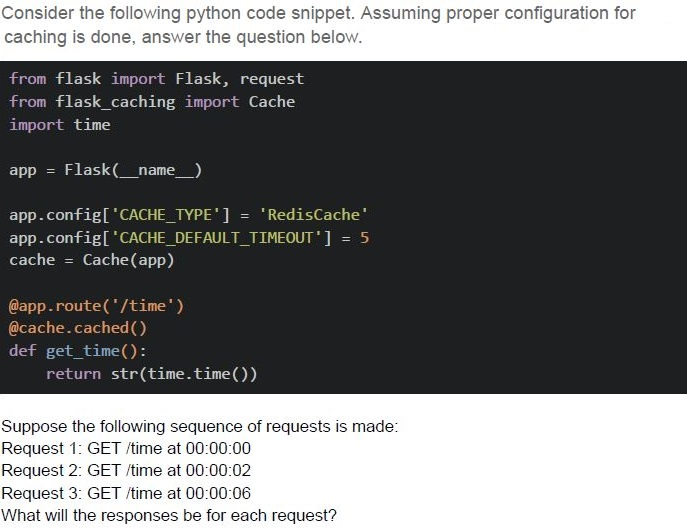
Text of the picture (copyable)
Consider the following python code snippet. Assuming proper configuration for caching is done, answer the question below.

```python
from flask import Flask, request
from flask_caching import Cache
import time

app = Flask(__name__)

app.config['CACHE_TYPE'] = 'RedisCache'
app.config['CACHE_DEFAULT_TIMEOUT'] = 5
cache = Cache(app)

@app.route('/time')
@cache.cached()
def get_time():
    return str(time.time())
```

Suppose the following sequence of requests is made:
Request 1: GET /time at 00:00:00
Request 2: GET /time at 00:00:02
Request 3: GET /time at 00:00:06
What will the responses be for each request?
text
Request 1: 00:00:00
Request 2: 00:00:02
Request 3: 00:00:06
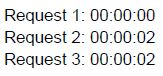
text
Request 1: 00:00:00
Request 2: 00:00:02
Request 3: 00:00:02
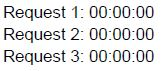
text
Request 1: 00:00:00
Request 2: 00:00:00
Request 3: 00:00:00

text
Request 1: 00:00:00
Request 2: 00:00:00
Request 3: 00:00:06
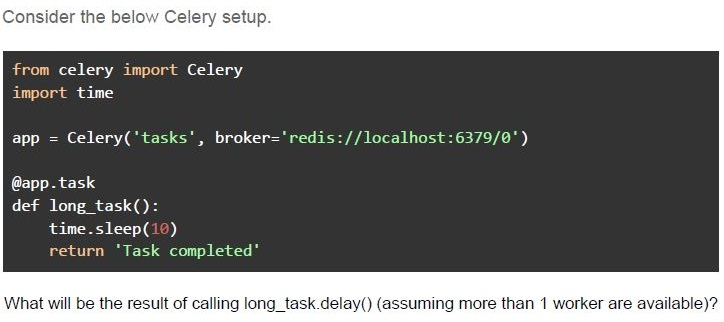
Text of the picture (copyable)
Consider the below Celery setup.

```python
from celery import Celery
import time

app = Celery('tasks', broker='redis://localhost:6379/0')

@app.task
def long_task():
    time.sleep(10)
    return 'Task completed'
```

What will be the result of calling long_task.delay() (assuming more than 1 worker are available)?- The task will immediately execute and print the result 'Task completed'.
- The task will execute asynchronously, and 'Task completed' will be printedafter a 10-second delay.
- The task will execute synchronously, blocking the main thread for 10 seconds.
- None of these
Which of the following statements correctly describe the use of asynchronous messaging systems and frameworks?
- Celery allows web servers to offload long-running tasks to worker processes,decoupling task execution from user requests.
- Push queues are used for real-time operations, while pull queues are bettersuited for batch processing.
- Server-Sent Events (SSE) provide a persistent connection between server andclient, enabling bi-directional communication.
- Redis is a high-performance in-memory database that supports Pub/Sub.
Which of the following statement(s) is/are true about Webhooks?
- A Webhook is a method for a server to send real-time data to another serveras an HTTP POST request.
- Webhooks are typically used for sending periodic updates at regular intervals.
- A client must continuously poll a Webhook URL to receive data.
- Webhooks are usually used in event-driven architectures, where an eventtriggers an HTTP POST request to a specified endpoint.
Which of the following is/are typical use case(s) for Celery tasks?
- Processing time-consuming or resource-intensive background jobsasynchronously.
- Directly handling incoming HTTP requests in web servers.
- Scheduling periodic tasks like sending emails or cleaning up the database.
- Serving real-time notifications over WebSockets.
Which of the following statements about Redis is true?
- Redis is a relational database that uses SQL for querying data.
- Redis is an in-memory data structure store, commonly used as a database,cache, and message broker.
- Redis can only store string data types and does not support complex datastructures like lists or sets.
- Redis cannot handle numerous operations per second.
Match the following technologies with their typical use cases:
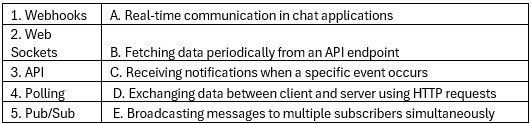 Match the following technologies with their typical use cases:
Match the following technologies with their typical use cases: Text of the picture (copyable)
| | |
|---|---|
| 1. Webhooks | A. Real-time communication in chat applications |
| 2. Web Sockets | B. Fetching data periodically from an API endpoint |
| 3. API | C. Receiving notifications when a specific event occurs |
| 4. Polling | D. Exchanging data between client and server using HTTP requests |
| 5. Pub/Sub | E. Broadcasting messages to multiple subscribers simultaneously |
- 1 - C, 2 - A, 3 - D, 4 - B, 5 - E
- 1 - D, 2 - E, 3 - A, 4 - C, 5 - B
- 1 - C, 2 - C, 3 - E, 4 - A, 5 - D
- 1 - D, 2 - A, 3 - C, 4 - D, 5 - B
Which of the following scenarios are best suited for using Celery tasks?
- Handling real-time user interactions on a website.
- Sending out periodic email notifications to users.
- Generating and displaying dynamic content on a web page.
- Performing long-running data processing tasks in the background.
Which of the following statement(s) is/are true regarding long and short polling?
- A webhook is the same as short polling.
- The short polling can be used to know the state of an asynchronous task, andtrigger an action if the task gets completed.
- The long polling cannot be achieved using HTTP protocol.
- Long Polling can be used to achieve real time communication.
Two requests are given to localhost:5000/compute/10/20 and localhost:5000/compute/5/10 within 60 seconds. What would be the json response from the server respectively?
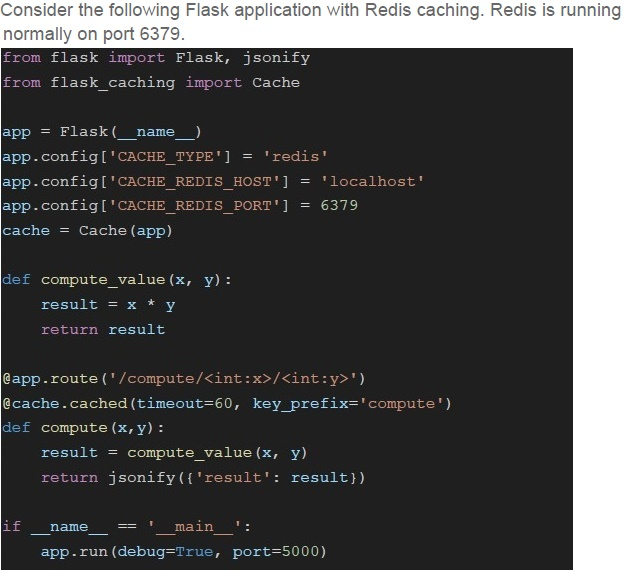
Text of the picture (copyable)
Consider the following Flask application with Redis caching. Redis is running
normally on port 6379.

```python
from flask import Flask, jsonify
from flask_caching import Cache

app = Flask(__name__)
app.config['CACHE_TYPE'] = 'redis'
app.config['CACHE_REDIS_HOST'] = 'localhost'
app.config['CACHE_REDIS_PORT'] = 6379
cache = Cache(app)

def compute_value(x, y):
    result = x * y
    return result

@app.route('/compute/<int:x>/<int:y>')
@cache.cached(timeout=60, key_prefix='compute')
def compute(x, y):
    result = compute_value(x, y)
    return jsonify({'result': result})

if __name__ == '__main__':
    app.run(debug=True, port=5000)
```- {“result” : 200} and {“result”: 50}
- {“result” : 50} and {“result”: 200}
- {“result”: 100} and {“result” : 100}
- {“result”: 200} and {“result”: 200}
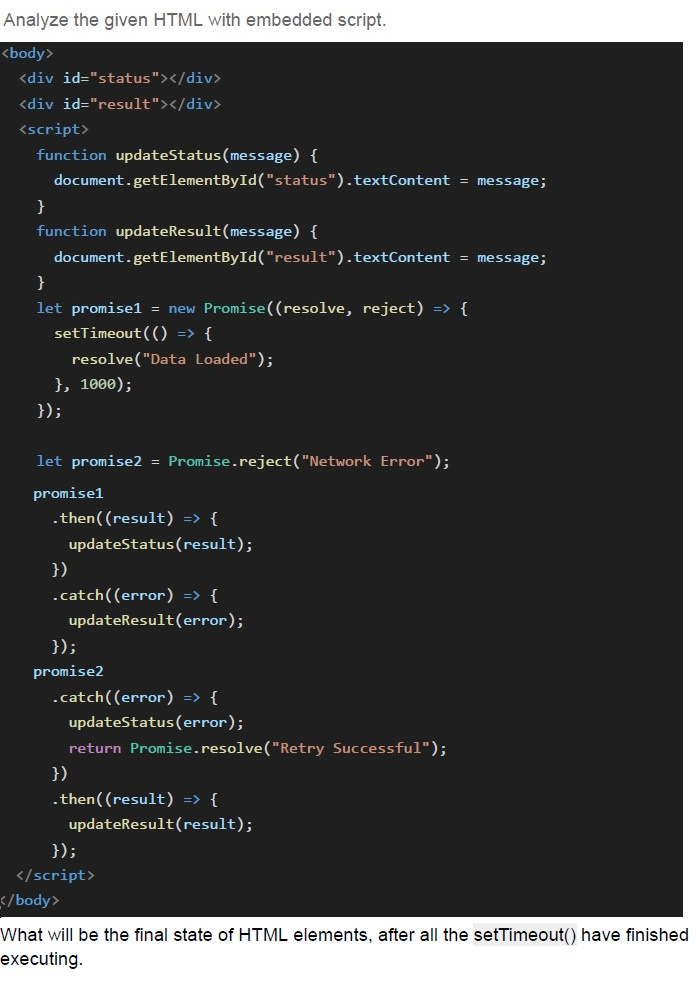
Text of the picture (copyable)
Analyze the given HTML with embedded script.

```html
<body>
    <div id="status"></div>
    <div id="result"></div>
    <script>
        function updateStatus(message) {
            document.getElementById("status").textContent = message;
        }

        function updateResult(message) {
            document.getElementById("result").textContent = message;
        }

        let promise1 = new Promise((resolve, reject) => {
            setTimeout(() => {
                resolve("Data Loaded");
            }, 1000);
        });

        let promise2 = Promise.reject("Network Error");

        promise1
            .then((result) => {
                updateStatus(result);
            })
            .catch((error) => {
                updateResult(error);
            });

        promise2
            .catch((error) => {
                updateStatus(error);
                return Promise.resolve("Retry Successful");
            })
            .then((result) => {
                updateResult(result);
            });
    </script>
</body>
```

What will be the final state of HTML elements, after all the `setTimeout()` have finished executing.
text
#status will be "Data Loaded", and #result will be "Data Save Failed".

text
```
#status will be "Network Error", and #result will be "Retry Successful".
```

text
```
#status will be "Data Loaded", and #result will be "Retry Successful".
```

text
```
#status will be "Network Error", and #result will be "Data Save Failed".
```
Which of the following statements regarding Celery task execution is correct?
- Celery tasks are executed synchronously by default.
- Celery tasks can only be executed on the same machine where the flaskapplication is running.
- Celery tasks are executed asynchronously by default.
- Celery tasks can only be executed once they are defined as part of a flaskapplication.
What is the primary objective of using a message broker?
- Eliminates the need for network communication
- Decouples producers and consumers
- Decreases CPU utilization
- Reduces the need for data serialization
In a message broker system, what does the term "topic" refer to?
- The physical location where messages are stored.
- A unique identifier for a message.
- The process of encrypting messages.
- A channel to which messages are published.
Which of the following method(s) can be used to ensure that the displayed state and system state are kept in sync at all times?
- Ajax requests on each UI change
- Periodic reloading of web-page
- Vue bindings to update data reactively
- Pure static pages with all updates rendered from server
You are trying to build a distributed system with N servers, each of which may need to communicate with any of the other servers. Which of the following statement(s) is/are true?
- With point-to-point communication, the number of connection links will growas O(n).
- With point-to-point communication, the number of connection links will growas O(n2).
- With the use of a central message broker, the number of connection links willgrow as O(n).
- With the use of a central message broker, the number of connection links willgrow as O(n2).
Which of the following statement(s) is/are false regarding long and short polling?
- A webhook is the same as short polling.
- The short polling can be used to know the state of an asynchronous task, andtrigger an action if the task gets completed.
- The long polling cannot be achieved using HTTP protocol.
- Long Polling can be used to achieve real time communication.
Consider the following flask application.
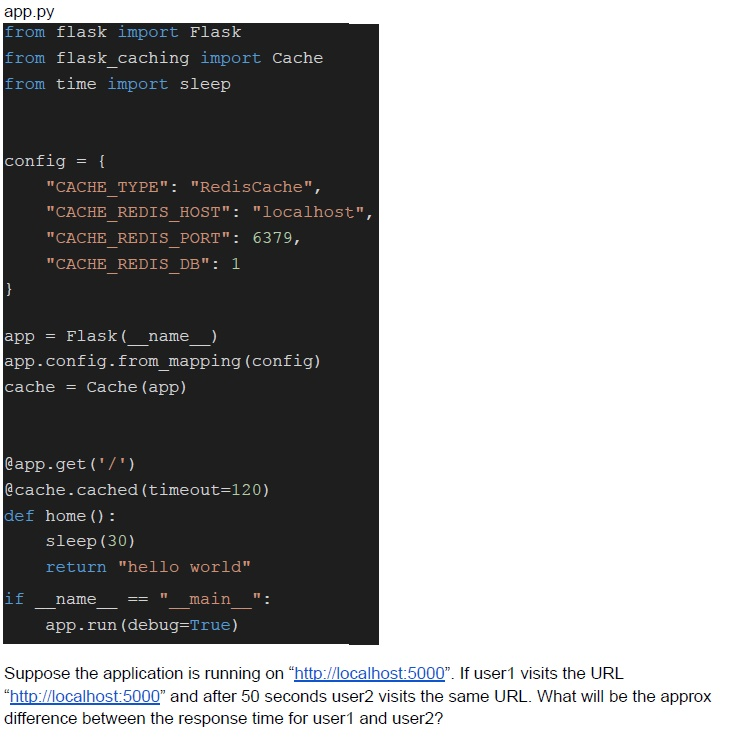 Consider the following flask application.
Consider the following flask application. Text of the picture (copyable)
app.py
```python
from flask import Flask
from flask_caching import Cache
from time import sleep

config = {
    "CACHE_TYPE": "RedisCache",
    "CACHE_REDIS_HOST": "localhost",
    "CACHE_REDIS_PORT": 6379,
    "CACHE_REDIS_DB": 1
}

app = Flask(__name__)
app.config.from_mapping(config)
cache = Cache(app)

@app.get('/')
@cache.cached(timeout=120)
def home():
    sleep(30)
    return "hello world"

if __name__ == "__main__":
    app.run(debug=True)
```
Suppose the application is running on "http://localhost:5000". If user1 visits the URL "http://localhost:5000" and after 50 seconds user2 visits the same URL. What will be the approx difference between the response time for user1 and user2?- 0 seconds
- 30 seconds
- 120 seconds
- None of these

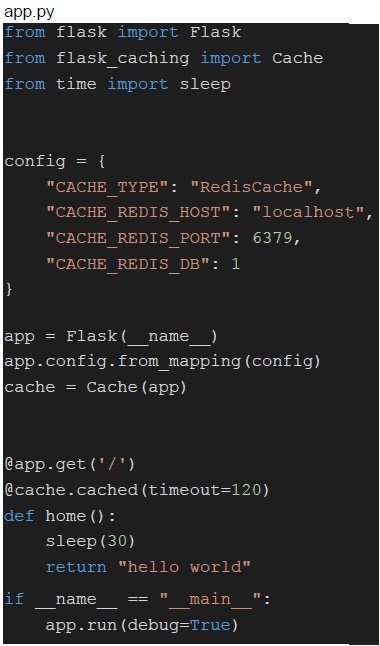
Text of the picture (copyable)
Consider the flask application mentioned. Suppose the application is
running on "http://localhost:5000". If user1 visits the URL "http://localhost:5000" and
after 3 minutes user2 visits the same URL. What will be the approx difference between
the response time for user1 and user2?
```python
app.py
from flask import Flask
from flask_caching import Cache
from time import sleep

config = {
    "CACHE_TYPE": "RedisCache",
    "CACHE_REDIS_HOST": "localhost",
    "CACHE_REDIS_PORT": 6379,
    "CACHE_REDIS_DB": 1
}

app = Flask(__name__)
app.config.from_mapping(config)
cache = Cache(app)

@app.get('/')
@cache.cached(timeout=120)
def home():
    sleep(30)
    return "hello world"

if __name__ == "__main__":
    app.run(debug=True)
```- 0 seconds
- 30 seconds
- 120 seconds
- None of these
Which of the following statement(s) is/are true regarding Celery?
- A celery system may consist of multiple brokers.
- Redis must be used as a message broker for Celery.
- The framework does not support periodic scheduling of tasks.
- All of these.
Which of the following is correct regarding Celery?
- Celery is a task queue.
- It needs broker to function.
- Celery can be used to schedule the task.
- None of these.
Which of the following method(s) does not guarantee that the displayed state and system state are kept in sync at all times?
- Ajax requests on each UI change
- Periodic reloading of web-page
- Vue bindings to update data reactively
- Pure static pages with all updates rendered from server
You are trying to build a distributed system with N servers, each of which may need to communicate with any of the other servers. Which of the following statement(s) is/are false?
- With point-to-point communication, the number of connection links will growas O(n).
- With point-to-point communication, the number of connection links will growas O(n2).
- With the use of a central message broker, the number of connection links willgrow as O(n).
- With the use of a central message broker, the number of connection links willgrow as O(n2).
Which of the following statements is false regarding promise in javascript?
- A promise has 3 states - pending, fulfilled & rejected.
- The promises can be chained to perform dependent tasks.
- Promises can have only two states, Fulfilled and Rejected.
- A promise constructor accepts an executor function, which in itself received 2parameters for resolve and reject functions.
Which of the following statement(s) is/are true regarding event loop in javascript?
- The event loop makes sure that each function is processed (or executed)completely before any other function is executed.
- The event loop takes the function from the callback queue, and sends thefunction to the call stack for execution.
- The event loop can stop any function in running state to allow some otherfunction to run on priority.
- All of these
Consider the following flask application.
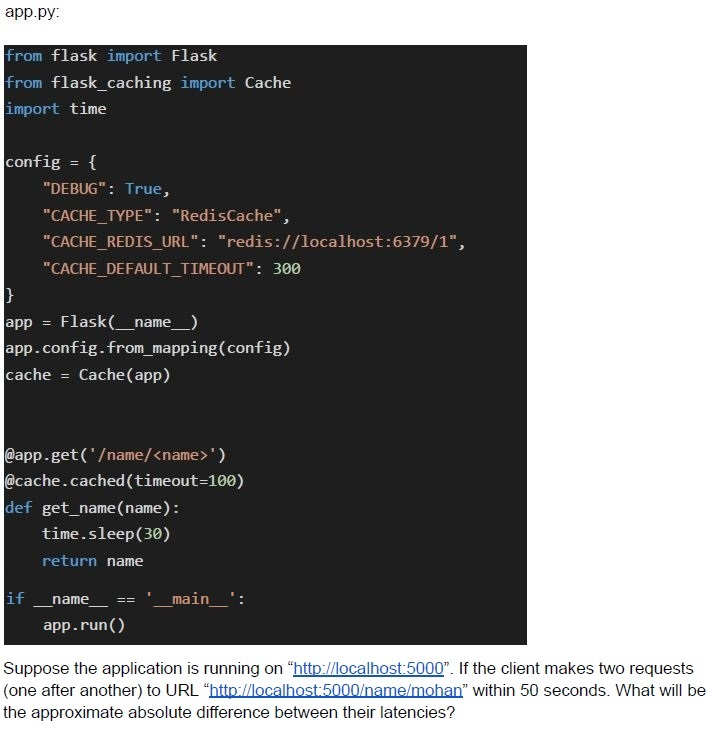 Consider the following flask application.
Consider the following flask application. Text of the picture (copyable)
app.py:

```python
from flask import Flask
from flask_caching import Cache
import time

config = {
    "DEBUG": True,
    "CACHE_TYPE": "RedisCache",
    "CACHE_REDIS_URL": "redis://localhost:6379/1",
    "CACHE_DEFAULT_TIMEOUT": 300
}

app = Flask(__name__)
app.config.from_mapping(config)
cache = Cache(app)

@app.get('/name/<name>')
@cache.cached(timeout=100)
def get_name(name):
    time.sleep(30)
    return name

if __name__ == '__main__':
    app.run()
```

Suppose the application is running on "http://localhost:5000". If the client makes two requests (one after another) to URL "http://localhost:5000/name/mohan" within 50 seconds. What will be the approximate absolute difference between their latencies?- 30 Seconds
- 40 Seconds
- 0 Seconds
- None of these
Which of the following statements is/are correct?
- Memoization term is used for a special kind of caching where the return valueof a function is cached based on its parameters value.
- Redis database can be used to cache data.
- Caching can only be done at the browser level.
- All of these
Which of the following statements is/are true regarding the celery in python?
- Celery is a task queue.
- Celery typically runs the tasks asynchronously.
- Celery typically runs the tasks synchronously.
- None of these.
Consider the given 2 implementations.
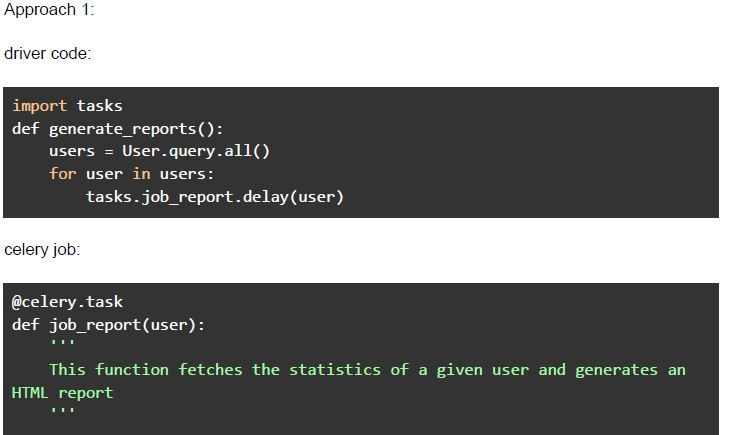 Consider the given 2 implementations.
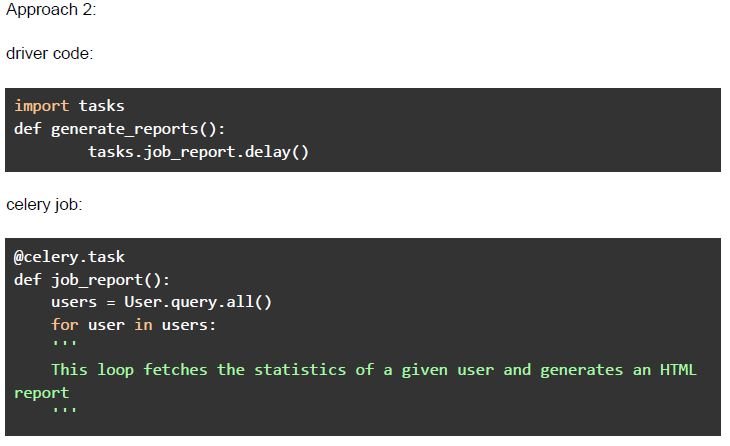 Consider the given 2 implementations. Suppose there are currently 1000 users in the database, and the application is supposed to generate 1000 HTML reports. Which of the following statement(s) is/are false (assuming there are more than 1 worker available in the celery system)?
Consider the given 2 implementations.
Consider the given 2 implementations. Suppose there are currently 1000 users in the database, and the application is supposed to generate 1000 HTML reports. Which of the following statement(s) is/are false (assuming there are more than 1 worker available in the celery system)?Text of the picture (copyable)
Approach 1:

driver code:

```python
import tasks
def generate_reports():
    users = User.query.all()
    for user in users:
        tasks.job_report.delay(user)
```

celery job:

```python
@celery.task
def job_report(user):
    """
    This function fetches the statistics of a given user and generates an
    HTML report
    """
```
Approach 2:

driver code:

```python
import tasks
def generate_reports():
    tasks.job_report.delay()
```

celery job:

```python
@celery.task
def job_report():
    users = User.query.all()
    for user in users:
        ...
        # This loop fetches the statistics of a given user and generates an HTML
        # report
        ...
```- Approach 1 will finish the task in less time than approach 2.
- Approach 2 will finish the task in less time than approach 1.
- Both the approaches will be comparable.
- Both the approaches will be comparable if there is only 1 worker available.
Which of the following is correct regarding the finally block of Promise?
- It allows scheduling a function after the promise is rejected.
- It allows scheduling a function after the promise is resolved.
- It allows scheduling a function when promise is either fulfilled or rejected.
- None of these
Which of the following statements is false regarding a message broker?
- A message broker allows two servers in a network to directly communicatewith each other, without an intermediary.
- A message broker makes the network scalable for adding more servers to thenetwork.
- A message broker can be used for batch processing of messages.
- A message broker is well suited in case of traffic spikes, as messages areretained in the queue until processed.
Suppose you are building an application which requires sending emails to all the users stored in the database at regular intervals. Given below are the two approaches to satisfy the requirement.
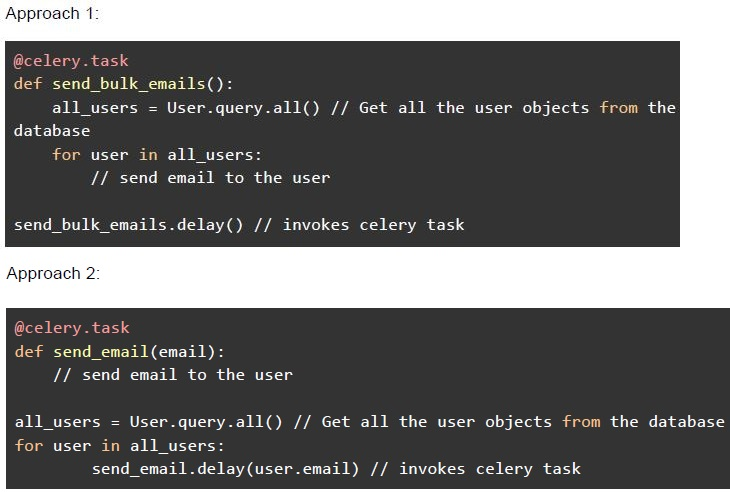 Suppose you are building an application which requires sending emails to all the users stored in the database at regular intervals. Given below are the two approaches to satisfy the requirement. Choose the correct statement(s).
Suppose you are building an application which requires sending emails to all the users stored in the database at regular intervals. Given below are the two approaches to satisfy the requirement. Choose the correct statement(s).Text of the picture (copyable)
Approach 1:

```python
@celery.task
def send_bulk_emails():
    all_users = User.query.all() // Get all the user objects from the
    database
    for user in all_users:
        // send email to the user

send_bulk_emails.delay() // invokes celery task
```

Approach 2:

```python
@celery.task
def send_email(email):
    // send email to the user

all_users = User.query.all() // Get all the user objects from the database
for user in all_users:
    send_email.delay(user.email) // invokes celery task
```- Approach 1 will take more time than approach 2, if more than 2 celery workersare available.
- Approach 2 will take more time than approach 1, if more than 2 celery workersare available.
- Both the approaches will take same time (approx), if only 1 celery worker isavailable.
- None of these
Suppose an endpoint in your flask application triggers a celery task, which generates a CSV file named “data.csv” and saves it in the static folder of a flask application. The file generator takes anywhere between 20 and 40 seconds to generate and save the CSV file. The below fetch call is used to get the file generated by the above explained celery task.
 Suppose an endpoint in your flask application triggers a celery task, which generates a CSV file named “data.csv” and saves it in the static folder of a flask application. The file generator takes anywhere between 20 and 40 seconds to generate and save the CSV file. The below fetch call is used to get the file generated by the above explained celery task. Which of the following is the most efficient way to make the above fetch call so that it doesn’t fail and return the desired response?
Suppose an endpoint in your flask application triggers a celery task, which generates a CSV file named “data.csv” and saves it in the static folder of a flask application. The file generator takes anywhere between 20 and 40 seconds to generate and save the CSV file. The below fetch call is used to get the file generated by the above explained celery task. Which of the following is the most efficient way to make the above fetch call so that it doesn’t fail and return the desired response? Text of the picture (copyable)
```javascript
fetch("/static/data.csv").then(response => response.blob())
  .then(data => {
    // does something with the response data
  })
```- Use short polling to check the state of the celery task after every 5 seconds,and make the fetch call, when the task succeeds.
- Use javascript function “setTimeout” to make the fetch after 41 seconds, whichmakes sure that the file is generated and saved to the desired location.
Consider the below flask application.
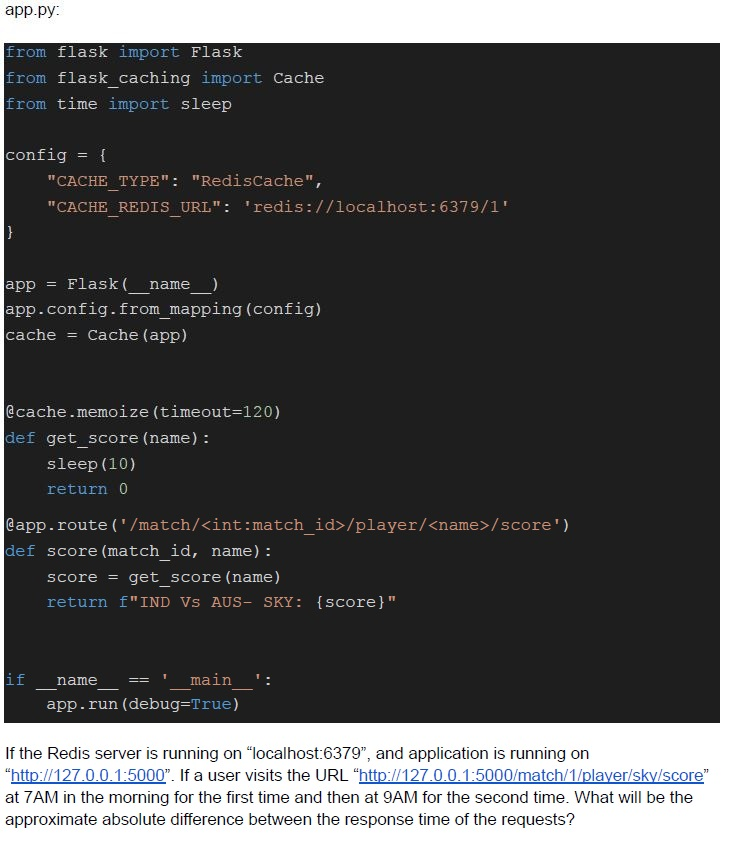 Consider the below flask application.
Consider the below flask application. Text of the picture (copyable)
app.py:

```python
from flask import Flask
from flask_caching import Cache
from time import sleep

config = {
    "CACHE_TYPE": "RedisCache",
    "CACHE_REDIS_URL": 'redis://localhost:6379/1'
}

app = Flask(__name__)
app.config.from_mapping(config)
cache = Cache(app)

@cache.memoize(timeout=120)
def get_score(name):
    sleep(10)
    return 0

@app.route('/match/<int:match_id>/player/<name>/score')
def score(match_id, name):
    score = get_score(name)
    return f"IND Vs AUS- SKY: {score}"

if __name__ == '__main__':
    app.run(debug=True)
```

If the Redis server is running on "localhost:6379", and application is running on "http://127.0.0.1:5000". If a user visits the URL "http://127.0.0.1:5000/match/1/player/sky/score" at 7AM in the morning for the first time and then at 9AM for the second time. What will be the approximate absolute difference between the response time of the requests?- 10 seconds
- 0 seconds
- 20 seconds
- 120 Seconds
Suppose you are writing an application to be used by lakhs of people, which will run a brute force algorithm and gives back the result to the user of the application when ready. Considering this context, arrange the below set of actions/operations to achieve a desirable and practical design. I. Invoke the webhook II. Relieve the worker III. Dispatch a backend job
- I, III, II
- III, I, II
- I, II, III
- The polling will be a better design.