Home / Past papers / MAD2 End Term / this paper
2023 Dec24: IIT M FN EXAM FDD1 - 24 Dec 2023
- SMTP is a mail delivery protocol.
- SMTP is a protocol to retrieve email from an email server.
- IMAP is a mail delivery protocol.
- IMAP is a protocol to retrieve email from an email server.
- CDN is an acronym for Content Delivery Network.
- CDN is a group of servers that helps in fast delivery of web contents.
- Web content is generally delivered from the closest server to the client in thenetwork.
- None of these.
- Replit.com is an example of a javascript engine.
- The language supports the concept of first class functions.
- The language does not allow the implementation of user defined higher orderfunctions.
- The language can be used for DOM manipulation.
- Ajax requests on each UI change
- Periodic reloading of web-page
- Vue bindings to update data reactively
- Pure static pages with all updates rendered from server

Text of the picture (copyable)
Suppose an application is loaded from an origin "https://xyz.com". Which of the following origins will result in a CORS error, while making a fetch call, by default?

text
https://xyz.com

text
https://abc.xyz.com

text
https://xyz.com/page1

text
https://xyz6.com
- A webhook uses HTTP protocol.
- A webhook uses web socket protocol.
- A webhook receiver must be deployed on the same origin as the webhookinitiator.
- A webhook is supposed to be used for machine to machine communication.
- XSS attack is an exploit where an attacker attaches a malicious code into awebsite.
- XSS can be used to steal the user's cookie.
- XSS is a client side injection attack.
- It can be avoided by validating the user's input.
- With point-to-point communication, the number of connection links will growas O(n).
- With point-to-point communication, the number of connection links will growas O(n2).
- With the use of a central message broker, the number of connection links willgrow as O(n).
- With the use of a central message broker, the number of connection links willgrow as O(n2).
- A webhook is the same as short polling.
- The short polling can be used to know the state of an asynchronous task, andtrigger an action if the task gets completed.
- The long polling cannot be achieved using HTTP protocol.
- Long Polling can be used to achieve real time communication.
- It is recommended to cache the social networking apps feed responses for alonger duration.
- Caching is primarily done to reduce the load from the origin server.
- The shared cache is meant to serve responses to the multiple users.
- A browser cannot cache JavaScript corresponding to a web page.
- CORS stands for Cross Origin Resource Sharing.
- The CORS reduces chances of malicious code by explicitly saying which URLscan be originators of data.
- CSRF stands for Cross Site Request Forgery.
- None of these.
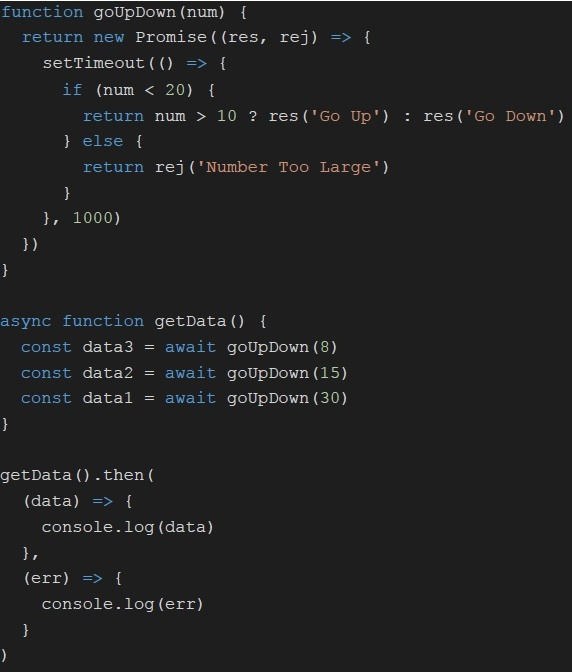 Consider the following JavaScript code. What will be logged on to console, if executed?
Text of the picture (copyable)
```javascript
function goUpDown(num) {
  return new Promise((res, rej) => {
    setTimeout(() => {
      if (num < 20) {
        return num > 10 ? res('Go Up') : res('Go Down')
      } else {
        return rej('Number Too Large')
      }
    }, 1000)
  })
}

async function getData() {
  const data3 = await goUpDown(8)
  const data2 = await goUpDown(15)
  const data1 = await goUpDown(30)
}

getData().then(
  (data) => {
    console.log(data)
  },
  (err) => {
    console.log(err)
  }
)
```- Go Up
- Go Down
- Number Too Large
- None of these
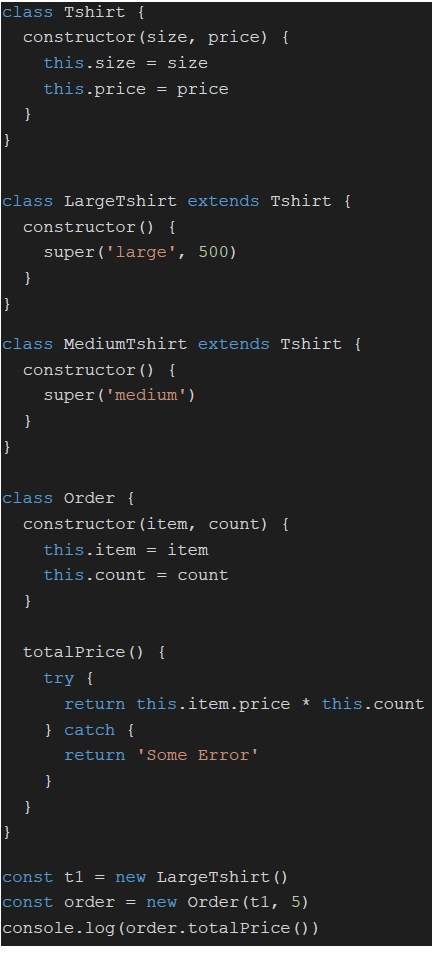 Consider the following JavaScript code. What will be logged on to console, if executed?
Text of the picture (copyable)
```javascript
class Tshirt {
  constructor(size, price) {
    this.size = size
    this.price = price
  }
}

class LargeTshirt extends Tshirt {
  constructor() {
    super('large', 500)
  }
}

class MediumTshirt extends Tshirt {
  constructor() {
    super('medium')
  }
}

class Order {
  constructor(item, count) {
    this.item = item
    this.count = count
  }

  totalPrice() {
    try {
      return this.item.price * this.count
    } catch {
      return 'Some Error'
    }
  }
}

const t1 = new LargeTshirt()
const order = new Order(t1, 5)
console.log(order.totalPrice())
```- NaN
- 500
- 2500
- Some Error
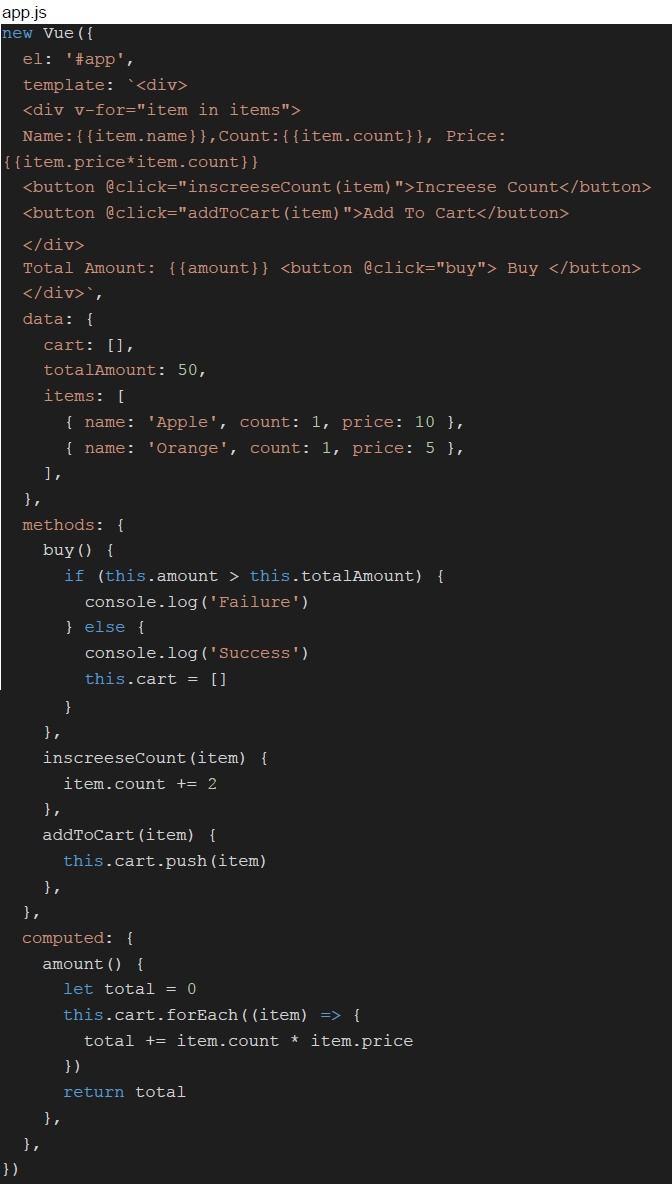 Consider the following Vue application with JavaScript “app.js” and markup “index.html”
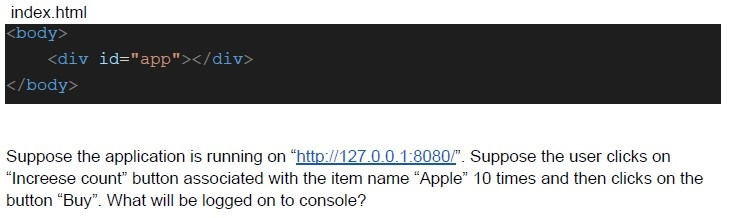 Consider the following Vue application with JavaScript “app.js” and markup “index.html”
 Text of the picture (copyable)
```javascript
app.js
new Vue({
  el: '#app',
  template: `
    <div v-for="item in items">
      Name:{{item.name}}, Count:{{item.count}}, Price:
      {{item.price*item.count}}
      <button @click="inscreeseCount(item)">Increase Count</button>
      <button @click="addToCart(item)">Add To Cart</button>
    </div>
    Total Amount: {{amount}} <button @click="buy"> Buy </button>
  `,
  data: {
    cart: [],
    totalAmount: 50,
    items: [
      { name: 'Apple', count: 1, price: 10 },
      { name: 'Orange', count: 1, price: 5 },
    ],
  },
  methods: {
    buy() {
      if (this.amount > this.totalAmount) {
        console.log('Failure')
      } else {
        console.log('Success')
        this.cart = []
      }
    },
    inscreeseCount(item) {
      item.count += 2
    },
    addToCart(item) {
      this.cart.push(item)
    },
  },
  computed: {
    amount() {
      let total = 0
      this.cart.forEach((item) => {
        total += item.count * item.price
      })
      return total
    },
  },
})
```
index.html
```html
<body>
    <div id="app"></div>
</body>
```

Suppose the application is running on "http://127.0.0.1:8080/". Suppose the user clicks on "Increase count" button associated with the item name "Apple" 10 times and then clicks on the button "Buy". What will be logged on to console?- Success
- Failure
- NaN
- None of these
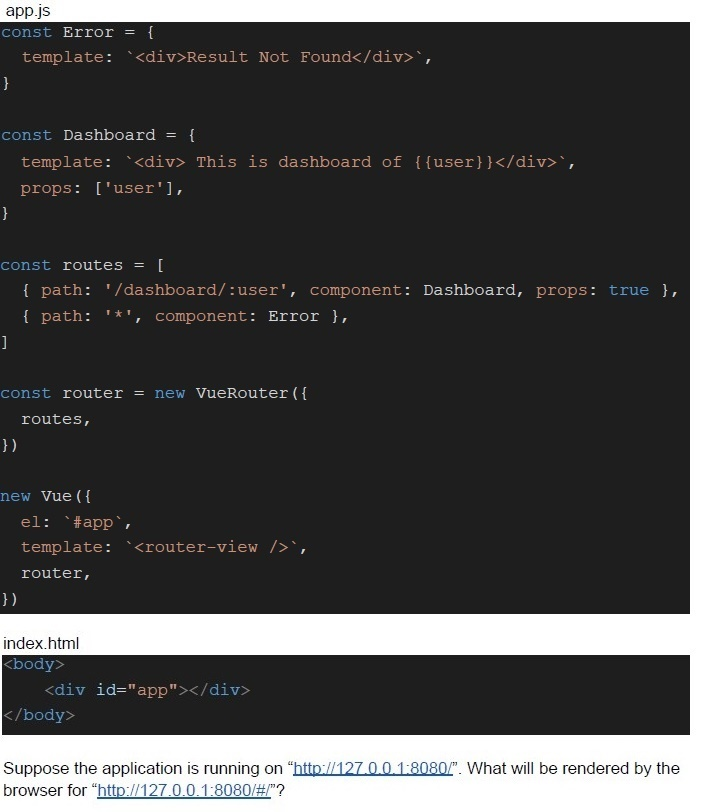 Consider the following Vue app with markup “index.html” and JavaScript “app.js”
 Text of the picture (copyable)
app.js
```javascript
const Error = {
  template: `<div>Result Not Found</div>`,
}

const Dashboard = {
  template: `<div> This is dashboard of {{user}}</div>`,
  props: ['user'],
}

const routes = [
  { path: '/dashboard/:user', component: Dashboard, props: true },
  { path: '*', component: Error },
]

const router = new VueRouter({
  routes,
})

new Vue({
  el: '#app',
  template: `<router-view />`,
  router,
})
```

index.html
```html
<body>
  <div id="app"></div>
</body>
```

Suppose the application is running on "http://127.0.0.1:8080/". What will be rendered by the browser for "http://127.0.0.1:8080/#/"?- This is dashboard of User
- Dashboard
- Error
- Result Not Found
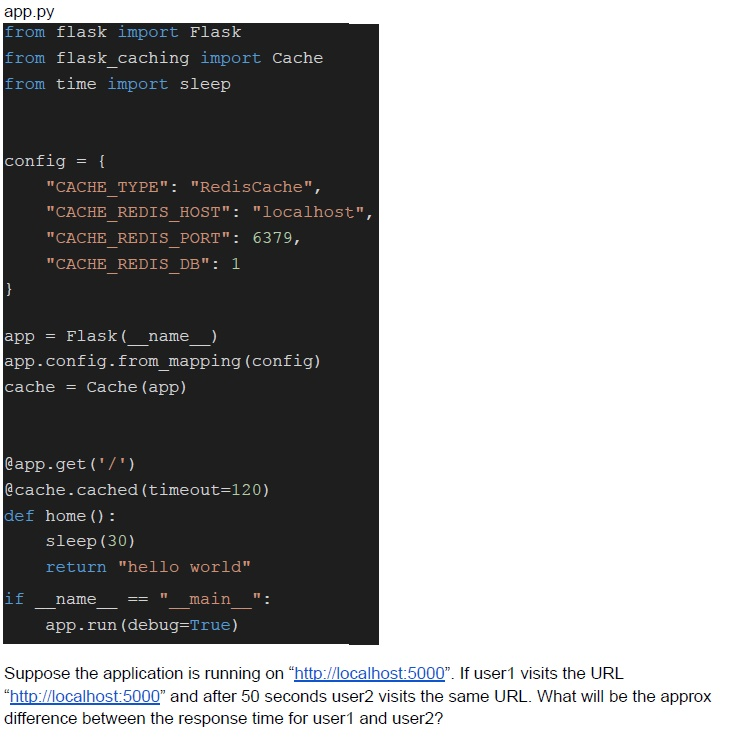 Consider the following flask application.
 Text of the picture (copyable)
app.py
```python
from flask import Flask
from flask_caching import Cache
from time import sleep

config = {
    "CACHE_TYPE": "RedisCache",
    "CACHE_REDIS_HOST": "localhost",
    "CACHE_REDIS_PORT": 6379,
    "CACHE_REDIS_DB": 1
}

app = Flask(__name__)
app.config.from_mapping(config)
cache = Cache(app)

@app.get('/')
@cache.cached(timeout=120)
def home():
    sleep(30)
    return "hello world"

if __name__ == "__main__":
    app.run(debug=True)
```
Suppose the application is running on "http://localhost:5000". If user1 visits the URL "http://localhost:5000" and after 50 seconds user2 visits the same URL. What will be the approx difference between the response time for user1 and user2?- 0 seconds
- 30 seconds
- 120 seconds
- None of these
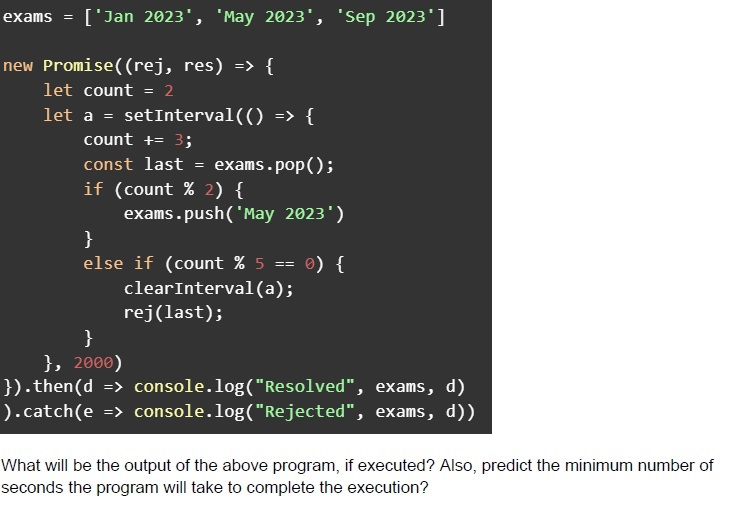 Consider the below javascript program.
 Text of the picture (copyable)
```javascript
exams = ['Jan 2023', 'May 2023', 'Sep 2023']

new Promise((rej, res) => {
    let count = 2
    let a = setInterval(() => {
        count += 3;
        const last = exams.pop();
        if (count % 2) {
            exams.push('May 2023')
        }
        else if (count % 5 == 0) {
            clearInterval(a);
            rej(last);
        }
    }, 2000)
}).then(d => console.log("Resolved", exams, d))
  .catch(e => console.log("Rejected", exams, d))
```
What will be the output of the above program, if executed? Also, predict the minimum number of seconds the program will take to complete the execution?- Resolved []Minimum Time Taken: 12 seconds
- Resolved [] May 2023Minimum Time Taken: 10 seconds
- Rejected [May 2023] May 2023Minimum Time Taken: 12 seconds
- Rejected [May 2023]Minimum Time Taken: 10 seconds
- Resolved [] May 2023Minimum Time Taken: 12 seconds
- Rejected [] May 2023Minimum Time Taken: 10 seconds
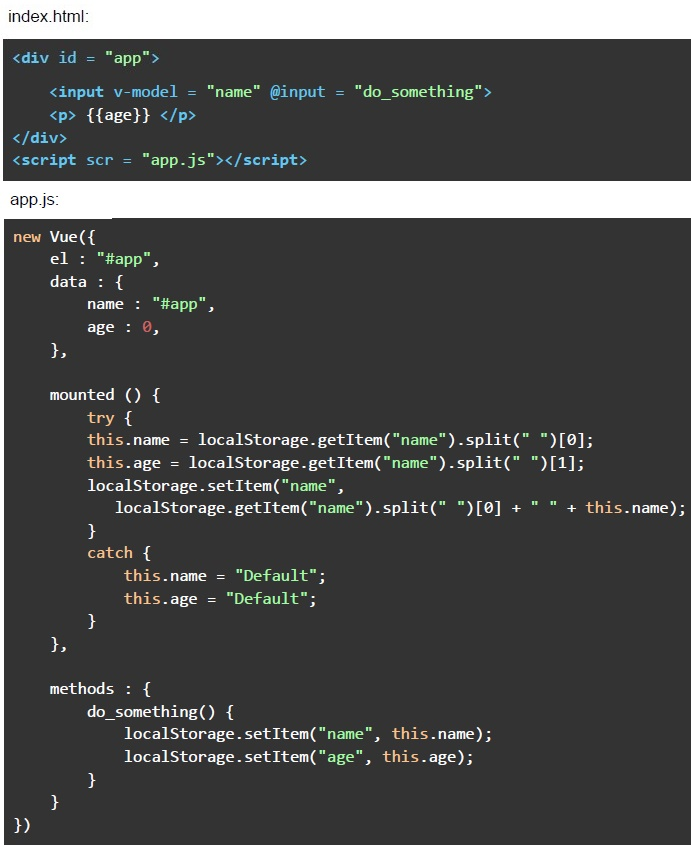 Consider the following Vue application with markup “index.html” and javascript file “app.js”. Suppose you open “index.html” file in a browser, and type the text “IIT Madras” in the text box shown (after removing the previous text, if any), and hard refresh the page twice, without clicking anywhere. What will be the value shown in the text box, and the “age” placeholder, respectively?
Text of the picture (copyable)
index.html:

```html
<div id = "app">
    <input v-model = "name" @input = "do_something">
    <p> {{age}} </p>
</div>
<script scr = "app.js"></script>
```

app.js:

```javascript
new Vue({
    el : "#app",
    data : {
        name : "#app",
        age : 0,
    },

    mounted () {
        try {
            this.name = localStorage.getItem("name").split(" ")[0];
            this.age = localStorage.getItem("name").split(" ")[1];
            localStorage.setItem("name",
            localStorage.getItem("name").split(" ")[0] + " " + this.name);
        }
        catch {
            this.name = "Default";
            this.age = "Default";
        }
    },

    methods : {
        do_something() {
            localStorage.setItem("name", this.name);
            localStorage.setItem("age", this.age);
        }
    }
})
```- The app will show an error in the console
- Default, Default
- IIT, Madras
- IIT, IIT
- Madras, IIT
- None of these
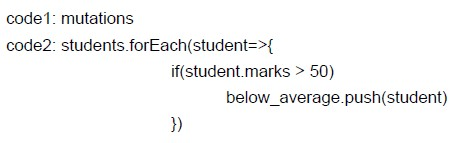
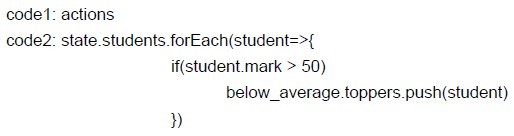
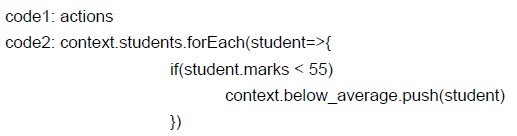
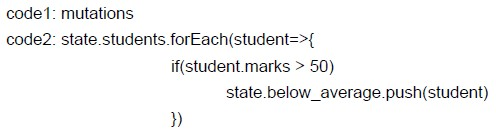
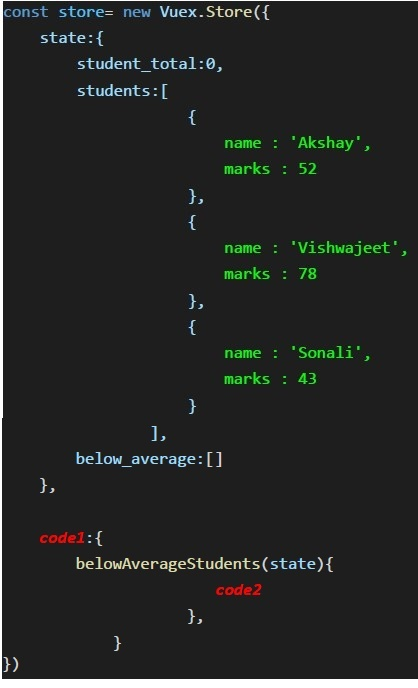 Fill in code1 & code2, which can be used in Vuex Store to update the “below_average” state variable with the objects of those students who have scored more than 50 marks.
 Text of the picture (copyable)
```javascript
const store= new Vuex.Store({
    state:{
        student_total:0,
        students:[
            {
                name : 'Akshay',
                marks : 52
            },
            {
                name : 'Vishwajeet',
                marks : 78
            },
            {
                name : 'Sonali',
                marks : 43
            }
        ],
        below_average:[]
    },

    code1:{
        belowAverageStudents(state){
            code2
        },
    }
})
```
text
```
code1: mutations
code2: students.forEach(student=>{
            if(student.marks > 50)
                below_average.push(student)
        })
```
text
```
code1: actions
code2: state.students.forEach(student=>{
    if(student.mark > 50)

        below_average.toppers.push(student)
})
```
text
```
code1: actions
code2: context.students.forEach(student=>{
    if(student.marks < 55)
        context.below_average.push(student)
})
```
text
```
code1: mutations
code2: state.students.forEach(student=>{
    if(student.marks > 50)
        state.below_average.push(student)
})
```
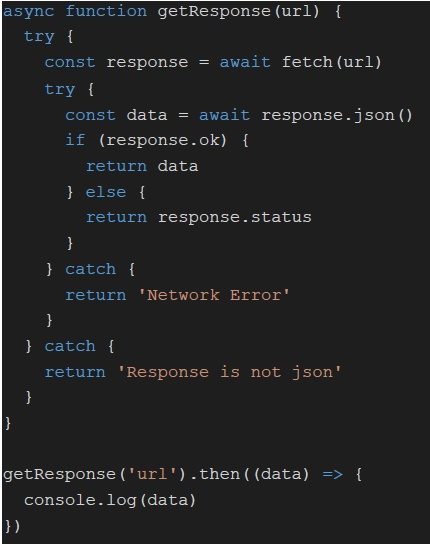 Consider the following JavaScript code. Suppose ‘url’ returns an HTML response for a get request with 200 status code. What will be logged on to console, if the code is executed?
Text of the picture (copyable)
```javascript
async function getResponse(url) {
  try {
    const response = await fetch(url)
    try {
      const data = await response.json()
      if (response.ok) {
        return data
      } else {
        return response.status
      }
    } catch {
      return 'Network Error'
    }
  } catch {
    return 'Response is not json'
  }
}

getResponse('url').then((data) => {
  console.log(data)
})
```- Response is not json
- Network Error
- 200
- None of these
Consider the JavaScript code. Suppose the ‘url’ returns a JSON response with 404 status code. What will be logged on to console? Text of the picture (copyable)
```javascript
async function getResponse(url) {
  try {
    const response = await fetch(url)
    try {
      const data = await response.json()
      if (response.ok) {
        return data
      } else {
        return response.status
      }
    } catch {
      return 'Network Error'
    }
  } catch {
    return 'Response is not json'
  }
}

getResponse('url').then((data) => {
  console.log(data)
})
```- Response is not json
- Network Error
- 404
- None of these
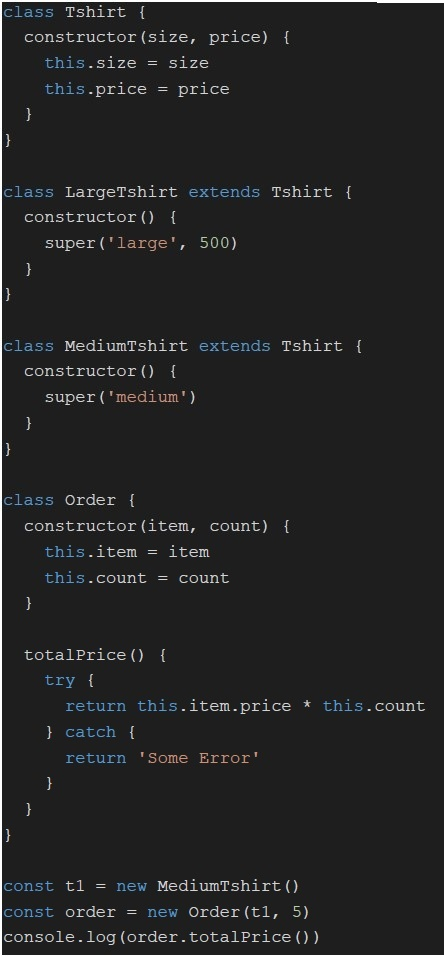 Consider the following JavaScript code. What will be logged on to console, if executed?
Text of the picture (copyable)
```javascript
class Tshirt {
  constructor(size, price) {
    this.size = size
    this.price = price
  }
}

class LargeTshirt extends Tshirt {
  constructor() {
    super('large', 500)
  }
}

class MediumTshirt extends Tshirt {
  constructor() {
    super('medium')
  }
}

class Order {
  constructor(item, count) {
    this.item = item
    this.count = count
  }

  totalPrice() {
    try {
      return this.item.price * this.count
    } catch {
      return 'Some Error'
    }
  }
}

const t1 = new MediumTshirt()
const order = new Order(t1, 5)
console.log(order.totalPrice())
```- NaN
- 500
- 2500
- Some Error

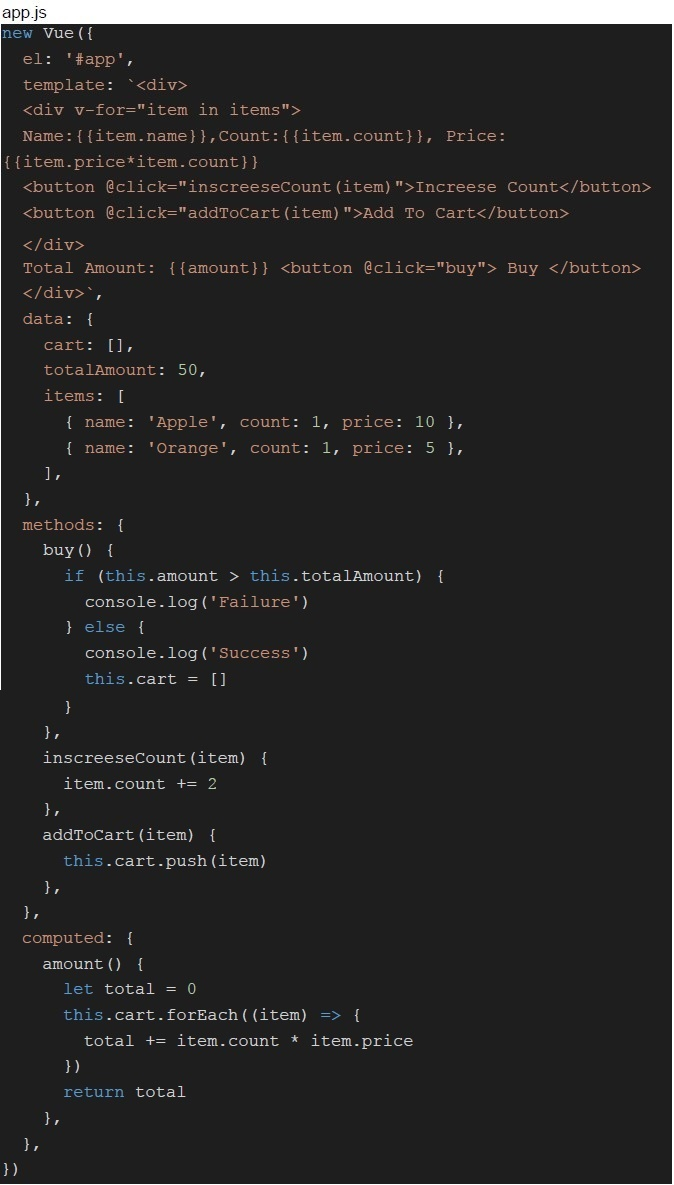

Text of the picture (copyable)
Consider the following Vue application with Javascript "app.js" and markup "index.html"
Suppose the application is running on "http://127.0.0.1:8080/". Suppose the user clicks on
"Increase count" button associated with the item name "Apple" 10 times then clicks on
"Add To Cart" and then clicks on the button "Buy". What will be logged on to console?
app.js
```javascript
new Vue({
  el: '#app',
  template: `
    <div v-for="item in items">
      Name:{{item.name}}, Count:{{item.count}}, Price:
      {{item.price*item.count}}
      <button @click="inscreeseCount(item)">Increase Count</button>
      <button @click="addToCart(item)">Add To Cart</button>
    </div>
    Total Amount: {{amount}} <button @click="buy"> Buy </button>
  `,
  data: {
    cart: [],
    totalAmount: 50,
    items: [
      { name: 'Apple', count: 1, price: 10 },
      { name: 'Orange', count: 1, price: 5 },
    ],
  },
  methods: {
    buy() {
      if (this.amount > this.totalAmount) {
        console.log('Failure')
      } else {
        console.log('Success')
        this.cart = []
      }
    },
    inscreeseCount(item) {
      item.count += 2
    },
    addToCart(item) {
      this.cart.push(item)
    },
  },
  computed: {
    amount() {
      let total = 0
      this.cart.forEach((item) => {
        total += item.count * item.price
      })
      return total
    },
  },
})
```
index.html

```html
<body>
    <div id="app"></div>
</body>
```- Success
- Failure
- NaN
- None of these

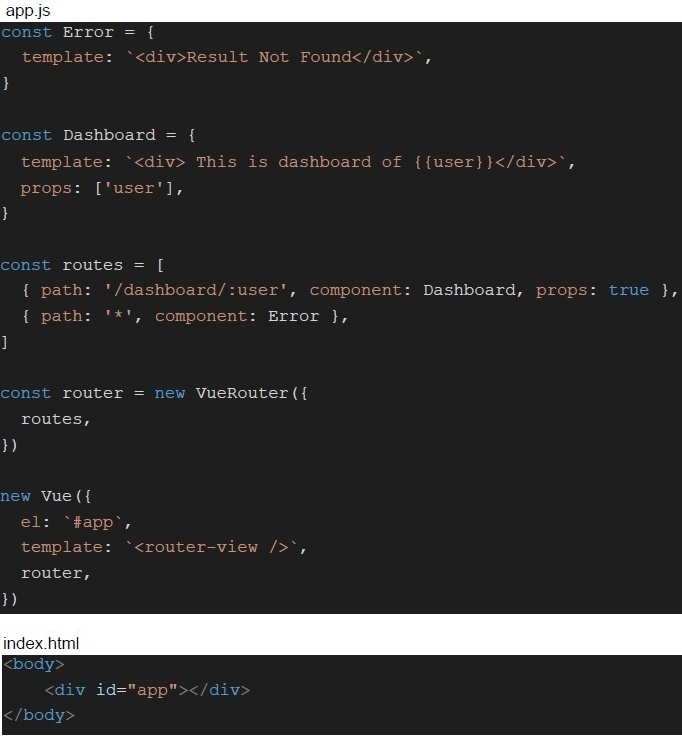
Text of the picture (copyable)
Consider the Vue application mentioned. What will be rendered by the browser for the URL "http://127.0.0.1:8080/#/dashboard/2"?
```javascript
app.js
const Error = {
  template: `<div>Result Not Found</div>`,
}

const Dashboard = {
  template: `<div> This is dashboard of {{user}}</div>`,
  props: ['user'],
}

const routes = [
  { path: '/dashboard/:user', component: Dashboard, props: true },
  { path: '*', component: Error },
]

const router = new VueRouter({
  routes,
})

new Vue({
  el: '#app',
  template: `<router-view />`,
  router,
})

index.html
<body>
  <div id="app"></div>
</body>
```- This is dashboard of User
- This is dashboard of 2
- Dashboard
- Result Not Found

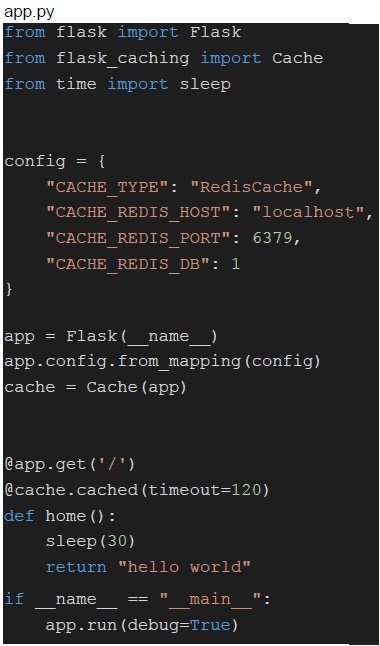
Text of the picture (copyable)
Consider the flask application mentioned. Suppose the application is
running on "http://localhost:5000". If user1 visits the URL "http://localhost:5000" and
after 3 minutes user2 visits the same URL. What will be the approx difference between
the response time for user1 and user2?
```python
app.py
from flask import Flask
from flask_caching import Cache
from time import sleep

config = {
    "CACHE_TYPE": "RedisCache",
    "CACHE_REDIS_HOST": "localhost",
    "CACHE_REDIS_PORT": 6379,
    "CACHE_REDIS_DB": 1
}

app = Flask(__name__)
app.config.from_mapping(config)
cache = Cache(app)

@app.get('/')
@cache.cached(timeout=120)
def home():
    sleep(30)
    return "hello world"

if __name__ == "__main__":
    app.run(debug=True)
```- 0 seconds
- 30 seconds
- 120 seconds
- None of these
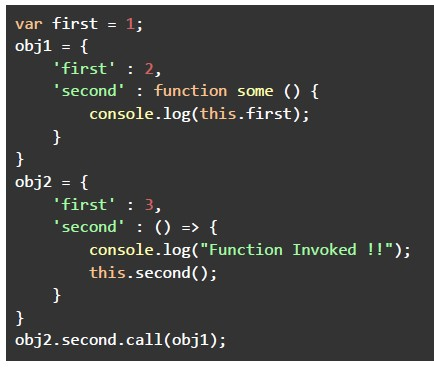 Consider the below javascript program. What will be the output of the above program, if executed?
Text of the picture (copyable)
```javascript
var first = 1;
obj1 = {
    'first' : 2,
    'second' : function some () {
        console.log(this.first);
    }
}
obj2 = {
    'first' : 3,
    'second' : () => {
        console.log("Function Invoked !!");
        this.second();
    }
}
obj2.second.call(obj1);
```- Function Invoked !!2
- Function Invoked !!3
- Function Invoked !!1
- Function Invoked !!Error
- Error
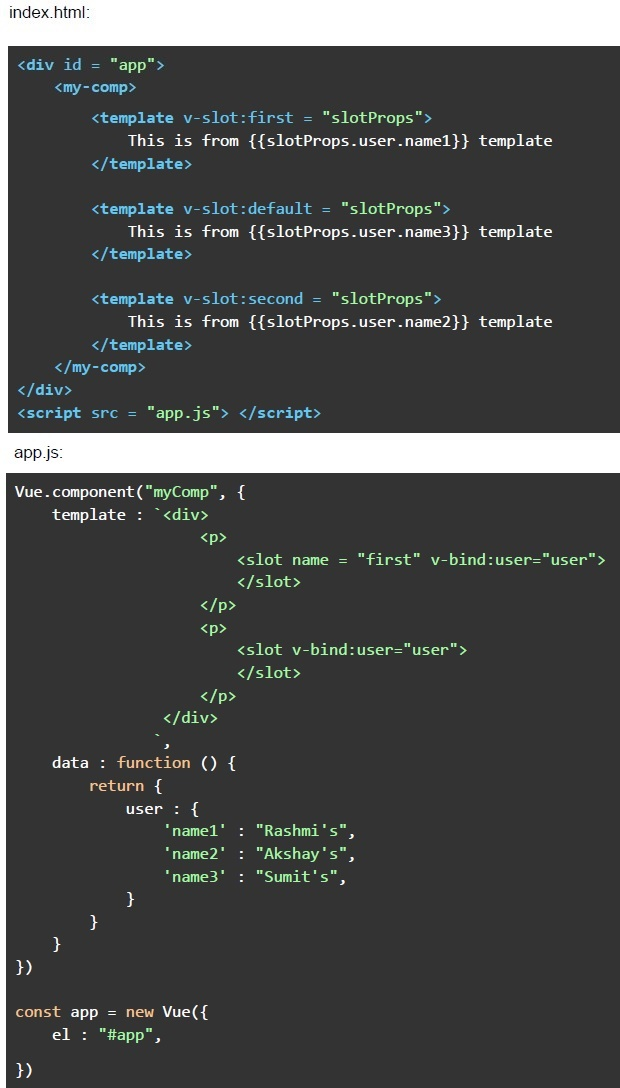 Consider the following Vue application with markup “index.html” and javascript file “app.js”.
 Text of the picture (copyable)
index.html:
```html
<div id = "app">
    <my-comp>
        <template v-slot:first = "slotProps">
            This is from {{slotProps.user.name1}} template
        </template>

        <template v-slot:default = "slotProps">
            This is from {{slotProps.user.name3}} template
        </template>

        <template v-slot:second = "slotProps">
            This is from {{slotProps.user.name2}} template
        </template>
    </my-comp>
</div>
<script src = "app.js"></script>
```

app.js:
```javascript
Vue.component("myComp", {
    template : `<div>
        <p>
            <slot name = "first" v-bind:user="user">
            </slot>
        </p>
        <p>
            <slot v-bind:user="user">
            </slot>
        </p>
    </div>`,

    data : function () {
        return {
            user : {
                'name1' : "Rashmi's",
                'name2' : "Akshay's",
                'name3' : "Sumit's",
            }
        }
    }
})

const app = new Vue({
    el : "#app",

})
```- This is from templateThis is from template
- This is from Rashmi’s templateThis is from Akshay’s templateThis is from Sumit’s template
- This is from Rashmi’s templateThis is from Sumit’s template
- This is from Rashmi’s templateThis is from Sumit’s templateThis is from Akshay’s template
- This is from templateThis is from templateThis is from template
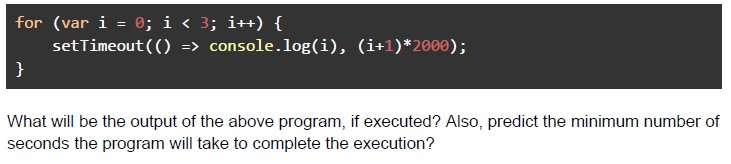 Consider the below javascript program.
 Text of the picture (copyable)
```javascript
for (var i = 0; i < 3; i++) {
    setTimeout(() => console.log(i), (i+1)*2000);
}
```
What will be the output of the above program, if executed? Also, predict the minimum number of seconds the program will take to complete the execution?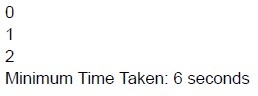
text
```text
0
1
2
Minimum Time Taken: 6 seconds
```
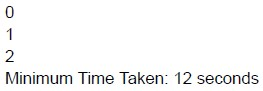
text
0
1
2
Minimum Time Taken: 12 seconds
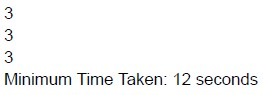
text
3
3
3
Minimum Time Taken: 12 seconds
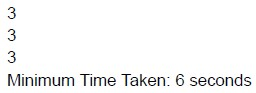
text
3
3
3
Minimum Time Taken: 6 seconds
- Denial Of Service Attack
- CSRF Attack
- Flooding Attack
- None of these
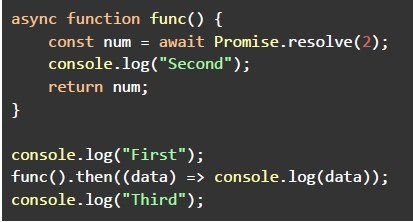 Consider the below javascript program. What will be the output of the above program, if executed?
Text of the picture (copyable)
```javascript
async function func() {
  const num = await Promise.resolve(2);
  console.log("Second");
  return num;
}

console.log("First");
func().then((data) => console.log(data));
console.log("Third");
```- FirstSecondThird2
- FirstError
- FirstThirdSecondundefined
- FirstThirdSecond2
- The output cannot be predicted
- v-for = “value in obj”
- v-for = “(value, name) in obj”
- v-for = “(value, name, index) in obj”
- All of these.
- A celery system may consist of multiple brokers.
- Redis must be used as a message broker for Celery.
- The framework does not support periodic scheduling of tasks.
- All of these.
Answer key
- Q1 (MSQ, 2 marks): A, D
- Q2 (MSQ, 2 marks): A, B, C
- Q3 (MSQ, 2 marks): A, C
- Q4 (MSQ, 2 marks): A, D
- Q5 (MSQ, 2 marks): B, D
- Q6 (MSQ, 2 marks): A, D
- Q7 (MSQ, 3 marks): A, B, C, D
- Q8 (MSQ, 3 marks): B, C
- Q9 (MSQ, 3 marks): A, C
- Q10 (MSQ, 3 marks): B, C
- Q11 (MSQ, 3 marks): A, B, C
- Q12 (MCQ, 4.5 marks): C
- Q13 (MCQ, 4.5 marks): C
- Q14 (MCQ, 4.5 marks): A
- Q15 (MCQ, 4.5 marks): D
- Q16 (MCQ, 4.5 marks): B
- Q17 (MCQ, 4.5 marks): E
- Q18 (MCQ, 4.5 marks): D
- Q19 (MCQ, 4.5 marks): D
- Q20 (MCQ, 3 marks): B
- Q21 (MCQ, 3 marks): C
- Q22 (MCQ, 3 marks): A
- Q23 (MCQ, 3 marks): B
- Q24 (MCQ, 3 marks): B
- Q25 (MCQ, 3 marks): A
- Q26 (MCQ, 3 marks): D
- Q27 (MCQ, 3 marks): C
- Q28 (MCQ, 3 marks): C
- Q29 (MCQ, 3 marks): B
- Q30 (MCQ, 3 marks): D
- Q31 (MCQ, 2 marks): D
- Q32 (MCQ, 2 marks): A
Concepts this paper tests
Auto-generated summary from the source site. Handy as a checklist; the lessons above explain each idea from scratch.
Here’s a structured summary of core topics, concepts, principles, and equations for the "Modern Application Development II" exam, along with Mermaid knowledge graphs to visualize relationships.
1. Core Topics & Concepts
A. Web Protocols & Communication
1. Email Protocols
SMTP (Simple Mail Transfer Protocol)
- Used for sending/mail delivery (not retrieval).
- Port:
25(unencrypted),587(TLS).
IMAP (Internet Message Access Protocol)
- Used for retrieving emails from a server.
- Supports server-side folders, synchronization.
- Port:
143(unencrypted),993(SSL/TLS).
POP3 (Post Office Protocol 3)
- Retrieves emails but deletes them from the server by default.
2. HTTP/HTTPS & APIs
- REST APIs: Stateless, uses HTTP methods (
GET,POST,PUT,DELETE). - WebSockets: Full-duplex communication over a single TCP connection.
Webhooks: Machine-to-machine communication via HTTP callbacks (not WebSockets).
- Example: GitHub webhooks for CI/CD triggers.
3. CORS (Cross-Origin Resource Sharing)
- Same-Origin Policy: Blocks requests to different scheme (HTTP/HTTPS), host (domain), or port.
CORS Headers:
Access-Control-Allow-Origin: Specifies allowed origins.Access-Control-Allow-Methods: Allowed HTTP methods.
- Preflight Request:
OPTIONSrequest sent before actual request for non-simple requests.
4. CSRF (Cross-Site Request Forgery)
- Attack: Tricks users into submitting malicious requests (e.g., deleting an account) via authenticated sessions.
Mitigation:
- CSRF Tokens: Unique tokens per session.
- SameSite Cookies: Restrict cookie sending to same-site requests.
5. XSS (Cross-Site Scripting)
Types:
- Stored XSS: Malicious script stored on the server (e.g., in a database).
- Reflected XSS: Script reflected in response (e.g., via URL parameters).
- DOM-based XSS: Script executes in the browser due to DOM manipulation.
Mitigation:
- Input validation/sanitization.
- Use
Content Security Policy (CSP)headers.
B. JavaScript & Frontend Frameworks
1. JavaScript Core Concepts
- First-Class Functions: Functions treated as variables (can be passed as arguments).
- Higher-Order Functions: Functions that take/return other functions (e.g.,
map,filter). - Closures: Inner functions retain access to outer function variables.
Asynchronous JS:
- Callbacks: Function passed as an argument to be executed later.
- Promises:
.then()/.catch()for async operations. - Async/Await: Syntactic sugar for promises.
- Event Loop: Handles async operations (call stack, callback queue, microtask queue).
2. DOM Manipulation
Methods:
document.getElementById()element.addEventListener()element.innerHTML
- Virtual DOM (Vue/React): Efficient updates by comparing virtual and real DOM.
3. Vue.js
Directives:
v-for: Loop over arrays/objects.<div v-for="(value, key, index) in object"></div>v-model: Two-way data binding.v-bind: Bind attributes (:class,:style).v-on: Event handling (@click).
Components:
- Props: Pass data from parent to child.
- Slots: Distribute content (
<slot>). - Scoped Slots: Pass data from child to parent.
Vuex (State Management):
- State: Single source of truth.
- Mutations: Synchronous state updates.
- Actions: Asynchronous operations (commit mutations).
- Getters: Computed properties for state.
- Vue Router: Client-side routing (
<router-view>). - Reactivity: Automatic UI updates when data changes.
4. AJAX & Real-Time Communication
Polling:
- Short Polling: Client requests server at fixed intervals.
- Long Polling: Server holds request until new data is available.
- Server-Sent Events (SSE): One-way server-to-client updates.
- WebSockets: Full-duplex communication (e.g., chat apps).
C. Backend & Distributed Systems
1. Flask (Python)
Caching:
- Redis: In-memory cache (used with
Flask-Caching). - Cache Headers:
Cache-Control,ETag.
- Redis: In-memory cache (used with
Route Handling:
@app.route('/')
@cache.cached(timeout=120)  # Cache for 120 seconds
def home():
    return "Hello World"
2. Distributed Systems
Point-to-Point Communication:
- Complexity:
O(n²)connections (each node connects to every other node).
- Complexity:
Central Message Broker (e.g., RabbitMQ, Kafka):
- Complexity:
O(n)connections (each node connects to the broker).
- Complexity:
CDN (Content Delivery Network):
- Purpose: Reduce latency by serving content from edge servers.
How it works:
- User requests content → CDN routes to nearest edge server.
- If content is cached, it’s served immediately; else, fetched from origin.
3. Celery (Task Queue)
Components:
- Broker: Message queue (Redis, RabbitMQ).
- Workers: Execute tasks.
- Result Backend: Store task results (optional).
Features:
- Asynchronous task execution.
- Periodic tasks (
Celery Beat).
D. Security
| Attack | Description | Mitigation |
|---|---|---|
| XSS | Inject malicious scripts. | Input sanitization, CSP headers. |
| CSRF | Trick users into submitting requests. | CSRF tokens, SameSite cookies. |
| CORS Misconfig | Overly permissive CORS headers. | Restrict Access-Control-Allow-Origin. |
| SQL Injection | Inject SQL queries. | Use ORM/parameterized queries. |
E. Caching
Types:
- Browser Cache: Stores static assets (HTML, CSS, JS).
- CDN Cache: Caches content at edge locations.
- Server Cache: Redis, Memcached.
- Shared Cache: Caches responses for multiple users (e.g., CDN).
- Cache Invalidation: Strategies to update cached data (TTL, manual purge).
F. Algorithms & Data Structures (JS Context)
Closures &
thisBinding:varvs.let/constin loops (e.g.,setTimeoutwithvarleaksi).
Promise Chaining:
.then()executes after promise resolves..catch()handles rejections.
Event Loop:
- Microtasks (Promises) > Macrotasks (setTimeout, I/O).
2. Key Equations & Code Snippets
A. JavaScript
1. Closure in Loops
for (var i = 0; i < 3; i++) {
  setTimeout(() => console.log(i), 1000); // Output: 3, 3, 3
}Fix: Use let or IIFE.
for (let i = 0; i < 3; i++) {
  setTimeout(() => console.log(i), 1000); // Output: 0, 1, 2
}
2. Promise Execution Order
console.log("First");
Promise.resolve().then(() => console.log("Second"));
console.log("Third");
// Output: First, Third, Second
3. Async/Await
async function func() {
  await Promise.resolve(7);
  console.log("Second");
  return 7;
}
console.log("First");
func().then(data => console.log(data));
console.log("Third");
// Output: First, Third, Second, 7
B. Vue.js
1. Vuex Mutation
mutations: {
  belowAverageStudents(state) {
    state.below_average = state.students.filter(s => s.marks > 50);
  }
}
2. Computed Property
computed: {
  amount() {
    return this.cart.reduce((total, item) => total + item.price * item.count, 0);
  }
}
3. Slots
<!-- Parent -->
<my-comp>
  <template v-slot:default="slotProps">
    {{ slotProps.user.name }}
  </template>
</my-comp>

<!-- Child (my-comp) -->
<div>
  <slot :user="user"></slot>
</div>
C. Flask Caching
from flask_caching import Cache
cache = Cache(app, config={'CACHE_TYPE': 'RedisCache'})

@app.route('/')
@cache.cached(timeout=120)  # Cache for 120 seconds
def home():
    return "Hello World"
D. CORS Headers
Access-Control-Allow-Origin: https://trusted-site.com
Access-Control-Allow-Methods: GET, POST
Access-Control-Allow-Headers: Content-Type
Graph 2: JavaScript & Frontend
Graph 3: Backend & Distributed Systems
Graph 4: Security Attacks & Mitigations
Graph 5: Caching Strategies
4. Exam Tips
JavaScript:
- Understand closures,
thisbinding, and event loop. - Know how
varvs.letbehaves in loops. - Practice promise chaining and async/await.
- Understand closures,
Vue.js:
- Master directives (
v-for,v-model,v-bind). - Understand Vuex (state, mutations, actions, getters).
- Know slots (default, named, scoped).
- Master directives (
Web Protocols:
- Differentiate SMTP (sending) vs. IMAP (retrieving).
- Understand CORS and CSRF mitigations.
Backend:
- Know Flask caching with Redis.
- Understand Celery components (broker, workers).
Security:
- Recognize XSS (injection) vs. CSRF (unauthorized actions).
- Know how to set CSP and CORS headers.
Distributed Systems:
- Point-to-point:
O(n²)connections. - Message broker:
O(n)connections.
- Point-to-point:
Caching:
- Know when to use browser cache vs. CDN cache.
- Understand cache invalidation strategies.
Good luck! 🚀 Review the graphs and key concepts thoroughly.