Home / MAD2 / Week 7 / Real questions
MAD2 week 7 - real exam questions
60 questions pulled from past papers whose wording matches this week's topics, newest first, duplicates removed. Pick your answers, then press Check answers. Figures and answer keys are the originals.
Elapsed 00:00
Consider the following Vuex store:
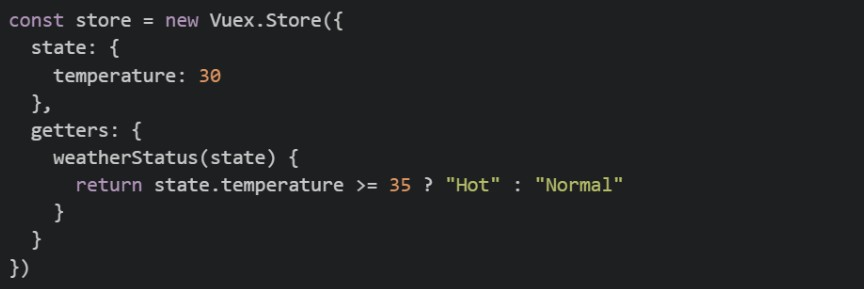 The
The 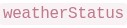 getter is used in a Vue component as shown below:
 Now suppose the Vuex getter is removed, while the temperature state continues to be updated through Vuex mutations. Which of the following implementations correctly recreates in the component so that it automatically reacts whenever the Vuex
 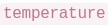 changes?
The getter is used in a Vue component as shown below:
Now suppose the Vuex getter is removed, while the temperature state continues to be updated through Vuex mutations. Which of the following implementations correctly recreates in the component so that it automatically reacts whenever the Vuex changes?Text of the picture (copyable)
```javascript
const store = new Vuex.Store({
  state: {
    temperature: 30
  },
  getters: {
    weatherStatus(state) {
      return state.temperature >= 35 ? "Hot" : "Normal"
    }
  }
})
```
weatherStatus
```javascript
computed: {
  weatherStatus() {
    return this.$store.getters.weatherStatus
  }
}
```
weatherStatus
weatherStatus
temperature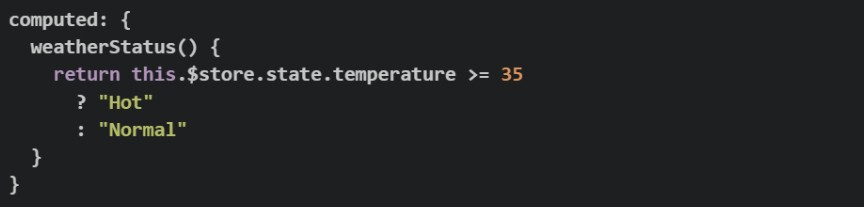
text
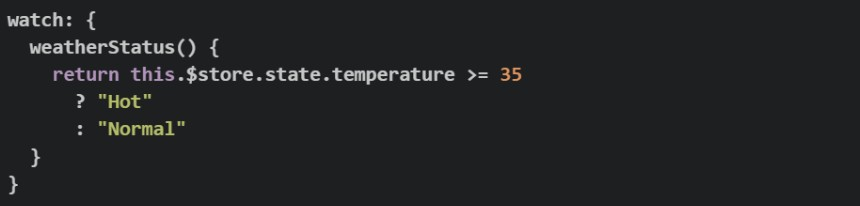
```javascript
computed: {
  weatherStatus() {
    return this.$store.state.temperature >= 35
      ? "Hot"
      : "Normal"
  }
}
```
text
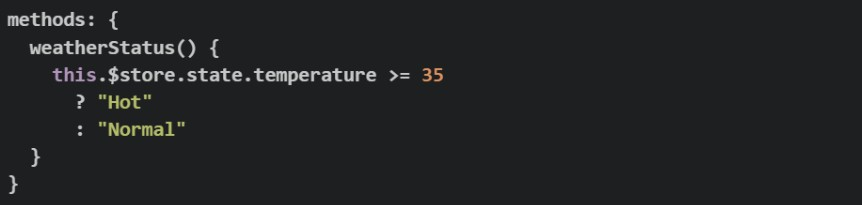
```javascript
watch: {
  weatherStatus() {
    return this.$store.state.temperature >= 35
      ? "Hot"
      : "Normal"
  }
}
```
text
```javascript
methods: {
  weatherStatus() {
    this.$store.state.temperature >= 35
      ? "Hot"
      : "Normal"
  }
}
```
text
```javascript
watch: {
  weatherStatus() {
    return this.$store.state.temperature >= 35
  }
}
```
Comprehension passage for this question
Consider the following JavaScript code:
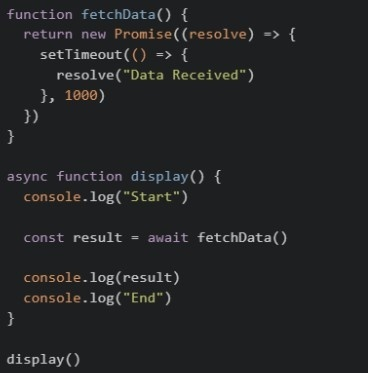 Based on the above data, answer the given subquestions.
Which of the following statements are correct?
 pauses the execution of the
  function until the Promise resolves.
text
await
```
display()
```
 immediately returns the resolved string "Data Received".
text
```
fetchData()
```
 functions cannot return a
  .
.text
async
Promise
- Removing would cause
 to store a object instead of the resolved value.
text
await
result
Promise
Comprehension passage for this question
Consider the following Vue 2 + Vuex application:
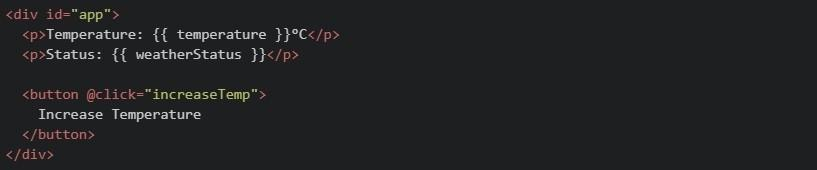 Note: All three image above are of one html. Based on the above data, answer the given subquestions.
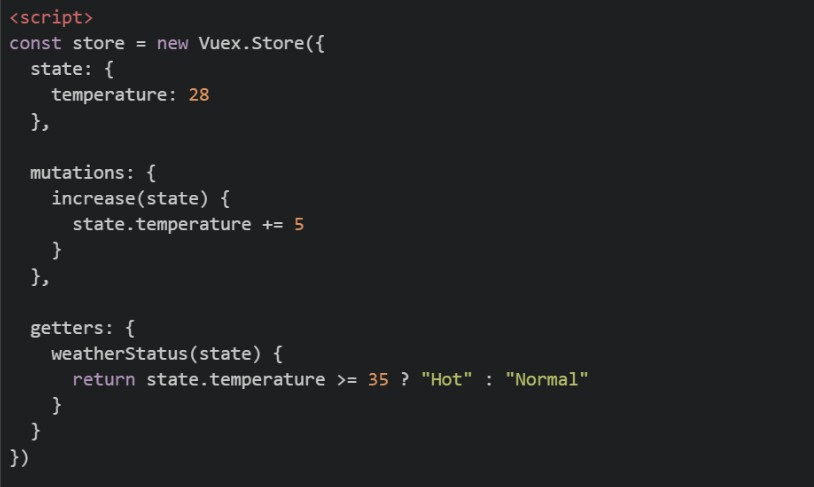
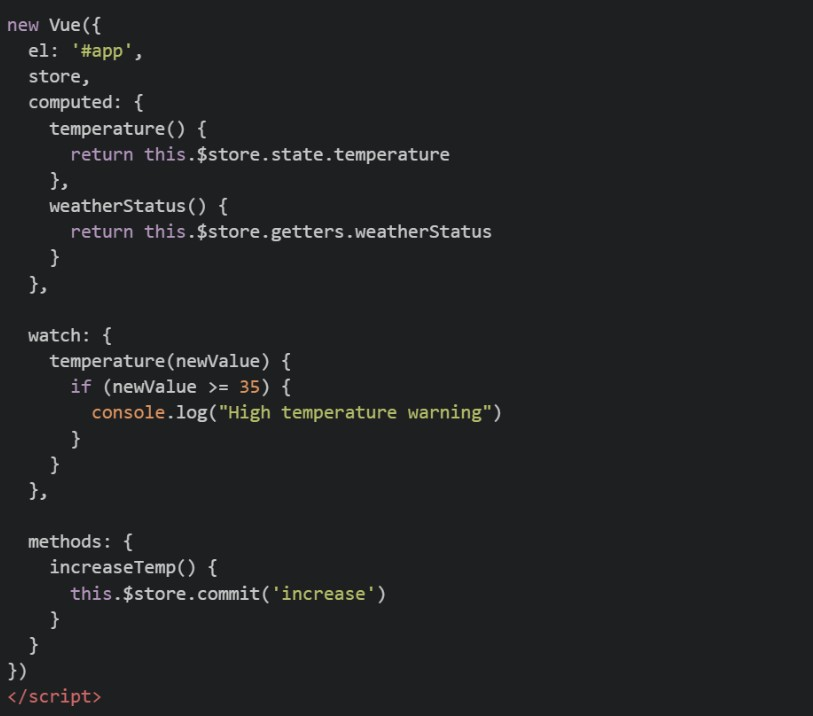
Why does the watcher on temperature execute after clicking the button?
- Because Vue automatically watches all methods
- Because the Vuex mutation changes the state used by the computed property
- Because getters directly trigger watchers
- Because computed properties cannot access Vuex state
Comprehension passage for this question
Read the following Vuex setup carefully and answer the given subquestions: store.js
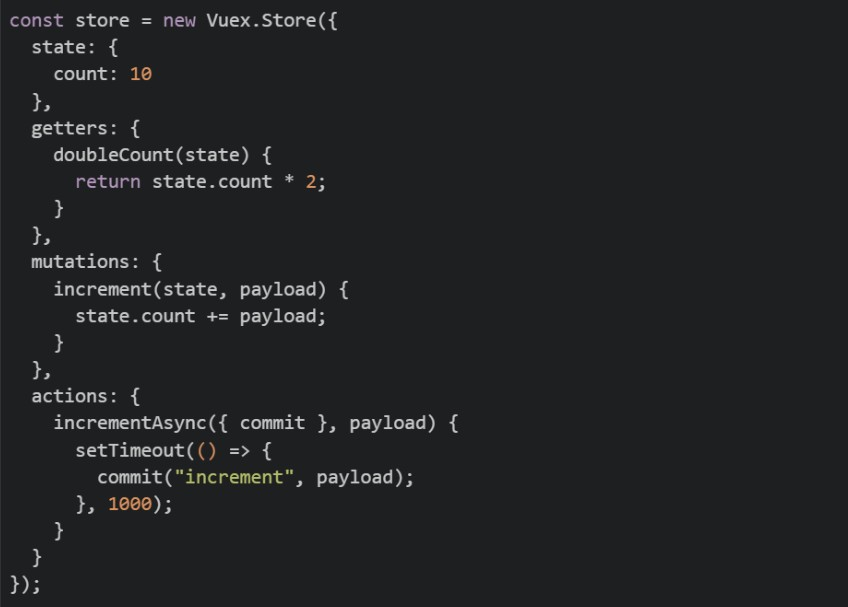 component
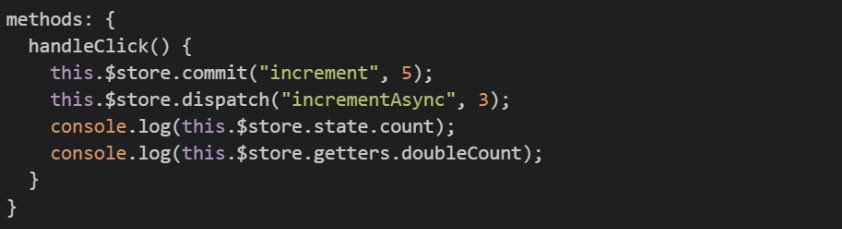
Inside 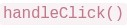 , what values are logged by the two
 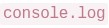 statements, immediately after commit and dispatch are called (before the 1-second timeout completes)?
, what values are logged by the two statements, immediately after commit and dispatch are called (before the 1-second timeout completes)?Text of the picture (copyable)
```
handleClick()
```
```
console.log
```
- 15 and 30
- 18 and 36
- 15 and 20
- 10 and 20
Comprehension passage for this question
Read the following Vuex setup carefully and answer the given subquestions: store.js
component
Which statement correctly describes why  is defined as a
  while
while 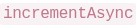 is defined as an
  ?
?
is defined as a while is defined as an ?Text of the picture (copyable)
```
increment
```
mutation
```
incrementAsync
```
action
- Mutations can contain asynchronous code; actions cannot
- Only actions can call commit; mutations cannot
- Mutations must be synchronous; actions can contain async logic and then commit mutations
- There is no real difference; both are interchangeable
Consider the following Vuex store snippets. Which of the following demonstrates the correct usage of a mutation as per its definition?
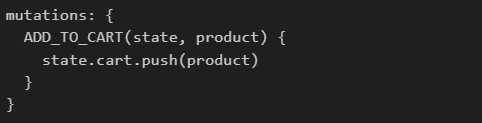
text
```
mutations: {
  ADD_TO_CART(state, product) {
    state.cart.push(product)
  }
}
```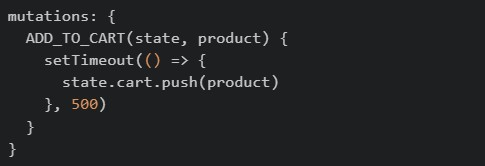
text
```javascript
mutations: {
  ADD_TO_CART(state, product) {
    setTimeout(() => {
      state.cart.push(product)
    }, 500)
  }
}
```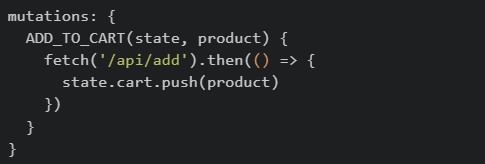
text
```javascript
mutations: {
  ADD_TO_CART(state, product) {
    fetch('/api/add').then(() => {
      state.cart.push(product)
    })
  }
}
```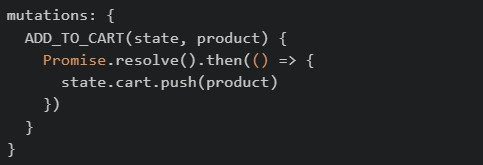
text
```javascript
mutations: {
  ADD_TO_CART(state, product) {
    Promise.resolve().then(() => {
      state.cart.push(product)
    })
  }
}
```
Fill in Code1, inside a mutation handler, which can be used to reduce the price of each of the products in the state by a certain discount. app.js:
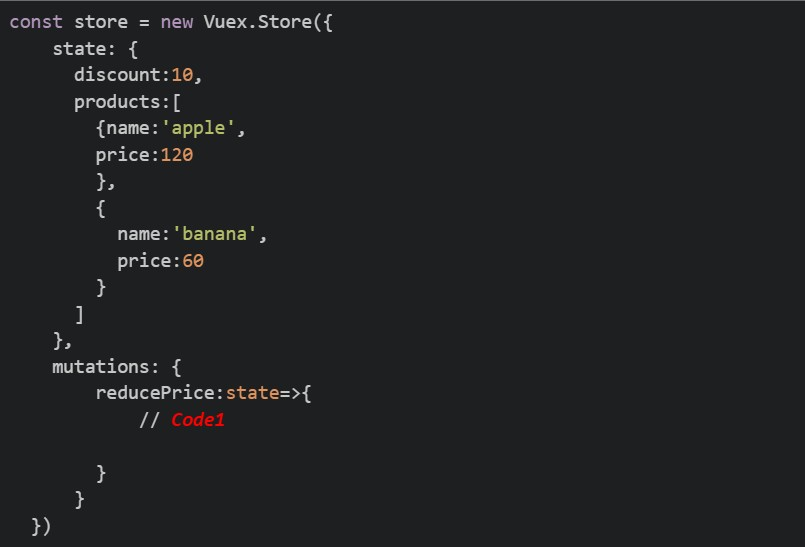
Text of the picture (copyable)
```javascript
const store = new Vuex.Store({
  state: {
    discount: 10,
    products: [
      {name: 'apple',
        price: 120
      },
      {
        name: 'banana',
        price: 60
      }
    ]
  },
  mutations: {
    reducePrice: state=>{
      // Code1
    }
  }
})
```
text
```javascript
this.$store.state.products.forEach(product => { product.price -= (state.discount)/100*product.price; })
```
text
```javascript
state.products.forEach(product => { product.price -= (state.discount)/100*product.price;})
```
text
```javascript
commit.products.forEach(product => { product.price -= (state.discount)/100*product.price;})
```
text
```javascript
dispatch.products.forEach(product => { product.price -= (state.discount)/100*product.price;})
```
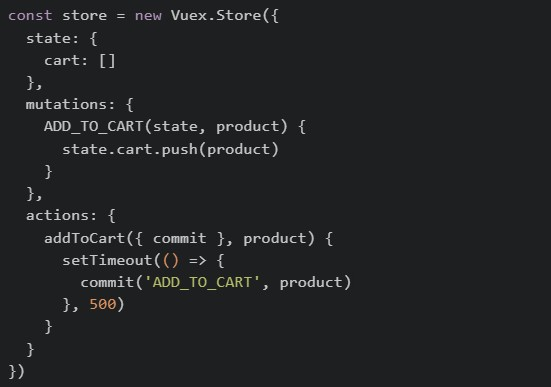
Consider the following Vuex store and component code. store.js
 Component.vue
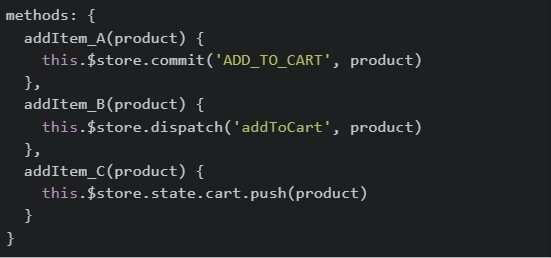 After triggering all three methods (
  ,
,  and
and  ) one by one, which of the following statements is correct?
Component.vue
After triggering all three methods ( , and ) one by one, which of the following statements is correct?Text of the picture (copyable)
```javascript
const store = new Vuex.Store({
  state: {
    cart: []
  },
  mutations: {
    ADD_TO_CART(state, product) {
      state.cart.push(product)
    }
  },
  actions: {
    addToCart({ commit }, product) {
      setTimeout(() => {
        commit('ADD_TO_CART', product)
      }, 500)
    }
  }
})
```
```javascript
methods: {
  addItem_A(product) {
    this.$store.commit('ADD_TO_CART', product)
  },
  addItem_B(product) {
    this.$store.dispatch('addToCart', product)
  },
  addItem_C(product) {
    this.$store.state.cart.push(product)
  }
}
```
addItem_A
addItem_B
addItem_C- All three methods will update the cart and all changes will be visible in Vue DevTools mutation history.
- Only and will appear in Vue DevTools mutation history, but will appear with a delay.
text
addItem_A
addItem_B
addItem_B
- Only will update the cart because mutations cannot be called directly from components.
text
addItem_B
- will throw an error because Vuex prevents direct state modification.
text
addItem_C
Consider the below Vuex store configuration:
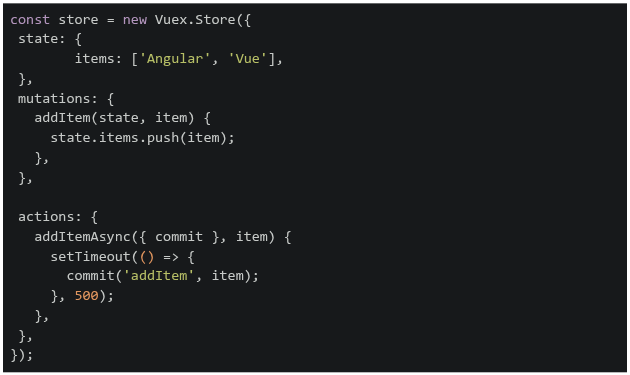 If the addItemAsync action is dispatched with the item 'React', what will be the state of items after 2 seconds?
If the addItemAsync action is dispatched with the item 'React', what will be the state of items after 2 seconds?Text of the picture (copyable)
```javascript
const store = new Vuex.Store({
  state: {
    items: ['Angular', 'Vue'],
  },
  mutations: {
    addItem(state, item) {
      state.items.push(item);
    },
  },

  actions: {
    addItemAsync({ commit }, item) {
      setTimeout(() => {
        commit('addItem', item);
      }, 500);
    },
  },
});
```- ['Angular', 'Vue']
- ['Angular', 'Vue', 'React']
- ['React']
- ['Angular']
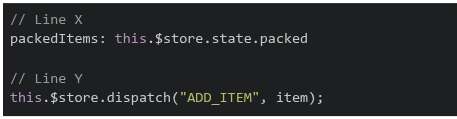
A student is going on a trip and wants to check whether all essential items are packed. The application uses Vue 2 and Vuex to manage the list of packed items.The following Vue application is incomplete. Two lines of code are missing and are marked as Line X and Line Y.
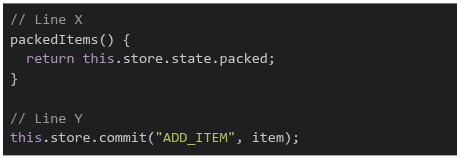
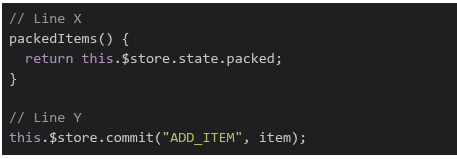
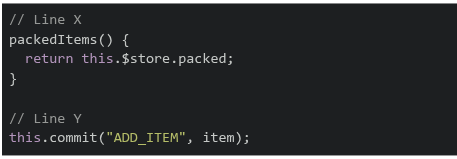
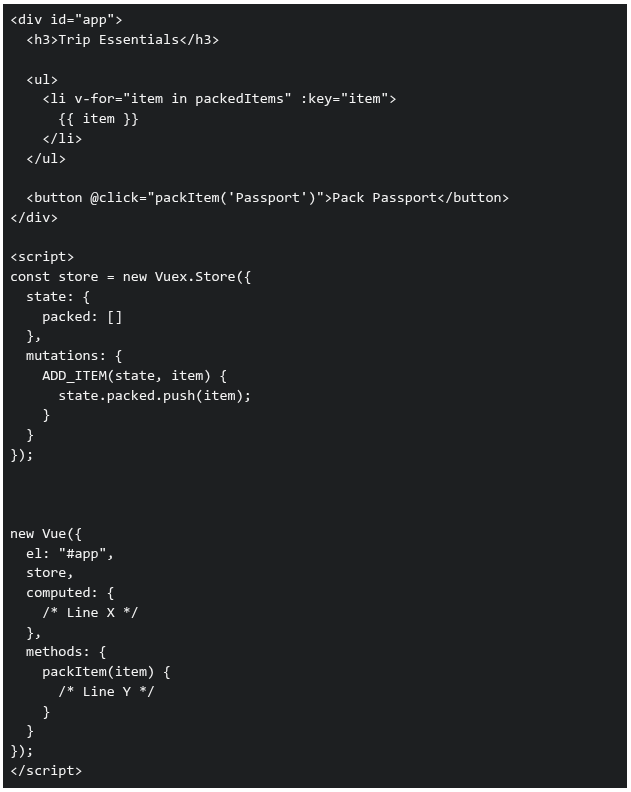 Which of the following options correctly fills Line X and Line Y so that the application works as expected?
Which of the following options correctly fills Line X and Line Y so that the application works as expected?Text of the picture (copyable)
```html
<div id="app">
  <h3>Trip Essentials</h3>

  <ul>
    <li v-for="item in packedItems" :key="item">
      {{ item }}
    </li>
  </ul>

  <button @click="packItem('Passport')">Pack Passport</button>
</div>

<script>
  const store = new Vuex.Store({
    state: {
      packed: []
    },
    mutations: {
      ADD_ITEM(state, item) {
        state.packed.push(item);
      }
    }
  });

  new Vue({
    el: "#app",
    store,
    computed: {
      /* Line X */
    },
    methods: {
      packItem(item) {
        /* Line Y */
      }
    }
  });
</script>
```
text
```javascript
// Line X
packedItems() {
  return this.store.state.packed;
}

// Line Y
this.store.commit("ADD_ITEM", item);
```
text
```javascript
// Line X
packedItems() {
  return this.$store.state.packed;
}

// Line Y
this.$store.commit("ADD_ITEM", item);
```
text
```javascript
// Line X
packedItems() {
  return this.$store.packed;
}

// Line Y
this.commit("ADD_ITEM", item);
```
text
```javascript
// Line X
packedItems: this.$store.state.packed

// Line Y
this.$store.dispatch("ADD_ITEM", item);
```
Which of the following statement(s) is/are true about GraphQL?
- Mutations in GraphQL can be used to change the underlying data store.
- GraphQL services are created by defining types and fields of those types, then providing functions for each field.
- GraphQL can only fetch data from a single source.
- GraphQL allows only GET operations.
Hamza is working on a project using Git and performs the following operations: Creates a new branch and switches to it1. Stages changes for commit2. Commits changes with a message3. Pushes the branch to a remote repository4. Which of the following commands are correctly used for these operations?

text
```
git checkout -b feature-branch
```

text
```
git add .
```

text
```
git commit -m "Initial commit"
```

text
```
git push origin feature-branch
```

text
```
git branch feature-branch && git checkout main
```

text
```
git push feature-branch origin
```
Consider the following Vue.js code.
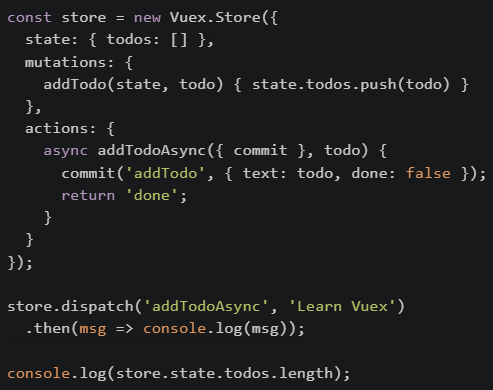 What will be printed on the console first?
What will be printed on the console first?Text of the picture (copyable)
```javascript
const store = new Vuex.Store({
  state: { todos: [] },
  mutations: {
    addTodo(state, todo) { state.todos.push(todo) }
  },
  actions: {
    async addTodoAsync({ commit }, todo) {
      commit('addTodo', { text: todo, done: false });
      return 'done';
    }
  }
});

store.dispatch('addTodoAsync', 'Learn Vuex')
  .then(msg => console.log(msg));

console.log(store.state.todos.length);
```- 0
- done
- 1
- Error
Consider the following Vuex store setup for a user management system:
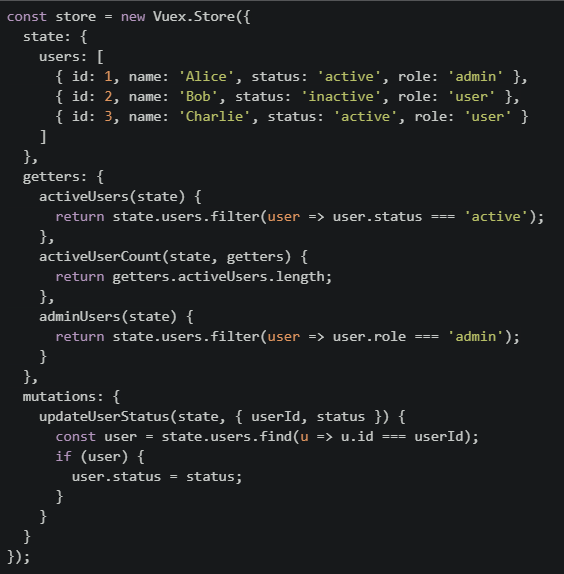 Suppose the following mutation is committed:store.commit("updateUserStatus", { userId: 2, status: "active" });. Which of the following statements is TRUE after this mutation is executed?
Suppose the following mutation is committed:store.commit("updateUserStatus", { userId: 2, status: "active" });. Which of the following statements is TRUE after this mutation is executed?Text of the picture (copyable)
```javascript
const store = new Vuex.Store({
state: {
users: [
{ id: 1, name: 'Alice', status: 'active', role: 'admin' },
{ id: 2, name: 'Bob', status: 'inactive', role: 'user' },
{ id: 3, name: 'Charlie', status: 'active', role: 'user' }
]
},
getters: {
activeUsers(state) {
return state.users.filter(user => user.status === 'active');
},
activeUserCount(state, getters) {
return getters.activeUsers.length;
},
adminUsers(state) {
return state.users.filter(user => user.role === 'admin');
}
},
mutations: {
updateUserStatus(state, { userId, status }) {
const user = state.users.find(u => u.id === userId);
if (user) {
user.status = status;
}
}
}
});
``` will return 3
text
```
activeUserCount
```
 will return two users
text
adminUsers
 will include only Alice and Charlie
text
activeUsers
- The mutation will not affect any getter output
Consider the following HTML:
 And JavaScript code:
 What are the values of id and action respectively?
And JavaScript code:
What are the values of id and action respectively?Text of the picture (copyable)
```html
<button id="btn1" data-action="delete" data-id="42">Delete</button>
```
```javascript
const btn = document.getElementById('btn1');
const id = btn.dataset.id;
const action = btn.getAttribute('data-action');
```- id = 42 (number), action = "delete" (string)
- id = 42 (string), action = "delete" (string)
- id = undefined, action = undefined
- id = 42 (number), action = undefined
Match the following storage mechanisms used in the browser with their correct characteristics.
 Which of the following is the correct matching?
Which of the following is the correct matching?Text of the picture (copyable)
| Storage Type      | Characteristic                                                                    |
| :---------------- | :-------------------------------------------------------------------------------- |
| 1. Session Storage | A. Data automatically encrypts itself without developer intervention.             |
| 2. Token Storage   | B. Data persists only until the browser/tab is closed.                            |
| 3. Cookie Storage  | C. Often used to store authentication tokens securely on the client side.         |
|                   | D. Data persists across sessions, typically stored on the client and sent with every HTTP request. |
- 1 → B, 2 → C, 3 → A
- 1 → B, 2 → A, 3 → C
- 1 → A, 2 → C, 3 → B
- 1 → B, 2 → C, 3 → D
Which of the following is considered a good practice for securing user authentication in a web application?
- Storing passwords as plain text in the database for quick lookup
- Using hashing algorithms like "bcrypt" or "Argon2" to store passwords securely
- Including user passwords directly in SQL queries for verification
- All of these
You are working in VS Code terminal with Git CLI. You are currently on branch appdev2, and you want to merge the latest changes from the main branch into appdev2. Which of the following command sequences correctly performs the merge with a commit?

text
```
git checkout main
git merge appdev2
git commit -m "Merged main into appdev2"
```

text
```
git merge main
git commit -m "Merged main into appdev2"
```

text
```
git checkout appdev2
git pull origin main
git commit -m "Pulled changes from main into appdev2"
```

text
```
git merge appdev2 main
git commit -m "Merged main into appdev2"
```
When comparing Redis with a typical API data store (like a relational database accessed through REST APIs), which of the following statements is true?
- Redis can only store strings, unlike API data stores which can handle complex structures.
- Redis is an in-memory data structure store, often used as a cache or message broker to complement API-based data stores.
- Redis is a relational database and queries data using SQL, just like an API data store.
- Redis is slower than API-based databases because it stores everything in memory.
How can you stop a Cross-Site Scripting (XSS) attack?
- Backend validation of user input and make sure any user-provided text is not executed as code.
- Store authentication token or jwt in cookies.
- Use v-html to show user generated data.
- Send cookies with every request to the backend.
Which of the following is true about Vuex state?
- It should be modified only through mutations
- It should be modified only through actions
- It cannot contain nested objects
- It should be modified by getters
What is the purpose of Redis in a Celery-based system?
- To automatically retry failed tasks
- To execute tasks in parallel
- To return computed results in JSON format
- To store scheduled tasks and serve as a message broker
A developer uses sessionStorage to store authentication tokens in a web application. The user logs in, the token is stored, and then they close the browser window completely. When they reopen the browser later, what will happen? Code:
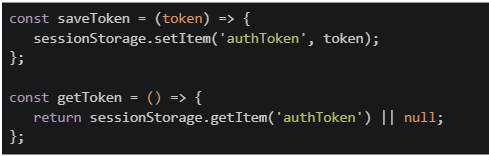
Text of the picture (copyable)
```javascript
const saveToken = (token) => {
  sessionStorage.setItem('authToken', token);
};

const getToken = () => {
  return sessionStorage.getItem('authToken') || null;
};
```- The token will be preserved and available in the new browser session.
- The token will be cleared because sessionStorage is cleared when the browser is closed.
- The token will be partially available but require re-authentication.
- The token will move to localStorage automatically.
In a web application using webhooks and Redis for real-time data synchronization: Scenario: An order management system where: • When an order is created, a webhook is sent to a notification service • Redis stores the current order cache • Multiple concurrent requests update the cache Which statements about this architecture are true?
- Webhooks guarantee that the notification service will process events in the exact order they were triggered
- Redis is suitable for this use case because it's an in-memory data structure store that provides fast access to cached data
- The webhook will automatically retry if the notification service is temporarily unavailable
- Webhooks use HTTP POST requests to communicate events asynchronously
Which of the following are true about mutations and actions in Vuex?
- Actions can be asynchronous
- Only actions can call APIs through fetch call
- Mutations should modify state directly
- Mutations can be asynchronous
Which of the following statement(s) about Web Storage APIs is/are correct?

text
The `localStorage` object stores data with no expiration date, even after the browser is closed.

text
The `sessionStorage` object keeps data only for the duration of the page session.

text
Both `localStorage` and `sessionStorage` can store data in key-value pair format.

text
Data stored in `sessionStorage` is available across different browser tabs.
Text of the picture (copyable)
Consider the following Vue 2 code with Vuex 3 used via CDN, assume the Vuex
store is correctly injected into the Vue instance.
Filename: store.js
```javascript
export default store = new Vuex.Store({
  state: {
    score: 10,
  },
  mutations: {
    increaseScore(state) {
      state.score += 5;
    },
  },
  actions: {
    increaseScoreAsync({ commit }) {
      setTimeout(() => {
        commit("increaseScore");
      }, 1000);
    },
  },
});
```
Filename: score-display.js
```javascript
export default Vue.component('score-display', {
  template: `
    <div>
      <p>Current Score: {{ score }}</p>
      <button @click="boostNow">Boost Now</button>
      <button @click="boostLater">Boost After 1s</button>
    </div>
  `,
  computed: {
    score() {
      // CODE 1
    }
  },
  methods: {
    boostNow() {
      // CODE 2
    },
    boostLater() {
      // CODE 3
    }
  }
});
```
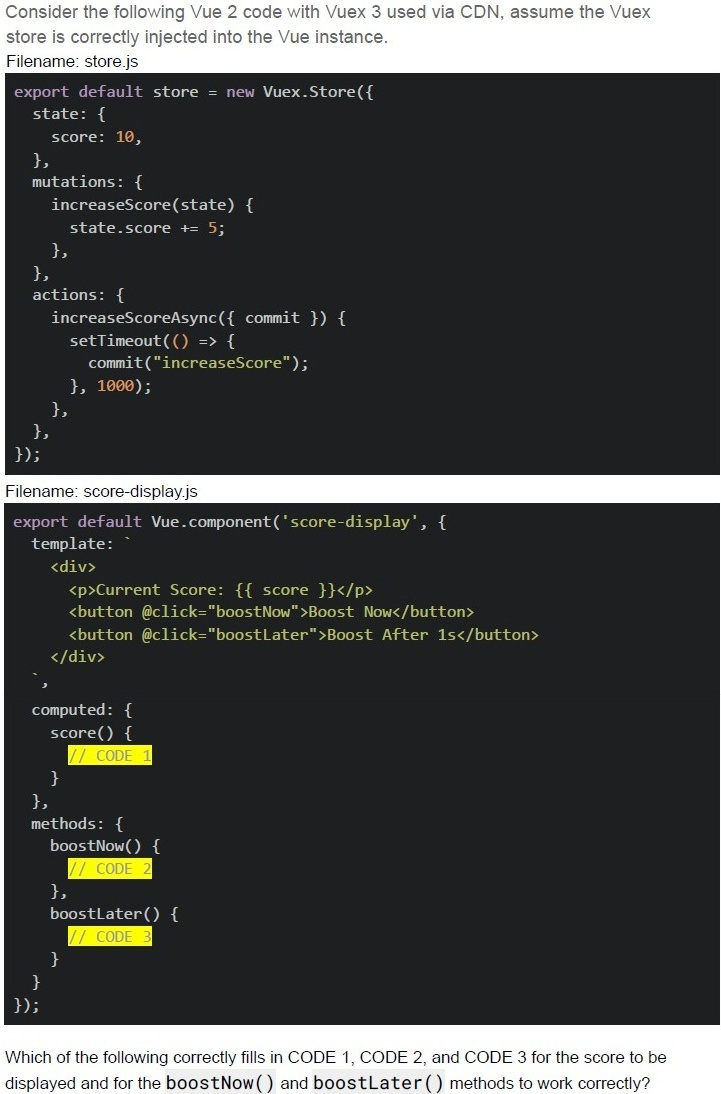
Which of the following correctly fills in CODE 1, CODE 2, and CODE 3 for the score to be
displayed and for the **boostNow()** and **boostLater()** methods to work correctly?
text
CODE 1:
```
return this.$store.state.score;
```

text
CODE 2:
```
this.$store.commit('increaseScore');
```
text
```
CODE 2: this.increaseScore() ;
```

text
CODE 3:
```
this.$store.dispatch('increaseScoreAsync');
```
text
CODE 3:
```
this.$store.increaseScoreAsync();
```
Text of the picture (copyable)
Consider the following Vue application with markup "index.html" and JavaScript file "app.js".

Filename: index.html

```html
<div id="app">
  <data-panel>
    <template #sidebar>
      <span>Navigation Menu</span>
    </template>
    <template #actions>
      <button>Save Changes</button>
      <button>Cancel</button>
    </template>
    <template #default>
      <h3>Main Dashboard</h3>
      <p>Welcome to the control panel</p>
    </template>
    <template #footer>
      <small>Last updated: Today</small>
    </template>
    <div>Extra content outside templates</div>
  </data-panel>
</div>
```

Filename: app.js

```javascript
Vue.component("data-panel", {
  template: `<div class="panel">
    <header>
      <slot name="sidebar"></slot>
    </header>
    <main>
      <slot></slot>
    </main>
    <section>
      <slot name="actions"></slot>
    </section>
    <footer>
      <slot name="summary"></slot>
    </footer>
  </div>`,
});
const app = new Vue({
  el: "#app",
});
```

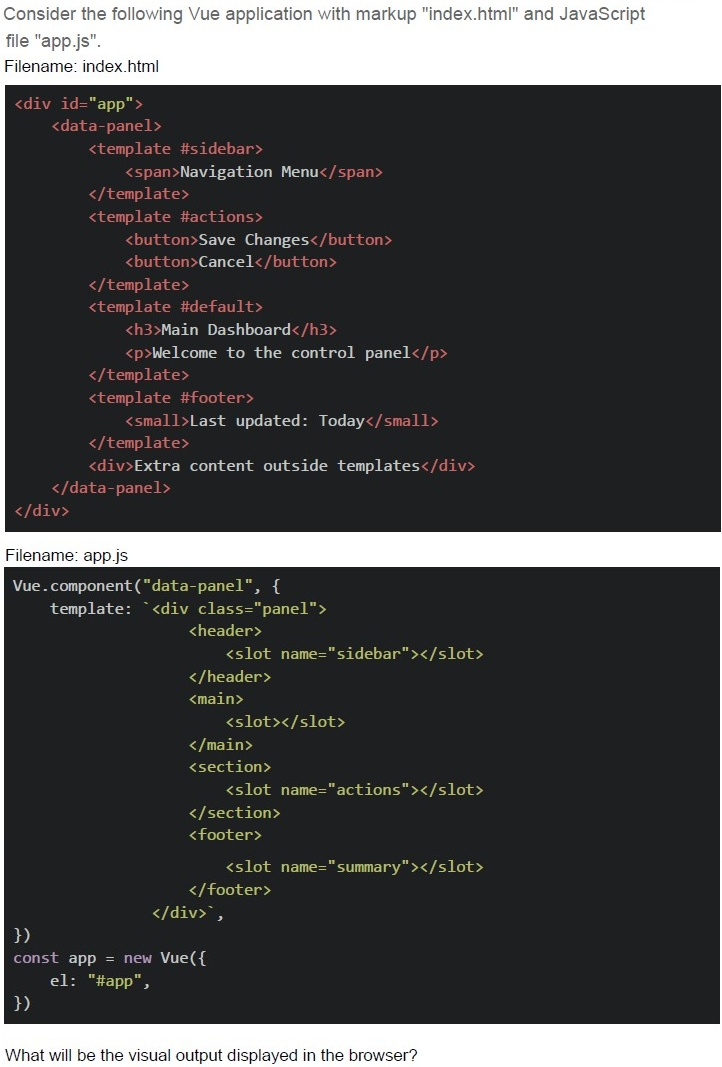
What will be the visual output displayed in the browser?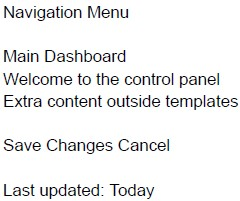
text
Navigation Menu

Main Dashboard
Welcome to the control panel
Extra content outside templates

Save Changes Cancel

Last updated: Today
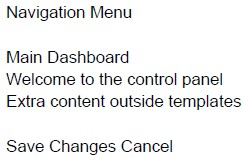
text
Navigation Menu

Main Dashboard
Welcome to the control panel
Extra content outside templates

Save Changes Cancel
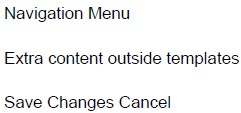
text
Navigation Menu
Extra content outside templates
Save Changes Cancel

text
Navigation Menu

Main Dashboard
Welcome to the control panel

Save Changes Cancel
Last updated: Today
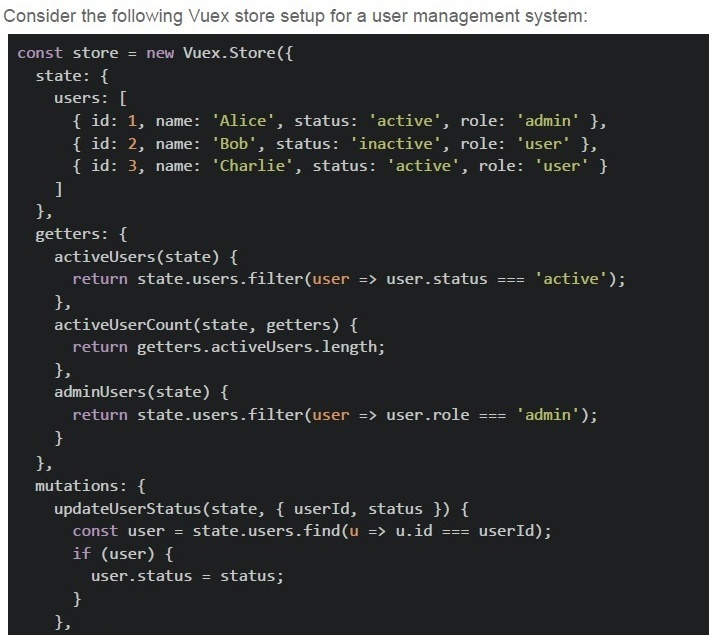
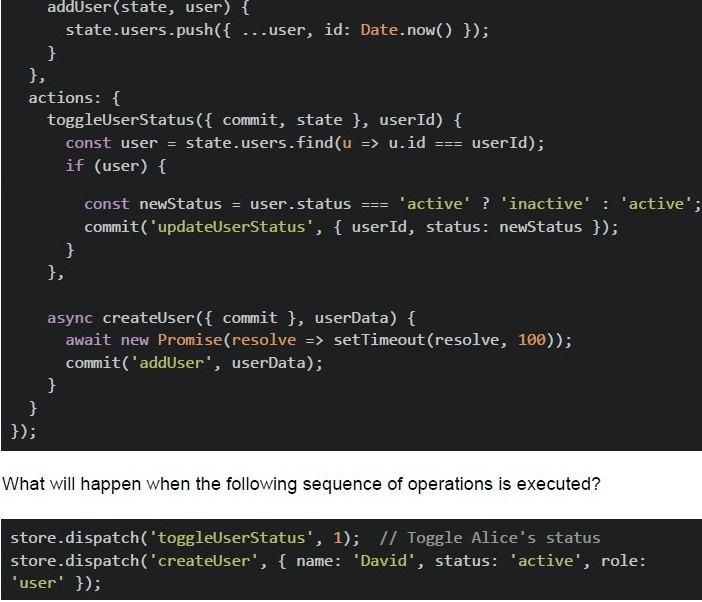
Text of the picture (copyable)
Consider the following Vuex store setup for a user management system:

```javascript
const store = new Vuex.Store({
  state: {
    users: [
      { id: 1, name: 'Alice', status: 'active', role: 'admin' },
      { id: 2, name: 'Bob', status: 'inactive', role: 'user' },
      { id: 3, name: 'Charlie', status: 'active', role: 'user' }
    ]
  },
  getters: {
    activeUsers(state) {
      return state.users.filter(user => user.status === 'active');
    },
    activeUserCount(state, getters) {
      return getters.activeUsers.length;
    },
    adminUsers(state) {
      return state.users.filter(user => user.role === 'admin');
    }
  },
  mutations: {
    updateUserStatus(state, { userId, status }) {
      const user = state.users.find(u => u.id === userId);
      if (user) {
        user.status = status;
      }
    }
  }
});
```
```javascript
addUser(state, user) {
  state.users.push({ ...user, id: Date.now() });
},
actions: {
  toggleUserStatus({ commit, state }, userId) {
    const user = state.users.find(u => u.id === userId);
    if (user) {
      const newStatus = user.status === 'active' ? 'inactive' : 'active';
      commit('updateUserStatus', { userId, status: newStatus });
    }
  },
  async createUser({ commit }, userData) {
    await new Promise(resolve => setTimeout(resolve, 100));
    commit('addUser', userData);
  }
}
```

What will happen when the following sequence of operations is executed?

```javascript
store.dispatch('toggleUserStatus', 1); // Toggle Alice's status
store.dispatch('createUser', { name: 'David', status: 'active', role: 'user' });
```
text
The activeUserCount will become 1 immediately after the first dispatch, and remain 1 after the second dispatch completes.

text
The activeUserCount will become 1 after the first dispatch, and become 2 after the second dispatch completes.

text
The activeUserCount will remain 2 after the first dispatch, and become 3 after the second dispatch completes.

text
The activeUserCount will become 3 immediately after both dispatches, since both operations run synchronously.
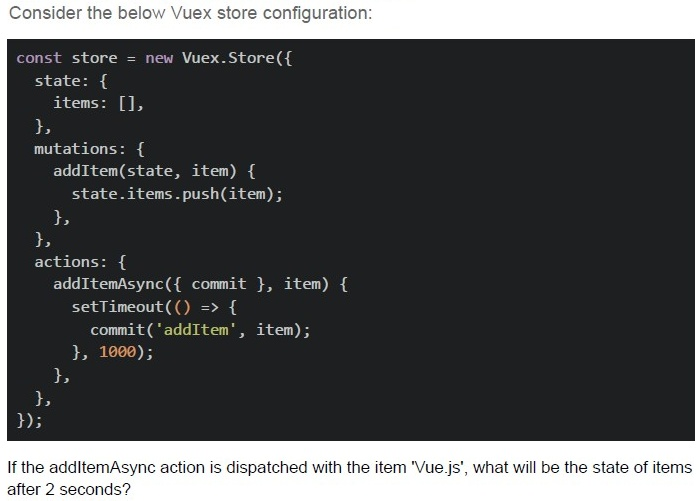
Text of the picture (copyable)
Consider the below Vuex store configuration:

```javascript
const store = new Vuex.Store({
  state: {
    items: [],
  },
  mutations: {
    addItem(state, item) {
      state.items.push(item);
    },
  },
  actions: {
    addItemAsync({ commit }, item) {
      setTimeout(() => {
        commit('addItem', item);
      }, 1000);
    },
  },
});
```

If the addItemAsync action is dispatched with the item 'Vue.js', what will be the state of items after 2 seconds?
text
The image shows a single vertical bar character.

text
```
['Vue.js', 'Vue.js']
```

text
```
['Vue.js']
```

text
[object]
Consider the below Vuex setup.
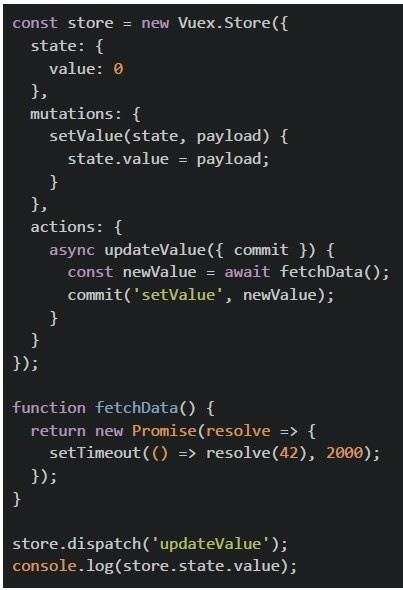 Consider the below Vuex setup.
What is logged to the console immediately after dispatching the action?
Consider the below Vuex setup.
What is logged to the console immediately after dispatching the action?
Consider the below Vuex setup.
What is logged to the console immediately after dispatching the action?Text of the picture (copyable)
```javascript
const store = new Vuex.Store({
  state: {
    value: 0
  },
  mutations: {
    setValue(state, payload) {
      state.value = payload;
    }
  },
  actions: {
    async updateValue({
      commit
    }) {
      const newValue = await fetchData();
      commit('setValue', newValue);
    }
  }
});

function fetchData() {
  return new Promise(resolve => {
    setTimeout(() => resolve(42), 2000);
  });
}

store.dispatch('updateValue');
console.log(store.state.value);
```- 0
- 42
- Undefined behavior
- Error: Action did not resolve
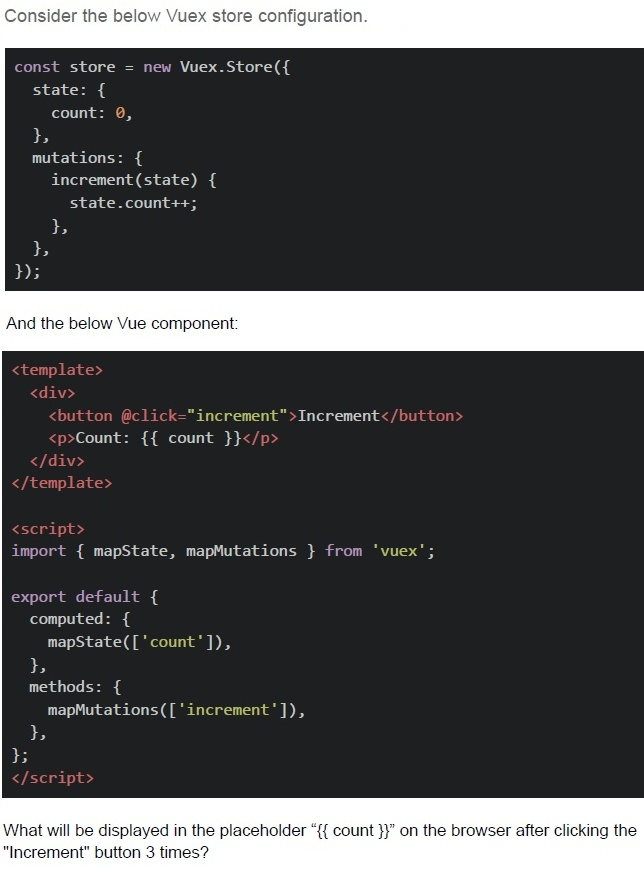
Text of the picture (copyable)
Consider the below Vuex store configuration.

```javascript
const store = new Vuex.Store({
  state: {
    count: 0,
  },
  mutations: {
    increment(state) {
      state.count++;
    },
  },
});
```

And the below Vue component:

```html
<template>
  <div>
    <button @click="increment">Increment</button>
    <p>Count: {{ count }}</p>
  </div>
</template>

<script>
import { mapState, mapMutations } from 'vuex';

export default {
  computed: {
    ...mapState(['count']),
  },
  methods: {
    ...mapMutations(['increment']),
  },
};
</script>
```

What will be displayed in the placeholder "{{ count }}" on the browser after clicking the "Increment" button 3 times?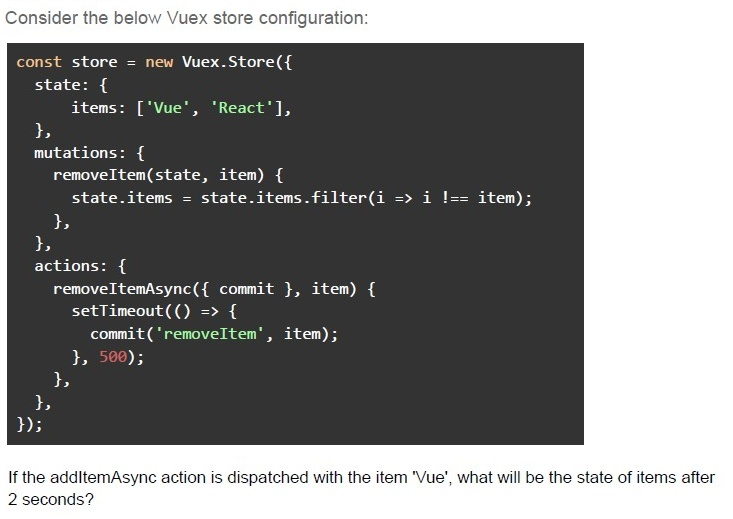
Text of the picture (copyable)
Consider the below Vuex store configuration:

```javascript
const store = new Vuex.Store({
  state: {
    items: ['Vue', 'React'],
  },
  mutations: {
    removeItem(state, item) {
      state.items = state.items.filter(i => i !== item);
    },
  },
  actions: {
    removeItemAsync({ commit }, item) {
      setTimeout(() => {
        commit('removeItem', item);
      }, 500);
    },
  },
});
```

If the addItemAsync action is dispatched with the item 'Vue', what will be the state of items after 2 seconds?- []
- [ 'Vu', 'React' ]
- [ 'React' ]
- [ object ]
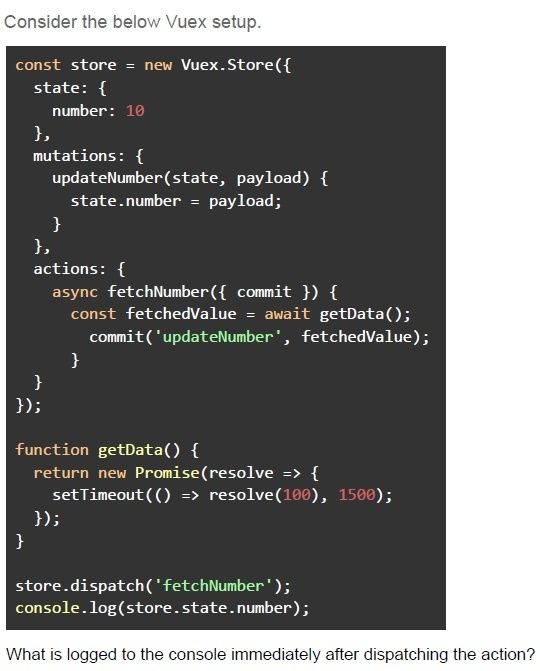
Text of the picture (copyable)
Consider the below Vuex setup.

```javascript
const store = new Vuex.Store({
  state: {
    number: 10
  },
  mutations: {
    updateNumber(state, payload) {
      state.number = payload;
    }
  },
  actions: {
    async fetchNumber({ commit }) {
      const fetchedValue = await getData();
      commit('updateNumber', fetchedValue);
    }
  }
});

function getData() {
  return new Promise(resolve => {
    setTimeout(() => resolve(100), 1500);
  });
}

store.dispatch('fetchNumber');
console.log(store.state.number);
```

What is logged to the console immediately after dispatching the action?- 0
- 10
- 100
- Undefined behavior
- Error: Action did not resolve
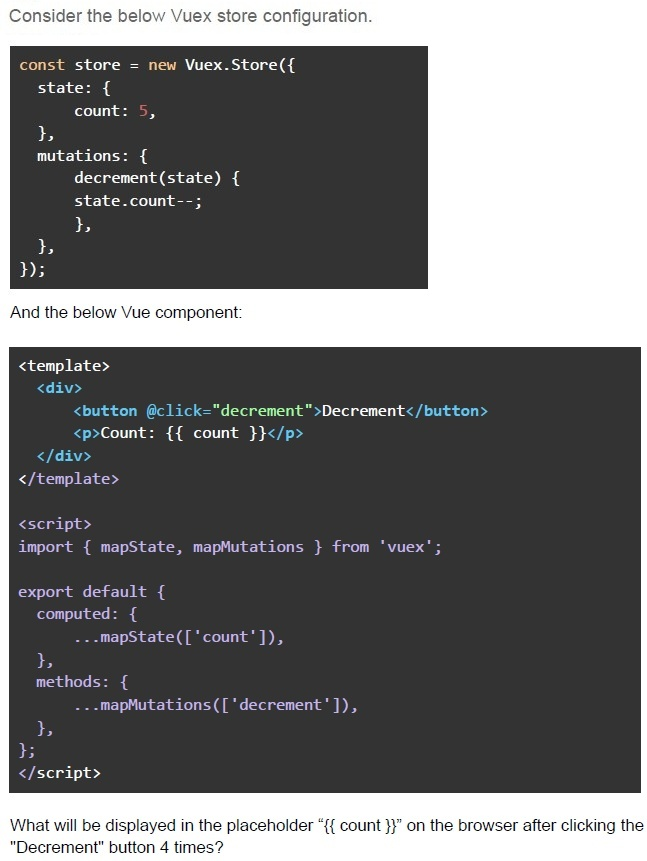
Text of the picture (copyable)
Consider the below Vuex store configuration.

```javascript
const store = new Vuex.Store({
  state: {
    count: 5,
  },
  mutations: {
    decrement(state) {
      state.count--;
    },
  },
});
```

And the below Vue component:

```html
<template>
  <div>
    <button @click="decrement">Decrement</button>
    <p>Count: {{ count }}</p>
  </div>
</template>

<script>
  import { mapState, mapMutations } from 'vuex';

  export default {
    computed: {
      ...mapState(['count']),
    },
    methods: {
      ...mapMutations(['decrement']),
    },
  };
</script>
```

What will be displayed in the placeholder "{{ count }}" on the browser after clicking the "Decrement" button 4 times?
Text of the picture (copyable)
What is the correct way to implement two-way data binding in a custom component
in Vue.js 2?
- Use v-bind directly with a prop
- Create a computed property with getter and setter
- Use v-model with corresponding prop and emit
- Modify the prop value directly in the child component

Text of the picture (copyable)
What distinguishes a Progressive Web App (PWA) from a traditional web application?
- PWAs must be downloaded from an app store
- PWAs only work on mobile devices
- PWAs can work offline and be installed on the home screen
- PWAs require native mobile code
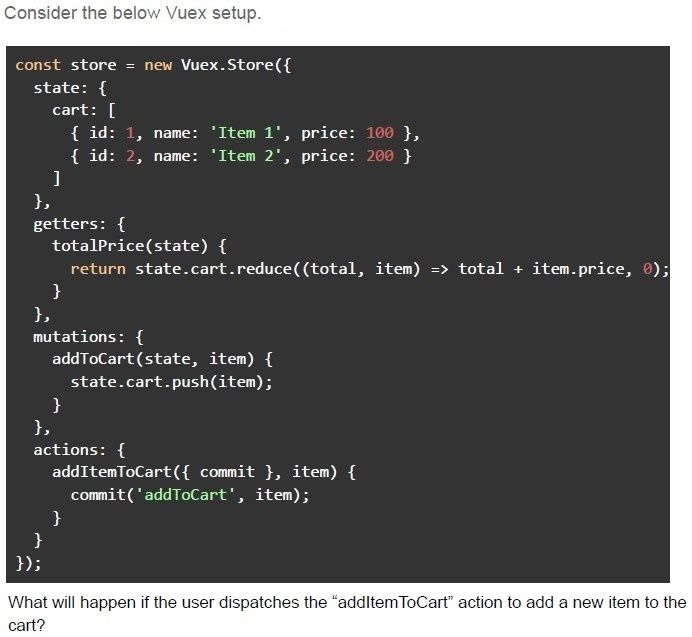
Text of the picture (copyable)
Consider the below Vuex setup.

```javascript
const store = new Vuex.Store({
  state: {
    cart: [
      { id: 1, name: 'Item 1', price: 100 },
      { id: 2, name: 'Item 2', price: 200 }
    ]
  },
  getters: {
    totalPrice(state) {
      return state.cart.reduce((total, item) => total + item.price, 0);
    }
  },
  mutations: {
    addToCart(state, item) {
      state.cart.push(item);
    }
  },
  actions: {
    addItemToCart({ commit }, item) {
      commit('addToCart', item);
    }
  }
});
```

What will happen if the user dispatches the "addItemToCart" action to add a new item to the cart?- The total price will remain the same until the page is refreshed.
- The total price will not reflect the new item because the getter is not reactive.
- The total price will be updated immediately in the Vuex store.
- A mutation error will occur because the cart array is not updated.
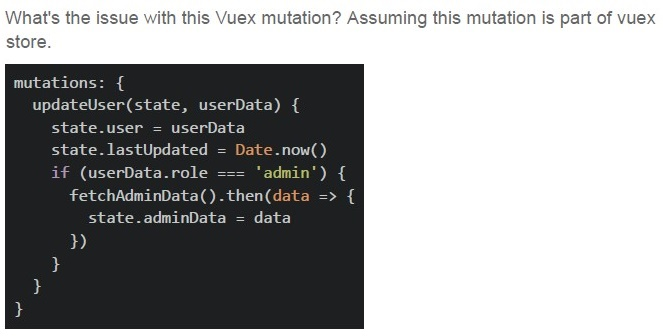
Text of the picture (copyable)
What's the issue with this Vuex mutation? Assuming this mutation is part of vuex store.

```javascript
mutations: {
  updateUser(state, userData) {
    state.user = userData
    state.lastUpdated = Date.now()
    if (userData.role === 'admin') {
      fetchAdminData().then(data => {
        state.adminData = data
      })
    }
  }
}
```- Multiple state changes in one mutation
- Async operation in mutation
- Direct state mutation
- Both Multiple state changes in one mutation and Async operation in mutation
Which of the following statements is FALSE?
- Cache-Control: no-store prevents caching
- ETag helps validate cache freshness
- Data stored in sessionStorage remains available even after the browser isclosed and reopened.
- localStorage has larger storage limit than cookies
Text of the picture (copyable)
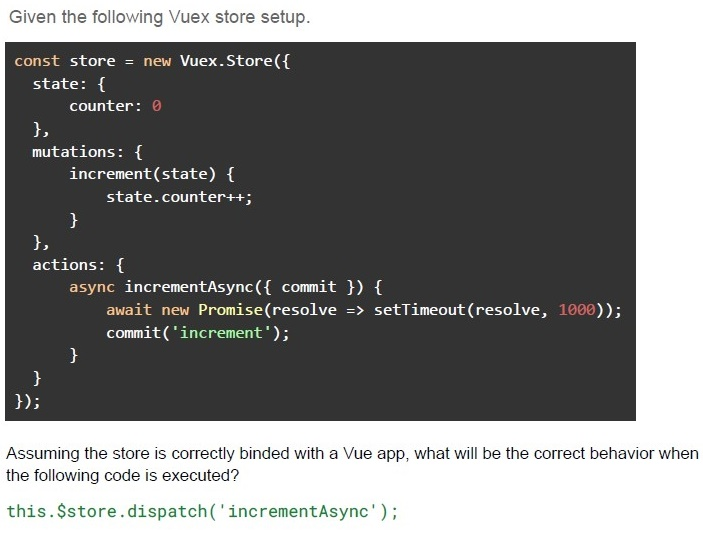
Given the following Vuex store setup.

```javascript
const store = new Vuex.Store({
  state: {
    counter: 0
  },
  mutations: {
    increment(state) {
      state.counter++;
    }
  },
  actions: {
    async incrementAsync({
      commit
    }) {
      await new Promise(resolve => setTimeout(resolve, 1000));
      commit('increment');
    }
  }
});
```

Assuming the store is correctly binded with a Vue app, what will be the correct behavior when the following code is executed?

`this.$store.dispatch('incrementAsync');`- The increment mutation will be called immediately after the dispatch.
- The state will be updated after the asynchronous operation completes.
- The incrementAsync action will be executed synchronously, and increment willbe committed before the promise resolves.
- The action will be skipped since mutations cannot be called inside actions.
Text of the picture (copyable)
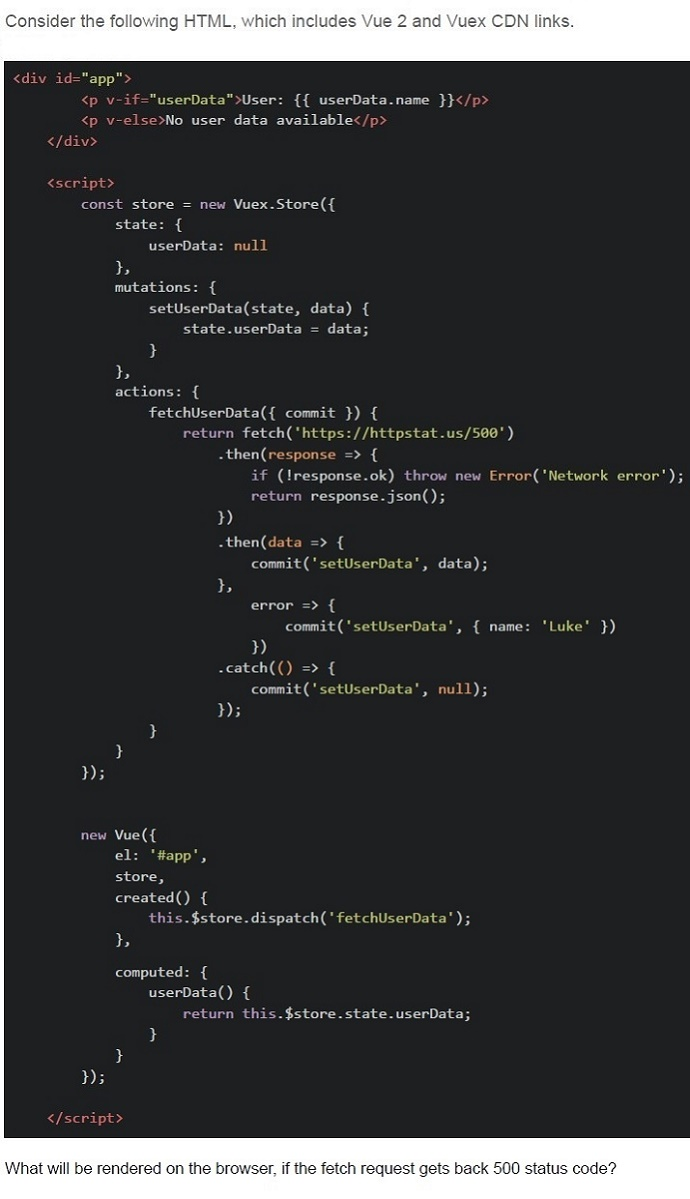
Consider the following HTML, which includes Vue 2 and Vuex CDN links.

```html
<div id="app">
  <p v-if="userData">User: {{ userData.name }}</p>
  <p v-else>No user data available</p>
</div>

<script>
  const store = new Vuex.Store({
    state: {
      userData: null
    },
    mutations: {
      setUserData(state, data) {
        state.userData = data;
      }
    },
    actions: {
      fetchUserData({ commit }) {
        return fetch('https://httpstat.us/500')
          .then(response => {
            if (!response.ok) throw new Error('Network error');
            return response.json();
          })
          .then(data => {
            commit('setUserData', data);
          },
          error => {
            commit('setUserData', { name: 'Luke' })
          })
          .catch(() => {
            commit('setUserData', null);
          });
      }
    }
  });

  new Vue({
    el: '#app',
    store,
    created() {
      this.$store.dispatch('fetchUserData');
    },
    computed: {
      userData() {
        return this.$store.state.userData;
      }
    }
  });
</script>
```

What will be rendered on the browser, if the fetch request gets back 500 status code?- The userData in the store is set to the data from the API.
- User: null
- The error will be logged, Nothing will be displayed
- User: Luke
Text of the picture (copyable)
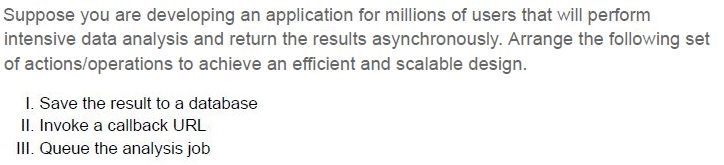
Suppose you are developing an application for millions of users that will perform intensive data analysis and return the results asynchronously. Arrange the following set of actions/operations to achieve an efficient and scalable design.

I. Save the result to a database
II. Invoke a callback URL
III. Queue the analysis job
- II, III, I
- III, I, II
- III, II, I
- I, II, III
Which of the following statement(s) is/are correct regarding the behavior of local storage in Vue.js applications?
- The local storage data persists even after the browser is closed and reopened.
- The local storage data is automatically cleared every session.
- The local storage can only store strings, and storing objects requires manualserialization and de-serialization.
- Vue's reactivity system automatically updates the local storage when bound toa Vue data property.
In Vuex, what is the purpose of mutations?
- To commit asynchronous operations
- To directly mutate the state
- To get the state
- To define computed properties
Text of the picture (copyable)
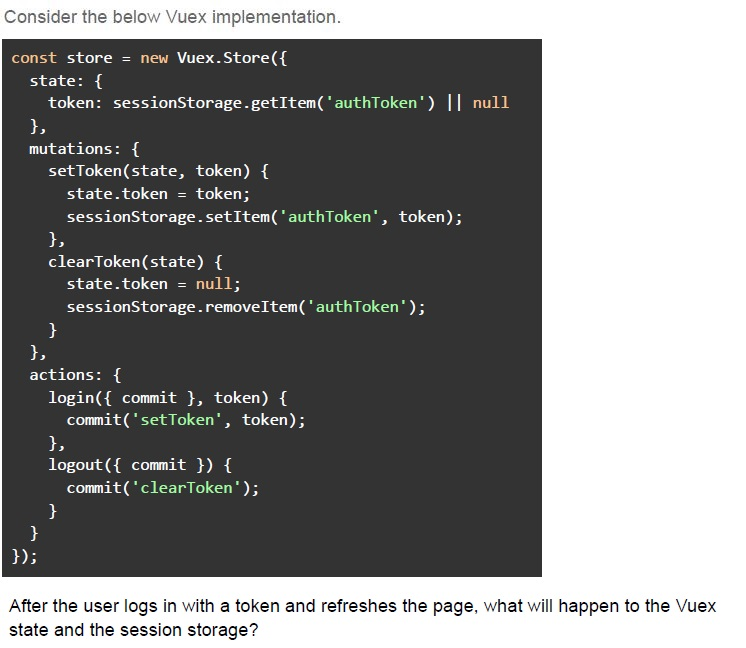
Consider the below Vuex implementation.

```javascript
const store = new Vuex.Store({
  state: {
    token: sessionStorage.getItem('authToken') || null
  },
  mutations: {
    setToken(state, token) {
      state.token = token;
      sessionStorage.setItem('authToken', token);
    },
    clearToken(state) {
      state.token = null;
      sessionStorage.removeItem('authToken');
    }
  },
  actions: {
    login({ commit }, token) {
      commit('setToken', token);
    },
    logout({ commit }) {
      commit('clearToken');
    }
  }
});
```

After the user logs in with a token and refreshes the page, what will happen to the Vuex state and the session storage?- The session storage will reset, but the Vuex state will still contain the“authToken”.
- Both the Vuex state and the sessionStorage will retain the token after the pagerefresh.
- The Vuex state will load the token from sessionStorage after the page refresh.
- The token will be lost from both the Vuex state and sessionStorage after thepage refresh.
Which of the following is/are the use cases of watchers in Vue.js?
- To watch a reactive property and perform actions when it changes.
- To cache values based on reactive dependencies.
- To perform side effects when a specific data property changes.
- To create reactive data within the component.
What of the following is the primary objective of a CSRF token?
- To encrypt the user's session
- To validate that the request comes from the authenticated user
- To store the user's password securely
- To compress the HTTP request
What is the correct sequence of steps to update the state in Vuex when handling an asynchronous operation?
- State → Dispatch an action → Commit a mutation → State change
- Dispatch an action → Commit a mutation → State change
- Commit a mutation → Dispatch an action → State change
- State change → Commit a mutation → Dispatch an action
Which of the following statements about Redis is true?
- Redis is a relational database that uses SQL for querying data.
- Redis is an in-memory data structure store, commonly used as a database,cache, and message broker.
- Redis can only store string data types and does not support complex datastructures like lists or sets.
- Redis cannot handle numerous operations per second.
Which of the following statement(s) is/are true regarding long and short polling?
- A webhook is the same as short polling.
- The short polling can be used to know the state of an asynchronous task, andtrigger an action if the task gets completed.
- The long polling cannot be achieved using HTTP protocol.
- Long Polling can be used to achieve real time communication.
In a Vue CLI project with Vuex, you have the following configuration:
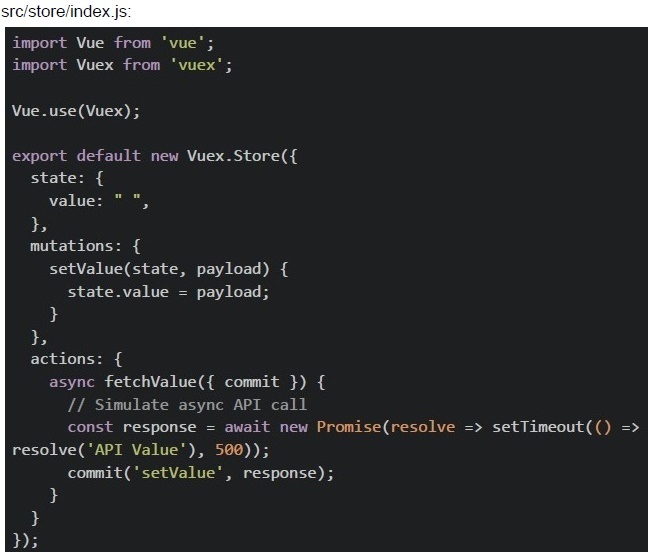 In a Vue CLI project with Vuex, you have the following configuration:
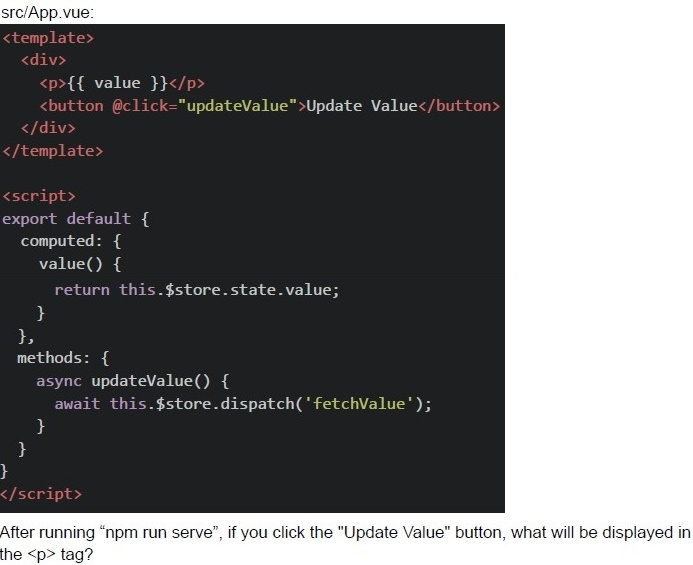 In a Vue CLI project with Vuex, you have the following configuration:
In a Vue CLI project with Vuex, you have the following configuration:
In a Vue CLI project with Vuex, you have the following configuration: Text of the picture (copyable)
src/store/index.js:
```javascript
import Vue from 'vue';
import Vuex from 'vuex';

Vue.use(Vuex);

export default new Vuex.Store({
  state: {
    value: "",
  },
  mutations: {
    setValue(state, payload) {
      state.value = payload;
    }
  },
  actions: {
    async fetchValue({ commit }) {
      // Simulate async API call
      const response = await new Promise(resolve => setTimeout(() =>
        resolve('API Value'), 500));
      commit('setValue', response);
    }
  }
});
```
src/App.vue:
```html
<template>
  <div>
    <p>{{ value }}</p>
    <button @click="updateValue">Update Value</button>
  </div>
</template>

<script>
export default {
  computed: {
    value() {
      return this.$store.state.value;
    },
  },
  methods: {
    async updateValue() {
      await this.$store.dispatch('fetchValue');
    },
  },
};
</script>
```
After running "npm run serve", if you click the "Update Value" button, what will be displayed in the `<p>` tag?
text
API Value

text
"" ""

text
undefined

text
null
Text of the picture (copyable)
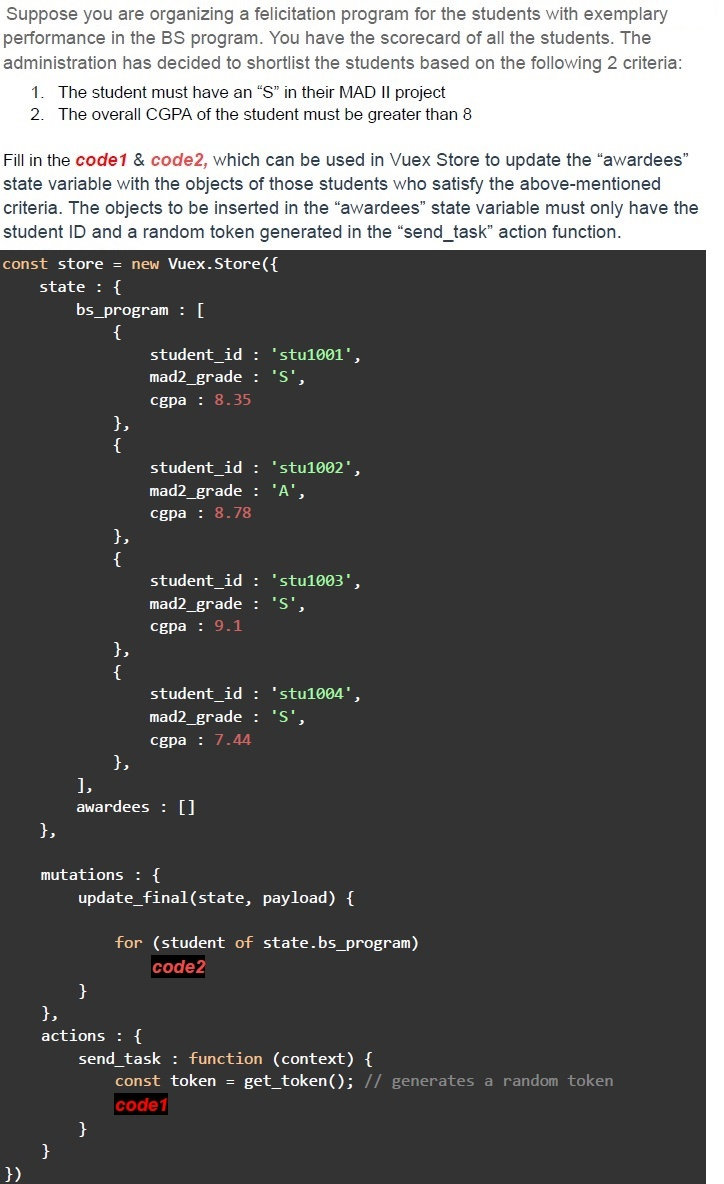
Suppose you are organizing a felicitation program for the students with exemplary performance in the BS program. You have the scorecard of all the students. The administration has decided to shortlist the students based on the following 2 criteria:
1. The student must have an "S" in their MAD II project
2. The overall CGPA of the student must be greater than 8

Fill in the `code1` & `code2`, which can be used in Vuex Store to update the "awardees" state variable with the objects of those students who satisfy the above-mentioned criteria. The objects to be inserted in the "awardees" state variable must only have the student ID and a random token generated in the "send_task" action function.

```javascript
const store = new Vuex.Store({
  state: {
    bs_program: [{
      student_id: 'stu1001',
      mad2_grade: 'S',
      cgpa: 8.35
    }, {
      student_id: 'stu1002',
      mad2_grade: 'A',
      cgpa: 8.78
    }, {
      student_id: 'stu1003',
      mad2_grade: 'S',
      cgpa: 9.1
    }, {
      student_id: 'stu1004',
      mad2_grade: 'S',
      cgpa: 7.44
    }, ],
    awardees: []
  },

  mutations: {
    update_final(state, payload) {

      for (student of state.bs_program)
        code2
    }
  },
  actions: {
    send_task: function(context) {
      const token = get_token(); // generates a random token
      code1
    }
  }
})
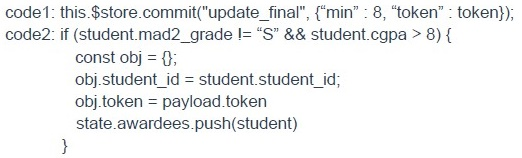
```
text
```javascript
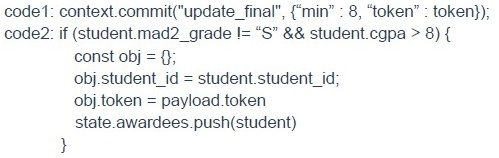
code1: this.$store.commit("update_final", {"min" : 8, "token" : token});
code2: if (student.mad2_grade != "S" && student.cgpa > 8) {
    const obj = {};
    obj.student_id = student.student_id;
    obj.token = payload.token
    state.awardees.push(student)
}
```
text
```
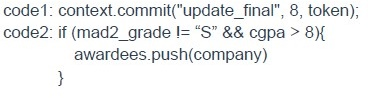
code1: context.commit("update_final", 8, token);
code2: if (mad2_grade != "S" && cgpa > 8){
    awardees.push(company)
}
```
text
```javascript
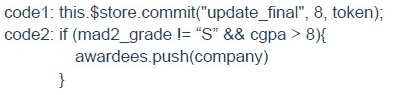
code1: this.$store.commit("update_final", 8, token);
code2: if (mad2_grade != "S" && cgpa > 8){
    awardees.push(company)
}
```
text
```
code1: context.commit("update_final", {"min" : 8, "token" : token});
code2: if (student.mad2_grade != "S" && student.cgpa > 8) {
    const obj = {};
    obj.student_id = student.student_id;
    obj.token = payload.token
    state.awardees.push(student)
}
```
Which of the following statement(s) is/are incorrect regarding Vuex?
- A Vuex store provides a single source of truth that can drive the application.
- It provides a variable named “this.$vuexstore” to allow components to accessthe store data.
- A component cannot have its own local state, if the application uses Vuex.
- The mutations and actions are some constructs of a Vuex store.
What is state management in the context of a web application?
- Organizing and storing data on the server-side database.
- Handling and updating the state of client-side components and data.
- Managing user session data using browser cookies.
- Coordinating the state of HTTP requests and responses between client andserver.
Which technology is commonly used to manage application state in a Vue.js application?
- Vue.js
- React.js
- Vuex
- Redux
- Express.js
- Angular
Text of the picture (copyable)
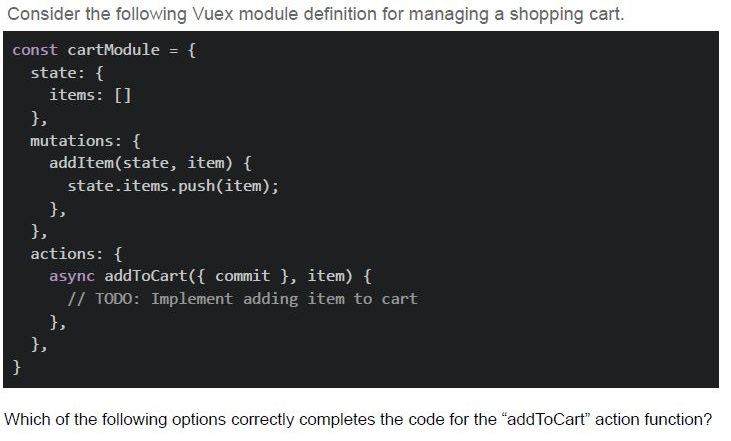
Consider the following Vuex module definition for managing a shopping cart.

```javascript
const cartModule = {
  state: {
    items: []
  },
  mutations: {
    addItem(state, item) {
      state.items.push(item);
    },
  },
  actions: {
    async addToCart({ commit }, item) {
      // TODO: Implement adding item to cart
    },
  },
}
```

Which of the following options correctly completes the code for the "addToCart" action function?
text
```javascript
addToCart({ commit }, item) {
  commit('addItem', item);
}
```
text
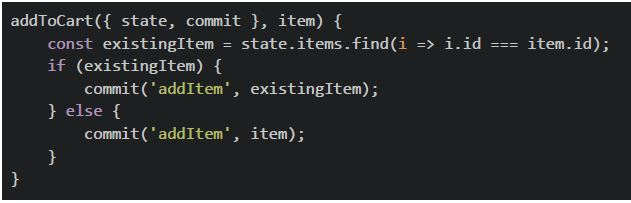
```javascript
addToCart({ state, commit }, item) {
  const existingItem = state.items.find(i => i.id === item.id);
  if (existingItem) {
    commit('addItem', existingItem);
  } else {
    commit('addItem', item);
  }
}
```
text
```javascript
addToCart({ commit }, item) {
  commit('addItem', { ...item });
}
```
text
All of these
Text of the picture (copyable)
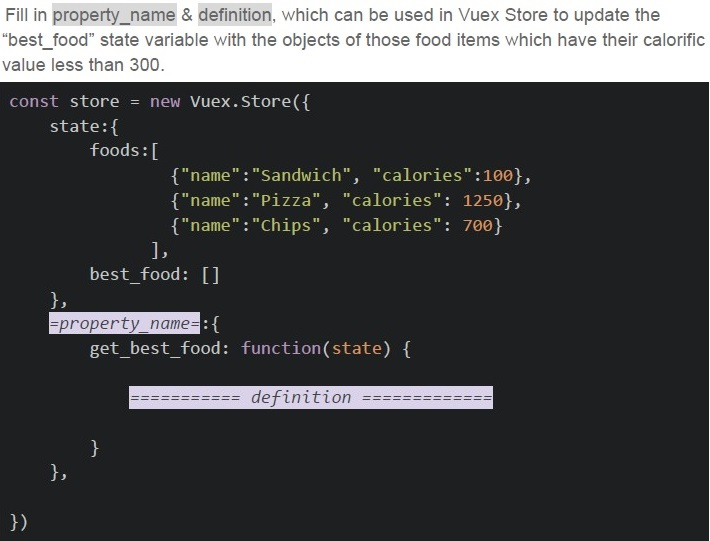
Fill in property_name & definition, which can be used in Vuex Store to update the "best_food" state variable with the objects of those food items which have their calorific value less than 300.

```javascript
const store = new Vuex.Store({
  state: {
    foods: [
      { "name": "Sandwich", "calories": 100 },
      { "name": "Pizza", "calories": 1250 },
      { "name": "Chips", "calories": 700 }
    ],
    best_food: []
  },
  =property_name=: {
    get_best_food: function(state) {
      ======== definition ========
    }
  }
})
```
text
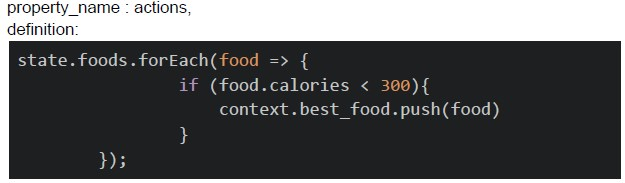
property_name : actions,
definition:

```
state.foods.forEach(food => {
    if (food.calories < 300){
        context.best_food.push(food)
    }
});
```
text
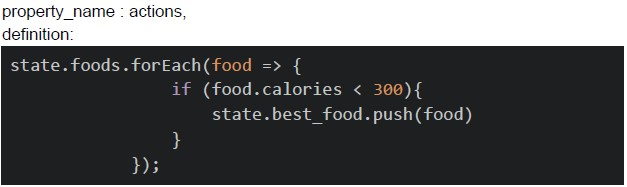
property_name : actions,
definition:

```javascript
state.foods.forEach(food => {
    if (food.calories < 300){
        state.best_food.push(food)
    }
});
```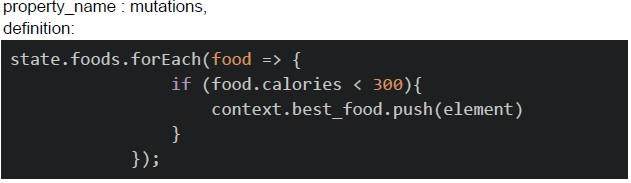
text
property_name : mutations,
definition:

```javascript
state.foods.forEach(food => {
    if (food.calories < 300){
        context.best_food.push(element)
    }
});
```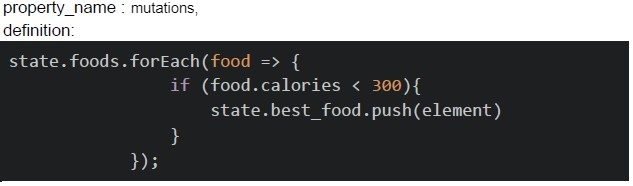
text
property_name : mutations,
definition:

```javascript
state.foods.forEach(food => {
    if (food.calories < 300){
        state.best_food.push(element)
    }
});
```
Which of the following statement(s) is/are correct regarding web storage APIs?
- Web Storage APIs provide a way to store key-value pairs persistently on theclient side.
- Web Storage APIs include “localStorage” and “sessionStorage”.
- Data stored in “localStorage” is automatically cleared when the browsersession ends.
- The “sessionStorage” allows data to persist across browser sessions.
Which of the following is a valid function signature for an action function in Vuex?

text
```javascript
async actionFunction ( context ) {}
```
text
```javascript
async actionFunction ( { state, commit }, payload ) { }
```
text
```javascript
async actionFunction ( context, payload1, payload2 ) { }
```
text
```javascript
async actionFunction ( {context, commit} ) {}
```