Home / MAD1 / Week 12 / Real questions
MAD1 week 12 - real exam questions
33 questions pulled from past papers whose wording matches this week's topics, newest first, duplicates removed. Pick your answers, then press Check answers. Figures and answer keys are the originals.
Elapsed 00:00
A recipe webpage needs to display two distinct sections: A list of ingredients where the order does not matter.1. A sequence of cooking steps that must be followed in order.2. Which combination of HTML list container tags is most appropriate for these sections?

text
Ingredients: <ol> | Cooking Steps: <ol>

text
Ingredients: `<ul>` | Cooking Steps: `<ul>`

text
Ingredients: `<d1>` | Cooking Steps: `<u1>`

text
Ingredients: `<ul>` | Cooking Steps: `<ol>`
Consider the following Flask RESTful API code.
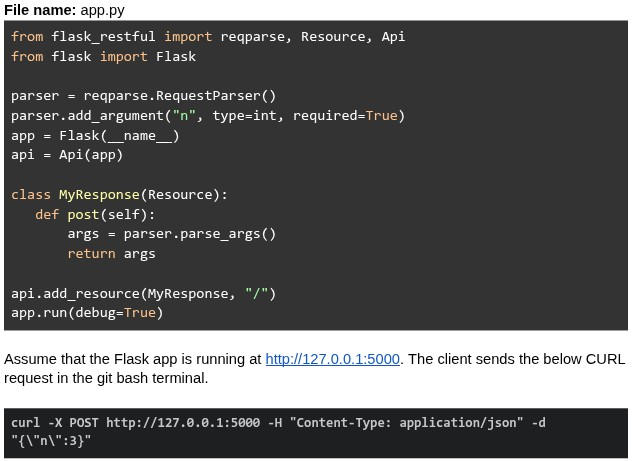 What will be the response?
What will be the response?Text of the picture (copyable)
File name: app.py
```python
from flask_restful import reqparse, Resource, Api
from flask import Flask

parser = reqparse.RequestParser()
parser.add_argument("n", type=int, required=True)
app = Flask(__name__)
api = Api(app)

class MyResponse(Resource):
    def post(self):
        args = parser.parse_args()
        return args

api.add_resource(MyResponse, "/")
app.run(debug=True)
```

Assume that the Flask app is running at http://127.0.0.1:5000. The client sends the below CURL request in the git bash terminal.

```bash
curl -X POST http://127.0.0.1:5000 -H "Content-Type: application/json" -d "{\"n\":3}"
```- {"n": 3}
- Runtime error
- 400 Bad Request
- { }
Consider the following HTML and CSS code.
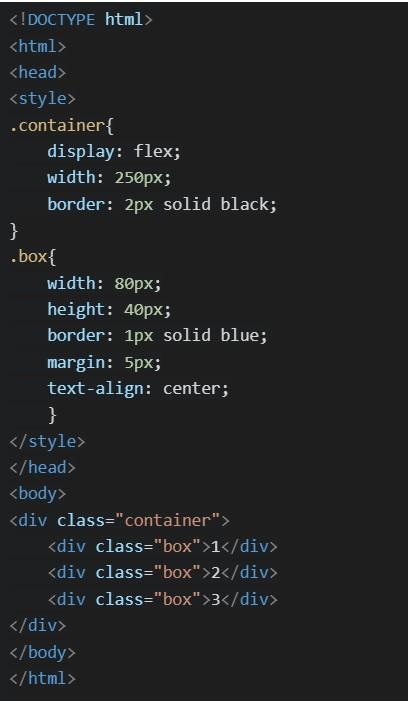 Which of the following will be the correct rendered output ?
Which of the following will be the correct rendered output ?Text of the picture (copyable)
```html
<!DOCTYPE html>
<html>
<head>
<style>
.container{
    display: flex;
    width: 250px;
    border: 2px solid black;
}
.box{
    width: 80px;
    height: 40px;
    border: 1px solid blue;
    margin: 5px;
    text-align: center;
}
</style>
</head>
<body>
<div class="container">
    <div class="box">1</div>
    <div class="box">2</div>
    <div class="box">3</div>
</div>
</body>
</html>
```
text
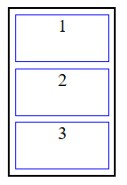
This is a diagram showing three rectangular boxes stacked vertically within a larger outer rectangle. Each inner box is outlined in blue and contains a single number.
- The top box is labeled "1".
- The middle box is labeled "2".
- The bottom box is labeled "3".
text
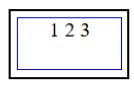
This is a diagram of a rectangle with a nested rectangle.
The outer rectangle is black.
The inner rectangle is blue.
Inside the inner rectangle, the text "1 2 3" is displayed.
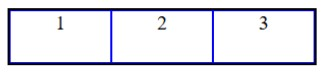
text
This is a diagram of three rectangular boxes arranged horizontally, each containing a number.
- The first box on the left contains the number "1".
- The second box in the middle contains the number "2".
- The third box on the right contains the number "3".
All boxes are outlined with a dark blue border, and the vertical lines separating the boxes are also dark blue.
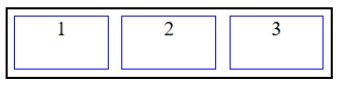
text
The image displays a diagram with a black rectangular outer border. Inside this border, there are three smaller, identical rectangular boxes arranged horizontally. Each of these inner boxes has a blue border. The boxes are labeled with numbers: "1" in the leftmost box, "2" in the middle box, and "3" in the rightmost box. There is a small gap between each of the inner boxes.
Which of the following statements are correct regarding git?
- Files in the staging area can be committed.
- The command
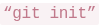 converts a local folder into a Git repository.
text
```
"git init"
```
- The command
 moves the local repository to the remote repository.
text
```
"git add"
```
- Git can be used only online.
- Git branches are pointers to commits.
Consider the following Flask RESTful API code.
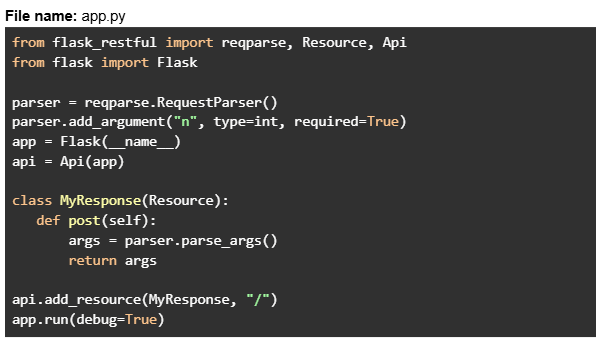 Assume that the Flask app is running at http://127.0.0.1:5000. The client sends the below CURL request in the git bash terminal.
 What will be the response?
Assume that the Flask app is running at http://127.0.0.1:5000. The client sends the below CURL request in the git bash terminal.
What will be the response?Text of the picture (copyable)
File name: app.py
```python
from flask_restful import reqparse, Resource, Api
from flask import Flask

parser = reqparse.RequestParser()
parser.add_argument("n", type=int, required=True)
app = Flask(__name__)
api = Api(app)

class MyResponse(Resource):
    def post(self):
        args = parser.parse_args()
        return args

api.add_resource(MyResponse, "/")
app.run(debug=True)
```
```
curl -X POST http://127.0.0.1:5000 -H "Content-Type: application/json" -d '{}'
```- {"n": None}
- Runtime error
- 400 Bad Request
- { }
Consider the following CSS code:
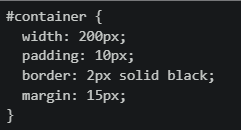 Which of the following statements are TRUE regarding the element's dimensions and spacing?
Which of the following statements are TRUE regarding the element's dimensions and spacing?Text of the picture (copyable)
```css
#container {
  width: 200px;
  padding: 10px;
  border: 2px solid black;
  margin: 15px;
}
```- The total width including padding and border is 224px
- The margin affects the content box width
- The padding adds internal spacing inside the element
- The border contributes to the total width in the standard box model
You are on the main branch and want to merge feature1 and feature2 branches. What is the correct command sequence?

text
```
git merge feature1 then git merge feature2
```

text
```
git checkout feature1 then git merge feature2 then git merge main
```

text
```
git checkout feature1 then git merge feature2 then git checkout main then git merge feature1
```

text
```
git merge feature1 then git checkout feature2 then git merge main
```
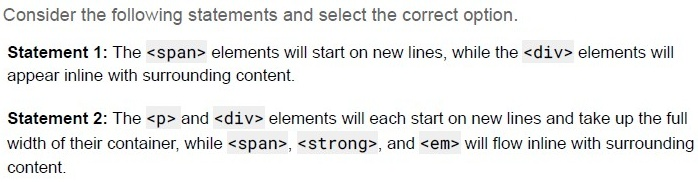
Text of the picture (copyable)
Consider the following statements and select the correct option.

Statement 1: The `<span>` elements will start on new lines, while the `<div>` elements will appear inline with surrounding content.

Statement 2: The `<p>` and `<div>` elements will each start on new lines and take up the full width of their container, while `<span>`, `<strong>`, and `<em>` will flow inline with surrounding content.
- Statement 1 is correct, but statement 2 is incorrect.
- Statement 2 is correct, but statement 1 is incorrect.
- Both statements 1 and 2 are correct
- Both statements 1 and 2 are incorrect
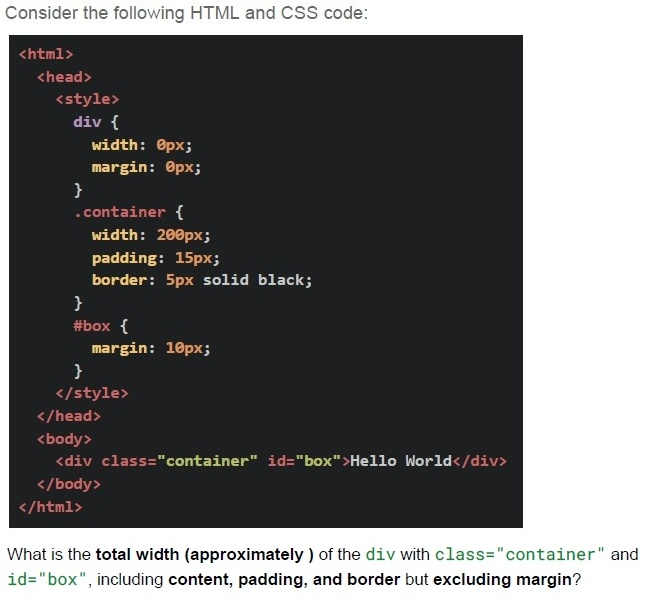
Text of the picture (copyable)
Consider the following HTML and CSS code:

```html
<html>
  <head>
    <style>
      div {
        width: 0px;
        margin: 0px;
      }
      .container {
        width: 200px;
        padding: 15px;
        border: 5px solid black;
      }
      #box {
        margin: 10px;
      }
    </style>
  </head>
  <body>
    <div class="container" id="box">Hello World</div>
  </body>
</html>
```

What is the **total width (approximately)** of the `div` with `class="container"` and `id="box"`, including **content, padding, and border** but excluding margin?- 200 px
- 230 px
- 240 px
- 250 px
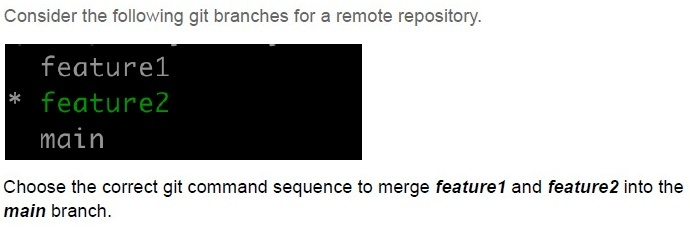
Text of the picture (copyable)
Consider the following git branches for a remote repository.

```
feature1
* feature2
main
```

Choose the correct git command sequence to merge *feature1* and *feature2* into the *main* branch.
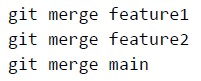
text
```
git merge feature1
git merge feature2
git merge main
```
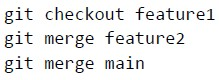
text
```
git checkout feature1
git merge feature2
git merge main
```
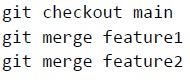
text
```
git checkout main
git merge feature1
git merge feature2
```
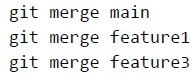
text
```
git merge main
git merge feature1
git merge feature3
```
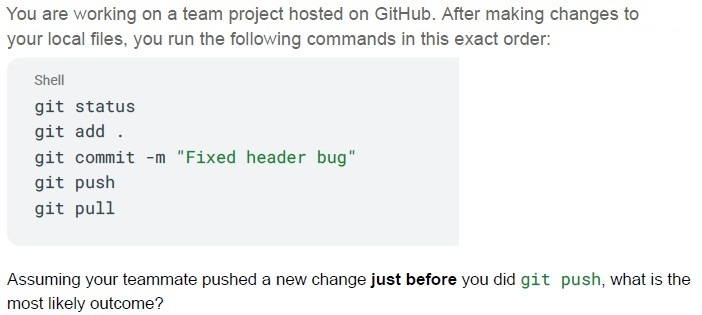
Text of the picture (copyable)
You are working on a team project hosted on GitHub. After making changes to your local files, you run the following commands in this exact order:

```shell
git status
git add .
git commit -m "Fixed header bug"
git push
git pull
```

Assuming your teammate pushed a new change **just before** you did `git push`, what is the most likely outcome?

text
Your commit will be rejected because the remote branch is ahead of your local branch.

text
The `git pull` should have been run **before** `git push` to avoid possible conflicts.

text
The `git push` will automatically merge your changes with the remote and succeed.

text
The `git status` will show the conflict before `git push` is run.
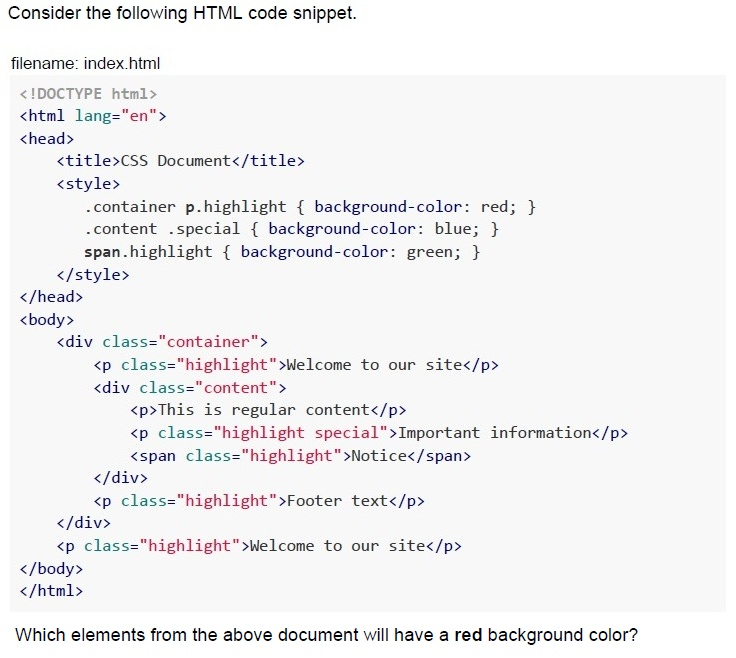
Text of the picture (copyable)
Consider the following HTML code snippet.

filename: index.html

```html
<!DOCTYPE html>
<html lang="en">
<head>
    <title>CSS Document</title>
    <style>
        .container p.highlight { background-color: red; }
        .content .special { background-color: blue; }
        span.highlight { background-color: green; }
    </style>
</head>
<body>
    <div class="container">
        <p class="highlight">Welcome to our site</p>
        <div class="content">
            <p>This is regular content</p>
            <p class="highlight special">Important information</p>
            <span class="highlight">Notice</span>
        </div>
        <p class="highlight">Footer text</p>
    </div>
    <p class="highlight">Welcome to our site</p>
</body>
</html>
```

Which elements from the above document will have a red background color?
text
All elements with the class "highlight".

text
Only the `<p>` elements that are direct children of `.container` and have the class "highlight"

text
All `<p>` elements with the class "highlight" that are descendants of `.container`

text
Only the first `<p>` element with class "highlight"
Consider the following git branches for a remote repository.
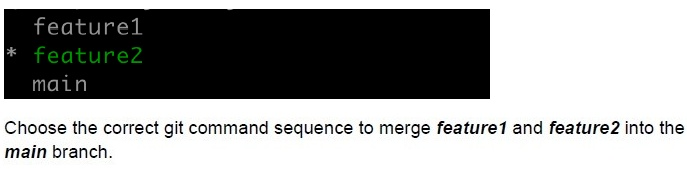 Consider the following git branches for a remote repository.
Consider the following git branches for a remote repository.
Text of the picture (copyable)
```
feature1
* feature2
main
```
Choose the correct git command sequence to merge *feature1* and *feature2* into the *main* branch.
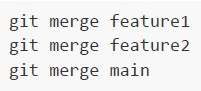
text
```
git merge feature1
git merge feature2
git merge main
```
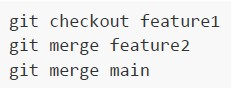
text
```
git checkout feature1
git merge feature2
git merge main
```
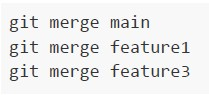
text
```
git merge main
git merge feature1
git merge feature3
```
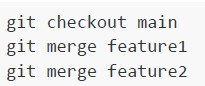
text
```
git checkout main
git merge feature1
git merge feature2
```
Which of the following statements about server architectures, Apache and Nginx, is/are correct?
- Apache is better suited for handling a large volume of concurrent connectionsthan Nginx.
- Apache is versatile and supports a wide range of modules and dynamicconfigurations.
- Nginx is generally faster for serving static files and handling high traffic withlow memory usage.
- Both Apache and Nginx are open-source web servers.
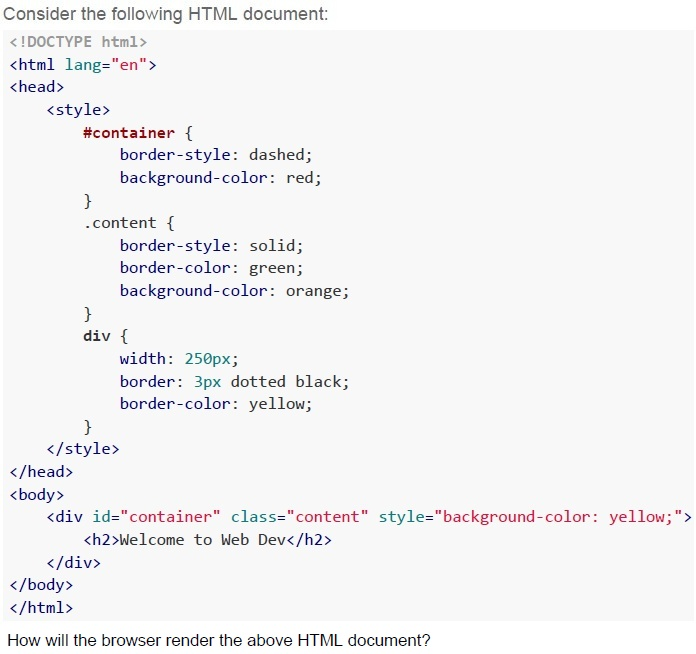
Text of the picture (copyable)
Consider the following HTML document:

```html
<!DOCTYPE html>
<html lang="en">
<head>
    <style>
        #container {
            border-style: dashed;
            background-color: red;
        }
        .content {
            border-style: solid;
            border-color: green;
            background-color: orange;
        }
        div {
            width: 250px;
            border: 3px dotted black;
            border-color: yellow;
        }
    </style>
</head>
<body>
    <div id="container" class="content" style="background-color: yellow;">
        <h2>Welcome to Web Dev</h2>
    </div>
</body>
</html>
```

How will the browser render the above HTML document?
text
Welcome to Web Dev

text
Welcome to Web Dev

text
Welcome to Web Dev

text
This is a screenshot of a web page element. It shows a red rectangular box with a dotted green border. Inside the box, the text "Welcome to Web Dev" is displayed in black, bold font.
Which of the following is an example of an application using Attribute-Based Access Control (ABAC)?
- A system where users are granted access based on their job roles within anorganization.
- A cloud service that grants or restricts access to files based on attributes suchas user department, job title, or current location.
- A file-sharing system where the file owner decides who can access theirdocuments.
- A system that enforces access based on security classifications and clearancelevels.
Consider that you have installed some python packages using requirements.txt. Which command you will use to list the installed packages in the virtual environment?
- pip list
- pip freeze
- ls -la
- ls
What is the name of the branch that we start with when we create a new git repository?
- main
- master
- develop
- feature
Which command of the below command creates a new branch in GIT?

text
```
git new-branch <branch_name>
```

text
```
git branch <branch_name>
```

text
```
git new <branch_name>
```

text
```
git create-branch <branch_name>
```
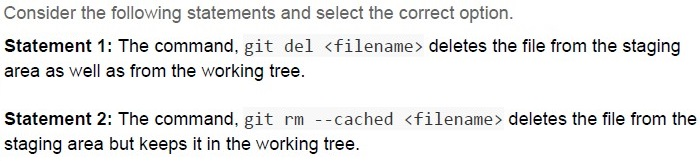
Text of the picture (copyable)
Consider the following statements and select the correct option.

**Statement 1:** The command, `git del <filename>` deletes the file from the staging area as well as from the working tree.

**Statement 2:** The command, `git rm --cached <filename>` deletes the file from the staging area but keeps it in the working tree.
- Statement 1 is correct, but statement 2 is incorrect.
- Statement 1 is incorrect, but statement 2 is correct.
- Both statements 1 and 2 are correct.
- Both statements 1 and 2 are incorrect.
Comprehension passage for this question
Based on the above data, answer the given subquestions.
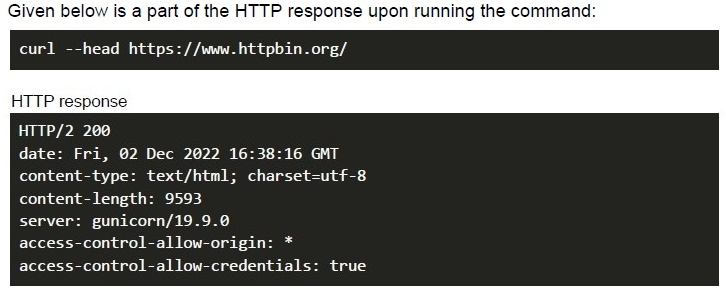
Which part of the response indicates the MIME type of the response body?
- charset=utf-8
- server: gunicorn/19.9.0
- content-type: text/html;
- None of these
Comprehension passage for this question
Based on the above data, answer the given subquestions.
Which part of the response indicates that the request created a successful response?
- server: gunicorn/19.9.0
- content-type: text/html;
- HTTP/2 200
- None of these
What is the git command to change the registered e-mail of a user using CLI?

text
```
git config email <new e-mail>
```

text
```
git config user.email <new e-mail>
```

text
```
git config --global email <new e-mail>
```

text
```
git config --global user.email <new e-mail>
```
Which of the following git command will remove a file from the staged area but keeps the file in the directory?

text
```
git rm <filename>
```

text
```
git rm --cached <filename>
```

text
```
git del <filename>
```

text
```
git del --cached <filename>
```
Consider the following statements regarding Continuous Integration and Continuous Deployment and select the correct option. Statement 1: As part of continuous integration, frequent, isolated changes are tested and reported on as soon as they are added to a larger code base. Statement 2: When a change is made to an application, it is automatically deployed into production using a continuous deployment strategy.
- Statement 1 and statement 2 both are correct.
- Statement 1 and statement 2 both are incorrect.
- Statement 1 is correct and statement 2 is incorrect.
- Statement 1 is incorrect and statement 2 is correct.
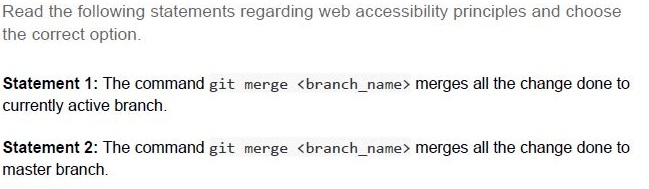
Text of the picture (copyable)
Read the following statements regarding web accessibility principles and choose the correct option.

**Statement 1:** The command `git merge <branch_name>` merges all the change done to currently active branch.

**Statement 2:** The command `git merge <branch_name>` merges all the change done to master branch.
- Both statement 1 and statement 2 are correct
- Both statement 1 and statement 2 are incorrect
- Statement 1 is correct but statement 2 is incorrect
- Statement 1 is incorrect but statement 2 is correct
Which of the following statement(s) is/are false regarding Git?
- Git is an example of a centralized version control system.
- A file can stay in both working directory and staging area at a given time, whileworking with Git.
- Git and GitLab/GitHub are essentially the same.
- The command “git checkout -b
” will create the new branchand switches to the new branch created.
Which of the following statement(s) is/are true regarding database migrations?
- Flask does not provide support for migrations, as of December 2022.
- The database migration allows a developer to make schema changes withoutlosing the data
- One of the disadvantages of migration is that a developer can only upgradethe database, and it does not allow rollbacks.
- The migration is useful when a business wants to move from an on-premisedatabase to a cloud based database.
In the given HTML template, to correctly embed a URL in the href, the argument "user" in the "url_for" function must be a __________________?
 In the given HTML template, to correctly embed a URL in the href, the argument "user" in the "url_for" function must be a __________________?
In the given HTML template, to correctly embed a URL in the href, the argument "user" in the "url_for" function must be a __________________? Text of the picture (copyable)
```html
<a href = {{ url_for('user')}}>Click here</a>
```- A view function name
- An HTML template name
- A URL
- An environment variable
Which of the following statement(s) is/are true regarding Git?

text
Git is an example of a centralized version control system.

text
A file can stay in both working directory and staging area at a given time, while working with Git.

text
Git and GitLab/GitHub are essentially the same.

text
The command "git checkout -b <branch_name>" will create the new branch and switches to the new branch created.
Which of the following statement(s) is/are false regarding database migrations?
- Flask does not provide support for migrations, as of December 2022.
- The database migration allows a developer to make schema changes withoutlosing the data.
- One of the disadvantages of migration is that a developer can only upgradethe database, and it does not allow rollbacks.
- The migration is useful when a business wants to move from an on-premisedatabase to a cloud based database.
Consider the table “production” in SQLite database given below:
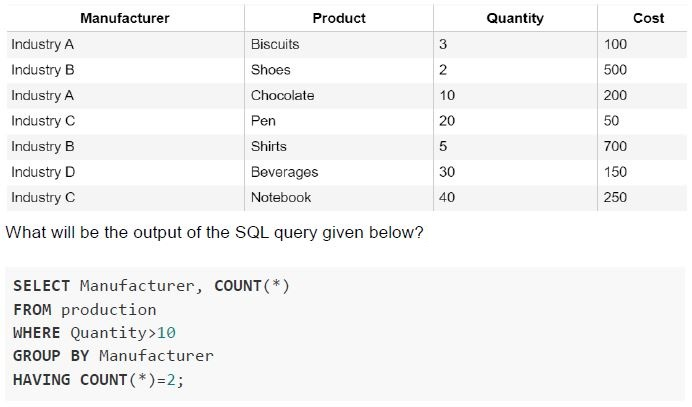 Consider the table “production” in SQLite database given below:
Consider the table “production” in SQLite database given below: Text of the picture (copyable)
| Manufacturer | Product | Quantity | Cost |
|---|---|---|---|
| Industry A | Biscuits | 3 | 100 |
| Industry B | Shoes | 2 | 500 |
| Industry A | Chocolate | 10 | 200 |
| Industry C | Pen | 20 | 50 |
| Industry B | Shirts | 5 | 700 |
| Industry D | Beverages | 30 | 150 |
| Industry C | Notebook | 40 | 250 |

What will be the output of the SQL query given below?

```sql
SELECT Manufacturer, COUNT(*)
FROM production
WHERE Quantity>10
GROUP BY Manufacturer
HAVING COUNT(*)=2;
```
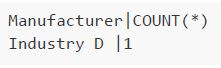
text
```
| Manufacturer | COUNT(*) |
|---|---|
| Industry D | 1 |
```
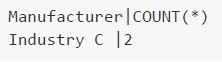
text
```
Manufacturer|COUNT(*)
Industry C  |2
```
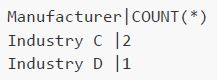
text
```
Manufacturer|COUNT(*)
Industry C  |2
Industry D  |1
```
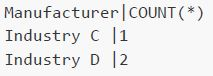
text
```
Manufacturer|COUNT(*)
Industry C  |1
Industry D  |2
```
Consider a situation, where a developer wants to create his own customized application and wants to deploy it for the end users. For that, he wants a development environment that consists of some programming language execution environment, an operating system, a web server and a database, such that he can build, compile and run his programs without worrying about the servers, storage, and networking. Which of the following service models he would prefer in order to do so?
- SaaS
- PaaS
- IaaS
- None of these