Home / Past papers / MAD1 End Term / this paper
Modern Application Development I 18 Dec 25 - 21 Dec 2025
Elapsed 00:00
Consider the following flask app and Jinja2 template.
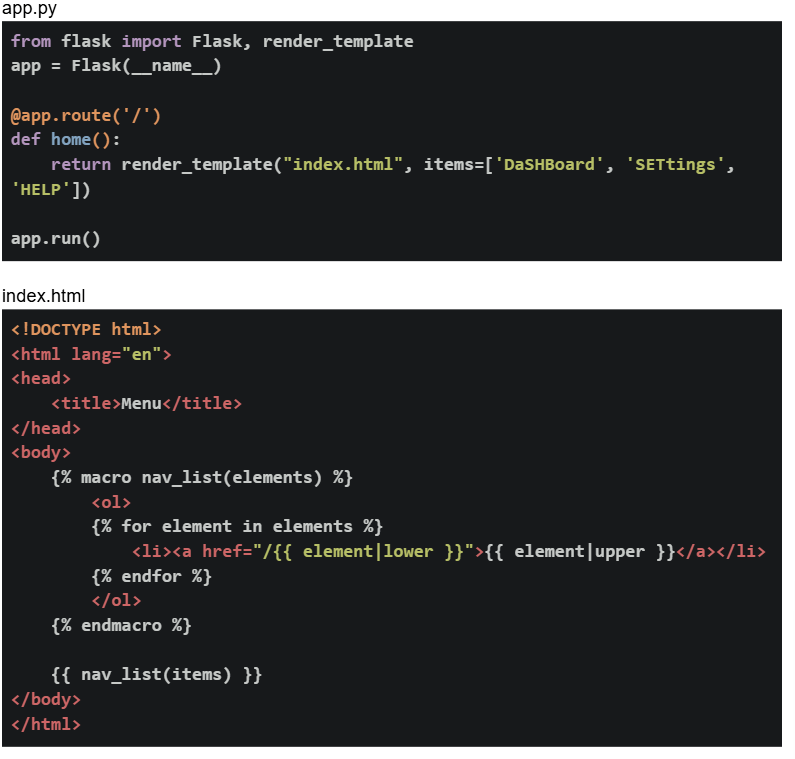 If the flask app is running locally on http://127.0.0.1:5000. What will be the output on the browser for the base URL?
If the flask app is running locally on http://127.0.0.1:5000. What will be the output on the browser for the base URL?Text of the picture (copyable)
app.py
```python
from flask import Flask, render_template
app = Flask(__name__)

@app.route('/')
def home():
    return render_template("index.html", items=['DaShBoard', 'SETtings',
                                                 'HELP'])

app.run()
```

index.html
```html
<!DOCTYPE html>
<html lang="en">
<head>
    <title>Menu</title>
</head>
<body>
    {% macro nav_list(elements) %}
    <ol>
        {% for element in elements %}
        <li><a href="/{{ element|lower }}">{{ element|upper }}</a></li>
        {% endfor %}
    </ol>
    {% endmacro %}

    {{ nav_list(items) }}
</body>
</html>
```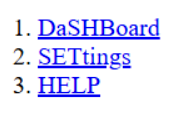
text
1. DaSHBoard
2. SETtings
3. HELP
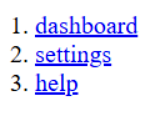
text
1. dashboard
2. settings
3. help
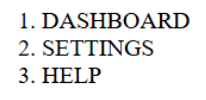
text
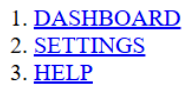
1. DASHBOARD
2. SETTINGS
3. HELP
text
1. DASHBOARD
2. SETTINGS
3. HELP
Consider the following flask app.
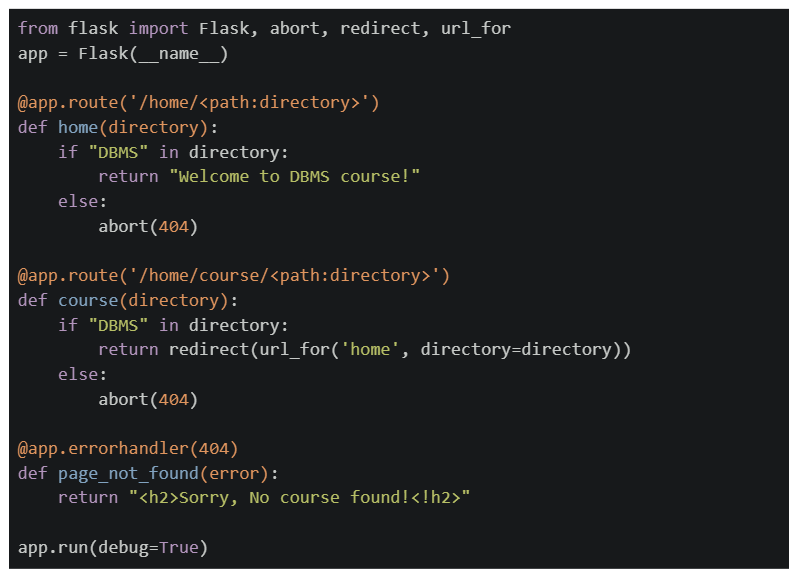 If the application is running locally on http://127.0.0.1:5000, select the correct options.
If the application is running locally on http://127.0.0.1:5000, select the correct options.Text of the picture (copyable)
```python
from flask import Flask, abort, redirect, url_for

app = Flask(__name__)

@app.route('/home/<path:directory>')
def home(directory):
    if "DBMS" in directory:
        return "Welcome to DBMS course!"
    else:
        abort(404)

@app.route('/home/course/<path:directory>')
def course(directory):
    if "DBMS" in directory:
        return redirect(url_for('home', directory=directory))
    else:
        abort(404)

@app.errorhandler(404)
def page_not_found(error):
    return "<h2>Sorry, No course found!!<h2>"

app.run(debug=True)
```
text
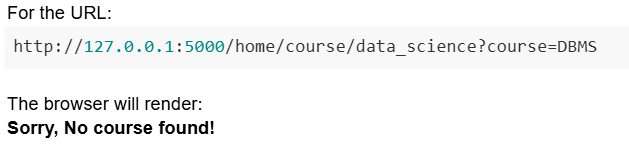
For the URL:
```
http://127.0.0.1:5000/home/course/data_science?course=DBMS
```
The browser will render:
**Sorry, No course found!**
text
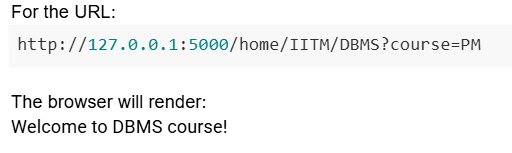
For the URL:
```
http://127.0.0.1:5000/home/IITM/DBMS?course=PM
```
The browser will render:
Welcome to DBMS course!
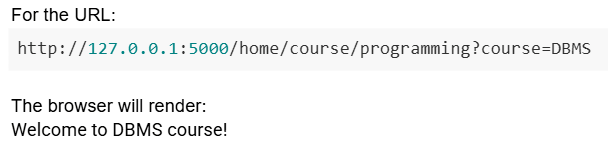
text
For the URL:
```
http://127.0.0.1:5000/home/course/programming?course=DBMS
```
The browser will render:
Welcome to DBMS course!
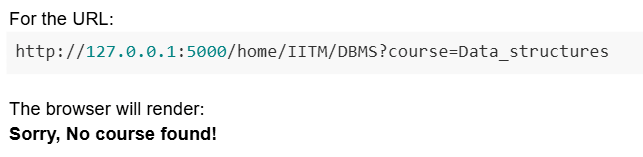
text
For the URL:

```
http://127.0.0.1:5000/home/IITM/DBMS?course=Data_structures
```

The browser will render:
**Sorry, No course found!**
Comprehension passage - the questions below it refer to this
Based on the above data, answer the given subquestions.
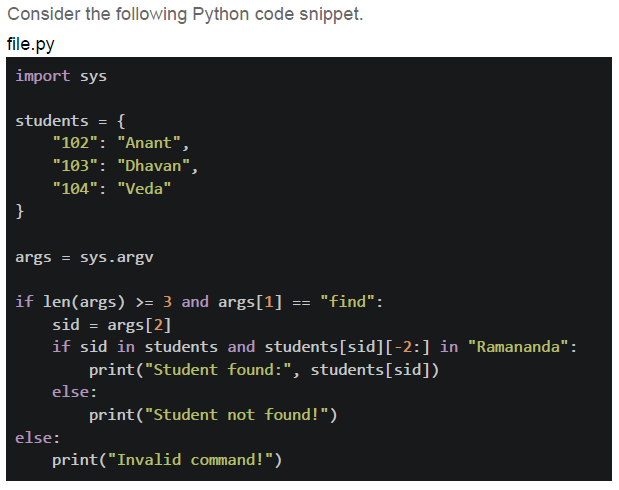
Which of the following statements is/are correct ?
- For the command: python file.py find 103 , the terminal output is:

text
Student not found!
- For the command: python file.py find 103 , the terminal output is:

text
Student found: Dhawan
- For the command: python file.py find 104 sid , the terminal output is:

text
```
IndexError: list index out of range
```
- For the command: python file.py find 102 , the terminal output is:

text
Student found: Anant
- For the command: python file.py find 104 sid , the terminal output is:

text
Student found: Veda
Which of the following commands will give the terminal output as:

Text of the picture (copyable)
Invalid command!
- python file.py find 104 sid
- python file.py 102 find sid
- python file.py find 105 sid
- python file.py find
Consider the following function to be tested and test functions given in the Python code snippet below.
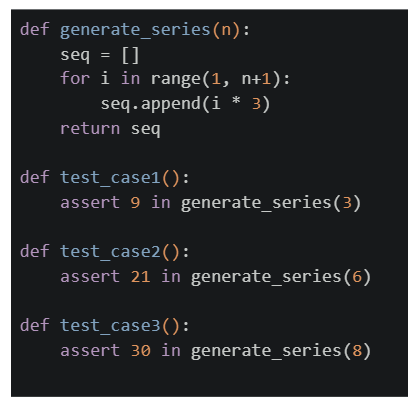

Text of the picture (copyable)
```python
def generate_series(n):
    seq = []
    for i in range(1, n+1):
        seq.append(i * 3)
    return seq

def test_case1():
    assert 9 in generate_series(3)

def test_case2():
    assert 21 in generate_series(6)

def test_case3():
    assert 30 in generate_series(8)
```
What will be the summary of the output for the command `pytest file.py` on the terminal?
text
```
=========== 1 failed, 2 passed in 0.30s ===========
```

text
```
========== 2 failed, 1 passed in 0.30s ==========
```

text
```
=================================== 3 failed in 0.30s ===================================
```

text
```text
============================= 1 failed, 1 passed in 0.30s =============================
```
Consider the following SQL create statement.
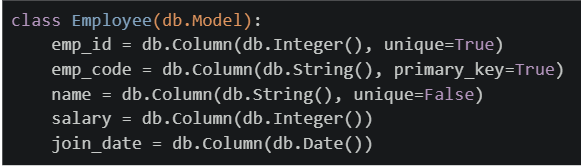
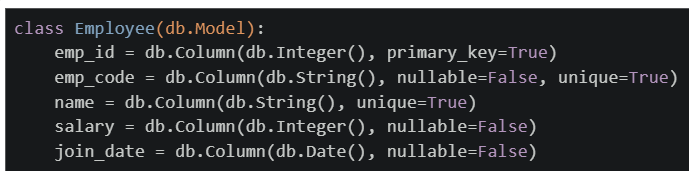
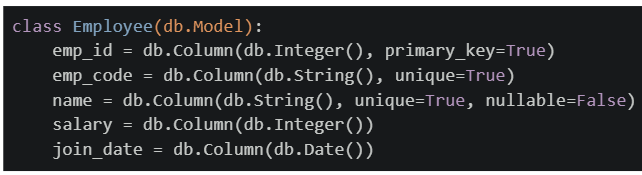
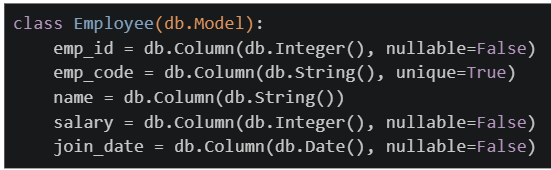
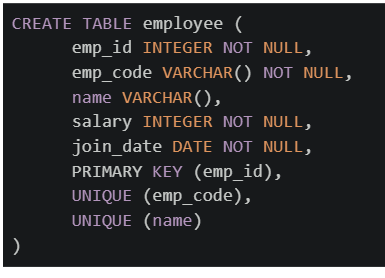 Which of the following flask_sqlalchemy models will create exactly the same table as created by the above SQL command?
Which of the following flask_sqlalchemy models will create exactly the same table as created by the above SQL command?Text of the picture (copyable)
```sql
CREATE TABLE employee (
    emp_id INTEGER NOT NULL,
    emp_code VARCHAR() NOT NULL,
    name VARCHAR(),
    salary INTEGER NOT NULL,
    join_date DATE NOT NULL,
    PRIMARY KEY (emp_id),
    UNIQUE (emp_code),
    UNIQUE (name)
)
```
text
```python
class Employee(db.Model):
    emp_id = db.Column(db.Integer(), unique=True)
    emp_code = db.Column(db.String(), primary_key=True)
    name = db.Column(db.String(), unique=False)
    salary = db.Column(db.Integer())
    join_date = db.Column(db.Date())
```
text
```python
class Employee(db.Model):
    emp_id = db.Column(db.Integer(), primary_key=True)
    emp_code = db.Column(db.String(), nullable=False, unique=True)
    name = db.Column(db.String(), unique=True)
    salary = db.Column(db.Integer(), nullable=False)
    join_date = db.Column(db.Date(), nullable=False)
```
text
```python
class Employee(db.Model):
    emp_id = db.Column(db.Integer(), primary_key=True)
    emp_code = db.Column(db.String(), unique=True)
    name = db.Column(db.String(), unique=True, nullable=False)
    salary = db.Column(db.Integer())
    join_date = db.Column(db.Date())
```
text
```python
class Employee(db.Model):
    emp_id = db.Column(db.Integer(), nullable=False)
    emp_code = db.Column(db.String(), unique=True)
    name = db.Column(db.String())
    salary = db.Column(db.Integer(), nullable=False)
    join_date = db.Column(db.Date(), nullable=False)
```
Consider the following python code snippet. What will be the rendered output for the terminal output?
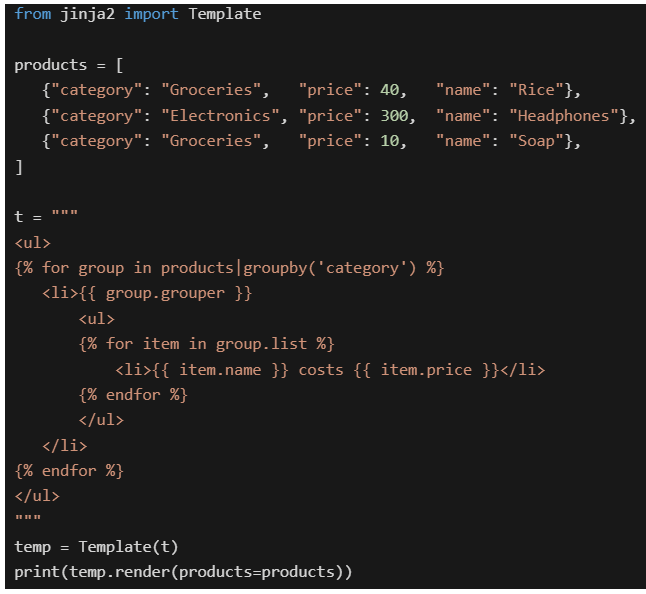
Text of the picture (copyable)
```python
from jinja2 import Template

products = [
    {"category": "Groceries", "price": 40, "name": "Rice"},
    {"category": "Electronics", "price": 300, "name": "Headphones"},
    {"category": "Groceries", "price": 10, "name": "Soap"},
]

t = """
<ul>
{% for group in products|groupby('category') %}
    <li>{{ group.grouper }}
        <ul>
        {% for item in group.list %}
            <li>{{ item.name }} costs {{ item.price }}</li>
        {% endfor %}
        </ul>
    </li>
{% endfor %}
</ul>
"""

temp = Template(t)
print(temp.render(products=products))
```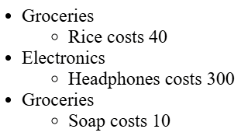
text
* Groceries
    * Rice costs 40
* Electronics
    * Headphones costs 300
* Groceries
    * Soap costs 10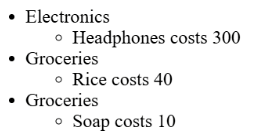
text
* Electronics
    * Headphones costs 300
* Groceries
    * Rice costs 40
* Groceries
    * Soap costs 10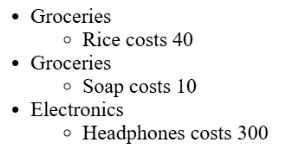
text
* Groceries
  * Rice costs 40
* Groceries
  * Soap costs 10
* Electronics
  * Headphones costs 300
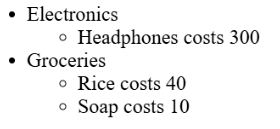
text
- Electronics
  - Headphones costs 300
- Groceries
  - Rice costs 40
  - Soap costs 10
Comprehension passage - the questions below it refer to this
Consider the following flask application and html template. Assume that the Flask app is running at http://127.0.0.1:5000.
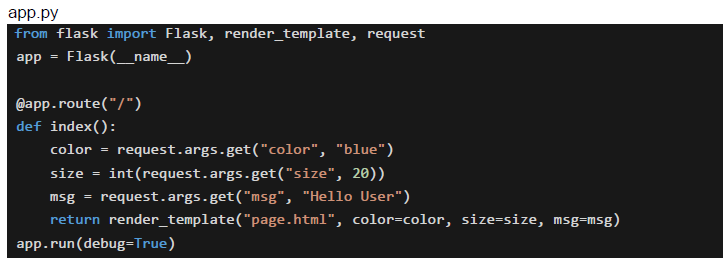 Based on the above data, answer the given subquestions.
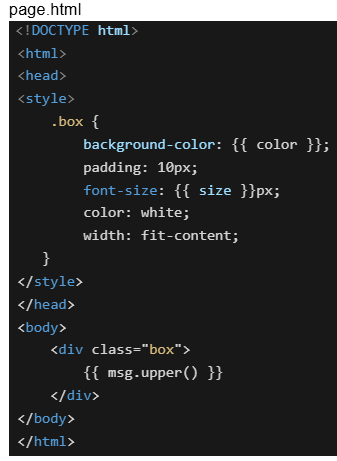
What will be the final styling applied to the element inside the div for the URL: http://127.0.0.1:5000/?color=green&size=30&msg=welcome+user
- background-color: blue, font-size: 20px, padding: 10px, color: white
- background-color: green, font-size: 30px, padding: 20px, color: white
- background-color: blue, font-size: 20px, padding: 30px, color: green
- background-color: green, font-size: 30px, padding: 10px, color: white
What will be the rendered output on the browser for the URL: http://127.0.0.1:5000/?color=green&size=30&msg=welcome+user

text
HELLO USER

text
HELLO USER

text
WELCOME USER

text
WELCOME USER
Which of the following statements correctly differentiates between synchronous and asynchronous updates in frontend development?
- In synchronous updates, the UI waits for the operation to complete, while in asynchronous updates, the UI remains responsive.
- Synchronous execution is blocking, whereas asynchronous execution is non- blocking.
- Asynchronous updates are preferred for network requests and background tasks, while synchronous is best for quick operations.
- Both synchronous and asynchronous updates allow the browser to continue execution without waiting.
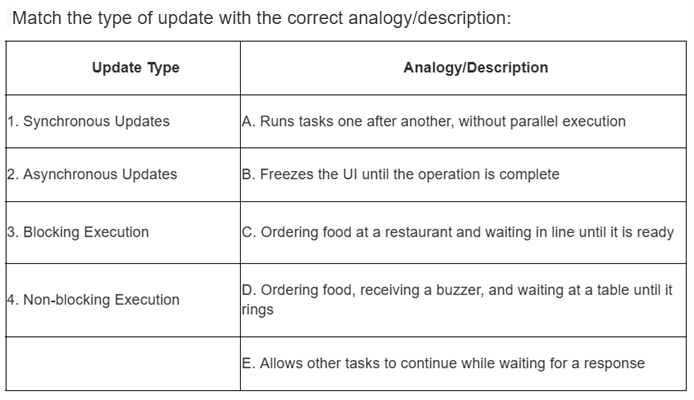
Text of the picture (copyable)
Match the type of update with the correct analogy/description:

| Update Type             | Analogy/Description                                                      |
| :---------------------- | :----------------------------------------------------------------------- |
| 1. Synchronous Updates  | A. Runs tasks one after another, without parallel execution              |
| 2. Asynchronous Updates | B. Freezes the UI until the operation is complete                        |
| 3. Blocking Execution   | C. Ordering food at a restaurant and waiting in line until it is ready   |
| 4. Non-blocking Execution | D. Ordering food, receiving a buzzer, and waiting at a table until it rings |
|                         | E. Allows other tasks to continue while waiting for a response           |
- 1 → C, 2 → D, 3 → B, 4 → A
- 1 → B, 2 → A, 3 → D, 4 → C
- 1 → A, 2 → B, 3 → E, 4 → C
- 1 → C, 2 → D, 3 → B, 4 → E
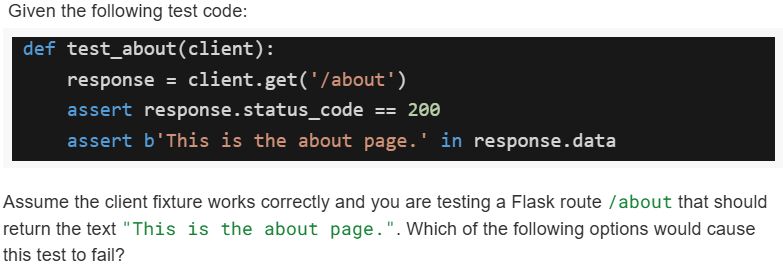
Text of the picture (copyable)
Given the following test code:

```python
def test_about(client):
    response = client.get('/about')
    assert response.status_code == 200
    assert b'This is the about page.' in response.data
```

Assume the client fixture works correctly and you are testing a Flask route `/about` that should return the text "This is the about page.". Which of the following options would cause this test to fail?
text
The route `/about` is missing in `app.py`.

text
The route `/about` exists but returns "About us page" instead.

text
The route `/about` returns `<p>this is the about page.</p>` instead of plain text.
- None of these.
Comprehension passage - the questions below it refer to this
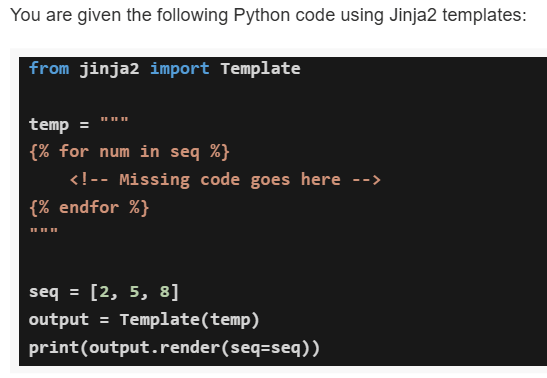
Based on the above data, answer the given subquestions.
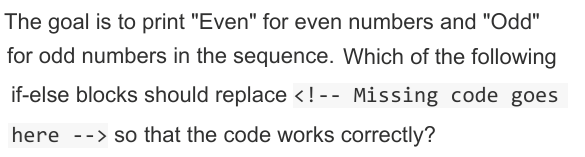
Text of the picture (copyable)
The goal is to print "Even" for even numbers and "Odd"
for odd numbers in the sequence. Which of the following
if-else blocks should replace <!-- Missing code goes
here --> so that the code works correctly?
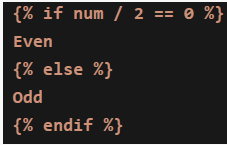
text
```jinja2
{% if num / 2 == 0 %}
Even
{% else %}
Odd
{% endif %}
```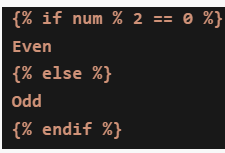
text
```jinja2
{% if num % 2 == 0 %}
Even
{% else %}
Odd
{% endif %}
```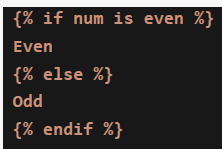
text
```jinja2
{% if num is even %}
Even
{% else %}
Odd
{% endif %}
```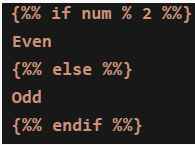
text
```jinja
{% if num % 2 %}
Even
{% else %}
Odd
{% endif %}
```
If the correct if-else block is used, what will be the output of the program for the sequence [2, 5, 8]?

text
Even
Even
Even
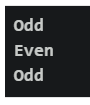
text
Odd
Even
Odd

text
```
2
5

8
```
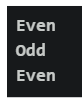
text
Even
Odd
Even
Comprehension passage - the questions below it refer to this
A Household Services Application maintains the following three tables:
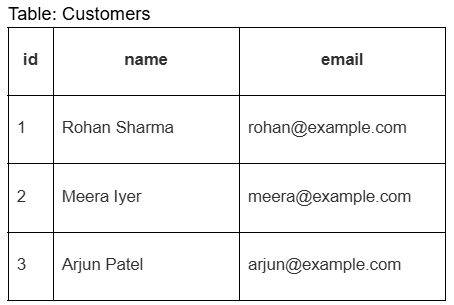 The Requests table represents service bookings made by customers. Based on the above data, answer the given subquestions.
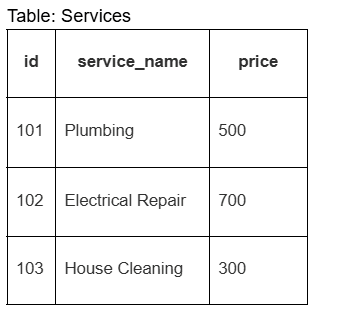
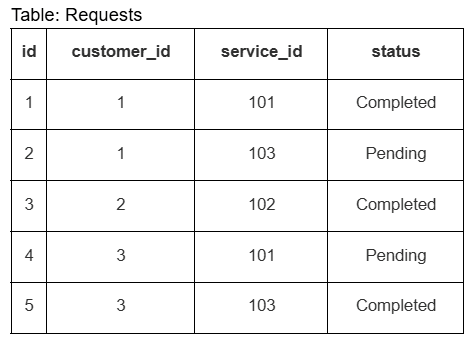
Which SQL query correctly retrieves the customer names and the services they requested?
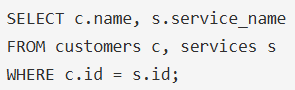
text
```sql
SELECT c.name, s.service_name
FROM customers c, services s
WHERE c.id = s.id;
```
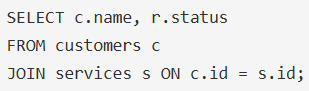
text
```sql
SELECT c.name, r.status
FROM customers c
JOIN services s ON c.id = s.id;
```
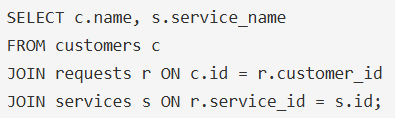
text
```sql
SELECT c.name, s.service_name
FROM customers c
JOIN requests r ON c.id = r.customer_id
JOIN services s ON r.service_id = s.id;
```
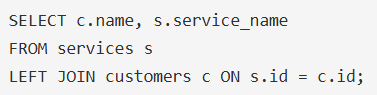
text
```sql
SELECT c.name, s.service_name
FROM services s
LEFT JOIN customers c ON s.id = c.id;
```
Which query finds the number of service requests made by each customer?

text
```sql
SELECT r.customer_id, COUNT(*) AS total_requests
FROM requests r;
```
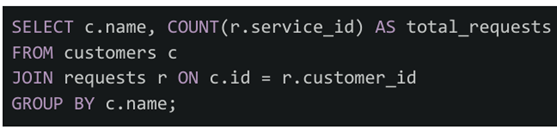
text
```sql
SELECT c.name, COUNT(r.service_id) AS total_requests
FROM customers c
JOIN requests r ON c.id = r.customer_id
GROUP BY c.name;
```
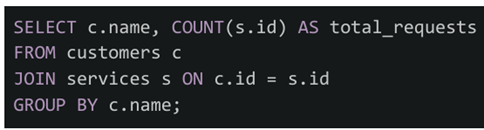
text
```sql
SELECT c.name, COUNT(s.id) AS total_requests
FROM customers c
JOIN services s ON c.id = s.id
GROUP BY c.name;
```
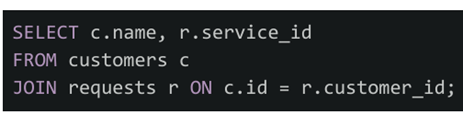
text
```sql
SELECT c.name, r.service_id
FROM customers c
JOIN requests r ON c.id = r.customer_id;
```
If the given tables are mapped to Flask-SQLAlchemy models (Customer, Service, Request), which query correctly retrieves all services requested by customer with id=1?

text
```python
customer = Customer.query.filter_by(id=1).first()
services = Service.query.all()
```

text
```python
services = Service.query.filter_by(customer_id=1).all()
```

text
```python
customer = Customer.query.get(1)
services = [r.service for r in customer.requests]
```

text
```python
services = Request.query.filter_by(id=1).all()
```
Which of the following is the correct way to add a click event listener to a button with id="myBtn" in JavaScript?

text
```javascript
document.getElementById("myBtn").onclick = function() {alert("Clicked!");
};
```
text
```javascript
document.getElementById("myBtn").addEventListener("click", function() {
    alert("Clicked!");
});
```
text
```html <button onclick="alert('Clicked!')">Click Me</button> ```- All of these
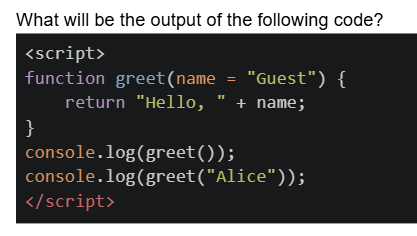
Text of the picture (copyable)
What will be the output of the following code?
```html
<script>
  function greet(name = "Guest") {
    return "Hello, " + name;
  }
  console.log(greet());
  console.log(greet("Alice"));
</script>
```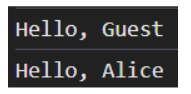
text
Hello, Guest
Hello, Alice
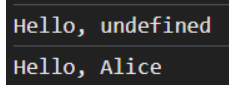
text
```
Hello, undefined
Hello, Alice
```
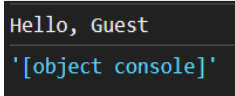
text
```
Hello, Guest
'[object console]'
```
- Error: Missing argument
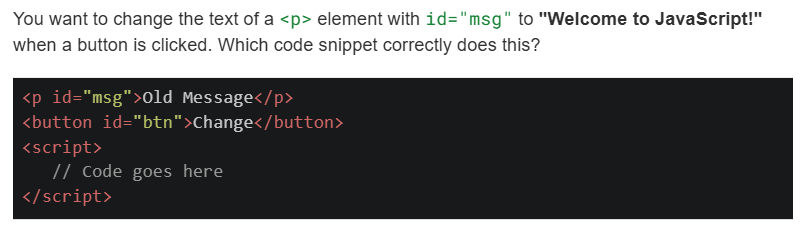
Text of the picture (copyable)
You want to change the text of a `<p>` element with `id="msg"` to "Welcome to JavaScript!" when a button is clicked. Which code snippet correctly does this?

```html
<p id="msg">Old Message</p>
<button id="btn">Change</button>
<script>
    // Code goes here
</script>
```
text
```javascript
document.getElementById("btn").onclick = function() {
    document.getElementById("msg").innerHTML = "Welcome to JavaScript!";
};
```
text
```javascript
document.getElementById("btn").addEventListener("click", function() {
    msg.text = "Welcome to JavaScript!";
});
```
text
```javascript document.querySelector("#btn").addEventListener("click", function() { document.querySelector("#msg").innerText = "Welcome to JavaScript!"; }); ```- Both and
text
```javascript
document.getElementById("btn").onclick = function() {
    document.getElementById("msg").innerHTML = "Welcome to JavaScript!";
};
```
Consider the data table below in SQLite database.
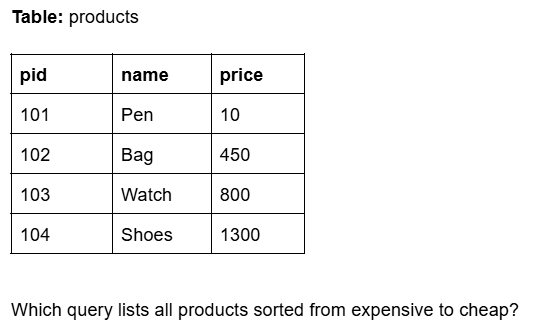
Text of the picture (copyable)
Table: products

| pid | name  | price |
| :-- | :---- | :---- |
| 101 | Pen   | 10    |
| 102 | Bag   | 450   |
| 103 | Watch | 800   |
| 104 | Shoes | 1300  |

Which query lists all products sorted from expensive to cheap?
- SELECT * FROM products ORDER BY price ASC;
- SELECT * FROM products ORDER BY price DESC;
- SELECT price FROM products;
- SELECT MAX(price) FROM products;
Which of the following commands is/are valid to run pytest from the command line?
- pytest
- pytest test_file.py
- pytest -run
- pytest -k “login”
Consider the following Python code.
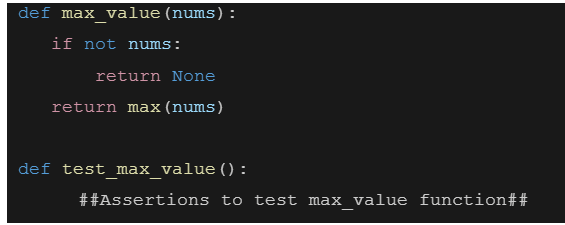 Which of the following assertion test case throws the exception?
Which of the following assertion test case throws the exception?Text of the picture (copyable)
```python
def max_value(nums):
    if not nums:
        return None
    return max(nums)

def test_max_value():
    ##Assertions to test max_value function##
```- assert max_value([3, 7, 2]) == 7
- assert max_value([]) is None
- assert max_value("abczfk") == "z"
- assert max_value(1) == 1
What does the following curl command do?

Text of the picture (copyable)
```
curl -X POST -d "username=student&password=1234" https://student/login
```
- Sends a POST request to retrieve data.
- Sends a POST request to send form data.
- Sends a POST request to send JSON data.
- Sends a POST request to retrieve JSON data.
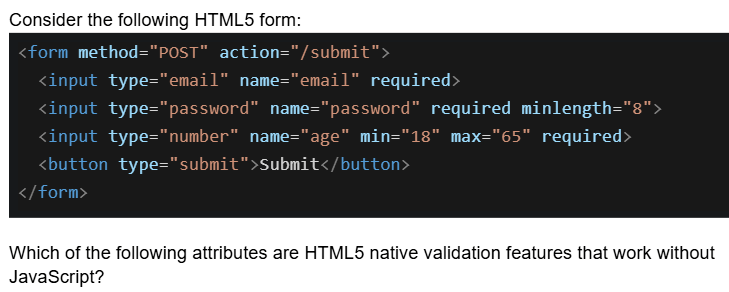
Text of the picture (copyable)
Consider the following HTML5 form:

```html
<form method="POST" action="/submit">
    <input type="email" name="email" required>
    <input type="password" name="password" required minlength="8">
    <input type="number" name="age" min="18" max="65" required>
    <button type="submit">Submit</button>
</form>
```

Which of the following attributes are HTML5 native validation features that work without JavaScript?- required, minlength, and type="email"
- min, max, and minlength
- required, type="password", and action
- type="email", min, max, minlength, and required
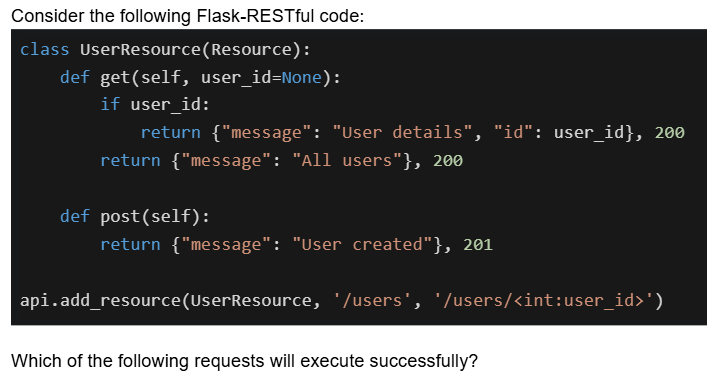
Text of the picture (copyable)
Consider the following Flask-RESTful code:

```python
class UserResource(Resource):
    def get(self, user_id=None):
        if user_id:
            return {"message": "User details", "id": user_id}, 200
        return {"message": "All users"}, 200

    def post(self):
        return {"message": "User created"}, 201

api.add_resource(UserResource, '/users', '/users/<int:user_id>')
```

Which of the following requests will execute successfully?- GET /users - returns 200 with all users
- GET /users/5 - returns 200 with user details for ID 5
- POST /users - returns 201 with user created message
- POST /users/5 - returns 201 with user created message
Which statements about frontend and backend validation are TRUE?
- Frontend validation (HTML5/JavaScript) is sufficient for security
- Frontend validation improves user experience by providing immediate feedback
- Backend validation is mandatory for security because frontend can be bypassed
- Backend validation should validate the same constraints as frontend
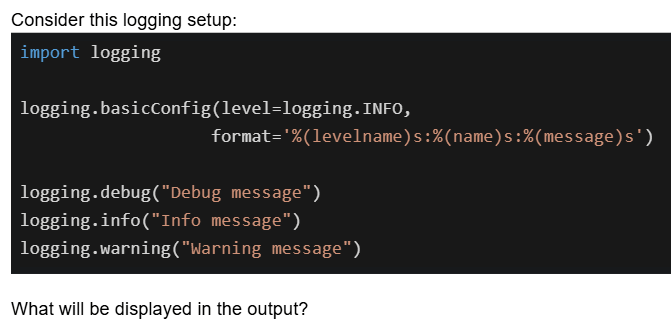
Text of the picture (copyable)
Consider this logging setup:

```python
import logging

logging.basicConfig(level=logging.INFO,
                    format='%(levelname)s:%(name)s:%(message)s')

logging.debug("Debug message")
logging.info("Info message")
logging.warning("Warning message")
```

What will be displayed in the output?- All three messages will be displayed
- Only the info and warning messages will be displayed
- Only the warning message will be displayed
- Only the info and debug messages will be displayed
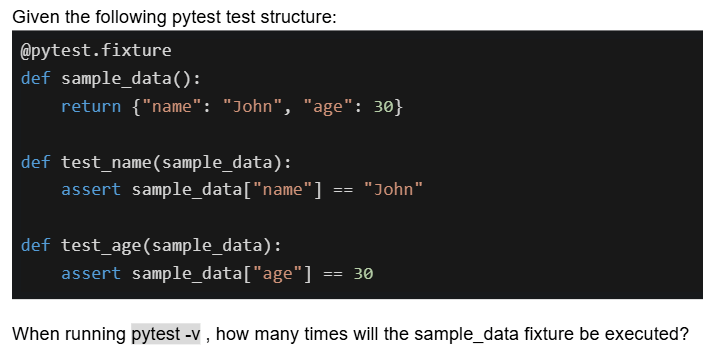
Text of the picture (copyable)
Given the following pytest test structure:

```python
@pytest.fixture
def sample_data():
    return {"name": "John", "age": 30}

def test_name(sample_data):
    assert sample_data["name"] == "John"

def test_age(sample_data):
    assert sample_data["age"] == 30
```

When running `pytest -v`, how many times will the sample_data fixture be executed?- Once for all tests
- Twice, once for each test
- Once during collection phase only
- It depends on the pytest configuration
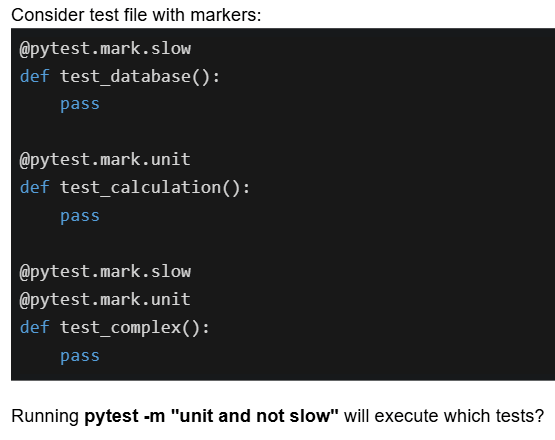
Text of the picture (copyable)
Consider test file with markers:

```python
@pytest.mark.slow
def test_database():
    pass

@pytest.mark.unit
def test_calculation():
    pass

@pytest.mark.slow
@pytest.mark.unit
def test_complex():
    pass
```

Running `pytest -m "unit and not slow"` will execute which tests?- test_database and test_complex
- Only test_calculation
- test_calculation and test_complex
- All three tests
You are on the main branch and want to merge feature1 and feature2 branches. What is the correct command sequence?

text
```
git merge feature1 then git merge feature2
```

text
```
git checkout feature1 then git merge feature2 then git merge main
```

text
```
git checkout feature1 then git merge feature2 then git checkout main then git merge feature1
```

text
```
git merge feature1 then git checkout feature2 then git merge main
```
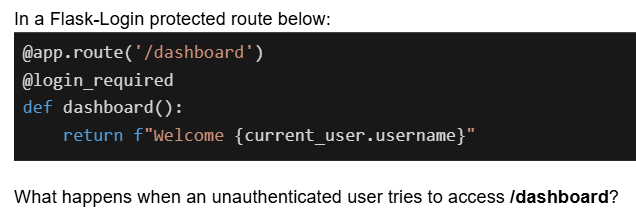
Text of the picture (copyable)
In a Flask-Login protected route below:

```python
@app.route('/dashboard')
@login_required
def dashboard():
    return f"Welcome {current_user.username}"
```

What happens when an unauthenticated user tries to access /dashboard?- Returns a 404 error
- Displays "Welcome None"
- Redirects to the login page
- Returns an error page with HTTP 403
Answer key
- Q1 (MCQ, 4 marks): D
- Q2 (MSQ, 5 marks): A, B
- Q3 (MSQ, 5 marks): B, E
- Q4 (MSQ, 3 marks): B, D
- Q5 (MCQ, 3 marks): B
- Q6 (MCQ, 3 marks): B
- Q7 (MCQ, 4 marks): D
- Q8 (MCQ, 4 marks): D
- Q9 (MCQ, 3 marks): C
- Q10 (MSQ, 3 marks): A, B, C
- Q11 (MCQ, 3 marks): D
- Q12 (MSQ, 3 marks): A, B, C
- Q13 (MSQ, 3 marks): B, C
- Q14 (MCQ, 2 marks): D
- Q15 (MCQ, 3 marks): C
- Q16 (MCQ, 3 marks): B
- Q17 (MCQ, 2 marks): C
- Q18 (MCQ, 2 marks): D
- Q19 (MCQ, 3 marks): A
- Q20 (MCQ, 3 marks): D
- Q21 (MCQ, 2 marks): B
- Q22 (MSQ, 3 marks): A, B, D
- Q23 (MCQ, 2 marks): D
- Q24 (MCQ, 2 marks): B
- Q25 (MCQ, 2 marks): D
- Q26 (MSQ, 5 marks): A, B, C
- Q27 (MSQ, 3 marks): B, C, D
- Q28 (MCQ, 3 marks): B
- Q29 (MCQ, 4 marks): B
- Q30 (MCQ, 5 marks): B
- Q31 (MCQ, 2 marks): A
- Q32 (MCQ, 3 marks): C