Home / Past papers / MAD1 End Term / this paper
IIT M FOUNDATION DIPLOMA FN EXAM - 22 Dec 2024
Elapsed 00:00
Text of the picture (copyable)
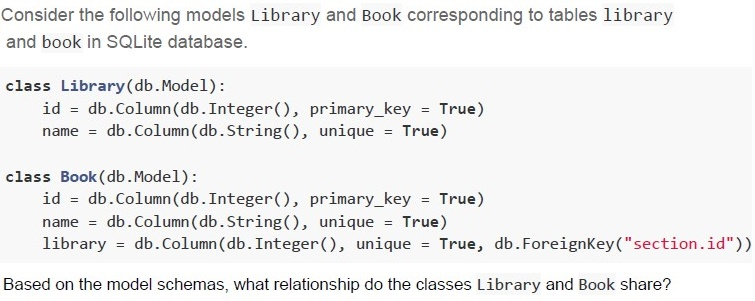
Consider the following models Library and Book corresponding to tables library and book in SQLite database.

```python
class Library(db.Model):
    id = db.Column(db.Integer(), primary_key = True)
    name = db.Column(db.String(), unique = True)

class Book(db.Model):
    id = db.Column(db.Integer(), primary_key = True)
    name = db.Column(db.String(), unique = True)
    library = db.Column(db.Integer(), unique = True, db.ForeignKey("section.id"))
```

Based on the model schemas, what relationship do the classes Library and Book share?- Many-to-Many
- One-to-Many
- One-to-One
- The tables are not at all related
Text of the picture (copyable)
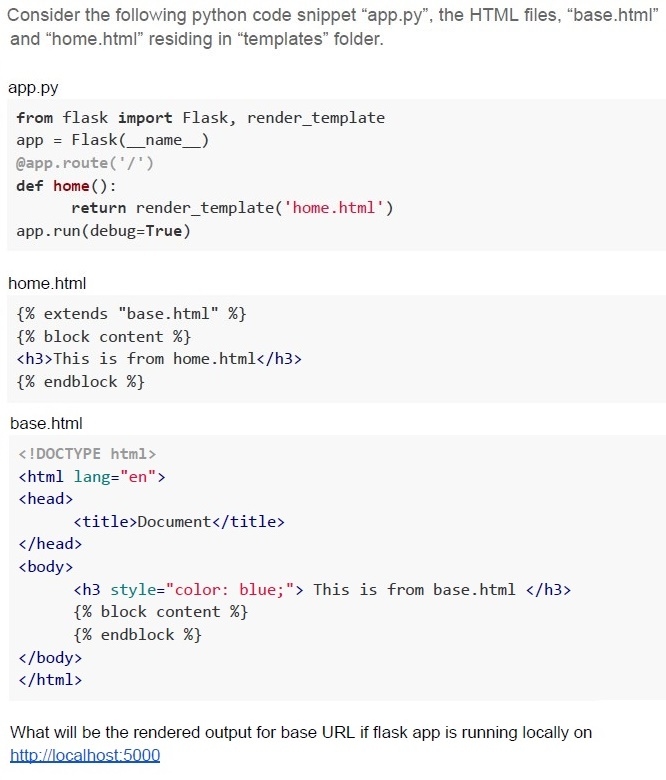
Consider the following python code snippet "app.py", the HTML files, "base.html" and "home.html" residing in "templates" folder.

app.py
```python
from flask import Flask, render_template
app = Flask(__name__)

@app.route('/')
def home():
    return render_template('home.html')

app.run(debug=True)
```

home.html
```html
{% extends "base.html" %}
{% block content %}
<h3>This is from home.html</h3>
{% endblock %}
```

base.html
```html
<!DOCTYPE html>
<html lang="en">
<head>
    <title>Document</title>
</head>
<body>
    <h3 style="color: blue;"> This is from base.html </h3>
    {% block content %}
    {% endblock %}
</body>
</html>
```

What will be the rendered output for base URL if flask app is running locally on
http://localhost:5000
text
This is from home.html
text
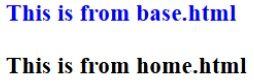
This is from base.html
This is from home.html
text
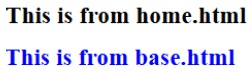
This is from home.html
This is from base.html

text
Error
Text of the picture (copyable)
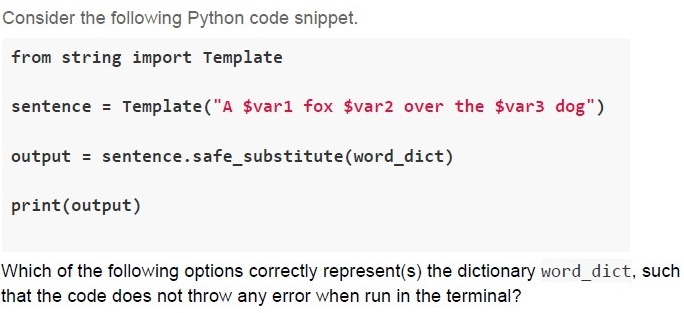
Consider the following Python code snippet.

```python
from string import Template

sentence = Template("A $var1 fox $var2 over the $var3 dog")

output = sentence.safe_substitute(word_dict)

print(output)
```

Which of the following options correctly represent(s) the dictionary `word_dict`, such that the code does not throw any error when run in the terminal?
text
```python
word_dict = {'var1': 'quick'}
```
text
```python
word_dict = {'var1': 'quick', 'var2': 'jumps'}
```
text
```python
word_dict = {'var1': 'quick', 'var2': 'jumps', 'var3': 'lazy'}
```
text
All of these
Which of the following is a time series database?
- MongoDB
- InfluxDB
- MySQL
- PostgreSQL
Match the platforms given in column A with their correct features in column B.
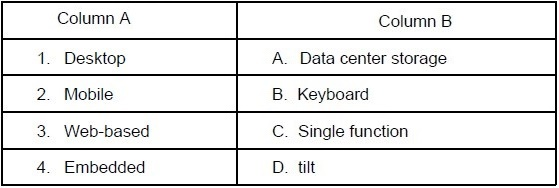 Match the platforms given in column A with their correct features in column B.
Match the platforms given in column A with their correct features in column B.
Text of the picture (copyable)
| Column A | Column B |
|---|---|
| 1. Desktop | A. Data center storage |
| 2. Mobile | B. Keyboard |
| 3. Web-based | C. Single function |
| 4. Embedded | D. tilt |
- 1 - A, 2 - B, 3 - C, 4 - D
- 1 - D, 2 - A, 3 - B, 4 - C
- 1 - B, 2 - D, 3 - A, 4 - C
- 1 - A, 2 - C, 3 - D, 4 - B
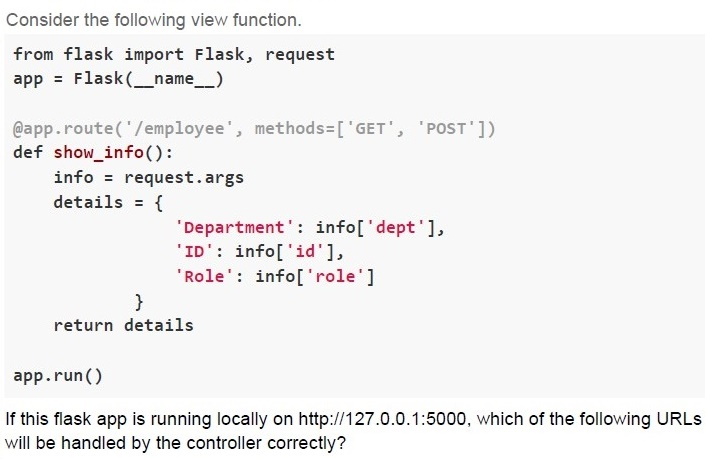
Text of the picture (copyable)
Consider the following view function.

```python
from flask import Flask, request
app = Flask(__name__)

@app.route('/employee', methods=['GET', 'POST'])
def show_info():
    info = request.args
    details = {
        'Department': info['dept'],
        'ID': info['id'],
        'Role': info['role']
    }
    return details

app.run()
```

If this flask app is running locally on http://127.0.0.1:5000, which of the following URLs will be handled by the controller correctly?
text
```
http://127.0.0.1:5000?dept=HR&id=101&role=manager
```

text
http://127.0.0.1:5000/HR/101/manager

text
```
http://127.0.0.1:5000/employee?dept=HR&id=1018&role=manager
```

text
```
http://127.0.0.1:5000/employee/HR/101/manager
```

Text of the picture (copyable)
A certain internet connection is established such that its bandwidth reduces to half of its current value every hour. A user connects to this connection at 01:00 pm with the network speed of 4 Mbps, how much data (in GBs) will be consumed by the user by 04:00 p.m in the evening? [round off upto 2 decimal places](Assume that the user is using the entire bandwidth)
- 1.35
- 2.7
- 3.15
- 5.4
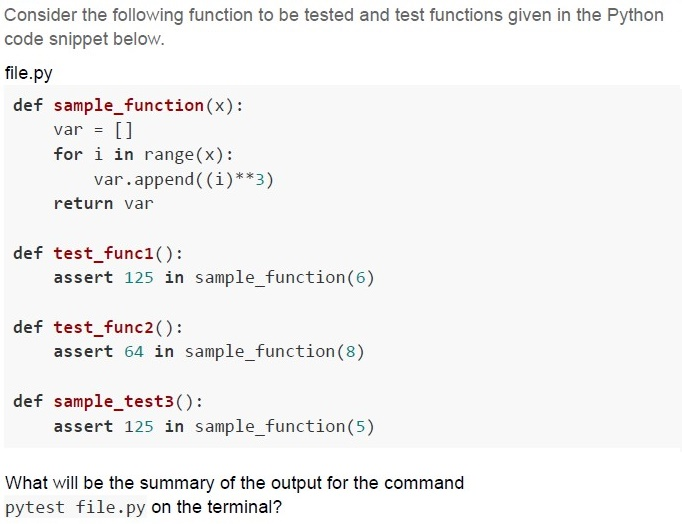
Text of the picture (copyable)
Consider the following function to be tested and test functions given in the Python code snippet below.

file.py

```python
def sample_function(x):
    var = []
    for i in range(x):
        var.append((i)**3)
    return var

def test_func1():
    assert 125 in sample_function(6)

def test_func2():
    assert 64 in sample_function(8)

def sample_test3():
    assert 125 in sample_function(5)
```

What will be the summary of the output for the command
`pytest file.py` on the terminal?
text
```
=========== 1 failed, 2 passed in 0.06s ===========
```

text
```
========== 2 failed, 1 passed in 0.06s ==========
```

text
```
============================= 3 passed in 0.06s =============================
```

text
```
============================= 2 passed in 0.06s =============================
```
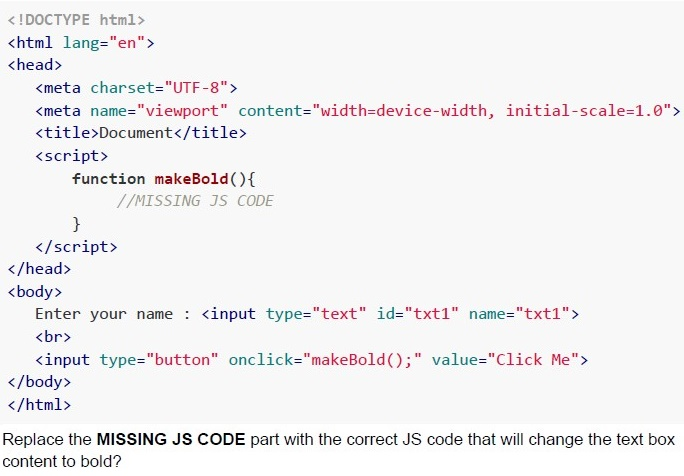
Consider the following HTML document.
 Consider the following HTML document.
Consider the following HTML document. Text of the picture (copyable)
```html
<!DOCTYPE html>
<html lang="en">
<head>
    <meta charset="UTF-8">
    <meta name="viewport" content="width=device-width, initial-scale=1.0">
    <title>Document</title>
    <script>
        function makeBold(){
            //MISSING JS CODE
        }
    </script>
</head>
<body>
    Enter your name : <input type="text" id="txt1" name="txt1">
    <br>
    <input type="button" onclick="makeBold();" value="Click Me">
</body>
</html>
```
Replace the **MISSING JS CODE** part with the correct JS code that will change the text box content to bold?
text
```javascript
t=document.getElementsByName("txt1").value;
t.style.fontWeight="bold";
```
text
```javascript
t=document.getElementById("txt1").value;
t.style.fontWeight="bold";
```
text
```javascript
t=document.getElementById("txt1");
t.style.fontWeight="bold";
```
text
```javascript
t=document.getElementById("txt1");
t.style.fontWeight="bold";
```
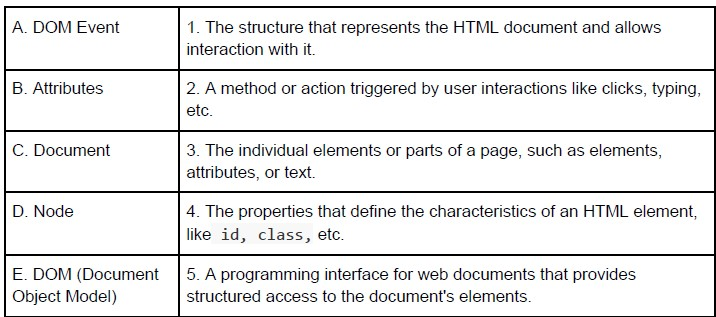
Match the following terms with their correct descriptions:
 Match the following terms with their correct descriptions:
Match the following terms with their correct descriptions:
Text of the picture (copyable)
| | |
| :--- | :--- |
| A. DOM Event | 1. The structure that represents the HTML document and allows interaction with it. |
| B. Attributes | 2. A method or action triggered by user interactions like clicks, typing, etc. |
| C. Document | 3. The individual elements or parts of a page, such as elements, attributes, or text. |
| D. Node | 4. The properties that define the characteristics of an HTML element, like `id`, `class`, etc. |
| E. DOM (Document Object Model) | 5. A programming interface for web documents that provides structured access to the document's elements. |
- A → 2, B → 4, C → 1, D → 3, E → 5
- A → 3, B → 4, C → 1, D → 2, E → 5
- A → 2, B → 4, C → 5, D → 3, E → 1
- A → 3, B → 4, C → 5, D → 2, E → 1
Which of the following is an example of an application using Attribute-Based Access Control (ABAC)?
- A system where users are granted access based on their job roles within anorganization.
- A cloud service that grants or restricts access to files based on attributes suchas user department, job title, or current location.
- A file-sharing system where the file owner decides who can access theirdocuments.
- A system that enforces access based on security classifications and clearancelevels.
Text of the picture (copyable)
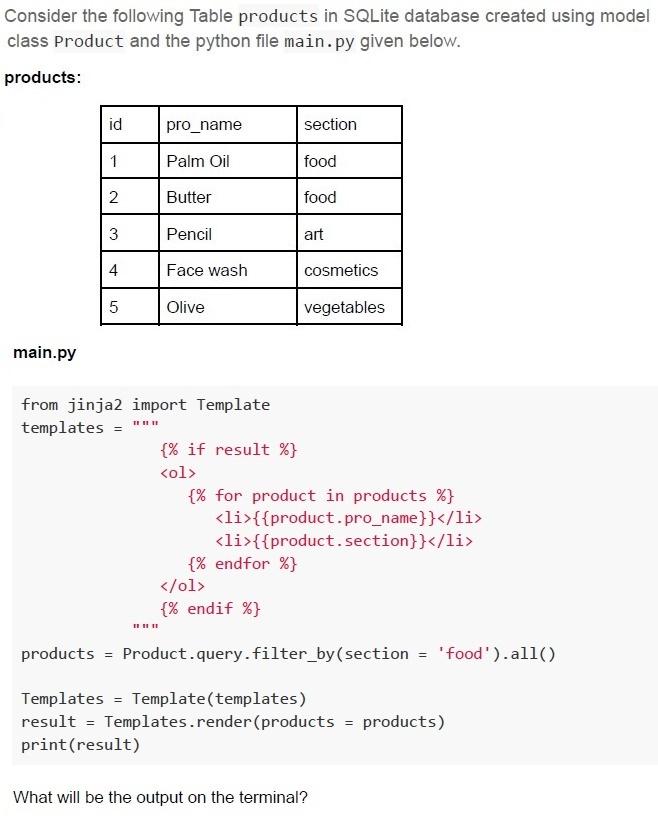
Consider the following Table products in SQLite database created using model class Product and the python file main.py given below.

products:

| id | pro_name  | section    |
|:---|:----------|:-----------|
| 1  | Palm Oil  | food       |
| 2  | Butter    | food       |
| 3  | Pencil    | art        |
| 4  | Face wash | cosmetics  |
| 5  | Olive     | vegetables |

main.py

```python
from jinja2 import Template
templates = """
    {% if result %}
    <ol>
        {% for product in products %}
        <li>{{product.pro_name}}</li>
        <li>{{product.section}}</li>
        {% endfor %}
    </ol>
    {% endif %}
"""

products = Product.query.filter_by(section = 'food').all()

Templates = Template(templates)
result = Templates.render(products = products)
print(result)
```

What will be the output on the terminal?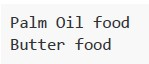
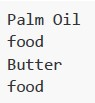
text
Palm Oil food
Butter food
text
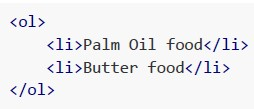
```html
<ol>
    <li>Palm Oil food</li>
    <li>Butter food</li>
</ol>
```
text
Palm Oil
food
Butter
food
text
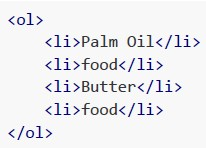
```html
<ol>
    <li>Palm Oil</li>
    <li>food</li>
    <li>Butter</li>
    <li>food</li>
</ol>
```
Text of the picture (copyable)
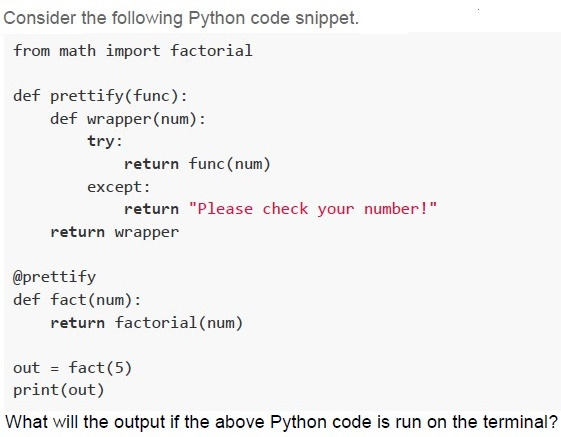
Consider the following Python code snippet.

```python
from math import factorial

def prettify(func):
    def wrapper(num):
        try:
            return func(num)
        except:
            return "Please check your number!"
    return wrapper

@prettify
def fact(num):
    return factorial(num)

out = fact(5)
print(out)
```

What will the output if the above Python code is run on the terminal?
text
-120

text
120

text
Please check your number!

text
None of these.
Text of the picture (copyable)
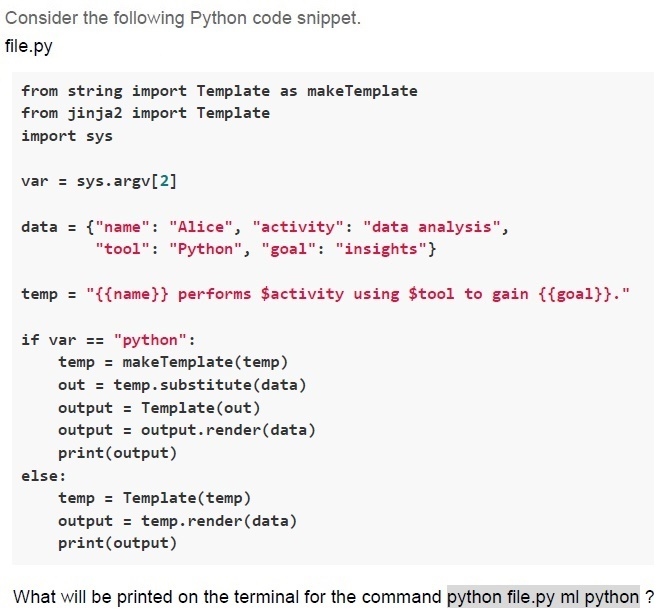
Consider the following Python code snippet.
file.py

```python
from string import Template as makeTemplate
from jinja2 import Template
import sys

var = sys.argv[2]

data = {"name": "Alice", "activity": "data analysis",
        "tool": "Python", "goal": "insights"}

temp = "{{name}} performs $activity using $tool to gain {{goal}}."

if var == "python":
    temp = makeTemplate(temp)
    out = temp.substitute(data)
    output = Template(out)
    output = output.render(data)
    print(output)
else:
    temp = Template(temp)
    output = temp.render(data)
    print(output)
```

What will be printed on the terminal for the command `python file.py ml python`?
text
Alice performs $activity using $tool to gain insights.

text
```
{{name}} performs $activity using $tool to gain {{goal}}.
```
text
Alice performs data analysis using Python to gain insights.

text
```
Alice performs $activity using $tool to gain {{goal}}.
```
Consider the following HTML document.
 Consider the following HTML document.
How will the browser render above HTML file?
Consider the following HTML document.
How will the browser render above HTML file?
Consider the following HTML document.
How will the browser render above HTML file?Text of the picture (copyable)
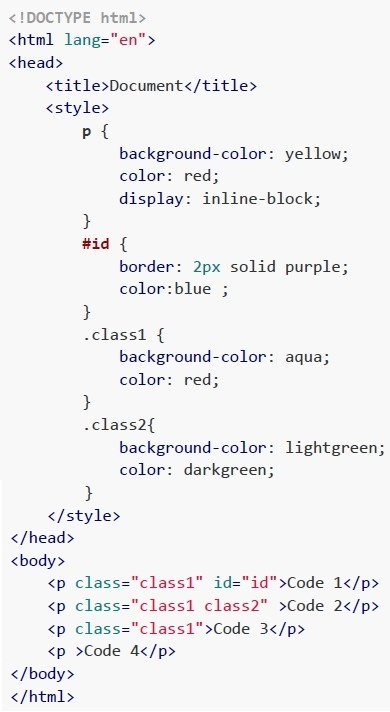
```html
<!DOCTYPE html>
<html lang="en">
<head>
    <title>Document</title>
    <style>
        p {
            background-color: yellow;
            color: red;
            display: inline-block;
        }
        #id {
            border: 2px solid purple;
            color:blue ;
        }
        .class1 {
            background-color: aqua;
            color: red;
        }
        .class2{
            background-color: lightgreen;
            color: darkgreen;
        }
    </style>
</head>
<body>
    <p class="class1" id="id">Code 1</p>
    <p class="class1 class2" >Code 2</p>
    <p class="class1">Code 3</p>
    <p >Code 4</p>
</body>
</html>
```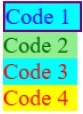
text
This is a diagram showing four stacked rectangular blocks, each with text.
The top block is light blue with a purple border and contains the text "Code 1" in blue.
The second block is light green and contains the text "Code 2" in green.
The third block is light blue and contains the text "Code 3" in brown.
The bottom block is yellow and contains the text "Code 4" in orange.
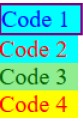
text
This is a diagram showing four colored horizontal bars, each with text.

- Top bar (cyan with a purple border): Code 1
- Second bar (cyan): Code 2
- Third bar (light green): Code 3
- Bottom bar (yellow): Code 4

text
Code 1 Code 2 Code 3 Code 4

text
The image displays four rectangular boxes arranged horizontally.
1. The first box has a purple border and a light blue fill. Inside, the text "Code 1" is written in blue.
2. The second box has a light green fill. Inside, the text "Code 2" is written in green.
3. The third box has a light blue fill. Inside, the text "Code 3" is written in red.
4. The fourth box has a yellow fill. Inside, the text "Code 4" is written in red.
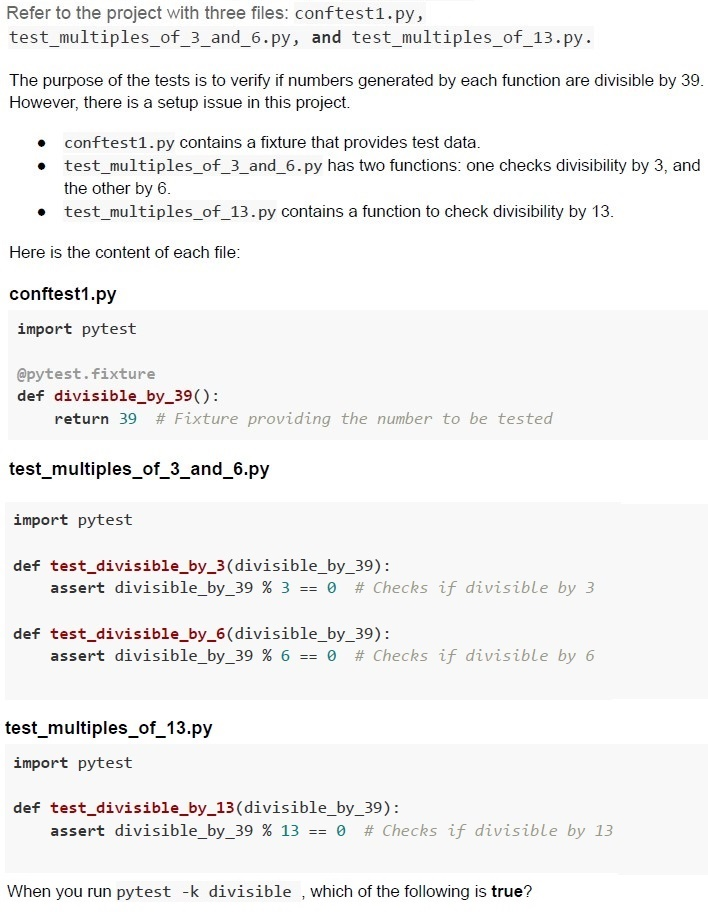
Text of the picture (copyable)
Refer to the project with three files: `conftest1.py`, `test_multiples_of_3_and_6.py`, and `test_multiples_of_13.py`.

The purpose of the tests is to verify if numbers generated by each function are divisible by 39. However, there is a setup issue in this project.

* `conftest1.py` contains a fixture that provides test data.
* `test_multiples_of_3_and_6.py` has two functions: one checks divisibility by 3, and the other by 6.
* `test_multiples_of_13.py` contains a function to check divisibility by 13.

Here is the content of each file:

**conftest1.py**
```python
import pytest

@pytest.fixture
def divisible_by_39():
    return 39 # Fixture providing the number to be tested
```

**test_multiples_of_3_and_6.py**
```python
import pytest

def test_divisible_by_3(divisible_by_39):
    assert divisible_by_39 % 3 == 0 # Checks if divisible by 3

def test_divisible_by_6(divisible_by_39):
    assert divisible_by_39 % 6 == 0 # Checks if divisible by 6
```

**test_multiples_of_13.py**
```python
import pytest

def test_divisible_by_13(divisible_by_39):
    assert divisible_by_39 % 13 == 0 # Checks if divisible by 13
```

When you run `pytest -k divisible`, which of the following is **true**?
text
```
========== 1 passed in 0.02s ==========
```

text
```
========== 3 passed in 0.02s ==========
```

text
```
========= 1 failed, 2 passed in 0.06s =========
```

text
```
========== 3 errors in 0.02s ==========
```
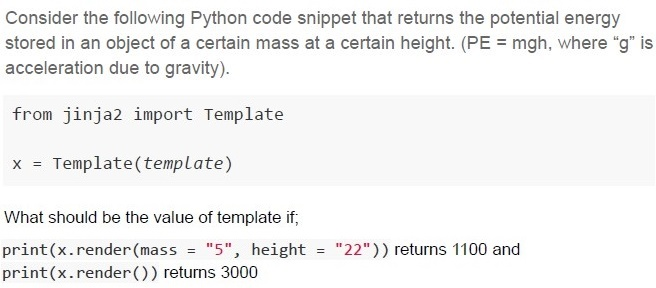
Text of the picture (copyable)
Consider the following Python code snippet that returns the potential energy stored in an object of a certain mass at a certain height. (PE = mgh, where "g" is acceleration due to gravity).

```python
from jinja2 import Template

x = Template(template)
```

What should be the value of template if;
`print(x.render(mass = "5", height = "22"))` returns 1100 and
`print(x.render())` returns 3000

text
```
"{{ mass|default(3)|int*gravity|default(10)|int*height|default(100)|int }}"
```
text
```
"{{ mass|int|default(3)*gravity|int|default(10)*height|int|default(100) }}"
```
text
```
"{{ mass|default(5)|int*gravity|default(10)|int*height|default(100)|int }}"
```
text
```
"{{ mass|int|default(5)*gravity|int|default(10)*height|int|default(100) }}"
```
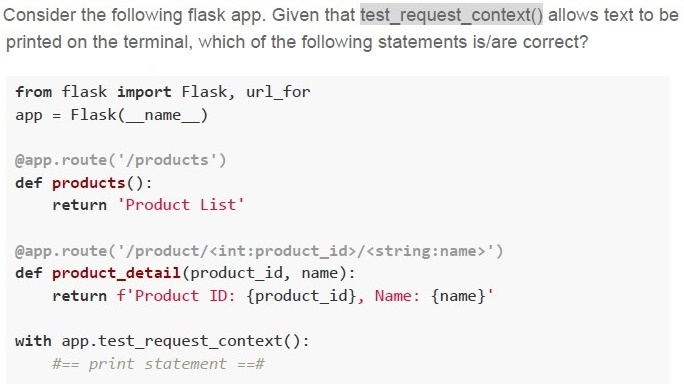
Text of the picture (copyable)
Consider the following flask app. Given that `test_request_context()` allows text to be printed on the terminal, which of the following statements is/are correct?

```python
from flask import Flask, url_for
app = Flask(__name__)

@app.route('/products')
def products():
    return 'Product List'

@app.route('/product/<int:product_id>/<string:name>')
def product_detail(product_id, name):
    return f'Product ID: {product_id}, Name: {name}'

with app.test_request_context():
    #== print statement ==#
```
text
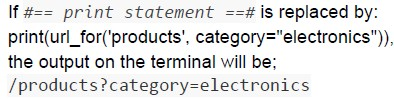
If `print statement` is replaced by:
```python
print(url_for('products', category="electronics"))
```
the output on the terminal will be;
`/products?category=electronics`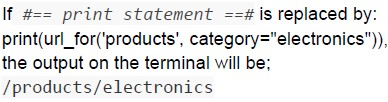
text
If #== *print statement* ==# is replaced by:
```python
print(url_for('products', category="electronics")),
```
the output on the terminal will be;
/products/electronics
text
If #== print statement ==# is replaced by:
```python
print(url_for('product_detail', product_id=101, name="Gadget", discount=20))
```
the output on the terminal will be;
/product/101/Gadget?discount=20
text
If #== print statement ==# is replaced by:
```python
print(url_for('product_detail', product_id=101, name="Gadget", discount=20))
```
the output on the terminal will be;
/product/101/Gadget/20
Consider the following code snippet.
 Consider the following code snippet.
Consider the following code snippet.
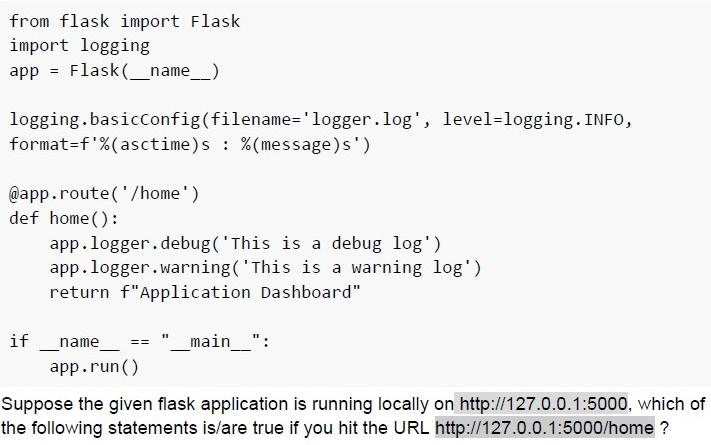
Text of the picture (copyable)
```python
from flask import Flask
import logging
app = Flask(__name__)

logging.basicConfig(filename='logger.log', level=logging.INFO,
                    format=f'%(asctime)s : %(message)s')

@app.route('/home')
def home():
    app.logger.debug('This is a debug log')
    app.logger.warning('This is a warning log')
    return f"Application Dashboard"

if __name__ == "__main__":
    app.run()
```
Suppose the given flask application is running locally on http://127.0.0.1:5000, which of the following statements is/are true if you hit the URL http://127.0.0.1:5000/home ?
text
A file called "logger.log" will be created inside the Flask application root folder.

text
The message "Application Dashboard" will be displayed within the log file.

text
The message "This is a debug log" will be logged inside the "logger.log" file.

text
The message "This is a warning log" will be logged inside the "logger.log" file.
Consider the following flask application running on the base URL and is accessed through a browser. Select the correct option(s).
 Consider the following flask application running on the base URL and is accessed through a browser. Select the correct option(s).
Consider the following flask application running on the base URL and is accessed through a browser. Select the correct option(s).
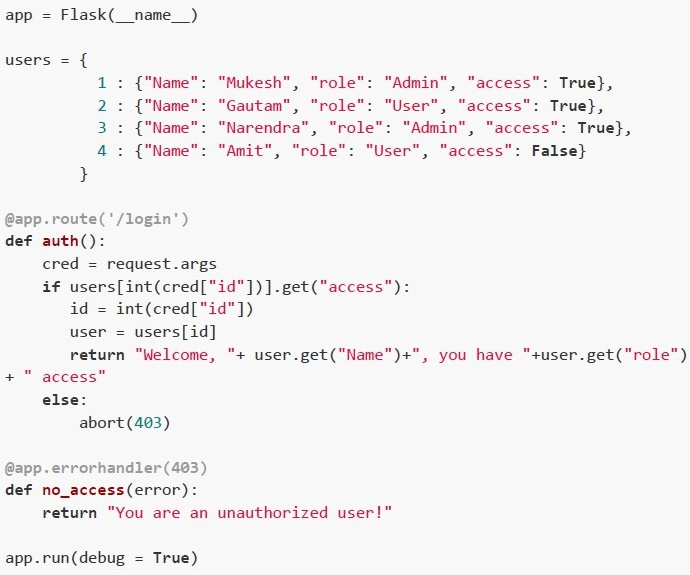
Text of the picture (copyable)
```python
app = Flask(__name__)

users = {
    1 : {"Name": "Mukesh", "role": "Admin", "access": True},
    2 : {"Name": "Gautam", "role": "User", "access": True},
    3 : {"Name": "Narendra", "role": "Admin", "access": True},
    4 : {"Name": "Amit", "role": "User", "access": False}
}

@app.route('/login')
def auth():
    cred = request.args
    if users[int(cred["id"])].get("access"):
        id = int(cred["id"])
        user = users[id]
        return "Welcome, "+ user.get("Name")+", you have "+user.get("role") \
            + " access"
    else:
        abort(403)

@app.errorhandler(403)
def no_access(error):
    return "You are an unauthorized user!"

app.run(debug = True)
```
text
For the URL: http://127.0.0.1:5000?id=2, The browser will render;
Welcome, Gautam, you have User access.

text
For the URL: http://127.0.0.1:5000/login?id=1, The browser will render;
Welcome, Mukesh, you have Admin access.

text
For the URL: http://127.0.0.1:5000/login?id=3, The browser will render,
Welcome, Narendra, you have User access.

text
For the URL: http://127.0.0.1:5000/login?id=4, The browser will render,
You are an unauthorized user!
Consider the following Python code snippet.
 Consider the following Python code snippet.
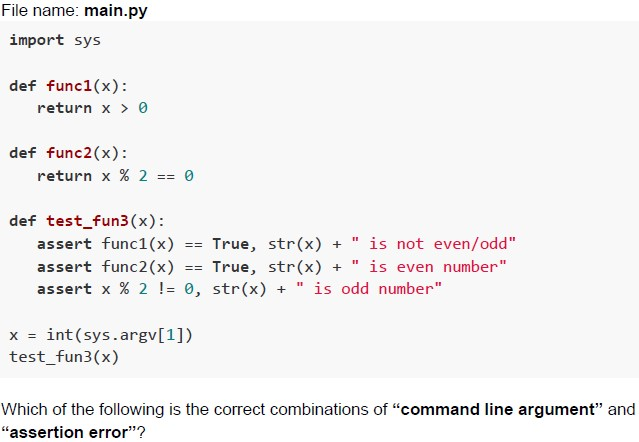
Consider the following Python code snippet. Text of the picture (copyable)
File name: main.py
```python
import sys

def func1(x):
    return x > 0

def func2(x):
    return x % 2 == 0

def test_fun3(x):
    assert func1(x) == True, str(x) + " is not even/odd"
    assert func2(x) == True, str(x) + " is even number"
    assert x % 2 != 0, str(x) + " is odd number"

x = int(sys.argv[1])
test_fun3(x)
```

Which of the following is the correct combinations of “command line argument” and “assertion error”?
text
Command: python main.py 9
AssertionError: 9 is even number
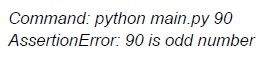
text
Command: python main.py 90
AssertionError: 90 is odd number

text
```
Command: python main.py 0
AssertionError: 0 is not even/odd
```
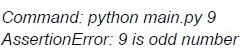
text
Command: python main.py 9
AssertionError: 9 is odd number
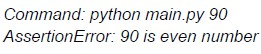
text
Command: python main.py 90
AssertionError: 90 is even number
Which of the following statements about the Constraint Validation API is/are true?
- The Constraint Validation API ensures that form input meets client-sidevalidation rules before submission.
- The Constraint Validation API is sufficient to prevent server-side attacks likeSQL injection.
- It is possible to bypass the Constraint Validation API by directly sendingrequests to the server.
- The Constraint Validation API automatically validates all data on the serverside.
Which of the following statements is invalid in the context of the primary key?
- The primary key can be null
- The primary key can be auto-incremented
- The primary key allows duplicate values
- The primary key can be referenced by foreign keys in other tables.
Consider the following HTML document.
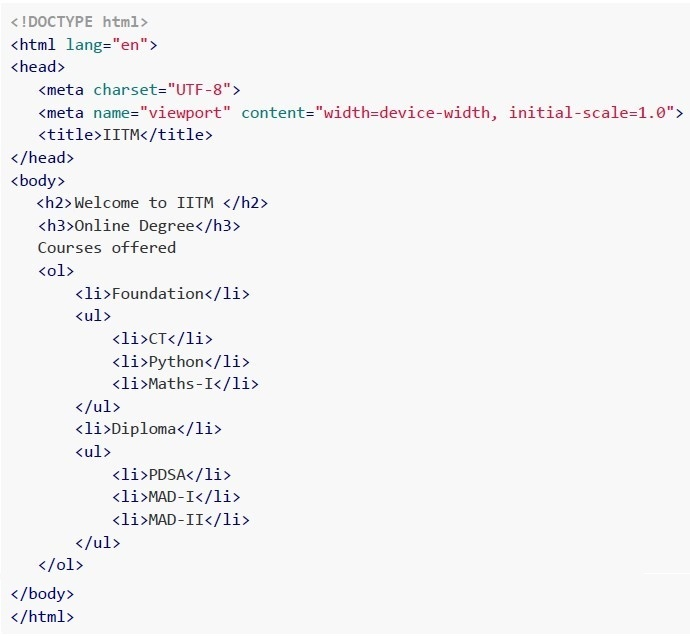 Consider the following HTML document.
Which of the following statements is/are correct about the above code snippet?
Consider the following HTML document.
Which of the following statements is/are correct about the above code snippet?
Consider the following HTML document.
Which of the following statements is/are correct about the above code snippet?Text of the picture (copyable)
```html
<!DOCTYPE html>
<html lang="en">
<head>
    <meta charset="UTF-8">
    <meta name="viewport" content="width=device-width, initial-scale=1.0">
    <title>IITM</title>
</head>
<body>
    <h2>Welcome to IITM </h2>
    <h3>Online Degree</h3>
    Courses offered
    <ol>
        <li>Foundation</li>
        <ul>
            <li>CT</li>
            <li>Python</li>
            <li>Maths-I</li>
        </ul>
        <li>Diploma</li>
        <ul>
            <li>PDSA</li>
            <li>MAD-I</li>
            <li>MAD-II</li>
        </ul>
    </ol>
</body>
</html>
```- List Items, Foundations and Diploma are numbered 1 and 2
- List Items, Foundations and Diploma are bulleted
- List Items, PDSA, MAD-I and MAD-II are numbered 1, 2 and 3
- List Items, PDSA, MAD-I and MAD-II are bulleted

Text of the picture (copyable)
Consider a comma-separated values (CSV) file with all characters set ["0", "1", "2", "3", "4", "5", "6", "7", "8", "9", "a", "b"]. You need to store a file consisting of 2000 characters mentioned only in the above list without spaces. How many minimum number of bytes are required to store this CSV file efficiently?

Text of the picture (copyable)
You are connected to a server that can process 1500 requests per second. Each request is a constant size of 100KB. You are connected to the above server through a network line with a speed of 2Gbps. What is the maximum number of requests per second that the server can handle(in KBps)? (Consider that 1000Bytes=1KB, 1000KB = 1MB)?
Comprehension passage - the questions below it refer to this
Based on the above data, answer the given subquestions.
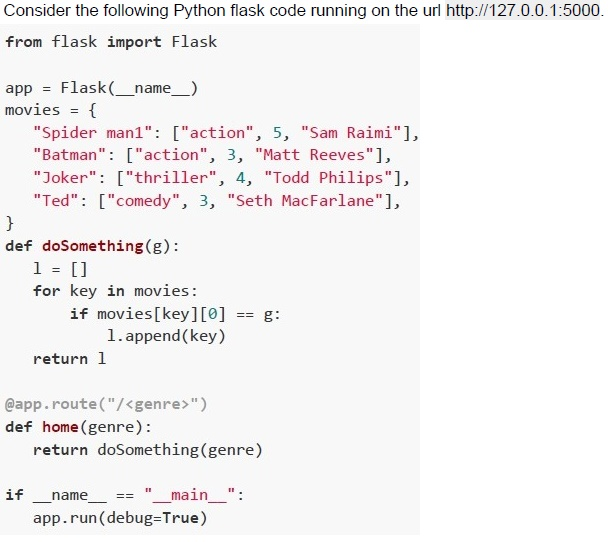

Text of the picture (copyable)
Which of the following urls will display [Joker]
on the browser?

text
http://127.0.0.1:5000/action

text
http://127.0.0.1:5000/thriller

text
http://127.0.0.1:5000/comedy

text
http://127.0.0.1:5000?genre=thriller

Text of the picture (copyable)
What will be displayed on the browser for the url:
http://127.0.0.1:5000?genre=action ?

text
[5, 3]

text
```
["Spider man 1", "Batman"]
```

text
```
["Sam Raimi", "Matt Reeves"]
```
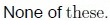
text
None of these.
Comprehension passage - the questions below it refer to this
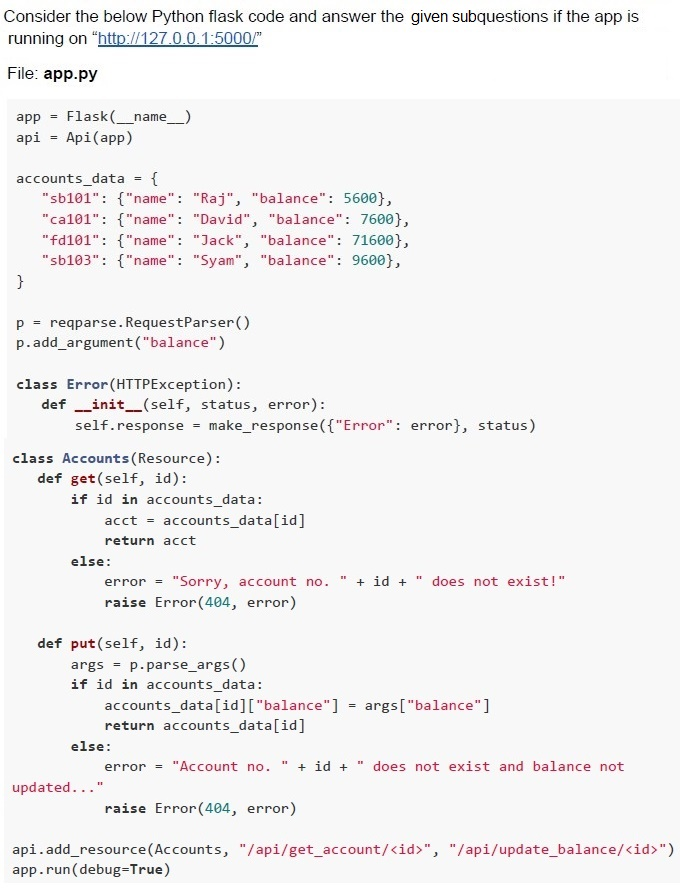

Text of the picture (copyable)
What will be the output of the below terminal request?
```
curl http://127.0.0.1:5000/api/get_account/fd101 -X GET
```
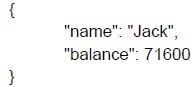
text
```json
{
    "name": "Jack",
    "balance": 71600
}
```
text
Sorry, account no. fd101 does not exist

text
Account no. fd101 does not exist and balance not updated...
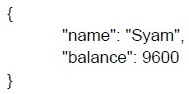
text
```json
{
    "name": "Syam",
    "balance": 9600
}
```

Text of the picture (copyable)
Which of the following command will
update balance of account no. **ca101**?

text
```
curl http://127.0.0.1:5000/api/update_balance/ca101 -X POST -d
"{\"balance\":\"15890\"}" -H "Content-Type: application/json"
```
text
```
curl http://127.0.0.1:5000/api/get_balance/ca101 -X POST -d
"{\"balance\":\"15890\"}" -H "Content-Type: application/json"
```
text
```
curl http://127.0.0.1:5000/api/get_balance/ca101 -X PUT -d
"{\"balance\":\"15890\"}" -H "Content-Type: application/json"
```
text
```
curl http://127.0.0.1:5000/api/update_balance/ca101 -X PUT -d
"{\"balance\":\"15890\"}" -H "Content-Type: application/json"
```
Comprehension passage - the questions below it refer to this
Use the Python code given below for answering the subquestions:
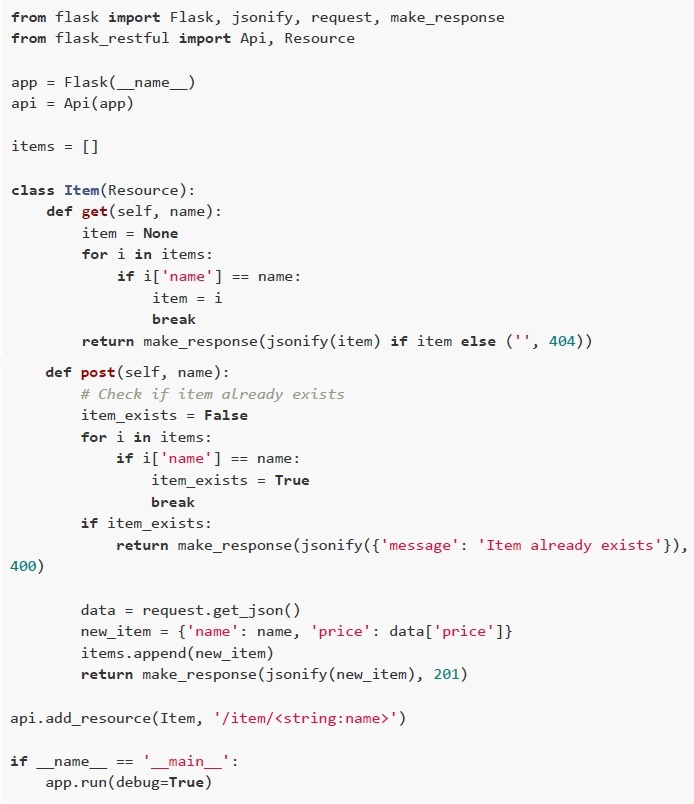 Use the Python code given below for answering the subquestions:
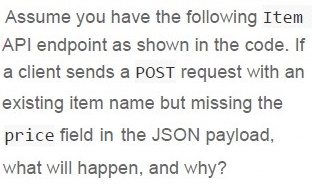
Text of the picture (copyable)
Assume you have the following Item
API endpoint as shown in the code. If
a client sends a POST request with an
existing item name but missing the
price field in the JSON payload,
what will happen, and why?
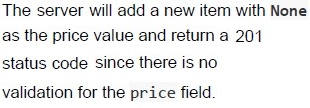
text
The server will add a new item with **None**
as the price value and return a 201
status code since there is no
validation for the price field.
text
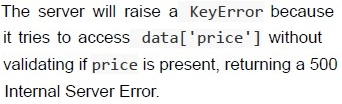
The server will raise a KeyError because
it tries to access data['price'] without
validating if price is present, returning a 500
Internal Server Error.
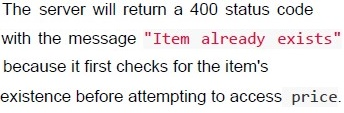
text
The server will return a 400 status code
with the message "Item already exists"
because it first checks for the item's
existence before attempting to access price.
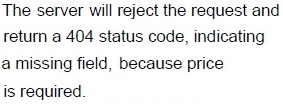
text
The server will reject the request and
return a 404 status code, indicating
a missing field, because price
is required.

Text of the picture (copyable)
What will be the status code of the response
for the request:

```
curl http://127.0.0.1:5000/item/candle?price=120 -X POST
```
- 201
- 404
- 500
- None of these
Answer key
- Q1 (MCQ, 2 marks): D
- Q2 (MCQ, 2 marks): B
- Q3 (MCQ, 2 marks): D
- Q4 (MCQ, 2 marks): B
- Q5 (MCQ, 2 marks): C
- Q6 (MCQ, 3 marks): C
- Q7 (MCQ, 3 marks): C
- Q8 (MCQ, 3 marks): D
- Q9 (MCQ, 3 marks): D
- Q10 (MCQ, 3 marks): A
- Q11 (MCQ, 3 marks): B
- Q12 (MCQ, 3 marks): D
- Q13 (MCQ, 3 marks): B
- Q14 (MCQ, 4.5 marks): C
- Q15 (MCQ, 4.5 marks): D
- Q16 (MCQ, 4.5 marks): D
- Q17 (MCQ, 4.5 marks): A
- Q18 (MSQ, 4.5 marks): A, C
- Q19 (MSQ, 3 marks): A, D
- Q20 (MSQ, 3 marks): B, D
- Q21 (MSQ, 3 marks): A, B, C
- Q22 (MSQ, 3 marks): A, C
- Q23 (MSQ, 2 marks): A, C
- Q24 (MSQ, 2 marks): A, D
- Q25 (SA, 3 marks): 1000
- Q26 (SA, 3 marks): 150000
- Q27 (MCQ, 3 marks): C
- Q28 (MCQ, 2 marks): B
- Q29 (MCQ, 4.5 marks): A
- Q30 (MCQ, 4.5 marks): D
- Q31 (MCQ, 4.5 marks): B
- Q32 (MCQ, 3 marks): D
Concepts this paper tests
Auto-generated summary from the source site. Handy as a checklist; the lessons above explain each idea from scratch.
Here’s a structured summary of the core topics, concepts, and principles essential for the Diploma Level: Modern Application Development I exam, along with a knowledge graph in Mermaid syntax.
Core Topics and Concepts Summary
1. Web Development with Flask
Key Concepts:
- Flask Basics: Routing, request handling, templates (Jinja2), and context management.
- Request Methods:
GET,POST,PUT, etc. - URL Handling: Dynamic routing (
/<variable>), query parameters (?key=value). Templates (Jinja2):
- Template inheritance (
{% extends %},{% block %}). - Variable substitution (
{{ variable }}). - Conditional rendering (
{% if %}).
- Template inheritance (
- Error Handling: Custom error pages (
@app.errorhandler). - Logging: Configuring logs (
logging.basicConfig), log levels (debug,info,warning). - Flask-RESTful: Building REST APIs with resources and request parsing.
Key Code Snippets:
### Basic Flask App
from flask import Flask
app = Flask(__name__)
@app.route('/')
def home():
    return "Hello, World!"
app.run(debug=True)

### Dynamic Routing
@app.route('/user/<username>')
def show_user(username):
    return f"User: {username}"

### Query Parameters
from flask import request
@app.route('/search')
def search():
    query = request.args.get('q')
    return f"Search query: {query}"

### Jinja2 Template Rendering
from flask import render_template
@app.route('/template')
def template():
    return render_template('index.html', title="Home")

### REST API with Flask-RESTful
from flask_restful import Api, Resource
api = Api(app)
class HelloWorld(Resource):
    def get(self):
        return {"message": "Hello, World!"}
api.add_resource(HelloWorld, '/api/hello')
Equations (Math-Related):
- Bandwidth Decay (Q8): \[ B(t) = B_0 \times \left(\frac{1}{2}\right)^t \] where \( B_0 \) = initial bandwidth, \( t \) = time in hours.
- Data Consumption (Q8): \[ \text{Total Data (GB)} = \sum_{t=0}^{n-1} \left( B(t) \times \text{time} \times \frac{1}{8 \times 1024} \right) \]
- Character Encoding (Q26): \[ \text{Min bits per character} = \lceil \log_2(n) \rceil \] where \( n \) = number of unique characters.
2. Databases and SQLAlchemy
Key Concepts:
- SQLAlchemy Models: Defining tables, relationships (
ForeignKey), and constraints. Relationships:
- One-to-Many: Foreign key in the "many" table (e.g.,
Book.library_idreferencesLibrary.id). - Many-to-Many: Requires an association table.
- One-to-Many: Foreign key in the "many" table (e.g.,
- Time-Series Databases: InfluxDB (vs. MongoDB, MySQL, PostgreSQL).
- Primary Keys: Unique, non-null, can be auto-incremented.
Key Code Snippets:
### SQLAlchemy One-to-Many Relationship
class Library(db.Model):
    id = db.Column(db.Integer, primary_key=True)
    books = db.relationship('Book', backref='library')

class Book(db.Model):
    id = db.Column(db.Integer, primary_key=True)
    library_id = db.Column(db.Integer, db.ForeignKey('library.id'))

### Querying with SQLAlchemy
books = Book.query.filter_by(library_id=1).all()
3. Frontend Development (HTML/CSS/JS)
Key Concepts:
- DOM (Document Object Model): Structure of HTML documents, nodes, and events.
- HTML Lists: Ordered (
<ol>), unordered (<ul>), and nested lists. - CSS Specificity: Inline styles vs. IDs vs. classes.
JavaScript DOM Manipulation:
- Selecting elements (
getElementById,querySelector). - Modifying styles (
element.style.property).
- Selecting elements (
- Constraint Validation API: Client-side form validation (e.g.,
required,pattern).
Key Code Snippets:
<!-- HTML Lists -->
<ol>
  <li>Item 1
    <ul>
      <li>Subitem 1</li>
    </ul>
  </li>
</ol>

<!-- CSS Specificity -->
<style>
  #id { color: red; }          /* Higher specificity */
  .class { color: blue; }      /* Lower specificity */
</style>

<!-- JavaScript DOM Manipulation -->
<script>
  document.getElementById("myInput").style.fontWeight = "bold";
</script>
4. Testing and Debugging
Key Concepts:
Unit Testing with
pytest:- Assertions (
assert). - Fixtures (
@pytest.fixture). - Running tests (
pytest file.py).
- Assertions (
- Flask Test Context: Simulating requests (
app.test_request_context). - Error Handling: Custom exceptions, HTTP error codes (404, 403).
Key Code Snippets:
### Pytest Example
def test_addition():
    assert 1 + 1 == 2

### Flask Test Context
with app.test_request_context('/user?name=John'):
    print(request.args['name'])  # Output: John

### Custom Error Handling
from werkzeug.exceptions import HTTPException
class MyError(HTTPException):
    def __init__(self, message):
        super().__init__(message, 400)
5. Data Structures and Algorithms
Key Concepts:
- Factorials and Recursion: Calculating factorials (
math.factorial). - Decorators: Wrapping functions for pre/post-processing.
- Data Encoding: Calculating minimum bits for character sets.
Key Code Snippets:
### Decorator Example
def prettify(func):
    def wrapper(*args, **kwargs):
        try:
            return func(*args, **kwargs)
        except:
            return "Error occurred!"
    return wrapper

@prettify
def divide(a, b):
    return a / b
6. Access Control Models
Key Concepts:
- Attribute-Based Access Control (ABAC): Access based on attributes (e.g., role, department).
- Role-Based Access Control (RBAC): Access based on user roles.
7. Networking and Bandwidth
Key Concepts:
- Bandwidth vs. Throughput: Bandwidth (max capacity), throughput (actual data transfer).
Data Conversion:
- 1 Byte = 8 bits.
- 1 KB = 1000 Bytes, 1 MB = 1000 KB.
Equations:
- Network Speed (Q27): \[ \text{Max Requests/sec} = \frac{\text{Network Speed (KBps)}}{\text{Request Size (KB)}} \]
8. REST APIs and HTTP Methods
Key Concepts:
HTTP Methods:
GET: Retrieve data.POST: Create data.PUT: Update data.DELETE: Delete data.
- Request Parsing: Handling JSON payloads (
request.get_json). Status Codes:
- 200: OK.
- 201: Created.
- 400: Bad Request.
- 404: Not Found.
Key Code Snippets:
### Flask-RESTful PUT Request
class Item(Resource):
    def put(self, id):
        data = request.get_json()
        items[id] = data
        return items[id], 201