Home / Past papers / MAD1 End Term / this paper
IIT M DIPLOMA AN EXAM QDD4 13 Apr 2025 - 13 Apr 2025
- 20000 bits
- 1,40,000 bits
- 22,40,000 bits
- 320000 bits
- The server keeps the state of the client to respond to the required request.
- Server is ready to respond to the client's request without knowing anythingabout the client.
- Server uses various HTTP methods to respond to the client's request.
- Server uses the URL to convey context to the client.
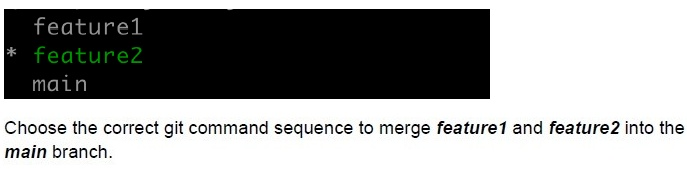 Consider the following git branches for a remote repository.
Text of the picture (copyable)
```
feature1
* feature2
main
```
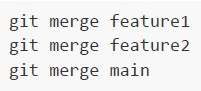
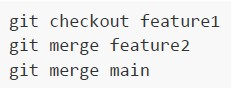
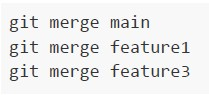
Choose the correct git command sequence to merge *feature1* and *feature2* into the *main* branch.
text
```
git merge feature1
git merge feature2
git merge main
```
text
```
git checkout feature1
git merge feature2
git merge main
```
text
```
git merge main
git merge feature1
git merge feature3
```
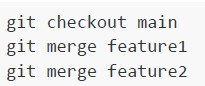
text
```
git checkout main
git merge feature1
git merge feature2
```
- Flask-Mail
- Flask-WTF
- Flask-SQLAlchemy
- Flask-Migrate
- 48
- 57.6
- 72
- 576
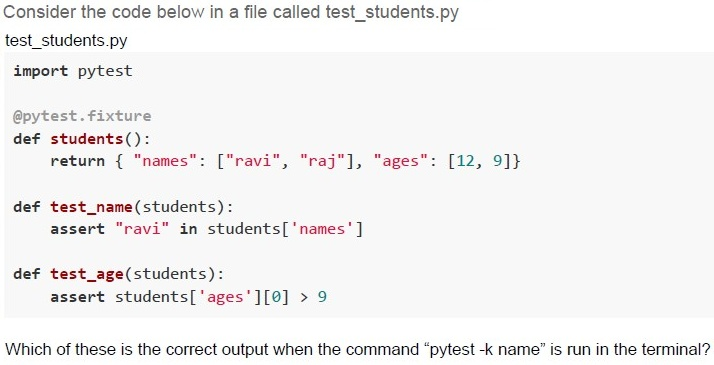
Text of the picture (copyable)
Consider the code below in a file called test_students.py

```python
test_students.py

import pytest

@pytest.fixture
def students():
    return { "names": ["ravi", "raj"], "ages": [12, 9]}

def test_name(students):
    assert "ravi" in students['names']

def test_age(students):
    assert students['ages'][0] > 9
```

Which of these is the correct output when the command "pytest -k name" is run in the terminal?
text
```
===== 1 passed, 1 deselected in 0.02s =====
```

text
```
======== 1 passed, 2 deselected in 0.02s ========
```

text
```text
======== 1 failed, 1 deselected in 0.02s ========
```

text
```
======== 1 failed, 2 deselected in 0.02s ========
```
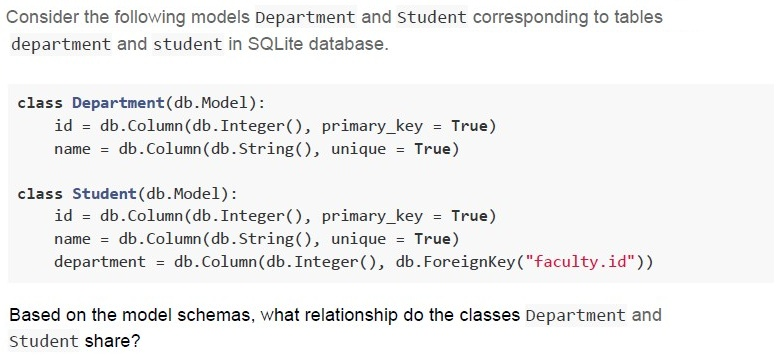
Text of the picture (copyable)
Consider the following models Department and Student corresponding to tables
department and student in SQLite database.

```python
class Department(db.Model):
    id = db.Column(db.Integer(), primary_key = True)
    name = db.Column(db.String(), unique = True)

class Student(db.Model):
    id = db.Column(db.Integer(), primary_key = True)
    name = db.Column(db.String(), unique = True)
    department = db.Column(db.Integer(), db.ForeignKey("faculty.id"))
```

Based on the model schemas, what relationship do the classes Department and
Student share?- Many-to-Many
- One-to-Many
- One-to-One
- The tables are not at all related
- Statement 1 is false, while statement 2 is true
- Statement 1 is true, while statement 2 is false
- Both statements are false
- Both statements are true
Text of the picture (copyable)
Consider the following HTML code.

```html
<!DOCTYPE html>
<html lang="en">
<head>
    <title>Home page</title>
    <style>
        /* Missing CSS code */
    </style>
</head>
<body>
    <div id="mybox">
        IITM Online Degree
    </div>
</body>
</html>
```

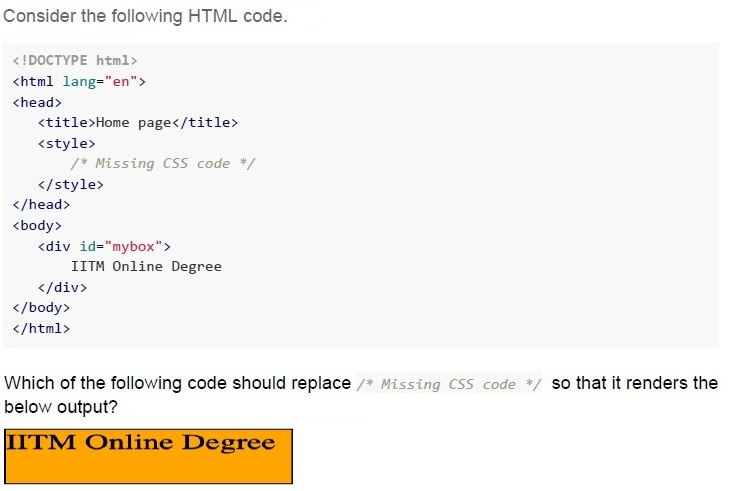
Which of the following code should replace `/* Missing CSS code */` so that it renders the below output?

UI screenshot: A rectangular box with an orange background and a thin dark border. Inside the box, the text "IITM Online Degree" is displayed in a dark, bold font.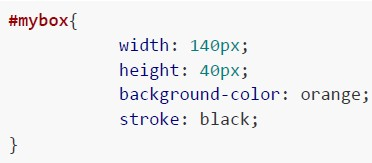
text
```css
#mybox{
    width: 140px;
    height: 40px;
    background-color: orange;
    stroke: black;
}
```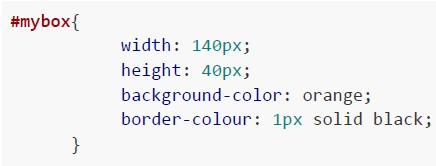
text
```css
#mybox {
    width: 140px;
    height: 40px;
    background-color: orange;
    border-colour: 1px solid black;
}
```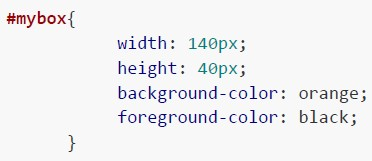
text
```css
#mybox{
    width: 140px;
    height: 40px;
    background-color: orange;
    foreground-color: black;
}
```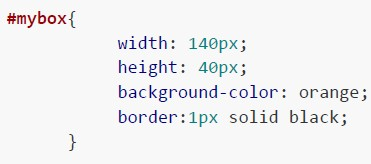
text
```css
#mybox {
    width: 140px;
    height: 40px;
    background-color: orange;
    border:1px solid black;
}
```
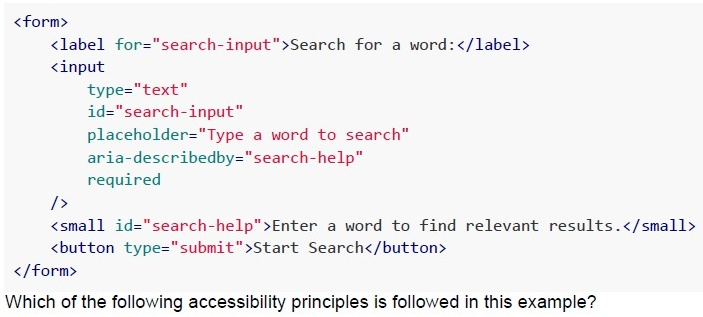 Consider the following example:
Text of the picture (copyable)
```html
<form>
    <label for="search-input">Search for a word:</label>
    <input
        type="text"
        id="search-input"
        placeholder="Type a word to search"
        aria-describedby="search-help"
        required
    />
    <small id="search-help">Enter a word to find relevant results.</small>
    <button type="submit">Start Search</button>
</form>
```
Which of the following accessibility principles is followed in this example?- Perceivable
- Operable
- Robust
- Understandable
Text of the picture (copyable)
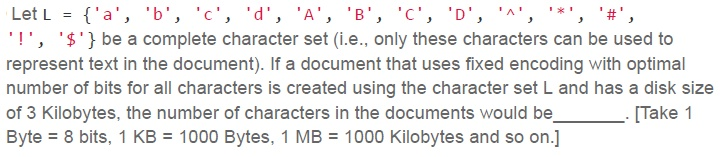
Let L = { 'a', 'b', 'c', 'd', 'A', 'B', 'C', 'D', '^', '*', '#', '!', '$' } be a complete character set (i.e., only these characters can be used to represent text in the document). If a document that uses fixed encoding with optimal number of bits for all characters is created using the character set L and has a disk size of 3 Kilobytes, the number of characters in the documents would be _____. [Take 1 Byte = 8 bits, 1 KB = 1000 Bytes, 1 MB = 1000 Kilobytes and so on.]- 3000
- 9000
- 6000
- 12000
Text of the picture (copyable)
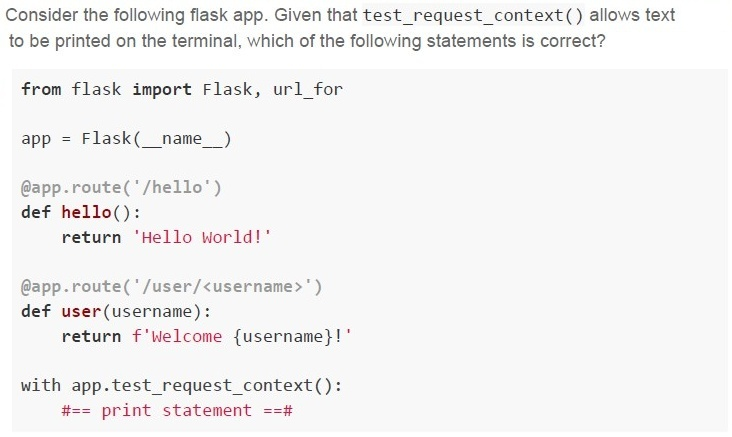
Consider the following flask app. Given that test_request_context() allows text to be printed on the terminal, which of the following statements is correct?

```python
from flask import Flask, url_for

app = Flask(__name__)

@app.route('/hello')
def hello():
    return 'Hello World!'

@app.route('/user/<username>')
def user(username):
    return f'Welcome {username}!'

with app.test_request_context():
    #== print statement ==#
```
text
If `print statement` is replaced by `print(url_for('user', username='John'))`, the output on the terminal will be `/user?username=John`
text
If `print statement` is replaced by `print(url_for('user', username='John', id='101'))`, the output on the terminal will be
`/user/John/101`
text
If `print statement` is replaced by `print(url_for('hello', username='John'))`,
the output on the terminal will be `/hello?username=John`
text
If `print statement` is replaced by `print(url_for('hello', username='John'))`, the output on the terminal will be Hello World!
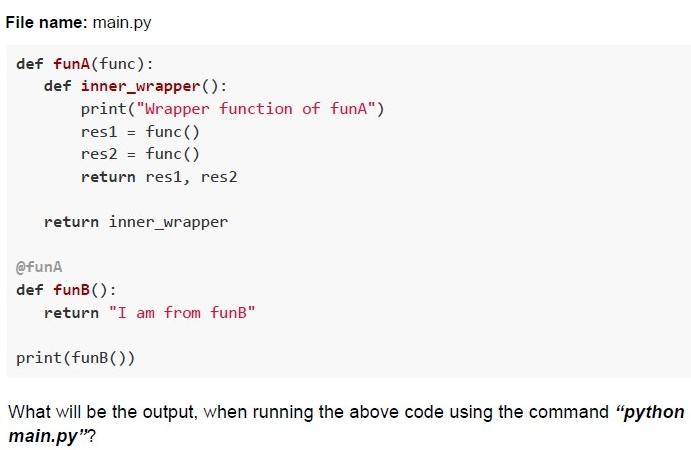 Consider the following Python code.
Text of the picture (copyable)
File name: main.py

```python
def funA(func):
    def inner_wrapper():
        print("Wrapper function of funA")
        res1 = func()
        res2 = func()
        return res1, res2

    return inner_wrapper

@funA
def funB():
    return "I am from funB"

print(funB())
```

What will be the output, when running the above code using the command "python main.py"?
text
```
('I am from funB', 'I am from funB')
Wrapper function of funA
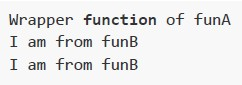
```
text
```
Wrapper function of funA
I am from funB
I am from funB
```

text
```
wrapper function of funA
('I am from funB', 'I am from funB')
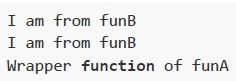
```
text
I am from funB
I am from funB
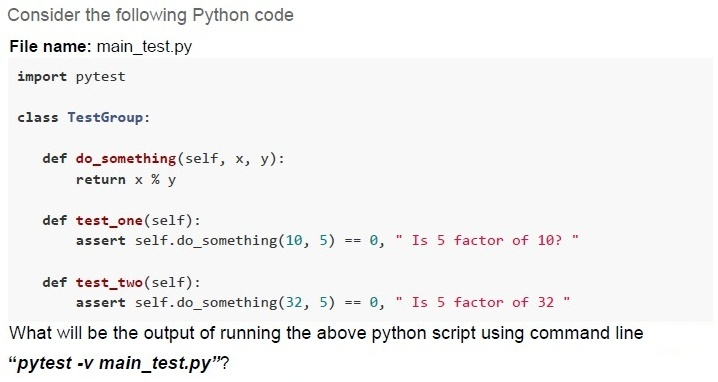
Wrapper **function** of funA
Text of the picture (copyable)
Consider the following Python code
File name: main_test.py
```python
import pytest

class TestGroup:

    def do_something(self, x, y):
        return x % y

    def test_one(self):
        assert self.do_something(10, 5) == 0, " Is 5 factor of 10? "

    def test_two(self):
        assert self.do_something(32, 5) == 0, " Is 5 factor of 32 "
```
What will be the output of running the above python script using command line
“pytest -v main_test.py”?
text
```
============ short test summary info ============
main_test.py::TestGroup::test_one PASSED           [ 50%]
main_test.py::TestGroup::test_two PASSED          [100%]

============ 2 passed in 0.02s ============
```

text
```
========== short test summary info ==========
FAILED main_test.py::TestGroup::test_two - AssertionError: Is 5
factor of 32
========== 1 failed, 1 passed in 0.12s ==========
```

text
```
======================== short test summary info ========================
main_test.py::TestGroup::test_one FAILED                               [ 50%]
main_test.py::TestGroup::test_two FAILED                              [100%]

========================== 2 failed in 0.02s===========================
```
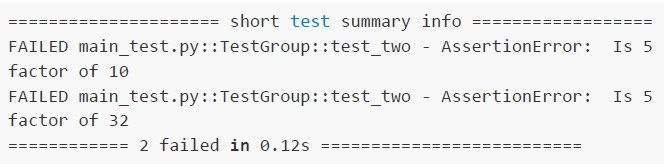
text
```
============ short test summary info ============
FAILED main_test.py::TestGroup::test_two - AssertionError: Is 5
factor of 10
FAILED main_test.py::TestGroup::test_two - AssertionError: Is 5
factor of 32
========== 2 failed in 0.12s ============
```
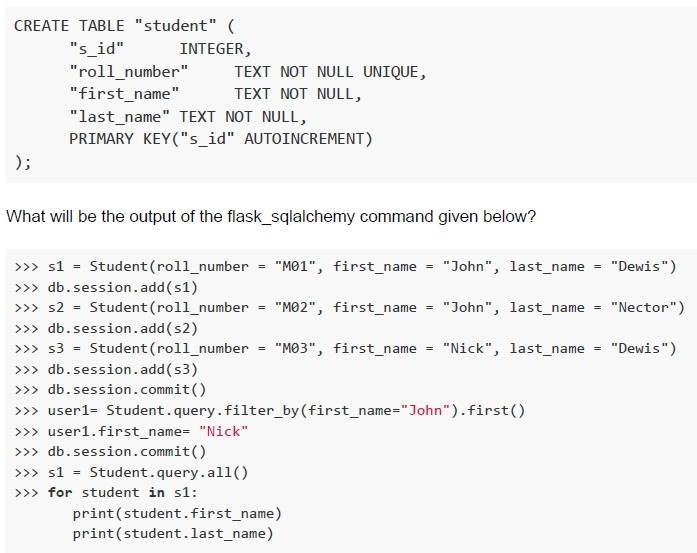 Consider the schema for the Class Student.
Text of the picture (copyable)
```sql
CREATE TABLE "student" (
    "s_id"          INTEGER,
    "roll_number"   TEXT NOT NULL UNIQUE,
    "first_name"    TEXT NOT NULL,
    "last_name" TEXT NOT NULL,
    PRIMARY KEY("s_id" AUTOINCREMENT)
);
```

What will be the output of the flask_sqlalchemy command given below?

```python
>>> s1 = Student(roll_number = "M01", first_name = "John", last_name = "Dewis")
>>> db.session.add(s1)
>>> s2 = Student(roll_number = "M02", first_name = "John", last_name = "Nector")
>>> db.session.add(s2)
>>> s3 = Student(roll_number = "M03", first_name = "Nick", last_name = "Dewis")
>>> db.session.add(s3)
>>> db.session.commit()
>>> user1= Student.query.filter_by(first_name="John").first()
>>> user1.first_name= "Nick"
>>> db.session.commit()
>>> s1 = Student.query.all()
>>> for student in s1:
        print(student.first_name)
        print(student.last_name)
```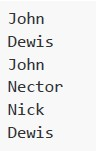
text
John
Dewis
John
Nector
Nick
Dewis
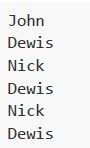
text
```
John
Dewis
Nick
Dewis
Nick
Dewis
```
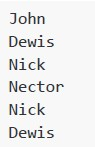
text
John
Dewis
Nick
Nector
Nick
Dewis
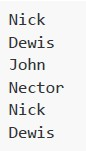
text
Nick
Dewis
John
Nector
Nick
Dewis
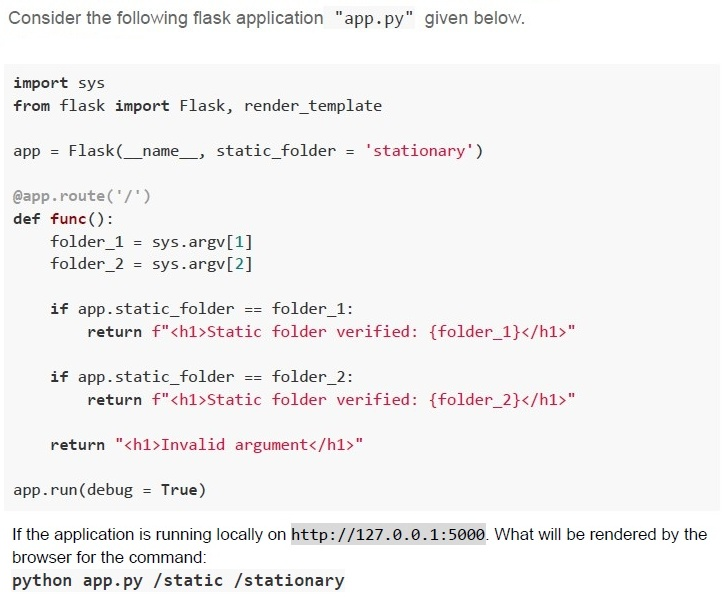
Text of the picture (copyable)
Consider the following flask application "app.py" given below.

```python
import sys
from flask import Flask, render_template

app = Flask(__name__, static_folder = 'stationary')

@app.route('/')
def func():
    folder_1 = sys.argv[1]
    folder_2 = sys.argv[2]

    if app.static_folder == folder_1:
        return f"<h1>Static folder verified: {folder_1}</h1>"

    if app.static_folder == folder_2:
        return f"<h1>Static folder verified: {folder_2}</h1>"

    return "<h1>Invalid argument</h1>"

app.run(debug = True)
```

If the application is running locally on `http://127.0.0.1:5000`. What will be rendered by the browser for the command:
`python app.py /static /stationary`
text
Static folder verified: /static

text
Static folder verified: /stationary
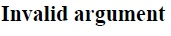
text
Invalid argument

text
None of these
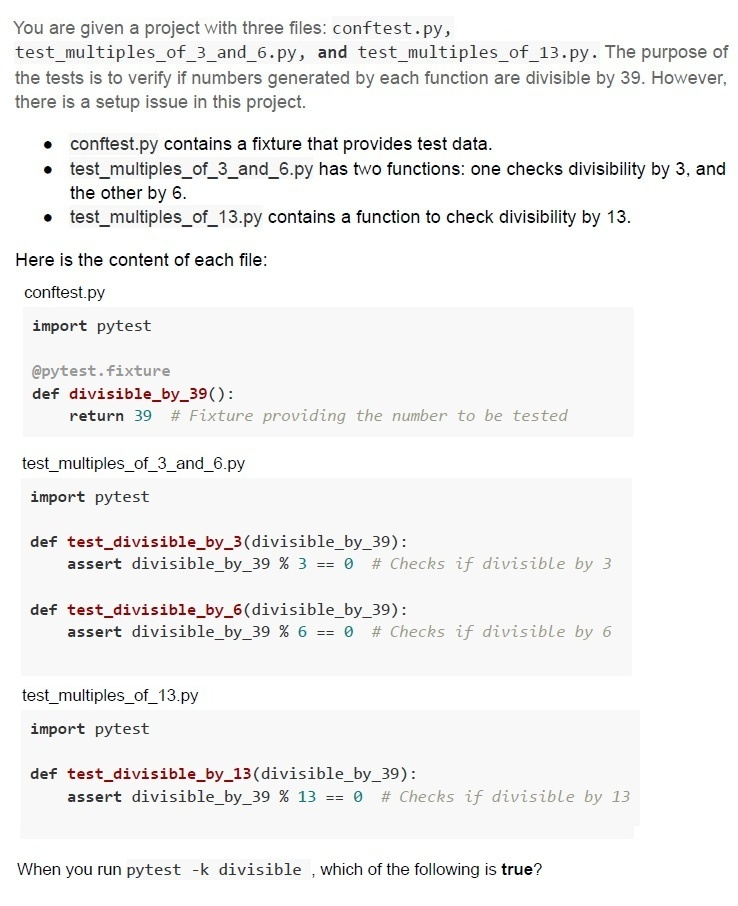
Text of the picture (copyable)
You are given a project with three files: `conftest.py`, `test_multiples_of_3_and_6.py`, and `test_multiples_of_13.py`. The purpose of the tests is to verify if numbers generated by each function are divisible by 39. However, there is a setup issue in this project.

* `conftest.py` contains a fixture that provides test data.
* `test_multiples_of_3_and_6.py` has two functions: one checks divisibility by 3, and the other by 6.
* `test_multiples_of_13.py` contains a function to check divisibility by 13.

Here is the content of each file:

`conftest.py`
```python
import pytest

@pytest.fixture
def divisible_by_39():
    return 39 # Fixture providing the number to be tested
```

`test_multiples_of_3_and_6.py`
```python
import pytest

def test_divisible_by_3(divisible_by_39):
    assert divisible_by_39 % 3 == 0 # Checks if divisible by 3

def test_divisible_by_6(divisible_by_39):
    assert divisible_by_39 % 6 == 0 # Checks if divisible by 6
```

`test_multiples_of_13.py`
```python
import pytest

def test_divisible_by_13(divisible_by_39):
    assert divisible_by_39 % 13 == 0 # Checks if divisible by 13
```

When you run `pytest -k divisible`, which of the following is **true**?
text
```
========== 1 failed, 2 passed in 0.06s ==========
```

text
```text
=========== 3 errors in 0.02s ===========
```

text
```
========== 1 passed in 0.02s ==========
```

text
```
========== 3 passed in 0.02s ==========
```

text
54 x 10^6

text
216 x 10⁶

text
90 x 10⁶

text
108 x 10⁶
- MVC allows for the implementation of multiple views of the same dataconcurrently.
- MVC supports parallel development, enabling developers to work on differentparts of the application simultaneously.
- MVC enforces the use of View State, increasing the bandwidth of requests.
- MVC is a heavyweight framework that requires significant bandwidth due toits design.
Text of the picture (copyable)
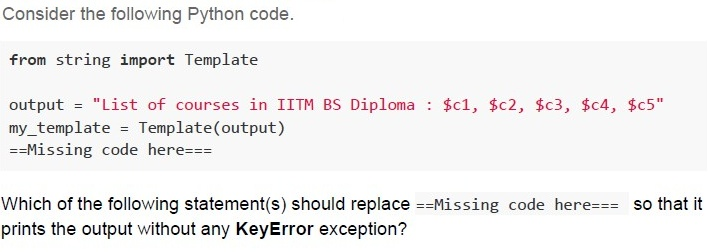
Consider the following Python code.

```python
from string import Template

output = "List of courses in IITM BS Diploma : $c1, $c2, $c3, $c4, $c5"
my_template = Template(output)
==Missing code here===
```

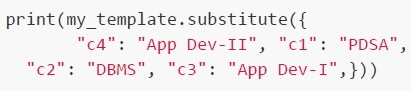
Which of the following statement(s) should replace ==Missing code here=== so that it prints the output without any KeyError exception?

text
```python
print(my_template.safe_substitute({
    "c1": "PDSA", "c2": "DBMS", "c3": "App Dev-I",
    "c4": "App Dev-II", "c5": "Java",}))
```
text
```python
print(my_template.substitute({
    "c1": "PDSA", "c2": "DBMS", "c3": "App Dev-I",
    "c4": "App Dev-II", "c5": "Java",}))
```
text
```python
print(my_template.substitute({
    "c4": "App Dev-II", "c5": "Java", "c1": "PDSA",
    "c2": "DBMS", "c3": "App Dev-I",}))
```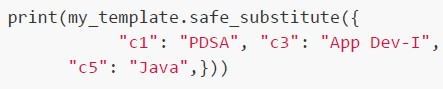
text
```python
print(my_template.safe_substitute({
    "c1": "PDSA", "c3": "App Dev-I",
    "c5": "Java",}))
```
text
```python
print(my_template.substitute({
    "c4": "App Dev-II", "c1": "PDSA",
    "c2": "DBMS", "c3": "App Dev-I",}))
```
- Apache is better suited for handling a large volume of concurrent connectionsthan Nginx.
- Apache is versatile and supports a wide range of modules and dynamicconfigurations.
- Nginx is generally faster for serving static files and handling high traffic withlow memory usage.
- Both Apache and Nginx are open-source web servers.
Text of the picture (copyable)
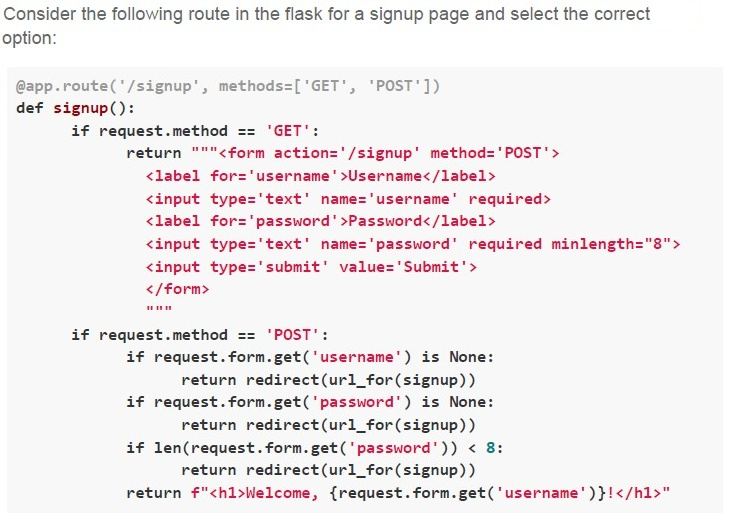
Consider the following route in the flask for a signup page and select the correct option:

```python
@app.route('/signup', methods=['GET', 'POST'])
def signup():
    if request.method == 'GET':
        return """<form action='/signup' method='POST'>
            <label for='username'>Username</label>
            <input type='text' name='username' required>
            <label for='password'>Password</label>
            <input type='text' name='password' required minlength="8">
            <input type='submit' value='Submit'>
        </form>
        """

    if request.method == 'POST':
        if request.form.get('username') is None:
            return redirect(url_for(signup))
        if request.form.get('password') is None:
            return redirect(url_for(signup))
        if len(request.form.get('password')) < 8:
            return redirect(url_for(signup))
        return f"<h1>Welcome, {request.form.get('username')}!</h1>"
```- The signup page is dynamically generated.
- The signup page uses server-side rendering.
- The signup page uses frontend validation.
- The signup page uses backend validation.
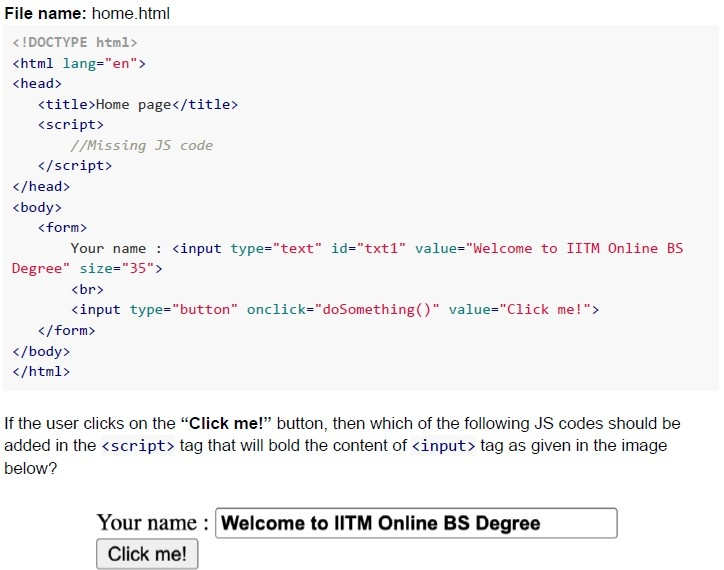 Consider the following HTML code.
Text of the picture (copyable)
File name: home.html

```html
<!DOCTYPE html>
<html lang="en">
<head>
    <title>Home page</title>
    <script>
        //Missing JS code
    </script>
</head>
<body>
    <form>
        Your name : <input type="text" id="txt1" value="Welcome to IITM Online BS Degree" size="35">
        <br>
        <input type="button" onclick="doSomething()" value="Click me!">
    </form>
</body>
</html>
```

If the user clicks on the “**Click me!**” button, then which of the following JS codes should be added in the `<script>` tag that will bold the content of `<input>` tag as given in the image below?

UI screenshot:
- Label: Your name :
- Input field: Welcome to IITM Online BS Degree (text is bolded)
- Button: Click me!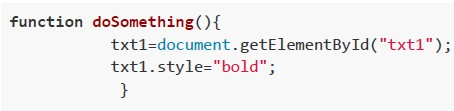
text
```javascript
function doSomething(){
    txt1=document.getElementById("txt1");
    txt1.style="bold";
}
```
text
```javascript
function doSomething(){
    document.getElementById("txt1").style="bold";
}
```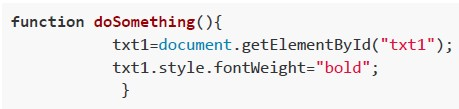
text
```javascript
function doSomething(){
    txt1=document.getElementById("txt1");
    txt1.style.fontWeight="bold";
}
```
text
```javascript
function doSomething(){
    document.getElementById("txt1").style.fontWeight="bold";
}
```
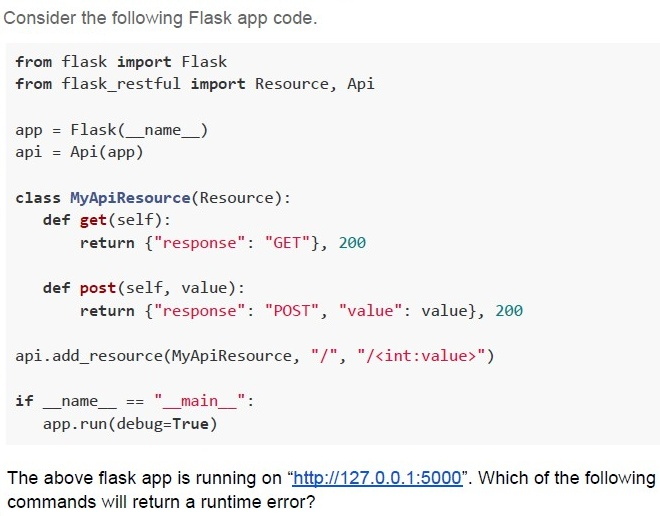
Text of the picture (copyable)
Consider the following Flask app code.

```python
from flask import Flask
from flask_restful import Resource, Api

app = Flask(__name__)
api = Api(app)

class MyApiResource(Resource):
    def get(self):
        return {"response": "GET"}, 200

    def post(self, value):
        return {"response": "POST", "value": value}, 200

api.add_resource(MyApiResource, "/", "/<int:value>")

if __name__ == "__main__":
    app.run(debug=True)
```

The above flask app is running on "http://127.0.0.1:5000". Which of the following commands will return a runtime error?
text
```
curl http://127.0.0.1:5000/1025 -X GET
```

text
```
curl http://127.0.0.1:5000/1025 -X POST
```

text
```
curl http://127.0.0.1:5000/ -X POST
```

text
```
curl http://127.0.0.1:5000/ -x GET
```
Text of the picture (copyable)
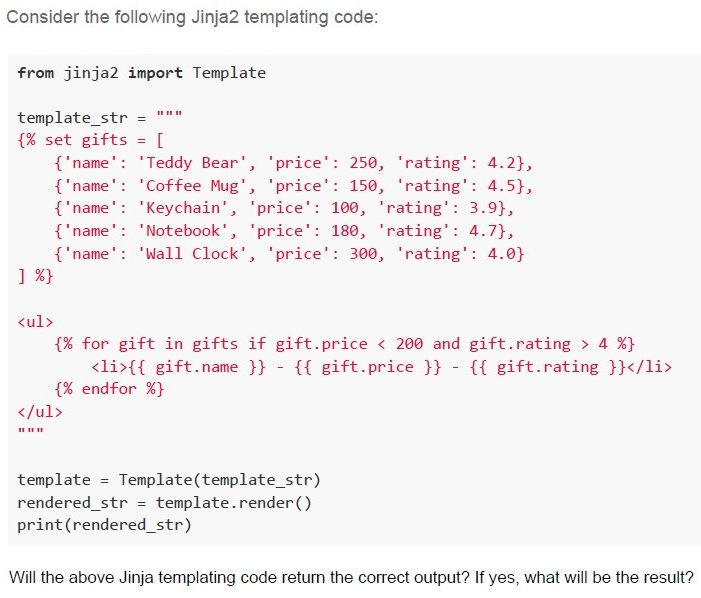
Consider the following Jinja2 templating code:

```python
from jinja2 import Template

template_str = """
{% set gifts = [
    {'name': 'Teddy Bear', 'price': 250, 'rating': 4.2},
    {'name': 'Coffee Mug', 'price': 150, 'rating': 4.5},
    {'name': 'Keychain', 'price': 100, 'rating': 3.9},
    {'name': 'Notebook', 'price': 180, 'rating': 4.7},
    {'name': 'Wall Clock', 'price': 300, 'rating': 4.0}
] %}

<ul>
{% for gift in gifts if gift.price < 200 and gift.rating > 4 %}
    <li>{{ gift.name }} - {{ gift.price }} - {{ gift.rating }}</li>
{% endfor %}
</ul>
"""

template = Template(template_str)
rendered_str = template.render()
print(rendered_str)
```

Will the above Jinja templating code return the correct output? If yes, what will be the result?
text
The template will not work correctly because the **for** loop condition (if `gift.price < 200` and `gift.rating > 4`) is invalid in Jinja2 syntax. This will raise a `TemplateSyntaxError`.

text
The template will work correctly, but the output will include all gifts, not filtering by price and rating, as the condition inside the for loop will be ignored.
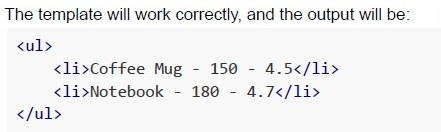
text
The template will work correctly, and the output will be:

```html
<ul>
  <li>Coffee Mug - 150 - 4.5</li>
  <li>Notebook - 180 - 4.7</li>
</ul>
```
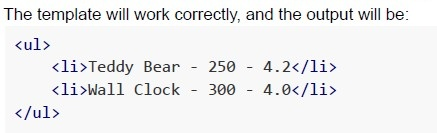
text
The template will work correctly, and the output will be:
```html
<ul>
    <li>Teddy Bear - 250 - 4.2</li>
    <li>Wall Clock - 300 - 4.0</li>
</ul>
```
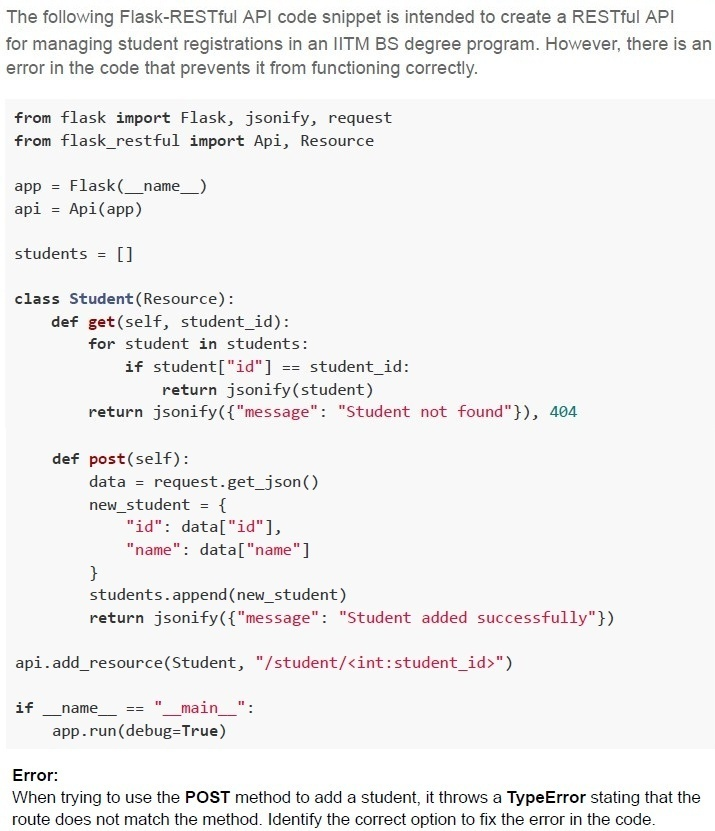
Text of the picture (copyable)
The following Flask-RESTful API code snippet is intended to create a RESTful API for managing student registrations in an IITM BS degree program. However, there is an error in the code that prevents it from functioning correctly.

```python
from flask import Flask, jsonify, request
from flask_restful import Api, Resource

app = Flask(__name__)
api = Api(app)

students = []

class Student(Resource):
    def get(self, student_id):
        for student in students:
            if student["id"] == student_id:
                return jsonify(student)
        return jsonify({"message": "Student not found"}), 404

    def post(self):
        data = request.get_json()
        new_student = {
            "id": data["id"],
            "name": data["name"]
        }
        students.append(new_student)
        return jsonify({"message": "Student added successfully"})

api.add_resource(Student, "/student/<int:student_id>")

if __name__ == "__main__":
    app.run(debug=True)
```

Error:
When trying to use the POST method to add a student, it throws a TypeError stating that the route does not match the method. Identify the correct option to fix the error in the code.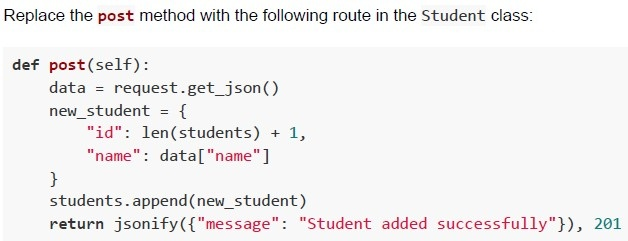
text
Replace the **post** method with the following route in the Student class:

```python
def post(self):
    data = request.get_json()
    new_student = {
        "id": len(students) + 1,
        "name": data["name"]
    }
    students.append(new_student)
    return jsonify({"message": "Student added successfully"}), 201
```
text
Change the api.add_resource(Student, "/student/<int:student_id>") to:
api.add_resource(Student, "/students")

text
Change the api.add_resource(Student, "/student/<int:student_id>") to:
```
api.add_resource(Student, "/student", "/student/<int:student_id>")
```

text
Add the student_id parameter to the **post** method in the Student class as **def**
```
post(self, student_id):
```
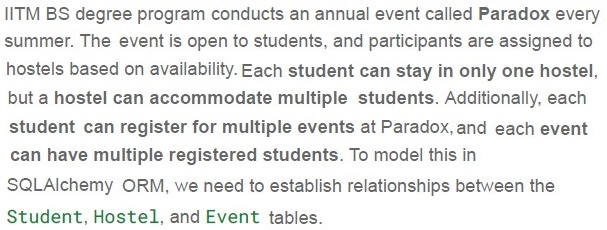
- One-to-One
- One-to-Many
- Many-to-One
- Many-to-Many

text
```python
db.relationship('Event', backref='students')
```
in the Student model
text
```python
db.relationship('Student', back_populates='events')
```
in the Event model
text
Using an association table between
students and events

text
Creating a foreign key inside the
Student model referring to Event
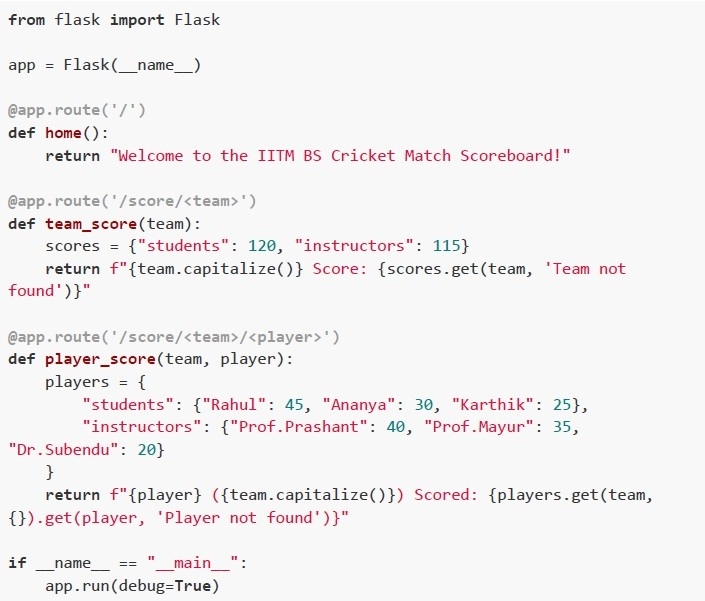 The students of IITM BS challenged their instructors to a cricket match. A Flask web application is built to track the scores. Below is the Flask app code that defines multiple routes for fetching scores dynamically. Based on the above data, answer the given subquestions.
 What will be the output when the following URL is accessed?
Text of the picture (copyable)
http://127.0.0.1:5000/score/students
- Score: students
- Students Score: 120
- None of these
- Team not found
 What will happen if we access the following URL?
Text of the picture (copyable)
```
http://127.0.0.1:5000/score/instructors/Dr.Prashant
```
- Dr.Prashant (Instructors) Scored: 40
- Player not found
- Internal Server Error
- Dr.Prashant (Instructors) Scored: Player not found
- Hard Disk Drive (HDD)
- Solid State Drive (SSD)
- Registers
- Static RAM (SRAM)
- Registers
- SRAM
- Hard Disk Drive (HDD)
- DRAM
Answer key
- Q1 (MCQ, 2 marks): B
- Q2 (MCQ, 2 marks): A
- Q3 (MCQ, 2 marks): D
- Q4 (MCQ, 3 marks): B
- Q5 (MCQ, 3 marks): C
- Q6 (MCQ, 3 marks): A
- Q7 (MCQ, 3 marks): D
- Q8 (MCQ, 3 marks): C
- Q9 (MCQ, 3 marks): D
- Q10 (MCQ, 3 marks): D
- Q11 (MCQ, 3 marks): C
- Q12 (MCQ, 3 marks): C
- Q13 (MCQ, 3 marks): C
- Q14 (MCQ, 3 marks): A
- Q15 (MCQ, 4.5 marks): D
- Q16 (MCQ, 4.5 marks): C
- Q17 (MCQ, 4.5 marks): A
- Q18 (MCQ, 4.5 marks): D
- Q19 (MSQ, 2 marks): A, B
- Q20 (MSQ, 3 marks): A, B, C, D
- Q21 (MSQ, 3 marks): B, C, D
- Q22 (MSQ, 3 marks): A, B, C, D
- Q23 (MSQ, 3 marks): C, D
- Q24 (MSQ, 4.5 marks): A, C
- Q25 (MSQ, 4.5 marks): C
- Q26 (MSQ, 4.5 marks): C, D
- Q27 (MCQ, 2 marks): C
- Q28 (MCQ, 3 marks): C
- Q29 (MCQ, 2 marks): B
- Q30 (MCQ, 4.5 marks): D
- Q31 (MCQ, 2 marks): D
- Q32 (MCQ, 2 marks): C
Concepts this paper tests
Auto-generated summary from the source site. Handy as a checklist; the lessons above explain each idea from scratch.
Here’s a structured summary of core topics, concepts, principles, and equations essential for the "Modern Application Development I" exam, along with Mermaid knowledge graphs to visualize relationships.
1. Core Topics & Concepts
A. Encoding and Data Representation
Key Concepts:
Character Encoding Schemes:
- ASCII: 7-bit encoding (128 characters), 8-bit extended ASCII (256 characters).
- UCS-2: 2-byte (16-bit) fixed-width encoding for Unicode (supports 65,536 characters).
- UTF-8: Variable-width encoding (1-4 bytes per character).
Optimal Bit Calculation:
- For a character set of size
N, optimal bits =⌈log₂N⌉. - Example: For
L = 13characters, optimal bits =⌈log₂13⌉ = 4.
- For a character set of size
Data Storage Calculations:
Bit ↔ Byte ↔ Kilobyte ↔ Megabyte:
1 Byte = 8 bits1 KB = 1000 Bytes(decimal) or1024 Bytes(binary, KiB).- Example: 320,000 bits =
320,000 / 8 = 40,000 Bytes=40 KB.
Conversion Between Encodings:
- UCS-2 (2 bytes/char) → ASCII (1 byte/char): Size halves if all characters fit in ASCII.
- Example: 320,000 bits in UCS-2 =
320,000 / 16 = 20,000 characters. - ASCII size =
20,000 characters * 7 bits = 140,000 bits.
Equations:
- Optimal bits for encoding: \[ \text{Bits per character} = \lceil \log_2(\text{Number of characters}) \rceil \]
- Total bits for a document: \[ \text{Total bits} = \text{Number of characters} \times \text{Bits per character} \]
- Conversion between encodings: \[ \text{Size in ASCII (bits)} = \text{Size in UCS-2 (bits)} \times \frac{7}{16} \]
B. Client-Server Model
Key Concepts:
Stateless vs. Stateful:
- Stateless: Server treats each request as independent (e.g., HTTP).
- Stateful: Server retains client state across requests (e.g., sessions, WebSockets).
HTTP Methods:
GET,POST,PUT,DELETE, etc.
CAPTCHA:
- Used to distinguish humans from bots (e.g., Google reCAPTCHA).
- Flask-WTF: Extension for form handling and CAPTCHA integration in Flask.
Flask Extensions:
| Extension | Purpose |
|---|---|
| Flask-WTF | Form handling + CAPTCHA |
| Flask-Mail | Email sending |
| Flask-SQLAlchemy | Database ORM |
| Flask-Migrate | Database migrations |
C. Version Control (Git)
Key Concepts:
Branching and Merging:
git checkout <branch>: Switch branches.git merge <branch>: Merge branches into current branch.Example:
git checkout main
git merge feature1
git merge feature2
Common Commands:
git add,git commit,git push,git pull.
D. Web Development
Key Concepts:
Flask:
- Microframework for Python.
- Routing:
@app.route('/path'). - Templates: Jinja2 for dynamic HTML.
- Request Context:
test_request_context()for testing URLs (e.g.,url_for).
Jinja2 Templating:
- Syntax:
{{ variable }},{% logic %}. Example:
{% for item in items if item.price < 200 %}
  {{ item.name }}
{% endfor %}
- Syntax:
Flask-RESTful:
- For building REST APIs.
Example:
class MyResource(Resource):
    def get(self):
        return {"data": "value"}
api.add_resource(MyResource, '/')
SQLAlchemy ORM:
Relationships:
- One-to-Many:
db.ForeignKey. - Many-to-Many: Association table.
- One-to-Many:
Example:
class Student(db.Model):
    id = db.Column(db.Integer, primary_key=True)
    name = db.Column(db.String)
    department_id = db.Column(db.Integer, db.ForeignKey('department.id'))
Database Relationships:
| Type | Description | SQLAlchemy Syntax |
|---|---|---|
| One-to-Many | One department → Many students | db.ForeignKey('department.id') |
| Many-to-One | Many students → One department | Same as above |
| Many-to-Many | Students ↔ Events | Association table with foreign keys |
E. Testing (Pytest)
Key Concepts:
Fixtures:
- Reusable test data (e.g.,
@pytest.fixture). Example:
@pytest.fixture
def students():
    return {"names": ["Alice", "Bob"]}
- Reusable test data (e.g.,
Assertions:
assert condition, "message".
Filtering Tests:
pytest -k "name": Run tests with "name" in their name.pytest -v: Verbose output.
Test Outcomes:
PASSED,FAILED,DESELECTED(filtered out).
Example Outputs:
1 passed, 1 deselected: One test ran and passed; one was filtered out.FAILED ... AssertionError: Test failed due to assertion.
F. Networking and Data Transfer
Key Concepts:
Bandwidth vs. Range:
- Bandwidth: Data transfer rate (e.g., 240 Mbps).
- Range: Coverage area (e.g., 80 km for a tower).
Data Consumption:
- Total Data = Bandwidth × Time in range.
Example:
- Client moves at 120 km/h away from a tower with 80 km range.
- Time in range =
80 km / 120 km/h = 2/3 hours = 40 minutes. - Data =
240 Mbps × 40 × 60 seconds = 576,000 Mb = 72 GB.
Latency and Speed of Light:
- Time for data to travel = Distance / Speed of light.
- Example: 120 km / (3 × 10⁸ m/s) ≈ 0.4 ms (negligible for most calculations).
Equations:
- Time in network range: \[ \text{Time} = \frac{\text{Range}}{\text{Speed}} \]
- Total data consumed: \[ \text{Data (bits)} = \text{Bandwidth (bps)} \times \text{Time (s)} \]
- Data in GB: \[ \text{Data (GB)} = \frac{\text{Data (bits)}}{8 \times 10^9} \]
G. Accessibility and HTML/CSS
Key Concepts:
ARIA Attributes:
aria-describedby: Links input to descriptive text.
Semantic HTML:
<label>,<input>,<button>for accessibility.
CSS Styling:
Example: Bold text in input:
document.getElementById("txt1").style.fontWeight = "bold";
WCAG Principles:
- Perceivable, Operable, Understandable, Robust (POUR).
H. MVC Architecture
Key Concepts:
Model-View-Controller:
- Model: Data logic (e.g., database).
- View: UI (e.g., HTML templates).
- Controller: Business logic (e.g., Flask routes).
Benefits:
- Separation of concerns.
- Parallel development.
- Multiple views for the same data.
I. Storage Hierarchy
Key Concepts:
| Storage Type | Latency | Use Case |
|---|---|---|
| Registers | ~1 ns | CPU operations |
| SRAM | ~10 ns | Cache, fast access |
| DRAM | ~100 ns | Main memory (RAM) |
| SSD | ~100 µs | Fast storage (e.g., databases) |
| HDD | ~10 ms | Long-term storage (archives) |
Choosing Storage:
- Frequent small data: SRAM/DRAM.
- Large archives: HDD (cost-effective).
- Temporary session data: DRAM or SSD.
J. Web Servers (Apache vs. Nginx)
| Feature | Apache | Nginx |
|---|---|---|
| Concurrency | Process/thread-based | Event-driven (better for high concurrency) |
| Static Files | Slower | Faster |
| Dynamic Content | Modular (e.g., .htaccess) | Reverse proxy (e.g., FastCGI) |
| Use Case | Traditional LAMP stack | High-traffic, microservices |
K. Decorators in Python
Key Concepts:
- Decorators: Modify function behavior (e.g.,
@funA). Example:
def decorator(func):
    def wrapper():
        print("Before")
        func()
        print("After")
    return wrapper
@decorator
def say_hello():
    print("Hello")
Output:
Before
Hello
After
L. RESTful APIs
Key Concepts:
HTTP Methods:
GET: Retrieve data.POST: Create data.PUT: Update data.DELETE: Delete data.
Flask-RESTful:
- Define resources with
GET,POST, etc. Example:
class User(Resource):
    def get(self, user_id):
        return {"user": user_id}
api.add_resource(User, '/user/<int:user_id>')
- Define resources with
Error Handling:
404: Not found.500: Server error.
Graph 2: Client-Server Model
Graph 3: Git Workflow
Graph 4: Flask and Web Development
Graph 5: Testing with Pytest
Graph 6: Networking and Data Transfer
Graph 7: Storage Hierarchy
Graph 8: MVC Architecture
Graph 9: Apache vs. Nginx
Graph 10: RESTful APIs
3. Key Equations Summary
| Topic | Equation |
|---|---|
| Optimal bits for encoding | \(\text{Bits} = \lceil \log_2(\text{Number of characters}) \rceil\) |
| Total bits for a document | \(\text{Total bits} = \text{Characters} \times \text{Bits per char}\) |
| UCS-2 to ASCII conversion | \(\text{ASCII size} = \text{UCS-2 size} \times \frac{7}{16}\) |
| Time in network range | \(\text{Time} = \frac{\text{Range}}{\text{Speed}}\) |
| Data consumed | \(\text{Data (bits)} = \text{Bandwidth (bps)} \times \text{Time (s)}\) |
| Data in GB | \(\text{Data (GB)} = \frac{\text{Data (bits)}}{8 \times 10^9}\) |
4. Exam Tips
Encoding:
- Remember the difference between ASCII (7/8-bit) and UCS-2 (16-bit).
- Calculate optimal bits using \(\log_2\).
Flask:
- Know how to use
url_for,test_request_context, and Jinja2 templates. - Understand RESTful routes and SQLAlchemy relationships.
- Know how to use
Git:
- Practice branching and merging commands.
Networking:
- Bandwidth × Time = Data.
- Speed of light is usually negligible in such problems.
Testing:
- Pytest fixtures and assertions are key.
-kfilters tests by name.
Storage:
- SRAM > DRAM > SSD > HDD in terms of speed.
Accessibility:
- Use semantic HTML and ARIA attributes.
MVC:
- Separation of concerns is the core idea.