Home / Past papers / MAD1 End Term / this paper
IIT M DIPLOMA AN1 EXAM ETD1 11 Dec 2022 - 11 Dec 2022
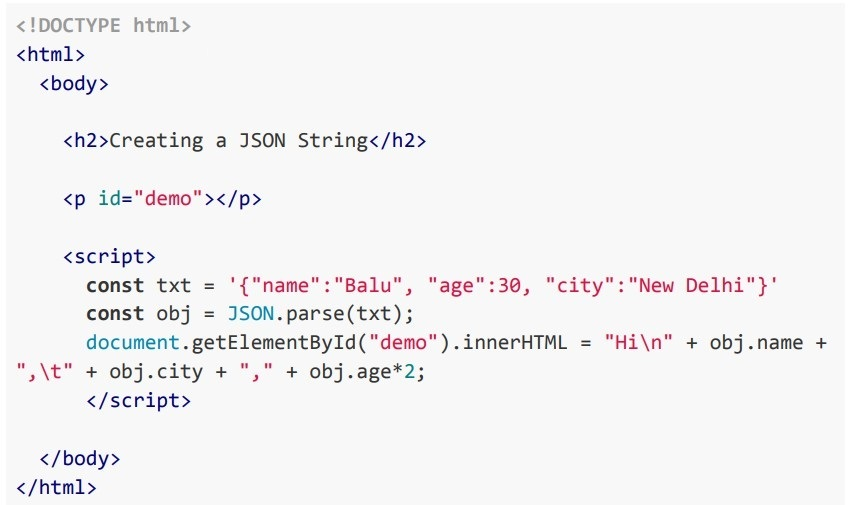 Consider the following HTML document with script which is running at the URL http://127.0.0.1:8000, then choose the correct output of the JSON object.
 Text of the picture (copyable)
```html
<!DOCTYPE html>
<html>
<body>

<h2>Creating a JSON String</h2>

<p id="demo"></p>

<script>
const txt = '{"name":"Balu", "age":30, "city":"New Delhi"}'
const obj = JSON.parse(txt);
document.getElementById("demo").innerHTML = "Hi\n" + obj.name +
",\t" + obj.city + "," + obj.age*2;
</script>

</body>
</html>
```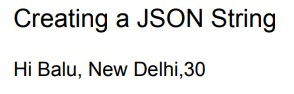
text
Creating a JSON String

Hi Balu, New Delhi,30
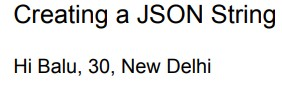
text
Creating a JSON String

Hi Balu, 30, New Delhi
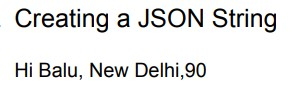
text
Creating a JSON String
Hi Balu, New Delhi,90
text
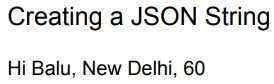
Creating a JSON String
Hi Balu, New Delhi, 60
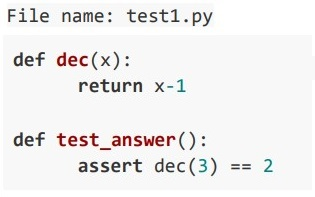 If the given python program is executed using pytest, then identify the status of the test code.
 Text of the picture (copyable)
File name: test1.py

```python
def dec(x):
    return x-1

def test_answer():
    assert dec(3) == 2
```- passed test1.py test_answer - assert 2 == 3
- 2 Failed
- 1 passed
- Failed test1.py test_answer - assert 2 == 3
- {% expand 'base.html'%}
- {% include 'base.html'%}
- {% extends 'base.html'%}
- {% inherits 'base.html' %}
text
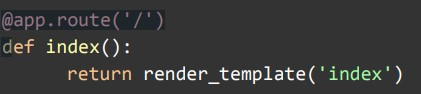
```python
@app.route('/')
def index():
    return render_template('index')
```
text
```python
@app.route('/')
def index():
    return render_template('index.html')
```
text
```python
@app.route('/')
def index():
    return render_template(index.html)
```
text
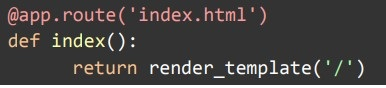
```python
@app.route('index.html')
def index():
    return render_template('/')
```
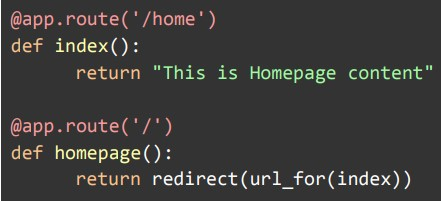
text
```python
@app.route('/home')
def index():
    return "This is Homepage content"

@app.route('/')
def homepage():
    return redirect(url_for(index))
```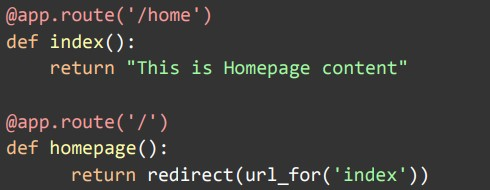
text
```python
@app.route('/home')
def index():
    return "This is Homepage content"

@app.route('/')
def homepage():
    return redirect(url_for('index'))
```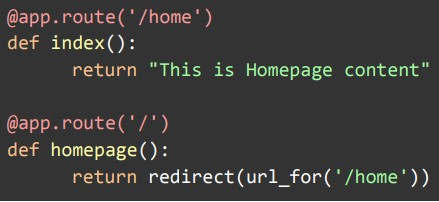
text
```python
@app.route('/home')
def index():
    return "This is Homepage content"

@app.route('/')
def homepage():
    return redirect(url_for('/home'))
```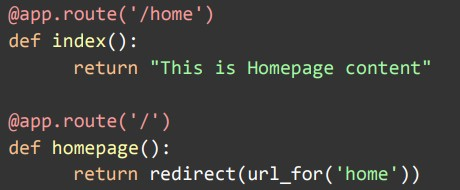
text
```python
@app.route('/home')
def index():
    return "This is Homepage content"

@app.route('/')
def homepage():
    return redirect(url_for('home'))
```
- Both statements 1 and 2 are correct
- Both statements 1 and 2 are incorrect.
- Statement 1 is correct, but statement 2 is incorrect.
- Statement 2 is correct, but statement 1 is incorrect.
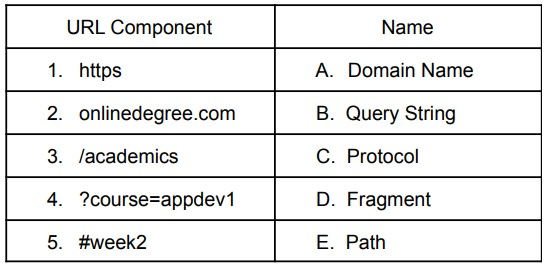 Consider the URL given below. https://onlinedegree.com/academics?course=appdev1#week2 Which of the following options correctly describes each component of the URL given above?
 Text of the picture (copyable)
| URL Component           | Name          |
| :---------------------- | :------------ |
| 1. https                | A. Domain Name |
| 2. onlinedegree.com     | B. Query String |
| 3. /academics           | C. Protocol   |
| 4. ?course=appdev1      | D. Fragment   |
| 5. #week2               | E. Path       |
- 1-C, 2-A, 3-D, 4-B, 5-E
- 1-C, 2-A, 3-E, 4-B, 5-D
- 1-A, 2-C, 3-D, 4-B, 5-E
- 1-C, 2-A, 3-B, 4-E, 5-D
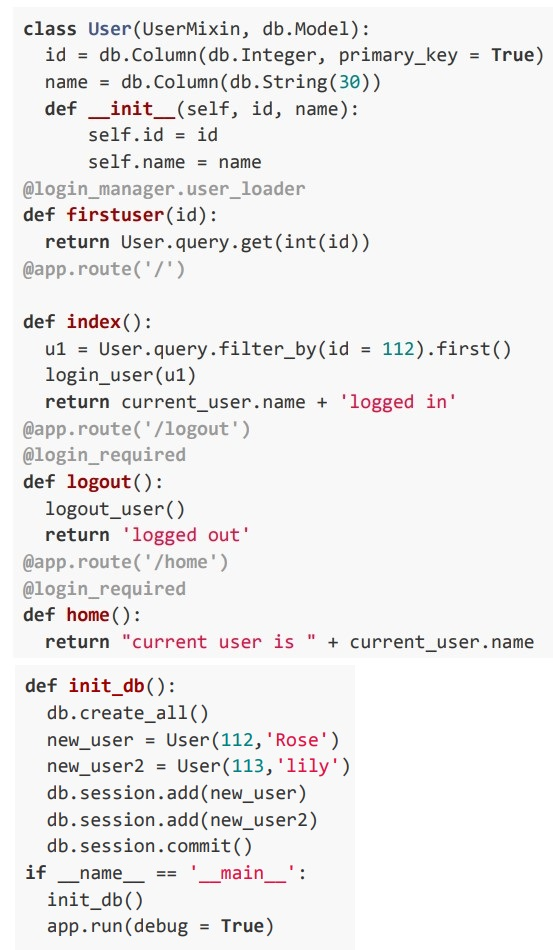 Consider the following flask python snippet with all preliminary conditions. If the above program is running in the URL “http://127.0.0.1:8000” then what will be the output for the given URLs in sequence ● http://127.0.0.1:8000 ● http://127.0.0.1:8000/logout ● http://127.0.0.1:8000/home
Text of the picture (copyable)
```python
class User(UserMixin, db.Model):
    id = db.Column(db.Integer, primary_key = True)
    name = db.Column(db.String(30))
    def __init__(self, id, name):
        self.id = id
        self.name = name
@login_manager.user_loader
def firstuser(id):
    return User.query.get(int(id))
@app.route('/')

def index():
    u1 = User.query.filter_by(id = 112).first()
    login_user(u1)
    return current_user.name + 'logged in'
@app.route('/logout')
@login_required
def logout():
    logout_user()
    return 'logged out'
@app.route('/home')
@login_required
def home():
    return "current user is " + current_user.name

def init_db():
    db.create_all()
    new_user = User(112, 'Rose')
    new_user2 = User(113, 'lily')
    db.session.add(new_user)
    db.session.add(new_user2)
    db.session.commit()
if __name__ == '__main__':
    init_db()
    app.run(debug = True)
```- current user is lilylogged outUnauthorized user
- Rose logged inlogged outUnauthorized user
- Rose logged incurrent user is Roselogged out
- lily logged incurrent user is lilylogged out
- internal > inline > external
- inline > internal > external
- inline > external > internal
- external > internal > inline
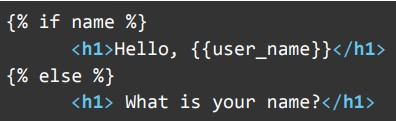
text
```html
{% if name %}
    <h1>Hello, {{user_name}}</h1>
{% else %}
    <h1> What is your name?</h1>
```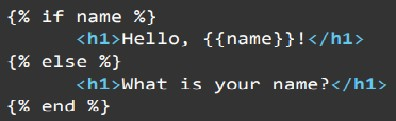
text
```html
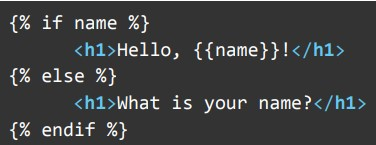
{% if name %}
    <h1>Hello, {{name}}!</h1>
{% else %}
    <h1>What is your name?</h1>
{% end %}
```
text
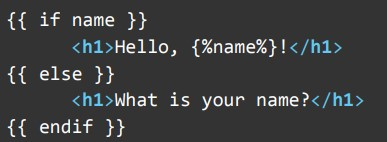
```jinja2
{% if name %}
    <h1>Hello, {{name}}!</h1>
{% else %}
    <h1>What is your name?</h1>
{% endif %}
```
text
```html
{{ if name }}
    <h1>Hello, {%name%}!</h1>
{{ else }}
    <h1>What is your name?</h1>
{{ endif }}
```
 A template named userinfo.html contains the following line inside the body tag: Which of the following code snippets will utilize the template to display Hello Ram when http://localhost:5000/user/Ram is visited on the browser?
 Text of the picture (copyable)
```html
<h1> Hello {{user_name}}! </h1>
```
text
```python
@app.route('/user/<name>')
def user():
    return render_template('userinfo.html', user_name=name)
```
text
```python
@app.route('/user/<name>')
def user(name):
    return render_template('userinfo.html', user_name=name)
```
text
```python
@app.route('/user/<user_name>')
def user(name):
    return render_template('userinfo.html', user_name = name)
```
text
```python
@app.route('/user/<name>')
def user(name):
    return render_template('templates/userinfo',user_name=name)
```
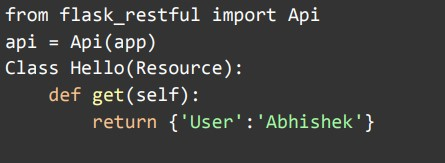 Which line of code correctly adds the below Hello class as a resource to a Flask application to get data using “http://localhost:5000/hello" URL?
 Text of the picture (copyable)
```python
from flask_restful import Api
api = Api(app)
Class Hello(Resource):
    def get(self):
        return {'User':'Abhishek'}
```
text
```python
api.add_resource(Hello, '/hello')
```

text
```python
api.add_argument(Hello, '/hello')
```

text
```python
api.resource(Hello, '/hello')
```

text
```python
api.put_resource(Hello, '/hello')
```
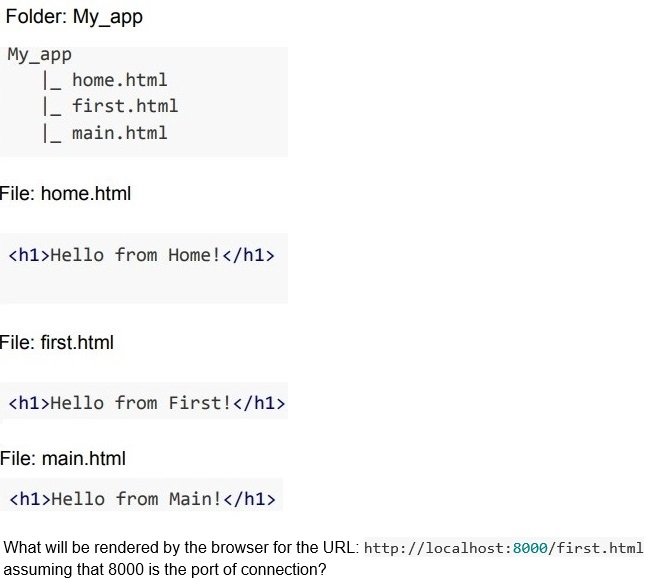 A server using the inbuilt http module of Python, is running for a directory My_app whose file structure and content of each file is given below.
 Text of the picture (copyable)
Folder: My_app
My_app
  |_ home.html
  |_ first.html
  |_ main.html

File: home.html

```html
<h1>Hello from Home!</h1>
```

File: first.html

```html
<h1>Hello from First!</h1>
```

File: main.html

```html
<h1>Hello from Main!</h1>
```

What will be rendered by the browser for the URL: http://localhost:8000/first.html assuming that 8000 is the port of connection?
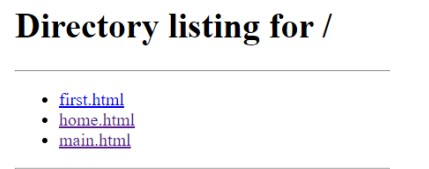
text
Directory listing for /
* first.html
* home.html
* main.html

text
Hello from First!

text
Hello from Home!

text
Hello from Main!
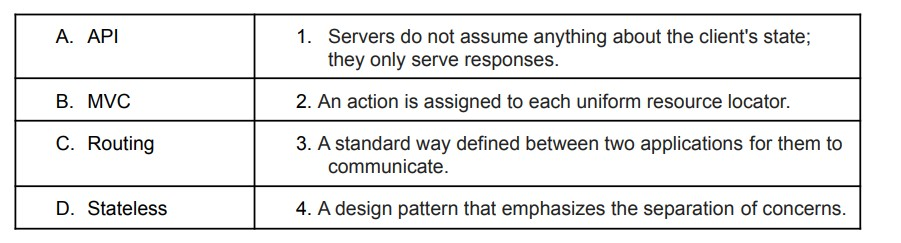 Match the following: Which of the following is the correct?
Text of the picture (copyable)
| | |
|---|---|
| A. API | 1. Servers do not assume anything about the client's state; they only serve responses. |
| B. MVC | 2. An action is assigned to each uniform resource locator. |
| C. Routing | 3. A standard way defined between two applications for them to communicate. |
| D. Stateless | 4. A design pattern that emphasizes the separation of concerns. |
- A-1, B-2, C-3, D-4
- A-2, B-4, C-1, D-3
- A-3, B-4, C-2, D-1
- A-4, B-3, C-1, D-2
- Git is an example of a centralized version control system.
- A file can stay in both working directory and staging area at a given time, whileworking with Git.
- Git and GitLab/GitHub are essentially the same.
- The command “git checkout -b
” will create the new branchand switches to the new branch created.
- Flask does not provide support for migrations, as of December 2022.
- The database migration allows a developer to make schema changes withoutlosing the data
- One of the disadvantages of migration is that a developer can only upgradethe database, and it does not allow rollbacks.
- The migration is useful when a business wants to move from an on-premisedatabase to a cloud based database.
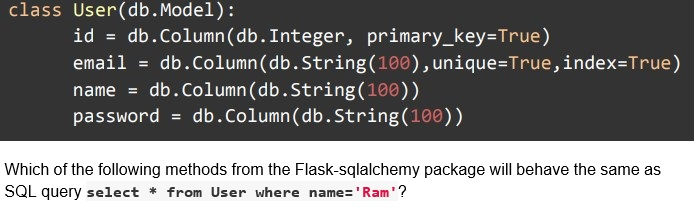 Consider the following Model for User.
 Text of the picture (copyable)
```python
class User(db.Model):
    id = db.Column(db.Integer, primary_key=True)
    email = db.Column(db.String(100),unique=True,index=True)
    name = db.Column(db.String(100))
    password = db.Column(db.String(100))
```
Which of the following methods from the Flask-sqlalchemy package will behave the same as SQL query `select * from User where name='Ram'`?
text
```python
User.query.filter(User.name = 'Ram').all()
```

text
```python
User.query.get(name = 'Ram').all()
```

text
```python
User.query.filter_by('Ram').all()
```
text
```python
User.query.filter_by(name = 'Ram').all()
```
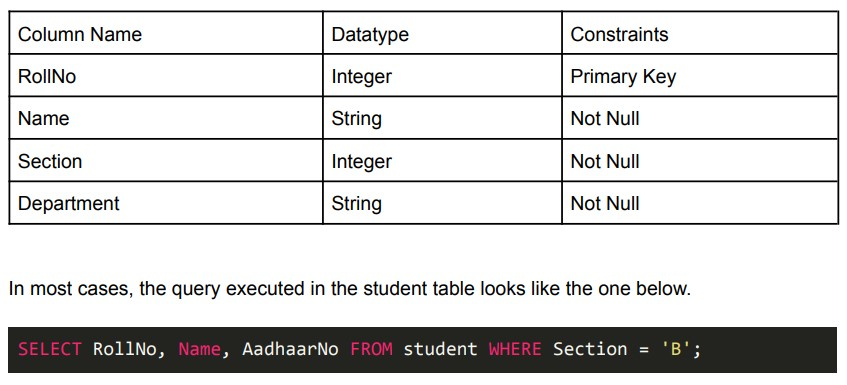 Consider the following constraints for the “student” table: For the above student table, which of the following columns would be the most appropriate for the indexing?
Text of the picture (copyable)
| Column Name | Datatype | Constraints |
|---|---|---|
| RollNo | Integer | Primary Key |
| Name | String | Not Null |
| Section | Integer | Not Null |
| Department | String | Not Null |

In most cases, the query executed in the student table looks like the one below.

```sql
SELECT RollNo, Name, AadhaarNo FROM student WHERE Section = 'B';
```
- RollNo
- Name
- Section
- Department
Text of the picture (copyable)
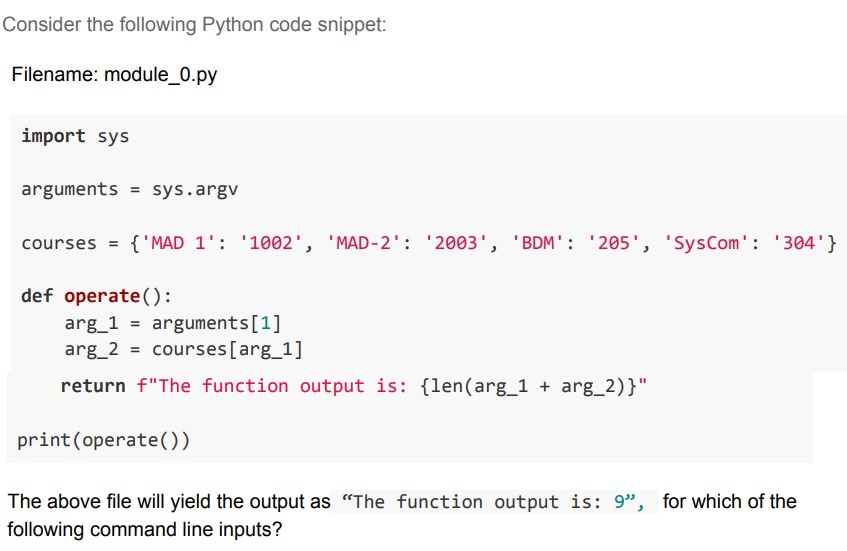
Consider the following Python code snippet:

Filename: module_0.py

```python
import sys

arguments = sys.argv

courses = {'MAD 1': '1002', 'MAD-2': '2003', 'BDM': '205', 'SysCom': '304'}

def operate():
    arg_1 = arguments[1]
    arg_2 = courses[arg_1]
    return f"The function output is: {len(arg_1 + arg_2)}"

print(operate())
```

The above file will yield the output as "The function output is: 9", for which of the following command line inputs?- python module_0.py MAD 1
- python module_0.py MAD-2
- python module_0.py BDM
- python module_0.py SysCom

Text of the picture (copyable)
Consider two software packages A and B spend exactly $T_A(N) = 2N^2 + 9$ and $T_B(N) = N^3$ milliseconds to process N data items. Analyze the software packages and select the correct statement(s).
- Software package A is slower than Software package B for inputs in the rangeN ∈ [0,3]
- Software package B is slower than Software package A for inputs in the rangeN ∈ [0,3]
- Software package B is faster than Software package A for all N > 3.
- Time taken by both the software packages A and B is the same when N = 3.
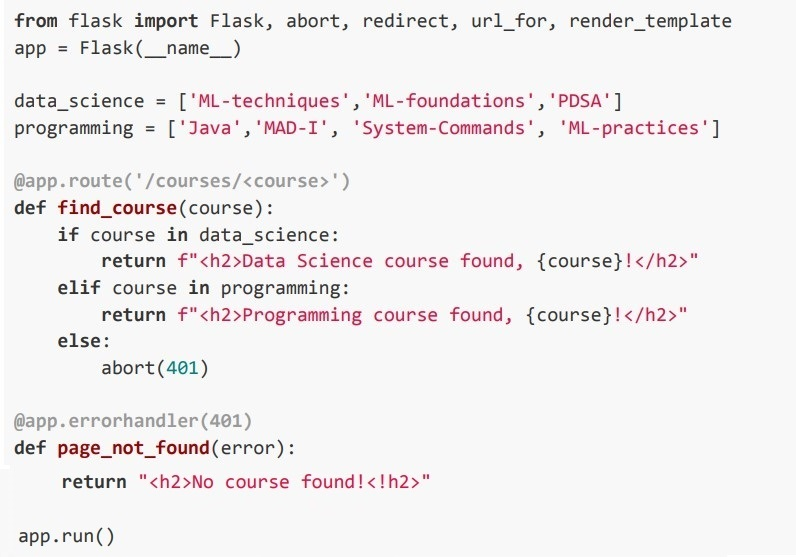 Consider the following Python code snippet. If the above application is running locally on URL: http://127.0.0.1:5000, select the correct statement(s).
Text of the picture (copyable)
```python
from flask import Flask, abort, redirect, url_for, render_template
app = Flask(__name__)

data_science = ['ML-techniques', 'ML-foundations', 'PDSA']
programming = ['Java', 'MAD-I', 'System-Commands', 'ML-practices']

@app.route('/courses/<course>')
def find_course(course):
    if course in data_science:
        return f"<h2>Data Science course found, {course}!</h2>"
    elif course in programming:
        return f"<h2>Programming course found, {course}!</h2>"
    else:
        abort(401)

@app.errorhandler(401)
def page_not_found(error):
    return "<h2>No course found!</h2>"

app.run()
```
text
For the URL, "http://localhost:5000/courses/PDSA", the browser will render:
**Programming course found, ML-techniques!**

text
For the URL, "http://localhost:5000/courses/ML-practices", the browser will render:
**Data Science course found, ML-practices!**

text
For the URL, "http://localhost:5000/courses/MAD-2", the browser will render:
**No course found!**

text
For the URL, "http://localhost:5000/courses/Java", the browser will render:
**Programming course found, Java!**
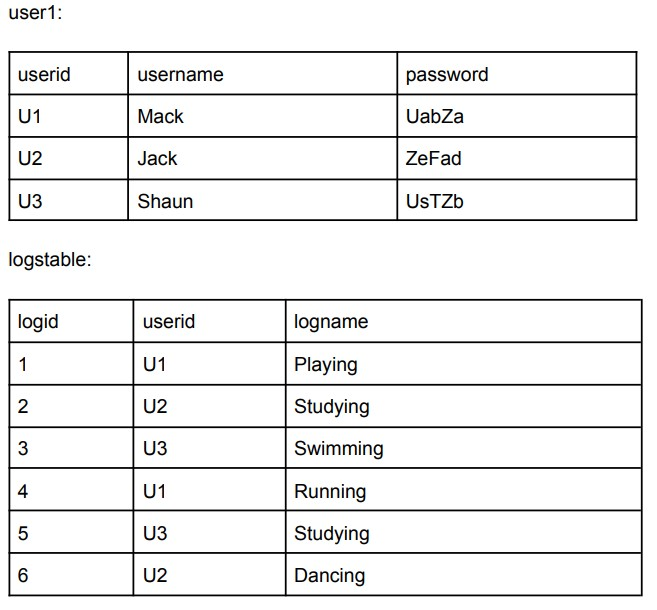 Consider the following two tables, user1 and logstable: Which of the following query/ queries will return the log ID and log name, which are created by user ‘Shaun’?
Text of the picture (copyable)
user1:

| userid | username | password |
|---|---|---|
| U1 | Mack | UabZa |
| U2 | Jack | ZeFad |
| U3 | Shaun | UsTZb |

logstable:

| logid | userid | logname |
|---|---|---|
| 1 | U1 | Playing |
| 2 | U2 | Studying |
| 3 | U3 | Swimming |
| 4 | U1 | Running |
| 5 | U3 | Studying |
| 6 | U2 | Dancing |

text
```sql
select logid, logstable.logname from user1 inner join logstable on user1.userid = logstable.userid where user1.username = 'Shaun'
```

text
```sql
select logid, logstable.logname from user1 natural join logstable
where user1.username = 'Shaun'
```

text
```sql
select logid, logstable.logname from user1 inner join logstable on
user1.username = logstable.logname where user1.username = 'Shaun'
```

text
```sql
select logid, logstable.logname from user1, logstable WHERE
user1.username = 'Shaun'
```
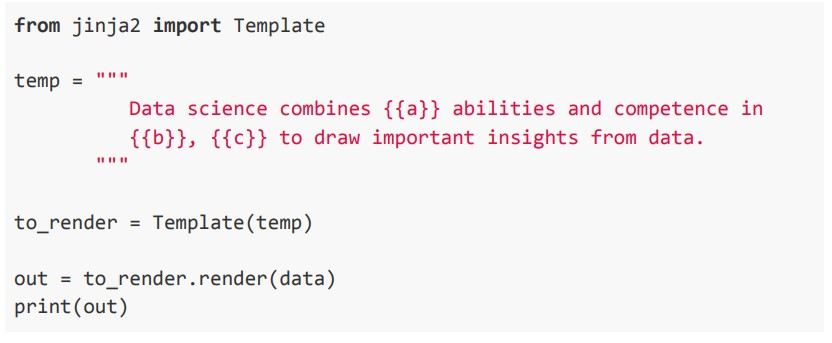 Consider the following jinja2 template, and answer the given subquestions.
  What will be the output on the terminal for:
 Text of the picture (copyable)
```python
data = {'a': 'programming', 'b': 'mathematics', 'd': 'statistics'}
```
text
Data science combines programming abilities and competence in
mathematics, statistics to draw important insights from data.

text
Data science combines programming abilities and competence in
mathematics and statistics to draw important insights from data.

text
Data science combines programming abilities and competence in
Mathematics, to draw important insights from data.

text
KeyError: 'c'
 What will be the output on the terminal for:
 Text of the picture (copyable)
```python
data = {'b': 'mathematics','c': 'statistics', 'd': 'programming'}
```
text
Data science combines {{a}} abilities and competence in
mathematics, statistics to draw important insights from data.
text
Data science combines programming abilities and competence in
mathematics, statistics to draw important insights from data.

text
Data science combines abilities and competence in
mathematics, statistics to draw important insights from data.

text
```
KeyError: 'a'
```
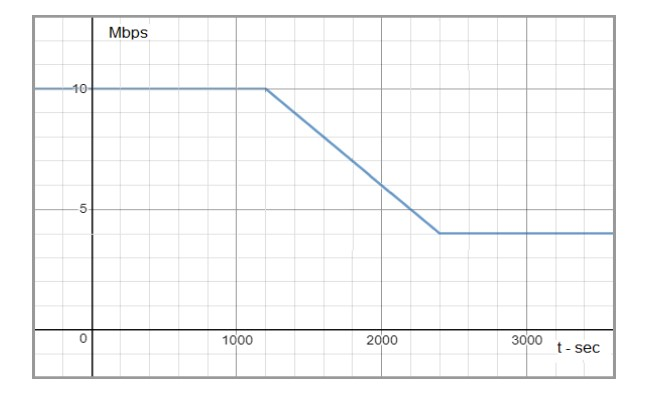 Consider the below graph, and answer the given subquestions. The bandwidth vs. time graph for a period of one hour between 12 noon to 1 p.m in the afternoon is shown below. [Use relations: 1 Byte = 8 bits, 1 GB = 1000 MB and so on.]
 - 5
- 6
- 7
- 8
- 81
- 8.1
- 1.0125
- 10.125
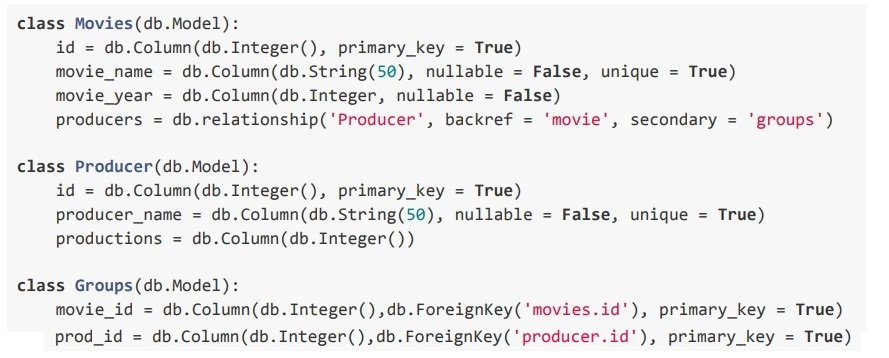 Consider the below model definitions, and answer the given subquestions. Consider the following model classes “Movies” and “Producers” corresponding to tables “movies” and “producers”, respectively, in the SQLite database.
 - One-to-one
- One-to-many
- Many-to-Many
- Many-to-One
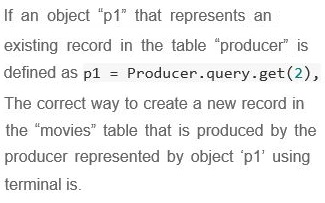
Text of the picture (copyable)
If an object "p1" that represents an
existing record in the table "producer" is
defined as

```
p1 = Producer.query.get(2),
```

The correct way to create a new record in
the "movies" table that is produced by the
producer represented by object 'p1' using
terminal is.

text
```python
>>> mov = Movies(movie_name = 'The movie', movie_year = 2001)
>>> p1.movie.append(mov)
>>> db.session.commit()
```

text
```python
>>> mov = Movies(movie_name = 'The movie', movie_year = 2001)
>>> mov.producers.append(p1)
>>> db.session.commit()
```

text
```python
>>> mov = Movies(movie_name = 'The movie', movie_year = 2001,
producers = p1)
>>> db.session.add(mov)
>>> db.session.commit()
```

text
```python
>>> mov = Movies(movie_name = 'The movie', movie_year = 2001)
>>> p1.producers.append(mov)
>>> db.session.commit()
```
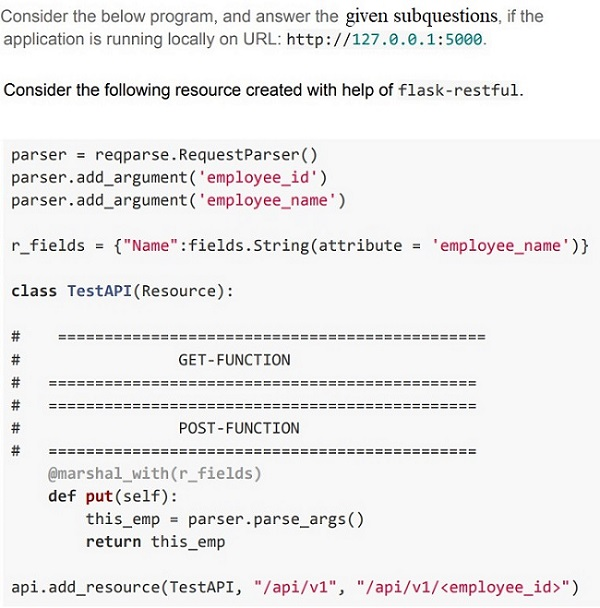
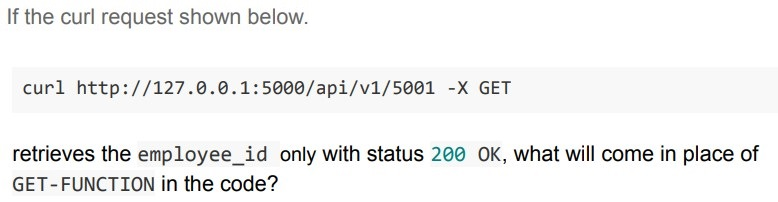
Text of the picture (copyable)
If the curl request shown below.

```
curl http://127.0.0.1:5000/api/v1/5001 -X GET
```

retrieves the employee_id only with status 200 OK, what will come in place of GET-FUNCTION in the code?

text
```python
def get(self):
    return {'employee_Id': employee_id}
```
text
```python
def get(self, employee_id):
    return {'employee_Id': employee_id}
```
text
```python
def get(self):
    args = parser.parse_args()
    return {'Id_no.': args['employee_id']}
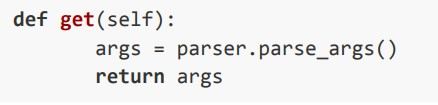
```
text
```python
def get(self):
    args = parser.parse_args()
    return args
```
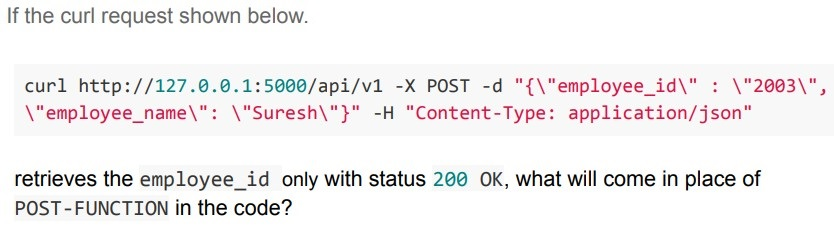
Text of the picture (copyable)
If the curl request shown below.

```
curl http://127.0.0.1:5000/api/v1 -X POST -d "{\"employee_id\" : \"2003\",
\"employee_name\" : \"Suresh\"}" -H "Content-Type: application/json"
```

retrieves the employee_id only with status 200 OK, what will come in place of
POST-FUNCTION in the code?
text
```python
def post(self):
    return {'employee_Id': employee_id}
```
text
```python
def post(self, employee_id):
    return {'employee_Id': employee_id}
```
text
```python
def post(self):
    args = parser.parse_args()
    return {'Id_no.': args['employee_id']}
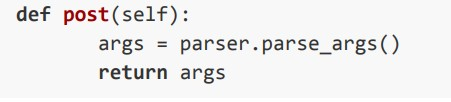
```
text
```python
def post(self):
    args = parser.parse_args()
    return args
```

Text of the picture (copyable)
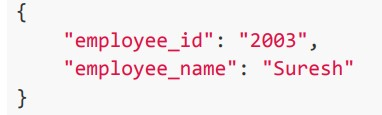
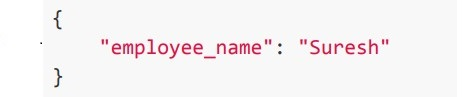
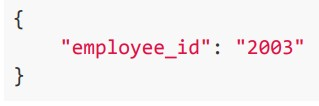
What will be the response from the server for the request:

```
curl http://127.0.0.1:5000/api/v1 -X PUT -d "{\"employee_id\": \"2003\", \"employee_name\": \"Suresh\"}" -H "Content-Type: application/json"
```
text
```json
{
    "employee_id": "2003",
    "employee_name": "Suresh"
}
```
text
```json
{
    "employee_name": "Suresh"
}
```
text
```json
{
  "employee_id": "2003"
}
```
text
None of these
Answer key
- Q1 (MCQ, 2 marks): D
- Q2 (MCQ, 2 marks): C
- Q3 (MCQ, 2 marks): C
- Q4 (MCQ, 2 marks): B
- Q5 (MCQ, 2 marks): B
- Q6 (MCQ, 2 marks): A
- Q7 (SA, 2 marks): 105
- Q8 (MCQ, 3 marks): B
- Q9 (MCQ, 3 marks): B
- Q10 (MCQ, 3 marks): B
- Q11 (MCQ, 3 marks): C
- Q12 (MCQ, 3 marks): B
- Q13 (MCQ, 3 marks): A
- Q14 (MCQ, 3 marks): B
- Q15 (MCQ, 3 marks): C
- Q16 (MSQ, 3 marks): A, C
- Q17 (MSQ, 3 marks): B, D
- Q18 (MSQ, 3 marks): A, D
- Q19 (MCQ, 4.5 marks): C
- Q20 (MSQ, 4.5 marks): B, D
- Q21 (MSQ, 4.5 marks): A, D
- Q22 (MSQ, 4.5 marks): C, D
- Q23 (MSQ, 4.5 marks): A, B
- Q24 (MCQ, 3 marks): C
- Q25 (MCQ, 3 marks): C
- Q26 (MCQ, 2 marks): C
- Q27 (MCQ, 4.5 marks): C
- Q28 (MCQ, 3 marks): C
- Q29 (MSQ, 4.5 marks): A, B
- Q30 (MCQ, 3 marks): B
- Q31 (MCQ, 3 marks): C
- Q32 (MCQ, 4.5 marks): D
Concepts this paper tests
Auto-generated summary from the source site. Handy as a checklist; the lessons above explain each idea from scratch.
Here’s a structured summary of core topics, concepts, principles, and equations essential for the "Diploma Level: Modern Application Development 1" exam, followed by Mermaid knowledge graphs to visualize relationships.
1. Core Topics & Concepts
A. Web Development Fundamentals
1. HTML & JavaScript Basics
JSON Parsing:
JSON.parse()converts a JSON string to a JavaScript object.Example:
const obj = JSON.parse('{"name":"Balu", "age":30}');
console.log(obj.name); // Output: "Balu"
Template Literals:
- Use backticks (`
) for multi-line strings and variable interpolation (${variable}`). Example:
document.getElementById("demo").innerHTML = `Hi ${obj.name}, ${obj.city}`;
- Use backticks (`
2. Flask (Python Web Framework)
Routing:
@app.route('/')binds a function to a URL.Example:
@app.route('/')
def index():
    return render_template('index.html')
Templates (Jinja2):
- Inheritance:
{% extends 'base.html' %}inherits a base template. Conditionals:
{% if name %} <h1>Hello, {{ name }}!</h1> {% else %} <h1>What is your name?</h1> {% endif %}- Variables:
{{ variable }}renders a variable.
- Inheritance:
URL Generation:
url_for('function_name')generates a URL for a route.Example:
return redirect(url_for('index'))
Error Handling:
@app.errorhandler(404)defines custom error pages.Example:
@app.errorhandler(401)
def unauthorized(error):
    return "Unauthorized", 401
Flask-RESTful:
api.add_resource(ResourceClass, '/url')adds a RESTful endpoint.Example:
api.add_resource(Hello, '/hello')
Flask-SQLAlchemy:
Querying:
User.query.filter_by(name='Ram').all() # Equivalent to SQL: SELECT * FROM User WHERE name='Ram'Relationships:
- One-to-Many, Many-to-Many (using
db.relationshipand secondary tables). Example (Many-to-Many):
producers = db.relationship('Producer', secondary='groups')
- One-to-Many, Many-to-Many (using
3. Testing (Pytest)
Assertions:
assert function() == expected_resultExample:
def test_dec():
    assert dec(3) == 2  # Passes if dec(3) returns 2
Running Tests:
- Execute with
pytest filename.py.
- Execute with
4. URL Structure
Components of a URL:
- Protocol:
https - Domain:
onlinedegree.com - Path:
/academics - Query String:
?course=appdev1 - Fragment:
#week2
- Protocol:
5. CSS Precedence
- Order of Priority:
inline > internal > external
B. Version Control (Git)
Centralized vs. Distributed:
- Git is distributed (not centralized).
Staging Area:
- A file can be in both the working directory and staging area simultaneously.
Branching:
git checkout -b <branch_name>creates and switches to a new branch.
Git vs. GitHub/GitLab:
- Git is the version control system; GitHub/GitLab are hosting platforms.
C. Databases & SQL
1. SQL Queries
Joins:
INNER JOIN,NATURAL JOIN(joins tables on common columns).Example:
SELECT logid, logname
FROM user1
INNER JOIN logstable ON user1.userid = logstable.userid
WHERE username = 'Shaun';
Indexing:
- Improves query performance on frequently searched columns (e.g.,
Sectionin thestudenttable).
- Improves query performance on frequently searched columns (e.g.,
2. Database Migrations
Purpose:
- Allows schema changes without data loss.
- Supports rollbacks.
Use Cases:
- Moving from on-premise to cloud databases.
D. Continuous Integration/Delivery (CI/CD)
Continuous Integration (CI):
- Automates code integration from multiple contributors.
Continuous Delivery (CD):
- Automates deployment of release packages after successful tests.
E. Performance Analysis
Time Complexity:
- Compare growth rates of functions (e.g., \(O(N^2)\) vs. \(O(N^3)\)).
Example:
- \(T_A(N) = 2N^2 + 9\) (quadratic)
- \(T_B(N) = N^3\) (cubic)
- For small \(N\), constants matter; for large \(N\), the highest-order term dominates.
F. Networking
Bandwidth Calculation:
- Convert between bits and bytes (1 Byte = 8 bits).
Calculate total data transfer:
- Bandwidth (Mbps) × Time (seconds) → Megabits.
- Convert to Gigabytes: \[ \text{Data (GB)} = \frac{\text{Bandwidth (Mbps)} \times \text{Time (s)}}{8 \times 1000^2} \]
Example:
- Bandwidth = 7 Mbps, Time = 900s (15 minutes): \[ \text{Data} = \frac{7 \times 900}{8 \times 1000^2} = 0.007875 \, \text{GB} \approx 1.0125 \, \text{GB} \, (\text{with rounding}) \]
G. Python Command-Line Arguments
sys.argv:- Access command-line arguments as a list.
Example:
import sys
print(sys.argv[1])  # First argument
2. Key Equations (Mathematics/Performance)
| Concept | Equation |
|---|---|
| Time Complexity | \(O(N^2)\) vs. \(O(N^3)\) |
| Bandwidth to Data | \(\text{Data (bits)} = \text{Bandwidth (bps)} \times \text{Time (s)}\) |
| Bits to Bytes | \(1 \, \text{Byte} = 8 \, \text{bits}\) |
| Binary to Octal | Group binary digits into sets of 3 (right to left). |