Home / Past papers / MAD1 Quiz 1 / this paper
Modern Application Development I 16 Jul 26 - 19 Jul 2026
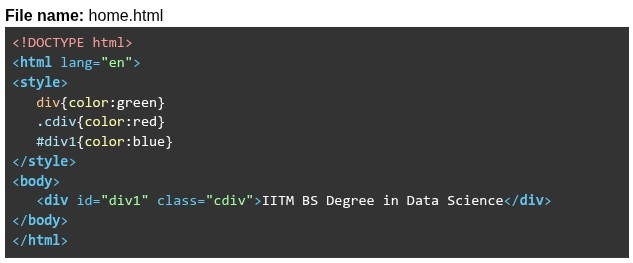 What will be rendered by the browser?
Text of the picture (copyable)
File name: home.html

```html
<!DOCTYPE html>
<html lang="en">
<style>
    div{color:green}
    .cdiv{color:red}
    #div1{color:blue}
</style>
<body>
    <div id="div1" class="cdiv">IITM BS Degree in Data Science</div>
</body>
</html>
```
text
IITM BS Degree in Data Science

text
IITM BS Degree in Data Science

text
IITM BS Degree in Data Science

text
1. IITM BS Degree in Data Science

text
Block: `<span>` | Inline: `<div>`

text
Block: `<div>` | Inline: `<a>`

text
Block: `<h1>` | Inline: `<p>`

text
Block: `<span>` | Inline: `<h5>`
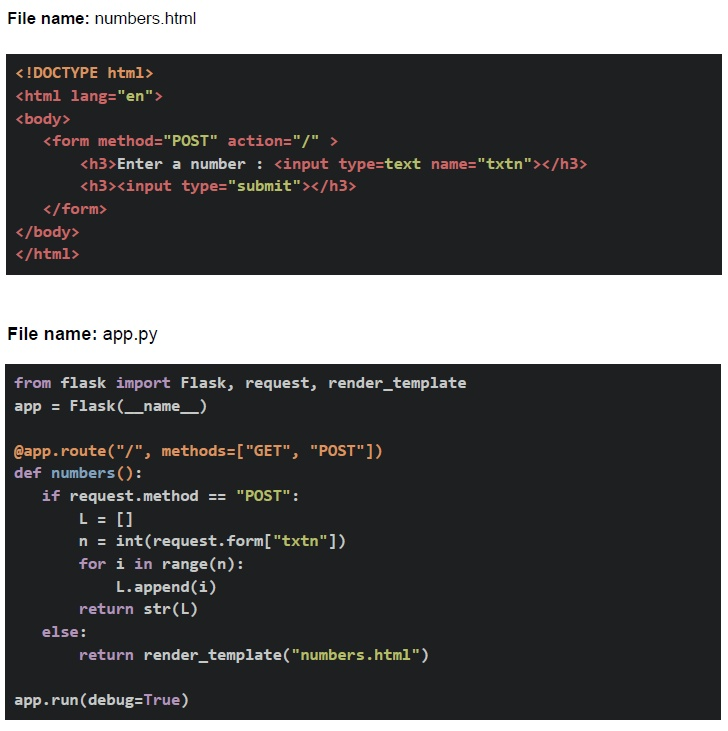 Assume that the Flask app is running at http://127.0.0.1:5000. Based on the above data, answer the given subquestions.
- Both statements are correct
- Both statements are incorrect.
- Statement 1 is incorrect, but statement 2 is correct.
- Statement 2 is incorrect, but statement 1 is correct.
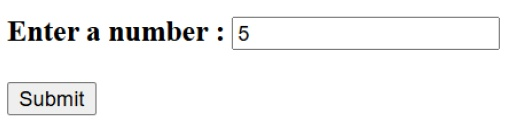
Text of the picture (copyable)
Enter a number :
[text input field with "5" entered]
[Submit button]
- 404 Not Found
- [0, 1, 2, 3, 4]
- [ ]
- [1, 2, 3, 4, 5]
- 3
- 30
- 3000
- 300
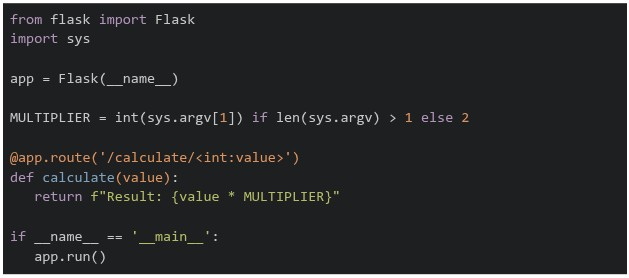 What will be the output when you run the following code in the terminal
  and then access in the browser with the following link
  ?
?Text of the picture (copyable)
```python
from flask import Flask
import sys

app = Flask(__name__)

MULTIPLIER = int(sys.argv[1]) if len(sys.argv) > 1 else 2

@app.route('/calculate/<int:value>')
def calculate(value):
    return f"Result: {value * MULTIPLIER}"

if __name__ == '__main__':
    app.run()
```
```
python app.py 7
```
http://localhost:5000/calculate/6- Result: 42
- Result: 13
- Result: 7
- Result: 12
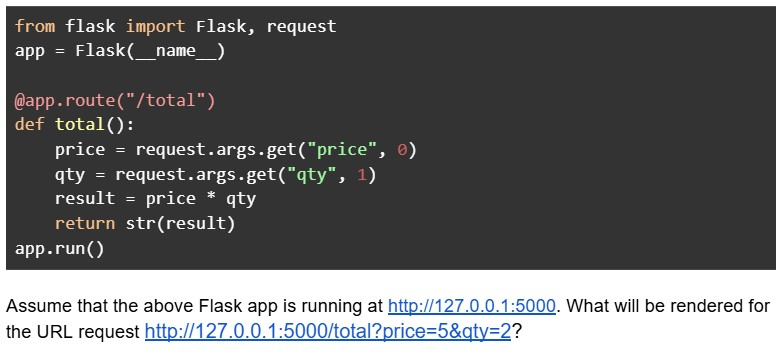
Text of the picture (copyable)
```python
from flask import Flask, request
app = Flask(__name__)

@app.route("/total")
def total():
    price = request.args.get("price", 0)
    qty = request.args.get("qty", 1)
    result = price * qty
    return str(result)

app.run()
```

Assume that the above Flask app is running at http://127.0.0.1:5000. What will be rendered for the URL request http://127.0.0.1:5000/total?price=5&qty=2?- 55
- 52
- 10
- TypeError
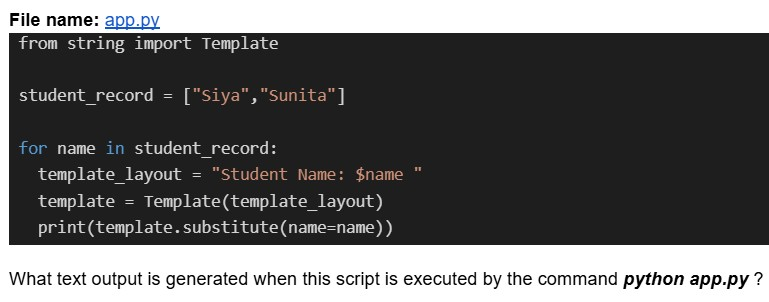
Text of the picture (copyable)
File name: app.py
```python
from string import Template

student_record = ["Siya", "Sunita"]

for name in student_record:
    template_layout = "Student Name: $name "
    template = Template(template_layout)
    print(template.substitute(name=name))
```
What text output is generated when this script is executed by the command `python app.py`?- Student Name: Siya Sunita
- Student Name: Siya Student Name: Sunita
- Student Name: Sunita
- Key Error
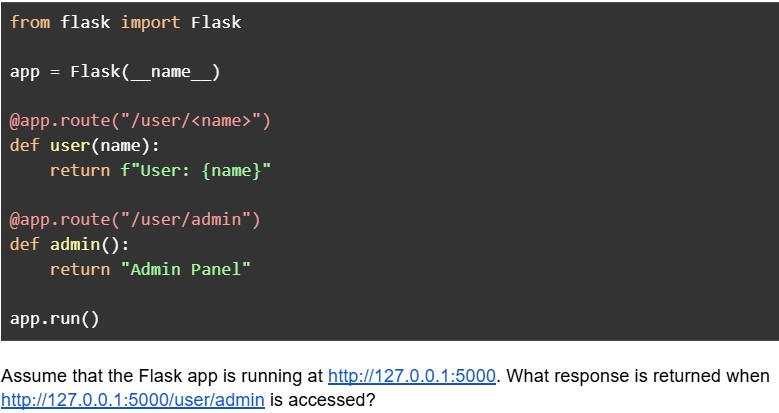
Text of the picture (copyable)
```python
from flask import Flask

app = Flask(__name__)

@app.route("/user/<name>")
def user(name):
    return f"User: {name}"

@app.route("/user/admin")
def admin():
    return "Admin Panel"

app.run()
```

Assume that the Flask app is running at http://127.0.0.1:5000. What response is returned when http://127.0.0.1:5000/user/admin is accessed?- Admin Panel
- User: admin
- 404 Error
- Internal Server Error
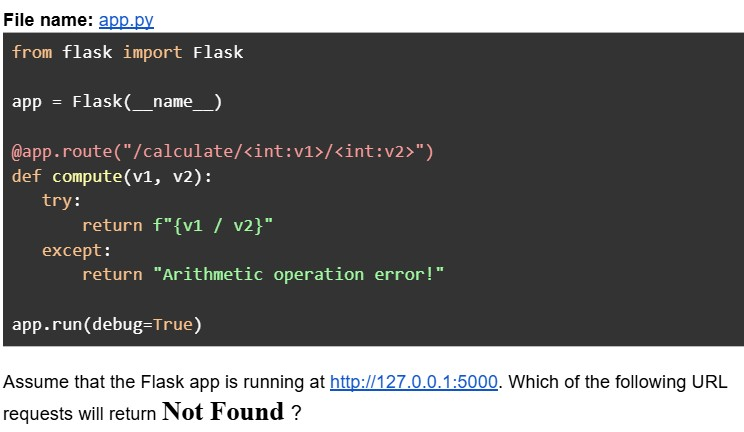
Text of the picture (copyable)
File name: app.py
```python
from flask import Flask

app = Flask(__name__)

@app.route("/calculate/<int:v1>/<int:v2>")
def compute(v1, v2):
    try:
        return f"{v1 / v2}"
    except:
        return "Arithmetic operation error!"

app.run(debug=True)
```

Assume that the Flask app is running at http://127.0.0.1:5000. Which of the following URL requests will return **Not Found** ?
text
```
http://127.0.0.1:5000/calculate/10/5
```

text
```
http://127.0.0.1:5000/calculate/3/0.2
```

text
```
http://127.0.0.1:5000/calculate/3/2?v1=1
```

text
```
http://127.0.0.1:5000/calculate?v1=5&v2=2
```
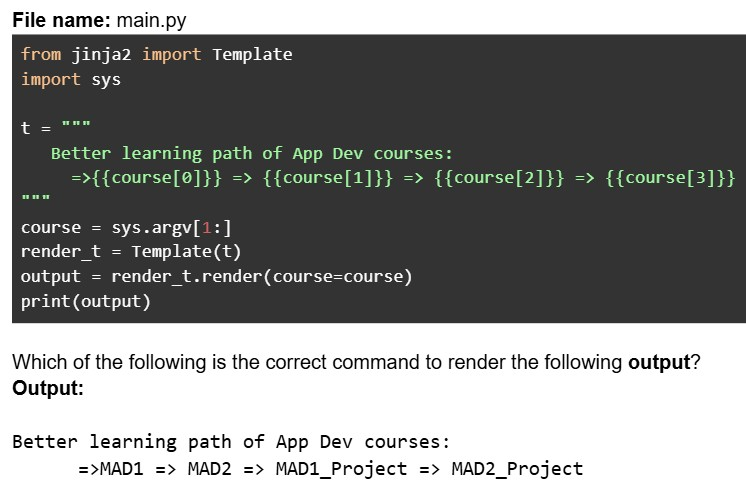
Text of the picture (copyable)
File name: main.py

```python
from jinja2 import Template
import sys

t = """
Better learning path of App Dev courses:
=>{{course[0]}} => {{course[1]}} => {{course[2]}} => {{course[3]}}
"""

course = sys.argv[1:]
render_t = Template(t)
output = render_t.render(course=course)
print(output)
```

Which of the following is the correct command to render the following **output**?
**Output**:

Better learning path of App Dev courses:
=>MAD1 => MAD2 => MAD1_Project => MAD2_Project- python main.py MAD1 MAD2 MAD1_ Project MAD2_ Project
- python main.py MAD1 MAD2 MAD1_Project MAD2_Project
- python main.py "MAD1 MAD2 MAD1_Project MAD2_Project"
- python main.py MAD1 MAD2 "MAD1_Project" "MAD2_Project"
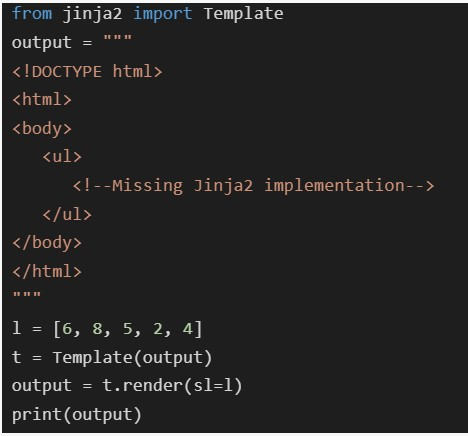 Which of the following code snippets should be placed at
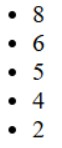
  such that the output generated in the terminal when rendered will be as shown below?
Text of the picture (copyable)
```python
from jinja2 import Template
output = """
<!DOCTYPE html>
<html>
<body>
    <ul>
        <!--Missing Jinja2 implementation-->
    </ul>
</body>
</html>
"""

l = [6, 8, 5, 2, 4]
t = Template(output)
output = t.render(sl=l)
print(output)
```
```html
<!--Missing Jinja2 implementation-->
```
- 8
- 6
- 5
- 4
- 2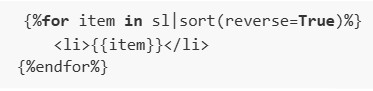
text
```html
{%for item in sl|sort(reverse=True)%}
    <li>{{item}}</li>
{%endfor%}
```
text
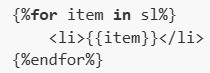
```html
{%for item in sl%}
    <li>{{item}}</li>
{%endfor%}
```
text
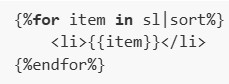
```html
{%for item in sl|sort%}
    <li>{{item}}</li>
{%endfor%}
```
text
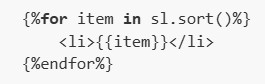
```
{%for item in sl.sort()%}
    <li>{{item}}</li>
{%endfor%}
```
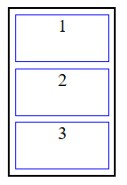
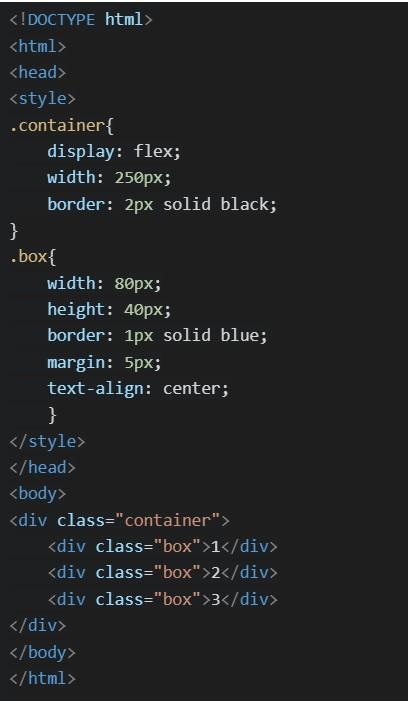 Which of the following will be the correct rendered output ?
Text of the picture (copyable)
```html
<!DOCTYPE html>
<html>
<head>
<style>
.container{
    display: flex;
    width: 250px;
    border: 2px solid black;
}
.box{
    width: 80px;
    height: 40px;
    border: 1px solid blue;
    margin: 5px;
    text-align: center;
}
</style>
</head>
<body>
<div class="container">
    <div class="box">1</div>
    <div class="box">2</div>
    <div class="box">3</div>
</div>
</body>
</html>
```
text
This is a diagram showing three rectangular boxes stacked vertically within a larger outer rectangle. Each inner box is outlined in blue and contains a single number.
- The top box is labeled "1".
- The middle box is labeled "2".
- The bottom box is labeled "3".
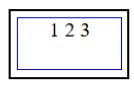
text
This is a diagram of a rectangle with a nested rectangle.
The outer rectangle is black.
The inner rectangle is blue.
Inside the inner rectangle, the text "1 2 3" is displayed.
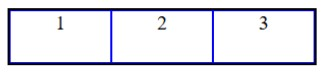
text
This is a diagram of three rectangular boxes arranged horizontally, each containing a number.
- The first box on the left contains the number "1".
- The second box in the middle contains the number "2".
- The third box on the right contains the number "3".
All boxes are outlined with a dark blue border, and the vertical lines separating the boxes are also dark blue.
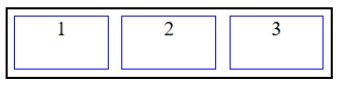
text
The image displays a diagram with a black rectangular outer border. Inside this border, there are three smaller, identical rectangular boxes arranged horizontally. Each of these inner boxes has a blue border. The boxes are labeled with numbers: "1" in the leftmost box, "2" in the middle box, and "3" in the rightmost box. There is a small gap between each of the inner boxes.
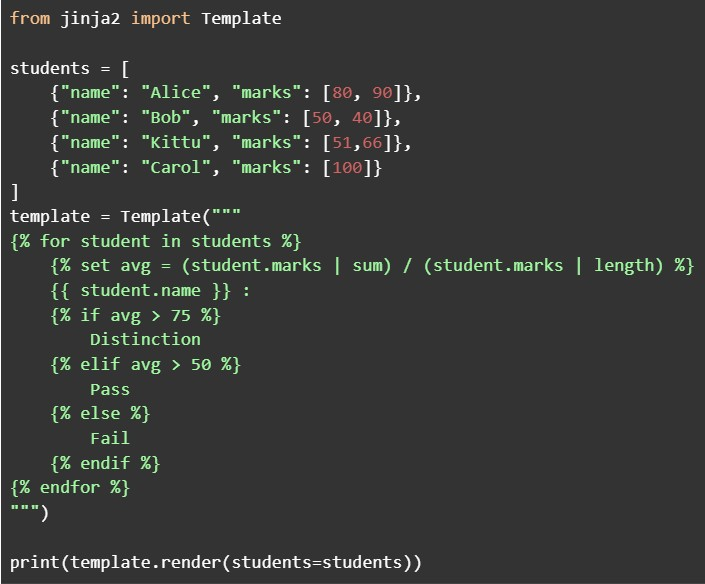 Which of the following students is classified as "Pass" by the template?
Text of the picture (copyable)
```python
from jinja2 import Template

students = [
    {"name": "Alice", "marks": [80, 90]},
    {"name": "Bob", "marks": [50, 40]},
    {"name": "Kittu", "marks": [51,66]},
    {"name": "Carol", "marks": [100]}
]

template = Template("""
{% for student in students %}
    {% set avg = (student.marks | sum) / (student.marks | length) %}
    {{ student.name }} :
    {% if avg > 75 %}
        Distinction
    {% elif avg > 50 %}
        Pass
    {% else %}
        Fail
    {% endif %}
{% endfor %}
""")

print(template.render(students=students))
```- Alice
- Bob
- Kittu
- Carol
Answer key
- Q1 (MCQ, 2 marks): B
- Q2 (MCQ, 2 marks): B
- Q3 (MCQ, 2 marks): A
- Q4 (MCQ, 4 marks): B
- Q5 (MCQ, 3 marks): C
- Q6 (MCQ, 3 marks): A
- Q7 (MCQ, 3 marks): D
- Q8 (MCQ, 3 marks): B
- Q9 (MCQ, 3 marks): A
- Q10 (MSQ, 3 marks): B, D
- Q11 (MSQ, 3 marks): B, D
- Q12 (SA, 3 marks): 125
- Q13 (SA, 2 marks): 5
- Q14 (MCQ, 4 marks): A
- Q15 (MCQ, 5 marks): D
- Q16 (MCQ, 5 marks): C
Concepts this paper tests
Auto-generated summary from the source site. Handy as a checklist; the lessons above explain each idea from scratch.
Here's a summary of the core topics, concepts, principles, and equations essential to study for the exam, followed by a knowledge graph.
Summary of Core Topics and Concepts
The questions cover fundamental aspects of Web Development, specifically focusing on Frontend Technologies (HTML, CSS) and Backend Development with Python Flask, alongside core Python Programming concepts and some Mathematical/Networking Fundamentals.
1. Web Technologies (HTML, CSS, HTTP)
HTML Structure and Elements:
- Understanding the basic document structure (
<!DOCTYPE html>,<html>,<head>,<body>). - Common HTML elements and their attributes:
<div>,<h3>,<input>,<form>,<ul>,<li>. - Block-level vs. Inline-level Elements: Differentiating elements that start on a new line and take full width (e.g.,
<div>,<p>,<h1>) from those that flow with text and take only necessary width (e.g.,<span>,<a>,<img>,<input>). - Form elements:
<input type="text">,<input type="submit">.
- Understanding the basic document structure (
CSS Styling and Selectors:
- Embedding CSS within the
<style>tag in HTML. CSS Selector Specificity: The mechanism by which browsers decide which CSS rules to apply.
- ID selectors (
#id) have higher specificity than Class selectors (.class), which in turn have higher specificity than Type selectors (element_name). - Rules with higher specificity override less specific ones. If specificity is equal, the last declared rule in the stylesheet takes precedence.
- ID selectors (
- Basic CSS properties:
color,display,width,height,border,margin,text-align. Flexbox Layout (
display: flex):- Making a container a flex container by setting
display: flex. - Default Flexbox behavior: items (
divchildren) are arranged in a row (flex-direction: row), do not wrap (flex-wrap: nowrap), and typically align to the start of the main axis and stretch along the cross axis. Margins, borders, and padding contribute to the item's total size within the layout.
- Making a container a flex container by setting
- Embedding CSS within the
HTTP Request Methods:
- GET: Used to request data from a specified resource. It's the default method when directly typing a URL in a browser or submitting an HTML form without a specified
method. - POST: Used to send data to a server to create or update a resource. Commonly used for submitting HTML forms.
- GET: Used to request data from a specified resource. It's the default method when directly typing a URL in a browser or submitting an HTML form without a specified
2. Python Web Framework (Flask)
Flask Application Structure:
- Importing necessary modules:
Flask,request,render_template. - Initializing a Flask application:
app = Flask(__name__). - Running the development server:
app.run(debug=True).
- Importing necessary modules:
Routing:
- Route Decorators: Using
@app.route()to associate URL paths with Python functions. - Dynamic Routes: Defining routes with variable parts using
<variable_name>(e.g.,/user/<name>). - Type Converters: Specifying expected data types for dynamic route parameters (e.g.,
<int:value>). If a URL segment cannot be converted to the specified type, Flask typically returns a404 Not Founderror. - Route Matching Precedence: Flask generally prioritizes more specific routes. A static route (e.g.,
/user/admin) will be matched over a dynamic route (e.g.,/user/<name>) if the URL exactly matches the static path.
- Route Decorators: Using
Request Handling:
- Accessing Form Data (POST requests):
request.form.get("input_name")to retrieve values from submitted forms. Values are always strings. - Accessing Query Parameters (GET requests):
request.args.get("param_name", default_value)to retrieve values from the URL's query string (e.g.,?key=value). Values are always strings. A default value can be provided. - Checking HTTP Method:
request.methodallows conditional logic based on the incoming request method (e.g.,if request.method == "POST":).
- Accessing Form Data (POST requests):
Template Rendering:
- Using
render_template("filename.html")to serve HTML templates. - Passing Python variables/data structures to Jinja2 templates for dynamic content generation.
- Using
Error Handling:
- Python's
try-exceptblocks are used for handling runtime exceptions that occur within the route function's logic (e.g.,ZeroDivisionError). Note that route matching errors (like failed type conversion) are handled by Flask's routing layer, often resulting in a404 Not Found.
- Python's
3. Python Core Concepts
Data Types and Structures:
- Lists: Creation (
[]), adding elements (list.append(element)), accessing elements by index (list[index]). - Strings: String conversion (
str(value)), f-strings for formatting (f"..."), string repetition ("text" * integer). - Integers: Type conversion (
int(value)). - Dictionaries: Storing key-value pairs, accessing values (
dict["key"]).
- Lists: Creation (
Control Flow:
forloops: Iterating over iterable objects (lists, ranges).if/elif/elsestatements: Implementing conditional logic.
- Functions: Defining and calling Python functions, understanding return values.
sysModule:- Command-line Arguments (
sys.argv):sys.argvis a list containing the command-line arguments passed to a Python script.sys.argv[0]is the script name, andsys.argv[1:]is a list of all arguments after the script name.len(sys.argv)gives the total number of arguments.
- Command-line Arguments (
- String Templating (
string.Template): A built-in Python module for simple string substitutions using$placeholderor${placeholder}syntax. - Type Conversion/Coercion: The necessity of explicitly converting string inputs (from web requests) to appropriate numeric types (
int(),float()) before performing mathematical operations, to preventTypeErroror unintended string operations (like repetition).
4. Jinja2 Templating Language
Basic Syntax:
- Variables:
{{ variable_name }}(double curly braces). - Control structures (loops, conditionals, assignments):
{% control_statement %}(curly brace-percentage sign).
- Variables:
Control Flow:
forloops:{% for item in sequence %}and{% endfor %}for iterating over data.if/elif/elsestatements:{% if condition %},{% elif condition %},{% else %},{% endif %}for conditional rendering.
Filters:
- Applying filters:
variable | filter_name. - Common filters:
sum(calculates sum of list elements),length(calculates length of a list/string),sort(sorts a list). - Filter arguments:
sort(reverse=True)for descending order.
- Applying filters:
Assignments:
setstatement:{% set variable = expression %}for creating variables within the template.
5. Mathematical and Networking Fundamentals
Bandwidth and Concurrent Requests:
- Understanding units of data transfer rates (bps, Kbps, Mbps, Gbps).
- Unit Conversion: Ensure consistent units for calculations (e.g., $1 \text{ Gbps} = 1000 \text{ Mbps}$).
- Calculation Principle: The maximum number of concurrent requests is determined by dividing the total available bandwidth by the bandwidth required per client.
- Equation: $$ \text{Max Concurrent Requests} = \frac{\text{Total Bandwidth}}{\text{Bandwidth per Client}} $$
Round Trip Time (RTT):
- Propagation Delay: The time it takes for a signal to travel from one point to another.
- Equation for Propagation Time: $$ t_{\text{prop}} = \frac{\text{Distance}}{\text{Speed}} $$
- RTT Definition: The total time taken for a signal to travel from the sender to the receiver and back.
- Equation for RTT: $$ \text{RTT} = 2 \times t_{\text{prop}} $$
- Importance of unit consistency (meters for distance, meters/second for speed, seconds for time, converting seconds to milliseconds).
Information Theory (Data Encoding):
- Minimum Bits for Encoding: To uniquely encode $N$ distinct symbols, each with a fixed-length binary code, you need at least $k$ bits per symbol such that $2^k \ge N$.
- Equation: This can be found using the ceiling of the base-2 logarithm: $$ k = \lceil \log_2 N \rceil $$ Where $N$ is the number of distinct symbols.