Home / Past papers / MAD1 Quiz 1 / this paper
Modern Application Development I 15 Mar 26 - 15 Mar 2026
- 45 MB
- 450 MB
- 5.6 MB
- 56.25 MB
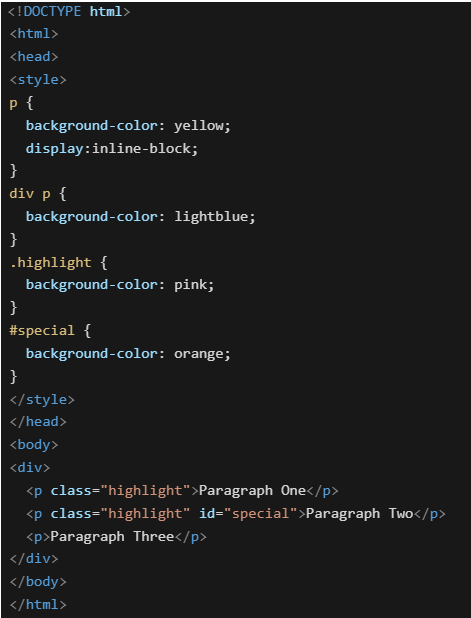 Which of the following will be the rendered output?
Text of the picture (copyable)
```html
<!DOCTYPE html>
<html>
<head>
<style>
p {
  background-color: yellow;
  display:inline-block;
}

div p {
  background-color: lightblue;
}

.highlight {
  background-color: pink;
}

#special {
  background-color: orange;
}
</style>
</head>
<body>
<div>
  <p class="highlight">Paragraph One</p>
  <p class="highlight" id="special">Paragraph Two</p>
  <p>Paragraph Three</p>
</div>
</body>
</html>
```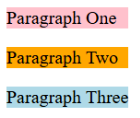
text
Paragraph One
Paragraph Two
Paragraph Three
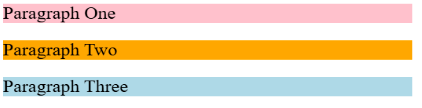
text
Paragraph One
Paragraph Two
Paragraph Three

text
Paragraph One Paragraph Two Paragraph Three

text
Paragraph One Paragraph Two Paragraph Three
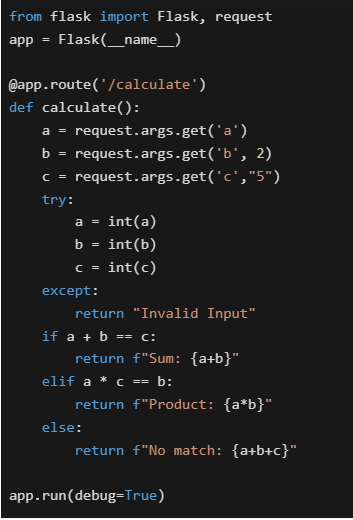 Select the option which correctly matches the URL in column A with the rendered output in column B, if the application is running locally on http://127.0.0.1:5000.
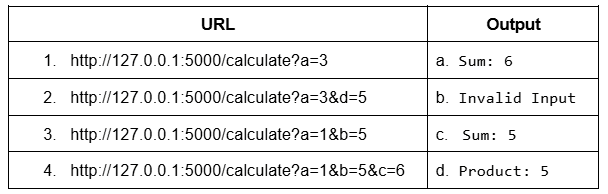
Text of the picture (copyable)
```python
from flask import Flask, request
app = Flask(__name__)

@app.route('/calculate')
def calculate():
    a = request.args.get('a')
    b = request.args.get('b', 2)
    c = request.args.get('c', "5")

    try:
        a = int(a)
        b = int(b)
        c = int(c)
    except:
        return "Invalid Input"

    if a + b == c:
        return f"Sum: {a+b}"
    elif a * c == b:
        return f"Product: {a*b}"
    else:
        return f"No match: {a+b+c}"

app.run(debug=True)
```
| URL | Output |
|---|---|
| 1. http://127.0.0.1:5000/calculate?a=3 | a. Sum: 6 |
| 2. http://127.0.0.1:5000/calculate?a=3&d=5 | b. Invalid Input |
| 3. http://127.0.0.1:5000/calculate?a=1&b=5 | c. Sum: 5 |
| 4. http://127.0.0.1:5000/calculate?a=1&b=5&c=6 | d. Product: 5 |- 1-b, 2-b, 3-a, 4-a
- 1-b, 2-b, 3-d, 4-a
- 1-c, 2-c, 3-d, 4-a
- 1-c, 2-b, 3-d, 4-a
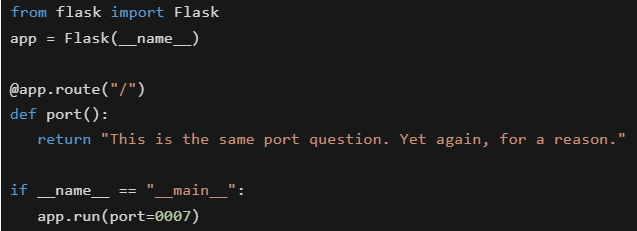 You are running a Flask web application locally using the command: python app.py. On which URL will the application be accessible in the browser?
Text of the picture (copyable)
```python
from flask import Flask
app = Flask(__name__)

@app.route("/")
def port():
    return "This is the same port question. Yet again, for a reason."

if __name__ == "__main__":
    app.run(port=0007)
```- https://127.0.0.1:5000/
- http://localhost:0007/
- http://0.0.0.0:0007/
- None of these
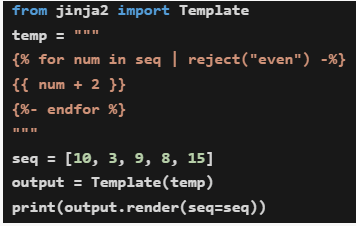 What will be the output when the code is executed?
Text of the picture (copyable)
```python
from jinja2 import Template

temp = """
{% for num in seq | reject("even") -%}
{{ num + 2 }}
{%- endfor %}
"""

seq = [10, 3, 9, 8, 15]
output = Template(temp)
print(output.render(seq=seq))
```- 10511817
- 125111017
- 3915
- 51117
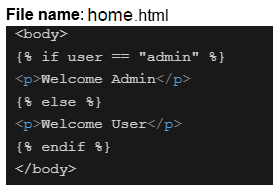

Text of the picture (copyable)
File name: home.html

```html
<body>
  {% if user == "admin" %}
  <p>Welcome Admin</p>
  {% else %}
  <p>Welcome User</p>
  {% endif %}
</body>
```
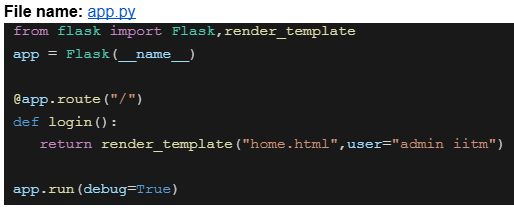
File name: app.py

```python
from flask import Flask,render_template

app = Flask(__name__)

@app.route("/")
def login():
    return render_template("home.html",user="admin iitm")

app.run(debug=True)
```
Assume that the above code is running on http://127.0.0.1:5000. What will be the rendered output for the URL request http://127.0.0.1:5000 ?- Welcome Admin
- Welcome User
- 404 Not Found
- Nothing will be rendered
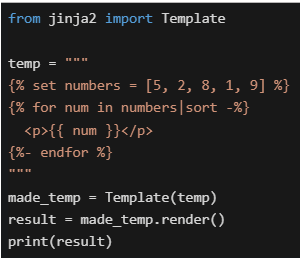 What will be the output in the terminal?
Text of the picture (copyable)
```python
from jinja2 import Template

temp = """
{% set numbers = [5, 2, 8, 1, 9] %}
{% for num in numbers|sort -%}
<p>{{ num }}</p>
{%- endfor %}
"""

made_temp = Template(temp)
result = made_temp.render()
print(result)
```
text
```html
<p>5</p><p>2</p><p>8</p><p>1</p><p>9</p>
```

text
```html
<p>1</p><p>2</p><p>5</p><p>8</p><p>9</p>
```

text
```html
<p>9</p><p>8</p><p>5</p><p>2</p><p>1</p>
```

text
```html
<p>12589</p>
```

text
Template will throw an error

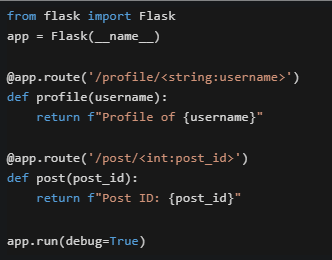

Text of the picture (copyable)
Consider the following Flask application running on http://127.0.0.1:5000.
```python
from flask import Flask
app = Flask(__name__)

@app.route('/profile/<string:username>')
def profile(username):
    return f"Profile of {username}"

@app.route('/post/<int:post_id>')
def post(post_id):
    return f"Post ID: {post_id}"

app.run(debug=True)
```
What will happen when accessing http://127.0.0.1:5000/post/abc123 ?- It will render "Post ID: abc123"
- Flask will return a 404 error because abc123 cannot be converted to integer
- It will render "Profile of abc123"
- The application will crash with a TypeError

text
```
curl -i <URL>
```

text
```
curl -v <URL>
```

text
```
curl --headers <URL>
```

text
```
curl -X GET <URL>
```
- UTF-8 is a variable-length encoding that can represent all Unicode characters.
- In HTML, attribute names are case-insensitive.
- Inline CSS is preferred over external CSS for large-scale projects.
- UTF-32 is a fixed-length encoding where each character takes 4 bytes.
- All web applications run entirely in the client's browser without requiring a server.
- Web applications can interact with backend services using APIs.
- A web application typically consists of frontend, backend and database components.
- Web applications cannot be accessed unless they are installed on the user’s computer.
- sys.argv is a list containing command-line arguments.
- sys.argv[0] stores the Python script name.
- sys.argv elements are always interpreted as integers.
- sys.argv elements are always interpreted as strings.
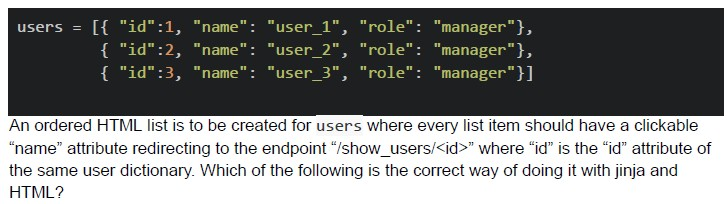
Text of the picture (copyable)
```python
users = [[{ "id":1, "name": "user_1", "role": "manager"},
          { "id":2, "name": "user_2", "role": "manager"},
          { "id":3, "name": "user_3", "role": "manager"}]]
```
An ordered HTML list is to be created for users where every list item should have a clickable "name" attribute redirecting to the endpoint "/show_users/<id>" where "id" is the "id" attribute of the same user dictionary. Which of the following is the correct way of doing it with jinja and HTML?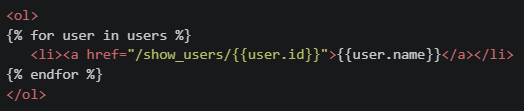
text
```html
<ol>
{% for user in users %}
    <li><a href="/show_users/{{user.id}}">{{user.name}}</a></li>
{% endfor %}
</ol>
```
text
```html
<ol>
{% for user in users %}
    <li><a href="/show_users/{{user['id']}}">{{user['name']}}</a></li>
{% endfor %}
</ol>
```
text
```html
<ol>
    <li><a href="/show_users/{{users[0].id}}">{{users[0].name}}</a></li>
    <li><a href="/show_users/{{users[1].id}}">{{users[1].name}}</a></li>
    <li><a href="/show_users/{{users[2].id}}">{{users[2].name}}</a></li>
</ol>
```
text
```html
<ol>
{% for user in users %}
    <li><a href="/show_users/{{user.name[-1]}}">{{user.name}}</a></li>
{% endfor %}
</ol>
```
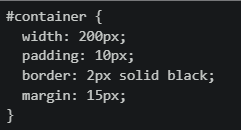 Which of the following statements are TRUE regarding the element's dimensions and spacing?
Text of the picture (copyable)
```css
#container {
  width: 200px;
  padding: 10px;
  border: 2px solid black;
  margin: 15px;
}
```- The total width including padding and border is 224px
- The margin affects the content box width
- The padding adds internal spacing inside the element
- The border contributes to the total width in the standard box model
- display: block elements always start on a new line and take full width
- display: inline elements can be manipulated with height and width properties
- display: inline-block elements can be placed inline and be manipulated with height and width properties
- display: inline elements can’t be manipulated with height and width properties
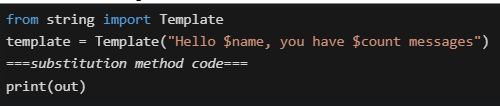 Which substitution methods will work WITHOUT raising KeyError ?
Text of the picture (copyable)
```python
from string import Template
template = Template("Hello $name, you have $count messages")
===substitution method code===
print(out)
```- out = template.substitute({"name": "Alice"})
- out = template.safe_substitute({"name": "Alice"})
- out = template.substitute({"name": "Alice", "count": 5})
- out = template.safe_substitute({"name": "Alice", "count": 5})
Answer key
- Q1 (MCQ, 4 marks): D
- Q2 (MCQ, 4 marks): C
- Q3 (MCQ, 5 marks): C
- Q4 (MCQ, 3 marks): D
- Q5 (MCQ, 3 marks): D
- Q6 (MCQ, 3 marks): B
- Q7 (MCQ, 3 marks): B
- Q8 (MCQ, 3 marks): B
- Q9 (MCQ, 2 marks): B
- Q10 (MSQ, 2 marks): A, B, D
- Q11 (MSQ, 2 marks): B, C
- Q12 (MSQ, 2 marks): A, B, D
- Q13 (MSQ, 5 marks): A, B, C, D
- Q14 (MSQ, 3 marks): A, C, D
- Q15 (MSQ, 3 marks): A, C, D
- Q16 (MSQ, 3 marks): B, C, D
Concepts this paper tests
Auto-generated summary from the source site. Handy as a checklist; the lessons above explain each idea from scratch.
Here's a summary of the core topics, concepts, principles, and equations essential for the exam, followed by a knowledge graph.
Summary of Core Topics and Concepts
The questions cover a broad range of topics within Modern Application Development, touching upon foundational Software Engineering principles, specific Python and Web Framework knowledge, Web Technologies (HTML, CSS), and basic Mathematical/Physics calculations.
I. Software Engineering & Web Development Fundamentals
Python Programming Essentials:
- Data Structures: Understanding and manipulating Python lists and dictionaries (accessing elements using dot notation or bracket notation).
- Control Flow:
if-elif-elsestatements for conditional logic. - Error Handling:
try-exceptblocks for graceful management of potential runtime errors (e.g., during type conversion). - String Manipulation: F-strings for dynamic string formatting.
Command-Line Arguments (
sys.argv):sys.argvis a list holding command-line arguments.sys.argv[0]contains the name of the script being executed.- All elements in
sys.argvare strings by default and require explicit type conversion if needed.
String Templating (
string.Template):Templateclass for defining strings with placeholder variables (e.g.,$variable).substitute()method: Performs substitution, raisesKeyErrorif a placeholder is not provided.safe_substitute()method: Performs substitution, does not raiseKeyErrorfor missing placeholders; leaves them unchanged.
Web Technologies (Frontend - HTML & CSS):
HTML Structure and Semantics:
- Basic document structure (
<!DOCTYPE html>,<html>,<head>,<body>). - Common elements: Paragraphs (
<p>), divisions (<div>), hyperlinks (<a>), ordered lists (<ol>), list items (<li>). - Attributes:
class,id,href. HTML attribute names are generally case-insensitive (though lowercase is best practice).
- Basic document structure (
CSS Styling and Layout:
- Selectors: Element (
p), Class (.highlight), ID (#special), and Descendant selectors (div p). - Specificity: Rules are applied based on selector specificity (ID > Class > Element). Inline styles override internal/external styles.
- Core Properties:
background-color,width,padding,border,margin. displayProperty: Controls how an element interacts with the document flow.display: block: Elements start on a new line and take up the full available width.heightandwidthproperties are effective.display: inline: Elements flow on the same line.heightandwidthproperties generally do not apply.display: inline-block: Elements flow on the same line but can be manipulated withheightandwidthproperties, and respect verticalpadding/margin.
CSS Box Model (Standard Model):
- An element's total space is defined by its content, padding, border, and margin.
widthandheightproperties, by default, refer to the content box.paddingadds internal spacing between the content and the border.borderis drawn around the padding.marginadds external spacing around the element, separating it from other elements; it does not contribute to the element's total rendered width or height but affects its position relative to other elements.- Equation for Total Element Width:
Total Width = content_width + 2 * padding_left + 2 * padding_right + 2 * border_left + 2 * border_right
- Best Practices: External CSS is generally preferred over inline CSS for large-scale projects due to better organization and maintainability.
- Selectors: Element (
Character Encoding:
- UTF-8: A variable-length encoding standard that can represent all Unicode characters. It is backward-compatible with ASCII.
- UTF-32: A fixed-length encoding standard where each character occupies 4 bytes. It can also represent all Unicode characters.
Web Backend Development (Flask & Jinja2):
Flask Framework:
- Routing: Defining URL endpoints using
@app.route(). - Variable Rules: Capturing parts of the URL as variables (
/<string:username>,/<int:post_id>). - Type Converters: Flask automatically converts URL variables based on specified types (
string,int). Mismatching types (e.g., non-integer for<int>) will result in a 404 Not Found error. - Request Handling: Accessing URL query parameters (e.g.,
?a=3&b=5) usingrequest.args.get(). Understanding how to provide default values for missing parameters. - Server Configuration: Running the Flask application using
app.run(). Specifying the listening port (e.g.,port=0007). Default port is 5000. Understandinglocalhost(127.0.0.1) for local access and0.0.0.0for network-wide access. - Template Rendering: Using
render_template()to send Python variables and data structures to Jinja2 templates for dynamic HTML generation.
- Routing: Defining URL endpoints using
Jinja2 Templating Engine:
- Syntax:
{% ... %}for control statements (loops, conditionals, variable assignments),{{ ... }}for outputting expressions/variables. - Control Structures:
forloops to iterate over lists or dictionaries.if-elif-elsestatements for conditional content. - Filters: Applying filters like
|reject("even")(to remove even numbers) or|sort(to sort a list). - Variable Assignment:
{% set variable = value %}to define variables within the template. - Data Access: Accessing dictionary values using dot notation (
user.id) or bracket notation (user['id'],user['name']). - Whitespace Control: Using
-%}(to remove trailing whitespace) and{%-(to remove leading whitespace) within template tags to prevent unwanted newlines or spaces in the rendered output.
- Syntax:
Web Application Concepts and Architecture:
- Components: A typical web application consists of a frontend (client-side), a backend (server-side), and a database.
- Interaction: Web applications interact with backend services primarily through APIs (Application Programming Interfaces).
- Execution Environment: Web applications run entirely in the client's browser; they do not require installation on the user's computer. They require a server to provide the frontend code and handle backend logic/data.
Networking and Debugging Tools:
curlCommand: A command-line tool for making HTTP requests.Debugging Flags:
-v(verbose): Provides detailed information about the request and response, including headers.-i(include): Includes HTTP response headers in the output.
II. Mathematics / Physics (Applied Calculations)
Basic Kinematics:
- Principle: The relationship between distance, speed, and time.
- Equation:
Time = Distance / Speed - Equation:
Distance = Speed × Time
Data Transfer Rate:
- Principle: The amount of data transferred is a product of bandwidth and time.
- Equation:
Data Transferred = Bandwidth × Time
Unit Conversions:
- Speed: Converting kilometers per hour (kmph) to other units (e.g., km/second or m/second).
Data Units: Converting Megabits (Mbps) to Megabytes (MBps).
- Conversion Factor:
1 Byte = 8 bits. Therefore,1 Megabyte (MB) = 8 Megabits (Mb).
- Conversion Factor: