Home / Past papers / MAD1 End Term / this paper
IIT M FOUNDATION DIPLOMA FN EXAM QDF1 28 Apr 2024 - 28 Apr 2024
Text of the picture (copyable)
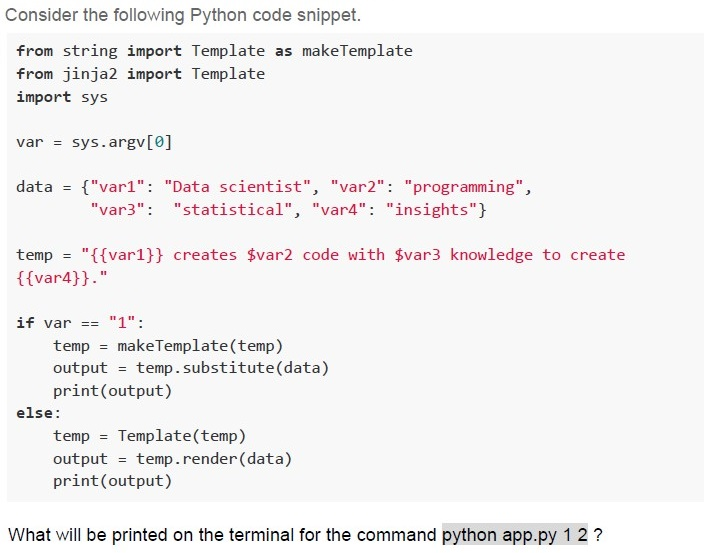
Consider the following Python code snippet.

```python
from string import Template as makeTemplate
from jinja2 import Template
import sys

var = sys.argv[0]

data = {"var1": "Data scientist", "var2": "programming",
        "var3": "statistical", "var4": "insights"}

temp = "{{var1}} creates $var2 code with $var3 knowledge to create\
{{var4}}."

if var == "1":
    temp = makeTemplate(temp)
    output = temp.substitute(data)
    print(output)
else:
    temp = Template(temp)
    output = temp.render(data)
    print(output)
```

What will be printed on the terminal for the command `python app.py 1 2`?
text
```
{{var1}} creates programming code with statistical knowledge to create {{var4}}.
```
text
Data scientist creates $var2 code with $var3 knowledge to create insights.

text
```
{{var1}} creates $var2 code with $var3 knowledge to create {{var4}}
```
text
Data scientist creates programming code with statistical knowledge to create insights.
Text of the picture (copyable)
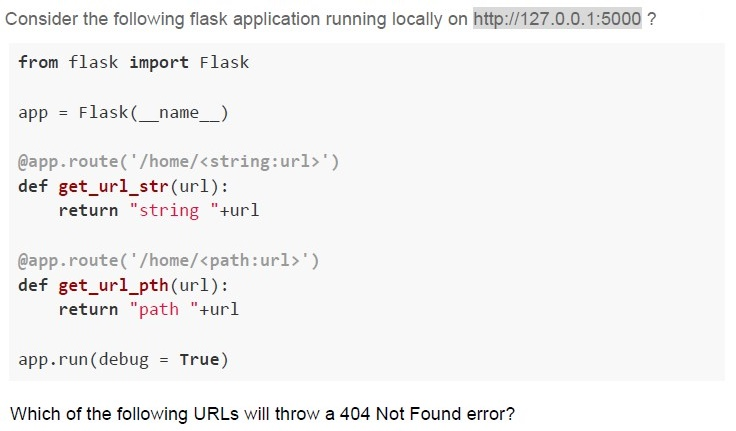
Consider the following flask application running locally on http://127.0.0.1:5000 ?

```python
from flask import Flask

app = Flask(__name__)

@app.route('/home/<string:url>')
def get_url_str(url):
    return "string "+url

@app.route('/home/<path:url>')
def get_url_pth(url):
    return "path "+url

app.run(debug = True)
```

Which of the following URLs will throw a 404 Not Found error?
text
http://127.0.0.1:5000/home/modules

text
http://127.0.0.1:5000/home/modules/chapters/one

text
```
http://127.0.0.1:5000/home/library/modules/chapters/one
```

text
None
Text of the picture (copyable)
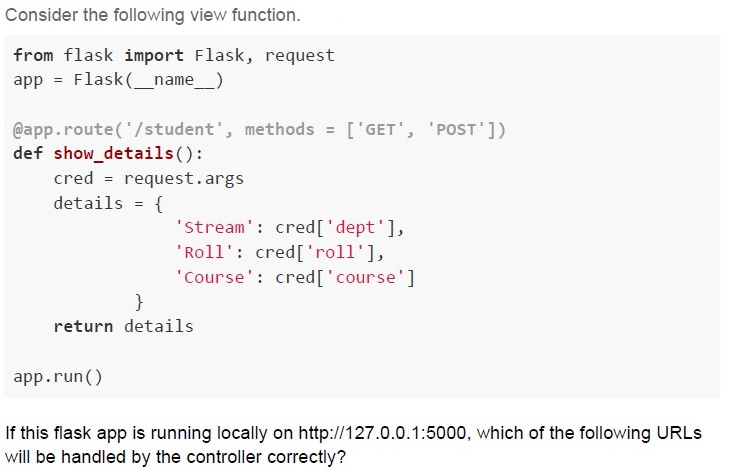
Consider the following view function.

```python
from flask import Flask, request
app = Flask(__name__)

@app.route('/student', methods = ['GET', 'POST'])
def show_details():
    cred = request.args
    details = {
        'Stream': cred['dept'],
        'Roll': cred['roll'],
        'Course': cred['course']
    }
    return details

app.run()
```

If this flask app is running locally on http://127.0.0.1:5000, which of the following URLs will be handled by the controller correctly?
text
```
http://127.0.0.1:50000?dept=data_science&roll=cs10018&course=cs2003
```

text
http://127.0.0.1:5000/data_science/cs1001/cs2003

text
http://127.0.0.1:5000/student?dept=data_science&roll=cs1001&course=cs2003

text
http://127.0.0.1:5000/student/data_science/cs1001/cs2003
- The server responds to the client based on the previous state.
- The server uses FTP protocol to respond to the client's request.
- Server use the URL to convey information to the client.
- Server is not required to maintain any state of client or session duringtransactions between client and server.
Text of the picture (copyable)
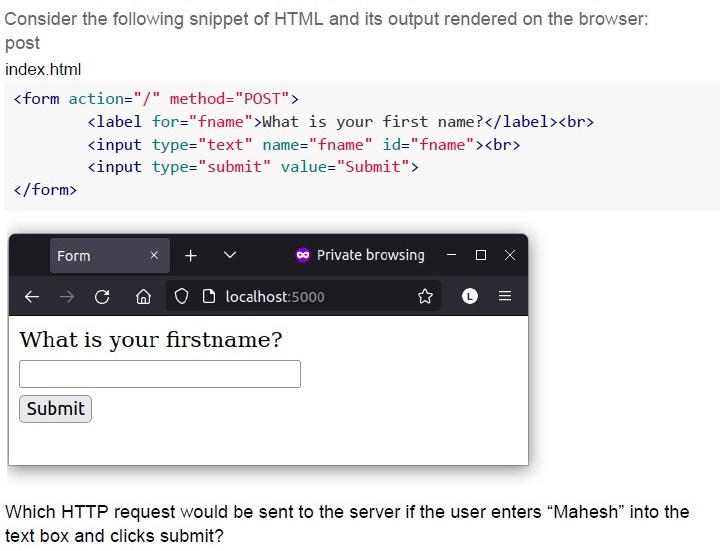
Consider the following snippet of HTML and its output rendered on the browser:
post
index.html

```html
<form action="/" method="POST">
    <label for="fname">What is your first name?</label><br>
    <input type="text" name="fname" id="fname"><br>
    <input type="submit" value="Submit">
</form>
```

Diagram: Browser window showing a web page.
The browser window has a dark grey title bar with "Form" as the tab title, a close button, a plus button, a dropdown arrow, a purple infinity symbol with "Private browsing", minimize, maximize, and close buttons.
Below the title bar is a navigation bar with back, forward, reload, home, shield, padlock, "localhost:5000", star, L, and menu icons.
The main content area of the browser window is white and displays:
"What is your firstname?"
Below this text is an empty rectangular input field.
Below the input field is a button labeled "Submit".

Which HTTP request would be sent to the server if the user enters "Mahesh" into the text box and clicks submit?- GET
- POST
- PUT
- DELETE
- window.alert()
- console.log()
- document.write()
- None of these

text
```
git new-branch <branch_name>
```

text
```
git branch <branch_name>
```

text
```
git new <branch_name>
```

text
```
git create-branch <branch_name>
```
- Statement 1 is true & statement 2 is false
- Statement 2 is true & statement 1 is false
- Both statements 1 and 2 are true
- Both statements 1 and 2 are false
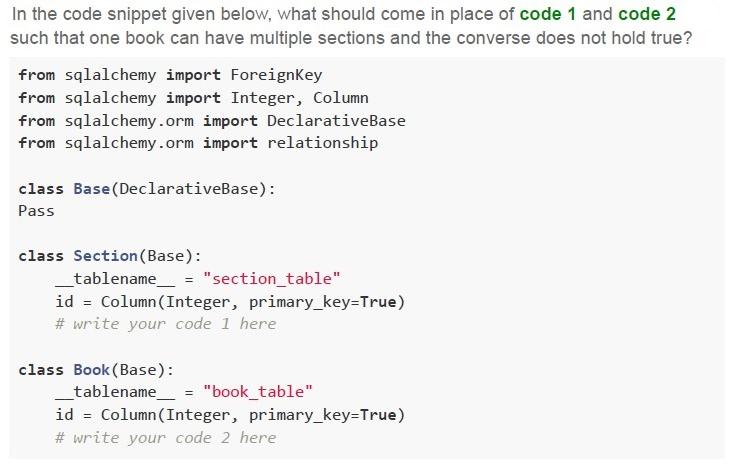
Text of the picture (copyable)
In the code snippet given below, what should come in place of code 1 and code 2 such that one book can have multiple sections and the converse does not hold true?

```python
from sqlalchemy import ForeignKey
from sqlalchemy import Integer, Column
from sqlalchemy.orm import DeclarativeBase
from sqlalchemy.orm import relationship

class Base(DeclarativeBase):
    Pass

class Section(Base):
    __tablename__ = "section_table"
    id = Column(Integer, primary_key=True)
    # write your code 1 here

class Book(Base):
    __tablename__ = "book_table"
    id = Column(Integer, primary_key=True)
    # write your code 2 here
```
text
```python
code 1: book_id=Column(Integer, ForeignKey("book_table.id"))
code 2: books = relationship("Section")
```
text
```python
code 1: books = relationship("Section")
code 2: section_id=Column(Integer, ForeignKey("book_table.id"))
```
text
```python
code 1: books = relationship("Book")
code 2: section_id=Column(Integer, ForeignKey("section_table.id"))
```
text
```python
code 1: book_id=Column(Integer, ForeignKey("book_table.id"))
code 2: sections = relationship("Book")
```
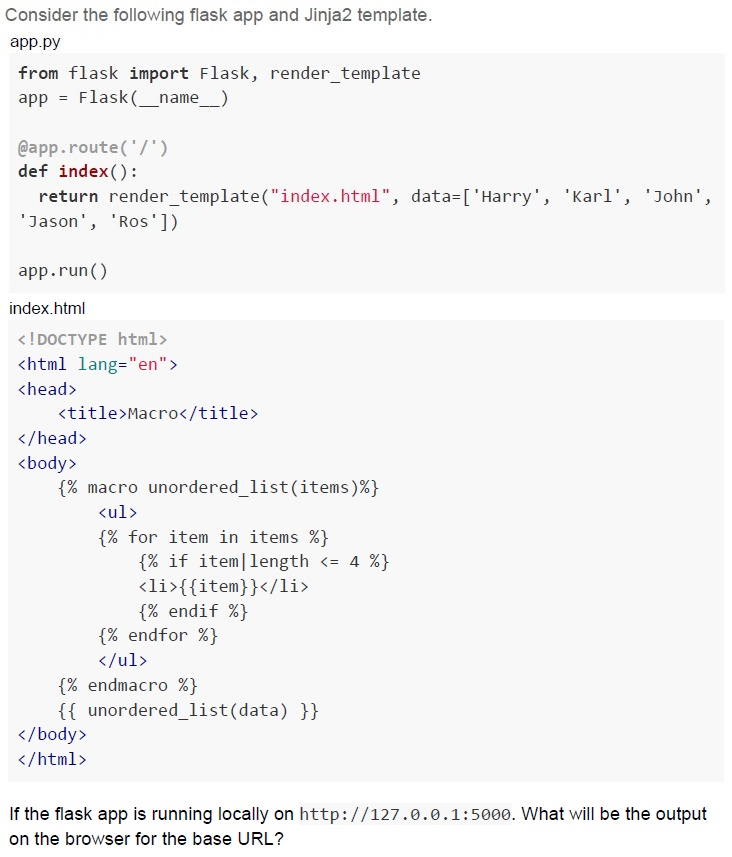
Text of the picture (copyable)
Consider the following flask app and Jinja2 template.
app.py

```python
from flask import Flask, render_template
app = Flask(__name__)

@app.route('/')
def index():
    return render_template("index.html", data=['Harry', 'Karl', 'John', 'Jason', 'Ros'])

app.run()
```

index.html

```html
<!DOCTYPE html>
<html lang="en">
<head>
    <title>Macro</title>
</head>
<body>
    {% macro unordered_list(items)%}
    <ul>
        {% for item in items %}
        {% if item|length <= 4 %}
        <li>{{item}}</li>
        {% endif %}
        {% endfor %}
    </ul>
    {% endmacro %}
    {{ unordered_list(data) }}
</body>
</html>
```

If the flask app is running locally on http://127.0.0.1:5000. What will be the output on the browser for the base URL?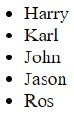
text
- Harry
- Karl
- John
- Jason
- Ros

text
- Karl
- John

text
- Harry
- Jason

text
* Karl
* John
* Ros
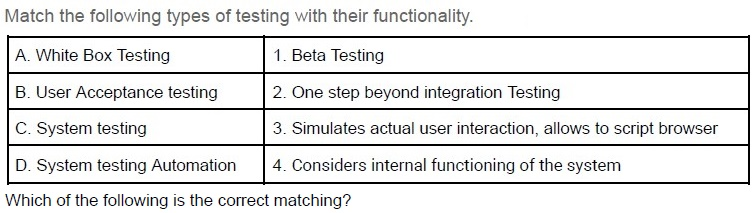
Text of the picture (copyable)
Match the following types of testing with their functionality.

| | |
|---|---|
| A. White Box Testing | 1. Beta Testing |
| B. User Acceptance testing | 2. One step beyond integration Testing |
| C. System testing | 3. Simulates actual user interaction, allows to script browser |
| D. System testing Automation | 4. Considers internal functioning of the system |

Which of the following is the correct matching?

text
A → 1, B → 2, C → 3, D → 4

text
A → 4, B → 3, C → 2, D → 1

text
A -> 4, B -> 1, C -> 2, D -> 3

text
A → 3, B → 2, C → 1, D → 4
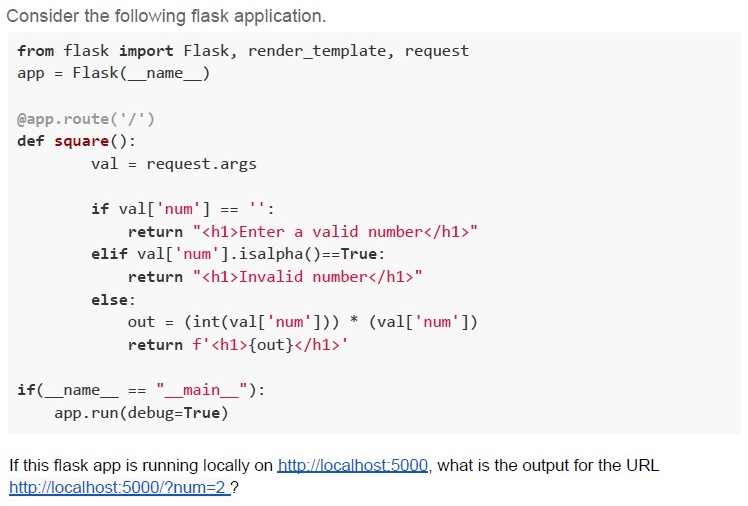
Text of the picture (copyable)
Consider the following flask application.

```python
from flask import Flask, render_template, request
app = Flask(__name__)

@app.route('/')
def square():
    val = request.args

    if val['num'] == '':
        return "<h1>Enter a valid number</h1>"
    elif val['num'].isalpha()==True:
        return "<h1>Invalid number</h1>"
    else:
        out = (int(val['num'])) * (val['num'])
        return f'<h1>{out}</h1>'

if(__name__ == "__main__"):
    app.run(debug=True)
```

If this flask app is running locally on http://localhost:5000, what is the output for the URL
http://localhost:5000/?num=2 ?- 4
- 22
- ValueError
- 2
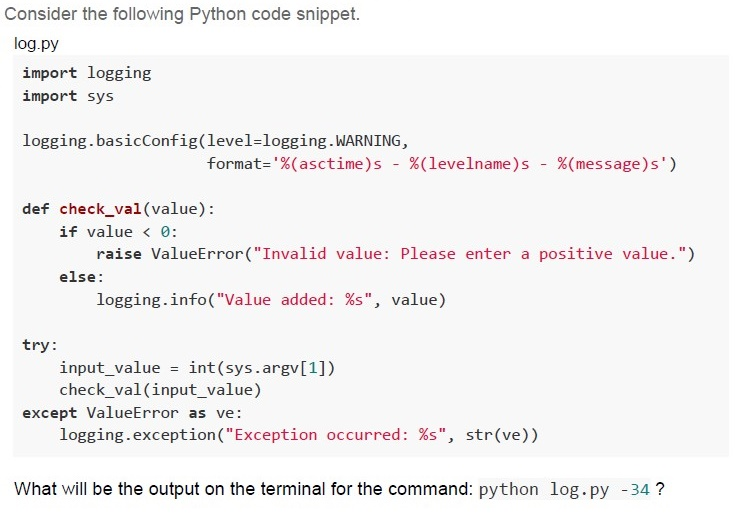
Text of the picture (copyable)
Consider the following Python code snippet.
log.py

```python
import logging
import sys

logging.basicConfig(level=logging.WARNING,
                    format='%(asctime)s - %(levelname)s - %(message)s')

def check_val(value):
    if value < 0:
        raise ValueError("Invalid value: Please enter a positive value.")
    else:
        logging.info("Value added: %s", value)

try:
    input_value = int(sys.argv[1])
    check_val(input_value)
except ValueError as ve:
    logging.exception("Exception occurred: %s", str(ve))
```

What will be the output on the terminal for the command: `python log.py -34`?
text
2023-08-14 21:01:05,684 - INFO - Value added: 34

text
```
2023-08-14 21:01:05,684 - WARNING - Value added: 34
```

text
Error: Exception occurred: Invalid value: Please enter a positive value.

text
None.
- 16
- 8
- 32
- 128
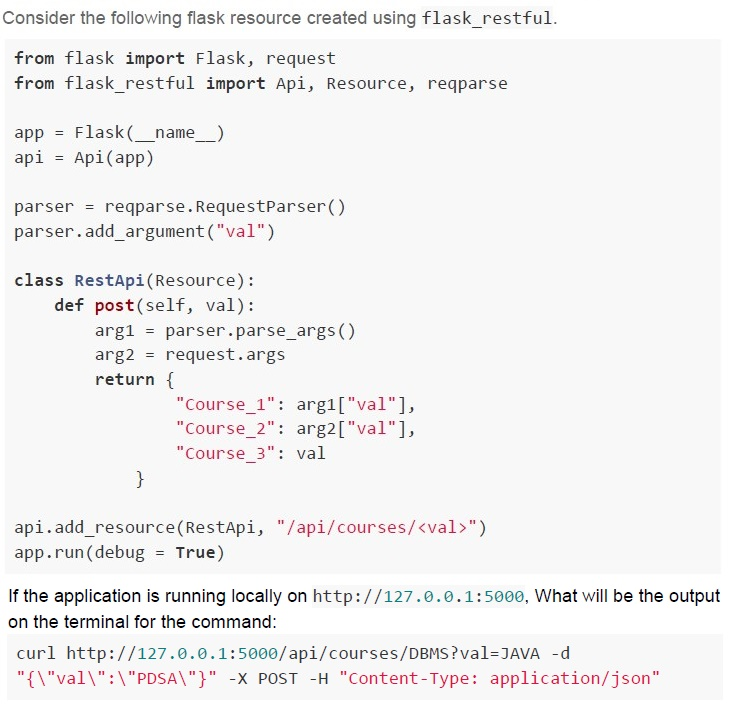
Text of the picture (copyable)
Consider the following flask resource created using flask_restful.

```python
from flask import Flask, request
from flask_restful import Api, Resource, reqparse

app = Flask(__name__)
api = Api(app)

parser = reqparse.RequestParser()
parser.add_argument("val")

class RestApi(Resource):
    def post(self, val):
        arg1 = parser.parse_args()
        arg2 = request.args
        return {
            "Course_1": arg1["val"],
            "Course_2": arg2["val"],
            "Course_3": val
        }

api.add_resource(RestApi, "/api/courses/<val>")
app.run(debug = True)
```

If the application is running locally on http://127.0.0.1:5000, What will be the output on the terminal for the command:

```bash
curl http://127.0.0.1:5000/api/courses/DBMS?val=JAVA -d "{\"val\":\"PDSA\"}" -X POST -H "Content-Type: application/json"
```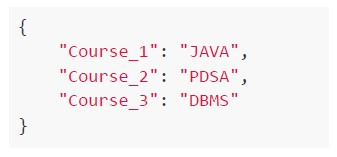
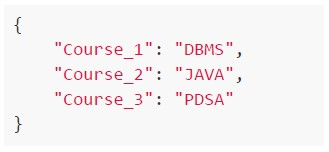
text
```json
{
  "Course_1": "JAVA",
  "Course_2": "PDSA",
  "Course_3": "DBMS"
}
```
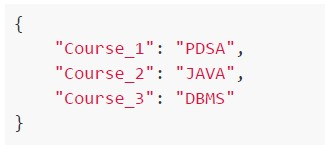
text
```json
{
    "Course_1": "DBMS",
    "Course_2": "JAVA",
    "Course_3": "PDSA"
}
```
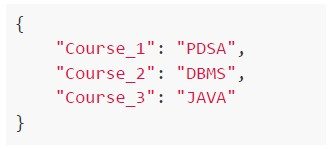
text
```json
{
    "Course_1": "PDSA",
    "Course_2": "JAVA",
    "Course_3": "DBMS"
}
```
text
```json
{
    "Course_1": "PDSA",
    "Course_2": "DBMS",
    "Course_3": "JAVA"
}
```
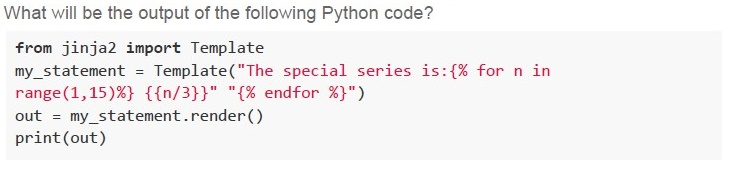
Text of the picture (copyable)
What will be the output of the following Python code?

```python
from jinja2 import Template
my_statement = Template("The special series is:{% for n in
range(1,15)%} {{n/3}}" "{% endfor %}")
out = my_statement.render()
print(out)
```- The special series is: 1 0 1 0 1 0 1 0 1 0 1 0 1 0
- The special series is: 1 2 0 1 2 0 1 2 0 1 2 0 1 2
- The special series is: 1.0 0.0 1.0 0.0 1.0 0.0 1.0 0.0 1.0 0.0 1.0 0.0 1.0 0.0
- The special series is: 0.33 0.67 1.0 1.33 1.67 2.0 2.33 2.67 3.0 3.33 3.67 4.0 4.334.67

Text of the picture (copyable)
Consider that there are two HTML files.
i) index.html - Home page of the application
ii) login.html - Login page of the application

Which of the following code will navigate the user between **index.html** and **login.html**, and vice versa?
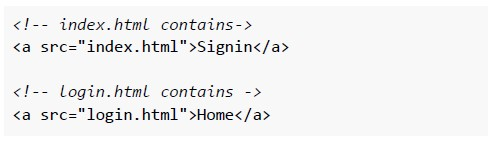
text
```html
<!-- index.html contains-->
<a src="index.html">Signin</a>

<!-- login.html contains ->
<a src="login.html">Home</a>
```
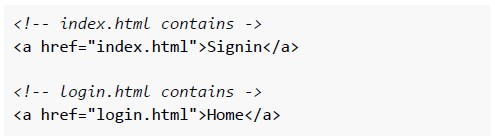
text
```html
<!-- index.html contains ->
<a href="index.html">Signin</a>

<!-- login.html contains ->
<a href="login.html">Home</a>
```
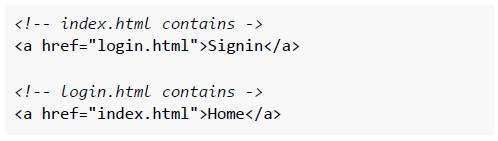
text
```html
<!-- index.html contains ->
<a href="login.html">Signin</a>

<!-- login.html contains ->
<a href="index.html">Home</a>
```
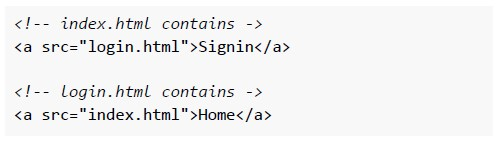
text
```html
<!-- index.html contains ->
<a src="login.html">Signin</a>

<!-- login.html contains ->
<a src="index.html">Home</a>
```
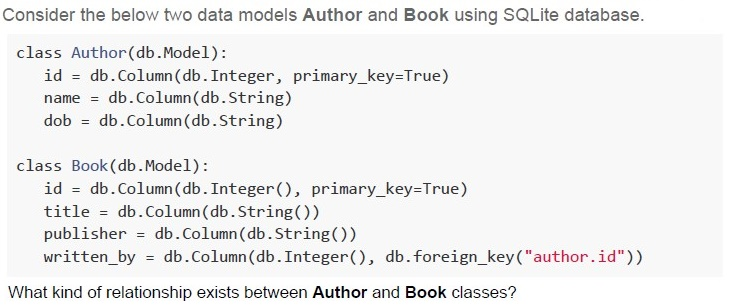
Text of the picture (copyable)
Consider the below two data models Author and Book using SQLite database.

```python
class Author(db.Model):
    id = db.Column(db.Integer, primary_key=True)
    name = db.Column(db.String)
    dob = db.Column(db.String)

class Book(db.Model):
    id = db.Column(db.Integer(), primary_key=True)
    title = db.Column(db.String())
    publisher = db.Column(db.String())
    written_by = db.Column(db.Integer(), db.foreign_key("author.id"))
```

What kind of relationship exists between Author and Book classes?- One Book to one Author relationship
- One Author to many Books relationship
- Many Authors to one Book relationship
- Many Books to many Author relationship
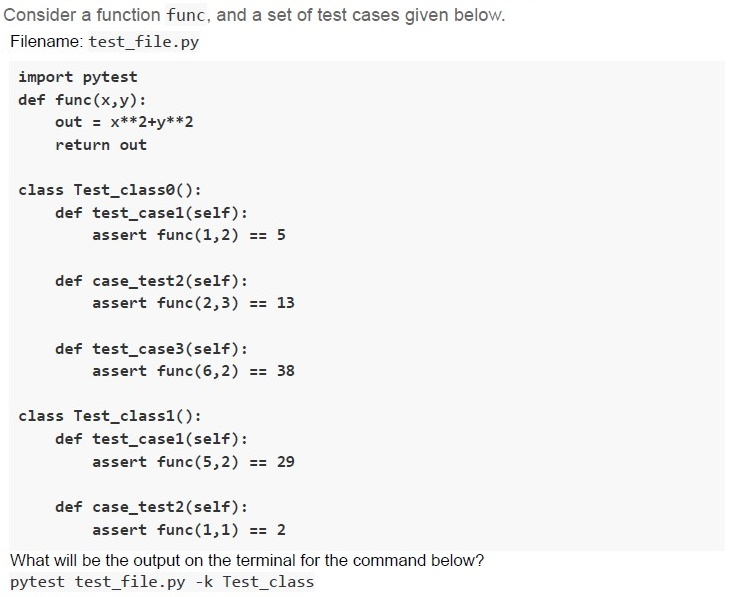
Text of the picture (copyable)
Consider a function func, and a set of test cases given below.
Filename: test_file.py

```python
import pytest

def func(x,y):
    out = x**2+y**2
    return out

class Test_class0():
    def test_case1(self):
        assert func(1,2) == 5

    def case_test2(self):
        assert func(2,3) == 13

    def test_case3(self):
        assert func(6,2) == 38

class Test_class1():
    def test_case1(self):
        assert func(5,2) == 29

    def case_test2(self):
        assert func(1,1) == 2
```

What will be the output on the terminal for the command below?
pytest test_file.py -k Test_class
text
```
== 1 failed, 4 passed in 0.17s ===
```

text
```
== 1 failed, 2 passed, 2 deselected in 0.17s ===
```

text
```
== 2 failed, 1 deselected in 0.17s ===
```

text
```
== 1 failed, 2 passed in 0.14s ===
```
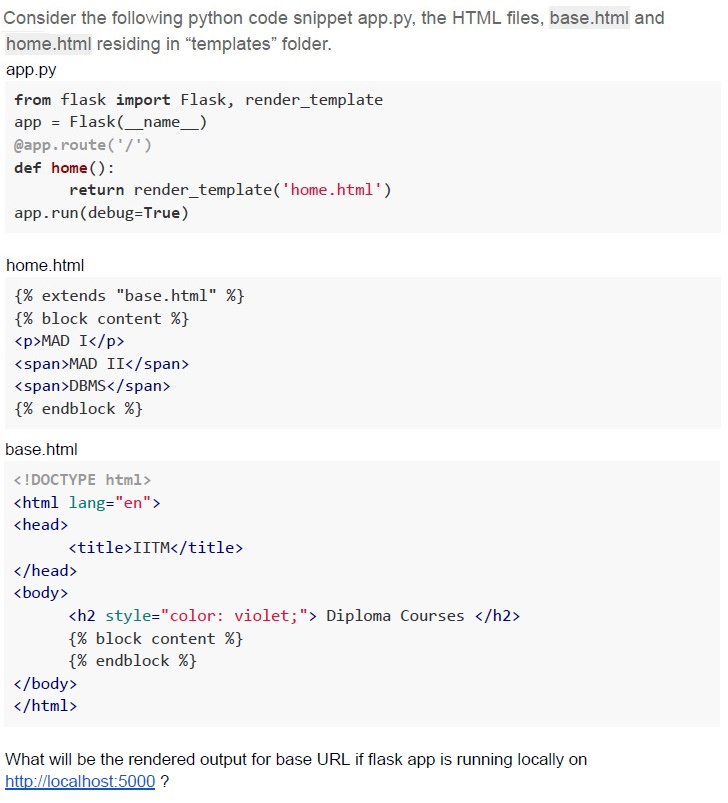
Text of the picture (copyable)
Consider the following python code snippet app.py, the HTML files, base.html and home.html residing in "templates" folder.

app.py
```python
from flask import Flask, render_template
app = Flask(__name__)
@app.route('/')
def home():
    return render_template('home.html')
app.run(debug=True)
```

home.html
```html
{% extends "base.html" %}
{% block content %}
<p>MAD I</p>
<span>MAD II</span>
<span>DBMS</span>
{% endblock %}
```

base.html
```html
<!DOCTYPE html>
<html lang="en">
<head>
    <title>IITM</title>
</head>
<body>
    <h2 style="color: violet;"> Diploma Courses </h2>
    {% block content %}
    {% endblock %}
</body>
</html>
```

What will be the rendered output for base URL if flask app is running locally on
http://localhost:5000 ?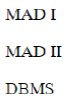
text
MAD I
MAD II
DBMS

text
Diploma Courses
MAD I
MAD II
DBMS

text
Diploma Courses

MAD I

MAD II DBMS
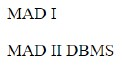
text
MAD I

MAD II DBMS
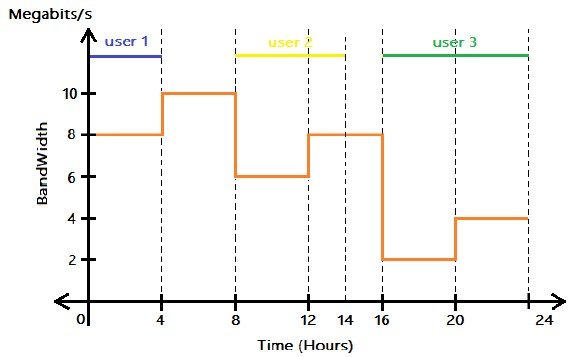 Consider the following graph that represents the variation in bandwidth of a network for an entire day (24 hours). Three users were connected to the network at three different times of the day. What is the total data consumed in GigaBytes by all the users in 24 hrs?
 Text of the picture (copyable)
This is a 2D line graph with a horizontal axis labeled "Time (Hours)" ranging from 0 to 24, and a vertical axis labeled "BandWidth" with units "Megabits/s" ranging from 0 to 12.

There are three horizontal colored lines at the top of the graph, each labeled:
- A blue line labeled "user 1" extends from Time 0 to 4.
- A yellow line labeled "user 2" extends from Time 8 to 14.
- A green line labeled "user 3" extends from Time 14 to 24.

There is an orange step-function line representing bandwidth over time:
- From Time 0 to 4, BandWidth is 8 Megabits/s.
- From Time 4 to 8, BandWidth is 10 Megabits/s.
- From Time 8 to 12, BandWidth is 6 Megabits/s.
- From Time 12 to 16, BandWidth is 8 Megabits/s.
- From Time 16 to 20, BandWidth is 2 Megabits/s.
- From Time 20 to 24, BandWidth is 4 Megabits/s.

Vertical dashed lines extend from the horizontal axis at Time 4, 8, 12, 14, 16, 20, and 24, indicating the points where the bandwidth or user activity changes.
- 547.2 GB
- 12 GB
- 43.2 GB
- 345.6 GB
Text of the picture (copyable)
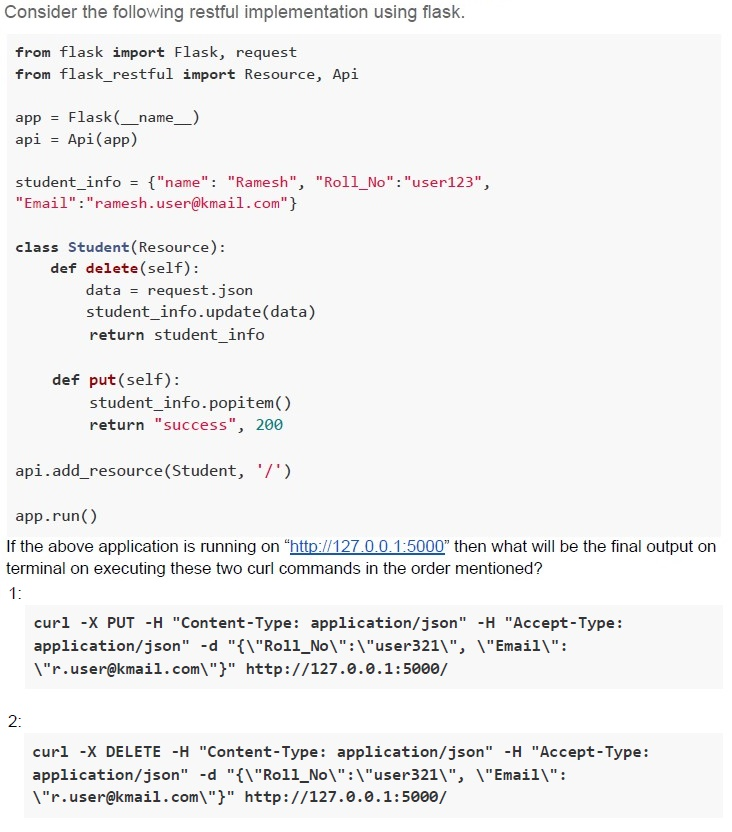
Consider the following restful implementation using flask.

```python
from flask import Flask, request
from flask_restful import Resource, Api

app = Flask(__name__)
api = Api(app)

student_info = {"name": "Ramesh", "Roll_No":"user123",
"Email":"ramesh.user@kmail.com"}

class Student(Resource):
    def delete(self):
        data = request.json
        student_info.update(data)
        return student_info

    def put(self):
        student_info.popitem()
        return "success", 200

api.add_resource(Student, '/')

app.run()
```

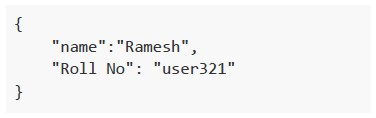
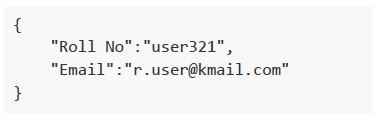
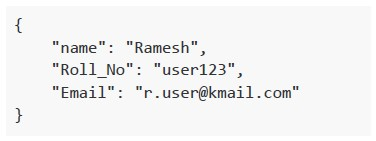
If the above application is running on http://127.0.0.1:5000 then what will be the final output on terminal on executing these two curl commands in the order mentioned?

1:

```bash
curl -X PUT -H "Content-Type: application/json" -H "Accept-Type: application/json" -d "{\"Roll_No\":\"user321\", \"Email\":\"r.user@kmail.com\"}" http://127.0.0.1:5000/
```

2:

```bash
curl -X DELETE -H "Content-Type: application/json" -H "Accept-Type: application/json" -d "{\"Roll_No\":\"user321\", \"Email\":\"r.user@kmail.com\"}" http://127.0.0.1:5000/
```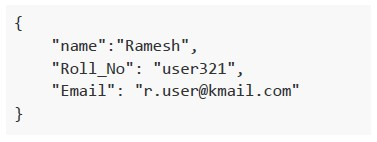
text
```json
{
  "name": "Ramesh",
  "Roll_No": "user321",
  "Email": "r.user@kmail.com"
}
```
text
```json
{
    "name": "Ramesh",
    "Roll No": "user321"
}
```
text
```json
{
    "Roll No":"user321",
    "Email":"r.user@kmail.com"
}
```
text
```json
{
    "name": "Ramesh",
    "Roll_No": "user123",
    "Email": "r.user@kmail.com"
}
```
Text of the picture (copyable)
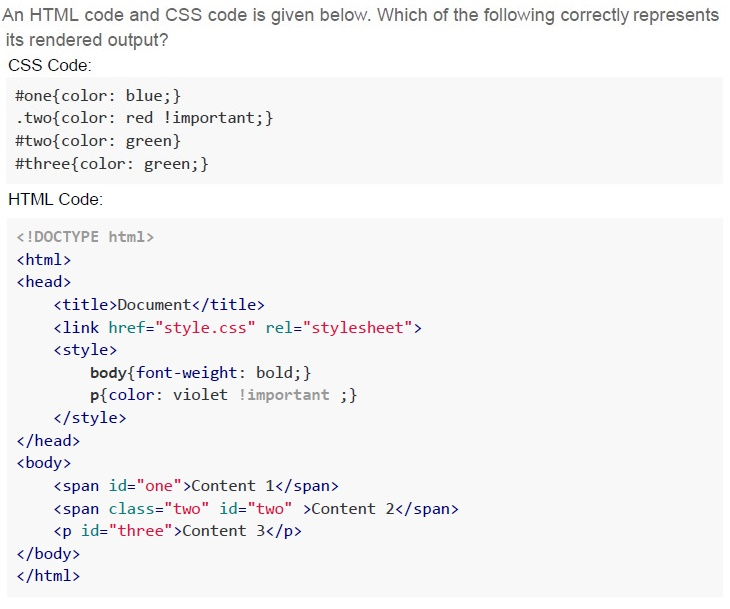
An HTML code and CSS code is given below. Which of the following correctly represents
its rendered output?
CSS Code:

```css
#one{color: blue;}
.two{color: red !important;}
#two{color: green}
#three{color: green;}
```

HTML Code:

```html
<!DOCTYPE html>
<html>
<head>
    <title>Document</title>
    <link href="style.css" rel="stylesheet">
    <style>
        body{font-weight: bold;}
        p{color: violet !important ;}
    </style>
</head>
<body>
    <span id="one">Content 1</span>
    <span class="two" id="two">Content 2</span>
    <p id="three">Content 3</p>
</body>
</html>
```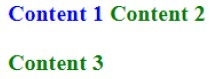
text
Content 1 Content 2
Content 3
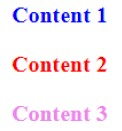
text
Content 1
Content 2
Content 3
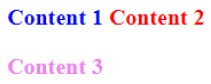
text
Content 1 Content 2
Content 3
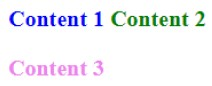
text
Content 1 Content 2
Content 3
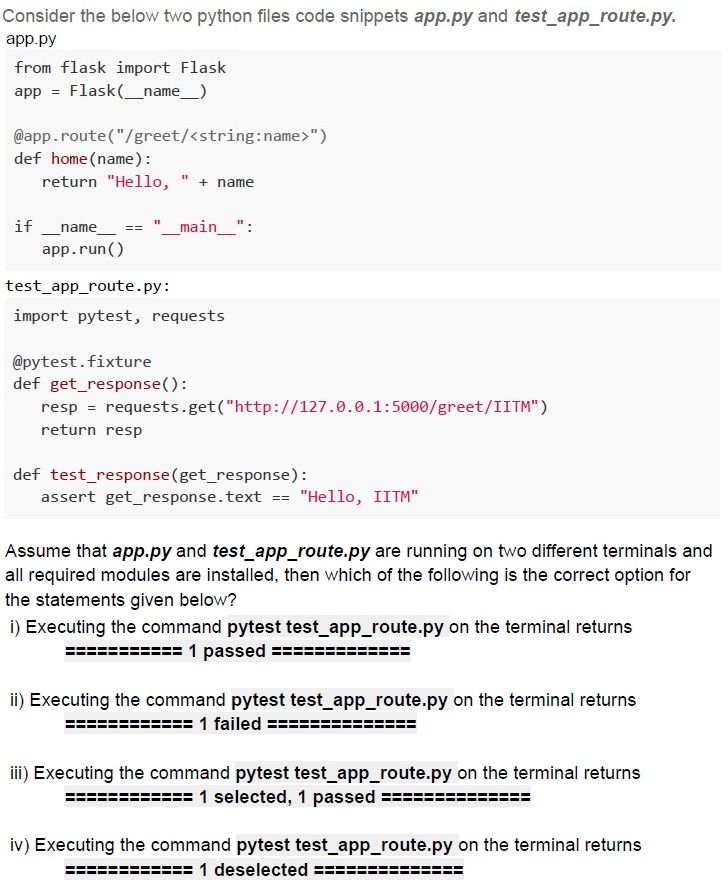
Text of the picture (copyable)
Consider the below two python files code snippets app.py and test_app_route.py.
app.py

```python
from flask import Flask
app = Flask(__name__)

@app.route("/greet/<string:name>")
def home(name):
    return "Hello, " + name

if __name__ == "__main__":
    app.run()
```

test_app_route.py:

```python
import pytest, requests

@pytest.fixture
def get_response():
    resp = requests.get("http://127.0.0.1:5000/greet/IITM")
    return resp

def test_response(get_response):
    assert get_response.text == "Hello, IITM"
```

Assume that app.py and test_app_route.py are running on two different terminals and all required modules are installed, then which of the following is the correct option for the statements given below?

i) Executing the command `pytest test_app_route.py` on the terminal returns
`=========== 1 passed ===========`

ii) Executing the command `pytest test_app_route.py` on the terminal returns
`=========== 1 failed ===========`

iii) Executing the command `pytest test_app_route.py` on the terminal returns
`=========== 1 selected, 1 passed ===========`

iv) Executing the command `pytest test_app_route.py` on the terminal returns
`=========== 1 deselected ===========`- Statements i and iii are correct
- Statements ii and iv are correct
- Only statement i is correct
- Only statement ii is correct
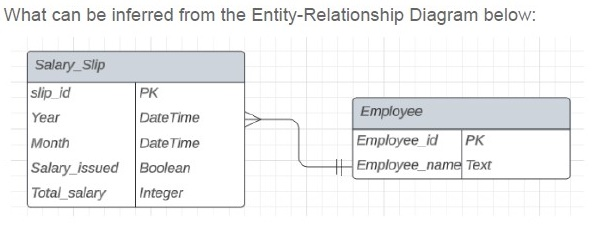
Text of the picture (copyable)
What can be inferred from the Entity-Relationship Diagram below:

ER Diagram:
- Two entities: `Salary_Slip` and `Employee`.
- `Salary_Slip` entity has the following attributes:
  - `slip_id` (PK)
  - `Year` (DateTime)
  - `Month` (DateTime)
  - `Salary_issued` (Boolean)
  - `Total_salary` (Integer)
- `Employee` entity has the following attributes:
  - `Employee_id` (PK)
  - `Employee_name` (Text)
- A relationship exists between `Salary_Slip` and `Employee`.
- The relationship line connects `Salary_Slip` to `Employee`.
- The `Salary_Slip` side of the relationship has a crow's foot (many) and a single line (exactly one or more).
- The `Employee` side of the relationship has two vertical lines (exactly one).
- This indicates a many-to-one relationship where many `Salary_Slip` records can be associated with exactly one `Employee`.
- An employee can exist without having any salary slips
- An employee can have more than one salary slip
- An employee needs to have at least one salary slip
- A salary slip must belong to one and only one employee
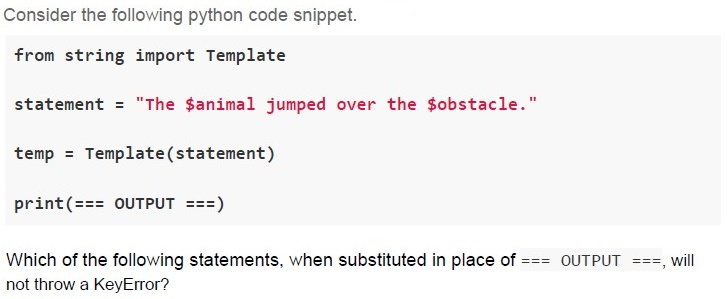
Text of the picture (copyable)
Consider the following python code snippet.

```python
from string import Template

statement = "The $animal jumped over the $obstacle."

temp = Template(statement)

print(=== OUTPUT ===)
```

Which of the following statements, when substituted in place of === OUTPUT ===, will not throw a KeyError?

text
```python
temp.substitute({"animal": "cat"})
```
text
```python
temp.safe_substitute({"animal": "dog", "obstacle": "fence"})
```
text
```python
temp.safe_substitute({"animal": "rabbit"})
```
text
```python
temp.substitute({"animal": "horse", "obstacle": "wall"})
```
- Always web server response in HTML format
- Web servers process the business logic and return different types of responses
- Web servers can host multiple web applications
- The web server sends the requested web page using HTTP
- A change of medium where the speed of light is 2v m/sec.
- Reduce the distance between C and S from D to D/2.
- A change of medium where the speed of light is v/2 m/sec.
- Increase the distance between C and S from D to 2D.
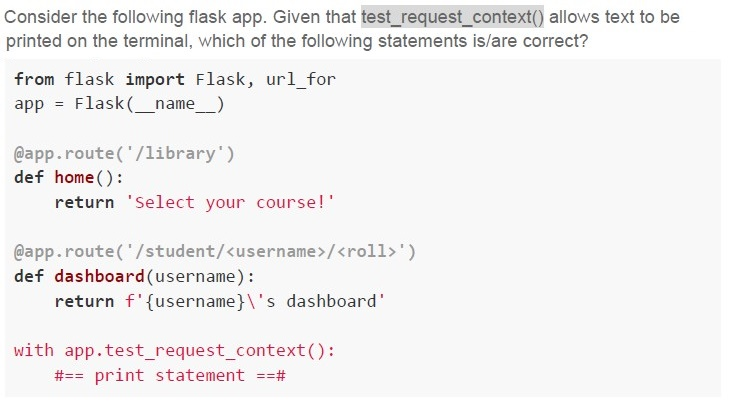
Text of the picture (copyable)
Consider the following flask app. Given that `test_request_context()` allows text to be printed on the terminal, which of the following statements is/are correct?

```python
from flask import Flask, url_for
app = Flask(__name__)

@app.route('/library')
def home():
    return 'Select your course!'

@app.route('/student/<username>/<roll>')
def dashboard(username):
    return f'{username}\'s dashboard'

with app.test_request_context():
    #== print statement ==#
```
text
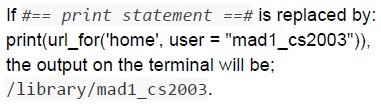
If `print statement` is replaced by:
```python
print(url_for('home', user = "mad1_cs2003"))
```
the output on the terminal will be;
`/library/mad1_cs2003.`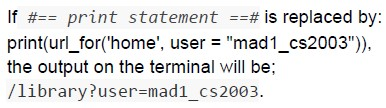
text
If `#== print statement ==#` is replaced by:
```python
print(url_for('home', user = "mad1_cs2003")),
```
the output on the terminal will be;
`/library?user=mad1_cs2003.`
text
If #== *print statement* ==# is replaced by:
```python
print(url_for('dashboard', username = "mad1", roll = "cs2003", term = "jan2024"))
```
the output on the terminal will be;
`/student/mad1/cs2003?term=jan2024.`
text
If #== *print statement* ==# is replaced by:
```python
print(url_for('dashboard', username = "mad1", roll = "cs2003", term = "jan2024"))
```
the output on the terminal will be:
/student/mad1/cs2003/jan2024.
Text of the picture (copyable)
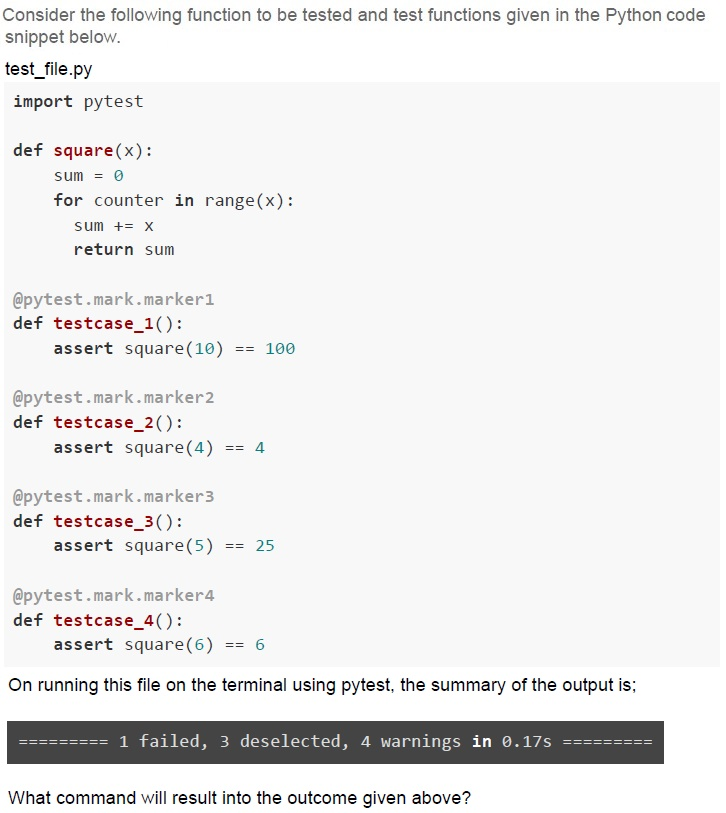
Consider the following function to be tested and test functions given in the Python code snippet below.

**test_file.py**
```python
import pytest

def square(x):
    sum = 0
    for counter in range(x):
        sum += x
    return sum

@pytest.mark.marker1
def testcase_1():
    assert square(10) == 100

@pytest.mark.marker2
def testcase_2():
    assert square(4) == 4

@pytest.mark.marker3
def testcase_3():
    assert square(5) == 25

@pytest.mark.marker4
def testcase_4():
    assert square(6) == 6
```

On running this file on the terminal using pytest, the summary of the output is:

`========= 1 failed, 3 deselected, 4 warnings in 0.17s =========`

What command will result into the outcome given above?
text
```
pytest test_file.py -m marker4
```

text
```
pytest test_file.py -m marker1
```

text
```
pytest test_file.py -m marker2
```

text
```
pytest test_file.py -m marker3
```

Text of the picture (copyable)
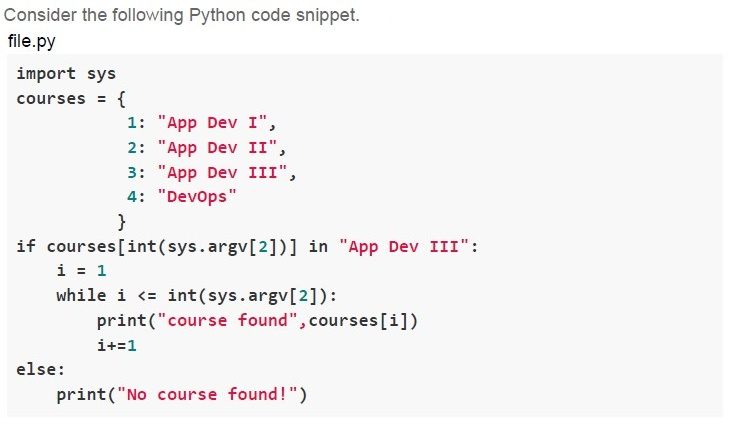
What will be output on the terminal for the command python file.py course 2?

text
course found App Dev II

text
course found App Dev III

text
No course found!

text
```text
course found App Dev I
course found App Dev II
```

Text of the picture (copyable)
What will be output on the terminal for the command python file.py course 3?

text
course found App Dev III

text
```
course found App Dev I
course found App Dev II
```

text
```
course found App Dev I
course found App Dev II
course found App Dev III
```

text
```
IndexError: list index out of range
```
Answer key
- Q1 (MCQ, 3 marks): B
- Q2 (MCQ, 2 marks): D
- Q3 (MCQ, 2 marks): C
- Q4 (MCQ, 2 marks): D
- Q5 (MCQ, 2 marks): B
- Q6 (MCQ, 2 marks): B
- Q7 (MCQ, 2 marks): B
- Q8 (MCQ, 2 marks): D
- Q9 (MCQ, 3 marks): D
- Q10 (MCQ, 3 marks): D
- Q11 (MCQ, 3 marks): C
- Q12 (MCQ, 3 marks): B
- Q13 (MCQ, 3 marks): C
- Q14 (MCQ, 3 marks): C
- Q15 (MCQ, 3 marks): C
- Q16 (MCQ, 3 marks): D
- Q17 (MCQ, 3 marks): C
- Q18 (MCQ, 3 marks): B
- Q19 (MCQ, 4.5 marks): D
- Q20 (MCQ, 4.5 marks): C
- Q21 (MCQ, 4.5 marks): C
- Q22 (MCQ, 4.5 marks): A
- Q23 (MCQ, 4.5 marks): C
- Q24 (MCQ, 4.5 marks): C
- Q25 (MSQ, 2 marks): A, B, D
- Q26 (MSQ, 3 marks): B, C, D
- Q27 (MSQ, 3 marks): B, C, D
- Q28 (MSQ, 3 marks): C, D
- Q29 (MSQ, 4.5 marks): B, C
- Q30 (MSQ, 4.5 marks): B, D
- Q31 (MCQ, 3 marks): D
- Q32 (MCQ, 3 marks): C
Concepts this paper tests
Auto-generated summary from the source site. Handy as a checklist; the lessons above explain each idea from scratch.
Here’s a structured summary of the core topics, concepts, principles, and equations essential for the exam, along with Mermaid knowledge graphs to visualize relationships.
1. Core Topics & Concepts
A. Python & Flask
Key Concepts:
Python String Templating
string.Templatevs.jinja2.Template:string.Template: Uses$varsyntax (e.g.,"Hello ${name}").- Methods:
.substitute()(raisesKeyErrorif missing),.safe_substitute()(ignores missing keys).
- Methods:
jinja2.Template: Uses{{ var }}syntax.- Methods:
.render()(handles missing keys gracefully).
- Methods:
Example:
from string import Template as makeTemplate
temp = makeTemplate("${var1} creates ${var2}")
output = temp.substitute(var1="Data scientist", var2="code")  # Requires all keys.
Flask Routing & Request Handling
Route Parameters:
<string:url>: Matches a single path segment (e.g.,/home/abc).<path:url>: Matches multiple segments (e.g.,/home/abc/def/ghi).
HTTP Methods:
GET: Query parameters (request.args).POST: Form/data (request.formorrequest.json).
Example:
@app.route('/student', methods=['GET', 'POST'])
def show_details():
    cred = request.args  # For GET: ?dept=CSE&roll=1
    return {"stream": cred['dept'], "Roll": cred['roll']}
Flask-Jinja2 Macros & Templating
Macros: Reusable HTML blocks (e.g., lists, forms).
{% macro unordered_list(items) %}
  <ul>{% for item in items %}<li>{{ item }}</li>{% endfor %}</ul>
{% endmacro %}
Template Inheritance:
{% extends "base.html" %}: Inherit from a parent template.{% block content %}...{% endblock %}: Override sections.
Flask-RESTful
- Resource Classes: Define HTTP methods (
get,post,put,delete). Request Parsing:
from flask_restful import reqparse
parser = reqparse.RequestParser()
parser.add_argument("val", type=str)
args = parser.parse_args()  # Parses JSON/form data.
- Resource Classes: Define HTTP methods (
Flask Testing
test_request_context(): Simulates a request for testing URLs.with app.test_request_context(): print(url_for('home', user="test")) # Output: /library?user=testPytest Fixtures:
@pytest.fixture
def client():
    app.config['TESTING'] = True
    return app.test_client()
Key Equations (Math/Performance):
DRAM Bandwidth Calculation:
- Formula: \[ \text{Bandwidth (GB/s)} = \frac{\text{Bus Width (bits)} \times \text{Clock Speed (Hz)} \times 2 \text{ (DDR)}}{8 \times 10^9} \]
- Example: 64-bit bus, 2 GHz, DDR → \( \frac{64 \times 2 \times 10^9 \times 2}{8 \times 10^9} = 32 \) GB/s.
Network Latency:
- Round-Trip Time (RTT): \[ \text{RTT} = \frac{2 \times \text{Distance (D)}}{\text{Speed of Light (v)}} \]
- Requests per Second (N): \[ N = \frac{1}{\text{RTT}} \]
- Halving N: Double RTT (e.g., halve
vor doubleD).
B. Web Development
Key Concepts:
HTTP Methods:
GET: Fetch data (query params in URL).POST: Submit data (body payload).PUT: Update/replace resource.DELETE: Remove resource.
HTML Forms:
method="POST": Sends data in request body.action="/post": Endpoint URL.Example:
<form action="/post" method="POST">
  <input type="text" name="fname">
  <input type="submit">
</form>
→ Submits
fname=Maheshin request body.
CSS Specificity:
- Order:
!important> Inline > ID (#one) > Class (.two) > Element (p). Example:
.two { color: red !important; } /* Wins over #two { color: green; } */
- Order:
JavaScript Console Logging:
console.log(): Prints to browser console.window.alert(): Shows popup.document.write(): Writes to HTML body.
C. Databases & SQLAlchemy
Key Concepts:
Relationships:
One-to-Many: Foreign key in "many" table (e.g.,
Book→Section).class Section(Base): __tablename__ = "section" id = Column(Integer, primary_key=True) book_id = Column(Integer, ForeignKey("book.id")) # Foreign key book = relationship("Book", back_populates="sections") # Relationship- Bidirectional: Use
back_populatesorbackref.
Indexes:
- Can be created on multiple columns (composite index).
- Duplicate values allowed (unless
UNIQUEconstraint is set).
ER Diagrams:
Cardinality:
- One-to-Many: "An author can have many books."
- Many-to-Many: Requires a junction table.
D. Git & Version Control
Key Commands:
| Command | Description |
|---|---|
git branch <name> | Create a new branch. |
git checkout <branch> | Switch branches. |
git merge <branch> | Merge branches. |
E. Testing
Key Concepts:
Pytest:
Markers:
@pytest.mark.marker1to select tests.pytest -m "marker1" # Run only marker1 tests. pytest -m "not marker2" # Exclude marker2.- Fixtures: Reusable test setup (e.g., database connections).
- Assertions:
assert func(1, 2) == 5.
- Testing Types: | Type | Description | |--------------------|--------------------------------------| | White Box | Tests internal logic (e.g., code coverage). | | Black Box | Tests functionality (e.g., UAT). | | System Testing | End-to-end validation. | | Automation | Scripted tests (e.g., Selenium). |
F. Performance & Networking
Key Concepts:
Statelessness:
- Servers do not store client session data (e.g., HTTP).
- Stateful: FTP (maintains connection state).
Bandwidth vs. Data Transfer:
- Bandwidth: Rate (Mb/s).
- Data Transfer: Bandwidth × Time.
- Example: 10 Mb/s for 1 hour = \( 10 \times 3600 / 8 = 4.5 \) GB.
Graph 2: HTTP & Web Development
Graph 3: Databases & SQLAlchemy
Graph 4: Testing & Git
Graph 5: Networking & Performance
3. Summary of Key Equations
| Concept | Equation |
|---|---|
| DRAM Bandwidth | \( \text{GB/s} = \frac{\text{Bus Width (bits)} \times \text{Clock (Hz)} \times 2}{8 \times 10^9} \) |
| Network RTT | \( \text{RTT} = \frac{2 \times \text{Distance}}{\text{Speed of Light}} \) |
| Requests per Second | \( N = \frac{1}{\text{RTT}} \) |
| Data Transfer | \( \text{GB} = \frac{\text{Bandwidth (Mb/s)} \times \text{Time (s)}}{8 \times 10^3} \) |
4. Exam Tips
Flask/Jinja2:
- Know the difference between
string.Templateandjinja2.Template. - Practice route parameters (
<string>vs.<path>). - Understand
request.args(GET) vs.request.json(POST).
- Know the difference between
Databases:
- Focus on foreign keys and relationships (one-to-many, many-to-many).
- Remember that indexes can have duplicates unless specified as
UNIQUE.
Testing:
- Pytest markers (
-m) and fixtures are critical. - Know how to deselect tests (e.g.,
pytest -m "not marker1").
- Pytest markers (
Networking:
- Stateless = HTTP, Stateful = FTP.
- Bandwidth calculations are frequently tested.
Git:
git branch(create),git checkout(switch),git merge(combine).
Performance:
- Halving requests/sec (
N) requires doubling RTT (e.g., halve speed or double distance).
- Halving requests/sec (