Home / Past papers / MAD1 End Term / this paper
IIT M DIPLOMA ET1 EXAM QPD1 S2 30 Apr 2023 - 30 Apr 2023

Text of the picture (copyable)
Which of the following statements is correct for the "alt" attribute of an `<img>` tag in HTML?

text
The "alt" attribute stores the address of an alternative image which gets loaded if the image URL specified in "src" attribute fails to load.

text
The "alt" attribute stores an alternative text which gets displayed if the image
URL specified in "src" attribute fails to load.

text
It is mandatory to specify the value of "alt" attribute while using an `<img>` tag.

text
All of these.

Text of the picture (copyable)
Which of the following would change the default templates folder to "views" in a Flask app?

text
```python
app = Flask(__name__, template="views")
```

text
```python
app = Flask(__name__, templates="views")
```

text
```python
app = Flask(__name__, template_folder="views")
```

text
```python
app = Flask(__name__, templates_folder="views")
```
- Statement 1 is true, while statement 2 is false
- Statement 2 is true, while statement 1 is false
- Both statements 1 and 2 are correct
- Both statements 1 and 2 are incorrect
- Both statements 1 and 2 are correct.
- Both statements 1 and 2 are incorrect.
- Statement 1 is correct but statement 2 is incorrect.
- Statement 2 is correct but statement 1 is incorrect.
- Statement 1 is true & statement 2 is false
- Statement 2 is true & statement 1 is false
- Both statements 1 and 2 are true
- Both statements 1 and 2 are false
- Both statement 1 and statement 2 are correct.
- Both statement 1 and statement 2 are incorrect
- Statement 1 is correct but statement 2 is incorrect
- Statement 1 is incorrect but statement 2 is correct
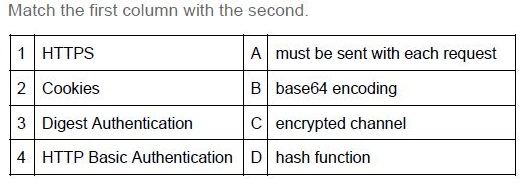
Text of the picture (copyable)
Match the first column with the second.

| 1 | HTTPS | A | must be sent with each request |
|---|---|---|---|
| 2 | Cookies | B | base64 encoding |
| 3 | Digest Authentication | C | encrypted channel |
| 4 | HTTP Basic Authentication | D | hash function |
- 1-C, 2-D, 3-A, 4-B
- 1-C, 2-A, 3-D, 4-B
- 1-B, 2-A, 3-D, 4-C
- 1-A, 2-D, 3-B, 4-C
Text of the picture (copyable)
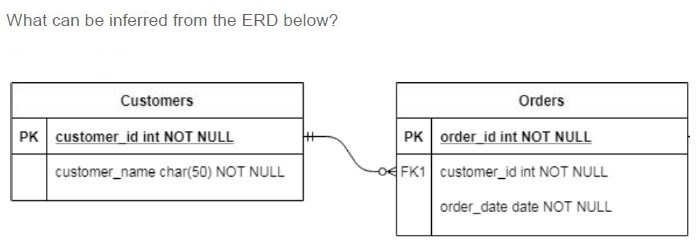
What can be inferred from the ERD below?

The diagram shows two tables, "Customers" and "Orders", connected by a relationship line.

**Customers Table:**

| Column | Attribute |
|---|---|
| PK | customer_id int NOT NULL |
| | customer_name char(50) NOT NULL |

**Orders Table:**

| Column | Attribute |
|---|---|
| PK | order_id int NOT NULL |
| FK1 | customer_id int NOT NULL |
| | order_date date NOT NULL |

**Relationship:**
A curved line connects the "Customers" table to the "Orders" table.
- On the "Customers" side, the line ends with a "one-to-many" symbol (two vertical lines and a crow's foot).
- On the "Orders" side, the line ends with a "zero or one" symbol (a circle and a vertical line).
The line also has "FK1" labeled near the "Orders" table, indicating `customer_id` in "Orders" is a foreign key.
- A customer can exist without having any orders
- An order can exist without belonging to any customer
- A customer needs to have at least one order
- An order must belong to one and only one customer
Text of the picture (copyable)
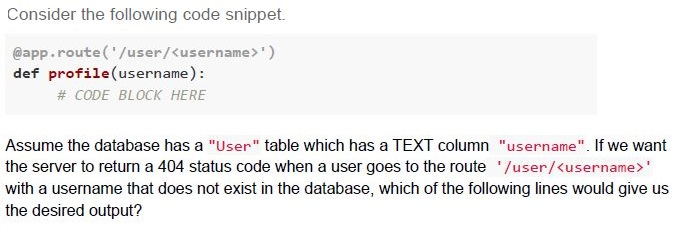
Consider the following code snippet.

```python
@app.route('/user/<username>')
def profile(username):
    # CODE BLOCK HERE
```

Assume the database has a "User" table which has a TEXT column "username". If we want the server to return a 404 status code when a user goes to the route '/user/<username>' with a username that does not exist in the database, which of the following lines would give us the desired output?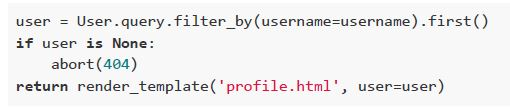
text
```python
user = User.query.filter_by(username=username).first()
if user is None:
    abort(404)
return render_template('profile.html', user=user)
```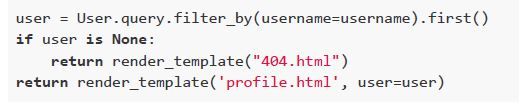
text
```python
user = User.query.filter_by(username=username).first()
if user is None:
    return render_template("404.html")
return render_template('profile.html', user=user)
```
text
```python
user = User.query.filter_by(username=username).first_or_404()
return render_template('profile.html', user=user)
```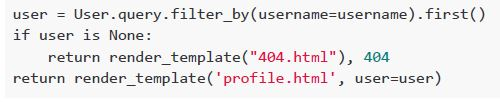
text
```python
user = User.query.filter_by(username=username).first()
if user is None:
    return render_template("404.html"), 404
return render_template('profile.html', user=user)
```
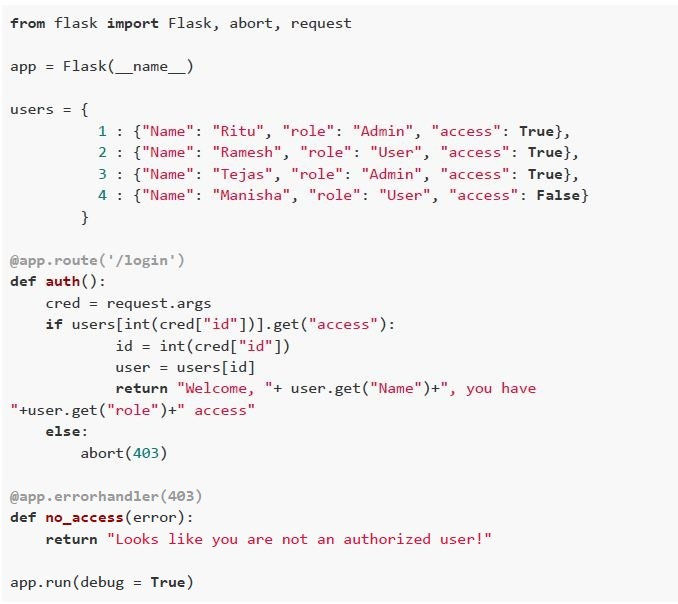 Consider the following flask application running on the base URL and is accessed through a browser. Select the correct option(s).
 Text of the picture (copyable)
```python
from flask import Flask, abort, request

app = Flask(__name__)

users = {
    1 : {"Name": "Ritu", "role": "Admin", "access": True},
    2 : {"Name": "Ramesh", "role": "User", "access": True},
    3 : {"Name": "Tejas", "role": "Admin", "access": True},
    4 : {"Name": "Manisha", "role": "User", "access": False}
}

@app.route('/login')
def auth():
    cred = request.args
    if users[int(cred["id"])].get("access"):
        id = int(cred["id"])
        user = users[id]
        return "Welcome, " + user.get("Name") + ", you have " \
               +user.get("role")+" access"
    else:
        abort(403)

@app.errorhandler(403)
def no_access(error):
    return "Looks like you are not an authorized user!"

app.run(debug = True)
```
text
For the URL: http://127.0.0.1:5000/?id=2, The browser will render;
Welcome, Ramesh, you have User access.

text
For the URL: http://127.0.0.1:5000/login?id=1, The browser will render,
Welcome, Ritu, you have Admin access.

text
For the URL: http://127.0.0.1:5000/login?id=4, The browser will render,
Welcome, Manisha, you have User access.

text
For the URL: http://127.0.0.1:5000/login?id=4, The browser will render;
Looks like you are not an authorized user!
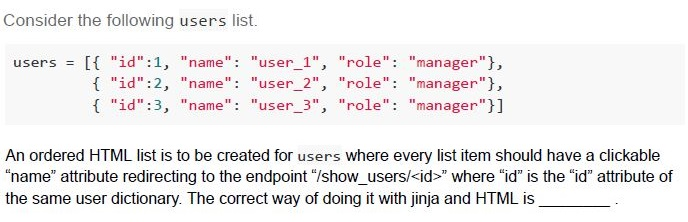
Text of the picture (copyable)
Consider the following users list.

```
users = [ {"id":1, "name": "user_1", "role": "manager"},
          {"id":2, "name": "user_2", "role": "manager"},
          {"id":3, "name": "user_3", "role": "manager"}]
```

An ordered HTML list is to be created for users where every list item should have a clickable "name" attribute redirecting to the endpoint "/show_users/<id>" where "id" is the "id" attribute of the same user dictionary. The correct way of doing it with jinja and HTML is _________.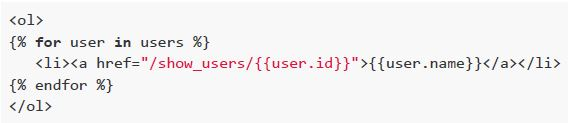
text
```html
<ol>
{% for user in users %}
    <li><a href="/show_users/{{user.id}}">{{user.name}}</a></li>
{% endfor %}
</ol>
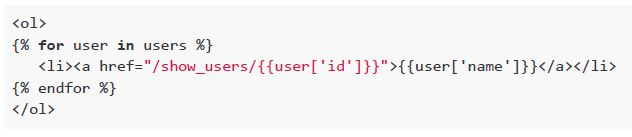
```
text
```html
<ol>
{% for user in users %}
    <li><a href="/show_users/{{user['id']}}">{{user['name']}}</a></li>
{% endfor %}
</ol>
```
text
```html
<ol>
    <li><a href="/show_users/{{users[0].id}}">{{users[0].name}}</a></li>
    <li><a href="/show_users/{{users[1].id}}">{{users[1].name}}</a></li>
    <li><a href="/show_users/{{users[2].id}}">{{users[2].name}}</a></li>
</ol>
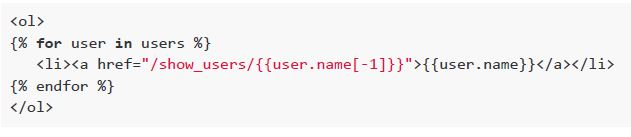
```
text
```html
<ol>
{% for user in users %}
    <li><a href="/show_users/{{user.name[-1]}}">{{user.name}}</a></li>
{% endfor %}
</ol>
```
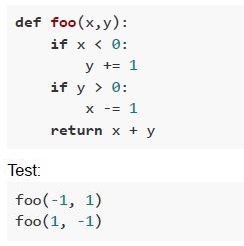 Consider the following code snippet. Which of the following is correct regarding the coverage of the test?
Text of the picture (copyable)
```python
def foo(x,y):
    if x < 0:
        y += 1
    if y > 0:
        x -= 1
    return x + y
```

Test:
```
foo(-1, 1)
foo(1, -1)
```- 100% statement coverage
- 100% function coverage
- 100% branch coverage
- 100% condition coverage

Text of the picture (copyable)
If $N_x$ is a number N represented in the base 'x' and the equation.

$400_a = 100_b = 256_c$

Holds for a specific set of a, b and c. The correct values of a, b and c that satisfy the above equation are:
- a = 8; b = 10; c = 16;
- a = 10; b = 2; c = 16;
- a = 8; b = 16; c = 10;
- a = 2; b = 16; c = 8;
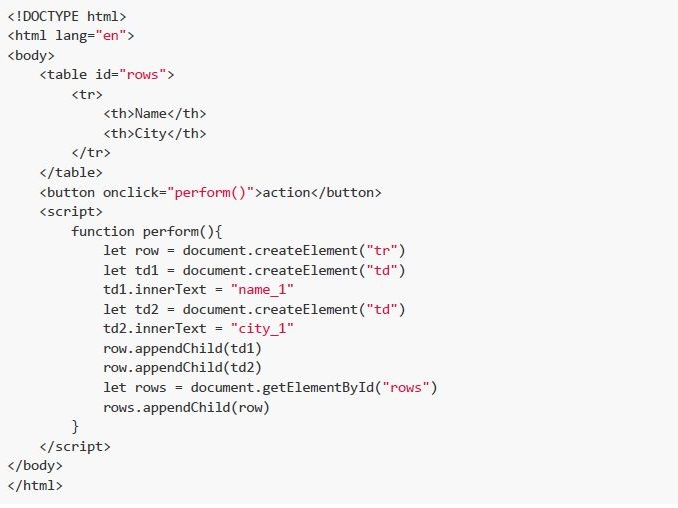 Consider the following HTML file and select the correct option.
 Text of the picture (copyable)
```html
<!DOCTYPE html>
<html lang="en">
<body>
    <table id="rows">
        <tr>
            <th>Name</th>
            <th>City</th>
        </tr>
    </table>
    <button onclick="perform()">action</button>
    <script>
        function perform(){
            let row = document.createElement("tr")
            let td1 = document.createElement("td")
            td1.innerText = "name_1"
            let td2 = document.createElement("td")
            td2.innerText = "city_1"
            row.appendChild(td1)
            row.appendChild(td2)
            let rows = document.getElementById("rows")
            rows.appendChild(row)
        }
    </script>
</body>
</html>
```- The action button when clicked adds a new column to the table with value“city_1”.
- The action button when clicked adds a new column to the table with value“name_1”.
- The action button when clicked adds a new row to the table with values“name_1” in the first column and “city_1” in the second column.
- The action button when clicked adds a new row to the table with values “city_1”in the first column and “name_1” in the second column.
- Role-based access control
- Attribute-based access control
- Both role-based and attribute-based access control
- None of these
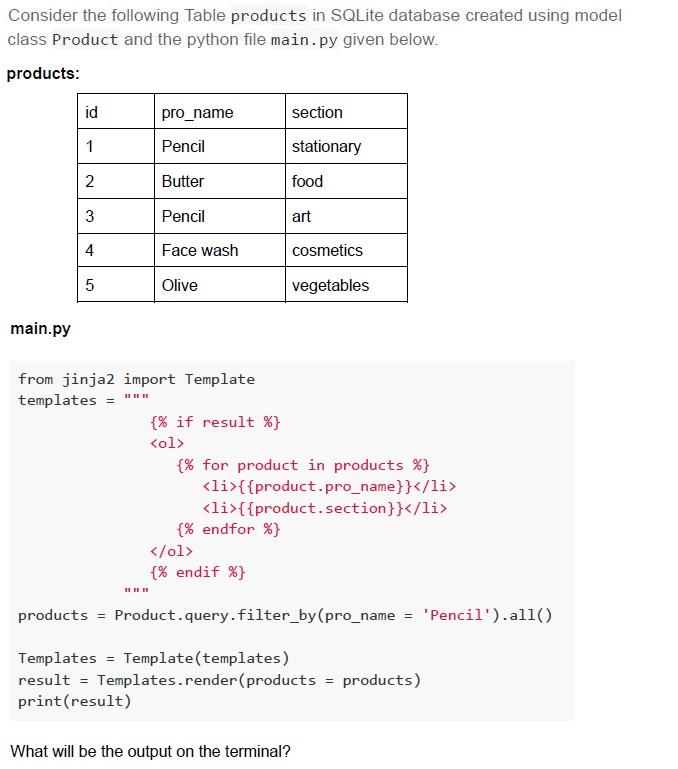
Text of the picture (copyable)
Consider the following Table products in SQLite database created using model class Product and the python file main.py given below.

**products:**

| id | pro_name | section |
|---|---|---|
| 1 | Pencil | stationary |
| 2 | Butter | food |
| 3 | Pencil | art |
| 4 | Face wash | cosmetics |
| 5 | Olive | vegetables |

**main.py**

```python
from jinja2 import Template
templates = """
{% if result %}
<ol>
    {% for product in products %}
    <li>{{product.pro_name}}</li>
    <li>{{product.section}}</li>
    {% endfor %}
</ol>
{% endif %}
"""

products = Product.query.filter_by(pro_name = 'Pencil').all()

Templates = Template(templates)
result = Templates.render(products = products)
print(result)
```

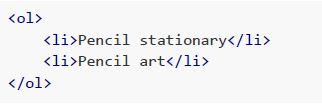
What will be the output on the terminal?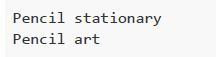
text
Pencil stationary
Pencil art
text
```html
<ol>
    <li>Pencil stationary</li>
    <li>Pencil art</li>
</ol>
```
text
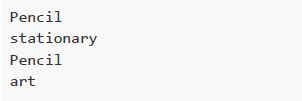
Pencil
stationary
Pencil
art
text
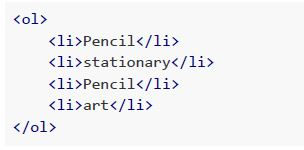
```html
<ol>
    <li>Pencil</li>
    <li>stationary</li>
    <li>Pencil</li>
    <li>art</li>
</ol>
```
- Statement 1 and statement 2 both are correct.
- Statement 1 and statement 2 both are incorrect.
- Statement 1 is correct and statement 2 is incorrect.
- Statement 1 is incorrect and statement 2 is correct.
Text of the picture (copyable)
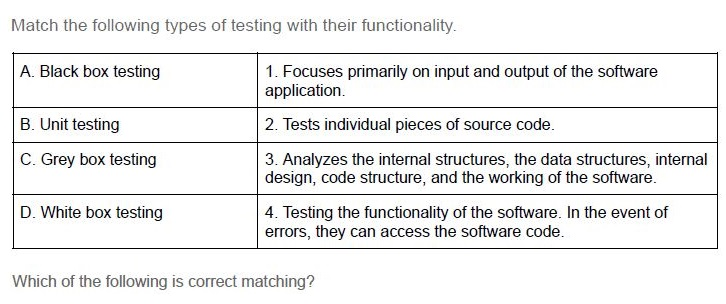
Match the following types of testing with their functionality.

| | |
|---|---|
| A. Black box testing | 1. Focuses primarily on input and output of the software application. |
| B. Unit testing | 2. Tests individual pieces of source code. |
| C. Grey box testing | 3. Analyzes the internal structures, the data structures, internal design, code structure, and the working of the software. |
| D. White box testing | 4. Testing the functionality of the software. In the event of errors, they can access the software code. |

Which of the following is correct matching?
- A → 1, B → 2, C → 4, D → 3
- A → 4, B → 3, C → 2, D → 1
- A → 4, B → 1, C → 2, D → 3
- A → 3, B → 2, C → 1, D → 4
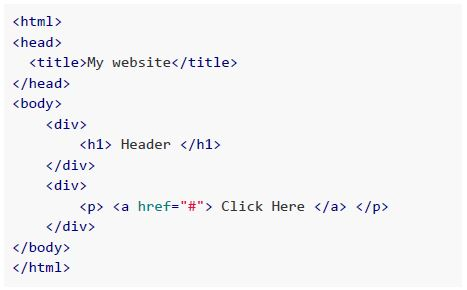
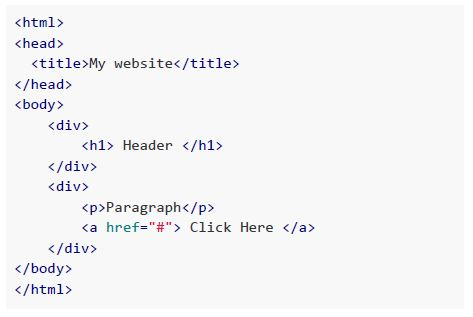
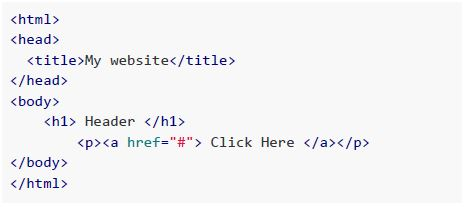
Text of the picture (copyable)
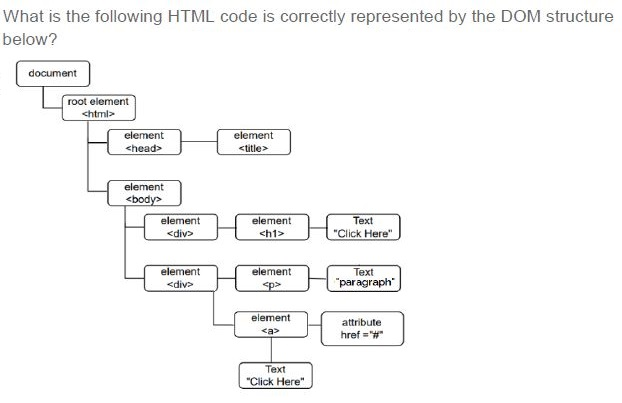
What is the following HTML code is correctly represented by the DOM structure below?

Diagram: DOM structure
- "document" node.
  - "document" node connects to "root element <html>" node.
    - "root element <html>" node connects to "element <head>" node.
      - "element <head>" node connects to "element <title>" node.
    - "root element <html>" node connects to "element <body>" node.
      - "element <body>" node connects to "element <div>" node.
        - "element <div>" node connects to "element <h1>" node.
          - "element <h1>" node connects to "Text "Click Here"" node.
      - "element <body>" node connects to "element <div>" node.
        - "element <div>" node connects to "element <p>" node.
          - "element <p>" node connects to "Text "paragraph"" node.
        - "element <div>" node connects to "element <a>" node.
          - "element <a>" node connects to "attribute href="#" " node.
          - "element <a>" node connects to "Text "Click Here"" node.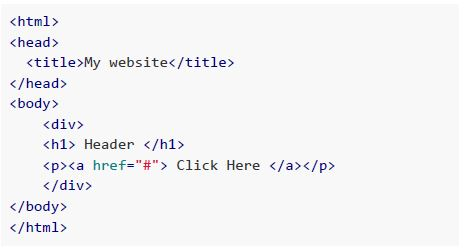
text
```html
<html>
<head>
    <title>My website</title>
</head>
<body>
    <div>
        <h1> Header </h1>
        <p><a href="#"> Click Here </a></p>
    </div>
</body>
</html>
```
text
```html
<html>
<head>
    <title>My website</title>
</head>
<body>
    <div>
        <h1> Header </h1>
    </div>
    <div>
        <p> <a href="#"> Click Here </a> </p>
    </div>
</body>
</html>
```
text
```html
<html>
<head>
    <title>My website</title>
</head>
<body>
    <div>
        <h1> Header </h1>
    </div>
    <div>
        <p>Paragraph</p>
        <a href="#"> Click Here </a>
    </div>
</body>
</html>
```
text
```html
<html>
<head>
    <title>My website</title>
</head>
<body>
    <h1> Header </h1>
    <p><a href="#"> Click Here </a></p>
</body>
</html>
```
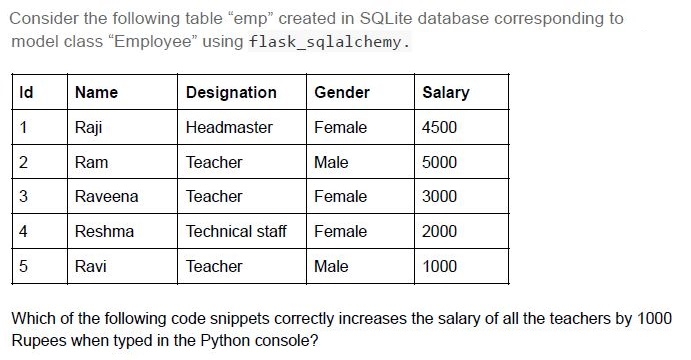
Text of the picture (copyable)
Consider the following table "emp" created in SQLite database corresponding to model class "Employee" using flask_sqlalchemy.

| Id | Name | Designation | Gender | Salary |
|---|---|---|---|---|
| 1 | Raji | Headmaster | Female | 4500 |
| 2 | Ram | Teacher | Male | 5000 |
| 3 | Raveena | Teacher | Female | 3000 |
| 4 | Reshma | Technical staff | Female | 2000 |
| 5 | Ravi | Teacher | Male | 1000 |

Which of the following code snippets correctly increases the salary of all the teachers by 1000 Rupees when typed in the Python console?
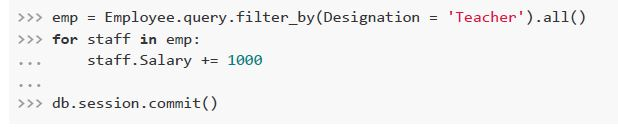
text
```python
>>> emp = Employee.query.filter_by(Designation = 'Teacher').all()
>>> for staff in emp:
...     staff.Salary += 1000
...
>>> db.session.commit()
```

text
```python
>>> emp = Employee.query.filter_by(Gender = 'Female').all()
>>> staff.Salary += 1000
>>> db.session.commit()
```
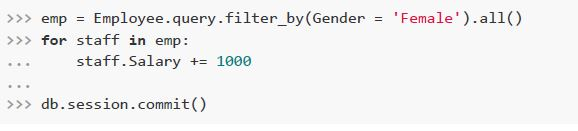
text
```python
>>> emp = Employee.query.filter_by(Gender = 'Female').all()
>>> for staff in emp:
...     staff.Salary += 1000
...
>>> db.session.commit()
```
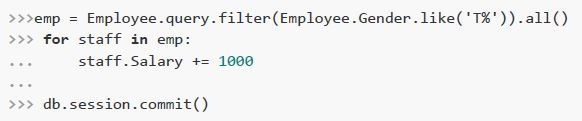
text
```python
>>>emp = Employee.query.filter(Employee.Gender.like('T%')).all()
>>> for staff in emp:
...     staff.Salary += 1000
...
>>> db.session.commit()
```
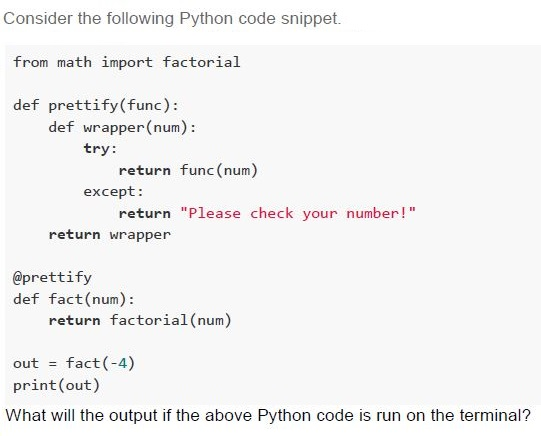
Text of the picture (copyable)
Consider the following Python code snippet.

```python
from math import factorial

def prettify(func):
    def wrapper(num):
        try:
            return func(num)
        except:
            return "Please check your number!"
    return wrapper

@prettify
def fact(num):
    return factorial(num)

out = fact(-4)
print(out)
```

What will the output if the above Python code is run on the terminal?
text
-24

text
24

text
Please check your number!

text
None
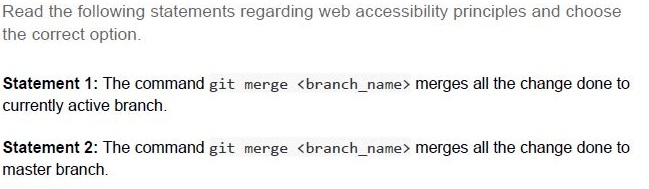
Text of the picture (copyable)
Read the following statements regarding web accessibility principles and choose the correct option.

**Statement 1:** The command `git merge <branch_name>` merges all the change done to currently active branch.

**Statement 2:** The command `git merge <branch_name>` merges all the change done to master branch.
- Both statement 1 and statement 2 are correct
- Both statement 1 and statement 2 are incorrect
- Statement 1 is correct but statement 2 is incorrect
- Statement 1 is incorrect but statement 2 is correct
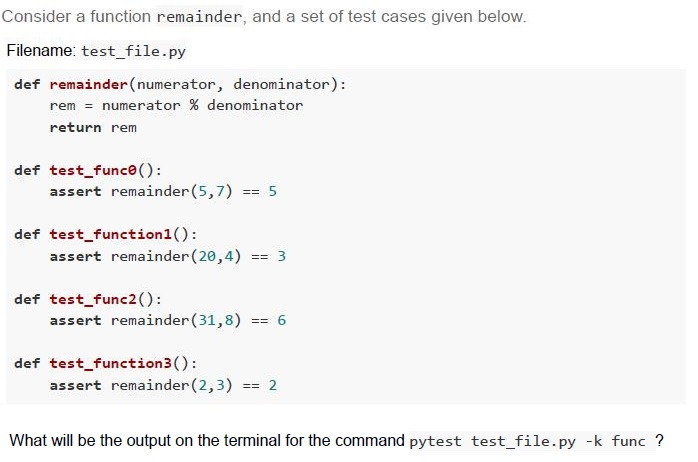
Text of the picture (copyable)
Consider a function remainder, and a set of test cases given below.

Filename: test_file.py

```python
def remainder(numerator, denominator):
    rem = numerator % denominator
    return rem

def test_func0():
    assert remainder(5,7) == 5

def test_function1():
    assert remainder(20,4) == 3

def test_func2():
    assert remainder(31,8) == 6

def test_function3():
    assert remainder(2,3) == 2
```

What will be the output on the terminal for the command `pytest test_file.py -k func`?
text
```
======== 1 failed, 1 passed, 2 deselected in 0.41s ========
```

text
```text
============================= 2 passed, 2 deselected in 0.41s =============================
```

text
```text
============================= 2 failed, 2 passed in 0.41s =============================
```

text
```
========== 2 failed, 2 deselected in 0.41s ==========
```
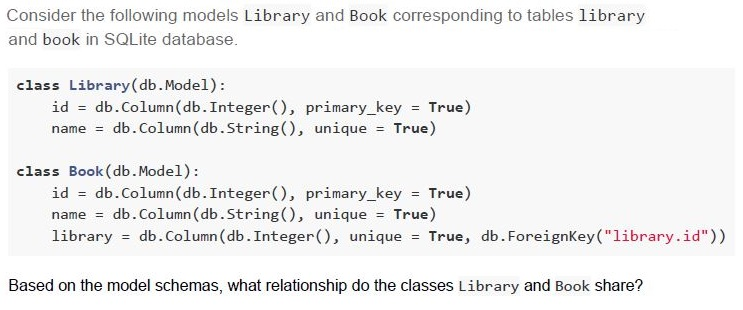
Text of the picture (copyable)
Consider the following models Library and Book corresponding to tables library and book in SQLite database.

```python
class Library(db.Model):
    id = db.Column(db.Integer(), primary_key = True)
    name = db.Column(db.String(), unique = True)

class Book(db.Model):
    id = db.Column(db.Integer(), primary_key = True)
    name = db.Column(db.String(), unique = True)
    library = db.Column(db.Integer(), unique = True, db.ForeignKey("library.id"))
```

Based on the model schemas, what relationship do the classes Library and Book share?- Many-to-Many
- One-to-Many
- One-to-One
- The tables are not at all related
Text of the picture (copyable)
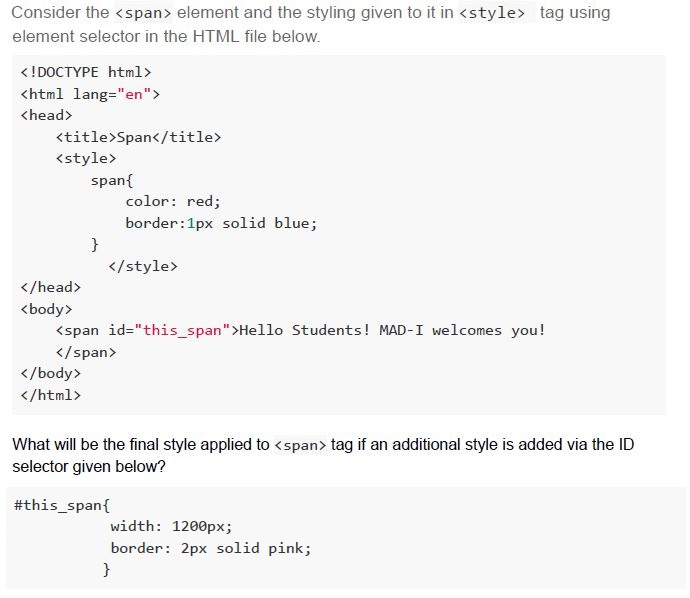
Consider the `<span>` element and the styling given to it in `<style>` tag using element selector in the HTML file below.

```html
<!DOCTYPE html>
<html lang="en">
<head>
    <title>Span</title>
    <style>
        span{
            color: red;
            border:1px solid blue;
        }
    </style>
</head>
<body>
    <span id="this_span">Hello Students! MAD-I welcomes you!</span>
</body>
</html>
```

What will be the final style applied to `<span>` tag if an additional style is added via the ID selector given below?

```css
#this_span{
    width: 1200px;
    border: 2px solid pink;
}
```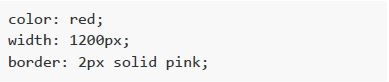
text
```css
color: red;
width: 1200px;
border: 2px solid pink;
```
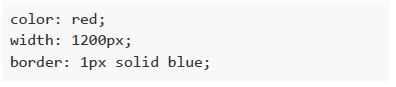
text
```css
color: red;
width: 1200px;
border: 1px solid blue;
```

text
```css
color: red;
border: 2px solid pink;
```
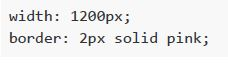
text
```css
width: 1200px;
border: 2px solid pink;
```
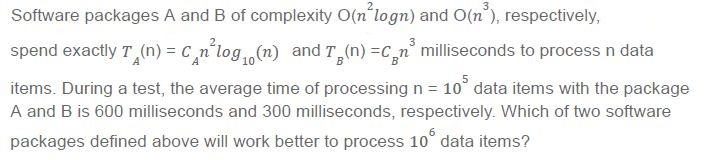
Text of the picture (copyable)
Software packages A and B of complexity O(n²logn) and O(n³), respectively,
spend exactly T_A(n) = C_A n²log₁₀(n) and T_B(n) = C_B n³ milliseconds to process n data
items. During a test, the average time of processing n = 10⁵ data items with the package
A and B is 600 milliseconds and 300 milliseconds, respectively. Which of two software
packages defined above will work better to process 10⁶ data items?
- Software package A
- Software package B
- Both Software packages A and B will take same time to process 106 items
- Both Software packages A and B will take infinitely long time to process 106items
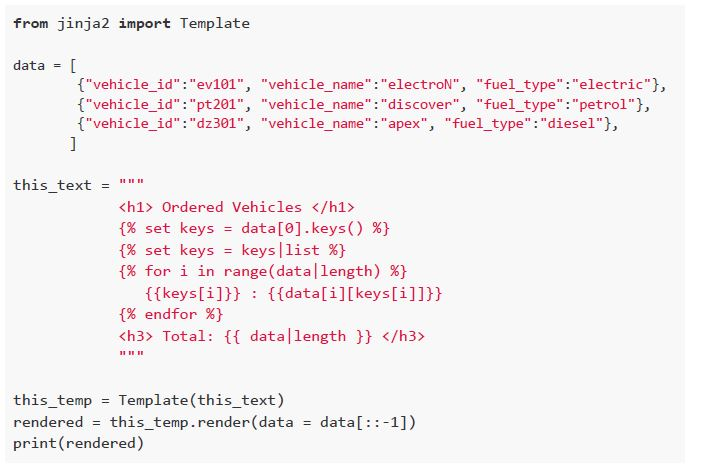 Consider the following Python code snippet. How will the browser render the output of the above given Python code?
Text of the picture (copyable)
```python
from jinja2 import Template

data = [
    {"vehicle_id":"ev101", "vehicle_name":"electroN", "fuel_type":"electric"},
    {"vehicle_id":"pt201", "vehicle_name":"discover", "fuel_type":"petrol"},
    {"vehicle_id":"dz301", "vehicle_name":"apex", "fuel_type":"diesel"},
]

this_text = """
<h1> Ordered Vehicles </h1>
{% set keys = data[0].keys() %}
{% set keys = keys|list %}
{% for i in range(data|length) %}
{{keys[i]}} : {{data[i][keys[i]]}}
{% endfor %}
<h3> Total: {{ data|length }} </h3>
"""

this_temp = Template(this_text)
rendered = this_temp.render(data = data[::-1])
print(rendered)
```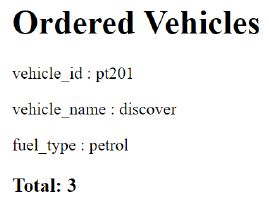
text
Ordered Vehicles

vehicle_id : pt201

vehicle_name : discover

fuel_type : petrol

Total: 3
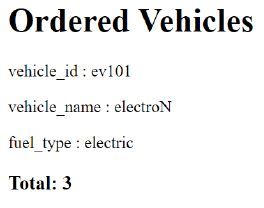
text
Ordered Vehicles

vehicle_id : ev101

vehicle_name : electroN

fuel_type : electric

Total: 3
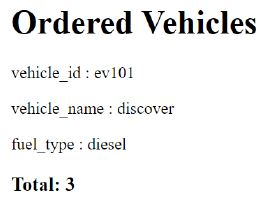
text
Ordered Vehicles

vehicle_id : ev101

vehicle_name : discover

fuel_type : diesel

Total: 3
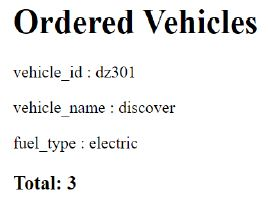
text
Ordered Vehicles

vehicle_id : dz301

vehicle_name : discover

fuel_type : electric

Total: 3
- 6000 kilometers
- 4500 kilometers
- 7500 kilometers
- 8000 kilometers
- 6
- 60
- 110
- 120
- The AI voice
- The LED light around the device
- The body of the device
- None of these
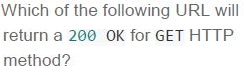
Text of the picture (copyable)
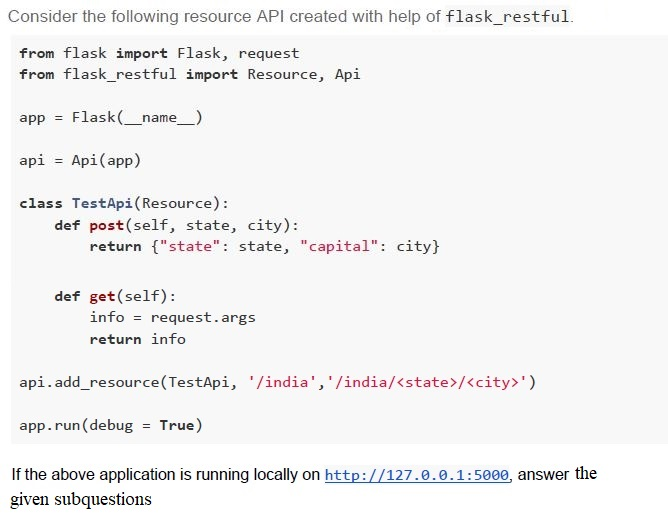
Which of the following URL will
return a 200 OK for GET HTTP
method?

text
```
http://127.0.0.1:5000/maharastra/mumbai
```

text
```
http://127.0.0.1:5000/india?state=tamilnadu&capital=chennai
```

text
```
http://127.0.0.1:5000/india/madhyapradesh/bhopal
```

text
```
http://127.0.0.1:5000?state=rajasthan&capital=jaipur
```
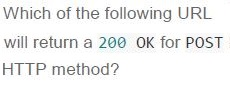
Text of the picture (copyable)
Which of the following URL
will return a 200 OK for POST
HTTP method?

text
```
http://127.0.0.1:5000/india?state=odisha&capital=bhubaneshwar
```

text
```
http://127.0.0.1:5000?state=telangana&capital=hyderabad
```

text
```
http://127.0.0.1:5000/karnataka/bangalore
```

text
```
http://127.0.0.1:5000/india/westbengal/kolkata
```
Answer key
- Q1 (MCQ, 2 marks): B
- Q2 (MCQ, 2 marks): C
- Q3 (MCQ, 2 marks): C
- Q4 (MCQ, 2 marks): D
- Q5 (MCQ, 2 marks): C
- Q6 (MCQ, 2 marks): C
- Q7 (MCQ, 2 marks): B
- Q8 (MSQ, 3 marks): A, D
- Q9 (MSQ, 3 marks): A, C, D
- Q10 (MSQ, 3 marks): B, D
- Q11 (MSQ, 3 marks): A, B, C, D
- Q12 (MSQ, 3 marks): A, B, C
- Q13 (MCQ, 3 marks): C
- Q14 (MCQ, 3 marks): C
- Q15 (MCQ, 3 marks): B
- Q16 (MCQ, 3 marks): D
- Q17 (MCQ, 3 marks): A
- Q18 (MCQ, 3 marks): A
- Q19 (MCQ, 3 marks): C
- Q20 (MCQ, 3 marks): A
- Q21 (MCQ, 3 marks): C
- Q22 (MCQ, 3 marks): C
- Q23 (MCQ, 4.5 marks): C
- Q24 (MCQ, 4.5 marks): C
- Q25 (MCQ, 4.5 marks): C
- Q26 (MCQ, 4.5 marks): A
- Q27 (MCQ, 4.5 marks): D
- Q28 (MCQ, 4.5 marks): B
- Q29 (MCQ, 3 marks): D
- Q30 (MSQ, 2 marks): A, B
- Q31 (MCQ, 4.5 marks): B
- Q32 (MCQ, 4.5 marks): B
Concepts this paper tests
Auto-generated summary from the source site. Handy as a checklist; the lessons above explain each idea from scratch.
Here’s a structured summary of core topics, concepts, principles, and equations for the "Diploma Level: Modern Application Development 1" exam, along with Mermaid knowledge graphs to visualize relationships.
1. Core Topics & Concepts
A. Web Development (HTML, Flask, Jinja2)
Key Concepts:
HTML Attributes & Accessibility
altattribute in<img>: Provides alternative text for accessibility (e.g., screen readers) or when the image fails to load.- Semantic HTML5: Supports multimedia (
<video>,<audio>,<canvas>), parsing rules, and separation from SGML (unlike HTML4).
Flask Framework
Template Folder Customization:
app = Flask(__name__, template_folder="views") # Changes default templates folder to "views"Routing & Error Handling:
@app.route('/user/<username>')
def profile(username):
    user = User.query.filter_by(username=username).first_or_404()  # Returns 404 if user not found
    return render_template('profile.html', user=user)
HTTP Methods:
GET: Retrieve data (e.g., query parameters viarequest.args).POST: Submit data (e.g., form data viarequest.form).
Jinja2 Templating:
Loop through lists:
<ol>
  {% for user in users %}
    <li><a href="/show_users/{{ user.id }}">{{ user.name }}</a></li>
  {% endfor %}
</ol>
Conditional rendering:
{% if user.access %}
  <p>Welcome, {{ user.name }}!</p>
{% else %}
  <p>Access denied.</p>
{% endif %}
Database Integration (SQLAlchemy)
Relationships:
- One-to-Many: Foreign key in the "many" side (e.g.,
Book.library_idreferencesLibrary.id). - One-to-One:
unique=Truein the foreign key column.
- One-to-Many: Foreign key in the "many" side (e.g.,
Querying:
teachers = Employee.query.filter_by(Designation='Teacher').all()
for teacher in teachers:
    teacher.Salary += 1000
db.session.commit()
RESTful APIs (Flask-RESTful)
Define resources with HTTP methods:
class TestApi(Resource):
    def get(self):
        return {"data": request.args}  # Handles GET requests
    def post(self, state, city):
        return {"state": state, "capital": city}  # Handles POST requests
api.add_resource(TestApi, '/india', '/india/<state>/<city>')
B. Web Security & Performance
- Authentication Methods | Method | Description | |----------------------|--------------------------------------| | HTTP Basic Auth | Base64-encoded credentials. | | Digest Auth | Uses hash functions (more secure). | | HTTPS | Encrypted channel (TLS/SSL). | | Cookies | Must be sent with each request. |
Logging & DDoS Protection
Server logs can detect:
- Accessed URLs.
- High request volumes (e.g., DDoS attacks).
Access Control Models
- Role-Based Access Control (RBAC): Permissions tied to roles (e.g., "Admin").
- Attribute-Based Access Control (ABAC): Permissions tied to attributes (e.g., "post_count > 25").
Web Accessibility (WCAG Principles)
- Perceivable: Content must be presentable in different forms (e.g., alt text for images).
- Understandable: Clear navigation and error prevention.
C. Software Engineering Principles
Testing
- Types of Testing: | Type | Description | |--------------------|----------------------------------------------| | Black Box | Tests input/output without code knowledge. | | White Box | Tests internal structures (code coverage). | | Grey Box | Partial code knowledge (e.g., API tests). | | Unit Testing | Tests individual functions. |
Coverage Metrics:
- Statement Coverage: All lines executed.
- Branch Coverage: All branches (e.g.,
if/else) executed. Example:
def foo(x, y):
    if x < 0: y += 1      # Branch 1
    if y > 0: x -= 1      # Branch 2
    return x + y
Tests
foo(-1, 1)andfoo(1, -1)achieve 100% branch coverage.
Version Control (Git)
git merge <branch>: Merges changes into the currently active branch (not necessarilymaster).
CI/CD (Continuous Integration/Deployment)
- CI: Automated testing of isolated changes.
- CD: Automated deployment to production.
D. Data Structures & Algorithms
Entity-Relationship Diagrams (ERD)
Example:
Customers (PK: customer_id) → Orders (FK: customer_id)Inferences:
- One-to-many: One customer can have multiple orders.
- Foreign keys enforce referential integrity.
Time Complexity
- Compare algorithms for large inputs (e.g., \(O(n^2 \log n)\) vs. \(O(n^3)\)).
Example:
- \(T_A(n) = c_A n^2 \log n\) (Package A)
- \(T_B(n) = c_B n^3\) (Package B)
- For \(n = 10^5\), if \(T_A = 600\)ms and \(T_B = 300\)ms, solve for \(c_A\) and \(c_B\) to predict performance at \(n = 10^6\).
E. Networking
Latency Calculation
Round-trip time (RTT) depends on:
- Distance (\(d\)).
Speed of light in medium (\(v\)):
- Cable: \(1.5 \times 10^8\) m/s.
- Air: \(3 \times 10^8\) m/s.
- Formula: \[ \text{RTT} = 2 \times \left( \frac{d_1}{v_1} + \frac{d_2}{v_2} \right) \]
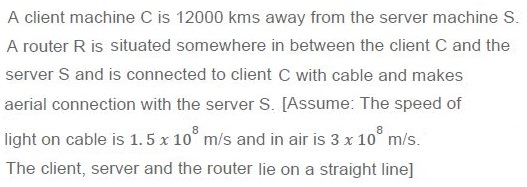
Example: Client-server distance = 12,000 km, router at midpoint.
- Cable segment: 6,000 km → \(t_1 = \frac{6000 \times 10^3}{1.5 \times 10^8} = 0.04\) s.
- Air segment: 6,000 km → \(t_2 = \frac{6000 \times 10^3}{3 \times 10^8} = 0.02\) s.
- Total RTT = \(2 \times (0.04 + 0.02) = 120\) ms.
F. Mathematics (Number Bases)
Base Conversion
- Equation: \(400_a = 100_b = 256_c\).
- Solve for \(a, b, c\) by converting to base 10: \[ 4a^2 + 0 + 0 = 1b^2 + 0 + 0 = 2c^2 + 5c + 6 \]
- Solution: \(a = 8\), \(b = 16\), \(c = 10\).
2. Key Equations
| Topic | Equation |
|---|---|
| Time Complexity | \(T_A(n) = c_A n^2 \log n\), \(T_B(n) = c_B n^3\) |
| Latency | \(\text{RTT} = 2 \times \left( \frac{d_1}{v_1} + \frac{d_2}{v_2} \right)\) |
| Base Conversion | \(400_a = 4a^2 = 100_b = b^2 = 256_c = 2c^2 + 5c + 6\) |
Graph 2: Security & Performance
Graph 3: Software Engineering
Graph 4: Networking & Math
4. Exam Tips
- Flask/Jinja2: Focus on routing, template rendering, and database queries.
- HTML: Understand
alt, semantic tags, and DOM structure. - Testing: Know the difference between coverage types (statement vs. branch).
- Networking: Memorize latency formulas and base conversion steps.
- Git:
git mergeaffects the current branch, not alwaysmaster.