Home / Past papers / MAD1 End Term / this paper
Modern Application Development I 06 May 26 - 10 May 2026
Elapsed 00:00
Which of the following is the correct match between Column A and Column B?
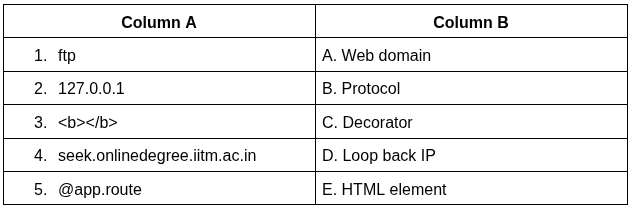
Text of the picture (copyable)
| Column A | Column B |
|---|---|
| 1. ftp | A. Web domain |
| 2. 127.0.0.1 | B. Protocol |
| 3. `<b></b>` | C. Decorator |
| 4. seek.onlinedegree.iitm.ac.in | D. Loop back IP |
| 5. @app.route | E. HTML element |
- 1-B, 2-D, 3-E, 4-A, 5-C
- 1-B, 2-A, 3-E, 4-D, 5-C
- 1-A, 2-D, 3-E, 4-B, 5-C
- 1-B, 2-D, 3-C, 4-A, 5-E
Logging is typically used for what purpose?
- detect unusual activity on the server.
- block unauthorized access.
- enforce HTTPS connections.
- convert HTTP to HTTPS.
A web server has an outgoing bandwidth of 5Gbps, and each client requires 2Mbps. What is the maximum number of concurrent requests allowed? (Use: 1KB= 1000Bytes, 1MB=1000KB and so on)
- 2.5
- 25
- 250
- 2500
Consider the following SQL Alchemy model  with below data.
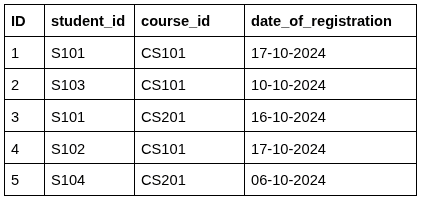 Which of the following SQL Alchemy statements is used to count the number of students registered for
  ?
?
with below data.
Which of the following SQL Alchemy statements is used to count the number of students registered for ?Text of the picture (copyable)
CourseRegistrations
| ID | student_id | course_id | date_of_registration |
|---|---|---|---|
| 1 | S101 | CS101 | 17-10-2024 |
| 2 | S103 | CS101 | 10-10-2024 |
| 3 | S101 | CS201 | 16-10-2024 |
| 4 | S102 | CS101 | 17-10-2024 |
| 5 | S104 | CS201 | 06-10-2024 |
```
course_id="CS101"
```

text
```python
count = db.session.query(CourseRegistrations) \
    .filter(course_id == "CS101") \
    .count()
```
text
```python
count = db.session.query \
    .filter(CourseRegistrations.course_id == "CS101") \
    .count()
```
text
```python
count = db.query(CourseRegistrations) \
    .filter(course_id == "CS101") \
    .count()
```
text
```python
count = db.session.query(CourseRegistrations) \
    .filter(CourseRegistrations.course_id == "CS101") \
    .count()
```
What is the purpose of the primary_key=True attribute in a SQLAlchemy model?
- It allows duplicate values in the column
- It uniquely identifies each row in the table
- It automatically creates foreign key relationships
- It makes the column optional
Which of the following statements are correct regarding git?
- Files in the staging area can be committed.
- The command
 converts a local folder into a Git repository.
text
```
"git init"
```
- The command
 moves the local repository to the remote repository.
text
```
"git add"
```
- Git can be used only online.
- Git branches are pointers to commits.
Consider the following Python Flask code.
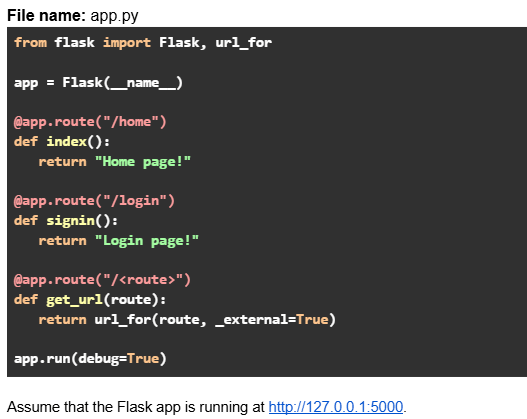 Which of the following options are true?
Which of the following options are true?Text of the picture (copyable)
File name: app.py
```python
from flask import Flask, url_for

app = Flask(__name__)

@app.route("/home")
def index():
    return "Home page!"

@app.route("/login")
def signin():
    return "Login page!"

@app.route("/<route>")
def get_url(route):
    return url_for(route, _external=True)

app.run(debug=True)
```
Assume that the Flask app is running at http://127.0.0.1:5000.- URL request: http://127.0.0.1:5000/signin will return output: http://127.0.0.1:5000/login
- URL request: http://127.0.0.1:5000/login will return output: http://127.0.0.1:5000/login
- URL request: http://127.0.0.1:5000/index will return output: http://127.0.0.1:5000/home
- URL request: http://127.0.0.1:5000/home will return output: http://127.0.0.1:5000/home
Consider the following Python Flask code.
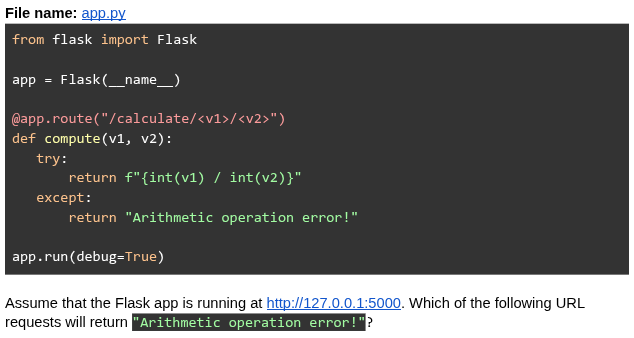
Text of the picture (copyable)
File name: app.py

```python
from flask import Flask

app = Flask(__name__)

@app.route("/calculate/<v1>/<v2>")
def compute(v1, v2):
    try:
        return f"{int(v1) / int(v2)}"
    except:
        return "Arithmetic operation error!"

app.run(debug=True)
```

Assume that the Flask app is running at http://127.0.0.1:5000. Which of the following URL requests will return "Arithmetic operation error!"?
text
```
http://127.0.0.1:5000/calculate/4/"2"
```

text
http://127.0.0.1:5000/calculate/4/4

text
```
http://127.0.0.1:5000/calculate/4/0.2
```

text
```
http://127.0.0.1:5000/calculate/4/2?v1=1
```

text
```
http://127.0.0.1:5000/calculate/4.0/0.5
```
Consider the following Python code.
 Which of the following statement(s) should replace ==Missing code here== so that it prints the output without any KeyError exception?
Which of the following statement(s) should replace ==Missing code here== so that it prints the output without any KeyError exception?Text of the picture (copyable)
```python
from string import Template

message = "Available courses: $course1, $course2, $course3"
template = Template(message)
==Missing code here===
```

text
```python
print(template.safe_substitute({"course1": "Python", "course2": "Java",
"course3": "C++",}))
```
text
```python
print(template.substitute({"course1": "Python", "course2": "Java",
"course3": "C++",}))
```
text
```python
print(template.safe_substitute({"course1" : "Python", "course3" : "C++",}))
```
text
```python
print(template.substitute({"course1" : "Python", "course2" : "Java"}))
```
Consider the following HTML/CSS code.
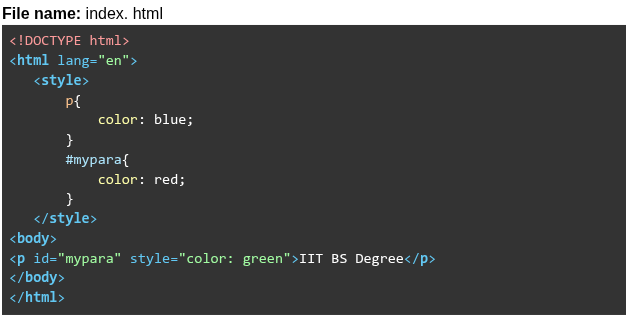 Read the following statements about “index.html” and choose the correct option. Statement 1: Internal element selector blue will be overridden by ID selector red. Statement 2: Internal ID selector red will be overridden by inline styling green.
Read the following statements about “index.html” and choose the correct option. Statement 1: Internal element selector blue will be overridden by ID selector red. Statement 2: Internal ID selector red will be overridden by inline styling green.Text of the picture (copyable)
File name: index. html

```html
<!DOCTYPE html>
<html lang="en">
<style>
    p{
        color: blue;
    }
    #mypara{
        color: red;
    }
</style>
<body>
    <p id="mypara" style="color: green">IIT BS Degree</p>
</body>
</html>
```- Both statements are incorrect.
- Both statements are correct.
- Statement 1 is incorrect, but statement 2 is correct.
- Statement 2 is incorrect, but statement 1 is correct.
Consider the Flask SQLAlchemy data model.
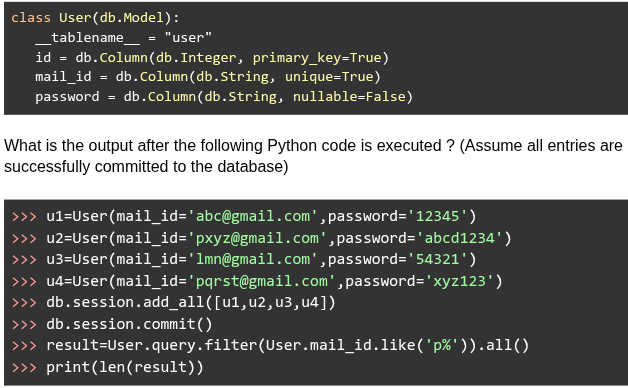
Text of the picture (copyable)
```python
class User(db.Model):
    __tablename__ = "user"
    id = db.Column(db.Integer, primary_key=True)
    mail_id = db.Column(db.String, unique=True)
    password = db.Column(db.String, nullable=False)
```

What is the output after the following Python code is executed ? (Assume all entries are successfully committed to the database)

```python
>>> u1=User(mail_id='abc@gmail.com',password='12345')
>>> u2=User(mail_id='pxyz@gmail.com',password='abcd1234')
>>> u3=User(mail_id='lmn@gmail.com',password='54321')
>>> u4=User(mail_id='pqrst@gmail.com',password='xyz123')
>>> db.session.add_all([u1,u2,u3,u4])
>>> db.session.commit()
>>> result=User.query.filter(User.mail_id.like('p%')).all()
>>> print(len(result))
```- 1
- 2
- 3
- 4
You write an algorithm to sort N numbers (stored in an array a[0] to a[N-1]) as follows: Algorithm steps: i. Search through the list of numbers to find the lowest number - say it is position "i" ii. Move a[i-1] to a[i], a[i-2] to a[i-1] etc, till a[0] to a[1] iii. Place the original a[i] in position 0 iv. Repeat the above steps but now starting from position 1 to N-1, then 2 to N-1 etc till all numbers are in the correct places. What is the running complexity of this algorithm?
- linear
- quadratic
- cubic
- exponential
Consider the following graph that represents the variation in bandwidth of a network for an entire day (24 hours). Three users were connected to the network at three different times of the day. What is the total data consumed in GigaBytes by all the users in 24 hrs?
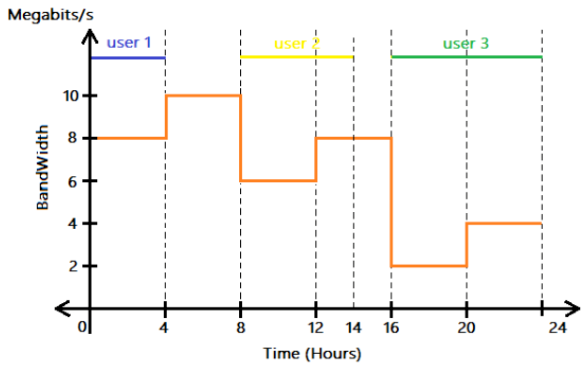
Text of the picture (copyable)
This is a 2D line graph with a horizontal x-axis labeled "Time (Hours)" and a vertical y-axis labeled "BandWidth" with units "Megabits/s".

The x-axis ranges from 0 to 24, with major ticks at 0, 4, 8, 12, 14, 16, 20, and 24.
The y-axis ranges from 0 to 12, with major ticks at 0, 2, 4, 6, 8, 10.

There is an orange step-function line graph representing bandwidth over time.
- From 0 to 4 hours, bandwidth is 8 Megabits/s.
- From 4 to 8 hours, bandwidth is 10 Megabits/s.
- From 8 to 12 hours, bandwidth is 6 Megabits/s.
- From 12 to 16 hours, bandwidth is 8 Megabits/s.
- From 16 to 20 hours, bandwidth is 2 Megabits/s.
- From 20 to 24 hours, bandwidth is 4 Megabits/s.

Additionally, there are three horizontal lines with labels indicating user activity:
- A blue line labeled "user 1" extends from 0 to 4 hours at an unspecified y-value (visually above 10).
- A yellow line labeled "user 2" extends from 8 to 14 hours at an unspecified y-value (visually above 10).
- A green line labeled "user 3" extends from 16 to 24 hours at an unspecified y-value (visually above 10).

Vertical dashed lines extend from the x-axis ticks at 4, 8, 12, 14, 16, 20, and 24 hours up to the top of the graph.
- 547.2 GB
- 12 GB
- 43.2 GB
- 345.6 GB
Consider the following Python code.
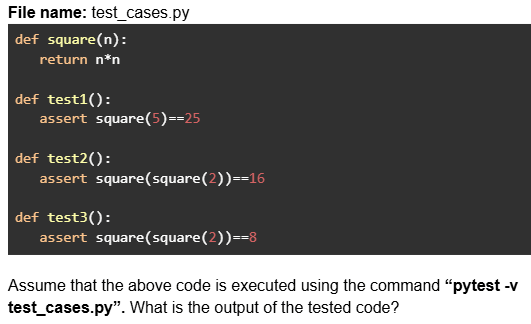
Text of the picture (copyable)
File name: test_cases.py

```python
def square(n):
    return n*n

def test1():
    assert square(5)==25

def test2():
    assert square(square(2))==16

def test3():
    assert square(square(2))==8
```

Assume that the above code is executed using the command “**pytest -v test_cases.py**”. What is the output of the tested code?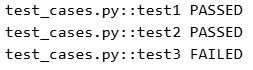
text
```
test_cases.py::test1 PASSED
test_cases.py::test2 PASSED
test_cases.py::test3 FAILED
```
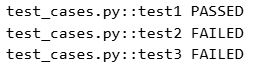
text
```
test_cases.py::test1 PASSED
test_cases.py::test2 FAILED
test_cases.py::test3 FAILED
```
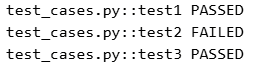
text
```
test_cases.py::test1 PASSED
test_cases.py::test2 FAILED
test_cases.py::test3 PASSED
```
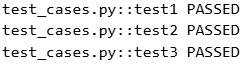
text
```
test_cases.py::test1 PASSED
test_cases.py::test2 PASSED
test_cases.py::test3 PASSED
```
Consider the following Python Jinja2 template code.
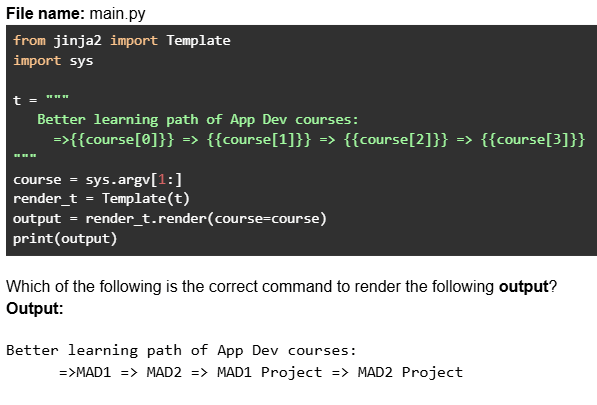
Text of the picture (copyable)
File name: main.py

```python
from jinja2 import Template
import sys

t = """
Better learning path of App Dev courses:
=>{{course[0]}} => {{course[1]}} => {{course[2]}} => {{course[3]}}
"""

course = sys.argv[1:]
render_t = Template(t)
output = render_t.render(course=course)
print(output)
```

Which of the following is the correct command to render the following **output**?
**Output**:

Better learning path of App Dev courses:
=>MAD1 => MAD2 => MAD1 Project => MAD2 Project- python main.py MAD1 MAD2 MAD1 Project MAD2 Project
- python main.py MAD1 MAD2 MAD1_Project MAD2_Project
- python main.py "MAD1 MAD2 MAD1 Project MAD2 Project"
- python main.py MAD1 MAD2 "MAD1 Project" "MAD2 Project"
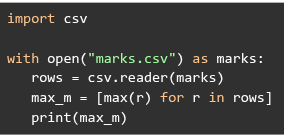
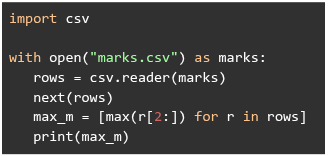
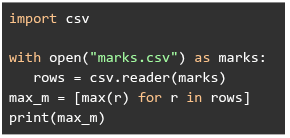
Consider the following csv file.
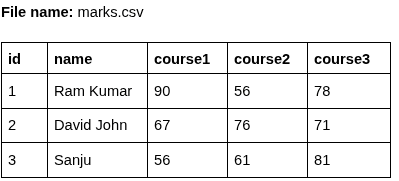 Choose the correct Python code that will print the output: ['90', '76', '81']?
Choose the correct Python code that will print the output: ['90', '76', '81']?Text of the picture (copyable)
File name: marks.csv

| id | name | course1 | course2 | course3 |
|---|---|---|---|---|
| 1 | Ram Kumar | 90 | 56 | 78 |
| 2 | David John | 67 | 76 | 71 |
| 3 | Sanju | 56 | 61 | 81 |
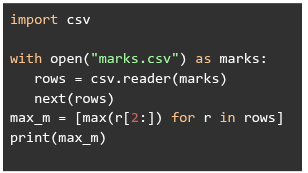
text
```python
import csv

with open("marks.csv") as marks:
    rows = csv.reader(marks)
    next(rows)
    max_m = [max(r[2:]) for r in rows]
    print(max_m)
```
text
```python
import csv

with open("marks.csv") as marks:
    rows = csv.reader(marks)
    max_m = [max(r) for r in rows]
    print(max_m)
```
text
```python
import csv

with open("marks.csv") as marks:
    rows = csv.reader(marks)
    next(rows)
    max_m = [max(r[2:]) for r in rows]
    print(max_m)
```
text
```python
import csv

with open("marks.csv") as marks:
    rows = csv.reader(marks)
    max_m = [max(r) for r in rows]
print(max_m)
```
Which of the following is the correct flask_login code snippet to register a user as logged in for the current session?
- login_user(user.id)
- login_user(user)
- login_user(user.name)
- login_user(user.name and user.password)
Consider the following HTML code snippet (without any CSS styling).
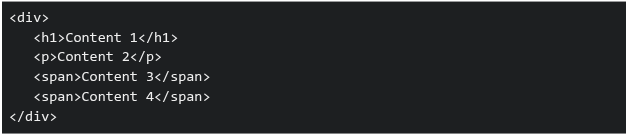 Which of the following statements correctly describes how the elements will be displayed by default in a browser?
Which of the following statements correctly describes how the elements will be displayed by default in a browser?Text of the picture (copyable)
```html
<div>
  <h1>Content 1</h1>
  <p>Content 2</p>
  <span>Content 3</span>
  <span>Content 4</span>
</div>
```
- The content of all elements will appear on the same line as they are inline elements.
- The content of
 ,
,  and
and  tags will start on new lines as they are block elements.
text
`<h1/>`
`<p>`
```html
<span>
```
- The content of and tags will start on new lines, others will display inline.
text
`<h1/>`
`<p>`
- The content of tags will start on new lines, others will display inline.
text
```html
<span>
```
What does the following curl command do?

Text of the picture (copyable)
```
curl -X POST -d "email=user@test.com&password=secret" https://auth/signin
```
- Sends a POST request to retrieve authentication data.
- Sends a POST request to send form data.
- Sends a POST request to send JSON data.
- Sends a POST request to retrieve user credentials.
Comprehension passage - the questions below it refer to this
Consider the following HTML and Python flask code.
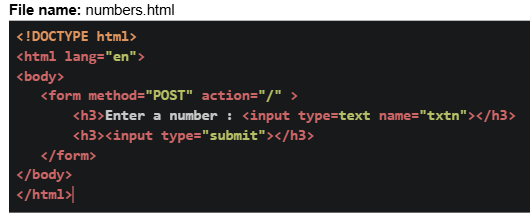 Based on the above data, answer the given subquestions.
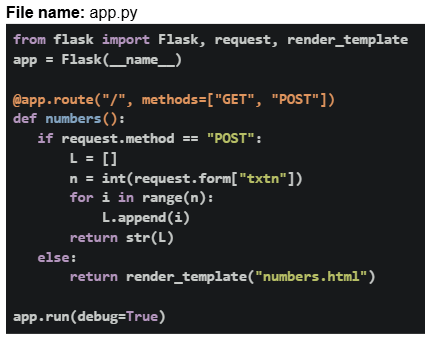
Which of the following statements are correct for the statements below? Statement 1: Accessing the URL: http://127.0.0.1:5000 directly in the browser makes a POST request. Statement 2: Clicking on the Submit button will invoke the GET request method.
- Both statements are correct.
- Both statements are incorrect.
- Statement 1 is incorrect, but statement 2 is correct.
- Statement 2 is incorrect, but statement 1 is correct.
What will be the rendered output for the following input in the form?

Text of the picture (copyable)
UI screenshot:
A web form with a label "Enter a number :", an input field containing "-5", and a "Submit" button.
- 404 Not Found
- [-1, -2, -3, -4, -5]
- [ ]
- None of these
Which of the following statements are true in the context of HTML forms?
 default type is “submit”.
text
```html
<button>
```
- “read-only” inputs are not submitted.
- “disabled” inputs are not submitted.
- “required” works on

text
```html
<input type='hidden'>
```
Which of the following statements are true about DOM?
- Changing the DOM value changes the HTML source file.
- JS can interact with DOM elements.
- DOM is created before the JS is executed.
- DOM is created after the JS is executed.
- HTML and DOM are identical.
Consider the following Flask RESTful API code.
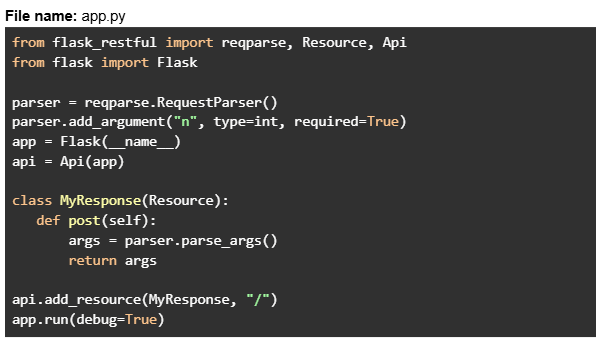 Assume that the Flask app is running at http://127.0.0.1:5000. The client sends the below CURL request in the git bash terminal.
 What will be the response?
Assume that the Flask app is running at http://127.0.0.1:5000. The client sends the below CURL request in the git bash terminal.
What will be the response?Text of the picture (copyable)
File name: app.py
```python
from flask_restful import reqparse, Resource, Api
from flask import Flask

parser = reqparse.RequestParser()
parser.add_argument("n", type=int, required=True)
app = Flask(__name__)
api = Api(app)

class MyResponse(Resource):
    def post(self):
        args = parser.parse_args()
        return args

api.add_resource(MyResponse, "/")
app.run(debug=True)
```
```
curl -X POST http://127.0.0.1:5000 -H "Content-Type: application/json" -d '{}'
```- {"n": None}
- Runtime error
- 400 Bad Request
- { }
Consider the code below in a file called 
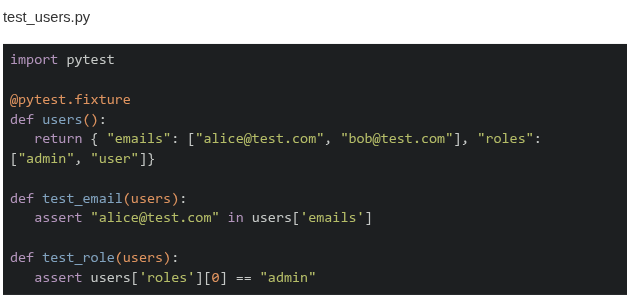 Which of these is the correct output when the command
  is run in the terminal?
Which of these is the correct output when the command is run in the terminal?Text of the picture (copyable)
```
test_users.py
```
test_users.py

```python
import pytest

@pytest.fixture
def users():
    return { "emails": ["alice@test.com", "bob@test.com"], "roles":
             ["admin", "user"]}

def test_email(users):
    assert "alice@test.com" in users['emails']

def test_role(users):
    assert users['roles'][0] == "admin"
```
```
"pytest -k email"
```- ====== 1 passed, 1 deselected in 0.02s =========
- ====== 1 passed, 2 deselected in 0.02s =========
- ====== 1 failed, 1 deselected in 0.02s =========
- ====== 1 failed, 2 deselected in 0.02s =========
Consider the following HTML templates and Python Flask code.
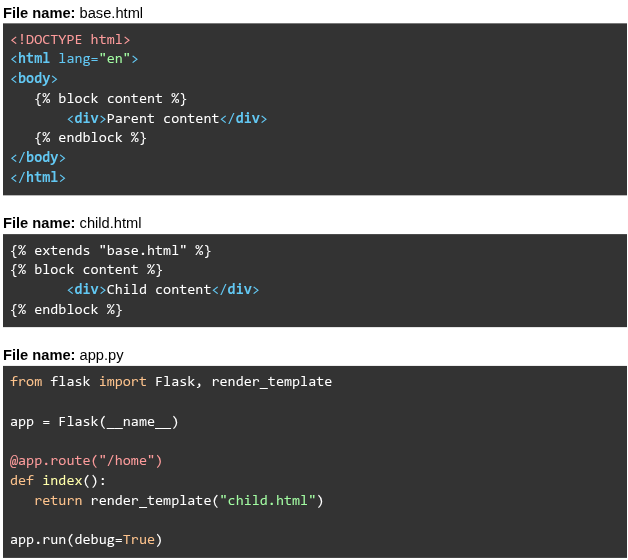 Assume that the Flask app is running at
  . What will be rendered for the URL request
  ?
?
Assume that the Flask app is running at . What will be rendered for the URL request ?Text of the picture (copyable)
File name: base.html
```html
<!DOCTYPE html>
<html lang="en">
<body>
    {% block content %}
    <div>Parent content</div>
    {% endblock %}
</body>
</html>
```

File name: child.html
```html
{% extends "base.html" %}
{% block content %}
    <div>Child content</div>
{% endblock %}
```

File name: app.py
```python
from flask import Flask, render_template

app = Flask(__name__)

@app.route("/home")
def index():
    return render_template("child.html")

app.run(debug=True)
```
http://127.0.0.1:5000
http://127.0.0.1:5000/home- Parent content Child content
- Parent content
- Child content
- Child content Parent content
Consider the following Flask SQLAlchemy models and RESTful API code.
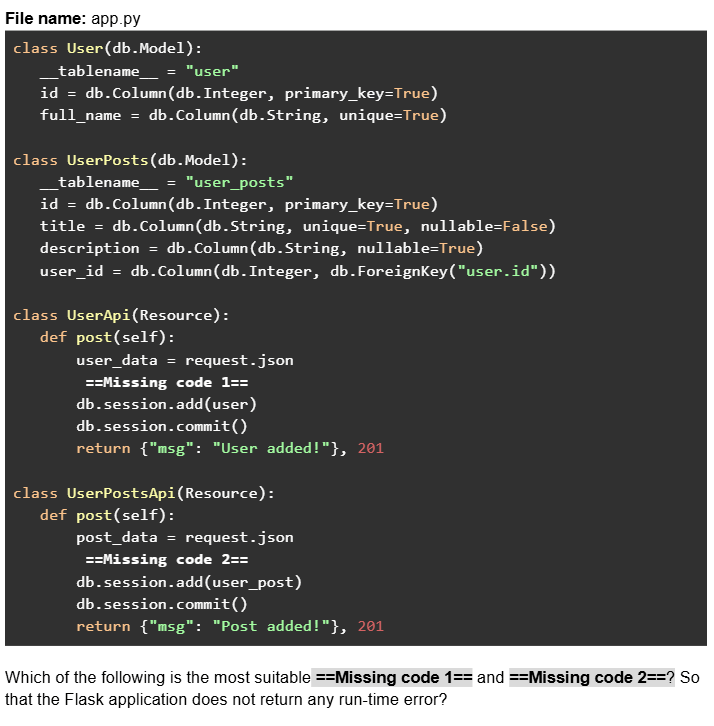
Text of the picture (copyable)
File name: app.py
```python
class User(db.Model):
    __tablename__ = "user"
    id = db.Column(db.Integer, primary_key=True)
    full_name = db.Column(db.String, unique=True)

class UserPosts(db.Model):
    __tablename__ = "user_posts"
    id = db.Column(db.Integer, primary_key=True)
    title = db.Column(db.String, unique=True, nullable=False)
    description = db.Column(db.String, nullable=True)
    user_id = db.Column(db.Integer, db.ForeignKey("user.id"))

class UserApi(Resource):
    def post(self):
        user_data = request.json
        ==Missing code 1==
        db.session.add(user)
        db.session.commit()
        return {"msg": "User added!"}, 201

class UserPostsApi(Resource):
    def post(self):
        post_data = request.json
        ==Missing code 2==
        db.session.add(user_post)
        db.session.commit()
        return {"msg": "Post added!"}, 201
```
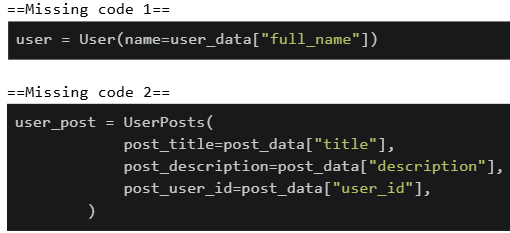
Which of the following is the most suitable ==Missing code 1== and ==Missing code 2==? So that the Flask application does not return any run-time error?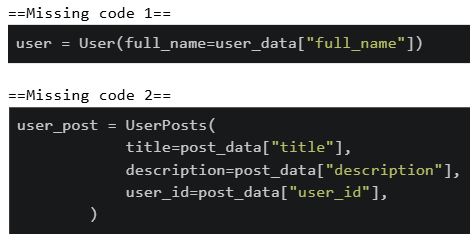
text
==Missing code 1==
```python
user = User(full_name=user_data["full_name"])
```

==Missing code 2==
```python
user_post = UserPosts(
    title=post_data["title"],
    description=post_data["description"],
    user_id=post_data["user_id"],
)
```
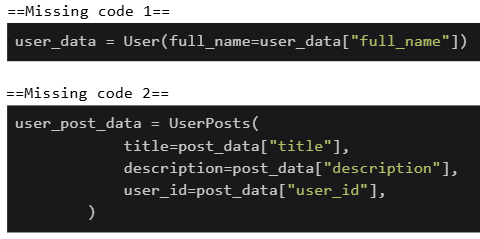
text
```python
==Missing code 1==
user = User(name=user_data["full_name"])

==Missing code 2==
user_post = UserPosts(
    post_title=post_data["title"],
    post_description=post_data["description"],
    post_user_id=post_data["user_id"],
)
```
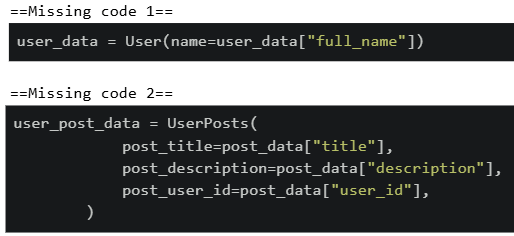
text
```python
==Missing code 1==
user_data = User(full_name=user_data["full_name"])

==Missing code 2==
user_post_data = UserPosts(
    title=post_data["title"],
    description=post_data["description"],
    user_id=post_data["user_id"],
)
```
text
```
==Missing code 1==
user_data = User(name=user_data["full_name"])

==Missing code 2==
user_post_data = UserPosts(
    post_title=post_data["title"],
    post_description=post_data["description"],
    post_user_id=post_data["user_id"],
)
```
Consider the following HTML/JavaScript code.
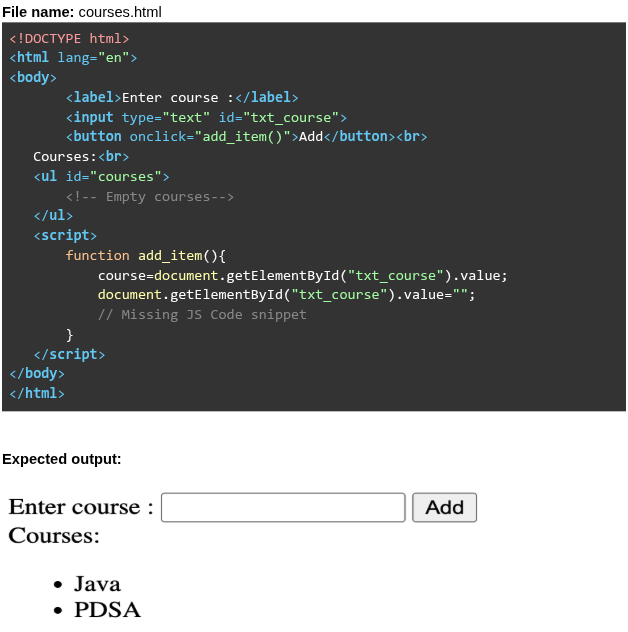 The above code allows courses to be added dynamically to the
  element when the user clicks the “Add” Button. What is the most suitable
  given below?
The above code allows courses to be added dynamically to the element when the user clicks the “Add” Button. What is the most suitable given below?Text of the picture (copyable)
File name: courses.html

```html
<!DOCTYPE html>
<html lang="en">
<body>
    <label>Enter course :</label>
    <input type="text" id="txt_course">
    <button onclick="add_item()">Add</button><br>
    Courses:<br>
    <ul id="courses">
        <!-- Empty courses-->
    </ul>
    <script>
        function add_item(){
            course=document.getElementById("txt_course").value;
            document.getElementById("txt_course").value="";
            // Missing JS Code snippet
        }
    </script>
</body>
</html>
```

Expected output:

Enter course : [text input field] [Add button]
Courses:
* Java
* PDSA
```html
<ul>
```
```javascript
//Missing JS Code snippet
```
text
```javascript
courses=document.getElementById("txt_course");
courses.innerHTML=courses.innerHTML+"<li>"+course+"</li>";
```
text
```javascript
courses=document.getElementById("courses");
courses.innerHTML=courses.innerHTML+"<li>"+course+"</li>";
```
text
```javascript
courses.innerHTML=courses.innerHTML + "<li>"+course+"</li>";
```

text
```javascript
courses.innerHTML = "<li>"+course+"</li>";
```
Consider the following flask application "app.py" given below.
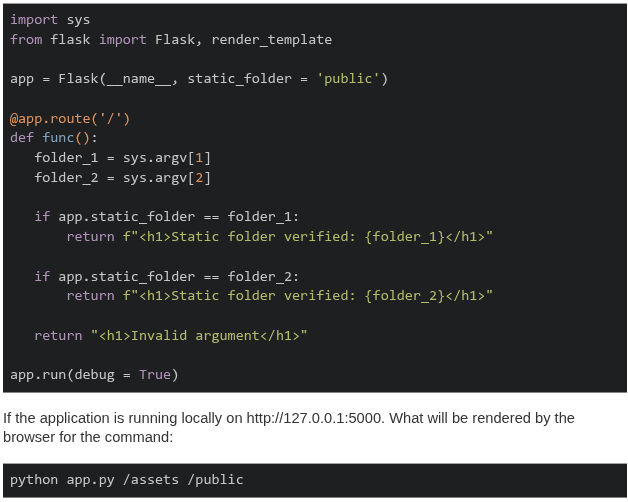
Text of the picture (copyable)
```python
import sys
from flask import Flask, render_template

app = Flask(__name__, static_folder = 'public')

@app.route('/')
def func():
    folder_1 = sys.argv[1]
    folder_2 = sys.argv[2]

    if app.static_folder == folder_1:
        return f"<h1>Static folder verified: {folder_1}</h1>"

    if app.static_folder == folder_2:
        return f"<h1>Static folder verified: {folder_2}</h1>"

    return "<h1>Invalid argument</h1>"

app.run(debug = True)
```

If the application is running locally on http://127.0.0.1:5000. What will be rendered by the browser for the command:

```
python app.py /assets /public
```- Static folder verified: /assets
- Static folder verified: /public
- Invalid argument
- None of these
Examine the following Python code snippet.
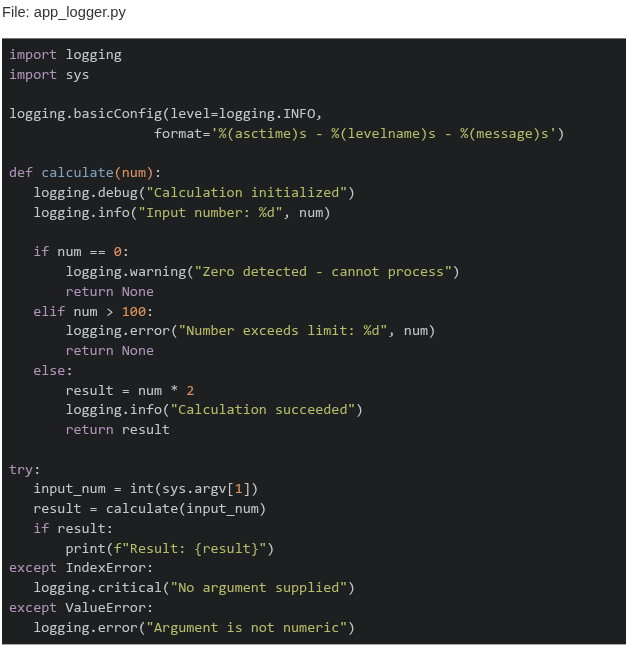 What will be the output when running the command:
  ?
?
What will be the output when running the command: ?Text of the picture (copyable)
File: app_logger.py

```python
import logging
import sys

logging.basicConfig(level=logging.INFO,
                    format='%(asctime)s - %(levelname)s - %(message)s')


def calculate(num):
    logging.debug("Calculation initialized")
    logging.info("Input number: %d", num)

    if num == 0:
        logging.warning("Zero detected - cannot process")
        return None
    elif num > 100:
        logging.error("Number exceeds limit: %d", num)
        return None
    else:
        result = num * 2
        logging.info("Calculation succeeded")
        return result


try:
    input_num = int(sys.argv[1])
    result = calculate(input_num)
    if result:
        print(f"Result: {result}")
except IndexError:
    logging.critical("No argument supplied")
except ValueError:
    logging.error("Argument is not numeric")
```
```
python app_logger.py 150
```
text
```
2024-07-29 10:20:15,234 - DEBUG - Calculation initialized
2024-07-29 10:20:15,235 - INFO - Input number: 150
2024-07-29 10:20:15,236 - ERROR - Number exceeds limit: 150
```

text
```
2024-07-29 10:20:15,235 - INFO - Input number: 150
2024-07-29 10:20:15,236 - ERROR - Number exceeds limit: 150
```

text
```
2024-07-29 10:20:15,235 - WARNING - Zero detected - cannot process
2024-07-29 10:20:15,236 - ERROR - Number exceeds limit: 150
```

text
```
2024-07-29 10:20:15,235 - INFO - Input number: 150
2024-07-29 10:20:15,236 - DEBUG - Calculation succeeded
```
A magnetic disk can spin only in one direction with a constant speed of 5000rpm. What is the maximum delay(worst-case latency) before data transfer starts (in milliseconds)?
Consider the following flask app. Given that  allows code to be tested without a server, which of the following statements is correct?
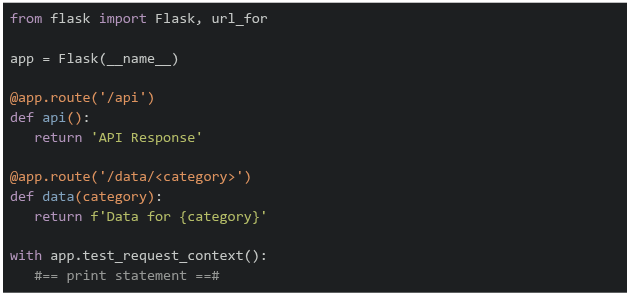
allows code to be tested without a server, which of the following statements is correct?
Text of the picture (copyable)
```
test_request_context()
```
```python
from flask import Flask, url_for

app = Flask(__name__)

@app.route('/api')
def api():
    return 'API Response'

@app.route('/data/<category>')
def data(category):
    return f'Data for {category}'

with app.test_request_context():
    #== print statement ==#
```- If
 is replaced by
  , the output on the terminal will be
text
```python #=== print statement ===# ``` ```python print(url_for('data', category='sales')) ``` ``` /data?category=sales ``` - If is replaced by
 , the output on the terminal will be
text
```python #=== print statement ===# ``` ```python print(url_for('data', category='sales', format='json')) ``` ``` /data/sales/json ``` - If is replaced by
 , the output on the terminal will be
text
```python #=== print statement ===# ``` ```python print(url_for('api', category='sales')) ``` ``` /api?category=sales ``` - If is replaced by
 , the output on the terminal will be
text
```python
#=== print statement ===#
```
```python
print(url_for('api'))
```
/api
Answer key
- Q1 (MCQ, 2 marks): A
- Q2 (MCQ, 2 marks): A
- Q3 (MCQ, 2 marks): D
- Q4 (MCQ, 2 marks): D
- Q5 (MCQ, 2 marks): B
- Q6 (MSQ, 3 marks): A, B, E
- Q7 (MSQ, 3 marks): A, C
- Q8 (MSQ, 3 marks): A, C, E
- Q9 (MSQ, 3 marks): A, B, C
- Q10 (MCQ, 3 marks): B
- Q11 (MCQ, 3 marks): B
- Q12 (MCQ, 3 marks): B
- Q13 (MCQ, 3 marks): C
- Q14 (MCQ, 3 marks): A
- Q15 (MCQ, 3 marks): D
- Q16 (MCQ, 3 marks): C
- Q17 (MCQ, 3 marks): B
- Q18 (MCQ, 3 marks): C
- Q19 (MCQ, 3 marks): B
- Q20 (MCQ, 3 marks): B
- Q21 (MCQ, 3 marks): C
- Q22 (MSQ, 2 marks): A, C
- Q23 (MSQ, 2 marks): B, C
- Q24 (MCQ, 4 marks): C
- Q25 (MCQ, 4 marks): A
- Q26 (MCQ, 4 marks): C
- Q27 (MCQ, 5 marks): A
- Q28 (MCQ, 5 marks): B
- Q29 (MCQ, 5 marks): C
- Q30 (MCQ, 5 marks): B
- Q31 (SA, 2 marks): 12
- Q32 (MSQ, 4 marks): C, D