Home / MAD2 / Week 8 / Real questions
MAD2 week 8 - real exam questions
60 questions pulled from past papers whose wording matches this week's topics, newest first, duplicates removed. Pick your answers, then press Check answers. Figures and answer keys are the originals.
Elapsed 00:00
A JWT token contains three parts:  . Which of the following best explains the relationship between the header and the signature in JWT authentication?
. Which of the following best explains the relationship between the header and the signature in JWT authentication?Text of the picture (copyable)
```
header.payload.signature
```
- The header stores the encrypted password used to generate the signature.
- The signature only protects the payload section; changes to the header do not affect token validation.
- The signature is generated using the encoded header, encoded payload, and a secret key. If the header is modified, the signature verification fails.
- The header contains the final signature hash generated after token creation.
A team builds an internal warehouse dashboard where multiple managers, each on a different computer, need to receive live low-stock alerts from the server in real time. They decide to use Flask-SSE with Redis. Which of the following best explains Redis's role in a Flask-SSE setup?
- Redis is used by Flask-SSE to authenticate connected users before events can be streamed to the browser.
- Redis is optional in Flask-SSE and is only recommended when the application has a very large number of concurrent users.
- Redis is only needed when SSE events must be stored permanently and replayed after reconnection.
- Flask-SSE uses Redis as a shared event channel so published messages can be delivered to connected clients.
What is logged to the console after running the following code?
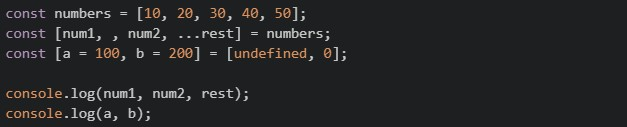
Text of the picture (copyable)
```javascript
const numbers = [10, 20, 30, 40, 50];
const [num1, , num2, ...rest] = numbers;
const [a = 100, b = 200] = [undefined, 0];

console.log(num1, num2, rest);
console.log(a, b);
```
- 10 30 [30, 40, 50] and 100 0
- 10 30 [40, 50] and 100 200
- 10 20 [30, 40, 50] and undefined 0
- 10 30 [40, 50] and 100 0
Consider the following Flask JWT code:
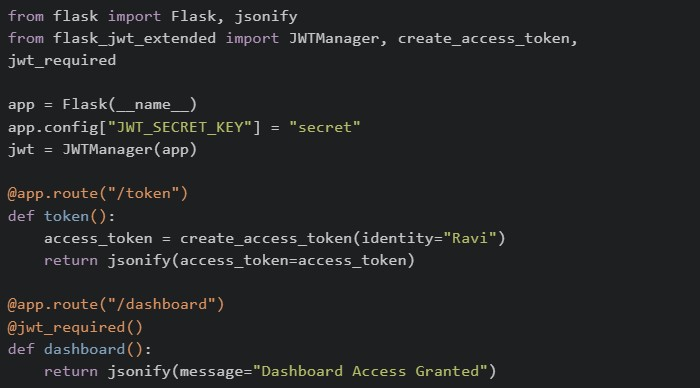 A client first accesses
  and then tries to access
  . Which of the following statements are correct?
A client first accesses and then tries to access . Which of the following statements are correct?Text of the picture (copyable)
```python
from flask import Flask, jsonify
from flask_jwt_extended import JWTManager, create_access_token, \
    jwt_required

app = Flask(__name__)
app.config["JWT_SECRET_KEY"] = "secret"
jwt = JWTManager(app)

@app.route("/token")
def token():
    access_token = create_access_token(identity="Ravi")
    return jsonify(access_token=access_token)

@app.route("/dashboard")
@jwt_required()
def dashboard():
    return jsonify(message="Dashboard Access Granted")
```
/token
/dashboard- can only be accessed if a valid JWT token is sent with the request.
text
/dashboard
- If the JWT token is missing or invalid, Flask-JWT-Extended returns an unauthorized error.
- The JWT token is typically sent in the
 header while accessing protected routes.
text
Authorization
- The token generated by is automatically stored by Flask and reused for future requests.
text
/token
Consider the following code using flask_jwt_extended:
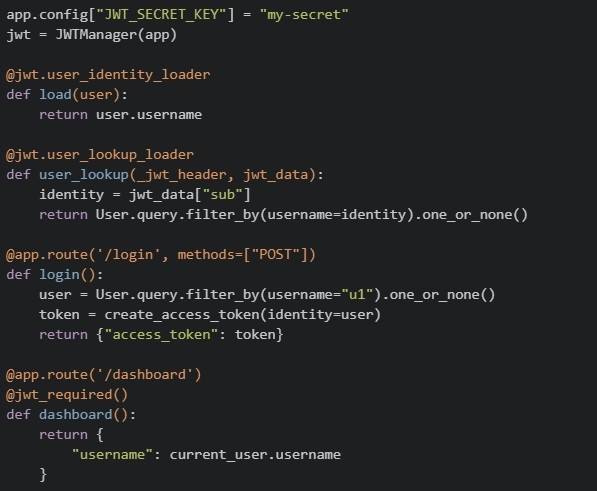 Which of the following statements are correct? (Select all that apply)
Which of the following statements are correct? (Select all that apply)Text of the picture (copyable)
```python
app.config["JWT_SECRET_KEY"] = "my-secret"
jwt = JWTManager(app)

@jwt.user_identity_loader
def load(user):
    return user.username

@jwt.user_lookup_loader
def user_lookup(_jwt_header, jwt_data):
    identity = jwt_data["sub"]
    return User.query.filter_by(username=identity).one_or_none()

@app.route('/login', methods=["POST"])
def login():
    user = User.query.filter_by(username="u1").one_or_none()
    token = create_access_token(identity=user)
    return {"access_token": token}

@app.route('/dashboard')
@jwt_required()
def dashboard():
    return {
        "username": current_user.username
    }
```- The
 decorator ensures that only requests with a valid JWT can access .
text
```
@jwt_required()
```
/dashboard
- The
 determines what value is stored in the "sub" field of the JWT.
text
```
user_identity_loader
```
- If
 is removed,
  will not be automatically populated.
text
```
user_lookup_loader
```
current_user
- The
 directly stores the entire user object inside the JWT.
text
```python
create_access_token(identity=user)
```
- If no JWT is sent in the request, will still execute but will be None.
text
/dashboard
current_user
- The object is reconstructed using the identity extracted from the JWT.
text
current_user
A developer runs the following code in Tab 1 of a browser, then opens the same website in a new Tab 2 (not a duplicate, but a fresh tab typed into the address bar).
 Which of the following statements correctly describes what happens in Tab 2?
Which of the following statements correctly describes what happens in Tab 2?Text of the picture (copyable)
```javascript
// Executed in Tab 1
localStorage.setItem("theme", "dark");
sessionStorage.setItem("cart", "3-items");
```- Both
 and
and  return their respective values.
text
```javascript localStorage.getItem("theme") ``` ```javascript sessionStorage.getItem("cart") ``` - returns "dark", but returns null.
text
```javascript localStorage.getItem("theme") ``` ```javascript sessionStorage.getItem("cart") ``` - Both return null
- returns "3-items", but returns null.
text
```javascript
sessionStorage.getItem("cart")
```
```javascript
localStorage.getItem("theme")
```
A Vue frontend, a mobile app, and another backend service all call the same Flask API deployed on multiple servers. The team chooses JWT authentication. Which of the following statements are correct?
- Each request can carry the token, so any server can validate it without storing a per-user session in memory.
- JWT is API-friendly because clients can send it using the
 header.
text
```
Authorization: Bearer <token>
```
- In Flask-JWT-Extended,
 can read the identity stored in the token.
text
```
get_jwt_identity()
```
- Session-based authentication is usually easier to scale across multiple servers because no shared storage is needed. The team should have chosen this.
What is the main advantage of using JWT over session-based authentication?
- JWTs require server-side storage for each session.
- JWTs are stateless and eliminate the need for server-side session storage.
- JWTs are longer and contain more data than session IDs.
- JWTs automatically handle token expiration without additional logic.
A JWT (JSON Web Token) is represented in the format:  .In authentication using Flask-JWT-Extended, what does the payload part of the JWT stores?
.In authentication using Flask-JWT-Extended, what does the payload part of the JWT stores?Text of the picture (copyable)
```
"header.payload.signature"
```
- Encryption keys used to secure the token
- User-related data (claims) such as identity and expiration time
- The algorithm used for signing the token
- The hashed signature of the token
Consider the following JavaScript program:
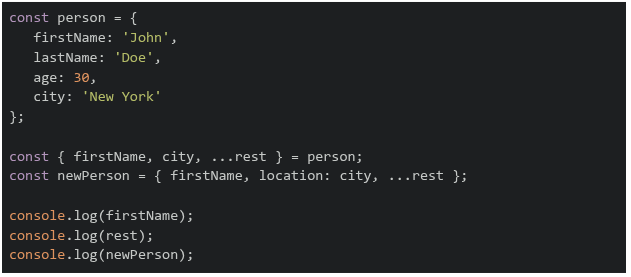 What will be the output of the above program?
What will be the output of the above program?Text of the picture (copyable)
```javascript
const person = {
  firstName: 'John',
  lastName: 'Doe',
  age: 30,
  city: 'New York'
};

const { firstName, city, ...rest } = person;
const newPerson = { firstName, location: city, ...rest };

console.log(firstName);
console.log(rest);
console.log(newPerson);
```
text
```
John
{ city: 'New York', lastName: 'Doe', age: 30 }
{ firstName: 'John', location: 'New York', city: 'New York', lastName:
'Doe', age: 30 }
```
text
```
John
{ 'lastName': 'Doe', 'age': 30 }
{ 'firstName': 'John', 'location': 'New York', 'lastName': 'Doe', 'age': 30 }
```
text
```
John
{ 'lastName': 'Doe', 'age': 30 }
{ 'firstName': 'John', 'location': 'New York', 'city': 'New York', 'lastName':
'Doe', 'age': 30 }
```
text
```
undefined
{ firstName: 'John', city: 'New York', lastName: 'Doe', age: 30 }
{ firstName: 'John', location: 'New York' }
```
Which of the following is the correct statement?
- Cookie size can impact the website performance.
- Cookie size does not affect performance in any practical/meaningful sense.
- A request to static.example.com will include cookies set for example.com.
- A request to static.example.com will not include cookies set for example.com.
Consider the following endpoints created with a working setup of flask-security and flask-sqlalchemy.
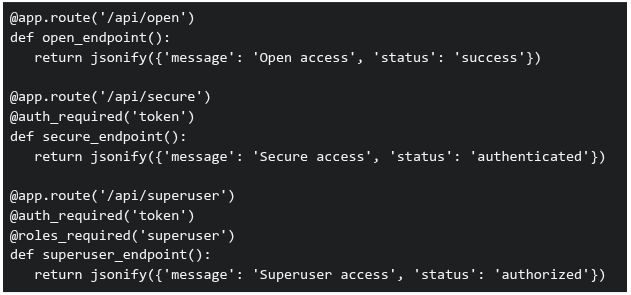 Three requests are made to this application: GET /api/open (no authentication headers)1. GET /api/secure (no authentication headers)2. GET /api/superuser with valid authentication token but user has role 'basic' (not 'superuser')3. What will be the response status codes for these requests, respectively?
Three requests are made to this application: GET /api/open (no authentication headers)1. GET /api/secure (no authentication headers)2. GET /api/superuser with valid authentication token but user has role 'basic' (not 'superuser')3. What will be the response status codes for these requests, respectively?Text of the picture (copyable)
```python
@app.route('/api/open')
def open_endpoint():
    return jsonify({'message': 'Open access', 'status': 'success'})

@app.route('/api/secure')
@auth_required('token')
def secure_endpoint():
    return jsonify({'message': 'Secure access', 'status': 'authenticated'})

@app.route('/api/superuser')
@auth_required('token')
@roles_required('superuser')
def superuser_endpoint():
    return jsonify({'message': 'Superuser access', 'status': 'authorized'})
```- 200, 200, 200
- 200, 401, 403
- 200, 403, 401
- 401, 403, 403
Consider the following code:
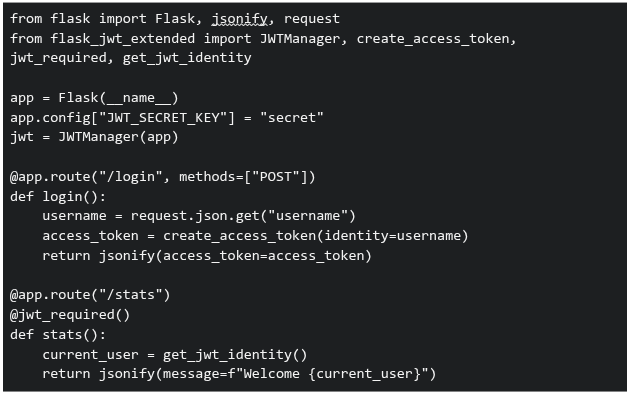 You are developing an analytics platform using Flask and Flask-JWT-Extended. A user sends a POST request to
  with:
with:  . Then tries to access
  . Which of the following statements are correct?
You are developing an analytics platform using Flask and Flask-JWT-Extended. A user sends a POST request to with: . Then tries to access . Which of the following statements are correct?Text of the picture (copyable)
```python
from flask import Flask, jsonify, request
from flask_jwt_extended import JWTManager, create_access_token, \
    jwt_required, get_jwt_identity

app = Flask(__name__)
app.config["JWT_SECRET_KEY"] = "secret"
jwt = JWTManager(app)

@app.route("/login", methods=["POST"])
def login():
    username = request.json.get("username")
    access_token = create_access_token(identity=username)
    return jsonify(access_token=access_token)

@app.route("/stats")
@jwt_required()
def stats():
    current_user = get_jwt_identity()
    return jsonify(message=f"Welcome {current_user}")
```
/login
```json
{ "username": "Jassi" }
```
/stats- The route will return "Welcome Jassi" only if a valid JWT token is sent in the Authorization header
text
/stats
- If no token is sent, accessing will result in an unauthorized error
text
/stats
- The JWT token must be sent as JSON in the request body to access
text
/stats
- None of these
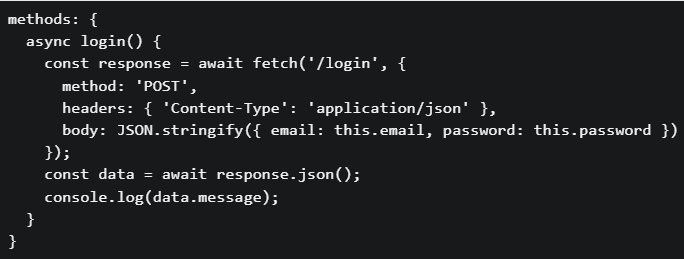
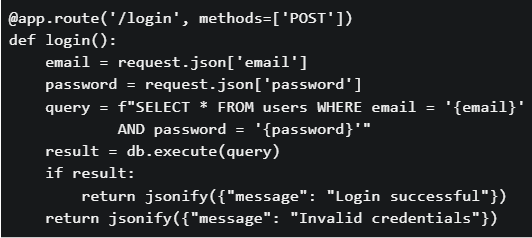
You are building a login feature for a web application. The frontend sends the user’s email and password to the backend API. The backend validates credentials against a database. Which security issues exist in the code given below? Frontend: script.js
 Backend: app.py
Backend: app.py
Text of the picture (copyable)
```javascript
methods: {
  async login() {
    const response = await fetch('/login', {
      method: 'POST',
      headers: { 'Content-Type': 'application/json' },
      body: JSON.stringify({ email: this.email, password: this.password })
    });
    const data = await response.json();
    console.log(data.message);
  }
}
```
```python
@app.route('/login', methods=['POST'])
def login():
    email = request.json['email']
    password = request.json['password']
    query = f"SELECT * FROM users WHERE email = '{email}'" \
            f" AND password = '{password}'"
    result = db.execute(query)
    if result:
        return jsonify({"message": "Login successful"})
    return jsonify({"message": "Invalid credentials"})
```- The SQL query is vulnerable to SQL injection attacks
- Passwords are stored and compared in plain text
- No authentication token (session/JWT) mechanism is implemented
- All of these.
Match the following web dev concept given below:
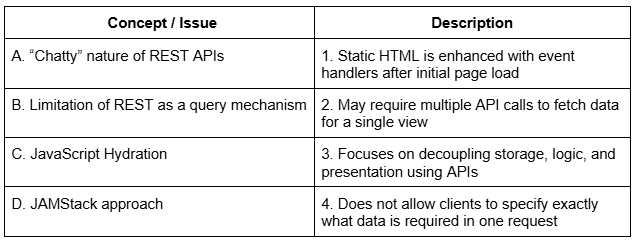 Which of the following options correctly matches Concept / Issue and Description?
Which of the following options correctly matches Concept / Issue and Description?Text of the picture (copyable)
| Concept / Issue | Description |
|---|---|
| A. "Chatty" nature of REST APIs | 1. Static HTML is enhanced with event handlers after initial page load |
| B. Limitation of REST as a query mechanism | 2. May require multiple API calls to fetch data for a single view |
| C. JavaScript Hydration | 3. Focuses on decoupling storage, logic, and presentation using APIs |
| D. JAMStack approach | 4. Does not allow clients to specify exactly what data is required in one request |
- A→2, B→4, C→1, D→3
- A→1, B→2, C→3, D→4
- A→2, B→1, C→4, D→3
- A→4, B→2, C→1, D→3
Which of the following statements best describes a permalink?
- A temporary URL generated for a single browsing session
- A stable URL that uniquely identifies a specific resource and is not expected to change
- A human-readable URL used only for navigation menus
- A URL that depends on the user’s login session or device
Consider a scenario involving localStorage, Promise chains, and Vue lifecycle hooks: Scenario: A user authentication system where: On app initialization, the app checks localStorage for a stored user token• If a token exists, it validates the token asynchronously (via a Promise)• Based on validation, different UI components are rendered• The user navigates between different views• Code in mounted() hook:
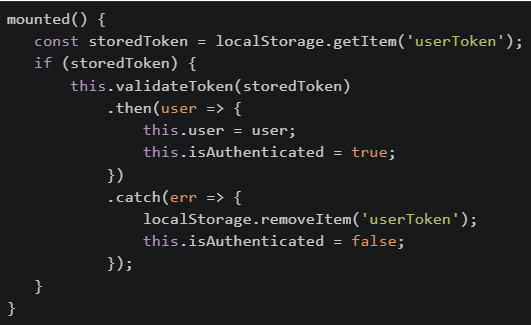 Which of the following statements is/are CORRECT about this implementation?
Which of the following statements is/are CORRECT about this implementation?Text of the picture (copyable)
```javascript
mounted() {
  const storedToken = localStorage.getItem('userToken');
  if (storedToken) {
    this.validateToken(storedToken)
      .then(user => {
        this.user = user;
        this.isAuthenticated = true;
      })
      .catch(err => {
        localStorage.removeItem('userToken');
        this.isAuthenticated = false;
      });
  }
}
```- If the page is refreshed while the Promise is pending, the token will be lost because localStorage is cleared on refresh
- If token validation fails, the token is removed from storage, preventing automatic login on future page loads
- The isAuthenticated flag might be false even though a storedToken exists, until the Promise validation completes
- sessionStorage should be used instead of localStorage because user tokens should not persist across browser sessions
- If the user navigates to a different route while validation is pending, the Promise will still complete and update the user data
Match the following storage mechanisms used in the browser with their correct characteristics.
 Which of the following is the correct matching?
Which of the following is the correct matching?Text of the picture (copyable)
| Storage Type      | Characteristic                                                                    |
| :---------------- | :-------------------------------------------------------------------------------- |
| 1. Session Storage | A. Data automatically encrypts itself without developer intervention.             |
| 2. Token Storage   | B. Data persists only until the browser/tab is closed.                            |
| 3. Cookie Storage  | C. Often used to store authentication tokens securely on the client side.         |
|                   | D. Data persists across sessions, typically stored on the client and sent with every HTTP request. |
- 1 → B, 2 → C, 3 → A
- 1 → B, 2 → A, 3 → C
- 1 → A, 2 → C, 3 → B
- 1 → B, 2 → C, 3 → D
Which of the following best describes UI State (Ephemeral State) in frontend applications?
- It includes all data stored permanently in the database and is shared across users
- It represents the complete system data such as users, products, and transactions
- It refers to short-lived interface elements like loading indicators or selected tabs
- It handles complex application logic and long-term session management
Given that HTTP is stateless, which approach is commonly used to manage application state between the client and the server?
- Storing all state permanently in frontend memory across sessions
- Allowing the frontend to handle complex business logic and data storage
- Client or server maintaining state and explicitly exchanging it through requests
- Eliminating state entirely from web applications
Which of the following is considered a good practice for securing user authentication in a web application?
- Storing passwords as plain text in the database for quick lookup
- Using hashing algorithms like "bcrypt" or "Argon2" to store passwords securely
- Including user passwords directly in SQL queries for verification
- All of these
In the following code snippet, which values should replace option1 and option2 so that the cookie is sent only over HTTPS and is restricted from cross-site requests?

Text of the picture (copyable)
```python
response.set_cookie('session_id', 'abc123', secure=option1,
samesite=option2)
```- secure=True and samesite='Strict'
- secure=False and samesite='Strict'
- secure=True and samesite='None'
- secure=False and samesite='Lax'
When comparing Redis with a typical API data store (like a relational database accessed through REST APIs), which of the following statements is true?
- Redis can only store strings, unlike API data stores which can handle complex structures.
- Redis is an in-memory data structure store, often used as a cache or message broker to complement API-based data stores.
- Redis is a relational database and queries data using SQL, just like an API data store.
- Redis is slower than API-based databases because it stores everything in memory.
How can you stop a Cross-Site Scripting (XSS) attack?
- Backend validation of user input and make sure any user-provided text is not executed as code.
- Store authentication token or jwt in cookies.
- Use v-html to show user generated data.
- Send cookies with every request to the backend.
What happens to the fetch call when it gets a 404 status code (page not found)?

text
Promise rejects automatically

text
Promise resolves and `response.ok = true`

text
Promise resolves and `response.ok = false`

text
Promise stays as pending
Consider the following JavaScript code snippet where a web application manages user preferences using localStorage. A user opens the application, sets their theme preference to "dark", refreshes the page once, closes the browser tab, and opens a new tab to reload the page. What will be the behavior of the theme preference?
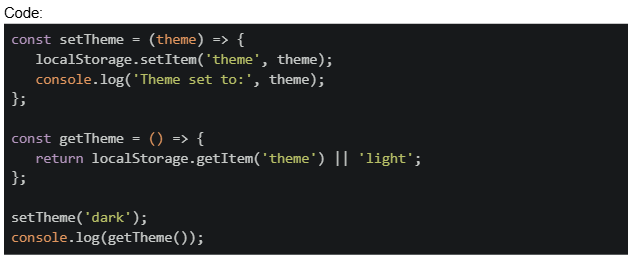
Text of the picture (copyable)
Code:
```javascript
const setTheme = (theme) => {
  localStorage.setItem('theme', theme);
  console.log('Theme set to:', theme);
};

const getTheme = () => {
  return localStorage.getItem('theme') || 'light';
};

setTheme('dark');
console.log(getTheme());
```- The theme will be lost because closing the browser tab clears localStorage
- The theme will be preserved as "dark" because localStorage persists across browser sessions
- The theme will be undefined because localStorage is cleared on refresh
- The theme will be reset to "light" when a new tab is opened
A developer uses sessionStorage to store authentication tokens in a web application. The user logs in, the token is stored, and then they close the browser window completely. When they reopen the browser later, what will happen? Code:
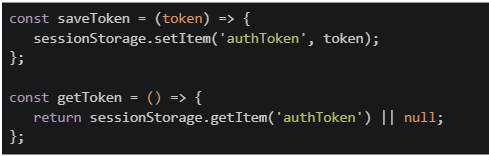
Text of the picture (copyable)
```javascript
const saveToken = (token) => {
  sessionStorage.setItem('authToken', token);
};

const getToken = () => {
  return sessionStorage.getItem('authToken') || null;
};
```- The token will be preserved and available in the new browser session.
- The token will be cleared because sessionStorage is cleared when the browser is closed.
- The token will be partially available but require re-authentication.
- The token will move to localStorage automatically.
In Flask, what is the main benefit of using the @cache.cached() decorator?
- It stores output in session storage
- It enables token authentication
- It sends compressed response headers
- It skips route execution for repeated inputs
What is the primary purpose of CORS (Cross-Origin Resource Sharing)?
- To encrypt data between client and server
- To compress HTTP responses
- To authenticate users across applications
- To control which domains can access resources
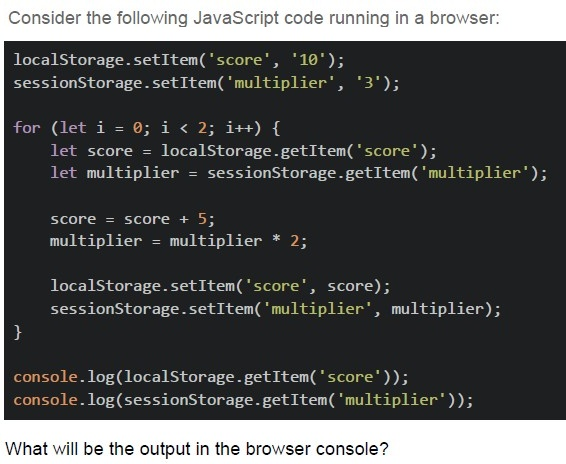
Text of the picture (copyable)
Consider the following JavaScript code running in a browser:

```javascript
localStorage.setItem('score', '10');
sessionStorage.setItem('multiplier', '3');

for (let i = 0; i < 2; i++) {
    let score = localStorage.getItem('score');
    let multiplier = sessionStorage.getItem('multiplier');

    score = score + 5;
    multiplier = multiplier * 2;

    localStorage.setItem('score', score);
    sessionStorage.setItem('multiplier', multiplier);
}

console.log(localStorage.getItem('score'));
console.log(sessionStorage.getItem('multiplier'));
```

What will be the output in the browser console?
text
20
12

text
20
NaN

text
NaN
12

text
None of these
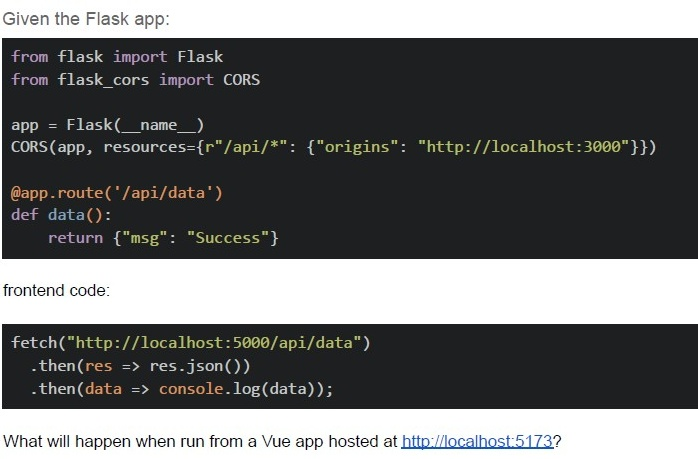
Text of the picture (copyable)
Given the Flask app:

```python
from flask import Flask
from flask_cors import CORS

app = Flask(__name__)
CORS(app, resources={r"/api/*": {"origins": "http://localhost:3000"}})

@app.route('/api/data')
def data():
    return {"msg": "Success"}
```

frontend code:

```javascript
fetch("http://localhost:5000/api/data")
    .then(res => res.json())
    .then(data => console.log(data));
```

What will happen when run from a Vue app hosted at http://localhost:5173?- Request succeeds
- CORS error occurs
- 404 error
- The server crashes
Which of the following statement(s) about Web Storage APIs is/are correct?

text
The `localStorage` object stores data with no expiration date, even after the browser is closed.

text
The `sessionStorage` object keeps data only for the duration of the page session.

text
Both `localStorage` and `sessionStorage` can store data in key-value pair format.

text
Data stored in `sessionStorage` is available across different browser tabs.
Which of the following options is the correct sequence of steps in JWT authentication?
- Client sends credentials, server validates and responds with JWT, client storesJWT, client sends JWT with each request.
- Client sends credentials, server validates and stores session ID, client sendssession ID with each request.
- Client sends JWT, server validates and issues a new JWT for each request.
- Client sends JWT, server decrypts JWT and checks credentials again.
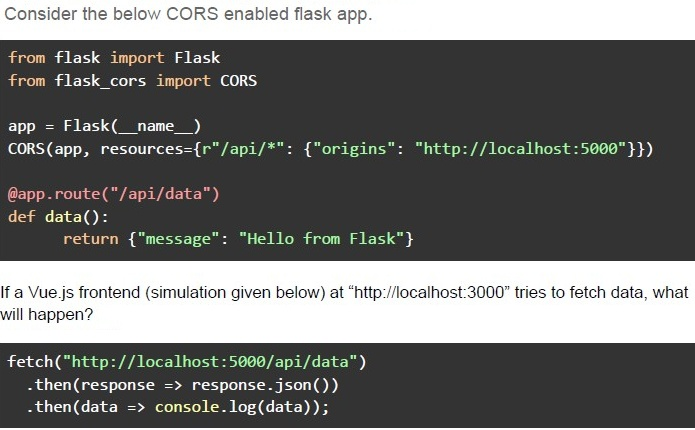
Text of the picture (copyable)
Consider the below CORS enabled flask app.

```python
from flask import Flask
from flask_cors import CORS

app = Flask(__name__)
CORS(app, resources={r"/api/*": {"origins": "http://localhost:5000"}})

@app.route("/api/data")
def data():
    return {"message": "Hello from Flask"}
```

If a Vue.js frontend (simulation given below) at "http://localhost:3000" tries to fetch data, what will happen?

```javascript
fetch("http://localhost:5000/api/data")
    .then(response => response.json())
    .then(data => console.log(data));
```- The request will be blocked due to CORS policy.
- The request will succeed and return { "message": "Hello from Flask" }.
- The request will fail because Vue.js does not support CORS.
- The server will crash due to incorrect CORS settings.
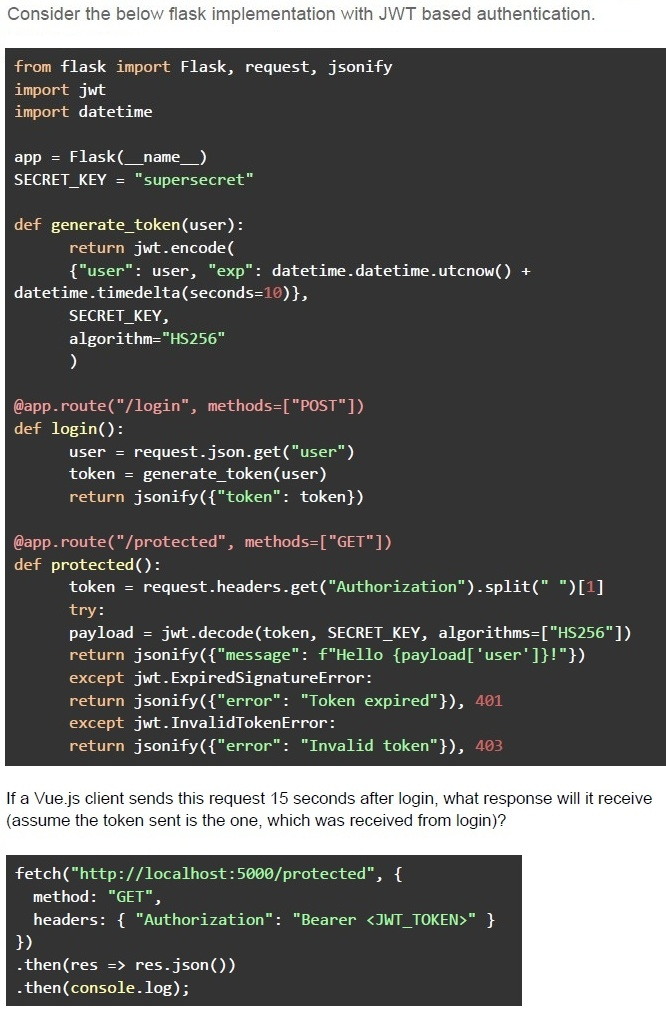
Text of the picture (copyable)
Consider the below flask implementation with JWT based authentication.

```python
from flask import Flask, request, jsonify
import jwt
import datetime

app = Flask(__name__)
SECRET_KEY = "supersecret"

def generate_token(user):
    return jwt.encode(
        {"user": user, "exp": datetime.datetime.utcnow() +
         datetime.timedelta(seconds=10)},
        SECRET_KEY,
        algorithm="HS256"
    )

@app.route("/login", methods=["POST"])
def login():
    user = request.json.get("user")
    token = generate_token(user)
    return jsonify({"token": token})

@app.route("/protected", methods=["GET"])
def protected():
    token = request.headers.get("Authorization").split(" ")[1]
    try:
        payload = jwt.decode(token, SECRET_KEY, algorithms=["HS256"])
        return jsonify({"message": f"Hello {payload['user']}!"})
    except jwt.ExpiredSignatureError:
        return jsonify({"error": "Token expired"}), 401
    except jwt.InvalidTokenError:
        return jsonify({"error": "Invalid token"}), 403
```

If a Vue.js client sends this request 15 seconds after login, what response will it receive
(assume the token sent is the one, which was received from login)?

```javascript
fetch("http://localhost:5000/protected", {
    method: "GET",
    headers: { "Authorization": "Bearer <JWT_TOKEN>" }
})
.then(res => res.json())
.then(console.log);
```
text
```json
{ "message": "Hello user!" }
```
text
```json
{ "error": "Token expired" }
```
text
```json
{
  "error": "Invalid token"
}
```
text
```json
{
  "message": "Access granted"
}
```
Which of the following are advantages of using GraphQL over REST?
- It allows clients to fetch only the required fields, reducing over-fetching.
- It replaces the need for authentication mechanisms.
- It improves database performance automatically.
- It enforces a strict API response format.
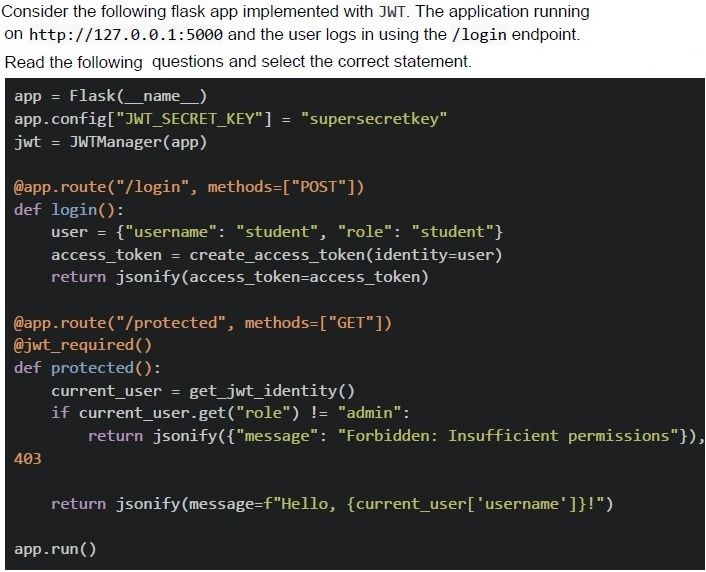
Comprehension passage for this question
Based on the above data, answer the given subquestions.
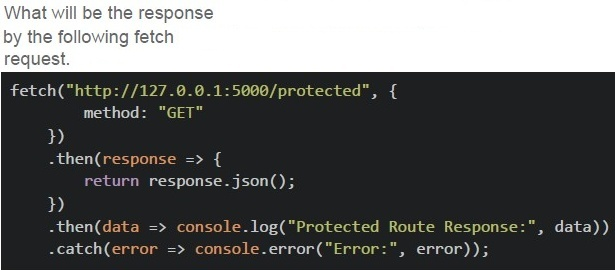
Text of the picture (copyable)
What will be the response
by the following fetch
request.

```javascript
fetch("http://127.0.0.1:5000/protected", {
    method: "GET"
})
.then(response => {
    return response.json();
})
.then(data => console.log("Protected Route Response:", data))
.catch(error => console.error("Error:", error));
```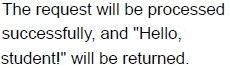
text
The request will be processed
successfully, and "Hello,
student!" will be returned.
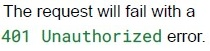
text
The request will fail with a
401 Unauthorized error.
text
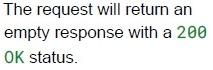
The request will return an
empty response with a 200
OK status.
text
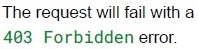
The request will fail with a
403 Forbidden error.
Comprehension passage for this question
Based on the above data, answer the given subquestions.
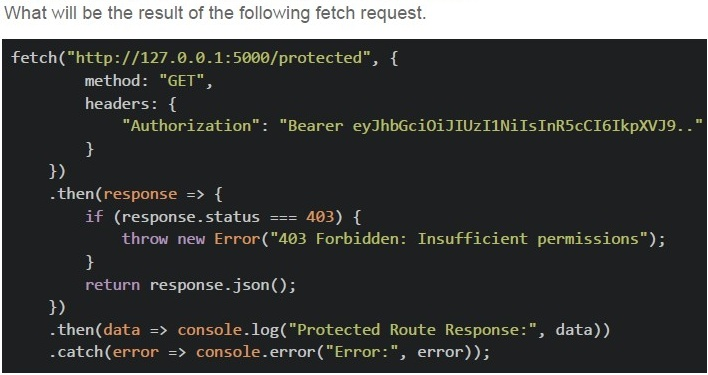
Text of the picture (copyable)
What will be the result of the following fetch request.

```javascript
fetch("http://127.0.0.1:5000/protected", {
    method: "GET",
    headers: {
        "Authorization": "Bearer eyJhbGciOiJIUzI1NiIsInR5cCI6IkpXVCJ9.."
    }
})
.then(response => {
    if (response.status === 403) {
        throw new Error("403 Forbidden: Insufficient permissions");
    }
    return response.json();
})
.then(data => console.log("Protected Route Response:", data))
.catch(error => console.error("Error:", error));
```
text
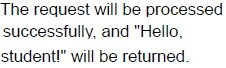
The request will be processed
successfully, and "Hello,
student!" will be returned.
text
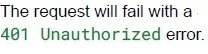
The request will fail with a
401 Unauthorized error.
text
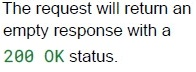
The request will return an
empty response with a
200 OK status.

text
The request will fail with a
403 Forbidden error.
Comprehension passage for this question
Consider the following Vue app with the Vue Router shown below and answer the given subquestions.
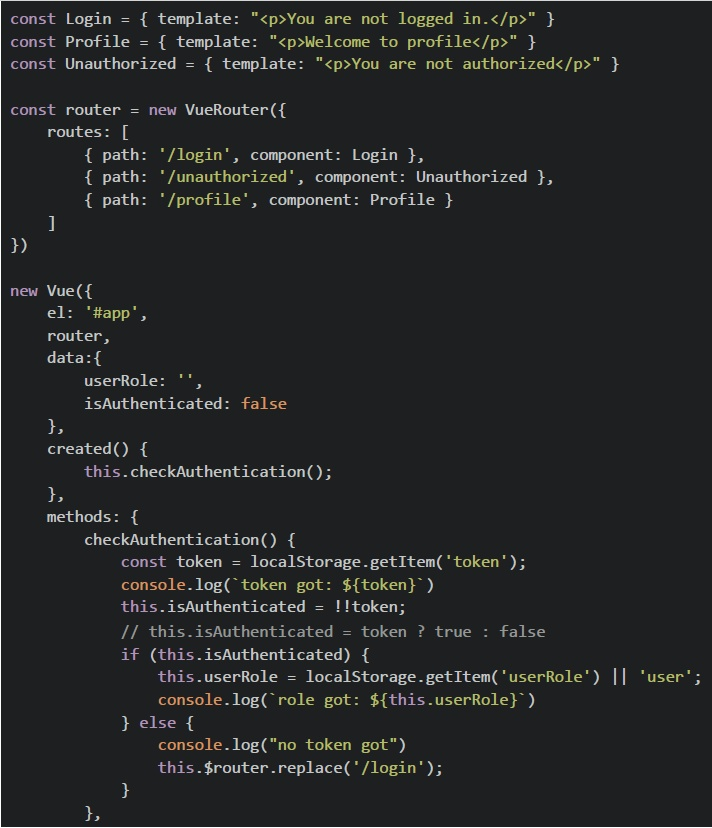 Consider the following Vue app with the Vue Router shown below and answer the given subquestions.
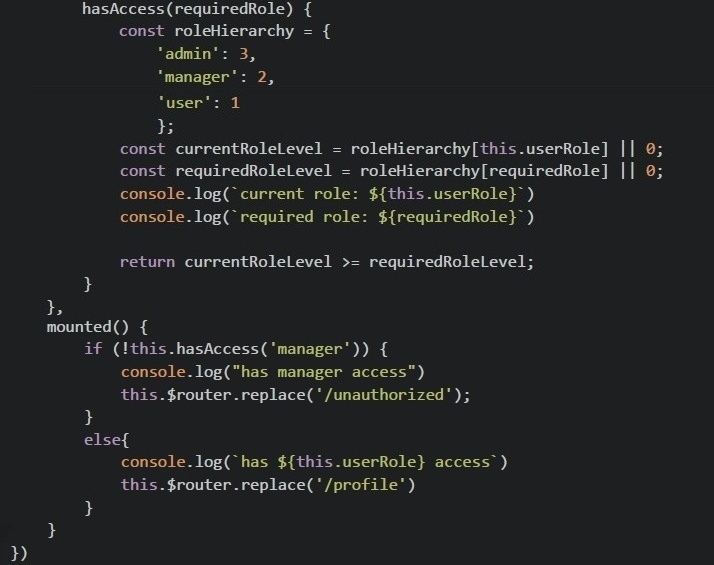 Consider the following Vue app with the Vue Router shown below and answer the given subquestions.
What will be rendered on the browser if the application is loaded on the browser for the first time?
- You are not logged in.
- Welcome to profile
- You are not authorized.
- None of these.
Comprehension passage for this question
Consider the following Vue app with the Vue Router shown below and answer the given subquestions.
Consider the following Vue app with the Vue Router shown below and answer the given subquestions.
Consider the following Vue app with the Vue Router shown below and answer the given subquestions.
What will be rendered on the browser for the given value of localStorage?
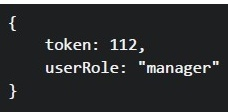 What will be rendered on the browser for the given value of localStorage?
What will be rendered on the browser for the given value of localStorage?
Text of the picture (copyable)
```
{
  token: 112,
  userRole: "manager"
}
```- You are not logged in.
- Welcome to profile
- You are not authorized.
- None of these.
How does a webhook differ from an API call?
- A webhook is triggered by an event, while an API call requires a client request.
- A webhook always returns a response body, while an API call does not.
- A webhook uses WebSockets for communication, while APIs use REST.
- A webhook only supports the HTTP GET method.
What is the purpose of CORS in web security?
- To allow browsers to make requests to any domain without restrictions.
- To prevent the server from making requests to unauthorized origins.
- To allow a web application to request resources from a different domainsecurely.
- To restrict all incoming requests to the same domain.
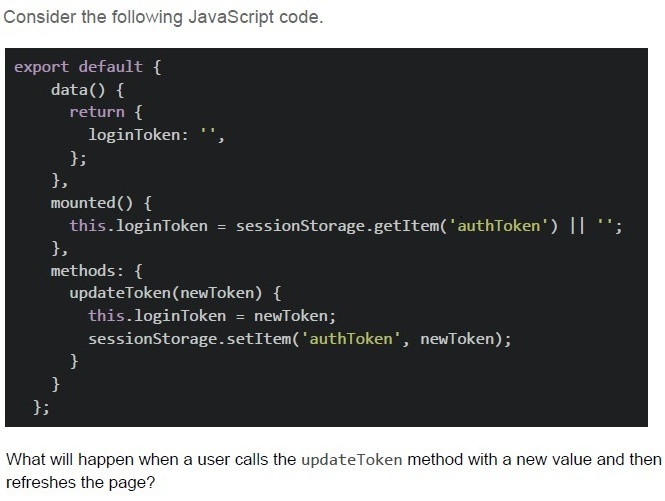
Text of the picture (copyable)
Consider the following JavaScript code.

```javascript
export default {
  data() {
    return {
      loginToken: '',
    };
  },
  mounted() {
    this.loginToken = sessionStorage.getItem('authToken') || '';
  },
  methods: {
    updateToken(newToken) {
      this.loginToken = newToken;
      sessionStorage.setItem('authToken', newToken);
    }
  }
};
```

What will happen when a user calls the updateToken method with a new value and then refreshes the page?
text
The new token will be lost, and the "loginToken" data property will be reset to an empty string.

text
The new token will be preserved in session storage, and the "LoginToken" data property will be populated with the stored value on page refresh.

text
The method will throw an error because sessionStorage cannot be modified directly.

text
The "loginToken" data property will be updated, but the session storage will remain unchanged.
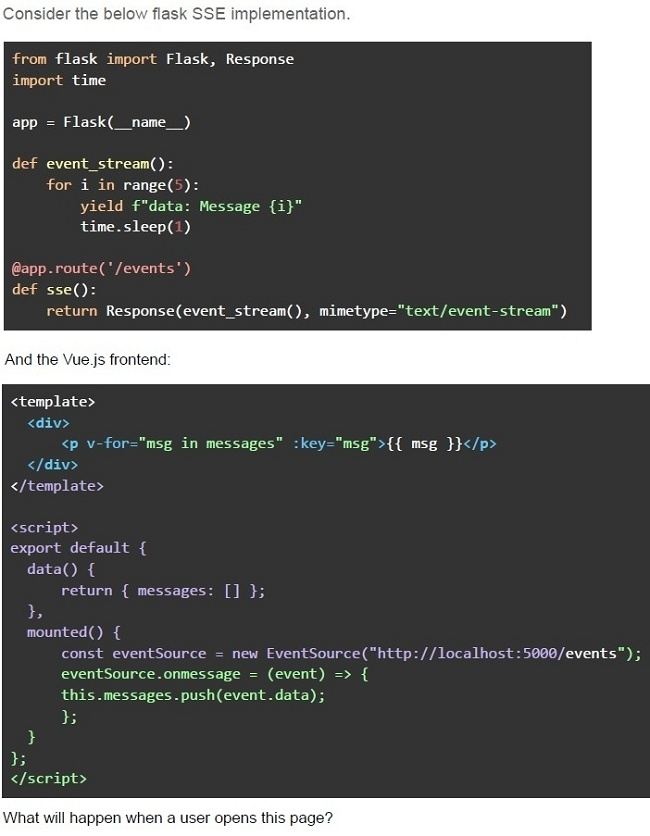
Text of the picture (copyable)
Consider the below flask SSE implementation.

```python
from flask import Flask, Response
import time

app = Flask(__name__)

def event_stream():
    for i in range(5):
        yield f"data: Message {i}"
        time.sleep(1)

@app.route('/events')
def sse():
    return Response(event_stream(), mimetype="text/event-stream")
```

And the Vue.js frontend:

```html
<template>
  <div>
    <p v-for="msg in messages" :key="msg">{{ msg }}</p>
  </div>
</template>

<script>
export default {
  data() {
    return { messages: [] };
  },
  mounted() {
    const eventSource = new EventSource("http://localhost:5000/events");
    eventSource.onmessage = (event) => {
      this.messages.push(event.data);
    };
  },
};
</script>
```

What will happen when a user opens this page?- The client will receive 5 messages, one per second.
- The client will receive all 5 messages instantly.
- The client will not receive any messages due to CORS issues.
- The server will crash because Flask cannot handle SSE.
Comprehension passage for this question
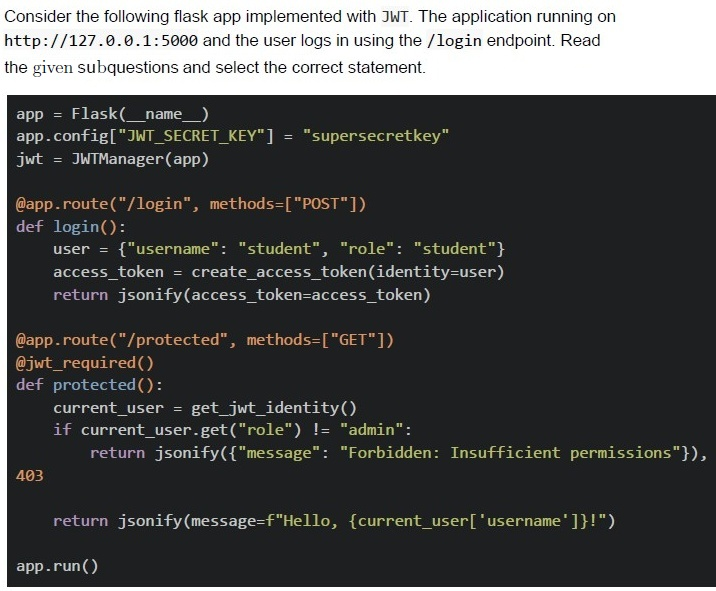
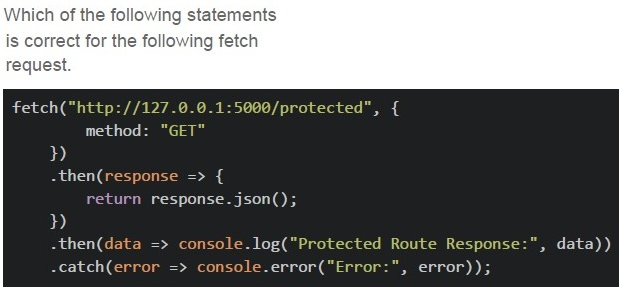
Text of the picture (copyable)
Which of the following statements
is correct for the following fetch
request.

```javascript
fetch("http://127.0.0.1:5000/protected", {
    method: "GET"
})
.then(response => {
    return response.json();
})
.then(data => console.log("Protected Route Response:", data))
.catch(error => console.error("Error:", error));
```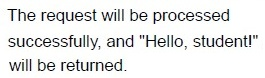
text
The request will be processed
successfully, and "Hello, student!"
will be returned.
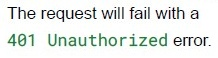
text
The request will fail with a
401 Unauthorized error.

text
The request will return an empty
response with a 200 OK status.
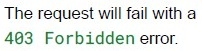
text
The request will fail with a
403 Forbidden error.
Comprehension passage for this question
Consider the following Vue app with the Vue Router shown below and answer the given subquestions.
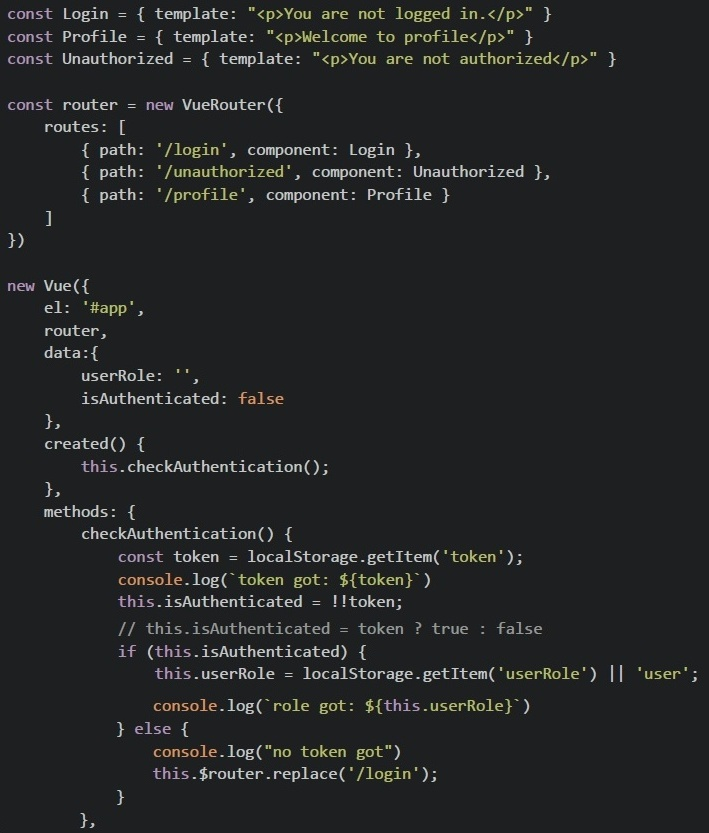 Consider the following Vue app with the Vue Router shown below and answer the given subquestions.
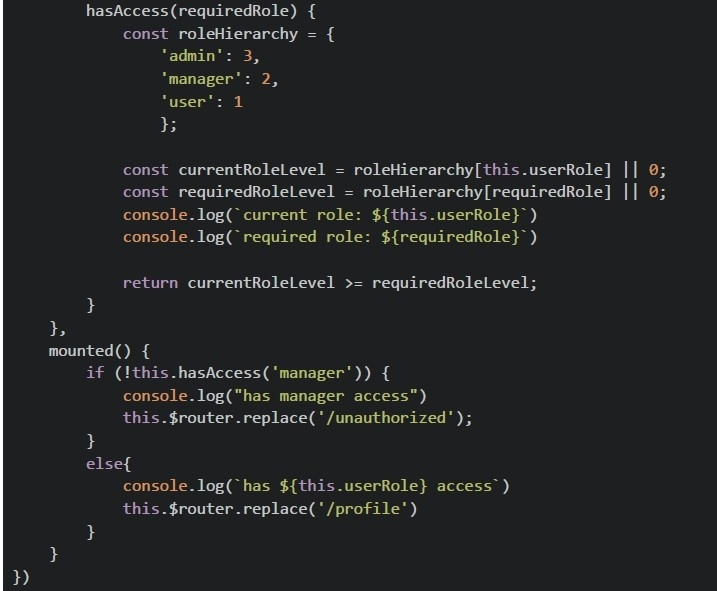 Consider the following Vue app with the Vue Router shown below and answer the given subquestions.
What will be rendered on the browser for the given value of localStorage?
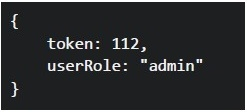 What will be rendered on the browser for the given value of localStorage?
What will be rendered on the browser for the given value of localStorage?
Text of the picture (copyable)
```json
{
  "token": 112,
  "userRole": "admin"
}
```- You are not logged in.
- Welcome to profile
- You are not authorized.
- None of these.
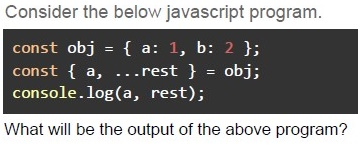
Text of the picture (copyable)
Consider the below javascript program.

```javascript
const obj = { a: 1, b: 2 };
const { a, ...rest } = obj;
console.log(a, rest);
```

What will be the output of the above program?- Error
- { a: 1, b: 2 } undefined
- { a: 1, b: 2 } { a: 1, b: 2 }
- 1 undefined
- 1 { b: 2 }
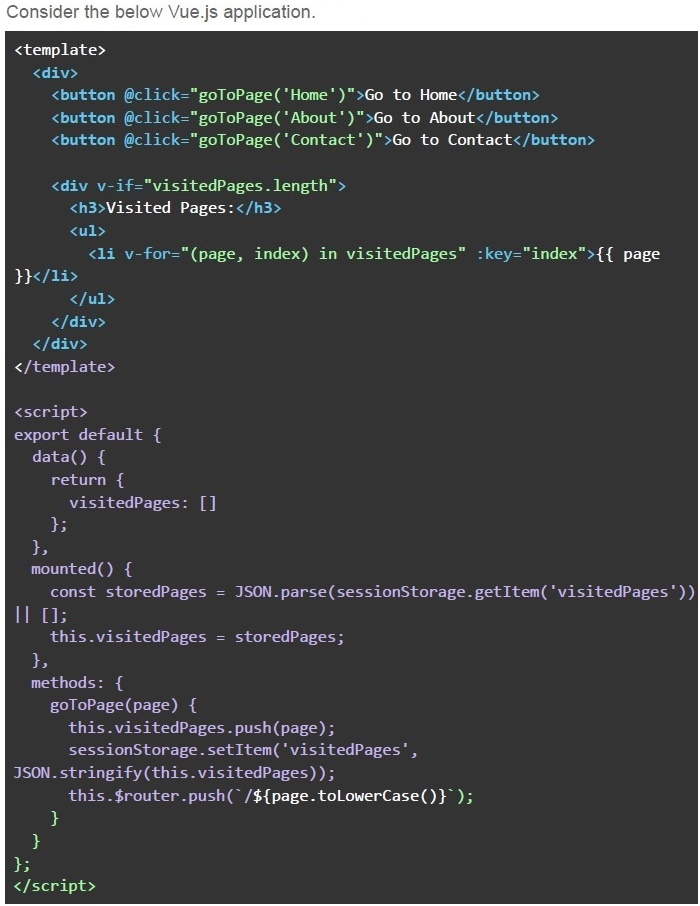
What will be the visited pages history when the user navigates between pages and refreshes the page?
Text of the picture (copyable)
Consider the below Vue.js application.

```html
<template>
  <div>
    <button @click="goToPage('Home')">Go to Home</button>
    <button @click="goToPage('About')">Go to About</button>
    <button @click="goToPage('Contact')">Go to Contact</button>

    <div v-if="visitedPages.length">
      <h3>Visited Pages:</h3>
      <ul>
        <li v-for="(page, index) in visitedPages" :key="index">{{ page }}</li>
      </ul>
    </div>
  </div>
</template>

<script>
export default {
  data() {
    return {
      visitedPages: []
    };
  },
  mounted() {
    const storedPages = JSON.parse(sessionStorage.getItem('visitedPages')) || [];
    this.visitedPages = storedPages;
  },
  methods: {
    goToPage(page) {
      this.visitedPages.push(page);
      sessionStorage.setItem('visitedPages',
        JSON.stringify(this.visitedPages));
      this.$router.push(`/${page.toLowerCase()}`);
    }
  }
};
</script>
```- The list of visited pages will reset to empty after the page is refreshed.
- The list of visited pages will be updated with the current page after everynavigation and will not reset even after reload.
- The navigation history will not be stored in sessionStorage.
- All of these

Text of the picture (copyable)
In the following code, which attributes ensure that the cookie will only be sent over HTTPS and restrict it from cross-site requests?

```
response.set_cookie('session_id', 'abc123', secure=option1, samesite=option2)
```- secure=True and samesite='Strict'
- secure=False and samesite='Strict'
- secure=True and samesite='None'
- secure=False and samesite='Lax'
Text of the picture (copyable)
Suppose you want the user data to only be accessible by an authenticated user.
What security issue exists in this code?

// Javascript
```javascript
methods: {
  async fetchUserData() {
    const response = await fetch(`/api/user/${this.userId}`)
    const data = await response.json()
    this.userData = data
  }
}
```

# Flask route
```python
@app.route('/api/user/<user_id>')
def get_user(user_id):
  query = f"SELECT * FROM users WHERE id = {user_id}"
  result = db.execute(query)
  return jsonify(result)
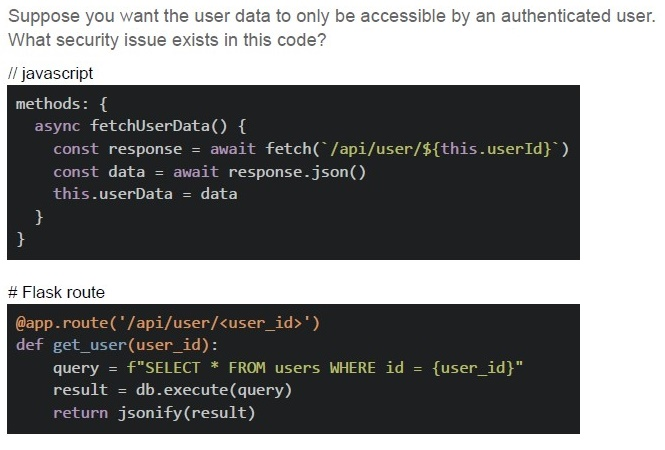
```- No authentication check
- SQL injection vulnerability
- Unvalidated user input
- All of these
Which of the following statements is FALSE?
- Cache-Control: no-store prevents caching
- ETag helps validate cache freshness
- Data stored in sessionStorage remains available even after the browser isclosed and reopened.
- localStorage has larger storage limit than cookies
Text of the picture (copyable)
Consider the following HTML, which includes Vue 2 and Vuex CDN links.

```html
<div id="app">
  <p v-if="userData">User: {{ userData.name }}</p>
  <p v-else>No user data available</p>
</div>

<script>
  const store = new Vuex.Store({
    state: {
      userData: null
    },
    mutations: {
      setUserData(state, data) {
        state.userData = data;
      }
    },
    actions: {
      fetchUserData({ commit }) {
        return fetch('https://httpstat.us/500')
          .then(response => {
            if (!response.ok) throw new Error('Network error');
            return response.json();
          })
          .then(data => {
            commit('setUserData', data);
          },
          error => {
            commit('setUserData', { name: 'Luke' })
          })
          .catch(() => {
            commit('setUserData', null);
          });
      }
    }
  });

  new Vue({
    el: '#app',
    store,
    created() {
      this.$store.dispatch('fetchUserData');
    },
    computed: {
      userData() {
        return this.$store.state.userData;
      }
    }
  });
</script>
```

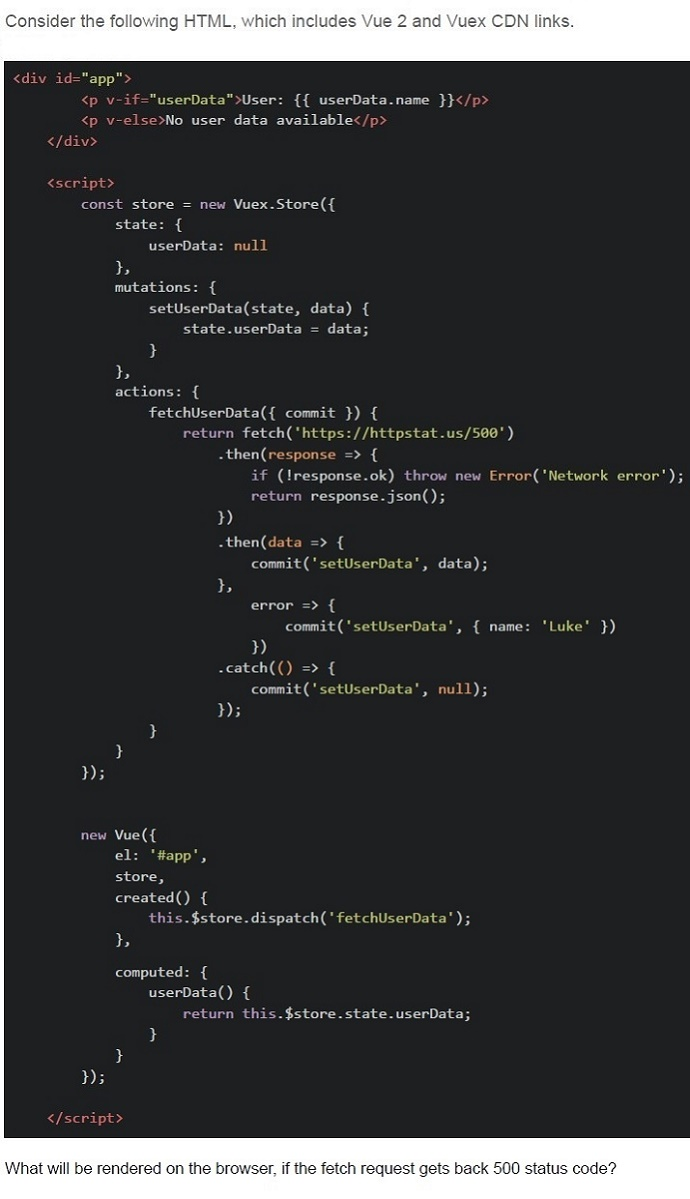
What will be rendered on the browser, if the fetch request gets back 500 status code?- The userData in the store is set to the data from the API.
- User: null
- The error will be logged, Nothing will be displayed
- User: Luke
Text of the picture (copyable)
Consider the below Vue component.

```javascript
export default {
  data() {
    return {
      userName: '',
    };
  },
  mounted() {
    this.userName = sessionStorage.getItem('userName') || '';
  },
  watch: {
    userName(newVal) {
      sessionStorage.setItem('userName', newVal);
    }
  }
};
```

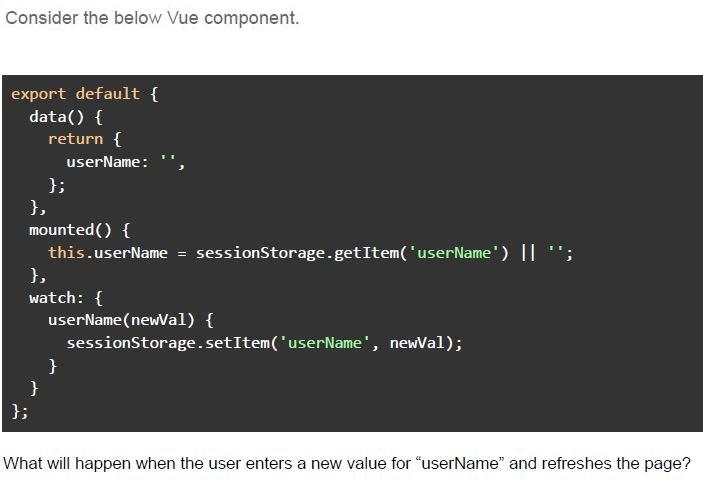
What will happen when the user enters a new value for "userName" and refreshes the page?- The new value will be stored in session storage, and the “userName” dataproperty will be updated.
- The new value will be stored in session storage, but the “userName” dataproperty will be reset to an empty string on page refresh.
- The “userName” data property will be reset to an empty string, and thesession storage value will be ignored on refresh.
- The “userName” data property will not be updated in session storage becausesession storage doesn't persist across refreshes.
Which of the following statement(s) is/are correct regarding the behavior of local storage in Vue.js applications?
- The local storage data persists even after the browser is closed and reopened.
- The local storage data is automatically cleared every session.
- The local storage can only store strings, and storing objects requires manualserialization and de-serialization.
- Vue's reactivity system automatically updates the local storage when bound toa Vue data property.
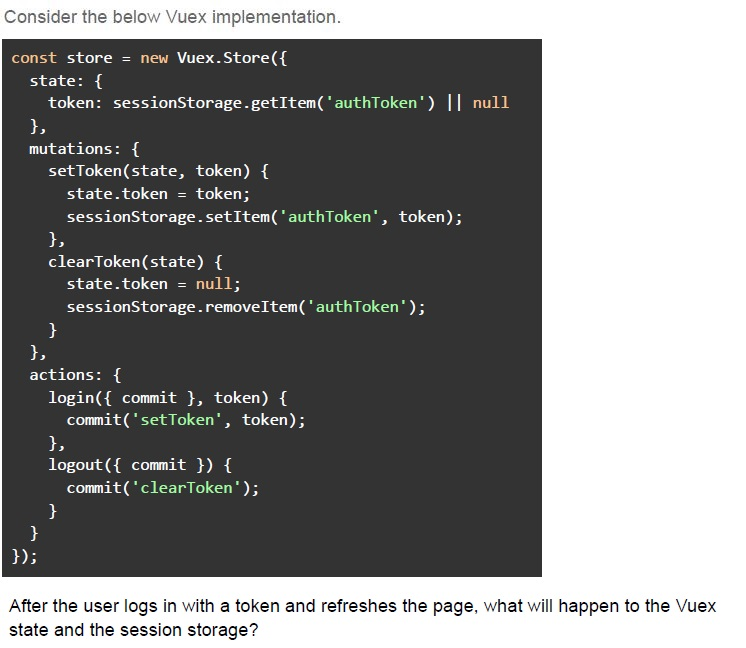
Text of the picture (copyable)
Consider the below Vuex implementation.

```javascript
const store = new Vuex.Store({
  state: {
    token: sessionStorage.getItem('authToken') || null
  },
  mutations: {
    setToken(state, token) {
      state.token = token;
      sessionStorage.setItem('authToken', token);
    },
    clearToken(state) {
      state.token = null;
      sessionStorage.removeItem('authToken');
    }
  },
  actions: {
    login({ commit }, token) {
      commit('setToken', token);
    },
    logout({ commit }) {
      commit('clearToken');
    }
  }
});
```

After the user logs in with a token and refreshes the page, what will happen to the Vuex state and the session storage?- The session storage will reset, but the Vuex state will still contain the“authToken”.
- Both the Vuex state and the sessionStorage will retain the token after the pagerefresh.
- The Vuex state will load the token from sessionStorage after the page refresh.
- The token will be lost from both the Vuex state and sessionStorage after thepage refresh.
Which of the following is an example of ephemeral state in a web application?
- A user's authentication token stored in local storage
- A form input value that changes as the user types
- The list of favorite items saved in a user's profile
- A shopping cart saved between sessions
Which of the following scenario(s) represent ephemeral state(s) in a web application?
- The user's current scroll position on a webpage.
- The user's authentication token, saved in localStorage.
- The temporary state of a dropdown menu.
- All of these
What of the following is the primary objective of a CSRF token?
- To encrypt the user's session
- To validate that the request comes from the authenticated user
- To store the user's password securely
- To compress the HTTP request
Which of the following scenarios is an example of a Cross-Site Request Forgery (CSRF) attack?
- A user receives an email containing a link to a phishing site that asks for theirlogin credentials.
- A user clicks on a malicious link while logged into their bank account, andwithout their knowledge, a money transfer request is sent to the bank's server using the user'sauthenticated session.
- A hacker uses a brute-force attack to guess the password of a user's onlineaccount.
- A user is tricked into downloading and installing malware that steals theirsensitive information.
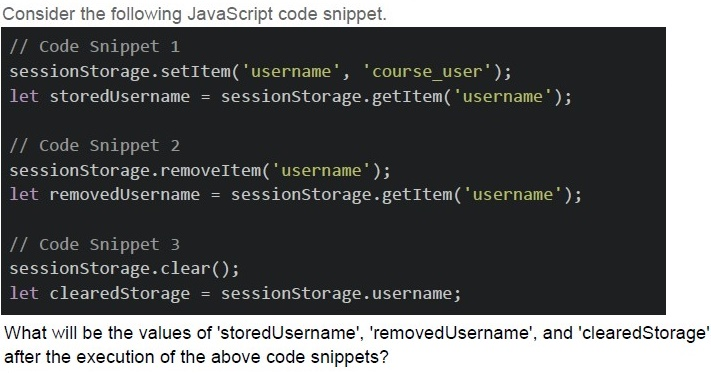
Text of the picture (copyable)
Consider the following JavaScript code snippet.

```javascript
// Code Snippet 1
sessionStorage.setItem('username', 'course_user');
let storedUsername = sessionStorage.getItem('username');

// Code Snippet 2
sessionStorage.removeItem('username');
let removedUsername = sessionStorage.getItem('username');

// Code Snippet 3
sessionStorage.clear();
let clearedStorage = sessionStorage.username;
```

What will be the values of 'storedUsername', 'removedUsername', and 'clearedStorage' after the execution of the above code snippets?- storedUsername: 'course_user', removedUsername: null, clearedStorage: null
- storedUsername: 'course_user', removedUsername: undefined,clearedStorage: null
- storedUsername: 'course_user', removedUsername: null, clearedStorage:undefined
- storedUsername: 'course_user', removedUsername: undefined,clearedStorage: undefined