Home / MAD1 / Week 10 / Real questions
MAD1 week 10 - real exam questions
60 questions pulled from past papers whose wording matches this week's topics, newest first, duplicates removed. Pick your answers, then press Check answers. Figures and answer keys are the originals.
Elapsed 00:00
Consider the following Python code.
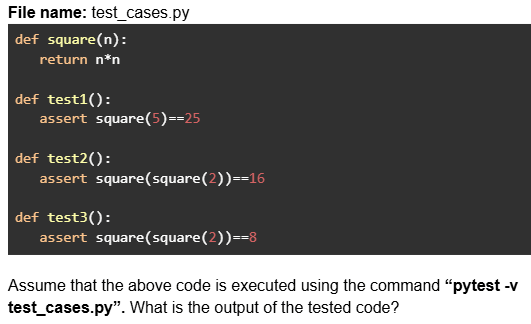
Text of the picture (copyable)
File name: test_cases.py

```python
def square(n):
    return n*n

def test1():
    assert square(5)==25

def test2():
    assert square(square(2))==16

def test3():
    assert square(square(2))==8
```

Assume that the above code is executed using the command “**pytest -v test_cases.py**”. What is the output of the tested code?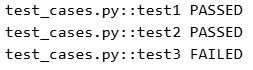
text
```
test_cases.py::test1 PASSED
test_cases.py::test2 PASSED
test_cases.py::test3 FAILED
```
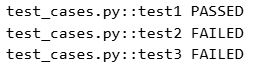
text
```
test_cases.py::test1 PASSED
test_cases.py::test2 FAILED
test_cases.py::test3 FAILED
```
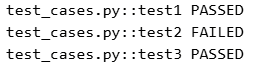
text
```
test_cases.py::test1 PASSED
test_cases.py::test2 FAILED
test_cases.py::test3 PASSED
```
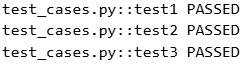
text
```
test_cases.py::test1 PASSED
test_cases.py::test2 PASSED
test_cases.py::test3 PASSED
```
What does the following curl command do?

Text of the picture (copyable)
```
curl -X POST -d "email=user@test.com&password=secret" https://auth/signin
```
- Sends a POST request to retrieve authentication data.
- Sends a POST request to send form data.
- Sends a POST request to send JSON data.
- Sends a POST request to retrieve user credentials.
Consider the code below in a file called 
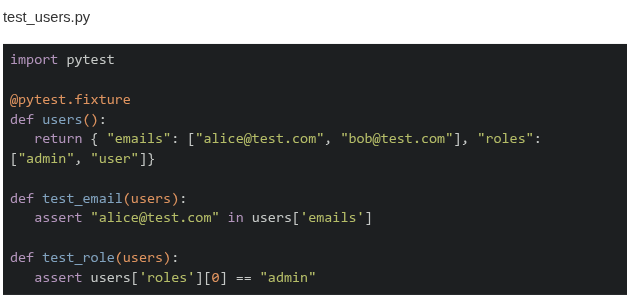 Which of these is the correct output when the command
  is run in the terminal?
Which of these is the correct output when the command is run in the terminal?Text of the picture (copyable)
```
test_users.py
```
test_users.py

```python
import pytest

@pytest.fixture
def users():
    return { "emails": ["alice@test.com", "bob@test.com"], "roles":
             ["admin", "user"]}

def test_email(users):
    assert "alice@test.com" in users['emails']

def test_role(users):
    assert users['roles'][0] == "admin"
```
```
"pytest -k email"
```- ====== 1 passed, 1 deselected in 0.02s =========
- ====== 1 passed, 2 deselected in 0.02s =========
- ====== 1 failed, 1 deselected in 0.02s =========
- ====== 1 failed, 2 deselected in 0.02s =========
Consider the following flask app. Given that  allows code to be tested without a server, which of the following statements is correct?
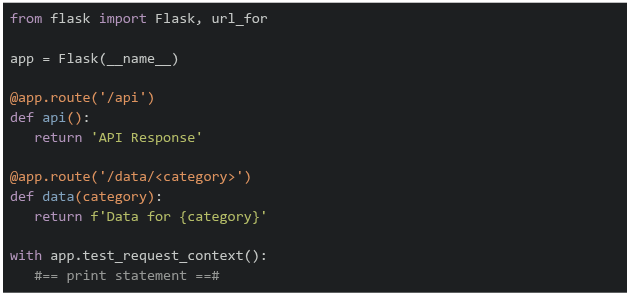
allows code to be tested without a server, which of the following statements is correct?
Text of the picture (copyable)
```
test_request_context()
```
```python
from flask import Flask, url_for

app = Flask(__name__)

@app.route('/api')
def api():
    return 'API Response'

@app.route('/data/<category>')
def data(category):
    return f'Data for {category}'

with app.test_request_context():
    #== print statement ==#
```- If
 is replaced by
  , the output on the terminal will be
text
```python #=== print statement ===# ``` ```python print(url_for('data', category='sales')) ``` ``` /data?category=sales ``` - If is replaced by
 , the output on the terminal will be
text
```python #=== print statement ===# ``` ```python print(url_for('data', category='sales', format='json')) ``` ``` /data/sales/json ``` - If is replaced by
 , the output on the terminal will be
text
```python #=== print statement ===# ``` ```python print(url_for('api', category='sales')) ``` ``` /api?category=sales ``` - If is replaced by
 , the output on the terminal will be
text
```python
#=== print statement ===#
```
```python
print(url_for('api'))
```
/api
A client sitting in a train is connected to a server through a network tower that has a range of 4.5 kilometers and a constant bandwidth of 5 Mbps. The train is at a negligible distance from the tower and is moving away from it at a speed of 180 kmph. How much data (in Megabytes) will be used by the client before the train completely moves out of the coverage area, assuming that the client is consuming the entire bandwidth?
- 45 MB
- 450 MB
- 5.6 MB
- 56.25 MB
Consider the following function to be tested and test functions given in the Python code snippet below.
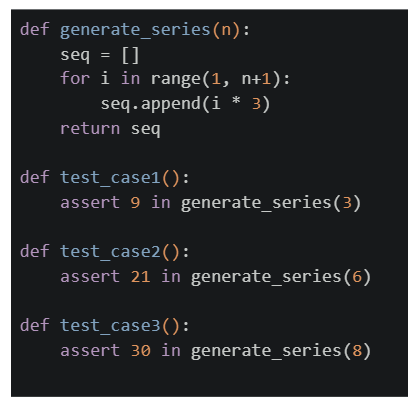

Text of the picture (copyable)
```python
def generate_series(n):
    seq = []
    for i in range(1, n+1):
        seq.append(i * 3)
    return seq

def test_case1():
    assert 9 in generate_series(3)

def test_case2():
    assert 21 in generate_series(6)

def test_case3():
    assert 30 in generate_series(8)
```
What will be the summary of the output for the command `pytest file.py` on the terminal?
text
```
=========== 1 failed, 2 passed in 0.30s ===========
```

text
```
========== 2 failed, 1 passed in 0.30s ==========
```

text
```
=================================== 3 failed in 0.30s ===================================
```

text
```text
============================= 1 failed, 1 passed in 0.30s =============================
```
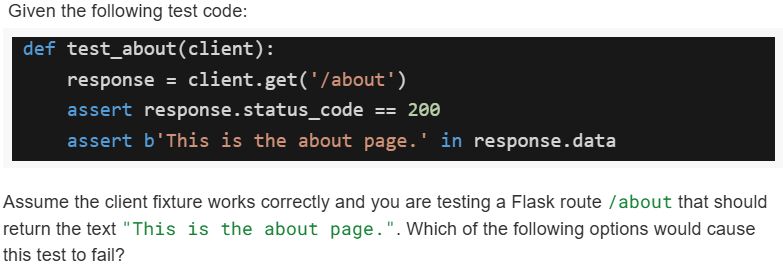
Text of the picture (copyable)
Given the following test code:

```python
def test_about(client):
    response = client.get('/about')
    assert response.status_code == 200
    assert b'This is the about page.' in response.data
```

Assume the client fixture works correctly and you are testing a Flask route `/about` that should return the text "This is the about page.". Which of the following options would cause this test to fail?
text
The route `/about` is missing in `app.py`.

text
The route `/about` exists but returns "About us page" instead.

text
The route `/about` returns `<p>this is the about page.</p>` instead of plain text.
- None of these.
Which of the following commands is/are valid to run pytest from the command line?
- pytest
- pytest test_file.py
- pytest -run
- pytest -k “login”
Consider the following Python code.
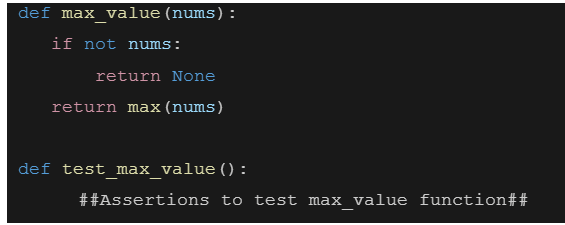 Which of the following assertion test case throws the exception?
Which of the following assertion test case throws the exception?Text of the picture (copyable)
```python
def max_value(nums):
    if not nums:
        return None
    return max(nums)

def test_max_value():
    ##Assertions to test max_value function##
```- assert max_value([3, 7, 2]) == 7
- assert max_value([]) is None
- assert max_value("abczfk") == "z"
- assert max_value(1) == 1
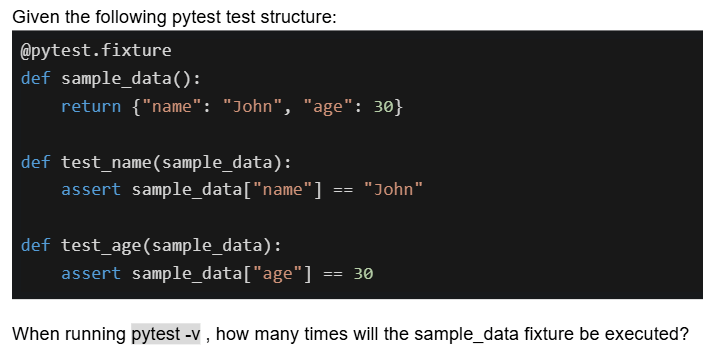
Text of the picture (copyable)
Given the following pytest test structure:

```python
@pytest.fixture
def sample_data():
    return {"name": "John", "age": 30}

def test_name(sample_data):
    assert sample_data["name"] == "John"

def test_age(sample_data):
    assert sample_data["age"] == 30
```

When running `pytest -v`, how many times will the sample_data fixture be executed?- Once for all tests
- Twice, once for each test
- Once during collection phase only
- It depends on the pytest configuration
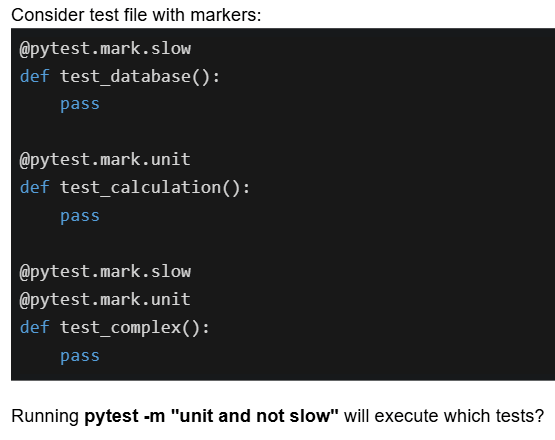
Text of the picture (copyable)
Consider test file with markers:

```python
@pytest.mark.slow
def test_database():
    pass

@pytest.mark.unit
def test_calculation():
    pass

@pytest.mark.slow
@pytest.mark.unit
def test_complex():
    pass
```

Running `pytest -m "unit and not slow"` will execute which tests?- test_database and test_complex
- Only test_calculation
- test_calculation and test_complex
- All three tests
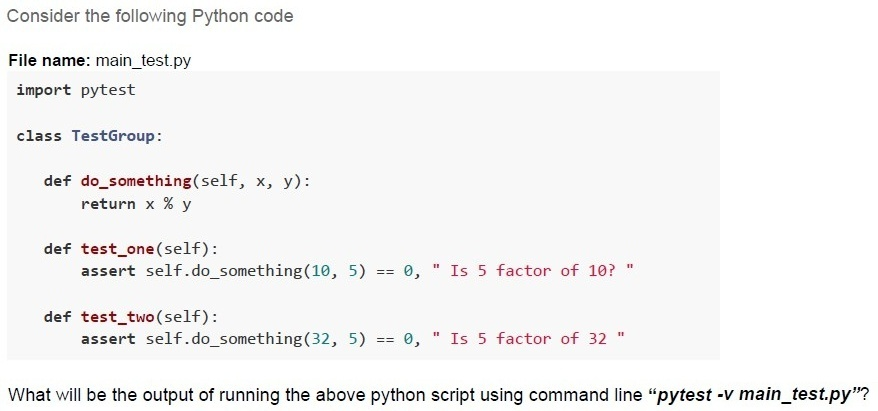
Text of the picture (copyable)
Consider the following Python code

File name: main_test.py
```python
import pytest

class TestGroup:

    def do_something(self, x, y):
        return x % y

    def test_one(self):
        assert self.do_something(10, 5) == 0, " Is 5 factor of 10? "

    def test_two(self):
        assert self.do_something(32, 5) == 0, " Is 5 factor of 32 "
```
What will be the output of running the above python script using command line "pytest -v main_test.py"?
text
```
==================== short test summary info ====================
FAILED test6.py::TestGroup::test_two - AssertionError: Is 5 factor of
32
========== 1 failed, 1 passed in 0.12s ==========================
```
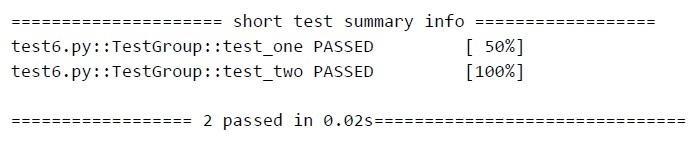
text
```text
==================== short test summary info ====================
test6.py::TestGroup::test_one PASSED                  [ 50%]
test6.py::TestGroup::test_two PASSED                 [100%]

==================== 2 passed in 0.02s====================
```
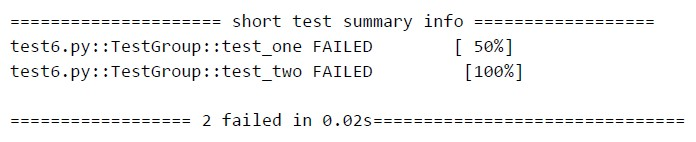
text
```text
==================== short test summary info ====================
test6.py::TestGroup::test_one FAILED           [ 50%]
test6.py::TestGroup::test_two FAILED          [100%]

==================== 2 failed in 0.02s====================
```
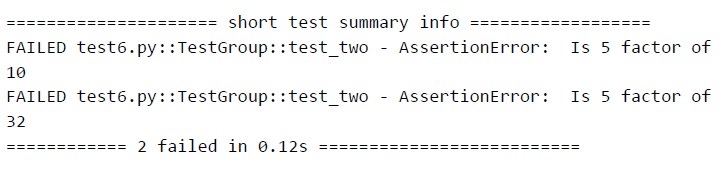
text
```
==================== short test summary info ====================
FAILED test6.py::TestGroup::test_two - AssertionError: Is 5 factor of
10
FAILED test6.py::TestGroup::test_two - AssertionError: Is 5 factor of
32
==================== 2 failed in 0.12s ====================
```
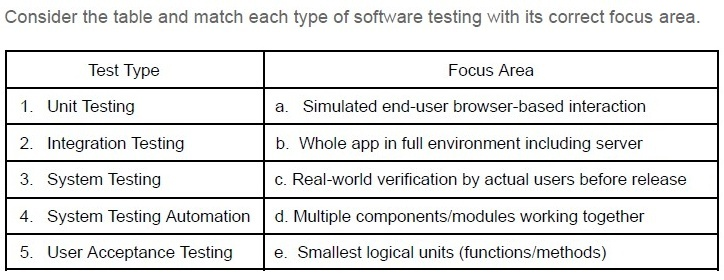
Text of the picture (copyable)
Consider the table and match each type of software testing with its correct focus area.

| Test Type | Focus Area |
|---|---|
| 1. Unit Testing | a. Simulated end-user browser-based interaction |
| 2. Integration Testing | b. Whole app in full environment including server |
| 3. System Testing | c. Real-world verification by actual users before release |
| 4. System Testing Automation | d. Multiple components/modules working together |
| 5. User Acceptance Testing | e. Smallest logical units (functions/methods) |
- 1-a, 2- c, 3-b, 4-d, 5-e
- 1-b, 2- c, 3-a, 4-e, 5-d
- 1-e, 2- d, 3-c, 4-a, 5-b
- 1-e, 2- d, 3-b, 4-a, 5-c

Text of the picture (copyable)
Which of these are true about unit tests in Flask using pytest?

text
Tests must start with test_ prefix

text
You must import `FlaskClient` from `flask.testing`

text
You cannot test routes using `client.get()`

text
Fixtures help simulate isolated environments
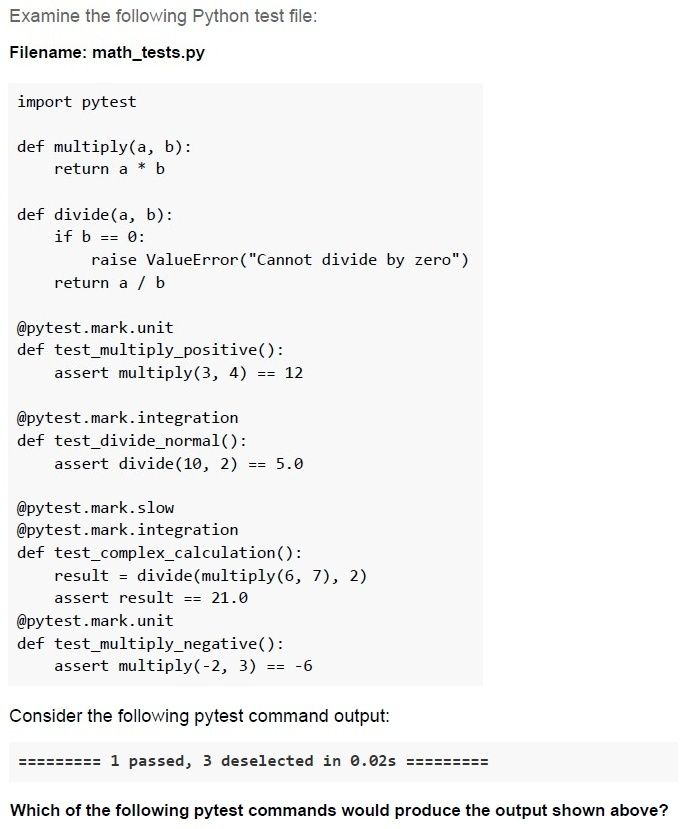
Text of the picture (copyable)
Examine the following Python test file:

Filename: math_tests.py

```python
import pytest

def multiply(a, b):
    return a * b

def divide(a, b):
    if b == 0:
        raise ValueError("Cannot divide by zero")
    return a / b

@pytest.mark.unit
def test_multiply_positive():
    assert multiply(3, 4) == 12

@pytest.mark.integration
def test_divide_normal():
    assert divide(10, 2) == 5.0

@pytest.mark.slow
@pytest.mark.integration
def test_complex_calculation():
    result = divide(multiply(6, 7), 2)
    assert result == 21.0

@pytest.mark.unit
def test_multiply_negative():
    assert multiply(-2, 3) == -6
```

Consider the following pytest command output:

========= 1 passed, 3 deselected in 0.02s =========

Which of the following pytest commands would produce the output shown above?
text
```
pytest math_tests.py -m unit
```

text
```
pytest math_tests.py -m integration
```

text
```
pytest math_tests.py -m "not sLow"
```

text
```
pytest math_tests.py -m "slow and integration"
```

text
None of these
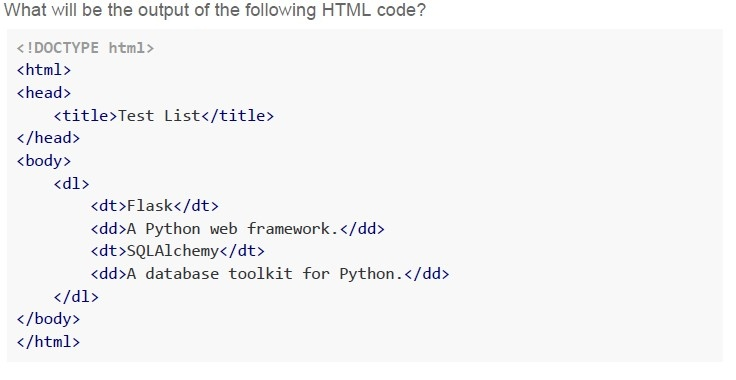
Text of the picture (copyable)
What will be the output of the following HTML code?

```html
<!DOCTYPE html>
<html>
<head>
    <title>Test List</title>
</head>
<body>
    <dl>
        <dt>Flask</dt>
        <dd>A Python web framework.</dd>
        <dt>SQLAlchemy</dt>
        <dd>A database toolkit for Python.</dd>
    </dl>
</body>
</html>
```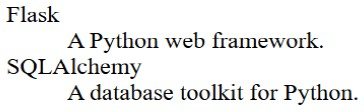
text
Flask
    A Python web framework.
SQLAlchemy
    A database toolkit for Python.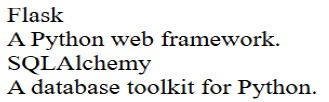
text
Flask
A Python web framework.
SQLAlchemy
A database toolkit for Python.
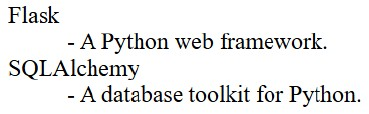
text
Flask
 - A Python web framework.
SQLAlchemy
 - A database toolkit for Python.
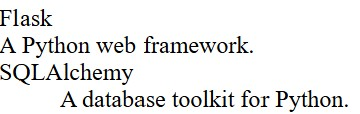
text
Flask
A Python web framework.
SQLAlchemy
A database toolkit for Python.
Text of the picture (copyable)
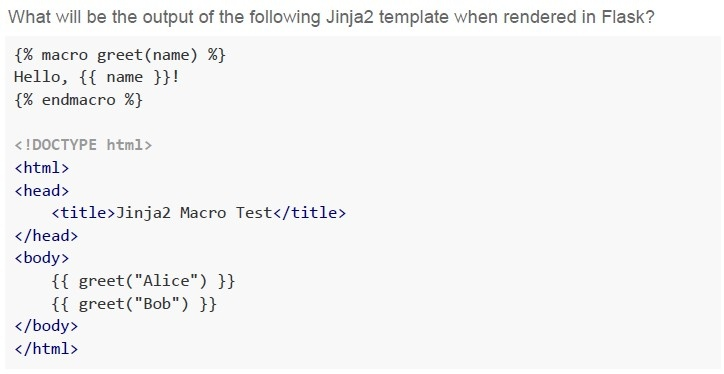
What will be the output of the following Jinja2 template when rendered in Flask?

```html
{% macro greet(name) %}
Hello, {{ name }}!
{% endmacro %}

<!DOCTYPE html>
<html>
<head>
    <title>Jinja2 Macro Test</title>
</head>
<body>
    {{ greet("Alice") }}
    {{ greet("Bob") }}
</body>
</html>
```
text
Hello, Alice! Hello, Bob!

text
```
jinja2.exceptions.UndefinedError: 'greet' is undefined
```
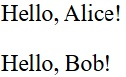
text
Hello, Alice!
Hello, Bob!
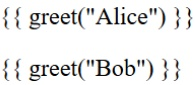
text
```
{{ greet("Alice") }}
{{ greet("Bob") }}
```
Text of the picture (copyable)
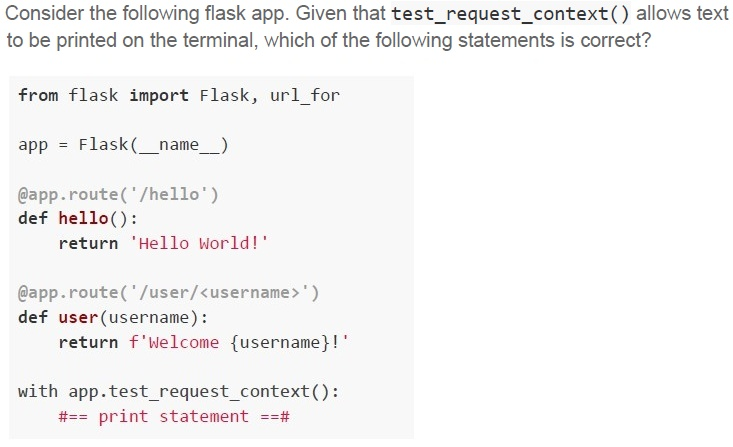
Consider the following flask app. Given that **test_request_context()** allows text
to be printed on the terminal, which of the following statements is correct?

```python
from flask import Flask, url_for

app = Flask(__name__)

@app.route('/hello')
def hello():
    return 'Hello World!'

@app.route('/user/<username>')
def user(username):
    return f'Welcome {username}!'

with app.test_request_context():
    #== print statement ==#
```
text
If `print statement` is replaced by `print(url_for('user', username='John'))`, the output on the terminal will be `/user?username=John`
text
If `print statement` is replaced by `print(url_for('user', username='John', id='101'))`, the output on the terminal will be
`/user/John/101`
text
If `print statement` is replaced by `print(url_for('hello', username='John'))`, the output on the terminal will be Hello World!
text
If `#== print statement ==#` is replaced by `print(url_for('hello', username='John'))`,
the output on the terminal will be `/hello?username=John`.
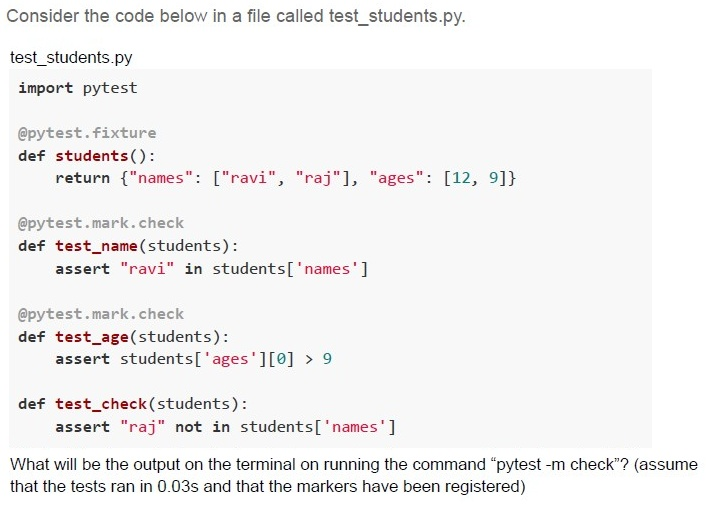
Text of the picture (copyable)
Consider the code below in a file called test_students.py.

test_students.py
```python
import pytest

@pytest.fixture
def students():
    return {"names": ["ravi", "raj"], "ages": [12, 9]}

@pytest.mark.check
def test_name(students):
    assert "ravi" in students['names']

@pytest.mark.check
def test_age(students):
    assert students['ages'][0] > 9

def test_check(students):
    assert "raj" not in students['names']
```

What will be the output on the terminal on running the command "pytest -m check"? (assume that the tests ran in 0.03s and that the markers have been registered)
text
```
======== 2 passed, 1 deselected in 0.03s ========
```

text
```
======== 2 passed in 0.03s========
```

text
```text
======== 1 passed, 1 failed in 0.03s ========
```

text
```
========2 passed, 1 failed in 0.03s========
```
Text of the picture (copyable)
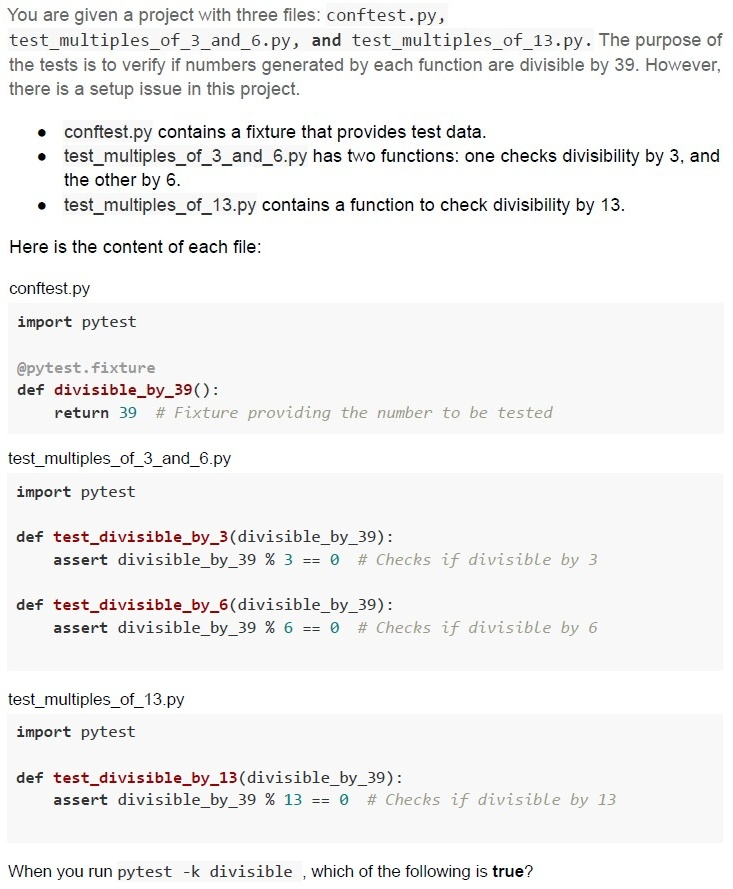
You are given a project with three files: `conftest.py`, `test_multiples_of_3_and_6.py`, and `test_multiples_of_13.py`. The purpose of the tests is to verify if numbers generated by each function are divisible by 39. However, there is a setup issue in this project.

* `conftest.py` contains a fixture that provides test data.
* `test_multiples_of_3_and_6.py` has two functions: one checks divisibility by 3, and the other by 6.
* `test_multiples_of_13.py` contains a function to check divisibility by 13.

Here is the content of each file:

`conftest.py`
```python
import pytest

@pytest.fixture
def divisible_by_39():
    return 39 # Fixture providing the number to be tested
```

`test_multiples_of_3_and_6.py`
```python
import pytest

def test_divisible_by_3(divisible_by_39):
    assert divisible_by_39 % 3 == 0 # Checks if divisible by 3

def test_divisible_by_6(divisible_by_39):
    assert divisible_by_39 % 6 == 0 # Checks if divisible by 6
```

`test_multiples_of_13.py`
```python
import pytest

def test_divisible_by_13(divisible_by_39):
    assert divisible_by_39 % 13 == 0 # Checks if divisible by 13
```

When you run `pytest -k divisible`, which of the following is **true**?
text
```
========== 1 passed in 0.02s ==========
```

text
```
========== 3 passed in 0.02s ==========
```

text
```
========== 1 failed, 2 passed in 0.06s ==========
```

text
```
========== 3 errors in 0.02s ==========
```
Comprehension passage for this question
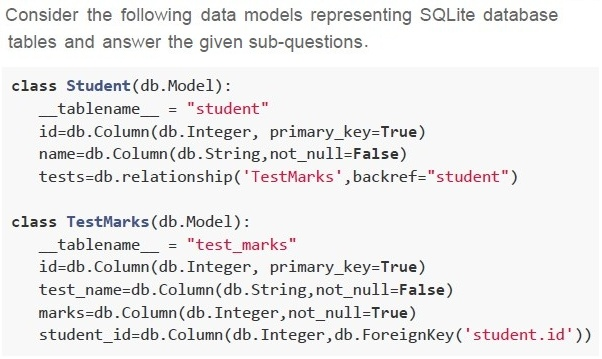
Which of the following statements is/are True?
text
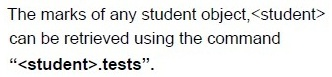
The marks of any student object, <student>
can be retrieved using the command
"<student>.tests".
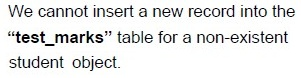
text
We cannot insert a new record into the
"**test_marks**" table for a non-existent
student object.
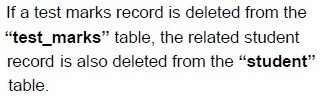
text
If a test marks record is deleted from the
“**test_marks**” table, the related student
record is also deleted from the “**student**”
table.

text
We can insert a new record in the “**student**”
table for a non-existent “**test_marks**” object.
Comprehension passage for this question
Which of the following is the correct way of adding records into the ‘student’ and the ‘test_marks’
tables?
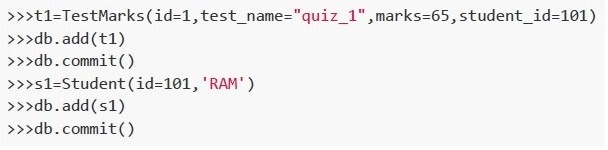
text
```python
>>>t1=TestMarks(id=1, test_name="quiz_1",marks=65, student_id=101)
>>>db.add(t1)
>>>db.commit()
>>>s1=Student(id=101, 'RAM')
>>>db.add(s1)
>>>db.commit()
```
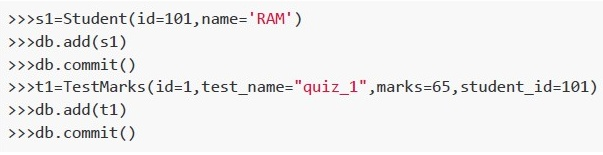
text
```python
>>>s1=Student(id=101,name='RAM')
>>>db.add(s1)
>>>db.commit()
>>>t1=TestMarks(id=1,test_name="quiz_1",marks=65,student_id=101)
>>>db.add(t1)
>>>db.commit()
```
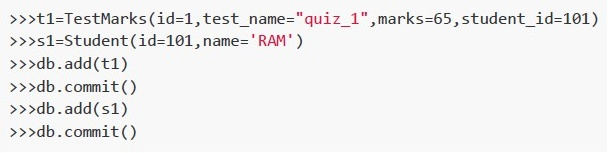
text
```python
>>>t1=TestMarks(id=1,test_name="quiz_1",marks=65,student_id=101)
>>>s1=Student(id=101,name='RAM')
>>>db.add(t1)
>>>db.commit()
>>>db.add(s1)
>>>db.commit()
```
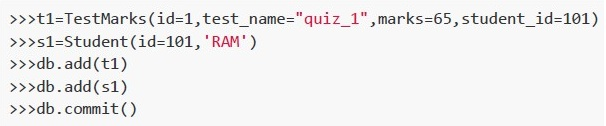
text
```python
>>>t1=TestMarks(id=1,test_name="quiz_1",marks=65,student_id=101)
>>>s1=Student(id=101,'RAM')
>>>db.add(t1)
>>>db.add(s1)
>>>db.commit()
```
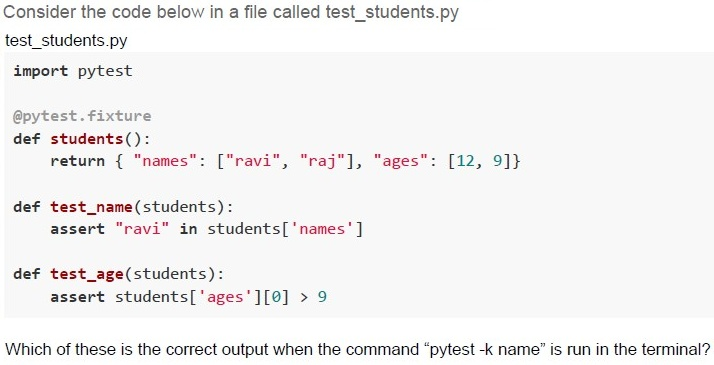
Text of the picture (copyable)
Consider the code below in a file called test_students.py

```python
test_students.py

import pytest

@pytest.fixture
def students():
    return { "names": ["ravi", "raj"], "ages": [12, 9]}

def test_name(students):
    assert "ravi" in students['names']

def test_age(students):
    assert students['ages'][0] > 9
```

Which of these is the correct output when the command "pytest -k name" is run in the terminal?
text
```
===== 1 passed, 1 deselected in 0.02s =====
```

text
```
======== 1 passed, 2 deselected in 0.02s ========
```

text
```text
======== 1 failed, 1 deselected in 0.02s ========
```

text
```
======== 1 failed, 2 deselected in 0.02s ========
```
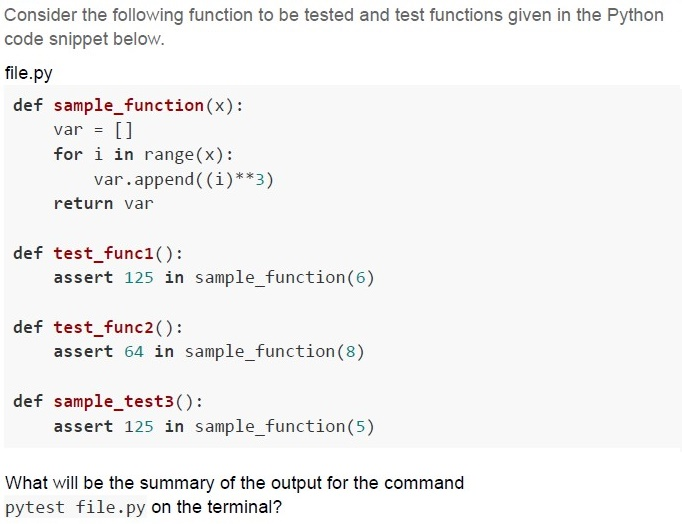
Text of the picture (copyable)
Consider the following function to be tested and test functions given in the Python code snippet below.

file.py

```python
def sample_function(x):
    var = []
    for i in range(x):
        var.append((i)**3)
    return var

def test_func1():
    assert 125 in sample_function(6)

def test_func2():
    assert 64 in sample_function(8)

def sample_test3():
    assert 125 in sample_function(5)
```

What will be the summary of the output for the command
`pytest file.py` on the terminal?
text
```
=========== 1 failed, 2 passed in 0.06s ===========
```

text
```
========== 2 failed, 1 passed in 0.06s ==========
```

text
```
============================= 3 passed in 0.06s =============================
```

text
```
============================= 2 passed in 0.06s =============================
```
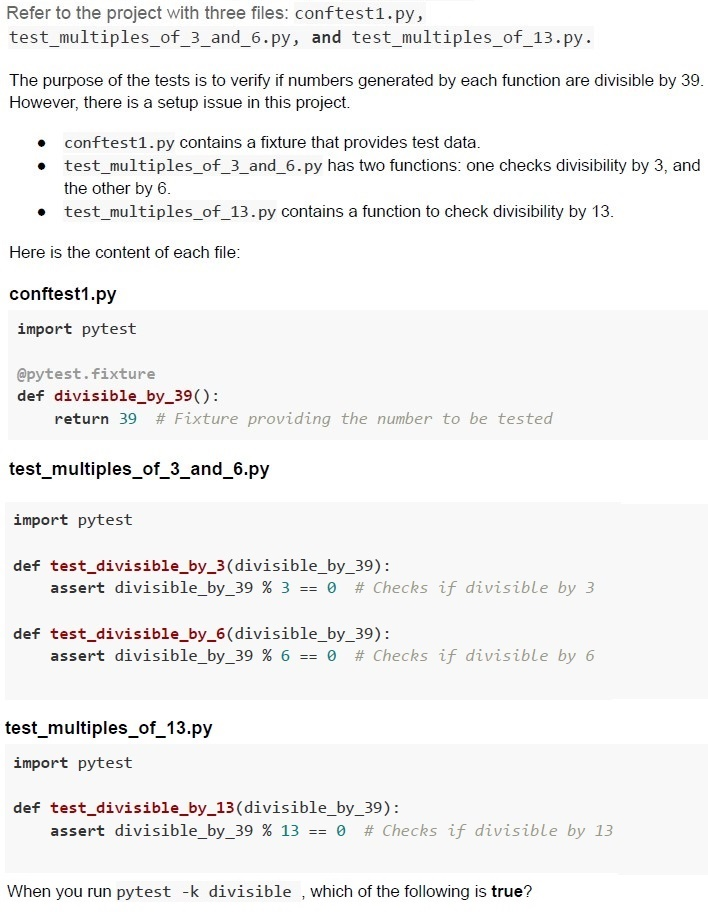
Text of the picture (copyable)
Refer to the project with three files: `conftest1.py`, `test_multiples_of_3_and_6.py`, and `test_multiples_of_13.py`.

The purpose of the tests is to verify if numbers generated by each function are divisible by 39. However, there is a setup issue in this project.

* `conftest1.py` contains a fixture that provides test data.
* `test_multiples_of_3_and_6.py` has two functions: one checks divisibility by 3, and the other by 6.
* `test_multiples_of_13.py` contains a function to check divisibility by 13.

Here is the content of each file:

**conftest1.py**
```python
import pytest

@pytest.fixture
def divisible_by_39():
    return 39 # Fixture providing the number to be tested
```

**test_multiples_of_3_and_6.py**
```python
import pytest

def test_divisible_by_3(divisible_by_39):
    assert divisible_by_39 % 3 == 0 # Checks if divisible by 3

def test_divisible_by_6(divisible_by_39):
    assert divisible_by_39 % 6 == 0 # Checks if divisible by 6
```

**test_multiples_of_13.py**
```python
import pytest

def test_divisible_by_13(divisible_by_39):
    assert divisible_by_39 % 13 == 0 # Checks if divisible by 13
```

When you run `pytest -k divisible`, which of the following is **true**?
text
```
========== 1 passed in 0.02s ==========
```

text
```
========== 3 passed in 0.02s ==========
```

text
```
========= 1 failed, 2 passed in 0.06s =========
```

text
```
========== 3 errors in 0.02s ==========
```
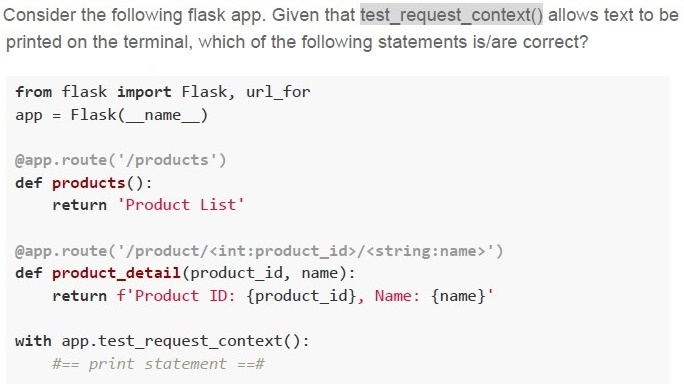
Text of the picture (copyable)
Consider the following flask app. Given that `test_request_context()` allows text to be printed on the terminal, which of the following statements is/are correct?

```python
from flask import Flask, url_for
app = Flask(__name__)

@app.route('/products')
def products():
    return 'Product List'

@app.route('/product/<int:product_id>/<string:name>')
def product_detail(product_id, name):
    return f'Product ID: {product_id}, Name: {name}'

with app.test_request_context():
    #== print statement ==#
```
text
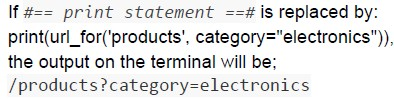
If `print statement` is replaced by:
```python
print(url_for('products', category="electronics"))
```
the output on the terminal will be;
`/products?category=electronics`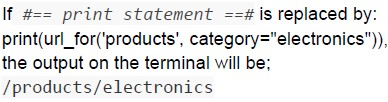
text
If #== *print statement* ==# is replaced by:
```python
print(url_for('products', category="electronics")),
```
the output on the terminal will be;
/products/electronics
text
If #== print statement ==# is replaced by:
```python
print(url_for('product_detail', product_id=101, name="Gadget", discount=20))
```
the output on the terminal will be;
/product/101/Gadget?discount=20
text
If #== print statement ==# is replaced by:
```python
print(url_for('product_detail', product_id=101, name="Gadget", discount=20))
```
the output on the terminal will be;
/product/101/Gadget/20
Consider the following Python code snippet.
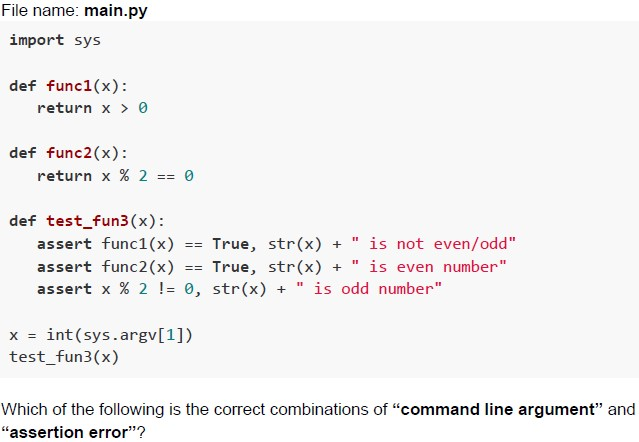 Consider the following Python code snippet.
Consider the following Python code snippet. Text of the picture (copyable)
File name: main.py
```python
import sys

def func1(x):
    return x > 0

def func2(x):
    return x % 2 == 0

def test_fun3(x):
    assert func1(x) == True, str(x) + " is not even/odd"
    assert func2(x) == True, str(x) + " is even number"
    assert x % 2 != 0, str(x) + " is odd number"

x = int(sys.argv[1])
test_fun3(x)
```

Which of the following is the correct combinations of “command line argument” and “assertion error”?
text
Command: python main.py 9
AssertionError: 9 is even number
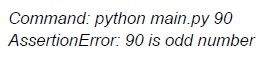
text
Command: python main.py 90
AssertionError: 90 is odd number

text
```
Command: python main.py 0
AssertionError: 0 is not even/odd
```
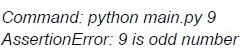
text
Command: python main.py 9
AssertionError: 9 is odd number
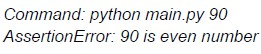
text
Command: python main.py 90
AssertionError: 90 is even number
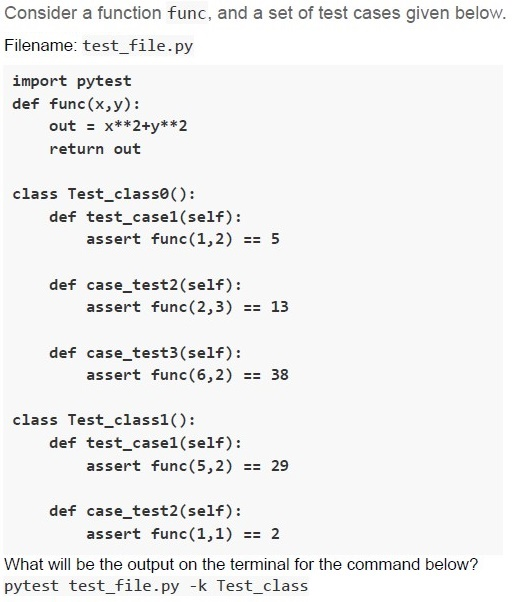
Text of the picture (copyable)
Consider a function func, and a set of test cases given below.
Filename: test_file.py

```python
import pytest
def func(x,y):
    out = x**2+y**2
    return out

class Test_class0():
    def test_case1(self):
        assert func(1,2) == 5

    def case_test2(self):
        assert func(2,3) == 13

    def case_test3(self):
        assert func(6,2) == 38

class Test_class1():
    def test_case1(self):
        assert func(5,2) == 29

    def case_test2(self):
        assert func(1,1) == 2
```

What will be the output on the terminal for the command below?
pytest test_file.py -k Test_class
text
```
== 1 failed, 4 passed in 0.17s ===
```

text
```
== 2 passed, 3 deselected in 0.17s ===
```

text
```text
== 2 passed in 0.07s ===
```

text
```
== 3 failed, 2 passed in 0.17s ===
```
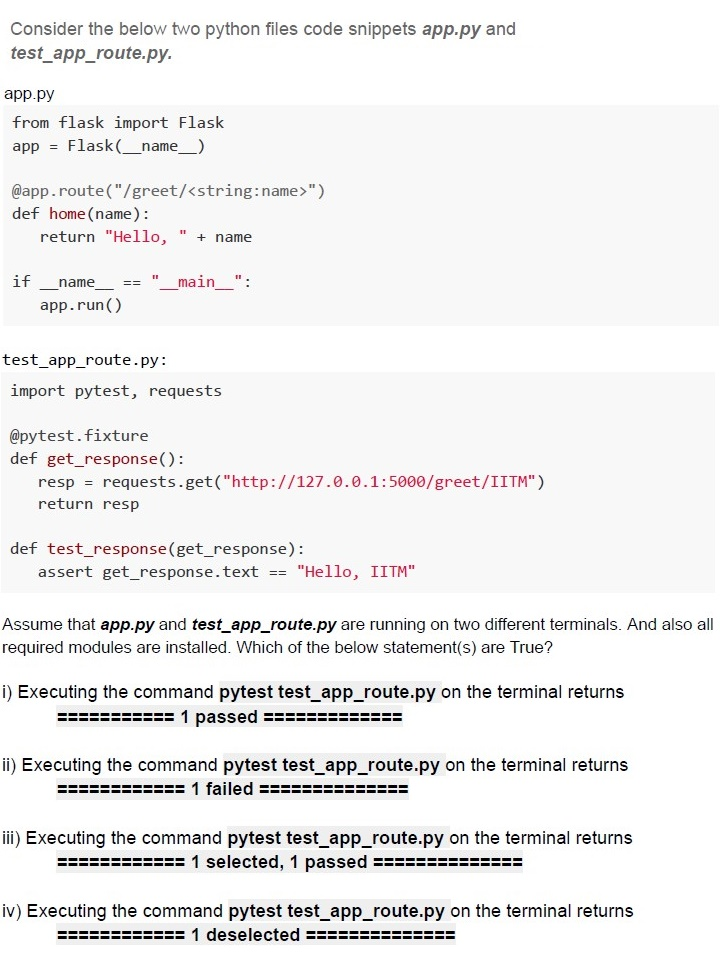
Text of the picture (copyable)
Consider the below two python files code snippets *app.py* and *test_app_route.py*.

**app.py**
```python
from flask import Flask
app = Flask(__name__)

@app.route("/greet/<string:name>")
def home(name):
    return "Hello, " + name

if __name__ == "__main__":
    app.run()
```

**test_app_route.py:**
```python
import pytest, requests

@pytest.fixture
def get_response():
    resp = requests.get("http://127.0.0.1:5000/greet/IITM")
    return resp

def test_response(get_response):
    assert get_response.text == "Hello, IITM"
```

Assume that *app.py* and *test_app_route.py* are running on two different terminals. And also all required modules are installed. Which of the below statement(s) are True?

i) Executing the command `pytest test_app_route.py` on the terminal returns
`========== 1 passed ==========`

ii) Executing the command `pytest test_app_route.py` on the terminal returns
`========== 1 failed ==========`

iii) Executing the command `pytest test_app_route.py` on the terminal returns
`========== 1 selected, 1 passed ==========`

iv) Executing the command `pytest test_app_route.py` on the terminal returns
`========== 1 deselected ==========`- Only statement i is correct
- Only statement ii is correct
- Statements i and iii are correct
- Statements ii and iv are correct
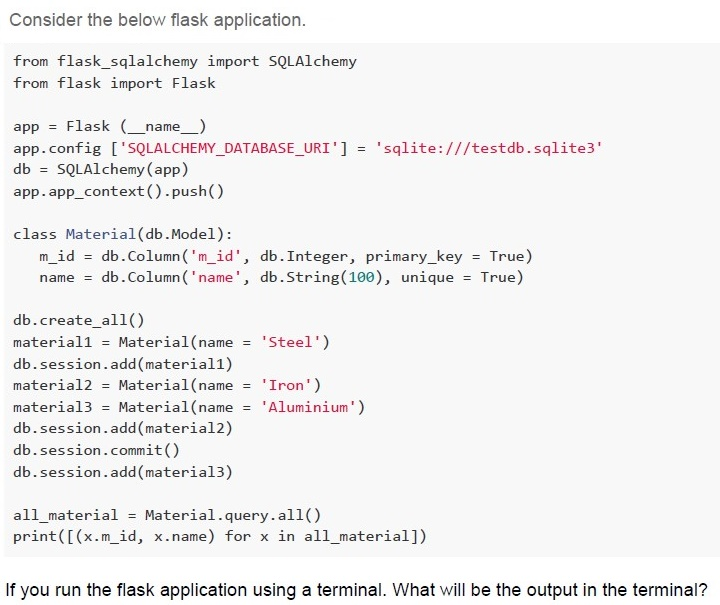
Text of the picture (copyable)
Consider the below flask application.

```python
from flask_sqlalchemy import SQLAlchemy
from flask import Flask

app = Flask (__name__)
app.config ['SQLALCHEMY_DATABASE_URI'] = 'sqlite:///testdb.sqlite3'
db = SQLAlchemy(app)
app.app_context().push()

class Material(db.Model):
    m_id = db.Column('m_id', db.Integer, primary_key = True)
    name = db.Column('name', db.String(100), unique = True)

db.create_all()
material1 = Material(name = 'Steel')
db.session.add(material1)
material2 = Material(name = 'Iron')
material3 = Material(name = 'Aluminium')
db.session.add(material2)
db.session.commit()
db.session.add(material3)

all_material = Material.query.all()
print([(x.m_id, x.name) for x in all_material])
```

If you run the flask application using a terminal. What will be the output in the terminal?
text
```
[(1, 'Steel'), (2, 'Iron')] will be displayed in the terminal and two records will be added in the "testdb" database.
```

text
```
[(1, 'Steel'), (2, 'Iron'), (3, 'Aluminium')] will be displayed in the terminal
and three records will be added in the "testdb" database.
```

text
```
[(1, 'Steel'), (2, 'Iron'), (3, 'Aluminium')] will be displayed in the terminal
and two records will be added in the "testdb" database.
```

text
```
[(1, 'Steel', 2, 'Iron', 3, 'Aluminium')] will be displayed in the terminal and
two records will be added in the "testdb" database.
```
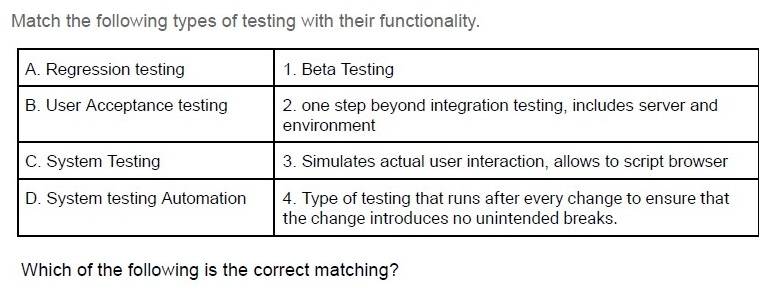
Text of the picture (copyable)
Match the following types of testing with their functionality.

| | |
|---|---|
| A. Regression testing | 1. Beta Testing |
| B. User Acceptance testing | 2. one step beyond integration testing, includes server and environment |
| C. System Testing | 3. Simulates actual user interaction, allows to script browser |
| D. System testing Automation | 4. Type of testing that runs after every change to ensure that the change introduces no unintended breaks. |

Which of the following is the correct matching?
- A → 1, B → 2, C → 3, D → 4
- A → 4, B → 3, C → 2, D → 1
- A → 4, B → 1, C → 2, D → 3
- A → 3, B → 2, C → 1, D → 4
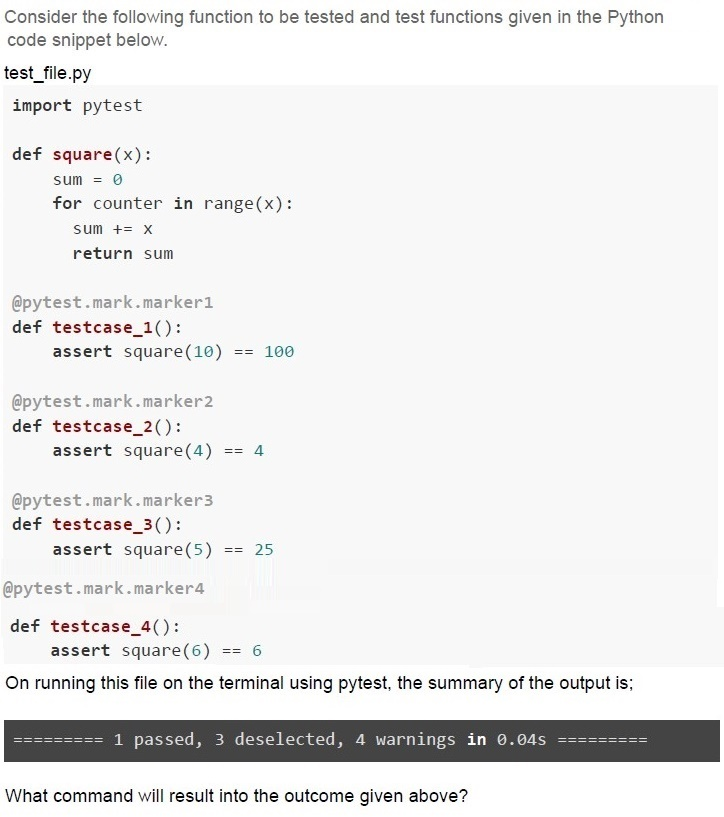
Text of the picture (copyable)
Consider the following function to be tested and test functions given in the Python code snippet below.

test_file.py
```python
import pytest

def square(x):
    sum = 0
    for counter in range(x):
        sum += x
    return sum

@pytest.mark.marker1
def testcase_1():
    assert square(10) == 100

@pytest.mark.marker2
def testcase_2():
    assert square(4) == 4

@pytest.mark.marker3
def testcase_3():
    assert square(5) == 25

@pytest.mark.marker4
def testcase_4():
    assert square(6) == 6
```

On running this file on the terminal using pytest, the summary of the output is;

`========= 1 passed, 3 deselected, 4 warnings in 0.04s =========`

What command will result into the outcome given above?
text
```
pytest test_file.py -m marker4
```

text
```
pytest test_file.py -m marker1
```

text
```
pytest test_file.py -m marker2
```

text
```
pytest test_file.py -m marker3
```
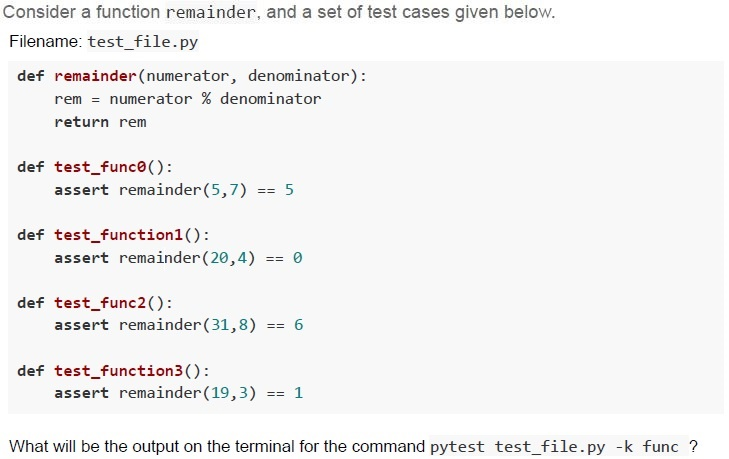
Text of the picture (copyable)
Consider a function remainder, and a set of test cases given below.
Filename: test_file.py

```python
def remainder(numerator, denominator):
    rem = numerator % denominator
    return rem

def test_func0():
    assert remainder(5,7) == 5

def test_function1():
    assert remainder(20,4) == 0

def test_func2():
    assert remainder(31,8) == 6

def test_function3():
    assert remainder(19,3) == 1
```

What will be the output on the terminal for the command `pytest test_file.py -k func`?
text
```text
========= 1 failed, 1 passed, 2 deselected in 0.41s =========
```

text
```
=========== 3 passed, 1 deselected in 0.41s ============
```

text
```
============================= 1 failed, 3 passed in 0.41s =============================
```

text
```text
========== 2 failed, 2 deselected in 0.41s ==========
```
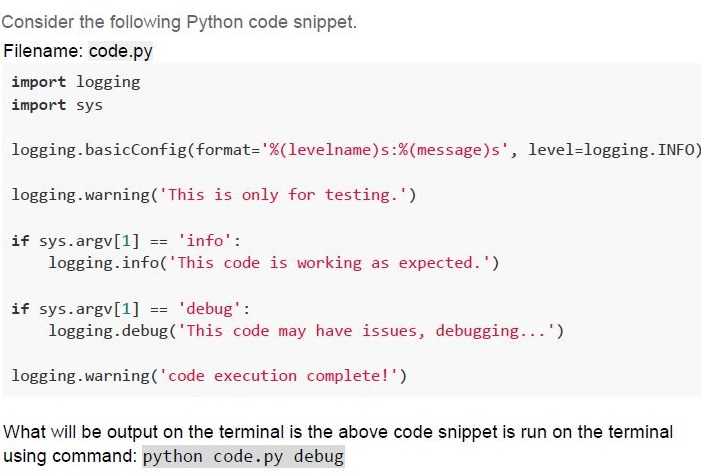
Text of the picture (copyable)
Consider the following Python code snippet.
Filename: code.py

```python
import logging
import sys

logging.basicConfig(format='%(levelname)s:%(message)s', level=logging.INFO)

logging.warning('This is only for testing.')

if sys.argv[1] == 'info':
    logging.info('This code is working as expected.')

if sys.argv[1] == 'debug':
    logging.debug('This code may have issues, debugging...')

logging.warning('code execution complete!')
```

What will be output on the terminal is the above code snippet is run on the terminal using command: `python code.py debug`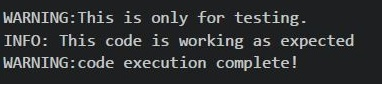
text
```
WARNING:This is only for testing.
INFO: This code is working as expected
WARNING:code execution complete!
```

text
```
WARNING:This is only for testing.
DEBUG: This code may have issues, debugging...
WARNING:code execution complete!
```

text
```
WARNING:This is only for testing.
WARNING:code execution complete!
```

text
```
INFO: This code is working as expected
DEBUG: This code may have issues, debugging...
```
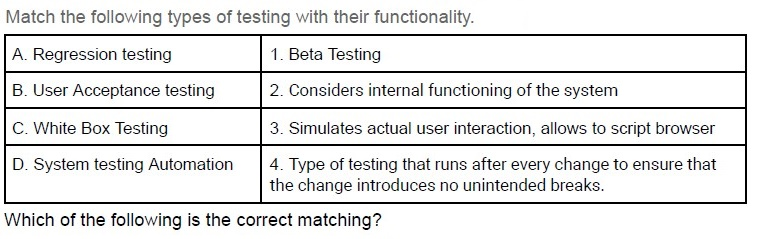
Text of the picture (copyable)
Match the following types of testing with their functionality.

| | |
|---|---|
| A. Regression testing | 1. Beta Testing |
| B. User Acceptance testing | 2. Considers internal functioning of the system |
| C. White Box Testing | 3. Simulates actual user interaction, allows to script browser |
| D. System testing Automation | 4. Type of testing that runs after every change to ensure that the change introduces no unintended breaks. |

Which of the following is the correct matching?

text
A → 1, B → 2, C → 3, D → 4

text
A -> 4, B -> 3, C -> 2, D -> 1

text
A → 4, B → 1, C → 2, D → 3

text
A → 3, B → 2, C → 1, D → 4
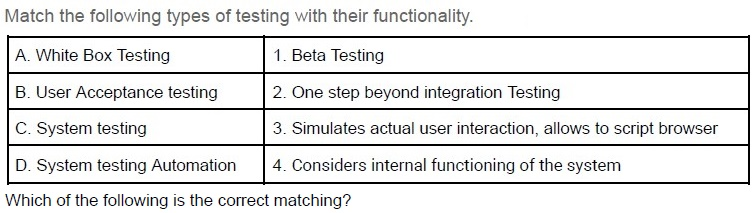
Text of the picture (copyable)
Match the following types of testing with their functionality.

| | |
|---|---|
| A. White Box Testing | 1. Beta Testing |
| B. User Acceptance testing | 2. One step beyond integration Testing |
| C. System testing | 3. Simulates actual user interaction, allows to script browser |
| D. System testing Automation | 4. Considers internal functioning of the system |

Which of the following is the correct matching?

text
A → 1, B → 2, C → 3, D → 4

text
A → 4, B → 3, C → 2, D → 1

text
A -> 4, B -> 1, C -> 2, D -> 3

text
A → 3, B → 2, C → 1, D → 4
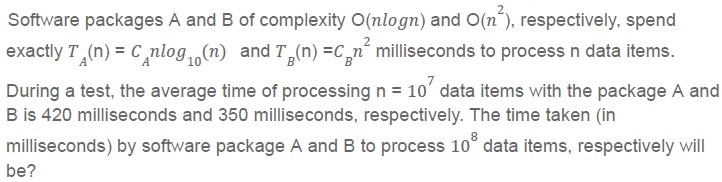
Text of the picture (copyable)
Software packages A and B of complexity O(nlogn) and O(n^2), respectively, spend exactly T_A(n) = C_A nlog_10(n) and T_B(n) = C_B n^2 milliseconds to process n data items.

During a test, the average time of processing n = 10^7 data items with the package A and B is 420 milliseconds and 350 milliseconds, respectively. The time taken (in milliseconds) by software package A and B to process 10^8 data items, respectively will be?
- 48 and 35
- 480 and 350
- 480 and 35000
- 48000 and 35000
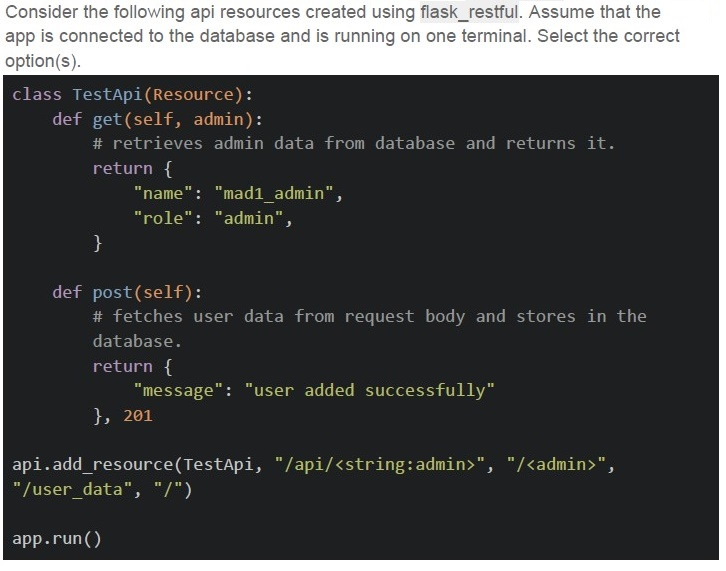
Text of the picture (copyable)
Consider the following api resources created using flask_restful. Assume that the app is connected to the database and is running on one terminal. Select the correct option(s).

```python
class TestApi(Resource):
    def get(self, admin):
        # retrieves admin data from database and returns it.
        return {
            "name": "mad1_admin",
            "role": "admin",
        }

    def post(self):
        # fetches user data from request body and stores in the
        # database.
        return {
            "message": "user added successfully"
        }, 201

api.add_resource(TestApi, "/api/<string:admin>", "/<admin>",
                 "/user_data", "/")

app.run()
```
text
The base URL for the app is mapped with GET HTTP method.
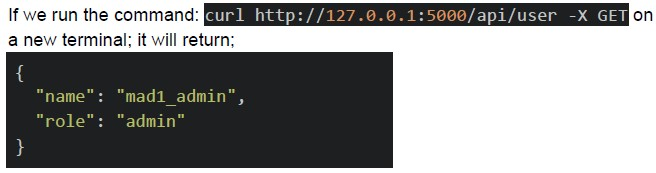
text
If we run the command: `curl http://127.0.0.1:5000/api/user -X GET` on a new terminal; it will return;

```json
{
  "name": "mad1_admin",
  "role": "admin"
}
```
text
The endpoint, `/admin` is mapped with GET HTTP method.
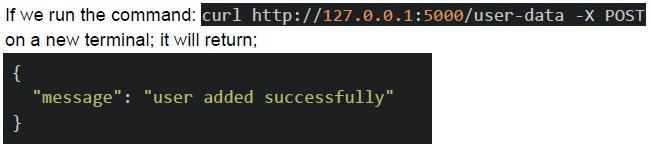
text
If we run the command: `curl http://127.0.0.1:5000/user-data -X POST`
on a new terminal; it will return;

```json
{
  "message": "user added successfully"
}
```
Consider the statements given below and choose the correct option. Statement 1: 100% statement coverage automatically implies 100% branch coverage. Statement 2: 100% statement coverage automatically implies 100% condition coverage.
- Both statement 1 and 2 are correct.
- Both statement 1 and 2 are incorrect.
- Statement 1 is correct but, statement 2 is incorrect.
- Statement 2 is correct but, statement 1 is incorrect.
Consider the following function to be tested and test functions given in the Python code snippet below.
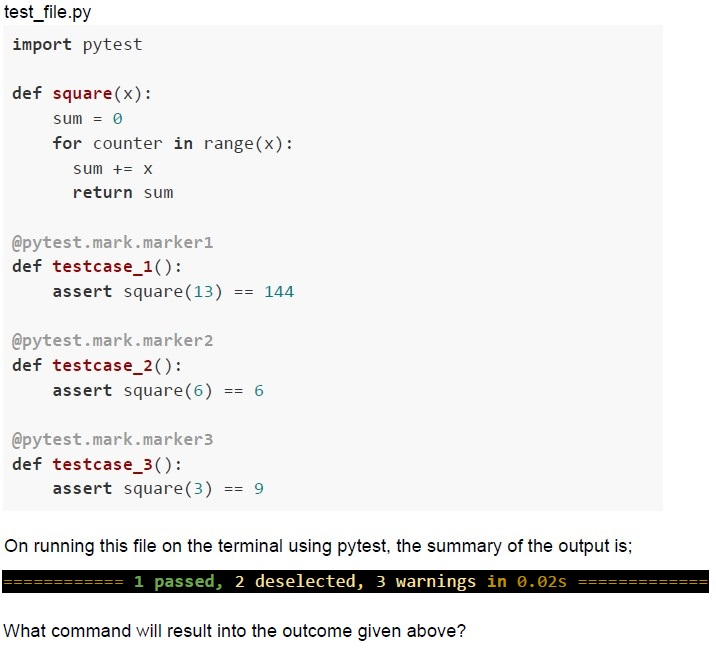 Consider the following function to be tested and test functions given in the Python code snippet below.
Consider the following function to be tested and test functions given in the Python code snippet below. Text of the picture (copyable)
test_file.py

```python
import pytest

def square(x):
    sum = 0
    for counter in range(x):
        sum += x
    return sum

@pytest.mark.marker1
def testcase_1():
    assert square(13) == 144

@pytest.mark.marker2
def testcase_2():
    assert square(6) == 6

@pytest.mark.marker3
def testcase_3():
    assert square(3) == 9
```

On running this file on the terminal using pytest, the summary of the output is;
============================= 1 passed, 2 deselected, 3 warnings in 0.02s =============================

What command will result into the outcome given above?
text
```
pytest test_file.py -k marker1
```

text
```
pytest test_file.py -m marker1
```

text
```
pytest test_file.py -m marker3
```

text
```
pytest test_file.py -m marker2
```
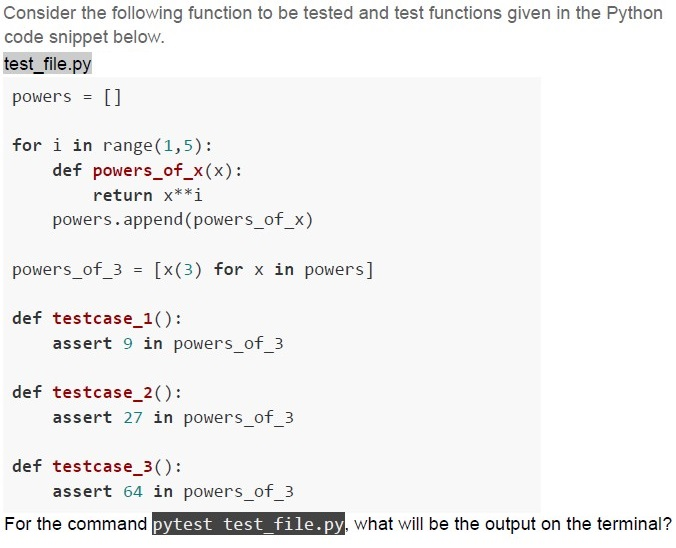
Text of the picture (copyable)
Consider the following function to be tested and test functions given in the Python code snippet below.

test_file.py

```python
powers = []

for i in range(1,5):
    def powers_of_x(x):
        return x**i
    powers.append(powers_of_x)

powers_of_3 = [x(3) for x in powers]

def testcase_1():
    assert 9 in powers_of_3

def testcase_2():
    assert 27 in powers_of_3

def testcase_3():
    assert 64 in powers_of_3
```

For the command `pytest test_file.py`, what will be the output on the terminal?
text
```
============================= 1 failed, 2 passed in 0.02s =============================
```


text
```
======================================== 3 failed in 0.02s ========================================
```

text
```
============================= 2 failed, 1 passed in 0.02s =============================
```
Consider the following two code snippets.
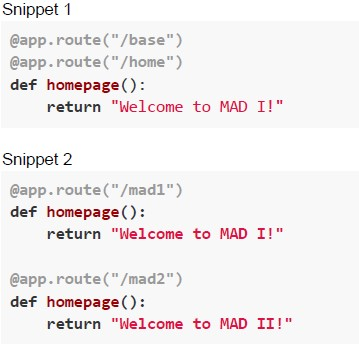 Consider the following two code snippets. Which of the following is/are correct options if the above snippets are run as view functions of a flask application ?
Consider the following two code snippets. Which of the following is/are correct options if the above snippets are run as view functions of a flask application ?Text of the picture (copyable)
Snippet 1

```python
@app.route("/base")
@app.route("/home")
def homepage():
    return "Welcome to MAD I!"
```

Snippet 2

```python
@app.route("/mad1")
def homepage():
    return "Welcome to MAD I!"

@app.route("/mad2")
def homepage():
    return "Welcome to MAD II!"
```- Snippet 1 is valid, but Snippet 2 is invalid.
- Snippet 2 is valid, but Snippet 1 is invalid.
- Snippet 1 will run successfully, while Snippet 2 will raise an AssertionError.
- Snippet 2 will run successfully, while Snippet 1 will raise an AssertionError.
Consider the statements given below and choose the correct option. Statement 1: 100% condition coverage automatically implies 100% branch coverage. Statement 2: 100% branch coverage automatically implies 100% condition coverage.
- Both statement 1 and 2 are correct.
- Both statement 1 and 2 are incorrect.
- Statement 1 is correct but, statement 2 is incorrect.
- Statement 2 is correct but, statement 1 is incorrect.
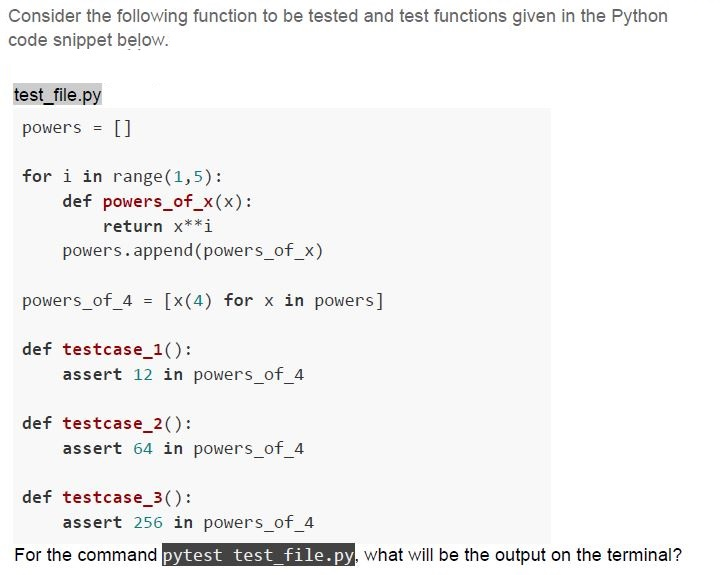
Text of the picture (copyable)
Consider the following function to be tested and test functions given in the Python code snippet below.

```python
# test_file.py
powers = []

for i in range(1,5):
    def powers_of_x(x):
        return x**i
    powers.append(powers_of_x)

powers_of_4 = [x(4) for x in powers]

def testcase_1():
    assert 12 in powers_of_4

def testcase_2():
    assert 64 in powers_of_4

def testcase_3():
    assert 256 in powers_of_4
```

For the command `pytest test_file.py`, what will be the output on the terminal?
text
```
======== 1 failed, 2 passed in 0.02s ========
```

text
======================================== 3 passed in 0.02s ========================================

text
========== 3 Failed in 0.02s ==========

text
```
========================= 2 failed, 1 passed in 0.02s =========================
```
Consider the following HTML Document.
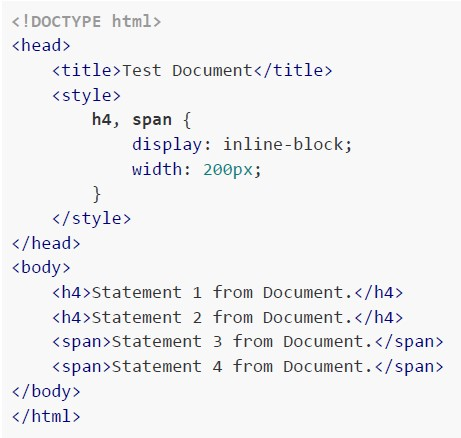 Consider the following HTML Document. How will the browser render the HTML document given above?
Consider the following HTML Document. How will the browser render the HTML document given above?Text of the picture (copyable)
```html
<!DOCTYPE html>
<html>
<head>
    <title>Test Document</title>
    <style>
        h4, span {
            display: inline-block;
            width: 200px;
        }
    </style>
</head>
<body>
    <h4>Statement 1 from Document.</h4>
    <h4>Statement 2 from Document.</h4>
    <span>Statement 3 from Document.</span>
    <span>Statement 4 from Document.</span>
</body>
</html>
```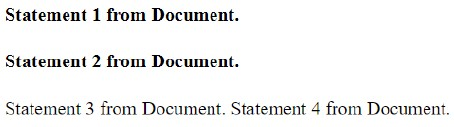
text
Statement 1 from Document.
Statement 2 from Document.
Statement 3 from Document. Statement 4 from Document.
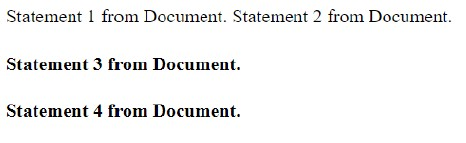
text
Statement 1 from Document. Statement 2 from Document.

**Statement 3 from Document.**

**Statement 4 from Document.**
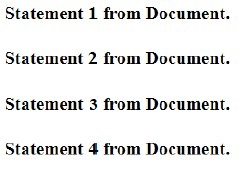
text
Statement 1 from Document.

Statement 2 from Document.

Statement 3 from Document.

Statement 4 from Document.

text
Statement 1 from Document. Statement 2 from Document. Statement 3 from Document. Statement 4 from Document.
Consider the code below and match the conditions in Column A with respect to the coverage types in Column B.
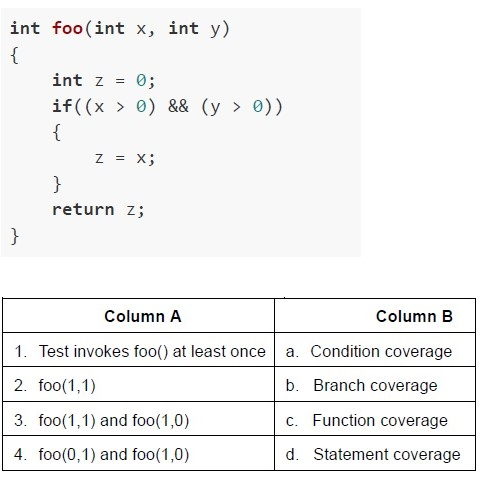 Consider the code below and match the conditions in Column A with respect to the coverage types in Column B.
Consider the code below and match the conditions in Column A with respect to the coverage types in Column B. Text of the picture (copyable)
```c
int foo(int x, int y)
{
    int z = 0;
    if((x > 0) && (y > 0))
    {
        z = x;
    }
    return z;
}
```

| Column A | Column B |
|---|---|
| 1. Test invokes foo() at least once | a. Condition coverage |
| 2. foo(1,1) | b. Branch coverage |
| 3. foo(1,1) and foo(1,0) | c. Function coverage |
| 4. foo(0,1) and foo(1,0) | d. Statement coverage |- 1-d, 2-a, 3-b, 4-c
- 1-c, 2-d, 3-a, 4-b
- 1-c, 2-d, 3-b, 4-a
- 1-b, 2-d, 3-c, 4-a
Match the following types of testing with their functionality.
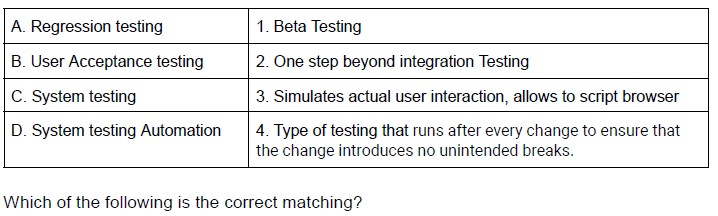 Match the following types of testing with their functionality.
Match the following types of testing with their functionality. Text of the picture (copyable)
| A. Regression testing | 1. Beta Testing |
|---|---|
| B. User Acceptance testing | 2. One step beyond integration Testing |
| C. System testing | 3. Simulates actual user interaction, allows to script browser |
| D. System testing Automation | 4. Type of testing that runs after every change to ensure that the change introduces no unintended breaks. |

Which of the following is the correct matching?
- A → 1, B → 2, C → 3, D → 4
- A → 4, B → 3, C → 2, D → 1
- A → 4, B → 1, C → 2, D → 3
- A → 3, B → 2, C → 1, D → 4
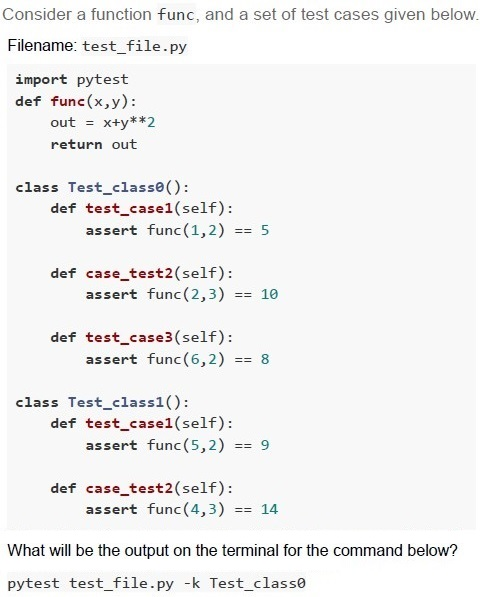
Text of the picture (copyable)
Consider a function func, and a set of test cases given below.
Filename: test_file.py

```python
import pytest
def func(x,y):
    out = x+y**2
    return out

class Test_class0():
    def test_case1(self):
        assert func(1,2) == 5

    def case_test2(self):
        assert func(2,3) == 10

    def test_case3(self):
        assert func(6,2) == 8

class Test_class1():
    def test_case1(self):
        assert func(5,2) == 9

    def case_test2(self):
        assert func(4,3) == 14
```

What will be the output on the terminal for the command below?
`pytest test_file.py -k Test_class0`
text
```
== 2 failed, 1 passed in 0.17s ===
```

text
```text
== 1 failed, 1 passed, 1 deselected in 0.17s ===
```

text
```
== 2 failed, 1 deselected in 0.17s ===
```

text
```
== 1 failed, 2 passed in 0.17s ====
```
Match the following types of testing with their functionality.
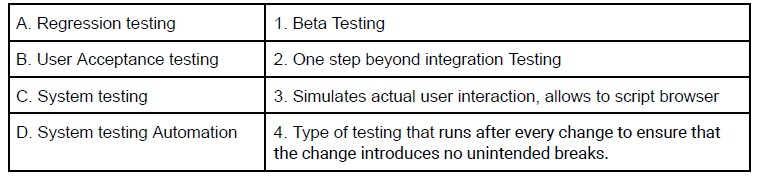 Match the following types of testing with their functionality. Which of the following is the correct matching?
Match the following types of testing with their functionality. Which of the following is the correct matching?Text of the picture (copyable)
| A. Regression testing | 1. Beta Testing |
|---|---|
| B. User Acceptance testing | 2. One step beyond integration Testing |
| C. System testing | 3. Simulates actual user interaction, allows to script browser |
| D. System testing Automation | 4. Type of testing that runs after every change to ensure that the change introduces no unintended breaks. |
- A → 1, B → 2, C → 3, D → 4
- A → 4, B → 3, C → 2, D → 1
- A → 3, B → 2, C → 1, D → 4
- A → 4, B → 1, C → 2, D → 3
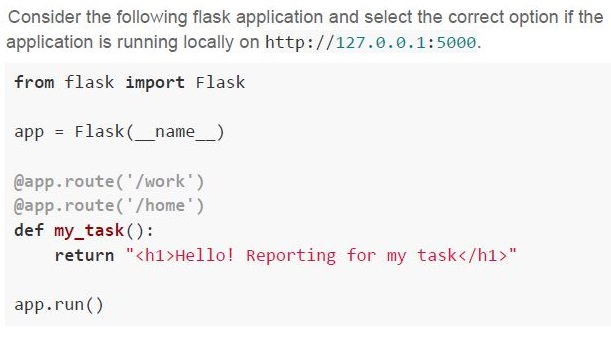
Text of the picture (copyable)
Consider the following flask application and select the correct option if the application is running locally on http://127.0.0.1:5000.

```python
from flask import Flask

app = Flask(__name__)

@app.route('/work')
@app.route('/home')
def my_task():
    return "<h1>Hello! Reporting for my task</h1>"

app.run()
```
text
The application will return 200 OK status code for /home endpoint only

text
The application will return 200 OK status code for /work endpoint only

text
The application will return 200 OK status code for both the endpoints

text
The application will throw an AssertionError for both the endpoints

Text of the picture (copyable)
Which of the following statements about OpenAPI Specification (OAS) is true?
- OAS is a programming language used for building APIs.
- OAS is a way to describe interfaces for building RESTful APIs.
- OAS is a tool used for testing the performance of APIs.
- OAS is a software library used for authenticating API requests.
Consider the following code snippet.
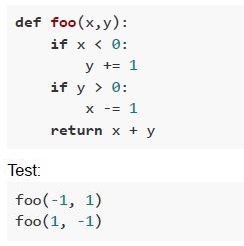 Consider the following code snippet. Which of the following is correct regarding the coverage of the test?
Consider the following code snippet. Which of the following is correct regarding the coverage of the test?Text of the picture (copyable)
```python
def foo(x,y):
    if x < 0:
        y += 1
    if y > 0:
        x -= 1
    return x + y
```

Test:
```
foo(-1, 1)
foo(1, -1)
```- 100% statement coverage
- 100% function coverage
- 100% branch coverage
- 100% condition coverage
Consider the following statements regarding Continuous Integration and Continuous Deployment and select the correct option. Statement 1: As part of continuous integration, frequent, isolated changes are tested and reported on as soon as they are added to a larger code base. Statement 2: When a change is made to an application, it is automatically deployed into production using a continuous deployment strategy.
- Statement 1 and statement 2 both are correct.
- Statement 1 and statement 2 both are incorrect.
- Statement 1 is correct and statement 2 is incorrect.
- Statement 1 is incorrect and statement 2 is correct.
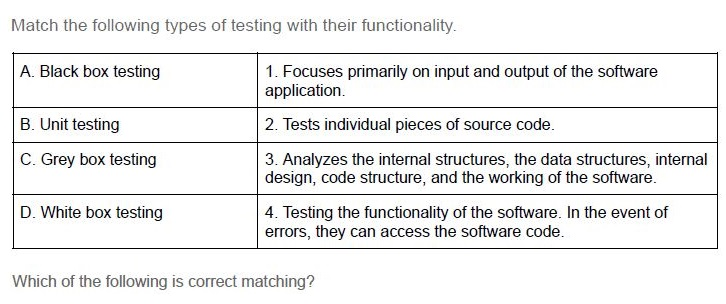
Text of the picture (copyable)
Match the following types of testing with their functionality.

| | |
|---|---|
| A. Black box testing | 1. Focuses primarily on input and output of the software application. |
| B. Unit testing | 2. Tests individual pieces of source code. |
| C. Grey box testing | 3. Analyzes the internal structures, the data structures, internal design, code structure, and the working of the software. |
| D. White box testing | 4. Testing the functionality of the software. In the event of errors, they can access the software code. |

Which of the following is correct matching?
- A → 1, B → 2, C → 4, D → 3
- A → 4, B → 3, C → 2, D → 1
- A → 4, B → 1, C → 2, D → 3
- A → 3, B → 2, C → 1, D → 4
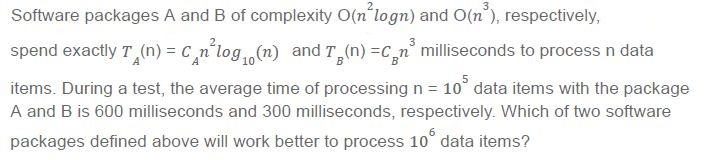
Text of the picture (copyable)
Software packages A and B of complexity O(n²logn) and O(n³), respectively,
spend exactly T_A(n) = C_A n²log₁₀(n) and T_B(n) = C_B n³ milliseconds to process n data
items. During a test, the average time of processing n = 10⁵ data items with the package
A and B is 600 milliseconds and 300 milliseconds, respectively. Which of two software
packages defined above will work better to process 10⁶ data items?
- Software package A
- Software package B
- Both Software packages A and B will take same time to process 106 items
- Both Software packages A and B will take infinitely long time to process 106items
If the given python program is executed using pytest, then identify the status of the test code.
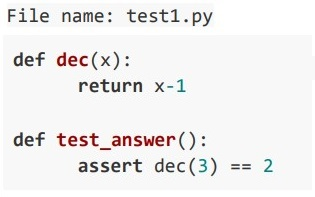 If the given python program is executed using pytest, then identify the status of the test code.
If the given python program is executed using pytest, then identify the status of the test code. Text of the picture (copyable)
File name: test1.py

```python
def dec(x):
    return x-1

def test_answer():
    assert dec(3) == 2
```- passed test1.py test_answer - assert 2 == 3
- 2 Failed
- 1 passed
- Failed test1.py test_answer - assert 2 == 3
Read the following statements carefully and mark the correct answer: Statement 1: Continuous integration is the practice of automating the integration of code changes from multiple contributors into a single software project Statement 2: Continuous Delivery refers to automated delivery of “release package” on each successful test
- Both statements 1 and 2 are correct
- Both statements 1 and 2 are incorrect.
- Statement 1 is correct, but statement 2 is incorrect.
- Statement 2 is correct, but statement 1 is incorrect.
If the given python program is executed using pytest, then identify the status of the test code. File name: test1.py
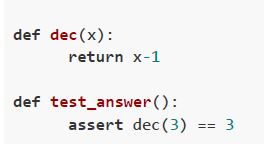 If the given python program is executed using pytest, then identify the status of the test code. File name: test1.py
If the given python program is executed using pytest, then identify the status of the test code. File name: test1.py Text of the picture (copyable)
```python
def dec(x):
    return x-1

def test_answer():
    assert dec(3) == 3
```- passed test1.py test_answer - assert 2 == 3
- 2 Failed
- 1 passed
- Failed test1.py test_answer - assert 2 == 3
How will the browser render the output of the following Python code snippet?
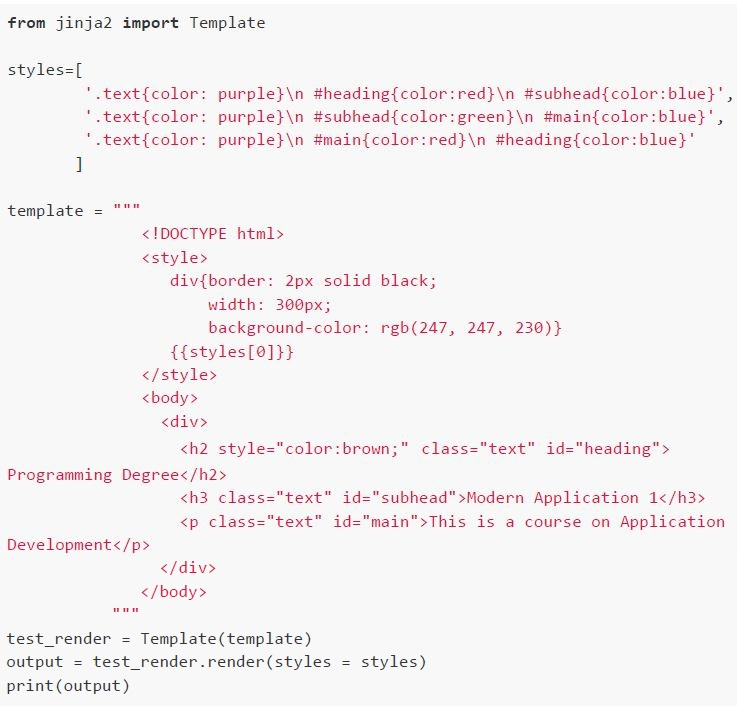 How will the browser render the output of the following Python code snippet?
How will the browser render the output of the following Python code snippet? Text of the picture (copyable)
```python
from jinja2 import Template

styles=[
    '.text{color: purple}\n #heading{color:red}\n #subhead{color:blue}',
    '.text{color: purple}\n #subhead{color:green}\n #main{color:blue}',
    '.text{color: purple}\n #main{color:red}\n #heading{color:blue}'
]

template = """
<!DOCTYPE html>
<style>
    div{border: 2px solid black;
        width: 300px;
        background-color: rgb(247, 247, 230)}
    {{styles[0]}}
</style>
<body>
    <div>
        <h2 style="color:brown;" class="text" id="heading">
Programming Degree</h2>
        <h3 class="text" id="subhead">Modern Application 1</h3>
        <p class="text" id="main">This is a course on Application
Development</p>
    </div>
</body>
"""

test_render = Template(template)
output = test_render.render(styles = styles)
print(output)
```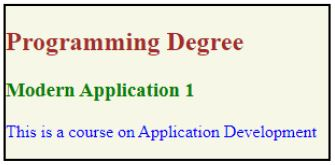
text
Programming Degree
Modern Application 1
This is a course on Application Development
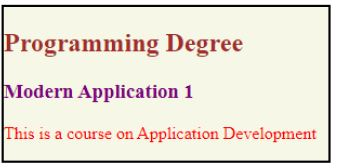
text
Programming Degree
Modern Application 1
This is a course on Application Development
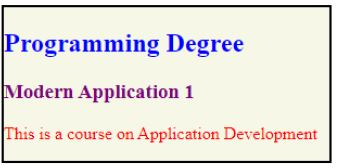
text
Programming Degree
Modern Application 1
This is a course on Application Development
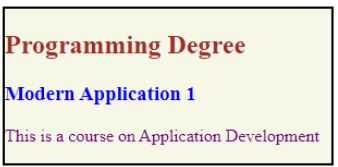
text
Programming Degree
Modern Application 1
This is a course on Application Development
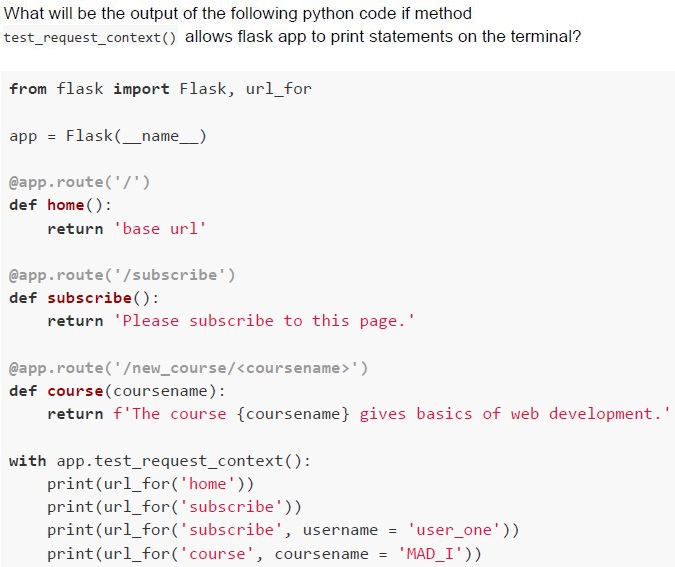
Text of the picture (copyable)
What will be the output of the following python code if method
test_request_context() allows flask app to print statements on the terminal?

```python
from flask import Flask, url_for

app = Flask(__name__)

@app.route('/')
def home():
    return 'base url'

@app.route('/subscribe')
def subscribe():
    return 'Please subscribe to this page.'

@app.route('/new_course/<coursename>')
def course(coursename):
    return f'The course {coursename} gives basics of web development.'

with app.test_request_context():
    print(url_for('home'))
    print(url_for('subscribe'))
    print(url_for('subscribe', username = 'user_one'))
    print(url_for('course', coursename = 'MAD_I'))
```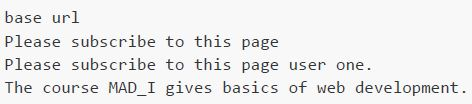
text
```
base url
Please subscribe to this page
Please subscribe to this page user one.
The course MAD_I gives basics of web development.
```
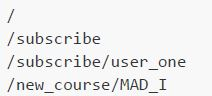
text
```
/
/subscribe
/subscribe/user_one
/new_course/MAD_I
```
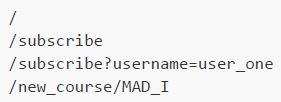
text
```
/
/subscribe
/subscribe?username=user_one
/new_course/MAD_I
```
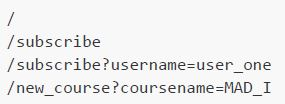
text
```
/
/subscribe
/subscribe?username=user_one
/new_course?coursename=MAD_I
```