Home / MAD2 / Week 12 / Real questions
MAD2 week 12 - real exam questions
34 questions pulled from past papers whose wording matches this week's topics, newest first, duplicates removed. Pick your answers, then press Check answers. Figures and answer keys are the originals.
Elapsed 00:00
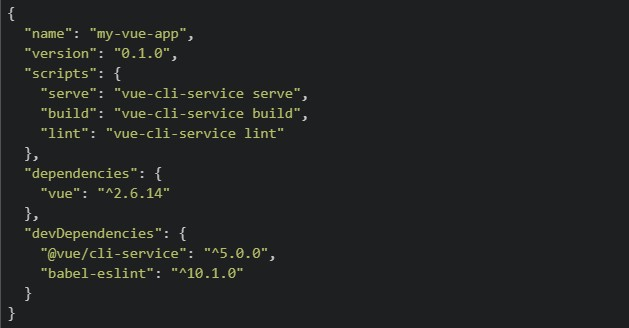
A developer has just created a new Vue 2 project using Vue CLI and the following package.json was generated. package.json
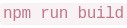
 The developer wants to view the app in the browser locally for development. They run the following command: bash:
  Which of the following best describes what happens and what the developer should have run instead?
The developer wants to view the app in the browser locally for development. They run the following command: bash: Which of the following best describes what happens and what the developer should have run instead?Text of the picture (copyable)
```json
{
  "name": "my-vue-app",
  "version": "0.1.0",
  "scripts": {
    "serve": "vue-cli-service serve",
    "build": "vue-cli-service build",
    "lint": "vue-cli-service lint"
  },
  "dependencies": {
    "vue": "^2.6.14"
  },
  "devDependencies": {
    "@vue/cli-service": "^5.0.0",
    "babel-eslint": "^10.1.0"
  }
}
```
```
npm run build
```- launches the app on
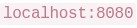 ; the developer should have run npm start to compile for production instead.
text
```
npm run build
```
```
localhost:8080
```
- and
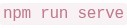 do the same thing — both launch the app at
 text
```
npm run build
```
```
npm run serve
```
```
localhost:8080
```
- is correct for local development; is only used for deploying to a server.
text
```
npm run build
```
```
npm run serve
```
- compiles and bundles the app for production into a
 folder — it does not start a local server. The developer should have run instead.
text
```
npm run build
```
/dist
```
npm run serve
```
Pratham builds a Flask route that generates a PDF report and sends it to the user via email, all inside the route handler without using Celery. A tester notices that the browser takes about 12 seconds to respond, and during that time other users are unable to use the app normally. Which of the following correctly explain this behaviour and what Celery would change?
- Flask handles one request at a time per worker, so the long-running task blocks the entire process until it finishes.
- Other users' requests are queued and only served after the heavy task completes, making the app feel unresponsive.
- Using Celery's
 would make the task run faster by giving it more CPU cores.
text
```
.delay()
```
- With Celery, Flask immediately returns a response to the user while the report generation and email sending happen inside a separate Celery worker process in the background.
A Vue frontend, a mobile app, and another backend service all call the same Flask API deployed on multiple servers. The team chooses JWT authentication. Which of the following statements are correct?
- Each request can carry the token, so any server can validate it without storing a per-user session in memory.
- JWT is API-friendly because clients can send it using the
 header.
text
```
Authorization: Bearer <token>
```
- In Flask-JWT-Extended,
 can read the identity stored in the token.
text
```
get_jwt_identity()
```
- Session-based authentication is usually easier to scale across multiple servers because no shared storage is needed. The team should have chosen this.
Read the following component carefully.
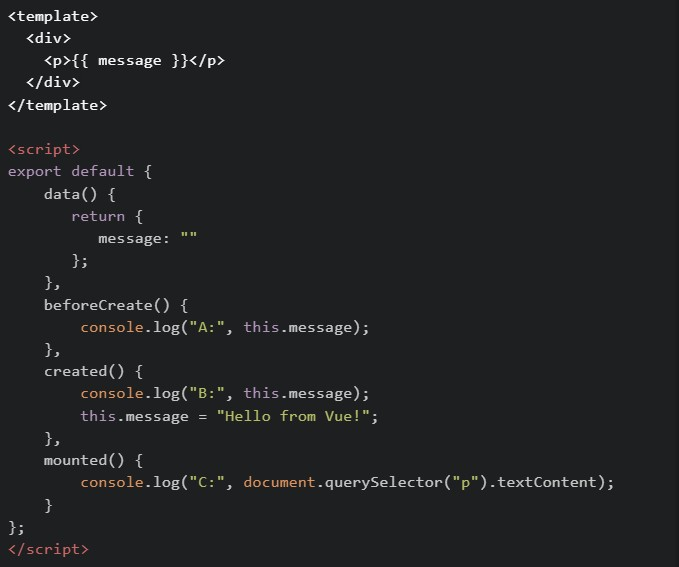 What will be logged in the console when this component first loads?
What will be logged in the console when this component first loads?Text of the picture (copyable)
```html
<template>
  <div>
    <p>{{ message }}</p>
  </div>
</template>

<script>
export default {
  data() {
    return {
      message: ""
    };
  },
  beforeCreate() {
    console.log("A:", this.message);
  },
  created() {
    console.log("B:", this.message);
    this.message = "Hello from Vue!";
  },
  mounted() {
    console.log("C:", document.querySelector("p").textContent);
  }
};
</script>
```
text
A: "" → B: Hello from Vue! → C: Hello from Vue!

text
A: undefined -> B: Hello from Vue! -> C: Hello from Vue!

text
A: undefined → B: "" → C: Hello from Vue!

text
A: undefined → B: undefined → C: Hello from Vue!

text
A: "" -> B: "" -> C: Hello from Vue!
You are building a cricket analytics app. The file battingStats.js contains the following exports:
 In another file app.js, which of the following import statements will correctly import both strikeRate and playerName ? ( Assume both files are in the same directory )
In another file app.js, which of the following import statements will correctly import both strikeRate and playerName ? ( Assume both files are in the same directory )Text of the picture (copyable)
```javascript
export const strikeRate = (runs, balls) => {
  return (runs / balls) * 100;
};

export const playerName = "Virat Kohli";
```
text
```javascript
import strikeRate, playerName from "./battingStats.js";
```

text
```javascript
import { strikeRate, playerName } from "./battingStats.js";
```
text
```javascript
import * as stats from "./battingStats.js";
```

text
```javascript
require("./battingStats.js");
```
Hamza is working on a project using Git and performs the following operations: Creates a new branch and switches to it1. Stages changes for commit2. Commits changes with a message3. Pushes the branch to a remote repository4. Which of the following commands are correctly used for these operations?

text
```
git checkout -b feature-branch
```

text
```
git add .
```

text
```
git commit -m "Initial commit"
```

text
```
git push origin feature-branch
```

text
```
git branch feature-branch && git checkout main
```

text
```
git push feature-branch origin
```
Prerna and Swathy are using a web application built with Vue.js for the BS Degree program. When the page loads, the sidebar content appears instantly• However, when they click on an Assignments link, the main content takes noticeable time to load • A simplified version of the component is shown below:
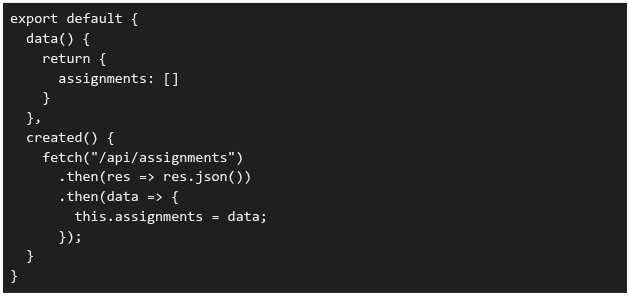 Which of the following statements correctly explain why the Assignments page takes time to load?
Which of the following statements correctly explain why the Assignments page takes time to load?Text of the picture (copyable)
```javascript
export default {
  data() {
    return {
      assignments: []
    }
  },
  created() {
    fetch("/api/assignments")
      .then(res => res.json())
      .then(data => {
        this.assignments = data;
      });
  }
}
```- The sidebar is likely part of a parent component and is already rendered before the API call
- The Assignments component waits for the API response before displaying data
- Vue blocks rendering of all components until API calls complete
- The delay is caused because data is fetched asynchronously after the component is created
Comprehension passage for this question
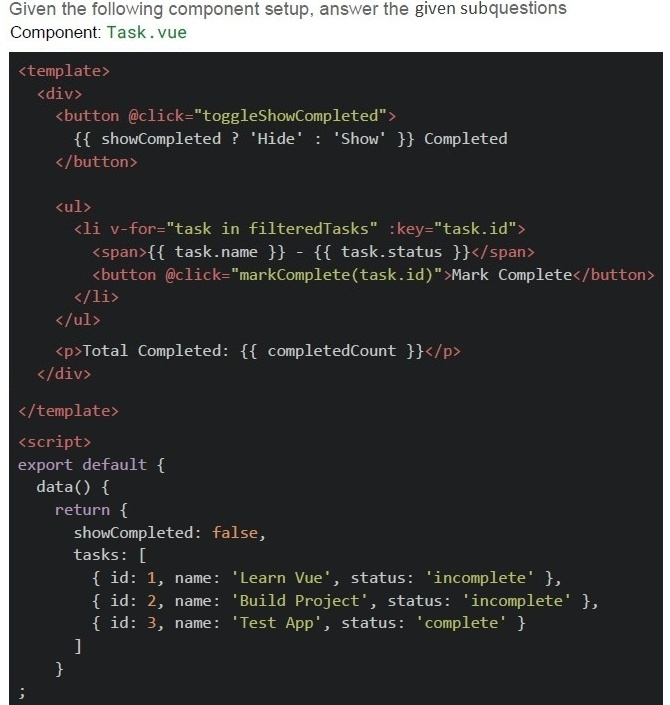 Scenario
1. The component is loaded. 2. User clicks "Mark Complete" for the task named Build Project.
3. User clicks "Show Completed" button again.
Scenario
1. The component is loaded. 2. User clicks "Mark Complete" for the task named Build Project.
3. User clicks "Show Completed" button again.
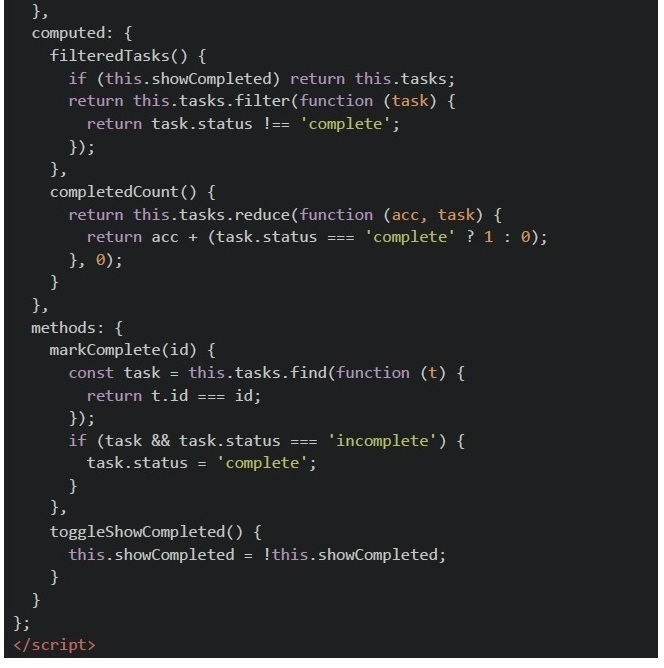
After step 2 (Mark Completed is clicked), what tasks are shown?
- Learn Vue
- Learn Vue, Build Project, Test App
- Test App only
- None
Comprehension passage for this question
Scenario
1. The component is loaded. 2. User clicks "Mark Complete" for the task named Build Project.
3. User clicks "Show Completed" button again.
After step 3 (Mark Complete is clicked on Build Project), how many completed tasks are reported in the UI?
- 1
- 2
- 3
- 0
Comprehension passage for this question
Answer the given Subquestions:Consider the following Vue Router configuration in a Vue 2 application:
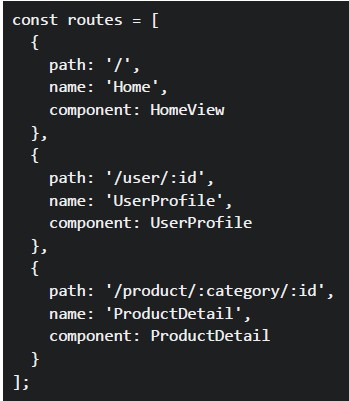 Consider the following Vue Router configuration in a Vue 2 application:
In a Vue component, you have these navigation methods:
Consider the following Vue Router configuration in a Vue 2 application:
In a Vue component, you have these navigation methods:
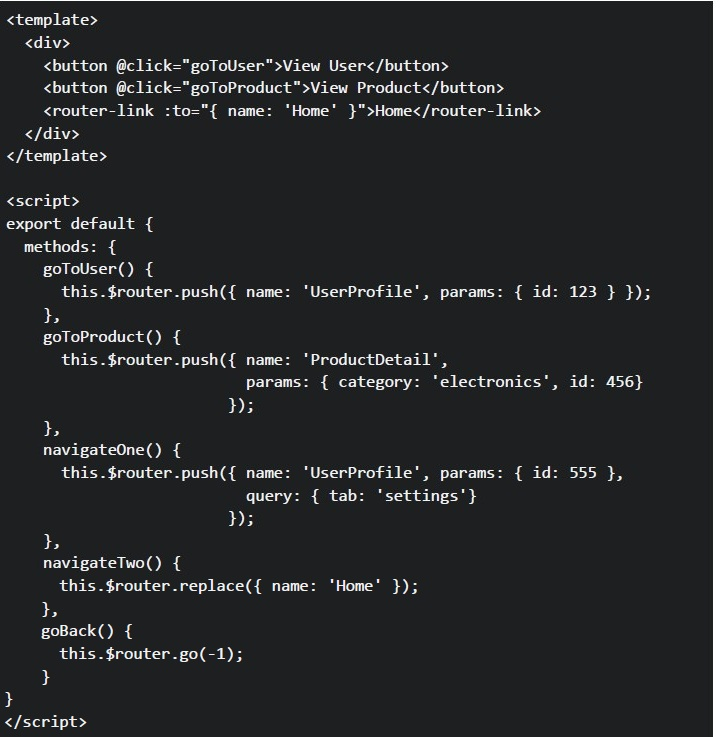 Consider the following Vue Router configuration in a Vue 2 application:
In a Vue component, you have these navigation methods: What URLs will be generated when the user clicks each navigation element?
Consider the following Vue Router configuration in a Vue 2 application:
In a Vue component, you have these navigation methods: What URLs will be generated when the user clicks each navigation element?
Consider the following Vue Router configuration in a Vue 2 application:
In a Vue component, you have these navigation methods:
Consider the following Vue Router configuration in a Vue 2 application:
In a Vue component, you have these navigation methods: What URLs will be generated when the user clicks each navigation element?Text of the picture (copyable)
```javascript
const routes = [
  {
    path: '/',
    name: 'Home',
    component: HomeView
  },
  {
    path: '/user/:id',
    name: 'UserProfile',
    component: UserProfile
  },
  {
    path: '/product/:category/:id',
    name: 'ProductDetail',
    component: ProductDetail
  }
];
```
```html
<template>
  <div>
    <button @click="goToUser">View User</button>
    <button @click="goToProduct">View Product</button>
    <router-link :to="{ name: 'Home' }">Home</router-link>
  </div>
</template>

<script>
export default {
  methods: {
    goToUser() {
      this.$router.push({ name: 'UserProfile', params: { id: 123 } });
    },
    goToProduct() {
      this.$router.push({ name: 'ProductDetail',
                           params: { category: 'electronics', id: 456}
                         });
    },
    navigateOne() {
      this.$router.push({ name: 'UserProfile', params: { id: 555 },
                           query: { tab: 'settings'}
                         });
    },
    navigateTwo() {
      this.$router.replace({ name: 'Home' });
    },
    goBack() {
      this.$router.go(-1);
    }
  }
}
</script>
```- User button: /user,Product button: /product, Home link: /home
- User button: /user/123,Product button: /product/electronics/456, Home link: /
- User button: /UserProfile/123,Product button: /ProductDetail/electronics/456, Home link: /Home
- User button: /user?id=123,Product button: /product?category=electronics&id=456, Home link: /
Text of the picture (copyable)
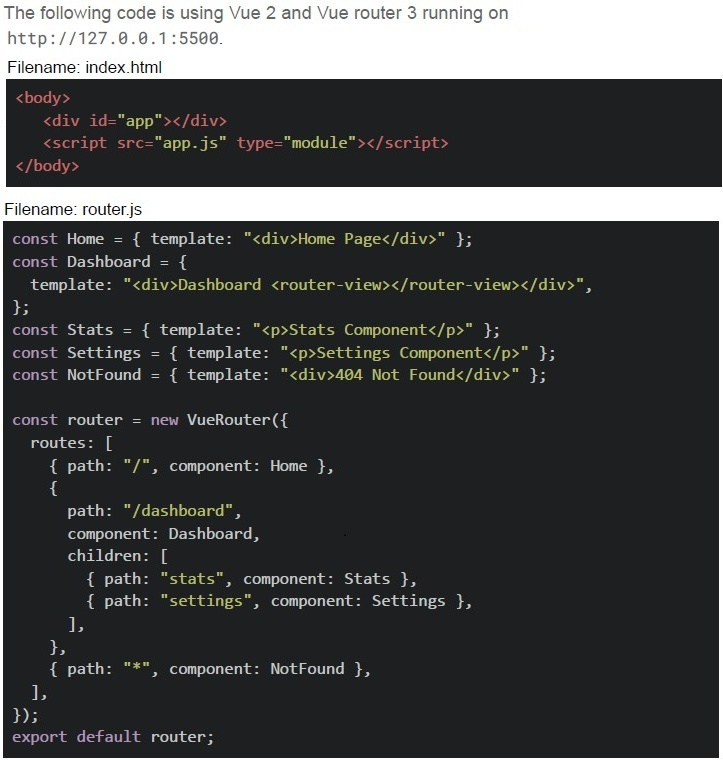
The following code is using Vue 2 and Vue router 3 running on
http://127.0.0.1:5500.

Filename: index.html
```html
<body>
    <div id="app"></div>
    <script src="app.js" type="module"></script>
</body>
```

Filename: router.js
```javascript
const Home = { template: "<div>Home Page</div>" };
const Dashboard = {
    template: "<div>Dashboard <router-view></router-view></div>",
};
const Stats = { template: "<p>Stats Component</p>" };
const Settings = { template: "<p>Settings Component</p>" };
const NotFound = { template: "<div>404 Not Found</div>" };

const router = new VueRouter({
    routes: [
        { path: "/", component: Home },
        {
            path: "/dashboard",
            component: Dashboard,
            children: [
                { path: "stats", component: Stats },
                { path: "settings", component: Settings },
            ],
        },
        { path: "**", component: NotFound },
    ],
});

export default router;
```
Filename: app.js

```javascript
import router from "./router.js";

new Vue({
  el: "#app",
  router,
  template: `<div><router-view></router-view></div>`,
});
```

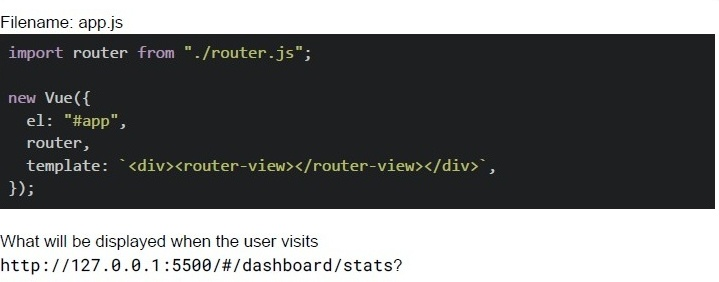
What will be displayed when the user visits
http://127.0.0.1:5500/#/dashboard/stats?- Dashboard only
- Stats Component only
- DashboardStats Component
- 404 Not Found
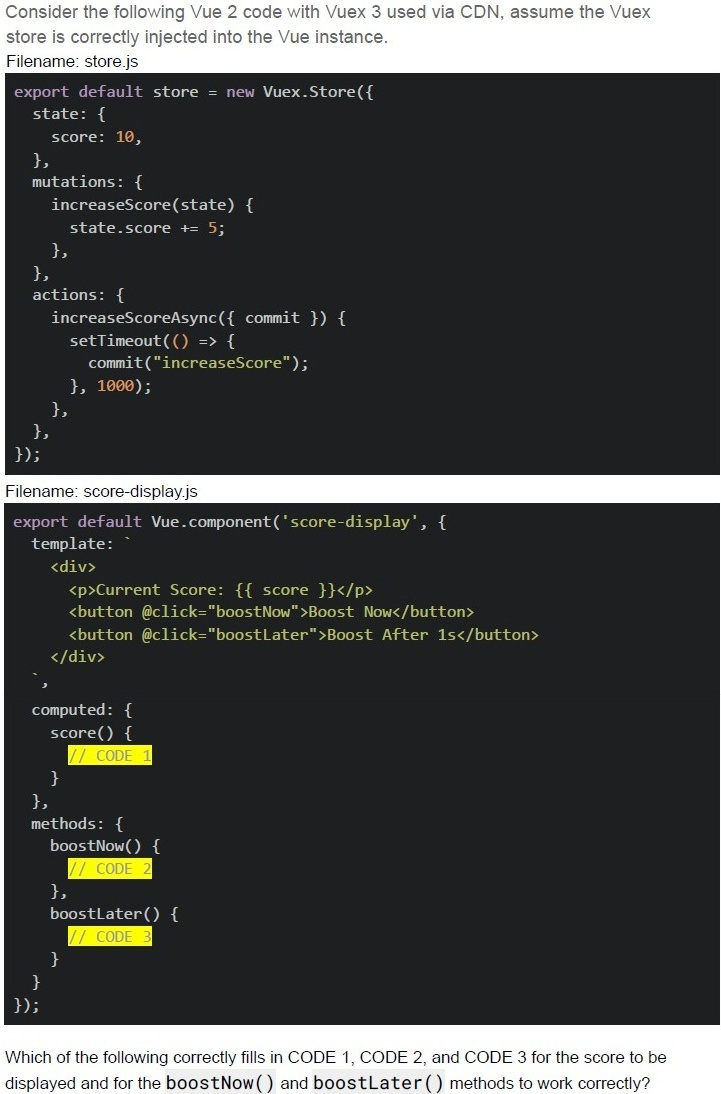
Text of the picture (copyable)
Consider the following Vue 2 code with Vuex 3 used via CDN, assume the Vuex
store is correctly injected into the Vue instance.
Filename: store.js
```javascript
export default store = new Vuex.Store({
  state: {
    score: 10,
  },
  mutations: {
    increaseScore(state) {
      state.score += 5;
    },
  },
  actions: {
    increaseScoreAsync({ commit }) {
      setTimeout(() => {
        commit("increaseScore");
      }, 1000);
    },
  },
});
```
Filename: score-display.js
```javascript
export default Vue.component('score-display', {
  template: `
    <div>
      <p>Current Score: {{ score }}</p>
      <button @click="boostNow">Boost Now</button>
      <button @click="boostLater">Boost After 1s</button>
    </div>
  `,
  computed: {
    score() {
      // CODE 1
    }
  },
  methods: {
    boostNow() {
      // CODE 2
    },
    boostLater() {
      // CODE 3
    }
  }
});
```
Which of the following correctly fills in CODE 1, CODE 2, and CODE 3 for the score to be
displayed and for the **boostNow()** and **boostLater()** methods to work correctly?
text
CODE 1:
```
return this.$store.state.score;
```

text
CODE 2:
```
this.$store.commit('increaseScore');
```
text
```
CODE 2: this.increaseScore() ;
```

text
CODE 3:
```
this.$store.dispatch('increaseScoreAsync');
```
text
CODE 3:
```
this.$store.increaseScoreAsync();
```
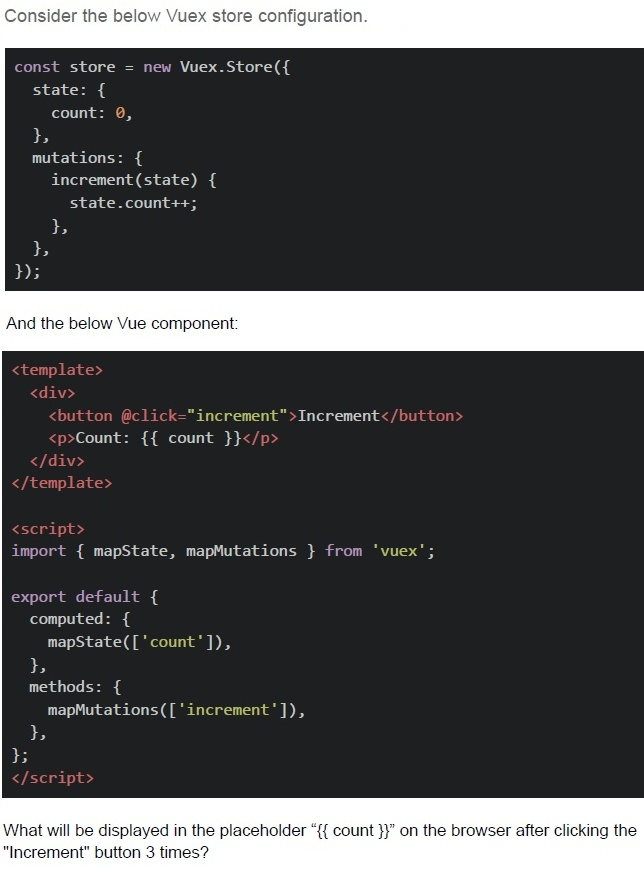
Text of the picture (copyable)
Consider the below Vuex store configuration.

```javascript
const store = new Vuex.Store({
  state: {
    count: 0,
  },
  mutations: {
    increment(state) {
      state.count++;
    },
  },
});
```

And the below Vue component:

```html
<template>
  <div>
    <button @click="increment">Increment</button>
    <p>Count: {{ count }}</p>
  </div>
</template>

<script>
import { mapState, mapMutations } from 'vuex';

export default {
  computed: {
    ...mapState(['count']),
  },
  methods: {
    ...mapMutations(['increment']),
  },
};
</script>
```

What will be displayed in the placeholder "{{ count }}" on the browser after clicking the "Increment" button 3 times?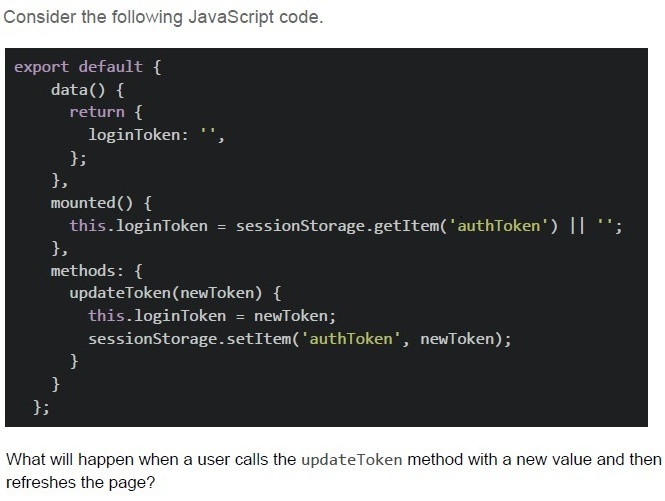
Text of the picture (copyable)
Consider the following JavaScript code.

```javascript
export default {
  data() {
    return {
      loginToken: '',
    };
  },
  mounted() {
    this.loginToken = sessionStorage.getItem('authToken') || '';
  },
  methods: {
    updateToken(newToken) {
      this.loginToken = newToken;
      sessionStorage.setItem('authToken', newToken);
    }
  }
};
```

What will happen when a user calls the updateToken method with a new value and then refreshes the page?
text
The new token will be lost, and the "loginToken" data property will be reset to an empty string.

text
The new token will be preserved in session storage, and the "LoginToken" data property will be populated with the stored value on page refresh.

text
The method will throw an error because sessionStorage cannot be modified directly.

text
The "loginToken" data property will be updated, but the session storage will remain unchanged.
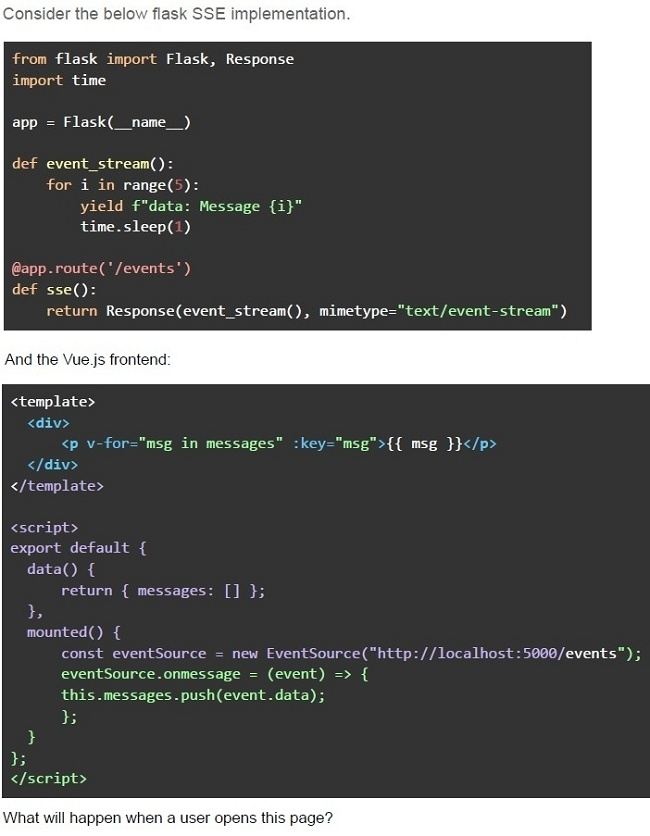
Text of the picture (copyable)
Consider the below flask SSE implementation.

```python
from flask import Flask, Response
import time

app = Flask(__name__)

def event_stream():
    for i in range(5):
        yield f"data: Message {i}"
        time.sleep(1)

@app.route('/events')
def sse():
    return Response(event_stream(), mimetype="text/event-stream")
```

And the Vue.js frontend:

```html
<template>
  <div>
    <p v-for="msg in messages" :key="msg">{{ msg }}</p>
  </div>
</template>

<script>
export default {
  data() {
    return { messages: [] };
  },
  mounted() {
    const eventSource = new EventSource("http://localhost:5000/events");
    eventSource.onmessage = (event) => {
      this.messages.push(event.data);
    };
  },
};
</script>
```

What will happen when a user opens this page?- The client will receive 5 messages, one per second.
- The client will receive all 5 messages instantly.
- The client will not receive any messages due to CORS issues.
- The server will crash because Flask cannot handle SSE.
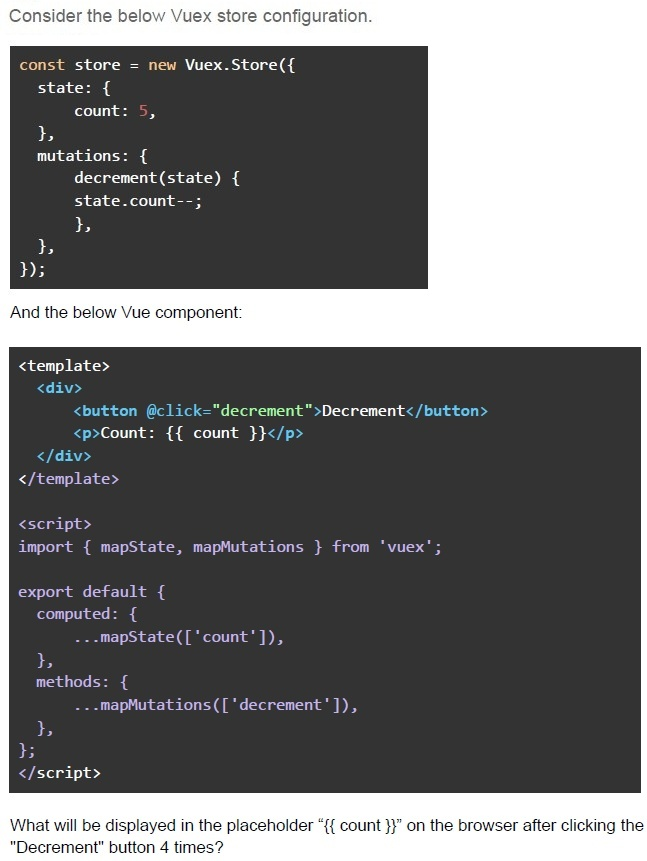
Text of the picture (copyable)
Consider the below Vuex store configuration.

```javascript
const store = new Vuex.Store({
  state: {
    count: 5,
  },
  mutations: {
    decrement(state) {
      state.count--;
    },
  },
});
```

And the below Vue component:

```html
<template>
  <div>
    <button @click="decrement">Decrement</button>
    <p>Count: {{ count }}</p>
  </div>
</template>

<script>
  import { mapState, mapMutations } from 'vuex';

  export default {
    computed: {
      ...mapState(['count']),
    },
    methods: {
      ...mapMutations(['decrement']),
    },
  };
</script>
```

What will be displayed in the placeholder "{{ count }}" on the browser after clicking the "Decrement" button 4 times? What will be the visited pages history when the user navigates between pages and refreshes the page?
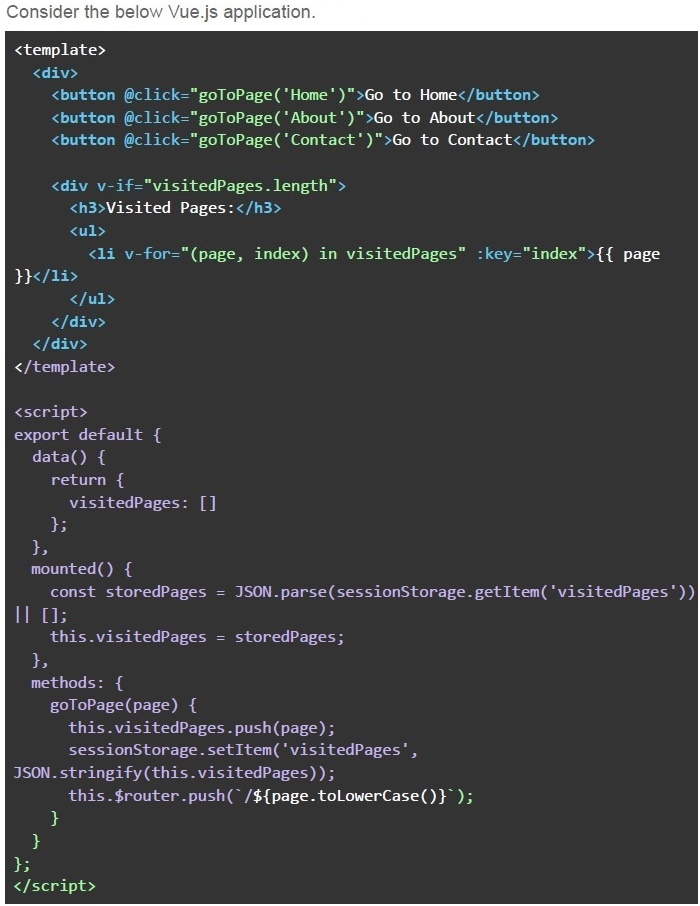
Text of the picture (copyable)
Consider the below Vue.js application.

```html
<template>
  <div>
    <button @click="goToPage('Home')">Go to Home</button>
    <button @click="goToPage('About')">Go to About</button>
    <button @click="goToPage('Contact')">Go to Contact</button>

    <div v-if="visitedPages.length">
      <h3>Visited Pages:</h3>
      <ul>
        <li v-for="(page, index) in visitedPages" :key="index">{{ page }}</li>
      </ul>
    </div>
  </div>
</template>

<script>
export default {
  data() {
    return {
      visitedPages: []
    };
  },
  mounted() {
    const storedPages = JSON.parse(sessionStorage.getItem('visitedPages')) || [];
    this.visitedPages = storedPages;
  },
  methods: {
    goToPage(page) {
      this.visitedPages.push(page);
      sessionStorage.setItem('visitedPages',
        JSON.stringify(this.visitedPages));
      this.$router.push(`/${page.toLowerCase()}`);
    }
  }
};
</script>
```- The list of visited pages will reset to empty after the page is refreshed.
- The list of visited pages will be updated with the current page after everynavigation and will not reset even after reload.
- The navigation history will not be stored in sessionStorage.
- All of these
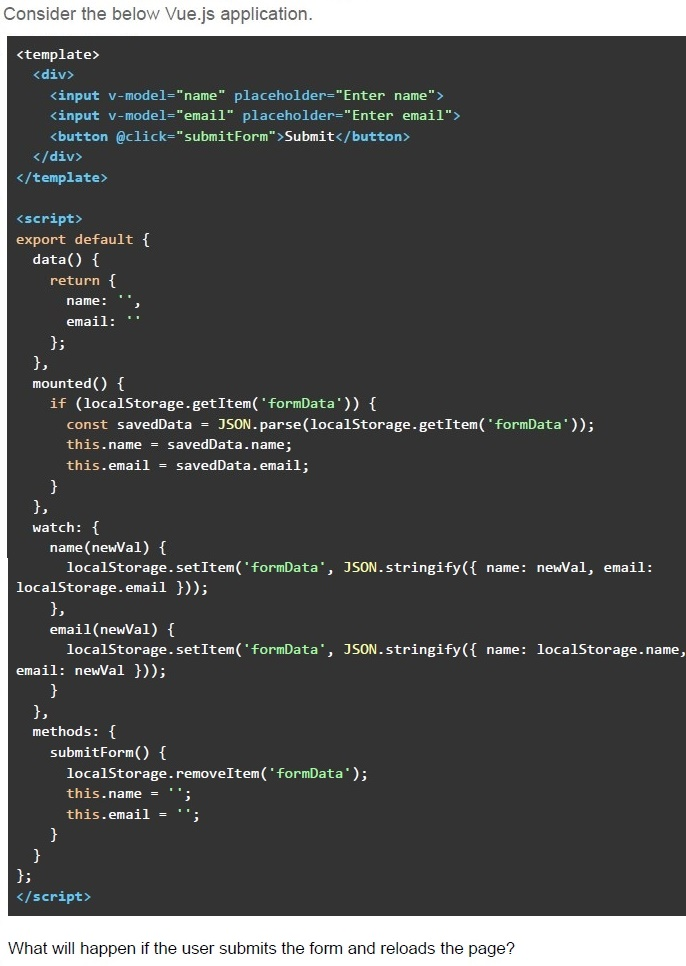
Text of the picture (copyable)
Consider the below Vue.js application.

```html
<template>
  <div>
    <input v-model="name" placeholder="Enter name">
    <input v-model="email" placeholder="Enter email">
    <button @click="submitForm">Submit</button>
  </div>
</template>

<script>
export default {
  data() {
    return {
      name: '',
      email: ''
    };
  },
  mounted() {
    if (localStorage.getItem('formData')) {
      const savedData = JSON.parse(localStorage.getItem('formData'));
      this.name = savedData.name;
      this.email = savedData.email;
    }
  },
  watch: {
    name(newVal) {
      localStorage.setItem('formData', JSON.stringify({ name: newVal, email: localStorage.email }));
    },
    email(newVal) {
      localStorage.setItem('formData', JSON.stringify({ name: localStorage.name, email: newVal }));
    }
  },
  methods: {
    submitForm() {
      localStorage.removeItem('formData');
      this.name = '';
      this.email = '';
    }
  }
};
</script>
```

What will happen if the user submits the form and reloads the page?- The form data will persist in the input fields even after submission and pagereload.
- The form data will be cleared after submission, and no data will appear after apage reload.
- The form data will appear in the inputs after submission and page reload, butonly until the user starts typing again.
- The page will go blank.
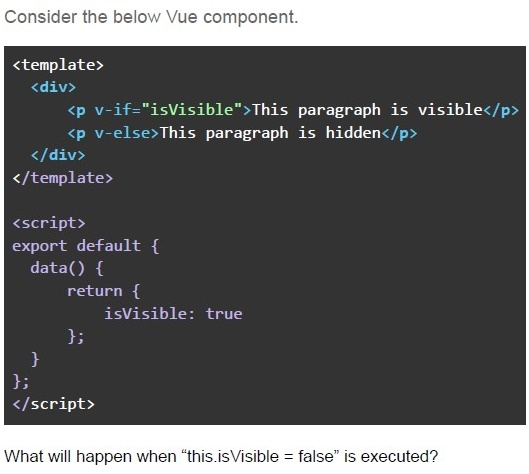
Text of the picture (copyable)
Consider the below Vue component.

```html
<template>
  <div>
    <p v-if="isVisible">This paragraph is visible</p>
    <p v-else>This paragraph is hidden</p>
  </div>
</template>

<script>
  export default {
    data() {
      return {
        isVisible: true
      };
    }
  };
</script>
```

What will happen when "this.isVisible = false" is executed?- The paragraph with the text “This paragraph is visible” will be displayed.
- The paragraph with the text “This paragraph is hidden” will be displayed.
- Both paragraphs will be displayed because of the v-if and v-else bindings.
- No change will happen since v-if and v-else do not update the DOM.
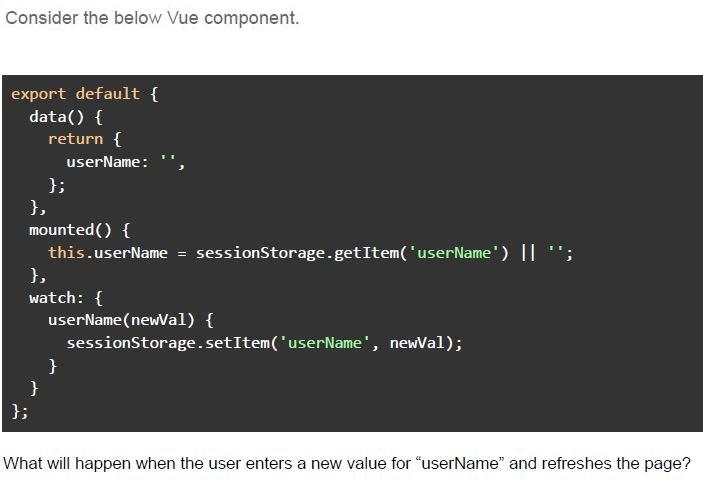
Text of the picture (copyable)
Consider the below Vue component.

```javascript
export default {
  data() {
    return {
      userName: '',
    };
  },
  mounted() {
    this.userName = sessionStorage.getItem('userName') || '';
  },
  watch: {
    userName(newVal) {
      sessionStorage.setItem('userName', newVal);
    }
  }
};
```

What will happen when the user enters a new value for "userName" and refreshes the page?- The new value will be stored in session storage, and the “userName” dataproperty will be updated.
- The new value will be stored in session storage, but the “userName” dataproperty will be reset to an empty string on page refresh.
- The “userName” data property will be reset to an empty string, and thesession storage value will be ignored on refresh.
- The “userName” data property will not be updated in session storage becausesession storage doesn't persist across refreshes.
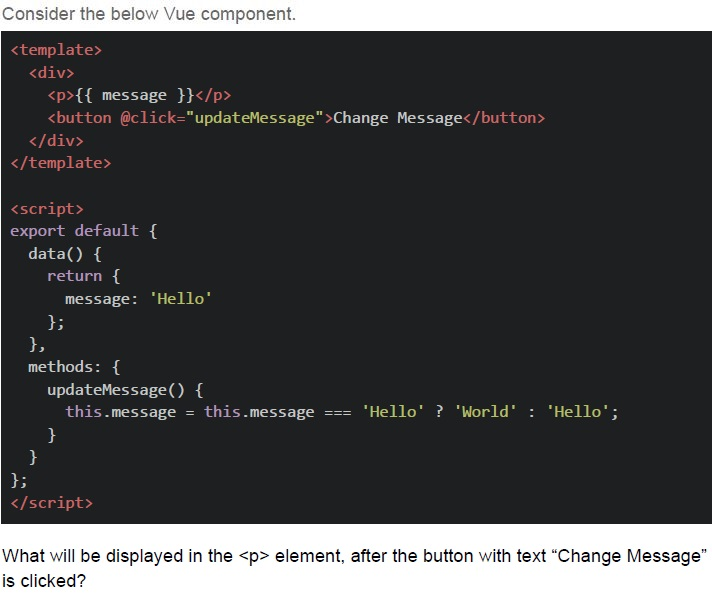
Text of the picture (copyable)
Consider the below Vue component.

```html
<template>
  <div>
    <p>{{ message }}</p>
    <button @click="updateMessage">Change Message</button>
  </div>
</template>

<script>
export default {
  data() {
    return {
      message: 'Hello'
    };
  },
  methods: {
    updateMessage() {
      this.message = this.message === 'Hello' ? 'World' : 'Hello';
    }
  }
};
</script>
```

What will be displayed in the `<p>` element, after the button with text "Change Message" is clicked?- Empty
- Error
- undefined
- World
- Hello
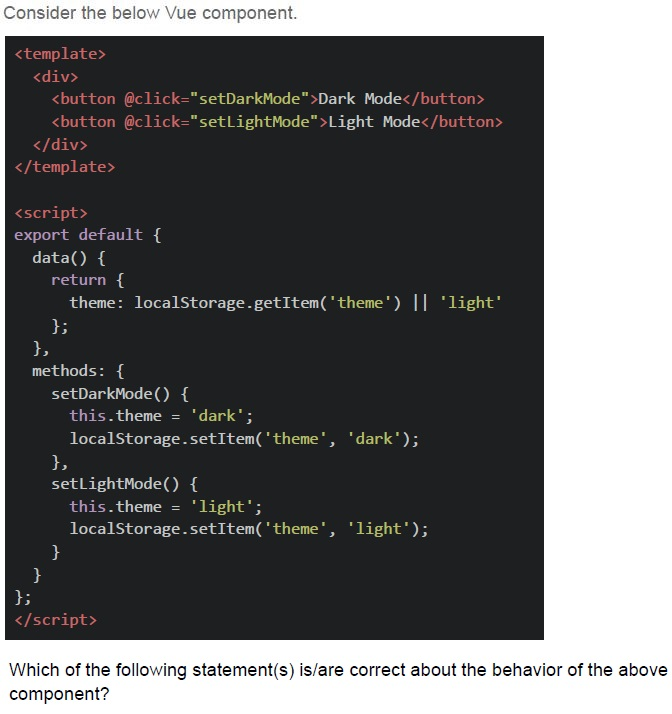
Text of the picture (copyable)
Consider the below Vue component.

```html
<template>
  <div>
    <button @click="setDarkMode">Dark Mode</button>
    <button @click="setLightMode">Light Mode</button>
  </div>
</template>

<script>
export default {
  data() {
    return {
      theme: localStorage.getItem('theme') || 'light'
    };
  },
  methods: {
    setDarkMode() {
      this.theme = 'dark';
      localStorage.setItem('theme', 'dark');
    },
    setLightMode() {
      this.theme = 'light';
      localStorage.setItem('theme', 'light');
    }
  }
};
</script>
```

Which of the following statement(s) is/are correct about the behavior of the above component?- The theme will persist across page reloads because it is stored in localStorage.
- If the user opens a new tab, the theme will reset to 'light' in that new tab.
- The theme will reset to 'light' every time the page is refreshed.
- The theme will be shared across all open tabs, as localStorage is accessibleacross tabs of the same origin.
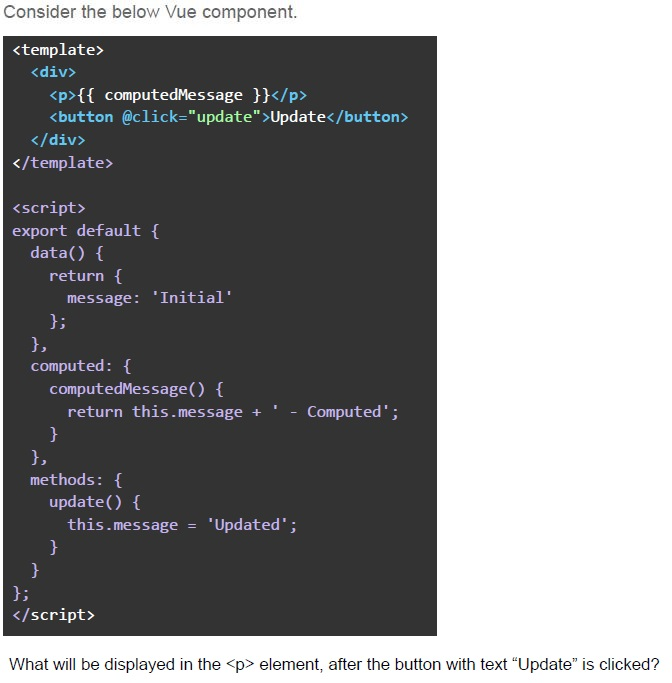
Text of the picture (copyable)
Consider the below Vue component.

```html
<template>
  <div>
    <p>{{ computedMessage }}</p>
    <button @click="update">Update</button>
  </div>
</template>

<script>
  export default {
    data() {
      return {
        message: 'Initial'
      };
    },
    computed: {
      computedMessage() {
        return this.message + ' - Computed';
      }
    },
    methods: {
      update() {
        this.message = 'Updated';
      }
    }
  };
</script>
```

What will be displayed in the `<p>` element, after the button with text "Update" is clicked?- "Initial - Computed"
- "Updated - Computed"
- "Initial - Computed Updated"
- "Updated"
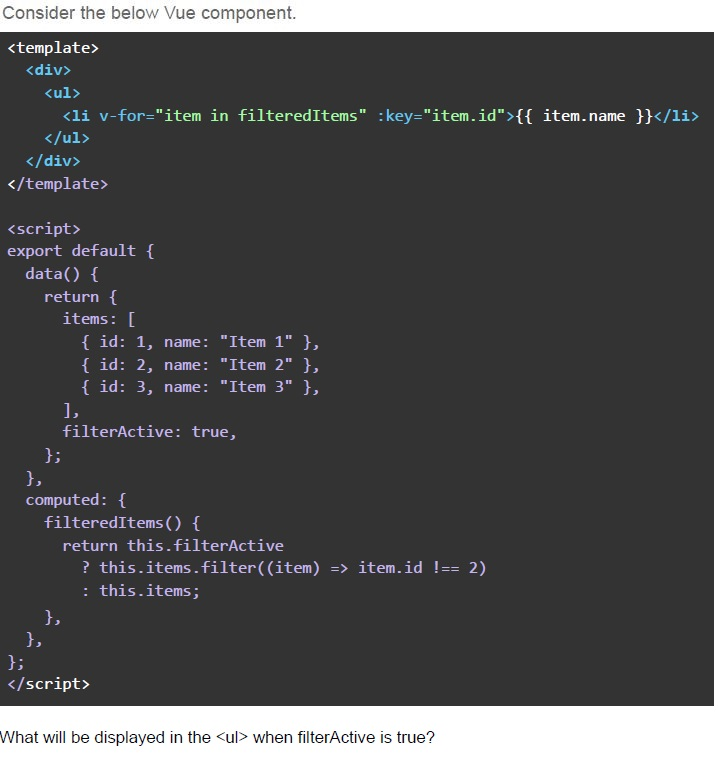
Text of the picture (copyable)
Consider the below Vue component.

```html
<template>
  <div>
    <ul>
      <li v-for="item in filteredItems" :key="item.id">{{ item.name }}</li>
    </ul>
  </div>
</template>

<script>
export default {
  data() {
    return {
      items: [
        { id: 1, name: "Item 1" },
        { id: 2, name: "Item 2" },
        { id: 3, name: "Item 3" },
      ],
      filterActive: true,
    };
  },
  computed: {
    filteredItems() {
      return this.filterActive
        ? this.items.filter((item) => item.id !== 2)
        : this.items;
    },
  },
};
</script>
```

What will be displayed in the `<ul>` when filterActive is true?- Item 1, Item 3
- Item 2
- Item 1, Item 2, Item 3
- The list will be empty.
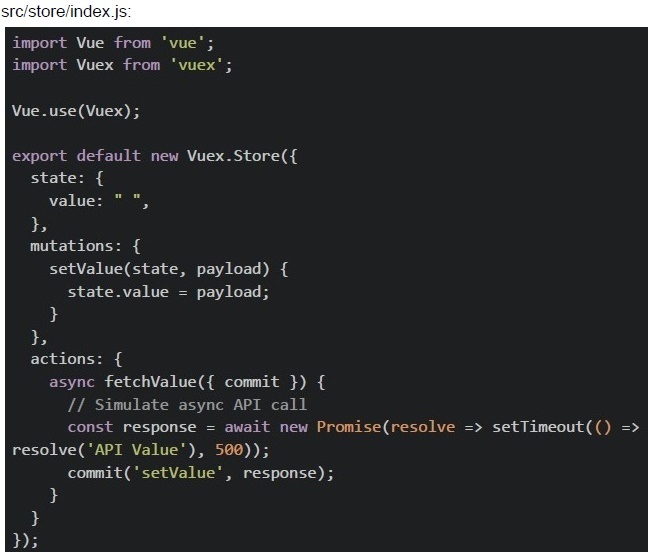
In a Vue CLI project with Vuex, you have the following configuration:
 In a Vue CLI project with Vuex, you have the following configuration:
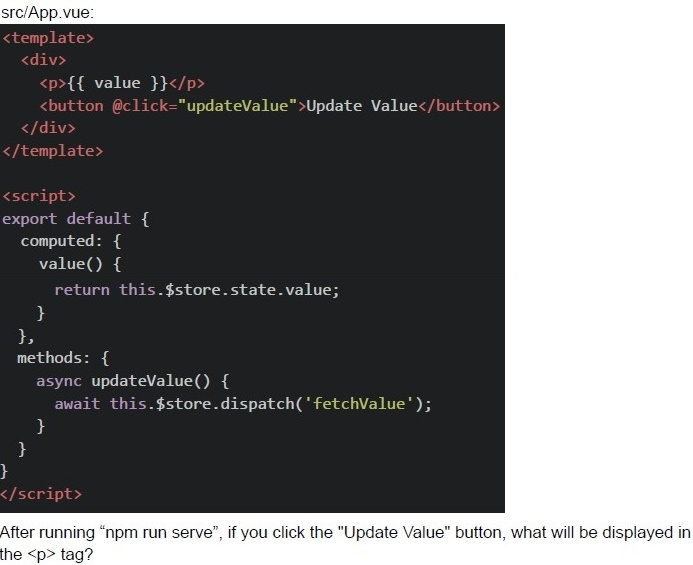 In a Vue CLI project with Vuex, you have the following configuration:
In a Vue CLI project with Vuex, you have the following configuration:
In a Vue CLI project with Vuex, you have the following configuration: Text of the picture (copyable)
src/store/index.js:
```javascript
import Vue from 'vue';
import Vuex from 'vuex';

Vue.use(Vuex);

export default new Vuex.Store({
  state: {
    value: "",
  },
  mutations: {
    setValue(state, payload) {
      state.value = payload;
    }
  },
  actions: {
    async fetchValue({ commit }) {
      // Simulate async API call
      const response = await new Promise(resolve => setTimeout(() =>
        resolve('API Value'), 500));
      commit('setValue', response);
    }
  }
});
```
src/App.vue:
```html
<template>
  <div>
    <p>{{ value }}</p>
    <button @click="updateValue">Update Value</button>
  </div>
</template>

<script>
export default {
  computed: {
    value() {
      return this.$store.state.value;
    },
  },
  methods: {
    async updateValue() {
      await this.$store.dispatch('fetchValue');
    },
  },
};
</script>
```
After running "npm run serve", if you click the "Update Value" button, what will be displayed in the `<p>` tag?
text
API Value

text
"" ""

text
undefined

text
null
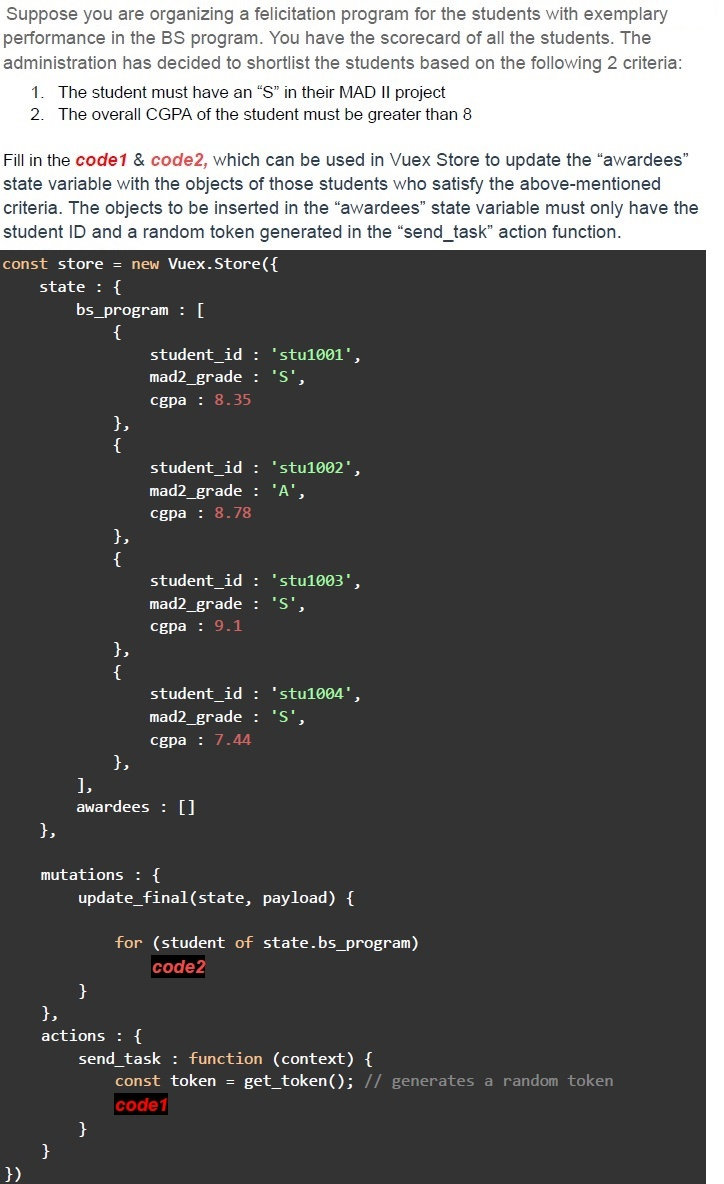
Text of the picture (copyable)
Suppose you are organizing a felicitation program for the students with exemplary performance in the BS program. You have the scorecard of all the students. The administration has decided to shortlist the students based on the following 2 criteria:
1. The student must have an "S" in their MAD II project
2. The overall CGPA of the student must be greater than 8

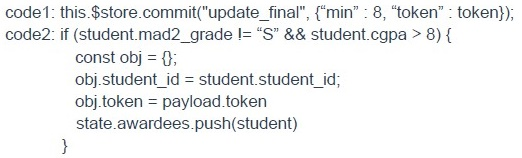
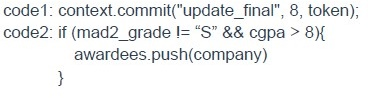
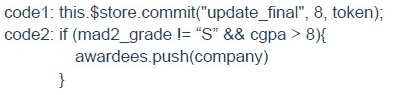
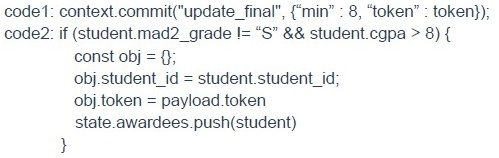
Fill in the `code1` & `code2`, which can be used in Vuex Store to update the "awardees" state variable with the objects of those students who satisfy the above-mentioned criteria. The objects to be inserted in the "awardees" state variable must only have the student ID and a random token generated in the "send_task" action function.

```javascript
const store = new Vuex.Store({
  state: {
    bs_program: [{
      student_id: 'stu1001',
      mad2_grade: 'S',
      cgpa: 8.35
    }, {
      student_id: 'stu1002',
      mad2_grade: 'A',
      cgpa: 8.78
    }, {
      student_id: 'stu1003',
      mad2_grade: 'S',
      cgpa: 9.1
    }, {
      student_id: 'stu1004',
      mad2_grade: 'S',
      cgpa: 7.44
    }, ],
    awardees: []
  },

  mutations: {
    update_final(state, payload) {

      for (student of state.bs_program)
        code2
    }
  },
  actions: {
    send_task: function(context) {
      const token = get_token(); // generates a random token
      code1
    }
  }
})
```
text
```javascript
code1: this.$store.commit("update_final", {"min" : 8, "token" : token});
code2: if (student.mad2_grade != "S" && student.cgpa > 8) {
    const obj = {};
    obj.student_id = student.student_id;
    obj.token = payload.token
    state.awardees.push(student)
}
```
text
```
code1: context.commit("update_final", 8, token);
code2: if (mad2_grade != "S" && cgpa > 8){
    awardees.push(company)
}
```
text
```javascript
code1: this.$store.commit("update_final", 8, token);
code2: if (mad2_grade != "S" && cgpa > 8){
    awardees.push(company)
}
```
text
```
code1: context.commit("update_final", {"min" : 8, "token" : token});
code2: if (student.mad2_grade != "S" && student.cgpa > 8) {
    const obj = {};
    obj.student_id = student.student_id;
    obj.token = payload.token
    state.awardees.push(student)
}
```
Text of the picture (copyable)
Consider the below Vue component template and script definitions that use Vue router.

Vue component template

```html
<template>
  <div>
    <h1>{{ pageAction }}</h1>
    <router-link to="/login" v-if="showLogin">Login</router-link>
    <router-link to="/register" v-if="showRegister">Register</router-link>
    <router-view></router-view>
  </div>
</template>
```

Filename: script.js

```javascript
<script>
  export default {
    name: 'App',
    data() {
      return {
        pageAction: 'Login or Signup',
        showLogin: true,
        showRegister: false,
      };
    },
    watch: {
      '$route.path'() {
        if (this.$route.path === '/login') {
          this.showRegister = true;
          this.showLogin = false;
          this.pageAction = 'Login Page';
        } else if (this.$route.path === '/register') {
          this.showRegister = false;
          this.showLogin = true;
          this.pageAction = 'Register Page';
        } else {
          this.pageAction = 'Login or Signup';
        }
      },
    },
  };
</script>
```

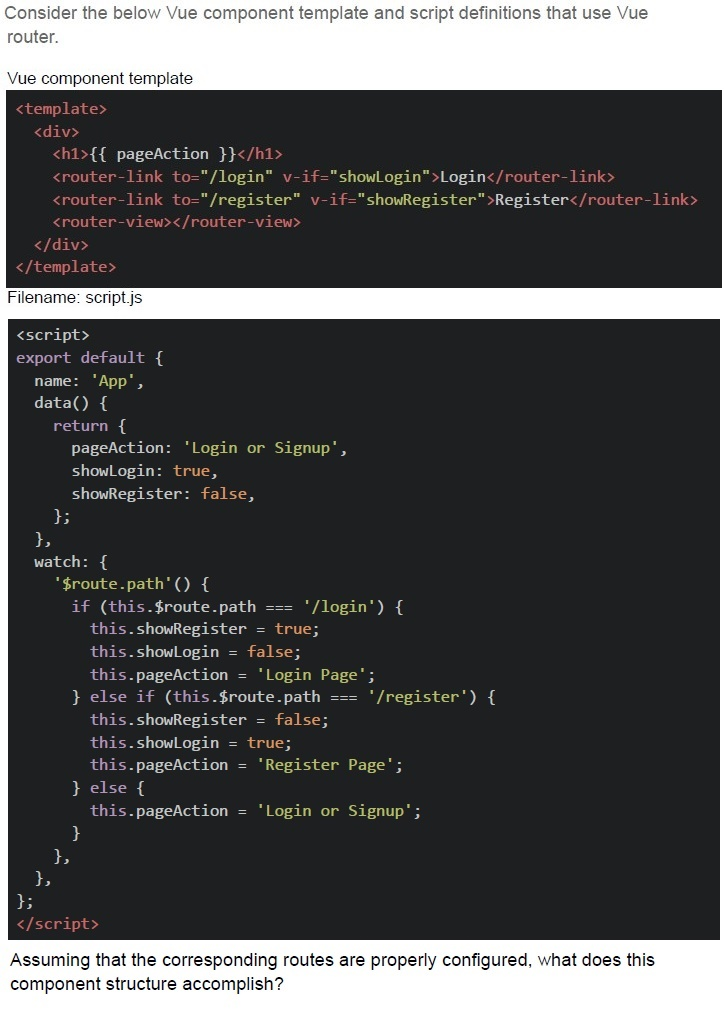
Assuming that the corresponding routes are properly configured, what does this component structure accomplish?- As soon as the app is run by a client, it displays a web page with a heading title"Login or Signup" and two navigation links to "Login" and "Register"
- It dynamically updates the heading title based on the route and conditionallyshows navigation links to "Login" and "Register"
- It has a bug and will throw a runtime error.
- The heading title is populated with the value “Login or Signup” when the useropens the app for the first time.
Consider the below Vue component template and script definitions that use Vue router.
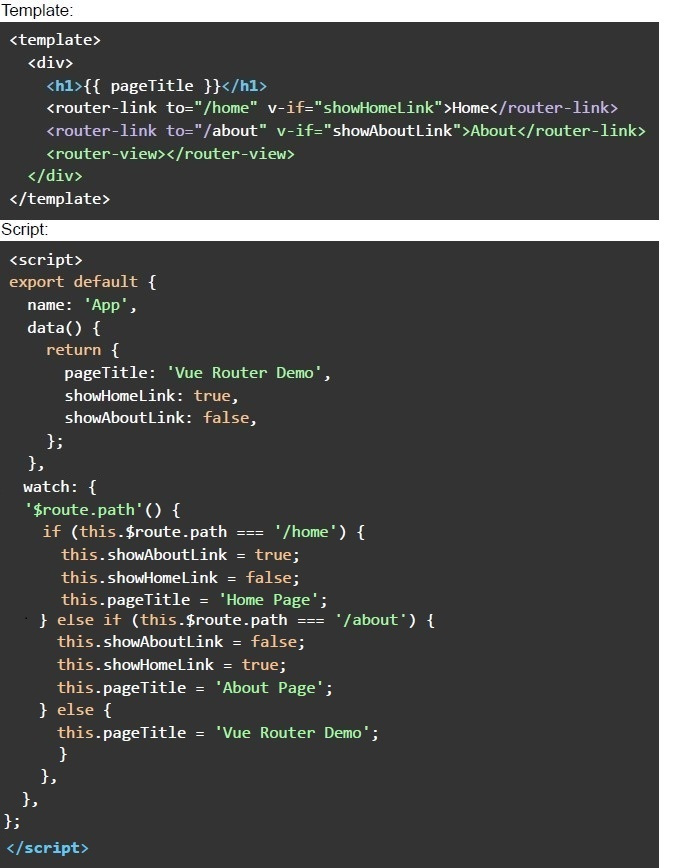 Consider the below Vue component template and script definitions that use Vue router. Assuming that the corresponding routes are properly configured, what does this component structure accomplish?
Consider the below Vue component template and script definitions that use Vue router. Assuming that the corresponding routes are properly configured, what does this component structure accomplish?Text of the picture (copyable)
Template:
```html
<template>
  <div>
    <h1>{{ pageTitle }}</h1>
    <router-link to="/home" v-if="showHomeLink">Home</router-link>
    <router-link to="/about" v-if="showAboutLink">About</router-link>
    <router-view></router-view>
  </div>
</template>
```

Script:
```html
<script>
export default {
  name: 'App',
  data() {
    return {
      pageTitle: 'Vue Router Demo',
      showHomeLink: true,
      showAboutLink: false,
    };
  },
  watch: {
    '$route.path'() {
      if (this.$route.path === '/home') {
        this.showAboutLink = true;
        this.showHomeLink = false;
        this.pageTitle = 'Home Page';
      } else if (this.$route.path === '/about') {
        this.showAboutLink = false;
        this.showHomeLink = true;
        this.pageTitle = 'About Page';
      } else {
        this.pageTitle = 'Vue Router Demo';
      }
    },
  },
};
</script>
```
text
It displays a web page with a heading title "Vue Router Demo" and two
navigation links to "Home" and "About."

text
It dynamically updates the heading title based on the route and conditionally
shows navigation links to "Home" and "About."

text
It has a bug and will throw a runtime error.

text
The heading title is populated with the value "Vue Router Demo" when the user opens the app for the first time.
Which of the following statement(s) is/are true regarding webhooks?
- A webhook uses HTTP protocol.
- A webhook uses web socket protocol.
- A webhook receiver must be deployed on the same origin as the webhookinitiator.
- A webhook is supposed to be used for machine to machine communication.
Which of the following statement(s) is/are false regarding webhooks?
- A webhook uses HTTP protocol.
- A webhook uses web socket protocol.
- A webhook receiver must be deployed on the same origin as the webhookinitiator.
- A webhook is supposed to be used for machine to machine communication
Consider the below Vue application with markup file “index.html” and javascript file “app.js”.
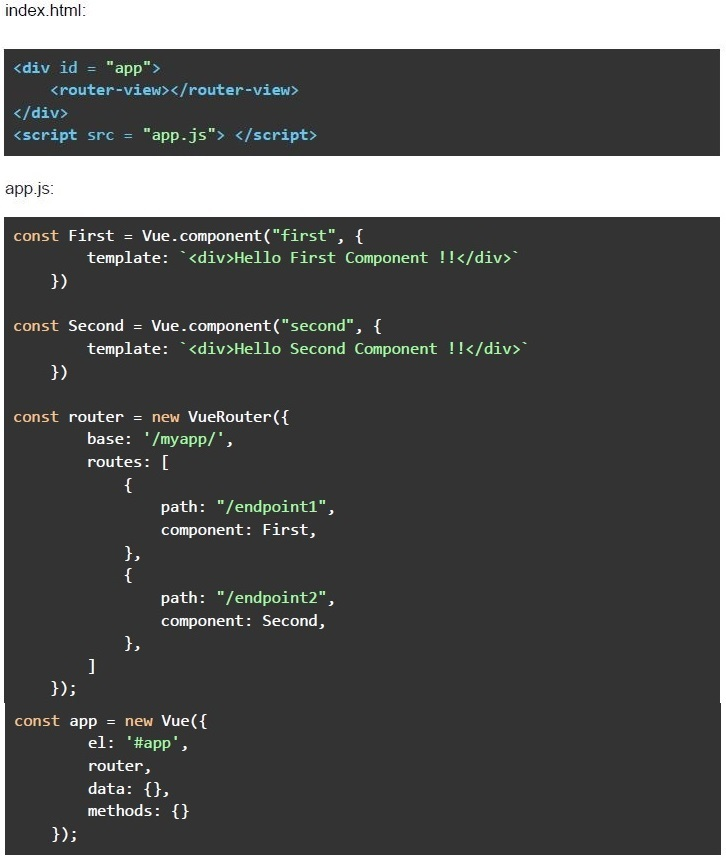 Consider the below Vue application with markup file “index.html” and javascript file “app.js”. Suppose the application is deployed under a subdirectory named “/myapp/” of a domain named “https://appdev2-may2023.com”, and you want to navigate to a page that renders “Hello Second Component !!”. What should be the correct URL to get the desired output?
Consider the below Vue application with markup file “index.html” and javascript file “app.js”. Suppose the application is deployed under a subdirectory named “/myapp/” of a domain named “https://appdev2-may2023.com”, and you want to navigate to a page that renders “Hello Second Component !!”. What should be the correct URL to get the desired output?Text of the picture (copyable)
index.html:

```html
<div id = "app">
    <router-view></router-view>
</div>
<script src = "app.js"></script>
```

app.js:

```javascript
const First = Vue.component("first", {
    template: `<div>Hello First Component !!</div>`
})

const Second = Vue.component("second", {
    template: `<div>Hello Second Component !!</div>`
})

const router = new VueRouter({
    base: '/myapp/',
    routes: [
        {
            path: "/endpoint1",
            component: First,
        },
        {
            path: "/endpoint2",
            component: Second,
        },
    ]
});

const app = new Vue({
    el: '#app',
    router,
    data: {},
    methods: {}
});
```
text
https://appdev2-may2023.com/mvapp/#/

text
https://appdev2-may2023.com/myapp/#/endpoint1

text
https://appdev2-may-2023.com/myapp/#/endpoint2

text
https://appdev2-may2023.com/#/endpoint1
Consider the given 2 implementations.
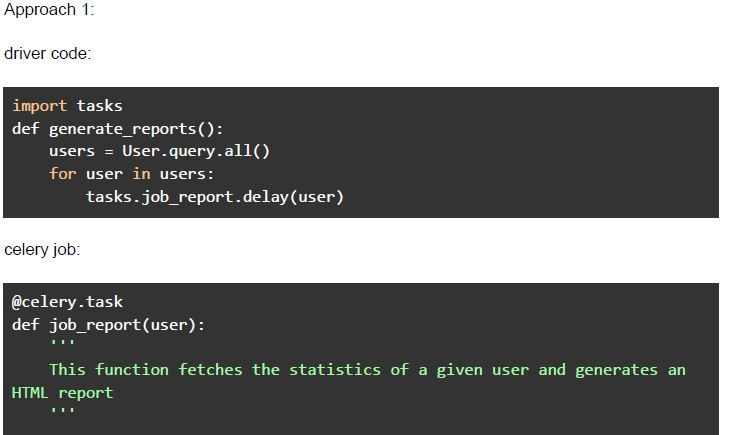 Consider the given 2 implementations.
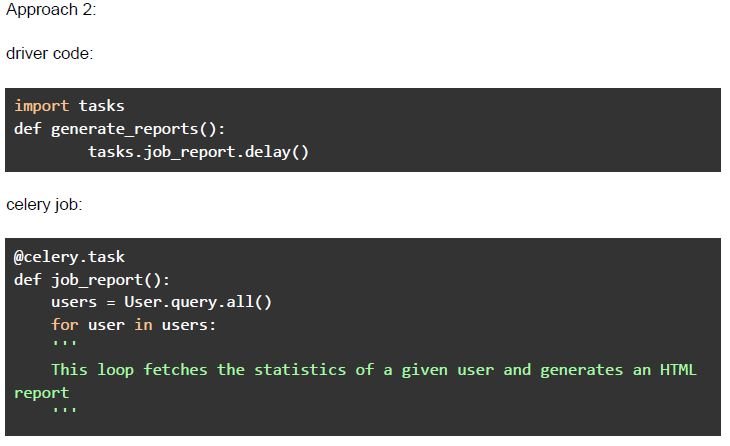 Consider the given 2 implementations. Suppose there are currently 1000 users in the database, and the application is supposed to generate 1000 HTML reports. Which of the following statement(s) is/are false (assuming there are more than 1 worker available in the celery system)?
Consider the given 2 implementations.
Consider the given 2 implementations. Suppose there are currently 1000 users in the database, and the application is supposed to generate 1000 HTML reports. Which of the following statement(s) is/are false (assuming there are more than 1 worker available in the celery system)?Text of the picture (copyable)
Approach 1:

driver code:

```python
import tasks
def generate_reports():
    users = User.query.all()
    for user in users:
        tasks.job_report.delay(user)
```

celery job:

```python
@celery.task
def job_report(user):
    """
    This function fetches the statistics of a given user and generates an
    HTML report
    """
```
Approach 2:

driver code:

```python
import tasks
def generate_reports():
    tasks.job_report.delay()
```

celery job:

```python
@celery.task
def job_report():
    users = User.query.all()
    for user in users:
        ...
        # This loop fetches the statistics of a given user and generates an HTML
        # report
        ...
```- Approach 1 will finish the task in less time than approach 2.
- Approach 2 will finish the task in less time than approach 1.
- Both the approaches will be comparable.
- Both the approaches will be comparable if there is only 1 worker available.
Suppose an endpoint in your flask application triggers a celery task, which generates a CSV file named “data.csv” and saves it in the static folder of a flask application. The file generator takes anywhere between 20 and 40 seconds to generate and save the CSV file. The below fetch call is used to get the file generated by the above explained celery task.
 Suppose an endpoint in your flask application triggers a celery task, which generates a CSV file named “data.csv” and saves it in the static folder of a flask application. The file generator takes anywhere between 20 and 40 seconds to generate and save the CSV file. The below fetch call is used to get the file generated by the above explained celery task. Which of the following is the most efficient way to make the above fetch call so that it doesn’t fail and return the desired response?
Suppose an endpoint in your flask application triggers a celery task, which generates a CSV file named “data.csv” and saves it in the static folder of a flask application. The file generator takes anywhere between 20 and 40 seconds to generate and save the CSV file. The below fetch call is used to get the file generated by the above explained celery task. Which of the following is the most efficient way to make the above fetch call so that it doesn’t fail and return the desired response? Text of the picture (copyable)
```javascript
fetch("/static/data.csv").then(response => response.blob())
  .then(data => {
    // does something with the response data
  })
```- Use short polling to check the state of the celery task after every 5 seconds,and make the fetch call, when the task succeeds.
- Use javascript function “setTimeout” to make the fetch after 41 seconds, whichmakes sure that the file is generated and saved to the desired location.

Text of the picture (copyable)
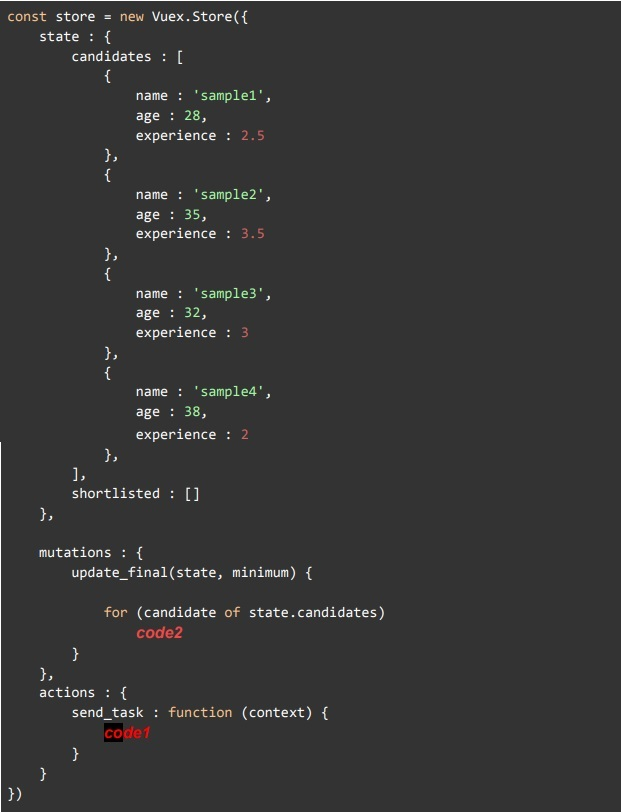
Suppose you own a company where you want to hire candidates for an upcoming project on a deputation basis, and you have received a lot of applications. On discussing with your team members, you decided to shortlist the candidates based on the following 2 criteria:

1. The candidate must have at least 3 years of experience
2. The candidate's age must be less than 30 years

Fill in the `code1` & `code2`, which can be used in Vuex Store to update the "shortlisted" state variable with the objects of those candidates who satisfy the above-mentioned criteria. Also, predict the length of the state variable "shortlisted", after the mutation has completed its execution.
```javascript
const store = new Vuex.Store({
  state : {
    candidates : [
      {
        name : 'sample1',
        age : 28,
        experience : 2.5
      },
      {
        name : 'sample2',
        age : 35,
        experience : 3.5
      },
      {
        name : 'sample3',
        age : 32,
        experience : 3
      },
      {
        name : 'sample4',
        age : 38,
        experience : 2
      },
    ],
    shortlisted : []
  },

  mutations : {
    update_final(state, minimum) {
      for (candidate of state.candidates)
        code2
    },
  },
  actions : {
    send_task : function (context) {
      code1
    }
  }
})
```
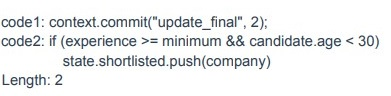
text
```
code1: this.$store.commit("update_final", 2);
code2: if (candidate.experience >= minimum && candidate.age < 30)
  state.shortlisted.push(company)
Length: 3
```
text
```
code1: context.commit("update_final", 2);
code2: if (experience >= minimum && candidate.age < 30)
           state.shortlisted.push(company)
```
Length: 2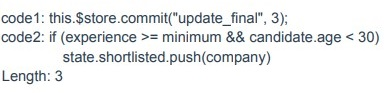
text
```javascript
code1: this.$store.commit("update_final", 3);
code2: if (experience >= minimum && candidate.age < 30)
    state.shortlisted.push(company)
```
Length: 3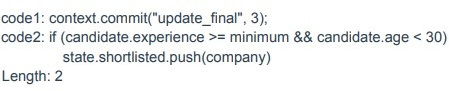
text
```
code1: context.commit("update_final", 3);
code2: if (candidate.experience >= minimum && candidate.age < 30)
    state.shortlisted.push(company)
```
Length: 2