Home / MAD2 / Week 6 / Real questions
MAD2 week 6 - real exam questions
60 questions pulled from past papers whose wording matches this week's topics, newest first, duplicates removed. Pick your answers, then press Check answers. Figures and answer keys are the originals.
Elapsed 00:00
Consider the following  and JavaScript
  for a Vue application: File: index.html
 File: app.js
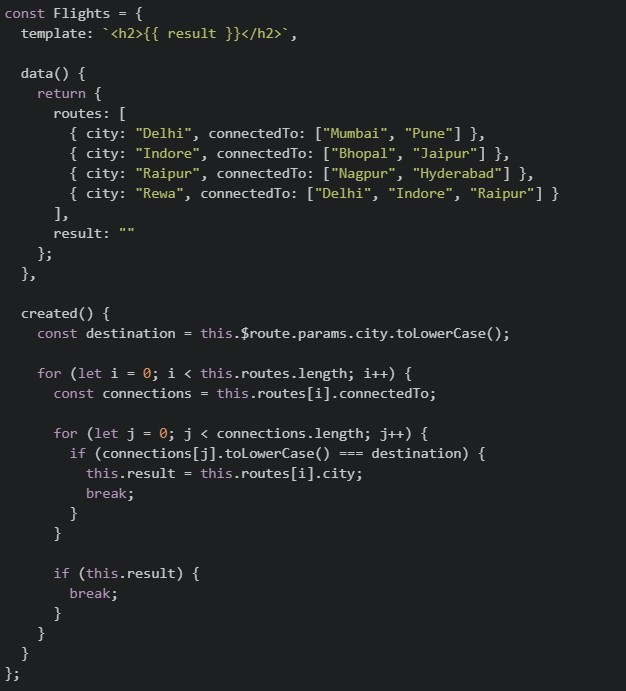 Suppose the application is running on
  , and the user visits the URL:
  What will be rendered by the browser? [NOTE: is divided in two images, consider them as one file content.]
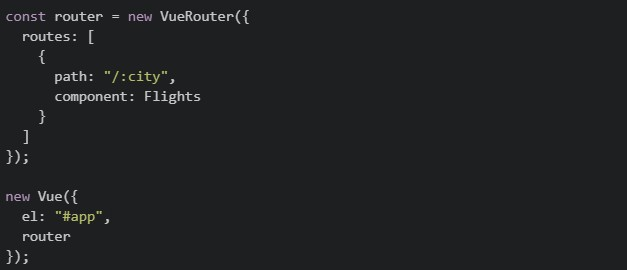
and JavaScript for a Vue application: File: index.html
File: app.js
Suppose the application is running on , and the user visits the URL: What will be rendered by the browser? [NOTE: is divided in two images, consider them as one file content.]
Text of the picture (copyable)
index.html
app.js
```html
<div id="app">
  <router-view></router-view>
</div>
```
```javascript
const Flights = {
  template: `<h2>{{ result }}</h2>`,

  data() {
    return {
      routes: [
        { city: "Delhi", connectedTo: ["Mumbai", "Pune"] },
        { city: "Indore", connectedTo: ["Bhopal", "Jaipur"] },
        { city: "Raipur", connectedTo: ["Nagpur", "Hyderabad"] },
        { city: "Rewa", connectedTo: ["Delhi", "Indore", "Raipur"] }
      ],
      result: ""
    };
  },

  created() {
    const destination = this.$route.params.city.toLowerCase();

    for (let i = 0; i < this.routes.length; i++) {
      const connections = this.routes[i].connectedTo;

      for (let j = 0; j < connections.length; j++) {
        if (connections[j].toLowerCase() === destination) {
          this.result = this.routes[i].city;
          break;
        }
      }

      if (this.result) {
        break;
      }
    }
  }
};
```
```
http://localhost:8080
```
```
http://localhost:8080/#/raipur
```
app.js
```javascript
const router = new VueRouter({
  routes: [
    {
      path: "/:city",
      component: Flights
    }
  ]
});

new Vue({
  el: "#app",
  router
});
```- Delhi
- Indore
- Raipur
- Rewa
Consider the following Vuex store:
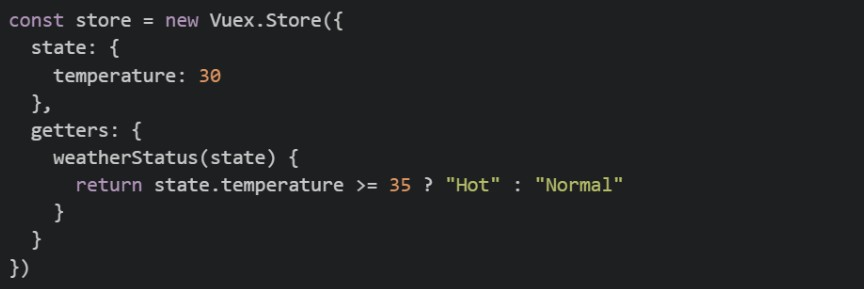 The
The  getter is used in a Vue component as shown below:
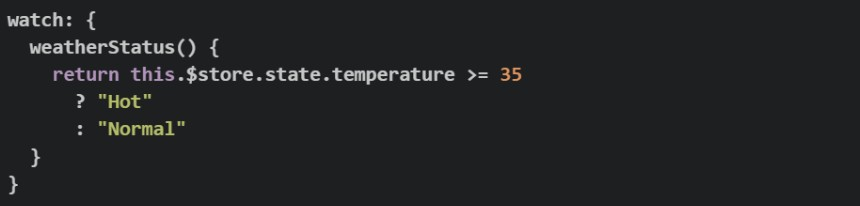
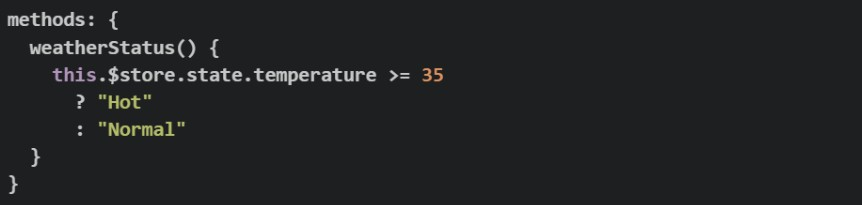
 Now suppose the Vuex getter is removed, while the temperature state continues to be updated through Vuex mutations. Which of the following implementations correctly recreates in the component so that it automatically reacts whenever the Vuex
  changes?
The getter is used in a Vue component as shown below:
Now suppose the Vuex getter is removed, while the temperature state continues to be updated through Vuex mutations. Which of the following implementations correctly recreates in the component so that it automatically reacts whenever the Vuex changes?Text of the picture (copyable)
```javascript
const store = new Vuex.Store({
  state: {
    temperature: 30
  },
  getters: {
    weatherStatus(state) {
      return state.temperature >= 35 ? "Hot" : "Normal"
    }
  }
})
```
weatherStatus
```javascript
computed: {
  weatherStatus() {
    return this.$store.getters.weatherStatus
  }
}
```
weatherStatus
weatherStatus
temperature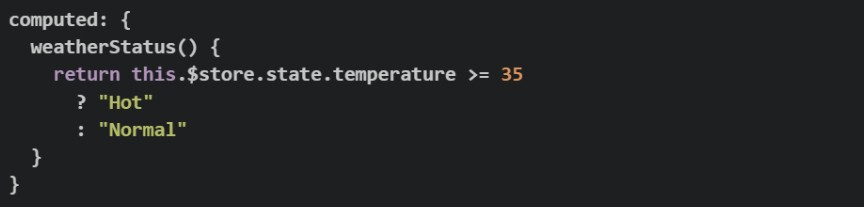
text
```javascript
computed: {
  weatherStatus() {
    return this.$store.state.temperature >= 35
      ? "Hot"
      : "Normal"
  }
}
```
text
```javascript
watch: {
  weatherStatus() {
    return this.$store.state.temperature >= 35
      ? "Hot"
      : "Normal"
  }
}
```
text
```javascript
methods: {
  weatherStatus() {
    this.$store.state.temperature >= 35
      ? "Hot"
      : "Normal"
  }
}
```
text
```javascript
watch: {
  weatherStatus() {
    return this.$store.state.temperature >= 35
  }
}
```
Match the testing concept in Column I with the most appropriate description in Column II.
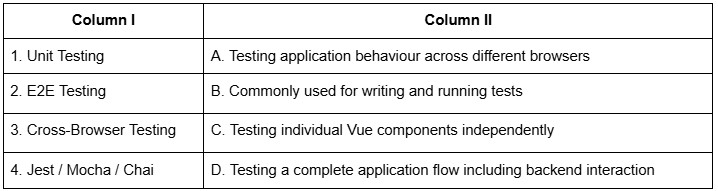
Text of the picture (copyable)
| Column I | Column II |
| :------- | :-------- |
| 1. Unit Testing | A. Testing application behaviour across different browsers |
| 2. E2E Testing | B. Commonly used for writing and running tests |
| 3. Cross-Browser Testing | C. Testing individual Vue components independently |
| 4. Jest / Mocha / Chai | D. Testing a complete application flow including backend interaction |
- 1-C, 2-B, 3-A, 4-D
- 1-B, 2-C, 3-D, 4-A
- 1-A, 2-D, 3-B, 4-C
- 1-C, 2-D, 3-A, 4-B
A developer has just created a new Vue 2 project using Vue CLI and the following package.json was generated. package.json
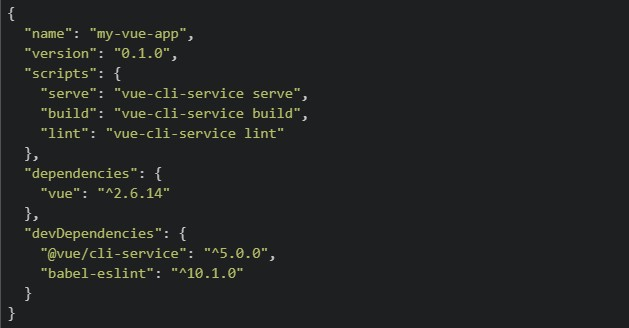 The developer wants to view the app in the browser locally for development. They run the following command: bash:
 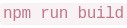 Which of the following best describes what happens and what the developer should have run instead?
The developer wants to view the app in the browser locally for development. They run the following command: bash: Which of the following best describes what happens and what the developer should have run instead?Text of the picture (copyable)
```json
{
  "name": "my-vue-app",
  "version": "0.1.0",
  "scripts": {
    "serve": "vue-cli-service serve",
    "build": "vue-cli-service build",
    "lint": "vue-cli-service lint"
  },
  "dependencies": {
    "vue": "^2.6.14"
  },
  "devDependencies": {
    "@vue/cli-service": "^5.0.0",
    "babel-eslint": "^10.1.0"
  }
}
```
```
npm run build
```- launches the app on
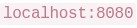 ; the developer should have run npm start to compile for production instead.
text
```
npm run build
```
```
localhost:8080
```
- and
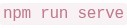 do the same thing — both launch the app at
 text
```
npm run build
```
```
npm run serve
```
```
localhost:8080
```
- is correct for local development; is only used for deploying to a server.
text
```
npm run build
```
```
npm run serve
```
- compiles and bundles the app for production into a
 folder — it does not start a local server. The developer should have run instead.
text
```
npm run build
```
/dist
```
npm run serve
```
Comprehension passage for this question
Read the following router and component setup carefully and answer the given sub questions: Router setup:
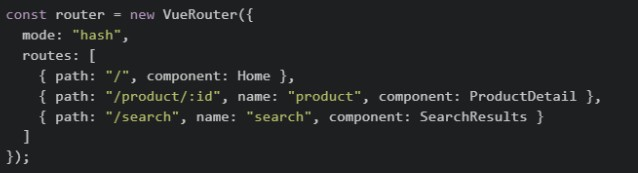 component's method:
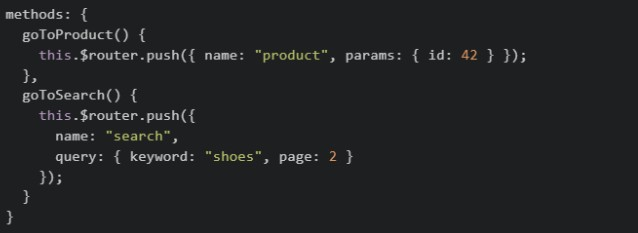
Inside  component, what expression correctly reads the
  value from the URL after navigation?
component, what expression correctly reads the value from the URL after navigation?Text of the picture (copyable)
SearchResults
keyword
- this.$router.query.keyword
- this.$route.query.keyword
- this.query.keyword
- this.$router.params.keyword
Read the following component code carefully. file: script.js
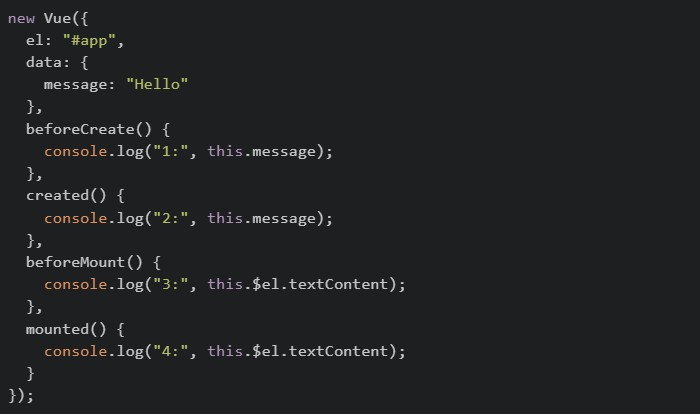 file:index.html
 Select all statements that correctly describe the console output:
file:index.html
Select all statements that correctly describe the console output:Text of the picture (copyable)
```javascript
new Vue({
  el: "#app",
  data: {
    message: "Hello"
  },
  beforeCreate() {
    console.log("1:", this.message);
  },
  created() {
    console.log("2:", this.message);
  },
  beforeMount() {
    console.log("3:", this.$el.textContent);
  },
  mounted() {
    console.log("4:", this.$el.textContent);
  }
});
```
```html
<div id="app">{{ message }}</div>
```- Log 1: prints

text
undefined
- Log 2: prints

text
hello
- Log 3: prints
text
hello
- Log 4: prints
text
hello
- Log 3: throws an error because $el is not yet available
A developer opens the Node.js REPL and runs the following line:
 Why does this fail?
Why does this fail?Text of the picture (copyable)
```javascript
const heading = document.querySelector("h1")
```- Node.js cannot execute JavaScript from the terminal.
- The Node.js runtime does not provide browser DOM APIs like

text
document
 works only after using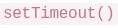
text
```javascript
document.querySelector()
```
```
setTimeout()
```
- V8 can execute only arithmetic expressions, not DOM code.
A Vue 2 component does the following: •loads initial task data from an API, •starts a timer after the component appears on the page, •clears that timer before the component is removed. Which hook choices are appropriate?
 for loading initial data.
text
```
created()
```
 for starting DOM-related work or timers.
text
```
mounted()
```
 for cleanup.
text
```
beforeDestroy()
```
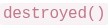 for declaring reactive
  .
.text
```
destroyed()
```
data
In a Vue Router app, a developer uses: •  inside a parent route, •
  , •
, •  inside a method. Which statements are correct?
inside a parent route, • , • inside a method. Which statements are correct?Text of the picture (copyable)
children
```
{ path: '*', component: NotFound }
```
```javascript
this.$router.go(-1)
```- can be used to organize nested routes under a parent route.
text
children
 can act as a fallback for unknown routes.
text
*
- tries to go back one step in browser history.
text
```javascript
this.$router.go(-1)
```
- Vue Router removes the need for route components.
Consider the following Vuex store and component code. store.js
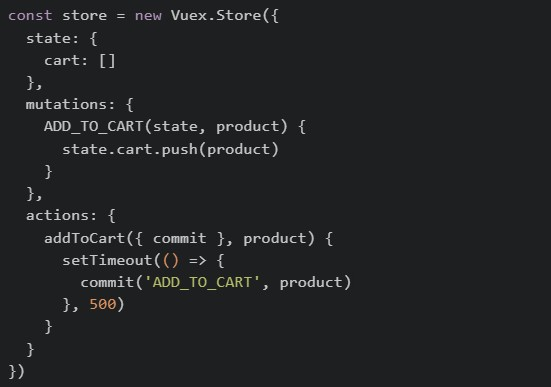 Component.vue
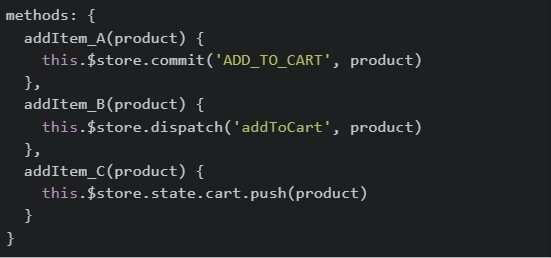 After triggering all three methods (
  ,
,  and
and  ) one by one, which of the following statements is correct?
Component.vue
After triggering all three methods ( , and ) one by one, which of the following statements is correct?Text of the picture (copyable)
```javascript
const store = new Vuex.Store({
  state: {
    cart: []
  },
  mutations: {
    ADD_TO_CART(state, product) {
      state.cart.push(product)
    }
  },
  actions: {
    addToCart({ commit }, product) {
      setTimeout(() => {
        commit('ADD_TO_CART', product)
      }, 500)
    }
  }
})
```
```javascript
methods: {
  addItem_A(product) {
    this.$store.commit('ADD_TO_CART', product)
  },
  addItem_B(product) {
    this.$store.dispatch('addToCart', product)
  },
  addItem_C(product) {
    this.$store.state.cart.push(product)
  }
}
```
addItem_A
addItem_B
addItem_C- All three methods will update the cart and all changes will be visible in Vue DevTools mutation history.
- Only and will appear in Vue DevTools mutation history, but will appear with a delay.
text
addItem_A
addItem_B
addItem_B
- Only will update the cart because mutations cannot be called directly from components.
text
addItem_B
- will throw an error because Vuex prevents direct state modification.
text
addItem_C
Read the following component carefully.
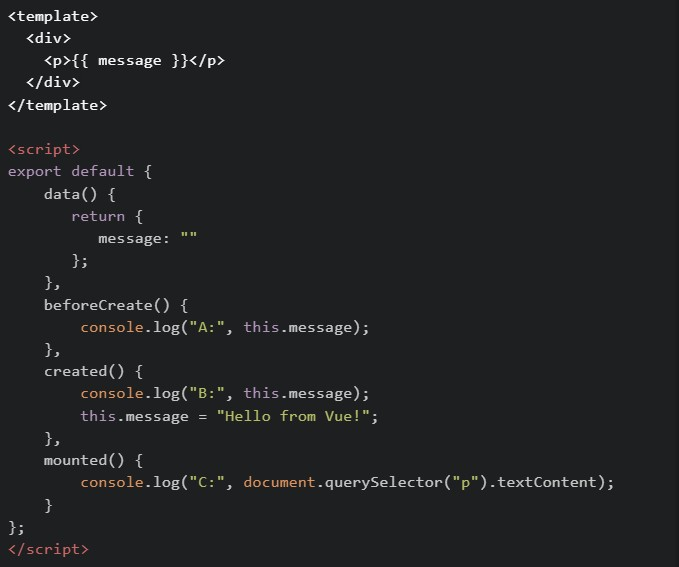 What will be logged in the console when this component first loads?
What will be logged in the console when this component first loads?Text of the picture (copyable)
```html
<template>
  <div>
    <p>{{ message }}</p>
  </div>
</template>

<script>
export default {
  data() {
    return {
      message: ""
    };
  },
  beforeCreate() {
    console.log("A:", this.message);
  },
  created() {
    console.log("B:", this.message);
    this.message = "Hello from Vue!";
  },
  mounted() {
    console.log("C:", document.querySelector("p").textContent);
  }
};
</script>
```
text
A: "" → B: Hello from Vue! → C: Hello from Vue!

text
A: undefined -> B: Hello from Vue! -> C: Hello from Vue!

text
A: undefined → B: "" → C: Hello from Vue!

text
A: undefined → B: undefined → C: Hello from Vue!

text
A: "" -> B: "" -> C: Hello from Vue!
Comprehension passage for this question
Read the following code carefully and answer the given sub questions: file1: router/index.js
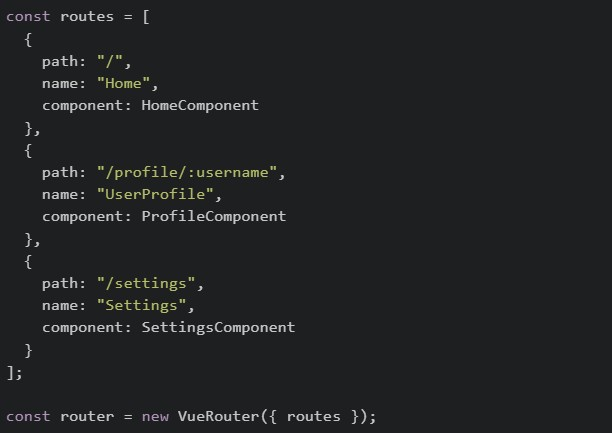 file2: ProfileComponent.vue
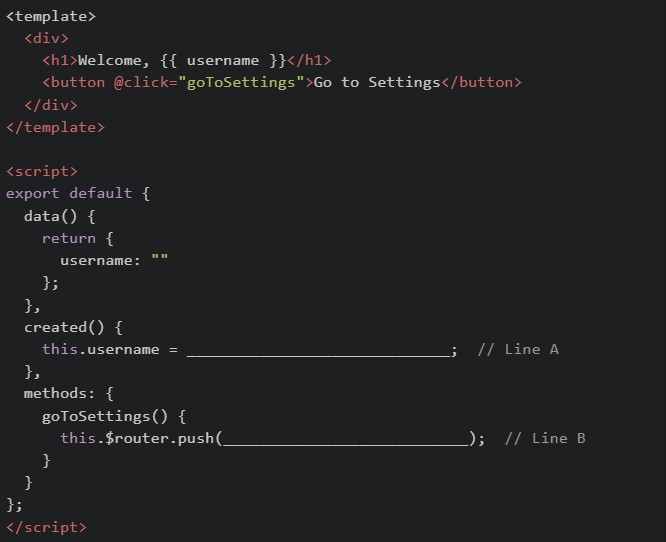
What should be filled in at Line A to correctly read the username from the URL?

text
```
this.$router.params.username
```

text
```
this.$route.params.username
```

text
```
this.$router.query.username
```

text
```
this.$route.query.username
```
Comprehension passage for this question
Read the following code carefully and answer the given sub questions: file1: router/index.js
file2: ProfileComponent.vue
What should be filled in at Line B to navigate to the Settings page?

text
```
{ path: "Settings" }
```
text
```json
{ path: "SettingsComponent" }
```
text
```json
{ "name": "Settings" }
```
text
```json
{ "name": "SettingsComponent" }
```
Consider running the following in Browser console:
 Which of the following statements are correct?
Which of the following statements are correct?Text of the picture (copyable)
```javascript
console.log(typeof setTimeout)
console.log(typeof document)
```
- The first line prints
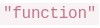 .
.text
"function"
- The second line prints
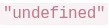 .
.text
"undefined"
- will work in Browser by default because V8 provides the DOM.
text
```javascript
document.querySelector()
```
- Different runtimes (browser, Node.js, etc.) can provide different APIs even if they use the same JavaScript engine.
Which of the following are advantages of component-based frontend frameworks like Vue.js?
- Code reusability
- Better maintainability
- Automatic SQL query optimization
- Easier UI management
A child component is initially visible using 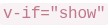 . The parent first updates a prop passed to the child, and then sets
 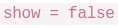 . After the child has already mounted once, which sequence can occur in the child after initial render?
. The parent first updates a prop passed to the child, and then sets . After the child has already mounted once, which sequence can occur in the child after initial render?Text of the picture (copyable)
```
v-if="show"
```
```
show = false
```
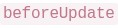 ->
->  ->
-> 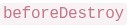 ->
-> 
text
beforeUpdate
updated
beforeDestroy
destroyed
- -> -> ->
text
beforeDestroy
destroyed
beforeUpdate
updated
 ->
->  -> ->
-> -> text
created
mounted
beforeUpdate
destroyed
- ->
 -> ->
-> -> text
updated
beforeCreate
destroyed
mounted
Given the following parent-child setup in Vue 2:
 and inside the child:
 Which statements are correct?
and inside the child:
Which statements are correct?Text of the picture (copyable)
```html
<child-box :message="parentMsg" @reply="handleReply"></child-box>
```
```javascript
this.$emit('reply', 'ok')
``` flows from parent to child through props.
text
message
 is a custom event sent from child to parent.
text
reply
- The child should directly change to update the parent source of truth.
text
message
- If
 changes in the parent, the child can receive the updated prop value.
text
parentMsg
Consider the below Vue app.
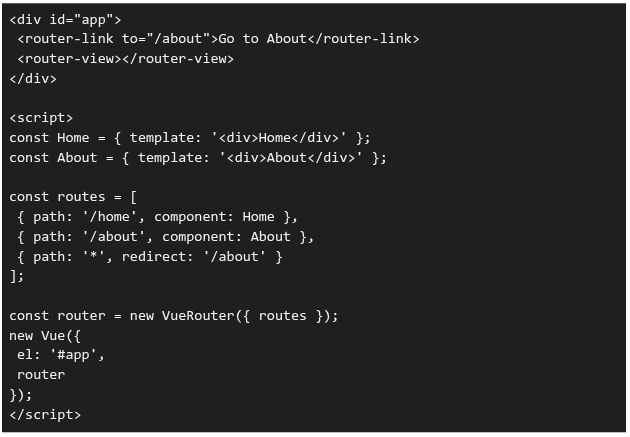 What happens when the user navigates to an undefined route like "/random"?
What happens when the user navigates to an undefined route like "/random"?Text of the picture (copyable)
```html
<div id="app">
  <router-link to="/about">Go to About</router-link>
  <router-view></router-view>
</div>

<script>
  const Home = { template: '<div>Home</div>' };
  const About = { template: '<div>About</div>' };

  const routes = [
    { path: '/home', component: Home },
    { path: '/about', component: About },
    { path: '*', redirect: '/about' }
  ];

  const router = new VueRouter({ routes });

  new Vue({
    el: '#app',
    router
  });
</script>
```- Browser navigates to /random and shows a blank page.
- Browser navigates to /random but renders nothing.
- Browser redirects to /about and displays "About".
- Error: No matching route.
Consider the following JavaScript program:
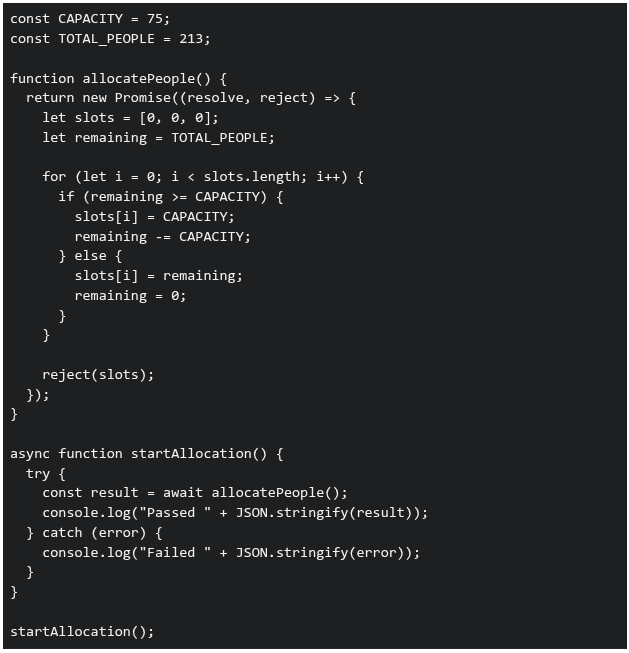 What will be printed in the console when the above code is executed?
What will be printed in the console when the above code is executed?Text of the picture (copyable)
```javascript
const CAPACITY = 75;
const TOTAL_PEOPLE = 213;

function allocatePeople() {
  return new Promise((resolve, reject) => {
    let slots = [0, 0, 0];
    let remaining = TOTAL_PEOPLE;

    for (let i = 0; i < slots.length; i++) {
      if (remaining >= CAPACITY) {
        slots[i] = CAPACITY;
        remaining -= CAPACITY;
      } else {
        slots[i] = remaining;
        remaining = 0;
      }
    }

    reject(slots);
  });
}

async function startAllocation() {
  try {
    const result = await allocatePeople();
    console.log("Passed " + JSON.stringify(result));
  } catch (error) {
    console.log("Failed " + JSON.stringify(error));
  }
}

startAllocation();
```- Passed [75,75,63]
- Failed [0,0,0]
- Failed [75,75,63]
- Passed [0,0,0]
Prerna and Swathy are using a web application built with Vue.js for the BS Degree program. When the page loads, the sidebar content appears instantly• However, when they click on an Assignments link, the main content takes noticeable time to load • A simplified version of the component is shown below:
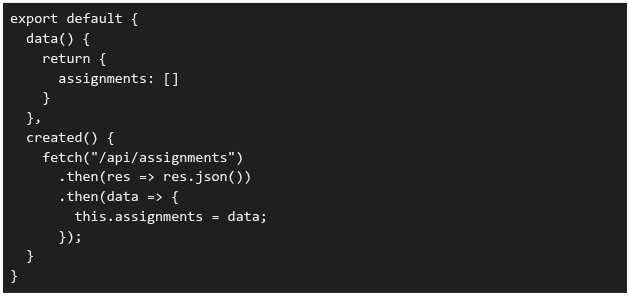 Which of the following statements correctly explain why the Assignments page takes time to load?
Which of the following statements correctly explain why the Assignments page takes time to load?Text of the picture (copyable)
```javascript
export default {
  data() {
    return {
      assignments: []
    }
  },
  created() {
    fetch("/api/assignments")
      .then(res => res.json())
      .then(data => {
        this.assignments = data;
      });
  }
}
```- The sidebar is likely part of a parent component and is already rendered before the API call
- The Assignments component waits for the API response before displaying data
- Vue blocks rendering of all components until API calls complete
- The delay is caused because data is fetched asynchronously after the component is created
Comprehension passage for this question
Consider the following Vue 2 application:
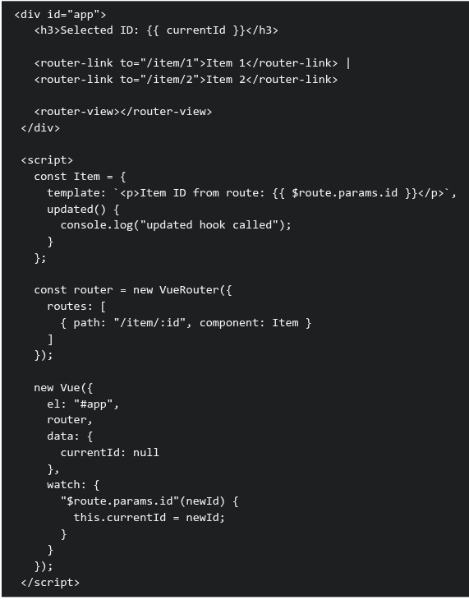 Assume the Vue application is loaded at the url
  . The user then clicks on the Item 2 router link. Based on the above data, answer the given subquestions.
What happens immediately after clicking "Item 2"?
- The Item component is destroyed and recreated, so
 is never called
text
```
updated()
```
- The route changes, the component is reused, and is called
text
```
updated()
```
- The route changes, but neither watcher nor lifecycle hooks run
- A new Vue instance is created for the route
Comprehension passage for this question
Consider the following Vue 2 application:
Assume the Vue application is loaded at the url . The user then clicks on the Item 2 router link. Based on the above data, answer the given subquestions.Why is the lifecycle hook triggered in this scenario?
lifecycle hook triggered in this scenario?Text of the picture (copyable)
```
updated()
```
- Because Vue Router always recreates components on navigation
- Because lifecycle hooks run on every URL change regardless of reactivity
- Because router-view forces a full re-render of the component tree
- Because a watched route parameter updates parent reactive state, triggering a component update
You are building a login feature for a web application. The frontend sends the user’s email and password to the backend API. The backend validates credentials against a database. Which security issues exist in the code given below? Frontend: script.js
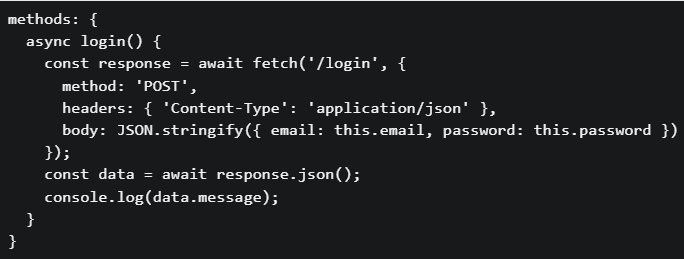 Backend: app.py
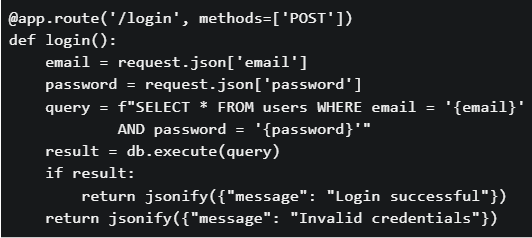
Backend: app.py
Text of the picture (copyable)
```javascript
methods: {
  async login() {
    const response = await fetch('/login', {
      method: 'POST',
      headers: { 'Content-Type': 'application/json' },
      body: JSON.stringify({ email: this.email, password: this.password })
    });
    const data = await response.json();
    console.log(data.message);
  }
}
```
```python
@app.route('/login', methods=['POST'])
def login():
    email = request.json['email']
    password = request.json['password']
    query = f"SELECT * FROM users WHERE email = '{email}'" \
            f" AND password = '{password}'"
    result = db.execute(query)
    if result:
        return jsonify({"message": "Login successful"})
    return jsonify({"message": "Invalid credentials"})
```- The SQL query is vulnerable to SQL injection attacks
- Passwords are stored and compared in plain text
- No authentication token (session/JWT) mechanism is implemented
- All of these.
Consider the following Vue.js application with two different route scenarios and a component that uses reactive data binding: Scenario: An e-commerce application where: Product list component displays products filtered by category• Category changes through router parameters: /products/:category• When a user navigates from /products/electronics to /products/books, the product list should update • Component Code:
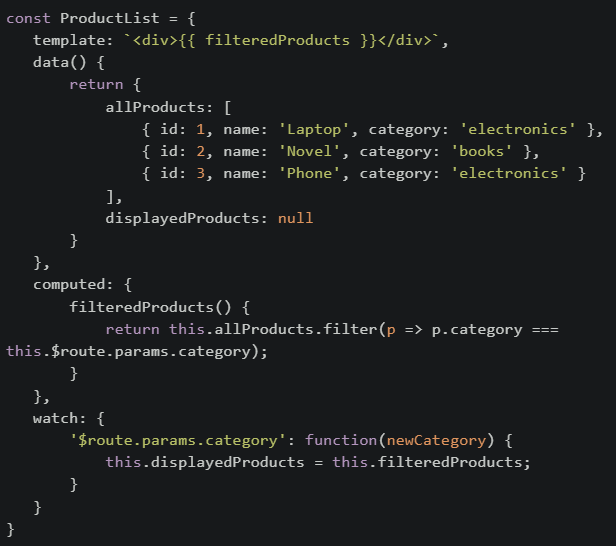 If the developer changed the template to use displayedProducts instead of filteredProducts, What would be the most likely issue?
If the developer changed the template to use displayedProducts instead of filteredProducts, What would be the most likely issue?Text of the picture (copyable)
```javascript
const ProductList = {
  template: `<div>{{ filteredProducts }}</div>`,
  data() {
    return {
      allProducts: [
        { id: 1, name: 'Laptop', category: 'electronics' },
        { id: 2, name: 'Novel', category: 'books' },
        { id: 3, name: 'Phone', category: 'electronics' }
      ],
      displayedProducts: null
    }
  },
  computed: {
    filteredProducts() {
      return this.allProducts.filter(p => p.category ===
        this.$route.params.category);
    }
  },
  watch: {
    '$route.params.category': function(newCategory) {
      this.displayedProducts = this.filteredProducts;
    }
  }
}
```- Performance would improve because computed properties are slower than data
- The initial page load would show an empty list, and only after navigation would data appear correctly
- There would be no difference because both will update at the same time
- The application would crash because displayedProducts is reactive
In Vue 2 (CDN), which of the following correctly describes the timing of the beforeDestroy and destroyed lifecycle hooks?
- beforeDestroy runs after the component has been removed from the DOM, while destroyed runs before destruction.
- beforeDestroy runs just before the component is torn down and removed from the DOM, while destroyed runs after the component is fully destroyed.
- beforeDestroy runs when the component is first mounted, while destroyed runs before the component is removed.
- both hooks run only after the component is destroyed.
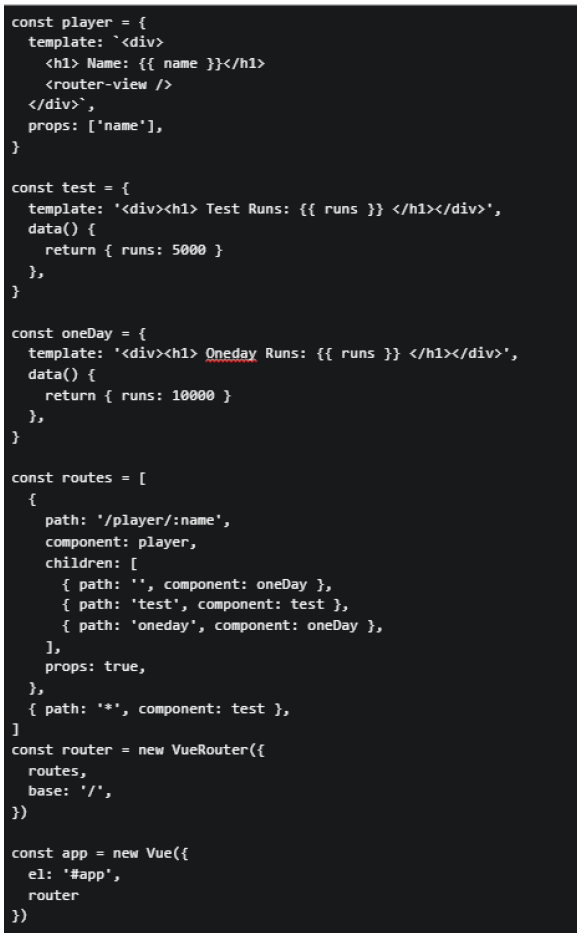
Consider the following markup index.html and JavaScript app.js for a Vue application. app.js:
 index.html:
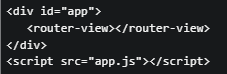 Suppose the application is running on http://localhost:8080, and the user visit the URL “http://localhost:8080/#/player/rohit/t20”. What will be rendered by the browser?
index.html:
Suppose the application is running on http://localhost:8080, and the user visit the URL “http://localhost:8080/#/player/rohit/t20”. What will be rendered by the browser?Text of the picture (copyable)
```javascript
const player = {
  template: `<div>
    <h1> Name: {{ name }}</h1>
    <router-view />
  </div>`,
  props: ['name'],
}

const test = {
  template: '<div><h1> Test Runs: {{ runs }} </h1></div>',
  data() {
    return { runs: 5000 }
  },
}

const oneDay = {
  template: '<div><h1> Oneday Runs: {{ runs }} </h1></div>',
  data() {
    return { runs: 10000 }
  },
}

const routes = [
  {
    path: '/player/:name',
    component: player,
    children: [
      { path: '', component: oneDay },
      { path: 'test', component: test },
      { path: 'oneday', component: oneDay },
    ],
    props: true,
  },
  { path: '*', component: test },
]
const router = new VueRouter({
  routes,
  base: '/',
})

const app = new Vue({
  el: '#app',
  router
})
```
```html
<div id="app">
  <router-view></router-view>
</div>
<script src="app.js"></script>
```- Name: Rohit Oneday Runs: 10000
- Test Runs: 5000
- Name: Rohit Test Runs: 5000
- Oneday Runs: 10000
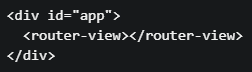
Consider the following html index.html and JavaScript app.js for a Vue application: File : index.html
 File : app.js
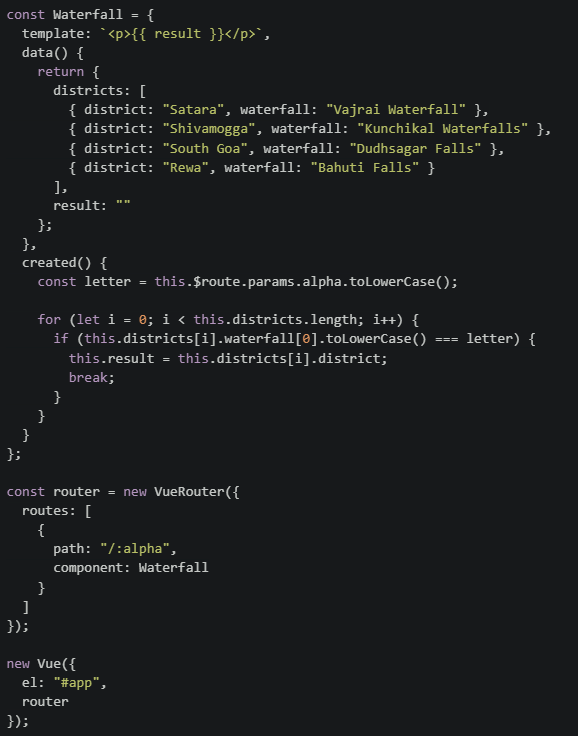 Suppose the application is running on http://localhost:8080, and the user visits the URL http://localhost:8080/#/b. What will be rendered by the browser?
File : app.js
Suppose the application is running on http://localhost:8080, and the user visits the URL http://localhost:8080/#/b. What will be rendered by the browser?Text of the picture (copyable)
```html
<div id="app">
  <router-view></router-view>
</div>
```
```javascript
const Waterfall = {
  template: `<p>{{ result }}</p>`,
  data() {
    return {
      districts: [
        { district: "Satara", waterfall: "Vajrai Waterfall" },
        { district: "Shivamogga", waterfall: "Kunchikal Waterfalls" },
        { district: "South Goa", waterfall: "Dudhsagar Falls" },
        { district: "Rewa", waterfall: "Bahuti Falls" }
      ],
      result: ""
    };
  },
  created() {
    const letter = this.$route.params.alpha.toLowerCase();

    for (let i = 0; i < this.districts.length; i++) {
      if (this.districts[i].waterfall[0].toLowerCase() === letter) {
        this.result = this.districts[i].district;
        break;
      }
    }
  }
};

const router = new VueRouter({
  routes: [
    {
      path: "/:alpha",
      component: Waterfall
    }
  ]
});

new Vue({
  el: "#app",
  router
});
```- Shivamogga
- South Goa
- Rewa
- Satara
Consider a scenario involving localStorage, Promise chains, and Vue lifecycle hooks: Scenario: A user authentication system where: On app initialization, the app checks localStorage for a stored user token• If a token exists, it validates the token asynchronously (via a Promise)• Based on validation, different UI components are rendered• The user navigates between different views• Code in mounted() hook:
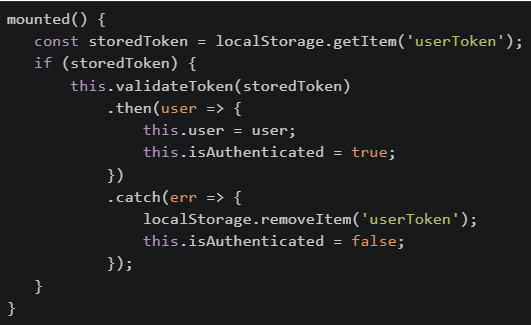 Which of the following statements is/are CORRECT about this implementation?
Which of the following statements is/are CORRECT about this implementation?Text of the picture (copyable)
```javascript
mounted() {
  const storedToken = localStorage.getItem('userToken');
  if (storedToken) {
    this.validateToken(storedToken)
      .then(user => {
        this.user = user;
        this.isAuthenticated = true;
      })
      .catch(err => {
        localStorage.removeItem('userToken');
        this.isAuthenticated = false;
      });
  }
}
```- If the page is refreshed while the Promise is pending, the token will be lost because localStorage is cleared on refresh
- If token validation fails, the token is removed from storage, preventing automatic login on future page loads
- The isAuthenticated flag might be false even though a storedToken exists, until the Promise validation completes
- sessionStorage should be used instead of localStorage because user tokens should not persist across browser sessions
- If the user navigates to a different route while validation is pending, the Promise will still complete and update the user data
Consider the following Vue application: File: Index.html
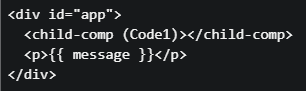 File: app.js
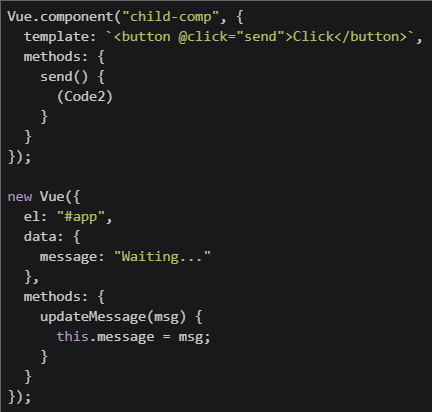 The application consists of a parent component and a child component. When the button inside the child component is clicked, the parent’s message should update and display "Hello" in the browser. Two important lines are missing and marked as (Code1) and (Code2). Which of the following options correctly completes the code?
File: app.js
The application consists of a parent component and a child component. When the button inside the child component is clicked, the parent’s message should update and display "Hello" in the browser. Two important lines are missing and marked as (Code1) and (Code2). Which of the following options correctly completes the code?Text of the picture (copyable)
```html
<div id="app">
  <child-comp (Code1)></child-comp>
  <p>{{ message }}</p>
</div>
```
```javascript
Vue.component("child-comp", {
    template: `<button @click="send">Click</button>`,
    methods: {
        send() {
            (Code2)
        }
    }
});

new Vue({
    el: "#app",
    data: {
        message: "Waiting..."
    },
    methods: {
        updateMessage(msg) {
            this.message = msg;
        }
    }
});
```
text
```
(Code1) @message="updateMessage('Hello')"
(Code2) this.$emit("message")
```
text
```
(Code1) @message="updateMessage"
(Code2) this.$emit("message", "Hello")
```
text
```
(Code1) :message="updateMessage"
(Code2) this.emit("message", "Hello")
```
text
```
(Code1) @updateMessage="message"
(Code2) this.$emit("updateMessage")
```
Consider the following Vue app with html and javascript file given below: File: index.html
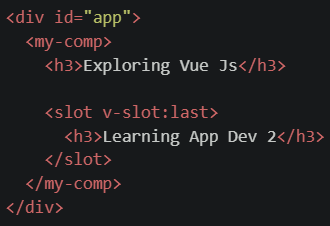 File: script.js
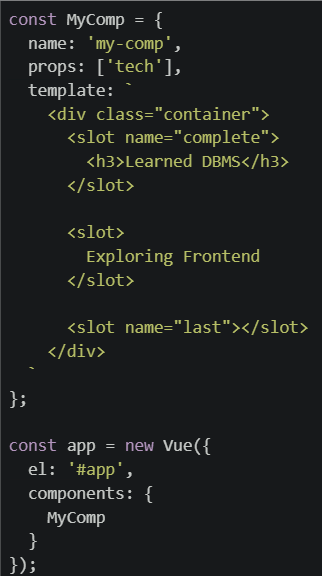 What will be rendered on the browser for the code setup given above ?
File: script.js
What will be rendered on the browser for the code setup given above ?Text of the picture (copyable)
```html
<div id="app">
  <my-comp>
    <h3>Exploring Vue Js</h3>

    <slot v-slot:last>
      <h3>Learning App Dev 2</h3>
    </slot>
  </my-comp>
</div>
```
```javascript
const MyComp = {
  name: 'my-comp',
  props: ['tech'],
  template: `
    <div class="container">
      <slot name="complete">
        <h3>Learned DBMS</h3>
      </slot>

      <slot>
        Exploring Frontend
      </slot>

      <slot name="last"></slot>
    </div>
  `
};

const app = new Vue({
  el: '#app',
  components: {
    MyComp
  }
});
```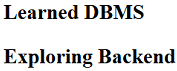
text
Learned DBMS
Exploring Backend
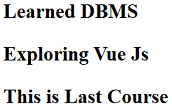
text
Learned DBMS

Exploring Vue Js

This is Last Course
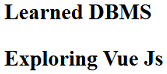
text
Learned DBMS
Exploring Vue Js
- None of these.
Comprehension passage for this question
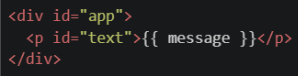
Consider the following HTML and Vue component code carefully and answer the given sub-questions. File: index.html
 File: script.js
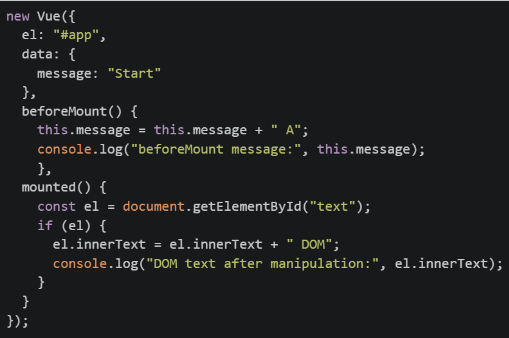
What will be the final text content displayed in the browser inside the  element after the component is fully mounted and all statements in the
  hook have executed?
element after the component is fully mounted and all statements in the hook have executed?Text of the picture (copyable)
`<p>`
```
mounted()
```

text
Start A

text
Start A B

text
Start A B DOM

text
Start A DOM
Considering the following code snippet, which statements are true about components in Vue?

Text of the picture (copyable)
```
childComponent.$emit('update', 5)
```- Parent can listen with @update
- Parent receives payload via $event
- Child can directly modify parent state
- $emit triggers a DOM event
How can you stop a Cross-Site Scripting (XSS) attack?
- Backend validation of user input and make sure any user-provided text is not executed as code.
- Store authentication token or jwt in cookies.
- Use v-html to show user generated data.
- Send cookies with every request to the backend.
Consider the following Vue Router setup and HTML.
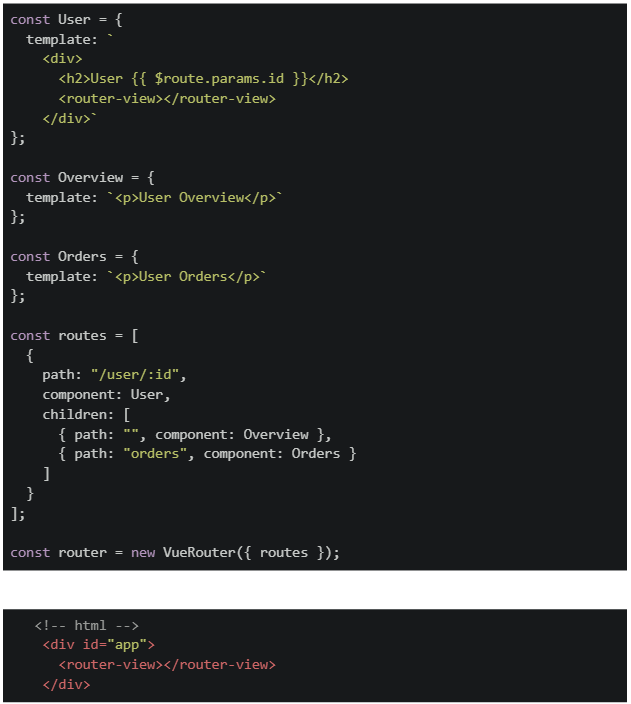 Suppose the webpage is served at http://127.0.0.1:5000. A user visits the URL http://127.0.0.1:5000/#/user/10/orders. What will be rendered on the browser?
Suppose the webpage is served at http://127.0.0.1:5000. A user visits the URL http://127.0.0.1:5000/#/user/10/orders. What will be rendered on the browser?Text of the picture (copyable)
```javascript
const User = {
  template: `
    <div>
      <h2>User {{ $route.params.id }}</h2>
      <router-view></router-view>
    </div>
  `
};

const Overview = {
  template: `<p>User Overview</p>`
};

const Orders = {
  template: `<p>User Orders</p>`
};

const routes = [
  {
    path: "/user/:id",
    component: User,
    children: [
      { path: "", component: Overview },
      { path: "orders", component: Orders }
    ]
  }
];

const router = new VueRouter({ routes });
```

```html
<!-- html -->
<div id="app">
  <router-view></router-view>
</div>
```- User Orders
- User 10 User Overview
- User 10 User Orders
- Nothing is rendered because sibling routes overwrite the parent route.
A developer creates a Vue component using both v-if and v-show directives on different elements with initially false conditions. Later, the conditions are changed to true. What is the key difference in how these two directives handle the DOM?
- v-if removes the element from DOM when false, v-show only changes CSS display property
- v-show removes the element from DOM when false, v-if only changes CSS display property
- Both v-if and v-show re-mount the element and re-run lifecycle hooks
- Both directives are identical in their functionality; they just have different naming conventions
A Vue Router application uses lazy-loaded route components. When a user navigates to a route with a dynamic parameter (e.g., /product/:id), and the computed property depends on this route parameter, what could be a potential issue if the component is not properly handling asynchronous operations?
- The component will throw a critical error and crash the application
- The computed property will return undefined because the component hasn't mounted yet
- The route parameter will not be accessible in the computed property
- The component will display data from the previously loaded route
A developer creates a Vue component with prototype chain inspection. The component uses class-based inheritance with lifecycle hooks. Consider the following scenario. Code:
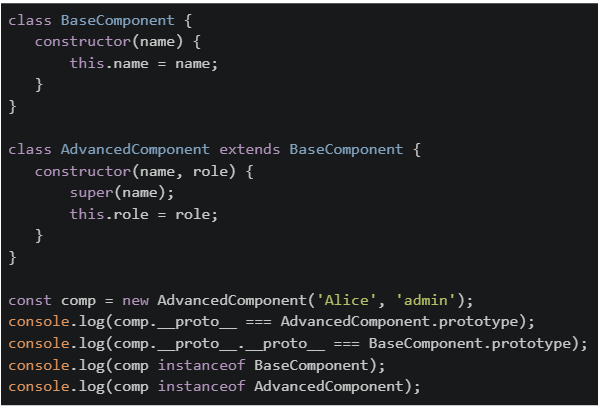 What will be the output on the browser's console?
What will be the output on the browser's console?Text of the picture (copyable)
```javascript
class BaseComponent {
  constructor(name) {
    this.name = name;
  }
}

class AdvancedComponent extends BaseComponent {
  constructor(name, role) {
    super(name);
    this.role = role;
  }
}

const comp = new AdvancedComponent('Alice', 'admin');
console.log(comp.__proto__ === AdvancedComponent.prototype);
console.log(comp.__proto__.__proto__ === BaseComponent.prototype);
console.log(comp instanceof BaseComponent);
console.log(comp instanceof AdvancedComponent);
```- true true true true
- true false true true
- false true true false
- true true false false
In a web application using webhooks and Redis for real-time data synchronization: Scenario: An order management system where: • When an order is created, a webhook is sent to a notification service • Redis stores the current order cache • Multiple concurrent requests update the cache Which statements about this architecture are true?
- Webhooks guarantee that the notification service will process events in the exact order they were triggered
- Redis is suitable for this use case because it's an in-memory data structure store that provides fast access to cached data
- The webhook will automatically retry if the notification service is temporarily unavailable
- Webhooks use HTTP POST requests to communicate events asynchronously
Comprehension passage for this question
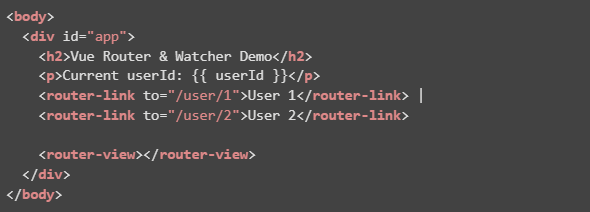
Consider the following Vue 2 (CDN) code. html code:
 script:
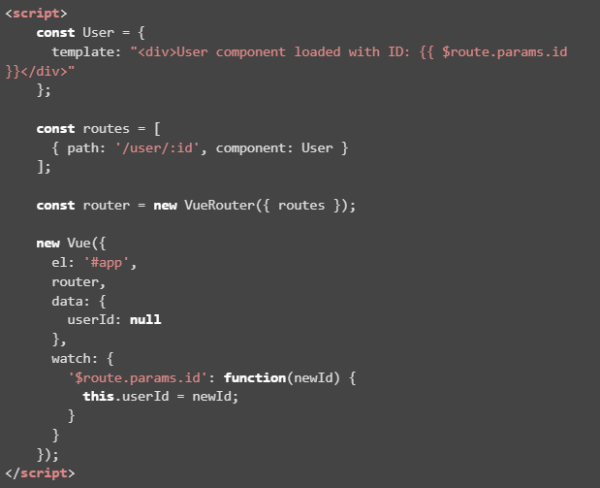 Based on the above data, answer the given subquestions.
What happens when the user clicks on "User 2" after initially opening "User 1"?

text
The route changes to /user/2 but the userId in data does not update.

text
The watcher updates `userId` to "2", and the `<p>` displays it instantly.

text
The `router-view` still shows User 1 because watchers don't re-render components.

text
An error occurs because `$route.params.id` cannot be watched.
Comprehension passage for this question
Consider the following Vue 2 (CDN) code. html code:
script:
Based on the above data, answer the given subquestions.Why is the watcher on $route.params.id necessary in this code?
- Without it, the userId in data would never change when the route changes.
- It is required because Vue Router does not automatically update component data.
- It prevents the component from being destroyed and recreated on every navigation.
- Both Without it, the userId in data would never change when the route changes and It is required because Vue Router does not automatically update component data are correct.
Which of the following statements about Vue 2 templates are correct?
- v-if removes elements from DOM when false
- v-show toggle initiates re-render of the Vue component
- v-bind can bind attributes and class dynamically
- Vue 2 templates must use double curly braces for all text interpolation
Text of the picture (copyable)
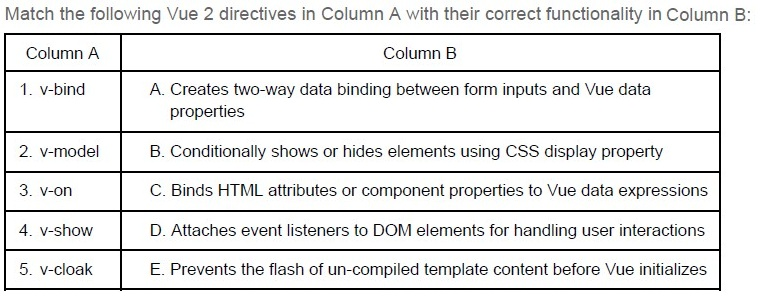
Match the following Vue 2 directives in Column A with their correct functionality in Column B:

| Column A | Column B |
|---|---|
| 1. v-bind | A. Creates two-way data binding between form inputs and Vue data properties |
| 2. v-model | B. Conditionally shows or hides elements using CSS display property |
| 3. v-on | C. Binds HTML attributes or component properties to Vue data expressions |
| 4. v-show | D. Attaches event listeners to DOM elements for handling user interactions |
| 5. v-cloak | E. Prevents the flash of un-compiled template content before Vue initializes |
- 1-C, 2-D, 3-A, 4-E, 5-B
- 1-A, 2-C, 3-B, 4-D, 5-E
- 1-C, 2-A, 3-D, 4-B, 5-E
- 1-E, 2-A, 3-D, 4-C, 5-B
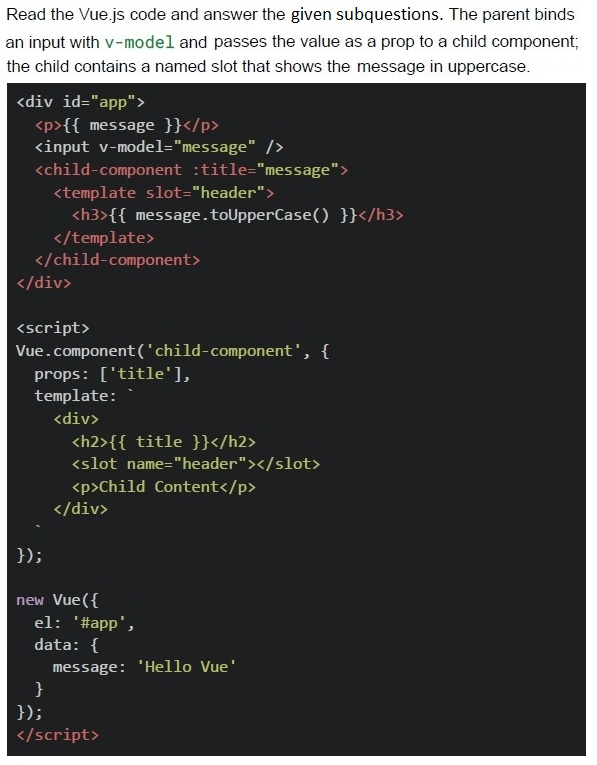
Comprehension passage for this question

Text of the picture (copyable)
Which Vue.js features are shown in the code?

text
Two-way data binding using v-model.

text
Use of a named `slot` inside a child component.

text
Passing values from parent to child using props.

text
Use of lifecycle hooks.
What does "reactivity" mean in the context of frontend frameworks like Vue.js?
- The component will reload when data changes
- All function calls become asynchronous
- It disables direct access to state
- The DOM updates automatically when the underlying reactive data changes
A popular e-commerce platform needs to notify multiple third-party services (inventory management, email marketing, analytics) whenever a customer places an order. The development team is considering different approaches to handle these notifications.
Scenario: When an order is placed, the system needs to:
● Update inventory levels in an external warehouse system ● Send a welcome email through a third-party email service ● Log analytics data to an external tracking service ● Update customer loyalty points in a CRM system
Which of the following statements about using webhooks for this scenario is MOST accurate?
- Webhooks are not suitable for this use case because they require the e-commerce platform to continuously poll each third-party service to check if they're ready to receive data, which would create unnecessary network overhead.
- Webhooks should be avoided in this scenario because they operatesynchronously, meaning the customer's order placement would be delayed until all third-party services have successfully processed their notifications.
- Webhooks provide an ideal solution as they allow the e-commerce platform topush real-time notifications to all subscribed third-party services immediately when an order is placed, eliminating the need for these services to repeatedly poll for updates.
- Webhooks are primarily designed for read-only operations and cannot handlecomplex data payloads like order information, making them unsuitable for e-commerce transaction notifications.
Comprehension passage for this question
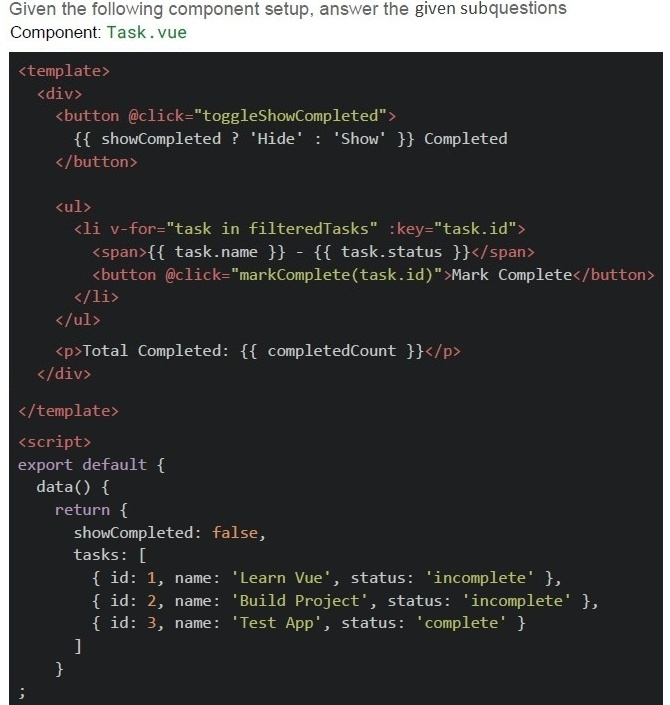 Scenario
1. The component is loaded. 2. User clicks "Mark Complete" for the task named Build Project.
3. User clicks "Show Completed" button again.
Scenario
1. The component is loaded. 2. User clicks "Mark Complete" for the task named Build Project.
3. User clicks "Show Completed" button again.
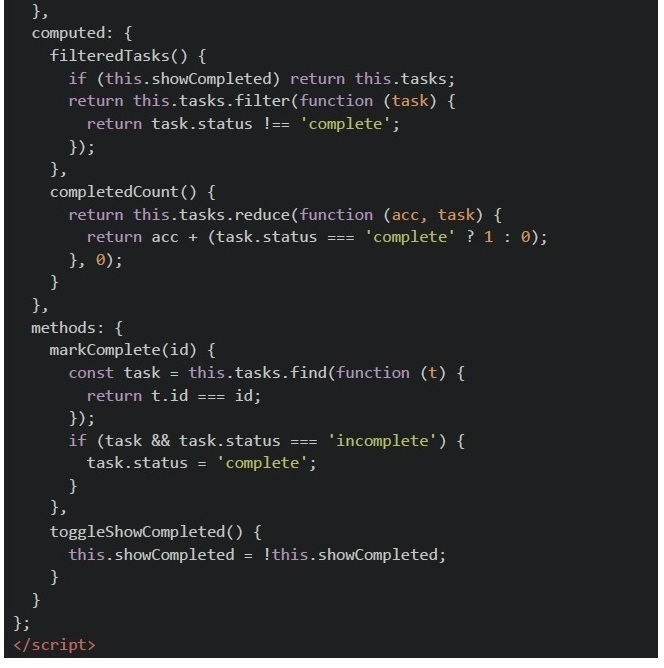
Which of the following are true about this component’s behavior?

text
The `filteredTasks` logic won't work properly if we used arrow functions for the `filter` method.

text
Using non-arrow functions in computed properties allows correct this access to Vue instance.

text
```
filteredTasks and completedCount will both update reactively when a task's
status is changed.
```

text
The `@click='markComplete(task.id)'` usage correctly preserves reactivity.
Text of the picture (copyable)
Consider this Vue.js component code:

```javascript
const TodoApp = {
  template: `
    <div>
      <input v-model="newTodo" @keyup.enter="addTodo" />
      <ul>
        <li v-for="todo in todos" :key="todo.id">{{ todo.text }}</li>
      </ul>
    </div>
  `,
  data() {
    return {
      newTodo: '',
      todos: []
    }
  },
  methods: {
    addTodo() {
      if (this.newTodo) {
        this.todos.push({ id: Date.now(), text: this.newTodo });
        this.newTodo = '';
      }
    }
  }
}
```

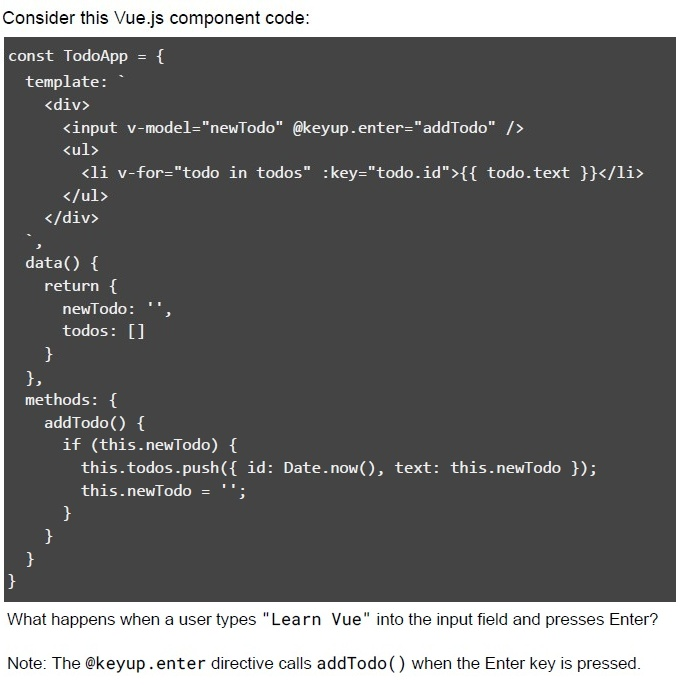
What happens when a user types "Learn Vue" into the input field and presses Enter?

Note: The `@keyup.enter` directive calls `addTodo()` when the Enter key is pressed.
text
An error occurs because the todos array is empty

text
The input is cleared, and Learn Vue appears in the list

text
Only the input is cleared, no todo is added

text
The page refreshes
Text of the picture (copyable)
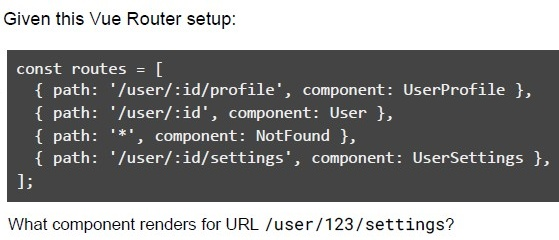
Given this Vue Router setup:

```javascript
const routes = [
  { path: '/user/:id/profile', component: UserProfile },
  { path: '/user/:id', component: User },
  { path: '*', component: NotFound },
  { path: '/user/:id/settings', component: UserSettings },
];
```

What component renders for URL /user/123/settings?- UserProfile
- User
- NotFound
- UserSettings
Assuming that the root Vue instance has already been created and mounted to div app. Which of the following statements are CORRECT?
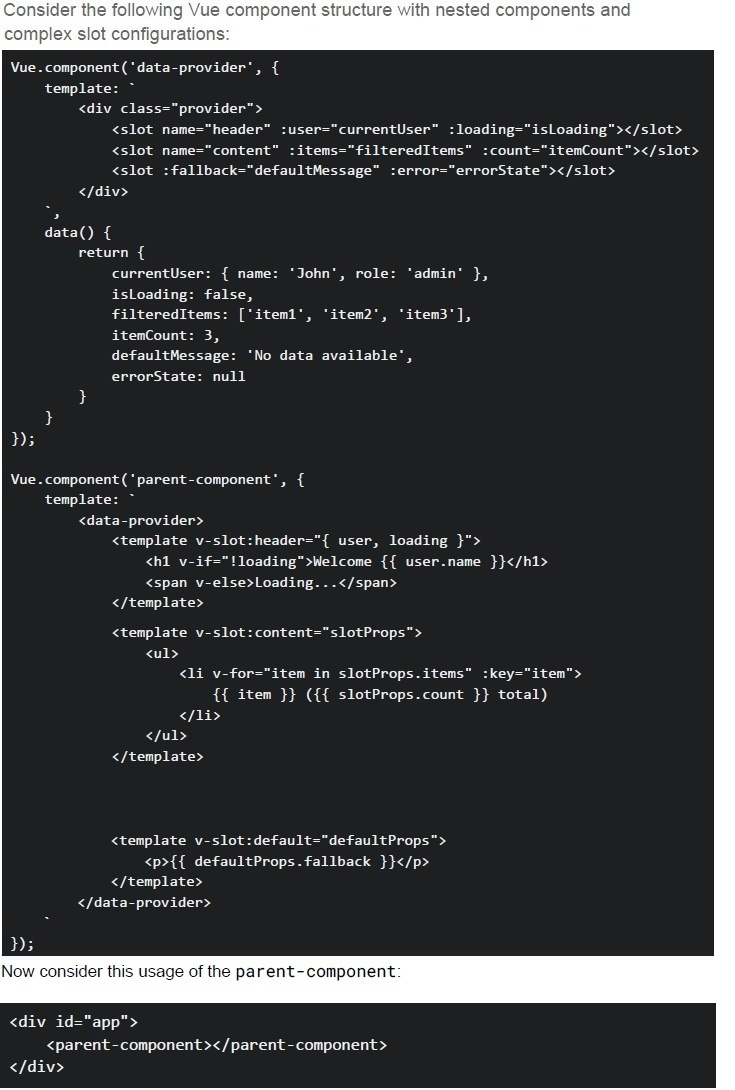
Text of the picture (copyable)
Consider the following Vue component structure with nested components and
complex slot configurations:

```javascript
Vue.component('data-provider', {
  template: `
    <div class="provider">
      <slot name="header" :user="currentUser" :loading="isLoading"></slot>
      <slot name="content" :items="filteredItems" :count="itemCount"></slot>
      <slot :fallback="defaultMessage" :error="errorState"></slot>
    </div>
  `,
  data() {
    return {
      currentUser: { name: 'John', role: 'admin' },
      isLoading: false,
      filteredItems: ['item1', 'item2', 'item3'],
      itemCount: 3,
      defaultMessage: 'No data available',
      errorState: null
    }
  }
});

Vue.component('parent-component', {
  template: `
    <data-provider>
      <template v-slot:header="{ user, loading }">
        <h1 v-if="!loading">Welcome {{ user.name }}</h1>
        <span v-else>Loading...</span>
      </template>

      <template v-slot:content="slotProps">
        <ul>
          <li v-for="item in slotProps.items" :key="item">
            {{ item }} ({{ slotProps.count }} total)
          </li>
        </ul>
      </template>

      <template v-slot:default="defaultProps">
        <p>{{ defaultProps.fallback }}</p>
      </template>
    </data-provider>
  `
});
```

Now consider this usage of the parent-component:

```html
<div id="app">
  <parent-component></parent-component>
</div>
```- The header slot will display "Welcome John" when loading is true
- The content slot will render 3 list items with "item1 (3 total)", "item2 (3 total)","item3 (3 total)"
- The default slot will display "No data available" from the fallback prop
- If we change isLoading: true in data-provider, the header will show"Loading..."
- Changing v-slot:default to just v-slot in parent-component would break thefunctionality
Comprehension passage for this question
Answer the given Subquestions:Consider the following Vue Router configuration in a Vue 2 application:
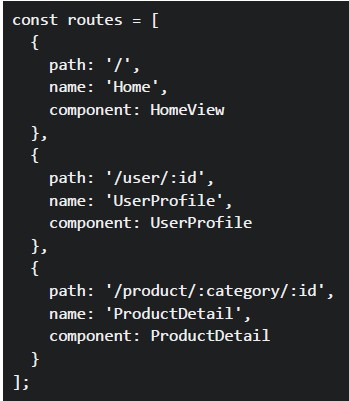 Consider the following Vue Router configuration in a Vue 2 application:
In a Vue component, you have these navigation methods:
Consider the following Vue Router configuration in a Vue 2 application:
In a Vue component, you have these navigation methods:
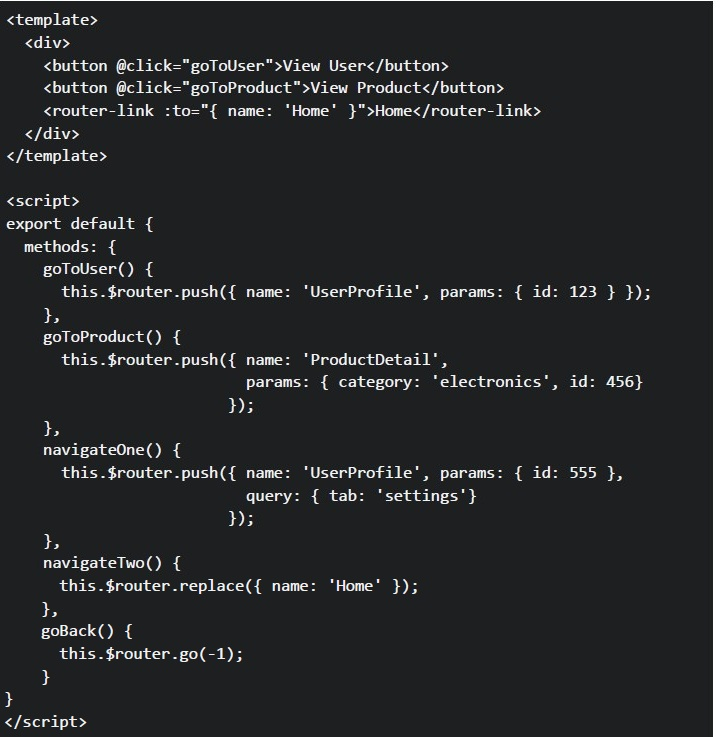 Consider the following Vue Router configuration in a Vue 2 application:
In a Vue component, you have these navigation methods: What URLs will be generated when the user clicks each navigation element?
Consider the following Vue Router configuration in a Vue 2 application:
In a Vue component, you have these navigation methods: What URLs will be generated when the user clicks each navigation element?
Consider the following Vue Router configuration in a Vue 2 application:
In a Vue component, you have these navigation methods:
Consider the following Vue Router configuration in a Vue 2 application:
In a Vue component, you have these navigation methods: What URLs will be generated when the user clicks each navigation element?Text of the picture (copyable)
```javascript
const routes = [
  {
    path: '/',
    name: 'Home',
    component: HomeView
  },
  {
    path: '/user/:id',
    name: 'UserProfile',
    component: UserProfile
  },
  {
    path: '/product/:category/:id',
    name: 'ProductDetail',
    component: ProductDetail
  }
];
```
```html
<template>
  <div>
    <button @click="goToUser">View User</button>
    <button @click="goToProduct">View Product</button>
    <router-link :to="{ name: 'Home' }">Home</router-link>
  </div>
</template>

<script>
export default {
  methods: {
    goToUser() {
      this.$router.push({ name: 'UserProfile', params: { id: 123 } });
    },
    goToProduct() {
      this.$router.push({ name: 'ProductDetail',
                           params: { category: 'electronics', id: 456}
                         });
    },
    navigateOne() {
      this.$router.push({ name: 'UserProfile', params: { id: 555 },
                           query: { tab: 'settings'}
                         });
    },
    navigateTwo() {
      this.$router.replace({ name: 'Home' });
    },
    goBack() {
      this.$router.go(-1);
    }
  }
}
</script>
```- User button: /user,Product button: /product, Home link: /home
- User button: /user/123,Product button: /product/electronics/456, Home link: /
- User button: /UserProfile/123,Product button: /ProductDetail/electronics/456, Home link: /Home
- User button: /user?id=123,Product button: /product?category=electronics&id=456, Home link: /
Comprehension passage for this question
Answer the given Subquestions:Using the same Vue Router configuration from the previous question, Select ALL correct statements about these navigation methods.
- The "View User" link will navigate to /user/789 and match the UserProfile route
- The navigateOne() method will create URL /user/555?tab=settings
- The $router.replace() method adds a new entry to the browser history
- The $router.go(-1) method navigates to the previous page in browser history
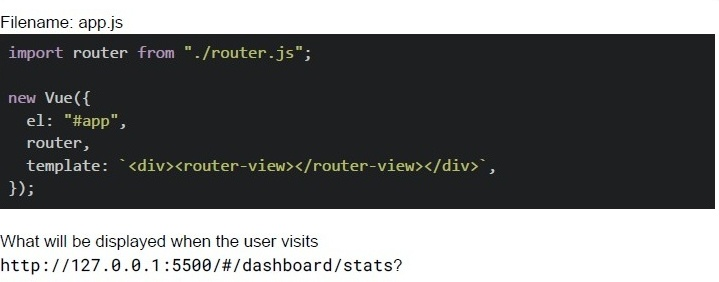
Text of the picture (copyable)
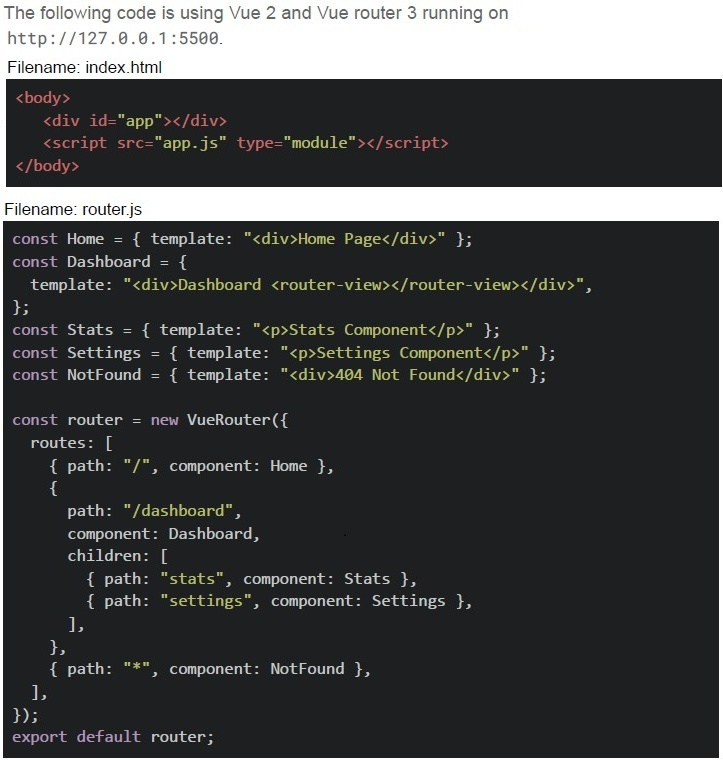
The following code is using Vue 2 and Vue router 3 running on
http://127.0.0.1:5500.

Filename: index.html
```html
<body>
    <div id="app"></div>
    <script src="app.js" type="module"></script>
</body>
```

Filename: router.js
```javascript
const Home = { template: "<div>Home Page</div>" };
const Dashboard = {
    template: "<div>Dashboard <router-view></router-view></div>",
};
const Stats = { template: "<p>Stats Component</p>" };
const Settings = { template: "<p>Settings Component</p>" };
const NotFound = { template: "<div>404 Not Found</div>" };

const router = new VueRouter({
    routes: [
        { path: "/", component: Home },
        {
            path: "/dashboard",
            component: Dashboard,
            children: [
                { path: "stats", component: Stats },
                { path: "settings", component: Settings },
            ],
        },
        { path: "**", component: NotFound },
    ],
});

export default router;
```
Filename: app.js

```javascript
import router from "./router.js";

new Vue({
  el: "#app",
  router,
  template: `<div><router-view></router-view></div>`,
});
```

What will be displayed when the user visits
http://127.0.0.1:5500/#/dashboard/stats?- Dashboard only
- Stats Component only
- DashboardStats Component
- 404 Not Found
Text of the picture (copyable)
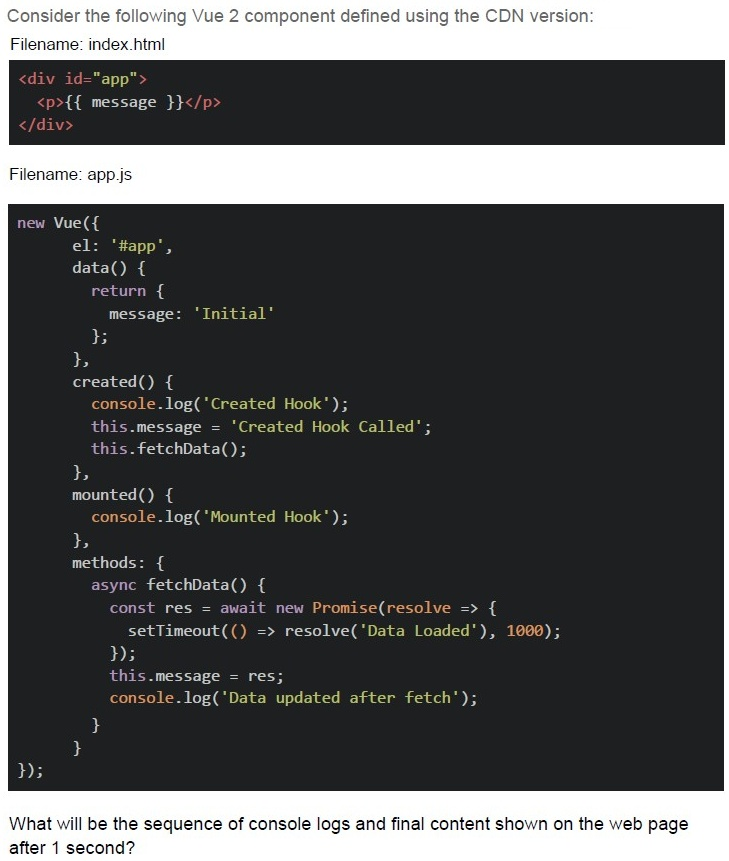
Consider the following Vue 2 component defined using the CDN version:
Filename: index.html

```html
<div id="app">
  <p>{{ message }}</p>
</div>
```

Filename: app.js

```javascript
new Vue({
  el: '#app',
  data() {
    return {
      message: 'Initial'
    };
  },
  created() {
    console.log('Created Hook');
    this.message = 'Created Hook Called';
    this.fetchData();
  },
  mounted() {
    console.log('Mounted Hook');
  },
  methods: {
    async fetchData() {
      const res = await new Promise(resolve => {
        setTimeout(() => resolve('Data Loaded'), 1000);
      });
      this.message = res;
      console.log('Data updated after fetch');
    }
  }
});
```

What will be the sequence of console logs and final content shown on the web page after 1 second?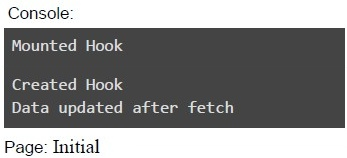
text
Console:
Mounted Hook
Created Hook
Data updated after fetch

Page: Initial
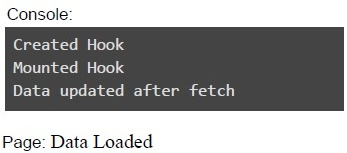
text
Console:
```
Created Hook
Mounted Hook
Data updated after fetch
```
Page: Data Loaded
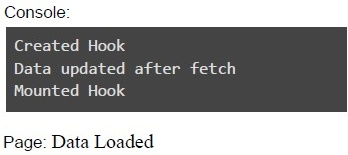
text
Console:
```
Created Hook
Data updated after fetch
Mounted Hook
```
Page: Data Loaded
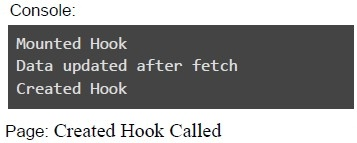
text
Console:
Mounted Hook
Data updated after fetch
Created Hook

Page: Created Hook Called
Text of the picture (copyable)
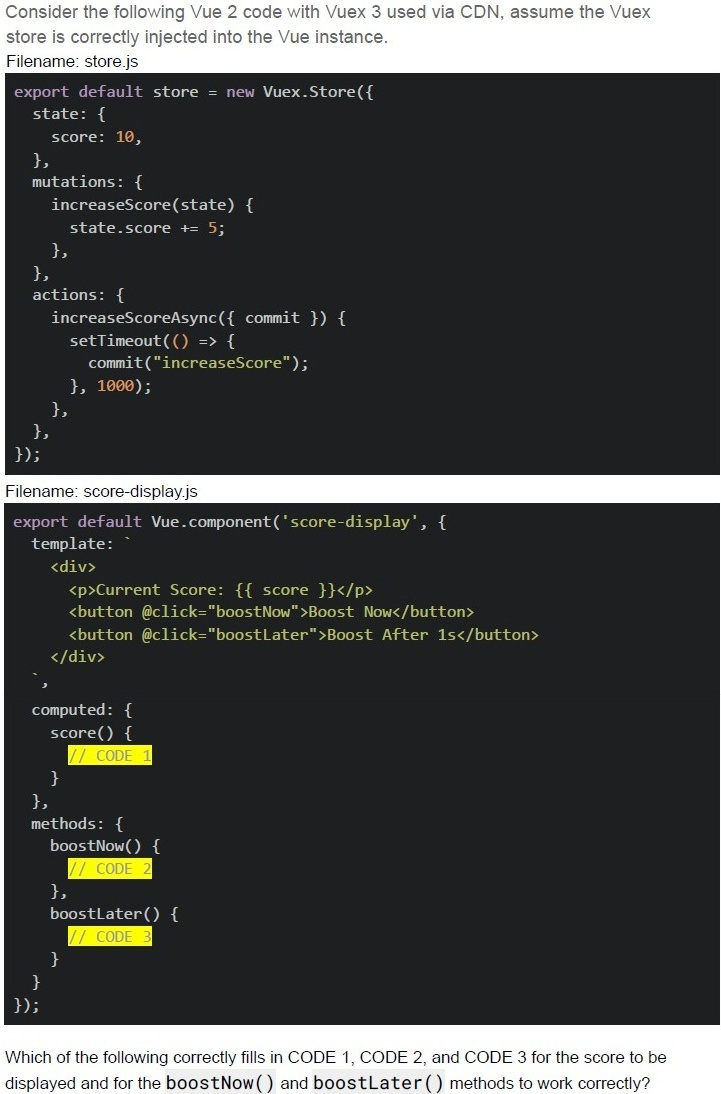
Consider the following Vue 2 code with Vuex 3 used via CDN, assume the Vuex
store is correctly injected into the Vue instance.
Filename: store.js
```javascript
export default store = new Vuex.Store({
  state: {
    score: 10,
  },
  mutations: {
    increaseScore(state) {
      state.score += 5;
    },
  },
  actions: {
    increaseScoreAsync({ commit }) {
      setTimeout(() => {
        commit("increaseScore");
      }, 1000);
    },
  },
});
```
Filename: score-display.js
```javascript
export default Vue.component('score-display', {
  template: `
    <div>
      <p>Current Score: {{ score }}</p>
      <button @click="boostNow">Boost Now</button>
      <button @click="boostLater">Boost After 1s</button>
    </div>
  `,
  computed: {
    score() {
      // CODE 1
    }
  },
  methods: {
    boostNow() {
      // CODE 2
    },
    boostLater() {
      // CODE 3
    }
  }
});
```
Which of the following correctly fills in CODE 1, CODE 2, and CODE 3 for the score to be
displayed and for the **boostNow()** and **boostLater()** methods to work correctly?
text
CODE 1:
```
return this.$store.state.score;
```

text
CODE 2:
```
this.$store.commit('increaseScore');
```
text
```
CODE 2: this.increaseScore() ;
```

text
CODE 3:
```
this.$store.dispatch('increaseScoreAsync');
```
text
CODE 3:
```
this.$store.increaseScoreAsync();
```
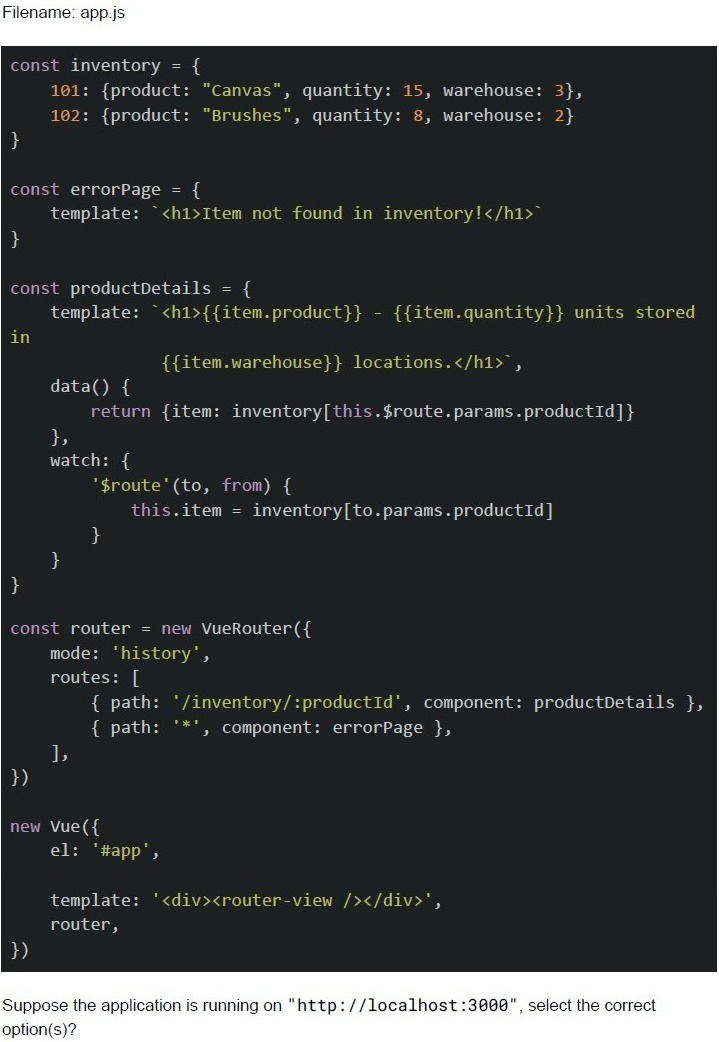
Text of the picture (copyable)
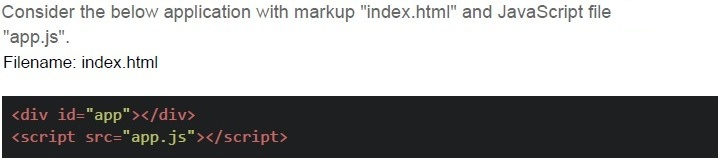
Consider the below application with markup "index.html" and JavaScript file
"app.js".
Filename: index.html

```html
<div id="app"></div>
<script src="app.js"></script>
```
Filename: app.js

```javascript
const inventory = {
  101: {product: "Canvas", quantity: 15, warehouse: 3},
  102: {product: "Brushes", quantity: 8, warehouse: 2}
}

const errorPage = {
  template: `<h1>Item not found in inventory!</h1>`
}

const productDetails = {
  template: `<h1>{{item.product}} - {{item.quantity}} units stored
  in
  {{item.warehouse}} locations.</h1>`,

  data() {
    return {item: inventory[this.$route.params.productId]}
  },
  watch: {
    '$route'(to, from) {
      this.item = inventory[to.params.productId]
    }
  }
}

const router = new VueRouter({
  mode: 'history',
  routes: [
    { path: '/inventory/:productId', component: productDetails },
    { path: '*', component: errorPage },
  ],
})

new Vue({
  el: '#app',

  template: '<div><router-view /></router-view></div>',
  router,
})
```

Suppose the application is running on "http://localhost:3000", select the correct option(s)?
text
For the endpoint, http://localhost:3000/inventory/101, The browser will render:
Canvas - 15 units stored in 3 locations.

text
For the endpoint, http://localhost:3000/#/inventory/102, The browser will render:
Brushes - 8 units stored in 2 locations.

text
For the endpoint, http://localhost:3000/inventory. The browser will render:
item not found in inventory!

text
For the endpoint, http://localhost:3000/inventory/103, The browser will render:
Item not found in inventory!

text
For the endpoint, http://localhost:3000/products/101, The browser will render:
Item not found in inventory!
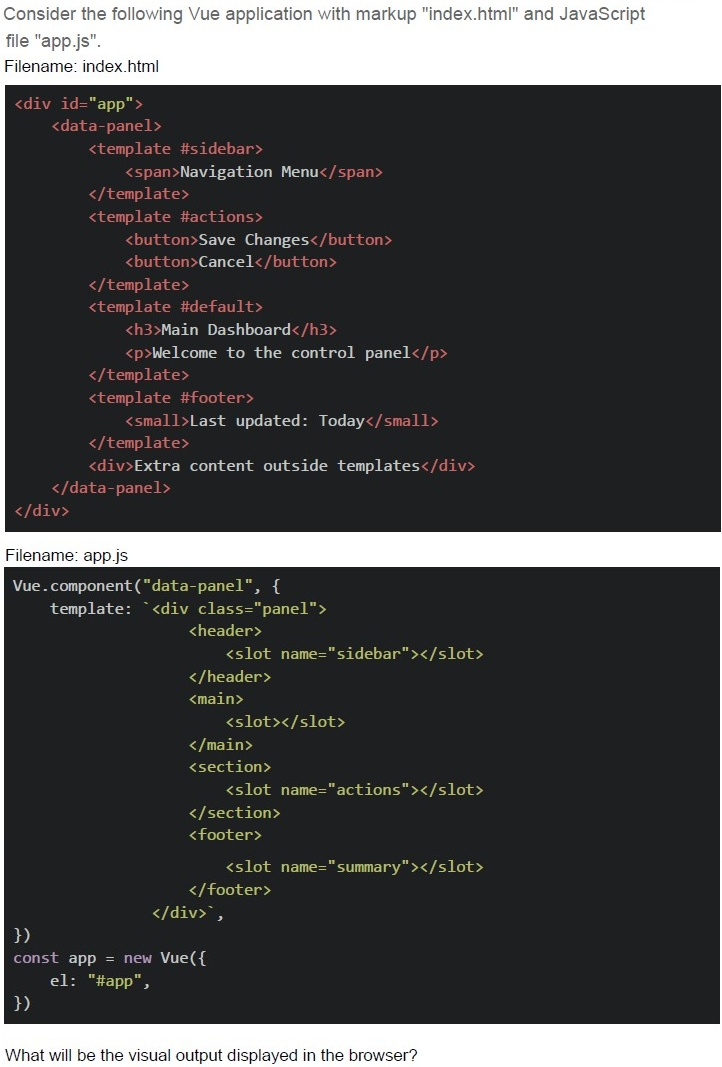
Text of the picture (copyable)
Consider the following Vue application with markup "index.html" and JavaScript file "app.js".

Filename: index.html

```html
<div id="app">
  <data-panel>
    <template #sidebar>
      <span>Navigation Menu</span>
    </template>
    <template #actions>
      <button>Save Changes</button>
      <button>Cancel</button>
    </template>
    <template #default>
      <h3>Main Dashboard</h3>
      <p>Welcome to the control panel</p>
    </template>
    <template #footer>
      <small>Last updated: Today</small>
    </template>
    <div>Extra content outside templates</div>
  </data-panel>
</div>
```

Filename: app.js

```javascript
Vue.component("data-panel", {
  template: `<div class="panel">
    <header>
      <slot name="sidebar"></slot>
    </header>
    <main>
      <slot></slot>
    </main>
    <section>
      <slot name="actions"></slot>
    </section>
    <footer>
      <slot name="summary"></slot>
    </footer>
  </div>`,
});
const app = new Vue({
  el: "#app",
});
```

What will be the visual output displayed in the browser?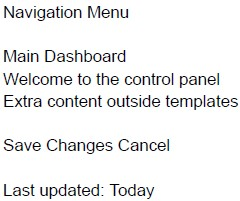
text
Navigation Menu

Main Dashboard
Welcome to the control panel
Extra content outside templates

Save Changes Cancel

Last updated: Today
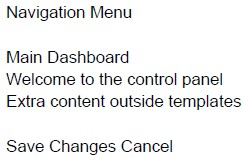
text
Navigation Menu

Main Dashboard
Welcome to the control panel
Extra content outside templates

Save Changes Cancel
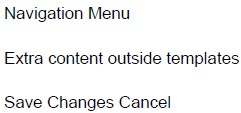
text
Navigation Menu
Extra content outside templates
Save Changes Cancel
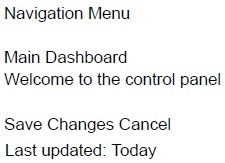
text
Navigation Menu

Main Dashboard
Welcome to the control panel

Save Changes Cancel
Last updated: Today
In Vue 2, what happens when you update a data property?
- DOM is immediately updated without virtual DOM
- The page reloads
- The virtual DOM detects changes and updates efficiently
- A full component re-renders from scratch
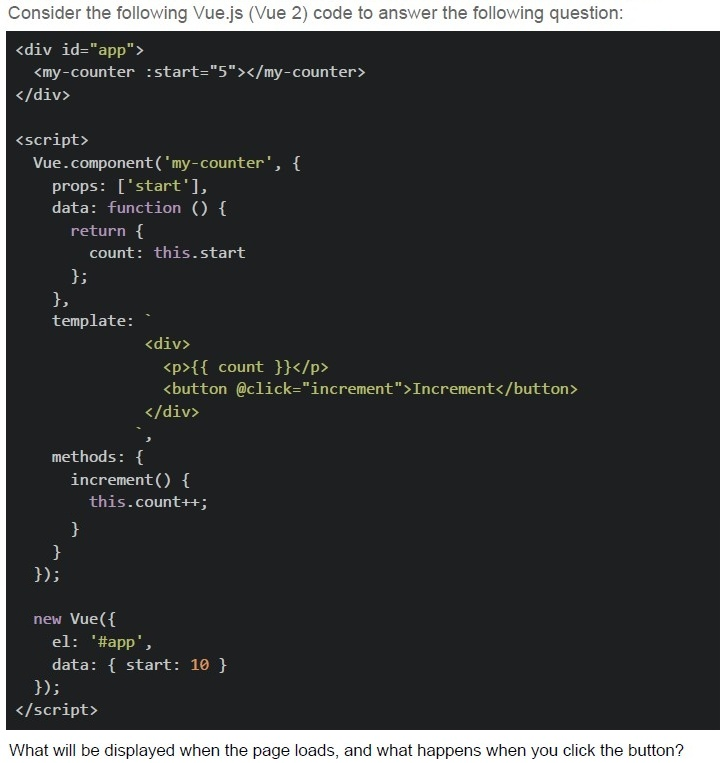
Text of the picture (copyable)
Consider the following Vue.js (Vue 2) code to answer the following question:

```html
<div id="app">
  <my-counter :start="5"></my-counter>
</div>

<script>
  Vue.component('my-counter', {
    props: ['start'],
    data: function () {
      return {
        count: this.start
      };
    },
    template: `
      <div>
        <p>{{ count }}</p>
        <button @click="increment">Increment</button>
      </div>
    `,
    methods: {
      increment() {
        this.count++;
      }
    }
  });

  new Vue({
    el: '#app',
    data: { start: 10 }
  });
</script>
```

What will be displayed when the page loads, and what happens when you click the button?
text
The counter starts at 10, and increments by 1 on each button click.

text
The counter starts at 5, and increments by 1 on each button click.

text
Nothing is rendered because the Vue component template is invalid when using Vue via CDN.

text
Vue throws a warning about compiling templates in the browser and fails to bind the component.
Which of the following correctly describes the lifecycle of a Vue.js component?
- beforeCreate -> created -> beforeMount -> mounted -> beforeUpdate ->updated -> beforeUnmount -> unmounted
- beforeCreate -> created -> beforeMount -> beforeUpdate -> mounted ->updated -> beforeUnmount -> unmounted
- created -> beforeCreate -> beforeMount -> mounted -> updated ->beforeUnmount -> unmounted
- created -> beforeCreate -> beforeMount -> mounted -> beforeUnmount ->updated -> unmounted
Which of the following is a key difference between Web Sockets and Server-Sent Events (SSE)?
- SSE allows bidirectional communication, while WebSockets only allow server-to-client communication.
- WebSockets maintain a persistent connection, while SSE creates a newconnection for each message.
- SSE works over HTTP and only supports server-to-client communication,whereas WebSockets provide full-duplex communication.
- WebSockets require an HTTP request for every message sent.