Home / MAD2 / Week 5 / Real questions
MAD2 week 5 - real exam questions
60 questions pulled from past papers whose wording matches this week's topics, newest first, duplicates removed. Pick your answers, then press Check answers. Figures and answer keys are the originals.
Elapsed 00:00
A startup is building a food delivery app. The customer-facing screen shows live order status updates: "Order Placed → Preparing → Out for Delivery → Delivered". Each stage is triggered by the restaurant or the delivery rider updating the status on their end. The customer's screen should reflect these changes in real time without refreshing the page. Two developers debate about the right technology: Developer A says: "Let's use Server-Sent Events. It's the right fit here." Developer B says: "No, we must use WebSockets. SSE won't work." Who is correct, and why?
- Developer B is correct. SSE cannot transmit JSON data, so structured order status objects cannot be pushed to the browser.
- Developer B is correct. SSE connections do not reconnect automatically when the network is briefly interrupted, making it unreliable for a live tracker.
- Developer A is correct, but only if WebSockets are set up as a mandatory fallback, since SSE requires HTTP/2 to function.
- Developer A is correct. The tracker only requires the server to push status updates to the customer, without the customer sending data back through the same connection. SSE is purpose-built for exactly this one-way server-to-client push scenario.
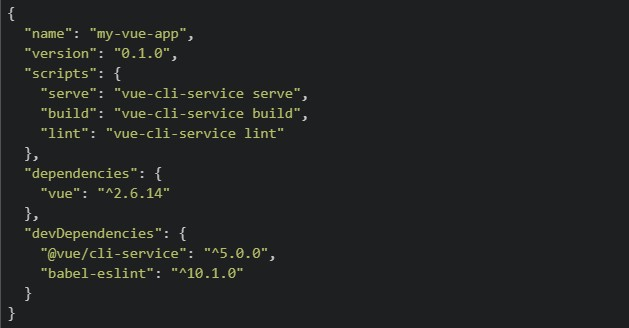
A developer has just created a new Vue 2 project using Vue CLI and the following package.json was generated. package.json
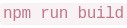
 The developer wants to view the app in the browser locally for development. They run the following command: bash:
  Which of the following best describes what happens and what the developer should have run instead?
The developer wants to view the app in the browser locally for development. They run the following command: bash: Which of the following best describes what happens and what the developer should have run instead?Text of the picture (copyable)
```json
{
  "name": "my-vue-app",
  "version": "0.1.0",
  "scripts": {
    "serve": "vue-cli-service serve",
    "build": "vue-cli-service build",
    "lint": "vue-cli-service lint"
  },
  "dependencies": {
    "vue": "^2.6.14"
  },
  "devDependencies": {
    "@vue/cli-service": "^5.0.0",
    "babel-eslint": "^10.1.0"
  }
}
```
```
npm run build
```- launches the app on
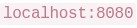 ; the developer should have run npm start to compile for production instead.
text
```
npm run build
```
```
localhost:8080
```
- and
 do the same thing — both launch the app at
 text
```
npm run build
```
```
npm run serve
```
```
localhost:8080
```
- is correct for local development; is only used for deploying to a server.
text
```
npm run build
```
```
npm run serve
```
- compiles and bundles the app for production into a
 folder — it does not start a local server. The developer should have run instead.
text
```
npm run build
```
/dist
```
npm run serve
```
What is logged to the console after running the following code?
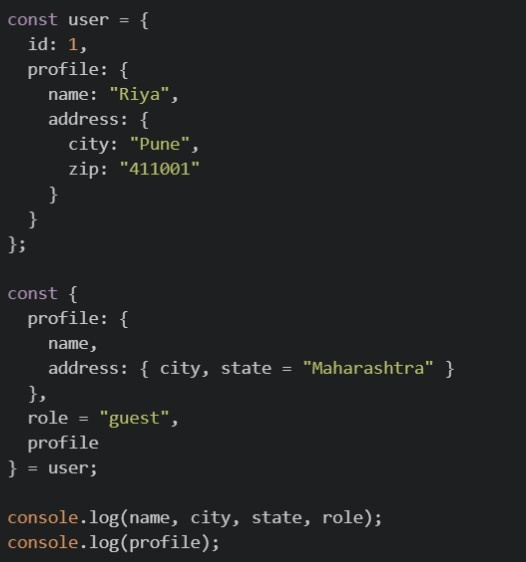
Text of the picture (copyable)
```javascript
const user = {
  id: 1,
  profile: {
    name: "Riya",
    address: {
      city: "Pune",
      zip: "411001"
    }
  }
};

const {
  profile: {
    name,
    address: { city, state = "Maharashtra" }
  },
  role = "guest",
  profile
} = user;

console.log(name, city, state, role);
console.log(profile);
```

text
Riya Pune Maharashtra guest ``` { name: "Riya", address: { city: "Pune", zip: "411001" } } ```-

text
Riya Pune Maharashtra guest
undefined


text
``` undefined undefined Maharashtra guest ``` ```json { "name": "Riya", "address": { ...} } ```- This code throws a
 , because you cannot destructure profile into nested variables and also assign it to a plain variable profile in the same statement.
text
SyntaxError
Consider the following JavaScript code:
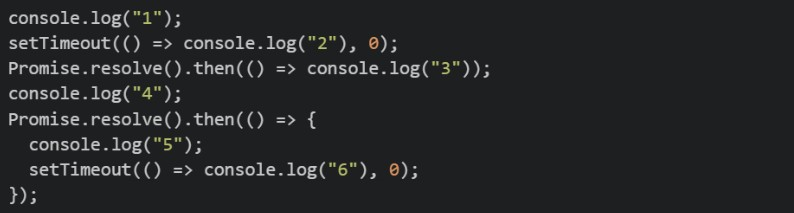 What is the order of console output?
What is the order of console output?Text of the picture (copyable)
```javascript
console.log("1");
setTimeout(() => console.log("2"), 0);
Promise.resolve().then(() => console.log("3"));
console.log("4");
Promise.resolve().then(() => {
  console.log("5");
  setTimeout(() => console.log("6"), 0);
});
```- 1, 4, 3, 5, 2, 6
- 1, 4, 3, 5, 6, 2
- 1, 3, 4, 5, 2, 6
- 1, 4, 2, 3, 5, 6
Comprehension passage for this question
Consider the following JavaScript code:
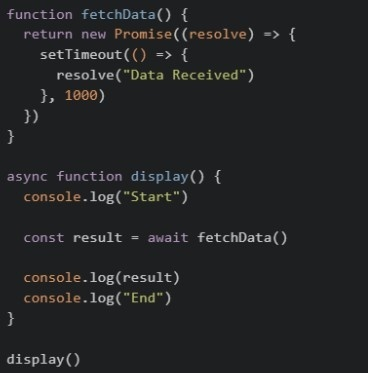 Based on the above data, answer the given subquestions.
Which of the following statements are correct?
 pauses the execution of the
  function until the Promise resolves.
text
await
```
display()
```
 immediately returns the resolved string "Data Received".
text
```
fetchData()
```
 functions cannot return a
  .
.text
async
Promise
- Removing would cause
 to store a object instead of the resolved value.
text
await
result
Promise
A Vue 2 application fetches a list of courses from an API and wants to display them in the template.
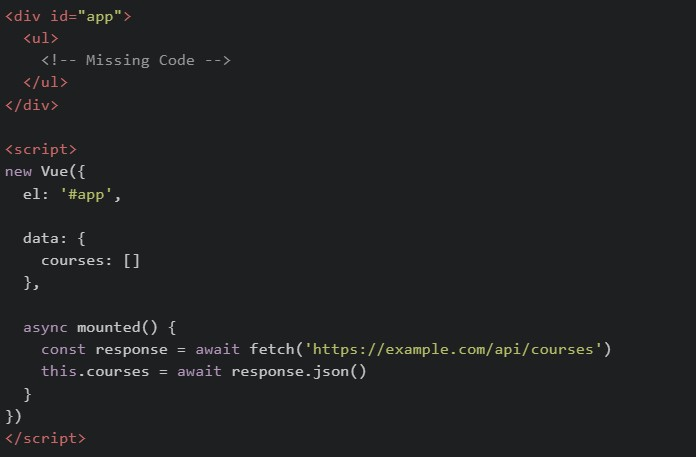 Assume the API returns:
 Complete the missing code so that all course names are rendered correctly. Which of the following code snippets can correctly replace
  ?
?
Assume the API returns:
Complete the missing code so that all course names are rendered correctly. Which of the following code snippets can correctly replace ?Text of the picture (copyable)
```html
<div id="app">
  <ul>
    <!-- Missing Code -->
  </ul>
</div>

<script>
  new Vue({
    el: '#app',

    data: {
      courses: []
    },

    async mounted() {
      const response = await fetch('https://example.com/api/courses')
      this.courses = await response.json()
    }
  })
</script>
```
```json
[
  { "id": 1, "name": "MAD-2" },
  { "id": 2, "name": "DBMS" }
]
```
```html
<!-- Missing Code -->
```
text
```html
<li v-for="course in courses" :key="course.id">
  {{ course.name }}
</li>
```
text
```html
<li v-for="(course, index) in courses" :key="index">
  {{ course.name }}
</li>
```
text
```html
<li v-if="course in courses">
  {{ course.name }}
</li>
```
text
```html
<li v-for="courses in course">
  {{ courses.name }}
</li>
```
What is the value of result after running the following code?
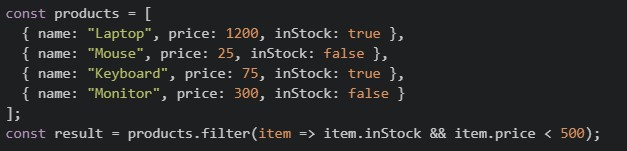
Text of the picture (copyable)
```javascript
const products = [
  { name: "Laptop", price: 1200, inStock: true },
  { name: "Mouse", price: 25, inStock: false },
  { name: "Keyboard", price: 75, inStock: true },
  { name: "Monitor", price: 300, inStock: false }
];

const result = products.filter(item => item.inStock && item.price < 500);
```
text
```json
{ "name": "Keyboard", "price": 75, "inStock": true }
```
text
```
[[{ name: "Laptop", price: 1200, inStock: true }, { name: "Keyboard", price: 75, inStock: true }]]
```
text
```
[[{ name: "Keyboard", price: 75, inStock: true }]]
```
text
```html
<!DOCTYPE html>
<html lang="en">
<head>
    <meta charset="UTF-8">
    <meta name="viewport" content="width=device-width, initial-scale=1.0">
    <title>Document</title>
    <style>
        .box {
            width: 100px;
            height: 100px;
            background-color: lightblue;
            margin: 10px;
            border: 1px solid black;
        }
        .container {
            display: flex;
            flex-direction: row;
            flex-wrap: wrap;
            justify-content: flex-start;
            align-items: flex-start;
            align-content: flex-start;
            height: 300px;
            border: 2px solid red;
        }
    </style>
</head>
<body>
    <div class="container">
        <div class="box">Box 1</div>
        <div class="box">Box 2</div>
        <div class="box">Box 3</div>
        <div class="box">Box 4</div>
        <div class="box">Box 5</div>
        <div class="box">Box 6</div>
    </div>
</body>
</html>
```
Consider the following javascript code:
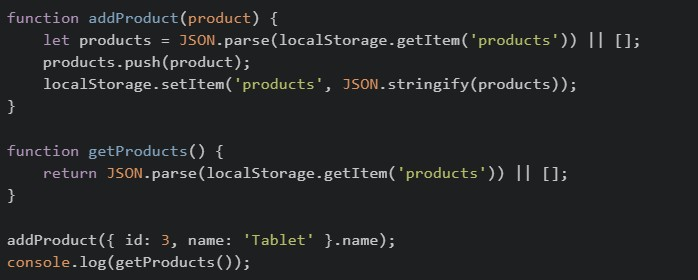 The above code is initially loaded on the browser and then the browser is refreshed two times. What will be the final output?
The above code is initially loaded on the browser and then the browser is refreshed two times. What will be the final output?Text of the picture (copyable)
```javascript
function addProduct(product) {
    let products = JSON.parse(localStorage.getItem('products')) || [];
    products.push(product);
    localStorage.setItem('products', JSON.stringify(products));
}

function getProducts() {
    return JSON.parse(localStorage.getItem('products')) || [];
}

addProduct({ id: 3, name: 'Tablet' }.name);
console.log(getProducts());
```- ['Tablet', 'Tablet']
- ['Tablet', 'Tablet', 'Tablet']
- [{ id: 3, name: 'Tablet' }]
- [undefined]
Point out the error with the following code that is used to display user data?
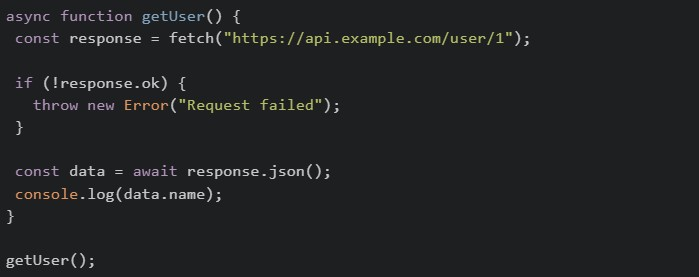
Text of the picture (copyable)
```javascript
async function getUser() {
const response = await fetch("https://api.example.com/user/1");
if (!response.ok) {
throw new Error("Request failed");
}
const data = await response.json();
console.log(data.name);
}
getUser();
``` should use POST method by default, not GET
text
```
fetch()
```
 and
and  will throw errors because response is a
 text
response.ok
```
response.json()
```
Promise
 cannot be called on a
  response; use
  instead
text
```
.json()
```
fetch
```
.text()
```
- does not work inside functions
text
```
fetch()
```
async
What is the correct output order for the following code?

Text of the picture (copyable)
```javascript
console.log("A")
setTimeout(() => console.log("B"), 0)
Promise.resolve().then(() => console.log("C"))
console.log("D")
```- A B C D
- C A D B
- A D C B
- A D B C
Consider the following JavaScript code snippet?
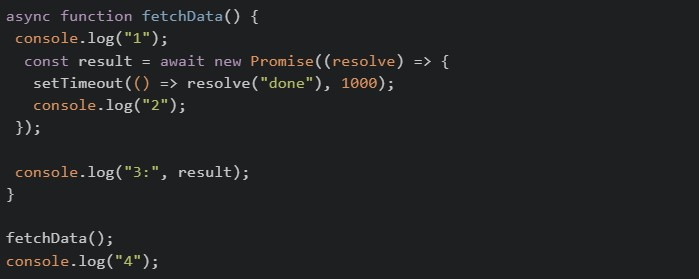 What will be the output of above code on the browser’s console?
What will be the output of above code on the browser’s console?Text of the picture (copyable)
```javascript
async function fetchData() {
  console.log("1");
  const result = await new Promise((resolve) => {
    setTimeout(() => resolve("done"), 1000);
    console.log("2");
  });

  console.log("3:", result);
}

fetchData();
console.log("4");
```- 1 → 2 → 3: done → 4
- 1 → 4 → 2 → 3: done
- 1 → 2 → 4 → 3: done
- 1 → 2 → 4 (3 never prints due to unresolved promise)
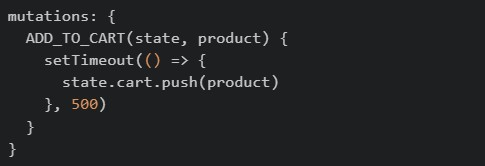
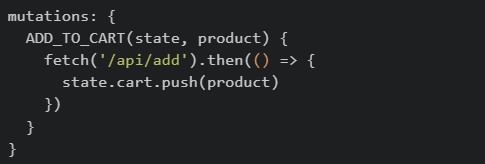
Consider the following Vuex store snippets. Which of the following demonstrates the correct usage of a mutation as per its definition?
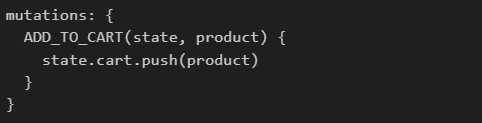
text
```
mutations: {
  ADD_TO_CART(state, product) {
    state.cart.push(product)
  }
}
```
text
```javascript
mutations: {
  ADD_TO_CART(state, product) {
    setTimeout(() => {
      state.cart.push(product)
    }, 500)
  }
}
```
text
```javascript
mutations: {
  ADD_TO_CART(state, product) {
    fetch('/api/add').then(() => {
      state.cart.push(product)
    })
  }
}
```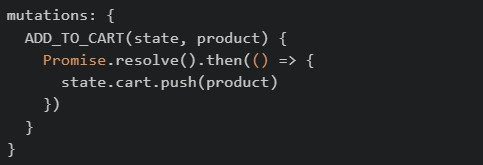
text
```javascript
mutations: {
  ADD_TO_CART(state, product) {
    Promise.resolve().then(() => {
      state.cart.push(product)
    })
  }
}
```
Comprehension passage for this question
Read the following code carefully and answer the given sub questions: file1: router/index.js
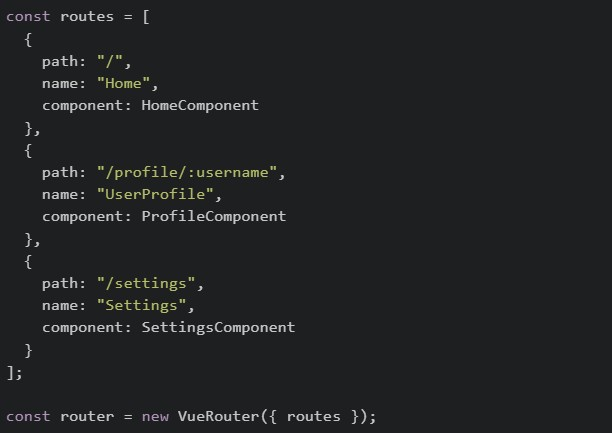 file2: ProfileComponent.vue
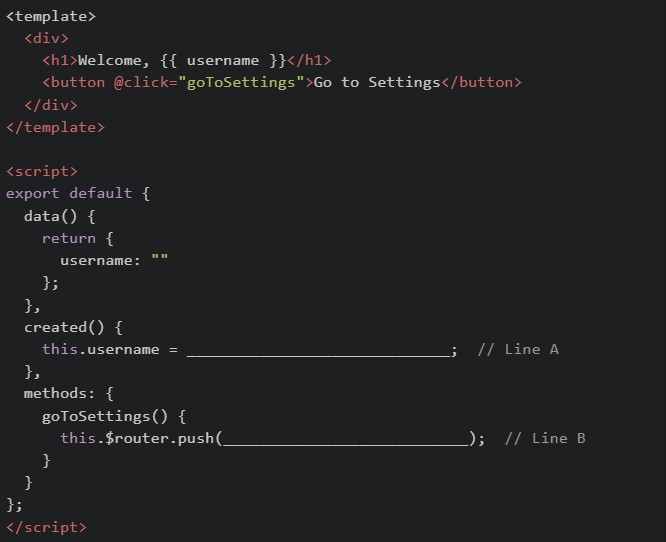
What should be filled in at Line B to navigate to the Settings page?

text
```
{ path: "Settings" }
```
text
```json
{ path: "SettingsComponent" }
```
text
```json
{ "name": "Settings" }
```
text
```json
{ "name": "SettingsComponent" }
```
A JWT (JSON Web Token) is represented in the format:  .In authentication using Flask-JWT-Extended, what does the payload part of the JWT stores?
.In authentication using Flask-JWT-Extended, what does the payload part of the JWT stores?Text of the picture (copyable)
```
"header.payload.signature"
```
- Encryption keys used to secure the token
- User-related data (claims) such as identity and expiration time
- The algorithm used for signing the token
- The hashed signature of the token
Consider the below JavaScript program.
 What will be the output of the above program?
What will be the output of the above program?Text of the picture (copyable)
```javascript
const promise = new Promise((resolve, reject) => {
  resolve('Success!');
  reject('Error!');
});

promise.then(console.log).catch(console.log);
```- Success!
- Error!
- Success! Error!
- Error! Success!
Consider the following JavaScript program:
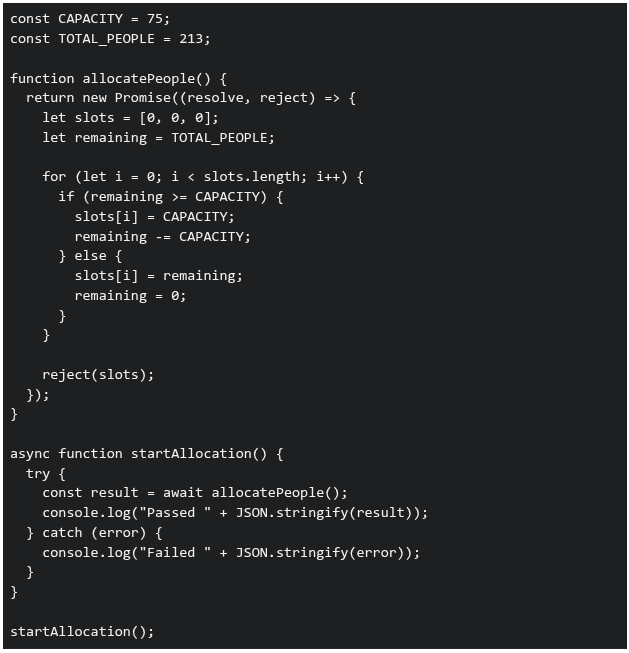 What will be printed in the console when the above code is executed?
What will be printed in the console when the above code is executed?Text of the picture (copyable)
```javascript
const CAPACITY = 75;
const TOTAL_PEOPLE = 213;

function allocatePeople() {
  return new Promise((resolve, reject) => {
    let slots = [0, 0, 0];
    let remaining = TOTAL_PEOPLE;

    for (let i = 0; i < slots.length; i++) {
      if (remaining >= CAPACITY) {
        slots[i] = CAPACITY;
        remaining -= CAPACITY;
      } else {
        slots[i] = remaining;
        remaining = 0;
      }
    }

    reject(slots);
  });
}

async function startAllocation() {
  try {
    const result = await allocatePeople();
    console.log("Passed " + JSON.stringify(result));
  } catch (error) {
    console.log("Failed " + JSON.stringify(error));
  }
}

startAllocation();
```- Passed [75,75,63]
- Failed [0,0,0]
- Failed [75,75,63]
- Passed [0,0,0]
Consider the following endpoints created with a working setup of flask-security and flask-sqlalchemy.
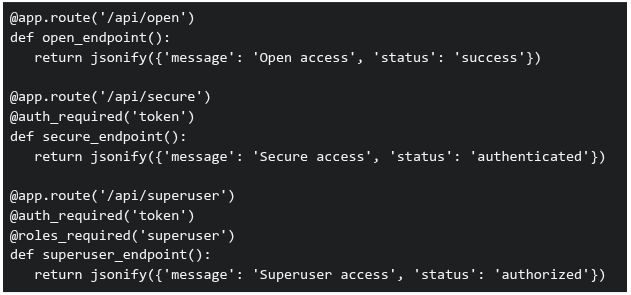 Three requests are made to this application: GET /api/open (no authentication headers)1. GET /api/secure (no authentication headers)2. GET /api/superuser with valid authentication token but user has role 'basic' (not 'superuser')3. What will be the response status codes for these requests, respectively?
Three requests are made to this application: GET /api/open (no authentication headers)1. GET /api/secure (no authentication headers)2. GET /api/superuser with valid authentication token but user has role 'basic' (not 'superuser')3. What will be the response status codes for these requests, respectively?Text of the picture (copyable)
```python
@app.route('/api/open')
def open_endpoint():
    return jsonify({'message': 'Open access', 'status': 'success'})

@app.route('/api/secure')
@auth_required('token')
def secure_endpoint():
    return jsonify({'message': 'Secure access', 'status': 'authenticated'})

@app.route('/api/superuser')
@auth_required('token')
@roles_required('superuser')
def superuser_endpoint():
    return jsonify({'message': 'Superuser access', 'status': 'authorized'})
```- 200, 200, 200
- 200, 401, 403
- 200, 403, 401
- 401, 403, 403
Consider the flask application app.py and an HTML file index.html:
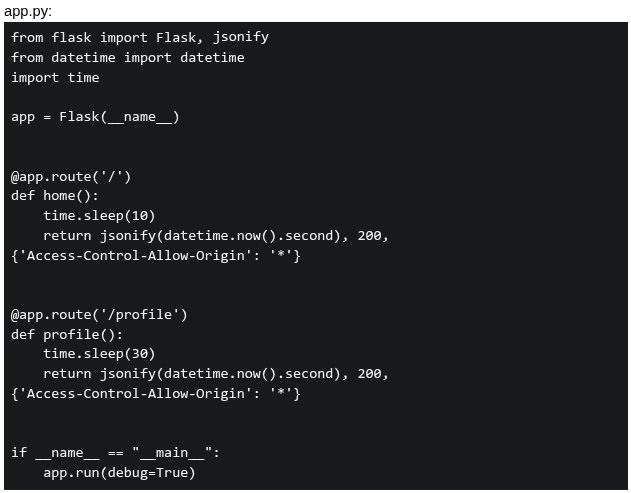 If a user visit index.html at 10:10:10 AM, what will be logged in the console?
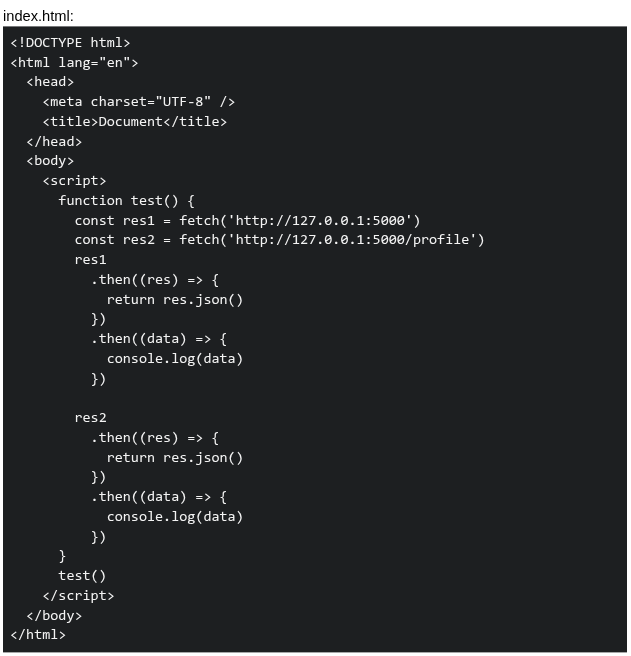
If a user visit index.html at 10:10:10 AM, what will be logged in the console?
Text of the picture (copyable)
app.py:
```python
from flask import Flask, jsonify
from datetime import datetime
import time

app = Flask(__name__)

@app.route('/')
def home():
    time.sleep(10)
    return jsonify(datetime.now().second), 200, \
        {'Access-Control-Allow-Origin': '*'}

@app.route('/profile')
def profile():
    time.sleep(30)
    return jsonify(datetime.now().second), 200, \
        {'Access-Control-Allow-Origin': '*'}

if __name__ == "__main__":
    app.run(debug=True)
```
index.html:
```html
<!DOCTYPE html>
<html lang="en">
<head>
    <meta charset="UTF-8" />
    <title>Document</title>
</head>
<body>
    <script>
        function test() {
            const res1 = fetch('http://127.0.0.1:5000')
            const res2 = fetch('http://127.0.0.1:5000/profile')
            res1
                .then((res) => {
                    return res.json()
                })
                .then((data) => {
                    console.log(data)
                })

            res2
                .then((res) => {
                    return res.json()
                })
                .then((data) => {
                    console.log(data)
                })
        }
        test()
    </script>
</body>
</html>
```- 20, 50
- 20, 40
- 40, 40
- 50, 50
Consider the following code:
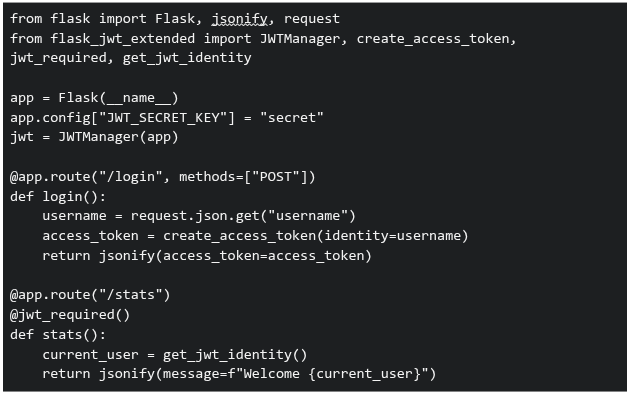 You are developing an analytics platform using Flask and Flask-JWT-Extended. A user sends a POST request to
  with:
with:  . Then tries to access
  . Which of the following statements are correct?
You are developing an analytics platform using Flask and Flask-JWT-Extended. A user sends a POST request to with: . Then tries to access . Which of the following statements are correct?Text of the picture (copyable)
```python
from flask import Flask, jsonify, request
from flask_jwt_extended import JWTManager, create_access_token, \
    jwt_required, get_jwt_identity

app = Flask(__name__)
app.config["JWT_SECRET_KEY"] = "secret"
jwt = JWTManager(app)

@app.route("/login", methods=["POST"])
def login():
    username = request.json.get("username")
    access_token = create_access_token(identity=username)
    return jsonify(access_token=access_token)

@app.route("/stats")
@jwt_required()
def stats():
    current_user = get_jwt_identity()
    return jsonify(message=f"Welcome {current_user}")
```
/login
```json
{ "username": "Jassi" }
```
/stats- The route will return "Welcome Jassi" only if a valid JWT token is sent in the Authorization header
text
/stats
- If no token is sent, accessing will result in an unauthorized error
text
/stats
- The JWT token must be sent as JSON in the request body to access
text
/stats
- None of these
Prerna and Swathy are using a web application built with Vue.js for the BS Degree program. When the page loads, the sidebar content appears instantly• However, when they click on an Assignments link, the main content takes noticeable time to load • A simplified version of the component is shown below:
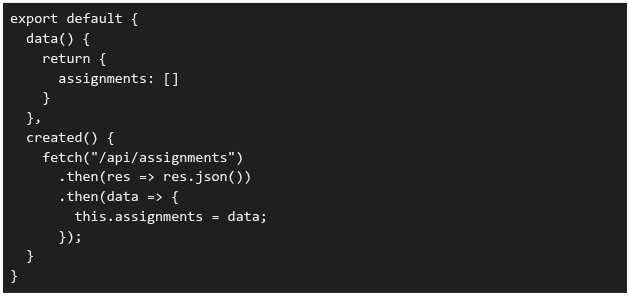 Which of the following statements correctly explain why the Assignments page takes time to load?
Which of the following statements correctly explain why the Assignments page takes time to load?Text of the picture (copyable)
```javascript
export default {
  data() {
    return {
      assignments: []
    }
  },
  created() {
    fetch("/api/assignments")
      .then(res => res.json())
      .then(data => {
        this.assignments = data;
      });
  }
}
```- The sidebar is likely part of a parent component and is already rendered before the API call
- The Assignments component waits for the API response before displaying data
- Vue blocks rendering of all components until API calls complete
- The delay is caused because data is fetched asynchronously after the component is created
You are building a login feature for a web application. The frontend sends the user’s email and password to the backend API. The backend validates credentials against a database. Which security issues exist in the code given below? Frontend: script.js
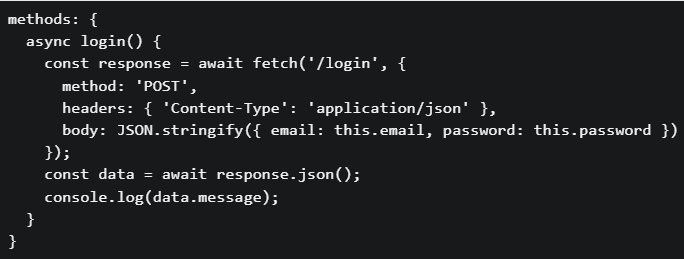 Backend: app.py
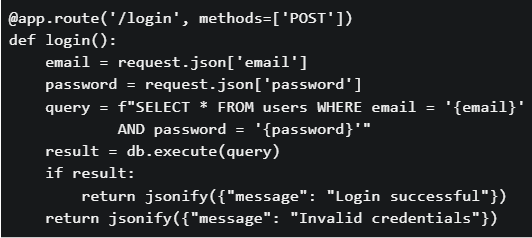
Backend: app.py
Text of the picture (copyable)
```javascript
methods: {
  async login() {
    const response = await fetch('/login', {
      method: 'POST',
      headers: { 'Content-Type': 'application/json' },
      body: JSON.stringify({ email: this.email, password: this.password })
    });
    const data = await response.json();
    console.log(data.message);
  }
}
```
```python
@app.route('/login', methods=['POST'])
def login():
    email = request.json['email']
    password = request.json['password']
    query = f"SELECT * FROM users WHERE email = '{email}'" \
            f" AND password = '{password}'"
    result = db.execute(query)
    if result:
        return jsonify({"message": "Login successful"})
    return jsonify({"message": "Invalid credentials"})
```- The SQL query is vulnerable to SQL injection attacks
- Passwords are stored and compared in plain text
- No authentication token (session/JWT) mechanism is implemented
- All of these.
Consider the following Vue.js code.
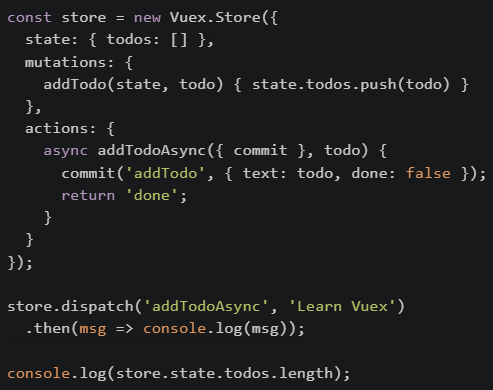 What will be printed on the console first?
What will be printed on the console first?Text of the picture (copyable)
```javascript
const store = new Vuex.Store({
  state: { todos: [] },
  mutations: {
    addTodo(state, todo) { state.todos.push(todo) }
  },
  actions: {
    async addTodoAsync({ commit }, todo) {
      commit('addTodo', { text: todo, done: false });
      return 'done';
    }
  }
});

store.dispatch('addTodoAsync', 'Learn Vuex')
  .then(msg => console.log(msg));

console.log(store.state.todos.length);
```- 0
- done
- 1
- Error
Consider the following JavaScript code:
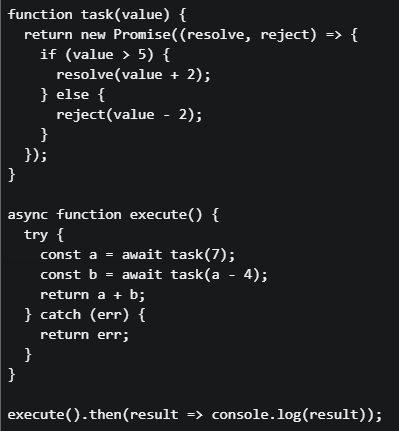 What will be printed to the console?
What will be printed to the console?Text of the picture (copyable)
```javascript
function task(value) {
  return new Promise((resolve, reject) => {
    if (value > 5) {
      resolve(value + 2);
    } else {
      reject(value - 2);
    }
  });
}

async function execute() {
  try {
    const a = await task(7);
    const b = await task(a - 4);
    return a + b;
  } catch (err) {
    return err;
  }
}

execute().then(result => console.log(result));
```- 12
- 10
- 5
- 3
Match the following web dev concept given below:
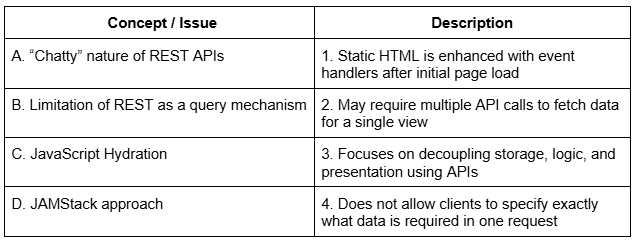 Which of the following options correctly matches Concept / Issue and Description?
Which of the following options correctly matches Concept / Issue and Description?Text of the picture (copyable)
| Concept / Issue | Description |
|---|---|
| A. "Chatty" nature of REST APIs | 1. Static HTML is enhanced with event handlers after initial page load |
| B. Limitation of REST as a query mechanism | 2. May require multiple API calls to fetch data for a single view |
| C. JavaScript Hydration | 3. Focuses on decoupling storage, logic, and presentation using APIs |
| D. JAMStack approach | 4. Does not allow clients to specify exactly what data is required in one request |
- A→2, B→4, C→1, D→3
- A→1, B→2, C→3, D→4
- A→2, B→1, C→4, D→3
- A→4, B→2, C→1, D→3
Consider a scenario involving localStorage, Promise chains, and Vue lifecycle hooks: Scenario: A user authentication system where: On app initialization, the app checks localStorage for a stored user token• If a token exists, it validates the token asynchronously (via a Promise)• Based on validation, different UI components are rendered• The user navigates between different views• Code in mounted() hook:
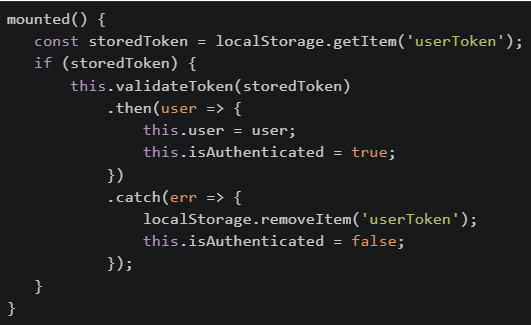 Which of the following statements is/are CORRECT about this implementation?
Which of the following statements is/are CORRECT about this implementation?Text of the picture (copyable)
```javascript
mounted() {
  const storedToken = localStorage.getItem('userToken');
  if (storedToken) {
    this.validateToken(storedToken)
      .then(user => {
        this.user = user;
        this.isAuthenticated = true;
      })
      .catch(err => {
        localStorage.removeItem('userToken');
        this.isAuthenticated = false;
      });
  }
}
```- If the page is refreshed while the Promise is pending, the token will be lost because localStorage is cleared on refresh
- If token validation fails, the token is removed from storage, preventing automatic login on future page loads
- The isAuthenticated flag might be false even though a storedToken exists, until the Promise validation completes
- sessionStorage should be used instead of localStorage because user tokens should not persist across browser sessions
- If the user navigates to a different route while validation is pending, the Promise will still complete and update the user data
Consider the following JavaScript code:
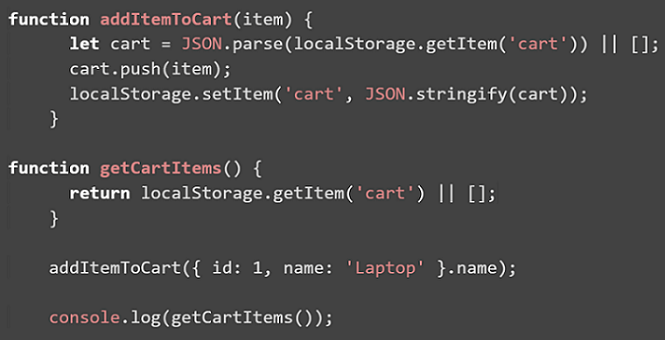 The above code is initially loaded in the browser, and then the browser is refreshed two times. What will be the final output printed in the console?
The above code is initially loaded in the browser, and then the browser is refreshed two times. What will be the final output printed in the console?Text of the picture (copyable)
```javascript
function addItemToCart(item) {
    let cart = JSON.parse(localStorage.getItem('cart')) || [];
    cart.push(item);
    localStorage.setItem('cart', JSON.stringify(cart));
}

function getCartItems() {
    return localStorage.getItem('cart') || [];
}

addItemToCart({ id: 1, name: 'Laptop' }.name);

console.log(getCartItems());
```
text
```
[]
```

text
```
['Laptop', 'Laptop', 'Laptop']
```

text
```
[{ id: 1, name: 'Laptop' }]
```
text
[undefined]
Match the following storage mechanisms used in the browser with their correct characteristics.
 Which of the following is the correct matching?
Which of the following is the correct matching?Text of the picture (copyable)
| Storage Type      | Characteristic                                                                    |
| :---------------- | :-------------------------------------------------------------------------------- |
| 1. Session Storage | A. Data automatically encrypts itself without developer intervention.             |
| 2. Token Storage   | B. Data persists only until the browser/tab is closed.                            |
| 3. Cookie Storage  | C. Often used to store authentication tokens securely on the client side.         |
|                   | D. Data persists across sessions, typically stored on the client and sent with every HTTP request. |
- 1 → B, 2 → C, 3 → A
- 1 → B, 2 → A, 3 → C
- 1 → A, 2 → C, 3 → B
- 1 → B, 2 → C, 3 → D
Consider the following JavaScript code snippet.
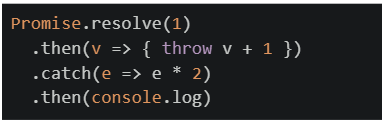 What will be printed on the console?
What will be printed on the console?Text of the picture (copyable)
```javascript
Promise.resolve(1)
  .then(v => { throw v + 1 })
  .catch(e => e * 2)
  .then(console.log)
```- 2
- 4
- Undefined
- Error
In the following code snippet, which values should replace option1 and option2 so that the cookie is sent only over HTTPS and is restricted from cross-site requests?

Text of the picture (copyable)
```python
response.set_cookie('session_id', 'abc123', secure=option1,
samesite=option2)
```- secure=True and samesite='Strict'
- secure=False and samesite='Strict'
- secure=True and samesite='None'
- secure=False and samesite='Lax'
What is the purpose of Redis in a Celery-based system?
- To automatically retry failed tasks
- To execute tasks in parallel
- To return computed results in JSON format
- To store scheduled tasks and serve as a message broker
What happens to the fetch call when it gets a 404 status code (page not found)?

text
Promise rejects automatically

text
Promise resolves and `response.ok = true`

text
Promise resolves and `response.ok = false`

text
Promise stays as pending
Consider the following JavaScript code.
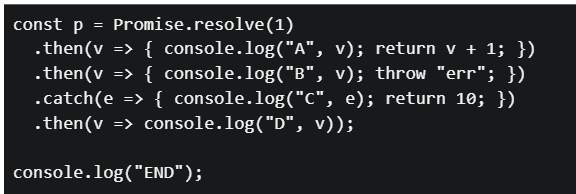 What will be the output?
What will be the output?Text of the picture (copyable)
```javascript
const p = Promise.resolve(1)
  .then(v => { console.log("A", v); return v + 1; })
  .then(v => { console.log("B", v); throw "err"; })
  .catch(e => { console.log("C", e); return 10; })
  .then(v => console.log("D", v)));

console.log("END");
```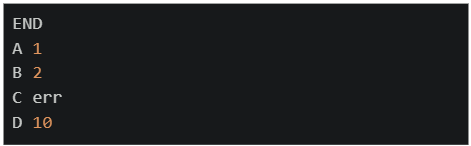
text
```
END
A 1
B 2
C err
D 10
```
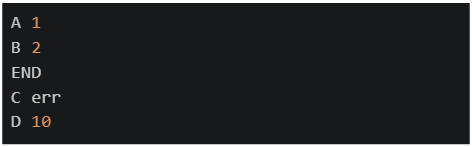
text
```
A 1
B 2
END
C err
D 10
```
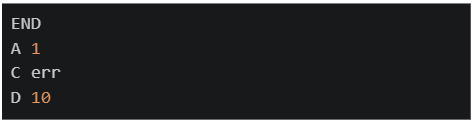
text
```
END
A 1
C err
D 10
```
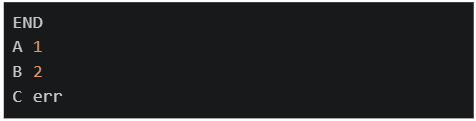
text
```
END
A 1
B 2
C err
```
A Promise chain is created as follows. The first Promise resolves with a string, which is then processed through multiple .then() handlers. What will be logged to the console?
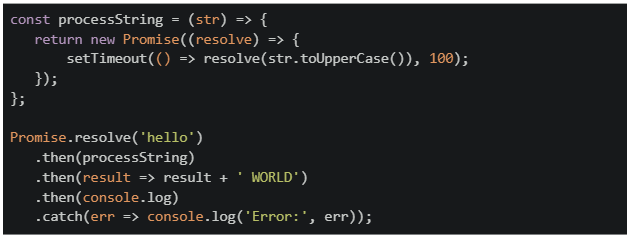
Text of the picture (copyable)
```javascript
const processString = (str) => {
  return new Promise((resolve) => {
    setTimeout(() => resolve(str.toUpperCase()), 100);
  });
};

Promise.resolve('hello')
  .then(processString)
  .then(result => result + ' WORLD')
  .then(console.log)
  .catch(err => console.log('Error:', err));
```- hello
- hello WORLD
- HELLO WORLD
- An error will be thrown
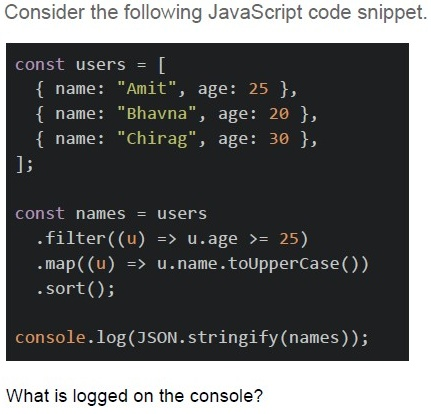
Text of the picture (copyable)
Consider the following JavaScript code snippet.

```javascript
const users = [
  { name: "Amit", age: 25 },
  { name: "Bhavna", age: 20 },
  { name: "Chirag", age: 30 },
];

const names = users
  .filter((u) => u.age >= 25)
  .map((u) => u.name.toUpperCase())
  .sort();

console.log(JSON.stringify(names));
```

What is logged on the console?- ['Amit', 'Chirag']
- ['CHIRAG', 'AMIT']
- ['AMIT', 'CHIRAG']
- ['AMIT', 'Bhavna', 'CHIRAG']
What is the primary purpose of CORS (Cross-Origin Resource Sharing)?
- To encrypt data between client and server
- To compress HTTP responses
- To authenticate users across applications
- To control which domains can access resources
Which of the following factors directly affect the speed and performance of a web page load?
- The number of CSS selectors in the stylesheet
- Use of semantic HTML tags
- Number of HTTP requests made
- File size of resources (like images, JS)
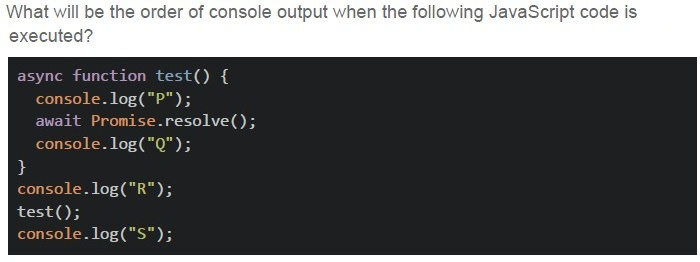
Text of the picture (copyable)
What will be the order of console output when the following JavaScript code is executed?

```javascript
async function test() {
  console.log("P");
  await Promise.resolve();
  console.log("Q");
}
console.log("R");
test();
console.log("S");
```- R P Q S
- P R S Q
- R S P Q
- R P S Q
Consider the following javascript program.
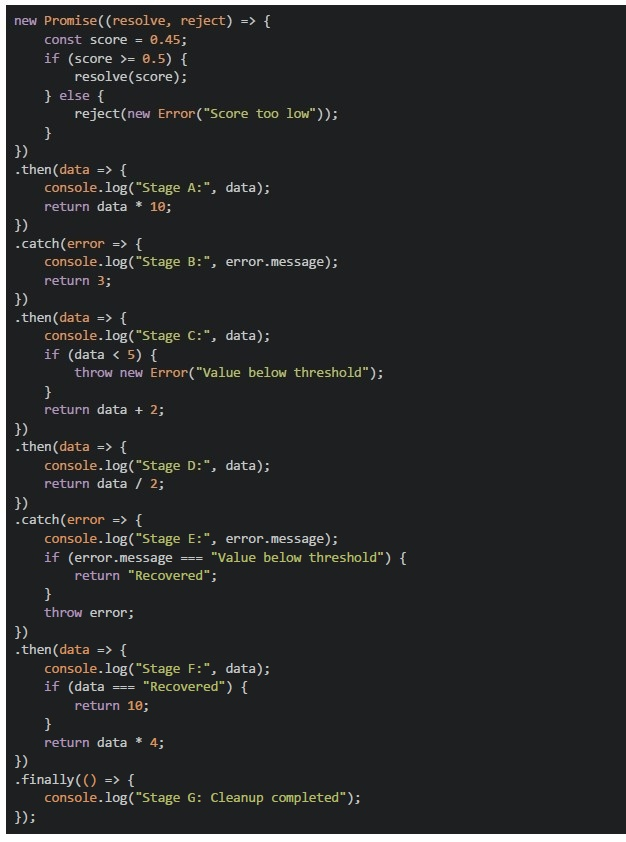 Consider the following javascript program.
What will be the output of the above program on the browser’s console?
Consider the following javascript program.
What will be the output of the above program on the browser’s console?
Consider the following javascript program.
What will be the output of the above program on the browser’s console?Text of the picture (copyable)
```javascript
new Promise((resolve, reject) => {
  const score = 0.45;
  if (score >= 0.5) {
    resolve(score);
  } else {
    reject(new Error("Score too low"));
  }
})
  .then(data => {
    console.log("Stage A:", data);
    return data * 10;
  })
  .catch(error => {
    console.log("Stage B:", error.message);
    return 3;
  })
  .then(data => {
    console.log("Stage C:", data);
    if (data < 5) {
      throw new Error("Value below threshold");
    }
    return data + 2;
  })
  .then(data => {
    console.log("Stage D:", data);
    return data / 2;
  })
  .catch(error => {
    console.log("Stage E:", error.message);
    if (error.message === "Value below threshold") {
      return "Recovered";
    }
    throw error;
  })
  .then(data => {
    console.log("Stage F:", data);
    if (data === "Recovered") {
      return 10;
    }
    return data * 4;
  })
  .finally(() => {
    console.log("Stage G: Cleanup completed");
  });
```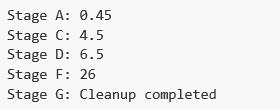
text
```text
Stage A: 0.45
Stage C: 4.5
Stage D: 6.5
Stage F: 26
Stage G: Cleanup completed
```
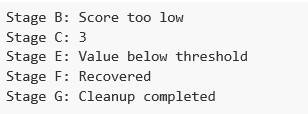
text
```text
Stage B: Score too low
Stage C: 3
Stage E: Value below threshold
Stage F: Recovered
Stage G: Cleanup completed
```
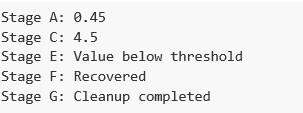
text
Stage A: 0.45
Stage C: 4.5
Stage E: Value below threshold
Stage F: Recovered
Stage G: Cleanup completed
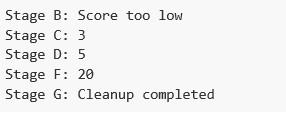
text
```
Stage B: Score too low
Stage C: 3
Stage D: 5
Stage F: 20
Stage G: Cleanup completed
```
Text of the picture (copyable)
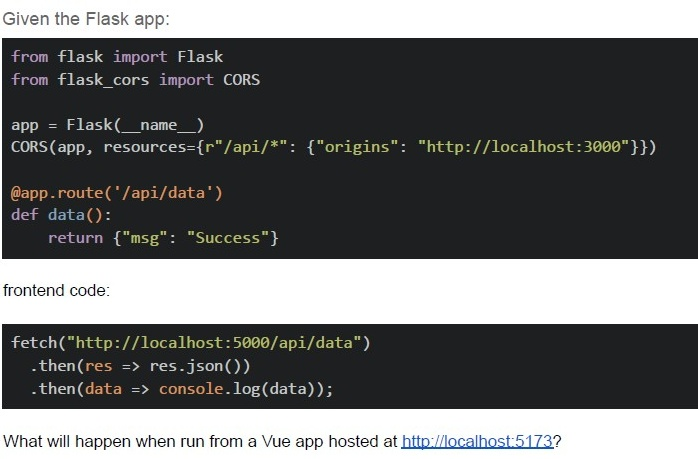
Given the Flask app:

```python
from flask import Flask
from flask_cors import CORS

app = Flask(__name__)
CORS(app, resources={r"/api/*": {"origins": "http://localhost:3000"}})

@app.route('/api/data')
def data():
    return {"msg": "Success"}
```

frontend code:

```javascript
fetch("http://localhost:5000/api/data")
    .then(res => res.json())
    .then(data => console.log(data));
```

What will happen when run from a Vue app hosted at http://localhost:5173?- Request succeeds
- CORS error occurs
- 404 error
- The server crashes
Comprehension passage for this question
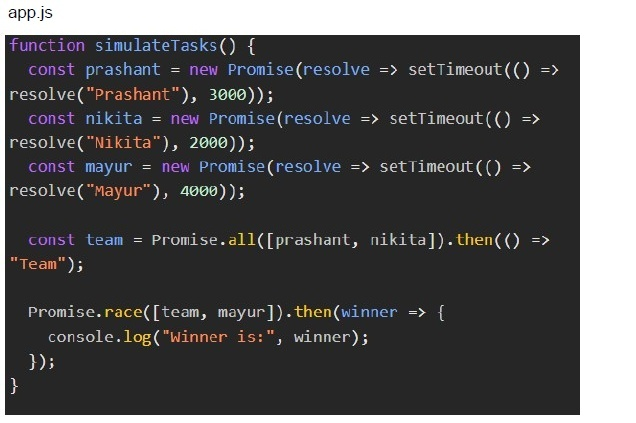
Prashant and Nikita are creating a quiz question paper collaboratively. They are each working on different sections — and complete their tasks in parallel. Meanwhile, Mayur is enjoying a single-player game that finishes when the game loop ends.
To compare productivity:
● If Prashant and Nikita (together) finish faster than Mayur, the winner is "Team". ● If Mayur finishes faster, he wins. ● If both take the same time, Mayur wins by default.
You are simulating this scenario in the browser.Prashant and Nikita are represented using parallel Promises. Mayur is represented using a single Promise. The frontend must calculate who finishes first using asynchronous logic, and display the result.
 Prashant and Nikita are creating a quiz question paper collaboratively. They are each working on different sections — and complete their tasks in parallel. Meanwhile, Mayur is enjoying a single-player game that finishes when the game loop ends.
To compare productivity:
● If Prashant and Nikita (together) finish faster than Mayur, the winner is "Team". ● If Mayur finishes faster, he wins. ● If both take the same time, Mayur wins by default.
You are simulating this scenario in the browser.Prashant and Nikita are represented using parallel Promises. Mayur is represented using a single Promise. The frontend must calculate who finishes first using asynchronous logic, and display the result.
Based on the above data, answer the given subquestions.
Prashant and Nikita are creating a quiz question paper collaboratively. They are each working on different sections — and complete their tasks in parallel. Meanwhile, Mayur is enjoying a single-player game that finishes when the game loop ends.
To compare productivity:
● If Prashant and Nikita (together) finish faster than Mayur, the winner is "Team". ● If Mayur finishes faster, he wins. ● If both take the same time, Mayur wins by default.
You are simulating this scenario in the browser.Prashant and Nikita are represented using parallel Promises. Mayur is represented using a single Promise. The frontend must calculate who finishes first using asynchronous logic, and display the result.
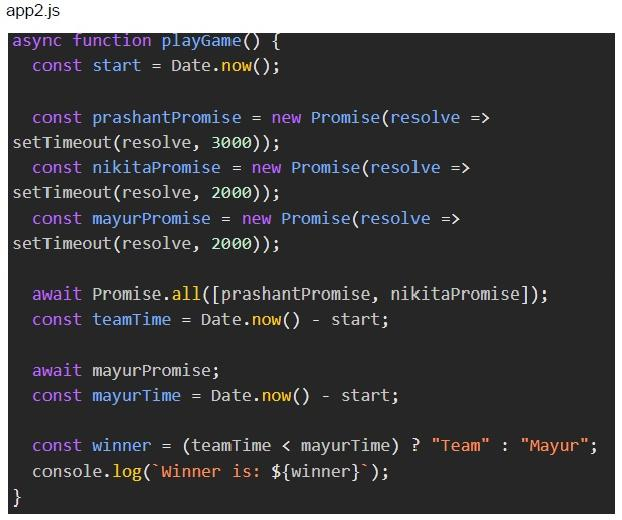
Based on the above data, answer the given subquestions. The Team takes 5 seconds in total. Mayur takes 2 seconds. According to the logic of app2.js, who is the winner?
Text of the picture (copyable)
app2.js
```javascript
async function playGame() {
  const start = Date.now();

  const prashantPromise = new Promise(resolve =>
    setTimeout(resolve, 3000));
  const nikitaPromise = new Promise(resolve =>
    setTimeout(resolve, 2000));
  const mayurPromise = new Promise(resolve =>
    setTimeout(resolve, 2000));

  await Promise.all([prashantPromise, nikitaPromise]);
  const teamTime = Date.now() - start;

  await mayurPromise;
  const mayurTime = Date.now() - start;

  const winner = (teamTime < mayurTime) ? "Team" : "Mayur";
  console.log(`Winner is: ${winner}`);
}
```- Mayur
- Team
- Undefined
- Error due to async logic
Text of the picture (copyable)
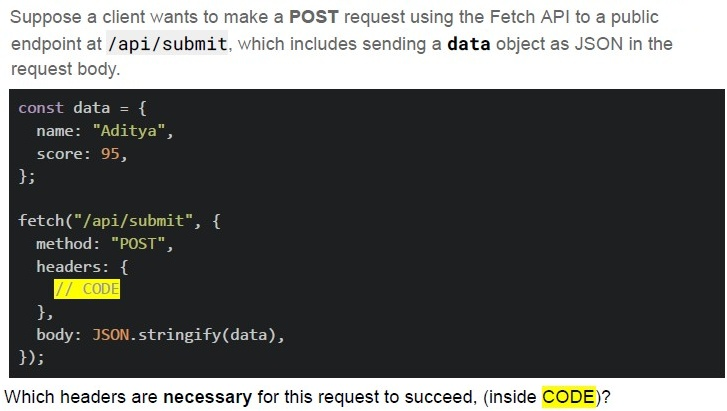
Suppose a client wants to make a **POST** request using the Fetch API to a public endpoint at **/api/submit**, which includes sending a **data** object as JSON in the request body.

```javascript
const data = {
  name: "Aditya",
  score: 95,
};

fetch("/api/submit", {
  method: "POST",
  headers: {
    // CODE
  },
  body: JSON.stringify(data),
});
```

Which headers are necessary for this request to succeed, (inside CODE)?
text
```
'Content-Type': 'application/json'
```

text
```
'Content-Type': 'multipart/form-data'
```

text
```
'Content-Type': 'application/text'
```

text
```
'Accept': '*/*'
```
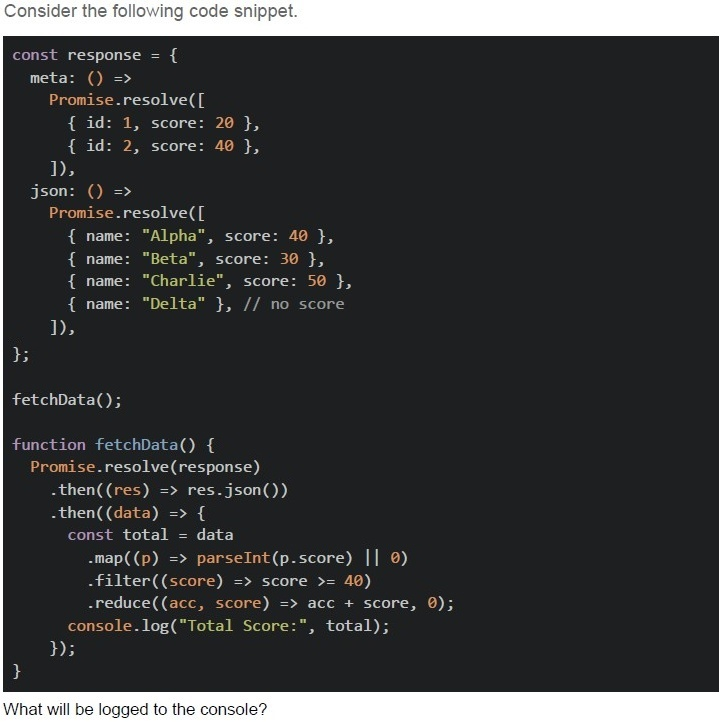
Text of the picture (copyable)
Consider the following code snippet.

```javascript
const response = {
  meta: () =>
    Promise.resolve([
      { id: 1, score: 20 },
      { id: 2, score: 40 },
    ]),
  json: () =>
    Promise.resolve([
      { name: "Alpha", score: 40 },
      { name: "Beta", score: 30 },
      { name: "Charlie", score: 50 },
      { name: "Delta" }, // no score
    ]),
};

fetchData();

function fetchData() {
  Promise.resolve(response)
    .then((res) => res.json())
    .then((data) => {
      const total = data
        .map((p) => parseInt(p.score) || 0)
        .filter((score) => score >= 40)
        .reduce((acc, score) => acc + score, 0);
      console.log("Total Score:", total);
    });
}
```

What will be logged to the console?- Total Score: 80
- Total Score: 90
- Total Score: 120
- Total Score: NaN
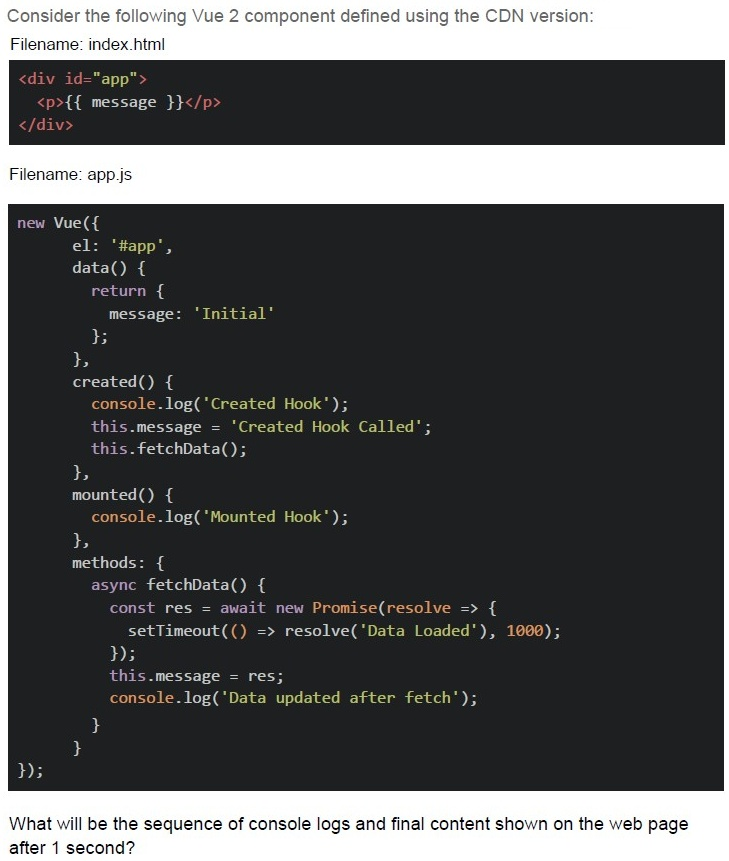
Text of the picture (copyable)
Consider the following Vue 2 component defined using the CDN version:
Filename: index.html

```html
<div id="app">
  <p>{{ message }}</p>
</div>
```

Filename: app.js

```javascript
new Vue({
  el: '#app',
  data() {
    return {
      message: 'Initial'
    };
  },
  created() {
    console.log('Created Hook');
    this.message = 'Created Hook Called';
    this.fetchData();
  },
  mounted() {
    console.log('Mounted Hook');
  },
  methods: {
    async fetchData() {
      const res = await new Promise(resolve => {
        setTimeout(() => resolve('Data Loaded'), 1000);
      });
      this.message = res;
      console.log('Data updated after fetch');
    }
  }
});
```

What will be the sequence of console logs and final content shown on the web page after 1 second?
text
Console:
Mounted Hook
Created Hook
Data updated after fetch

Page: Initial

text
Console:
```
Created Hook
Mounted Hook
Data updated after fetch
```
Page: Data Loaded

text
Console:
```
Created Hook
Data updated after fetch
Mounted Hook
```
Page: Data Loaded

text
Console:
Mounted Hook
Data updated after fetch
Created Hook

Page: Created Hook Called
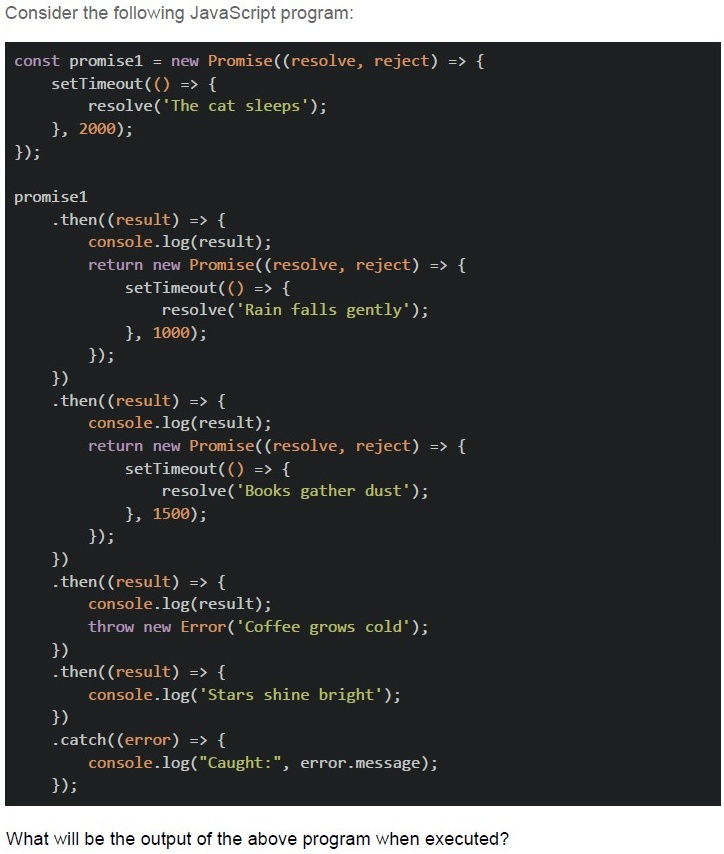
Text of the picture (copyable)
Consider the following JavaScript program:

```javascript
const promise1 = new Promise((resolve, reject) => {
  setTimeout(() => {
    resolve('The cat sleeps');
  }, 2000);
});

promise1
  .then((result) => {
    console.log(result);
    return new Promise((resolve, reject) => {
      setTimeout(() => {
        resolve('Rain falls gently');
      }, 1000);
    });
  })
  .then((result) => {
    console.log(result);
    return new Promise((resolve, reject) => {
      setTimeout(() => {
        resolve('Books gather dust');
      }, 1500);
    });
  })
  .then((result) => {
    console.log(result);
    throw new Error('Coffee grows cold');
  })
  .then((result) => {
    console.log('Stars shine bright');
  })
  .catch((error) => {
    console.log("Caught:", error.message);
  });
```

What will be the output of the above program when executed?
text
The cat sleeps
Rain falls gently
Books gather dust
Stars shine bright

text
The cat sleeps
Rain falls gently
Books gather dust
Caught: Coffee grows cold

text
The cat sleeps
Rain falls gently
Caught: Coffee grows cold

text
The program will crash without showing any output

text
The cat sleeps
Rain falls gently
Books gather dust
Caught: Coffee grows cold
Stars shine bright
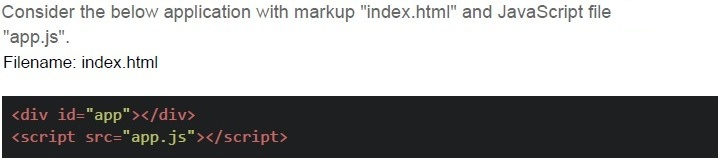
Text of the picture (copyable)
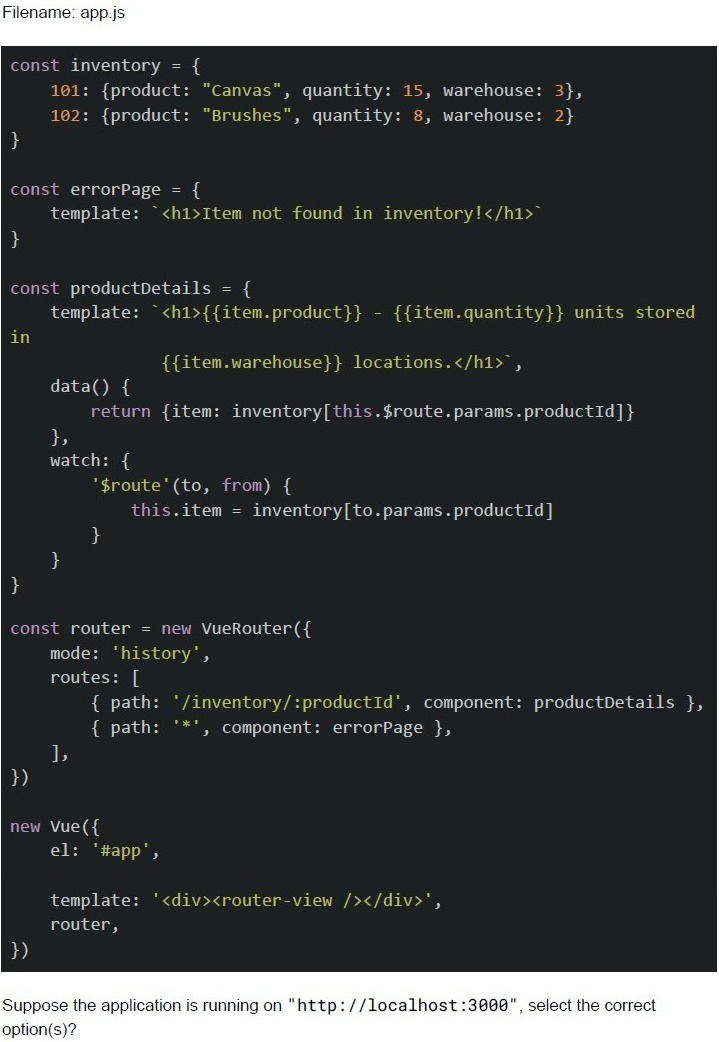
Consider the below application with markup "index.html" and JavaScript file
"app.js".
Filename: index.html

```html
<div id="app"></div>
<script src="app.js"></script>
```
Filename: app.js

```javascript
const inventory = {
  101: {product: "Canvas", quantity: 15, warehouse: 3},
  102: {product: "Brushes", quantity: 8, warehouse: 2}
}

const errorPage = {
  template: `<h1>Item not found in inventory!</h1>`
}

const productDetails = {
  template: `<h1>{{item.product}} - {{item.quantity}} units stored
  in
  {{item.warehouse}} locations.</h1>`,

  data() {
    return {item: inventory[this.$route.params.productId]}
  },
  watch: {
    '$route'(to, from) {
      this.item = inventory[to.params.productId]
    }
  }
}

const router = new VueRouter({
  mode: 'history',
  routes: [
    { path: '/inventory/:productId', component: productDetails },
    { path: '*', component: errorPage },
  ],
})

new Vue({
  el: '#app',

  template: '<div><router-view /></router-view></div>',
  router,
})
```

Suppose the application is running on "http://localhost:3000", select the correct option(s)?
text
For the endpoint, http://localhost:3000/inventory/101, The browser will render:
Canvas - 15 units stored in 3 locations.

text
For the endpoint, http://localhost:3000/#/inventory/102, The browser will render:
Brushes - 8 units stored in 2 locations.

text
For the endpoint, http://localhost:3000/inventory. The browser will render:
item not found in inventory!

text
For the endpoint, http://localhost:3000/inventory/103, The browser will render:
Item not found in inventory!

text
For the endpoint, http://localhost:3000/products/101, The browser will render:
Item not found in inventory!
Text of the picture (copyable)
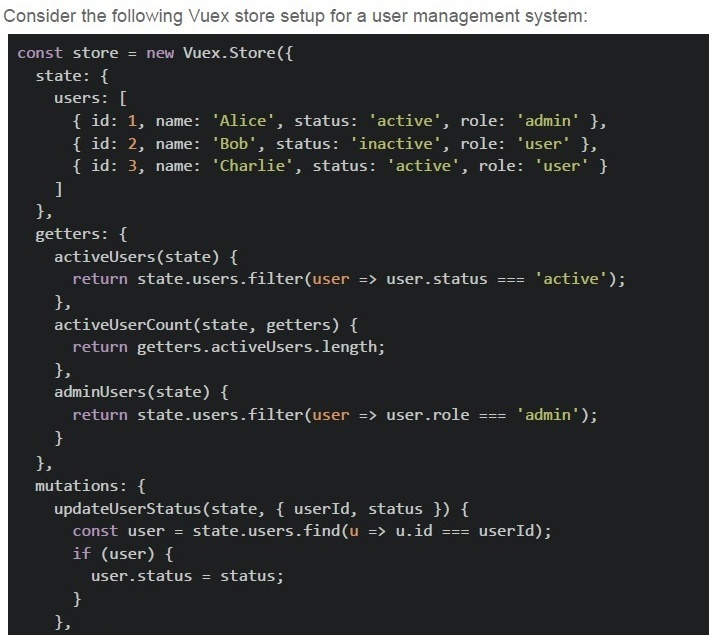
Consider the following Vuex store setup for a user management system:

```javascript
const store = new Vuex.Store({
  state: {
    users: [
      { id: 1, name: 'Alice', status: 'active', role: 'admin' },
      { id: 2, name: 'Bob', status: 'inactive', role: 'user' },
      { id: 3, name: 'Charlie', status: 'active', role: 'user' }
    ]
  },
  getters: {
    activeUsers(state) {
      return state.users.filter(user => user.status === 'active');
    },
    activeUserCount(state, getters) {
      return getters.activeUsers.length;
    },
    adminUsers(state) {
      return state.users.filter(user => user.role === 'admin');
    }
  },
  mutations: {
    updateUserStatus(state, { userId, status }) {
      const user = state.users.find(u => u.id === userId);
      if (user) {
        user.status = status;
      }
    }
  }
});
```
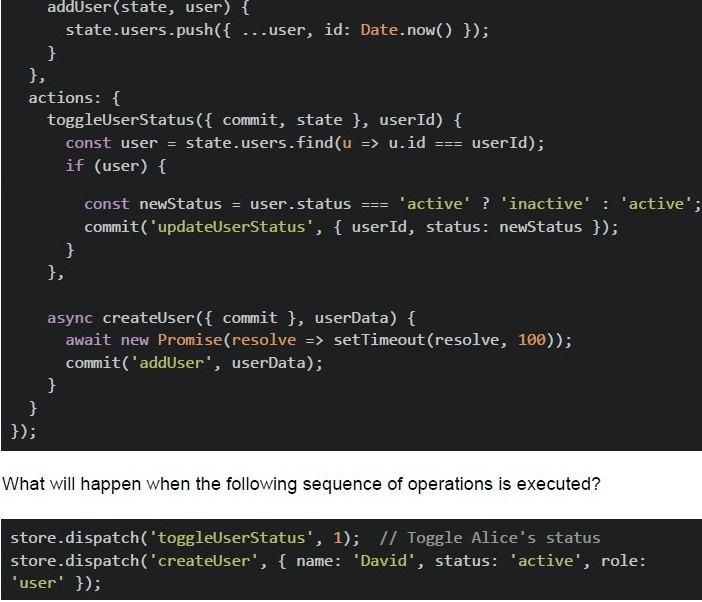
```javascript
addUser(state, user) {
  state.users.push({ ...user, id: Date.now() });
},
actions: {
  toggleUserStatus({ commit, state }, userId) {
    const user = state.users.find(u => u.id === userId);
    if (user) {
      const newStatus = user.status === 'active' ? 'inactive' : 'active';
      commit('updateUserStatus', { userId, status: newStatus });
    }
  },
  async createUser({ commit }, userData) {
    await new Promise(resolve => setTimeout(resolve, 100));
    commit('addUser', userData);
  }
}
```

What will happen when the following sequence of operations is executed?

```javascript
store.dispatch('toggleUserStatus', 1); // Toggle Alice's status
store.dispatch('createUser', { name: 'David', status: 'active', role: 'user' });
```
text
The activeUserCount will become 1 immediately after the first dispatch, and remain 1 after the second dispatch completes.

text
The activeUserCount will become 1 after the first dispatch, and become 2 after the second dispatch completes.

text
The activeUserCount will remain 2 after the first dispatch, and become 3 after the second dispatch completes.

text
The activeUserCount will become 3 immediately after both dispatches, since both operations run synchronously.
Comprehension passage for this question
You are given the following HTML and JavaScript code that uses Vue 2 via CDN along with Vue Router. Read the code carefully and answer the given subquestions.
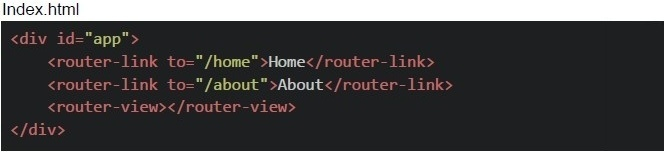 You are given the following HTML and JavaScript code that uses Vue 2 via CDN along with Vue Router. Read the code carefully and answer the given subquestions.
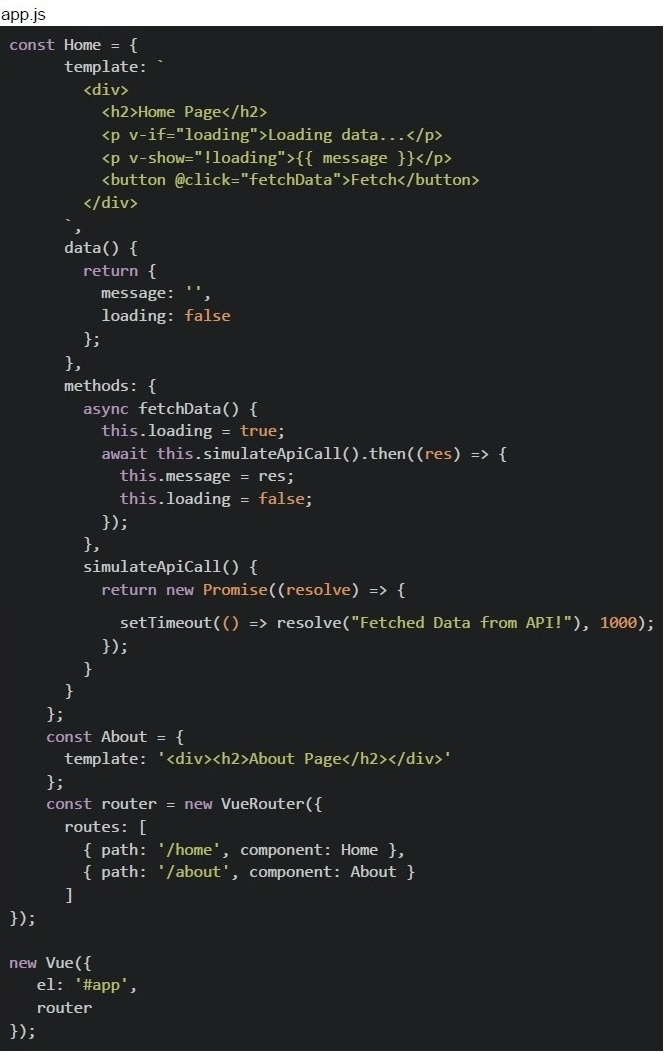 You are given the following HTML and JavaScript code that uses Vue 2 via CDN along with Vue Router. Read the code carefully and answer the given subquestions.
Suppose the button is clicked multiple times quickly, the message area flickers unexpectedly. How can you improve the code to ensure proper async behavior and prevent overlapping fetches?

text
Add v-else after v-if instead of v-show.

text
Replace
```javascript
await this.simulateApiCall().then(...);
```
with
```javascript
const res = await this.simulateApiCall(); this.message = res;
```

text
Add a check to disable the button while loading;
```html
<button @click="fetchData" :disabled="loading">Fetch</button>
```

text
Use v-html instead of v-show for message rendering.
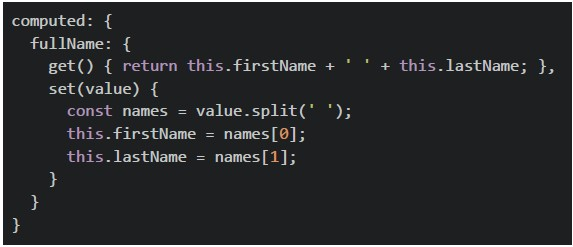
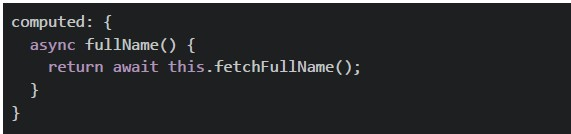
Which computed property implementation is INCORRECT?
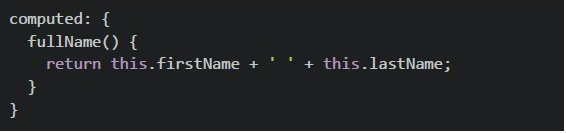
text
```javascript
computed: {
  fullName() {
    return this.firstName + ' ' + this.lastName;
  }
}
```
text
```javascript
computed: {
  fullName: {
    get() { return this.firstName + ' ' + this.lastName; },
    set(value) {
      const names = value.split(' ');
      this.firstName = names[0];
      this.lastName = names[1];
    }
  }
}
```
text
```javascript
computed: {
  async fullName() {
    return await this.fetchFullName();
  }
}
```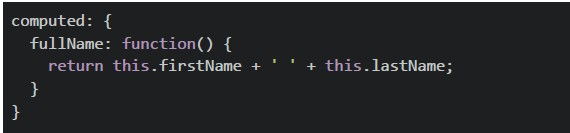
text
```javascript
computed: {
  fullName: function() {
    return this.firstName + ' ' + this.lastName;
  }
}
```
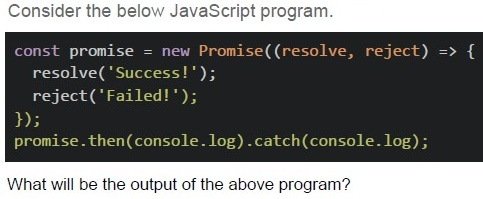
Text of the picture (copyable)
Consider the below JavaScript program.

```javascript
const promise = new Promise(((resolve, reject) => {
  resolve('Success!');
  reject('Failed!');
}));
promise.then(console.log).catch(console.log);
```

What will be the output of the above program?- SuccessFailed
- Success
- Failed
- Error
Which of the following is a key difference between Web Sockets and Server-Sent Events (SSE)?
- SSE allows bidirectional communication, while WebSockets only allow server-to-client communication.
- WebSockets maintain a persistent connection, while SSE creates a newconnection for each message.
- SSE works over HTTP and only supports server-to-client communication,whereas WebSockets provide full-duplex communication.
- WebSockets require an HTTP request for every message sent.
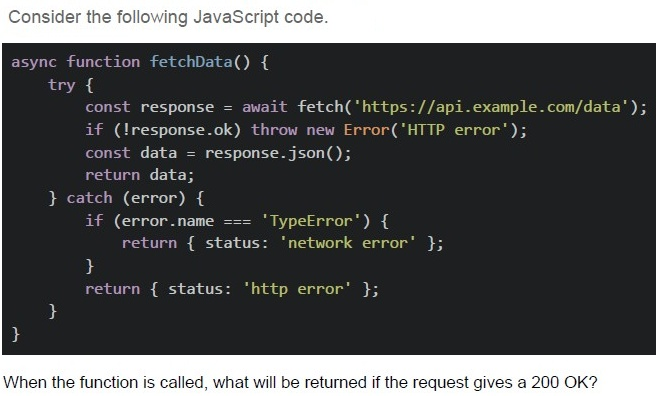
Text of the picture (copyable)
Consider the following JavaScript code.

```javascript
async function fetchData() {
  try {
    const response = await fetch('https://api.example.com/data');
    if (!response.ok) throw new Error('HTTP error');
    const data = response.json();
    return data;
  } catch (error) {
    if (error.name === 'TypeError') {
      return {
        status: 'network error'
      };
    }
    return {
      status: 'http error'
    };
  }
}
```

When the function is called, what will be returned if the request gives a 200 OK?
text
```
{ status: 'http error' }
```
text
```
{ status: 'network error' }
```
text
JSON data

text
The promise will remain pending
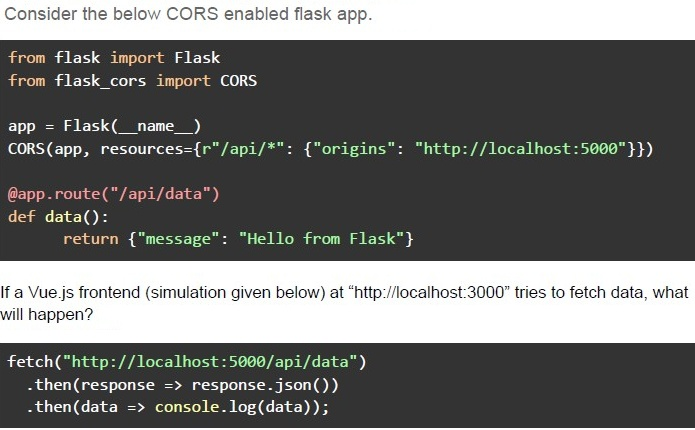
Text of the picture (copyable)
Consider the below CORS enabled flask app.

```python
from flask import Flask
from flask_cors import CORS

app = Flask(__name__)
CORS(app, resources={r"/api/*": {"origins": "http://localhost:5000"}})

@app.route("/api/data")
def data():
    return {"message": "Hello from Flask"}
```

If a Vue.js frontend (simulation given below) at "http://localhost:3000" tries to fetch data, what will happen?

```javascript
fetch("http://localhost:5000/api/data")
    .then(response => response.json())
    .then(data => console.log(data));
```- The request will be blocked due to CORS policy.
- The request will succeed and return { "message": "Hello from Flask" }.
- The request will fail because Vue.js does not support CORS.
- The server will crash due to incorrect CORS settings.
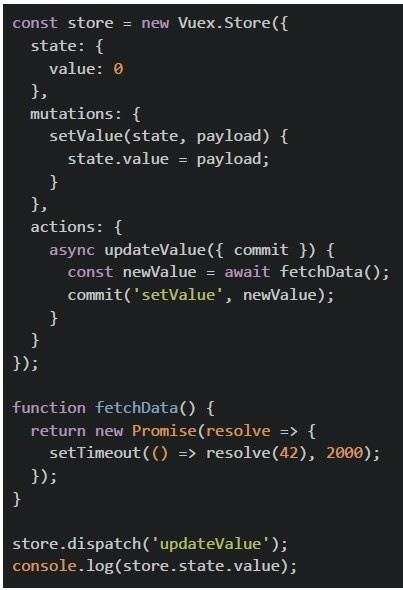
Consider the below Vuex setup.
 Consider the below Vuex setup.
What is logged to the console immediately after dispatching the action?
Consider the below Vuex setup.
What is logged to the console immediately after dispatching the action?
Consider the below Vuex setup.
What is logged to the console immediately after dispatching the action?Text of the picture (copyable)
```javascript
const store = new Vuex.Store({
  state: {
    value: 0
  },
  mutations: {
    setValue(state, payload) {
      state.value = payload;
    }
  },
  actions: {
    async updateValue({
      commit
    }) {
      const newValue = await fetchData();
      commit('setValue', newValue);
    }
  }
});

function fetchData() {
  return new Promise(resolve => {
    setTimeout(() => resolve(42), 2000);
  });
}

store.dispatch('updateValue');
console.log(store.state.value);
```- 0
- 42
- Undefined behavior
- Error: Action did not resolve
Text of the picture (copyable)
Consider the following Flask application (server.py) and an HTML file named index.html:

server.py

```python
from flask import Flask
import time

app = Flask(__name__)

@app.route("/api/slow1")
def slow_api_1():
    time.sleep(15)
    return "Response from Slow API 1", 200, {'Access-Control-Allow-Origin': '*'}

@app.route("/api/slow2")
def slow_api_2():
    time.sleep(25)
    return "Response from Slow API 2", 200, {'Access-Control-Allow-Origin': '*'}

if __name__ == "__main__":
    app.run(threaded=False)
```

index.html

```html
<!DOCTYPE html>
<html lang="en">
<head>
    <title>Flask Fetch Example</title>
</head>
<body>
    <h1>Fetching API Data...</h1>

    <script>
        fetch("http://127.0.0.1:5000/api/slow1")
            .then(res => res.json())
            .then(data => console.log("API 1 Response:", data));

        fetch("http://127.0.0.1:5000/api/slow2")
            .then(res => res.json())
            .then(data => console.log("API 2 Response:", data));
    </script>
</body>
</html>
```

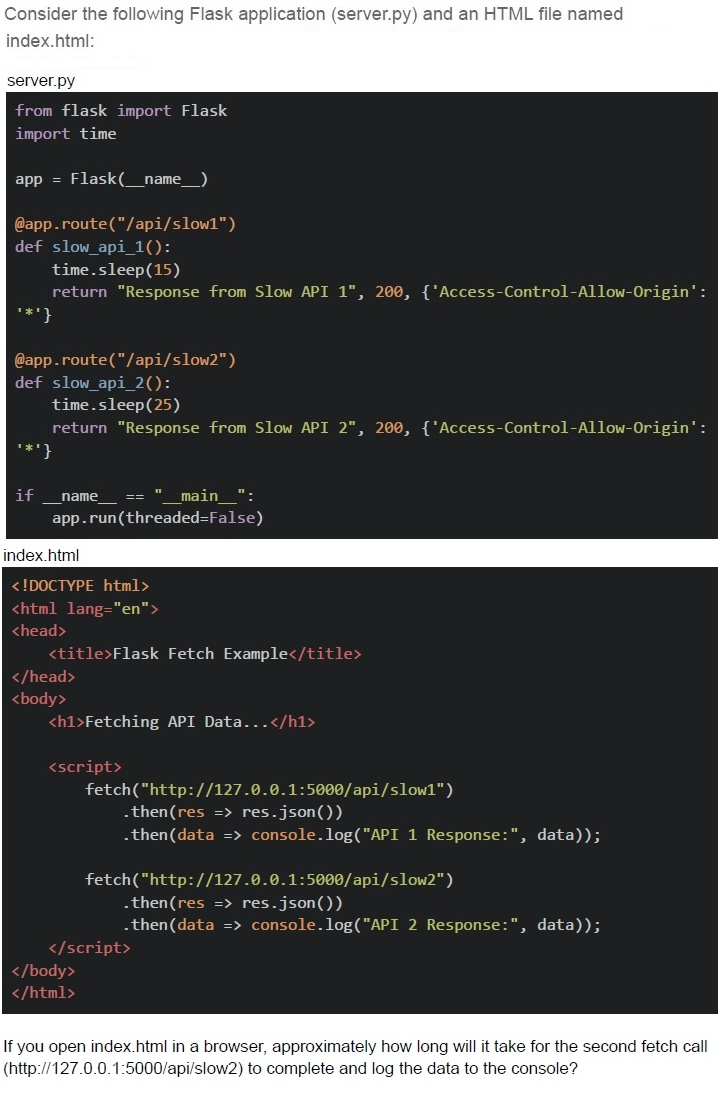
If you open index.html in a browser, approximately how long will it take for the second fetch call (http://127.0.0.1:5000/api/slow2) to complete and log the data to the console?- 15 seconds
- 25 seconds
- 10 seconds
- 40 seconds
Text of the picture (copyable)
Consider the below flask implementation with JWT based authentication.

```python
from flask import Flask, request, jsonify
import jwt
import datetime

app = Flask(__name__)
SECRET_KEY = "supersecret"

def generate_token(user):
    return jwt.encode(
        {"user": user, "exp": datetime.datetime.utcnow() +
         datetime.timedelta(seconds=10)},
        SECRET_KEY,
        algorithm="HS256"
    )

@app.route("/login", methods=["POST"])
def login():
    user = request.json.get("user")
    token = generate_token(user)
    return jsonify({"token": token})

@app.route("/protected", methods=["GET"])
def protected():
    token = request.headers.get("Authorization").split(" ")[1]
    try:
        payload = jwt.decode(token, SECRET_KEY, algorithms=["HS256"])
        return jsonify({"message": f"Hello {payload['user']}!"})
    except jwt.ExpiredSignatureError:
        return jsonify({"error": "Token expired"}), 401
    except jwt.InvalidTokenError:
        return jsonify({"error": "Invalid token"}), 403
```

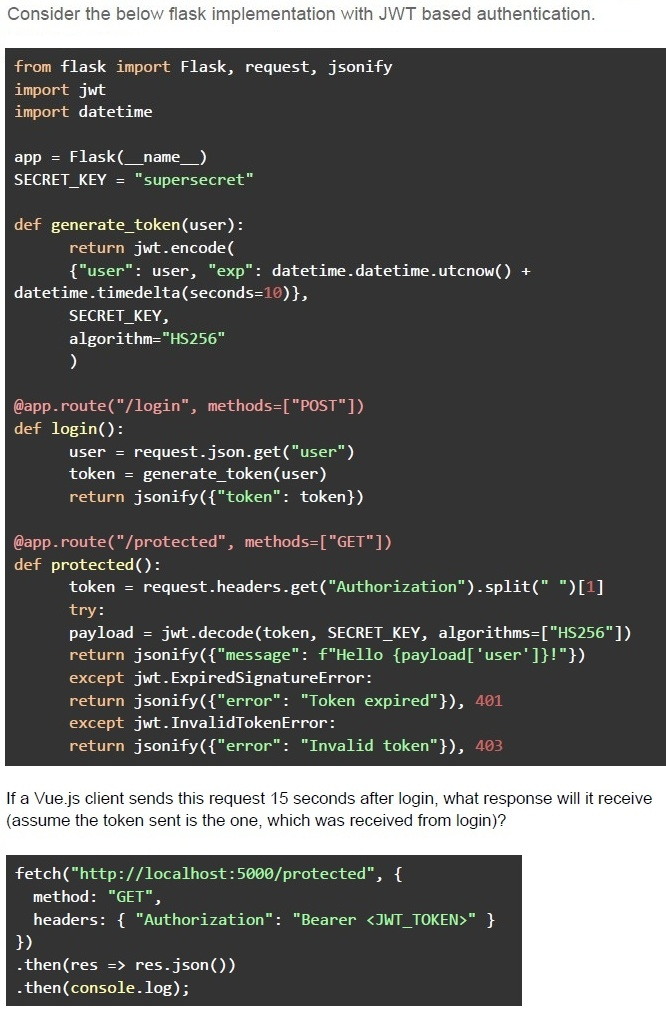
If a Vue.js client sends this request 15 seconds after login, what response will it receive
(assume the token sent is the one, which was received from login)?

```javascript
fetch("http://localhost:5000/protected", {
    method: "GET",
    headers: { "Authorization": "Bearer <JWT_TOKEN>" }
})
.then(res => res.json())
.then(console.log);
```
text
```json
{ "message": "Hello user!" }
```
text
```json
{ "error": "Token expired" }
```
text
```json
{
  "error": "Invalid token"
}
```
text
```json
{
  "message": "Access granted"
}
```
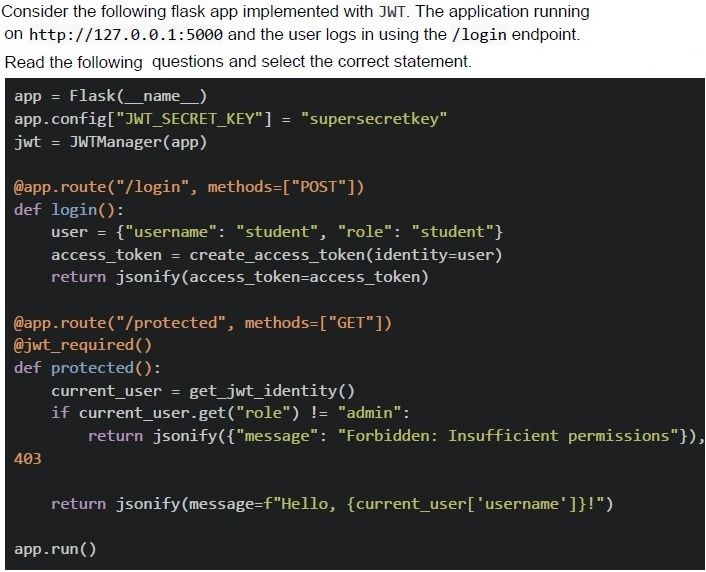
Comprehension passage for this question
Based on the above data, answer the given subquestions.
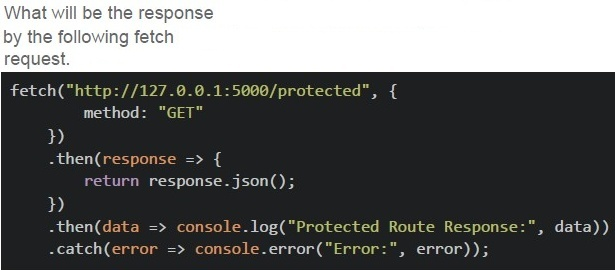
Text of the picture (copyable)
What will be the response
by the following fetch
request.

```javascript
fetch("http://127.0.0.1:5000/protected", {
    method: "GET"
})
.then(response => {
    return response.json();
})
.then(data => console.log("Protected Route Response:", data))
.catch(error => console.error("Error:", error));
```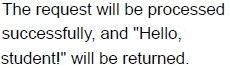
text
The request will be processed
successfully, and "Hello,
student!" will be returned.
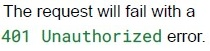
text
The request will fail with a
401 Unauthorized error.
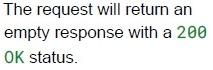
text
The request will return an
empty response with a 200
OK status.

text
The request will fail with a
403 Forbidden error.
Comprehension passage for this question
Based on the above data, answer the given subquestions.
Text of the picture (copyable)
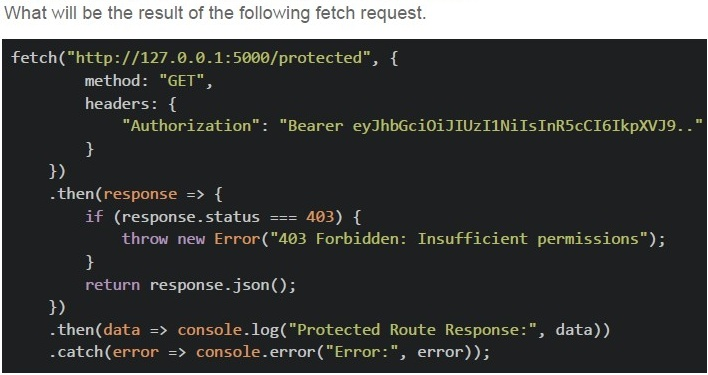
What will be the result of the following fetch request.

```javascript
fetch("http://127.0.0.1:5000/protected", {
    method: "GET",
    headers: {
        "Authorization": "Bearer eyJhbGciOiJIUzI1NiIsInR5cCI6IkpXVCJ9.."
    }
})
.then(response => {
    if (response.status === 403) {
        throw new Error("403 Forbidden: Insufficient permissions");
    }
    return response.json();
})
.then(data => console.log("Protected Route Response:", data))
.catch(error => console.error("Error:", error));
```
text
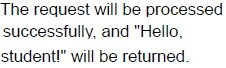
The request will be processed
successfully, and "Hello,
student!" will be returned.
text
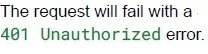
The request will fail with a
401 Unauthorized error.
text
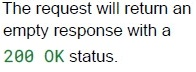
The request will return an
empty response with a
200 OK status.

text
The request will fail with a
403 Forbidden error.
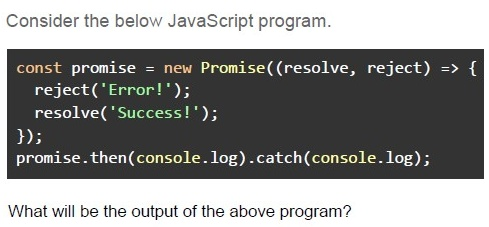
Text of the picture (copyable)
Consider the below JavaScript program.

```javascript
const promise = new Promise(((resolve, reject) => {
  reject('Error!');
  resolve('Success!');
}));
promise.then(console.log).catch(console.log);
```

What will be the output of the above program?- Success!Failed!
- Success!
- Failed!
- Error!
How does a webhook differ from an API call?
- A webhook is triggered by an event, while an API call requires a client request.
- A webhook always returns a response body, while an API call does not.
- A webhook uses WebSockets for communication, while APIs use REST.
- A webhook only supports the HTTP GET method.
What is the purpose of CORS in web security?
- To allow browsers to make requests to any domain without restrictions.
- To prevent the server from making requests to unauthorized origins.
- To allow a web application to request resources from a different domainsecurely.
- To restrict all incoming requests to the same domain.