Home / MAD1 / Week 11 / Real questions
MAD1 week 11 - real exam questions
42 questions pulled from past papers whose wording matches this week's topics, newest first, duplicates removed. Pick your answers, then press Check answers. Figures and answer keys are the originals.
Elapsed 00:00
What does the following curl command do? 
Text of the picture (copyable)
```
curl -X PUT -d "status=active&role=admin" https://api/users/update
```
- Sends a PUT request to update data using form format.
- Sends a PUT request using JSON encoding.
- Sends a GET request to retrieve user information.
- Sends a DELETE request to remove user data.
Consider the following code: app.py
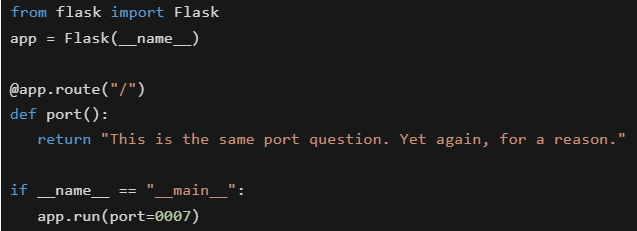 You are running a Flask web application locally using the command: python app.py. On which URL will the application be accessible in the browser?
You are running a Flask web application locally using the command: python app.py. On which URL will the application be accessible in the browser?Text of the picture (copyable)
```python
from flask import Flask
app = Flask(__name__)

@app.route("/")
def port():
    return "This is the same port question. Yet again, for a reason."

if __name__ == "__main__":
    app.run(port=0007)
```- https://127.0.0.1:5000/
- http://localhost:0007/
- http://0.0.0.0:0007/
- None of these
Which of the following statements about HTML, CSS, and character encoding is/are true?
- UTF-8 is a variable-length encoding that can represent all Unicode characters.
- In HTML, attribute names are case-insensitive.
- Inline CSS is preferred over external CSS for large-scale projects.
- UTF-32 is a fixed-length encoding where each character takes 4 bytes.
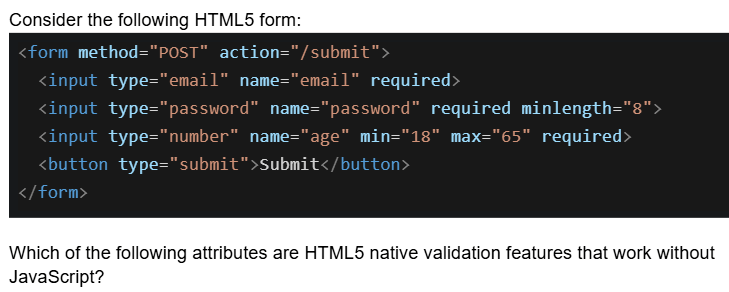
Text of the picture (copyable)
Consider the following HTML5 form:

```html
<form method="POST" action="/submit">
    <input type="email" name="email" required>
    <input type="password" name="password" required minlength="8">
    <input type="number" name="age" min="18" max="65" required>
    <button type="submit">Submit</button>
</form>
```

Which of the following attributes are HTML5 native validation features that work without JavaScript?- required, minlength, and type="email"
- min, max, and minlength
- required, type="password", and action
- type="email", min, max, minlength, and required
Which statements about frontend and backend validation are TRUE?
- Frontend validation (HTML5/JavaScript) is sufficient for security
- Frontend validation improves user experience by providing immediate feedback
- Backend validation is mandatory for security because frontend can be bypassed
- Backend validation should validate the same constraints as frontend
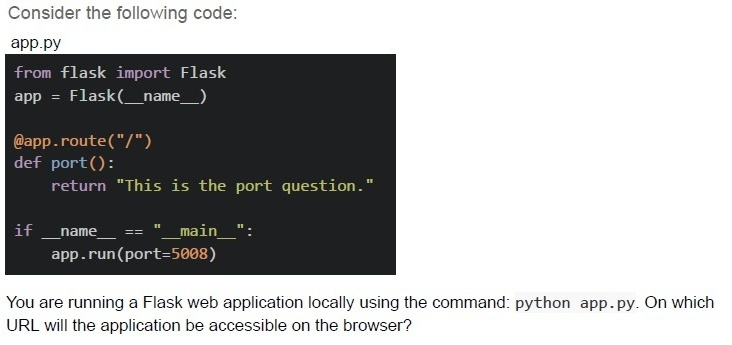
Text of the picture (copyable)
Consider the following code:
app.py

```python
from flask import Flask
app = Flask(__name__)

@app.route("/")
def port():
    return "This is the port question."

if __name__ == "__main__":
    app.run(port=5008)
```

You are running a Flask web application locally using the command: python app.py. On which URL will the application be accessible on the browser?
text
http://127.0.0.1:5000/

text
http://localhost:0000/

text
http://0.0.0.0:5000/

text
http://localhost:5008/
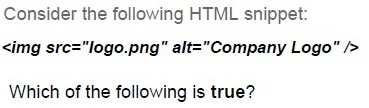
Text of the picture (copyable)
Consider the following HTML snippet:

```html
<img src="logo.png" alt="Company Logo" />
```

Which of the following is true?

text
If logo.png fails to load, the text "Company Logo" will be shown.

text
If the image file is missing, browsers display it as a broken image.

text
The alt attribute is mandatory in HTML5.

text
Logo.png fails to load because the `<img>` tag only allows "jpeg/jpg" files.

Text of the picture (copyable)
Consider a document of 2000 characters written using only the characters from the character set L1 = {'x', 'y', 'z', 'w', 'v', 'u', 't', 's'}. If the character set L1 is to be upgraded by adding all the characters from the set L2 = {'1', '2', '3', '4', '5'}, by how many bits will the size of the original document increase?(assume an optimal number of bits are used for representing each character).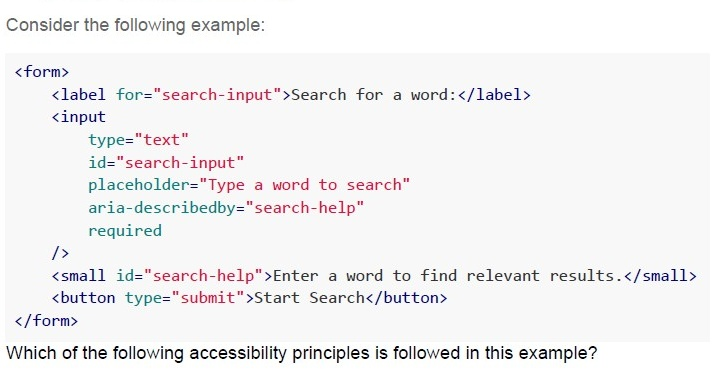
Text of the picture (copyable)
Consider the following example:

```html
<form>
    <label for="search-input">Search for a word:</label>
    <input
        type="text"
        id="search-input"
        placeholder="Type a word to search"
        aria-describedby="search-help"
        required
    />
    <small id="search-help">Enter a word to find relevant results.</small>
    <button type="submit">Start Search</button>
</form>
```

Which of the following accessibility principles is followed in this example?- Perceivable
- Operable
- Understandable
- Robust
Text of the picture (copyable)
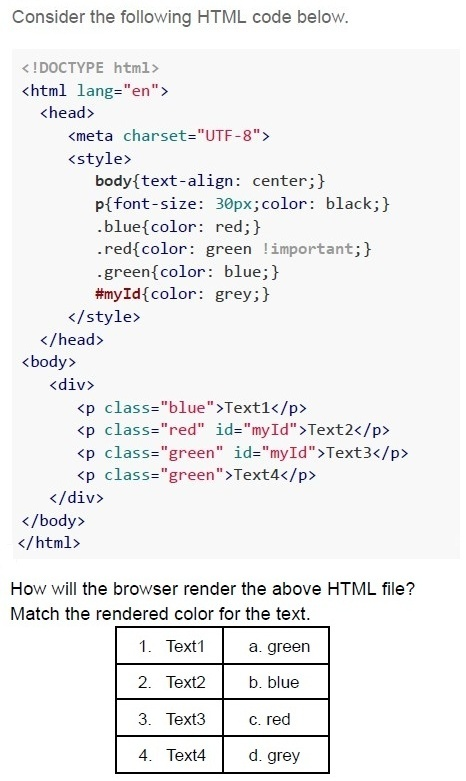
Consider the following HTML code below.

```html
<!DOCTYPE html>
<html lang="en">
<head>
    <meta charset="UTF-8">
    <style>
        body{text-align: center;}
        p{font-size: 30px;color: black;}
        .blue{color: red;}
        .red{color: green !important;}
        .green{color: blue;}
        #myId{color: grey;}
    </style>
</head>
<body>
    <div>
        <p class="blue">Text1</p>
        <p class="red" id="myId">Text2</p>
        <p class="green" id="myId">Text3</p>
        <p class="green">Text4</p>
    </div>
</body>
</html>
```

How will the browser render the above HTML file?
Match the rendered color for the text.

| 1. Text1 | a. green |
|---|---|
| 2. Text2 | b. blue |
| 3. Text3 | c. red |
| 4. Text4 | d. grey |- 1- b, 2 - a, 3- d, 4 - c
- 1- c, 2 - d, 3- d, 4 - b
- 1- c, 2 - a, 3- d, 4 - b
- 1- a, 2 - c, 3- b, 4 - d
Text of the picture (copyable)
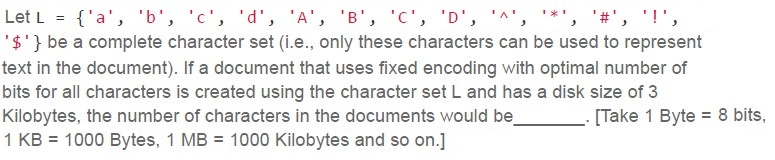
Let L = { 'a', 'b', 'c', 'd', 'A', 'B', 'C', 'D', '^', '*', '#', '!', '$' } be a complete character set (i.e., only these characters can be used to represent text in the document). If a document that uses fixed encoding with optimal number of bits for all characters is created using the character set L and has a disk size of 3 Kilobytes, the number of characters in the documents would be _____. [Take 1 Byte = 8 bits, 1 KB = 1000 Bytes, 1 MB = 1000 Kilobytes and so on.]- 3000
- 6000
- 9000
- 12000
Text of the picture (copyable)
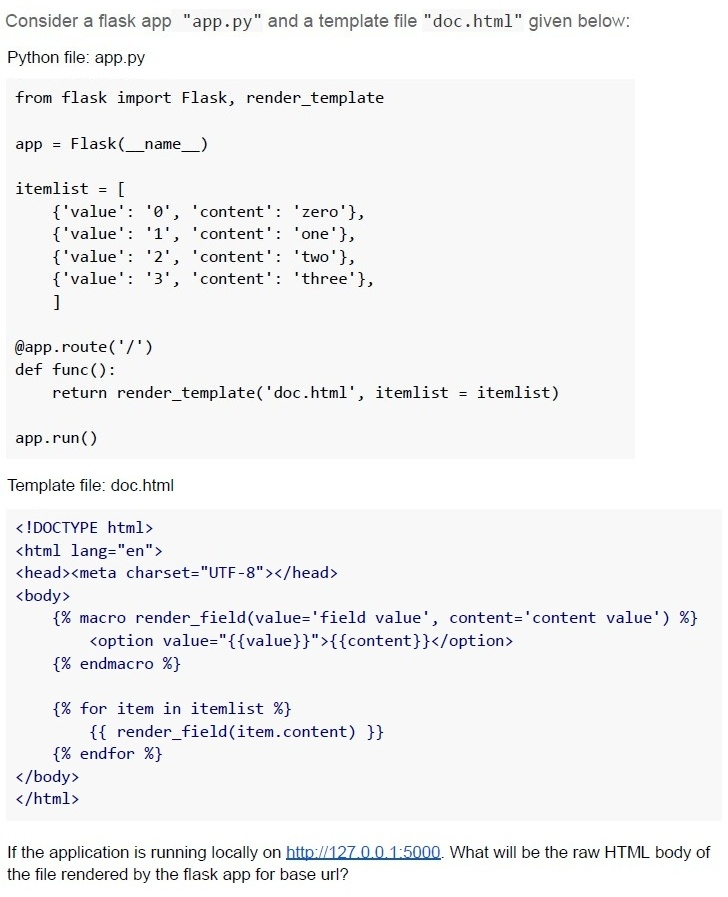
Consider a flask app "app.py" and a template file "doc.html" given below:

Python file: app.py

```python
from flask import Flask, render_template

app = Flask(__name__)

itemlist = [
    {'value': '0', 'content': 'zero'},
    {'value': '1', 'content': 'one'},
    {'value': '2', 'content': 'two'},
    {'value': '3', 'content': 'three'},
]

@app.route('/')
def func():
    return render_template('doc.html', itemlist = itemlist)

app.run()
```

Template file: doc.html

```html
<!DOCTYPE html>
<html lang="en">
<head><meta charset="UTF-8"></head>
<body>
    {% macro render_field(value='field value', content='content value') %}
        <option value="{{value}}">{{content}}</option>
    {% endmacro %}

    {% for item in itemlist %}
        {{ render_field(item.content) }}
    {% endfor %}
</body>
</html>
```

If the application is running locally on http://127.0.0.1:5000. What will be the raw HTML body of the file rendered by the flask app for base url?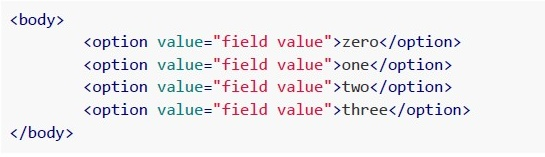
text
```html
<body>

    <option value="field value">zero</option>
    <option value="field value">one</option>
    <option value="field value">two</option>
    <option value="field value">three</option>

</body>
```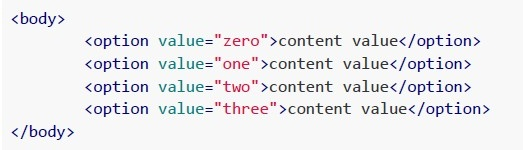
text
```html
<body>
    <option value="zero">content value</option>
    <option value="one">content value</option>
    <option value="two">content value</option>
    <option value="three">content value</option>
</body>
```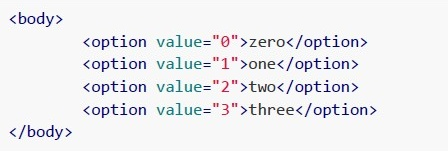
text
```html
<body>
    <option value="0">zero</option>
    <option value="1">one</option>
    <option value="2">two</option>
    <option value="3">three</option>
</body>
```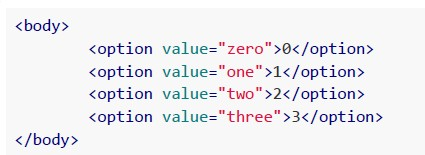
text
```html
<body>

    <option value="zero">0</option>
    <option value="one">1</option>
    <option value="two">2</option>
    <option value="three">3</option>

</body>
```
A certain text document consisting of only alphanumeric characters (including spaces) takes 320000 bits, when encoded with UCS-2 encoding. How many bits will the same document take if encoded with ASCII 7-bit encoding?
- 20000 bits
- 1,40,000 bits
- 22,40,000 bits
- 320000 bits
Consider the following statements and choose the correct option
Statement 1: It is always mandatory to implement server-side validations and client-side validations to create web applications. Statement 2: Server-side validations can be implemented using HTML5.
- Statement 1 is false, while statement 2 is true
- Statement 1 is true, while statement 2 is false
- Both statements are false
- Both statements are true
Consider the following example:
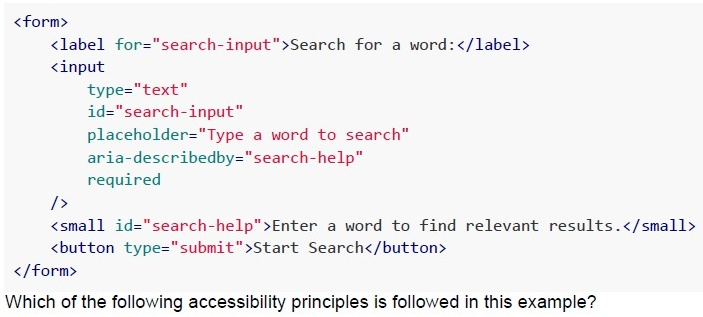 Consider the following example:
Consider the following example:
Text of the picture (copyable)
```html
<form>
    <label for="search-input">Search for a word:</label>
    <input
        type="text"
        id="search-input"
        placeholder="Type a word to search"
        aria-describedby="search-help"
        required
    />
    <small id="search-help">Enter a word to find relevant results.</small>
    <button type="submit">Start Search</button>
</form>
```
Which of the following accessibility principles is followed in this example?- Perceivable
- Operable
- Robust
- Understandable
Consider the following HTML document.
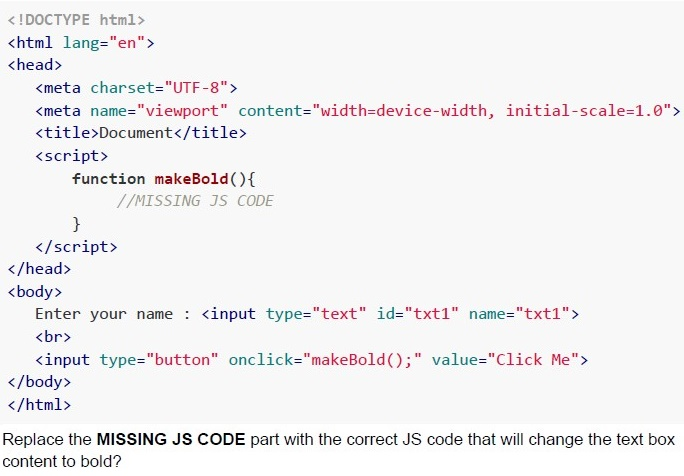 Consider the following HTML document.
Consider the following HTML document. Text of the picture (copyable)
```html
<!DOCTYPE html>
<html lang="en">
<head>
    <meta charset="UTF-8">
    <meta name="viewport" content="width=device-width, initial-scale=1.0">
    <title>Document</title>
    <script>
        function makeBold(){
            //MISSING JS CODE
        }
    </script>
</head>
<body>
    Enter your name : <input type="text" id="txt1" name="txt1">
    <br>
    <input type="button" onclick="makeBold();" value="Click Me">
</body>
</html>
```
Replace the **MISSING JS CODE** part with the correct JS code that will change the text box content to bold?
text
```javascript
t=document.getElementsByName("txt1").value;
t.style.fontWeight="bold";
```
text
```javascript
t=document.getElementById("txt1").value;
t.style.fontWeight="bold";
```
text
```javascript
t=document.getElementById("txt1");
t.style.fontWeight="bold";
```
text
```javascript
t=document.getElementById("txt1");
t.style.fontWeight="bold";
```
Consider the following HTML document.
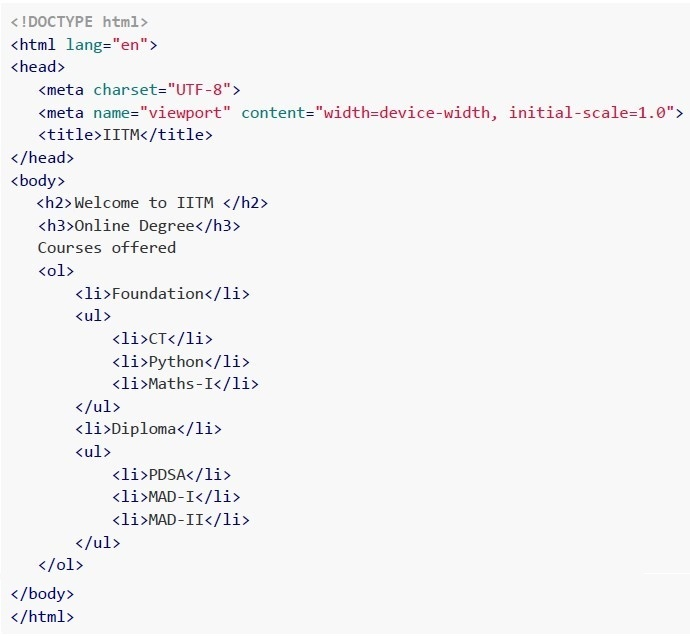 Consider the following HTML document.
Which of the following statements is/are correct about the above code snippet?
Consider the following HTML document.
Which of the following statements is/are correct about the above code snippet?
Consider the following HTML document.
Which of the following statements is/are correct about the above code snippet?Text of the picture (copyable)
```html
<!DOCTYPE html>
<html lang="en">
<head>
    <meta charset="UTF-8">
    <meta name="viewport" content="width=device-width, initial-scale=1.0">
    <title>IITM</title>
</head>
<body>
    <h2>Welcome to IITM </h2>
    <h3>Online Degree</h3>
    Courses offered
    <ol>
        <li>Foundation</li>
        <ul>
            <li>CT</li>
            <li>Python</li>
            <li>Maths-I</li>
        </ul>
        <li>Diploma</li>
        <ul>
            <li>PDSA</li>
            <li>MAD-I</li>
            <li>MAD-II</li>
        </ul>
    </ol>
</body>
</html>
```- List Items, Foundations and Diploma are numbered 1 and 2
- List Items, Foundations and Diploma are bulleted
- List Items, PDSA, MAD-I and MAD-II are numbered 1, 2 and 3
- List Items, PDSA, MAD-I and MAD-II are bulleted
Consider the following HTML document “form.html” and the flask route given in “app.py”. Assume all the required methods are imported, Which of the following statements is/are correct.
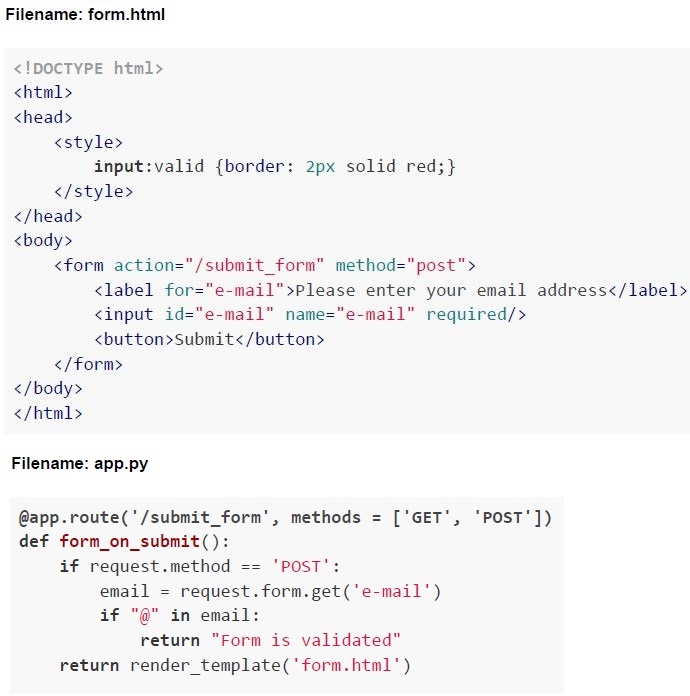 Consider the following HTML document “form.html” and the flask route given in “app.py”. Assume all the required methods are imported, Which of the following statements is/are correct.
Consider the following HTML document “form.html” and the flask route given in “app.py”. Assume all the required methods are imported, Which of the following statements is/are correct.
Text of the picture (copyable)
Filename: form.html

```html
<!DOCTYPE html>
<html>
<head>
    <style>
        input:valid {border: 2px solid red;}
    </style>
</head>
<body>
    <form action="/submit_form" method="post">
        <label for="e-mail">Please enter your email address</label>
        <input id="e-mail" name="e-mail" required/>
        <button>Submit</button>
    </form>
</body>
</html>
```

Filename: app.py

```python
@app.route('/submit_form', methods = ['GET', 'POST'])
def form_on_submit():
    if request.method == 'POST':
        email = request.form.get('e-mail')
        if "@" in email:
            return "Form is validated"
    return render_template('form.html')
```- The above HTML document has frontend validation incorporated, usingHTML5 form validation.
- The above HTML document has only backend validation incorporated.
- The above HTML document has both frontend and backend validationincorporated.
- If the e-mail input field is left blank, the border colour of the input field will bered.
Consider a character set Q, which consists of only those characters used in the sentence, "the five boxing wizards jump quickly" If this sentence is to be saved in a document with minimum encoding, what will be the size of the document given that no other information or context is to be saved?
- 175 bits
- 180 bits
- 252 bits
- 256 bits
A certain text document consisting of only alphanumeric characters (including spaces) takes 1,52,000 bits, when encoded with UCS-4 (32 bit) encoding. How many bits will the same document take if encoded with ASCII 7-bit encoding?
- 24000 bits
- 68000 bits
- 33250 bits
- 152000 bits
The ability of an application to work with different input modalities beyond keyboard highlights which of the following accessibility principle?
- Perceivable
- Robust
- Understandable
- Operable
Consider the following HTML Document and select the correct statement(s) from the following if a user types the password “mad1password” in the password field letter by letter.
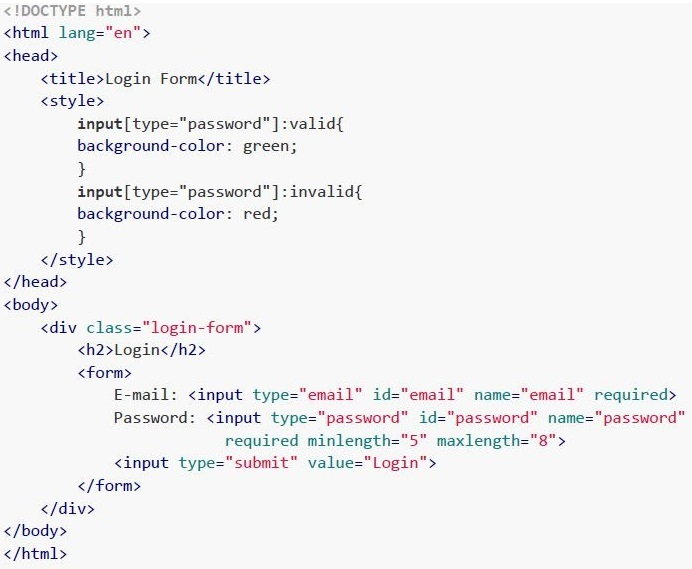 Consider the following HTML Document and select the correct statement(s) from the following if a user types the password “mad1password” in the password field letter by letter.
Consider the following HTML Document and select the correct statement(s) from the following if a user types the password “mad1password” in the password field letter by letter. Text of the picture (copyable)
```html
<!DOCTYPE html>
<html lang="en">
<head>
    <title>Login Form</title>
    <style>
        input[type="password"]:valid{
            background-color: green;
        }
        input[type="password"]:invalid{
            background-color: red;
        }
    </style>
</head>
<body>
    <div class="login-form">
        <h2>Login</h2>
        <form>
            E-mail: <input type="email" id="email" name="email" required>
            Password: <input type="password" id="password" name="password"
            required minlength="5" maxlength="8">
            <input type="submit" value="Login">
        </form>
    </div>
</body>
</html>
```- The HTML form is integrated with backend validation.
- The HTML form is integrated with Frontend HTML5 validation.
- The background colour of the password field remains red for the first 4 letters,then turns green for the next 4 letters, and then again turns red for the remaining letters.
- The background colour of the password field remains red for the first 4 letters,then turns green for the next 4 letters, and then remains green for the remaining allowable letters.
Which of the following is not a correct perceivable accessibility principle?
- Provide text alternatives for non-text content.
- Provide captions and other alternatives for multimedia.
- Make it easier for users to see and hear content.
- Give users enough time to read and use content.

Text of the picture (copyable)
Consider a document of 1000 characters written using only the characters of the character set L1 = {'a', 'b', 'c', 'd', 'e', 'f', 'g', 'h', 'i', 'j'}. If the character set L1 is to be upgraded by adding all the characters of character set L2 = {'0', '1', '2', '3', '4', '5', '6'} in it, By how many bits will the size of the original document increase?- 0 bits
- 1000 bits
- 4000 bits
- 5000 bits
Which of the statements are true?
- HTML5 is based on SGML
- XHTML is based on XML which in turn is based on SGML
- HTML5 is not backwards compatible with older versions of HTML
- XML is both human and machine readable
Consider a character set M, which consists of only those characters used in the statement, "sphinx of black quartz judge my vow" If this statement is to be saved in a document with minimum encoding, what will be the size of the document given that no other information or context is to be saved?
- 145 bits
- 245 bits
- 175 bits
- 256 bits

Text of the picture (copyable)
Consider the following example.
```html
<img src="example.jpg" alt="Gajendra Circle, IITM Campus">
```
Which of the following accessibility principle is followed in this example?
- Perceivable
- Operable
- Understandable
- Robust
Which of the following is not a web component?
- Custom Elements
- Shadow DOM
- HTML Templates
- Web Assembly
Comprehension passage for this question
Based on the above data, answer the given subquestions.
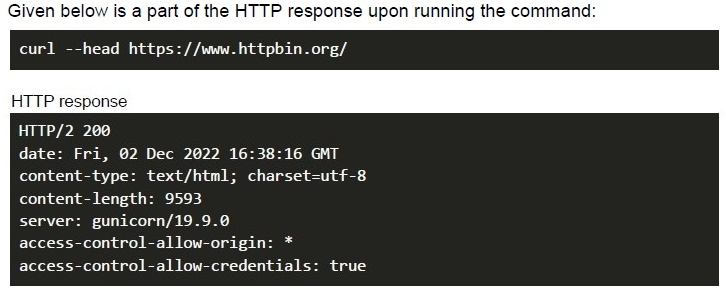
Which part of the response indicates the MIME type of the response body?
- charset=utf-8
- server: gunicorn/19.9.0
- content-type: text/html;
- None of these
Which of the following helps us to create custom HTML elements?
- SVG
- Web Components
- Web API
- None of these
Consider a character set L, which consists of only those characters which are used in the statement, “pack my box with five dozen liquor jugs”. If this statement is to be saved in a document with minimum encoding, what will be the size of the document given that no other information or context is to be saved?
- 160 bits
- 320 bits
- 195 bits
- 390 bits
Consider the following statements and select the correct option. Statement 1: It is not necessary to implement server-side validation if client-side validation has been implemented. Statement 2: Client-side validation can be implemented with HTML5.
- Statement 1 is true while statement 2 is false
- Statement 2 is true while statement 1 is false
- Both statements are true
- Both statements are false
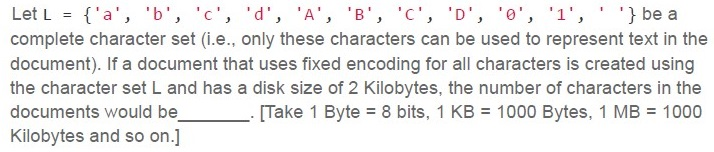
Text of the picture (copyable)
Let L = { 'a', 'b', 'c', 'd', 'A', 'B', 'C', 'D', '0', '1', ' ', ' '} be a complete character set (i.e., only these characters can be used to represent text in the document). If a document that uses fixed encoding for all characters is created using the character set L and has a disk size of 2 Kilobytes, the number of characters in the documents would be ______. [Take 1 Byte = 8 bits, 1 KB = 1000 Bytes, 1 MB = 1000 Kilobytes and so on.]- 2000
- 4000
- 8000
- 16000
Consider the following HTML document.
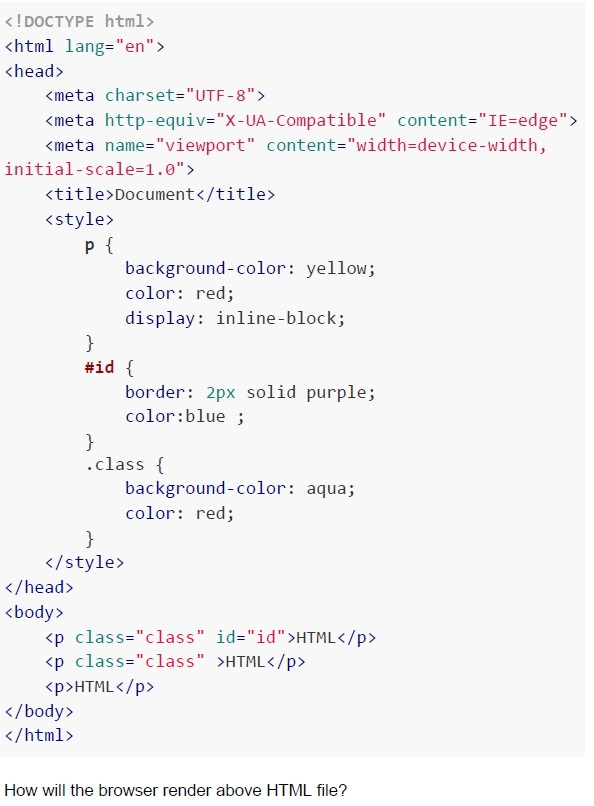 Consider the following HTML document.
Consider the following HTML document. Text of the picture (copyable)
```html
<!DOCTYPE html>
<html lang="en">
<head>
    <meta charset="UTF-8">
    <meta http-equiv="X-UA-Compatible" content="IE=edge">
    <meta name="viewport" content="width=device-width, initial-scale=1.0">
    <title>Document</title>
    <style>
        p {
            background-color: yellow;
            color: red;
            display: inline-block;
        }
        #id {
            border: 2px solid purple;
            color:blue ;
        }
        .class {
            background-color: aqua;
            color: red;
        }
    </style>
</head>
<body>
    <p class="class" id="id">HTML</p>
    <p class="class" >HTML</p>
    <p>HTML</p>
</body>
</html>
```
How will the browser render above HTML file?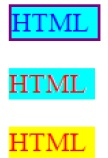
text
The image displays three rectangular boxes stacked vertically, each containing the text "HTML".

1.  **Top box:** Cyan background, blue text, purple border.
2.  **Middle box:** Cyan background, red text, no visible border.
3.  **Bottom box:** Yellow background, red text, no visible border.

text
The image displays three rectangular boxes, each containing the text "HTML".

1.  **Left Box:** A light blue rectangle with the text "HTML" in red. The text appears slightly blurred.
2.  **Middle Box:** A light blue rectangle with a purple border. The text "HTML" is in blue.
3.  **Right Box:** A yellow rectangle with the text "HTML" in red, with a gradient effect making it appear orange/yellow in some parts. The text also appears slightly blurred.

text
The image displays three rectangular blocks, each containing the text "HTML".

1.  **Left Block:** A cyan rectangle with a purple border. The text "HTML" is in blue.
2.  **Middle Block:** A cyan rectangle with no border. The text "HTML" is in red.
3.  **Right Block:** A yellow rectangle with no border. The text "HTML" is in red.

text
The image displays three rectangular blocks, each containing the text "HTML".

1.  **Left block:** A cyan-colored rectangle with the text "HTML" in red. The text has a slight shadow effect.
2.  **Middle block:** A yellow-colored rectangle with the text "HTML" in red. The text also has a slight shadow effect.
3.  **Right block:** A cyan-colored rectangle with a purple border. The text "HTML" is in blue and has a slight shadow effect.
Consider the following statements about HTML4 and HTML5 and select the correct option. Statement 1: The HTML gets separated out from SGML from its fourth version, HTML4. Statement 2: HTML5 has additional support for latest features like multimedia support, canvases etc. and it has its own parsing rules.
- Both statements 1 and 2 are correct.
- Both statements 1 and 2 are incorrect.
- Statement 1 is correct but statement 2 is incorrect.
- Statement 2 is correct but statement 1 is incorrect.
Read the following statements regarding web accessibility principles and choose the correct option. Statement 1: Understandable information and users interface helps developers to avoid and correct mistakes in their content. Statement 2: Perceivable information ensures that the content does not cause any seizures and physical reaction to its users.
- Both statement 1 and statement 2 are correct.
- Both statement 1 and statement 2 are incorrect
- Statement 1 is correct but statement 2 is incorrect
- Statement 1 is incorrect but statement 2 is correct
Text of the picture (copyable)
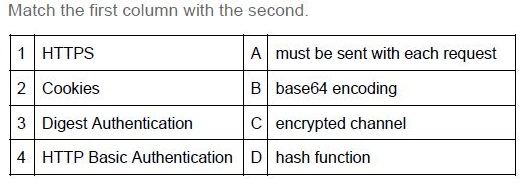
Match the first column with the second.

| 1 | HTTPS | A | must be sent with each request |
|---|---|---|---|
| 2 | Cookies | B | base64 encoding |
| 3 | Digest Authentication | C | encrypted channel |
| 4 | HTTP Basic Authentication | D | hash function |
- 1-C, 2-D, 3-A, 4-B
- 1-C, 2-A, 3-D, 4-B
- 1-B, 2-A, 3-D, 4-C
- 1-A, 2-D, 3-B, 4-C
Text of the picture (copyable)
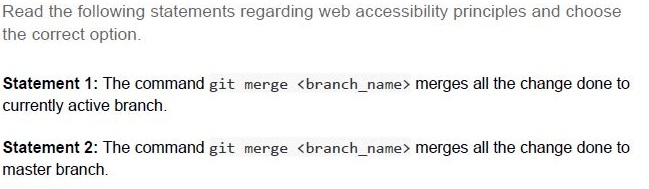
Read the following statements regarding web accessibility principles and choose the correct option.

**Statement 1:** The command `git merge <branch_name>` merges all the change done to currently active branch.

**Statement 2:** The command `git merge <branch_name>` merges all the change done to master branch.
- Both statement 1 and statement 2 are correct
- Both statement 1 and statement 2 are incorrect
- Statement 1 is correct but statement 2 is incorrect
- Statement 1 is incorrect but statement 2 is correct

Text of the picture (copyable)
A certain text document consisting of only alphanumeric characters (including
spaces) takes 1,36,000 bits, when encoded with UCS-4 (32 bit) encoding. How many
bits will the same document take if encoded with ASCII 7 bit encoding?
(Concept: Encoding efficiency)

text
34000 bits

text
68000 bits

text
29750 bits

text
136000 bits
Text of the picture (copyable)
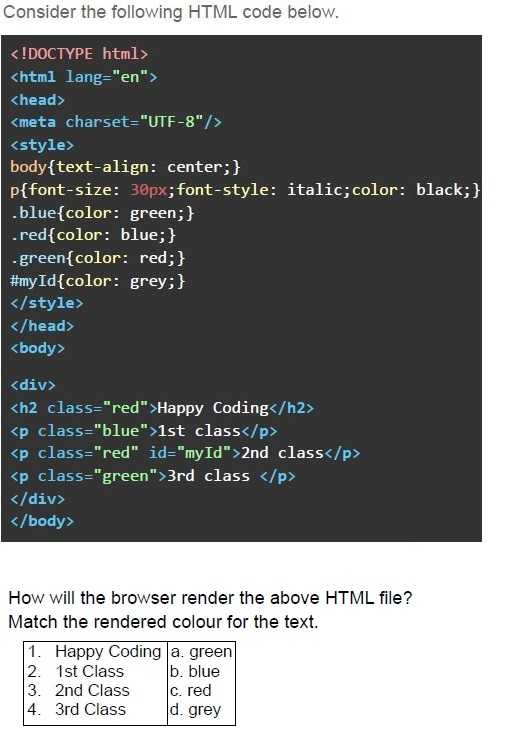
Consider the following HTML code below.

```html
<!DOCTYPE html>
<html lang="en">
<head>
<meta charset="UTF-8"/>
<style>
body{text-align: center;}
p{font-size: 30px;font-style: italic;color: black;}
.blue{color: green;}
.red{color: blue;}
.green{color: red;}
#myId{color: grey;}
</style>
</head>
<body>

<div>
<h2 class="red">Happy Coding</h2>
<p class="blue">1st class</p>
<p class="red" id="myId">2nd class</p>
<p class="green">3rd class </p>
</div>
</body>
</html>
```

How will the browser render the above HTML file?
Match the rendered colour for the text.

| | | |
|---|---|---|
| 1. | Happy Coding | a. green |
| 2. | 1st Class | b. blue |
| 3. | 2nd Class | c. red |
| 4. | 3rd Class | d. grey |
text
1- b, 2 - a, 3- d, 4 - c

text
1 - a, 2 - c, 3 - d, 4 - b

text
1- b, 2 - a, 3- c, 4 - d

text
1- a, 2 - c, 3- b, 4 - d

Text of the picture (copyable)
Which of the following statement(s) is/are true regarding HTML and encodings?
Concepts Covered: Encoding Standards, HTML & CSS

text
Both UTF-8 and UTF-32 are variable length encodings.

text
The UTF-8 can only be used for encoding (2^16 + 1) characters.

text
The HTML tags are case-insensitive.

text
The External CSS is preferred over internal and inline CSS for developing large websites.

Text of the picture (copyable)
A certain text document consisting of only alphanumeric characters (including spaces) takes 35,552 bits, when encoded with UCS-4 (32 bit) encoding. How many bits will the same document take if encoded with ASCII 7 bit encoding?
(Concept: Encoding efficiency)

text
6666 bits

text
7777 bits

text
8888 bits

text
17,776 bits