Home / Past papers / MAD1 Quiz 1 / this paper
IIT M QUIZ 1 FOUNDATION DAD DIPLOMA QPE3 16 Oct 2022 - 16 Oct 2022
Elapsed 00:00
Text of the picture (copyable)
THIS IS QUESTION PAPER FOR THE SUBJECT "DIPLOMA LEVEL: MODERN APPLICATION DEVELOPMENT 1"

ARE YOU SURE YOU HAVE TO WRITE EXAM FOR THIS SUBJECT?
CROSS CHECK YOUR HALL TICKET TO CONFIRM THE SUBJECTS TO BE WRITTEN.

(IF IT IS NOT THE CORRECT SUBJECT, PLS CHECK THE SECTION AT THE TOP FOR THE SUBJECTS REGISTERED BY YOU)
- YES
- NO

Text of the picture (copyable)
A certain text document consisting of only alphanumeric characters (including spaces) takes 35,552 bits, when encoded with UCS-4 (32 bit) encoding. How many bits will the same document take if encoded with ASCII 7 bit encoding?
(Concept: Encoding efficiency)

text
6666 bits

text
7777 bits

text
8888 bits

text
17,776 bits

Text of the picture (copyable)
For a certain table "worker" in SQLite database having one of its fields as
"First_name", the correct SQL query to fetch all "First_name" values from "worker" table
using the alias name as "Worker_name" is:
(Concept: basic SQL queries)

text
```sql
Select First_name ALIAS Worker_name from worker;
```

text
```sql
Select worker_name For First_name from worker;
```

text
```sql
Select First_name AS Worker_name from worker;
```

text
```sql
Select first_name from worker;
```
Text of the picture (copyable)
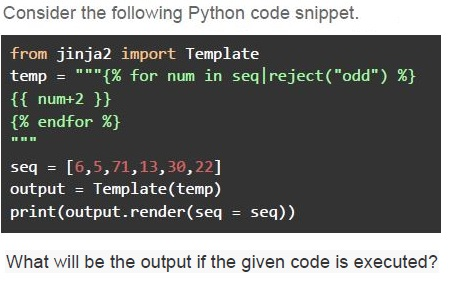
Consider the following Python code snippet.

```python
from jinja2 import Template
temp = """{% for num in seq|reject("odd") %}
{{ num+2 }}
{% endfor %}
"""

seq = [6,5,71,13,30,22]
output = Template(temp)
print(output.render(seq = seq))
```

What will be the output if the given code is executed?
text
8
32
24

text
5
71
13
text
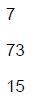
7
73
15

text
6
5
71
13
30
22
Text of the picture (copyable)
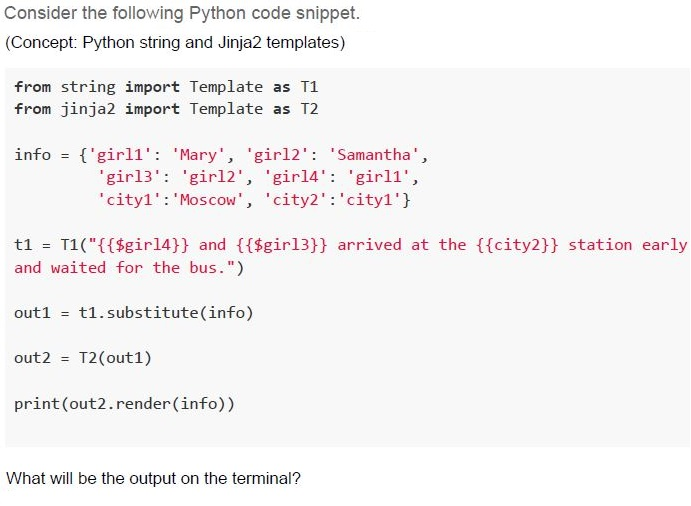
Consider the following Python code snippet.
(Concept: Python string and Jinja2 templates)

```python
from string import Template as T1
from jinja2 import Template as T2

info = {'girl1': 'Mary', 'girl2': 'Samantha',
        'girl3': 'girl2', 'girl4': 'girl1',
        'city1': 'Moscow', 'city2':'city1'}

t1 = T1("{{$girl4}} and {{$girl3}} arrived at the {{city2}} station early
and waited for the bus.")

out1 = t1.substitute(info)

out2 = T2(out1)

print(out2.render(info))
```

What will be the output on the terminal?
text
girl2 and girl1 arrived at the city1 station early and waited for the bus.

text
Samantha and Mary arrived at the Moscow station early and waited for the bus.

text
Mary and Samantha arrived at the city1 station early and waited for the bus.

text
Error
Text of the picture (copyable)
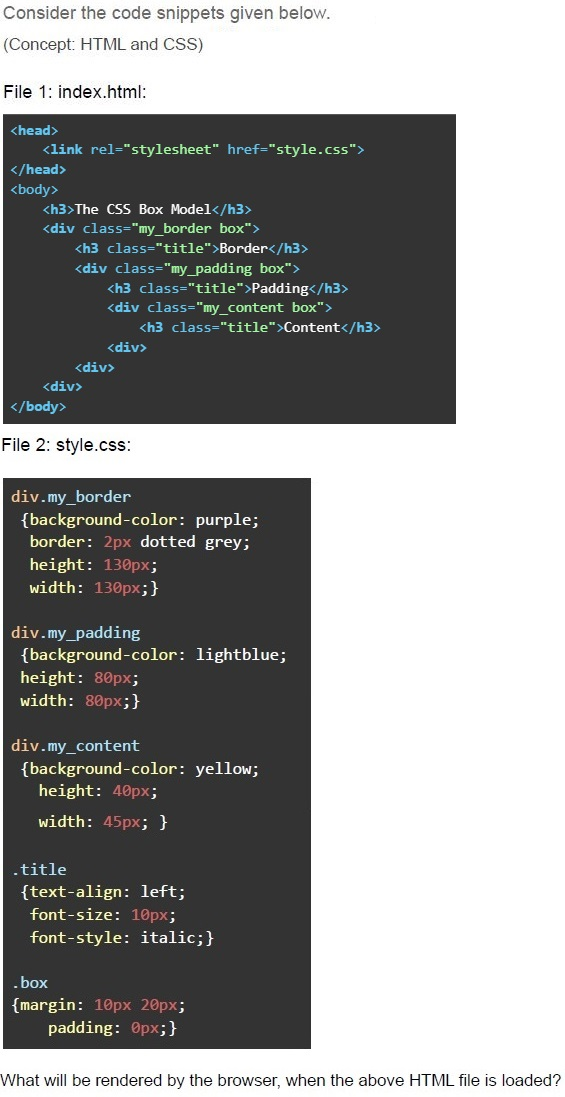
Consider the code snippets given below.
(Concept: HTML and CSS)

File 1: index.html:

```html
<head>
    <link rel="stylesheet" href="style.css">
</head>
<body>
    <h3>The CSS Box Model</h3>
    <div class="my_border box">
        <h3 class="title">Border</h3>
        <div class="my_padding box">
            <h3 class="title">Padding</h3>
            <div class="my_content box">
                <h3 class="title">Content</h3>
            </div>
        </div>
    </div>
</body>
```

File 2: style.css:

```css
div.my_border {
    background-color: purple;
    border: 2px dotted grey;
    height: 130px;
    width: 130px;
}

div.my_padding {
    background-color: lightblue;
    height: 80px;
    width: 80px;
}

div.my_content {
    background-color: yellow;
    height: 40px;
    width: 45px;
}

.title {
    text-align: left;
    font-size: 10px;
    font-style: italic;
}

.box {
    margin: 10px 20px;
    padding: 0px;
}
```

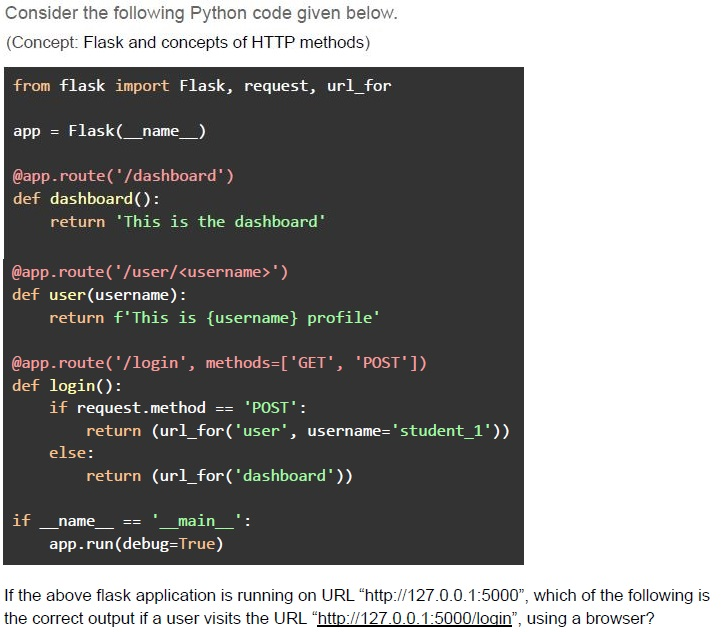
What will be rendered by the browser, when the above HTML file is loaded?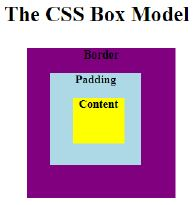
text
The CSS Box Model

This is a diagram showing the CSS Box Model. It consists of four concentric squares, from outermost to innermost:
1.  **Outermost square (purple):** Labeled "Border"
2.  **Second square (light blue):** Labeled "Padding"
3.  **Innermost square (yellow):** Labeled "Content"
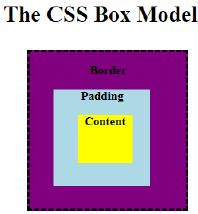
text
The CSS Box Model

Diagram: Nested boxes.
Outermost box (dashed border, dark purple fill): Label "Border" centered at the top.
Second box (light blue fill): Label "Padding" centered at the top.
Innermost box (yellow fill): Label "Content" centered.
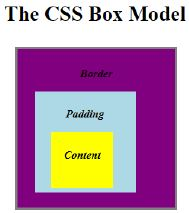
text
The CSS Box Model

Diagram: A series of concentric rectangles.
- Outermost rectangle (grey border, purple fill) is labeled "Border".
- Inside "Border" is a light blue rectangle labeled "Padding".
- Inside "Padding" is a yellow rectangle labeled "Content".
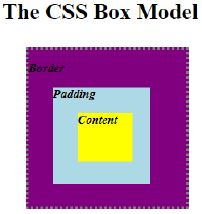
text
The CSS Box Model

Diagram: A series of concentric squares.
The outermost square is purple with a dotted border. It is labeled "Border" in the top-left corner.
Inside the "Border" square is a light blue square. It is labeled "Padding" in the top-left corner.
Inside the "Padding" square is a yellow square. It is labeled "Content" in the center.
Text of the picture (copyable)
Consider the following Python code given below.
(Concept: Flask and concepts of HTTP methods)

```python
from flask import Flask, request, url_for

app = Flask(__name__)

@app.route('/dashboard')
def dashboard():
    return 'This is the dashboard'

@app.route('/user/<username>')
def user(username):
    return f'This is {username} profile'

@app.route('/login', methods=['GET', 'POST'])
def login():
    if request.method == 'POST':
        return (url_for('user', username='student_1'))
    else:
        return (url_for('dashboard'))

if __name__ == '__main__':
    app.run(debug=True)
```

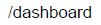
If the above flask application is running on URL “http://127.0.0.1:5000”, which of the following is the correct output if a user visits the URL “http://127.0.0.1:5000/login”, using a browser?
text
This is the dashboard.

text
This is student_1 profile.

text
"404 NOT FOUND" error
text
/dashboard
Text of the picture (copyable)
Consider the following HTML code below.

```html
<!DOCTYPE html>
<html lang="en">
<head>
<meta charset="UTF-8"/>
<style>
body{text-align: center;}
p{font-size: 30px;font-style: italic;color: black;}
.blue{color: red;}
.red{color: green;}
.green{color: blue;}
#myId{color: grey;}
</style>
</head>
<body>
<div>
<h2 class="red">Happy Coding</h2>
<p class="blue">1st class</p>
<p class="red" id="myId">2nd class</p>
<p class="green">3rd class </p>
</div>
</body>
```

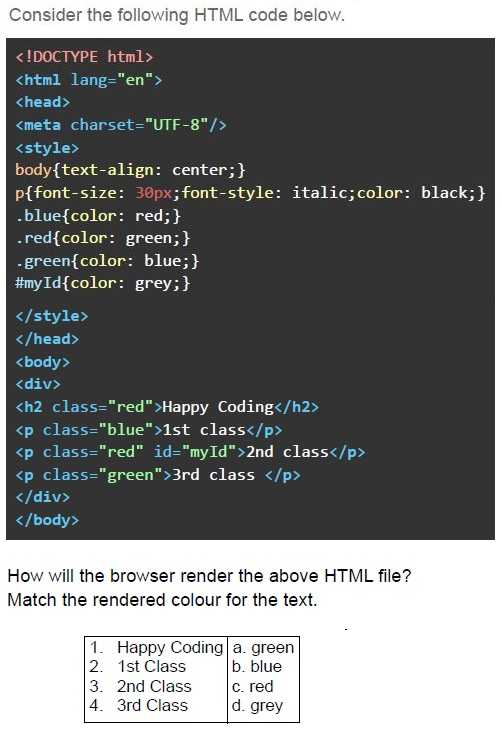
How will the browser render the above HTML file?
Match the rendered colour for the text.

| | | |
|---|---|---|
| 1. | Happy Coding | a. green |
| 2. | 1st Class | b. blue |
| 3. | 2nd Class | c. red |
| 4. | 3rd Class | d. grey |
text
1 - b, 2 - a, 3 - d, 4 - c

text
1 - a, 2 - c, 3 - d, 4 - b

text
1- a, 2 - b, 3-c, 4 - d

text
1- a, 2 - c, 3- b, 4 - d
Text of the picture (copyable)
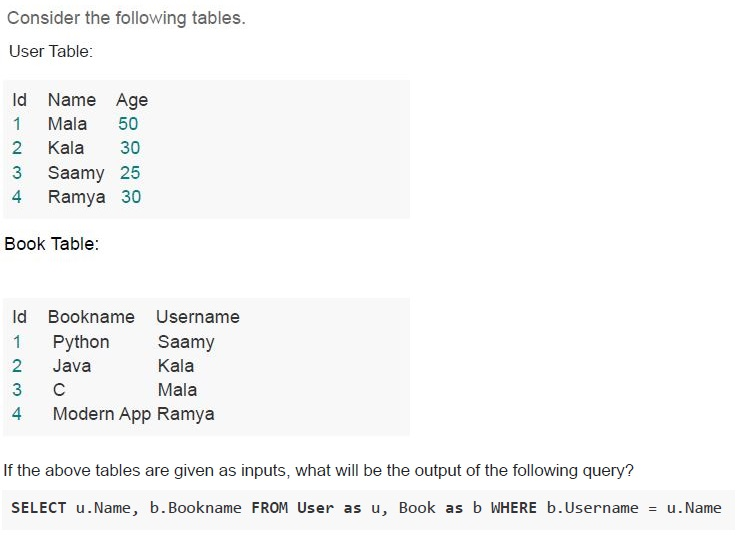
Consider the following tables.

User Table:

| Id | Name  | Age |
|----|-------|-----|
| 1  | Mala  | 50  |
| 2  | Kala  | 30  |
| 3  | Saamy | 25  |
| 4  | Ramya | 30  |

Book Table:

| Id | Bookname      | Username |
|----|---------------|----------|
| 1  | Python        | Saamy    |
| 2  | Java          | Kala     |
| 3  | C             | Mala     |
| 4  | Modern App    | Ramya    |

If the above tables are given as inputs, what will be the output of the following query?

```sql
SELECT u.Name, b.Bookname FROM User as u, Book as b WHERE b.Username = u.Name
```
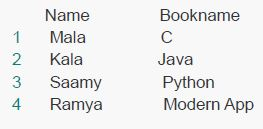
text
| | Name | Bookname |
|---|---|---|
| 1 | Mala | C |
| 2 | Kala | Java |
| 3 | Saamy | Python |
| 4 | Ramya | Modern App |
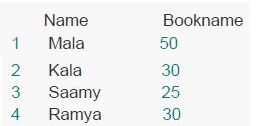
text
| | Name | Bookname |
|---|---|---|
| 1 | Mala | 50 |
| 2 | Kala | 30 |
| 3 | Saamy | 25 |
| 4 | Ramya | 30 |
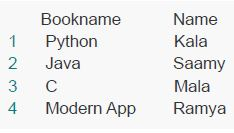
text
| | Bookname | Name |
|---|---|---|
| 1 | Python | Kala |
| 2 | Java | Saamy |
| 3 | C | Mala |
| 4 | Modern App | Ramya |
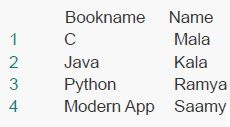
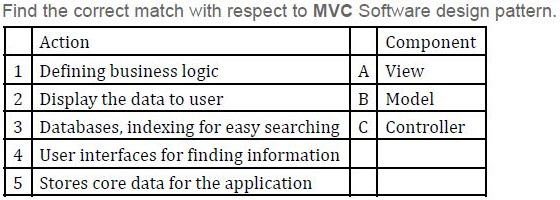
text
| | Bookname | Name |
|---|---|---|
| 1 | C | Mala |
| 2 | Java | Kala |
| 3 | Python | Ramya |
| 4 | Modern App | Saamy |
Text of the picture (copyable)
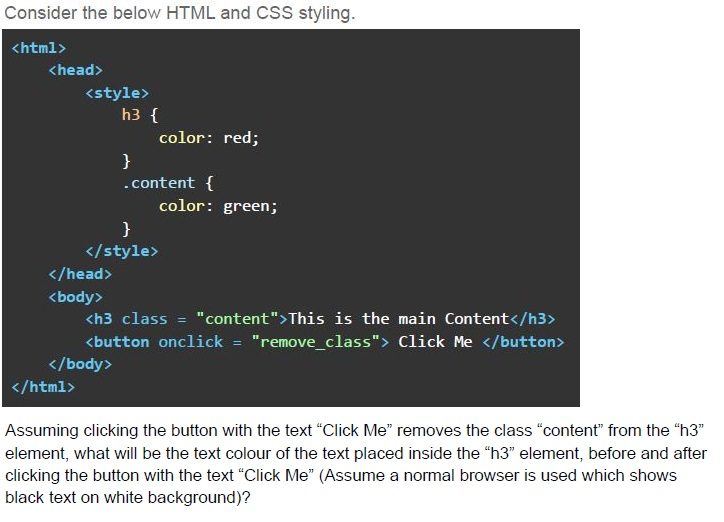
Find the correct match with respect to MVC Software design pattern.

| | Action | | Component |
|---|---|---|---|
| 1 | Defining business logic | A | View |
| 2 | Display the data to user | B | Model |
| 3 | Databases, indexing for easy searching | C | Controller |
| 4 | User interfaces for finding information | | |
| 5 | Stores core data for the application | | |

text
1-A, 2-C, 3-A, 4-B, 5-B

text
1-C, 2-B, 3-A, 4-B, 5-A

text
1-C, 2-A, 3-B, 4-A, 5-B

text
1-A, 2-B, 3-C, 4-B, 5-A
Text of the picture (copyable)
Consider the below HTML and CSS styling.

```html
<html>
  <head>
    <style>
      h3 {
        color: red;
      }
      .content {
        color: green;
      }
    </style>
  </head>
  <body>
    <h3 class = "content">This is the main Content</h3>
    <button onclick = "remove_class"> Click Me </button>
  </body>
</html>
```

Assuming clicking the button with the text "Click Me" removes the class "content" from the "h3" element, what will be the text colour of the text placed inside the "h3" element, before and after clicking the button with the text "Click Me" (Assume a normal browser is used which shows black text on white background)?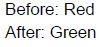
text
Before: Red
After: Green

text
Before: Red
After: Black
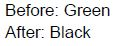
text
Before: Green
After: Black
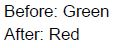
text
Before: Green
After: Red
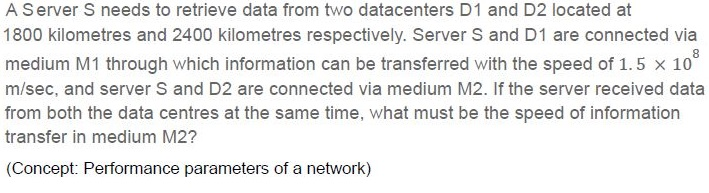
Text of the picture (copyable)
A Server S needs to retrieve data from two datacenters D1 and D2 located at 1800 kilometres and 2400 kilometres respectively. Server S and D1 are connected via medium M1 through which information can be transferred with the speed of 1.5 × 10⁸ m/sec, and server S and D2 are connected via medium M2. If the server received data from both the data centres at the same time, what must be the speed of information transfer in medium M2?

(Concept: Performance parameters of a network)
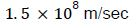
text
1.5 × 10⁸ m/sec
text
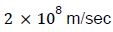
2 x 10⁸ m/sec

text
2.7 × 10⁸ m/sec
text
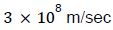
3 × 10⁸ m/sec
Text of the picture (copyable)
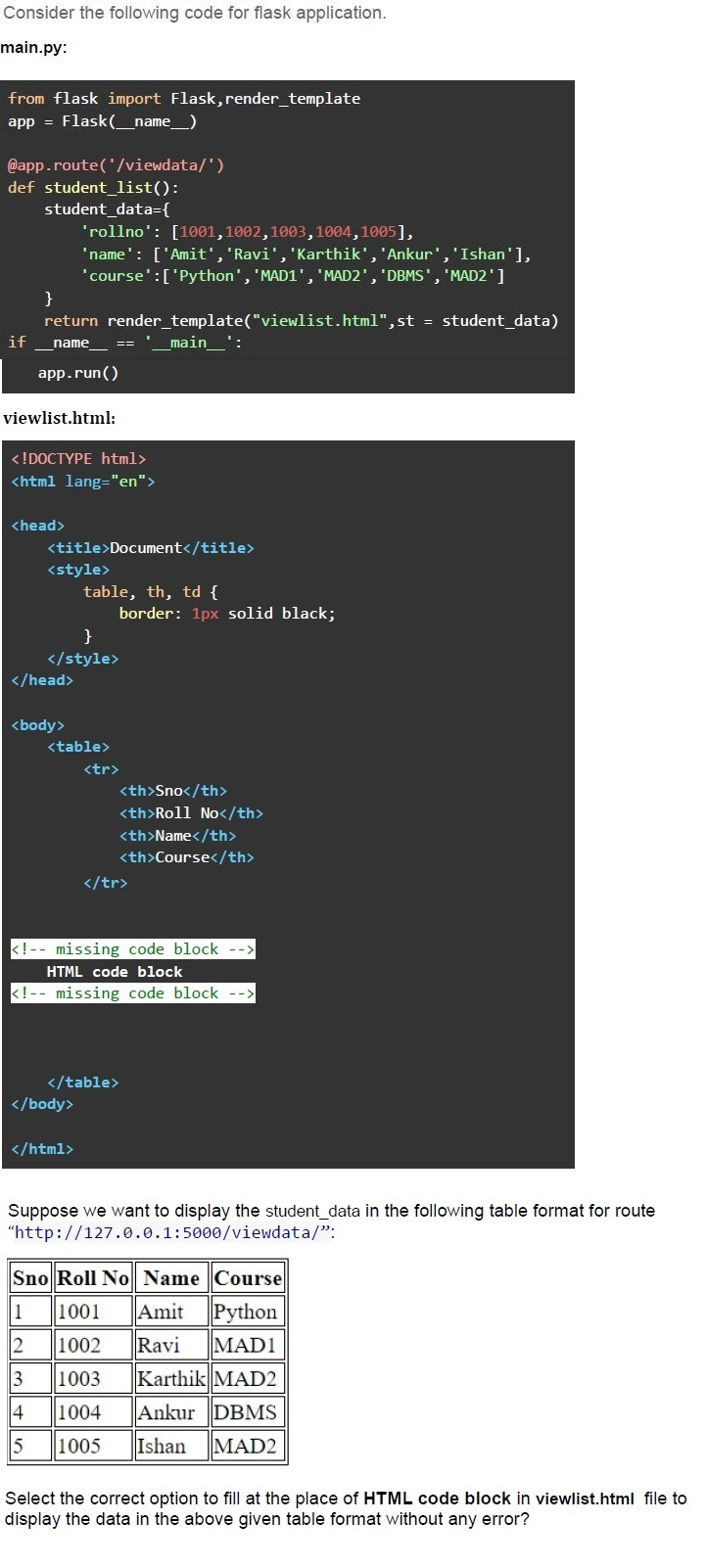
Consider the following code for flask application.

**main.py:**

```python
from flask import Flask,render_template
app = Flask(__name__)

@app.route('/viewdata/')
def student_list():
    student_data={
        'rollno': [1001,1002,1003,1004,1005],
        'name': ['Amit','Ravi','Karthik','Ankur','Ishan'],
        'course':['Python','MAD1','MAD2','DBMS','MAD2']
    }
    return render_template("viewlist.html",st = student_data)

if __name__ == '__main__':
    app.run()
```

**viewlist.html:**

```html
<!DOCTYPE html>
<html lang="en">

<head>
    <title>Document</title>
    <style>
        table,
        th,
        td {
            border: 1px solid black;
        }
    </style>
</head>

<body>
    <table>
        <tr>
            <th>Sno</th>
            <th>Roll No</th>
            <th>Name</th>
            <th>Course</th>
        </tr>
        <!-- missing code block -->
        HTML code block
        <!-- missing code block -->
    </table>
</body>

</html>
```

Suppose we want to display the student_data in the following table format for route "http://127.0.0.1:5000/viewdata/":

| Sno | Roll No | Name    | Course |
| --- | ------- | ------- | -------- |
| 1   | 1001    | Amit    | Python   |
| 2   | 1002    | Ravi    | MAD1     |
| 3   | 1003    | Karthik | MAD2     |
| 4   | 1004    | Ankur   | DBMS     |
| 5   | 1005    | Ishan   | MAD2     |

Select the correct option to fill at the place of **HTML code block** in viewlist.html file to display the data in the above given table format without any error?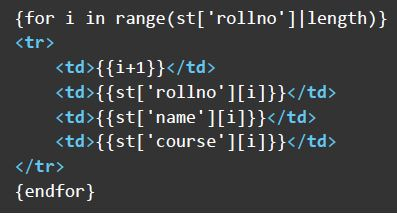
text
```html
{for i in range(st['rollno']|length)}
<tr>
    <td>{{i+1}}</td>
    <td>{{st['rollno'][i]}}</td>
    <td>{{st['name'][i]}}</td>
    <td>{{st['course'][i]}}</td>
</tr>
{endfor}
```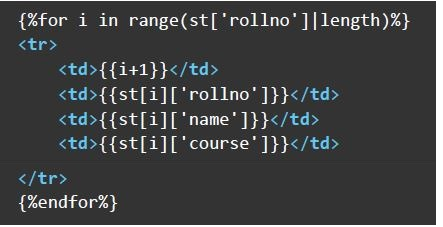
text
```html
{%for i in range(st['rollno']|length)%}
<tr>
    <td>{{i+1}}</td>
    <td>{{st[i]['rollno']}}</td>
    <td>{{st[i]['name']}}</td>
    <td>{{st[i]['course']}}</td>
</tr>
{%endfor%}
```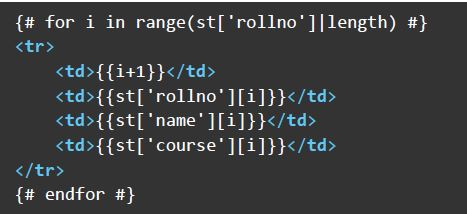
text
```html
{# for i in range(st['rollno']|length) #}
<tr>
    <td>{{i+1}}</td>
    <td>{{st['rollno'][i]}}</td>
    <td>{{st['name'][i]}}</td>
    <td>{{st['course'][i]}}</td>
</tr>
{# endfor #}
```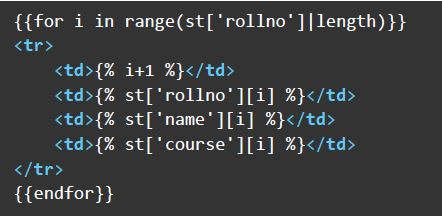
text
```html
{{for i in range(st['rollno']|length)}}
<tr>
    <td>{% i+1 %}</td>
    <td>{% st['rollno'][i] %}</td>
    <td>{% st['name'][i] %}</td>
    <td>{% st['course'][i] %}</td>
</tr>
{{endfor}}
```

Text of the picture (copyable)
Which of the following statement(s) is/are true regarding HTML and encodings?
Concepts Covered: Encoding Standards, HTML & CSS

text
The HTML tags are case-insensitive.

text
Both UTF-8 and UTF-32 are variable length encodings.

text
The UTF-8 can only be used for encoding (2^16 + 1) characters.

text
The External CSS is preferred over internal and inline CSS for developing large websites.
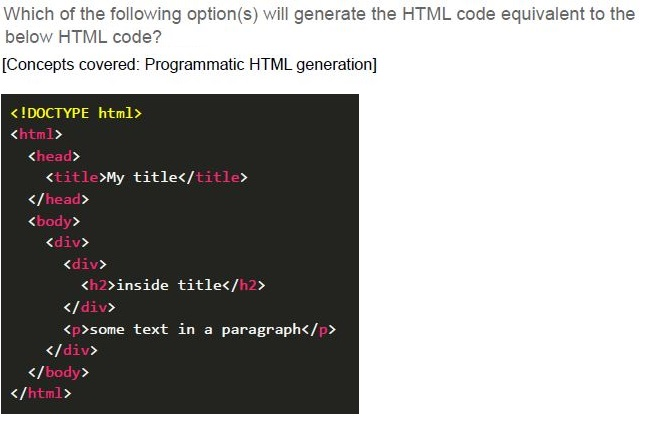
Text of the picture (copyable)
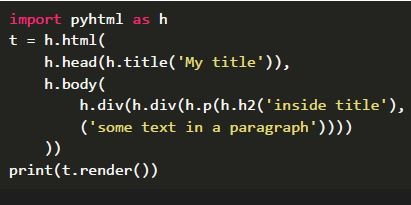
Which of the following option(s) will generate the HTML code equivalent to the below HTML code?
[Concepts covered: Programmatic HTML generation]

```html
<!DOCTYPE html>
<html>
<head>
    <title>My title</title>
</head>
<body>
    <div>
        <div>
            <h2>inside title</h2>
        </div>
        <p>some text in a paragraph</p>
    </div>
</body>
</html>
```
text
```python
import pyhtml as h
t = h.html(
    h.head(h.title('My title')),
    h.body(
        h.div(h.div(h.p(h.h2('inside title'),
                        'some text in a paragraph')))
    )
)
print(t.render())
```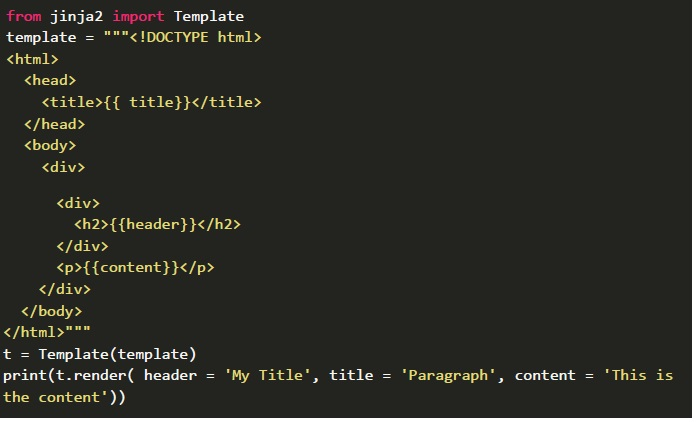
text
```python
from jinja2 import Template
template = """<!DOCTYPE html>
<html>
<head>
    <title>{{ title }}</title>
</head>
<body>
    <div>
        <div>
            <h2>{{ header }}</h2>
        </div>
        <p>{{ content }}</p>
    </div>
</body>
</html>"""
t = Template(template)
print(t.render( header = 'My Title', title = 'Paragraph', content = 'This is
the content'))
```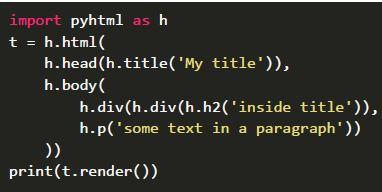
text
```python
import pyhtml as h

t = h.html(
    h.head(h.title('My title')),
    h.body(
        h.div(h.div(h.h2('inside title'))),
        h.p('some text in a paragraph')
    )
)
print(t.render())
```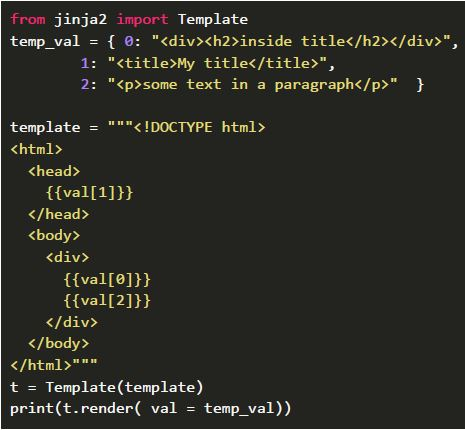
text
```python
from jinja2 import Template

temp_val = {
    0: "<div><h2>inside title</h2></div>",
    1: "<title>My title</title>",
    2: "<p>some text in a paragraph</p>"
}

template = """<!DOCTYPE html>
<html>
<head>
    {{val[1]}}
</head>
<body>
    <div>
        {{val[0]}}
        {{val[2]}}
    </div>
</body>
</html>"""

t = Template(template)
print(t.render(val=temp_val))
```
Text of the picture (copyable)
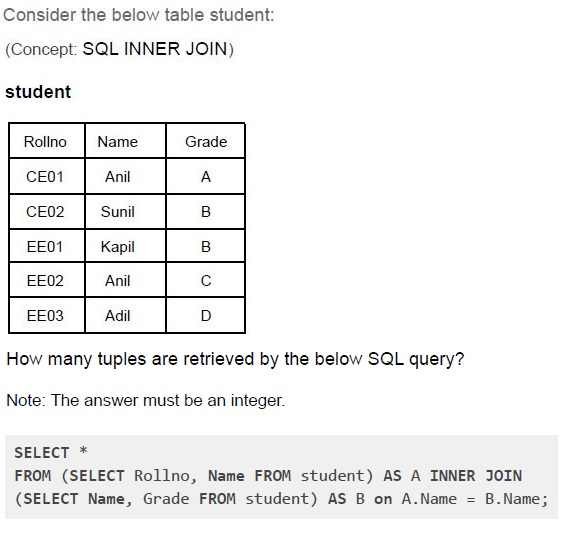
Consider the below table student:
(Concept: SQL INNER JOIN)

student

| Rollno | Name  | Grade |
| :----- | :---- | :---- |
| CE01   | Anil  | A     |
| CE02   | Sunil | B     |
| EE01   | Kapil | B     |
| EE02   | Anil  | C     |
| EE03   | Adil  | D     |

How many tuples are retrieved by the below SQL query?

Note: The answer must be an integer.

```sql
SELECT *
FROM (SELECT Rollno, Name FROM student) AS A INNER JOIN
(SELECT Name, Grade FROM student) AS B on A.Name = B.Name;
```
Comprehension passage - the questions below it refer to this
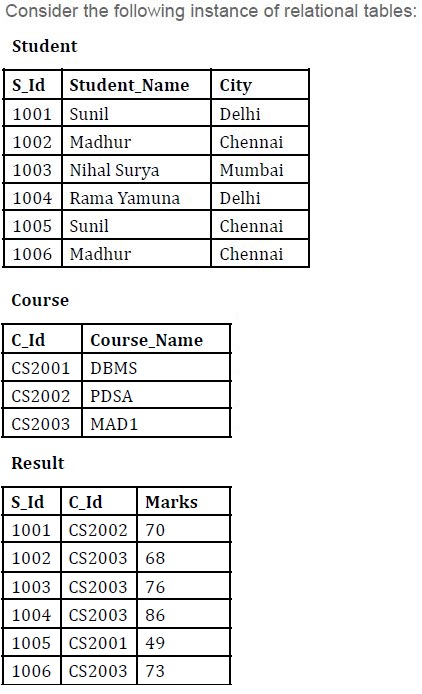
Based on the above data, answer the given subquestions.
Text of the picture (copyable)
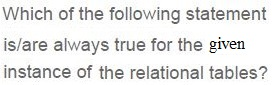
Which of the following statement
is/are always true for the given
instance of the relational tables?

text
The average of Marks for any particular course can be retrieved if the value of the column "Course_Name" is known.

text
The Marks of students in each course can be uniquely identified if the value of the column "Student_Name" is known.

text
All Course_Name in which at least one student is enrolled can be identified if all the values of column "S_Id" are known.

text
The City of the student can be uniquely identified if the value of the column "Student_Name" is known.

text
The number of enrolled students in any particular course can be retrieved if the value of the column "Course_Name" is known.
Text of the picture (copyable)
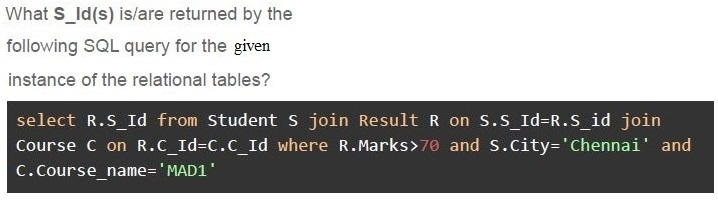
What **S_Id**(s) is/are returned by the
following SQL query for the **given**
instance of the relational tables?

```sql
select R.S_Id from Student S join Result R on S.S_Id=R.S_id join
Course C on R.C_Id=C.C_Id where R.Marks>70 and S.City='Chennai' and
C.Course_name='MAD1'
```

text
1005

text
1006

text
1006,1002

text
1002, 1005
Answer key
- Q1 (MCQ, 0 marks): A
- Q2 (MCQ, 2 marks): B
- Q3 (MCQ, 2 marks): C
- Q4 (MCQ, 2 marks): A
- Q5 (MCQ, 3 marks): C
- Q6 (MCQ, 3 marks): D
- Q7 (MCQ, 3 marks): D
- Q8 (MCQ, 3 marks): B
- Q9 (MCQ, 3 marks): A
- Q10 (MCQ, 3 marks): C
- Q11 (MCQ, 3 marks): C
- Q12 (MCQ, 4.5 marks): B
- Q13 (MCQ, 4.5 marks): B
- Q14 (MSQ, 2 marks): A, D
- Q15 (MSQ, 4.5 marks): C, D
- Q16 (SA, 3 marks): 7
- Q17 (MSQ, 2.5 marks): A, C, E
- Q18 (MCQ, 2 marks): B
Concepts this paper tests
Auto-generated summary from the source site. Handy as a checklist; the lessons above explain each idea from scratch.
Summary of Core Topics, Concepts, Principles, and Equations
1. Encoding Efficiency
- Concepts: Understanding different encoding schemes like UCS-4 and ASCII.
Equations:
- Number of characters = Total bits / Bits per character
- Total bits with new encoding = Number of characters * New bits per character
2. SQL Queries
- Concepts: Basic SQL queries, aliases, and joins.
Principles:
SELECT column_name AS alias_name FROM table_name;INNER JOINto combine rows from two or more tables based on a related column.
3. Jinja2 Templating
- Concepts: Template rendering, filters, and loops.
Principles:
{% for num in seq|reject("odd") %}to filter and loop through sequences.Template(temp).render(seq=seq)to render templates with given data.
4. HTML and CSS
- Concepts: CSS Box Model, styling, and rendering.
Principles:
- Understanding margins, borders, padding, and content.
- CSS specificity and inheritance.
5. Flask Application
- Concepts: Flask routes, methods, and URL generation.
Principles:
@app.route('/path', methods=['GET', 'POST'])to define routes.url_for('endpoint', param=value)to generate URLs.
6. Network Performance
- Concepts: Data transfer speed, distance, and time.
Equations:
- Speed = Distance / Time
7. Relational Databases
- Concepts: SQL queries, joins, and relational algebra.
Principles:
INNER JOINto combine data from multiple tables.SELECT * FROM table1 INNER JOIN table2 ON table1.column = table2.column;
8. MVC Software Design Pattern
- Concepts: Model-View-Controller pattern.
Principles:
- Model: Defines business logic and data.
- View: Displays data to the user.
- Controller: Handles user input and updates the model.