Home / Past papers / MAD1 Quiz 1 / this paper
IIT M DIPLOMA AN2 EXAM QDD2 25 Feb 2024 - 25 Feb 2024
Elapsed 00:00
Text of the picture (copyable)
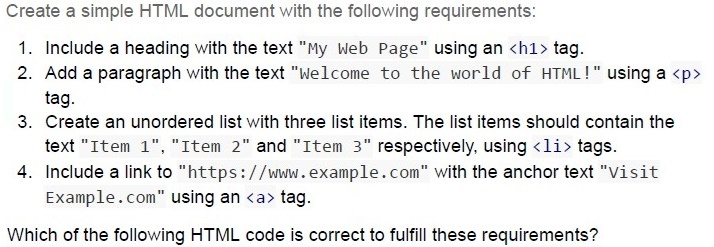
Create a simple HTML document with the following requirements:

1. Include a heading with the text "My Web Page" using an `<h1>` tag.
2. Add a paragraph with the text "Welcome to the world of HTML!" using a `<p>` tag.
3. Create an unordered list with three list items. The list items should contain the text "Item 1", "Item 2" and "Item 3" respectively, using `<li>` tags.
4. Include a link to "https://www.example.com" with the anchor text "Visit Example.com" using an `<a>` tag.

Which of the following HTML code is correct to fulfill these requirements?
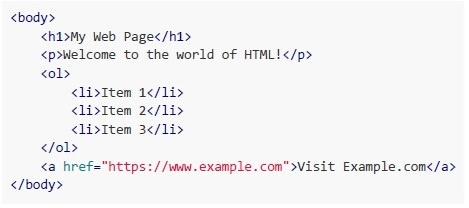
text
```html
<body>
    <h1>My Web Page</h1>
    <p>Welcome to the world of HTML!</p>
    <ol>
        <li>Item 1</li>
        <li>Item 2</li>
        <li>Item 3</li>
    </ol>
    <a href="https://www.example.com">Visit Example.com</a>
</body>
```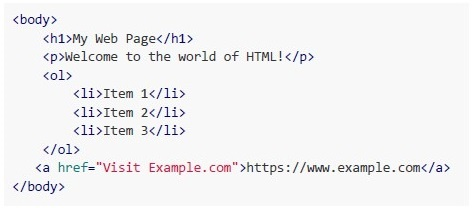
text
```html
<body>
    <h1>My Web Page</h1>
    <p>Welcome to the world of HTML!</p>
    <ol>
        <li>Item 1</li>
        <li>Item 2</li>
        <li>Item 3</li>
    </ol>
    <a href="Visit Example.com">https://www.example.com</a>
</body>
```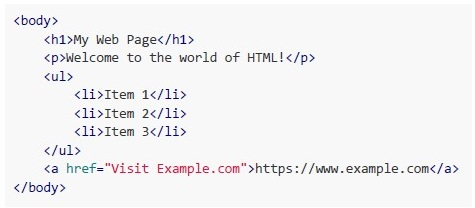
text
```html
<body>
    <h1>My Web Page</h1>
    <p>Welcome to the world of HTML!</p>
    <ul>
        <li>Item 1</li>
        <li>Item 2</li>
        <li>Item 3</li>
    </ul>
    <a href="Visit Example.com">https://www.example.com</a>
</body>
```
text
```html
<body>
    <h1>My Web Page</h1>
    <p>Welcome to the world of HTML!</p>
    <ul>
        <li>Item 1</li>
        <li>Item 2</li>
        <li>Item 3</li>
    </ul>
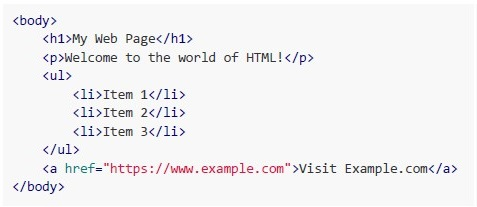
    <a href="https://www.example.com">Visit Example.com</a>
</body>
```

Text of the picture (copyable)
Consider the following example.
```html
<img src="example.jpg" alt="Gajendra Circle, IITM Campus">
```
Which of the following accessibility principle is followed in this example?
- Perceivable
- Operable
- Understandable
- Robust
Text of the picture (copyable)
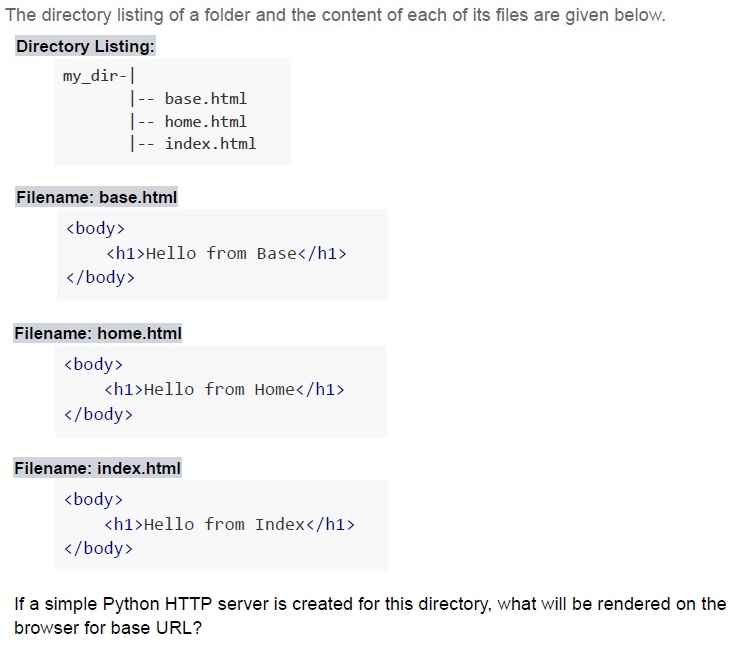
The directory listing of a folder and the content of each of its files are given below.

**Directory Listing:**
```
my_dir-|
       |-- base.html
       |-- home.html
       |-- index.html
```

**Filename: base.html**
```html
<body>
    <h1>Hello from Base</h1>
</body>
```

**Filename: home.html**
```html
<body>
    <h1>Hello from Home</h1>
</body>
```

**Filename: index.html**
```html
<body>
    <h1>Hello from Index</h1>
</body>
```

If a simple Python HTTP server is created for this directory, what will be rendered on the browser for base URL?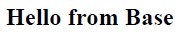
text
Hello from Base

text
Hello from Home

text
Hello from Index

text
Directory listing for /
Text of the picture (copyable)
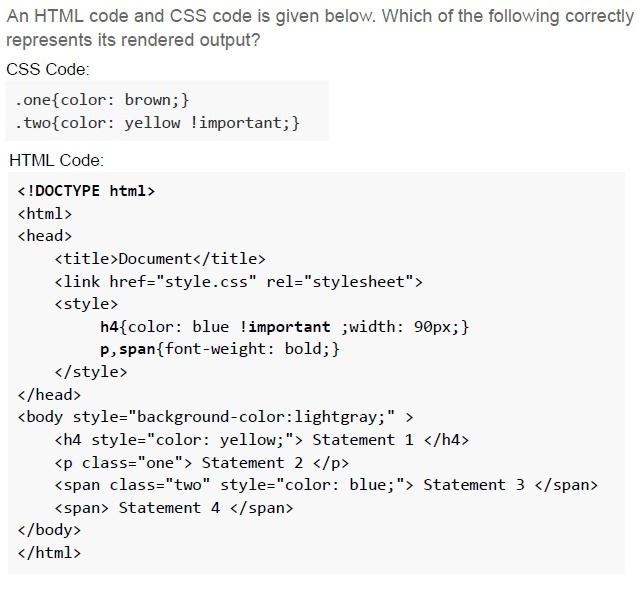
An HTML code and CSS code is given below. Which of the following correctly represents its rendered output?

CSS Code:

```css
.one{color: brown;}
.two{color: yellow !important;}
```

HTML Code:

```html
<!DOCTYPE html>
<html>
<head>
    <title>Document</title>
    <link href="style.css" rel="stylesheet">
    <style>
        h4{color: blue !important ;width: 90px;}
        p,span{font-weight: bold;}
    </style>
</head>
<body style="background-color:lightgray;">
    <h4 style="color: yellow;"> Statement 1 </h4>
    <p class="one"> Statement 2 </p>
    <span class="two" style="color: blue;"> Statement 3 </span>
    <span> Statement 4 </span>
</body>
</html>
```
text
Statement 1
Statement 2
Statement 3
Statement 4
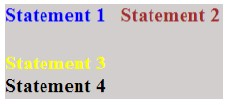
text
Statement 1
Statement 2
Statement 3
Statement 4
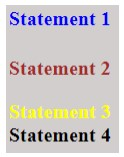
text
Statement 1
Statement 2
Statement 3 Statement 4
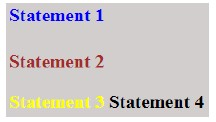
text
Statement 1 Statement 2 Statement 3 Statement 4
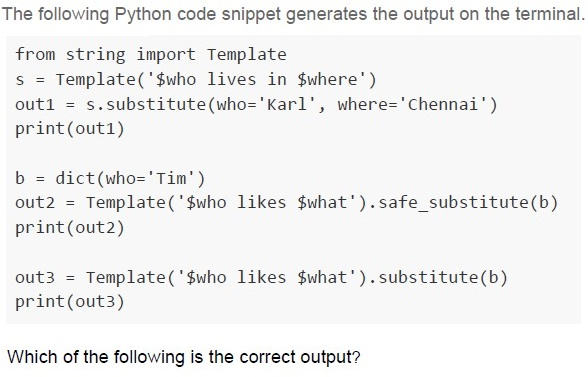
Text of the picture (copyable)
The following Python code snippet generates the output on the terminal.

```python
from string import Template
s = Template('$who lives in $where')
out1 = s.substitute(who='Karl', where='Chennai')
print(out1)

b = dict(who='Tim')
out2 = Template('$who likes $what').safe_substitute(b)
print(out2)

out3 = Template('$who likes $what').substitute(b)
print(out3)
```

Which of the following is the correct output?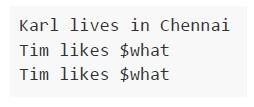
text
```
Karl lives in Chennai
Tim likes $what
Tim likes $what
```
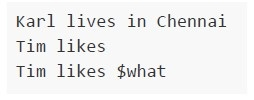
text
```
Karl lives in Chennai
Tim likes
Tim likes $what
```
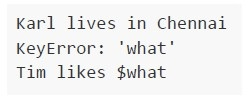
text
```text
Karl lives in Chennai
KeyError: 'what'
Tim likes $what
```
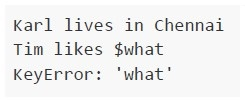
text
```
Karl lives in Chennai
Tim likes $what
KeyError: 'what'
```
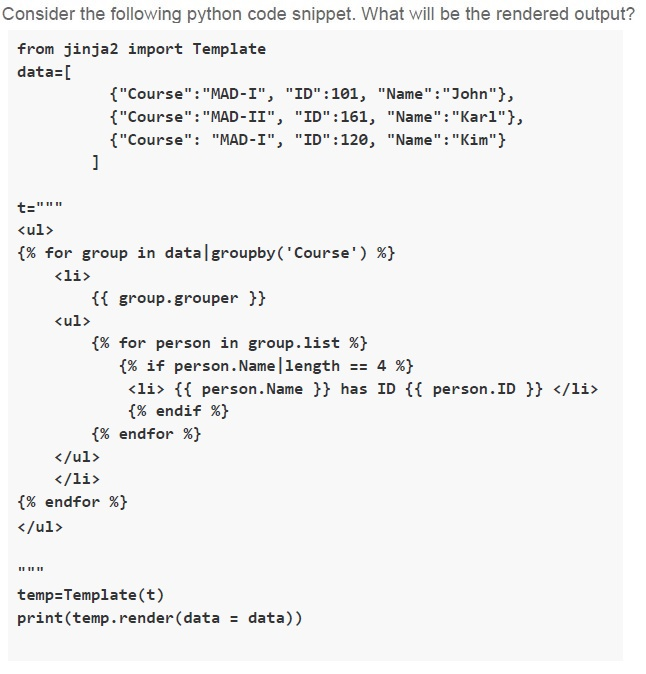
Text of the picture (copyable)
Consider the following python code snippet. What will be the rendered output?

```python
from jinja2 import Template

data=[
    {"Course":"MAD-I", "ID":101, "Name":"John"},
    {"Course":"MAD-II", "ID":161, "Name":"Karl"},
    {"Course":"MAD-I", "ID":120, "Name":"Kim"}
]

t="""
<ul>
{% for group in data|groupby('Course') %}
    <li>
        {{ group.grouper }}
        <ul>
        {% for person in group.list %}
            {% if person.Name|length == 4 %}
            <li> {{ person.Name }} has ID {{ person.ID }} </li>
            {% endif %}
        {% endfor %}
        </ul>
    </li>
{% endfor %}
</ul>
"""

temp=Template(t)
print(temp.render(data = data))
```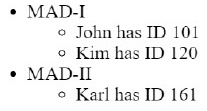
text
- MAD-I
  - John has ID 101
  - Kim has ID 120
- MAD-II
  - Karl has ID 161
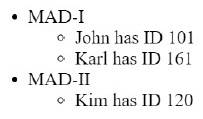
text
- MAD-I
  - John has ID 101
  - Karl has ID 161
- MAD-II
  - Kim has ID 120
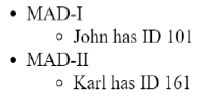
text
* MAD-I
    * John has ID 101
* MAD-II
    * Karl has ID 161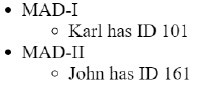
text
- MAD-I
  - Karl has ID 101
- MAD-II
  - John has ID 161
A certain network connection with a bandwidth of 12 Mbps allows making 4000 requests to a server per second. If each request is modified to have an additional data of 6 Kb, what should be the additional bandwidth required to maintain the rate of 4000 requests per second?
- 12 Mbps
- 24 Mbps
- 36 Mbps
- 48 Mbps
A client sitting in a train is connected to a server through a network tower that has a range of 4.5 kilometers and a constant bandwidth of 5 Mbps. The train is at a negligible distance from the tower and is moving away from it at a speed of 180 kmph. How much data (in Megabytes) will be used by the client before the train completely moves out of the coverage area, assuming that the client is consuming the entire bandwidth?
- 45 MB
- 450 MB
- 5.6 MB
- 56.25 MB
Text of the picture (copyable)
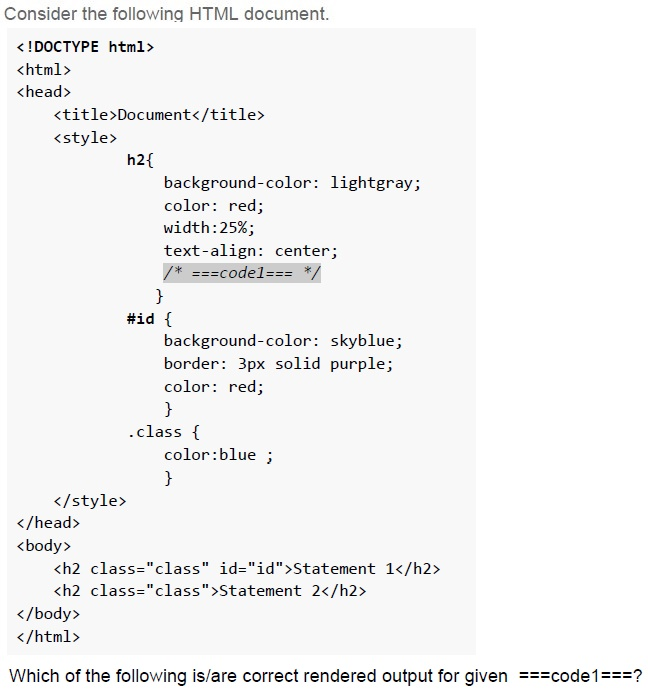
Consider the following HTML document.

```html
<!DOCTYPE html>
<html>
<head>
    <title>Document</title>
    <style>
        h2{
            background-color: lightgray;
            color: red;
            width:25%;
            text-align: center;
            /* ===code1=== */
        }
        #id {
            background-color: skyblue;
            border: 3px solid purple;
            color: red;
        }
        .class {
            color:blue ;
        }
    </style>
</head>
<body>
    <h2 class="class" id="id">Statement 1</h2>
    <h2 class="class">Statement 2</h2>
</body>
</html>
```

Which of the following is/are correct rendered output for given ===code1===?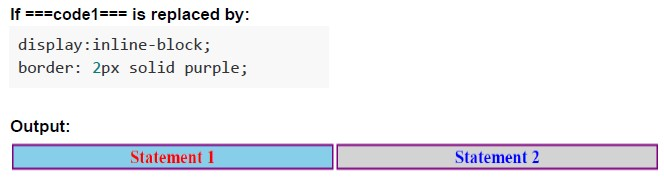
text
If ===code1=== is replaced by:

```css
display:inline-block;
border: 2px solid purple;
```

Output:

A diagram showing two rectangular boxes side-by-side.
The first box is light blue with a purple border and contains the text "Statement 1" in red.
The second box is light gray with a purple border and contains the text "Statement 2" in blue.
text
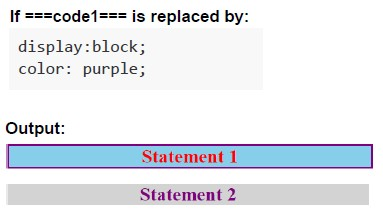
If ===code1=== is replaced by:

```
display:block;
color: purple;
```

Output:

A light blue rectangle with a purple border contains the text "Statement 1" in red.
Below it, a light gray rectangle contains the text "Statement 2" in purple.
text
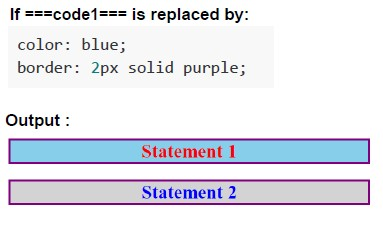
If ===code1=== is replaced by:

```
color: blue;
border: 2px solid purple;
```

Output:

Statement 1
Statement 2
text
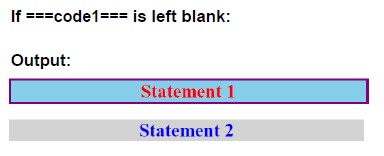
If ===code1=== is left blank:

Output:
Statement 1
Statement 2
Text of the picture (copyable)
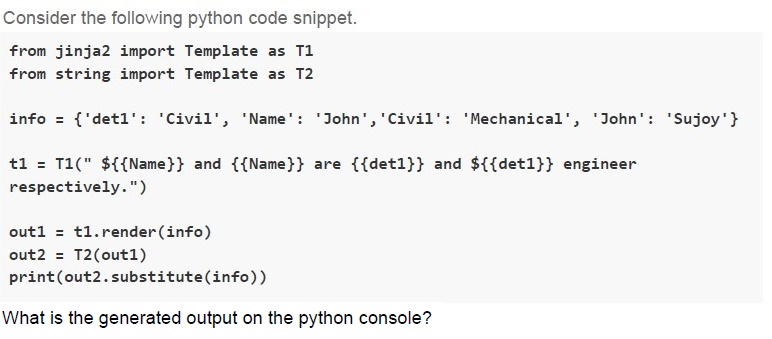
Consider the following python code snippet.
```python
from jinja2 import Template as T1
from string import Template as T2

info = {'det1': 'Civil', 'Name': 'John', 'Civil': 'Mechanical', 'John': 'Sujoy'}

t1 = T1(" ${{Name}} and {{Name}} are {{det1}} and ${{det1}} engineer respectively.")

out1 = t1.render(info)
out2 = T2(out1)
print(out2.substitute(info))
```
What is the generated output on the python console?
text
$John and John are Civil and $Civil engineer respectively.

text
John and Sujoy are Civil and Mechanical engineer respectively.

text
John and `{{John}}` are Civil and `{{Civil}}` engineer respectively.
text
Sujoy and John are Civil and Mechanical engineer respectively.

Text of the picture (copyable)
Consider the following equation;

$1xy25_8 = 1ED5_{16} = x89y_{10}.$

Where x and y are unknowns. For what values of x and y does the above equation hold true?- x = 3 and y = 8
- x = 6 and y = 4
- x = 7 and y = 3
- x = 1 and y = 2
Text of the picture (copyable)
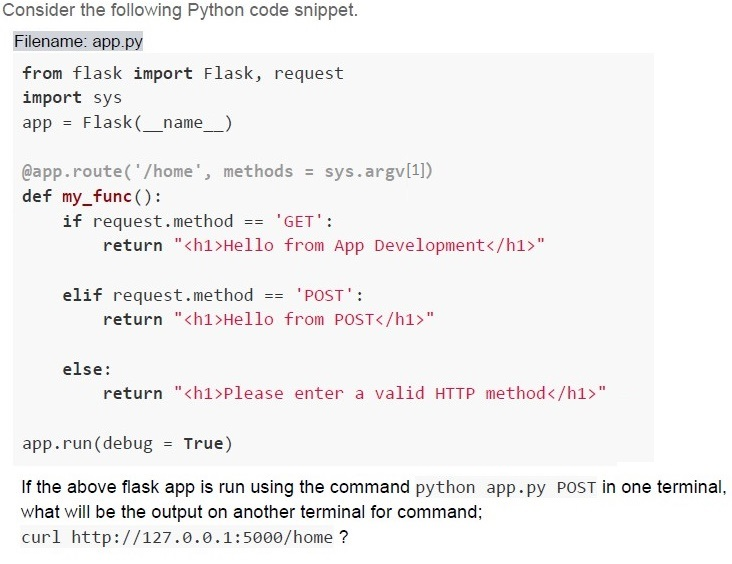
Consider the following Python code snippet.
Filename: app.py

```python
from flask import Flask, request
import sys
app = Flask(__name__)

@app.route('/home', methods = sys.argv[1])
def my_func():
    if request.method == 'GET':
        return "<h1>Hello from App Development</h1>"

    elif request.method == 'POST':
        return "<h1>Hello from POST</h1>"

    else:
        return "<h1>Please enter a valid HTTP method</h1>"

app.run(debug = True)
```

If the above flask app is run using the command `python app.py POST` in one terminal,
what will be the output on another terminal for command;
`curl http://127.0.0.1:5000/home ?`
text
```html
<h1>Hello from App Development</h1>
```

text
```html
<h1>Hello from App POST</h1>
```

text
```html
<h1>Please enter a valid HTTP method</h1>
```

text
```html
<h1>Method not Allowed</h1>
```
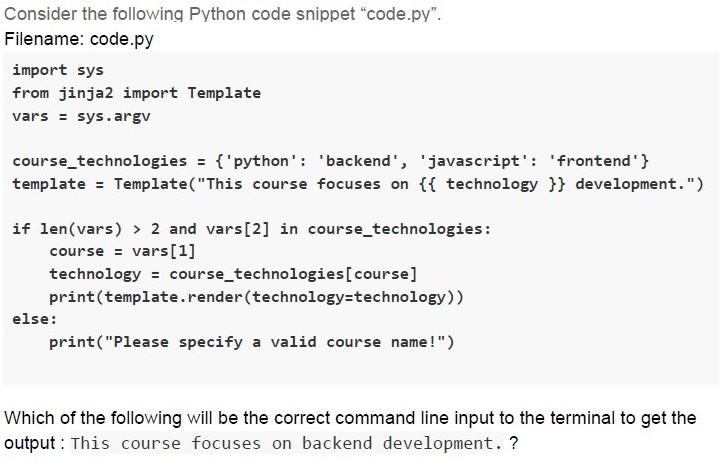
Text of the picture (copyable)
Consider the following Python code snippet "code.py".
Filename: code.py
```python
import sys
from jinja2 import Template

vars = sys.argv

course_technologies = {'python': 'backend', 'javascript': 'frontend'}
template = Template("This course focuses on {{ technology }} development.")

if len(vars) > 2 and vars[2] in course_technologies:
    course = vars[1]
    technology = course_technologies[course]
    print(template.render(technology=technology))
else:
    print("Please specify a valid course name!")
```

Which of the following will be the correct command line input to the terminal to get the output: This course focuses on backend development. ?
text
```
python code.py course python
```

text
```
python code.py python javascript
```

text
```
python code.py python python
```

text
```
python code.py python backend
```
Consider the following statements and choose the correct options. Statement I: An author can write multiple books, but each book is written by only one author. Statement II: A publisher can publish multiple books, but each book is published by only one publisher. Statement III: A book belongs to one genre, but a genre can have multiple books.
- Statement I represents a many-to-many relationship between Author andBook.
- Statement I represents a one-to-many relationship between Author and Book.
- Statement II represents a one-to-many relationship between Publisher andBook.
- Statement III represents a many-to-one relationship between Book and Genre.
Comprehension passage - the questions below it refer to this
Answer the given subquestion.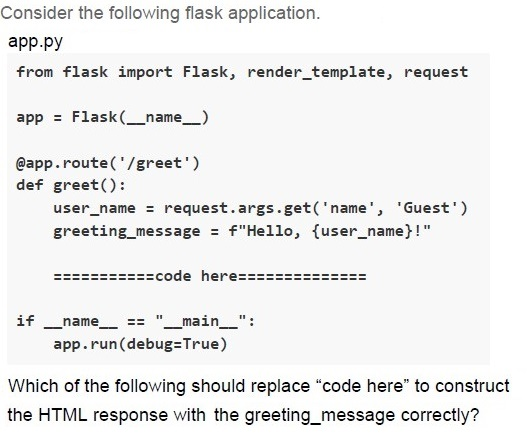
Text of the picture (copyable)
Consider the following flask application.
app.py

```python
from flask import Flask, render_template, request

app = Flask(__name__)

@app.route('/greet')
def greet():
    user_name = request.args.get('name', 'Guest')
    greeting_message = f"Hello, {user_name}!"

    ============code here============

if __name__ == "__main__":
    app.run(debug=True)
```

Which of the following should replace "code here" to construct the HTML response with the greeting_message correctly?
text
```
return "<h1>{{ greeting_message }}</h1>"
```
text
```
return f"<h1>{greeting_message}</h1>"
```
text
```
return "<h1>{greeting_message}</h1>"
```
text
```
return "Hello, {user_name}!"
```
Match the URLs in column A with their correct rendered output in Column B with the correct app.py code for the flask application given in the previous question.
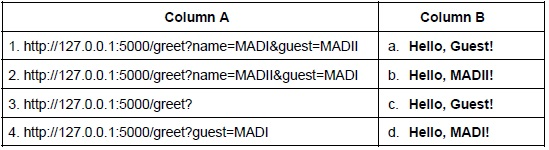 Match the URLs in column A with their correct rendered output in Column B with the correct app.py code for the flask application given in the previous question.
Match the URLs in column A with their correct rendered output in Column B with the correct app.py code for the flask application given in the previous question. Text of the picture (copyable)
| Column A | Column B |
| :------- | :------- |
| 1. http://127.0.0.1:5000/greet?name=MADI&guest=MADII | a. Hello, Guest! |
| 2. http://127.0.0.1:5000/greet?name=MADII&guest=MADI | b. Hello, MADII! |
| 3. http://127.0.0.1:5000/greet? | c. Hello, Guest! |
| 4. http://127.0.0.1:5000/greet?guest=MADI | d. Hello, MADI! |
- 1-b, 2-d, 3-a, 4-c
- 1-b, 2-a, 3-c, 4-d
- 1-d, 2-b, 3-a, 4- c
- 1-d, 2-a, 3-c, 4-b
Answer key
- Q1 (MCQ, 2 marks): D
- Q2 (MCQ, 2 marks): A
- Q3 (MCQ, 2 marks): C
- Q4 (MCQ, 3 marks): D
- Q5 (MCQ, 3 marks): D
- Q6 (MCQ, 3 marks): C
- Q7 (MCQ, 3 marks): B
- Q8 (MCQ, 3 marks): D
- Q9 (MSQ, 4.5 marks): A, C, D
- Q10 (MCQ, 4.5 marks): D
- Q11 (MCQ, 4.5 marks): C
- Q12 (MCQ, 4.5 marks): D
- Q13 (MSQ, 3 marks): B, C
- Q14 (MSQ, 3 marks): B, C, D
- Q15 (MCQ, 2 marks): B
- Q16 (MCQ, 3 marks): C
Concepts this paper tests
Auto-generated summary from the source site. Handy as a checklist; the lessons above explain each idea from scratch.
Summary of Core Topics, Concepts, Principles, and Equations
HTML and CSS
HTML Structure and Tags:
- Basic structure of an HTML document.
- Common HTML tags:
<h1>,<p>,<ul>,<li>,<a>,<img>. - Attributes:
src,alt,href,style,class,id.
CSS Styling:
- Inline styles vs. external stylesheets.
- CSS selectors: class (
.class), ID (#id), element (h2). - CSS properties:
color,background-color,width,text-align,display,border. - Specificity and inheritance in CSS.
!importantrule in CSS.
Accessibility Principles:
- WCAG (Web Content Accessibility Guidelines).
- Perceivable, Operable, Understandable, Robust principles.
- Use of
altattributes for images.
Python and Flask
Python Basics:
- String manipulation and templates.
- Using
string.Templateandjinja2.Template. - Command-line arguments with
sys.argv.
Flask Framework:
- Basic Flask application structure.
- Routing and handling HTTP methods (GET, POST).
- Using
requestobject to access query parameters. - Rendering templates and returning HTML responses.
HTTP and Web Servers:
- Basic understanding of HTTP methods and status codes.
- Running a simple Python HTTP server.
- Using
curlto make HTTP requests.
Data Structures and Algorithms
Data Structures:
- Dictionaries and lists in Python.
- Grouping data and iterating through structures.
Algorithms:
- Basic algorithms for data manipulation and rendering.
Networking and Bandwidth
Bandwidth Calculations:
- Understanding bandwidth requirements.
- Calculating data usage based on speed and time.
Network Coverage:
- Calculating data usage within a network coverage area.
- Understanding the relationship between speed, distance, and data usage.
Database Relationships
Relationship Types:
- One-to-many relationships.
- Many-to-one relationships.
- Many-to-many relationships.
Number Systems and Conversions
Number Bases:
- Understanding octal, hexadecimal, and decimal number systems.
- Converting between different number bases.
Equations
Networking and Bandwidth
- Bandwidth Calculation: \[ \text{Additional Bandwidth} = \text{Number of Requests per Second} \times \text{Additional Data per Request} \] \[ \text{Additional Bandwidth} = 4000 \, \text{requests/sec} \times 6 \, \text{Kb/request} \] \[ \text{Additional Bandwidth} = 24000 \, \text{Kbps} = 24 \, \text{Mbps} \]
- Data Usage Calculation: \[ \text{Time in Coverage Area} = \frac{\text{Coverage Distance}}{\text{Speed}} \] \[ \text{Time in Coverage Area} = \frac{4.5 \, \text{km}}{180 \, \text{km/h}} = 0.025 \, \text{hours} = 90 \, \text{seconds} \] \[ \text{Data Usage} = \text{Bandwidth} \times \text{Time} \] \[ \text{Data Usage} = 5 \, \text{Mbps} \times 90 \, \text{seconds} = 450 \, \text{Mb} = 56.25 \, \text{MB} \]
Number Systems and Conversions
- Octal to Decimal Conversion: \[ 1xy25_8 = 1 \times 8^4 + x \times 8^3 + y \times 8^2 + 2 \times 8^1 + 5 \times 8^0 \] \[ 1xy25_8 = 4096 + 512x + 64y + 16 + 5 = 4117 + 512x + 64y \]
- Hexadecimal to Decimal Conversion: \[ 1ED5_{16} = 1 \times 16^3 + E \times 16^2 + D \times 16^1 + 5 \times 16^0 \] \[ 1ED5_{16} = 4096 + 14 \times 256 + 13 \times 16 + 5 = 4096 + 3584 + 208 + 5 = 7893 \]
- Decimal Representation: \[ x89y_{10} = x \times 1000 + 8 \times 100 + 9 \times 10 + y = 1000x + 800 + 90 + y = 1000x + 890 + y \]
- Equating the Conversions: \[ 4117 + 512x + 64y = 7893 = 1000x + 890 + y \] Solving for \( x \) and \( y \): \[ 4117 + 512x + 64y = 1000x + 890 + y \] \[ 4117 - 890 + 512x - 1000x + 64y - y = 0 \] \[ 3227 - 488x + 63y = 0 \] \[ 488x - 63y = 3227 \] Testing the given options, we find that \( x = 7 \) and \( y = 3 \) satisfy the equation.
HTML and CSS
Python and Flask
Data Structures and Algorithms
Networking and Bandwidth
Database Relationships
Number Systems and Conversions
This summary and the knowledge graphs should help you focus on the essential topics and understand the relationships between different concepts for your exam.