Home / Past papers / MAD1 Quiz 1 / this paper
IIT M DIPLOMA AN2 EXAM QPD2 29 Oct 2023 - 29 Oct 2023
Elapsed 00:00
What does the term “responsive” mean in the context of web design?
- The ability of a webpage to give visual feedback on any kind of user input.
- The ability of a webpage to change its color scheme to “night mode”.
- The ability of a webpage to alter its layout and appearance to suit differentscreen widths, resolutions, etc.
- All of these.
Match the following HTTP methods in Column A with their conventional usage in Column B.
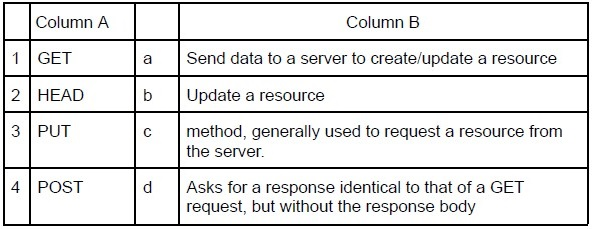 Match the following HTTP methods in Column A with their conventional usage in Column B.
Match the following HTTP methods in Column A with their conventional usage in Column B. Text of the picture (copyable)
| | Column A | | Column B |
|---|---|---|---|
| 1 | GET | a | Send data to a server to create/update a resource |
| 2 | HEAD | b | Update a resource |
| 3 | PUT | c | method, generally used to request a resource from the server. |
| 4 | POST | d | Asks for a response identical to that of a GET request, but without the response body |
- 1-c, 2-d, 3-b, 4-a
- 1-c, 2-b, 3-d, 4-a
- 1-c, 2-d, 3-a, 4-b
- 1-a, 2-d, 3-b, 4-c
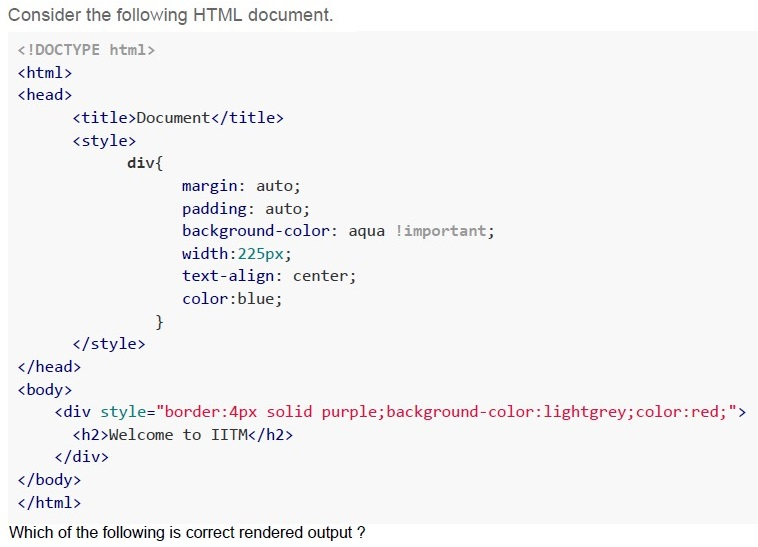
Text of the picture (copyable)
Consider the following HTML document.

```html
<!DOCTYPE html>
<html>
<head>
    <title>Document</title>
    <style>
        div{
            margin: auto;
            padding: auto;
            background-color: aqua !important;
            width:225px;
            text-align: center;
            color:blue;
        }
    </style>
</head>
<body>
    <div style="border:4px solid purple;background-color:lightgrey;color:red;">
        <h2>Welcome to IITM</h2>
    </div>
</body>
</html>
```
Which of the following is correct rendered output ?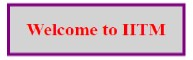
text
Welcome to IITM
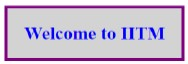
text
Welcome to IITM
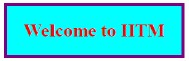
text
Welcome to IITM
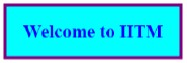
text
Welcome to IITM
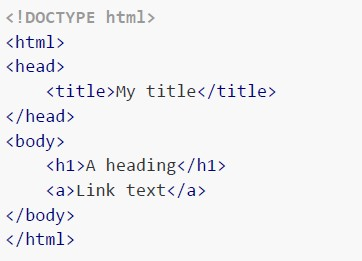
Consider the following DOM structure and select the HTML document that correctly represents the DOM structure .
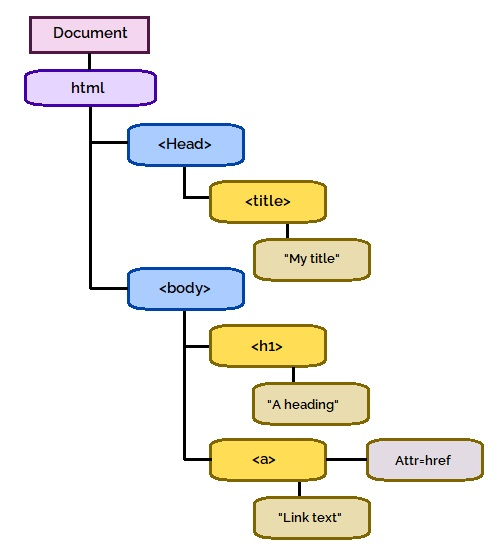 Consider the following DOM structure and select the HTML document that correctly represents the DOM structure .
Consider the following DOM structure and select the HTML document that correctly represents the DOM structure . Text of the picture (copyable)
This is a diagram representing a hierarchical structure, likely a Document Object Model (DOM) tree for an HTML document.

The diagram consists of several nodes connected by lines, indicating parent-child relationships.

**Nodes (from top to bottom, left to right):**

*   **Document** (purple rectangle with rounded corners)
*   **html** (purple rectangle with rounded corners)
*   **<Head>** (blue rectangle with rounded corners)
*   **<title>** (yellow rectangle with rounded corners)
*   **"My title"** (brown rectangle with rounded corners)
*   **<body>** (blue rectangle with rounded corners)
*   **<h1>** (yellow rectangle with rounded corners)
*   **"A heading"** (brown rectangle with rounded corners)
*   **<a>** (yellow rectangle with rounded corners)
*   **Attr=href** (grey rectangle with rounded corners)
*   **"Link text"** (brown rectangle with rounded corners)

**Connections:**

*   Document is parent of html.
*   html is parent of <Head>.
*   html is parent of <body>.
*   <Head> is parent of <title>.
*   <title> is parent of "My title".
*   <body> is parent of <h1>.
*   <body> is parent of <a>.
*   <h1> is parent of "A heading".
*   <a> is parent of "Link text".
*   <a> is parent of Attr=href.
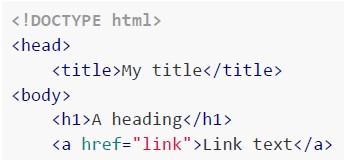
text
```html
<!DOCTYPE html>
<head>
    <title>My title</title>
</head>
<body>
    <h1>A heading</h1>
    <a href="link">Link text</a>
</body>
```
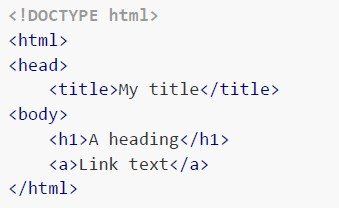
text
```html
<!DOCTYPE html>
<html>
<head>
    <title>My title</title>
</head>
<body>
    <h1>A heading</h1>
    <a>Link text</a>
</body>
</html>
```
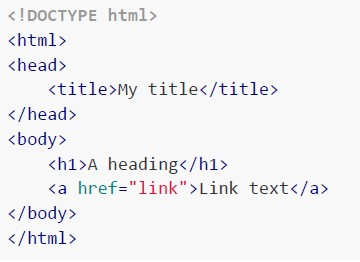
text
```html
<!DOCTYPE html>
<html>
<head>
    <title>My title</title>
</head>
<body>
    <h1>A heading</h1>
    <a>Link text</a>
</body>
</html>
```
text
```html
<!DOCTYPE html>
<html>
<head>
    <title>My title</title>
</head>
<body>
    <h1>A heading</h1>
    <a href="link">Link text</a>
</body>
</html>
```
Consider the following python code snippet.
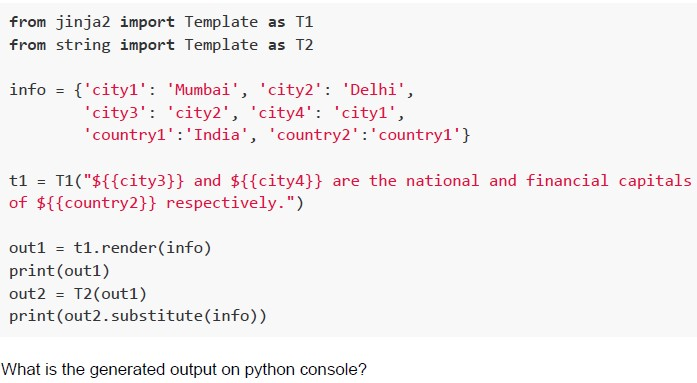 Consider the following python code snippet.
Consider the following python code snippet. Text of the picture (copyable)
```python
from jinja2 import Template as T1
from string import Template as T2

info = {'city1': 'Mumbai', 'city2': 'Delhi',
        'city3': 'city2', 'city4': 'city1',
        'country1':'India', 'country2':'country1'}

t1 = T1("${{city3}} and ${{city4}} are the national and financial capitals of ${{country2}} respectively.")

out1 = t1.render(info)
print(out1)
out2 = T2(out1)
print(out2.substitute(info))
```

What is the generated output on python console?
text
city2 and city1 are the national and financial capitals of country1 respectively.
Delhi and Mumbai are the national and financial capitals of India respectively.

text
$city2 and $city1 are the national and financial capitals of $country1 respectively.
Delhi and Mumbai are the national and financial capitals of India respectively.

text
```
{{city2}} and {{city1}} are the national and financial capitals of {{country1}} respectively.
Delhi and Mumbai are the national and financial capitals of India respectively.
```
text
$city3 and $city4 are the national and financial capitals of $country2 respectively.
Delhi and Mumbai are the national and financial capitals of India respectively.

Text of the picture (copyable)
Which of the following flask view functions will return a 404 error for the URL:
http://127.0.0.1:5000/home/student1/2001 ?

text
```python
@app.route('/home/<student_id>/<course_id>')
def home(student_id, course_id):
    details = {'student_id': student_id, 'course_id': course_id}
```
text
```python
@app.route('/home/<string:student_id>/<int:course_id>')
def home(student_id, course_id):
    details = { 'student_id': student_id, 'course_id' : course_id}
```
text
```python
@app.route('/home/<string:student_id>/<string:course_id>')
def home(student_id, course_id):
    details = {'student_id': student_id, 'course_id': course_id}
```
text
```python
@app.route('/home/student/<student_id>/<course_id>')
def home(student_id, course_id):
    details = {'student_id': student_id, 'course_id': course_id}
```
Consider a character set L, which consists of only those characters which are used in the statement, “pack my box with five dozen liquor jugs”. If this statement is to be saved in a document with minimum encoding, what will be the size of the document given that no other information or context is to be saved?
- 160 bits
- 320 bits
- 195 bits
- 390 bits
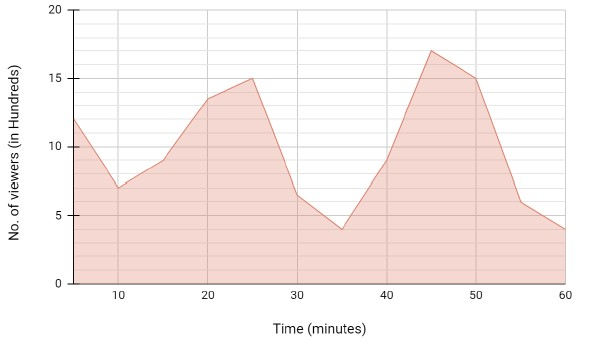
A certain video that was available on the web only for an hour occupied 2 gigabytes of memory of the server. If the number of viewers of the video over time for that hour is given by the curve shown below and assuming that each viewer required an individual connection to the server to view the video, what would be the minimum RAM requirement of the server that could process requests from all the viewers simultaneously at any point of time?
 A certain video that was available on the web only for an hour occupied 2 gigabytes of memory of the server. If the number of viewers of the video over time for that hour is given by the curve shown below and assuming that each viewer required an individual connection to the server to view the video, what would be the minimum RAM requirement of the server that could process requests from all the viewers simultaneously at any point of time?
A certain video that was available on the web only for an hour occupied 2 gigabytes of memory of the server. If the number of viewers of the video over time for that hour is given by the curve shown below and assuming that each viewer required an individual connection to the server to view the video, what would be the minimum RAM requirement of the server that could process requests from all the viewers simultaneously at any point of time? Text of the picture (copyable)
This is an area chart.
The x-axis is labeled "Time (minutes)" and ranges from 0 to 60 in increments of 10.
The y-axis is labeled "No. of viewers (in Hundreds)" and ranges from 0 to 20 in increments of 5.
The area under the line is shaded in a light red color.
The line graph shows the following approximate points:
(0, 12)
(10, 7)
(15, 9)
(20, 14)
(25, 15)
(30, 6)
(35, 4)
(40, 9)
(45, 17)
(50, 15)
(55, 6)
(60, 4)
- 1.7 GB
- 3.4 GB
- 1.7 TB
- 3.4 TB
Text of the picture (copyable)
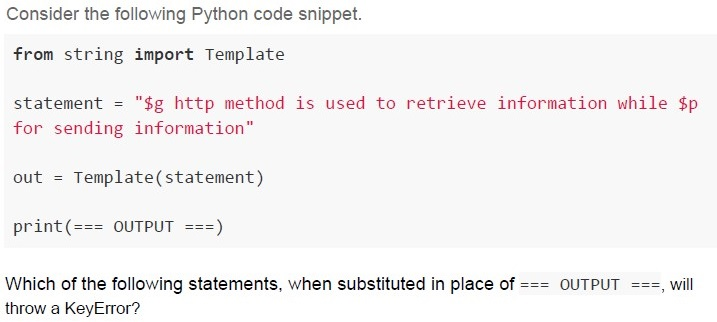
Consider the following Python code snippet.

```python
from string import Template

statement = "$g http method is used to retrieve information while $p for sending information"

out = Template(statement)

print(=== OUTPUT ===)
```

Which of the following statements, when substituted in place of === OUTPUT ===, will throw a KeyError?

text
```python
out.substitute({'g': 'GET'})
```
text
```
out.substitute({'g': 'GET', 'p': 'POST', 'd': 'delete'})
```
text
```python
out.safe_substitute({'g':'GET'})
```
text
```python
out.safe_substitute({'g':'GET', 'p':'POST', 'd':'delete'})
```
Text of the picture (copyable)
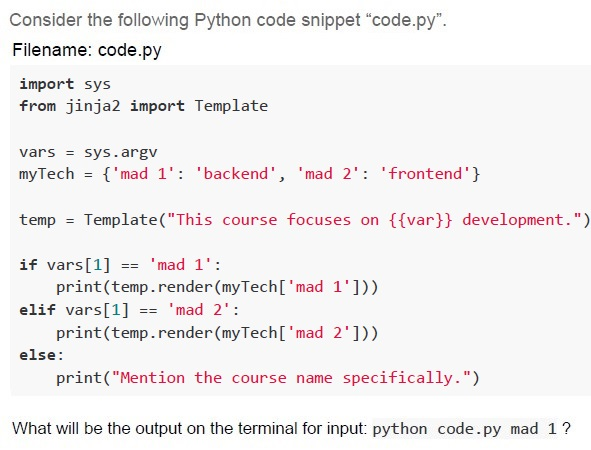
Consider the following Python code snippet "code.py".
Filename: code.py
```python
import sys
from jinja2 import Template

vars = sys.argv
myTech = {'mad 1': 'backend', 'mad 2': 'frontend'}

temp = Template("This course focuses on {{var}} development.")

if vars[1] == 'mad 1':
    print(temp.render(myTech['mad 1']))
elif vars[1] == 'mad 2':
    print(temp.render(myTech['mad 2']))
else:
    print("Mention the course name specifically.")
```
What will be the output on the terminal for input: python code.py mad 1?
text
This course focuses on frontend development.

text
This course focuses on backend development.

text
Mention the course name specifically.

text
```
IndexError: list index out of range
```
Text of the picture (copyable)
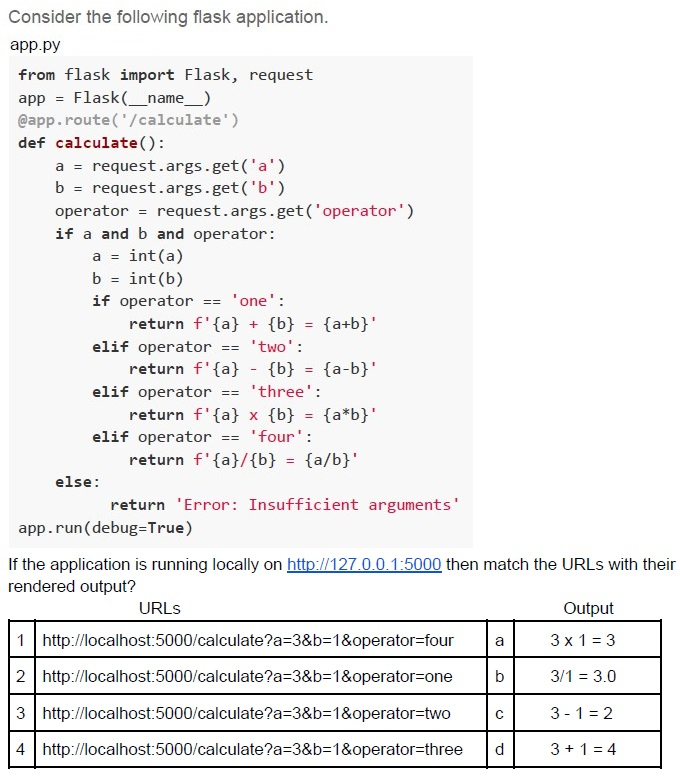
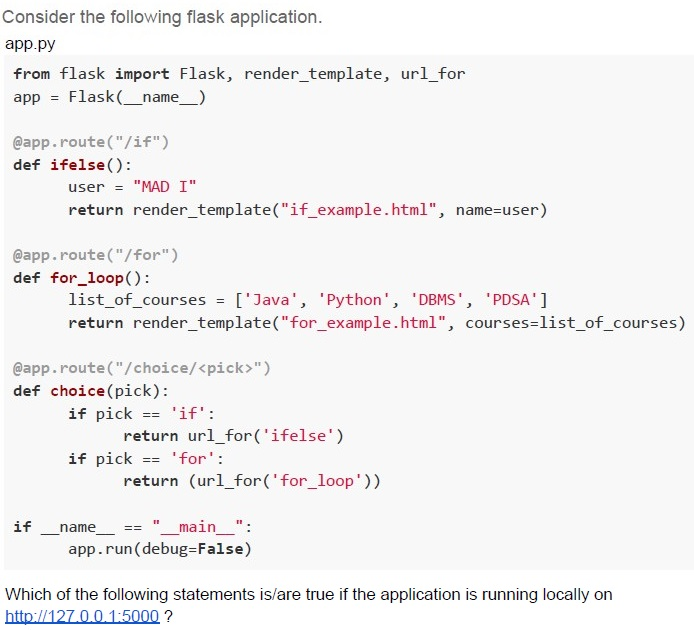
Consider the following flask application.
app.py

```python
from flask import Flask, request
app = Flask(__name__)
@app.route('/calculate')
def calculate():
    a = request.args.get('a')
    b = request.args.get('b')
    operator = request.args.get('operator')
    if a and b and operator:
        a = int(a)
        b = int(b)
        if operator == 'one':
            return f'{a} + {b} = {a+b}'
        elif operator == 'two':
            return f'{a} - {b} = {a-b}'
        elif operator == 'three':
            return f'{a} x {b} = {a*b}'
        elif operator == 'four':
            return f'{a}/{b} = {a/b}'
    else:
        return 'Error: Insufficient arguments'
app.run(debug=True)
```

If the application is running locally on http://127.0.0.1:5000 then match the URLs with their rendered output?

| | URLs | | Output |
|---|---|---|---|
| 1 | http://localhost:5000/calculate?a=3&b=1&operator=four | a | 3 x 1 = 3 |
| 2 | http://localhost:5000/calculate?a=3&b=1&operator=one | b | 3/1 = 3.0 |
| 3 | http://localhost:5000/calculate?a=3&b=1&operator=two | c | 3 - 1 = 2 |
| 4 | http://localhost:5000/calculate?a=3&b=1&operator=three | d | 3 + 1 = 4 |- 1-b, 2-d, 3-a, 4-c
- 1-b, 2-d, 3-c, 4-a
- 1-c, 2-d, 3-a, 4-b
- 1-a, 2-d, 3-b, 4-c
A mobile server and a client initially 750 km apart are moving towards each other in a straight line with the speeds of 165 kmph and 85 kmph respectively. The network bandwidth is set constant to 2 Mbps. Determine how much data (in Gigabytes) is used by the client before the client and the server collide. [speed of light in vacuum: 3 x 10⁸ m/sec, 1 MB = 1000 KB and so on.]
- 21.6
- 6
- 2.7
- 7.5
Which of the following entities and their relationship has been correctly represented by the ER diagram shown in the image?
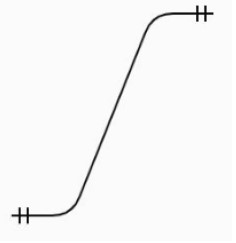 Which of the following entities and their relationship has been correctly represented by the ER diagram shown in the image?
Which of the following entities and their relationship has been correctly represented by the ER diagram shown in the image? Text of the picture (copyable)
This is a diagram of a curve.
It shows a black S-shaped curve on a light grey background.
The curve starts at the bottom left, goes up diagonally, then curves to the right, and ends at the top right.
There are two short vertical lines intersecting a short horizontal line at the bottom left end of the curve.
There are two short vertical lines intersecting a short horizontal line at the top right end of the curve.
- Person - Passport
- Person - Mobile number
- Person - Birth certificate
- Person - Fingerprint
Which of the following statements regarding dynamic webpages is/are true?
- The page is already present at the server even before a user requests it.
- The page generally maintains the same content every time the user requestsit.
- The page is generated on demand by a program or a request from a browser.
- On every request, every new page created may be different from the last.
Text of the picture (copyable)
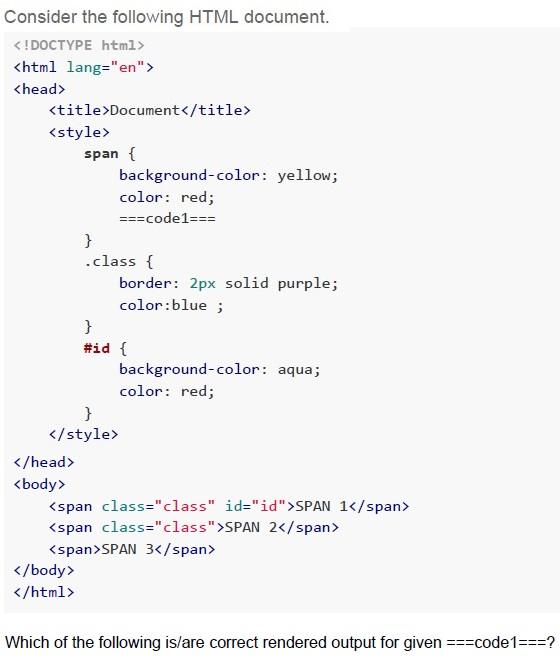
Consider the following HTML document.

```html
<!DOCTYPE html>
<html lang="en">
<head>
    <title>Document</title>
    <style>
        span {
            background-color: yellow;
            color: red;
            ===code1===
        }
        .class {
            border: 2px solid purple;
            color:blue ;
        }
        #id {
            background-color: aqua;
            color: red;
        }
    </style>
</head>
<body>
    <span class="class" id="id">SPAN 1</span>
    <span class="class">SPAN 2</span>
    <span>SPAN 3</span>
</body>
</html>
```

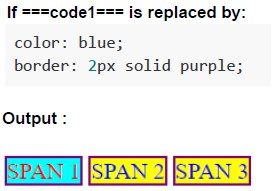
Which of the following is/are correct rendered output for given ===code1===?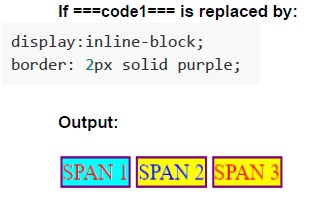
text
If ===code1=== is replaced by:

```
display:inline-block;
border: 2px solid purple;
```

Output:

A diagram showing three rectangular boxes arranged horizontally.
- The first box has a purple border, a light blue background, and contains the text "SPAN 1" in red.
- The second box has a purple border, a yellow background, and contains the text "SPAN 2" in red.
- The third box has a purple border, a yellow background, and contains the text "SPAN 3" in red.
text
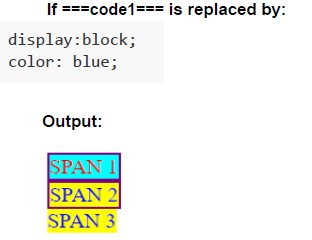
If ===code1=== is replaced by:

```
display:block;
color: blue;
```

Output:

SPAN 1
SPAN 2
SPAN 3
text
If ===code1=== is replaced by:

```
color: blue;
border: 2px solid purple;
```

Output :

SPAN 1 SPAN 2 SPAN 3
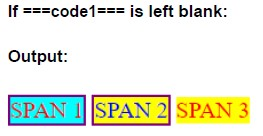
text
If ===code1=== is left blank:

Output:

[SPAN 1] [SPAN 2] [SPAN 3]
Text of the picture (copyable)
Consider the following flask application.
app.py

```python
from flask import Flask, render_template, url_for
app = Flask(__name__)

@app.route("/if")
def ifelse():
    user = "MAD I"
    return render_template("if_example.html", name=user)

@app.route("/for")
def for_loop():
    list_of_courses = ['Java', 'Python', 'DBMS', 'PDSA']
    return render_template("for_example.html", courses=list_of_courses)

@app.route("/choice/<pick>")
def choice(pick):
    if pick == 'if':
        return url_for('ifelse')
    if pick == 'for':
        return (url_for('for_loop'))

if __name__ == "__main__":
    app.run(debug=False)
```

Which of the following statements is/are true if the application is running locally on
http://127.0.0.1:5000 ?
text
For URL, http://127.0.0.1:5000/choice/for browser will render for_example.html

text
For URL, http://127.0.0.1:5000/choice/if browser will render if_example.html

text
For URL http://127.0.0.1:5000/choice/for browser will display /for as output.

text
For URL http://127.0.0.1:5000/choice/if browser will display /if as output.
Answer key
- Q1 (MCQ, 2 marks): C
- Q2 (MCQ, 2 marks): A
- Q3 (MCQ, 3 marks): C
- Q4 (MCQ, 3 marks): D
- Q5 (MCQ, 3 marks): B
- Q6 (MCQ, 3 marks): D
- Q7 (MCQ, 3 marks): C
- Q8 (MCQ, 3 marks): D
- Q9 (MCQ, 3 marks): A
- Q10 (MCQ, 3 marks): C
- Q11 (MCQ, 4.5 marks): B
- Q12 (MCQ, 4.5 marks): C
- Q13 (MSQ, 2 marks): A, C, D
- Q14 (MSQ, 2 marks): C, D
- Q15 (MSQ, 4.5 marks): A, C, D
- Q16 (MSQ, 4.5 marks): C, D
Concepts this paper tests
Auto-generated summary from the source site. Handy as a checklist; the lessons above explain each idea from scratch.
Summary of Core Topics, Concepts, Principles, and Equations
Web Design and Development
Responsive Web Design:
- Concept: Designing web pages to adapt to different screen sizes and resolutions.
- Principle: Use flexible layouts, flexible images, and CSS media queries.
HTTP Methods:
- Concept: Different HTTP methods (GET, POST, PUT, HEAD) and their uses.
Principles:
- GET: Retrieve data from the server.
- POST: Send data to the server to create/update a resource.
- PUT: Update a resource.
- HEAD: Similar to GET but without the response body.
CSS Specificity and Inheritance:
- Concept: How styles are applied based on specificity and inheritance rules.
- Principles: Inline styles > ID selectors > Class selectors > Element selectors.
Flask Framework:
- Concept: A micro web framework for Python.
- Principles: Routing, templates, and request handling.
Example:
@app.route('/path')
def function():
    return "Response"
Dynamic Web Pages:
- Concept: Web pages generated on demand.
- Principles: Content can change based on user input, time of day, or other factors.
Data Science and Mathematics
Data Encoding:
- Concept: Representing data in a specific format for storage or transmission.
- Equation: Size of document = Number of characters * Bits per character.
Relative Motion and Data Transfer:
- Concept: Calculating data transfer based on relative motion and bandwidth.
- Equation: Data = Bandwidth * Time.
- Example: Calculating data used before collision of two moving objects.
Character Set and Encoding:
- Concept: Determining the size of a document based on the character set and encoding.
- Equation: Document size = Number of characters * Bits per character.
Software Engineering
Templating Engines (Jinja2, String Template):
- Concept: Using templates to generate dynamic content.
- Principles: Placeholders, substitution, and rendering.
Example:
from jinja2 import Template
template = Template("Hello, {{ name }}!")
output = template.render(name="World")
Error Handling and Exceptions:
- Concept: Handling errors and exceptions in code.
- Principles: Using try-except blocks, checking for KeyError, etc.
Entity-Relationship (ER) Diagrams:
- Concept: Representing entities and their relationships in a database.
- Principles: Entities, attributes, and relationships.
Web Design and Development
Data Science and Mathematics
Software Engineering
These summaries and graphs should help you focus on the essential topics and understand the relationships between different concepts for your exam.