Home / MAD1 / Week 9 / Real questions
MAD1 week 9 - real exam questions
60 questions pulled from past papers whose wording matches this week's topics, newest first, duplicates removed. Pick your answers, then press Check answers. Figures and answer keys are the originals.
Elapsed 00:00
Consider the Flask SQLAlchemy data model.
 What is the output after the following Python code is executed ? (Assume all entries are successfully committed to the database)
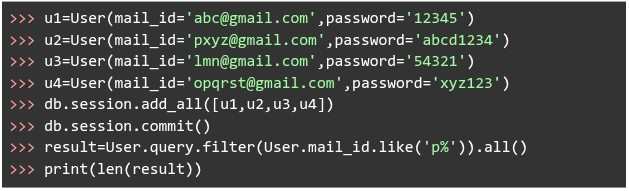
What is the output after the following Python code is executed ? (Assume all entries are successfully committed to the database)
Text of the picture (copyable)
```python
class User(db.Model):
    __tablename__ = "user"
    id = db.Column(db.Integer, primary_key=True)
    mail_id = db.Column(db.String, unique=True)
    password = db.Column(db.String, nullable=False)
```
```python
>>> u1=User(mail_id='abc@gmail.com',password='12345')
>>> u2=User(mail_id='pxyz@gmail.com',password='abcd1234')
>>> u3=User(mail_id='lmn@gmail.com',password='54321')
>>> u4=User(mail_id='opqrst@gmail.com',password='xyz123')
>>> db.session.add_all([u1,u2,u3,u4])
>>> db.session.commit()
>>> result=User.query.filter(User.mail_id.like('p%')).all()
>>> print(len(result))
```- 4
- 3
- 2
- 1
Consider the SQLAlchemy model Order mapped to the table orders.
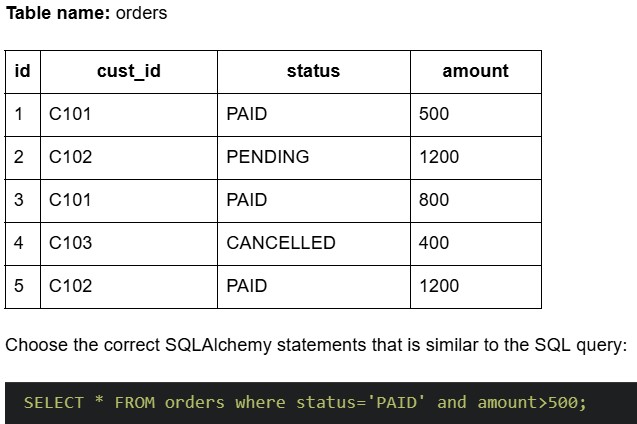
Text of the picture (copyable)
Table name: orders

| id | cust_id | status | amount |
|---|---|---|---|
| 1 | C101 | PAID | 500 |
| 2 | C102 | PENDING | 1200 |
| 3 | C101 | PAID | 800 |
| 4 | C103 | CANCELLED | 400 |
| 5 | C102 | PAID | 1200 |

Choose the correct SQLAlchemy statements that is similar to the SQL query:

```sql
SELECT * FROM orders where status='PAID' and amount>500;
```

text
```python
order_records = db.session.query(Order).filter( \
    Order.status == "PAID" and Order.amount > 500)
```
text
```python
order_records = db.session.query(Order) \
    .filter(Order.status == "PAID") \
    .filter(Order.amount > 500)
```
text
```python
order_records = db.session.query(Order).filter( \
    Order.status == "PAID") and \
db.session.query(Order).filter(Order.amount > 500)
```
text
```python
order_records = db.session.query(Order.status == "PAID" and \
    Order.amount > 500)
```
What does the following curl command do? 
Text of the picture (copyable)
```
curl -X PUT -d "status=active&role=admin" https://api/users/update
```
- Sends a PUT request to update data using form format.
- Sends a PUT request using JSON encoding.
- Sends a GET request to retrieve user information.
- Sends a DELETE request to remove user data.
An e-commerce web application stores user shopping cart information as server-side session state. Each active user session occupies an average of 4 KB of memory. During a flash sale, the application is expected to handle 1.5 million concurrent active sessions, all stored in a centralized Redis cache server. What is the minimum RAM capacity (in GB) required solely to store these session states? (Assume that 1000B=1KB, 1000KB=1MB and so on)
Logging is typically used for what purpose?
- detect unusual activity on the server.
- block unauthorized access.
- enforce HTTPS connections.
- convert HTTP to HTTPS.
Consider the following SQL Alchemy model  with below data.
 Which of the following SQL Alchemy statements is used to count the number of students registered for
  ?
?
with below data.
Which of the following SQL Alchemy statements is used to count the number of students registered for ?Text of the picture (copyable)
CourseRegistrations
| ID | student_id | course_id | date_of_registration |
|---|---|---|---|
| 1 | S101 | CS101 | 17-10-2024 |
| 2 | S103 | CS101 | 10-10-2024 |
| 3 | S101 | CS201 | 16-10-2024 |
| 4 | S102 | CS101 | 17-10-2024 |
| 5 | S104 | CS201 | 06-10-2024 |
```
course_id="CS101"
```

text
```python
count = db.session.query(CourseRegistrations) \
    .filter(course_id == "CS101") \
    .count()
```
text
```python
count = db.session.query \
    .filter(CourseRegistrations.course_id == "CS101") \
    .count()
```
text
```python
count = db.query(CourseRegistrations) \
    .filter(course_id == "CS101") \
    .count()
```
text
```python
count = db.session.query(CourseRegistrations) \
    .filter(CourseRegistrations.course_id == "CS101") \
    .count()
```
Consider the following Python Flask code.
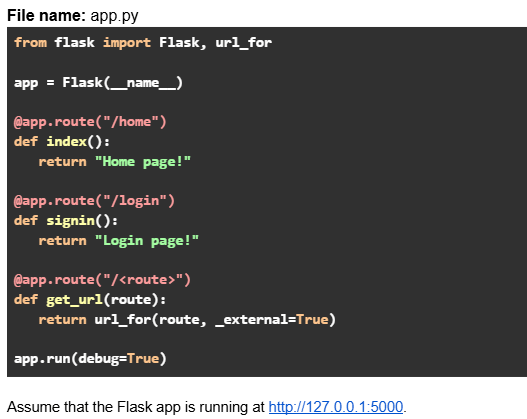 Which of the following options are true?
Which of the following options are true?Text of the picture (copyable)
File name: app.py
```python
from flask import Flask, url_for

app = Flask(__name__)

@app.route("/home")
def index():
    return "Home page!"

@app.route("/login")
def signin():
    return "Login page!"

@app.route("/<route>")
def get_url(route):
    return url_for(route, _external=True)

app.run(debug=True)
```
Assume that the Flask app is running at http://127.0.0.1:5000.- URL request: http://127.0.0.1:5000/signin will return output: http://127.0.0.1:5000/login
- URL request: http://127.0.0.1:5000/login will return output: http://127.0.0.1:5000/login
- URL request: http://127.0.0.1:5000/index will return output: http://127.0.0.1:5000/home
- URL request: http://127.0.0.1:5000/home will return output: http://127.0.0.1:5000/home
Consider the Flask SQLAlchemy data model.
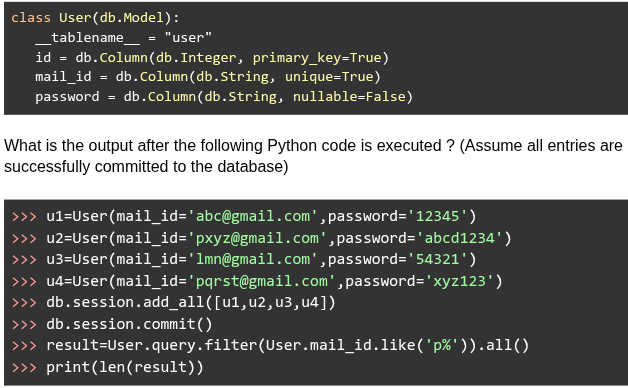
Text of the picture (copyable)
```python
class User(db.Model):
    __tablename__ = "user"
    id = db.Column(db.Integer, primary_key=True)
    mail_id = db.Column(db.String, unique=True)
    password = db.Column(db.String, nullable=False)
```

What is the output after the following Python code is executed ? (Assume all entries are successfully committed to the database)

```python
>>> u1=User(mail_id='abc@gmail.com',password='12345')
>>> u2=User(mail_id='pxyz@gmail.com',password='abcd1234')
>>> u3=User(mail_id='lmn@gmail.com',password='54321')
>>> u4=User(mail_id='pqrst@gmail.com',password='xyz123')
>>> db.session.add_all([u1,u2,u3,u4])
>>> db.session.commit()
>>> result=User.query.filter(User.mail_id.like('p%')).all()
>>> print(len(result))
```- 1
- 2
- 3
- 4
Which of the following is the correct flask_login code snippet to register a user as logged in for the current session?
- login_user(user.id)
- login_user(user)
- login_user(user.name)
- login_user(user.name and user.password)
What does the following curl command do?

Text of the picture (copyable)
```
curl -X POST -d "email=user@test.com&password=secret" https://auth/signin
```
- Sends a POST request to retrieve authentication data.
- Sends a POST request to send form data.
- Sends a POST request to send JSON data.
- Sends a POST request to retrieve user credentials.
Consider the code below in a file called 
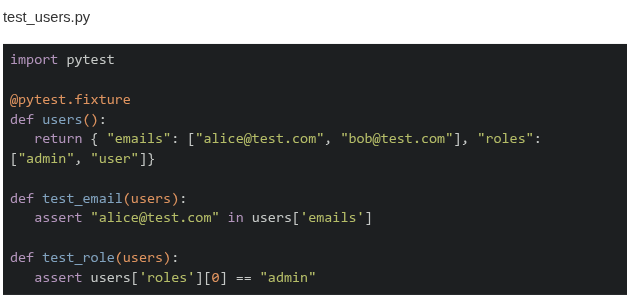 Which of these is the correct output when the command
  is run in the terminal?
Which of these is the correct output when the command is run in the terminal?Text of the picture (copyable)
```
test_users.py
```
test_users.py

```python
import pytest

@pytest.fixture
def users():
    return { "emails": ["alice@test.com", "bob@test.com"], "roles":
             ["admin", "user"]}

def test_email(users):
    assert "alice@test.com" in users['emails']

def test_role(users):
    assert users['roles'][0] == "admin"
```
```
"pytest -k email"
```- ====== 1 passed, 1 deselected in 0.02s =========
- ====== 1 passed, 2 deselected in 0.02s =========
- ====== 1 failed, 1 deselected in 0.02s =========
- ====== 1 failed, 2 deselected in 0.02s =========
Consider the following Flask SQLAlchemy models and RESTful API code.
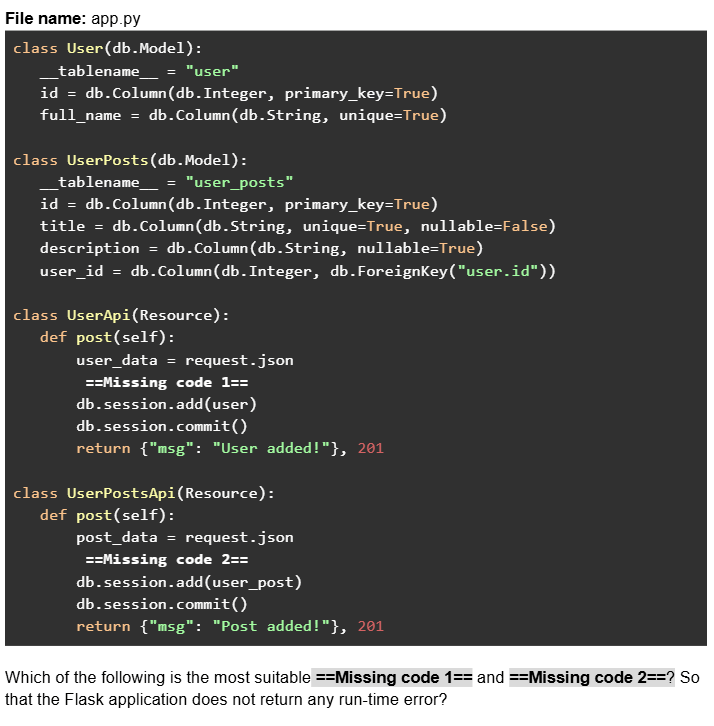
Text of the picture (copyable)
File name: app.py
```python
class User(db.Model):
    __tablename__ = "user"
    id = db.Column(db.Integer, primary_key=True)
    full_name = db.Column(db.String, unique=True)

class UserPosts(db.Model):
    __tablename__ = "user_posts"
    id = db.Column(db.Integer, primary_key=True)
    title = db.Column(db.String, unique=True, nullable=False)
    description = db.Column(db.String, nullable=True)
    user_id = db.Column(db.Integer, db.ForeignKey("user.id"))

class UserApi(Resource):
    def post(self):
        user_data = request.json
        ==Missing code 1==
        db.session.add(user)
        db.session.commit()
        return {"msg": "User added!"}, 201

class UserPostsApi(Resource):
    def post(self):
        post_data = request.json
        ==Missing code 2==
        db.session.add(user_post)
        db.session.commit()
        return {"msg": "Post added!"}, 201
```
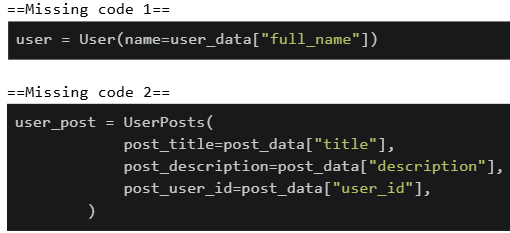
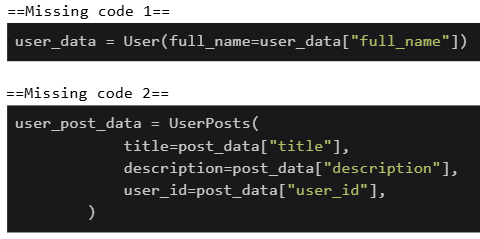
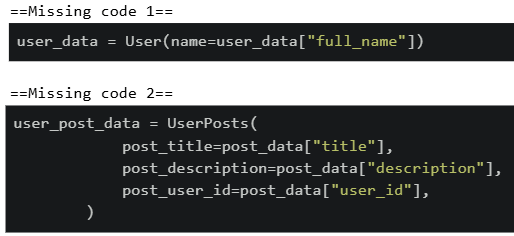
Which of the following is the most suitable ==Missing code 1== and ==Missing code 2==? So that the Flask application does not return any run-time error?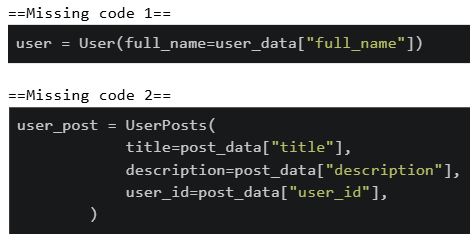
text
==Missing code 1==
```python
user = User(full_name=user_data["full_name"])
```

==Missing code 2==
```python
user_post = UserPosts(
    title=post_data["title"],
    description=post_data["description"],
    user_id=post_data["user_id"],
)
```
text
```python
==Missing code 1==
user = User(name=user_data["full_name"])

==Missing code 2==
user_post = UserPosts(
    post_title=post_data["title"],
    post_description=post_data["description"],
    post_user_id=post_data["user_id"],
)
```
text
```python
==Missing code 1==
user_data = User(full_name=user_data["full_name"])

==Missing code 2==
user_post_data = UserPosts(
    title=post_data["title"],
    description=post_data["description"],
    user_id=post_data["user_id"],
)
```
text
```
==Missing code 1==
user_data = User(name=user_data["full_name"])

==Missing code 2==
user_post_data = UserPosts(
    post_title=post_data["title"],
    post_description=post_data["description"],
    post_user_id=post_data["user_id"],
)
```
Consider the following Flask application.
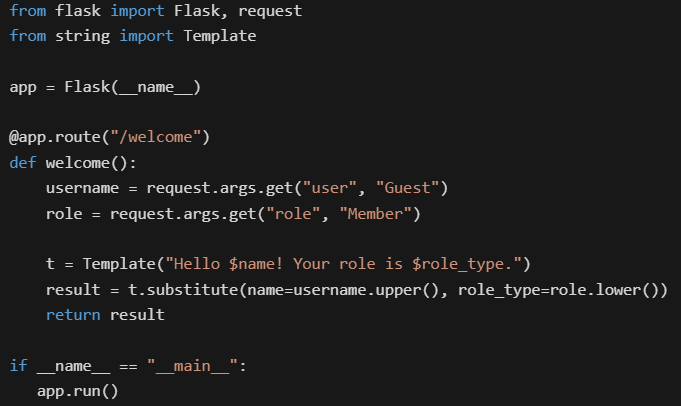

Text of the picture (copyable)
```python
from flask import Flask, request
from string import Template

app = Flask(__name__)

@app.route("/welcome")
def welcome():
    username = request.args.get("user", "Guest")
    role = request.args.get("role", "Member")

    t = Template("Hello $name! Your role is $role_type.")
    result = t.substitute(name=username.upper(), role_type=role.lower())
    return result

if __name__ == "__main__":
    app.run()
```
Assume that the Flask app is running at http://127.0.0.1:5000. What will be the rendered output in the browser for the URL: http://127.0.0.1:5000/welcome?user=Alice&role=ADMIN
text
It raises a KeyError because `$role_type` is missing in the URL.
- Hello Guest! Your role is member.
- Hello Alice! Your role is ADMIN.
- Hello ALICE! Your role is admin.
Consider the following Python Flask code.
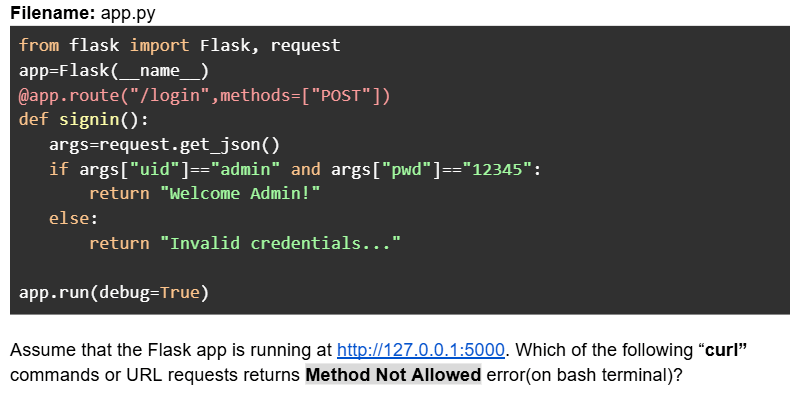
Text of the picture (copyable)
Filename: app.py

```python
from flask import Flask, request
app=Flask(__name__)
@app.route("/login",methods=["POST"])
def signin():
    args=request.get_json()
    if args["uid"]=="admin" and args["pwd"]=="12345":
        return "Welcome Admin!"
    else:
        return "Invalid credentials..."

app.run(debug=True)
```

Assume that the Flask app is running at http://127.0.0.1:5000. Which of the following "curl" commands or URL requests returns Method Not Allowed error(on bash terminal)?- curl -X POST --json '{"uid":"admin","pwd":"xyz"}' http://127.0.0.1:5000/login
- curl -X GET --json '{"uid":"admin","pwd":"xyz"}' http://127.0.0.1:5000/login
- URL request: http://127.0.0.1:5000/login
- curl --json '{"uid":"admin","pwd":"12345"}' http://127.0.0.1:5000/login
- curl -X POST --json '{"uid":"admin","pwd":"12345"}' http://127.0.0.1:5000/login
Comprehension passage for this question
Consider the following SQLAlchemy class models.
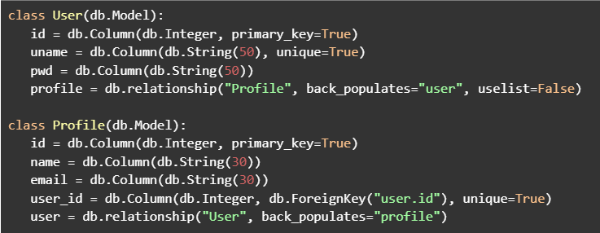 Based on the above data, answer the given subquestions.
What will be the output if the following commands are executed in the python shell.
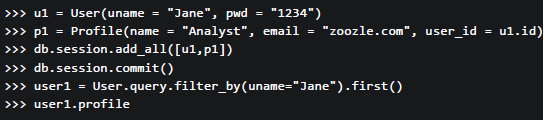
Text of the picture (copyable)
```python
>>> u1 = User(uname = "Jane", pwd = "1234")
>>> p1 = Profile(name = "Analyst", email = "zoozle.com", user_id = u1.id)
>>> db.session.add_all([u1,p1])
>>> db.session.commit()
>>> user1 = User.query.filter_by(uname="Jane").first()
>>> user1.profile
```

text
<User 1>

text
```
[<Profile 1>]
```

text
```html
<Profile 1>
```

text
```
'Analyst'
```
Consider the following HTML and Python flask codes.
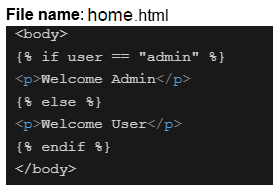
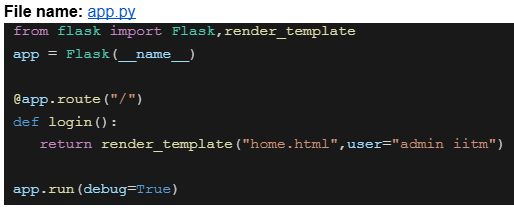

Text of the picture (copyable)
File name: home.html

```html
<body>
  {% if user == "admin" %}
  <p>Welcome Admin</p>
  {% else %}
  <p>Welcome User</p>
  {% endif %}
</body>
```
File name: app.py

```python
from flask import Flask,render_template

app = Flask(__name__)

@app.route("/")
def login():
    return render_template("home.html",user="admin iitm")

app.run(debug=True)
```
Assume that the above code is running on http://127.0.0.1:5000. What will be the rendered output for the URL request http://127.0.0.1:5000 ?- Welcome Admin
- Welcome User
- 404 Not Found
- Nothing will be rendered
Consider the following users list.

Text of the picture (copyable)
```python
users = [[{ "id":1, "name": "user_1", "role": "manager"},
          { "id":2, "name": "user_2", "role": "manager"},
          { "id":3, "name": "user_3", "role": "manager"}]]
```
An ordered HTML list is to be created for users where every list item should have a clickable "name" attribute redirecting to the endpoint "/show_users/<id>" where "id" is the "id" attribute of the same user dictionary. Which of the following is the correct way of doing it with jinja and HTML?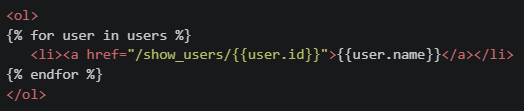
text
```html
<ol>
{% for user in users %}
    <li><a href="/show_users/{{user.id}}">{{user.name}}</a></li>
{% endfor %}
</ol>
```
text
```html
<ol>
{% for user in users %}
    <li><a href="/show_users/{{user['id']}}">{{user['name']}}</a></li>
{% endfor %}
</ol>
```
text
```html
<ol>
    <li><a href="/show_users/{{users[0].id}}">{{users[0].name}}</a></li>
    <li><a href="/show_users/{{users[1].id}}">{{users[1].name}}</a></li>
    <li><a href="/show_users/{{users[2].id}}">{{users[2].name}}</a></li>
</ol>
```
text
```html
<ol>
{% for user in users %}
    <li><a href="/show_users/{{user.name[-1]}}">{{user.name}}</a></li>
{% endfor %}
</ol>
```
Which of the following commands is/are valid to run pytest from the command line?
- pytest
- pytest test_file.py
- pytest -run
- pytest -k “login”
What does the following curl command do?

Text of the picture (copyable)
```
curl -X POST -d "username=student&password=1234" https://student/login
```
- Sends a POST request to retrieve data.
- Sends a POST request to send form data.
- Sends a POST request to send JSON data.
- Sends a POST request to retrieve JSON data.
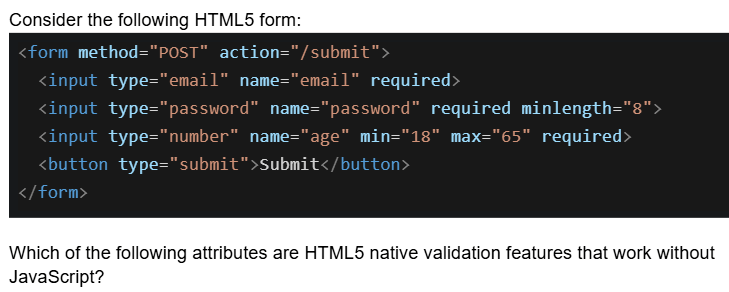
Text of the picture (copyable)
Consider the following HTML5 form:

```html
<form method="POST" action="/submit">
    <input type="email" name="email" required>
    <input type="password" name="password" required minlength="8">
    <input type="number" name="age" min="18" max="65" required>
    <button type="submit">Submit</button>
</form>
```

Which of the following attributes are HTML5 native validation features that work without JavaScript?- required, minlength, and type="email"
- min, max, and minlength
- required, type="password", and action
- type="email", min, max, minlength, and required
Which statements about frontend and backend validation are TRUE?
- Frontend validation (HTML5/JavaScript) is sufficient for security
- Frontend validation improves user experience by providing immediate feedback
- Backend validation is mandatory for security because frontend can be bypassed
- Backend validation should validate the same constraints as frontend
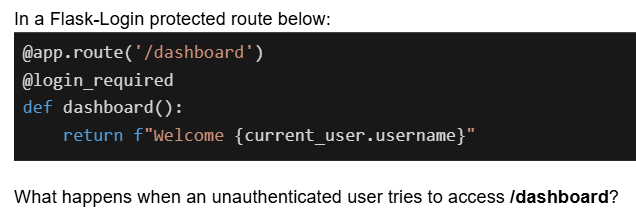
Text of the picture (copyable)
In a Flask-Login protected route below:

```python
@app.route('/dashboard')
@login_required
def dashboard():
    return f"Welcome {current_user.username}"
```

What happens when an unauthenticated user tries to access /dashboard?- Returns a 404 error
- Displays "Welcome None"
- Redirects to the login page
- Returns an error page with HTTP 403

Text of the picture (copyable)
Which of the following Flask view functions will NOT throw any error for the URL:
`http://127.0.0.1:5000/user?username=mad1&role=admin?`
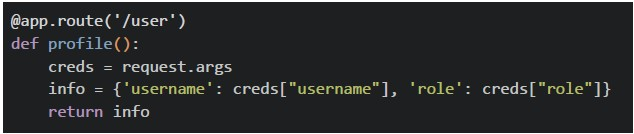
text
```python
@app.route('/user')
def profile():
    creds = request.args
    info = {'username': creds["username"], 'role': creds["role"]}
    return info
```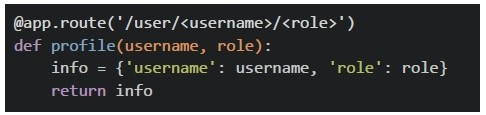
text
```python
@app.route('/user/<username>/<role>')
def profile(username, role):
    info = {'username': username, 'role': role}
    return info
```
text
```python
@app.route('/user')
def profile():
    return {'message': 'data retrieved successfully'}
```
text
All of these
Comprehension passage for this question
Based on the above data, answer the given subquestions.
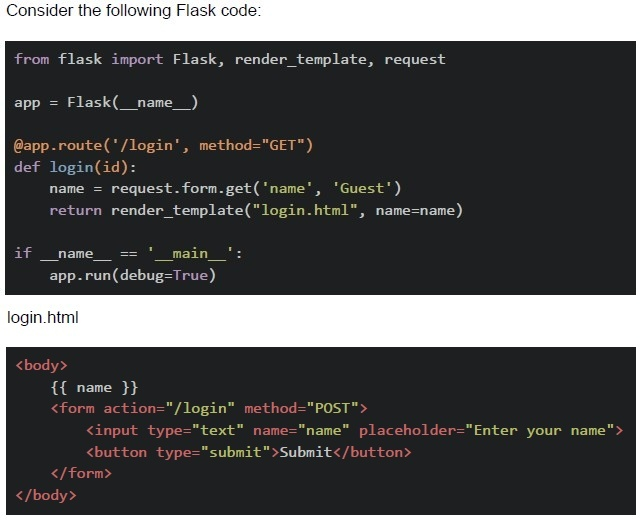
From the given options, select which part of the code (if any) will throw an error first in the terminal and prevent the Flask application from running successfully ?

text
method="GET" is not correct, it should be methods=["GET"]

text
```python
def login(id)
```
can throw error because no id is passed in, /login url

text
name will throw error because no name will be written in the starting of app

text
There is no error, Flask application will run correctly.
Comprehension passage for this question
Based on the above data, answer the given subquestions.
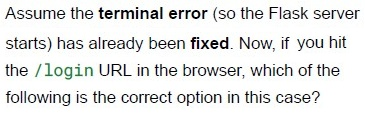
Text of the picture (copyable)
Assume the **terminal error** (so the Flask server
starts) has already been **fixed**. Now, if you hit
the `/login` URL in the browser, which of the
following is the correct option in this case?

text
method="GET" is not correct, it should be methods=["GET"]

text
```python
def login(id) can throw error because no id is passed in /login url
```

text
name will throw error because no name will be written in the starting of app

text
There is no error, Flask application will run correctly.
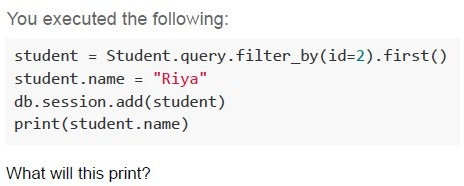
Text of the picture (copyable)
You executed the following:

```python
student = Student.query.filter_by(id=2).first()
student.name = "Riya"
db.session.add(student)
print(student.name)
```

What will this print?
- Riya
- Name stored in database
- None
- Error
Why is using the GET method for sensitive data discouraged?
- GET encrypts the URL
- Data becomes part of browser history and URL
- It uses a separate request header
- Flask doesn’t support GET by default
A login form doesn't show any message when users enter wrong credentials. Which Nielsen heuristic is violated?
- Aesthetic and minimalist design
- Visibility of system status
- Error prevention
- Recognition rather than recall
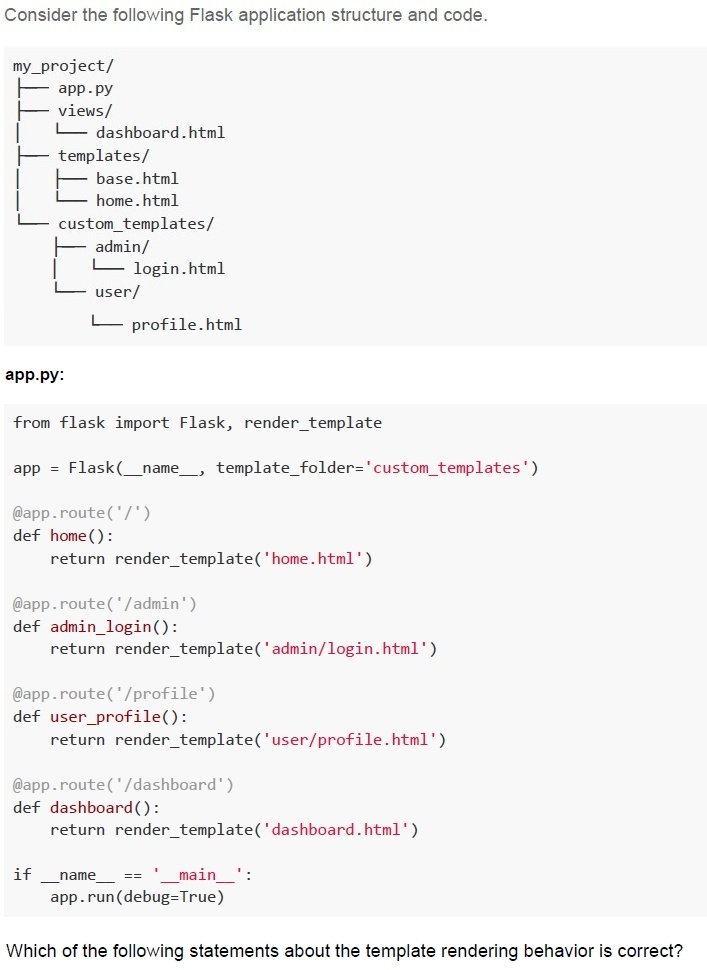
Text of the picture (copyable)
Consider the following Flask application structure and code.

```
my_project/
├── app.py
├── views/
│   └── dashboard.html
├── templates/
│   ├── base.html
│   └── home.html
└── custom_templates/
    ├── admin/
    │   └── login.html
    └── user/
        └── profile.html
```

**app.py:**

```python
from flask import Flask, render_template

app = Flask(__name__, template_folder='custom_templates')

@app.route('/')
def home():
    return render_template('home.html')

@app.route('/admin')
def admin_login():
    return render_template('admin/login.html')

@app.route('/profile')
def user_profile():
    return render_template('user/profile.html')

@app.route('/dashboard')
def dashboard():
    return render_template('dashboard.html')

if __name__ == '__main__':
    app.run(debug=True)
```

Which of the following statements about the template rendering behavior is correct?
text
All routes will work correctly as Flask will automatically search in both
templates/ and custom_templates/ folders

text
Only the /admin and /profile routes will work correctly, while / and /dashboard routes will fail with TemplateNotFound error

text
The / and /dashboard routes will fail with TemplateNotFound error, while
/admin and /profile routes will work correctly

text
All routes will fail because Flask requires the template folder to be named exactly
templates
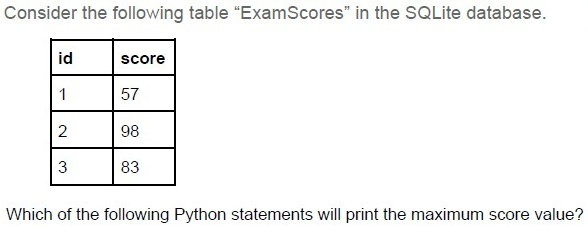
Text of the picture (copyable)
Consider the following table "ExamScores" in the SQLite database.

| id | score |
|----|-------|
| 1  | 57    |
| 2  | 98    |
| 3  | 83    |

Which of the following Python statements will print the maximum score value?

text
```python
>>> print(db.session.query.max(ExamScores.score))
```

text
```python
>>> print(db.session.query(func.max(ExamScores.score)).scalar())
```

text
```python
>>> print(db.session.query(func.max(ExamScores.score)))
```

text
```python
>>> print(db.session.query.max(ExamScores.score).scalar())
```
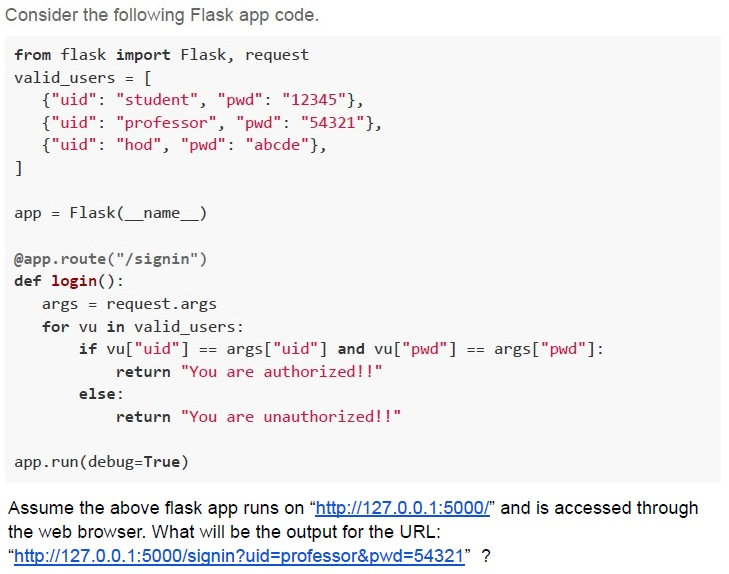
Text of the picture (copyable)
Consider the following Flask app code.

```python
from flask import Flask, request

valid_users = [
    {"uid": "student", "pwd": "12345"},
    {"uid": "professor", "pwd": "54321"},
    {"uid": "hod", "pwd": "abcde"},
]

app = Flask(__name__)

@app.route("/signin")
def login():
    args = request.args
    for vu in valid_users:
        if vu["uid"] == args["uid"] and vu["pwd"] == args["pwd"]:
            return "You are authorized!!"
    else:
        return "You are unauthorized!!"

app.run(debug=True)
```

Assume the above flask app runs on "http://127.0.0.1:5000/" and is accessed through the web browser. What will be the output for the URL: "http://127.0.0.1:5000/signin?uid=professor&pwd=54321" ?- You are authorized!!
- You are unauthorized!!
- Not Found
- Internal Server Error
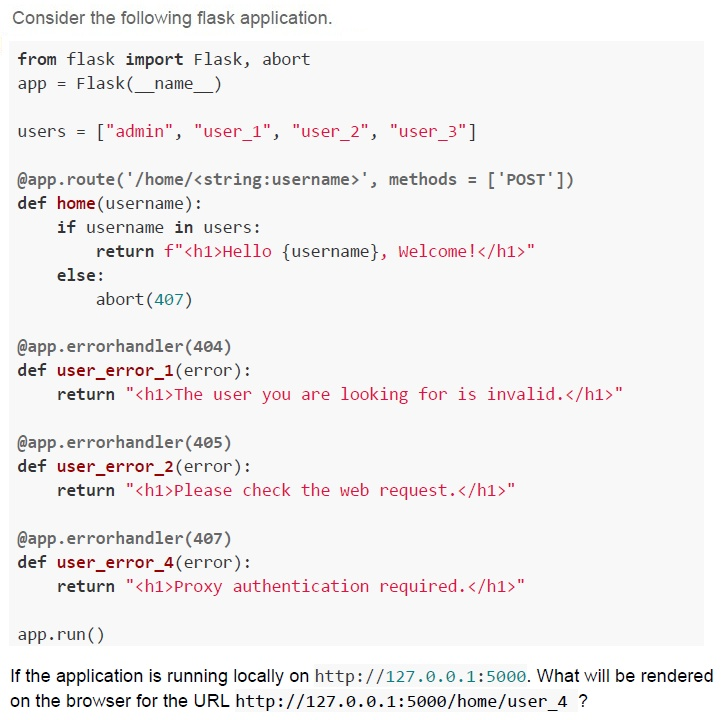
Text of the picture (copyable)
Consider the following flask application.

```python
from flask import Flask, abort
app = Flask(__name__)

users = ["admin", "user_1", "user_2", "user_3"]

@app.route('/home/<string:username>', methods = ['POST'])
def home(username):
    if username in users:
        return f"<h1>Hello {username}, Welcome!</h1>"
    else:
        abort(407)

@app.errorhandler(404)
def user_error_1(error):
    return "<h1>The user you are looking for is invalid.</h1>"

@app.errorhandler(405)
def user_error_2(error):
    return "<h1>Please check the web request.</h1>"

@app.errorhandler(407)
def user_error_4(error):
    return "<h1>Proxy authentication required.</h1>"

app.run()
```

If the application is running locally on `http://127.0.0.1:5000`. What will be rendered on the browser for the URL `http://127.0.0.1:5000/home/user_4` ?
text
Hello user_4, Welcome!

text
The user you are looking for is invalid.

text
Not Found

text
Please check the web request
Comprehension passage for this question
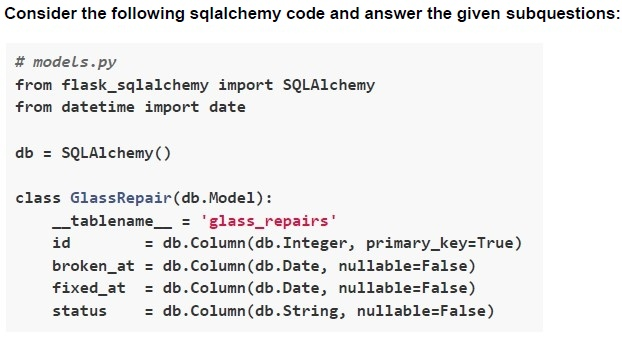
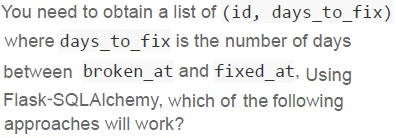
Text of the picture (copyable)
You need to obtain a list of (id, days_to_fix)
where days_to_fix is the number of days
between broken_at and fixed_at. Using
Flask-SQLAlchemy, which of the following
approaches will work?
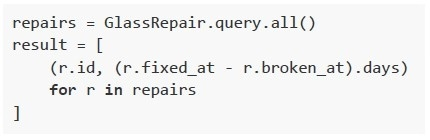
text
```python
repairs = GlassRepair.query.all()
result = [
    (r.id, (r.fixed_at - r.broken_at).days)
    for r in repairs
]
```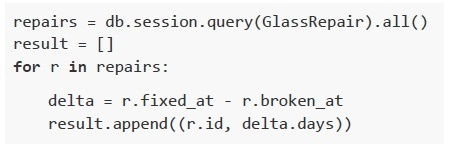
text
```python
repairs = db.session.query(GlassRepair).all()
result = []
for r in repairs:
    delta = r.fixed_at - r.broken_at
    result.append((r.id, delta.days))
```
text
```python
repairs = GlassRepair.query(
    GlassRepair.id,
    (GlassRepair.fixed_at - GlassRepair.broken_at).label('days_to_fix')
).all()
```
text
```python
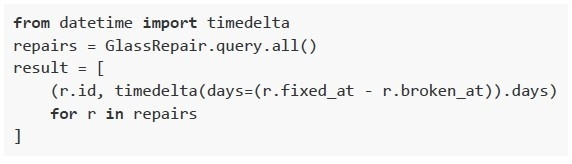
from datetime import timedelta
repairs = GlassRepair.query.all()
result = [
    (r.id, timedelta(days=(r.fixed_at - r.broken_at)).days)
    for r in repairs
]
```
Comprehension passage for this question
Text of the picture (copyable)
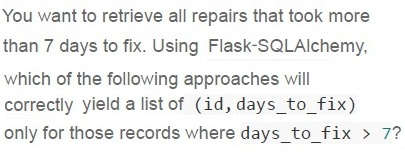
You want to retrieve all repairs that took more
than 7 days to fix. Using Flask-SQLAlchemy,
which of the following approaches will
correctly yield a list of (id, days_to_fix)
only for those records where days_to_fix > 7?
text
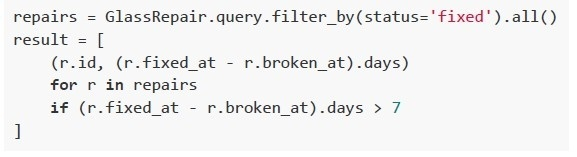
```python
repairs = GlassRepair.query.filter_by(status='fixed').all()
result = [
    (r.id, (r.fixed_at - r.broken_at).days)
    for r in repairs
    if (r.fixed_at - r.broken_at).days > 7
]
```
text
```python
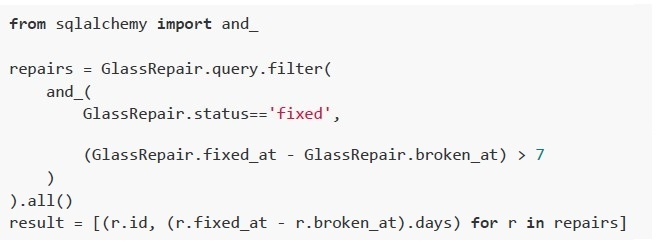
from sqlalchemy import and_

repairs = GlassRepair.query.filter(
    and_(
        GlassRepair.status=='fixed',

        (GlassRepair.fixed_at - GlassRepair.broken_at) > 7
    )
).all()
result = [(r.id, (r.fixed_at - r.broken_at).days) for r in repairs]
```
text
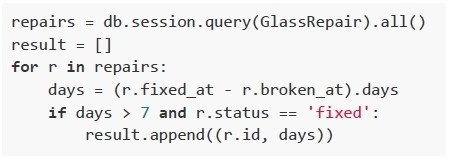
```python
repairs = db.session.query(GlassRepair).all()
result = []
for r in repairs:
    days = (r.fixed_at - r.broken_at).days
    if days > 7 and r.status == 'fixed':
        result.append((r.id, days))
```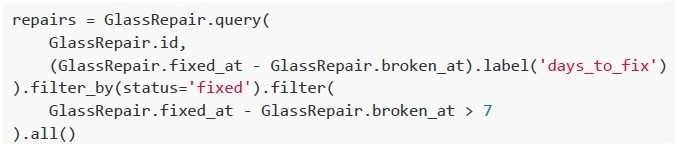
text
```python
repairs = GlassRepair.query(
    GlassRepair.id,
    (GlassRepair.fixed_at - GlassRepair.broken_at).label('days_to_fix')
).filter_by(status='fixed').filter(
    GlassRepair.fixed_at - GlassRepair.broken_at > 7
).all()
```
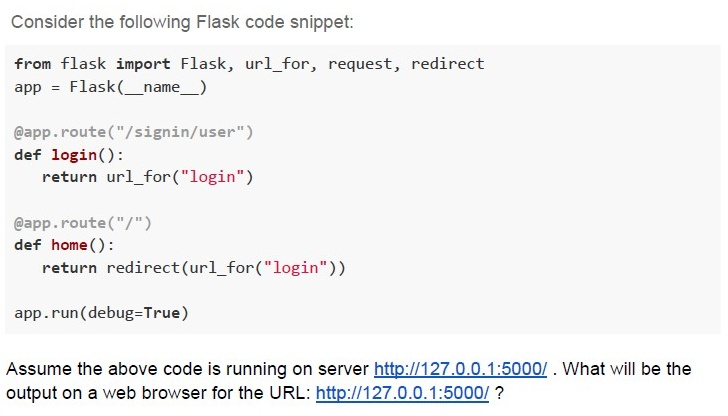
Text of the picture (copyable)
Consider the following Flask code snippet:

```python
from flask import Flask, url_for, request, redirect
app = Flask(__name__)

@app.route("/signin/user")
def login():
    return url_for("login")

@app.route("/")
def home():
    return redirect(url_for("login"))

app.run(debug=True)
```

Assume the above code is running on server http://127.0.0.1:5000/ . What will be the output on a web browser for the URL: http://127.0.0.1:5000/ ?
text
http://127.0.0.1:5000/signin/user

text
/signin/user

text
http://127.0.0.1:5000

text
Not Found
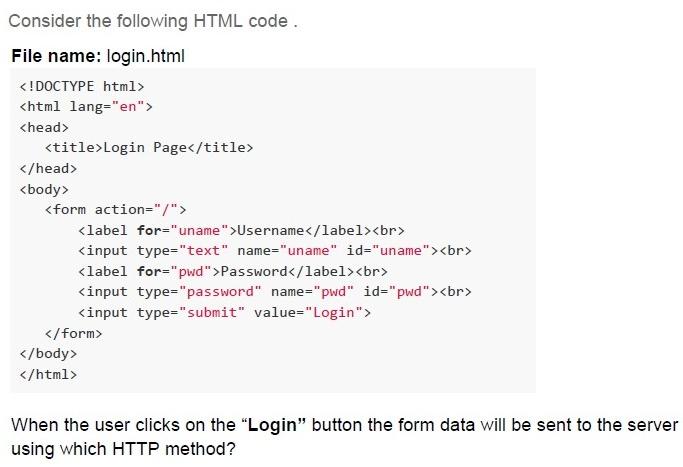
Text of the picture (copyable)
Consider the following HTML code.

**File name: login.html**
```html
<!DOCTYPE html>
<html lang="en">
<head>
    <title>Login Page</title>
</head>
<body>
    <form action="/">
        <label for="uname">Username</label><br>
        <input type="text" name="uname" id="uname"><br>
        <label for="pwd">Password</label><br>
        <input type="password" name="pwd" id="pwd"><br>
        <input type="submit" value="Login">
    </form>
</body>
</html>
```

When the user clicks on the "Login" button the form data will be sent to the server using which HTTP method?- GET
- POST
- PUT
- DELETE
Text of the picture (copyable)
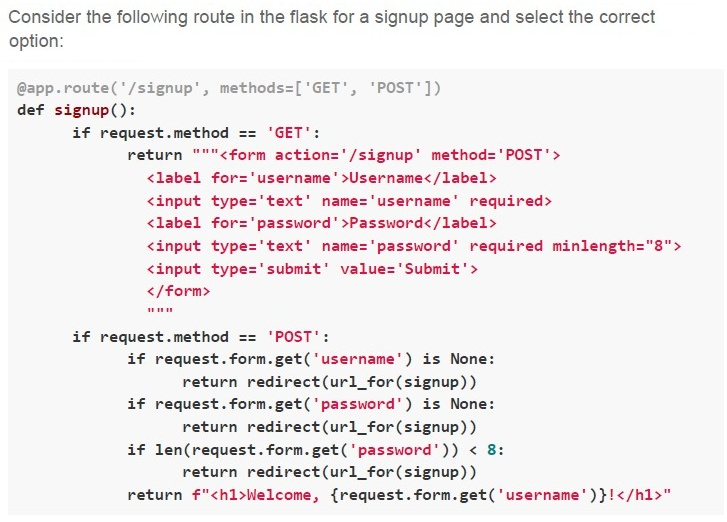
Consider the following route in the flask for a signup page and select the correct option:

```python
@app.route('/signup', methods=['GET', 'POST'])
def signup():
    if request.method == 'GET':
        return """<form action='/signup' method='POST'>
            <label for='username'>Username</label>
            <input type='text' name='username' required>
            <label for='password'>Password</label>
            <input type='text' name='password' required minlength="8">
            <input type='submit' value='Submit'>
        </form>
        """
    if request.method == 'POST':
        if request.form.get('username') is None:
            return redirect(url_for(signup))
        if request.form.get('password') is None:
            return redirect(url_for(signup))
        if len(request.form.get('password')) < 8:
            return redirect(url_for(signup))
        return f"<h1>Welcome, {request.form.get('username')}!</h1>"
```- The signup page is dynamically generated.
- The signup page uses server-side rendering.
- The signup page uses frontend validation.
- The signup page uses backend validation.
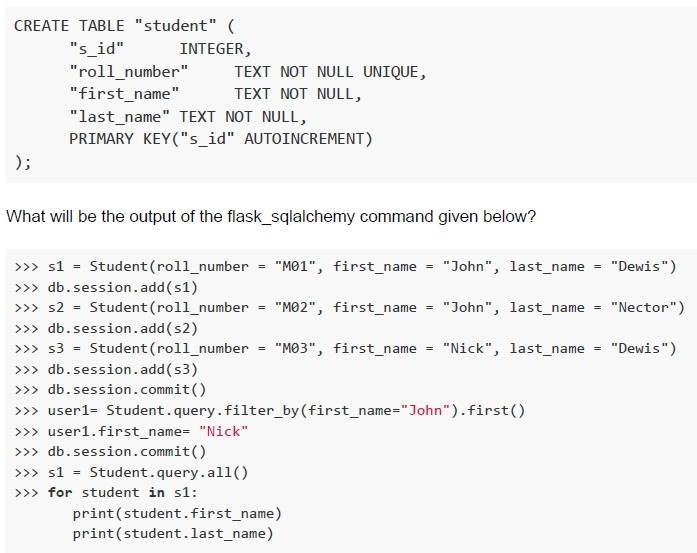
Consider the schema for the Class Student.
 Consider the schema for the Class Student.
Consider the schema for the Class Student.
Text of the picture (copyable)
```sql
CREATE TABLE "student" (
    "s_id"          INTEGER,
    "roll_number"   TEXT NOT NULL UNIQUE,
    "first_name"    TEXT NOT NULL,
    "last_name" TEXT NOT NULL,
    PRIMARY KEY("s_id" AUTOINCREMENT)
);
```

What will be the output of the flask_sqlalchemy command given below?

```python
>>> s1 = Student(roll_number = "M01", first_name = "John", last_name = "Dewis")
>>> db.session.add(s1)
>>> s2 = Student(roll_number = "M02", first_name = "John", last_name = "Nector")
>>> db.session.add(s2)
>>> s3 = Student(roll_number = "M03", first_name = "Nick", last_name = "Dewis")
>>> db.session.add(s3)
>>> db.session.commit()
>>> user1= Student.query.filter_by(first_name="John").first()
>>> user1.first_name= "Nick"
>>> db.session.commit()
>>> s1 = Student.query.all()
>>> for student in s1:
        print(student.first_name)
        print(student.last_name)
```
text
John
Dewis
John
Nector
Nick
Dewis

text
```
John
Dewis
Nick
Dewis
Nick
Dewis
```

text
John
Dewis
Nick
Nector
Nick
Dewis

text
Nick
Dewis
John
Nector
Nick
Dewis
Text of the picture (copyable)
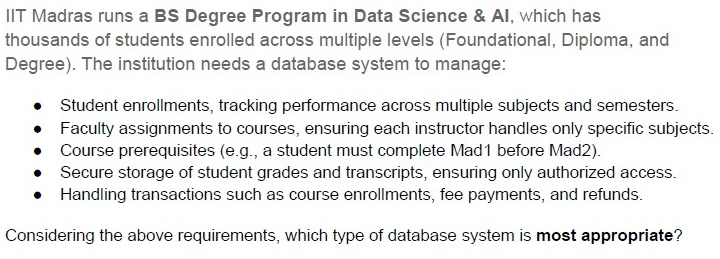
IIT Madras runs a **BS Degree Program in Data Science & AI**, which has thousands of students enrolled across multiple levels (Foundational, Diploma, and Degree). The institution needs a database system to manage:

* Student enrollments, tracking performance across multiple subjects and semesters.
* Faculty assignments to courses, ensuring each instructor handles only specific subjects.
* Course prerequisites (e.g., a student must complete Mad1 before Mad2).
* Secure storage of student grades and transcripts, ensuring only authorized access.
* Handling transactions such as course enrollments, fee payments, and refunds.

Considering the above requirements, which type of database system is **most appropriate**?
- NoSQL (Document-based database like MongoDB)
- Graph Database (e.g., Neo4j)
- RDBMS (e.g., PostgreSQL, MySQL, SQLite)
- Key-Value Store (e.g., Redis, DynamoDB)
Text of the picture (copyable)
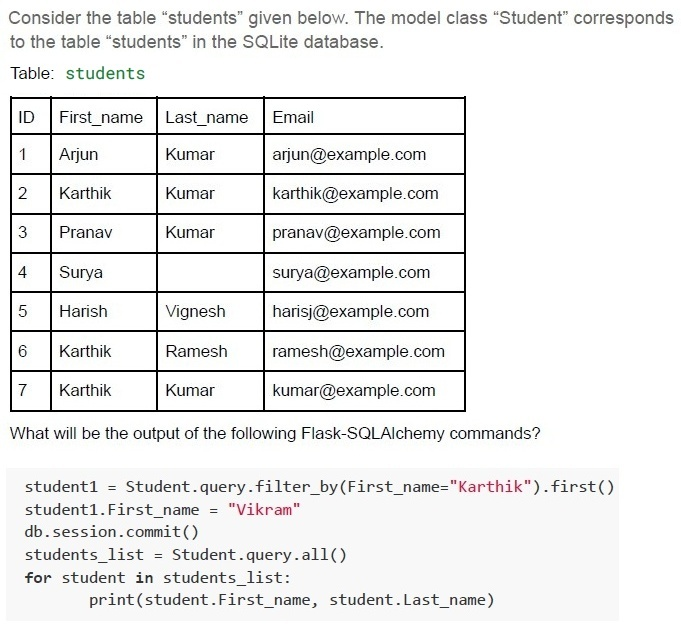
Consider the table "students" given below. The model class "Student" corresponds to the table "students" in the SQLite database.

Table: students

| ID | First_name | Last_name | Email             |
|----|------------|-----------|-------------------|
| 1  | Arjun      | Kumar     | arjun@example.com |
| 2  | Karthik    | Kumar     | karthik@example.com |
| 3  | Pranav     | Kumar     | pranav@example.com |
| 4  | Surya      |           | surya@example.com |
| 5  | Harish     | Vignesh   | harisj@example.com |
| 6  | Karthik    | Ramesh    | ramesh@example.com |
| 7  | Karthik    | Kumar     | kumar@example.com |

What will be the output of the following Flask-SQLAlchemy commands?

```python
student1 = Student.query.filter_by(First_name="Karthik").first()
student1.First_name = "Vikram"
db.session.commit()
students_list = Student.query.all()
for student in students_list:
    print(student.First_name, student.Last_name)
```
text
Arjun Kumar
Karthik Kumar
Pranav Kumar
Surya
Harish Vignesh
Karthik Ramesh
Karthik Kumar

text
Arjun Kumar
Vikram Kumar
Pranav Kumar
Surya
Harish Vignesh
Vikram Ramesh
Vikram Kumar

text
Arjun Kumar
Vikram Kumar
Pranav Kumar
Surya
Harish Vignesh
Karthik Ramesh
Karthik Kumar

text
Vikram Kumar
Karthik Ramesh
Karthik Kumar
Which of the following options represents a one-to-one relationship in the Entity-Relationship Diagram?

text
This is a diagram of a line segment.
The line starts at the bottom left with a short horizontal segment, then goes diagonally upwards and to the right, and ends with another short horizontal segment at the top right.
Both ends of the line have two short perpendicular hash marks.

text
This is a diagram. It shows a line segment starting at the bottom left, going diagonally upwards to the right, and then horizontally to the right.
- The bottom left end of the line has two vertical parallel lines.
- The top right end of the line has a small circle with a plus sign inside it, and then a short horizontal line extending to the right.

text
This is a diagram showing a single line with two arrows.
The line starts at the bottom left, goes horizontally right for a short segment, then diagonally up and right, then horizontally right for another short segment, ending at the top right.
There is an arrow head at the very beginning of the line, pointing left.
There is an arrow head at the very end of the line, pointing right.

text
This is a diagram of a line graph.
The graph starts at the bottom left with a horizontal line segment.
It then transitions to an upward sloping diagonal line segment.
Finally, it transitions to another horizontal line segment at the top right, which ends with a small asterisk-like symbol.
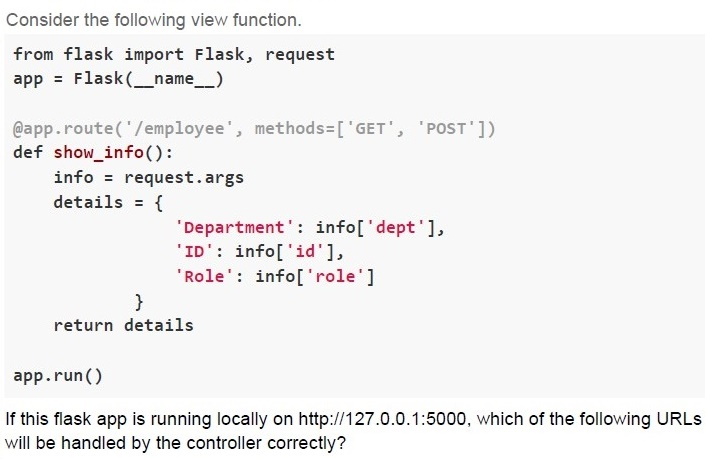
Text of the picture (copyable)
Consider the following view function.

```python
from flask import Flask, request
app = Flask(__name__)

@app.route('/employee', methods=['GET', 'POST'])
def show_info():
    info = request.args
    details = {
        'Department': info['dept'],
        'ID': info['id'],
        'Role': info['role']
    }
    return details

app.run()
```

If this flask app is running locally on http://127.0.0.1:5000, which of the following URLs will be handled by the controller correctly?
text
```
http://127.0.0.1:5000?dept=HR&id=101&role=manager
```

text
http://127.0.0.1:5000/HR/101/manager

text
```
http://127.0.0.1:5000/employee?dept=HR&id=1018&role=manager
```

text
```
http://127.0.0.1:5000/employee/HR/101/manager
```
Which of the following is an example of an application using Attribute-Based Access Control (ABAC)?
- A system where users are granted access based on their job roles within anorganization.
- A cloud service that grants or restricts access to files based on attributes suchas user department, job title, or current location.
- A file-sharing system where the file owner decides who can access theirdocuments.
- A system that enforces access based on security classifications and clearancelevels.
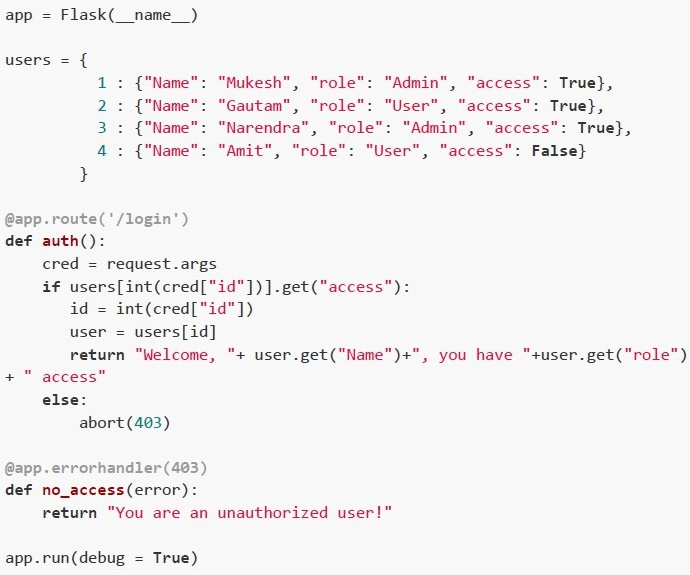
Consider the following flask application running on the base URL and is accessed through a browser. Select the correct option(s).
 Consider the following flask application running on the base URL and is accessed through a browser. Select the correct option(s).
Consider the following flask application running on the base URL and is accessed through a browser. Select the correct option(s).
Text of the picture (copyable)
```python
app = Flask(__name__)

users = {
    1 : {"Name": "Mukesh", "role": "Admin", "access": True},
    2 : {"Name": "Gautam", "role": "User", "access": True},
    3 : {"Name": "Narendra", "role": "Admin", "access": True},
    4 : {"Name": "Amit", "role": "User", "access": False}
}

@app.route('/login')
def auth():
    cred = request.args
    if users[int(cred["id"])].get("access"):
        id = int(cred["id"])
        user = users[id]
        return "Welcome, "+ user.get("Name")+", you have "+user.get("role") \
            + " access"
    else:
        abort(403)

@app.errorhandler(403)
def no_access(error):
    return "You are an unauthorized user!"

app.run(debug = True)
```
text
For the URL: http://127.0.0.1:5000?id=2, The browser will render;
Welcome, Gautam, you have User access.

text
For the URL: http://127.0.0.1:5000/login?id=1, The browser will render;
Welcome, Mukesh, you have Admin access.

text
For the URL: http://127.0.0.1:5000/login?id=3, The browser will render,
Welcome, Narendra, you have User access.

text
For the URL: http://127.0.0.1:5000/login?id=4, The browser will render,
You are an unauthorized user!
Which of the following statements about the Constraint Validation API is/are true?
- The Constraint Validation API ensures that form input meets client-sidevalidation rules before submission.
- The Constraint Validation API is sufficient to prevent server-side attacks likeSQL injection.
- It is possible to bypass the Constraint Validation API by directly sendingrequests to the server.
- The Constraint Validation API automatically validates all data on the serverside.
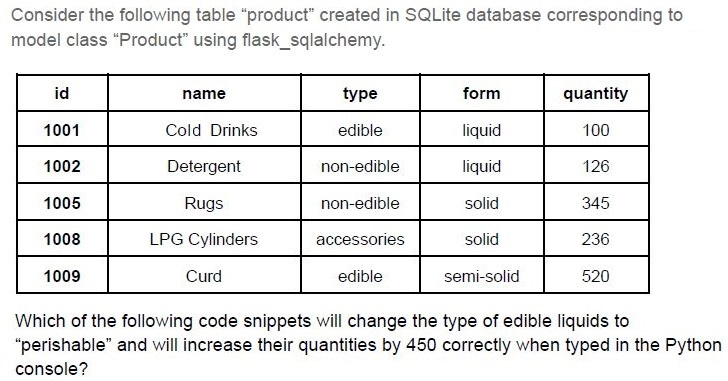
Text of the picture (copyable)
Consider the following table "product" created in SQLite database corresponding to model class "Product" using flask_sqlalchemy.

| id | name | type | form | quantity |
|---|---|---|---|---|
| 1001 | Cold Drinks | edible | liquid | 100 |
| 1002 | Detergent | non-edible | liquid | 126 |
| 1005 | Rugs | non-edible | solid | 345 |
| 1008 | LPG Cylinders | accessories | solid | 236 |
| 1009 | Curd | edible | semi-solid | 520 |

Which of the following code snippets will change the type of edible liquids to "perishable" and will increase their quantities by 450 correctly when typed in the Python console?
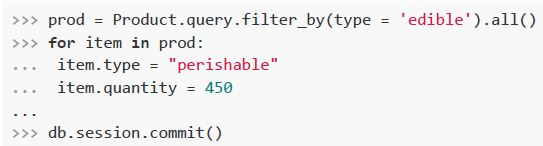
text
```python
>>> prod = Product.query.filter_by(type = 'edible').all()
>>> for item in prod:
...     item.type = "perishable"
...     item.quantity = 450
...
>>> db.session.commit()
```
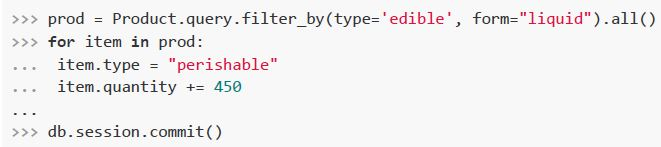
text
```python
>>> prod = Product.query.filter_by(type='edible', form="liquid").all()
>>> for item in prod:
...     item.type = "perishable"
...     item.quantity += 450
...
>>> db.session.commit()
```
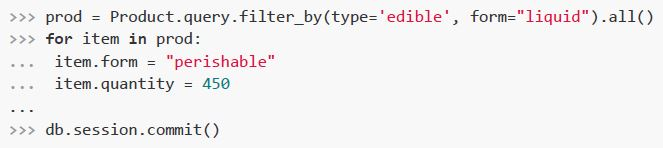
text
```python
>>> prod = Product.query.filter_by(type='edible', form="liquid").all()
>>> for item in prod:
...    item.form = "perishable"
...    item.quantity = 450
...
>>> db.session.commit()
```
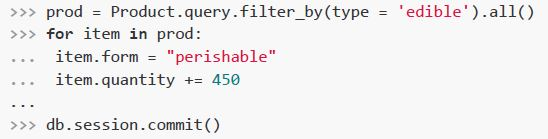
text
```python
>>> prod = Product.query.filter_by(type = 'edible').all()
>>> for item in prod:
...     item.form = "perishable"
...     item.quantity += 450
...
>>> db.session.commit()
```
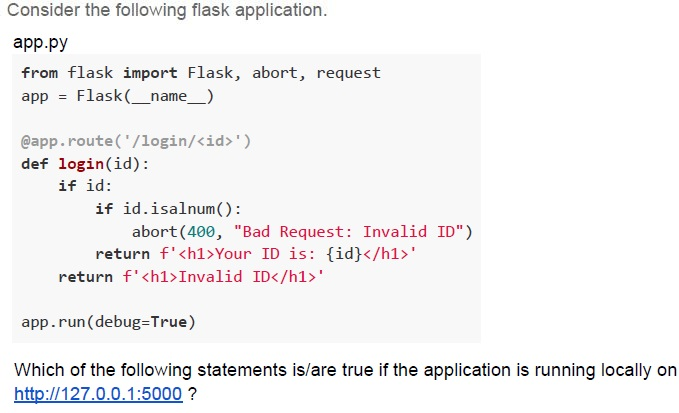
Text of the picture (copyable)
Consider the following flask application.

app.py
```python
from flask import Flask, abort, request
app = Flask(__name__)

@app.route('/login/<id>')
def login(id):
    if id:
        if id.isalnum():
            abort(400, "Bad Request: Invalid ID")
        return f'<h1>Your ID is: {id}</h1>'
    return f'<h1>Invalid ID</h1>'

app.run(debug=True)
```

Which of the following statements is/are true if the application is running locally on http://127.0.0.1:5000 ?
text
For URL http://127.0.0.1:5000/login?id=MAD-I the browser will render
Not Found

text
For URL http://127.0.0.1:5000/login/ the browser will render
**Invalid ID**

text
For URL http://127.0.0.1:5000/login/CS2003 the browser will render Bad
Request: Invalid ID

text
For URL http://127.0.0.1:5000/login/PDSA the browser will render Bad
Request: Invalid ID
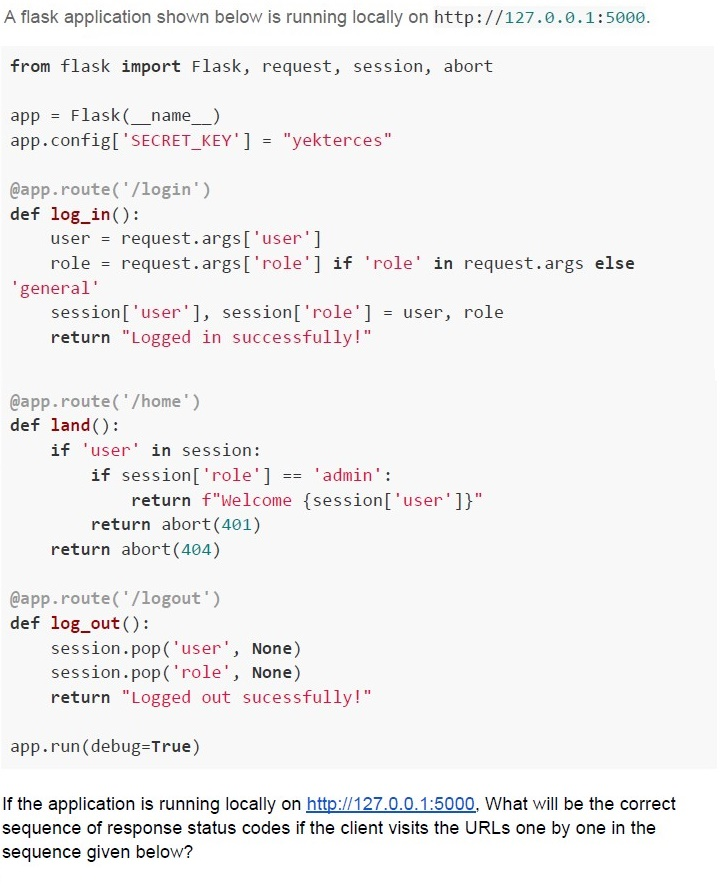
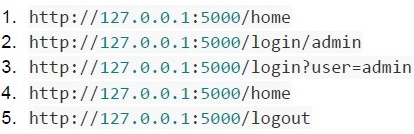
Text of the picture (copyable)
A flask application shown below is running locally on http://127.0.0.1:5000.

```python
from flask import Flask, request, session, abort

app = Flask(__name__)
app.config['SECRET_KEY'] = "yekterces"

@app.route('/login')
def log_in():
    user = request.args['user']
    role = request.args['role'] if 'role' in request.args else \
           'general'
    session['user'], session['role'] = user, role
    return "Logged in successfully!"

@app.route('/home')
def land():
    if 'user' in session:
        if session['role'] == 'admin':
            return f"Welcome {session['user']}"
        return abort(401)
    return abort(404)

@app.route('/logout')
def log_out():
    session.pop('user', None)
    session.pop('role', None)
    return "Logged out sucessfully!"

app.run(debug=True)
```

If the application is running locally on http://127.0.0.1:5000. What will be the correct sequence of response status codes if the client visits the URLs one by one in the sequence given below?
1. http://127.0.0.1:5000/home
2. http://127.0.0.1:5000/login/admin
3. http://127.0.0.1:5000/login?user=admin
4. http://127.0.0.1:5000/home
5. http://127.0.0.1:5000/logout
text
401
401
200
404
200

text
404
200
200
200
200

text
404
404
200
401
200

text
404
200
404
200
200
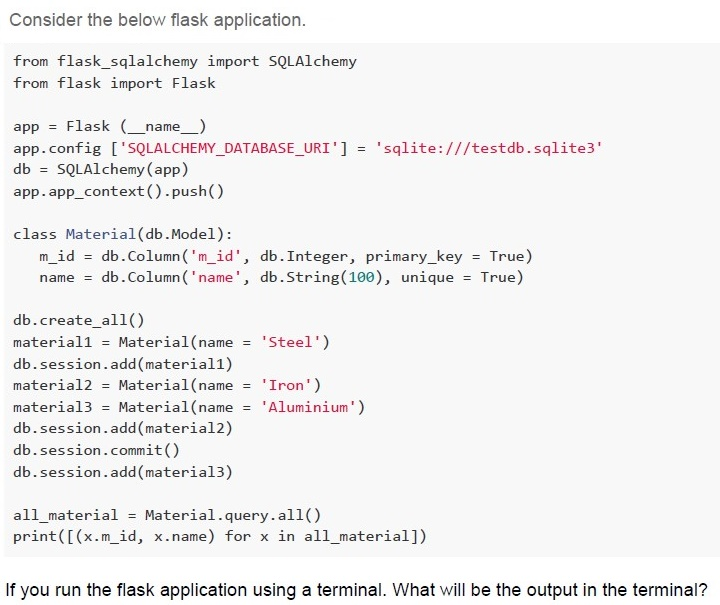
Text of the picture (copyable)
Consider the below flask application.

```python
from flask_sqlalchemy import SQLAlchemy
from flask import Flask

app = Flask (__name__)
app.config ['SQLALCHEMY_DATABASE_URI'] = 'sqlite:///testdb.sqlite3'
db = SQLAlchemy(app)
app.app_context().push()

class Material(db.Model):
    m_id = db.Column('m_id', db.Integer, primary_key = True)
    name = db.Column('name', db.String(100), unique = True)

db.create_all()
material1 = Material(name = 'Steel')
db.session.add(material1)
material2 = Material(name = 'Iron')
material3 = Material(name = 'Aluminium')
db.session.add(material2)
db.session.commit()
db.session.add(material3)

all_material = Material.query.all()
print([(x.m_id, x.name) for x in all_material])
```

If you run the flask application using a terminal. What will be the output in the terminal?
text
```
[(1, 'Steel'), (2, 'Iron')] will be displayed in the terminal and two records will be added in the "testdb" database.
```

text
```
[(1, 'Steel'), (2, 'Iron'), (3, 'Aluminium')] will be displayed in the terminal
and three records will be added in the "testdb" database.
```

text
```
[(1, 'Steel'), (2, 'Iron'), (3, 'Aluminium')] will be displayed in the terminal
and two records will be added in the "testdb" database.
```

text
```
[(1, 'Steel', 2, 'Iron', 3, 'Aluminium')] will be displayed in the terminal and
two records will be added in the "testdb" database.
```
Consider the following flask application.
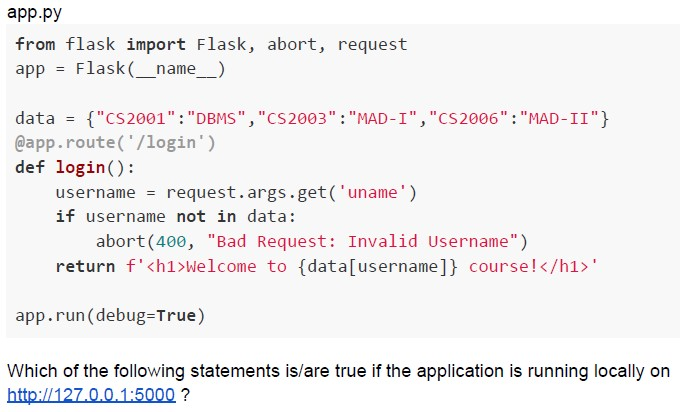 Consider the following flask application.
Consider the following flask application. Text of the picture (copyable)
app.py
```python
from flask import Flask, abort, request
app = Flask(__name__)

data = {"CS2001":"DBMS", "CS2003":"MAD-I", "CS2006":"MAD-II"}
@app.route('/login')
def login():
    username = request.args.get('uname')
    if username not in data:
        abort(400, "Bad Request: Invalid Username")
    return f'<h1>Welcome to {data[username]} course!</h1>'

app.run(debug=True)
```

Which of the following statements is/are true if the application is running locally on http://127.0.0.1:5000 ?
text
For URL http://127.0.0.1:5000?uname=CS2001 the browser will render
**Welcome to DBMS course!**

text
For URL http://127.0.0.1:5000/login the browser will render
**Welcome to MAD-I course!**

text
For URL http://127.0.0.1:5000/login?uname the browser will render
Bad Request: Invalid Username

text
For URL http://127.0.0.1:5000/login?uname=CS2006 the browser will
render **Welcome to MAD-II course!**
Text of the picture (copyable)
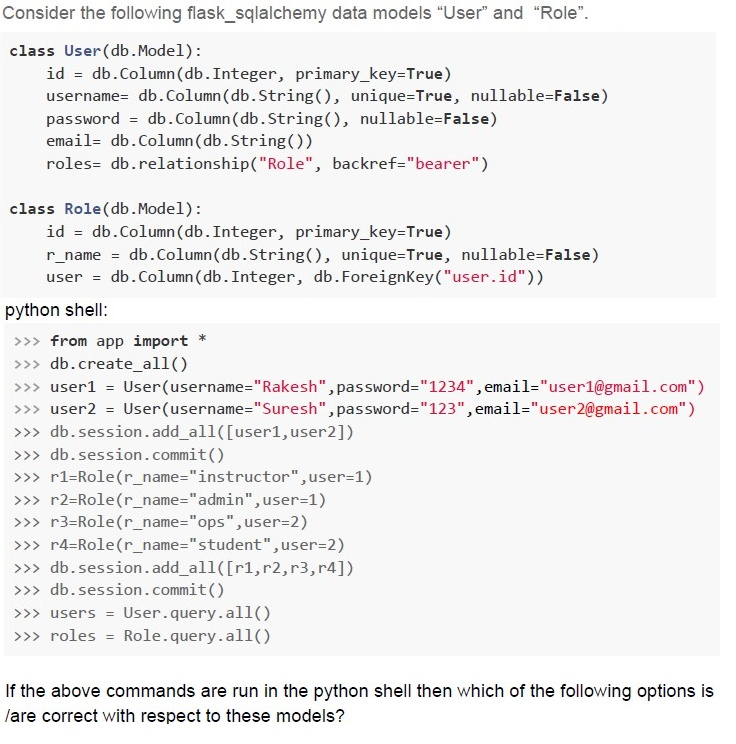
Consider the following flask_sqlalchemy data models "User" and "Role".

```python
class User(db.Model):
    id = db.Column(db.Integer, primary_key=True)
    username = db.Column(db.String(), unique=True, nullable=False)
    password = db.Column(db.String(), nullable=False)
    email = db.Column(db.String())
    roles = db.relationship("Role", backref="bearer")

class Role(db.Model):
    id = db.Column(db.Integer, primary_key=True)
    r_name = db.Column(db.String(), unique=True, nullable=False)
    user = db.Column(db.Integer, db.ForeignKey("user.id"))
```

python shell:
```python
>>> from app import *
>>> db.create_all()
>>> user1 = User(username="Rakesh",password="1234",email="user1@gmail.com")
>>> user2 = User(username="Suresh",password="123",email="user2@gmail.com")
>>> db.session.add_all([user1,user2])
>>> db.session.commit()
>>> r1=Role(r_name="instructor",user=1)
>>> r2=Role(r_name="admin",user=1)
>>> r3=Role(r_name="ops",user=2)
>>> r4=Role(r_name="student",user=2)
>>> db.session.add_all([r1,r2,r3,r4])
>>> db.session.commit()
>>> users = User.query.all()
>>> roles = Role.query.all()
```

If the above commands are run in the python shell then which of the following options is
/are correct with respect to these models?
text
Command: >>> users
Output: ["Ramesh", "Suresh"]
text
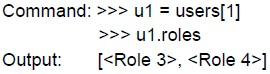
Command:
```
>>> u1 = users[1]
>>> u1.roles
```
Output:
```
[<Role 3>, <Role 4>]
```
text
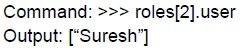
Command:
```
>>> roles[2].user
```
Output:
```
["Suresh"]
```
text
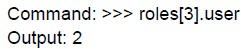
Command: >>> roles[3].user
Output: 2

text
```
Command: >>> roles[0].bearer
Output: <User 1>
```
Text of the picture (copyable)
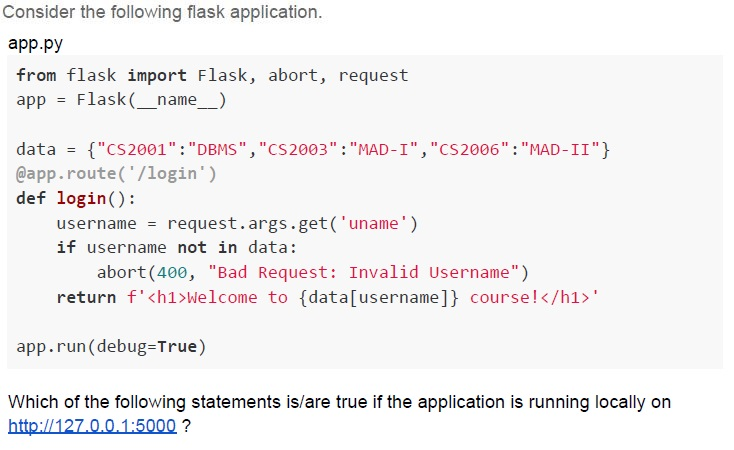
Consider the following flask application.

app.py
```python
from flask import Flask, abort, request
app = Flask(__name__)

data = {"CS2001":"DBMS", "CS2003":"MAD-I", "CS2006":"MAD-II"}
@app.route('/login')
def login():
    username = request.args.get('uname')
    if username not in data:
        abort(400, "Bad Request: Invalid Username")
    return f'<h1>Welcome to {data[username]} course!</h1>'

app.run(debug=True)
```

Which of the following statements is/are true if the application is running locally on
http://127.0.0.1:5000 ?
text
For URL http://127.0.0.1:5000/login?uname=CS2003 the browser will
render **Welcome to MAD-I course!**

text
For URL http://127.0.0.1:5000/login the browser will render
**Welcome to MAD-I course!**

text
For URL http://127.0.0.1:5000/login?uname the browser will render
Bad Request: Invalid Username

text
For URL http://127.0.0.1:5000/uname=CS2006 the browser will render
**Welcome to MAD-II course!**
Text of the picture (copyable)
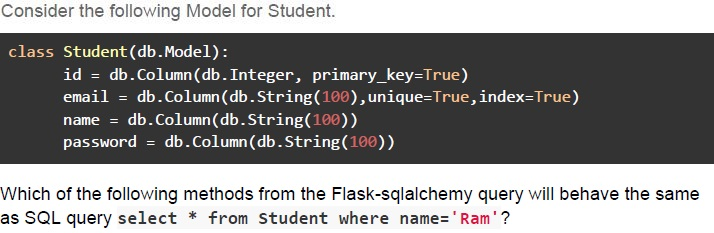
Consider the following Model for Student.

```python
class Student(db.Model):
    id = db.Column(db.Integer, primary_key=True)
    email = db.Column(db.String(100),unique=True,index=True)
    name = db.Column(db.String(100))
    password = db.Column(db.String(100))
```

Which of the following methods from the Flask-sqlalchemy query will behave the same
as SQL query `select * from student where name='Ram'`?
text
```python
Student.query.filter_by('Ram').all()
```
text
```python
Student.query.get(name = 'Ram').all()
```

text
```python
Student.query.filter_by(name = 'Ram').all()
```

text
```python
Student.query.filter(Student.name = 'Ram').all()
```
Text of the picture (copyable)
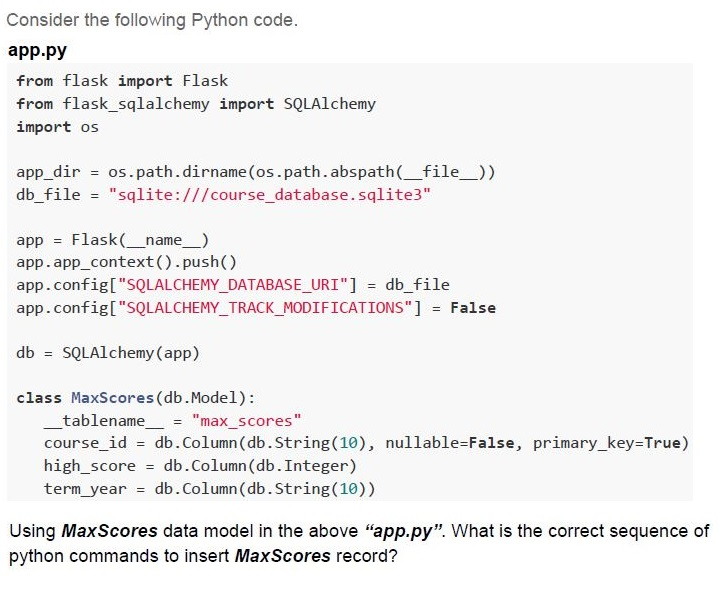
Consider the following Python code.

**app.py**
```python
from flask import Flask
from flask_sqlalchemy import SQLAlchemy
import os

app_dir = os.path.dirname(os.path.abspath(__file__))
db_file = "sqlite:///course_database.sqlite3"

app = Flask(__name__)
app.app_context().push()
app.config["SQLALCHEMY_DATABASE_URI"] = db_file
app.config["SQLALCHEMY_TRACK_MODIFICATIONS"] = False

db = SQLAlchemy(app)

class MaxScores(db.Model):
    __tablename__ = "max_scores"
    course_id = db.Column(db.String(10), nullable=False, primary_key=True)
    high_score = db.Column(db.Integer)
    term_year = db.Column(db.String(10))
```
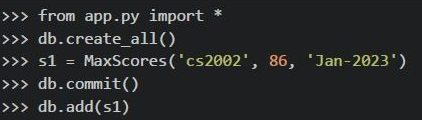
Using *MaxScores* data model in the above “*app.py*”. What is the correct sequence of python commands to insert *MaxScores* record?
text
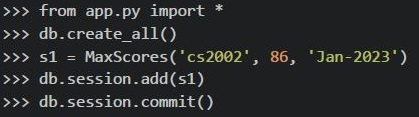
```python
>>> from app.py import *
>>> db.create_all()
>>> s1 = MaxScores(course_id='cs2002', high_score=86, term_year='Jan-2023')
>>> db.session.add(s1)
>>> db.session.commit()
```
text
```python
>>> from app.py import *
>>> db.create_all()
>>> s1 = MaxScores('cs2002', 86, 'Jan-2023')
>>> db.session.add(s1)
>>> db.session.commit()
```
text
```python
>>> from app.py import *
>>> db.create_all()
>>> s1 = MaxScores('cs2002', 86, 'Jan-2023')
>>> db.commit()
>>> db.add(s1)
```
text
```python
>>> from app.py import *
>>> db.create_all()
>>> s1 = MaxScores(course_id='cs2002',high_score=86,term_year='Jan-2023')
>>> db.session.commit()
>>> db.session.add(s1)
```
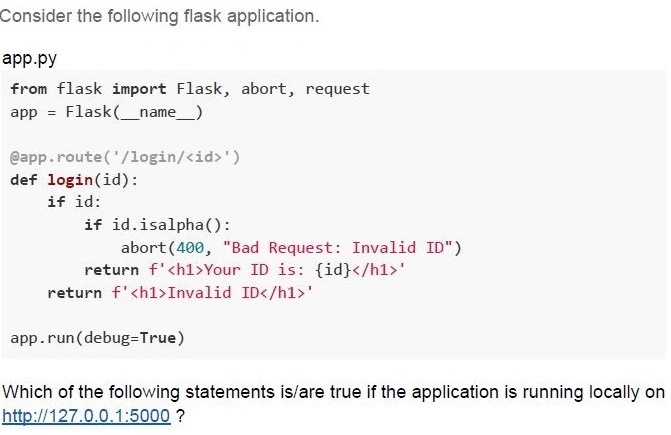
Text of the picture (copyable)
Consider the following flask application.

app.py
```python
from flask import Flask, abort, request
app = Flask(__name__)

@app.route('/login/<id>')
def login(id):
    if id:
        if id.isalpha():
            abort(400, "Bad Request: Invalid ID")
        return f'<h1>Your ID is: {id}</h1>'
    return f'<h1>Invalid ID</h1>'

app.run(debug=True)
```

Which of the following statements is/are true if the application is running locally on http://127.0.0.1:5000 ?
text
For URL http://127.0.0.1:5000/login?id=MAD-I the browser will render
Bad Request: Invalid ID

text
For URL http://127.0.0.1:5000/login/ the browser will render
Invalid ID

text
For URL http://127.0.0.1:5000/login/CS2003 the browser will render
Your ID is: CS2003

text
For URL http://127.0.0.1:5000/login/PDSA the browser will render Bad
Request: Invalid ID
Consider the following HTML Document and select the correct statement(s) from the following if a user types the password “mad1password” in the password field letter by letter.
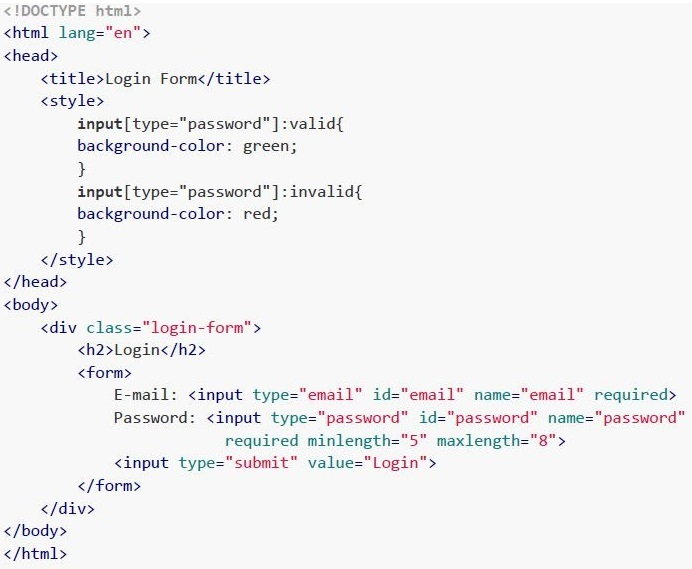 Consider the following HTML Document and select the correct statement(s) from the following if a user types the password “mad1password” in the password field letter by letter.
Consider the following HTML Document and select the correct statement(s) from the following if a user types the password “mad1password” in the password field letter by letter. Text of the picture (copyable)
```html
<!DOCTYPE html>
<html lang="en">
<head>
    <title>Login Form</title>
    <style>
        input[type="password"]:valid{
            background-color: green;
        }
        input[type="password"]:invalid{
            background-color: red;
        }
    </style>
</head>
<body>
    <div class="login-form">
        <h2>Login</h2>
        <form>
            E-mail: <input type="email" id="email" name="email" required>
            Password: <input type="password" id="password" name="password"
            required minlength="5" maxlength="8">
            <input type="submit" value="Login">
        </form>
    </div>
</body>
</html>
```- The HTML form is integrated with backend validation.
- The HTML form is integrated with Frontend HTML5 validation.
- The background colour of the password field remains red for the first 4 letters,then turns green for the next 4 letters, and then again turns red for the remaining letters.
- The background colour of the password field remains red for the first 4 letters,then turns green for the next 4 letters, and then remains green for the remaining allowable letters.

Text of the picture (copyable)
Consider that there are two HTML files.
i) index.html - Home page of the application
ii) login.html - Login page of the application
Which of the following code will navigate the user between **index.html** and **login.html**, and vice versa?
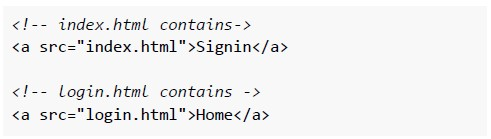
text
```html
<!-- index.html contains-->
<a src="index.html">Signin</a>

<!-- login.html contains -->
<a src="login.html">Home</a>
```
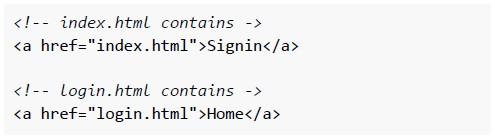
text
```html
<!-- index.html contains ->
<a href="index.html">Signin</a>

<!-- login.html contains ->
<a href="login.html">Home</a>
```
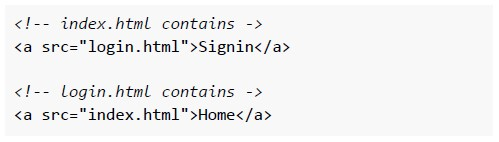
text
```html
<!-- index.html contains ->
<a src="login.html">Signin</a>

<!-- login.html contains ->
<a src="index.html">Home</a>
```
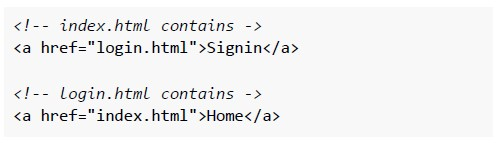
text
```html
<!-- index.html contains ->
<a href="login.html">Signin</a>

<!-- login.html contains ->
<a href="index.html">Home</a>
```
Which of the following is true about the term “stateful” in the client-server model?
- The server responds to the client based on the previous state.
- The server uses FTP protocol to respond to the client's request.
- Network performance may reduce because of the large amount of data sentout repetitively.
- Server is not required to maintain any state of client or session duringtransactions between client and server.
Which of the following is true about the term “stateless” in the client-server model?
- The server responds to the client based on the previous state.
- The server uses FTP protocol to respond to the client's request.
- Server use the URL to convey information to the client.
- Server is not required to maintain any state of client or session duringtransactions between client and server.
Consider the below statements about Cookies: Statement 1: Cookies enable the web app to recognize the users Statement 2: Cookies can include information about location, login data, and language etc., Which of the below is the correct option?
- Statement 1 is correct and Statement 2 is incorrect
- Statement 1 is incorrect and Statement 2 is correct
- Both Statement 1 and Statement 2 are correct
- Both Statement 1 and Statement 2 are incorrect