Home / Past papers / MAD1 Quiz 2 / this paper
Modern Application Development I 06 Apr 26 - 12 Apr 2026
Elapsed 00:00
You want to create an app where students can log in and download hall tickets. To make this more efficient, you want to have some very quick way to check whether a given user has already downloaded their hall ticket or not. Which kind of database will you prefer?
- RDBMS
- Doc-oriented database
- Graph database
- Key-value store
Which of the following enables asynchronous communication between client and server without loading the entire web page?
- CGI
- FTP
- SMTP
- AJAX
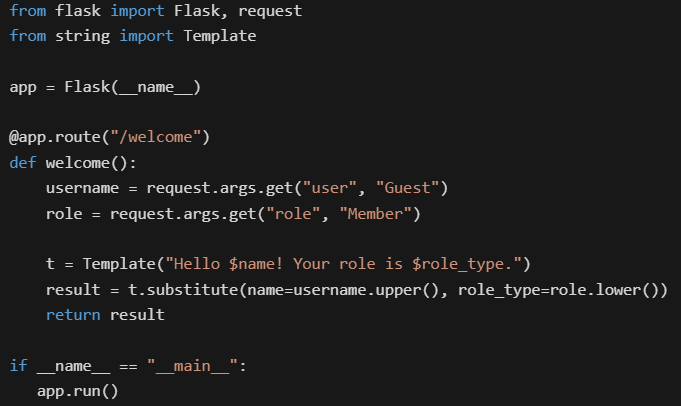
Consider the following Flask application.

Text of the picture (copyable)
```python
from flask import Flask, request
from string import Template

app = Flask(__name__)

@app.route("/welcome")
def welcome():
    username = request.args.get("user", "Guest")
    role = request.args.get("role", "Member")

    t = Template("Hello $name! Your role is $role_type.")
    result = t.substitute(name=username.upper(), role_type=role.lower())
    return result

if __name__ == "__main__":
    app.run()
```
Assume that the Flask app is running at http://127.0.0.1:5000. What will be the rendered output in the browser for the URL: http://127.0.0.1:5000/welcome?user=Alice&role=ADMIN
text
It raises a KeyError because `$role_type` is missing in the URL.
- Hello Guest! Your role is member.
- Hello Alice! Your role is ADMIN.
- Hello ALICE! Your role is admin.
Consider the following Python code.
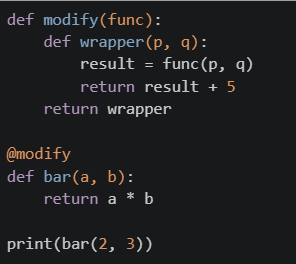 Which of the following is the correct output of the above code?
Which of the following is the correct output of the above code?Text of the picture (copyable)
```python
def modify(func):
    def wrapper(p, q):
        result = func(p, q)
        return result + 5
    return wrapper

@modify
def bar(a, b):
    return a * b

print(bar(2, 3))
```- 56
- 11
- 6
- 30
A server has a 16-core CPU, 64 GB RAM and 1 Gbps network connection. The server is running a single instance of an app that can generate a maximum of 500 HTML pages per second, each of which results in a 100KB image to be downloaded by the client. What is the maximum number of requests per second that can be handled by this setup?
- 10,000
- 1250
- 1000
- 500
A web server is connected to a 5Mbps network line. Each HTTP request contains 4KB of header information and 6KB of payload. What is the maximum number of requests per second the web server can support?(Note: 1KB=1000B, 1MB=1000KB and so on)
- 500
- 62
- 124
- 31
Consider the following HTML/CSS code.
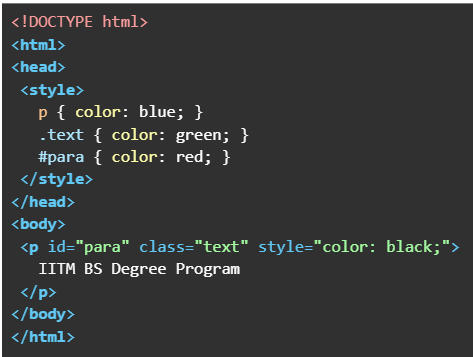 What will be the output when the above HTML file is rendered?
What will be the output when the above HTML file is rendered?Text of the picture (copyable)
```html
<!DOCTYPE html>
<html>
<head>
<style>
    p { color: blue; }
    .text { color: green; }
    #para { color: red; }
</style>
</head>
<body>
<p id="para" class="text" style="color: black;">
    IITM BS Degree Program
</p>
</body>
</html>
```
text
IITM BS Degree Program

text
IITM BS Degree Program

text
IITM BS Degree Program

text
IITM BS Degree Program
You have a DRAM module with bus width of 64 bits, clock speed of 1 GHz, and operating in DDR (double-data-rate or two values per clock cycle) mode. What is the maximum bandwidth (in Giga-bytes per second) of data transfer achievable with this module?
- 8 GigaBytes/s
- 16 GigaBytes/s
- 24 GigaBytes/s
- None of these
Which of the following flask routes can take dynamic value in the URL like “/user/55”?

text
```python
@app.route("/user/id")
```
text
```python
@app.route("/user/<int:id>")
```
text
```python
@app.route("/user/<id>")
```
text
```python
@app.route("/user/<float:id>")
```
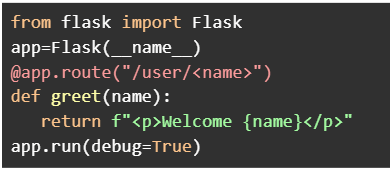
Consider the following Python Flask code.

Text of the picture (copyable)
```python
from flask import Flask
app=Flask(__name__)
@app.route("/user/<name>")
def greet(name):
    return f"<p>Welcome {name}</p>"
app.run(debug=True)
```
Assume that the Flask app is running at http://127.0.0.1:5000. Which of the following URL requests will render the output without any errors?- http://127.0.0.1:5000/user/IITM
- http://127.0.0.1:5000/user/101
- http://127.0.0.1:5000/user/10/greet
- http://127.0.0.1:5000/user
- http://127.0.0.1:5000/user/BS?id=101
Consider the following HTML and Python Flask code.
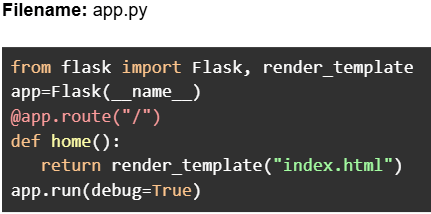
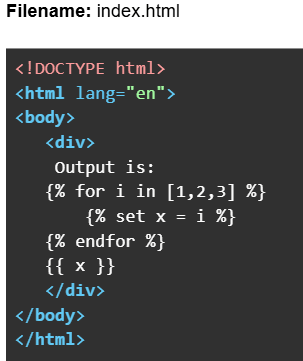

Text of the picture (copyable)
Filename: app.py

```python
from flask import Flask, render_template
app=Flask(__name__)
@app.route("/")
def home():
    return render_template("index.html")
app.run(debug=True)
```
Filename: index.html

```html
<!DOCTYPE html>
<html lang="en">
<body>
    <div>
        Output is:
        {% for i in [1,2,3] %}
            {% set x = i %}
        {% endfor %}
        {{ x }}
    </div>
</body>
</html>
```
Assume that the Flask app is running at http://127.0.0.1:5000. What will be the rendered output
in the browser for the URL: http://127.0.0.1:5000?- Output is: 3
- Output is:
- Output is: 1 2 3
- Output is: 1 2 3 3
Consider the following HTML code.
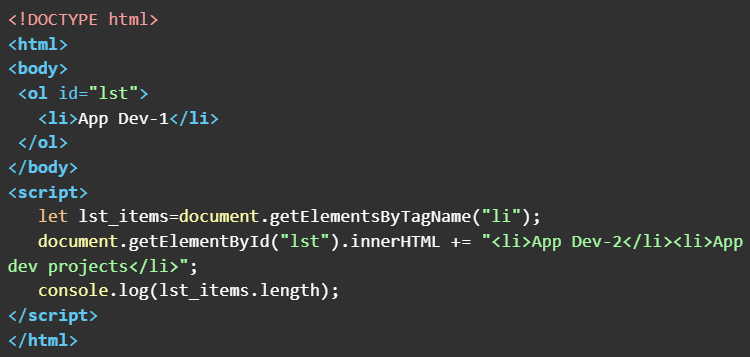 What will be the output in the console window when the above HTML doc is rendered on the browser ?
What will be the output in the console window when the above HTML doc is rendered on the browser ?Text of the picture (copyable)
```html
<!DOCTYPE html>
<html>
<body>
    <ol id="lst">
        <li>App Dev-1</li>
    </ol>
</body>
<script>
    let lst_items=document.getElementsByTagName("li");
    document.getElementById("lst").innerHTML += "<li>App Dev-2</li><li>App dev projects</li>";
    console.log(lst_items.length);
</script>
</html>
```- 1
- 2
- 3
- 4
Consider the following Python Flask code.
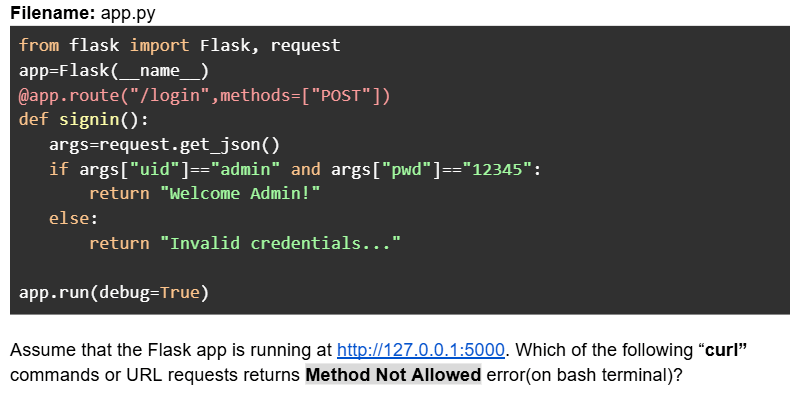
Text of the picture (copyable)
Filename: app.py

```python
from flask import Flask, request
app=Flask(__name__)
@app.route("/login",methods=["POST"])
def signin():
    args=request.get_json()
    if args["uid"]=="admin" and args["pwd"]=="12345":
        return "Welcome Admin!"
    else:
        return "Invalid credentials..."

app.run(debug=True)
```

Assume that the Flask app is running at http://127.0.0.1:5000. Which of the following "curl" commands or URL requests returns Method Not Allowed error(on bash terminal)?- curl -X POST --json '{"uid":"admin","pwd":"xyz"}' http://127.0.0.1:5000/login
- curl -X GET --json '{"uid":"admin","pwd":"xyz"}' http://127.0.0.1:5000/login
- URL request: http://127.0.0.1:5000/login
- curl --json '{"uid":"admin","pwd":"12345"}' http://127.0.0.1:5000/login
- curl -X POST --json '{"uid":"admin","pwd":"12345"}' http://127.0.0.1:5000/login
Consider the following Python Flask RESTful API code.
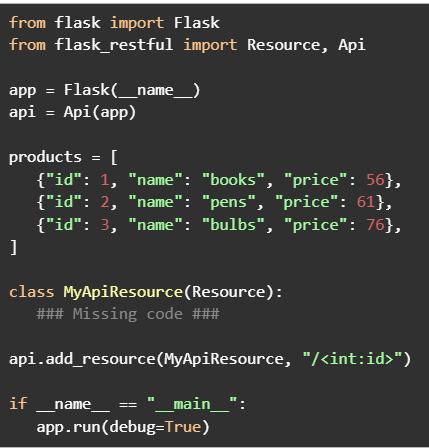

Text of the picture (copyable)
```python
from flask import Flask
from flask_restful import Resource, Api

app = Flask(__name__)
api = Api(app)

products = [
    {"id": 1, "name": "books", "price": 56},
    {"id": 2, "name": "pens", "price": 61},
    {"id": 3, "name": "bulbs", "price": 76},
]

class MyApiResource(Resource):
    ### Missing code ###

api.add_resource(MyApiResource, "/<int:id>")

if __name__ == "__main__":
    app.run(debug=True)
```
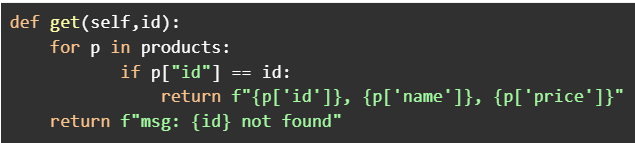
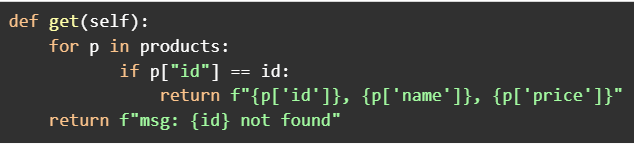
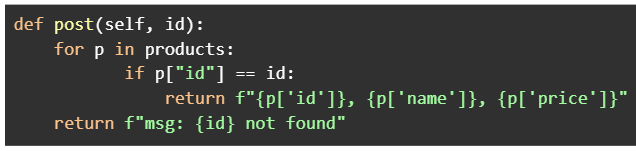
Assume that the Flask app is running at http://127.0.0.1:5000. Which of the following codes when placed at ###Missing code ### will work correctly to search a product by id?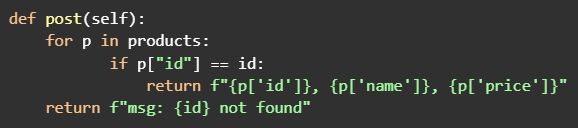
text
```python
def post(self):
    for p in products:
        if p["id"] == id:
            return f"{p['id']}, {p['name']}, {p['price']}"
    return f"msg: {id} not found"
```
text
```python
def get(self,id):
    for p in products:
        if p["id"] == id:
            return f"{p['id']}}, {p['name']}}, {p['price']}}"
    return f"msg: {id} not found"
```
text
```python
def get(self):
    for p in products:
        if p["id"] == id:
            return f"{p['id']}, {p['name']}, {p['price']}"
    return f"msg: {id} not found"
```
text
```python
def post(self, id):
    for p in products:
        if p["id"] == id:
            return f"{p['id']}, {p['name']}, {p['price']}"
    return f"msg: {id} not found"
```
Comprehension passage - the questions below it refer to this
Consider the following SQLAlchemy class models.
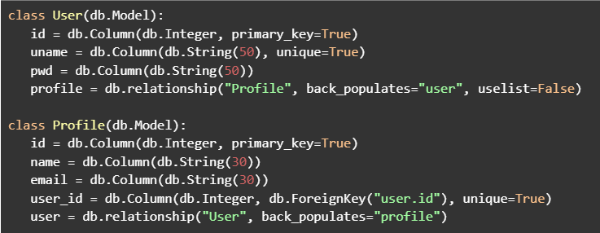 Based on the above data, answer the given subquestions.
Which of the following relationships exists between the “User” and “Profile” models?
- Many-to-Many
- Many-to-One
- One-to-Many
- One-to-One
What will be the output if the following commands are executed in the python shell.
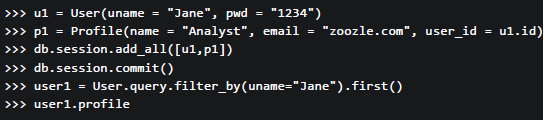
Text of the picture (copyable)
```python
>>> u1 = User(uname = "Jane", pwd = "1234")
>>> p1 = Profile(name = "Analyst", email = "zoozle.com", user_id = u1.id)
>>> db.session.add_all([u1,p1])
>>> db.session.commit()
>>> user1 = User.query.filter_by(uname="Jane").first()
>>> user1.profile
```

text
<User 1>

text
```
[<Profile 1>]
```

text
```html
<Profile 1>
```

text
```
'Analyst'
```
Answer key
- Q1 (MCQ, 2 marks): D
- Q2 (MCQ, 2 marks): D
- Q3 (MCQ, 3 marks): D
- Q4 (MCQ, 3 marks): B
- Q5 (MCQ, 3 marks): D
- Q6 (MCQ, 3 marks): B
- Q7 (MCQ, 3 marks): C
- Q8 (MCQ, 3 marks): B
- Q9 (MSQ, 2 marks): B, C
- Q10 (MSQ, 2 marks): A, B, E
- Q11 (MCQ, 4 marks): B
- Q12 (MCQ, 4 marks): C
- Q13 (MSQ, 5 marks): B, C
- Q14 (MSQ, 5 marks): B, D
- Q15 (MCQ, 3 marks): D
- Q16 (MCQ, 3 marks): C