Home / MAD2 / Week 11 / Real questions
MAD2 week 11 - real exam questions
60 questions pulled from past papers whose wording matches this week's topics, newest first, duplicates removed. Pick your answers, then press Check answers. Figures and answer keys are the originals.
Elapsed 00:00
Match the performance metric in Column I with the most appropriate description in Column II.
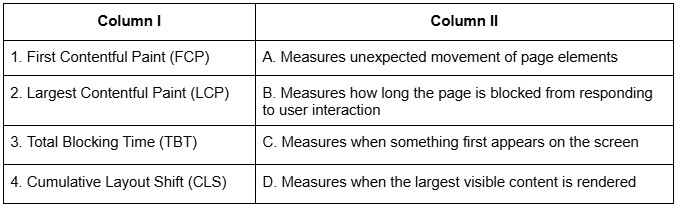
Text of the picture (copyable)
| Column I | Column II |
|---|---|
| 1. First Contentful Paint (FCP) | A. Measures unexpected movement of page elements |
| 2. Largest Contentful Paint (LCP) | B. Measures how long the page is blocked from responding to user interaction |
| 3. Total Blocking Time (TBT) | C. Measures when something first appears on the screen |
| 4. Cumulative Layout Shift (CLS) | D. Measures when the largest visible content is rendered |
- 1-C, 2-D, 3-B, 4-A
- 1-B, 2-C, 3-A, 4-D
- 1-C, 2-B, 3-D, 4-A
- 1-A, 2-B, 3-D, 4-C
What is logged to the console after running the following code?
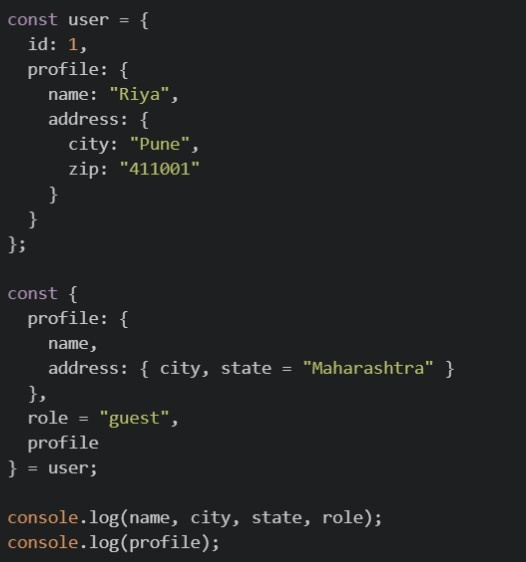
Text of the picture (copyable)
```javascript
const user = {
  id: 1,
  profile: {
    name: "Riya",
    address: {
      city: "Pune",
      zip: "411001"
    }
  }
};

const {
  profile: {
    name,
    address: { city, state = "Maharashtra" }
  },
  role = "guest",
  profile
} = user;

console.log(name, city, state, role);
console.log(profile);
```

text
Riya Pune Maharashtra guest ``` { name: "Riya", address: { city: "Pune", zip: "411001" } } ```-

text
Riya Pune Maharashtra guest
undefined


text
``` undefined undefined Maharashtra guest ``` ```json { "name": "Riya", "address": { ...} } ```- This code throws a
 , because you cannot destructure profile into nested variables and also assign it to a plain variable profile in the same statement.
text
SyntaxError
Which of the following are valid capabilities of Lighthouse while analyzing a website?
- Measuring performance metrics such as FCP, LCP and TBT
- Simulating slow networks and throttled conditions
- Automatically fixing accessibility and SEO issues in the source code
- Emulating mobile and desktop devices
What is the main advantage of using JWT over session-based authentication?
- JWTs require server-side storage for each session.
- JWTs are stateless and eliminate the need for server-side session storage.
- JWTs are longer and contain more data than session IDs.
- JWTs automatically handle token expiration without additional logic.
A JWT (JSON Web Token) is represented in the format:  .In authentication using Flask-JWT-Extended, what does the payload part of the JWT stores?
.In authentication using Flask-JWT-Extended, what does the payload part of the JWT stores?Text of the picture (copyable)
```
"header.payload.signature"
```
- Encryption keys used to secure the token
- User-related data (claims) such as identity and expiration time
- The algorithm used for signing the token
- The hashed signature of the token
What happens when this Flask caching code runs?
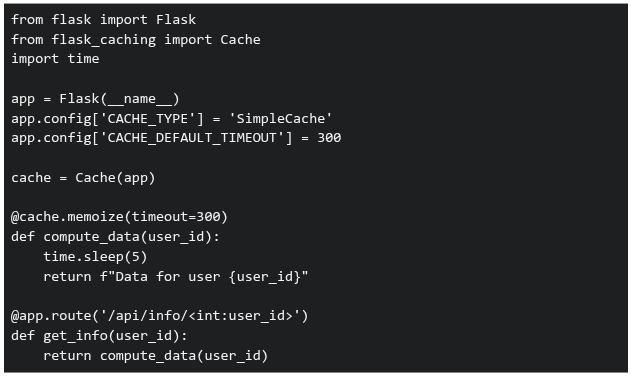 If requests for user IDs 1, 2, 1 are made within 5 minutes, what's the total response time?
If requests for user IDs 1, 2, 1 are made within 5 minutes, what's the total response time?Text of the picture (copyable)
```python
from flask import Flask
from flask_caching import Cache
import time

app = Flask(__name__)
app.config['CACHE_TYPE'] = 'SimpleCache'
app.config['CACHE_DEFAULT_TIMEOUT'] = 300

cache = Cache(app)

@cache.memoize(timeout=300)
def compute_data(user_id):
    time.sleep(5)
    return f"Data for user {user_id}"

@app.route('/api/info/<int:user_id>')
def get_info(user_id):
    return compute_data(user_id)
```- 15 seconds
- 10 seconds
- 5 seconds
- 0 seconds
In a Single Page Application (SPA), what are the benefits of client-side routing over server-side routing?
- Slower navigation between pages
- Reduced load on the backend server
- Better SEO performance by default
- Seamless page transitions without full reloads
Which of the following is the correct statement?
- Cookie size can impact the website performance.
- Cookie size does not affect performance in any practical/meaningful sense.
- A request to static.example.com will include cookies set for example.com.
- A request to static.example.com will not include cookies set for example.com.
Consider the flask application app.py and an HTML file index.html:
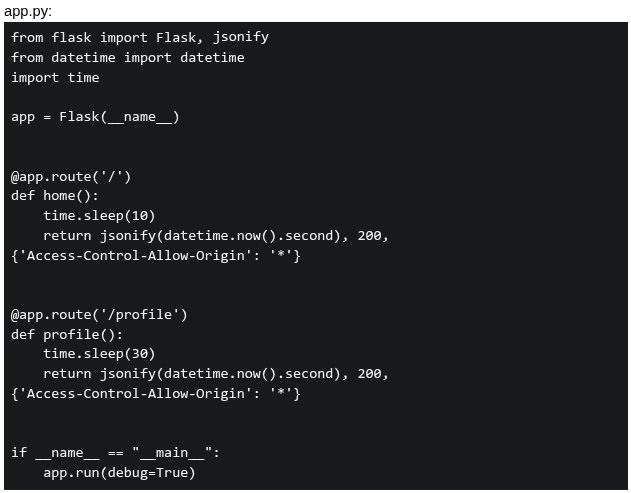 If a user visit index.html at 10:10:10 AM, what will be logged in the console?
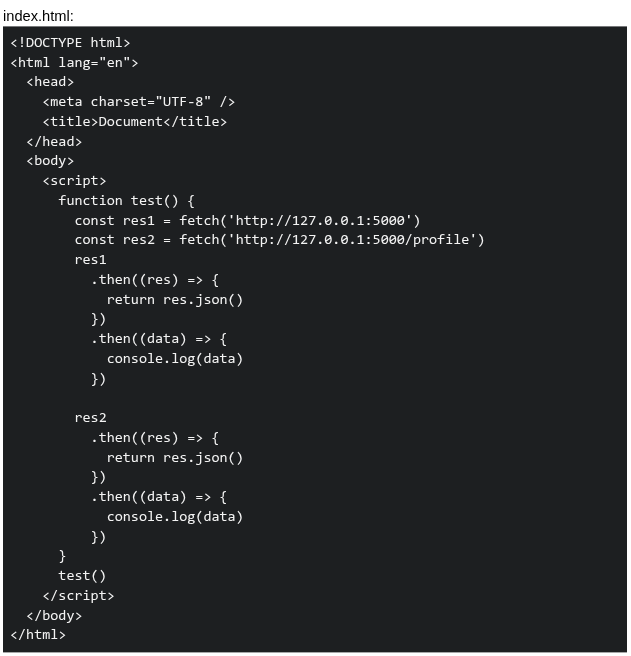
If a user visit index.html at 10:10:10 AM, what will be logged in the console?
Text of the picture (copyable)
app.py:
```python
from flask import Flask, jsonify
from datetime import datetime
import time

app = Flask(__name__)

@app.route('/')
def home():
    time.sleep(10)
    return jsonify(datetime.now().second), 200, \
        {'Access-Control-Allow-Origin': '*'}

@app.route('/profile')
def profile():
    time.sleep(30)
    return jsonify(datetime.now().second), 200, \
        {'Access-Control-Allow-Origin': '*'}

if __name__ == "__main__":
    app.run(debug=True)
```
index.html:
```html
<!DOCTYPE html>
<html lang="en">
<head>
    <meta charset="UTF-8" />
    <title>Document</title>
</head>
<body>
    <script>
        function test() {
            const res1 = fetch('http://127.0.0.1:5000')
            const res2 = fetch('http://127.0.0.1:5000/profile')
            res1
                .then((res) => {
                    return res.json()
                })
                .then((data) => {
                    console.log(data)
                })

            res2
                .then((res) => {
                    return res.json()
                })
                .then((data) => {
                    console.log(data)
                })
        }
        test()
    </script>
</body>
</html>
```- 20, 50
- 20, 40
- 40, 40
- 50, 50
Comprehension passage for this question
Consider the following Vue.js application:
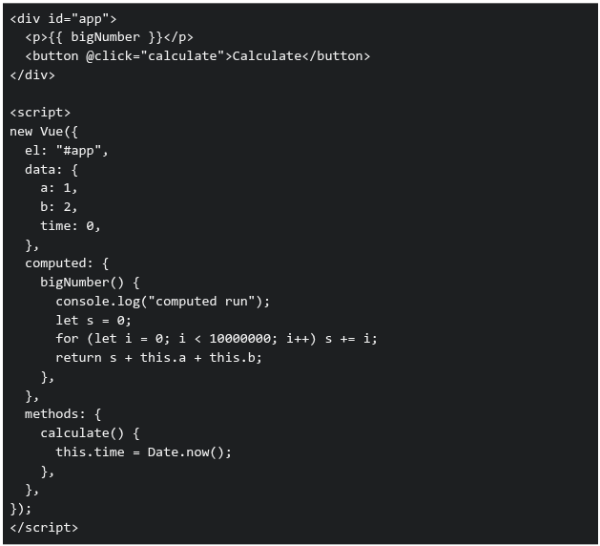 Based on the above data, answer the given subquestions.
Why is  defined as a computed property instead of a method?
defined as a computed property instead of a method?Text of the picture (copyable)
```
bigNumber()
```
- Computed properties are always faster than methods
- Methods cannot access data properties
- Computed properties are cached based on their dependencies
- Computed properties run only once
Consider the following Vue.js application with two different route scenarios and a component that uses reactive data binding: Scenario: An e-commerce application where: Product list component displays products filtered by category• Category changes through router parameters: /products/:category• When a user navigates from /products/electronics to /products/books, the product list should update • Component Code:
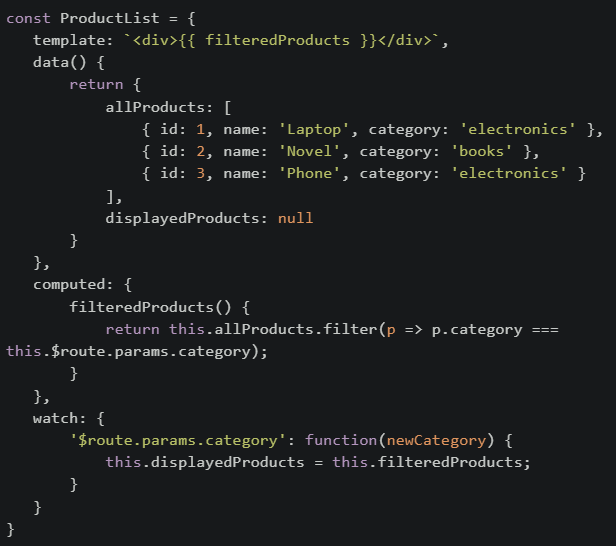 If the developer changed the template to use displayedProducts instead of filteredProducts, What would be the most likely issue?
If the developer changed the template to use displayedProducts instead of filteredProducts, What would be the most likely issue?Text of the picture (copyable)
```javascript
const ProductList = {
  template: `<div>{{ filteredProducts }}</div>`,
  data() {
    return {
      allProducts: [
        { id: 1, name: 'Laptop', category: 'electronics' },
        { id: 2, name: 'Novel', category: 'books' },
        { id: 3, name: 'Phone', category: 'electronics' }
      ],
      displayedProducts: null
    }
  },
  computed: {
    filteredProducts() {
      return this.allProducts.filter(p => p.category ===
        this.$route.params.category);
    }
  },
  watch: {
    '$route.params.category': function(newCategory) {
      this.displayedProducts = this.filteredProducts;
    }
  }
}
```- Performance would improve because computed properties are slower than data
- The initial page load would show an empty list, and only after navigation would data appear correctly
- There would be no difference because both will update at the same time
- The application would crash because displayedProducts is reactive
In Vue 2 (CDN), which of the following correctly describes the timing of the beforeDestroy and destroyed lifecycle hooks?
- beforeDestroy runs after the component has been removed from the DOM, while destroyed runs before destruction.
- beforeDestroy runs just before the component is torn down and removed from the DOM, while destroyed runs after the component is fully destroyed.
- beforeDestroy runs when the component is first mounted, while destroyed runs before the component is removed.
- both hooks run only after the component is destroyed.
When comparing Redis with a typical API data store (like a relational database accessed through REST APIs), which of the following statements is true?
- Redis can only store strings, unlike API data stores which can handle complex structures.
- Redis is an in-memory data structure store, often used as a cache or message broker to complement API-based data stores.
- Redis is a relational database and queries data using SQL, just like an API data store.
- Redis is slower than API-based databases because it stores everything in memory.
A Vue Router application uses lazy-loaded route components. When a user navigates to a route with a dynamic parameter (e.g., /product/:id), and the computed property depends on this route parameter, what could be a potential issue if the component is not properly handling asynchronous operations?
- The component will throw a critical error and crash the application
- The computed property will return undefined because the component hasn't mounted yet
- The route parameter will not be accessible in the computed property
- The component will display data from the previously loaded route
In a web application using webhooks and Redis for real-time data synchronization: Scenario: An order management system where: • When an order is created, a webhook is sent to a notification service • Redis stores the current order cache • Multiple concurrent requests update the cache Which statements about this architecture are true?
- Webhooks guarantee that the notification service will process events in the exact order they were triggered
- Redis is suitable for this use case because it's an in-memory data structure store that provides fast access to cached data
- The webhook will automatically retry if the notification service is temporarily unavailable
- Webhooks use HTTP POST requests to communicate events asynchronously
Comprehension passage for this question
Consider the Vue application.
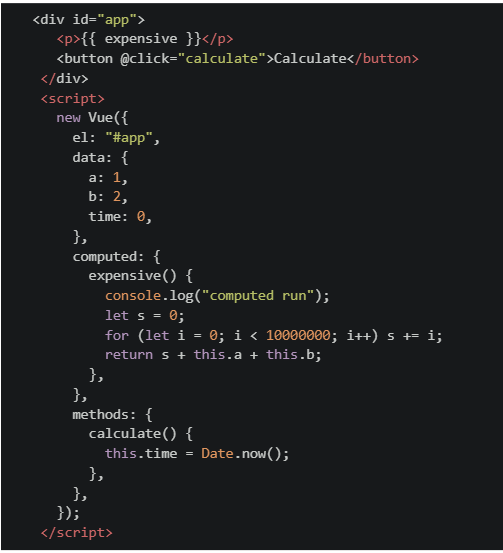 Based on the above data, answer the given subquestions.
What are the benefits of computed caching in Vue?
- Reduced CPU usage
- Faster rendering
- Avoids unnecessary recomputation
- Makes all computations asynchronous
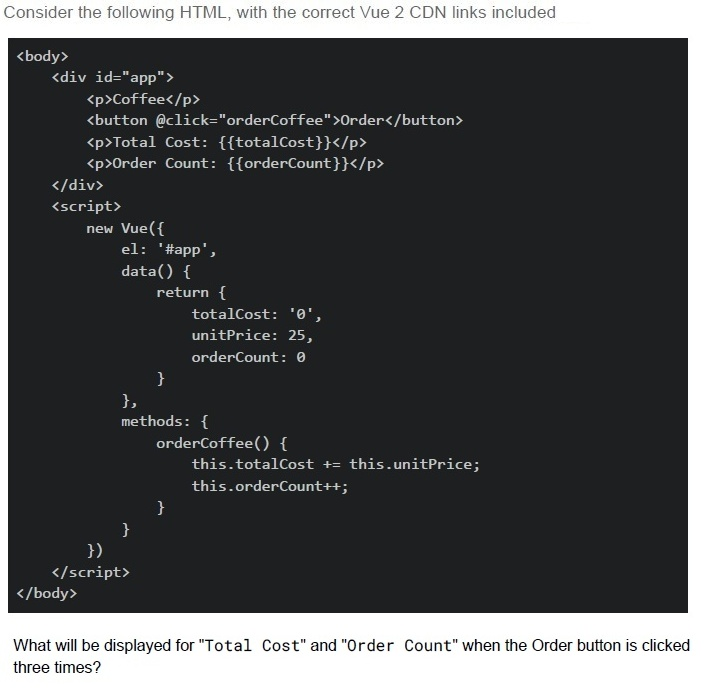
Text of the picture (copyable)
Consider the following HTML, with the correct Vue 2 CDN links included

```html
<body>
  <div id="app">
    <p>Coffee</p>
    <button @click="orderCoffee">Order</button>
    <p>Total Cost: {{totalCost}}</p>
    <p>Order Count: {{orderCount}}</p>
  </div>
  <script>
    new Vue({
      el: '#app',
      data() {
        return {
          totalCost: '0',
          unitPrice: 25,
          orderCount: 0
        }
      },
      methods: {
        orderCoffee() {
          this.totalCost += this.unitPrice;
          this.orderCount++;
        }
      }
    })
  </script>
</body>
```

What will be displayed for "Total Cost" and "Order Count" when the Order button is clicked three times?
text
Total Cost: 75, Order Count: 3

text
Total Cost: 02525, Order Count: 3

text
Total Cost: 252525, Order Count: 3

text
Total Cost: 0252525, Order Count: 3
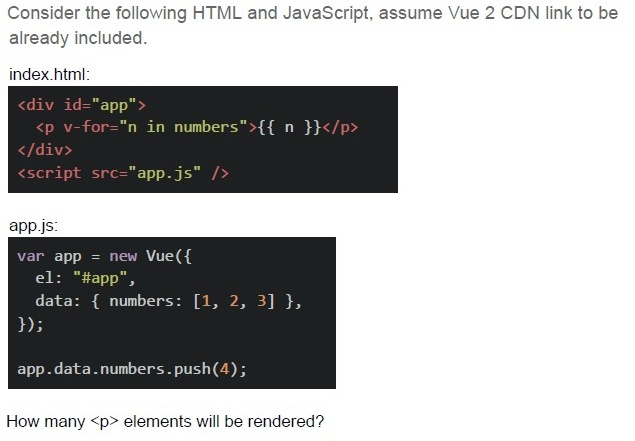
Text of the picture (copyable)
Consider the following HTML and JavaScript, assume Vue 2 CDN link to be already included.

index.html:
```html
<div id="app">
  <p v-for="n in numbers">{{ n }}</p>
</div>
<script src="app.js" ></script>
```

app.js:
```javascript
var app = new Vue({
  el: "#app",
  data: { numbers: [1, 2, 3] },
});

app.data.numbers.push(4);
```

How many `<p>` elements will be rendered?In Flask, what is the main benefit of using the @cache.cached() decorator?
- It stores output in session storage
- It enables token authentication
- It sends compressed response headers
- It skips route execution for repeated inputs
What is the primary purpose of CORS (Cross-Origin Resource Sharing)?
- To encrypt data between client and server
- To compress HTTP responses
- To authenticate users across applications
- To control which domains can access resources
Which of the following factors directly affect the speed and performance of a web page load?
- The number of CSS selectors in the stylesheet
- Use of semantic HTML tags
- Number of HTTP requests made
- File size of resources (like images, JS)
What is the main advantage of using caching in a Flask-based web application?
- It eliminates the need for client-side rendering
- It reduces server load by reusing responses for repeated requests
- It encrypts data transmission between server and client
- It avoids the need for database interactions completely
Which factors directly impact the Lighthouse "Performance" score?
- First Contentful Paint (FCP)
- Time to Interactive (TTI)
- Layout Shift
- HTTPS usage
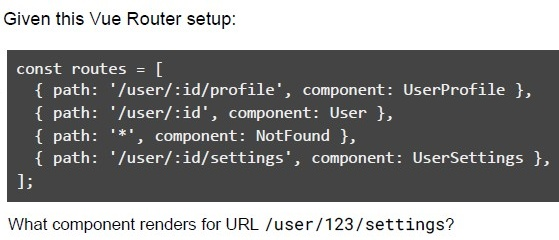
Text of the picture (copyable)
Given this Vue Router setup:

```javascript
const routes = [
  { path: '/user/:id/profile', component: UserProfile },
  { path: '/user/:id', component: User },
  { path: '*', component: NotFound },
  { path: '/user/:id/settings', component: UserSettings },
];
```

What component renders for URL /user/123/settings?- UserProfile
- User
- NotFound
- UserSettings
Comprehension passage for this question
Answer the given Subquestions:Consider the following Vue Router configuration in a Vue 2 application:
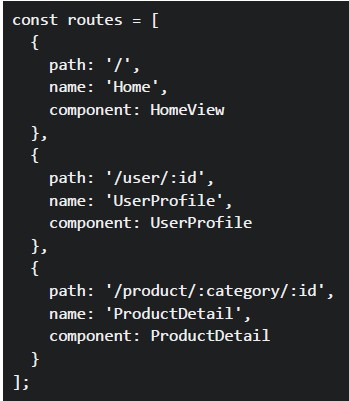 Consider the following Vue Router configuration in a Vue 2 application:
In a Vue component, you have these navigation methods:
Consider the following Vue Router configuration in a Vue 2 application:
In a Vue component, you have these navigation methods:
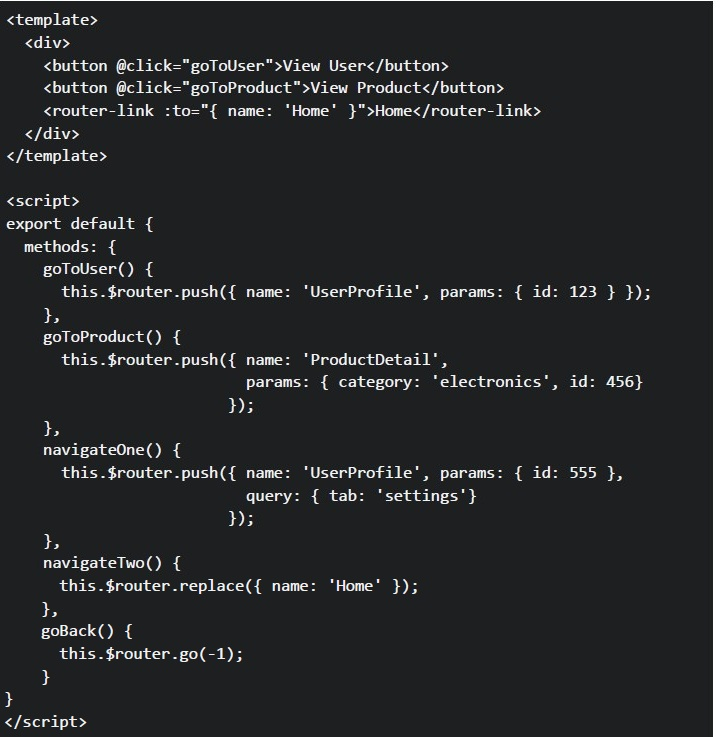 Consider the following Vue Router configuration in a Vue 2 application:
In a Vue component, you have these navigation methods: What URLs will be generated when the user clicks each navigation element?
Consider the following Vue Router configuration in a Vue 2 application:
In a Vue component, you have these navigation methods: What URLs will be generated when the user clicks each navigation element?
Consider the following Vue Router configuration in a Vue 2 application:
In a Vue component, you have these navigation methods:
Consider the following Vue Router configuration in a Vue 2 application:
In a Vue component, you have these navigation methods: What URLs will be generated when the user clicks each navigation element?Text of the picture (copyable)
```javascript
const routes = [
  {
    path: '/',
    name: 'Home',
    component: HomeView
  },
  {
    path: '/user/:id',
    name: 'UserProfile',
    component: UserProfile
  },
  {
    path: '/product/:category/:id',
    name: 'ProductDetail',
    component: ProductDetail
  }
];
```
```html
<template>
  <div>
    <button @click="goToUser">View User</button>
    <button @click="goToProduct">View Product</button>
    <router-link :to="{ name: 'Home' }">Home</router-link>
  </div>
</template>

<script>
export default {
  methods: {
    goToUser() {
      this.$router.push({ name: 'UserProfile', params: { id: 123 } });
    },
    goToProduct() {
      this.$router.push({ name: 'ProductDetail',
                           params: { category: 'electronics', id: 456}
                         });
    },
    navigateOne() {
      this.$router.push({ name: 'UserProfile', params: { id: 555 },
                           query: { tab: 'settings'}
                         });
    },
    navigateTwo() {
      this.$router.replace({ name: 'Home' });
    },
    goBack() {
      this.$router.go(-1);
    }
  }
}
</script>
```- User button: /user,Product button: /product, Home link: /home
- User button: /user/123,Product button: /product/electronics/456, Home link: /
- User button: /UserProfile/123,Product button: /ProductDetail/electronics/456, Home link: /Home
- User button: /user?id=123,Product button: /product?category=electronics&id=456, Home link: /
Comprehension passage for this question
Answer the given Subquestions:Using the same Vue Router configuration from the previous question, Select ALL correct statements about these navigation methods.
- The "View User" link will navigate to /user/789 and match the UserProfile route
- The navigateOne() method will create URL /user/555?tab=settings
- The $router.replace() method adds a new entry to the browser history
- The $router.go(-1) method navigates to the previous page in browser history
Which of the following statement(s) about Web Storage APIs is/are correct?

text
The `localStorage` object stores data with no expiration date, even after the browser is closed.

text
The `sessionStorage` object keeps data only for the duration of the page session.

text
Both `localStorage` and `sessionStorage` can store data in key-value pair format.

text
Data stored in `sessionStorage` is available across different browser tabs.
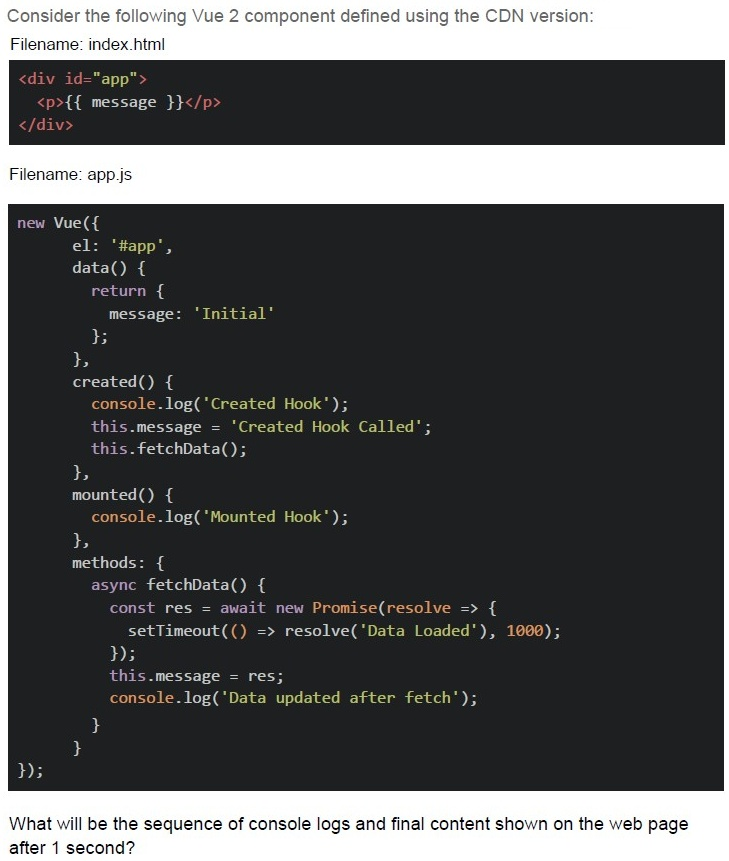
Text of the picture (copyable)
Consider the following Vue 2 component defined using the CDN version:
Filename: index.html

```html
<div id="app">
  <p>{{ message }}</p>
</div>
```

Filename: app.js

```javascript
new Vue({
  el: '#app',
  data() {
    return {
      message: 'Initial'
    };
  },
  created() {
    console.log('Created Hook');
    this.message = 'Created Hook Called';
    this.fetchData();
  },
  mounted() {
    console.log('Mounted Hook');
  },
  methods: {
    async fetchData() {
      const res = await new Promise(resolve => {
        setTimeout(() => resolve('Data Loaded'), 1000);
      });
      this.message = res;
      console.log('Data updated after fetch');
    }
  }
});
```

What will be the sequence of console logs and final content shown on the web page after 1 second?
text
Console:
Mounted Hook
Created Hook
Data updated after fetch

Page: Initial

text
Console:
```
Created Hook
Mounted Hook
Data updated after fetch
```
Page: Data Loaded

text
Console:
```
Created Hook
Data updated after fetch
Mounted Hook
```
Page: Data Loaded

text
Console:
Mounted Hook
Data updated after fetch
Created Hook

Page: Created Hook Called
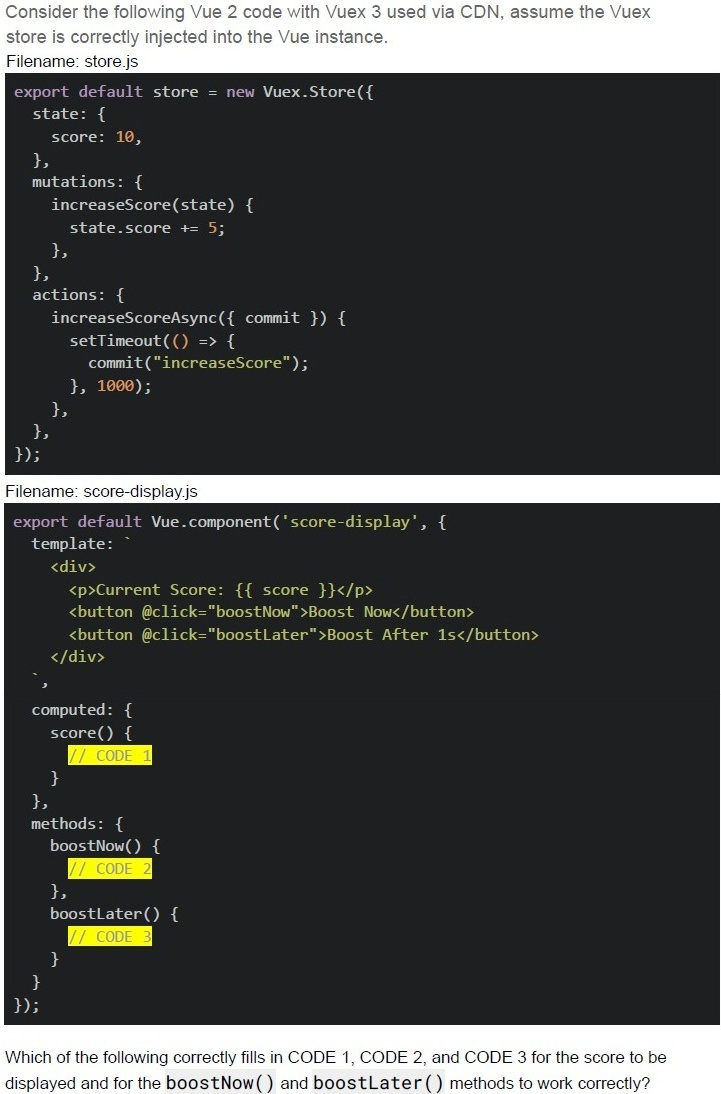
Text of the picture (copyable)
Consider the following Vue 2 code with Vuex 3 used via CDN, assume the Vuex
store is correctly injected into the Vue instance.
Filename: store.js
```javascript
export default store = new Vuex.Store({
  state: {
    score: 10,
  },
  mutations: {
    increaseScore(state) {
      state.score += 5;
    },
  },
  actions: {
    increaseScoreAsync({ commit }) {
      setTimeout(() => {
        commit("increaseScore");
      }, 1000);
    },
  },
});
```
Filename: score-display.js
```javascript
export default Vue.component('score-display', {
  template: `
    <div>
      <p>Current Score: {{ score }}</p>
      <button @click="boostNow">Boost Now</button>
      <button @click="boostLater">Boost After 1s</button>
    </div>
  `,
  computed: {
    score() {
      // CODE 1
    }
  },
  methods: {
    boostNow() {
      // CODE 2
    },
    boostLater() {
      // CODE 3
    }
  }
});
```
Which of the following correctly fills in CODE 1, CODE 2, and CODE 3 for the score to be
displayed and for the **boostNow()** and **boostLater()** methods to work correctly?
text
CODE 1:
```
return this.$store.state.score;
```

text
CODE 2:
```
this.$store.commit('increaseScore');
```
text
```
CODE 2: this.increaseScore() ;
```

text
CODE 3:
```
this.$store.dispatch('increaseScoreAsync');
```
text
CODE 3:
```
this.$store.increaseScoreAsync();
```
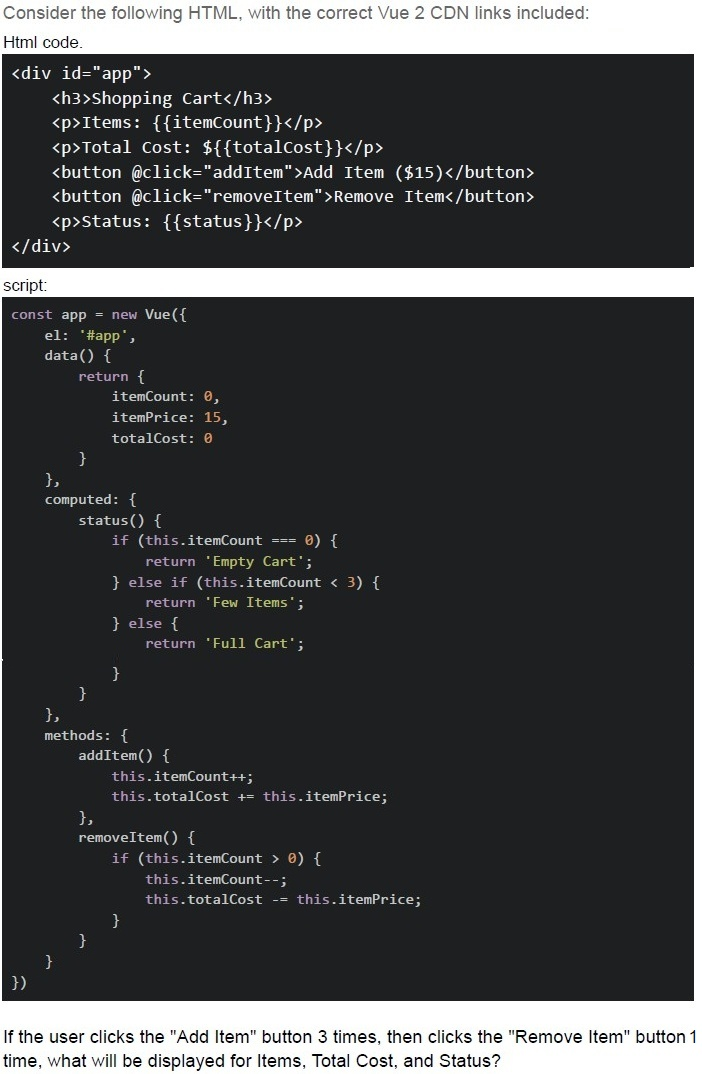
Text of the picture (copyable)
Consider the following HTML, with the correct Vue 2 CDN links included:
Html code.

```html
<div id="app">
  <h3>Shopping Cart</h3>
  <p>Items: {{itemCount}}</p>
  <p>Total Cost: ${{totalCost}}</p>
  <button @click="addItem">Add Item ($15)</button>
  <button @click="removeItem">Remove Item</button>
  <p>Status: {{status}}</p>
</div>
```

script:

```javascript
const app = new Vue({
  el: '#app',
  data() {
    return {
      itemCount: 0,
      itemPrice: 15,
      totalCost: 0
    }
  },
  computed: {
    status() {
      if (this.itemCount === 0) {
        return 'Empty Cart';
      } else if (this.itemCount < 3) {
        return 'Few Items';
      } else {
        return 'Full Cart';
      }
    }
  },
  methods: {
    addItem() {
      this.itemCount++;
      this.totalCost += this.itemPrice;
    },
    removeItem() {
      if (this.itemCount > 0) {
        this.itemCount--;
        this.totalCost -= this.itemPrice;
      }
    }
  }
})
```

If the user clicks the "Add Item" button 3 times, then clicks the "Remove Item" button 1 time, what will be displayed for Items, Total Cost, and Status?- Items: 2, Total Cost: $30, Status: Few Items
- Items: 2, Total Cost: $45, Status: Few Items
- Items: 3, Total Cost: $30, Status: Full Cart
- Items: 2, Total Cost: $30, Status: Full Cart
- Items: 1, Total Cost: $15, Status: Few Items
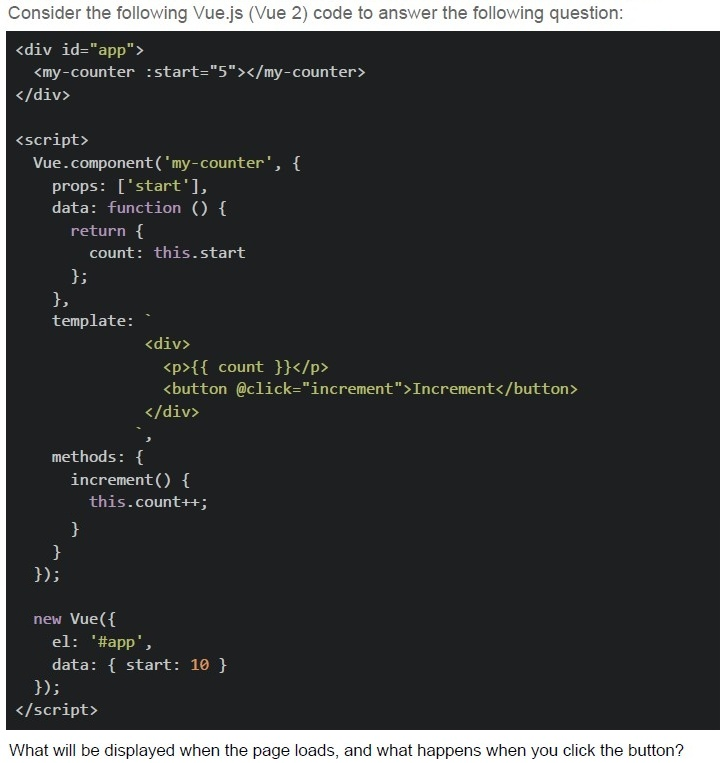
Text of the picture (copyable)
Consider the following Vue.js (Vue 2) code to answer the following question:

```html
<div id="app">
  <my-counter :start="5"></my-counter>
</div>

<script>
  Vue.component('my-counter', {
    props: ['start'],
    data: function () {
      return {
        count: this.start
      };
    },
    template: `
      <div>
        <p>{{ count }}</p>
        <button @click="increment">Increment</button>
      </div>
    `,
    methods: {
      increment() {
        this.count++;
      }
    }
  });

  new Vue({
    el: '#app',
    data: { start: 10 }
  });
</script>
```

What will be displayed when the page loads, and what happens when you click the button?
text
The counter starts at 10, and increments by 1 on each button click.

text
The counter starts at 5, and increments by 1 on each button click.

text
Nothing is rendered because the Vue component template is invalid when using Vue via CDN.

text
Vue throws a warning about compiling templates in the browser and fails to bind the component.
Which of the following is NOT a common performance metric measured by Google Lighthouse?
- First Contentful Paint (FCP)
- Time to Interactive (TTI)
- Total Blocking Time (TBT)
- Database Query Time (DQT)
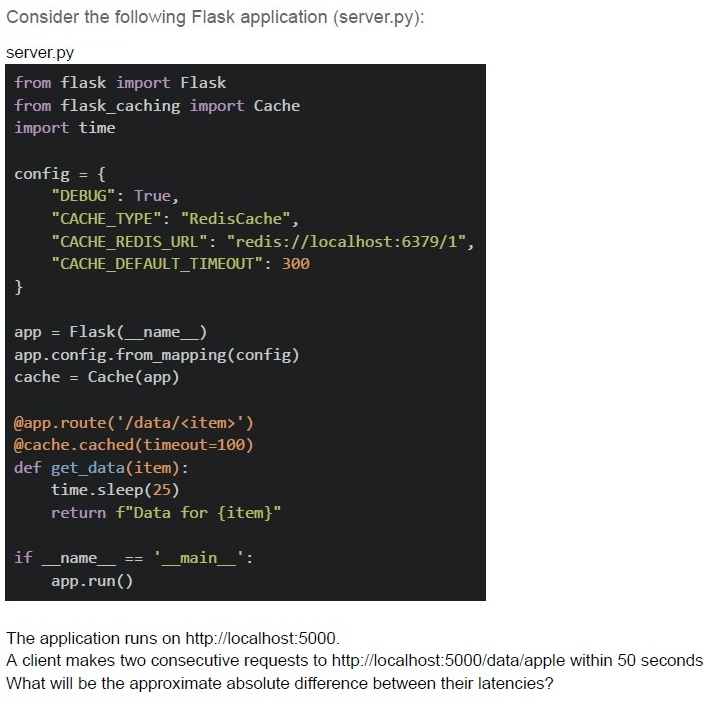
Text of the picture (copyable)
Consider the following Flask application (server.py):

server.py
```python
from flask import Flask
from flask_caching import Cache
import time

config = {
    "DEBUG": True,
    "CACHE_TYPE": "RedisCache",
    "CACHE_REDIS_URL": "redis://localhost:6379/1",
    "CACHE_DEFAULT_TIMEOUT": 300
}

app = Flask(__name__)
app.config.from_mapping(config)
cache = Cache(app)

@app.route('/data/<item>')
@cache.cached(timeout=100)
def get_data(item):
    time.sleep(25)
    return f"Data for {item}"

if __name__ == '__main__':
    app.run()
```

The application runs on http://localhost:5000.
A client makes two consecutive requests to http://localhost:5000/data/apple within 50 seconds
What will be the approximate absolute difference between their latencies?- 25 seconds
- 35 seconds
- 0 seconds
- 15 seconds
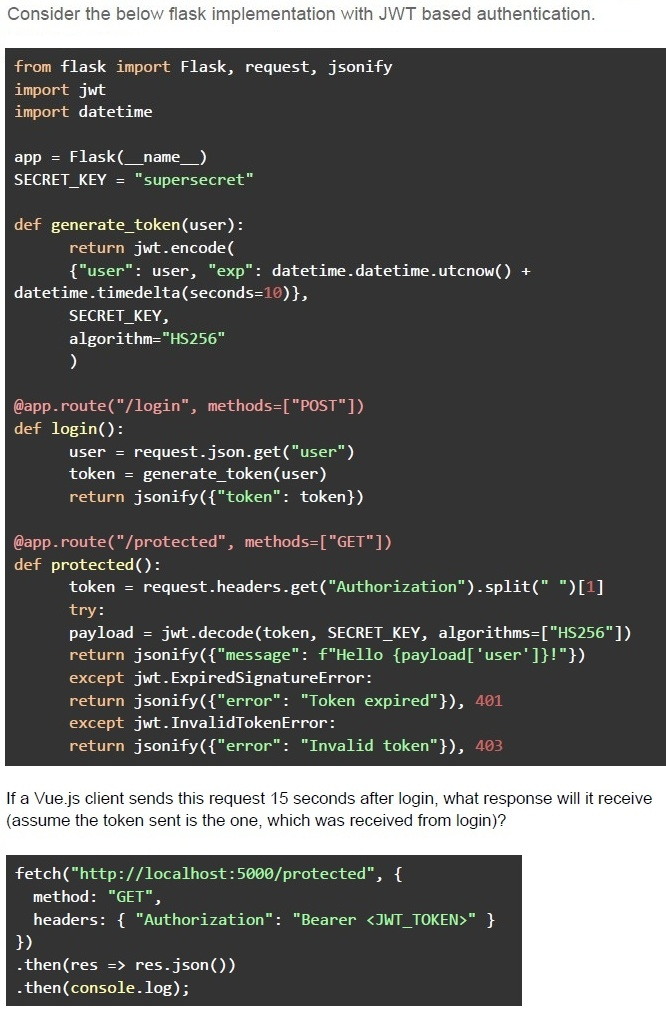
Text of the picture (copyable)
Consider the below flask implementation with JWT based authentication.

```python
from flask import Flask, request, jsonify
import jwt
import datetime

app = Flask(__name__)
SECRET_KEY = "supersecret"

def generate_token(user):
    return jwt.encode(
        {"user": user, "exp": datetime.datetime.utcnow() +
         datetime.timedelta(seconds=10)},
        SECRET_KEY,
        algorithm="HS256"
    )

@app.route("/login", methods=["POST"])
def login():
    user = request.json.get("user")
    token = generate_token(user)
    return jsonify({"token": token})

@app.route("/protected", methods=["GET"])
def protected():
    token = request.headers.get("Authorization").split(" ")[1]
    try:
        payload = jwt.decode(token, SECRET_KEY, algorithms=["HS256"])
        return jsonify({"message": f"Hello {payload['user']}!"})
    except jwt.ExpiredSignatureError:
        return jsonify({"error": "Token expired"}), 401
    except jwt.InvalidTokenError:
        return jsonify({"error": "Invalid token"}), 403
```

If a Vue.js client sends this request 15 seconds after login, what response will it receive
(assume the token sent is the one, which was received from login)?

```javascript
fetch("http://localhost:5000/protected", {
    method: "GET",
    headers: { "Authorization": "Bearer <JWT_TOKEN>" }
})
.then(res => res.json())
.then(console.log);
```
text
```json
{ "message": "Hello user!" }
```
text
```json
{ "error": "Token expired" }
```
text
```json
{
  "error": "Invalid token"
}
```
text
```json
{
  "message": "Access granted"
}
```
Which of the following are advantages of using GraphQL over REST?
- It allows clients to fetch only the required fields, reducing over-fetching.
- It replaces the need for authentication mechanisms.
- It improves database performance automatically.
- It enforces a strict API response format.
Comprehension passage for this question
Consider the following Vue app with the Vue Router shown below and answer the given subquestions.
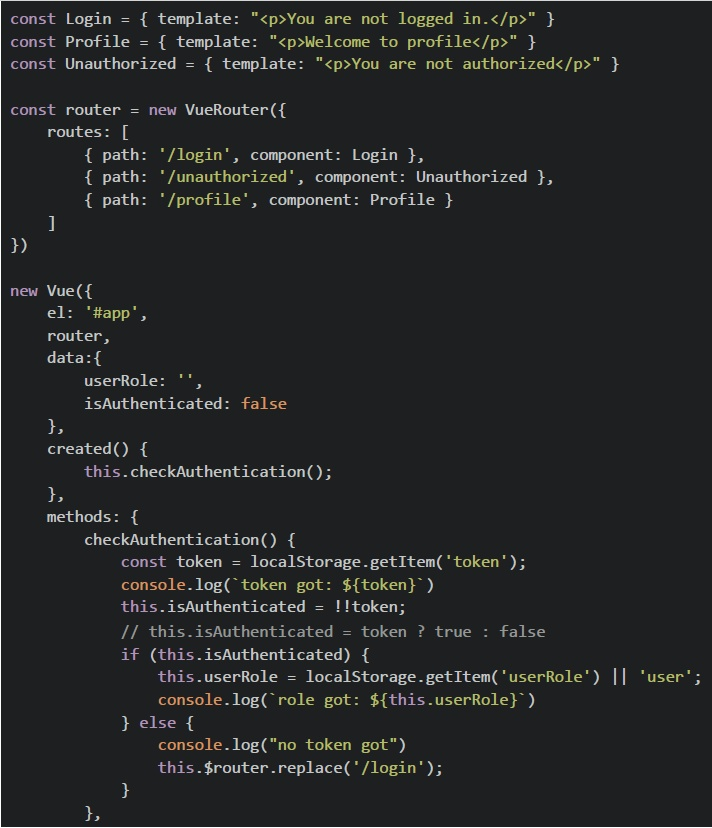 Consider the following Vue app with the Vue Router shown below and answer the given subquestions.
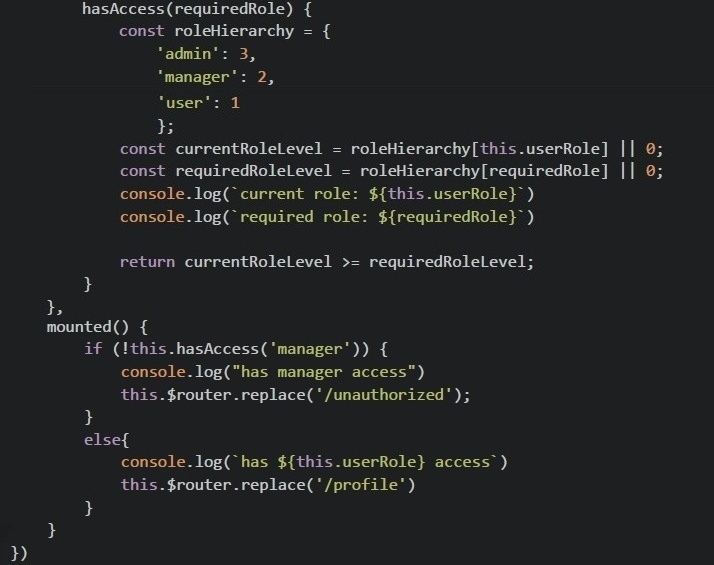 Consider the following Vue app with the Vue Router shown below and answer the given subquestions.
What will be rendered on the browser if the application is loaded on the browser for the first time?
- You are not logged in.
- Welcome to profile
- You are not authorized.
- None of these.
Comprehension passage for this question
Consider the following Vue app with the Vue Router shown below and answer the given subquestions.
Consider the following Vue app with the Vue Router shown below and answer the given subquestions.
Consider the following Vue app with the Vue Router shown below and answer the given subquestions.
What will be rendered on the browser for the given value of localStorage?
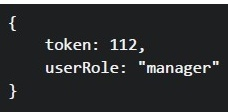 What will be rendered on the browser for the given value of localStorage?
What will be rendered on the browser for the given value of localStorage?
Text of the picture (copyable)
```
{
  token: 112,
  userRole: "manager"
}
```- You are not logged in.
- Welcome to profile
- You are not authorized.
- None of these.
Which scenario is best suited for a task queue system like Celery or RabbitMQ?
- A real-time chat application that requires low-latency message delivery.
- A weather API that provides instant weather data upon request.
- A system where a webhook sends an immediate notification to a client whenan event occurs.
- A system where a user uploads a video, and it needs to be processedasynchronously.
Comprehension passage for this question
Consider the following Vue app with the Vue Router shown below and answer the given subquestions.
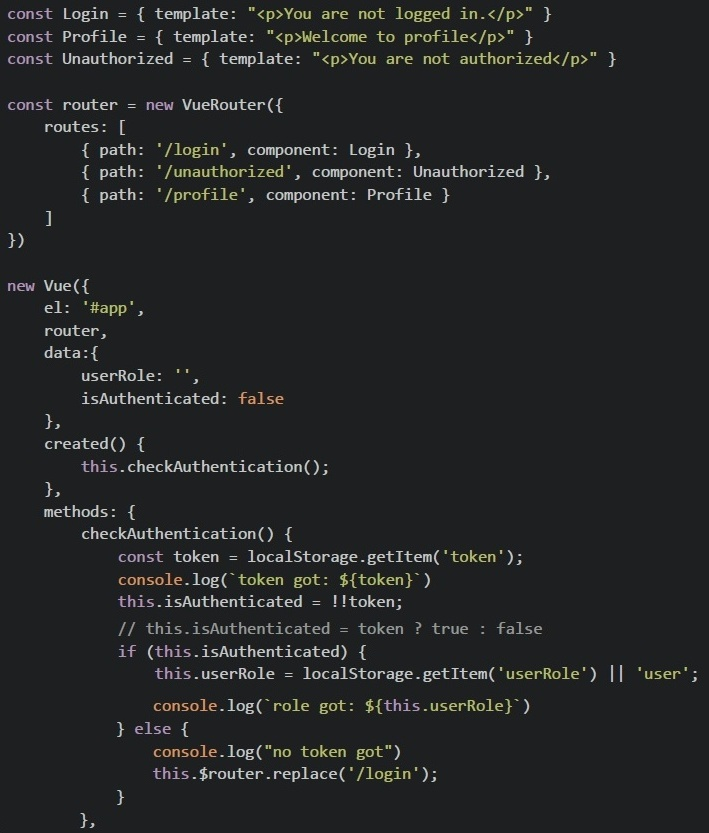 Consider the following Vue app with the Vue Router shown below and answer the given subquestions.
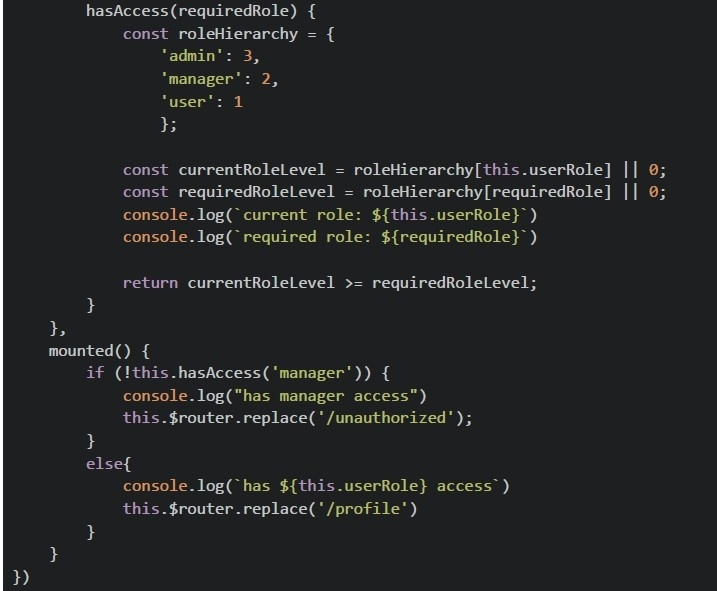 Consider the following Vue app with the Vue Router shown below and answer the given subquestions.
What will be rendered on the browser for the given value of localStorage?
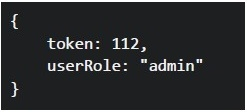 What will be rendered on the browser for the given value of localStorage?
What will be rendered on the browser for the given value of localStorage?
Text of the picture (copyable)
```json
{
  "token": 112,
  "userRole": "admin"
}
```- You are not logged in.
- Welcome to profile
- You are not authorized.
- None of these.
If a user clicks rapidly twice (within 500ms), what will the likes count be?
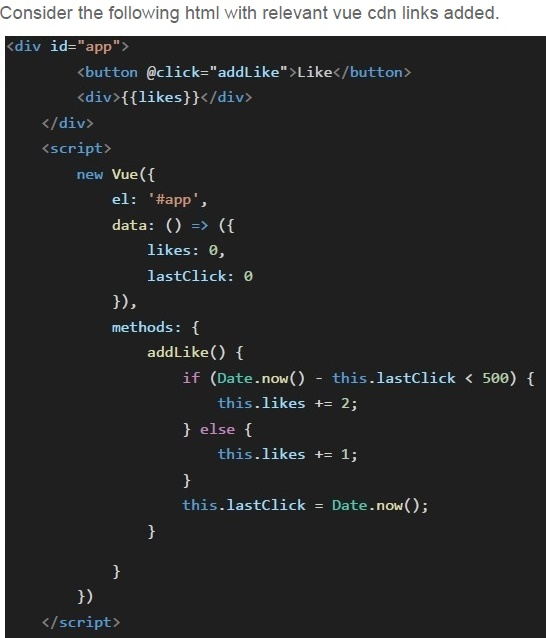
Text of the picture (copyable)
Consider the following html with relevant vue cdn links added.

```html
<div id="app">
    <button @click="addLike">Like</button>
    <div>{{likes}}</div>
</div>
<script>
    new Vue({
        el: '#app',
        data: () => ({
            likes: 0,
            lastClick: 0
        }),
        methods: {
            addLike() {
                if (Date.now() - this.lastClick < 500) {
                    this.likes += 2;
                } else {
                    this.likes += 1;
                }
                this.lastClick = Date.now();
            }
        }
    })
</script>
```- 1
- 2
- 3
- 4
In the Vue application above, what will be the initial rendered message?
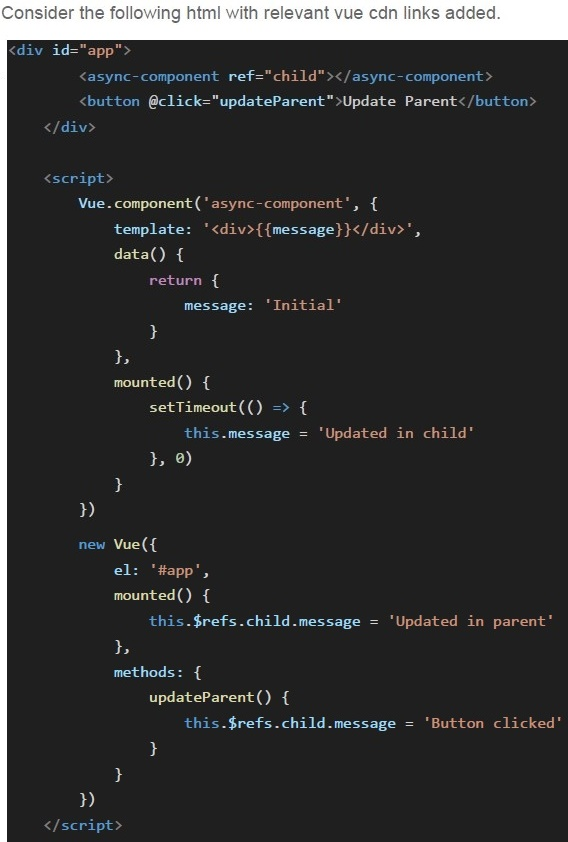
Text of the picture (copyable)
Consider the following html with relevant vue cdn links added.
```html
<div id="app">
    <async-component ref="child"></async-component>
    <button @click="updateParent">Update Parent</button>
</div>

<script>
    Vue.component('async-component', {
        template: '<div>{{message}}</div>',
        data() {
            return {
                message: 'Initial'
            }
        },
        mounted() {
            setTimeout(() => {
                this.message = 'Updated in child'
            }, 0)
        }
    })

    new Vue({
        el: '#app',
        mounted() {
            this.$refs.child.message = 'Updated in parent'
        },
        methods: {
            updateParent() {
                this.$refs.child.message = 'Button clicked'
            }
        }
    })
</script>
```- "Initial"
- "Updated in parent"
- "Updated in child"
- "Button clicked"
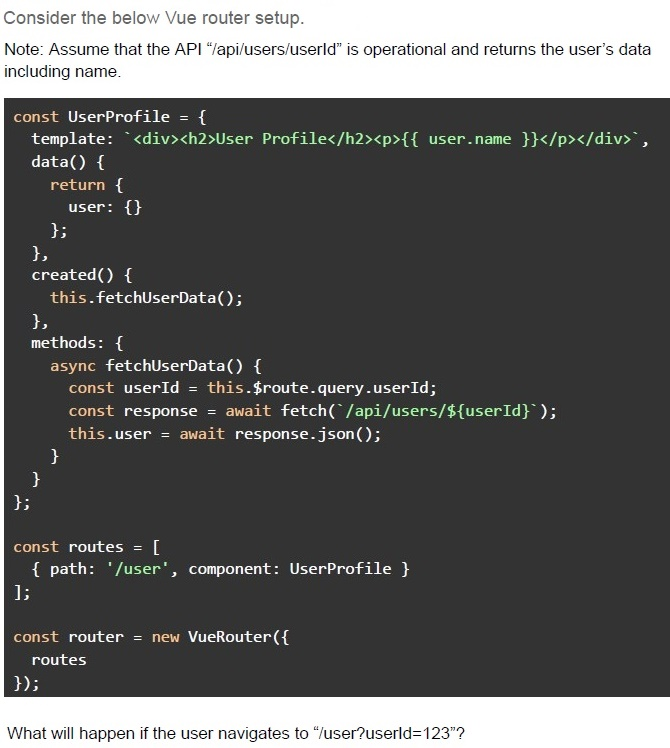
Text of the picture (copyable)
Consider the below Vue router setup.

Note: Assume that the API "/api/users/userId" is operational and returns the user's data including name.

```javascript
const UserProfile = {
  template: `<div><h2>User Profile</h2><p>{{ user.name }}</p></div>`,
  data() {
    return {
      user: {}
    };
  },
  created() {
    this.fetchUserData();
  },
  methods: {
    async fetchUserData() {
      const userId = this.$route.query.userId;
      const response = await fetch(`/api/users/${userId}`);
      this.user = await response.json();
    }
  }
};

const routes = [
  { path: '/user', component: UserProfile }
];

const router = new VueRouter({
  routes
});
```

What will happen if the user navigates to "/user?userId=123"?- The component will display the user's name (fetched from API) correctly asexpected.
- The component will show because the API call will never be triggered.
- The component will always show an empty profile because the userId queryparameter is not reactive.
- The component will throw an error because this.$route.query is not defined.
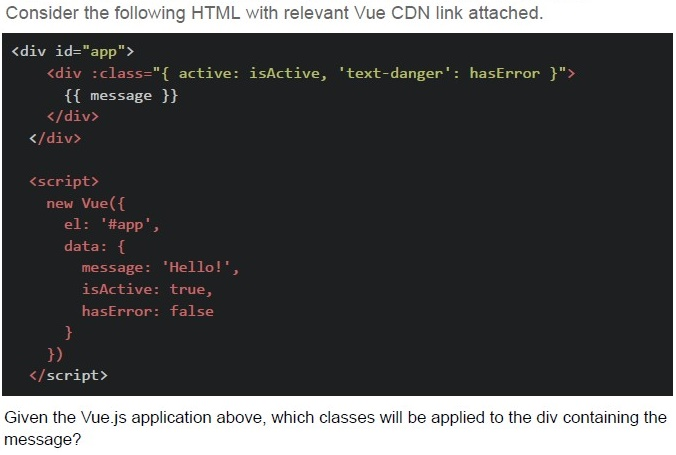
Text of the picture (copyable)
Consider the following HTML with relevant Vue CDN link attached.

```html
<div id="app">
    <div :class="{ active: isActive, 'text-danger': hasError }">
        {{ message }}
    </div>
</div>

<script>
    new Vue({
        el: '#app',
        data: {
            message: 'Hello!',
            isActive: true,
            hasError: false
        }
    })
</script>
```

Given the Vue.js application above, which classes will be applied to the div containing the message?- Only 'active'
- 'text-danger' and 'active'
- No classes
- Only 'text-danger'
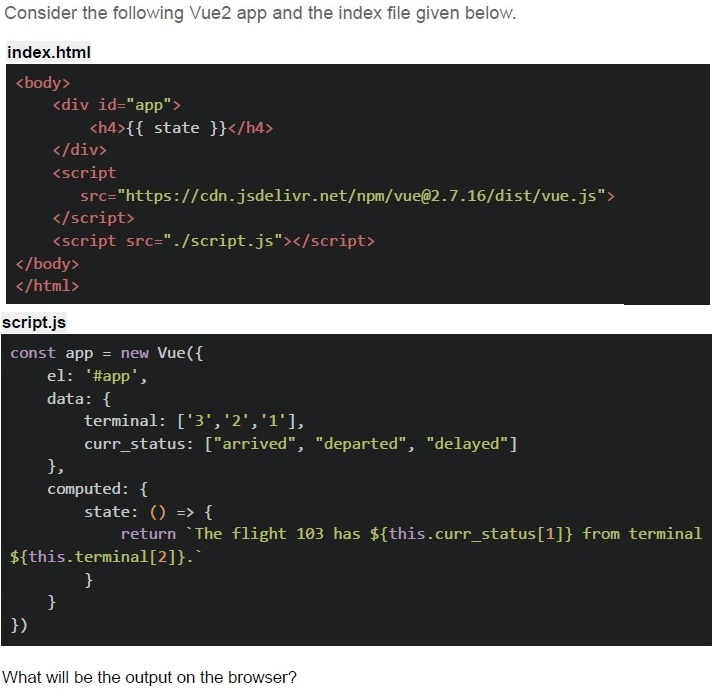
Text of the picture (copyable)
Consider the following Vue2 app and the index file given below.

index.html

```html
<body>
    <div id="app">
        <h4>{{ state }}</h4>
    </div>
    <script
        src="https://cdn.jsdelivr.net/npm/vue@2.7.16/dist/vue.js"
    ></script>
    <script src="./script.js"></script>
</body>
</html>
```

script.js

```javascript
const app = new Vue({
    el: '#app',
    data: {
        terminal: ['3', '2', '1'],
        curr_status: ["arrived", "departed", "delayed"]
    },
    computed: {
        state: () => {
            return `The flight 103 has ${this.curr_status[1]} from terminal ${this.terminal[2]}.`
        }
    }
})
```

What will be the output on the browser?- The flight 103 has departed from terminal 1.
- The flight 103 has arrived from terminal 2.
- The flight 103 has delayed from terminal 3.
- The flight 103 has from terminal.
- ReferenceError
Consider the following HTML with relevant Vue CDN link attached.
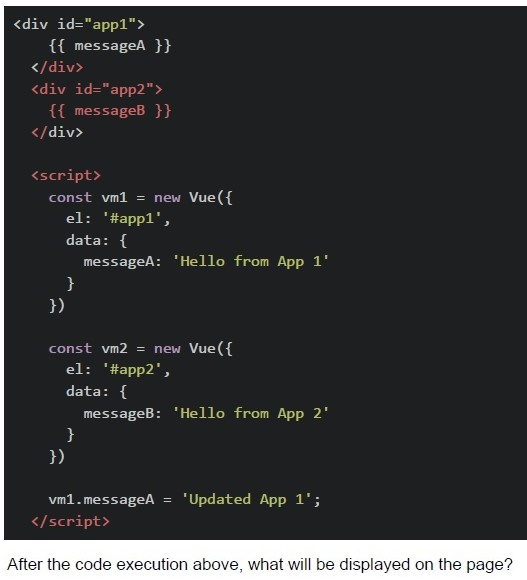 Consider the following HTML with relevant Vue CDN link attached.
Consider the following HTML with relevant Vue CDN link attached.
Text of the picture (copyable)
```html
<div id="app1">
  {{ messageA }}
</div>
<div id="app2">
  {{ messageB }}
</div>

<script>
  const vm1 = new Vue({
    el: '#app1',
    data: {
      messageA: 'Hello from App 1'
    }
  })

  const vm2 = new Vue({
    el: '#app2',
    data: {
      messageB: 'Hello from App 2'
    }
  })

  vm1.messageA = 'Updated App 1';
</script>
```
After the code execution above, what will be displayed on the page?- "Updated App 1" and "Hello from App 2"
- "Hello from App 1" and "Hello from App 2"
- "Updated App 1" and blank second div
- Both divs will be blank
Consider the following HTML with relevant Vue CDN attached.
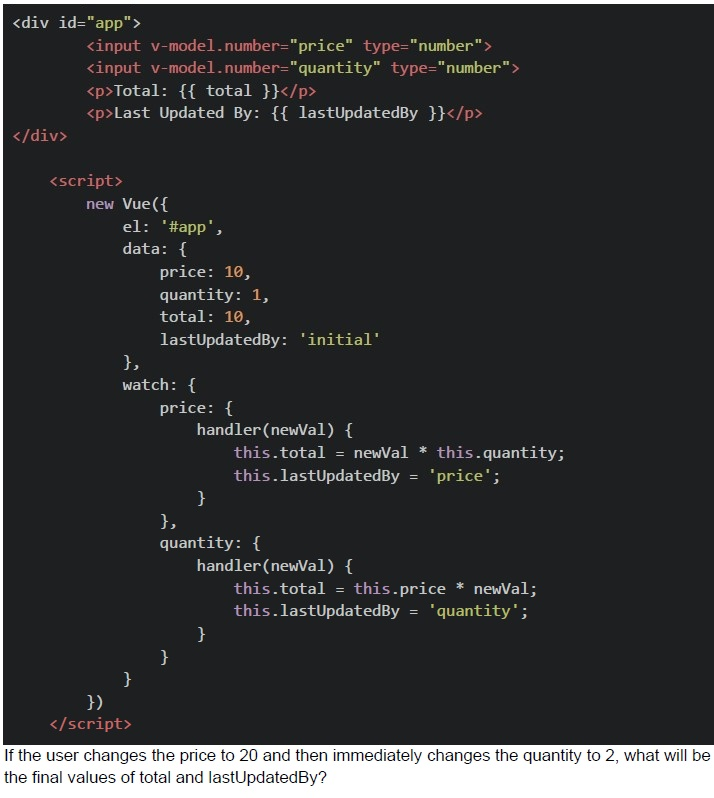 Consider the following HTML with relevant Vue CDN attached.
Consider the following HTML with relevant Vue CDN attached.
Text of the picture (copyable)
```html
<div id="app">
  <input v-model.number="price" type="number">
  <input v-model.number="quantity" type="number">
  <p>Total: {{ total }}</p>
  <p>Last Updated By: {{ lastUpdatedBy }}</p>
</div>

<script>
  new Vue({
    el: '#app',
    data: {
      price: 10,
      quantity: 1,
      total: 10,
      lastUpdatedBy: 'initial'
    },
    watch: {
      price: {
        handler(newVal) {
          this.total = newVal * this.quantity;
          this.lastUpdatedBy = 'price';
        }
      },
      quantity: {
        handler(newVal) {
          this.total = this.price * newVal;
          this.lastUpdatedBy = 'quantity';
        }
      }
    }
  })
</script>
```
If the user changes the price to 20 and then immediately changes the quantity to 2, what will be the final values of total and lastUpdatedBy?- total: 20, lastUpdatedBy: "price"
- total: 40, lastUpdatedBy: "quantity"
- total: 20, lastUpdatedBy: "quantity"
- total: 40, lastUpdatedBy: "price"
Which of the following best describes the difference between @cache.memoize() and @cache.cached() in Flask-Caching?

text
```
@cache.memoize() caches function results based on arguments, while
@cache.cached() caches entire views.
```

text
```
@cache.cached() caches function results based on arguments, while
@cache.memoize() caches entire views.
```

text
Both cache entire views, but `@cache.memoize()` uses Redis by default.

text
Both methods are identical but use different syntax.
Which of the following statements is FALSE?
- Cache-Control: no-store prevents caching
- ETag helps validate cache freshness
- Data stored in sessionStorage remains available even after the browser isclosed and reopened.
- localStorage has larger storage limit than cookies
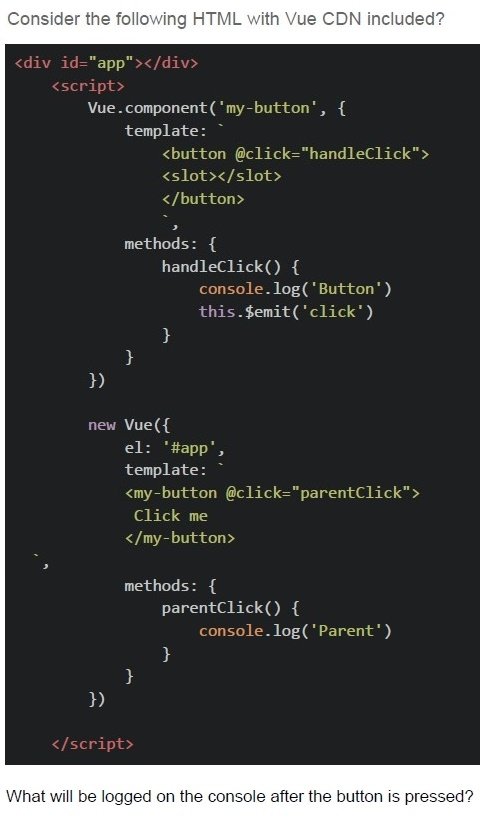
Text of the picture (copyable)
Consider the following HTML with Vue CDN included?

```html
<div id="app"></div>
<script>
    Vue.component('my-button', {
        template: `
            <button @click="handleClick">
                <slot></slot>
            </button>
        `,
        methods: {
            handleClick() {
                console.log('Button')
                this.$emit('click')
            }
        }
    })

    new Vue({
        el: '#app',
        template: `
            <my-button @click="parentClick">
                Click me
            </my-button>
        `,
        methods: {
            parentClick() {
                console.log('Parent')
            }
        }
    })
</script>
```

What will be logged on the console after the button is pressed?- Parent
- Button
- ButtonParent
- ParentButton
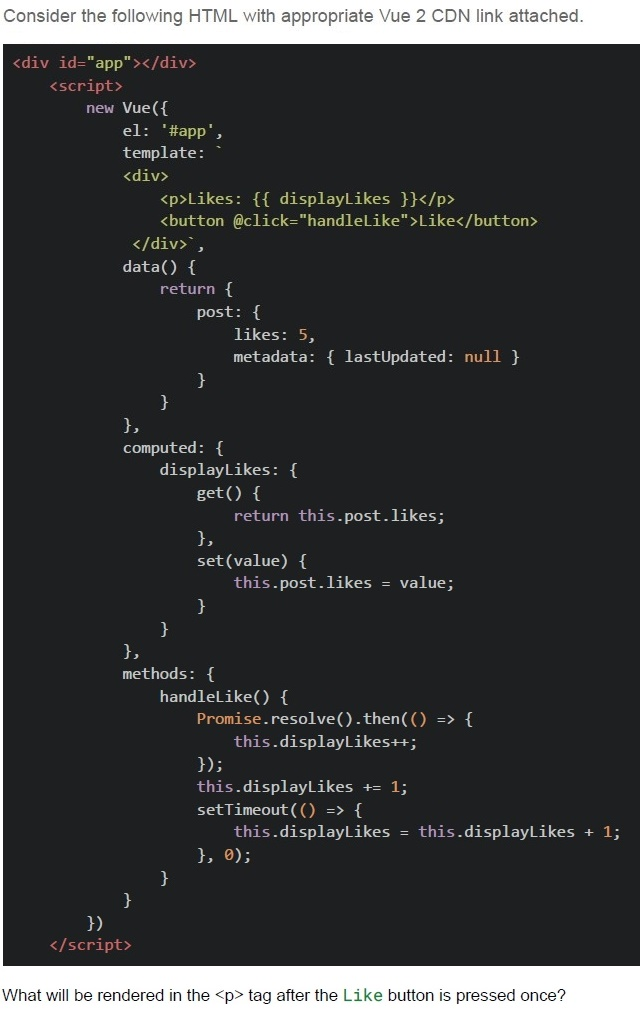
Text of the picture (copyable)
Consider the following HTML with appropriate Vue 2 CDN link attached.

```html
<div id="app"></div>
<script>
  new Vue({
    el: '#app',
    template: `
      <div>
        <p>Likes: {{ displayLikes }}</p>
        <button @click="handleLike">Like</button>
      </div>`,
    data() {
      return {
        post: {
          likes: 5,
          metadata: { lastUpdated: null }
        }
      }
    },
    computed: {
      displayLikes: {
        get() {
          return this.post.likes;
        },
        set(value) {
          this.post.likes = value;
        }
      }
    },
    methods: {
      handleLike() {
        Promise.resolve().then(() => {
          this.displayLikes++;
        });
        this.displayLikes += 1;
        setTimeout(() => {
          this.displayLikes = this.displayLikes + 1;
        }, 0);
      }
    }
  })
</script>
```

What will be rendered in the `<p>` tag after the Like button is pressed once?- Likes: 5
- Likes: 8
- Likes: 6
- Likes: 9
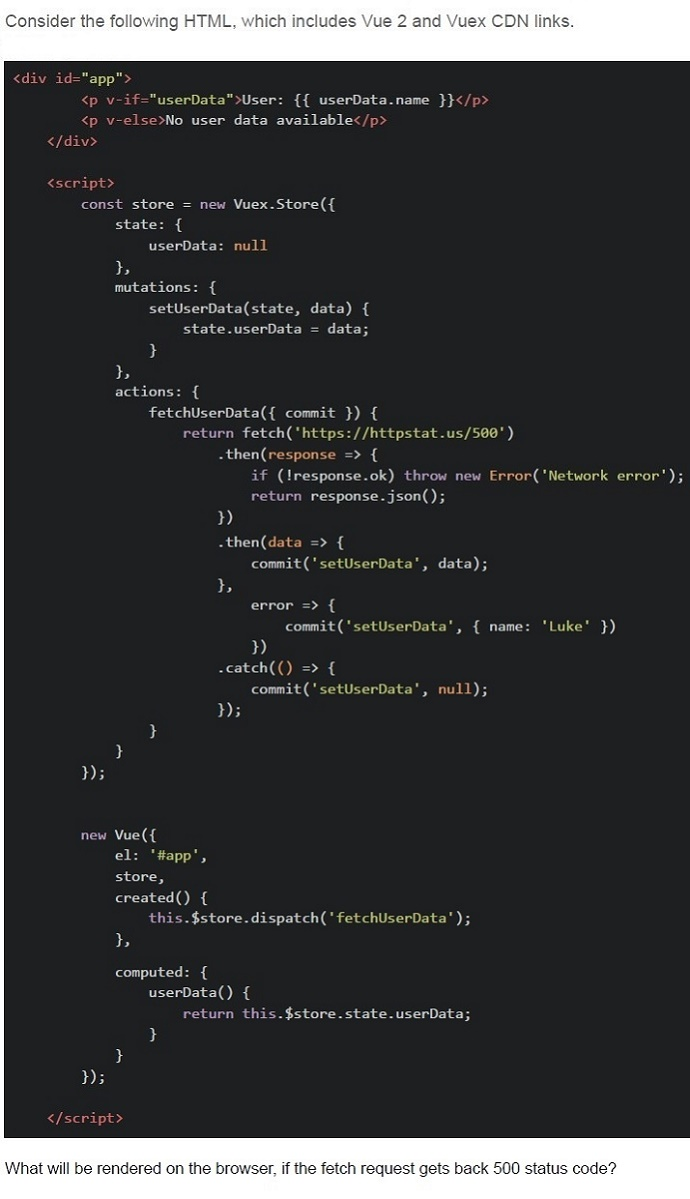
Text of the picture (copyable)
Consider the following HTML, which includes Vue 2 and Vuex CDN links.

```html
<div id="app">
  <p v-if="userData">User: {{ userData.name }}</p>
  <p v-else>No user data available</p>
</div>

<script>
  const store = new Vuex.Store({
    state: {
      userData: null
    },
    mutations: {
      setUserData(state, data) {
        state.userData = data;
      }
    },
    actions: {
      fetchUserData({ commit }) {
        return fetch('https://httpstat.us/500')
          .then(response => {
            if (!response.ok) throw new Error('Network error');
            return response.json();
          })
          .then(data => {
            commit('setUserData', data);
          },
          error => {
            commit('setUserData', { name: 'Luke' })
          })
          .catch(() => {
            commit('setUserData', null);
          });
      }
    }
  });

  new Vue({
    el: '#app',
    store,
    created() {
      this.$store.dispatch('fetchUserData');
    },
    computed: {
      userData() {
        return this.$store.state.userData;
      }
    }
  });
</script>
```

What will be rendered on the browser, if the fetch request gets back 500 status code?- The userData in the store is set to the data from the API.
- User: null
- The error will be logged, Nothing will be displayed
- User: Luke
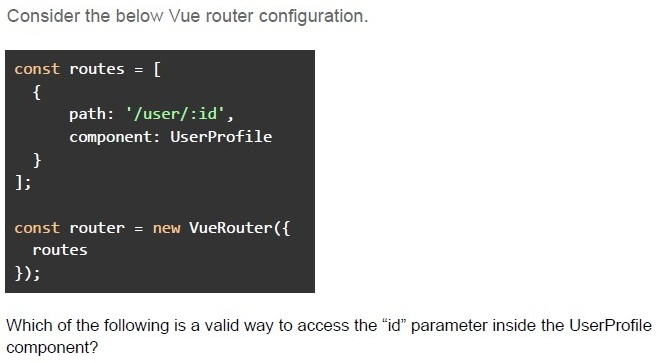
Text of the picture (copyable)
Consider the below Vue router configuration.

```javascript
const routes = [
  {
    path: '/user/:id',
    component: UserProfile
  }
];

const router = new VueRouter({
  routes
});
```

Which of the following is a valid way to access the "id" parameter inside the UserProfile component?- this.$route.params.id
- this.$router.params.id
- this.$route.query.id
- this.$route.params['id']
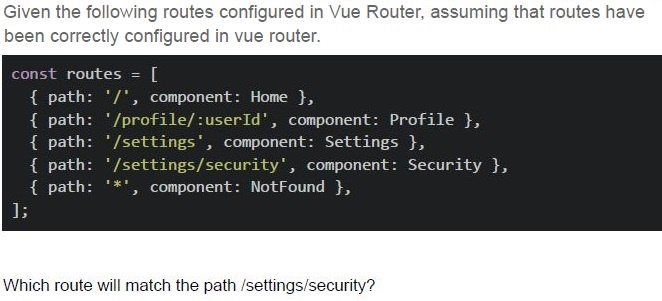
Text of the picture (copyable)
Given the following routes configured in Vue Router, assuming that routes have
been correctly configured in vue router.

```javascript
const routes = [
  { path: '/', component: Home },
  { path: '/profile/:userId', component: Profile },
  { path: '/settings', component: Settings },
  { path: '/settings/security', component: Security },
  { path: '/*', component: NotFound },
];
```

Which route will match the path /settings/security?- Home
- Profile
- Security
- Settings
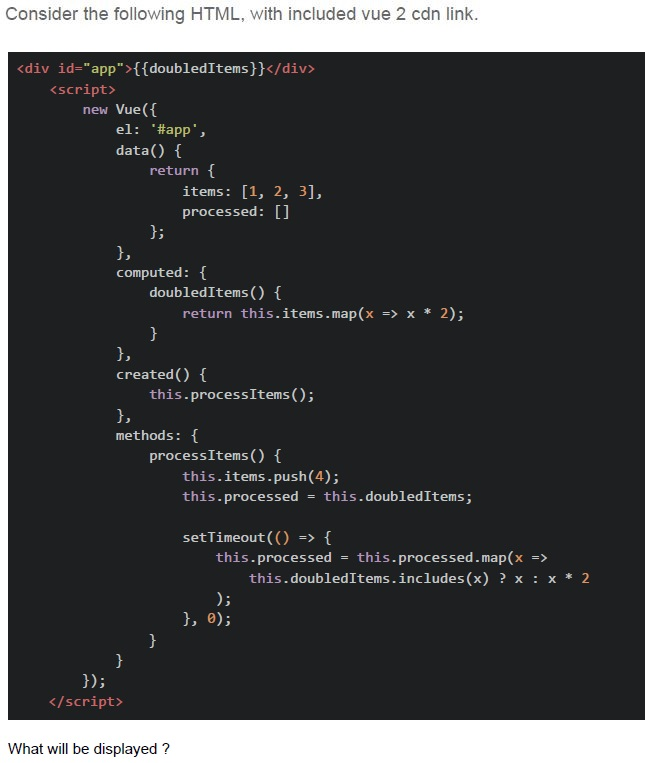
Text of the picture (copyable)
Consider the following HTML, with included vue 2 cdn link.

```html
<div id="app">{{doubledItems}}</div>
<script>
  new Vue({
    el: '#app',
    data() {
      return {
        items: [1, 2, 3],
        processed: []
      };
    },
    computed: {
      doubledItems() {
        return this.items.map(x => x * 2);
      }
    },
    created() {
      this.processItems();
    },
    methods: {
      processItems() {
        this.items.push(4);
        this.processed = this.doubledItems;

        setTimeout(() => {
          this.processed = this.processed.map(x =>
            this.doubledItems.includes(x) ? x : x * 2
          );
        }, 0);
      }
    }
  });
</script>
```

What will be displayed ?- [2, 4, 6]
- [2, 4, 6, 8]
- [4, 8, 12]
- [2, 4, 6, 16]
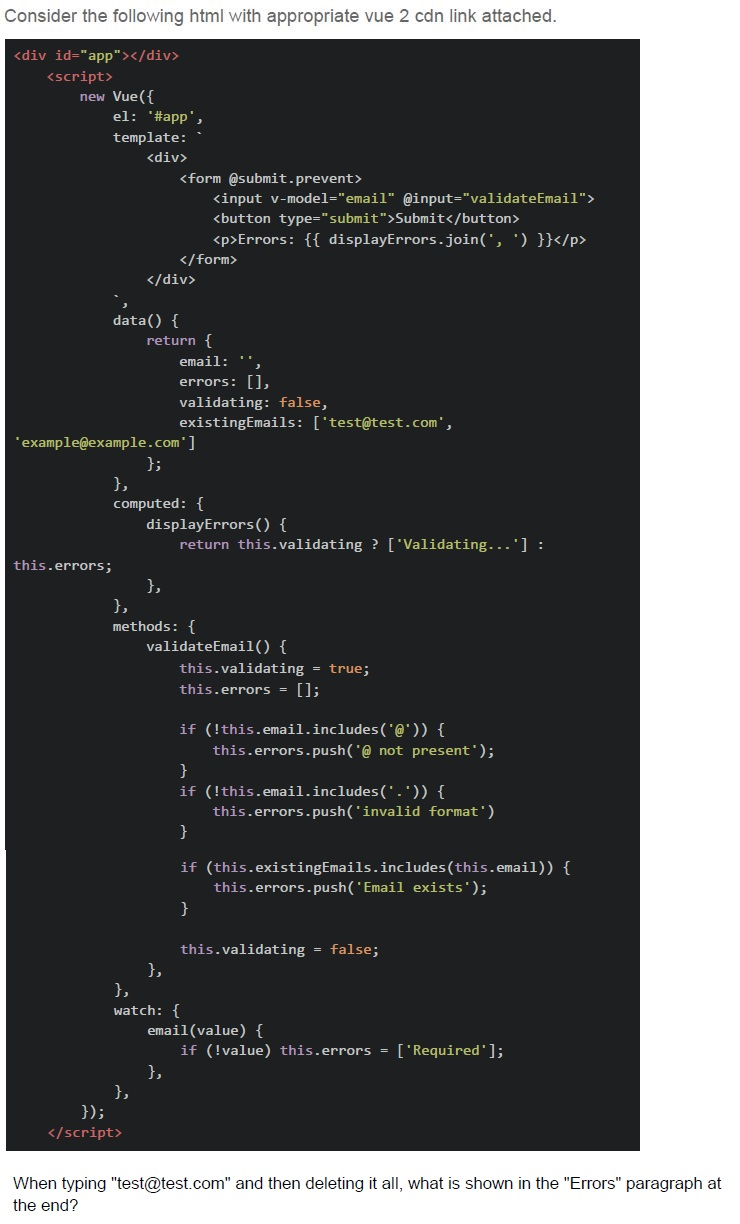
Text of the picture (copyable)
Consider the following html with appropriate vue 2 cdn link attached.

```html
<div id="app"></div>
<script>
  new Vue({
    el: '#app',
    template: `
      <div>
        <form @submit.prevent>
          <input v-model="email" @input="validateEmail">
          <button type="submit">Submit</button>
          <p>Errors: {{ displayErrors.join(', ') }}</p>
        </form>
      </div>
    `,
    data() {
      return {
        email: '',
        errors: [],
        validating: false,
        existingEmails: ['test@test.com', 'example@example.com']
      };
    },
    computed: {
      displayErrors() {
        return this.validating ? ['Validating...'] :
          this.errors;
      }
    },
    methods: {
      validateEmail() {
        this.validating = true;
        this.errors = [];

        if (!this.email.includes('@')) {
          this.errors.push('@ not present');
        }
        if (!this.email.includes('.')) {
          this.errors.push('invalid format');
        }

        if (this.existingEmails.includes(this.email)) {
          this.errors.push('Email exists');
        }

        this.validating = false;
      }
    },
    watch: {
      email(value) {
        if (!value) this.errors = ['Required']
      }
    }
  });
</script>
```

When typing "test@test.com" and then deleting it all, what is shown in the "Errors" paragraph at the end?- Required
- Invalid format, Email exists, Required
- Required, Email exists
- Validating..., Required
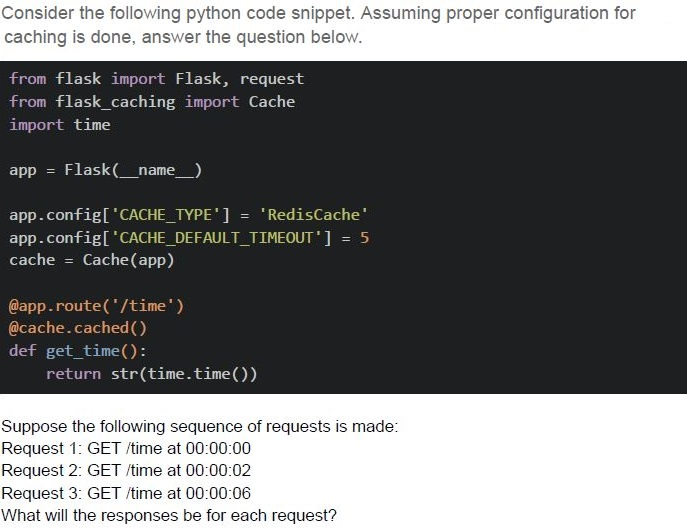
Text of the picture (copyable)
Consider the following python code snippet. Assuming proper configuration for caching is done, answer the question below.

```python
from flask import Flask, request
from flask_caching import Cache
import time

app = Flask(__name__)

app.config['CACHE_TYPE'] = 'RedisCache'
app.config['CACHE_DEFAULT_TIMEOUT'] = 5
cache = Cache(app)

@app.route('/time')
@cache.cached()
def get_time():
    return str(time.time())
```

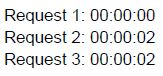
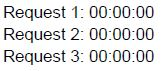
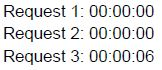
Suppose the following sequence of requests is made:
Request 1: GET /time at 00:00:00
Request 2: GET /time at 00:00:02
Request 3: GET /time at 00:00:06
What will the responses be for each request?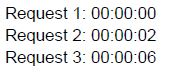
text
Request 1: 00:00:00
Request 2: 00:00:02
Request 3: 00:00:06
text
Request 1: 00:00:00
Request 2: 00:00:02
Request 3: 00:00:02
text
Request 1: 00:00:00
Request 2: 00:00:00
Request 3: 00:00:00
text
Request 1: 00:00:00
Request 2: 00:00:00
Request 3: 00:00:06
Which of the following statements are true about Lighthouse?
- Lighthouse measures various performance metrics, including Time toInteractive and Speed Index.
- Lighthouse generates a single score for UI design only.
- It can emulate network throttling and device types during performanceevaluation.
- Lighthouse focuses exclusively on performance and ignores accessibility.
Which of the following statements correctly describe the use of asynchronous messaging systems and frameworks?
- Celery allows web servers to offload long-running tasks to worker processes,decoupling task execution from user requests.
- Push queues are used for real-time operations, while pull queues are bettersuited for batch processing.
- Server-Sent Events (SSE) provide a persistent connection between server andclient, enabling bi-directional communication.
- Redis is a high-performance in-memory database that supports Pub/Sub.
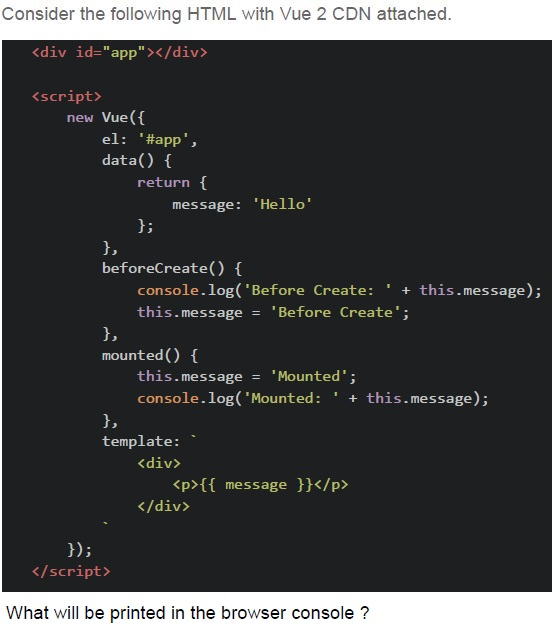
Text of the picture (copyable)
Consider the following HTML with Vue 2 CDN attached.

```html
<div id="app"></div>

<script>
  new Vue({
    el: '#app',
    data() {
      return {
        message: 'Hello'
      };
    },
    beforeCreate() {
      console.log('Before Create: ' + this.message);
      this.message = 'Before Create';
    },
    mounted() {
      this.message = 'Mounted';
      console.log('Mounted: ' + this.message);
    },
    template: `
      <div>
        <p>{{ message }}</p>
      </div>`
  });
</script>
```

What will be printed in the browser console ?- `Before Create: Before Create` and `Mounted: Hello`
- `Before Create: undefined` and `Mounted: Hello`
- `Before Create: Hello` and `Mounted: Mounted`
- `Before Create: undefined` and `Mounted: Mounted`
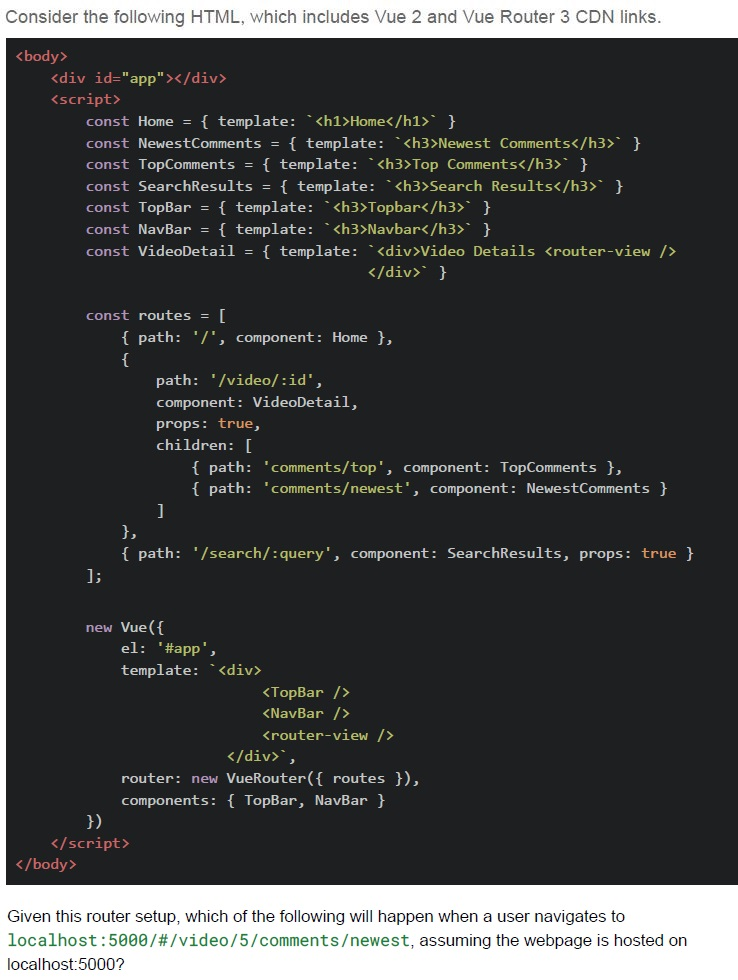
Text of the picture (copyable)
Consider the following HTML, which includes Vue 2 and Vue Router 3 CDN links.

```html
<body>
  <div id="app"></div>
  <script>
    const Home = { template: `<h1>Home</h1>` }
    const NewestComments = { template: `<h3>Newest Comments</h3>` }
    const TopComments = { template: `<h3>Top Comments</h3>` }
    const SearchResults = { template: `<h3>Search Results</h3>` }
    const TopBar = { template: `<h3>Topbar</h3>` }
    const NavBar = { template: `<h3>Navbar</h3>` }
    const VideoDetail = { template: `<div>Video Details <router-view /></div>` }

    const routes = [
      { path: '/', component: Home },
      {
        path: '/video/:id',
        component: VideoDetail,
        props: true,
        children: [
          { path: 'comments/top', component: TopComments },
          { path: 'comments/newest', component: NewestComments }
        ]
      },
      { path: '/search/:query', component: SearchResults, props: true }
    ];

    new Vue({
      el: '#app',
      template: `
        <div>
          <TopBar />
          <NavBar />
          <router-view />
        </div>`,
      router: new VueRouter({ routes }),
      components: { TopBar, NavBar }
    })
  </script>
</body>
```

Given this router setup, which of the following will happen when a user navigates to `localhost:5000/#/video/5/comments/newest`, assuming the webpage is hosted on `localhost:5000`?
text
The TopNavbar and Navbar components will remain visible, and the
NewestComments component will be displayed inside the VideoDetail component.

text
The Home component will be visible.

text
The TopComments component will be displayed.

text
No component will be shown.