Home / MAD1 / Week 6 / Real questions
MAD1 week 6 - real exam questions
60 questions pulled from past papers whose wording matches this week's topics, newest first, duplicates removed. Pick your answers, then press Check answers. Figures and answer keys are the originals.
Elapsed 00:00
What does the following curl command do? 
Text of the picture (copyable)
```
curl -X PUT -d "status=active&role=admin" https://api/users/update
```
- Sends a PUT request to update data using form format.
- Sends a PUT request using JSON encoding.
- Sends a GET request to retrieve user information.
- Sends a DELETE request to remove user data.
Consider the following Flask RESTful API code.
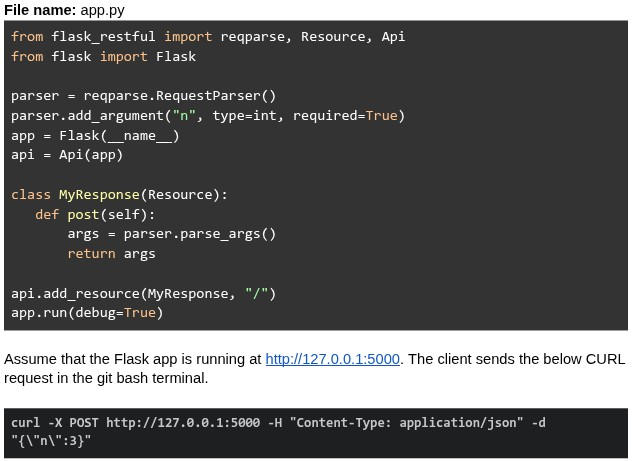 What will be the response?
What will be the response?Text of the picture (copyable)
File name: app.py
```python
from flask_restful import reqparse, Resource, Api
from flask import Flask

parser = reqparse.RequestParser()
parser.add_argument("n", type=int, required=True)
app = Flask(__name__)
api = Api(app)

class MyResponse(Resource):
    def post(self):
        args = parser.parse_args()
        return args

api.add_resource(MyResponse, "/")
app.run(debug=True)
```

Assume that the Flask app is running at http://127.0.0.1:5000. The client sends the below CURL request in the git bash terminal.

```bash
curl -X POST http://127.0.0.1:5000 -H "Content-Type: application/json" -d "{\"n\":3}"
```- {"n": 3}
- Runtime error
- 400 Bad Request
- { }
Consider the following Flask app code.
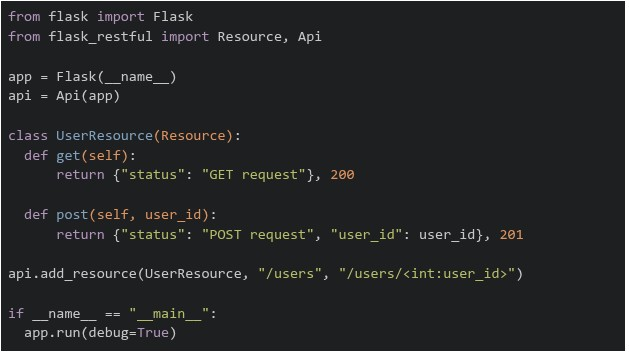 The above flask app is running on "http://127.0.0.1:5000". Which of the following commands will return a runtime error?
The above flask app is running on "http://127.0.0.1:5000". Which of the following commands will return a runtime error?Text of the picture (copyable)
```python
from flask import Flask
from flask_restful import Resource, Api

app = Flask(__name__)
api = Api(app)

class UserResource(Resource):
    def get(self):
        return {"status": "GET request"}, 200

    def post(self, user_id):
        return {"status": "POST request", "user_id": user_id}, 201

api.add_resource(UserResource, "/users", "/users/<int:user_id>")

if __name__ == "__main__":
    app.run(debug=True)
```
text
```
curl http://127.0.0.1:5000/users/5001 -X GET
```

text
```
curl http://127.0.0.1:5000/users/5001 -X POST
```

text
```
curl http://127.0.0.1:5000/users -X POST
```

text
```
curl http://127.0.0.1:5000/users -X GET
```
What does the following curl command do?

Text of the picture (copyable)
```
curl -X POST -d "email=user@test.com&password=secret" https://auth/signin
```
- Sends a POST request to retrieve authentication data.
- Sends a POST request to send form data.
- Sends a POST request to send JSON data.
- Sends a POST request to retrieve user credentials.
Consider the following Flask RESTful API code.
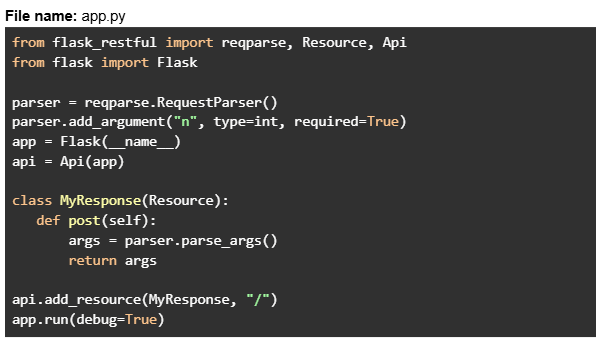 Assume that the Flask app is running at http://127.0.0.1:5000. The client sends the below CURL request in the git bash terminal.
 What will be the response?
Assume that the Flask app is running at http://127.0.0.1:5000. The client sends the below CURL request in the git bash terminal.
What will be the response?Text of the picture (copyable)
File name: app.py
```python
from flask_restful import reqparse, Resource, Api
from flask import Flask

parser = reqparse.RequestParser()
parser.add_argument("n", type=int, required=True)
app = Flask(__name__)
api = Api(app)

class MyResponse(Resource):
    def post(self):
        args = parser.parse_args()
        return args

api.add_resource(MyResponse, "/")
app.run(debug=True)
```
```
curl -X POST http://127.0.0.1:5000 -H "Content-Type: application/json" -d '{}'
```- {"n": None}
- Runtime error
- 400 Bad Request
- { }
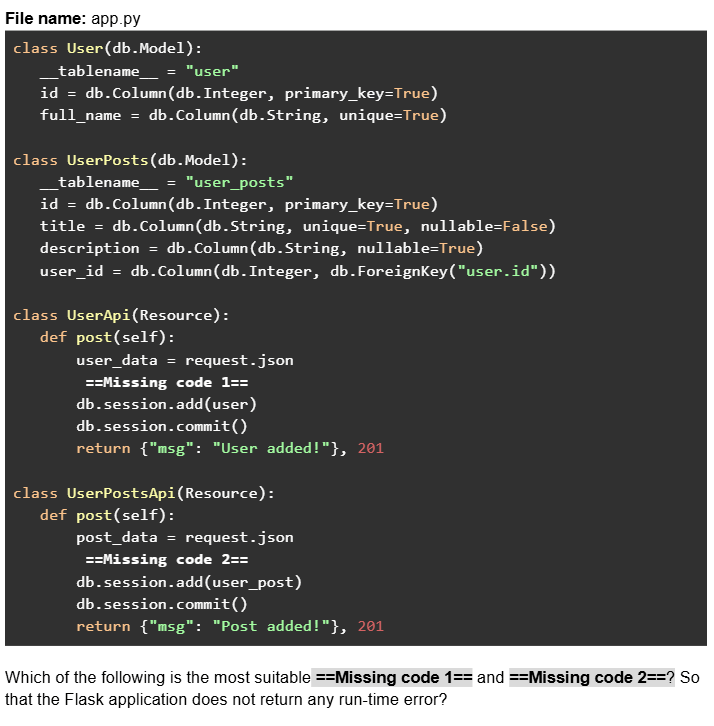
Consider the following Flask SQLAlchemy models and RESTful API code.
Text of the picture (copyable)
File name: app.py
```python
class User(db.Model):
    __tablename__ = "user"
    id = db.Column(db.Integer, primary_key=True)
    full_name = db.Column(db.String, unique=True)

class UserPosts(db.Model):
    __tablename__ = "user_posts"
    id = db.Column(db.Integer, primary_key=True)
    title = db.Column(db.String, unique=True, nullable=False)
    description = db.Column(db.String, nullable=True)
    user_id = db.Column(db.Integer, db.ForeignKey("user.id"))

class UserApi(Resource):
    def post(self):
        user_data = request.json
        ==Missing code 1==
        db.session.add(user)
        db.session.commit()
        return {"msg": "User added!"}, 201

class UserPostsApi(Resource):
    def post(self):
        post_data = request.json
        ==Missing code 2==
        db.session.add(user_post)
        db.session.commit()
        return {"msg": "Post added!"}, 201
```
Which of the following is the most suitable ==Missing code 1== and ==Missing code 2==? So that the Flask application does not return any run-time error?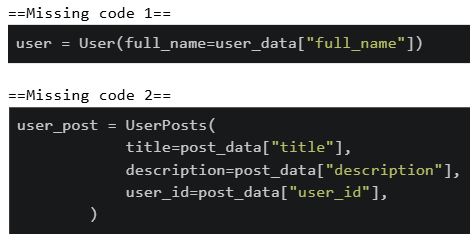
text
==Missing code 1==
```python
user = User(full_name=user_data["full_name"])
```

==Missing code 2==
```python
user_post = UserPosts(
    title=post_data["title"],
    description=post_data["description"],
    user_id=post_data["user_id"],
)
```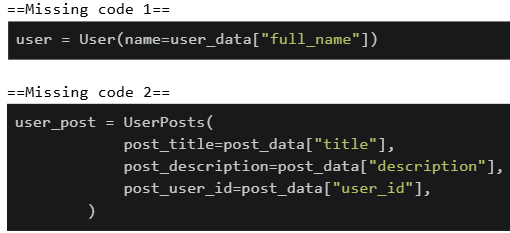
text
```python
==Missing code 1==
user = User(name=user_data["full_name"])

==Missing code 2==
user_post = UserPosts(
    post_title=post_data["title"],
    post_description=post_data["description"],
    post_user_id=post_data["user_id"],
)
```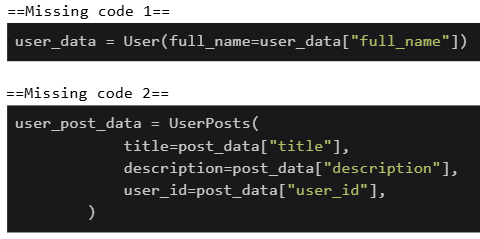
text
```python
==Missing code 1==
user_data = User(full_name=user_data["full_name"])

==Missing code 2==
user_post_data = UserPosts(
    title=post_data["title"],
    description=post_data["description"],
    user_id=post_data["user_id"],
)
```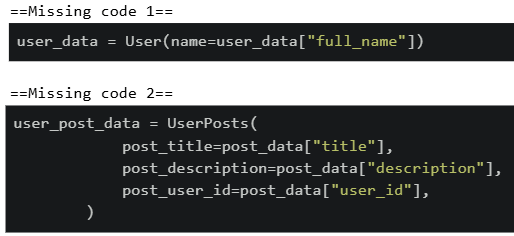
text
```
==Missing code 1==
user_data = User(name=user_data["full_name"])

==Missing code 2==
user_post_data = UserPosts(
    post_title=post_data["title"],
    post_description=post_data["description"],
    post_user_id=post_data["user_id"],
)
```
Consider the following flask app. Given that  allows code to be tested without a server, which of the following statements is correct?
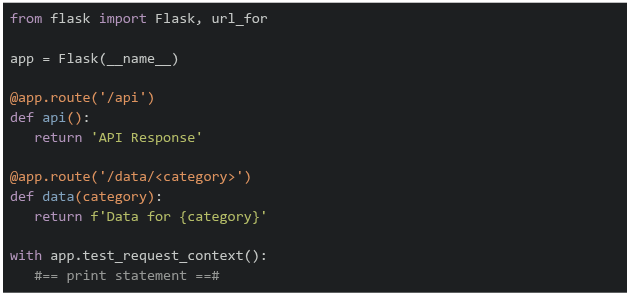
allows code to be tested without a server, which of the following statements is correct?
Text of the picture (copyable)
```
test_request_context()
```
```python
from flask import Flask, url_for

app = Flask(__name__)

@app.route('/api')
def api():
    return 'API Response'

@app.route('/data/<category>')
def data(category):
    return f'Data for {category}'

with app.test_request_context():
    #== print statement ==#
```- If
 is replaced by
  , the output on the terminal will be
text
```python #=== print statement ===# ``` ```python print(url_for('data', category='sales')) ``` ``` /data?category=sales ``` - If is replaced by
 , the output on the terminal will be
text
```python #=== print statement ===# ``` ```python print(url_for('data', category='sales', format='json')) ``` ``` /data/sales/json ``` - If is replaced by
 , the output on the terminal will be
text
```python #=== print statement ===# ``` ```python print(url_for('api', category='sales')) ``` ``` /api?category=sales ``` - If is replaced by
 , the output on the terminal will be
text
```python
#=== print statement ===#
```
```python
print(url_for('api'))
```
/api
Consider the following Python Flask code.
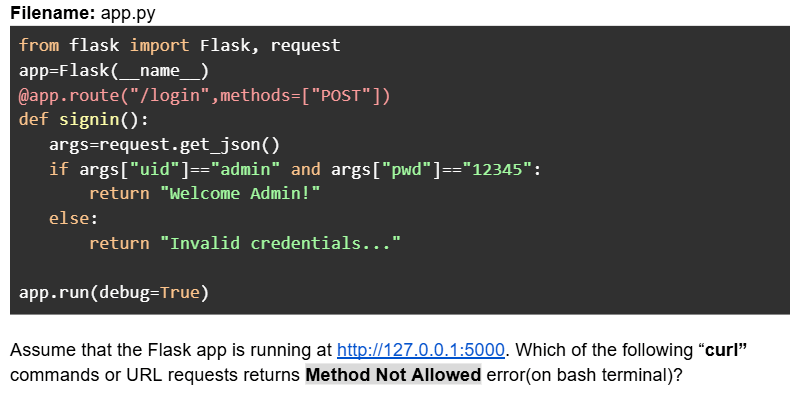
Text of the picture (copyable)
Filename: app.py

```python
from flask import Flask, request
app=Flask(__name__)
@app.route("/login",methods=["POST"])
def signin():
    args=request.get_json()
    if args["uid"]=="admin" and args["pwd"]=="12345":
        return "Welcome Admin!"
    else:
        return "Invalid credentials..."

app.run(debug=True)
```

Assume that the Flask app is running at http://127.0.0.1:5000. Which of the following "curl" commands or URL requests returns Method Not Allowed error(on bash terminal)?- curl -X POST --json '{"uid":"admin","pwd":"xyz"}' http://127.0.0.1:5000/login
- curl -X GET --json '{"uid":"admin","pwd":"xyz"}' http://127.0.0.1:5000/login
- URL request: http://127.0.0.1:5000/login
- curl --json '{"uid":"admin","pwd":"12345"}' http://127.0.0.1:5000/login
- curl -X POST --json '{"uid":"admin","pwd":"12345"}' http://127.0.0.1:5000/login
Consider the following Python Flask RESTful API code.
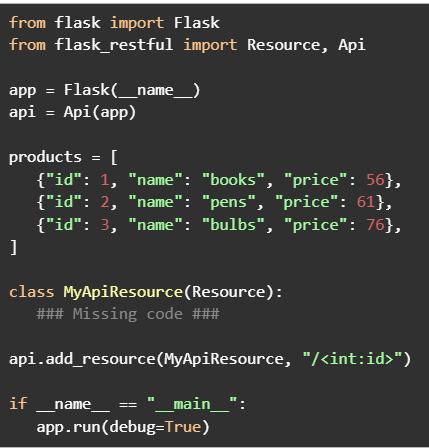

Text of the picture (copyable)
```python
from flask import Flask
from flask_restful import Resource, Api

app = Flask(__name__)
api = Api(app)

products = [
    {"id": 1, "name": "books", "price": 56},
    {"id": 2, "name": "pens", "price": 61},
    {"id": 3, "name": "bulbs", "price": 76},
]

class MyApiResource(Resource):
    ### Missing code ###

api.add_resource(MyApiResource, "/<int:id>")

if __name__ == "__main__":
    app.run(debug=True)
```
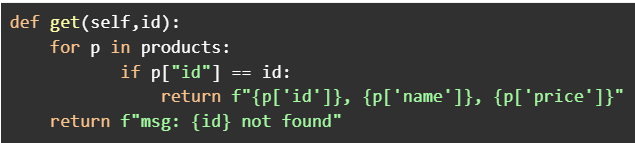
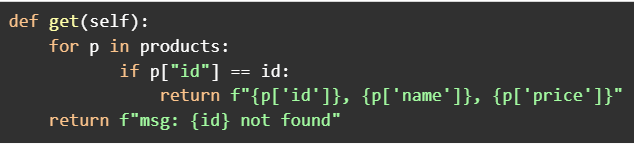
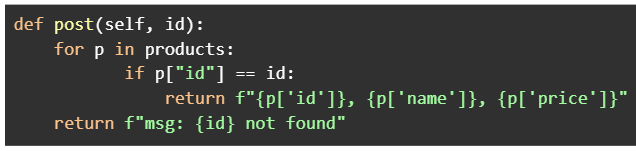
Assume that the Flask app is running at http://127.0.0.1:5000. Which of the following codes when placed at ###Missing code ### will work correctly to search a product by id?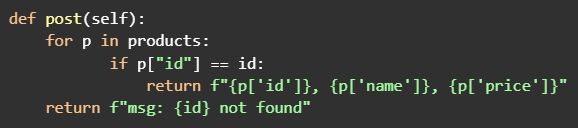
text
```python
def post(self):
    for p in products:
        if p["id"] == id:
            return f"{p['id']}, {p['name']}, {p['price']}"
    return f"msg: {id} not found"
```
text
```python
def get(self,id):
    for p in products:
        if p["id"] == id:
            return f"{p['id']}}, {p['name']}}, {p['price']}}"
    return f"msg: {id} not found"
```
text
```python
def get(self):
    for p in products:
        if p["id"] == id:
            return f"{p['id']}, {p['name']}, {p['price']}"
    return f"msg: {id} not found"
```
text
```python
def post(self, id):
    for p in products:
        if p["id"] == id:
            return f"{p['id']}, {p['name']}, {p['price']}"
    return f"msg: {id} not found"
```
Which command would you use to get detailed information about the HTTP request and response, including headers, and to help debug the HTTP request when using curl?

text
```
curl -i <URL>
```

text
```
curl -v <URL>
```

text
```
curl --headers <URL>
```

text
```
curl -X GET <URL>
```
Consider the following users list.

Text of the picture (copyable)
```python
users = [[{ "id":1, "name": "user_1", "role": "manager"},
          { "id":2, "name": "user_2", "role": "manager"},
          { "id":3, "name": "user_3", "role": "manager"}]]
```
An ordered HTML list is to be created for users where every list item should have a clickable "name" attribute redirecting to the endpoint "/show_users/<id>" where "id" is the "id" attribute of the same user dictionary. Which of the following is the correct way of doing it with jinja and HTML?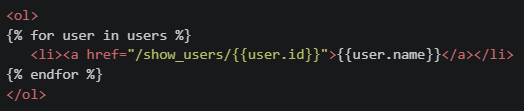
text
```html
<ol>
{% for user in users %}
    <li><a href="/show_users/{{user.id}}">{{user.name}}</a></li>
{% endfor %}
</ol>
```
text
```html
<ol>
{% for user in users %}
    <li><a href="/show_users/{{user['id']}}">{{user['name']}}</a></li>
{% endfor %}
</ol>
```
text
```html
<ol>
    <li><a href="/show_users/{{users[0].id}}">{{users[0].name}}</a></li>
    <li><a href="/show_users/{{users[1].id}}">{{users[1].name}}</a></li>
    <li><a href="/show_users/{{users[2].id}}">{{users[2].name}}</a></li>
</ol>
```
text
```html
<ol>
{% for user in users %}
    <li><a href="/show_users/{{user.name[-1]}}">{{user.name}}</a></li>
{% endfor %}
</ol>
```
What does the following curl command do?

Text of the picture (copyable)
```
curl -X POST -d "username=student&password=1234" https://student/login
```
- Sends a POST request to retrieve data.
- Sends a POST request to send form data.
- Sends a POST request to send JSON data.
- Sends a POST request to retrieve JSON data.
Text of the picture (copyable)
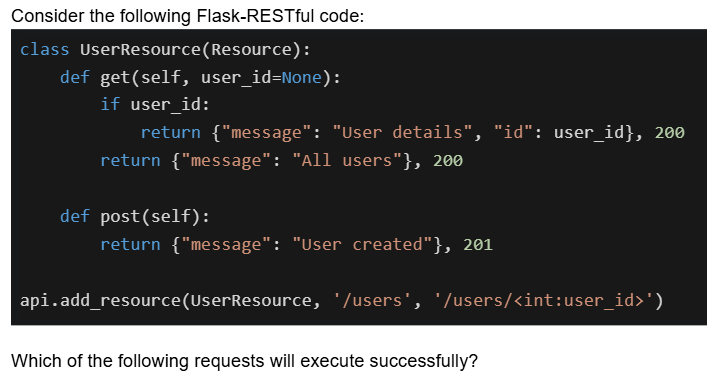
Consider the following Flask-RESTful code:

```python
class UserResource(Resource):
    def get(self, user_id=None):
        if user_id:
            return {"message": "User details", "id": user_id}, 200
        return {"message": "All users"}, 200

    def post(self):
        return {"message": "User created"}, 201

api.add_resource(UserResource, '/users', '/users/<int:user_id>')
```

Which of the following requests will execute successfully?- GET /users - returns 200 with all users
- GET /users/5 - returns 200 with user details for ID 5
- POST /users - returns 201 with user created message
- POST /users/5 - returns 201 with user created message
Text of the picture (copyable)
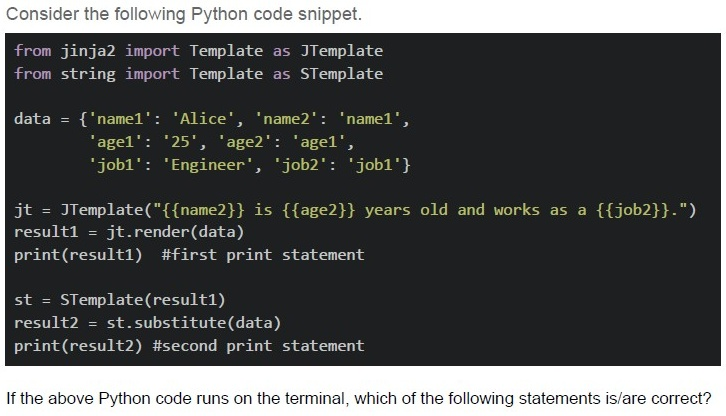
Consider the following Python code snippet.

```python
from jinja2 import Template as JTemplate
from string import Template as STemplate

data = {'name1': 'Alice', 'name2': 'name1',
        'age1': '25', 'age2': 'age1',
        'job1': 'Engineer', 'job2': 'job1'}

jt = JTemplate("{{name2}} is {{age2}} years old and works as a {{job2}}.")
result1 = jt.render(data)
print(result1) #first print statement

st = STemplate(result1)
result2 = st.substitute(data)
print(result2) #second print statement
```

If the above Python code runs on the terminal, which of the following statements is/are correct?
text
The first print statement will output: "name1 is age1 years old and works as a job1."

text
The second print statement will output: "Alice is 25 years old and works as a Engineer."

text
Jinja2 templates use double curly braces {{}} for variable substitution
text
String templates use dollar signs $ for variable substitution in the substitute() method

text
The code will raise a KeyError exception during execution
Comprehension passage for this question
Based on the above data, answer the given subquestions.
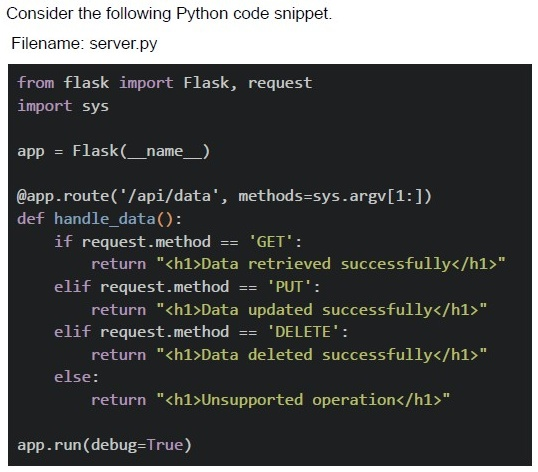
Text of the picture (copyable)
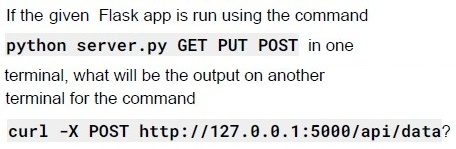
If the given Flask app is run using the command
```
python server.py GET PUT POST
```
in one terminal, what will be the output on another terminal for the command
```
curl -X POST http://127.0.0.1:5000/api/data?
```

text
```html
<h1>Data added successfully</h1>
```

text
```html
<h1>Unsupported operation</h1>
```

text
```html
<h1>Method not Allowed</h1>
```

text
```html
<h1>404 Not Found</h1>
```
Comprehension passage for this question
Based on the above data, answer the given subquestions.
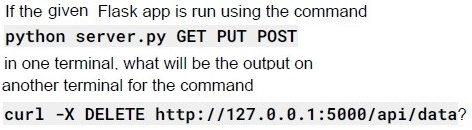
Text of the picture (copyable)
If the given Flask app is run using the command
```
python server.py GET PUT POST
```
in one terminal, what will be the output on
another terminal for the command
```
curl -X DELETE http://127.0.0.1:5000/api/data?
```

text
```html
<h1>Data deleted successfully</h1>
```

text
```html
<h1>Unsupported operation</h1>
```

text
```html
<h1>Method not Allowed</h1>
```

text
```html
<h1>404 Not Found</h1>
```
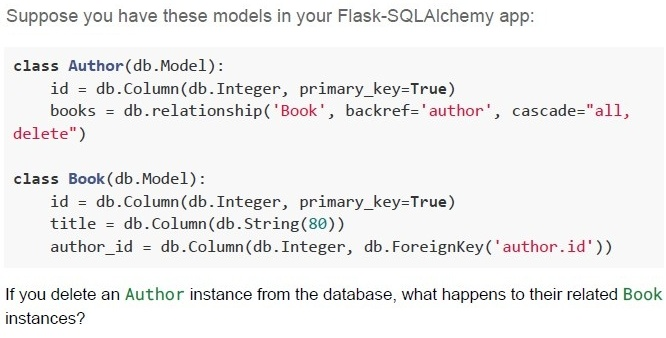
Text of the picture (copyable)
Suppose you have these models in your Flask-SQLAlchemy app:

```python
class Author(db.Model):
    id = db.Column(db.Integer, primary_key=True)
    books = db.relationship('Book', backref='author', cascade="all, delete")

class Book(db.Model):
    id = db.Column(db.Integer, primary_key=True)
    title = db.Column(db.String(80))
    author_id = db.Column(db.Integer, db.ForeignKey('author.id'))
```

If you delete an Author instance from the database, what happens to their related Book instances?
text
The books remain in the database, with author_id set to NULL

text
The books remain, but are marked as "inactive"

text
The books are also deleted from the database

text
An error is raised and the deletion is prevented
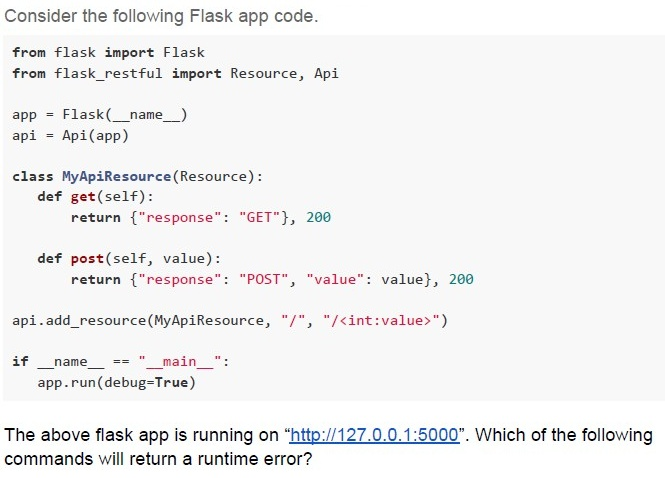
Text of the picture (copyable)
Consider the following Flask app code.

```python
from flask import Flask
from flask_restful import Resource, Api

app = Flask(__name__)
api = Api(app)

class MyApiResource(Resource):
    def get(self):
        return {"response": "GET"}, 200

    def post(self, value):
        return {"response": "POST", "value": value}, 200

api.add_resource(MyApiResource, "/", "/<int:value>")

if __name__ == "__main__":
    app.run(debug=True)
```

The above flask app is running on "http://127.0.0.1:5000". Which of the following commands will return a runtime error?
text
```
curl http://127.0.0.1:5000/1025 -X GET
```

text
```
curl http://127.0.0.1:5000/1025 -X POST
```

text
```
curl http://127.0.0.1:5000/ -X POST
```

text
```
curl http://127.0.0.1:5000/ -x GET
```
Comprehension passage for this question
Based on the above data, answer the given subquestions.
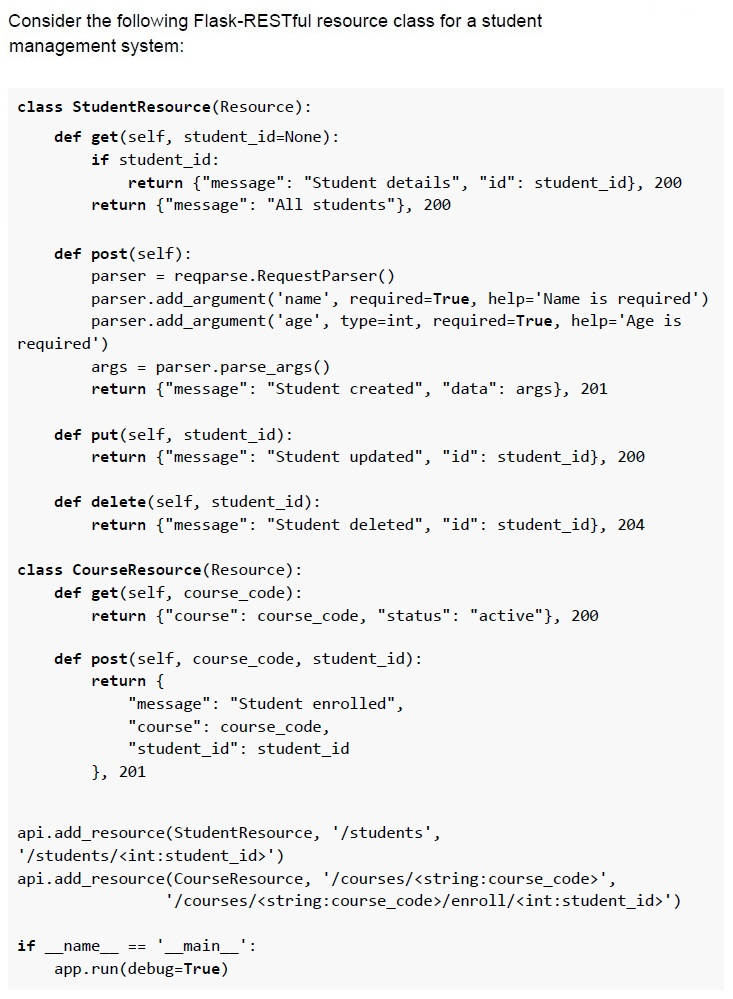
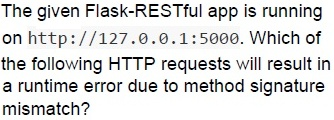
Text of the picture (copyable)
The given Flask-RESTful app is running
on http://127.0.0.1:5000. Which of
the following HTTP requests will result in
a runtime error due to method signature
mismatch?

text
```
curl http://127.0.0.1:5000/students/123 -X PUT
```

text
```
curl http://127.0.0.1:5000/students -X POST -d
"name=Jay&age=20"
```

text
```
curl http://127.0.0.1:5000/courses/CS101 -X POST
```

text
```
curl http://127.0.0.1:5000/students -X DELETE
```
Comprehension passage for this question
Based on the above data, answer the given subquestions.
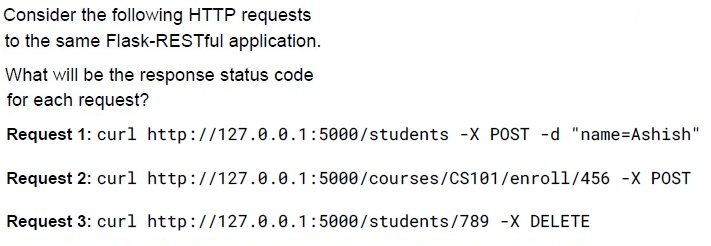
Text of the picture (copyable)
Consider the following HTTP requests
to the same Flask-RESTful application.

What will be the response status code
for each request?

Request 1: `curl http://127.0.0.1:5000/students -X POST -d "name=Ashish"`

Request 2: `curl http://127.0.0.1:5000/courses/CS101/enroll/456 -X POST`

Request 3: `curl http://127.0.0.1:5000/students/789 -X DELETE`
- Request 1: 400, Request 2: 201, Request 3: 204
- Request 1: 201, Request 2: 201, Request 3: 204
- Request 1: 400, Request 2: 405, Request 3: 204
- Request 1: 201, Request 2: 405, Request 3: 200
You manage a datacenter where each server has a 10 Gigabit per second network connection and the facility’s backbone link is also 10 Gbps. Your application is handling 10,000 requests per second, each with a 50 KB response, which translates to about 4 Gbps of required throughput. So, if each request involves minimal CPU processing, and the existing server has sufficient resources to handle the load. Which of the following scaling strategies is most appropriate to meet this demand?
- Scale up on a single server
- Scale out to multiple servers in the datacenter
- Both will produce similar results
- None of these
Which of the following statements BEST describes a key advantage of Jinja2 server-side rendering over JavaScript/JSON-based client-side rendering?
- It guarantees that dynamic updates on user interactions never requireadditional data fetches.
- It provides faster initial page load and improved Search Engine Optimizationwithout requiring client-side template logic.
- It allows the client to handle all template rendering, reducing load on theserver.
- None of these
Which of the following statements is/are false about caching in REST APIs?
- Caching allows storing server responses in a proxy or frontend so that a clientneed not make requests to the server for the same resources repeatedly.
- Caching degrades the overall quality of service and increases load on theservers.
- Browsers treat all GET and POST requests cacheable by default.
- Caching optimizes the network by increasing the latency.
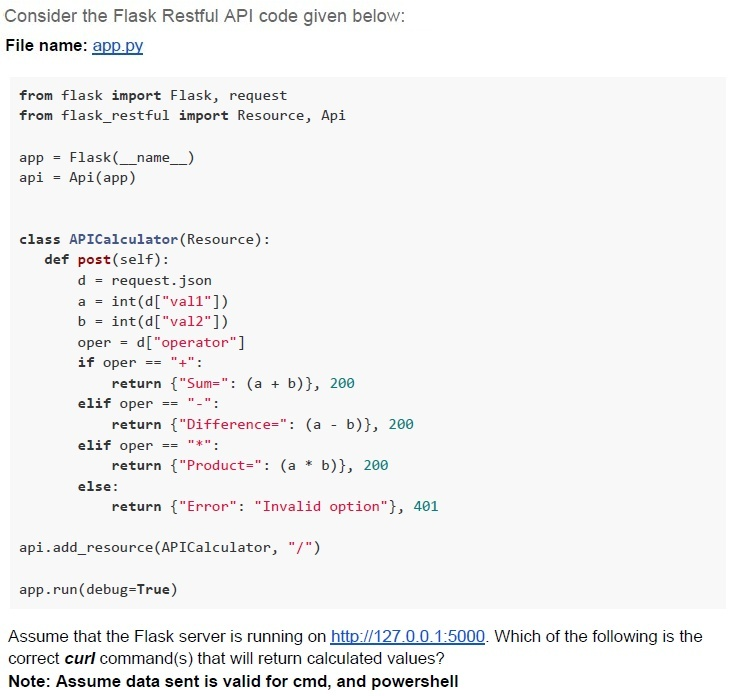
Text of the picture (copyable)
Consider the Flask Restful API code given below:
File name: app.py

```python
from flask import Flask, request
from flask_restful import Resource, Api

app = Flask(__name__)
api = Api(app)

class APICalculator(Resource):
    def post(self):
        d = request.json
        a = int(d["val1"])
        b = int(d["val2"])
        oper = d["operator"]
        if oper == "+":
            return {"Sum": (a + b)}, 200
        elif oper == "-":
            return {"Difference": (a - b)}, 200
        elif oper == "*":
            return {"Product": (a * b)}, 200
        else:
            return {"Error": "Invalid option"}, 401

api.add_resource(APICalculator, "/")

app.run(debug=True)
```

Assume that the Flask server is running on http://127.0.0.1:5000. Which of the following is the correct curl command(s) that will return calculated values?
**Note: Assume data sent is valid for cmd, and powershell**
text
```
curl -X POST "http://127.0.0.1:5000" -H 'Content-Type: application/json' -d '{"val1":27, "val2":3, "operator":"+"}'
```
text
```
curl -X POST "http://127.0.0.1:5000" -H 'Content-Type: application/json' -d
'{"val1":27,"val2":3,"operator":"**"}'
```
text
```
curl -X POST "http://127.0.0.1:5000" -H 'Content-Type: application/json' -d '{"val1":27,"val2":3,"operator":"/"}'
```
text
```
curl -X POST "http://127.0.0.1:5000" -d
'{"val1":27, "val2":3, "operator":"/"}'
```
text
```
curl -X POST "http://127.0.0.1:5000" -H 'Content-Type: application/json' -d '{"val1":27, "val2":3, "operator":"-"}'
```
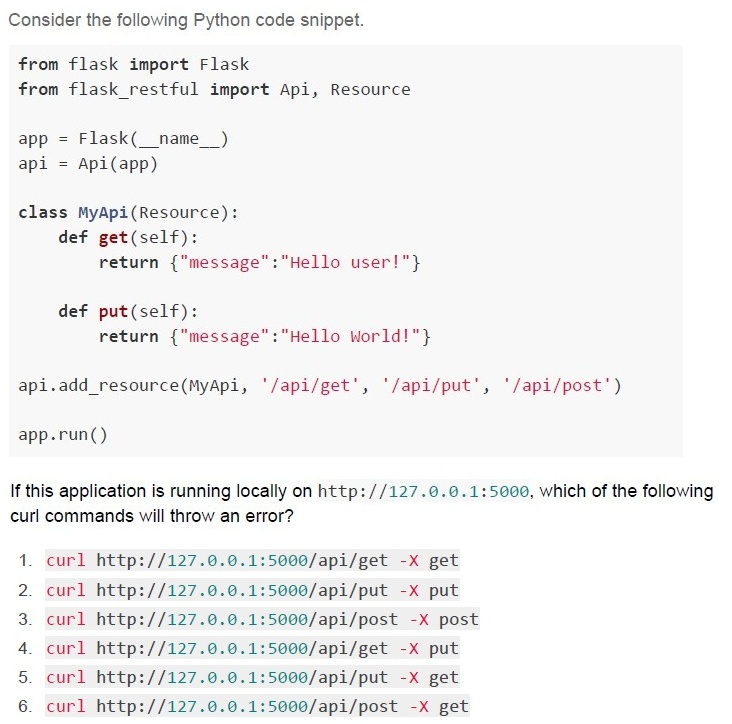
Text of the picture (copyable)
Consider the following Python code snippet.

```python
from flask import Flask
from flask_restful import Api, Resource

app = Flask(__name__)
api = Api(app)

class MyApi(Resource):
    def get(self):
        return {"message":"Hello user!"}

    def put(self):
        return {"message":"Hello World!"}

api.add_resource(MyApi, '/api/get', '/api/put', '/api/post')

app.run()
```

If this application is running locally on http://127.0.0.1:5000, which of the following curl commands will throw an error?

1. `curl http://127.0.0.1:5000/api/get -X get`
2. `curl http://127.0.0.1:5000/api/put -X put`
3. `curl http://127.0.0.1:5000/api/post -X post`
4. `curl http://127.0.0.1:5000/api/get -X put`
5. `curl http://127.0.0.1:5000/api/put -X get`
6. `curl http://127.0.0.1:5000/api/post -X get`- Only 3
- Only 3 and 4
- Only 5 and 6
- Only 3, 4, 5 and 6
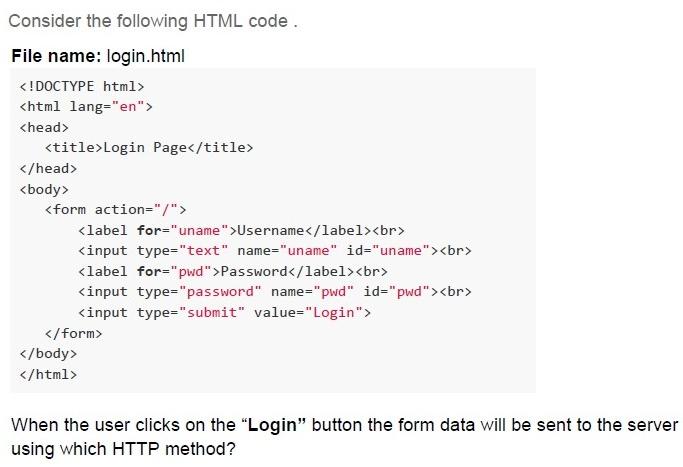
Text of the picture (copyable)
Consider the following HTML code.

**File name: login.html**
```html
<!DOCTYPE html>
<html lang="en">
<head>
    <title>Login Page</title>
</head>
<body>
    <form action="/">
        <label for="uname">Username</label><br>
        <input type="text" name="uname" id="uname"><br>
        <label for="pwd">Password</label><br>
        <input type="password" name="pwd" id="pwd"><br>
        <input type="submit" value="Login">
    </form>
</body>
</html>
```

When the user clicks on the "Login" button the form data will be sent to the server using which HTTP method?- GET
- POST
- PUT
- DELETE
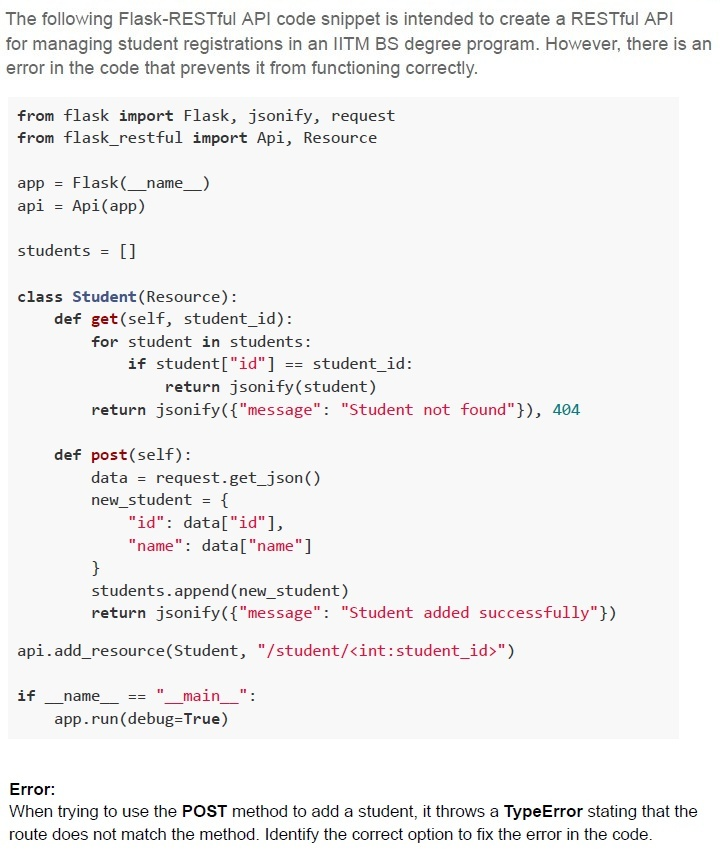
Text of the picture (copyable)
The following Flask-RESTful API code snippet is intended to create a RESTful API for managing student registrations in an IITM BS degree program. However, there is an error in the code that prevents it from functioning correctly.

```python
from flask import Flask, jsonify, request
from flask_restful import Api, Resource

app = Flask(__name__)
api = Api(app)

students = []

class Student(Resource):
    def get(self, student_id):
        for student in students:
            if student["id"] == student_id:
                return jsonify(student)
        return jsonify({"message": "Student not found"}), 404

    def post(self):
        data = request.get_json()
        new_student = {
            "id": data["id"],
            "name": data["name"]
        }
        students.append(new_student)
        return jsonify({"message": "Student added successfully"})

api.add_resource(Student, "/student/<int:student_id>")

if __name__ == "__main__":
    app.run(debug=True)
```

**Error:**
When trying to use the **POST** method to add a student, it throws a **TypeError** stating that the route does not match the method. Identify the correct option to fix the error in the code.
text
Change the api.add_resource(Student, "/student/<int:student_id>") to:
```
api.add_resource(Student, "/student", "/student/<int:student_id>")
```

text
Add the student_id parameter to the **post** method in the Student class as **def**
```
post(self, student_id):
```
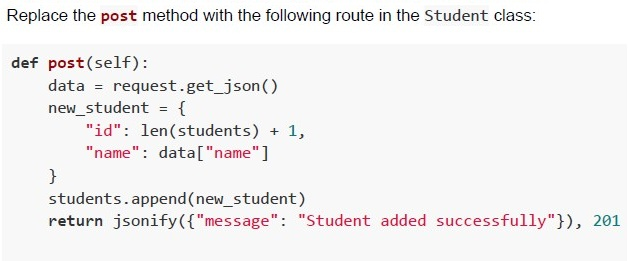
text
Replace the **post** method with the following route in the Student class:

```python
def post(self):
    data = request.get_json()
    new_student = {
        "id": len(students) + 1,
        "name": data["name"]
    }
    students.append(new_student)
    return jsonify({"message": "Student added successfully"}), 201
```
text
Change the api.add_resource(Student, "/student/<int:student_id>") to:
api.add_resource(Student, "/students")
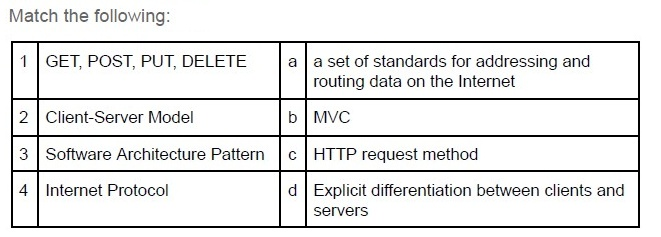
Text of the picture (copyable)
Match the following:

| | | | |
|---|---|---|---|
| 1 | GET, POST, PUT, DELETE | a | a set of standards for addressing and routing data on the Internet |
| 2 | Client-Server Model | b | MVC |
| 3 | Software Architecture Pattern | c | HTTP request method |
| 4 | Internet Protocol | d | Explicit differentiation between clients and servers |
- 1-c, 2-d, 3-b, 4-a
- 1-c, 2-b, 3-d, 4-a
- 1-c, 2-d, 3-a, 4-b
- 1-a, 2-d, 3-b, 4-c
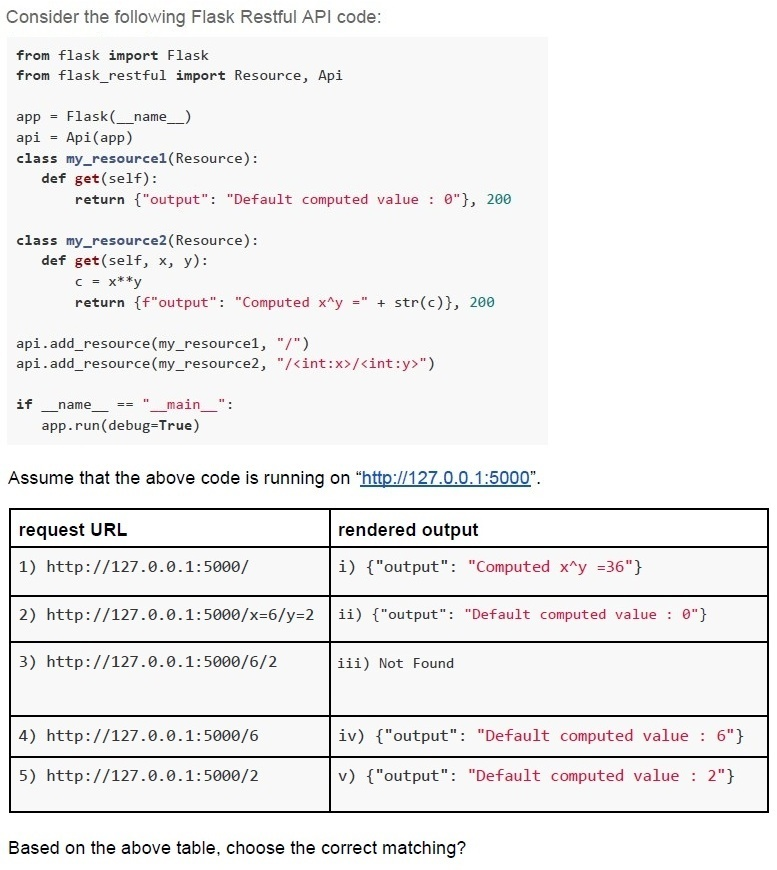
Text of the picture (copyable)
Consider the following Flask Restful API code:

```python
from flask import Flask
from flask_restful import Resource, Api

app = Flask(__name__)
api = Api(app)

class my_resource1(Resource):
    def get(self):
        return {"output": "Default computed value : 0"}, 200

class my_resource2(Resource):
    def get(self, x, y):
        c = x**y
        return f"output": "Computed x^y = " + str(c)}, 200

api.add_resource(my_resource1, "/")
api.add_resource(my_resource2, "/<int:x>/<int:y>")

if __name__ == "__main__":
    app.run(debug=True)
```

Assume that the above code is running on "http://127.0.0.1:5000".

| request URL | rendered output |
|---|---|
| 1) http://127.0.0.1:5000/ | i) {"output": "Computed x^y =36"} |
| 2) http://127.0.0.1:5000/x=6/y=2 | ii) {"output": "Default computed value : 0"} |
| 3) http://127.0.0.1:5000/6/2 | iii) Not Found |
| 4) http://127.0.0.1:5000/6 | iv) {"output": "Default computed value : 6"} |
| 5) http://127.0.0.1:5000/2 | v) {"output": "Default computed value : 2"} |

Based on the above table, choose the correct matching?- 1-ii, 2-i, 3-iii, 4-iv, 5-v
- 1-iii, 2-iii, 3-iii, 4-v, 5-iv
- 1-ii, 2-i, 3-i, 4-iv, 5-v
- 1-ii, 2-iii, 3-i, 4-iii, 5-iii
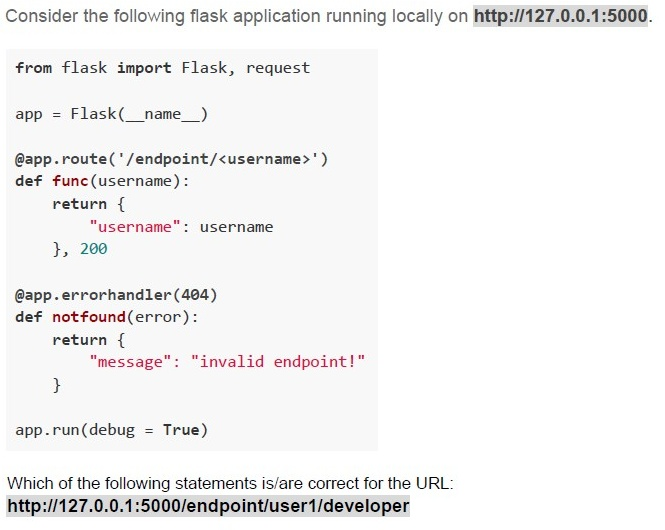
Text of the picture (copyable)
Consider the following flask application running locally on http://127.0.0.1:5000.

```python
from flask import Flask, request

app = Flask(__name__)

@app.route('/endpoint/<username>')
def func(username):
    return {
        "username": username
    }, 200

@app.errorhandler(404)
def notfound(error):
    return {
        "message": "invalid endpoint!"
    }

app.run(debug = True)
```

Which of the following statements is/are correct for the URL:
http://127.0.0.1:5000/endpoint/user1/developer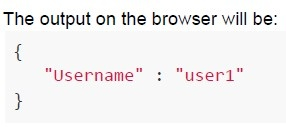
text
The output on the browser will be:
```
{
  "Username" : "user1"
}
```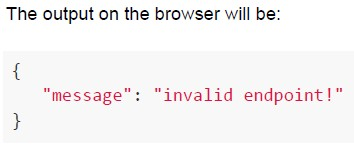
text
The output on the browser will be:

```json
{
    "message": "invalid endpoint!"
}
```
text
The status code of the response will be 200

text
The status code of the response will be 404
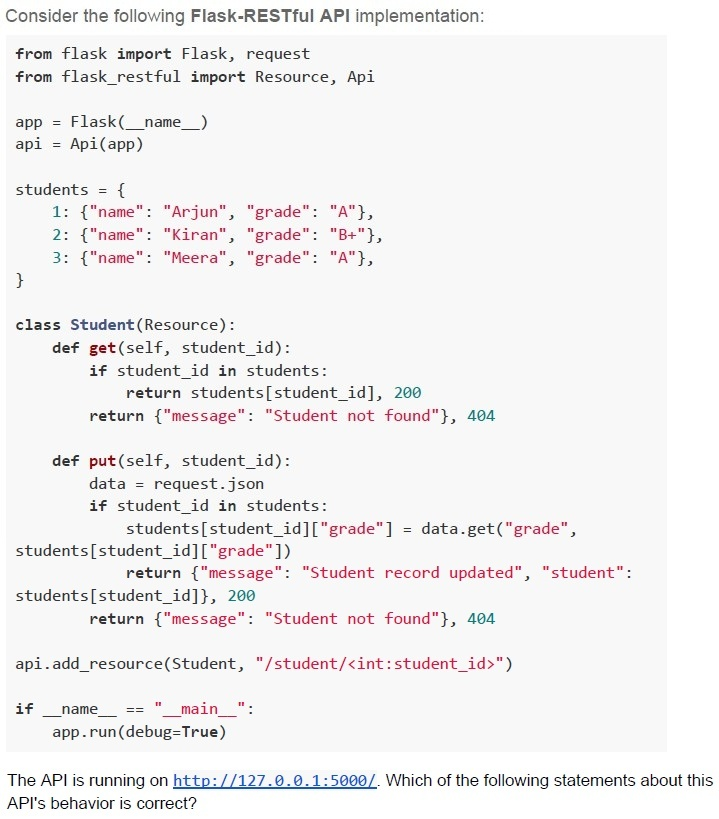
Text of the picture (copyable)
Consider the following Flask-RESTful API implementation:

```python
from flask import Flask, request
from flask_restful import Resource, Api

app = Flask(__name__)
api = Api(app)

students = {
    1: {"name": "Arjun", "grade": "A"},
    2: {"name": "Kiran", "grade": "B+"},
    3: {"name": "Meera", "grade": "A"},
}

class Student(Resource):
    def get(self, student_id):
        if student_id in students:
            return students[student_id], 200
        return {"message": "Student not found"}, 404

    def put(self, student_id):
        data = request.json
        if student_id in students:
            students[student_id]["grade"] = data.get("grade",
                                                    students[student_id]["grade"])
            return {"message": "Student record updated", "student":
                    students[student_id]}, 200
        return {"message": "Student not found"}, 404

api.add_resource(Student, "/student/<int:student_id>")

if __name__ == "__main__":
    app.run(debug=True)
```

The API is running on http://127.0.0.1:5000/. Which of the following statements about this API's behavior is correct?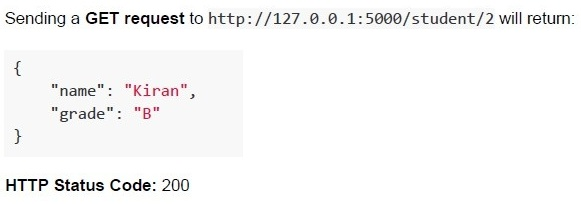
text
Sending a GET request to http://127.0.0.1:5000/student/2 will return:

```json
{
  "name": "Kiran",
  "grade": "B"
}
```

HTTP Status Code: 200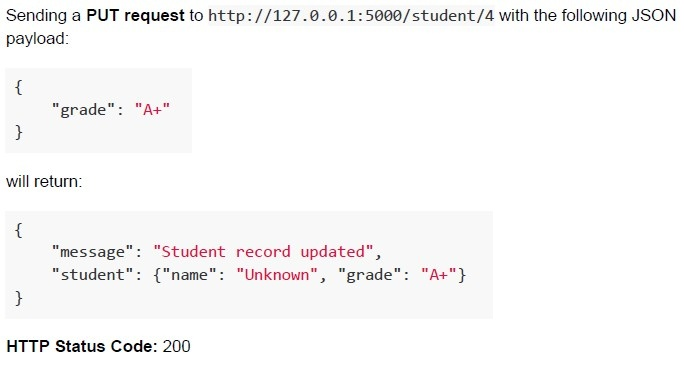
text
Sending a **PUT request** to http://127.0.0.1:5000/student/4 with the following JSON payload:

```json
{
  "grade": "A+"
}
```

will return:

```json
{
  "message": "Student record updated",
  "student": {"name": "Unknown", "grade": "A+"}
}
```

HTTP Status Code: 200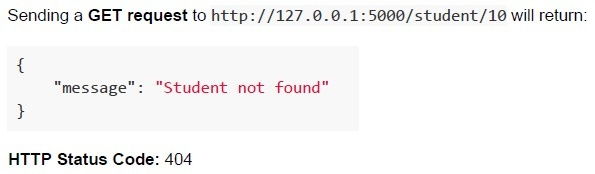
text
Sending a **GET** request to http://127.0.0.1:5000/student/10 will return:

```
{
  "message": "Student not found"
}
```

**HTTP Status Code**: 404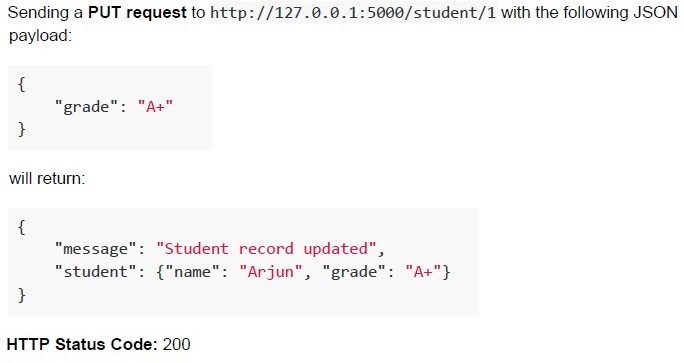
text
Sending a **PUT request** to http://127.0.0.1:5000/student/1 with the following JSON payload:

```json
{
  "grade": "A+"
}
```

will return:

```json
{
  "message": "Student record updated",
  "student": {"name": "Arjun", "grade": "A+"}
}
```

HTTP Status Code: 200
Which of the following statements about the Constraint Validation API is/are true?
- The Constraint Validation API ensures that form input meets client-sidevalidation rules before submission.
- The Constraint Validation API is sufficient to prevent server-side attacks likeSQL injection.
- It is possible to bypass the Constraint Validation API by directly sendingrequests to the server.
- The Constraint Validation API automatically validates all data on the serverside.
Comprehension passage for this question
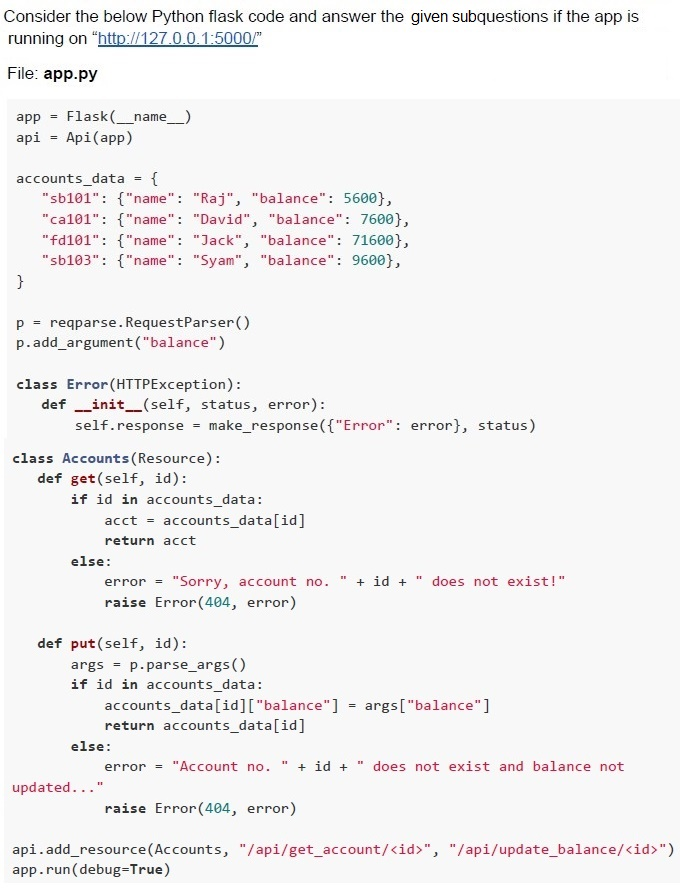

Text of the picture (copyable)
What will be the output of the below terminal request?
```
curl http://127.0.0.1:5000/api/get_account/fd101 -X GET
```
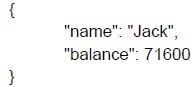
text
```json
{
    "name": "Jack",
    "balance": 71600
}
```
text
Sorry, account no. fd101 does not exist

text
Account no. fd101 does not exist and balance not updated...
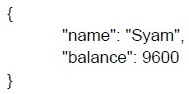
text
```json
{
    "name": "Syam",
    "balance": 9600
}
```
Comprehension passage for this question

Text of the picture (copyable)
Which of the following command will
update balance of account no. **ca101**?

text
```
curl http://127.0.0.1:5000/api/update_balance/ca101 -X POST -d
"{\"balance\":\"15890\"}" -H "Content-Type: application/json"
```
text
```
curl http://127.0.0.1:5000/api/get_balance/ca101 -X POST -d
"{\"balance\":\"15890\"}" -H "Content-Type: application/json"
```
text
```
curl http://127.0.0.1:5000/api/get_balance/ca101 -X PUT -d
"{\"balance\":\"15890\"}" -H "Content-Type: application/json"
```
text
```
curl http://127.0.0.1:5000/api/update_balance/ca101 -X PUT -d
"{\"balance\":\"15890\"}" -H "Content-Type: application/json"
```
Comprehension passage for this question
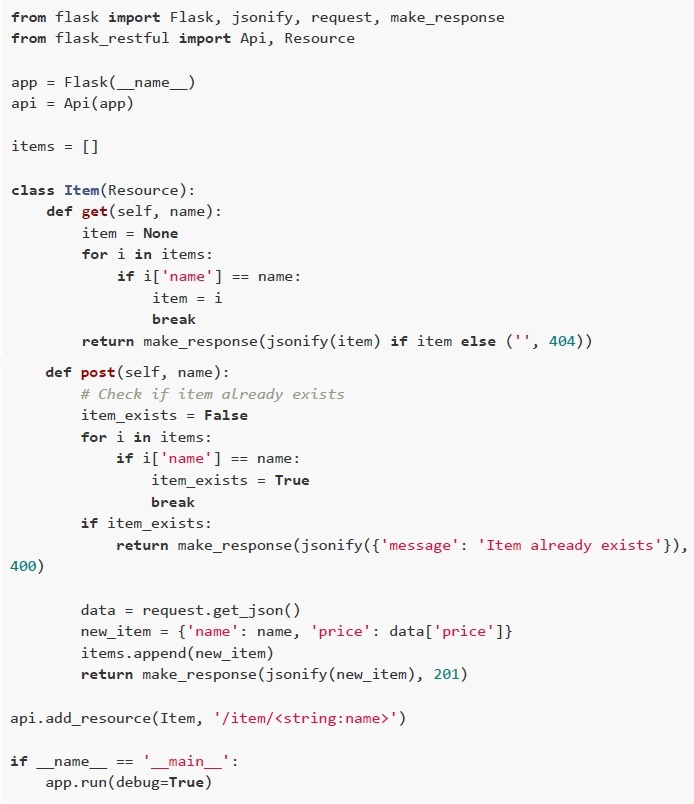
Use the Python code given below for answering the subquestions:
 Use the Python code given below for answering the subquestions:
Text of the picture (copyable)
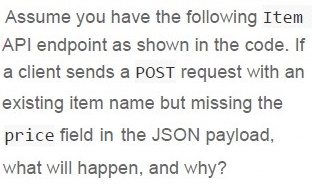
Assume you have the following Item
API endpoint as shown in the code. If
a client sends a POST request with an
existing item name but missing the
price field in the JSON payload,
what will happen, and why?
text
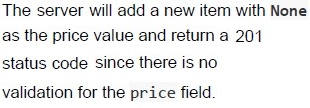
The server will add a new item with **None**
as the price value and return a 201
status code since there is no
validation for the price field.
text
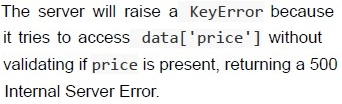
The server will raise a KeyError because
it tries to access data['price'] without
validating if price is present, returning a 500
Internal Server Error.
text
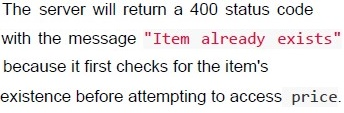
The server will return a 400 status code
with the message "Item already exists"
because it first checks for the item's
existence before attempting to access price.
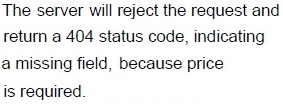
text
The server will reject the request and
return a 404 status code, indicating
a missing field, because price
is required.
Comprehension passage for this question
Use the Python code given below for answering the subquestions:
Use the Python code given below for answering the subquestions:

Text of the picture (copyable)
What will be the status code of the response
for the request:

```
curl http://127.0.0.1:5000/item/candle?price=120 -X POST
```
- 201
- 404
- 500
- None of these
Text of the picture (copyable)
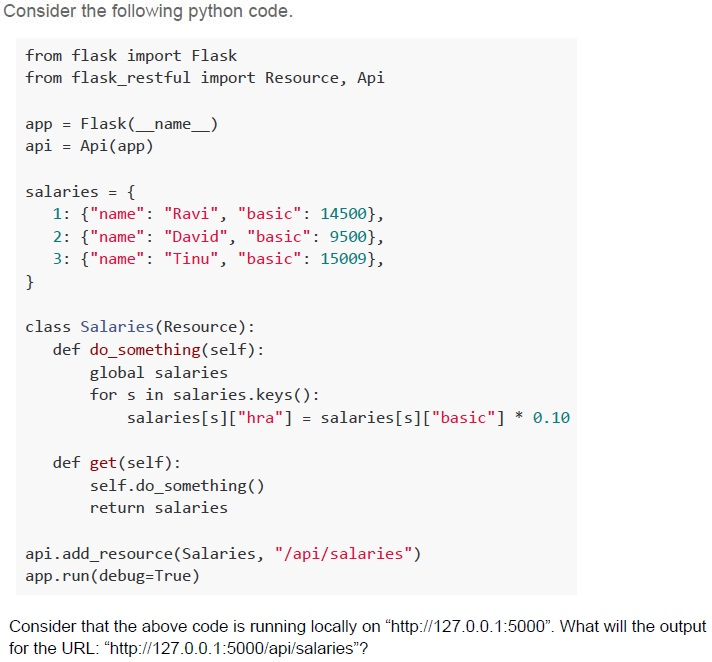
Consider the following python code.

```python
from flask import Flask
from flask_restful import Resource, Api

app = Flask(__name__)
api = Api(app)

salaries = {
    1: {"name": "Ravi", "basic": 14500},
    2: {"name": "David", "basic": 9500},
    3: {"name": "Tinu", "basic": 15009},
}

class Salaries(Resource):
    def do_something(self):
        global salaries
        for s in salaries.keys():
            salaries[s]["hra"] = salaries[s]["basic"] * 0.10

    def get(self):
        self.do_something()
        return salaries

api.add_resource(Salaries, "/api/salaries")
app.run(debug=True)
```

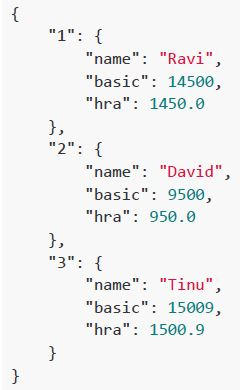
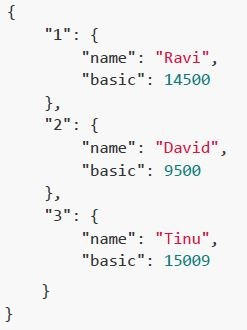
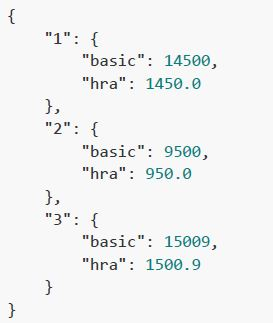
Consider that the above code is running locally on "http://127.0.0.1:5000". What will the output for the URL: "http://127.0.0.1:5000/api/salaries"?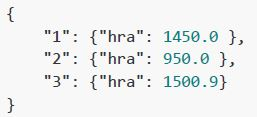
text
```json
{
    "1": {"hra": 1450.0 },
    "2": {"hra": 950.0 },
    "3": {"hra": 1500.9}
}
```
text
```json
{
    "1": {
        "name": "Ravi",
        "basic": 14500,
        "hra": 1450.0
    },
    "2": {
        "name": "David",
        "basic": 9500,
        "hra": 950.0
    },
    "3": {
        "name": "Tinu",
        "basic": 15009,
        "hra": 1500.9
    }
}
```
text
```json
{
  "1": {
    "name": "Ravi",
    "basic": 14500
  },
  "2": {
    "name": "David",
    "basic": 9500
  },
  "3": {
    "name": "Tinu",
    "basic": 15009
  }
}
```
text
```json
{
  "1": {
    "basic": 14500,
    "hra": 1450.0
  },
  "2": {
    "basic": 9500,
    "hra": 950.0
  },
  "3": {
    "basic": 15009,
    "hra": 1500.9
  }
}
```
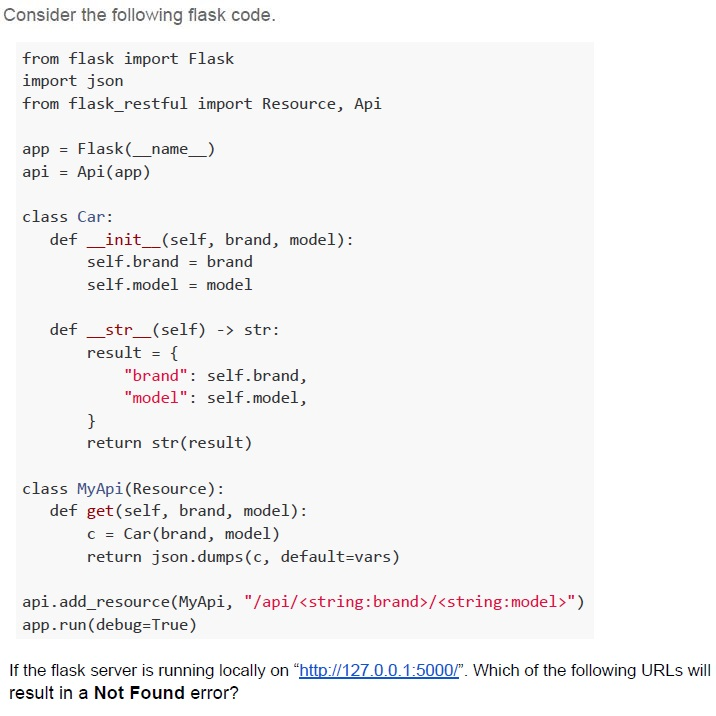
Text of the picture (copyable)
Consider the following flask code.

```python
from flask import Flask
import json
from flask_restful import Resource, Api

app = Flask(__name__)
api = Api(app)

class Car:
    def __init__(self, brand, model):
        self.brand = brand
        self.model = model

    def __str__(self) -> str:
        result = {
            "brand": self.brand,
            "model": self.model,
        }
        return str(result)

class MyApi(Resource):
    def get(self, brand, model):
        c = Car(brand, model)
        return json.dumps(c, default=vars)

api.add_resource(MyApi, "/api/<string:brand>/<string:model>")
app.run(debug=True)
```

If the flask server is running locally on "http://127.0.0.1:5000/". Which of the following URLs will result in a Not Found error?
text
http://127.0.0.1:5000/api/maruti/swift

text
```
http://127.0.0.1:5000/api/brand=Hyundai/model=Creta
```

text
```
http://127.0.0.1:5000/api/brand=Ford,model=Fiesta
```

text
http://127.0.0.1:5000/api/Honda&City

text
http://127.0.0.1:5000/api/model=Accent/brand=Hundai
Comprehension passage for this question
Consider the following resource created using Flask, assume that the application is running on a terminal 1 and being accessed using CURL on terminal 2. Answer the given subquestions.
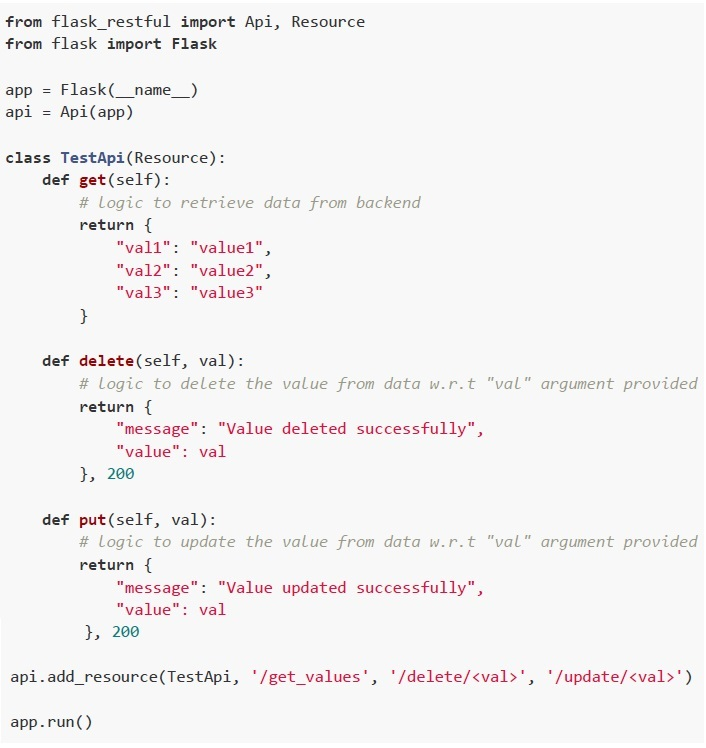 Consider the following resource created using Flask, assume that the application is running on a terminal 1 and being accessed using CURL on terminal 2. Answer the given subquestions.
What will be returned on the terminal 2 for the command:
 What will be returned on the terminal 2 for the command:
What will be returned on the terminal 2 for the command:
Text of the picture (copyable)
```
curl http://127.0.0.1:5000/delete/val1
```

text
```json
{"message": "Value deleted successfully", "value": "val1"}
```
text
```json
{"message": "Value updated successfully", "value": "val1"}
```
text
```json
{"val1": "value1"}
```
text
None of these.
Comprehension passage for this question
Consider the following resource created using Flask, assume that the application is running on a terminal 1 and being accessed using CURL on terminal 2. Answer the given subquestions.
Consider the following resource created using Flask, assume that the application is running on a terminal 1 and being accessed using CURL on terminal 2. Answer the given subquestions.
What will be returned on the terminal 2 for the command:
 What will be returned on the terminal 2 for the command:
What will be returned on the terminal 2 for the command:
Text of the picture (copyable)
```
curl http://127.0.0.1:5000/delete/va11 -X PUT
```

text
```json
{
  "message": "Value deleted successfully",
  "value": "val1"
}
```
text
```json
{"message": "Value updated successfully", "value": "val1"}
```
text
```json
{"val1": "value1"}
```
text
None of these.
Text of the picture (copyable)
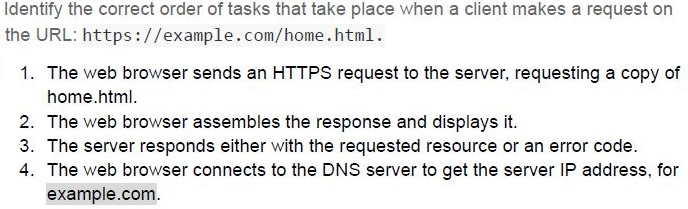
Identify the correct order of tasks that take place when a client makes a request on the URL: https://example.com/home.html.

1. The web browser sends an HTTPS request to the server, requesting a copy of home.html.
2. The web browser assembles the response and displays it.
3. The server responds either with the requested resource or an error code.
4. The web browser connects to the DNS server to get the server IP address, for example.com.
- 1-4-3-2
- 4-1-3-2
- 1-3-4-2
- 4-3-1-2
The term “stateless” in the context of a server means that _________
- it is not physically located on any particular machine
- it does not have any information about the state of the client
- it is ephemeral
- All of these
Text of the picture (copyable)
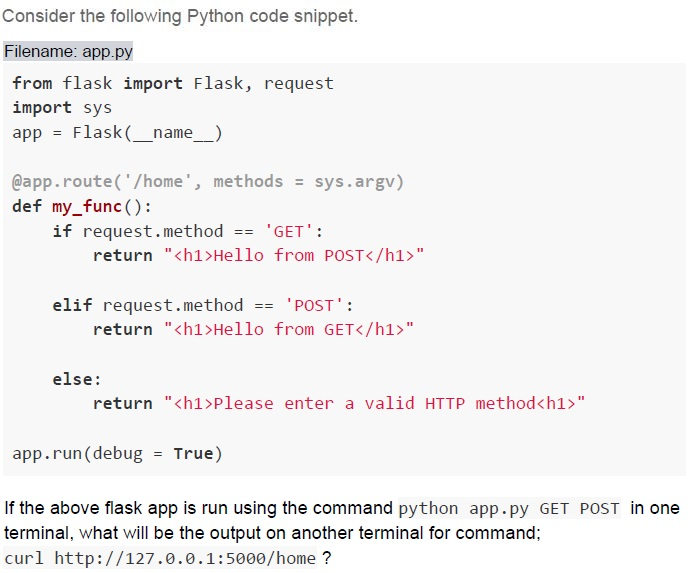
Consider the following Python code snippet.
Filename: app.py

```python
from flask import Flask, request
import sys
app = Flask(__name__)

@app.route('/home', methods = sys.argv)
def my_func():
    if request.method == 'GET':
        return "<h1>Hello from POST</h1>"

    elif request.method == 'POST':
        return "<h1>Hello from GET</h1>"

    else:
        return "<h1>Please enter a valid HTTP method</h1>"

app.run(debug = True)
```

If the above flask app is run using the command `python app.py GET POST` in one terminal, what will be the output on another terminal for command;
`curl http://127.0.0.1:5000/home ?`
text
```html
<h1>Hello from GET</h1>
```

text
```html
<h1>Hello from POST</h1>
```

text
```html
<h1>Please enter a valid HTTP method</h1>
```

text
```html
<h1>Method not Allowed</h1>
```
Text of the picture (copyable)
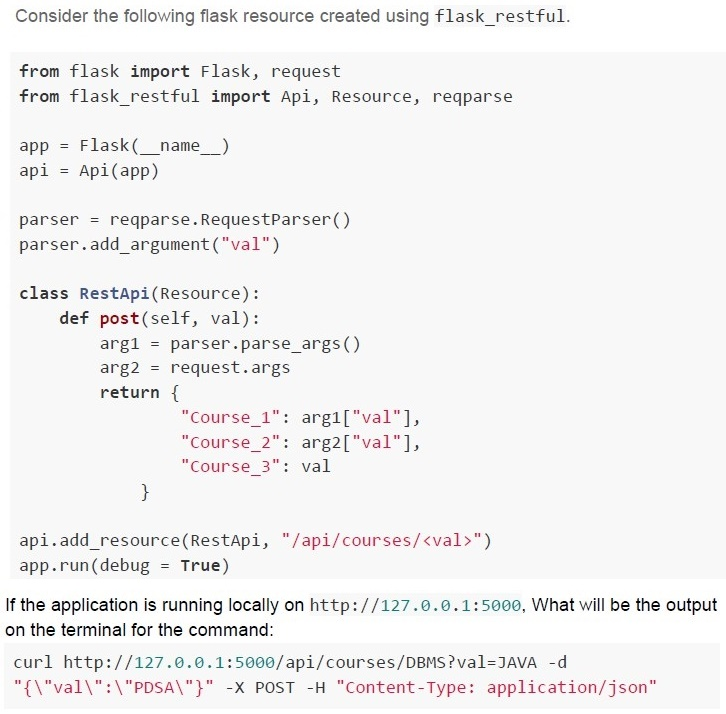
Consider the following flask resource created using flask_restful.

```python
from flask import Flask, request
from flask_restful import Api, Resource, reqparse

app = Flask(__name__)
api = Api(app)

parser = reqparse.RequestParser()
parser.add_argument("val")

class RestApi(Resource):
    def post(self, val):
        arg1 = parser.parse_args()
        arg2 = request.args
        return {
            "Course_1": arg1["val"],
            "Course_2": arg2["val"],
            "Course_3": val
        }

api.add_resource(RestApi, "/api/courses/<val>")
app.run(debug = True)
```

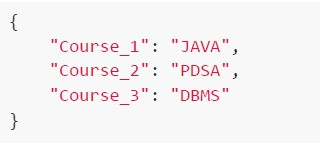
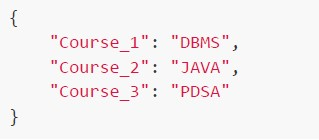
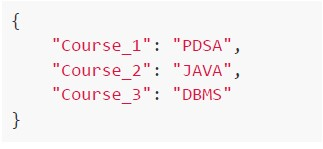
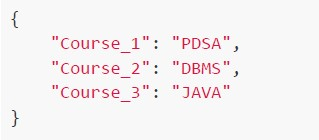
If the application is running locally on http://127.0.0.1:5000, What will be the output on the terminal for the command:

```bash
curl http://127.0.0.1:5000/api/courses/DBMS?val=JAVA -d "{\"val\":\"PDSA\"}" -X POST -H "Content-Type: application/json"
```
text
```json
{
    "Course_1": "JAVA",
    "Course_2": "PDSA",
    "Course_3": "DBMS"
}
```
text
```json
{
    "Course_1": "DBMS",
    "Course_2": "JAVA",
    "Course_3": "PDSA"
}
```
text
```json
{
  "Course_1": "PDSA",
  "Course_2": "JAVA",
  "Course_3": "DBMS"
}
```
text
```json
{
    "Course_1": "PDSA",
    "Course_2": "DBMS",
    "Course_3": "JAVA"
}
```
Which of the following is true about the term “stateless” in the client-server model?
- The server keeps the state of the client to respond to the required request.
- Server use variant HTTP methods to respond to the client's request.
- Server ready to respond to the client's request without knowing anythingabout the client.
- Server use the URL to convey context to the client.
Consider the following flask application.
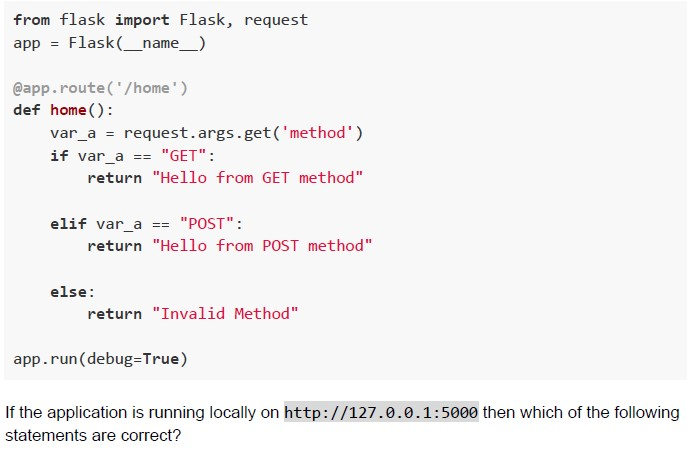 Consider the following flask application.
Consider the following flask application. Text of the picture (copyable)
```python
from flask import Flask, request
app = Flask(__name__)

@app.route('/home')
def home():
    var_a = request.args.get('method')
    if var_a == "GET":
        return "Hello from GET method"

    elif var_a == "POST":
        return "Hello from POST method"

    else:
        return "Invalid Method"

app.run(debug=True)
```

If the application is running locally on http://127.0.0.1:5000 then which of the following statements are correct?
text
The command `curl -X GET http://127.0.0.1:5000/home?method=GET` will give output
as `Hello from GET method` on terminal

text
The command `curl -X POST http://127.0.0.1:5000/home?method=POST` will give output
as `Method not Allowed` on terminal

text
The command `curl -X POST http://127.0.0.1:5000/home?method=POST` will give
output as `Hello from POST method` on terminal

text
The command `curl -X POST http://127.0.0.1:5000/home?method` will give output as
`Invalid Method` on terminal
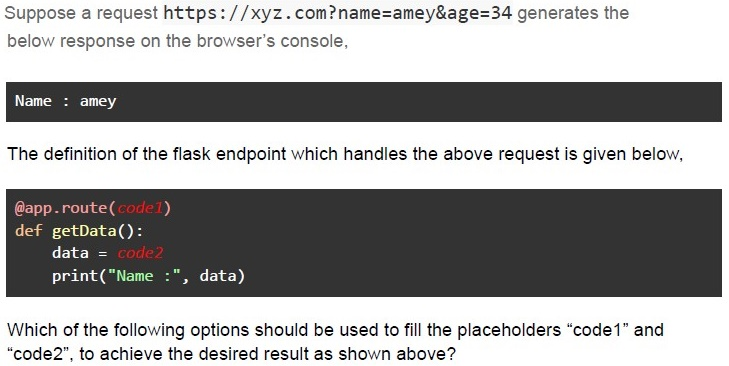
Text of the picture (copyable)
Suppose a request `https://xyz.com?name=amey&age=34` generates the below response on the browser's console,

```
Name : amey
```

The definition of the flask endpoint which handles the above request is given below,

```python
@app.route(code1)
def getData():
    data = code2
    print("Name :", data)
```

Which of the following options should be used to fill the placeholders "code1" and "code2", to achieve the desired result as shown above?
text
```
Code1: "/"
Code2: request.form['name']
```

text
```
Code1: "/", methods = ['GET']
Code2: request.form['name']
```

text
```python
Code1: "/", methods = ['GET', 'POST']
Code2: request.args['name']
```

text
```
Code1: "/"
Code2: request.args.get('name')
```
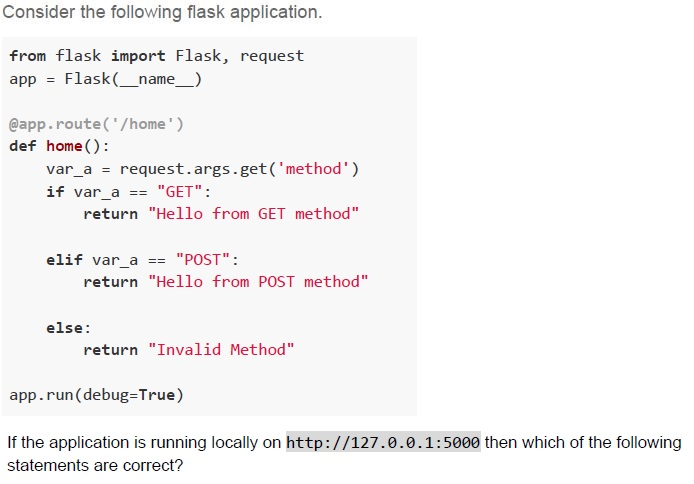
Text of the picture (copyable)
Consider the following flask application.

```python
from flask import Flask, request
app = Flask(__name__)

@app.route('/home')
def home():
    var_a = request.args.get('method')
    if var_a == "GET":
        return "Hello from GET method"

    elif var_a == "POST":
        return "Hello from POST method"

    else:
        return "Invalid Method"

app.run(debug=True)
```

If the application is running locally on http://127.0.0.1:5000 then which of the following statements are correct?
text
The command `curl -X GET http://127.0.0.1:5000/home?method=GET` will give output
as `Hello from GET method` on terminal

text
The command `curl -X POST http://127.0.0.1:5000/home?method=PATCH` will give
output as `Invalid Method` on terminal

text
The command `curl -X POST http://127.0.0.1:5000/home?method=POST` will give output as `Hello from POST method` on terminal

text
The command curl http://127.0.0.1:5000/home?method will give output as Invalid Method on terminal
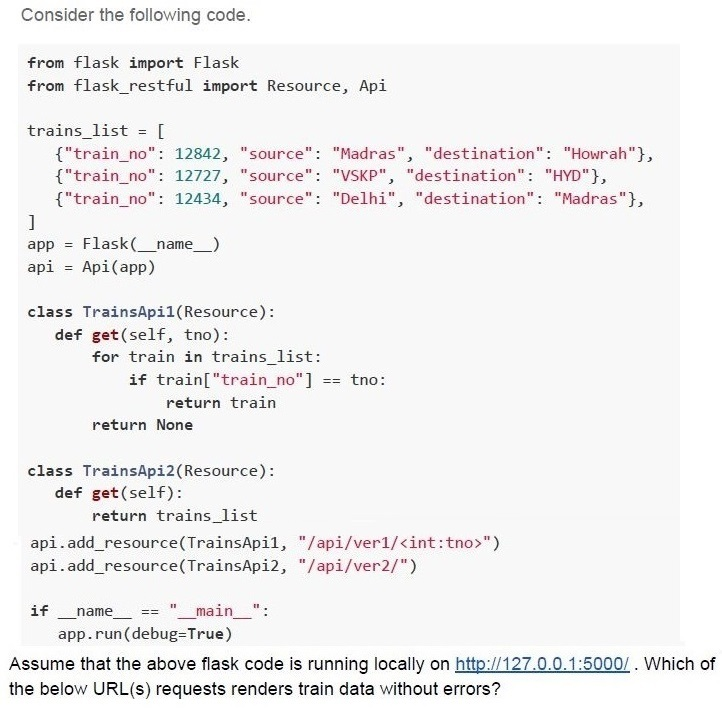
Text of the picture (copyable)
Consider the following code.

```python
from flask import Flask
from flask_restful import Resource, Api

trains_list = [
    {"train_no": 12842, "source": "Madras", "destination": "Howrah"},
    {"train_no": 12727, "source": "VSKP", "destination": "HYD"},
    {"train_no": 12434, "source": "Delhi", "destination": "Madras"},
]
app = Flask(__name__)
api = Api(app)

class TrainsApi1(Resource):
    def get(self, tno):
        for train in trains_list:
            if train["train_no"] == tno:
                return train
        return None

class TrainsApi2(Resource):
    def get(self):
        return trains_list

api.add_resource(TrainsApi1, "/api/ver1/<int:tno>")
api.add_resource(TrainsApi2, "/api/ver2/")

if __name__ == "__main__":
    app.run(debug=True)
```

Assume that the above flask code is running locally on http://127.0.0.1:5000/. Which of the below URL(s) requests renders train data without errors?- http://127.0.0.1:5000/api/ver1/12727
- http://127.0.0.1:5000/api/12727
- http://127.0.0.1:5000/ver2/12727
- http://127.0.0.1:5000/api/ver2
Consider the following Python code snippet.
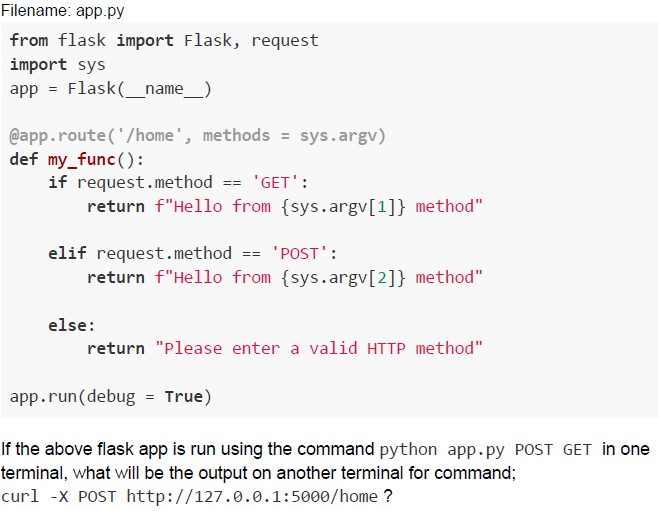 Consider the following Python code snippet.
Consider the following Python code snippet. Text of the picture (copyable)
Filename: app.py
```python
from flask import Flask, request
import sys
app = Flask(__name__)

@app.route('/home', methods = sys.argv)
def my_func():
    if request.method == 'GET':
        return f"Hello from {sys.argv[1]} method"

    elif request.method == 'POST':
        return f"Hello from {sys.argv[2]} method"

    else:
        return "Please enter a valid HTTP method"

app.run(debug = True)
```

If the above flask app is run using the command `python app.py POST GET` in one terminal, what will be the output on another terminal for command;
`curl -X POST http://127.0.0.1:5000/home ?`
text
Hello from POST method

text
Hello from GET method

text
Please enter a valid HTTP method

text
Method not Allowed
In an OpenAPI documentation, which field contains all the endpoints (routes) of the API?
- paths
- schema
- info
- responses
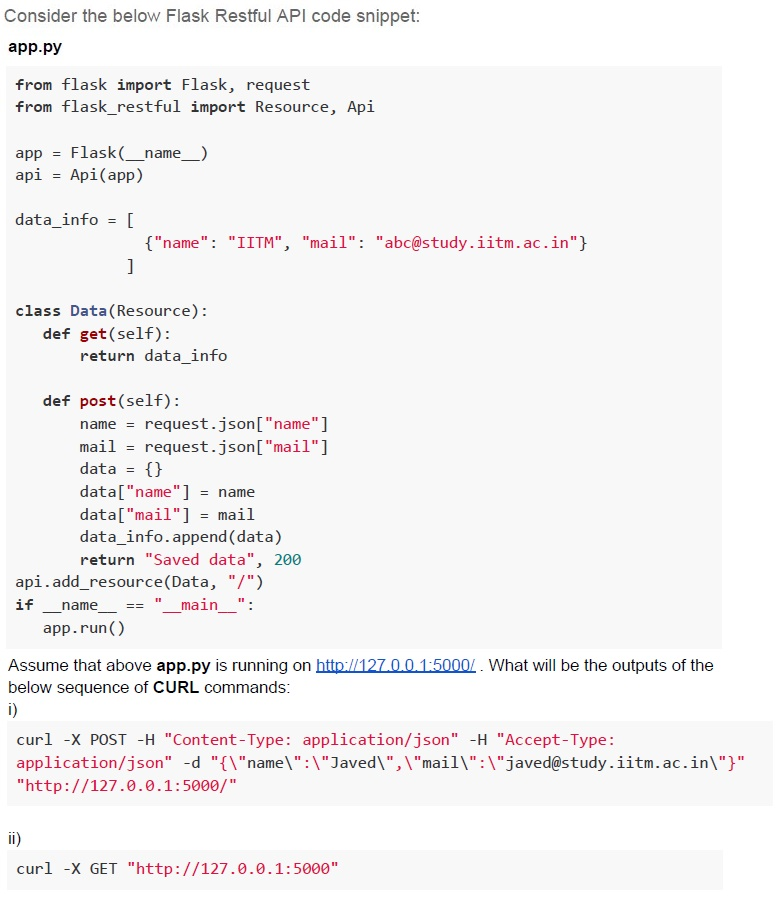
Text of the picture (copyable)
Consider the below Flask Restful API code snippet:
**app.py**

```python
from flask import Flask, request
from flask_restful import Resource, Api

app = Flask(__name__)
api = Api(app)

data_info = [
    {"name": "IITM", "mail": "abc@study.iitm.ac.in"}
]

class Data(Resource):
    def get(self):
        return data_info

    def post(self):
        name = request.json["name"]
        mail = request.json["mail"]
        data = {}
        data["name"] = name
        data["mail"] = mail
        data_info.append(data)
        return "Saved data", 200

api.add_resource(Data, "/")
if __name__ == "__main__":
    app.run()
```

Assume that above **app.py** is running on http://127.0.0.1:5000/. What will be the outputs of the below sequence of CURL commands:
i)

```
curl -X POST -H "Content-Type: application/json" -H "Accept-Type: application/json" -d "{\"name\":\"Javed\",\"mail\":\"javed@study.iitm.ac.in\"}" "http://127.0.0.1:5000/"
```

ii)

```
curl -X GET "http://127.0.0.1:5000"
```
text
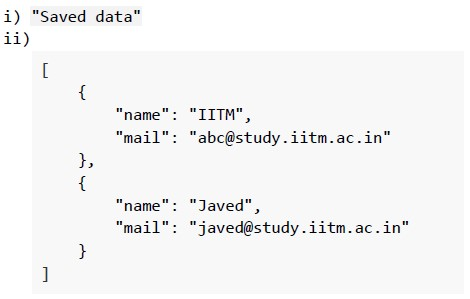
i) "Saved data"
ii)
```
[
    {
        "name": "IITM",
        "mail": "abc@study.iitm.ac.in"
    },
    {
        "name": "Javed",
        "mail": "javed@study.iitm.ac.in"
    }
]
```
text
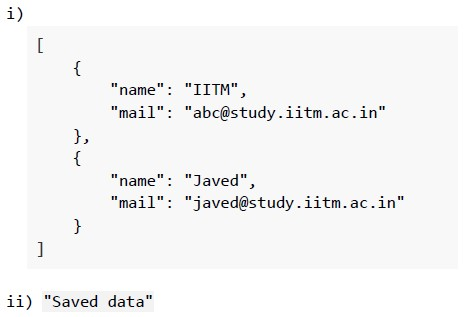
i)
```json
[
    {
        "name": "IITM",
        "mail": "abc@study.iitm.ac.in"
    },
    {
        "name": "Javed",
        "mail": "javed@study.iitm.ac.in"
    }
]
```
ii) "Saved data"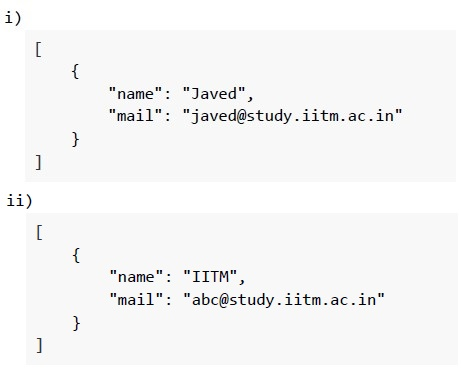
text
i)
```
[
    {
        "name": "Javed",
        "mail": "javed@study.iitm.ac.in"
    }
]
```
ii)
```
[
    {
        "name": "IITM",
        "mail": "abc@study.iitm.ac.in"
    }
]
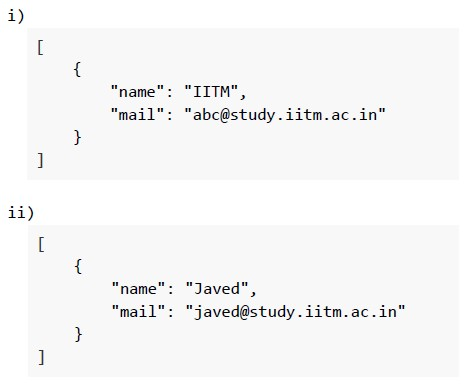
```
text
i)
```
[
    {
        "name": "IITM",
        "mail": "abc@study.iitm.ac.in"
    }
]
```
ii)
```
[
    {
        "name": "Javed",
        "mail": "javed@study.iitm.ac.in"
    }
]
```
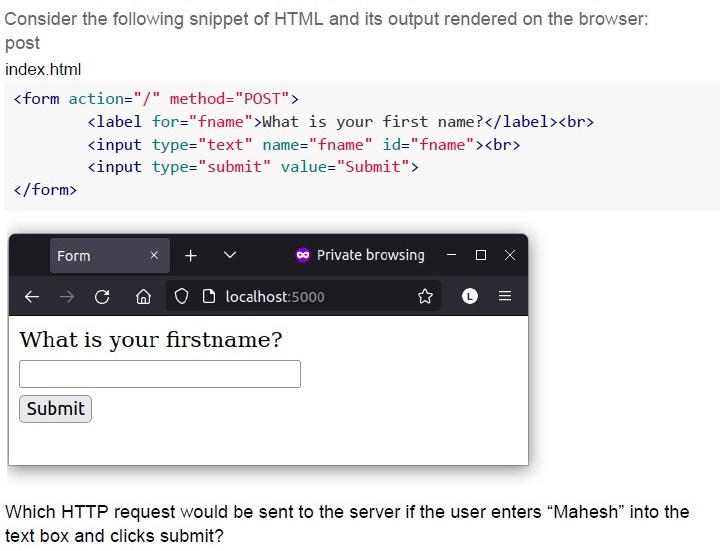
Text of the picture (copyable)
Consider the following snippet of HTML and its output rendered on the browser:
post
index.html

```html
<form action="/" method="POST">
    <label for="fname">What is your first name?</label><br>
    <input type="text" name="fname" id="fname"><br>
    <input type="submit" value="Submit">
</form>
```

Diagram: Browser window showing a web page.
The browser window has a dark grey title bar with "Form" as the tab title, a close button, a plus button, a dropdown arrow, a purple infinity symbol with "Private browsing", minimize, maximize, and close buttons.
Below the title bar is a navigation bar with back, forward, reload, home, shield, padlock, "localhost:5000", star, L, and menu icons.
The main content area of the browser window is white and displays:
"What is your firstname?"
Below this text is an empty rectangular input field.
Below the input field is a button labeled "Submit".

Which HTTP request would be sent to the server if the user enters "Mahesh" into the text box and clicks submit?- GET
- POST
- PUT
- DELETE
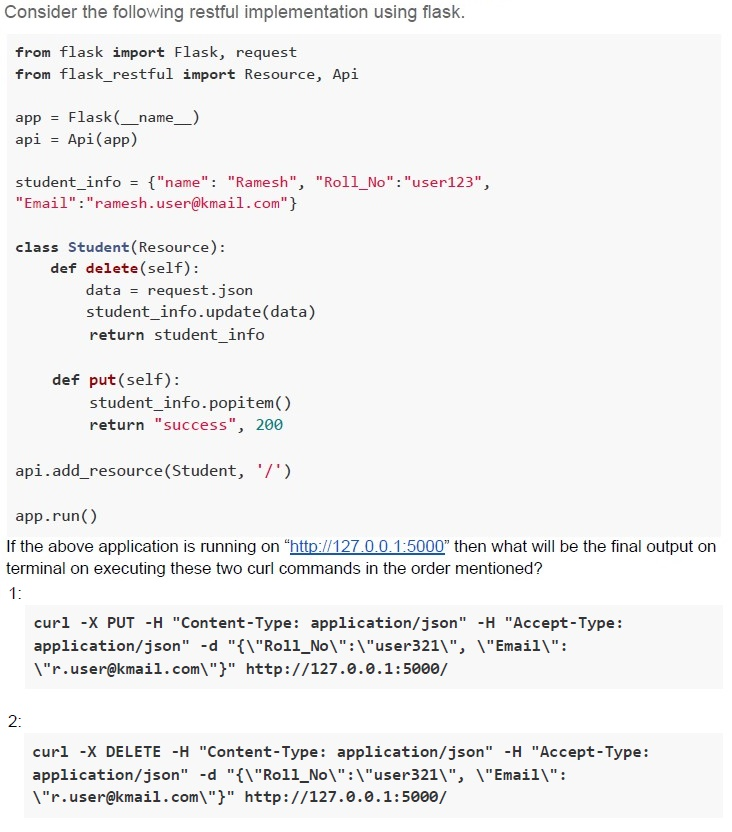
Text of the picture (copyable)
Consider the following restful implementation using flask.

```python
from flask import Flask, request
from flask_restful import Resource, Api

app = Flask(__name__)
api = Api(app)

student_info = {"name": "Ramesh", "Roll_No":"user123",
"Email":"ramesh.user@kmail.com"}

class Student(Resource):
    def delete(self):
        data = request.json
        student_info.update(data)
        return student_info

    def put(self):
        student_info.popitem()
        return "success", 200

api.add_resource(Student, '/')

app.run()
```

If the above application is running on http://127.0.0.1:5000 then what will be the final output on terminal on executing these two curl commands in the order mentioned?

1:

```bash
curl -X PUT -H "Content-Type: application/json" -H "Accept-Type: application/json" -d "{\"Roll_No\":\"user321\", \"Email\":\"r.user@kmail.com\"}" http://127.0.0.1:5000/
```

2:

```bash
curl -X DELETE -H "Content-Type: application/json" -H "Accept-Type: application/json" -d "{\"Roll_No\":\"user321\", \"Email\":\"r.user@kmail.com\"}" http://127.0.0.1:5000/
```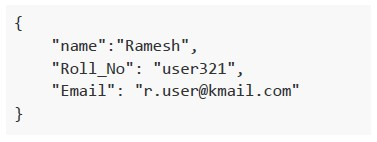
text
```json
{
  "name": "Ramesh",
  "Roll_No": "user321",
  "Email": "r.user@kmail.com"
}
```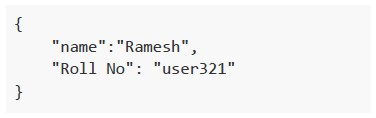
text
```json
{
    "name": "Ramesh",
    "Roll No": "user321"
}
```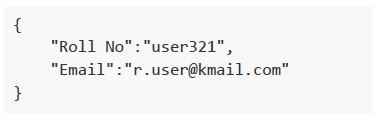
text
```json
{
    "Roll No":"user321",
    "Email":"r.user@kmail.com"
}
```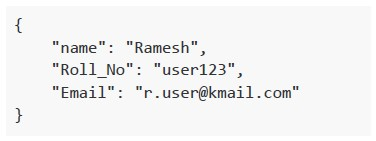
text
```json
{
    "name": "Ramesh",
    "Roll_No": "user123",
    "Email": "r.user@kmail.com"
}
```
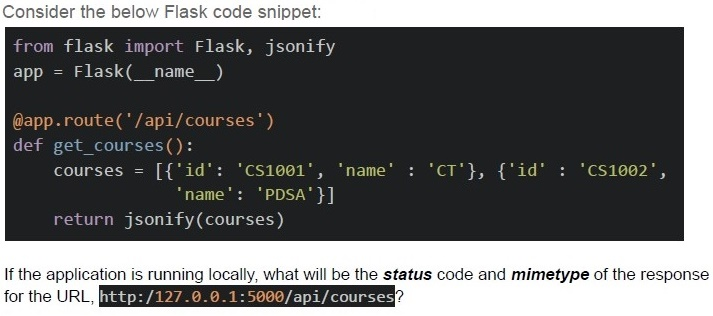
Text of the picture (copyable)
Consider the below Flask code snippet:

```python
from flask import Flask, jsonify

app = Flask(__name__)

@app.route('/api/courses')
def get_courses():
    courses = [{'id': 'CS1001', 'name': 'CT'}, {'id': 'CS1002',
               'name': 'PDSA'}]

    return jsonify(courses)
```

If the application is running locally, what will be the **status** code and **mimetype** of the response for the URL, `http://127.0.0.1:5000/api/courses`?
text
```
status=404 and mimetype='application/json'
```

text
```
status=200 and mimetype='application/json'
```

text
```
status=200 and mimetype='text/javascript'
```

text
```
status=404 and mimetype='text/javascript'
```
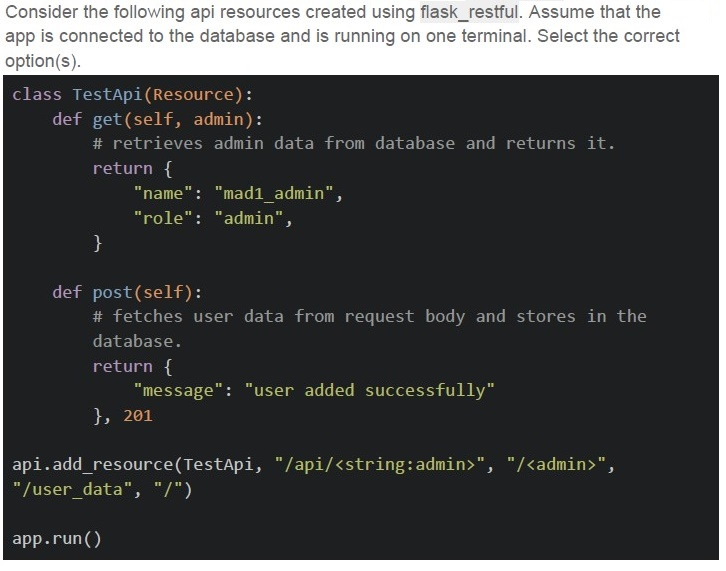
Text of the picture (copyable)
Consider the following api resources created using flask_restful. Assume that the app is connected to the database and is running on one terminal. Select the correct option(s).

```python
class TestApi(Resource):
    def get(self, admin):
        # retrieves admin data from database and returns it.
        return {
            "name": "mad1_admin",
            "role": "admin",
        }

    def post(self):
        # fetches user data from request body and stores in the
        # database.
        return {
            "message": "user added successfully"
        }, 201

api.add_resource(TestApi, "/api/<string:admin>", "/<admin>",
                 "/user_data", "/")

app.run()
```
text
The base URL for the app is mapped with GET HTTP method.
text
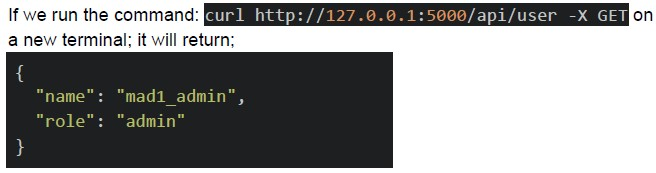
If we run the command: `curl http://127.0.0.1:5000/api/user -X GET` on a new terminal; it will return;

```json
{
  "name": "mad1_admin",
  "role": "admin"
}
```
text
The endpoint, `/admin` is mapped with GET HTTP method.
text
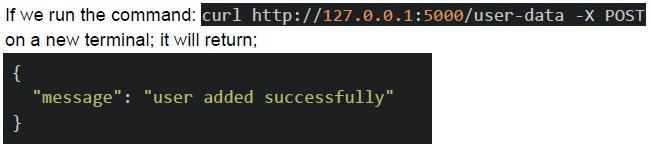
If we run the command: `curl http://127.0.0.1:5000/user-data -X POST`
on a new terminal; it will return;

```json
{
  "message": "user added successfully"
}
```
Text of the picture (copyable)
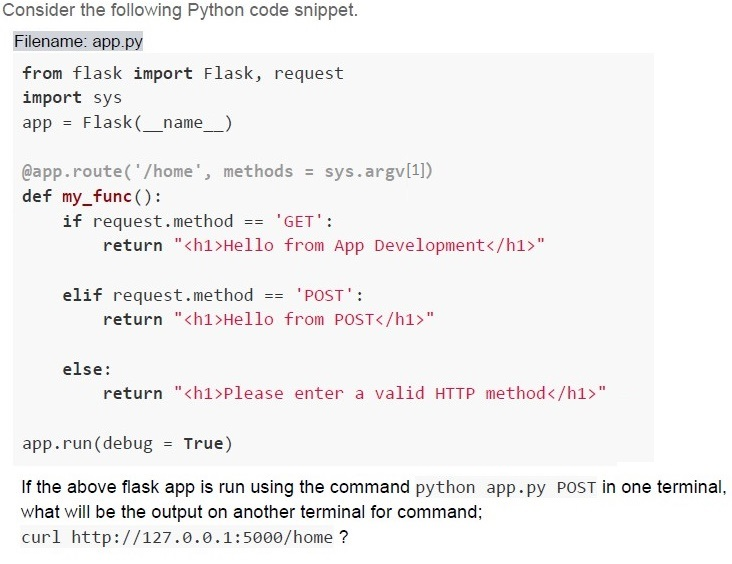
Consider the following Python code snippet.
Filename: app.py

```python
from flask import Flask, request
import sys
app = Flask(__name__)

@app.route('/home', methods = sys.argv[1])
def my_func():
    if request.method == 'GET':
        return "<h1>Hello from App Development</h1>"

    elif request.method == 'POST':
        return "<h1>Hello from POST</h1>"

    else:
        return "<h1>Please enter a valid HTTP method</h1>"

app.run(debug = True)
```

If the above flask app is run using the command `python app.py POST` in one terminal,
what will be the output on another terminal for command;
`curl http://127.0.0.1:5000/home ?`
text
```html
<h1>Hello from App Development</h1>
```

text
```html
<h1>Hello from App POST</h1>
```

text
```html
<h1>Please enter a valid HTTP method</h1>
```

text
```html
<h1>Method not Allowed</h1>
```
Text of the picture (copyable)
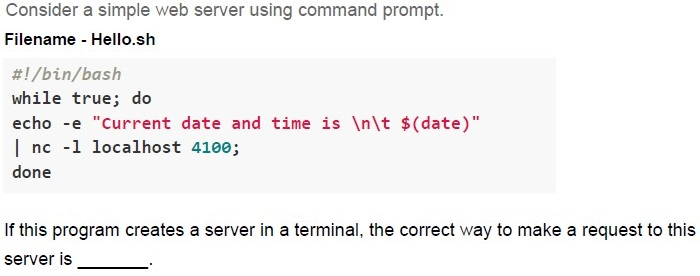
Consider a simple web server using command prompt.
Filename - Hello.sh
```bash
#!/bin/bash
while true; do
echo -e "Current date and time is \n\t $(date)"
| nc -l localhost 4100;
done
```
If this program creates a server in a terminal, the correct way to make a request to this server is ______.

text
Type `curl http://localhost:5000` in the same terminal where the server is running.

text
Type `curl http://localhost:4100` in the same terminal where the server is running.

text
Open a new terminal and type `curl http://localhost:5000`

text
Open a new terminal and type `curl http://localhost:4100`
Which curl option is used to set the request method in an HTTP request?
- -H
- -X
- -d
- -r
What is the primary purpose of curl?
- Web server configuration
- Making requests to the web server
- Database management
- HTML parsing