Home / MAD1 / Week 4 / Real questions
MAD1 week 4 - real exam questions
60 questions pulled from past papers whose wording matches this week's topics, newest first, duplicates removed. Pick your answers, then press Check answers. Figures and answer keys are the originals.
Elapsed 00:00
Consider the Flask SQLAlchemy data model.
 What is the output after the following Python code is executed ? (Assume all entries are successfully committed to the database)
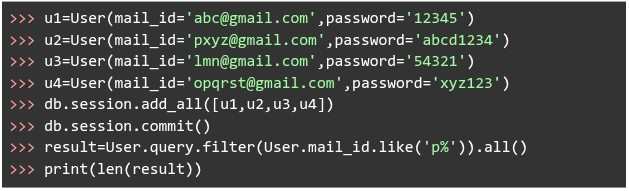
What is the output after the following Python code is executed ? (Assume all entries are successfully committed to the database)
Text of the picture (copyable)
```python
class User(db.Model):
    __tablename__ = "user"
    id = db.Column(db.Integer, primary_key=True)
    mail_id = db.Column(db.String, unique=True)
    password = db.Column(db.String, nullable=False)
```
```python
>>> u1=User(mail_id='abc@gmail.com',password='12345')
>>> u2=User(mail_id='pxyz@gmail.com',password='abcd1234')
>>> u3=User(mail_id='lmn@gmail.com',password='54321')
>>> u4=User(mail_id='opqrst@gmail.com',password='xyz123')
>>> db.session.add_all([u1,u2,u3,u4])
>>> db.session.commit()
>>> result=User.query.filter(User.mail_id.like('p%')).all()
>>> print(len(result))
```- 4
- 3
- 2
- 1
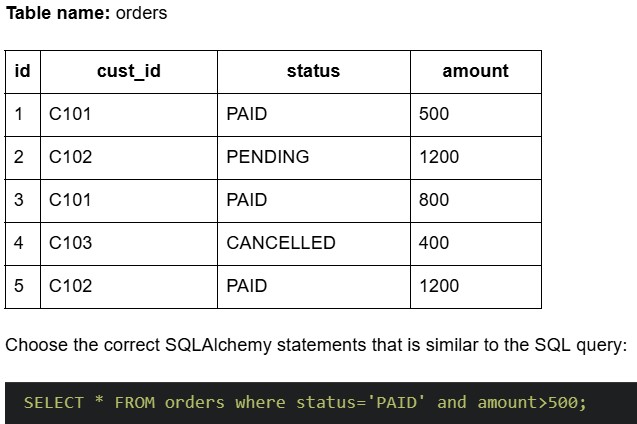
Consider the SQLAlchemy model Order mapped to the table orders.
Text of the picture (copyable)
Table name: orders

| id | cust_id | status | amount |
|---|---|---|---|
| 1 | C101 | PAID | 500 |
| 2 | C102 | PENDING | 1200 |
| 3 | C101 | PAID | 800 |
| 4 | C103 | CANCELLED | 400 |
| 5 | C102 | PAID | 1200 |

Choose the correct SQLAlchemy statements that is similar to the SQL query:

```sql
SELECT * FROM orders where status='PAID' and amount>500;
```

text
```python
order_records = db.session.query(Order).filter( \
    Order.status == "PAID" and Order.amount > 500)
```
text
```python
order_records = db.session.query(Order) \
    .filter(Order.status == "PAID") \
    .filter(Order.amount > 500)
```
text
```python
order_records = db.session.query(Order).filter( \
    Order.status == "PAID") and \
db.session.query(Order).filter(Order.amount > 500)
```
text
```python
order_records = db.session.query(Order.status == "PAID" and \
    Order.amount > 500)
```
Consider the following models: Course and Enrollment corresponding to tables course and enrollment in SQLite database.
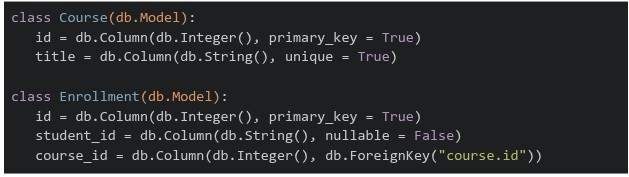 Based on the model schemas, what relationship do the classes Course and Enrollment share?
Based on the model schemas, what relationship do the classes Course and Enrollment share?Text of the picture (copyable)
```python
class Course(db.Model):
    id = db.Column(db.Integer(), primary_key = True)
    title = db.Column(db.String(), unique = True)

class Enrollment(db.Model):
    id = db.Column(db.Integer(), primary_key = True)
    student_id = db.Column(db.String(), nullable = False)
    course_id = db.Column(db.Integer(), db.ForeignKey("course.id"))
```- Many-to-Many
- One-to-Many
- One-to-One
- The tables are not at all related
Consider the following flask app.
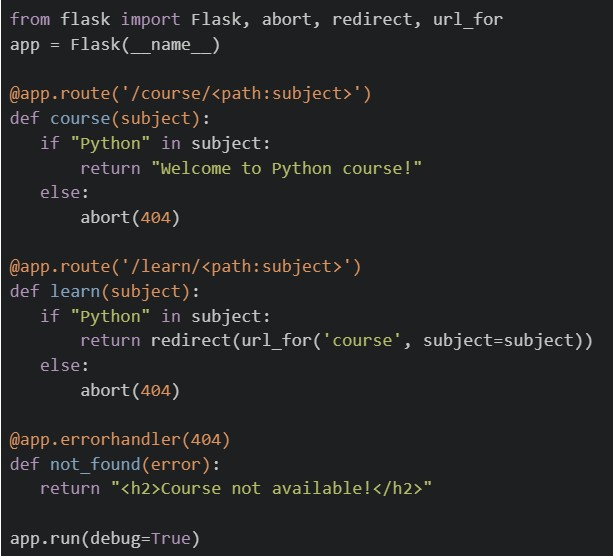 If the application is running locally on http://127.0.0.1:5000, select the correct options.
If the application is running locally on http://127.0.0.1:5000, select the correct options.Text of the picture (copyable)
```python
from flask import Flask, abort, redirect, url_for
app = Flask(__name__)

@app.route('/course/<path:subject>')
def course(subject):
    if "Python" in subject:
        return "Welcome to Python course!"
    else:
        abort(404)

@app.route('/learn/<path:subject>')
def learn(subject):
    if "Python" in subject:
        return redirect(url_for('course', subject=subject))
    else:
        abort(404)

@app.errorhandler(404)
def not_found(error):
    return "<h2>Course not available!</h2>"

app.run(debug=True)
```
text
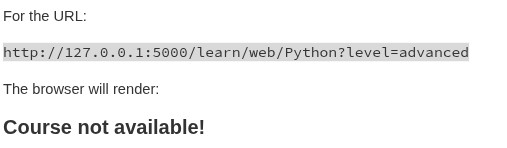
For the URL:

```
http://127.0.0.1:5000/learn/web/Python?level=advanced
```

The browser will render:

**Course not available!**
text
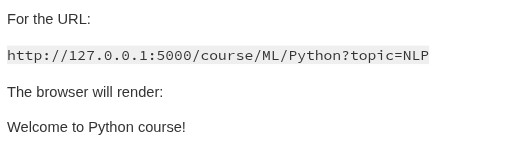
For the URL:

```
http://127.0.0.1:5000/course/ML/Python?topic=NLP
```

The browser will render:

Welcome to Python course!
text
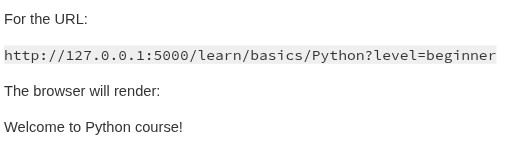
For the URL:

```
http://127.0.0.1:5000/learn/basics/Python?level=beginner
```

The browser will render:

Welcome to Python course!
text
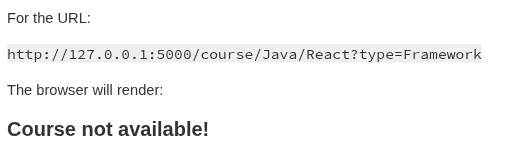
For the URL:

```
http://127.0.0.1:5000/course/Java/React?type=Framework
```

The browser will render:

**Course not available!**
Consider the following SQL Alchemy model  with below data.
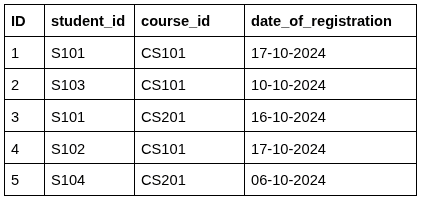 Which of the following SQL Alchemy statements is used to count the number of students registered for
  ?
?
with below data.
Which of the following SQL Alchemy statements is used to count the number of students registered for ?Text of the picture (copyable)
CourseRegistrations
| ID | student_id | course_id | date_of_registration |
|---|---|---|---|
| 1 | S101 | CS101 | 17-10-2024 |
| 2 | S103 | CS101 | 10-10-2024 |
| 3 | S101 | CS201 | 16-10-2024 |
| 4 | S102 | CS101 | 17-10-2024 |
| 5 | S104 | CS201 | 06-10-2024 |
```
course_id="CS101"
```

text
```python
count = db.session.query(CourseRegistrations) \
    .filter(course_id == "CS101") \
    .count()
```
text
```python
count = db.session.query \
    .filter(CourseRegistrations.course_id == "CS101") \
    .count()
```
text
```python
count = db.query(CourseRegistrations) \
    .filter(course_id == "CS101") \
    .count()
```
text
```python
count = db.session.query(CourseRegistrations) \
    .filter(CourseRegistrations.course_id == "CS101") \
    .count()
```
What is the purpose of the primary_key=True attribute in a SQLAlchemy model?
- It allows duplicate values in the column
- It uniquely identifies each row in the table
- It automatically creates foreign key relationships
- It makes the column optional
Consider the Flask SQLAlchemy data model.
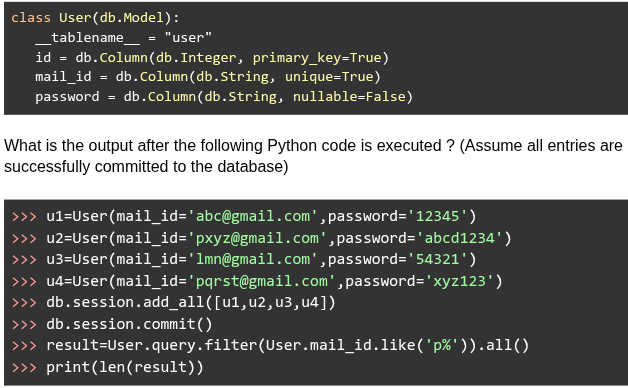
Text of the picture (copyable)
```python
class User(db.Model):
    __tablename__ = "user"
    id = db.Column(db.Integer, primary_key=True)
    mail_id = db.Column(db.String, unique=True)
    password = db.Column(db.String, nullable=False)
```

What is the output after the following Python code is executed ? (Assume all entries are successfully committed to the database)

```python
>>> u1=User(mail_id='abc@gmail.com',password='12345')
>>> u2=User(mail_id='pxyz@gmail.com',password='abcd1234')
>>> u3=User(mail_id='lmn@gmail.com',password='54321')
>>> u4=User(mail_id='pqrst@gmail.com',password='xyz123')
>>> db.session.add_all([u1,u2,u3,u4])
>>> db.session.commit()
>>> result=User.query.filter(User.mail_id.like('p%')).all()
>>> print(len(result))
```- 1
- 2
- 3
- 4
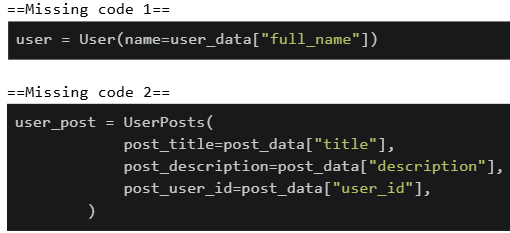
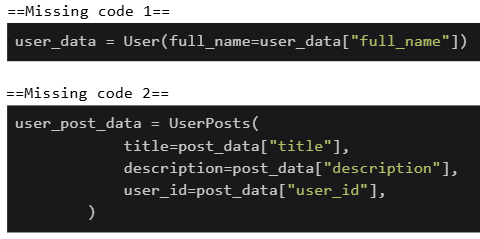
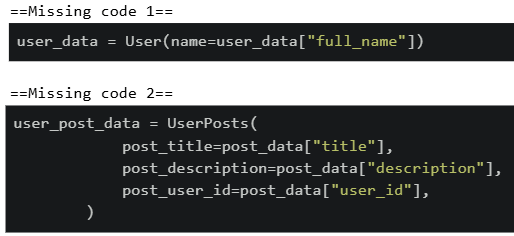
Consider the following Flask SQLAlchemy models and RESTful API code.
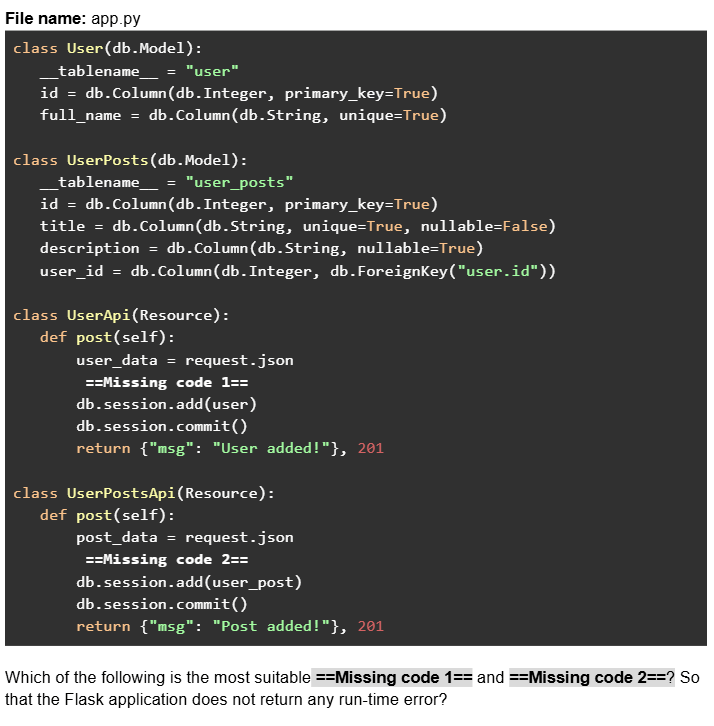
Text of the picture (copyable)
File name: app.py
```python
class User(db.Model):
    __tablename__ = "user"
    id = db.Column(db.Integer, primary_key=True)
    full_name = db.Column(db.String, unique=True)

class UserPosts(db.Model):
    __tablename__ = "user_posts"
    id = db.Column(db.Integer, primary_key=True)
    title = db.Column(db.String, unique=True, nullable=False)
    description = db.Column(db.String, nullable=True)
    user_id = db.Column(db.Integer, db.ForeignKey("user.id"))

class UserApi(Resource):
    def post(self):
        user_data = request.json
        ==Missing code 1==
        db.session.add(user)
        db.session.commit()
        return {"msg": "User added!"}, 201

class UserPostsApi(Resource):
    def post(self):
        post_data = request.json
        ==Missing code 2==
        db.session.add(user_post)
        db.session.commit()
        return {"msg": "Post added!"}, 201
```
Which of the following is the most suitable ==Missing code 1== and ==Missing code 2==? So that the Flask application does not return any run-time error?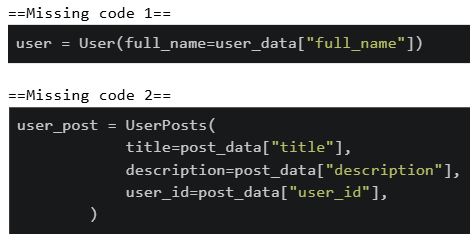
text
==Missing code 1==
```python
user = User(full_name=user_data["full_name"])
```

==Missing code 2==
```python
user_post = UserPosts(
    title=post_data["title"],
    description=post_data["description"],
    user_id=post_data["user_id"],
)
```
text
```python
==Missing code 1==
user = User(name=user_data["full_name"])

==Missing code 2==
user_post = UserPosts(
    post_title=post_data["title"],
    post_description=post_data["description"],
    post_user_id=post_data["user_id"],
)
```
text
```python
==Missing code 1==
user_data = User(full_name=user_data["full_name"])

==Missing code 2==
user_post_data = UserPosts(
    title=post_data["title"],
    description=post_data["description"],
    user_id=post_data["user_id"],
)
```
text
```
==Missing code 1==
user_data = User(name=user_data["full_name"])

==Missing code 2==
user_post_data = UserPosts(
    post_title=post_data["title"],
    post_description=post_data["description"],
    post_user_id=post_data["user_id"],
)
```
You want to create an app where students can log in and download hall tickets. To make this more efficient, you want to have some very quick way to check whether a given user has already downloaded their hall ticket or not. Which kind of database will you prefer?
- RDBMS
- Doc-oriented database
- Graph database
- Key-value store
Comprehension passage for this question
Consider the following SQLAlchemy class models.
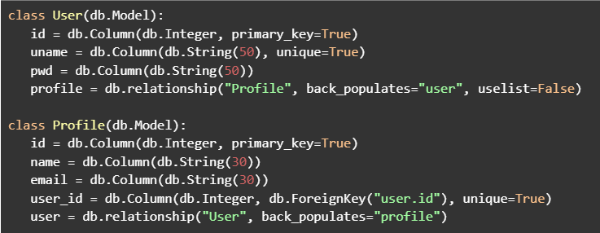 Based on the above data, answer the given subquestions.
Which of the following relationships exists between the “User” and “Profile” models?
- Many-to-Many
- Many-to-One
- One-to-Many
- One-to-One
Comprehension passage for this question
Consider the following SQLAlchemy class models.
Based on the above data, answer the given subquestions.What will be the output if the following commands are executed in the python shell.
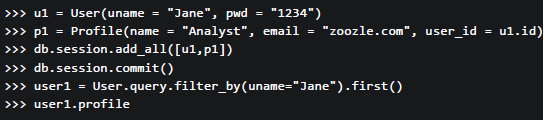
Text of the picture (copyable)
```python
>>> u1 = User(uname = "Jane", pwd = "1234")
>>> p1 = Profile(name = "Analyst", email = "zoozle.com", user_id = u1.id)
>>> db.session.add_all([u1,p1])
>>> db.session.commit()
>>> user1 = User.query.filter_by(uname="Jane").first()
>>> user1.profile
```

text
<User 1>

text
```
[<Profile 1>]
```

text
```html
<Profile 1>
```

text
```
'Analyst'
```
Consider the following flask app.
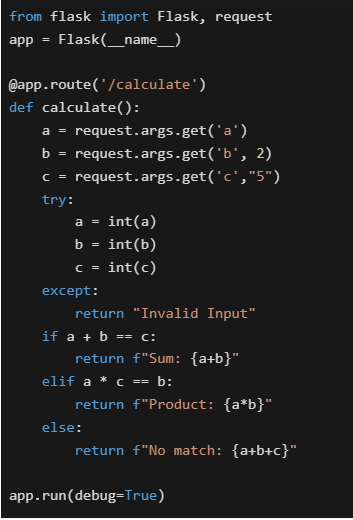 Select the option which correctly matches the URL in column A with the rendered output in column B, if the application is running locally on http://127.0.0.1:5000.
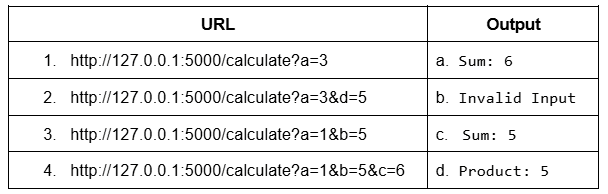
Select the option which correctly matches the URL in column A with the rendered output in column B, if the application is running locally on http://127.0.0.1:5000.
Text of the picture (copyable)
```python
from flask import Flask, request
app = Flask(__name__)

@app.route('/calculate')
def calculate():
    a = request.args.get('a')
    b = request.args.get('b', 2)
    c = request.args.get('c', "5")

    try:
        a = int(a)
        b = int(b)
        c = int(c)
    except:
        return "Invalid Input"

    if a + b == c:
        return f"Sum: {a+b}"
    elif a * c == b:
        return f"Product: {a*b}"
    else:
        return f"No match: {a+b+c}"

app.run(debug=True)
```
| URL | Output |
|---|---|
| 1. http://127.0.0.1:5000/calculate?a=3 | a. Sum: 6 |
| 2. http://127.0.0.1:5000/calculate?a=3&d=5 | b. Invalid Input |
| 3. http://127.0.0.1:5000/calculate?a=1&b=5 | c. Sum: 5 |
| 4. http://127.0.0.1:5000/calculate?a=1&b=5&c=6 | d. Product: 5 |- 1-b, 2-b, 3-a, 4-a
- 1-b, 2-b, 3-d, 4-a
- 1-c, 2-c, 3-d, 4-a
- 1-c, 2-b, 3-d, 4-a
Which of the following is/are True about Web Applications?
- All web applications run entirely in the client's browser without requiring a server.
- Web applications can interact with backend services using APIs.
- A web application typically consists of frontend, backend and database components.
- Web applications cannot be accessed unless they are installed on the user’s computer.
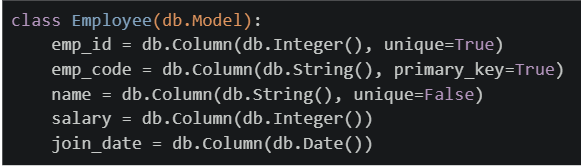
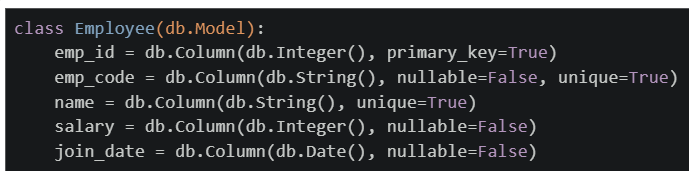
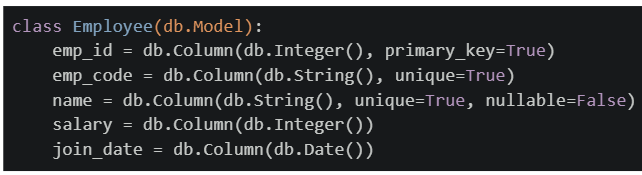
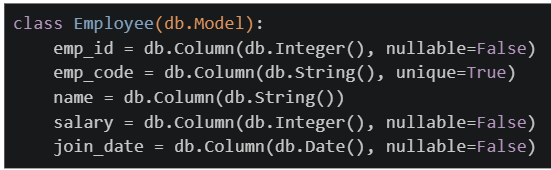
Consider the following SQL create statement.
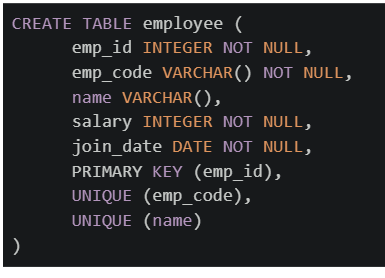 Which of the following flask_sqlalchemy models will create exactly the same table as created by the above SQL command?
Which of the following flask_sqlalchemy models will create exactly the same table as created by the above SQL command?Text of the picture (copyable)
```sql
CREATE TABLE employee (
    emp_id INTEGER NOT NULL,
    emp_code VARCHAR() NOT NULL,
    name VARCHAR(),
    salary INTEGER NOT NULL,
    join_date DATE NOT NULL,
    PRIMARY KEY (emp_id),
    UNIQUE (emp_code),
    UNIQUE (name)
)
```
text
```python
class Employee(db.Model):
    emp_id = db.Column(db.Integer(), unique=True)
    emp_code = db.Column(db.String(), primary_key=True)
    name = db.Column(db.String(), unique=False)
    salary = db.Column(db.Integer())
    join_date = db.Column(db.Date())
```
text
```python
class Employee(db.Model):
    emp_id = db.Column(db.Integer(), primary_key=True)
    emp_code = db.Column(db.String(), nullable=False, unique=True)
    name = db.Column(db.String(), unique=True)
    salary = db.Column(db.Integer(), nullable=False)
    join_date = db.Column(db.Date(), nullable=False)
```
text
```python
class Employee(db.Model):
    emp_id = db.Column(db.Integer(), primary_key=True)
    emp_code = db.Column(db.String(), unique=True)
    name = db.Column(db.String(), unique=True, nullable=False)
    salary = db.Column(db.Integer())
    join_date = db.Column(db.Date())
```
text
```python
class Employee(db.Model):
    emp_id = db.Column(db.Integer(), nullable=False)
    emp_code = db.Column(db.String(), unique=True)
    name = db.Column(db.String())
    salary = db.Column(db.Integer(), nullable=False)
    join_date = db.Column(db.Date(), nullable=False)
```
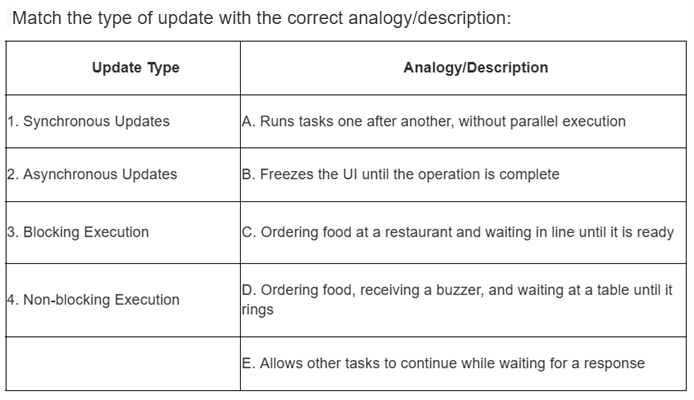
Text of the picture (copyable)
Match the type of update with the correct analogy/description:

| Update Type             | Analogy/Description                                                      |
| :---------------------- | :----------------------------------------------------------------------- |
| 1. Synchronous Updates  | A. Runs tasks one after another, without parallel execution              |
| 2. Asynchronous Updates | B. Freezes the UI until the operation is complete                        |
| 3. Blocking Execution   | C. Ordering food at a restaurant and waiting in line until it is ready   |
| 4. Non-blocking Execution | D. Ordering food, receiving a buzzer, and waiting at a table until it rings |
|                         | E. Allows other tasks to continue while waiting for a response           |
- 1 → C, 2 → D, 3 → B, 4 → A
- 1 → B, 2 → A, 3 → D, 4 → C
- 1 → A, 2 → B, 3 → E, 4 → C
- 1 → C, 2 → D, 3 → B, 4 → E
Comprehension passage for this question
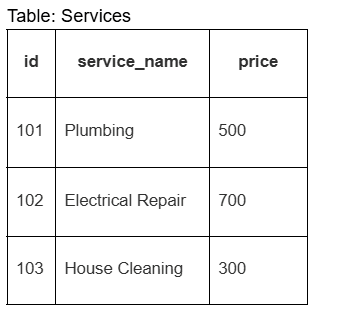
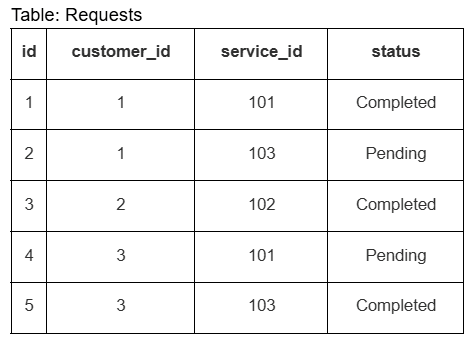
A Household Services Application maintains the following three tables:
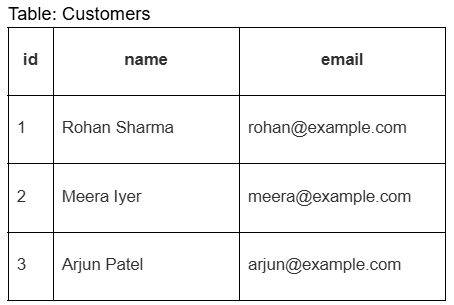 The Requests table represents service bookings made by customers. Based on the above data, answer the given subquestions.
Which SQL query correctly retrieves the customer names and the services they requested?
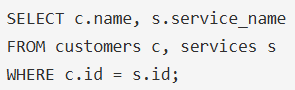
text
```sql
SELECT c.name, s.service_name
FROM customers c, services s
WHERE c.id = s.id;
```
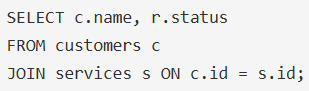
text
```sql
SELECT c.name, r.status
FROM customers c
JOIN services s ON c.id = s.id;
```
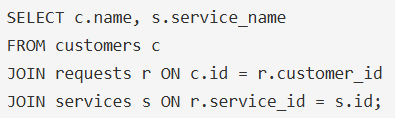
text
```sql
SELECT c.name, s.service_name
FROM customers c
JOIN requests r ON c.id = r.customer_id
JOIN services s ON r.service_id = s.id;
```
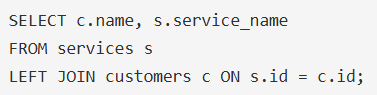
text
```sql
SELECT c.name, s.service_name
FROM services s
LEFT JOIN customers c ON s.id = c.id;
```
Comprehension passage for this question
A Household Services Application maintains the following three tables:
The Requests table represents service bookings made by customers. Based on the above data, answer the given subquestions.
Which query finds the number of service requests made by each customer?

text
```sql
SELECT r.customer_id, COUNT(*) AS total_requests
FROM requests r;
```
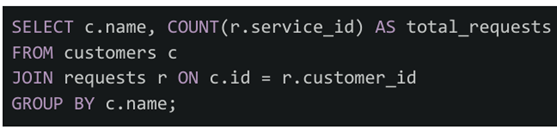
text
```sql
SELECT c.name, COUNT(r.service_id) AS total_requests
FROM customers c
JOIN requests r ON c.id = r.customer_id
GROUP BY c.name;
```
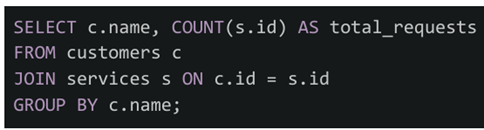
text
```sql
SELECT c.name, COUNT(s.id) AS total_requests
FROM customers c
JOIN services s ON c.id = s.id
GROUP BY c.name;
```
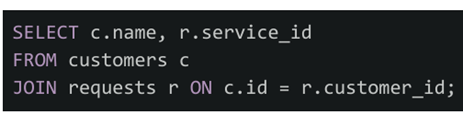
text
```sql
SELECT c.name, r.service_id
FROM customers c
JOIN requests r ON c.id = r.customer_id;
```
Comprehension passage for this question
A Household Services Application maintains the following three tables:
The Requests table represents service bookings made by customers. Based on the above data, answer the given subquestions.
If the given tables are mapped to Flask-SQLAlchemy models (Customer, Service, Request), which query correctly retrieves all services requested by customer with id=1?

text
```python
customer = Customer.query.filter_by(id=1).first()
services = Service.query.all()
```

text
```python
services = Service.query.filter_by(customer_id=1).all()
```

text
```python
customer = Customer.query.get(1)
services = [r.service for r in customer.requests]
```

text
```python
services = Request.query.filter_by(id=1).all()
```
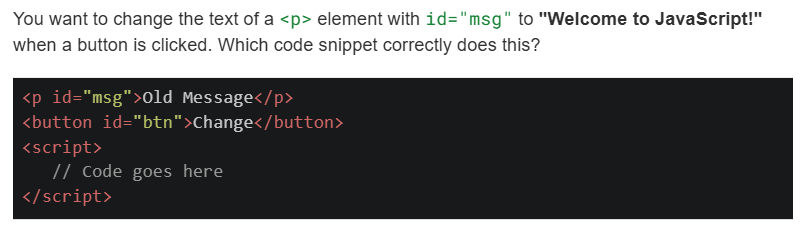
Text of the picture (copyable)
You want to change the text of a `<p>` element with `id="msg"` to "Welcome to JavaScript!" when a button is clicked. Which code snippet correctly does this?

```html
<p id="msg">Old Message</p>
<button id="btn">Change</button>
<script>
    // Code goes here
</script>
```
text
```javascript
document.getElementById("btn").onclick = function() {
    document.getElementById("msg").innerHTML = "Welcome to JavaScript!";
};
```
text
```javascript
document.getElementById("btn").addEventListener("click", function() {
    msg.text = "Welcome to JavaScript!";
});
```
text
```javascript document.querySelector("#btn").addEventListener("click", function() { document.querySelector("#msg").innerText = "Welcome to JavaScript!"; }); ```- Both and
text
```javascript
document.getElementById("btn").onclick = function() {
    document.getElementById("msg").innerHTML = "Welcome to JavaScript!";
};
```
Consider the data table below in SQLite database.
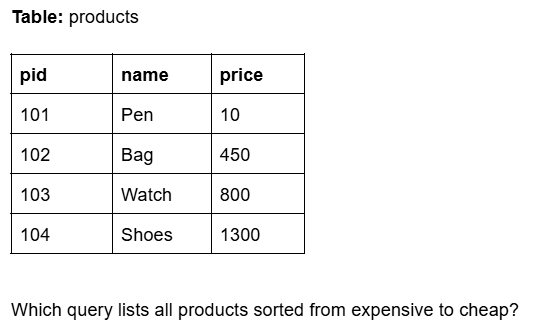
Text of the picture (copyable)
Table: products

| pid | name  | price |
| :-- | :---- | :---- |
| 101 | Pen   | 10    |
| 102 | Bag   | 450   |
| 103 | Watch | 800   |
| 104 | Shoes | 1300  |

Which query lists all products sorted from expensive to cheap?
- SELECT * FROM products ORDER BY price ASC;
- SELECT * FROM products ORDER BY price DESC;
- SELECT price FROM products;
- SELECT MAX(price) FROM products;
Which statements about frontend and backend validation are TRUE?
- Frontend validation (HTML5/JavaScript) is sufficient for security
- Frontend validation improves user experience by providing immediate feedback
- Backend validation is mandatory for security because frontend can be bypassed
- Backend validation should validate the same constraints as frontend
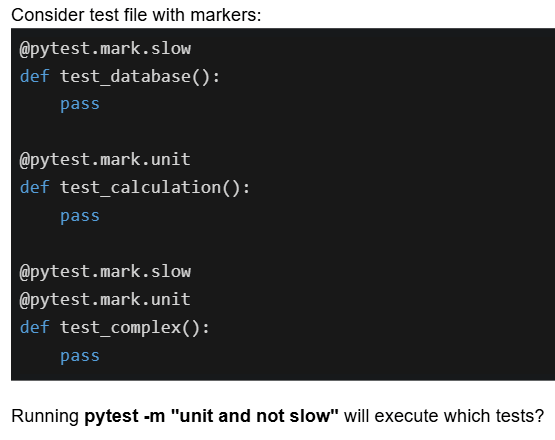
Text of the picture (copyable)
Consider test file with markers:

```python
@pytest.mark.slow
def test_database():
    pass

@pytest.mark.unit
def test_calculation():
    pass

@pytest.mark.slow
@pytest.mark.unit
def test_complex():
    pass
```

Running `pytest -m "unit and not slow"` will execute which tests?- test_database and test_complex
- Only test_calculation
- test_calculation and test_complex
- All three tests
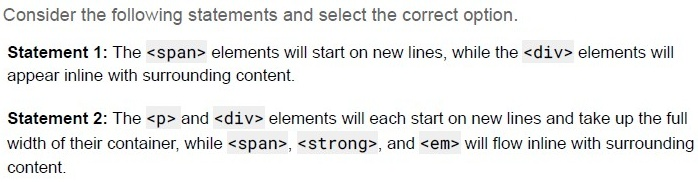
Text of the picture (copyable)
Consider the following statements and select the correct option.

Statement 1: The `<span>` elements will start on new lines, while the `<div>` elements will appear inline with surrounding content.

Statement 2: The `<p>` and `<div>` elements will each start on new lines and take up the full width of their container, while `<span>`, `<strong>`, and `<em>` will flow inline with surrounding content.
- Statement 1 is correct, but statement 2 is incorrect.
- Statement 2 is correct, but statement 1 is incorrect.
- Both statements 1 and 2 are correct
- Both statements 1 and 2 are incorrect
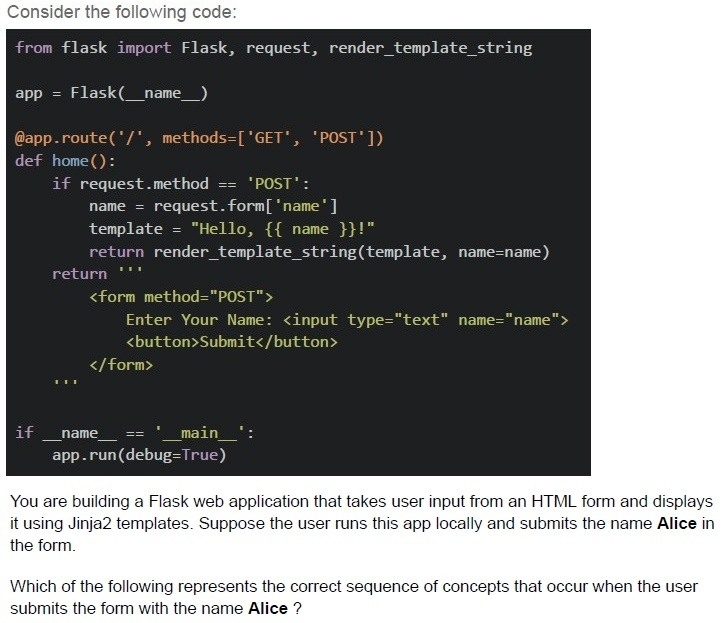
Text of the picture (copyable)
Consider the following code:

```python
from flask import Flask, request, render_template_string

app = Flask(__name__)

@app.route('/', methods=['GET', 'POST'])
def home():
    if request.method == 'POST':
        name = request.form['name']
        template = "Hello, {{ name }}!"
        return render_template_string(template, name=name)
    return '''
        <form method="POST">
            Enter Your Name: <input type="text" name="name">
            <button>Submit</button>
        </form>
    '''

if __name__ == '__main__':
    app.run(debug=True)
```

You are building a Flask web application that takes user input from an HTML form and displays it using Jinja2 templates. Suppose the user runs this app locally and submits the name **Alice** in the form.

Which of the following represents the correct sequence of concepts that occur when the user submits the form with the name **Alice** ?
text
HTML Form Rendering → HTTP 404 Not Found Error → User Submits Form → Flask Routing → Template Rendering

text
User Submits Form (HTTP POST) → Check URL Structure → Network Transfer (Bandwidth & Latency) → Flask Routing

text
User Accesses URL (Form at "/") → User Submits Form (HTTP POST) → Flask Request
Handling (request.form) → Jinja2 Template Rendering

text
Flask Request Handling → Network Round Trip (RTT) → HTML Table Rendering → Jinja2 Template Rendering
Comprehension passage for this question
Based on the above data, answer the given subquestions.
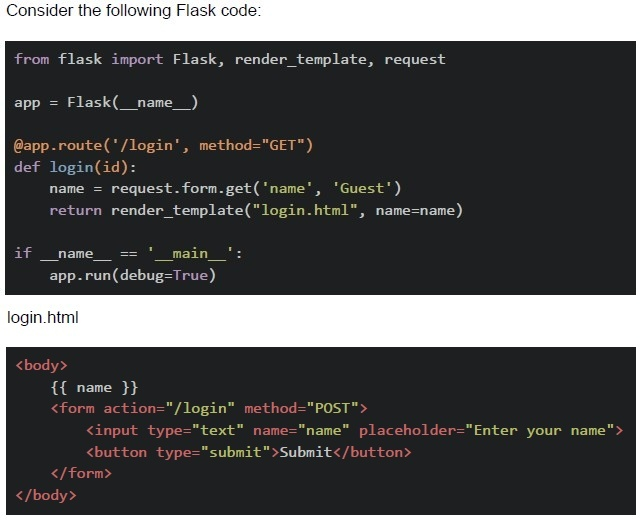
From the given options, select which part of the code (if any) will throw an error first in the terminal and prevent the Flask application from running successfully ?

text
method="GET" is not correct, it should be methods=["GET"]

text
```python
def login(id)
```
can throw error because no id is passed in, /login url

text
name will throw error because no name will be written in the starting of app

text
There is no error, Flask application will run correctly.
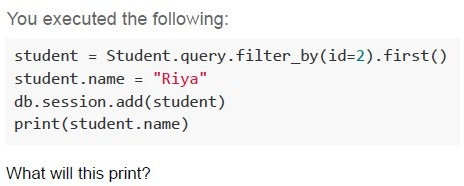
Text of the picture (copyable)
You executed the following:

```python
student = Student.query.filter_by(id=2).first()
student.name = "Riya"
db.session.add(student)
print(student.name)
```

What will this print?
- Riya
- Name stored in database
- None
- Error
What does SQLAlchemy's lazy='dynamic' do?
- Loads extra content of all the tables
- Returns a query object that can be filtered
- Loads all related records immediately
- Forces join queries at once
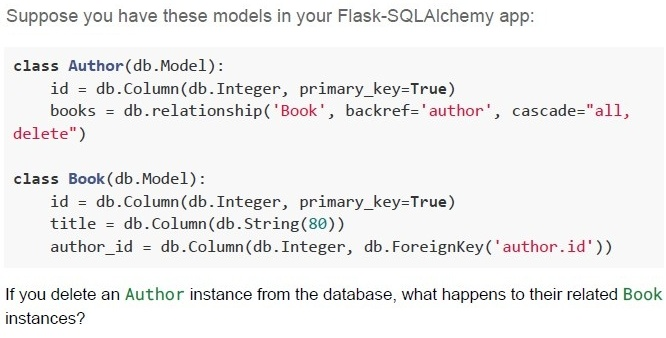
Text of the picture (copyable)
Suppose you have these models in your Flask-SQLAlchemy app:

```python
class Author(db.Model):
    id = db.Column(db.Integer, primary_key=True)
    books = db.relationship('Book', backref='author', cascade="all, delete")

class Book(db.Model):
    id = db.Column(db.Integer, primary_key=True)
    title = db.Column(db.String(80))
    author_id = db.Column(db.Integer, db.ForeignKey('author.id'))
```

If you delete an Author instance from the database, what happens to their related Book instances?
text
The books remain in the database, with author_id set to NULL

text
The books remain, but are marked as "inactive"

text
The books are also deleted from the database

text
An error is raised and the deletion is prevented
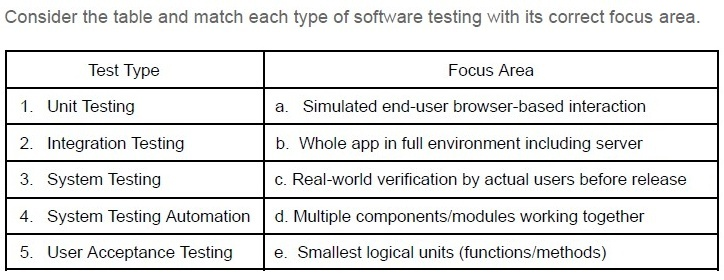
Text of the picture (copyable)
Consider the table and match each type of software testing with its correct focus area.

| Test Type | Focus Area |
|---|---|
| 1. Unit Testing | a. Simulated end-user browser-based interaction |
| 2. Integration Testing | b. Whole app in full environment including server |
| 3. System Testing | c. Real-world verification by actual users before release |
| 4. System Testing Automation | d. Multiple components/modules working together |
| 5. User Acceptance Testing | e. Smallest logical units (functions/methods) |
- 1-a, 2- c, 3-b, 4-d, 5-e
- 1-b, 2- c, 3-a, 4-e, 5-d
- 1-e, 2- d, 3-c, 4-a, 5-b
- 1-e, 2- d, 3-b, 4-a, 5-c
Comprehension passage for this question
Based on the above data, answer the given subquestions.
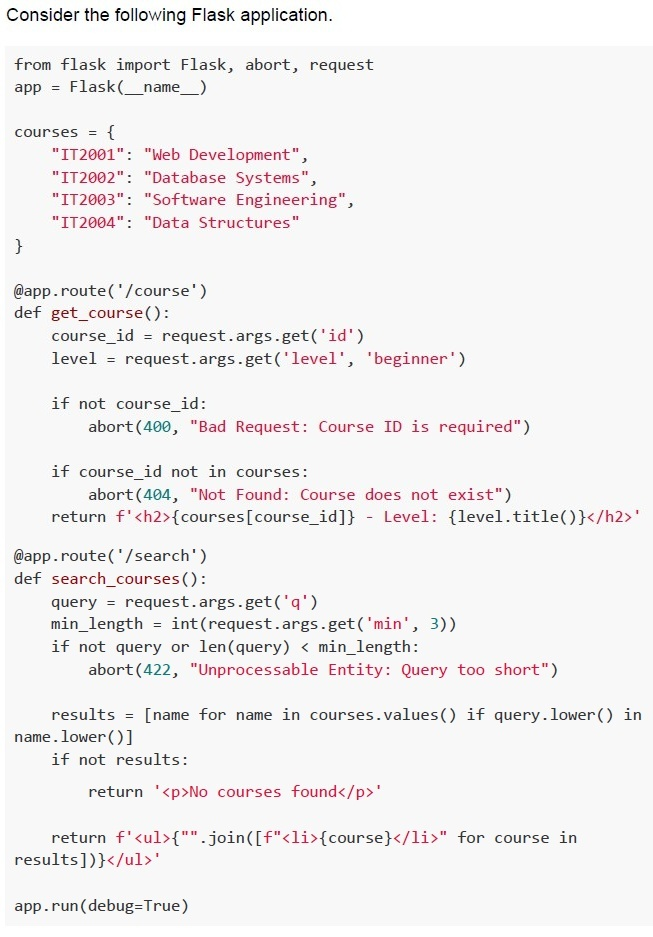
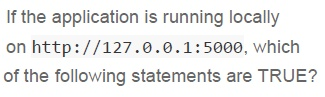
Text of the picture (copyable)
If the application is running locally
on http://127.0.0.1:5000, which
of the following statements are TRUE?

text
URL http://127.0.0.1:5000/course?id=IT2002 will render:
```html
<h2>Database Systems - Level: Beginner</h2>
```

text
URL http://127.0.0.1:5000/course will render:
```html
<h2> - Level: Beginner</h2>
```

text
URL http://127.0.0.1:5000/course?id=IT2005&level=advanced will return HTTP
404 error with message: "Not Found: Course does not exist"

text
URL http://127.0.0.1:5000/search?q=data&min=2 will render:
```html
<ul><li>Database Systems</li><li>Data Structures</li></ul>
```

text
URL http://127.0.0.1:5000/search?q=web will return HTTP 422 error with
message: "Unprocessable Entity: Query too short"
Comprehension passage for this question
Based on the above data, answer the given subquestions.
Analyze the following URLs and their expected behaviors. Which statement is CORRECT?

text
http://127.0.0.1:5000/search?q= will return:
```html
<p>No courses found</p>
```

text
http://127.0.0.1:5000/search?q=system&min=10 will return:
HTTP 422 error with message "Unprocessable Entity: Query too short"

text
http://127.0.0.1:5000/search?q=DATA&min=4 will return:
```html
<ul><li>Database Systems</li><li>Data Structures</li></ul>
```

text
http://127.0.0.1:5000/search?q=python&min=0 will return:
```html
<p>No courses found</p>
```

text
http://127.0.0.1:5000/search?min=2 will return:
HTTP 422 error with message "Unprocessable Entity: Query too short"
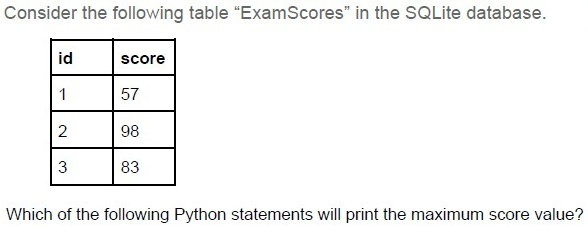
Text of the picture (copyable)
Consider the following table "ExamScores" in the SQLite database.

| id | score |
|----|-------|
| 1  | 57    |
| 2  | 98    |
| 3  | 83    |

Which of the following Python statements will print the maximum score value?

text
```python
>>> print(db.session.query.max(ExamScores.score))
```

text
```python
>>> print(db.session.query(func.max(ExamScores.score)).scalar())
```

text
```python
>>> print(db.session.query(func.max(ExamScores.score)))
```

text
```python
>>> print(db.session.query.max(ExamScores.score).scalar())
```
Comprehension passage for this question
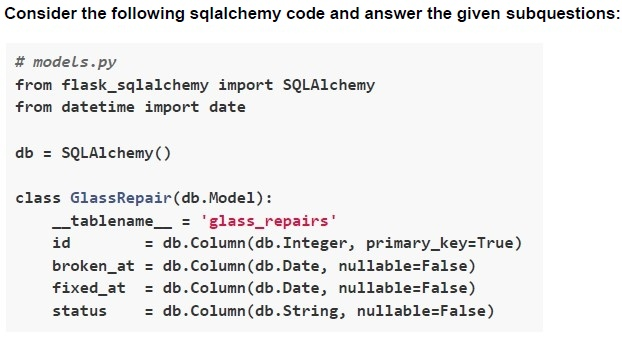
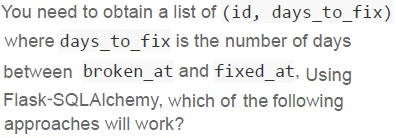
Text of the picture (copyable)
You need to obtain a list of (id, days_to_fix)
where days_to_fix is the number of days
between broken_at and fixed_at. Using
Flask-SQLAlchemy, which of the following
approaches will work?
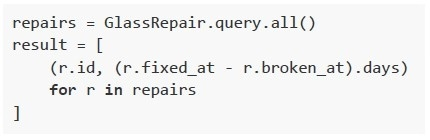
text
```python
repairs = GlassRepair.query.all()
result = [
    (r.id, (r.fixed_at - r.broken_at).days)
    for r in repairs
]
```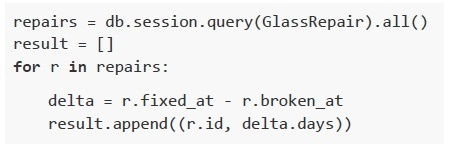
text
```python
repairs = db.session.query(GlassRepair).all()
result = []
for r in repairs:
    delta = r.fixed_at - r.broken_at
    result.append((r.id, delta.days))
```
text
```python
repairs = GlassRepair.query(
    GlassRepair.id,
    (GlassRepair.fixed_at - GlassRepair.broken_at).label('days_to_fix')
).all()
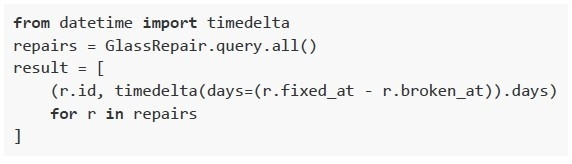
```
text
```python
from datetime import timedelta
repairs = GlassRepair.query.all()
result = [
    (r.id, timedelta(days=(r.fixed_at - r.broken_at)).days)
    for r in repairs
]
```
Comprehension passage for this question
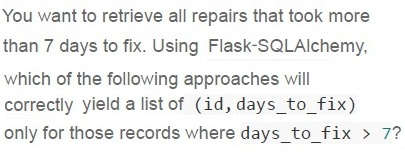
Text of the picture (copyable)
You want to retrieve all repairs that took more
than 7 days to fix. Using Flask-SQLAlchemy,
which of the following approaches will
correctly yield a list of (id, days_to_fix)
only for those records where days_to_fix > 7?
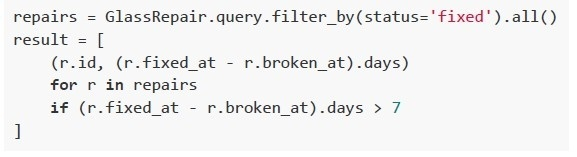
text
```python
repairs = GlassRepair.query.filter_by(status='fixed').all()
result = [
    (r.id, (r.fixed_at - r.broken_at).days)
    for r in repairs
    if (r.fixed_at - r.broken_at).days > 7
]
```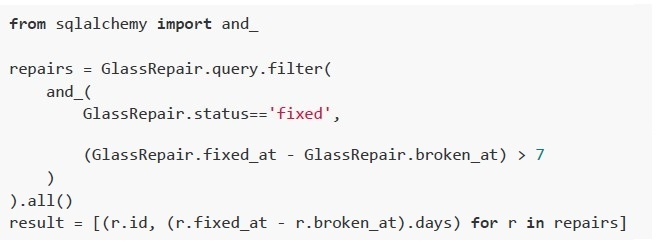
text
```python
from sqlalchemy import and_

repairs = GlassRepair.query.filter(
    and_(
        GlassRepair.status=='fixed',

        (GlassRepair.fixed_at - GlassRepair.broken_at) > 7
    )
).all()
result = [(r.id, (r.fixed_at - r.broken_at).days) for r in repairs]
```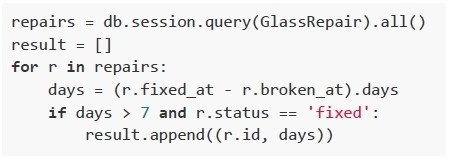
text
```python
repairs = db.session.query(GlassRepair).all()
result = []
for r in repairs:
    days = (r.fixed_at - r.broken_at).days
    if days > 7 and r.status == 'fixed':
        result.append((r.id, days))
```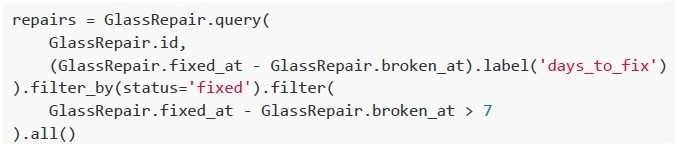
text
```python
repairs = GlassRepair.query(
    GlassRepair.id,
    (GlassRepair.fixed_at - GlassRepair.broken_at).label('days_to_fix')
).filter_by(status='fixed').filter(
    GlassRepair.fixed_at - GlassRepair.broken_at > 7
).all()
```
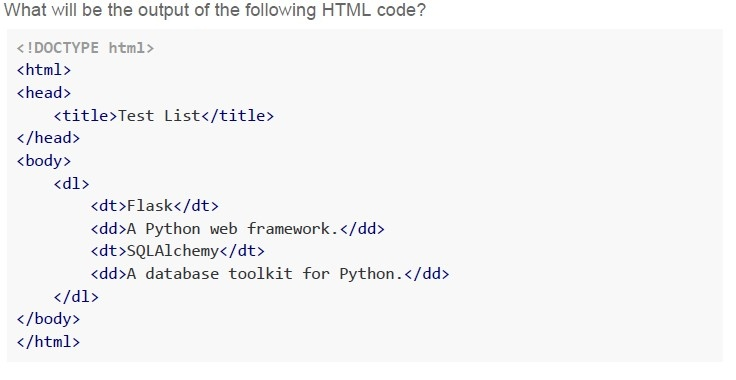
Text of the picture (copyable)
What will be the output of the following HTML code?

```html
<!DOCTYPE html>
<html>
<head>
    <title>Test List</title>
</head>
<body>
    <dl>
        <dt>Flask</dt>
        <dd>A Python web framework.</dd>
        <dt>SQLAlchemy</dt>
        <dd>A database toolkit for Python.</dd>
    </dl>
</body>
</html>
```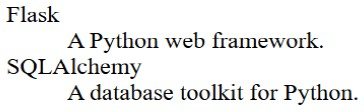
text
Flask
    A Python web framework.
SQLAlchemy
    A database toolkit for Python.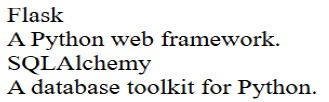
text
Flask
A Python web framework.
SQLAlchemy
A database toolkit for Python.
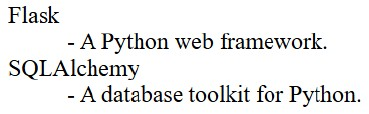
text
Flask
 - A Python web framework.
SQLAlchemy
 - A database toolkit for Python.
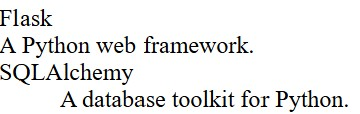
text
Flask
A Python web framework.
SQLAlchemy
A database toolkit for Python.
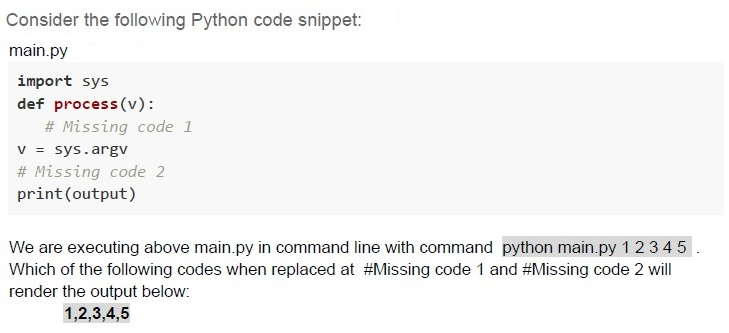
Text of the picture (copyable)
Consider the following Python code snippet:
main.py

```python
import sys
def process(v):
    # Missing code 1
    v = sys.argv
    # Missing code 2
    print(output)
```

We are executing above main.py in command line with command `python main.py 1 2 3 4 5`.
Which of the following codes when replaced at #Missing code 1 and #Missing code 2 will render the output below:
**1,2,3,4,5**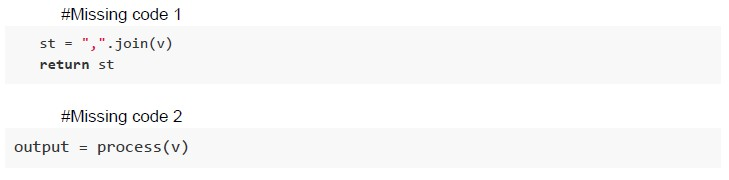
text
```python
#Missing code 1
st = ",".join(v)
return st

#Missing code 2
output = process(v)
```
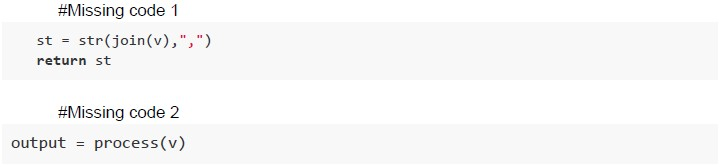
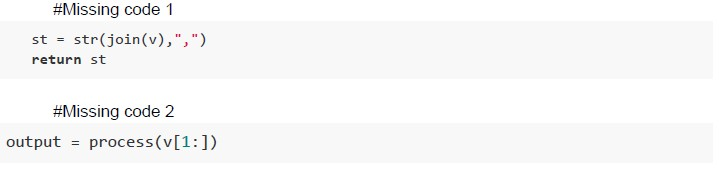
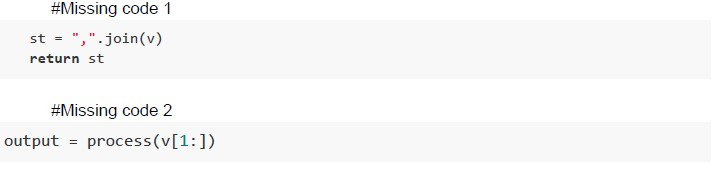
text
```python
#Missing code 1
st = str(join(v),",")
return st

#Missing code 2
output = process(v)
```
text
```python
#Missing code 1
st = str(join(v),",")
return st

#Missing code 2
output = process(v[1:])
```
text
```python
#Missing code 1
st = ",".join(v)
return st

#Missing code 2
output = process(v[1:])
```
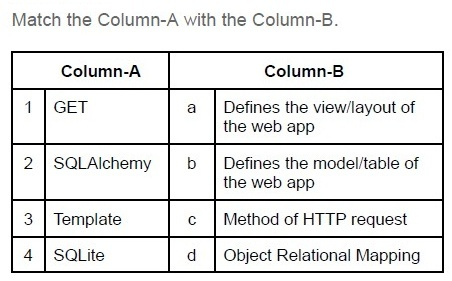
Text of the picture (copyable)
Match the Column-A with the Column-B.

| | Column-A | | Column-B |
|---|---|---|---|
| 1 | GET | a | Defines the view/layout of the web app |
| 2 | SQLAlchemy | b | Defines the model/table of the web app |
| 3 | Template | c | Method of HTTP request |
| 4 | SQLite | d | Object Relational Mapping |
- 1-c, 2-a, 3-d, 4-b
- 1-d, 2-c, 3-a, 4-b
- 1-c, 2-d, 3-b, 4-a
- 1-c, 2-d, 3-a, 4-b
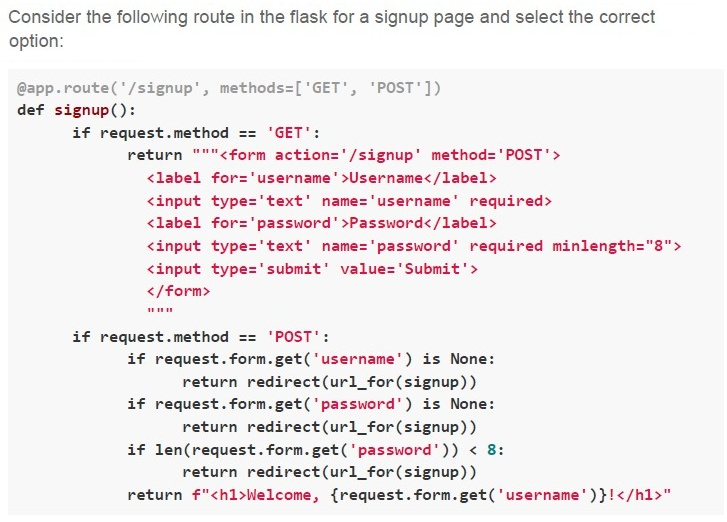
Text of the picture (copyable)
Consider the following route in the flask for a signup page and select the correct option:

```python
@app.route('/signup', methods=['GET', 'POST'])
def signup():
    if request.method == 'GET':
        return """<form action='/signup' method='POST'>
            <label for='username'>Username</label>
            <input type='text' name='username' required>
            <label for='password'>Password</label>
            <input type='text' name='password' required minlength="8">
            <input type='submit' value='Submit'>
        </form>
        """
    if request.method == 'POST':
        if request.form.get('username') is None:
            return redirect(url_for(signup))
        if request.form.get('password') is None:
            return redirect(url_for(signup))
        if len(request.form.get('password')) < 8:
            return redirect(url_for(signup))
        return f"<h1>Welcome, {request.form.get('username')}!</h1>"
```- The signup page is dynamically generated.
- The signup page uses server-side rendering.
- The signup page uses frontend validation.
- The signup page uses backend validation.
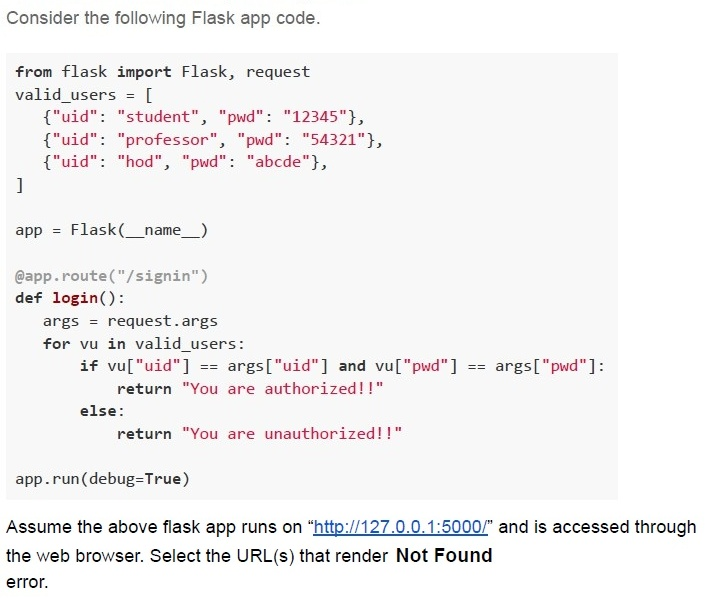
Text of the picture (copyable)
Consider the following Flask app code.

```python
from flask import Flask, request
valid_users = [
    {"uid": "student", "pwd": "12345"},
    {"uid": "professor", "pwd": "54321"},
    {"uid": "hod", "pwd": "abcde"},
]

app = Flask(__name__)

@app.route("/signin")
def login():
    args = request.args
    for vu in valid_users:
        if vu["uid"] == args["uid"] and vu["pwd"] == args["pwd"]:
            return "You are authorized!!"
    else:
        return "You are unauthorized!!"

app.run(debug=True)
```

Assume the above flask app runs on "http://127.0.0.1:5000/" and is accessed through the web browser. Select the URL(s) that render **Not Found** error.
text
http://127.0.0.1:5000/signin?uid=professor&pwd=54321

text
```
http://127.0.0.1:5000/login?uid=professor&pwd=54321
```

text
http://127.0.0.1:5000/signin?uid=student&pwd=12345

text
http://127.0.0.1:5000/login?uid=student&pwd=12345

text
http://127.0.0.1:5000/signin?uid=hod&pwd=12345
Comprehension passage for this question
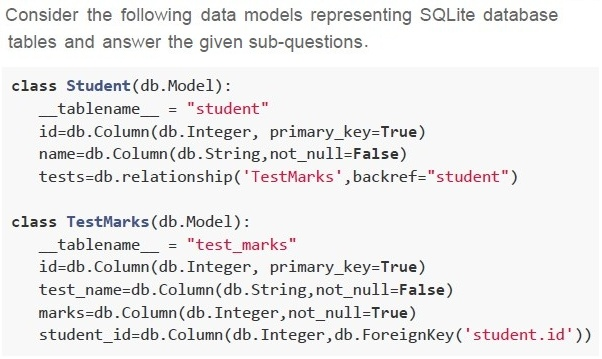
Which of the following statements is/are True?
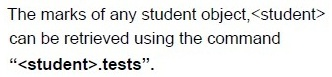
text
The marks of any student object, <student>
can be retrieved using the command
"<student>.tests".
text
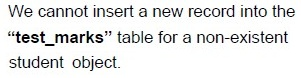
We cannot insert a new record into the
"**test_marks**" table for a non-existent
student object.
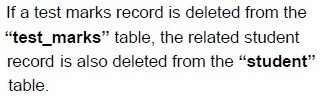
text
If a test marks record is deleted from the
“**test_marks**” table, the related student
record is also deleted from the “**student**”
table.

text
We can insert a new record in the “**student**”
table for a non-existent “**test_marks**” object.
The Quiz Master application at IITM BS allows students to attempt quizzes online. To prevent automated bots from mass-submitting quiz answers and ensure fair participation, the admin decides to implement a CAPTCHA verification system before allowing users to start a quiz. The admin decides to integrate Google reCAPTCHA into the Quiz Master app using Flask. Which Flask extension is best suited for implementing reCAPTCHA verification?
- Flask-Mail
- Flask-WTF
- Flask-SQLAlchemy
- Flask-Migrate
Text of the picture (copyable)
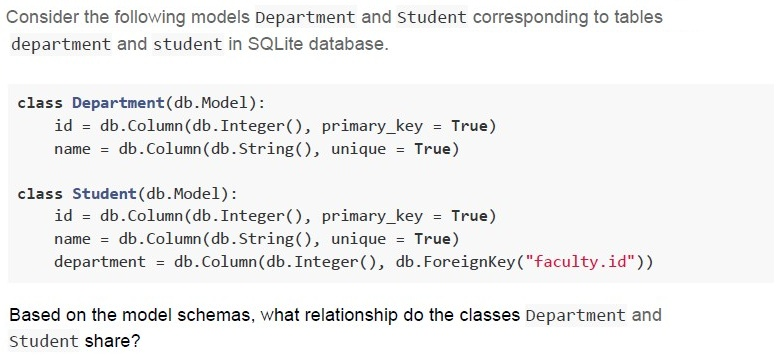
Consider the following models Department and Student corresponding to tables
department and student in SQLite database.

```python
class Department(db.Model):
    id = db.Column(db.Integer(), primary_key = True)
    name = db.Column(db.String(), unique = True)

class Student(db.Model):
    id = db.Column(db.Integer(), primary_key = True)
    name = db.Column(db.String(), unique = True)
    department = db.Column(db.Integer(), db.ForeignKey("faculty.id"))
```

Based on the model schemas, what relationship do the classes Department and
Student share?- Many-to-Many
- One-to-Many
- One-to-One
- The tables are not at all related
Consider the schema for the Class Student.
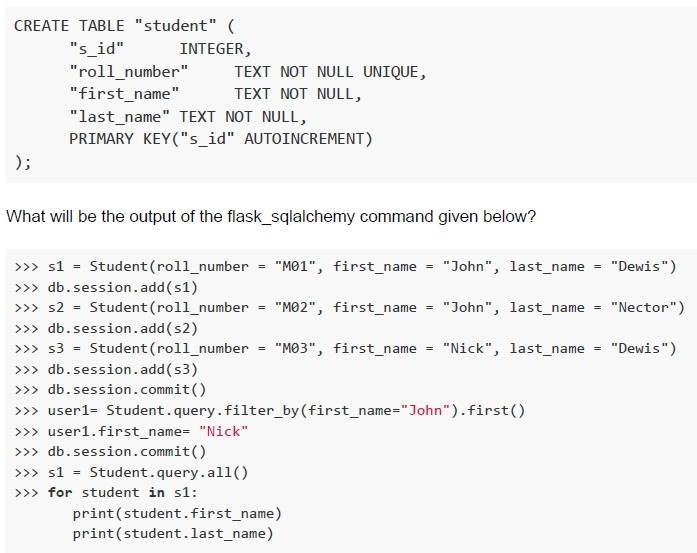 Consider the schema for the Class Student.
Consider the schema for the Class Student.
Text of the picture (copyable)
```sql
CREATE TABLE "student" (
    "s_id"          INTEGER,
    "roll_number"   TEXT NOT NULL UNIQUE,
    "first_name"    TEXT NOT NULL,
    "last_name" TEXT NOT NULL,
    PRIMARY KEY("s_id" AUTOINCREMENT)
);
```

What will be the output of the flask_sqlalchemy command given below?

```python
>>> s1 = Student(roll_number = "M01", first_name = "John", last_name = "Dewis")
>>> db.session.add(s1)
>>> s2 = Student(roll_number = "M02", first_name = "John", last_name = "Nector")
>>> db.session.add(s2)
>>> s3 = Student(roll_number = "M03", first_name = "Nick", last_name = "Dewis")
>>> db.session.add(s3)
>>> db.session.commit()
>>> user1= Student.query.filter_by(first_name="John").first()
>>> user1.first_name= "Nick"
>>> db.session.commit()
>>> s1 = Student.query.all()
>>> for student in s1:
        print(student.first_name)
        print(student.last_name)
```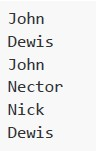
text
John
Dewis
John
Nector
Nick
Dewis
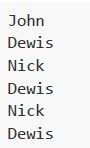
text
```
John
Dewis
Nick
Dewis
Nick
Dewis
```
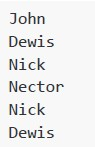
text
John
Dewis
Nick
Nector
Nick
Dewis
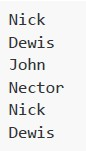
text
Nick
Dewis
John
Nector
Nick
Dewis
Text of the picture (copyable)
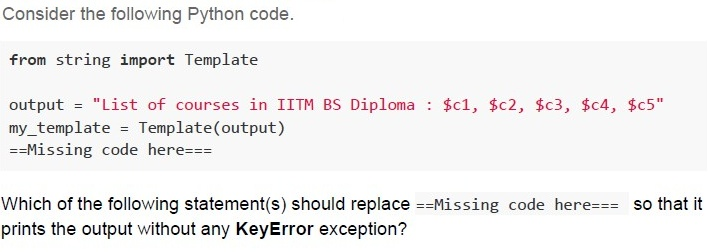
Consider the following Python code.

```python
from string import Template

output = "List of courses in IITM BS Diploma : $c1, $c2, $c3, $c4, $c5"
my_template = Template(output)
==Missing code here===
```

Which of the following statement(s) should replace ==Missing code here=== so that it prints the output without any KeyError exception?

text
```python
print(my_template.safe_substitute({
    "c1": "PDSA", "c2": "DBMS", "c3": "App Dev-I",
    "c4": "App Dev-II", "c5": "Java",}))
```
text
```python
print(my_template.substitute({
    "c1": "PDSA", "c2": "DBMS", "c3": "App Dev-I",
    "c4": "App Dev-II", "c5": "Java",}))
```
text
```python
print(my_template.substitute({
    "c4": "App Dev-II", "c5": "Java", "c1": "PDSA",
    "c2": "DBMS", "c3": "App Dev-I",}))
```
text
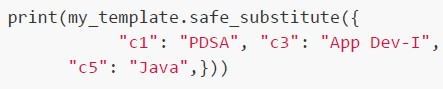
```python
print(my_template.safe_substitute({
    "c1": "PDSA", "c3": "App Dev-I",
    "c5": "Java",}))
```
text
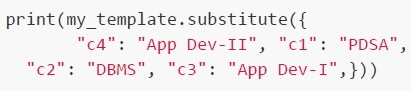
```python
print(my_template.substitute({
    "c4": "App Dev-II", "c1": "PDSA",
    "c2": "DBMS", "c3": "App Dev-I",}))
```
Comprehension passage for this question
Based on the above data, answer the given subquestions.
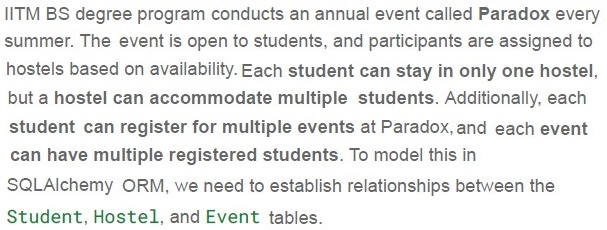
Which type of relationship best represents the association between students and hostels in the given scenario?
- One-to-One
- One-to-Many
- Many-to-One
- Many-to-Many
Comprehension passage for this question
Based on the above data, answer the given subquestions.
Which SQLAlchemy relationship should be used to model the many-to-many relationship between students and events in the Paradox ?

text
```python
db.relationship('Event', backref='students')
```
in the Student model
text
```python
db.relationship('Student', back_populates='events')
```
in the Event model
text
Using an association table between
students and events

text
Creating a foreign key inside the
Student model referring to Event
Text of the picture (copyable)
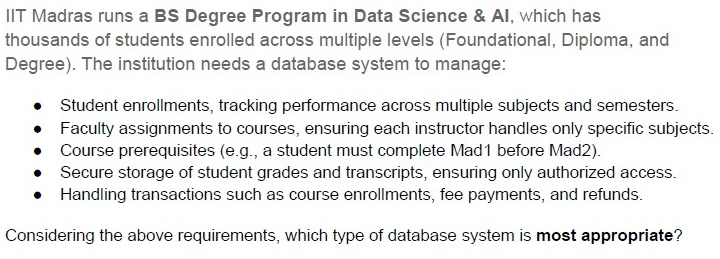
IIT Madras runs a **BS Degree Program in Data Science & AI**, which has thousands of students enrolled across multiple levels (Foundational, Diploma, and Degree). The institution needs a database system to manage:

* Student enrollments, tracking performance across multiple subjects and semesters.
* Faculty assignments to courses, ensuring each instructor handles only specific subjects.
* Course prerequisites (e.g., a student must complete Mad1 before Mad2).
* Secure storage of student grades and transcripts, ensuring only authorized access.
* Handling transactions such as course enrollments, fee payments, and refunds.

Considering the above requirements, which type of database system is **most appropriate**?
- NoSQL (Document-based database like MongoDB)
- Graph Database (e.g., Neo4j)
- RDBMS (e.g., PostgreSQL, MySQL, SQLite)
- Key-Value Store (e.g., Redis, DynamoDB)
Text of the picture (copyable)
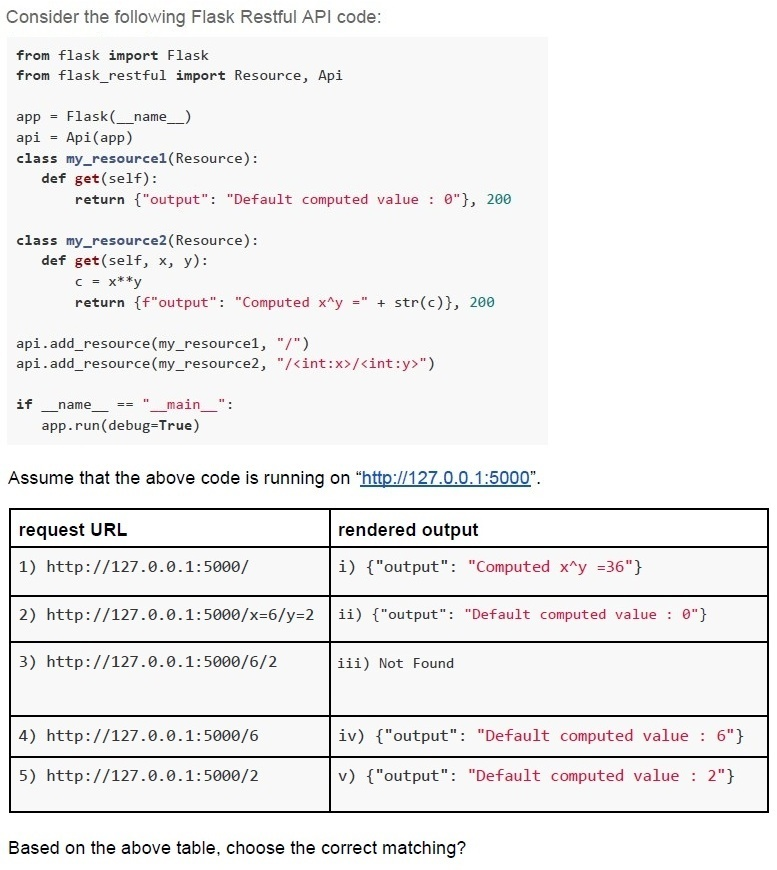
Consider the following Flask Restful API code:

```python
from flask import Flask
from flask_restful import Resource, Api

app = Flask(__name__)
api = Api(app)

class my_resource1(Resource):
    def get(self):
        return {"output": "Default computed value : 0"}, 200

class my_resource2(Resource):
    def get(self, x, y):
        c = x**y
        return f"output": "Computed x^y = " + str(c)}, 200

api.add_resource(my_resource1, "/")
api.add_resource(my_resource2, "/<int:x>/<int:y>")

if __name__ == "__main__":
    app.run(debug=True)
```

Assume that the above code is running on "http://127.0.0.1:5000".

| request URL | rendered output |
|---|---|
| 1) http://127.0.0.1:5000/ | i) {"output": "Computed x^y =36"} |
| 2) http://127.0.0.1:5000/x=6/y=2 | ii) {"output": "Default computed value : 0"} |
| 3) http://127.0.0.1:5000/6/2 | iii) Not Found |
| 4) http://127.0.0.1:5000/6 | iv) {"output": "Default computed value : 6"} |
| 5) http://127.0.0.1:5000/2 | v) {"output": "Default computed value : 2"} |

Based on the above table, choose the correct matching?- 1-ii, 2-i, 3-iii, 4-iv, 5-v
- 1-iii, 2-iii, 3-iii, 4-v, 5-iv
- 1-ii, 2-i, 3-i, 4-iv, 5-v
- 1-ii, 2-iii, 3-i, 4-iii, 5-iii
Text of the picture (copyable)
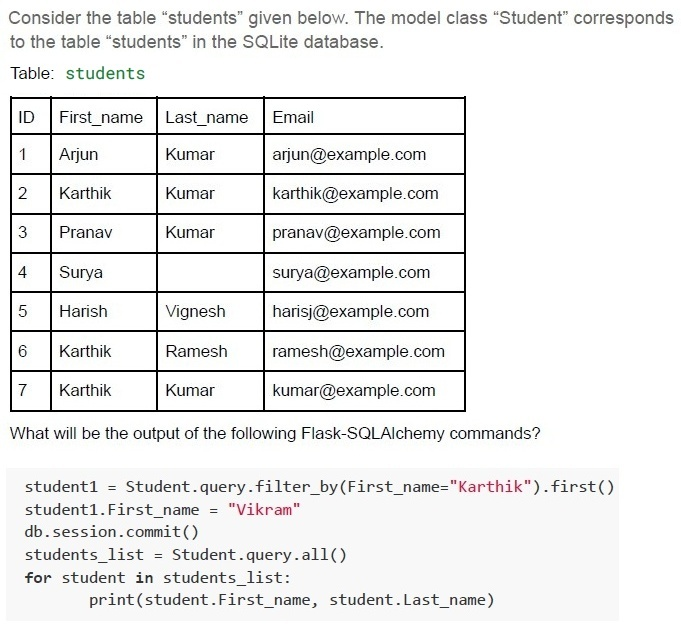
Consider the table "students" given below. The model class "Student" corresponds to the table "students" in the SQLite database.

Table: students

| ID | First_name | Last_name | Email             |
|----|------------|-----------|-------------------|
| 1  | Arjun      | Kumar     | arjun@example.com |
| 2  | Karthik    | Kumar     | karthik@example.com |
| 3  | Pranav     | Kumar     | pranav@example.com |
| 4  | Surya      |           | surya@example.com |
| 5  | Harish     | Vignesh   | harisj@example.com |
| 6  | Karthik    | Ramesh    | ramesh@example.com |
| 7  | Karthik    | Kumar     | kumar@example.com |

What will be the output of the following Flask-SQLAlchemy commands?

```python
student1 = Student.query.filter_by(First_name="Karthik").first()
student1.First_name = "Vikram"
db.session.commit()
students_list = Student.query.all()
for student in students_list:
    print(student.First_name, student.Last_name)
```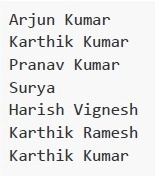
text
Arjun Kumar
Karthik Kumar
Pranav Kumar
Surya
Harish Vignesh
Karthik Ramesh
Karthik Kumar

text
Arjun Kumar
Vikram Kumar
Pranav Kumar
Surya
Harish Vignesh
Vikram Ramesh
Vikram Kumar

text
Arjun Kumar
Vikram Kumar
Pranav Kumar
Surya
Harish Vignesh
Karthik Ramesh
Karthik Kumar
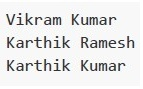
text
Vikram Kumar
Karthik Ramesh
Karthik Kumar
Text of the picture (copyable)
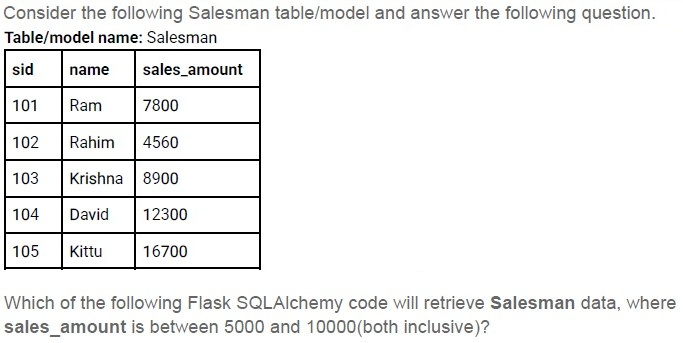
Consider the following Salesman table/model and answer the following question.
Table/model name: Salesman

| sid | name    | sales_amount |
| :-- | :------ | :----------- |
| 101 | Ram     | 7800         |
| 102 | Rahim   | 4560         |
| 103 | Krishna | 8900         |
| 104 | David   | 12300        |
| 105 | Kittu   | 16700        |

Which of the following Flask SQLAlchemy code will retrieve Salesman data, where **sales_amount** is between 5000 and 10000(both inclusive)?
- sales_man= Salesman.query.filter((Salesman.sales_amount >= 5000) &(Salesman.sales_amount <= 10000)).all()
- sales_man= Salesman.query.filter(and_(Salesman.sales_amount >= 5000,Salesman.sales_amount <= 10000)).all()
- sales_man= Salesman.query.filter(sales_amount >= 5000 and sales_amount <=10000)
- sales_man= Salesman.query.filter_by(sales_amount >= 5000, sales_amount <=10000)
Read the statements given below carefully and select the correct option.
Statement 1: If an element that belongs to two different classes is styled externally using both the classes, then for the same attribute, it will acquire styling from the latest class in order. Statement 2: If an element having an ID and a class is styled externally using both its ID and the class, then for the same attribute, it will acquire styling from the ID selector.
- Both statements 1 and 2 are correct
- Both statements 1 and 2 are incorrect
- Statement 1 is correct but statement 2 is incorrect
- Statement 2 is correct but statement 1 is incorrect
Which of the following options represents a one-to-one relationship in the Entity-Relationship Diagram?

text
This is a diagram of a line segment.
The line starts at the bottom left with a short horizontal segment, then goes diagonally upwards and to the right, and ends with another short horizontal segment at the top right.
Both ends of the line have two short perpendicular hash marks.

text
This is a diagram. It shows a line segment starting at the bottom left, going diagonally upwards to the right, and then horizontally to the right.
- The bottom left end of the line has two vertical parallel lines.
- The top right end of the line has a small circle with a plus sign inside it, and then a short horizontal line extending to the right.

text
This is a diagram showing a single line with two arrows.
The line starts at the bottom left, goes horizontally right for a short segment, then diagonally up and right, then horizontally right for another short segment, ending at the top right.
There is an arrow head at the very beginning of the line, pointing left.
There is an arrow head at the very end of the line, pointing right.

text
This is a diagram of a line graph.
The graph starts at the bottom left with a horizontal line segment.
It then transitions to an upward sloping diagonal line segment.
Finally, it transitions to another horizontal line segment at the top right, which ends with a small asterisk-like symbol.
Text of the picture (copyable)
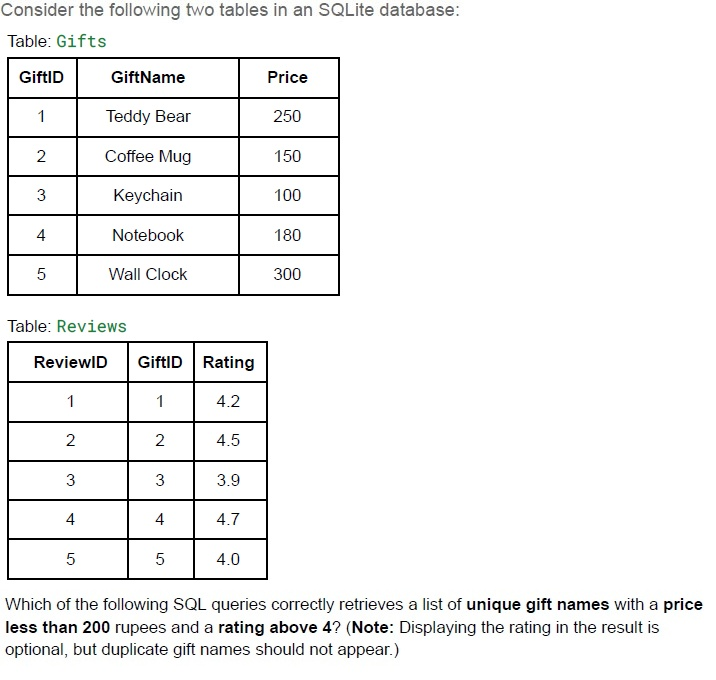
Consider the following two tables in an SQLite database:
Table: Gifts

| GiftID | GiftName | Price |
|---|---|---|
| 1 | Teddy Bear | 250 |
| 2 | Coffee Mug | 150 |
| 3 | Keychain | 100 |
| 4 | Notebook | 180 |
| 5 | Wall Clock | 300 |

Table: Reviews

| ReviewID | GiftID | Rating |
|---|---|---|
| 1 | 1 | 4.2 |
| 2 | 2 | 4.5 |
| 3 | 3 | 3.9 |
| 4 | 4 | 4.7 |
| 5 | 5 | 4.0 |

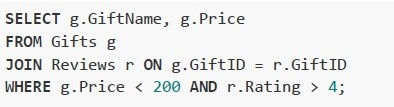
Which of the following SQL queries correctly retrieves a list of **unique gift names** with a **price less than 200 rupees** and a **rating above 4**? (Note: Displaying the rating in the result is optional, but duplicate gift names should not appear.)
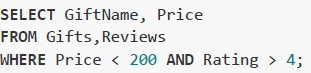
text
```sql
SELECT GiftName, Price
FROM Gifts,Reviews
WHERE Price < 200 AND Rating > 4;
```
text
```sql
SELECT g.GiftName, g.Price
FROM Gifts g
JOIN Reviews r ON g.GiftID = r.GiftID
WHERE g.Price < 200 AND r.Rating > 4;
```
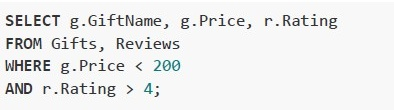
text
```sql
SELECT g.GiftName, g.Price, r.Rating
FROM Gifts, Reviews
WHERE g.Price < 200
AND r.Rating > 4;
```
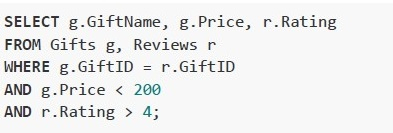
text
```sql
SELECT g.GiftName, g.Price, r.Rating
FROM Gifts g, Reviews r
WHERE g.GiftID = r.GiftID
AND g.Price < 200
AND r.Rating > 4;
```
Text of the picture (copyable)
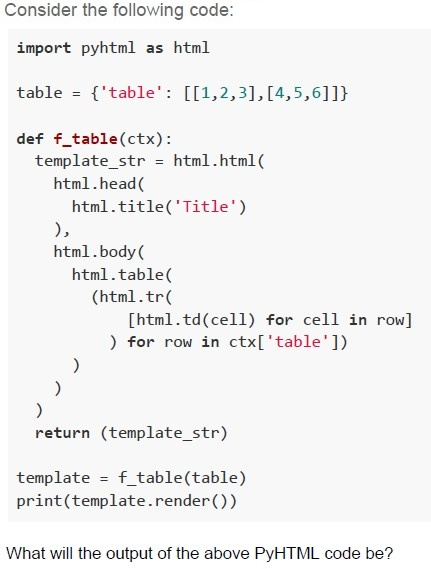
Consider the following code:

```python
import pyhtml as html

table = {'table': [[1,2,3],[4,5,6]]}

def f_table(ctx):
    template_str = html.html(
        html.head(
            html.title('Title')
        ),
        html.body(
            html.table(
                (html.tr(
                    [html.td(cell) for cell in row]
                ) for row in ctx['table'])
            )
        )
    )
    return (template_str)

template = f_table(table)
print(template.render())
```

What will the output of the above PyHTML code be?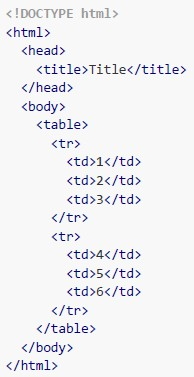
text
```html
<!DOCTYPE html>
<html>
<head>
    <title>Title</title>
</head>
<body>
    <table>
        <tr>
            <td>1</td>
            <td>2</td>
            <td>3</td>
        </tr>
        <tr>
            <td>4</td>
            <td>5</td>
            <td>6</td>
        </tr>
    </table>
</body>
</html>
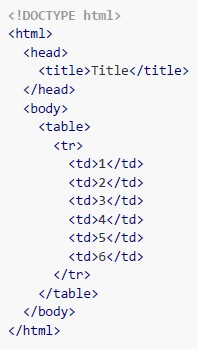
```
text
```html
<!DOCTYPE html>
<html>
<head>
    <title>Title</title>
</head>
<body>
    <table>
        <tr>
            <td>1</td>
            <td>2</td>
            <td>3</td>
            <td>4</td>
            <td>5</td>
            <td>6</td>
        </tr>
    </table>
</body>
</html>
```
text
```
AttributeError: module 'pyhtml' has no attribute 'html'.
```

text
None of these
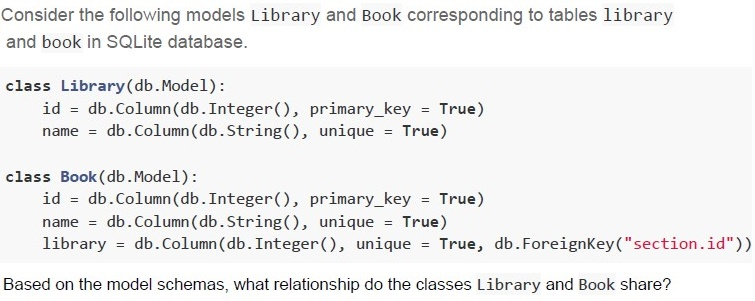
Text of the picture (copyable)
Consider the following models Library and Book corresponding to tables library and book in SQLite database.

```python
class Library(db.Model):
    id = db.Column(db.Integer(), primary_key = True)
    name = db.Column(db.String(), unique = True)

class Book(db.Model):
    id = db.Column(db.Integer(), primary_key = True)
    name = db.Column(db.String(), unique = True)
    library = db.Column(db.Integer(), unique = True, db.ForeignKey("section.id"))
```

Based on the model schemas, what relationship do the classes Library and Book share?- Many-to-Many
- One-to-Many
- One-to-One
- The tables are not at all related
Which of the following is a time series database?
- MongoDB
- InfluxDB
- MySQL
- PostgreSQL
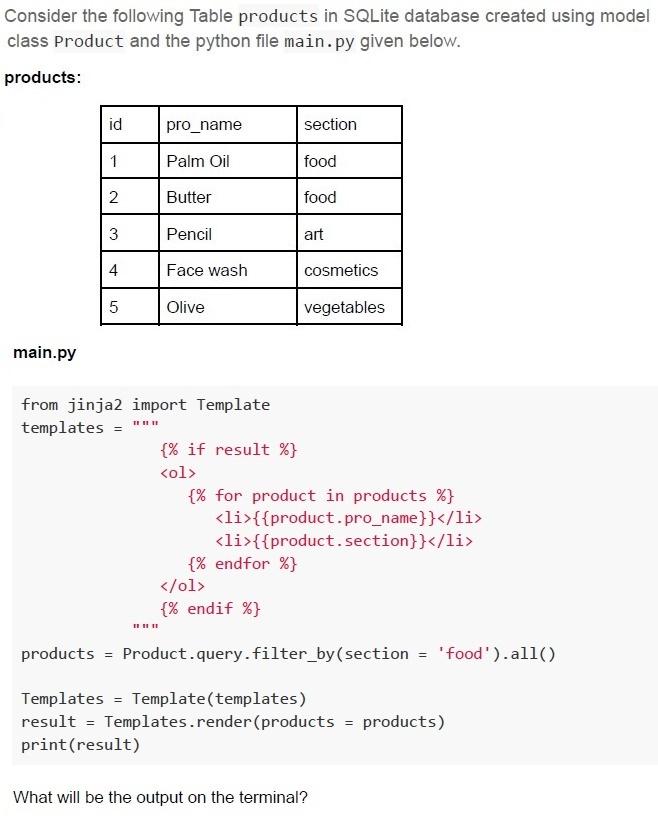
Text of the picture (copyable)
Consider the following Table products in SQLite database created using model class Product and the python file main.py given below.

products:

| id | pro_name  | section    |
|:---|:----------|:-----------|
| 1  | Palm Oil  | food       |
| 2  | Butter    | food       |
| 3  | Pencil    | art        |
| 4  | Face wash | cosmetics  |
| 5  | Olive     | vegetables |

main.py

```python
from jinja2 import Template
templates = """
    {% if result %}
    <ol>
        {% for product in products %}
        <li>{{product.pro_name}}</li>
        <li>{{product.section}}</li>
        {% endfor %}
    </ol>
    {% endif %}
"""

products = Product.query.filter_by(section = 'food').all()

Templates = Template(templates)
result = Templates.render(products = products)
print(result)
```

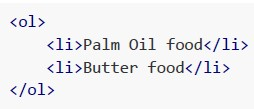
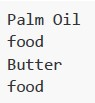
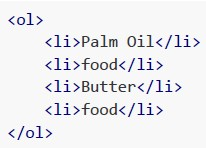
What will be the output on the terminal?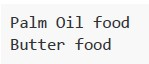
text
Palm Oil food
Butter food
text
```html
<ol>
    <li>Palm Oil food</li>
    <li>Butter food</li>
</ol>
```
text
Palm Oil
food
Butter
food
text
```html
<ol>
    <li>Palm Oil</li>
    <li>food</li>
    <li>Butter</li>
    <li>food</li>
</ol>
```
Consider the following flask application running on the base URL and is accessed through a browser. Select the correct option(s).
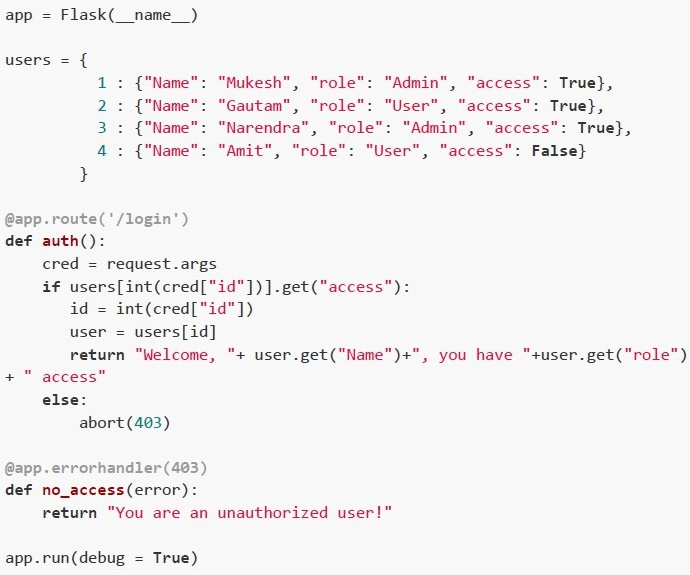 Consider the following flask application running on the base URL and is accessed through a browser. Select the correct option(s).
Consider the following flask application running on the base URL and is accessed through a browser. Select the correct option(s).
Text of the picture (copyable)
```python
app = Flask(__name__)

users = {
    1 : {"Name": "Mukesh", "role": "Admin", "access": True},
    2 : {"Name": "Gautam", "role": "User", "access": True},
    3 : {"Name": "Narendra", "role": "Admin", "access": True},
    4 : {"Name": "Amit", "role": "User", "access": False}
}

@app.route('/login')
def auth():
    cred = request.args
    if users[int(cred["id"])].get("access"):
        id = int(cred["id"])
        user = users[id]
        return "Welcome, "+ user.get("Name")+", you have "+user.get("role") \
            + " access"
    else:
        abort(403)

@app.errorhandler(403)
def no_access(error):
    return "You are an unauthorized user!"

app.run(debug = True)
```
text
For the URL: http://127.0.0.1:5000?id=2, The browser will render;
Welcome, Gautam, you have User access.

text
For the URL: http://127.0.0.1:5000/login?id=1, The browser will render;
Welcome, Mukesh, you have Admin access.

text
For the URL: http://127.0.0.1:5000/login?id=3, The browser will render,
Welcome, Narendra, you have User access.

text
For the URL: http://127.0.0.1:5000/login?id=4, The browser will render,
You are an unauthorized user!
Which of the following statements about the Constraint Validation API is/are true?
- The Constraint Validation API ensures that form input meets client-sidevalidation rules before submission.
- The Constraint Validation API is sufficient to prevent server-side attacks likeSQL injection.
- It is possible to bypass the Constraint Validation API by directly sendingrequests to the server.
- The Constraint Validation API automatically validates all data on the serverside.
Which of the following statements is invalid in the context of the primary key?
- The primary key can be null
- The primary key can be auto-incremented
- The primary key allows duplicate values
- The primary key can be referenced by foreign keys in other tables.