Home / MAD1 / Week 3 / Real questions
MAD1 week 3 - real exam questions
60 questions pulled from past papers whose wording matches this week's topics, newest first, duplicates removed. Pick your answers, then press Check answers. Figures and answer keys are the originals.
Elapsed 00:00
Consider the following Python jinja2 templating code.
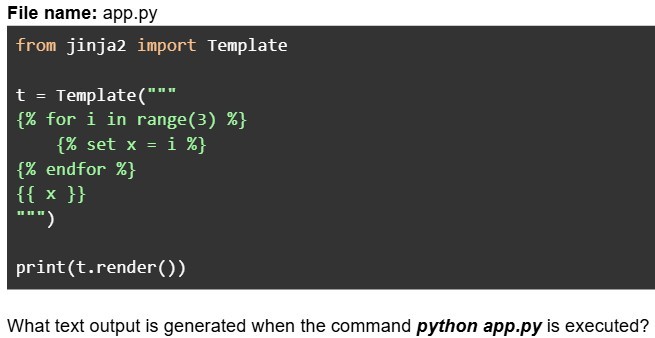
Text of the picture (copyable)
File name: app.py
```python
from jinja2 import Template

t = Template("""
{% for i in range(3) %}
    {% set x = i %}
{% endfor %}
{{ x }}
""")

print(t.render())
```
What text output is generated when the command *python app.py* is executed?- Nothing will be rendered in place of x
- 0
- 1
- 2
Consider the following flask app.
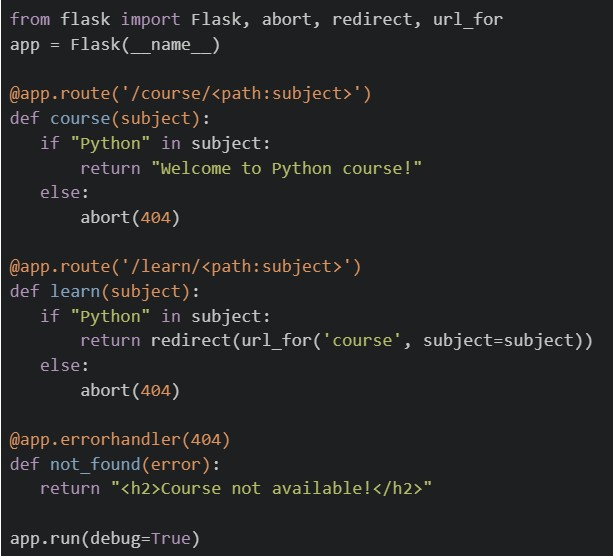 If the application is running locally on http://127.0.0.1:5000, select the correct options.
If the application is running locally on http://127.0.0.1:5000, select the correct options.Text of the picture (copyable)
```python
from flask import Flask, abort, redirect, url_for
app = Flask(__name__)

@app.route('/course/<path:subject>')
def course(subject):
    if "Python" in subject:
        return "Welcome to Python course!"
    else:
        abort(404)

@app.route('/learn/<path:subject>')
def learn(subject):
    if "Python" in subject:
        return redirect(url_for('course', subject=subject))
    else:
        abort(404)

@app.errorhandler(404)
def not_found(error):
    return "<h2>Course not available!</h2>"

app.run(debug=True)
```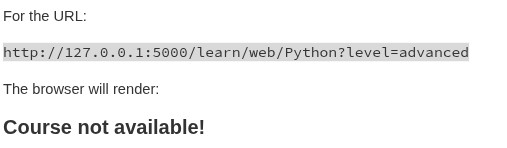
text
For the URL:

```
http://127.0.0.1:5000/learn/web/Python?level=advanced
```

The browser will render:

**Course not available!**
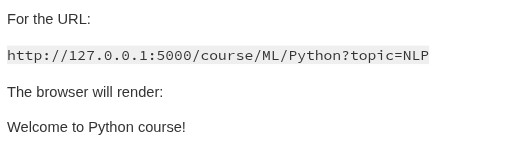
text
For the URL:

```
http://127.0.0.1:5000/course/ML/Python?topic=NLP
```

The browser will render:

Welcome to Python course!
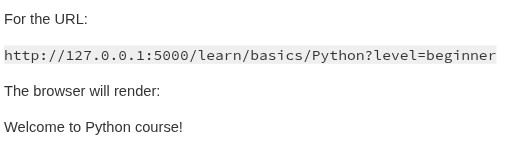
text
For the URL:

```
http://127.0.0.1:5000/learn/basics/Python?level=beginner
```

The browser will render:

Welcome to Python course!
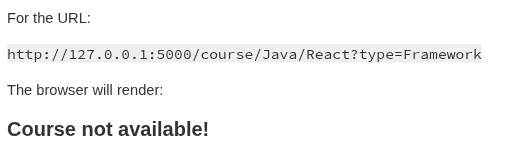
text
For the URL:

```
http://127.0.0.1:5000/course/Java/React?type=Framework
```

The browser will render:

**Course not available!**
Consider the following Flask application structure and code.
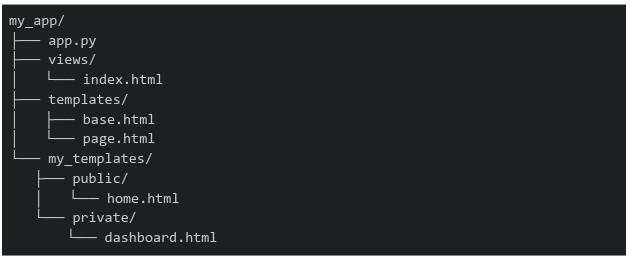 Which of the following statements about the template rendering behavior is correct?
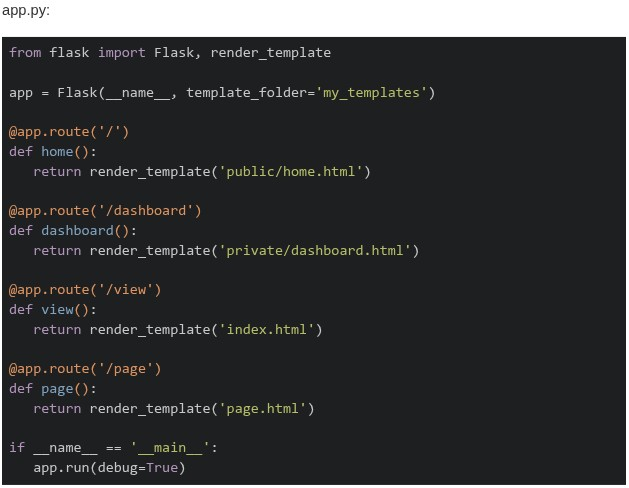
Which of the following statements about the template rendering behavior is correct?
Text of the picture (copyable)
```
my_app/
├── app.py
├── views/
│   └── index.html
├── templates/
│   ├── base.html
│   └── page.html
└── my_templates/
    ├── public/
    │   └── home.html
    └── private/
        └── dashboard.html
```
app.py:
```python
from flask import Flask, render_template

app = Flask(__name__, template_folder='my_templates')

@app.route('/')
def home():
    return render_template('public/home.html')

@app.route('/dashboard')
def dashboard():
    return render_template('private/dashboard.html')

@app.route('/view')
def view():
    return render_template('index.html')

@app.route('/page')
def page():
    return render_template('page.html')

if __name__ == '__main__':
    app.run(debug=True)
```- All routes will work correctly as Flask searches both
 and
and 
text
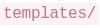
templates/
```
my_templates/
```
- Only
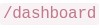 and
and  routes work, while
  and
and  routes fail with
  Error
Errortext
/dashboard
/view
The image contains a single, small, blurry, diagonal line. It appears to be a checkmark or a slash, but its exact nature is unclear due to the low resolution.
/page
TemplateNotFound
- The and routes work, while and fail with Error
text
The image contains a single, small, blurry, diagonal line. It appears to be a checkmark or a slash, but its exact nature is unclear due to the low resolution.
/dashboard
/view
/page
TemplateNotFound
- All routes fail because Flask requires templates to be in a default folder
Which of the following pairs correctly identifies one block-level element and one inline element?

text
Block: `<span>` | Inline: `<div>`

text
Block: `<div>` | Inline: `<a>`

text
Block: `<h1>` | Inline: `<p>`

text
Block: `<span>` | Inline: `<h5>`
Consider the following Python code.
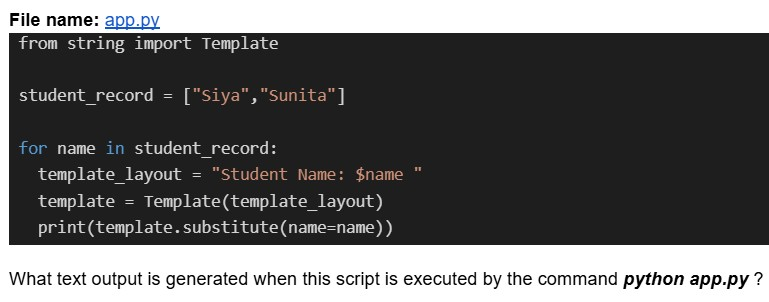
Text of the picture (copyable)
File name: app.py
```python
from string import Template

student_record = ["Siya", "Sunita"]

for name in student_record:
    template_layout = "Student Name: $name "
    template = Template(template_layout)
    print(template.substitute(name=name))
```
What text output is generated when this script is executed by the command `python app.py`?- Student Name: Siya Sunita
- Student Name: Siya Student Name: Sunita
- Student Name: Sunita
- Key Error
Consider the following Python Jinja2 template code.
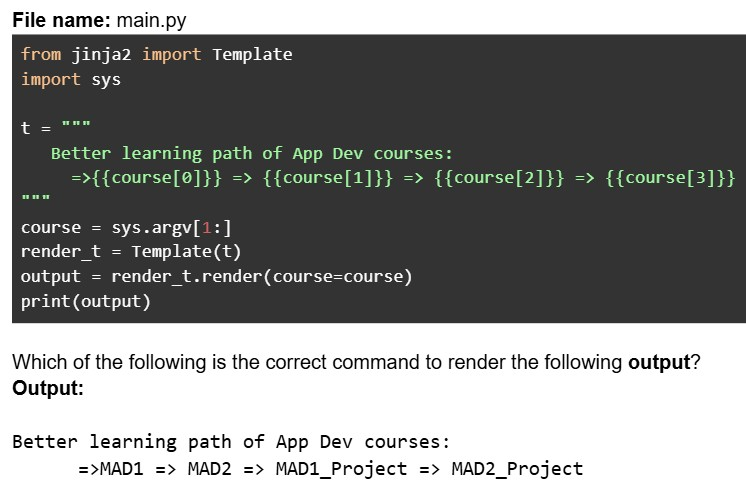
Text of the picture (copyable)
File name: main.py

```python
from jinja2 import Template
import sys

t = """
Better learning path of App Dev courses:
=>{{course[0]}} => {{course[1]}} => {{course[2]}} => {{course[3]}}
"""

course = sys.argv[1:]
render_t = Template(t)
output = render_t.render(course=course)
print(output)
```

Which of the following is the correct command to render the following **output**?
**Output**:

Better learning path of App Dev courses:
=>MAD1 => MAD2 => MAD1_Project => MAD2_Project- python main.py MAD1 MAD2 MAD1_ Project MAD2_ Project
- python main.py MAD1 MAD2 MAD1_Project MAD2_Project
- python main.py "MAD1 MAD2 MAD1_Project MAD2_Project"
- python main.py MAD1 MAD2 "MAD1_Project" "MAD2_Project"
Consider the following Python code.
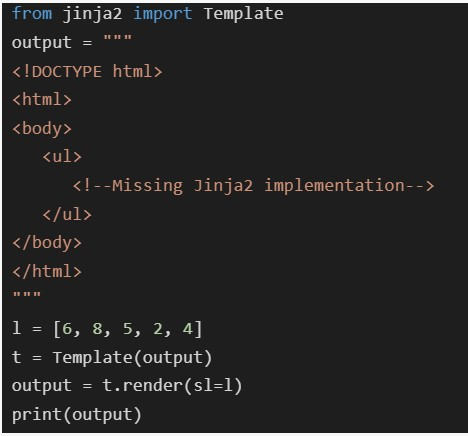 Which of the following code snippets should be placed at
  such that the output generated in the terminal when rendered will be as shown below?
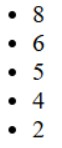
Which of the following code snippets should be placed at such that the output generated in the terminal when rendered will be as shown below?
Text of the picture (copyable)
```python
from jinja2 import Template
output = """
<!DOCTYPE html>
<html>
<body>
    <ul>
        <!--Missing Jinja2 implementation-->
    </ul>
</body>
</html>
"""

l = [6, 8, 5, 2, 4]
t = Template(output)
output = t.render(sl=l)
print(output)
```
```html
<!--Missing Jinja2 implementation-->
```
- 8
- 6
- 5
- 4
- 2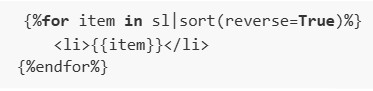
text
```html
{%for item in sl|sort(reverse=True)%}
    <li>{{item}}</li>
{%endfor%}
```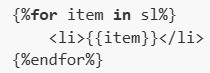
text
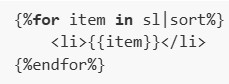
```html
{%for item in sl%}
    <li>{{item}}</li>
{%endfor%}
```
text
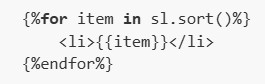
```html
{%for item in sl|sort%}
    <li>{{item}}</li>
{%endfor%}
```
text
```
{%for item in sl.sort()%}
    <li>{{item}}</li>
{%endfor%}
```
Consider the following Python code.
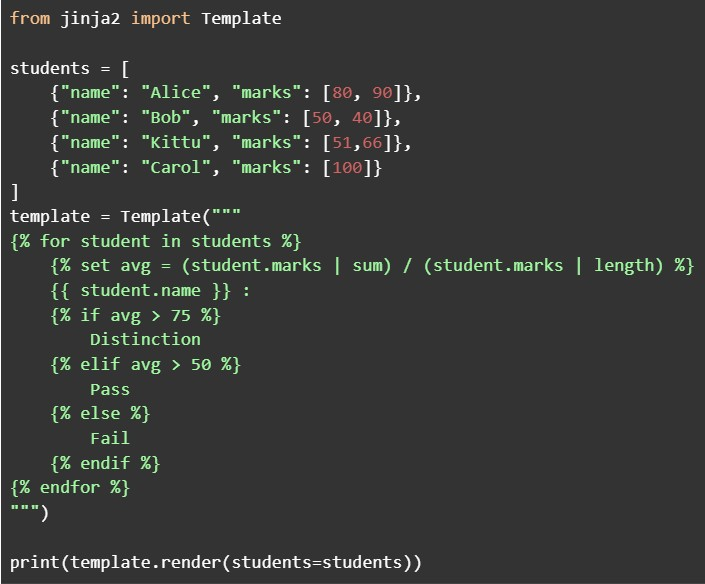 Which of the following students is classified as "Pass" by the template?
Which of the following students is classified as "Pass" by the template?Text of the picture (copyable)
```python
from jinja2 import Template

students = [
    {"name": "Alice", "marks": [80, 90]},
    {"name": "Bob", "marks": [50, 40]},
    {"name": "Kittu", "marks": [51,66]},
    {"name": "Carol", "marks": [100]}
]

template = Template("""
{% for student in students %}
    {% set avg = (student.marks | sum) / (student.marks | length) %}
    {{ student.name }} :
    {% if avg > 75 %}
        Distinction
    {% elif avg > 50 %}
        Pass
    {% else %}
        Fail
    {% endif %}
{% endfor %}
""")

print(template.render(students=students))
```- Alice
- Bob
- Kittu
- Carol
Logging is typically used for what purpose?
- detect unusual activity on the server.
- block unauthorized access.
- enforce HTTPS connections.
- convert HTTP to HTTPS.
Consider the following Python Flask code.
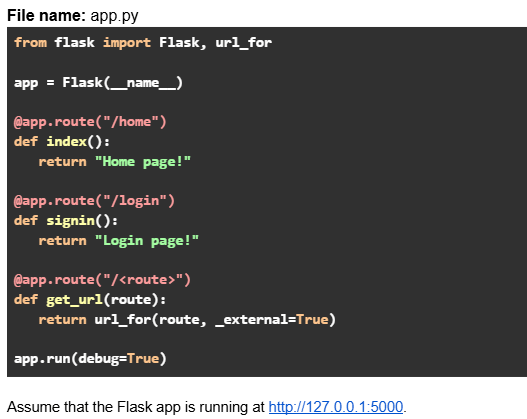 Which of the following options are true?
Which of the following options are true?Text of the picture (copyable)
File name: app.py
```python
from flask import Flask, url_for

app = Flask(__name__)

@app.route("/home")
def index():
    return "Home page!"

@app.route("/login")
def signin():
    return "Login page!"

@app.route("/<route>")
def get_url(route):
    return url_for(route, _external=True)

app.run(debug=True)
```
Assume that the Flask app is running at http://127.0.0.1:5000.- URL request: http://127.0.0.1:5000/signin will return output: http://127.0.0.1:5000/login
- URL request: http://127.0.0.1:5000/login will return output: http://127.0.0.1:5000/login
- URL request: http://127.0.0.1:5000/index will return output: http://127.0.0.1:5000/home
- URL request: http://127.0.0.1:5000/home will return output: http://127.0.0.1:5000/home
Consider the following Python code.
 Which of the following statement(s) should replace ==Missing code here== so that it prints the output without any KeyError exception?
Which of the following statement(s) should replace ==Missing code here== so that it prints the output without any KeyError exception?Text of the picture (copyable)
```python
from string import Template

message = "Available courses: $course1, $course2, $course3"
template = Template(message)
==Missing code here===
```

text
```python
print(template.safe_substitute({"course1": "Python", "course2": "Java",
"course3": "C++",}))
```
text
```python
print(template.substitute({"course1": "Python", "course2": "Java",
"course3": "C++",}))
```
text
```python
print(template.safe_substitute({"course1" : "Python", "course3" : "C++",}))
```
text
```python
print(template.substitute({"course1" : "Python", "course2" : "Java"}))
```
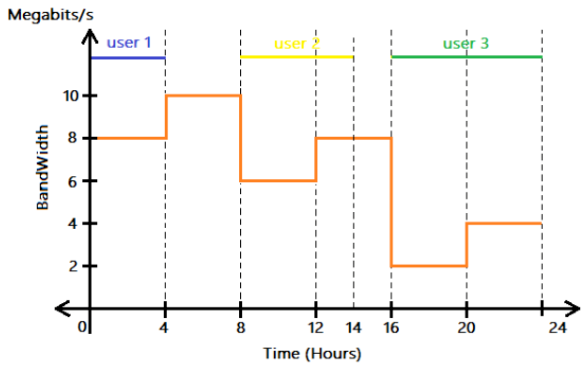
Consider the following graph that represents the variation in bandwidth of a network for an entire day (24 hours). Three users were connected to the network at three different times of the day. What is the total data consumed in GigaBytes by all the users in 24 hrs?
Text of the picture (copyable)
This is a 2D line graph with a horizontal x-axis labeled "Time (Hours)" and a vertical y-axis labeled "BandWidth" with units "Megabits/s".

The x-axis ranges from 0 to 24, with major ticks at 0, 4, 8, 12, 14, 16, 20, and 24.
The y-axis ranges from 0 to 12, with major ticks at 0, 2, 4, 6, 8, 10.

There is an orange step-function line graph representing bandwidth over time.
- From 0 to 4 hours, bandwidth is 8 Megabits/s.
- From 4 to 8 hours, bandwidth is 10 Megabits/s.
- From 8 to 12 hours, bandwidth is 6 Megabits/s.
- From 12 to 16 hours, bandwidth is 8 Megabits/s.
- From 16 to 20 hours, bandwidth is 2 Megabits/s.
- From 20 to 24 hours, bandwidth is 4 Megabits/s.

Additionally, there are three horizontal lines with labels indicating user activity:
- A blue line labeled "user 1" extends from 0 to 4 hours at an unspecified y-value (visually above 10).
- A yellow line labeled "user 2" extends from 8 to 14 hours at an unspecified y-value (visually above 10).
- A green line labeled "user 3" extends from 16 to 24 hours at an unspecified y-value (visually above 10).

Vertical dashed lines extend from the x-axis ticks at 4, 8, 12, 14, 16, 20, and 24 hours up to the top of the graph.
- 547.2 GB
- 12 GB
- 43.2 GB
- 345.6 GB
Consider the following HTML code snippet (without any CSS styling).
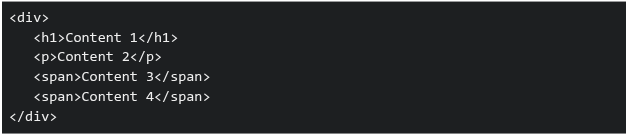 Which of the following statements correctly describes how the elements will be displayed by default in a browser?
Which of the following statements correctly describes how the elements will be displayed by default in a browser?Text of the picture (copyable)
```html
<div>
  <h1>Content 1</h1>
  <p>Content 2</p>
  <span>Content 3</span>
  <span>Content 4</span>
</div>
```
- The content of all elements will appear on the same line as they are inline elements.
- The content of
 ,
,  and
and  tags will start on new lines as they are block elements.
text
`<h1/>`
`<p>`
```html
<span>
```
- The content of and tags will start on new lines, others will display inline.
text
`<h1/>`
`<p>`
- The content of tags will start on new lines, others will display inline.
text
```html
<span>
```
Consider the following HTML templates and Python Flask code.
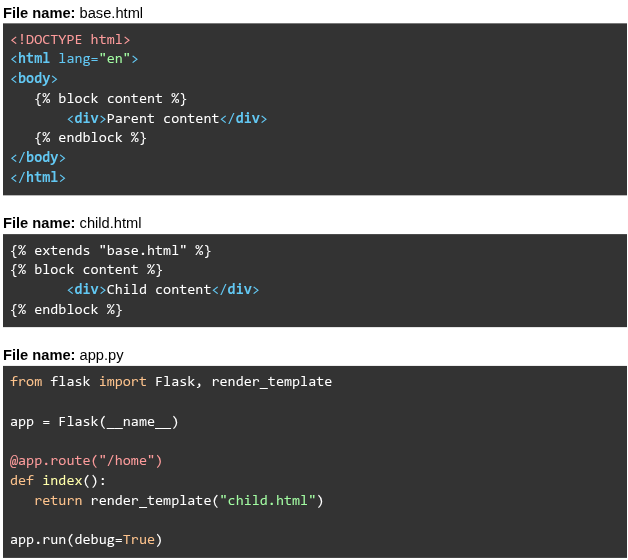 Assume that the Flask app is running at
  . What will be rendered for the URL request
  ?
?
Assume that the Flask app is running at . What will be rendered for the URL request ?Text of the picture (copyable)
File name: base.html
```html
<!DOCTYPE html>
<html lang="en">
<body>
    {% block content %}
    <div>Parent content</div>
    {% endblock %}
</body>
</html>
```

File name: child.html
```html
{% extends "base.html" %}
{% block content %}
    <div>Child content</div>
{% endblock %}
```

File name: app.py
```python
from flask import Flask, render_template

app = Flask(__name__)

@app.route("/home")
def index():
    return render_template("child.html")

app.run(debug=True)
```
http://127.0.0.1:5000
http://127.0.0.1:5000/home- Parent content Child content
- Parent content
- Child content
- Child content Parent content
Consider the following flask application "app.py" given below.
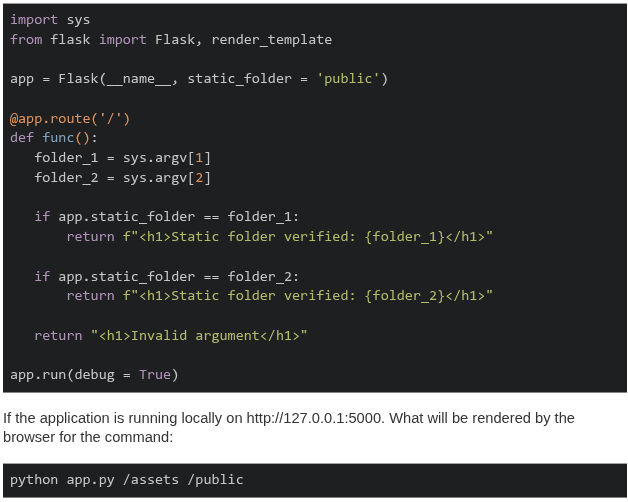
Text of the picture (copyable)
```python
import sys
from flask import Flask, render_template

app = Flask(__name__, static_folder = 'public')

@app.route('/')
def func():
    folder_1 = sys.argv[1]
    folder_2 = sys.argv[2]

    if app.static_folder == folder_1:
        return f"<h1>Static folder verified: {folder_1}</h1>"

    if app.static_folder == folder_2:
        return f"<h1>Static folder verified: {folder_2}</h1>"

    return "<h1>Invalid argument</h1>"

app.run(debug = True)
```

If the application is running locally on http://127.0.0.1:5000. What will be rendered by the browser for the command:

```
python app.py /assets /public
```- Static folder verified: /assets
- Static folder verified: /public
- Invalid argument
- None of these
Consider the following flask app. Given that  allows code to be tested without a server, which of the following statements is correct?
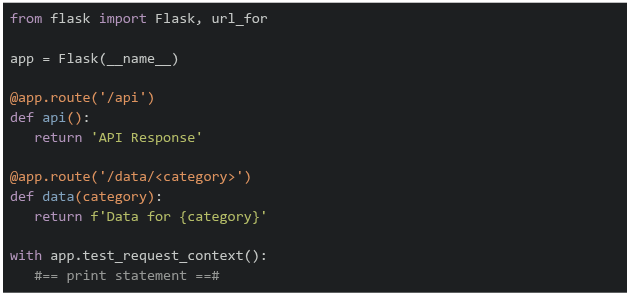
allows code to be tested without a server, which of the following statements is correct?
Text of the picture (copyable)
```
test_request_context()
```
```python
from flask import Flask, url_for

app = Flask(__name__)

@app.route('/api')
def api():
    return 'API Response'

@app.route('/data/<category>')
def data(category):
    return f'Data for {category}'

with app.test_request_context():
    #== print statement ==#
```- If
 is replaced by
  , the output on the terminal will be
text
```python #=== print statement ===# ``` ```python print(url_for('data', category='sales')) ``` ``` /data?category=sales ``` - If is replaced by
 , the output on the terminal will be
text
```python #=== print statement ===# ``` ```python print(url_for('data', category='sales', format='json')) ``` ``` /data/sales/json ``` - If is replaced by
 , the output on the terminal will be
text
```python #=== print statement ===# ``` ```python print(url_for('api', category='sales')) ``` ``` /api?category=sales ``` - If is replaced by
 , the output on the terminal will be
text
```python
#=== print statement ===#
```
```python
print(url_for('api'))
```
/api
Consider the following Flask application.
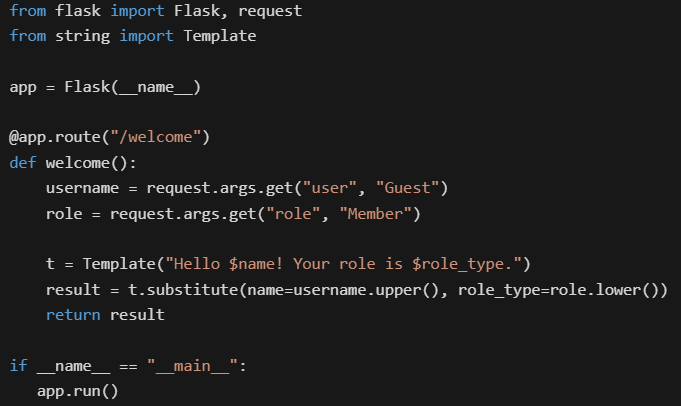

Text of the picture (copyable)
```python
from flask import Flask, request
from string import Template

app = Flask(__name__)

@app.route("/welcome")
def welcome():
    username = request.args.get("user", "Guest")
    role = request.args.get("role", "Member")

    t = Template("Hello $name! Your role is $role_type.")
    result = t.substitute(name=username.upper(), role_type=role.lower())
    return result

if __name__ == "__main__":
    app.run()
```
Assume that the Flask app is running at http://127.0.0.1:5000. What will be the rendered output in the browser for the URL: http://127.0.0.1:5000/welcome?user=Alice&role=ADMIN
text
It raises a KeyError because `$role_type` is missing in the URL.
- Hello Guest! Your role is member.
- Hello Alice! Your role is ADMIN.
- Hello ALICE! Your role is admin.
Consider the following HTML and Python Flask code.
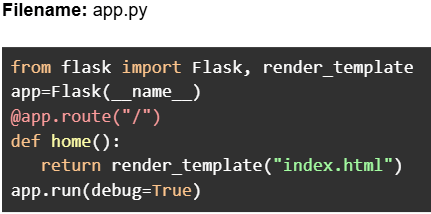
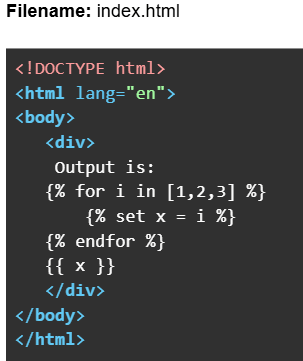

Text of the picture (copyable)
Filename: app.py

```python
from flask import Flask, render_template
app=Flask(__name__)
@app.route("/")
def home():
    return render_template("index.html")
app.run(debug=True)
```
Filename: index.html

```html
<!DOCTYPE html>
<html lang="en">
<body>
    <div>
        Output is:
        {% for i in [1,2,3] %}
            {% set x = i %}
        {% endfor %}
        {{ x }}
    </div>
</body>
</html>
```
Assume that the Flask app is running at http://127.0.0.1:5000. What will be the rendered output
in the browser for the URL: http://127.0.0.1:5000?- Output is: 3
- Output is:
- Output is: 1 2 3
- Output is: 1 2 3 3
Consider the HTML code below.
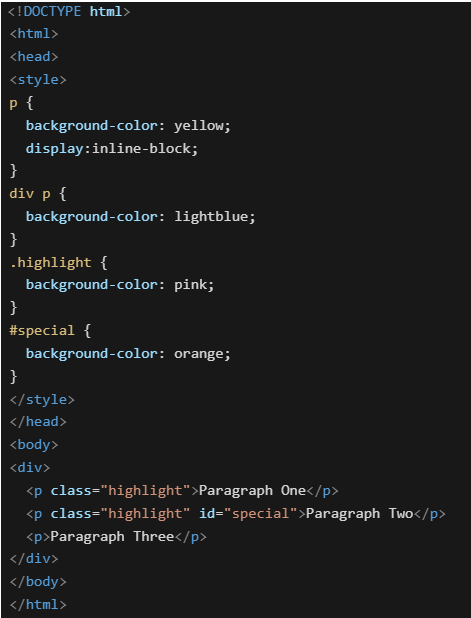 Which of the following will be the rendered output?
Which of the following will be the rendered output?Text of the picture (copyable)
```html
<!DOCTYPE html>
<html>
<head>
<style>
p {
  background-color: yellow;
  display:inline-block;
}

div p {
  background-color: lightblue;
}

.highlight {
  background-color: pink;
}

#special {
  background-color: orange;
}
</style>
</head>
<body>
<div>
  <p class="highlight">Paragraph One</p>
  <p class="highlight" id="special">Paragraph Two</p>
  <p>Paragraph Three</p>
</div>
</body>
</html>
```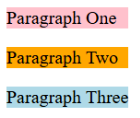
text
Paragraph One
Paragraph Two
Paragraph Three
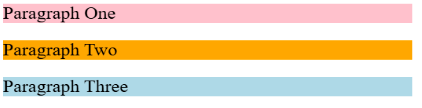
text
Paragraph One
Paragraph Two
Paragraph Three

text
Paragraph One Paragraph Two Paragraph Three

text
Paragraph One Paragraph Two Paragraph Three
Consider the following Jinja2 template code:
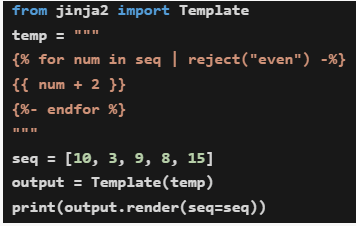 What will be the output when the code is executed?
What will be the output when the code is executed?Text of the picture (copyable)
```python
from jinja2 import Template

temp = """
{% for num in seq | reject("even") -%}
{{ num + 2 }}
{%- endfor %}
"""

seq = [10, 3, 9, 8, 15]
output = Template(temp)
print(output.render(seq=seq))
```- 10511817
- 125111017
- 3915
- 51117
Consider the following HTML and Python flask codes.
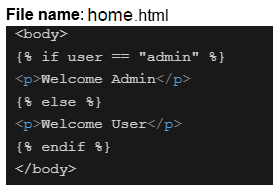
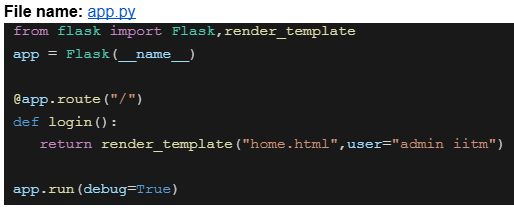

Text of the picture (copyable)
File name: home.html

```html
<body>
  {% if user == "admin" %}
  <p>Welcome Admin</p>
  {% else %}
  <p>Welcome User</p>
  {% endif %}
</body>
```
File name: app.py

```python
from flask import Flask,render_template

app = Flask(__name__)

@app.route("/")
def login():
    return render_template("home.html",user="admin iitm")

app.run(debug=True)
```
Assume that the above code is running on http://127.0.0.1:5000. What will be the rendered output for the URL request http://127.0.0.1:5000 ?- Welcome Admin
- Welcome User
- 404 Not Found
- Nothing will be rendered
Consider the following Jinja2 template:
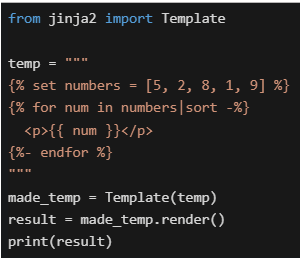 What will be the output in the terminal?
What will be the output in the terminal?Text of the picture (copyable)
```python
from jinja2 import Template

temp = """
{% set numbers = [5, 2, 8, 1, 9] %}
{% for num in numbers|sort -%}
<p>{{ num }}</p>
{%- endfor %}
"""

made_temp = Template(temp)
result = made_temp.render()
print(result)
```
text
```html
<p>5</p><p>2</p><p>8</p><p>1</p><p>9</p>
```

text
```html
<p>1</p><p>2</p><p>5</p><p>8</p><p>9</p>
```

text
```html
<p>9</p><p>8</p><p>5</p><p>2</p><p>1</p>
```

text
```html
<p>12589</p>
```

text
Template will throw an error
Consider the following users list.
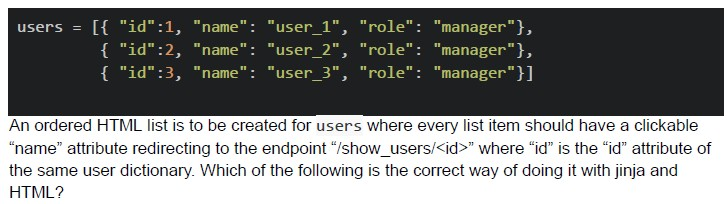
Text of the picture (copyable)
```python
users = [[{ "id":1, "name": "user_1", "role": "manager"},
          { "id":2, "name": "user_2", "role": "manager"},
          { "id":3, "name": "user_3", "role": "manager"}]]
```
An ordered HTML list is to be created for users where every list item should have a clickable "name" attribute redirecting to the endpoint "/show_users/<id>" where "id" is the "id" attribute of the same user dictionary. Which of the following is the correct way of doing it with jinja and HTML?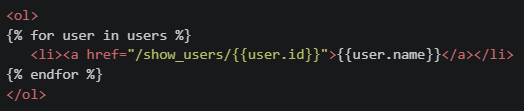
text
```html
<ol>
{% for user in users %}
    <li><a href="/show_users/{{user.id}}">{{user.name}}</a></li>
{% endfor %}
</ol>
```
text
```html
<ol>
{% for user in users %}
    <li><a href="/show_users/{{user['id']}}">{{user['name']}}</a></li>
{% endfor %}
</ol>
```
text
```html
<ol>
    <li><a href="/show_users/{{users[0].id}}">{{users[0].name}}</a></li>
    <li><a href="/show_users/{{users[1].id}}">{{users[1].name}}</a></li>
    <li><a href="/show_users/{{users[2].id}}">{{users[2].name}}</a></li>
</ol>
```
text
```html
<ol>
{% for user in users %}
    <li><a href="/show_users/{{user.name[-1]}}">{{user.name}}</a></li>
{% endfor %}
</ol>
```
Which statements about CSS display properties are CORRECT?
- display: block elements always start on a new line and take full width
- display: inline elements can be manipulated with height and width properties
- display: inline-block elements can be placed inline and be manipulated with height and width properties
- display: inline elements can’t be manipulated with height and width properties
Consider the following code.
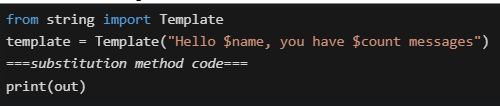 Which substitution methods will work WITHOUT raising KeyError ?
Which substitution methods will work WITHOUT raising KeyError ?Text of the picture (copyable)
```python
from string import Template
template = Template("Hello $name, you have $count messages")
===substitution method code===
print(out)
```- out = template.substitute({"name": "Alice"})
- out = template.safe_substitute({"name": "Alice"})
- out = template.substitute({"name": "Alice", "count": 5})
- out = template.safe_substitute({"name": "Alice", "count": 5})
Consider the following flask app and Jinja2 template.
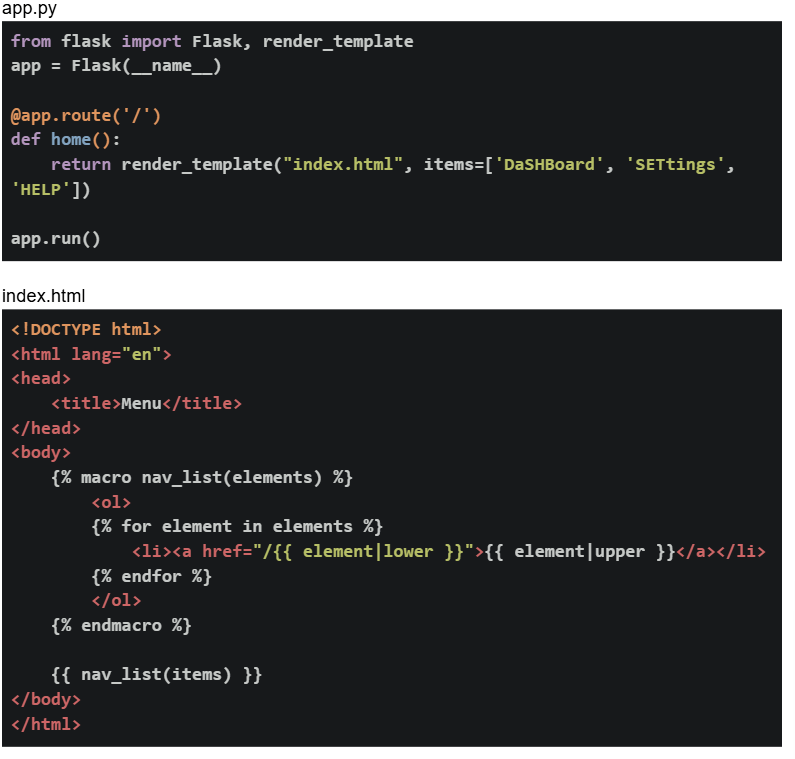 If the flask app is running locally on http://127.0.0.1:5000. What will be the output on the browser for the base URL?
If the flask app is running locally on http://127.0.0.1:5000. What will be the output on the browser for the base URL?Text of the picture (copyable)
app.py
```python
from flask import Flask, render_template
app = Flask(__name__)

@app.route('/')
def home():
    return render_template("index.html", items=['DaShBoard', 'SETtings',
                                                 'HELP'])

app.run()
```

index.html
```html
<!DOCTYPE html>
<html lang="en">
<head>
    <title>Menu</title>
</head>
<body>
    {% macro nav_list(elements) %}
    <ol>
        {% for element in elements %}
        <li><a href="/{{ element|lower }}">{{ element|upper }}</a></li>
        {% endfor %}
    </ol>
    {% endmacro %}

    {{ nav_list(items) }}
</body>
</html>
```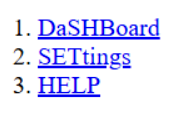
text
1. DaSHBoard
2. SETtings
3. HELP
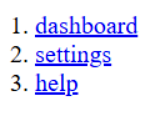
text
1. dashboard
2. settings
3. help
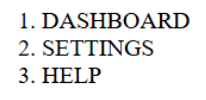
text
1. DASHBOARD
2. SETTINGS
3. HELP
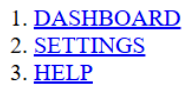
text
1. DASHBOARD
2. SETTINGS
3. HELP
Consider the following python code snippet. What will be the rendered output for the terminal output?
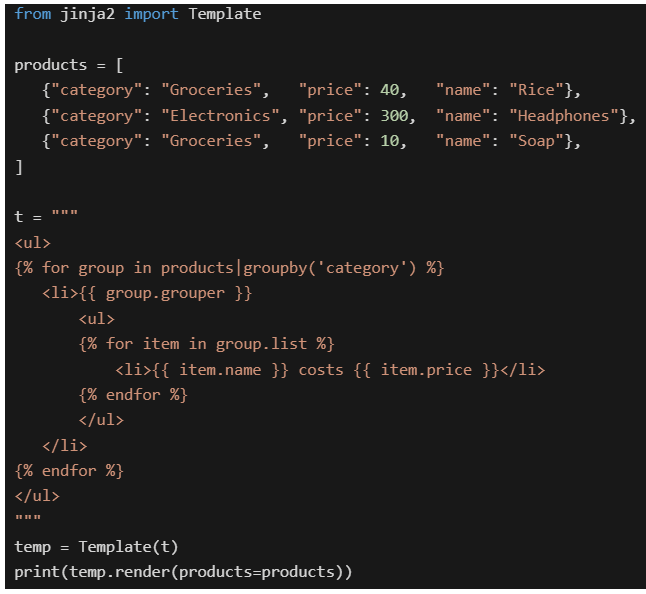
Text of the picture (copyable)
```python
from jinja2 import Template

products = [
    {"category": "Groceries", "price": 40, "name": "Rice"},
    {"category": "Electronics", "price": 300, "name": "Headphones"},
    {"category": "Groceries", "price": 10, "name": "Soap"},
]

t = """
<ul>
{% for group in products|groupby('category') %}
    <li>{{ group.grouper }}
        <ul>
        {% for item in group.list %}
            <li>{{ item.name }} costs {{ item.price }}</li>
        {% endfor %}
        </ul>
    </li>
{% endfor %}
</ul>
"""

temp = Template(t)
print(temp.render(products=products))
```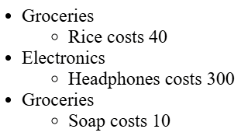
text
* Groceries
    * Rice costs 40
* Electronics
    * Headphones costs 300
* Groceries
    * Soap costs 10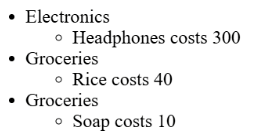
text
* Electronics
    * Headphones costs 300
* Groceries
    * Rice costs 40
* Groceries
    * Soap costs 10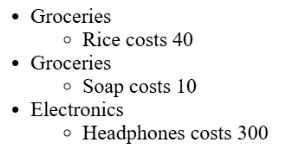
text
* Groceries
  * Rice costs 40
* Groceries
  * Soap costs 10
* Electronics
  * Headphones costs 300
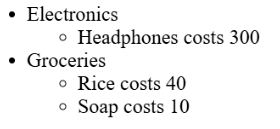
text
- Electronics
  - Headphones costs 300
- Groceries
  - Rice costs 40
  - Soap costs 10
Comprehension passage for this question
Based on the above data, answer the given subquestions.
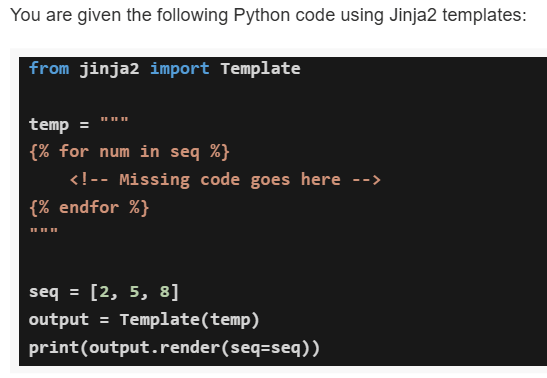
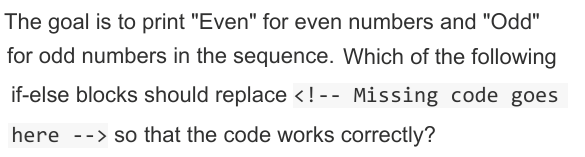
Text of the picture (copyable)
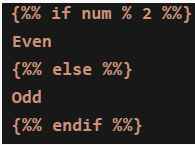
The goal is to print "Even" for even numbers and "Odd"
for odd numbers in the sequence. Which of the following
if-else blocks should replace <!-- Missing code goes
here --> so that the code works correctly?
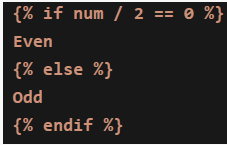
text
```jinja2
{% if num / 2 == 0 %}
Even
{% else %}
Odd
{% endif %}
```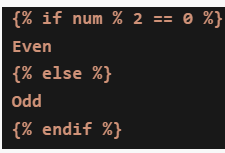
text
```jinja2
{% if num % 2 == 0 %}
Even
{% else %}
Odd
{% endif %}
```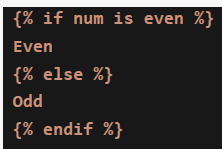
text
```jinja2
{% if num is even %}
Even
{% else %}
Odd
{% endif %}
```
text
```jinja
{% if num % 2 %}
Even
{% else %}
Odd
{% endif %}
```
Comprehension passage for this question
Based on the above data, answer the given subquestions.
If the correct if-else block is used, what will be the output of the program for the sequence [2, 5, 8]?
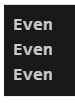
text
Even
Even
Even
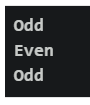
text
Odd
Even
Odd
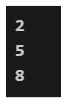
text
```
2
5

8
```
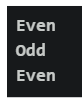
text
Even
Odd
Even
Which of the following is the correct syntax to display the total number of courses in a Jinja2 template?

text
```
{{ courses | len }}
```
text
```jinja
{{ courses | length }}
```
text
```html
{{ len(courses) }}
```
text
None of these
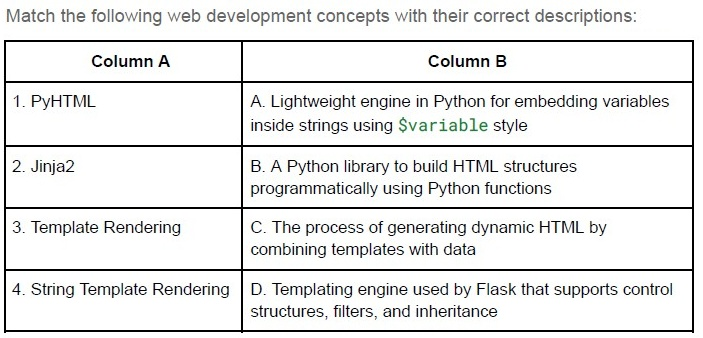
Text of the picture (copyable)
Match the following web development concepts with their correct descriptions:

| Column A | Column B |
|---|---|
| 1. PyHTML | A. Lightweight engine in Python for embedding variables inside strings using `$variable` style |
| 2. Jinja2 | B. A Python library to build HTML structures programmatically using Python functions |
| 3. Template Rendering | C. The process of generating dynamic HTML by combining templates with data |
| 4. String Template Rendering | D. Templating engine used by Flask that supports control structures, filters, and inheritance |
- 1 → B, 2 → C, 3 → D, 4 → A
- 1 → A, 2 → B, 3 → C, 4 → D
- 1 → B, 2 → D, 3 → C, 4 → A
- 1 → C, 2 → D, 3 → A, 4 → B
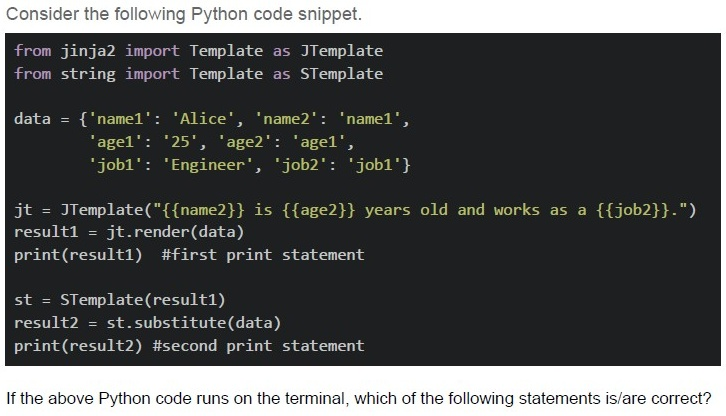
Text of the picture (copyable)
Consider the following Python code snippet.

```python
from jinja2 import Template as JTemplate
from string import Template as STemplate

data = {'name1': 'Alice', 'name2': 'name1',
        'age1': '25', 'age2': 'age1',
        'job1': 'Engineer', 'job2': 'job1'}

jt = JTemplate("{{name2}} is {{age2}} years old and works as a {{job2}}.")
result1 = jt.render(data)
print(result1) #first print statement

st = STemplate(result1)
result2 = st.substitute(data)
print(result2) #second print statement
```

If the above Python code runs on the terminal, which of the following statements is/are correct?
text
The first print statement will output: "name1 is age1 years old and works as a job1."

text
The second print statement will output: "Alice is 25 years old and works as a Engineer."

text
Jinja2 templates use double curly braces {{}} for variable substitution
text
String templates use dollar signs $ for variable substitution in the substitute() method

text
The code will raise a KeyError exception during execution
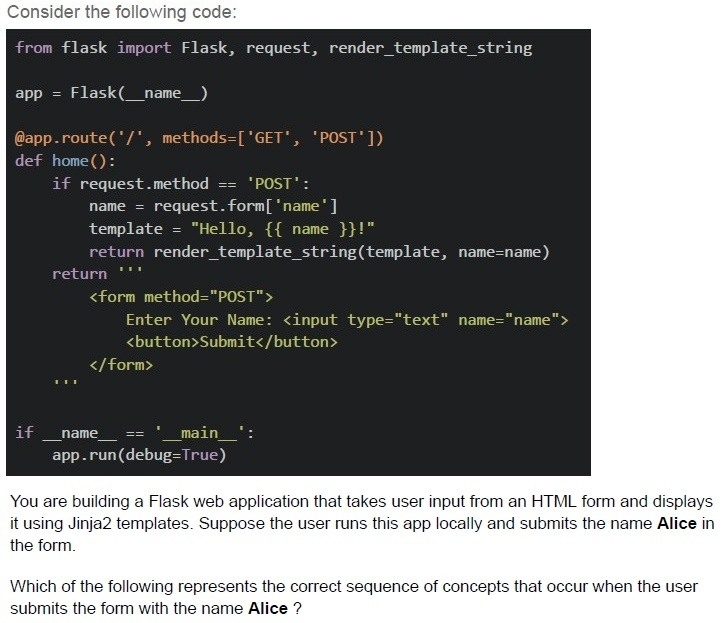
Text of the picture (copyable)
Consider the following code:

```python
from flask import Flask, request, render_template_string

app = Flask(__name__)

@app.route('/', methods=['GET', 'POST'])
def home():
    if request.method == 'POST':
        name = request.form['name']
        template = "Hello, {{ name }}!"
        return render_template_string(template, name=name)
    return '''
        <form method="POST">
            Enter Your Name: <input type="text" name="name">
            <button>Submit</button>
        </form>
    '''

if __name__ == '__main__':
    app.run(debug=True)
```

You are building a Flask web application that takes user input from an HTML form and displays it using Jinja2 templates. Suppose the user runs this app locally and submits the name **Alice** in the form.

Which of the following represents the correct sequence of concepts that occur when the user submits the form with the name **Alice** ?
text
HTML Form Rendering → HTTP 404 Not Found Error → User Submits Form → Flask Routing → Template Rendering

text
User Submits Form (HTTP POST) → Check URL Structure → Network Transfer (Bandwidth & Latency) → Flask Routing

text
User Accesses URL (Form at "/") → User Submits Form (HTTP POST) → Flask Request
Handling (request.form) → Jinja2 Template Rendering

text
Flask Request Handling → Network Round Trip (RTT) → HTML Table Rendering → Jinja2 Template Rendering
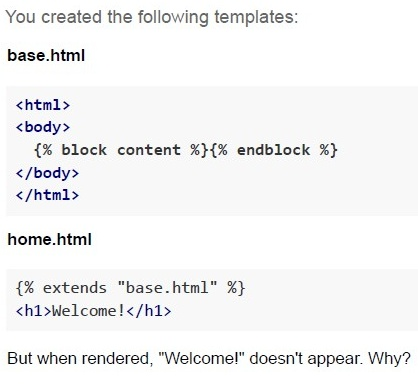
Text of the picture (copyable)
You created the following templates:

**base.html**

```html
<html>
<body>
    {% block content %}{% endblock %}
</body>
</html>
```

**home.html**

```html
{% extends "base.html" %}
<h1>Welcome!</h1>
```

But when rendered, "Welcome!" doesn't appear. Why?
text
extends is incorrectly used

text
base.html has syntax errors

text
Flask template folder is missing

text
```html
<h1> should be inside {% block content %}
```
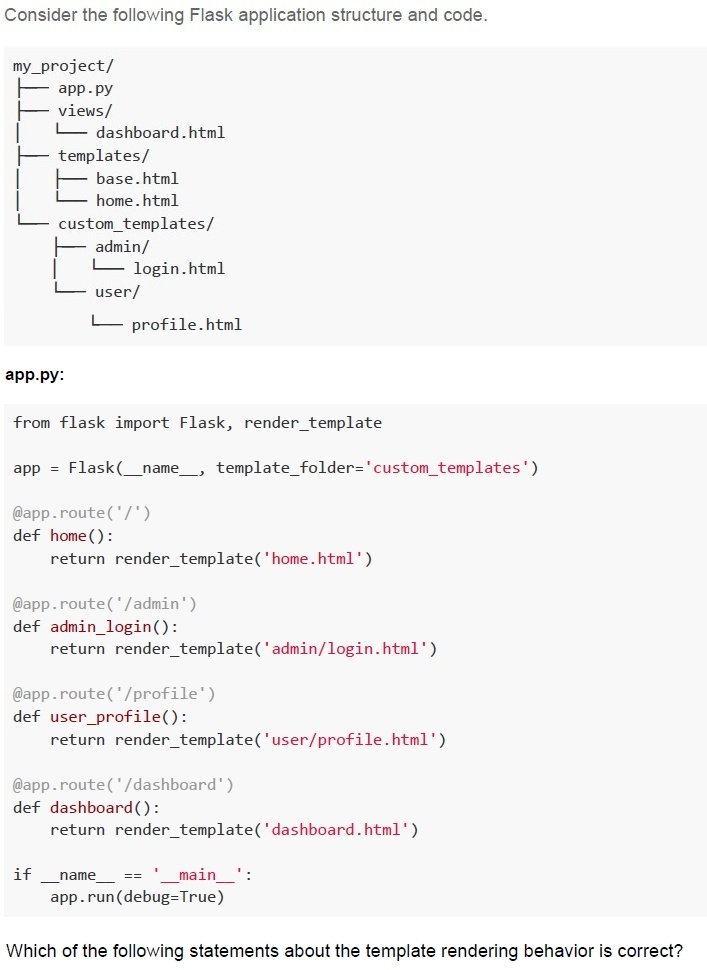
Text of the picture (copyable)
Consider the following Flask application structure and code.

```
my_project/
├── app.py
├── views/
│   └── dashboard.html
├── templates/
│   ├── base.html
│   └── home.html
└── custom_templates/
    ├── admin/
    │   └── login.html
    └── user/
        └── profile.html
```

**app.py:**

```python
from flask import Flask, render_template

app = Flask(__name__, template_folder='custom_templates')

@app.route('/')
def home():
    return render_template('home.html')

@app.route('/admin')
def admin_login():
    return render_template('admin/login.html')

@app.route('/profile')
def user_profile():
    return render_template('user/profile.html')

@app.route('/dashboard')
def dashboard():
    return render_template('dashboard.html')

if __name__ == '__main__':
    app.run(debug=True)
```

Which of the following statements about the template rendering behavior is correct?
text
All routes will work correctly as Flask will automatically search in both
templates/ and custom_templates/ folders

text
Only the /admin and /profile routes will work correctly, while / and /dashboard routes will fail with TemplateNotFound error

text
The / and /dashboard routes will fail with TemplateNotFound error, while
/admin and /profile routes will work correctly

text
All routes will fail because Flask requires the template folder to be named exactly
templates
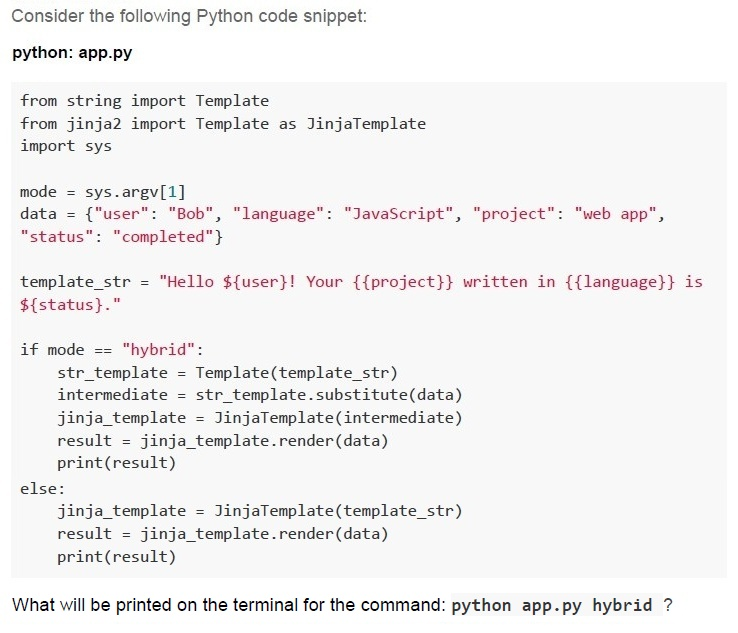
Text of the picture (copyable)
Consider the following Python code snippet:

**python: app.py**

```python
from string import Template
from jinja2 import Template as JinjaTemplate
import sys

mode = sys.argv[1]
data = {"user": "Bob", "language": "JavaScript", "project": "web app",
        "status": "completed"}

template_str = "Hello ${user}! Your {{project}} written in {{language}} is ${status}."

if mode == "hybrid":
    str_template = Template(template_str)
    intermediate = str_template.substitute(data)
    jinja_template = JinjaTemplate(intermediate)
    result = jinja_template.render(data)
    print(result)
else:
    jinja_template = JinjaTemplate(template_str)
    result = jinja_template.render(data)
    print(result)
```

What will be printed on the terminal for the command: `python app.py hybrid` ?
text
```
Hello ${user}! Your {{project}} written in {{language}} is
${status}.
```
text
```
Hello Bob! Your {{project}} written in {{language}} is completed.
```
text
Hello Bob! Your web app written in JavaScript is completed.

text
```
Hello ${user}! Your web app written in JavaScript is ${status}.
```
Which of the following statements BEST describes a key advantage of Jinja2 server-side rendering over JavaScript/JSON-based client-side rendering?
- It guarantees that dynamic updates on user interactions never requireadditional data fetches.
- It provides faster initial page load and improved Search Engine Optimizationwithout requiring client-side template logic.
- It allows the client to handle all template rendering, reducing load on theserver.
- None of these
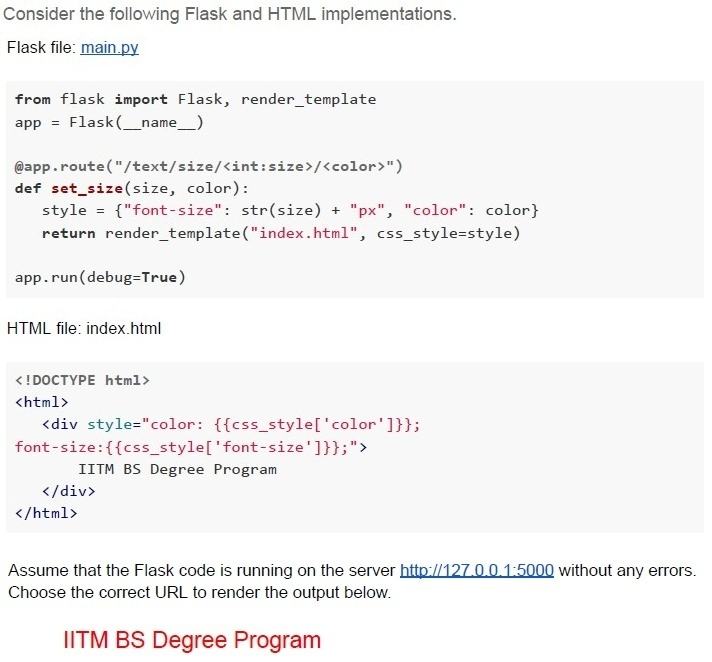
Text of the picture (copyable)
Consider the following Flask and HTML implementations.

Flask file: main.py

```python
from flask import Flask, render_template
app = Flask(__name__)

@app.route("/text/size/<int:size>/<color>")
def set_size(size, color):
    style = {"font-size": str(size) + "px", "color": color}
    return render_template("index.html", css_style=style)

app.run(debug=True)
```

HTML file: index.html

```html
<!DOCTYPE html>
<html>
    <div style="color: {{css_style['color']}};
    font-size:{{css_style['font-size']}};">
        IITM BS Degree Program
    </div>
</html>
```

Assume that the Flask code is running on the server http://127.0.0.1:5000 without any errors.
Choose the correct URL to render the output below.

IITM BS Degree Program
text
http://127.0.0.1:5000?text=red&size=20

text
```
http://127.0.0.1:5000?size=20&text=red
```

text
```
http://127.0.0.1:5000/text/size/red/20
```

text
```
http://127.0.0.1:5000/text/size/20/red
```
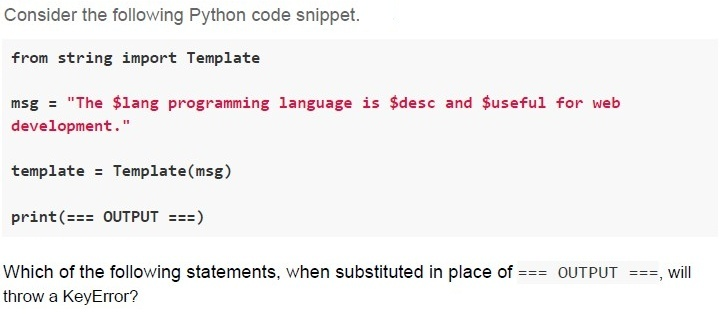
Text of the picture (copyable)
Consider the following Python code snippet.

```python
from string import Template

msg = "The $lang programming language is $desc and $useful for web
development."

template = Template(msg)

print(=== OUTPUT ===)
```

Which of the following statements, when substituted in place of `=== OUTPUT ===`, will throw a KeyError?

text
```python
template.substitute({'lang': 'Python'})
```
text
```python
template.substitute({'lang': 'Python', 'desc': 'popular',
'useful': 'useful'})
```
text
```python
template.safe_substitute({'lang': 'Python'})
```
text
```python
template.safe_substitute({'lang': 'Python', 'desc':
'versatile'})
```

Text of the picture (copyable)
Mayur and Manoj are playing a friendly cricket match. You are building a Flask web application to display their scores. Which of the following Flask route functions will correctly display the score when the user visits http://127.0.0.1/score ?(Assume that the score.html exists)

text
```python
@app.route('/score')
def score():
    return render('score.html', mayur=50, manoj=45)
```
text
```python
@app.route('/score')
def score():
    return render_template('score.html', mayur=50, manoj=45)
```
text
```python
def score():
    return render_template('score.html', mayur=50, manoj=45)
@app.route('/score')
```
text
```python
@app.route('/score')
def score():
    return 'score.html', mayur=50, manoj=45
```
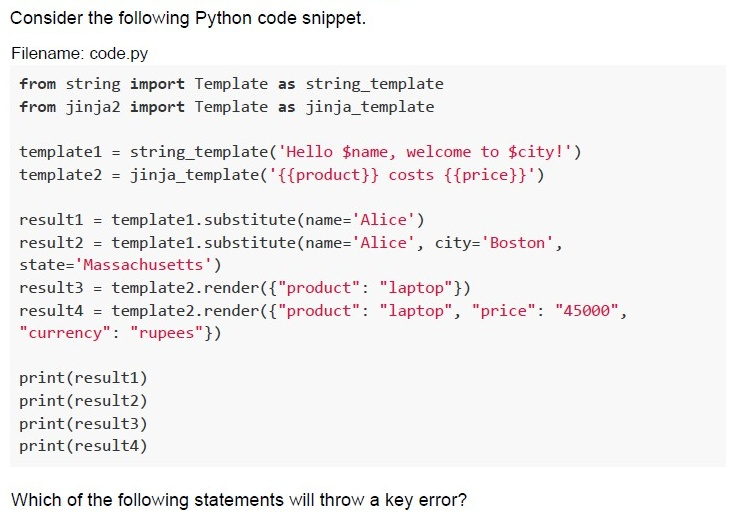
Text of the picture (copyable)
Consider the following Python code snippet.

Filename: code.py

```python
from string import Template as string_template
from jinja2 import Template as jinja_template

template1 = string_template('Hello $name, welcome to $city!')
template2 = jinja_template('{{product}} costs {{price}}')

result1 = template1.substitute(name='Alice')
result2 = template1.substitute(name='Alice', city='Boston',
                               state='Massachusetts')
result3 = template2.render({"product": "laptop"})
result4 = template2.render({"product": "laptop", "price": "45000",
                            "currency": "rupees"})

print(result1)
print(result2)
print(result3)
print(result4)
```

Which of the following statements will throw a key error?
text
```python
template1.substitute(name='Alice')
```

text
```python
template1.substitute(name='Alice', city='Boston', state='Massachusetts')
```

text
```
template2.render({"product": "laptop"})
```
text
```
template2.render({"product": "laptop", "price": "45000", "currency": "rupees"})
```
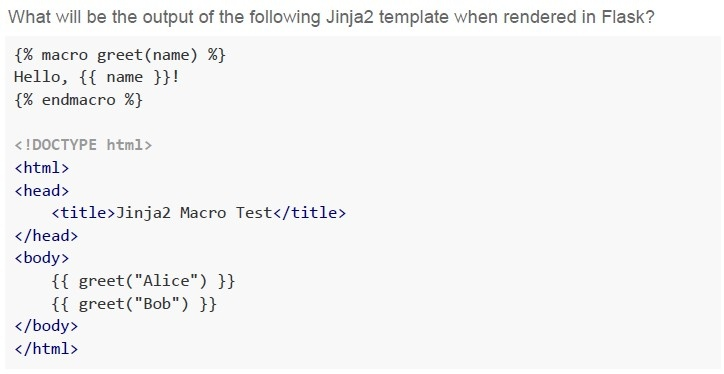
Text of the picture (copyable)
What will be the output of the following Jinja2 template when rendered in Flask?

```html
{% macro greet(name) %}
Hello, {{ name }}!
{% endmacro %}

<!DOCTYPE html>
<html>
<head>
    <title>Jinja2 Macro Test</title>
</head>
<body>
    {{ greet("Alice") }}
    {{ greet("Bob") }}
</body>
</html>
```
text
Hello, Alice! Hello, Bob!

text
```
jinja2.exceptions.UndefinedError: 'greet' is undefined
```
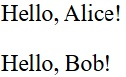
text
Hello, Alice!
Hello, Bob!
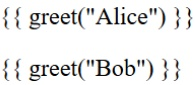
text
```
{{ greet("Alice") }}
{{ greet("Bob") }}
```
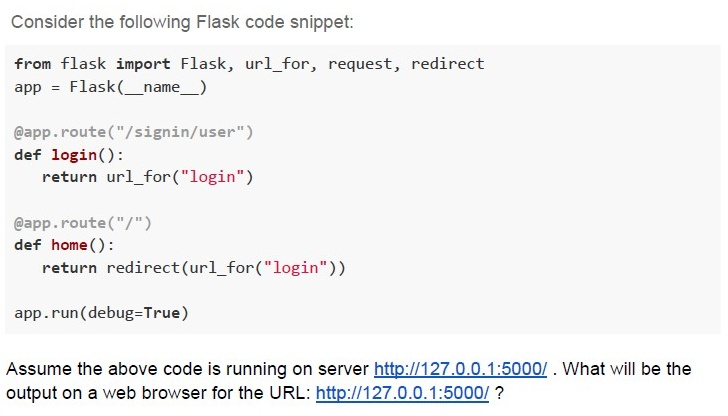
Text of the picture (copyable)
Consider the following Flask code snippet:

```python
from flask import Flask, url_for, request, redirect
app = Flask(__name__)

@app.route("/signin/user")
def login():
    return url_for("login")

@app.route("/")
def home():
    return redirect(url_for("login"))

app.run(debug=True)
```

Assume the above code is running on server http://127.0.0.1:5000/ . What will be the output on a web browser for the URL: http://127.0.0.1:5000/ ?
text
http://127.0.0.1:5000/signin/user

text
/signin/user

text
http://127.0.0.1:5000

text
Not Found
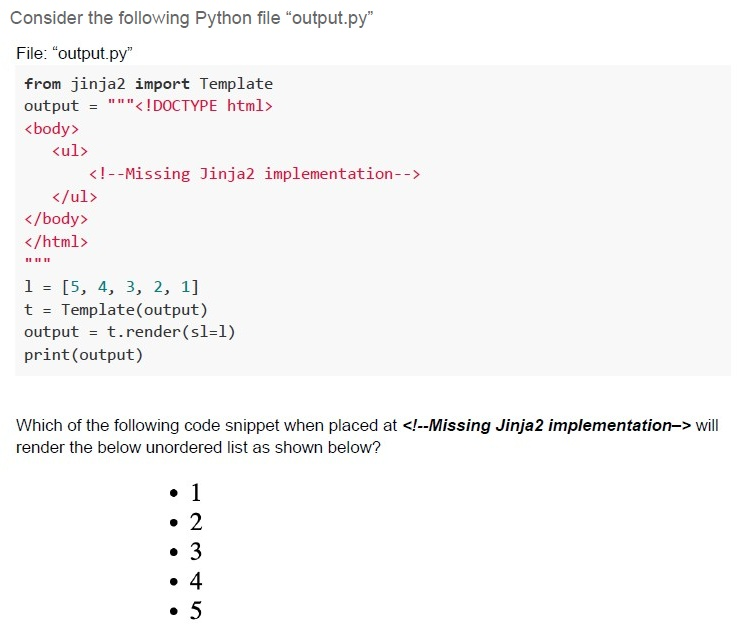
Text of the picture (copyable)
Consider the following Python file "output.py"

File: "output.py"
```python
from jinja2 import Template
output = """<!DOCTYPE html>
<body>
    <ul>
        <!--Missing Jinja2 implementation-->
    </ul>
</body>
</html>
"""

l = [5, 4, 3, 2, 1]
t = Template(output)
output = t.render(sl=l)
print(output)
```

Which of the following code snippet when placed at `<!--Missing Jinja2 implementation-->` will render the below unordered list as shown below?

* 1
* 2
* 3
* 4
* 5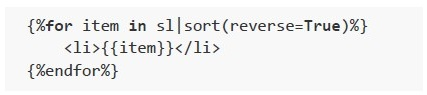
text
```html
{%for item in sl|sort(reverse=True)%}
    <li>{{item}}</li>
{%endfor%}
```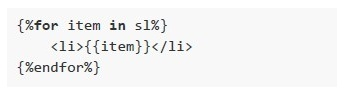
text
```
{%for item in sl%}
    <li>{{item}}</li>
{%endfor%}
```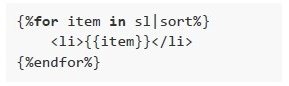
text
```html
{%for item in s1|sort%}
    <li>{{item}}</li>
{%endfor%}
```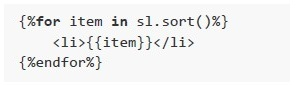
text
```jinja
{%for item in sl.sort()%}
    <li>{{item}}</li>
{%endfor%}
```
Comprehension passage for this question
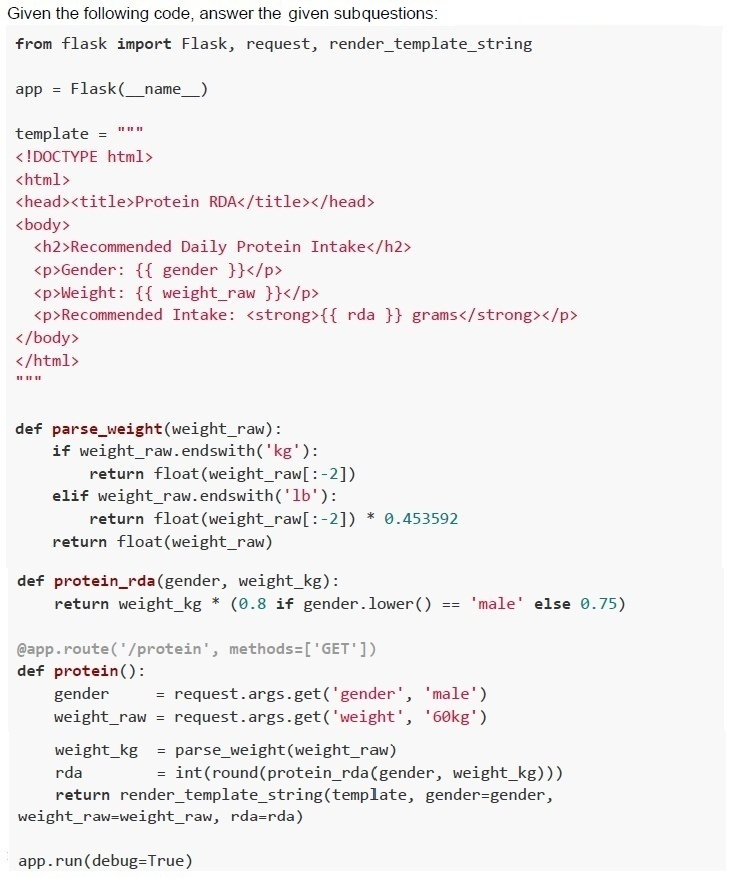
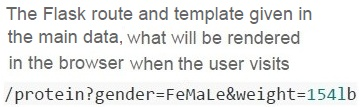
Text of the picture (copyable)
The Flask route and template given in
the main data, what will be rendered
in the browser when the user visits
`/protein?gender=FeMaLe&weight=154lb`
text
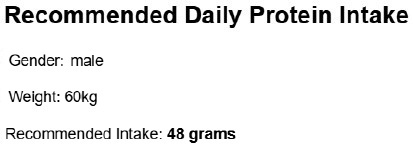
Recommended Daily Protein Intake
Gender: male
Weight: 60kg
Recommended Intake: **48 grams**

text
Recommended Daily Protein Intake

Gender: FeMaLe

Weight: 154lb

Recommended Intake: **52 grams**

text
Recommended Daily Protein Intake

Gender: FeMaLe

Weight: 154lb

Recommended Intake: **70 grams**
text
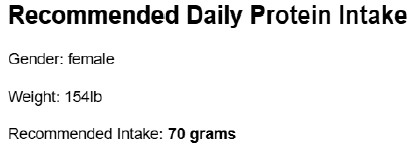
Recommended Daily Protein Intake

Gender: female

Weight: 154lb

Recommended Intake: **70 grams**
Comprehension passage for this question
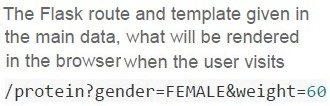
Text of the picture (copyable)
The Flask route and template given in
the main data, what will be rendered
in the browser when the user visits
`/protein?gender=FEMALE&weight=60`

text
Recommended Daily Protein Intake
Gender:
Weight:
Recommended Intake: grams

text
Recommended Daily Protein Intake

Gender: FEMALE

Weight: 60

Recommended Intake: **45 grams**
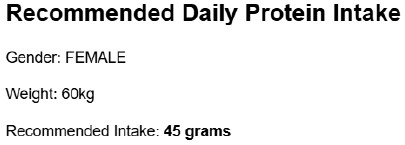
text
Recommended Daily Protein Intake
Gender: FEMALE
Weight: 60kg
Recommended Intake: **45 grams**
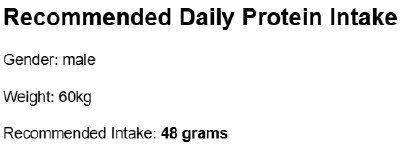
text
Recommended Daily Protein Intake

Gender: male

Weight: 60kg

Recommended Intake: **48 grams**

Text of the picture (copyable)
In a Flask application, we have a base template (`base.html`) that includes a `{% block content %}` section. A child template (`home.html`) extends this base template and uses `{{ super() }}` inside `{% block content %}`.

What will be the effect of using `{{ super() }}` inside the block in the child template?
text
It will result in an error because `super()` is not valid in Jinja2.

text
It will completely replace the content of {% block content %} in the base template.
text
It will include the content from the base template's {% block content %} along
with the overridden content in the child template.
text
It will ignore the base template's content and only render the child template's content.
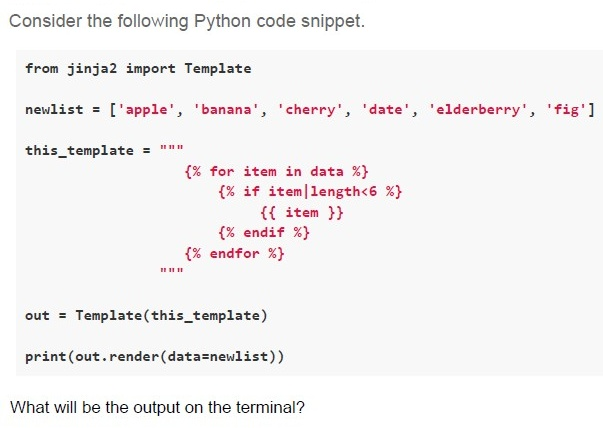
Text of the picture (copyable)
Consider the following Python code snippet.

```python
from jinja2 import Template

newlist = ['apple', 'banana', 'cherry', 'date', 'elderberry', 'fig']

this_template = """
{% for item in data %}
    {% if item|length<6 %}
        {{ item }}
    {% endif %}
{% endfor %}
"""

out = Template(this_template)

print(out.render(data=newlist))
```

What will be the output on the terminal?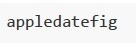
text
```
appledatefig
```
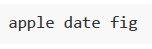
text
apple date fig

text
banana cherry elderberry

text
bananacherryelderberry
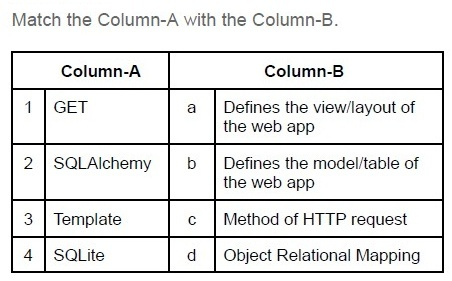
Text of the picture (copyable)
Match the Column-A with the Column-B.

| | Column-A | | Column-B |
|---|---|---|---|
| 1 | GET | a | Defines the view/layout of the web app |
| 2 | SQLAlchemy | b | Defines the model/table of the web app |
| 3 | Template | c | Method of HTTP request |
| 4 | SQLite | d | Object Relational Mapping |
- 1-c, 2-a, 3-d, 4-b
- 1-d, 2-c, 3-a, 4-b
- 1-c, 2-d, 3-b, 4-a
- 1-c, 2-d, 3-a, 4-b
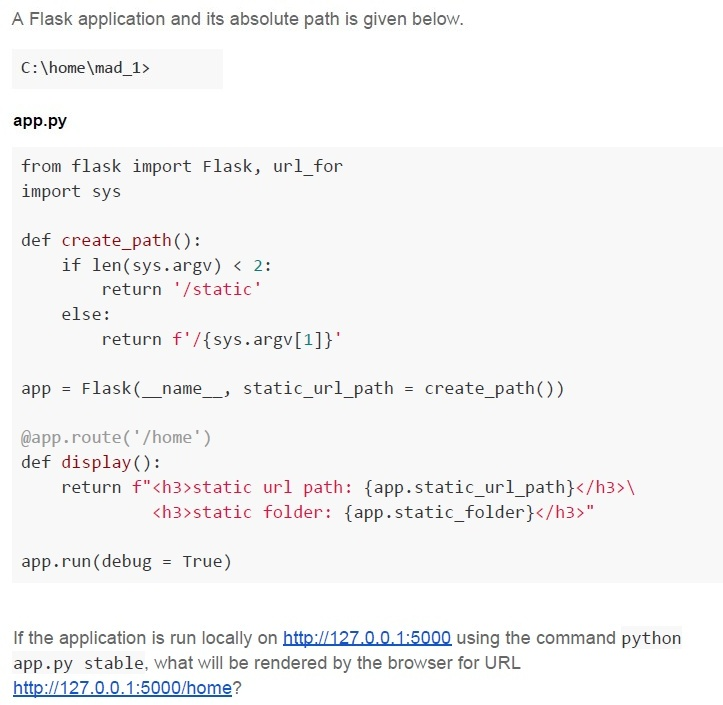
Text of the picture (copyable)
A Flask application and its absolute path is given below.

C:\home\mad_1>

**app.py**

```python
from flask import Flask, url_for
import sys

def create_path():
    if len(sys.argv) < 2:
        return '/static'
    else:
        return f'/{sys.argv[1]}'

app = Flask(__name__, static_url_path = create_path())

@app.route('/home')
def display():
    return f"<h3>static url path: {app.static_url_path}</h3>\
           <h3>static folder: {app.static_folder}</h3>"

app.run(debug = True)
```

If the application is run locally on http://127.0.0.1:5000 using the command python app.py stable, what will be rendered by the browser for URL http://127.0.0.1:5000/home?
text
static url path: C:\home\mad_1\static
static folder: /static

text
static url path: /static
static folder: C:\home\mad_1\static
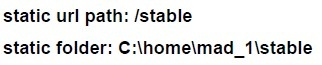
text
static url path: /stable
static folder: C:\home\mad_1\stable
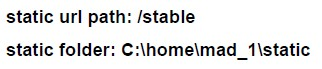
text
static url path: /stable
static folder: C:\home\mad_1\static
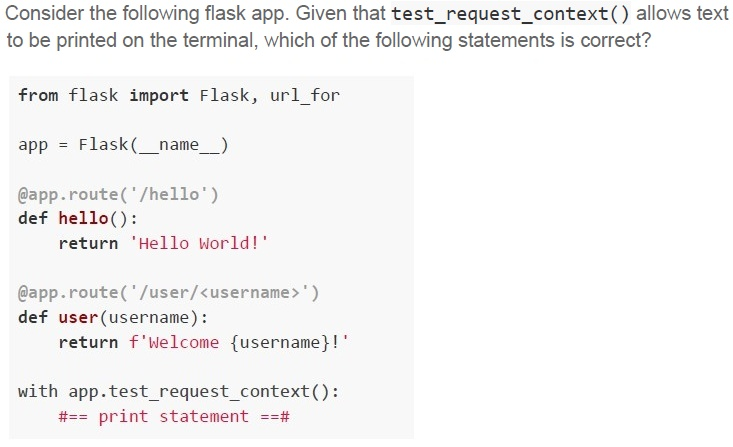
Text of the picture (copyable)
Consider the following flask app. Given that **test_request_context()** allows text
to be printed on the terminal, which of the following statements is correct?

```python
from flask import Flask, url_for

app = Flask(__name__)

@app.route('/hello')
def hello():
    return 'Hello World!'

@app.route('/user/<username>')
def user(username):
    return f'Welcome {username}!'

with app.test_request_context():
    #== print statement ==#
```
text
If `print statement` is replaced by `print(url_for('user', username='John'))`, the output on the terminal will be `/user?username=John`
text
If `print statement` is replaced by `print(url_for('user', username='John', id='101'))`, the output on the terminal will be
`/user/John/101`
text
If `print statement` is replaced by `print(url_for('hello', username='John'))`, the output on the terminal will be Hello World!
text
If `#== print statement ==#` is replaced by `print(url_for('hello', username='John'))`,
the output on the terminal will be `/hello?username=John`.
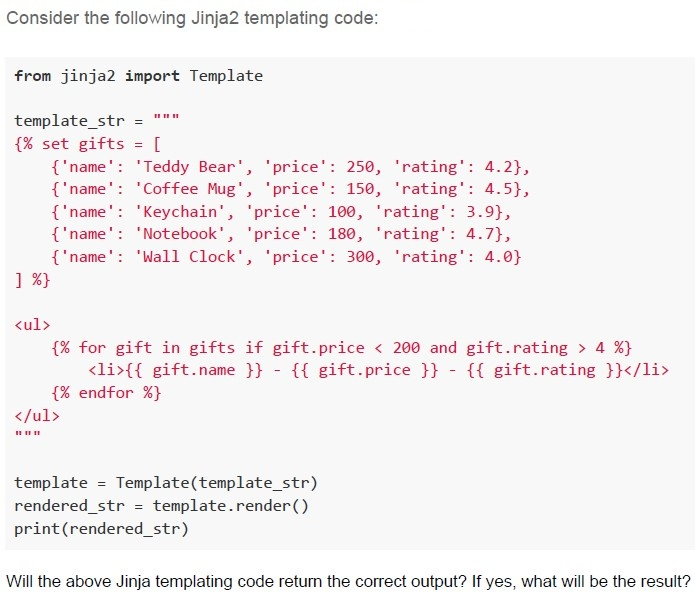
Text of the picture (copyable)
Consider the following Jinja2 templating code:

```python
from jinja2 import Template

template_str = """
{% set gifts = [
    {'name': 'Teddy Bear', 'price': 250, 'rating': 4.2},
    {'name': 'Coffee Mug', 'price': 150, 'rating': 4.5},
    {'name': 'Keychain', 'price': 100, 'rating': 3.9},
    {'name': 'Notebook', 'price': 180, 'rating': 4.7},
    {'name': 'Wall Clock', 'price': 300, 'rating': 4.0}
] %}

<ul>
{% for gift in gifts if gift.price < 200 and gift.rating > 4 %}
    <li>{{ gift.name }} - {{ gift.price }} - {{ gift.rating }}</li>
{% endfor %}
</ul>
"""

template = Template(template_str)
rendered_str = template.render()
print(rendered_str)
```

Will the above Jinja templating code return the correct output? If yes, what will be the result?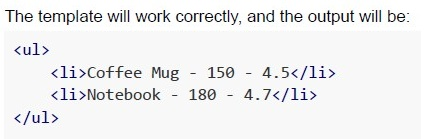
text
The template will work correctly, and the output will be:

```html
<ul>
  <li>Coffee Mug - 150 - 4.5</li>
  <li>Notebook - 180 - 4.7</li>
</ul>
```

text
The template will not work correctly because the **for** loop condition (if `gift.price < 200` and `gift.rating > 4`) is invalid in Jinja2 syntax. This will raise a `TemplateSyntaxError`.

text
The template will work correctly, but the output will include all gifts, not filtering by price and rating, as the condition inside the for loop will be ignored.
text
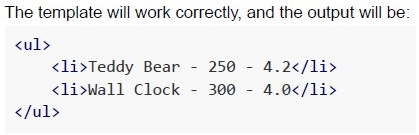
The template will work correctly, and the output will be:
```html
<ul>
    <li>Teddy Bear - 250 - 4.2</li>
    <li>Wall Clock - 300 - 4.0</li>
</ul>
```
Text of the picture (copyable)
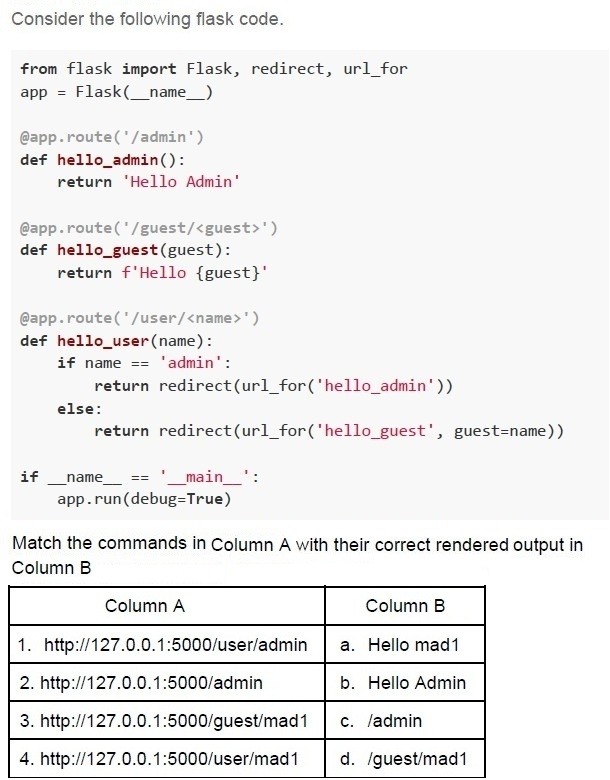
Consider the following flask code.

```python
from flask import Flask, redirect, url_for
app = Flask(__name__)

@app.route('/admin')
def hello_admin():
    return 'Hello Admin'

@app.route('/guest/<guest>')
def hello_guest(guest):
    return f'Hello {guest}'

@app.route('/user/<name>')
def hello_user(name):
    if name == 'admin':
        return redirect(url_for('hello_admin'))
    else:
        return redirect(url_for('hello_guest', guest=name))

if __name__ == '__main__':
    app.run(debug=True)
```

Match the commands in Column A with their correct rendered output in Column B

| Column A | Column B |
|---|---|
| 1. http://127.0.0.1:5000/user/admin | a. Hello mad1 |
| 2. http://127.0.0.1:5000/admin | b. Hello Admin |
| 3. http://127.0.0.1:5000/guest/mad1 | c. /admin |
| 4. http://127.0.0.1:5000/user/mad1 | d. /guest/mad1 |- 1-c, 2-b, 3-a, 4-d
- 1-c, 2-d, 3-a, 4-b
- 1-b, 2-a, 3-b, 4-d
- 1-b, 2-b, 3-a, 4-a
Text of the picture (copyable)
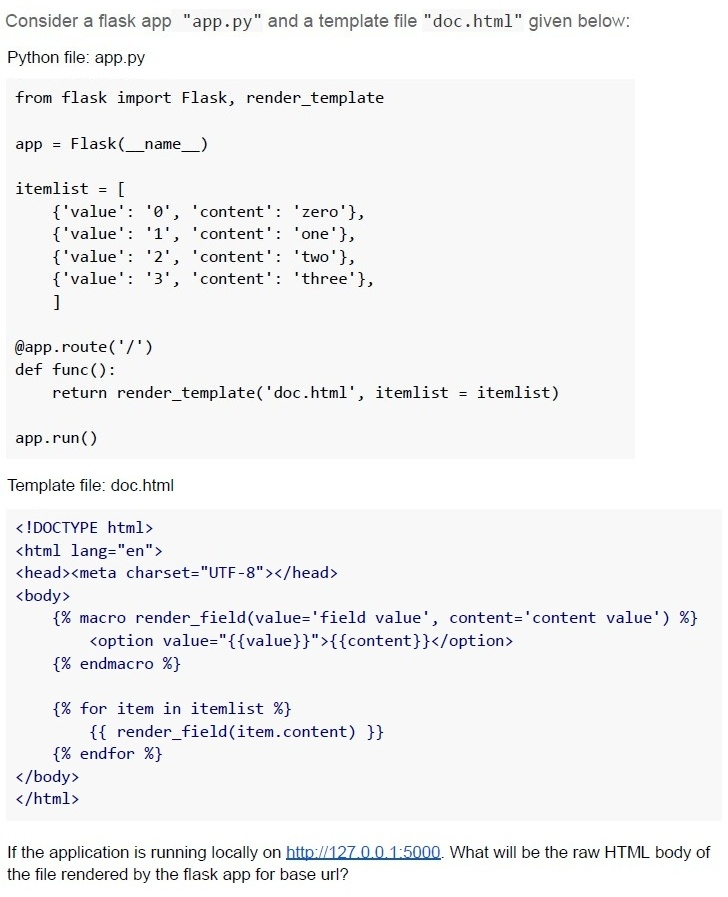
Consider a flask app "app.py" and a template file "doc.html" given below:

Python file: app.py

```python
from flask import Flask, render_template

app = Flask(__name__)

itemlist = [
    {'value': '0', 'content': 'zero'},
    {'value': '1', 'content': 'one'},
    {'value': '2', 'content': 'two'},
    {'value': '3', 'content': 'three'},
]

@app.route('/')
def func():
    return render_template('doc.html', itemlist = itemlist)

app.run()
```

Template file: doc.html

```html
<!DOCTYPE html>
<html lang="en">
<head><meta charset="UTF-8"></head>
<body>
    {% macro render_field(value='field value', content='content value') %}
        <option value="{{value}}">{{content}}</option>
    {% endmacro %}

    {% for item in itemlist %}
        {{ render_field(item.content) }}
    {% endfor %}
</body>
</html>
```

If the application is running locally on http://127.0.0.1:5000. What will be the raw HTML body of the file rendered by the flask app for base url?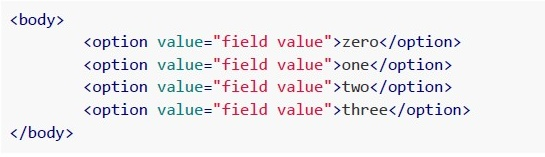
text
```html
<body>

    <option value="field value">zero</option>
    <option value="field value">one</option>
    <option value="field value">two</option>
    <option value="field value">three</option>

</body>
```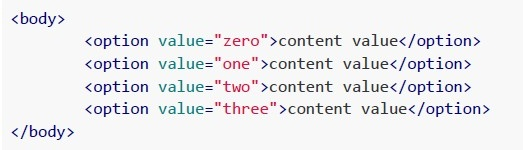
text
```html
<body>
    <option value="zero">content value</option>
    <option value="one">content value</option>
    <option value="two">content value</option>
    <option value="three">content value</option>
</body>
```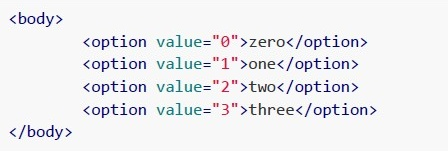
text
```html
<body>
    <option value="0">zero</option>
    <option value="1">one</option>
    <option value="2">two</option>
    <option value="3">three</option>
</body>
```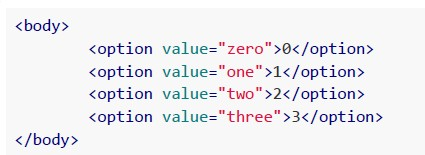
text
```html
<body>

    <option value="zero">0</option>
    <option value="one">1</option>
    <option value="two">2</option>
    <option value="three">3</option>

</body>
```
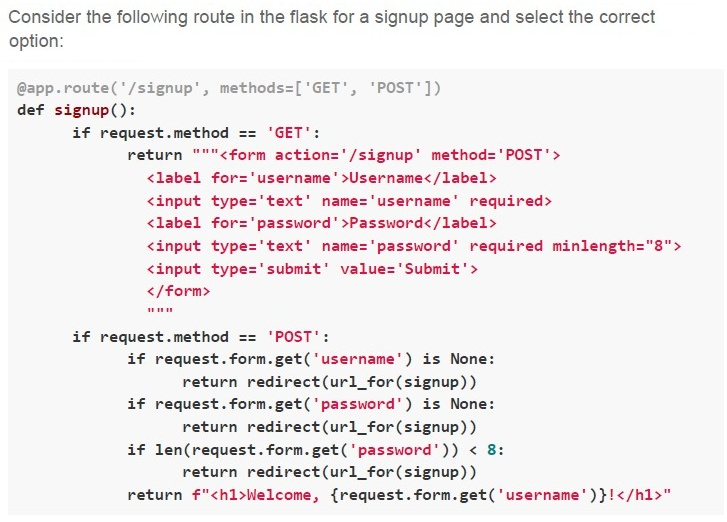
Text of the picture (copyable)
Consider the following route in the flask for a signup page and select the correct option:

```python
@app.route('/signup', methods=['GET', 'POST'])
def signup():
    if request.method == 'GET':
        return """<form action='/signup' method='POST'>
            <label for='username'>Username</label>
            <input type='text' name='username' required>
            <label for='password'>Password</label>
            <input type='text' name='password' required minlength="8">
            <input type='submit' value='Submit'>
        </form>
        """
    if request.method == 'POST':
        if request.form.get('username') is None:
            return redirect(url_for(signup))
        if request.form.get('password') is None:
            return redirect(url_for(signup))
        if len(request.form.get('password')) < 8:
            return redirect(url_for(signup))
        return f"<h1>Welcome, {request.form.get('username')}!</h1>"
```- The signup page is dynamically generated.
- The signup page uses server-side rendering.
- The signup page uses frontend validation.
- The signup page uses backend validation.
The Quiz Master application at IITM BS allows students to attempt quizzes online. To prevent automated bots from mass-submitting quiz answers and ensure fair participation, the admin decides to implement a CAPTCHA verification system before allowing users to start a quiz. The admin decides to integrate Google reCAPTCHA into the Quiz Master app using Flask. Which Flask extension is best suited for implementing reCAPTCHA verification?
- Flask-Mail
- Flask-WTF
- Flask-SQLAlchemy
- Flask-Migrate
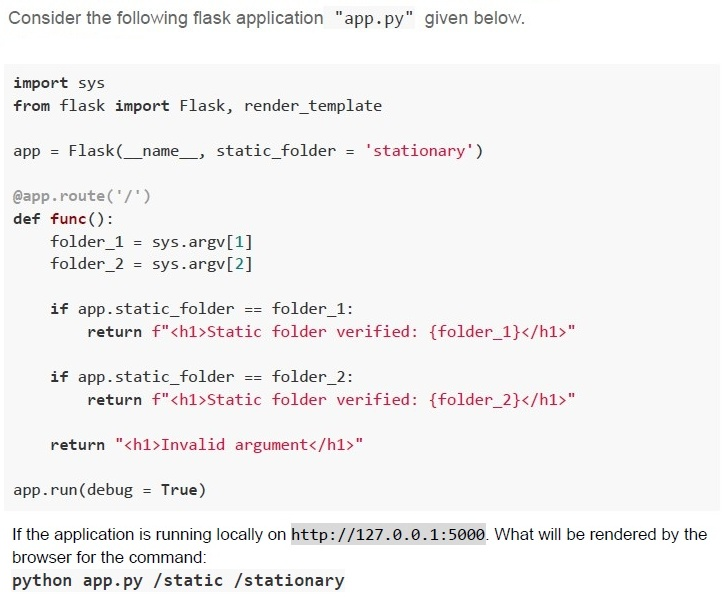
Text of the picture (copyable)
Consider the following flask application "app.py" given below.

```python
import sys
from flask import Flask, render_template

app = Flask(__name__, static_folder = 'stationary')

@app.route('/')
def func():
    folder_1 = sys.argv[1]
    folder_2 = sys.argv[2]

    if app.static_folder == folder_1:
        return f"<h1>Static folder verified: {folder_1}</h1>"

    if app.static_folder == folder_2:
        return f"<h1>Static folder verified: {folder_2}</h1>"

    return "<h1>Invalid argument</h1>"

app.run(debug = True)
```

If the application is running locally on `http://127.0.0.1:5000`. What will be rendered by the browser for the command:
`python app.py /static /stationary`
text
Static folder verified: /static

text
Static folder verified: /stationary
text
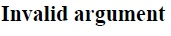
Invalid argument

text
None of these
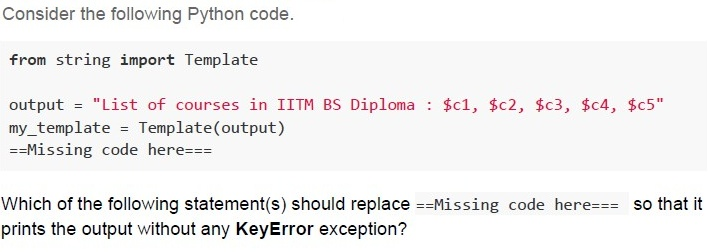
Text of the picture (copyable)
Consider the following Python code.

```python
from string import Template

output = "List of courses in IITM BS Diploma : $c1, $c2, $c3, $c4, $c5"
my_template = Template(output)
==Missing code here===
```

Which of the following statement(s) should replace ==Missing code here=== so that it prints the output without any KeyError exception?

text
```python
print(my_template.safe_substitute({
    "c1": "PDSA", "c2": "DBMS", "c3": "App Dev-I",
    "c4": "App Dev-II", "c5": "Java",}))
```
text
```python
print(my_template.substitute({
    "c1": "PDSA", "c2": "DBMS", "c3": "App Dev-I",
    "c4": "App Dev-II", "c5": "Java",}))
```
text
```python
print(my_template.substitute({
    "c4": "App Dev-II", "c5": "Java", "c1": "PDSA",
    "c2": "DBMS", "c3": "App Dev-I",}))
```
text
```python
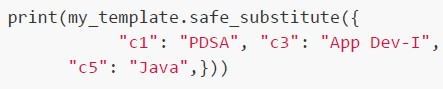
print(my_template.safe_substitute({
    "c1": "PDSA", "c3": "App Dev-I",
    "c5": "Java",}))
```
text
```python
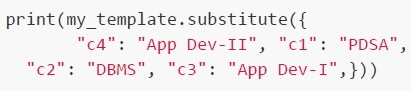
print(my_template.substitute({
    "c4": "App Dev-II", "c1": "PDSA",
    "c2": "DBMS", "c3": "App Dev-I",}))
```
Which of the following statements about server architectures, Apache and Nginx, is/are correct?
- Apache is better suited for handling a large volume of concurrent connectionsthan Nginx.
- Apache is versatile and supports a wide range of modules and dynamicconfigurations.
- Nginx is generally faster for serving static files and handling high traffic withlow memory usage.
- Both Apache and Nginx are open-source web servers.
Text of the picture (copyable)
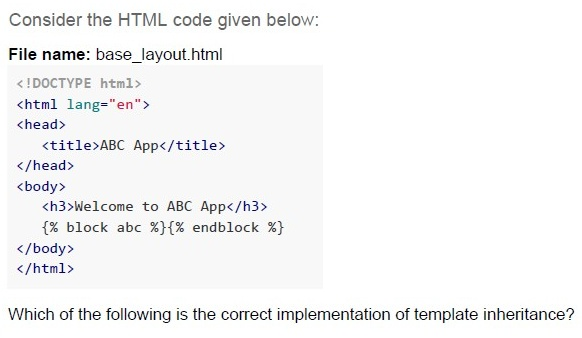
Consider the HTML code given below:

File name: base_layout.html

```html
<!DOCTYPE html>
<html lang="en">
<head>
    <title>ABC App</title>
</head>
<body>
    <h3>Welcome to ABC App</h3>
    {% block abc %}{% endblock %}
</body>
</html>
```

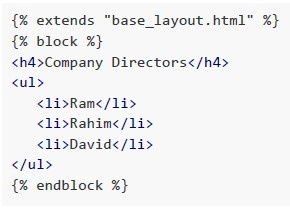
Which of the following is the correct implementation of template inheritance?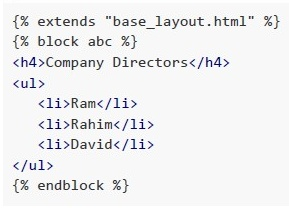
text
```jinja2
{% extends "base_layout.html" %}
{% block abc %}
<h4>Company Directors</h4>
<ul>
    <li>Ram</li>
    <li>Rahim</li>
    <li>David</li>
</ul>
{% endblock %}
```
text
```html
{% extends "base_layout.html" %}
{% block %}
<h4>Company Directors</h4>
<ul>
    <li>Ram</li>
    <li>Rahim</li>
    <li>David</li>
</ul>
{% endblock %}
```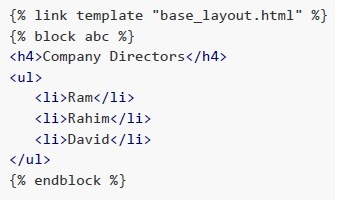
text
```html
{% link template "base_layout.html" %}
{% block abc %}
<h4>Company Directors</h4>
<ul>
    <li>Ram</li>
    <li>Rahim</li>
    <li>David</li>
</ul>
{% endblock %}
```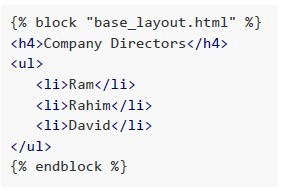
text
```jinja2
{% block "base_layout.html" %}
<h4>Company Directors</h4>
<ul>
    <li>Ram</li>
    <li>Rahim</li>
    <li>David</li>
</ul>
{% endblock %}
```