Home / MAD1 / Week 7 / Real questions
MAD1 week 7 - real exam questions
60 questions pulled from past papers whose wording matches this week's topics, newest first, duplicates removed. Pick your answers, then press Check answers. Figures and answer keys are the originals.
Elapsed 00:00
Consider the following flask app.
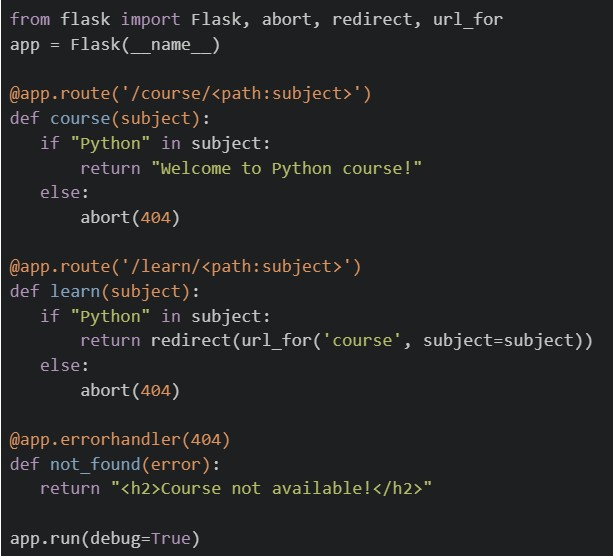 If the application is running locally on http://127.0.0.1:5000, select the correct options.
If the application is running locally on http://127.0.0.1:5000, select the correct options.Text of the picture (copyable)
```python
from flask import Flask, abort, redirect, url_for
app = Flask(__name__)

@app.route('/course/<path:subject>')
def course(subject):
    if "Python" in subject:
        return "Welcome to Python course!"
    else:
        abort(404)

@app.route('/learn/<path:subject>')
def learn(subject):
    if "Python" in subject:
        return redirect(url_for('course', subject=subject))
    else:
        abort(404)

@app.errorhandler(404)
def not_found(error):
    return "<h2>Course not available!</h2>"

app.run(debug=True)
```
text
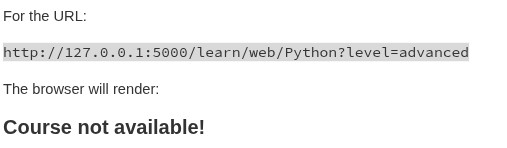
For the URL:

```
http://127.0.0.1:5000/learn/web/Python?level=advanced
```

The browser will render:

**Course not available!**
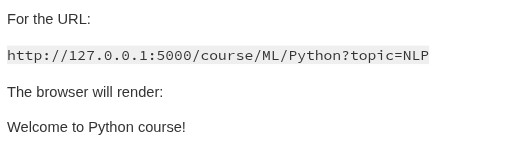
text
For the URL:

```
http://127.0.0.1:5000/course/ML/Python?topic=NLP
```

The browser will render:

Welcome to Python course!
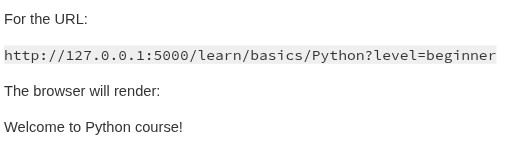
text
For the URL:

```
http://127.0.0.1:5000/learn/basics/Python?level=beginner
```

The browser will render:

Welcome to Python course!
text
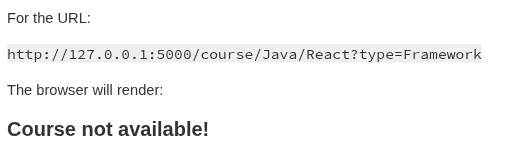
For the URL:

```
http://127.0.0.1:5000/course/Java/React?type=Framework
```

The browser will render:

**Course not available!**
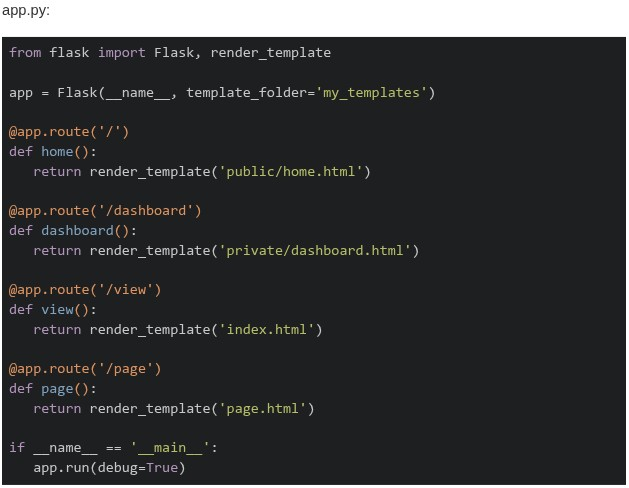
Consider the following Flask application structure and code.
 Which of the following statements about the template rendering behavior is correct?
Which of the following statements about the template rendering behavior is correct?
Text of the picture (copyable)
```
my_app/
├── app.py
├── views/
│   └── index.html
├── templates/
│   ├── base.html
│   └── page.html
└── my_templates/
    ├── public/
    │   └── home.html
    └── private/
        └── dashboard.html
```
app.py:
```python
from flask import Flask, render_template

app = Flask(__name__, template_folder='my_templates')

@app.route('/')
def home():
    return render_template('public/home.html')

@app.route('/dashboard')
def dashboard():
    return render_template('private/dashboard.html')

@app.route('/view')
def view():
    return render_template('index.html')

@app.route('/page')
def page():
    return render_template('page.html')

if __name__ == '__main__':
    app.run(debug=True)
```- All routes will work correctly as Flask searches both
 and
and 
text
templates/
```
my_templates/
```
- Only
 and
and  routes work, while
  and
and  routes fail with
  Error
Errortext
/dashboard
/view
The image contains a single, small, blurry, diagonal line. It appears to be a checkmark or a slash, but its exact nature is unclear due to the low resolution.
/page
TemplateNotFound
- The and routes work, while and fail with Error
text
The image contains a single, small, blurry, diagonal line. It appears to be a checkmark or a slash, but its exact nature is unclear due to the low resolution.
/dashboard
/view
/page
TemplateNotFound
- All routes fail because Flask requires templates to be in a default folder
Consider the following Flask RESTful API code.
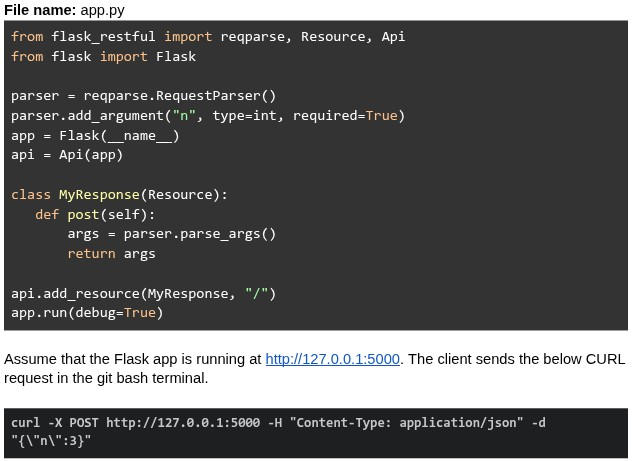 What will be the response?
What will be the response?Text of the picture (copyable)
File name: app.py
```python
from flask_restful import reqparse, Resource, Api
from flask import Flask

parser = reqparse.RequestParser()
parser.add_argument("n", type=int, required=True)
app = Flask(__name__)
api = Api(app)

class MyResponse(Resource):
    def post(self):
        args = parser.parse_args()
        return args

api.add_resource(MyResponse, "/")
app.run(debug=True)
```

Assume that the Flask app is running at http://127.0.0.1:5000. The client sends the below CURL request in the git bash terminal.

```bash
curl -X POST http://127.0.0.1:5000 -H "Content-Type: application/json" -d "{\"n\":3}"
```- {"n": 3}
- Runtime error
- 400 Bad Request
- { }
A magnetic disk can spin only in one direction with a constant speed of 6000rpm. What is the maximum delay (worst-case latency) before data transfer starts (in milliseconds)?
Consider the following Flask app code.
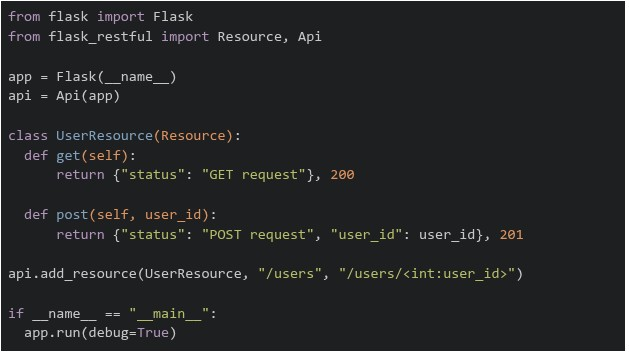 The above flask app is running on "http://127.0.0.1:5000". Which of the following commands will return a runtime error?
The above flask app is running on "http://127.0.0.1:5000". Which of the following commands will return a runtime error?Text of the picture (copyable)
```python
from flask import Flask
from flask_restful import Resource, Api

app = Flask(__name__)
api = Api(app)

class UserResource(Resource):
    def get(self):
        return {"status": "GET request"}, 200

    def post(self, user_id):
        return {"status": "POST request", "user_id": user_id}, 201

api.add_resource(UserResource, "/users", "/users/<int:user_id>")

if __name__ == "__main__":
    app.run(debug=True)
```
text
```
curl http://127.0.0.1:5000/users/5001 -X GET
```

text
```
curl http://127.0.0.1:5000/users/5001 -X POST
```

text
```
curl http://127.0.0.1:5000/users -X POST
```

text
```
curl http://127.0.0.1:5000/users -X GET
```
An e-commerce web application stores user shopping cart information as server-side session state. Each active user session occupies an average of 4 KB of memory. During a flash sale, the application is expected to handle 1.5 million concurrent active sessions, all stored in a centralized Redis cache server. What is the minimum RAM capacity (in GB) required solely to store these session states? (Assume that 1000B=1KB, 1000KB=1MB and so on)
A web server has an outgoing bandwidth of 6 Gbps, and each client requires 2 Mbps. What is the maximum number of concurrent requests allowed? (Use: 1KB= 1000Bytes, 1MB=1000KB and so on.)
- 3
- 30
- 3000
- 300
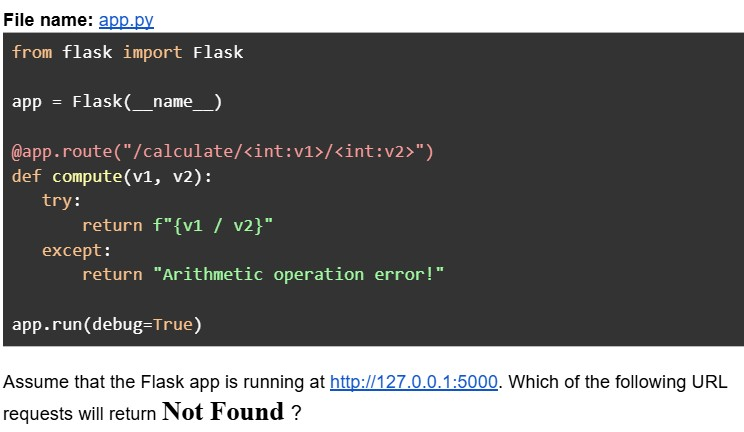
Consider the following Python Flask code.
Text of the picture (copyable)
File name: app.py
```python
from flask import Flask

app = Flask(__name__)

@app.route("/calculate/<int:v1>/<int:v2>")
def compute(v1, v2):
    try:
        return f"{v1 / v2}"
    except:
        return "Arithmetic operation error!"

app.run(debug=True)
```

Assume that the Flask app is running at http://127.0.0.1:5000. Which of the following URL requests will return **Not Found** ?
text
```
http://127.0.0.1:5000/calculate/10/5
```

text
```
http://127.0.0.1:5000/calculate/3/0.2
```

text
```
http://127.0.0.1:5000/calculate/3/2?v1=1
```

text
```
http://127.0.0.1:5000/calculate?v1=5&v2=2
```
Consider the following HTML and CSS code.
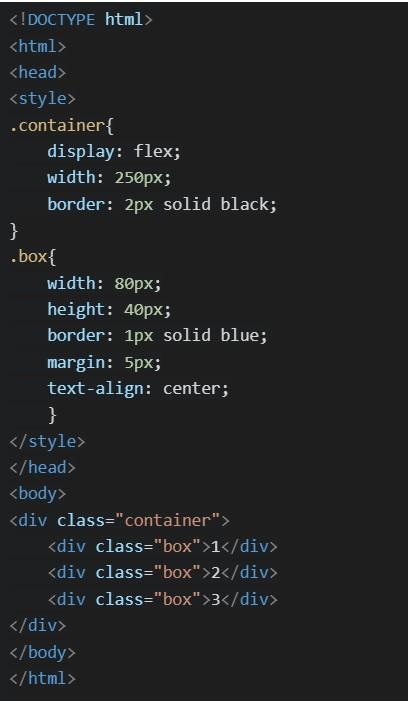 Which of the following will be the correct rendered output ?
Which of the following will be the correct rendered output ?Text of the picture (copyable)
```html
<!DOCTYPE html>
<html>
<head>
<style>
.container{
    display: flex;
    width: 250px;
    border: 2px solid black;
}
.box{
    width: 80px;
    height: 40px;
    border: 1px solid blue;
    margin: 5px;
    text-align: center;
}
</style>
</head>
<body>
<div class="container">
    <div class="box">1</div>
    <div class="box">2</div>
    <div class="box">3</div>
</div>
</body>
</html>
```
text
This is a diagram showing three rectangular boxes stacked vertically within a larger outer rectangle. Each inner box is outlined in blue and contains a single number.
- The top box is labeled "1".
- The middle box is labeled "2".
- The bottom box is labeled "3".

text
This is a diagram of a rectangle with a nested rectangle.
The outer rectangle is black.
The inner rectangle is blue.
Inside the inner rectangle, the text "1 2 3" is displayed.

text
This is a diagram of three rectangular boxes arranged horizontally, each containing a number.
- The first box on the left contains the number "1".
- The second box in the middle contains the number "2".
- The third box on the right contains the number "3".
All boxes are outlined with a dark blue border, and the vertical lines separating the boxes are also dark blue.

text
The image displays a diagram with a black rectangular outer border. Inside this border, there are three smaller, identical rectangular boxes arranged horizontally. Each of these inner boxes has a blue border. The boxes are labeled with numbers: "1" in the leftmost box, "2" in the middle box, and "3" in the rightmost box. There is a small gap between each of the inner boxes.
Logging is typically used for what purpose?
- detect unusual activity on the server.
- block unauthorized access.
- enforce HTTPS connections.
- convert HTTP to HTTPS.
A web server has an outgoing bandwidth of 5Gbps, and each client requires 2Mbps. What is the maximum number of concurrent requests allowed? (Use: 1KB= 1000Bytes, 1MB=1000KB and so on)
- 2.5
- 25
- 250
- 2500
Consider the following Python Flask code.
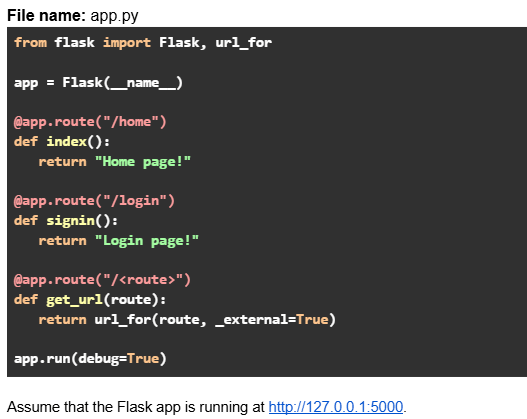 Which of the following options are true?
Which of the following options are true?Text of the picture (copyable)
File name: app.py
```python
from flask import Flask, url_for

app = Flask(__name__)

@app.route("/home")
def index():
    return "Home page!"

@app.route("/login")
def signin():
    return "Login page!"

@app.route("/<route>")
def get_url(route):
    return url_for(route, _external=True)

app.run(debug=True)
```
Assume that the Flask app is running at http://127.0.0.1:5000.- URL request: http://127.0.0.1:5000/signin will return output: http://127.0.0.1:5000/login
- URL request: http://127.0.0.1:5000/login will return output: http://127.0.0.1:5000/login
- URL request: http://127.0.0.1:5000/index will return output: http://127.0.0.1:5000/home
- URL request: http://127.0.0.1:5000/home will return output: http://127.0.0.1:5000/home
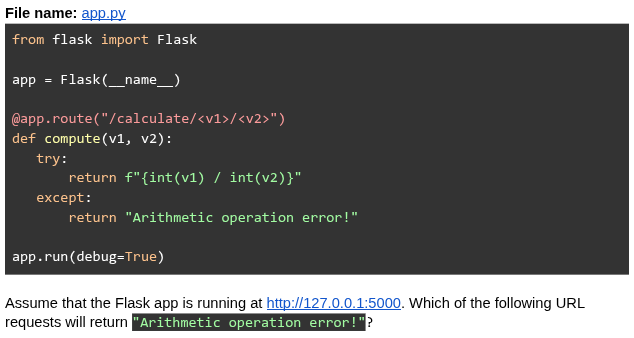
Consider the following Python Flask code.
Text of the picture (copyable)
File name: app.py

```python
from flask import Flask

app = Flask(__name__)

@app.route("/calculate/<v1>/<v2>")
def compute(v1, v2):
    try:
        return f"{int(v1) / int(v2)}"
    except:
        return "Arithmetic operation error!"

app.run(debug=True)
```

Assume that the Flask app is running at http://127.0.0.1:5000. Which of the following URL requests will return "Arithmetic operation error!"?
text
```
http://127.0.0.1:5000/calculate/4/"2"
```

text
http://127.0.0.1:5000/calculate/4/4

text
```
http://127.0.0.1:5000/calculate/4/0.2
```

text
```
http://127.0.0.1:5000/calculate/4/2?v1=1
```

text
```
http://127.0.0.1:5000/calculate/4.0/0.5
```
Consider the following HTML/CSS code.
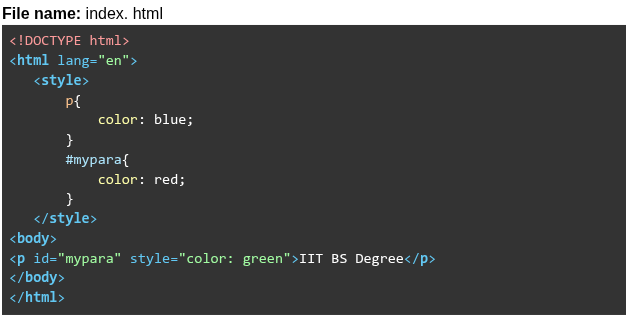 Read the following statements about “index.html” and choose the correct option. Statement 1: Internal element selector blue will be overridden by ID selector red. Statement 2: Internal ID selector red will be overridden by inline styling green.
Read the following statements about “index.html” and choose the correct option. Statement 1: Internal element selector blue will be overridden by ID selector red. Statement 2: Internal ID selector red will be overridden by inline styling green.Text of the picture (copyable)
File name: index. html

```html
<!DOCTYPE html>
<html lang="en">
<style>
    p{
        color: blue;
    }
    #mypara{
        color: red;
    }
</style>
<body>
    <p id="mypara" style="color: green">IIT BS Degree</p>
</body>
</html>
```- Both statements are incorrect.
- Both statements are correct.
- Statement 1 is incorrect, but statement 2 is correct.
- Statement 2 is incorrect, but statement 1 is correct.
Consider the following graph that represents the variation in bandwidth of a network for an entire day (24 hours). Three users were connected to the network at three different times of the day. What is the total data consumed in GigaBytes by all the users in 24 hrs?
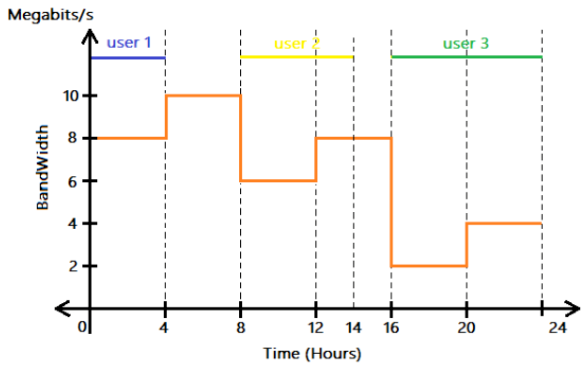
Text of the picture (copyable)
This is a 2D line graph with a horizontal x-axis labeled "Time (Hours)" and a vertical y-axis labeled "BandWidth" with units "Megabits/s".

The x-axis ranges from 0 to 24, with major ticks at 0, 4, 8, 12, 14, 16, 20, and 24.
The y-axis ranges from 0 to 12, with major ticks at 0, 2, 4, 6, 8, 10.

There is an orange step-function line graph representing bandwidth over time.
- From 0 to 4 hours, bandwidth is 8 Megabits/s.
- From 4 to 8 hours, bandwidth is 10 Megabits/s.
- From 8 to 12 hours, bandwidth is 6 Megabits/s.
- From 12 to 16 hours, bandwidth is 8 Megabits/s.
- From 16 to 20 hours, bandwidth is 2 Megabits/s.
- From 20 to 24 hours, bandwidth is 4 Megabits/s.

Additionally, there are three horizontal lines with labels indicating user activity:
- A blue line labeled "user 1" extends from 0 to 4 hours at an unspecified y-value (visually above 10).
- A yellow line labeled "user 2" extends from 8 to 14 hours at an unspecified y-value (visually above 10).
- A green line labeled "user 3" extends from 16 to 24 hours at an unspecified y-value (visually above 10).

Vertical dashed lines extend from the x-axis ticks at 4, 8, 12, 14, 16, 20, and 24 hours up to the top of the graph.
- 547.2 GB
- 12 GB
- 43.2 GB
- 345.6 GB
Consider the following Flask RESTful API code.
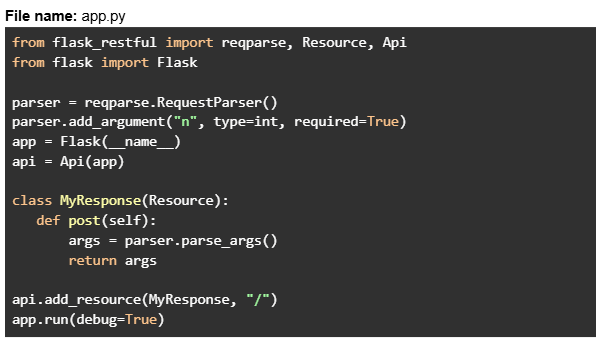 Assume that the Flask app is running at http://127.0.0.1:5000. The client sends the below CURL request in the git bash terminal.
 What will be the response?
Assume that the Flask app is running at http://127.0.0.1:5000. The client sends the below CURL request in the git bash terminal.
What will be the response?Text of the picture (copyable)
File name: app.py
```python
from flask_restful import reqparse, Resource, Api
from flask import Flask

parser = reqparse.RequestParser()
parser.add_argument("n", type=int, required=True)
app = Flask(__name__)
api = Api(app)

class MyResponse(Resource):
    def post(self):
        args = parser.parse_args()
        return args

api.add_resource(MyResponse, "/")
app.run(debug=True)
```
```
curl -X POST http://127.0.0.1:5000 -H "Content-Type: application/json" -d '{}'
```- {"n": None}
- Runtime error
- 400 Bad Request
- { }
Consider the following HTML templates and Python Flask code.
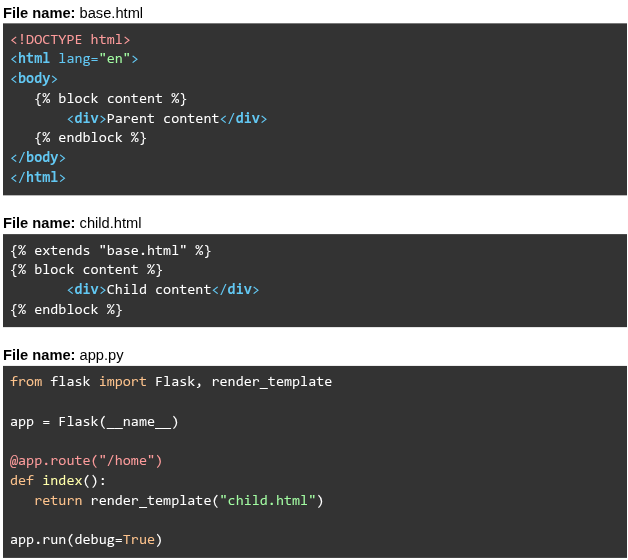 Assume that the Flask app is running at
  . What will be rendered for the URL request
  ?
?
Assume that the Flask app is running at . What will be rendered for the URL request ?Text of the picture (copyable)
File name: base.html
```html
<!DOCTYPE html>
<html lang="en">
<body>
    {% block content %}
    <div>Parent content</div>
    {% endblock %}
</body>
</html>
```

File name: child.html
```html
{% extends "base.html" %}
{% block content %}
    <div>Child content</div>
{% endblock %}
```

File name: app.py
```python
from flask import Flask, render_template

app = Flask(__name__)

@app.route("/home")
def index():
    return render_template("child.html")

app.run(debug=True)
```
http://127.0.0.1:5000
http://127.0.0.1:5000/home- Parent content Child content
- Parent content
- Child content
- Child content Parent content
Consider the following flask application "app.py" given below.
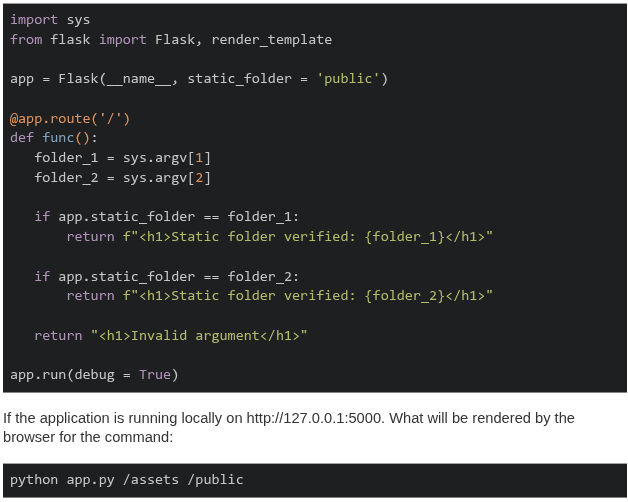
Text of the picture (copyable)
```python
import sys
from flask import Flask, render_template

app = Flask(__name__, static_folder = 'public')

@app.route('/')
def func():
    folder_1 = sys.argv[1]
    folder_2 = sys.argv[2]

    if app.static_folder == folder_1:
        return f"<h1>Static folder verified: {folder_1}</h1>"

    if app.static_folder == folder_2:
        return f"<h1>Static folder verified: {folder_2}</h1>"

    return "<h1>Invalid argument</h1>"

app.run(debug = True)
```

If the application is running locally on http://127.0.0.1:5000. What will be rendered by the browser for the command:

```
python app.py /assets /public
```- Static folder verified: /assets
- Static folder verified: /public
- Invalid argument
- None of these
Examine the following Python code snippet.
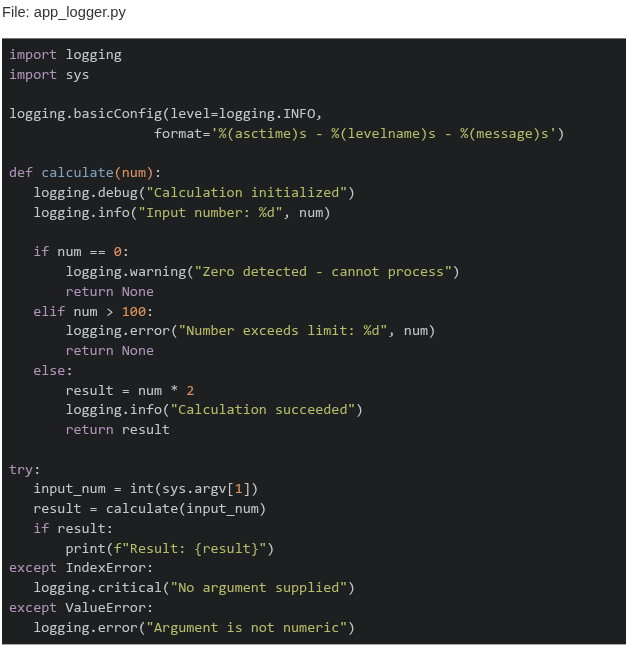 What will be the output when running the command:
  ?
?
What will be the output when running the command: ?Text of the picture (copyable)
File: app_logger.py

```python
import logging
import sys

logging.basicConfig(level=logging.INFO,
                    format='%(asctime)s - %(levelname)s - %(message)s')


def calculate(num):
    logging.debug("Calculation initialized")
    logging.info("Input number: %d", num)

    if num == 0:
        logging.warning("Zero detected - cannot process")
        return None
    elif num > 100:
        logging.error("Number exceeds limit: %d", num)
        return None
    else:
        result = num * 2
        logging.info("Calculation succeeded")
        return result


try:
    input_num = int(sys.argv[1])
    result = calculate(input_num)
    if result:
        print(f"Result: {result}")
except IndexError:
    logging.critical("No argument supplied")
except ValueError:
    logging.error("Argument is not numeric")
```
```
python app_logger.py 150
```
text
```
2024-07-29 10:20:15,234 - DEBUG - Calculation initialized
2024-07-29 10:20:15,235 - INFO - Input number: 150
2024-07-29 10:20:15,236 - ERROR - Number exceeds limit: 150
```

text
```
2024-07-29 10:20:15,235 - INFO - Input number: 150
2024-07-29 10:20:15,236 - ERROR - Number exceeds limit: 150
```

text
```
2024-07-29 10:20:15,235 - WARNING - Zero detected - cannot process
2024-07-29 10:20:15,236 - ERROR - Number exceeds limit: 150
```

text
```
2024-07-29 10:20:15,235 - INFO - Input number: 150
2024-07-29 10:20:15,236 - DEBUG - Calculation succeeded
```
A magnetic disk can spin only in one direction with a constant speed of 5000rpm. What is the maximum delay(worst-case latency) before data transfer starts (in milliseconds)?
You want to create an app where students can log in and download hall tickets. To make this more efficient, you want to have some very quick way to check whether a given user has already downloaded their hall ticket or not. Which kind of database will you prefer?
- RDBMS
- Doc-oriented database
- Graph database
- Key-value store
You have a DRAM module with bus width of 64 bits, clock speed of 1 GHz, and operating in DDR (double-data-rate or two values per clock cycle) mode. What is the maximum bandwidth (in Giga-bytes per second) of data transfer achievable with this module?
- 8 GigaBytes/s
- 16 GigaBytes/s
- 24 GigaBytes/s
- None of these
Consider the following Python Flask code.
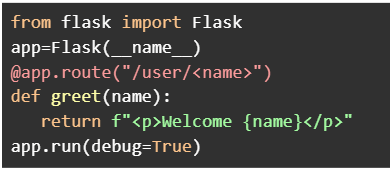

Text of the picture (copyable)
```python
from flask import Flask
app=Flask(__name__)
@app.route("/user/<name>")
def greet(name):
    return f"<p>Welcome {name}</p>"
app.run(debug=True)
```
Assume that the Flask app is running at http://127.0.0.1:5000. Which of the following URL requests will render the output without any errors?- http://127.0.0.1:5000/user/IITM
- http://127.0.0.1:5000/user/101
- http://127.0.0.1:5000/user/10/greet
- http://127.0.0.1:5000/user
- http://127.0.0.1:5000/user/BS?id=101
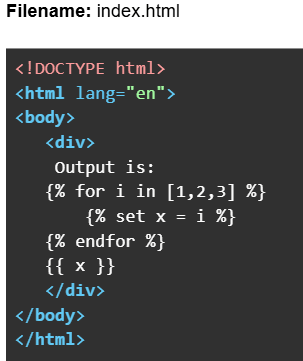
Consider the following HTML and Python Flask code.
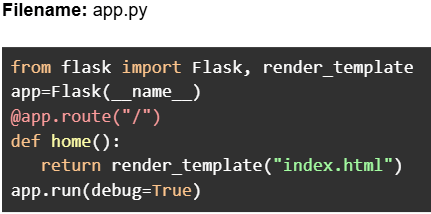

Text of the picture (copyable)
Filename: app.py

```python
from flask import Flask, render_template
app=Flask(__name__)
@app.route("/")
def home():
    return render_template("index.html")
app.run(debug=True)
```
Filename: index.html

```html
<!DOCTYPE html>
<html lang="en">
<body>
    <div>
        Output is:
        {% for i in [1,2,3] %}
            {% set x = i %}
        {% endfor %}
        {{ x }}
    </div>
</body>
</html>
```
Assume that the Flask app is running at http://127.0.0.1:5000. What will be the rendered output
in the browser for the URL: http://127.0.0.1:5000?- Output is: 3
- Output is:
- Output is: 1 2 3
- Output is: 1 2 3 3
Consider the following HTML code.
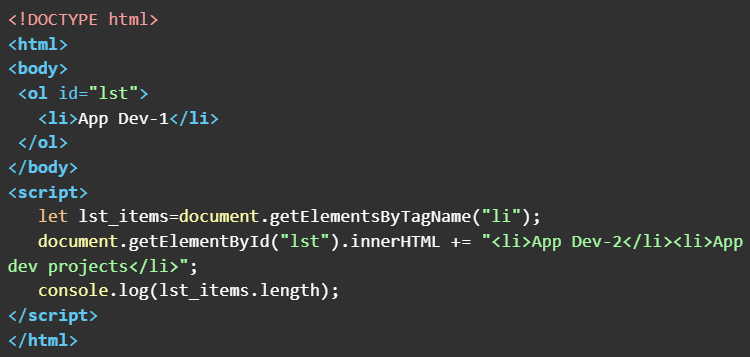 What will be the output in the console window when the above HTML doc is rendered on the browser ?
What will be the output in the console window when the above HTML doc is rendered on the browser ?Text of the picture (copyable)
```html
<!DOCTYPE html>
<html>
<body>
    <ol id="lst">
        <li>App Dev-1</li>
    </ol>
</body>
<script>
    let lst_items=document.getElementsByTagName("li");
    document.getElementById("lst").innerHTML += "<li>App Dev-2</li><li>App dev projects</li>";
    console.log(lst_items.length);
</script>
</html>
```- 1
- 2
- 3
- 4
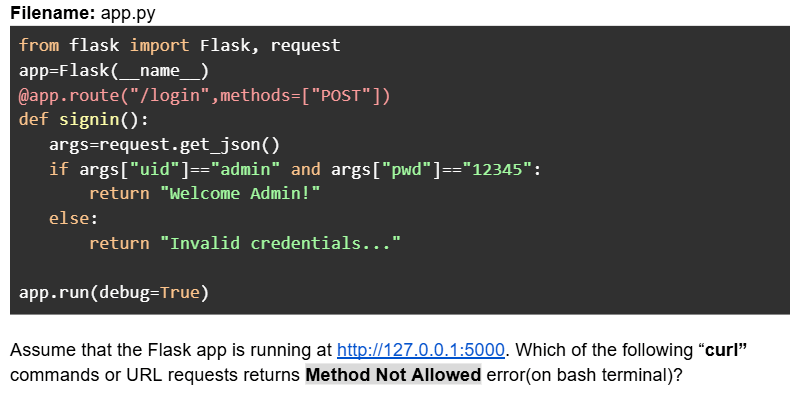
Consider the following Python Flask code.
Text of the picture (copyable)
Filename: app.py

```python
from flask import Flask, request
app=Flask(__name__)
@app.route("/login",methods=["POST"])
def signin():
    args=request.get_json()
    if args["uid"]=="admin" and args["pwd"]=="12345":
        return "Welcome Admin!"
    else:
        return "Invalid credentials..."

app.run(debug=True)
```

Assume that the Flask app is running at http://127.0.0.1:5000. Which of the following "curl" commands or URL requests returns Method Not Allowed error(on bash terminal)?- curl -X POST --json '{"uid":"admin","pwd":"xyz"}' http://127.0.0.1:5000/login
- curl -X GET --json '{"uid":"admin","pwd":"xyz"}' http://127.0.0.1:5000/login
- URL request: http://127.0.0.1:5000/login
- curl --json '{"uid":"admin","pwd":"12345"}' http://127.0.0.1:5000/login
- curl -X POST --json '{"uid":"admin","pwd":"12345"}' http://127.0.0.1:5000/login
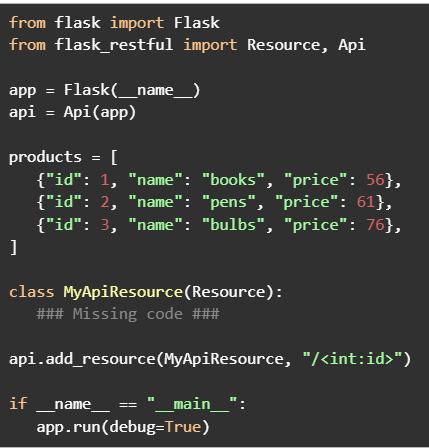
Consider the following Python Flask RESTful API code.

Text of the picture (copyable)
```python
from flask import Flask
from flask_restful import Resource, Api

app = Flask(__name__)
api = Api(app)

products = [
    {"id": 1, "name": "books", "price": 56},
    {"id": 2, "name": "pens", "price": 61},
    {"id": 3, "name": "bulbs", "price": 76},
]

class MyApiResource(Resource):
    ### Missing code ###

api.add_resource(MyApiResource, "/<int:id>")

if __name__ == "__main__":
    app.run(debug=True)
```
Assume that the Flask app is running at http://127.0.0.1:5000. Which of the following codes when placed at ###Missing code ### will work correctly to search a product by id?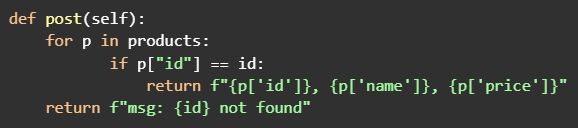
text
```python
def post(self):
    for p in products:
        if p["id"] == id:
            return f"{p['id']}, {p['name']}, {p['price']}"
    return f"msg: {id} not found"
```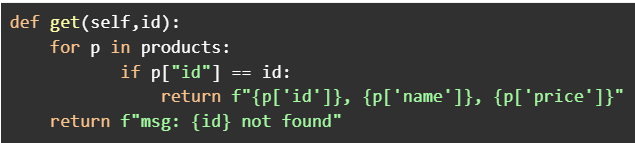
text
```python
def get(self,id):
    for p in products:
        if p["id"] == id:
            return f"{p['id']}}, {p['name']}}, {p['price']}}"
    return f"msg: {id} not found"
```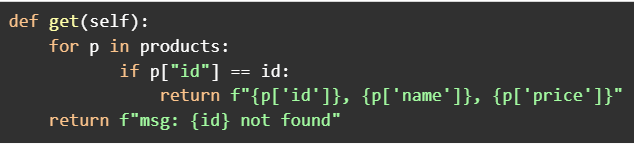
text
```python
def get(self):
    for p in products:
        if p["id"] == id:
            return f"{p['id']}, {p['name']}, {p['price']}"
    return f"msg: {id} not found"
```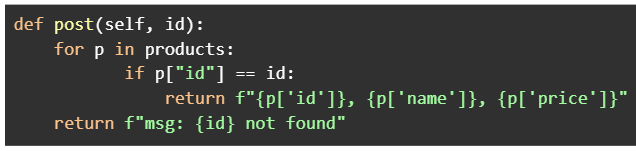
text
```python
def post(self, id):
    for p in products:
        if p["id"] == id:
            return f"{p['id']}, {p['name']}, {p['price']}"
    return f"msg: {id} not found"
```
A client sitting in a train is connected to a server through a network tower that has a range of 4.5 kilometers and a constant bandwidth of 5 Mbps. The train is at a negligible distance from the tower and is moving away from it at a speed of 180 kmph. How much data (in Megabytes) will be used by the client before the train completely moves out of the coverage area, assuming that the client is consuming the entire bandwidth?
- 45 MB
- 450 MB
- 5.6 MB
- 56.25 MB
Consider the following flask app.
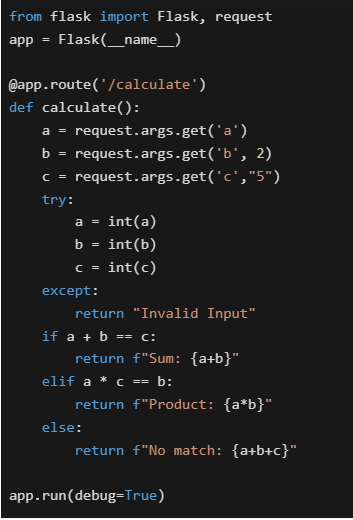 Select the option which correctly matches the URL in column A with the rendered output in column B, if the application is running locally on http://127.0.0.1:5000.
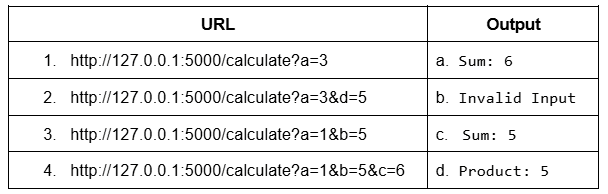
Select the option which correctly matches the URL in column A with the rendered output in column B, if the application is running locally on http://127.0.0.1:5000.
Text of the picture (copyable)
```python
from flask import Flask, request
app = Flask(__name__)

@app.route('/calculate')
def calculate():
    a = request.args.get('a')
    b = request.args.get('b', 2)
    c = request.args.get('c', "5")

    try:
        a = int(a)
        b = int(b)
        c = int(c)
    except:
        return "Invalid Input"

    if a + b == c:
        return f"Sum: {a+b}"
    elif a * c == b:
        return f"Product: {a*b}"
    else:
        return f"No match: {a+b+c}"

app.run(debug=True)
```
| URL | Output |
|---|---|
| 1. http://127.0.0.1:5000/calculate?a=3 | a. Sum: 6 |
| 2. http://127.0.0.1:5000/calculate?a=3&d=5 | b. Invalid Input |
| 3. http://127.0.0.1:5000/calculate?a=1&b=5 | c. Sum: 5 |
| 4. http://127.0.0.1:5000/calculate?a=1&b=5&c=6 | d. Product: 5 |- 1-b, 2-b, 3-a, 4-a
- 1-b, 2-b, 3-d, 4-a
- 1-c, 2-c, 3-d, 4-a
- 1-c, 2-b, 3-d, 4-a
Consider the following HTML and Python flask codes.
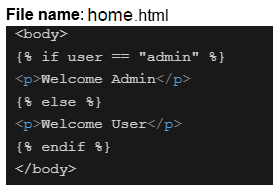
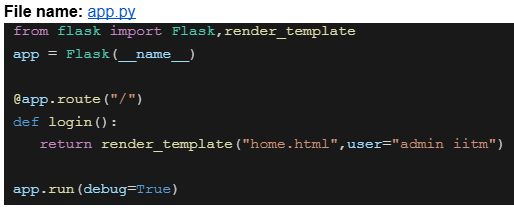

Text of the picture (copyable)
File name: home.html

```html
<body>
  {% if user == "admin" %}
  <p>Welcome Admin</p>
  {% else %}
  <p>Welcome User</p>
  {% endif %}
</body>
```
File name: app.py

```python
from flask import Flask,render_template

app = Flask(__name__)

@app.route("/")
def login():
    return render_template("home.html",user="admin iitm")

app.run(debug=True)
```
Assume that the above code is running on http://127.0.0.1:5000. What will be the rendered output for the URL request http://127.0.0.1:5000 ?- Welcome Admin
- Welcome User
- 404 Not Found
- Nothing will be rendered

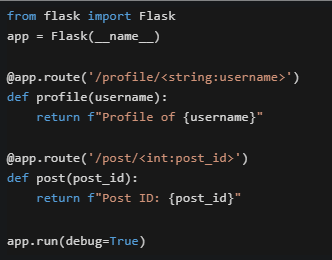

Text of the picture (copyable)
Consider the following Flask application running on http://127.0.0.1:5000.
```python
from flask import Flask
app = Flask(__name__)

@app.route('/profile/<string:username>')
def profile(username):
    return f"Profile of {username}"

@app.route('/post/<int:post_id>')
def post(post_id):
    return f"Post ID: {post_id}"

app.run(debug=True)
```
What will happen when accessing http://127.0.0.1:5000/post/abc123 ?- It will render "Post ID: abc123"
- Flask will return a 404 error because abc123 cannot be converted to integer
- It will render "Profile of abc123"
- The application will crash with a TypeError
Which command would you use to get detailed information about the HTTP request and response, including headers, and to help debug the HTTP request when using curl?

text
```
curl -i <URL>
```

text
```
curl -v <URL>
```

text
```
curl --headers <URL>
```

text
```
curl -X GET <URL>
```
Which of the following statements about HTML, CSS, and character encoding is/are true?
- UTF-8 is a variable-length encoding that can represent all Unicode characters.
- In HTML, attribute names are case-insensitive.
- Inline CSS is preferred over external CSS for large-scale projects.
- UTF-32 is a fixed-length encoding where each character takes 4 bytes.
Which of the following is/are True about Web Applications?
- All web applications run entirely in the client's browser without requiring a server.
- Web applications can interact with backend services using APIs.
- A web application typically consists of frontend, backend and database components.
- Web applications cannot be accessed unless they are installed on the user’s computer.
Consider the following flask app and Jinja2 template.
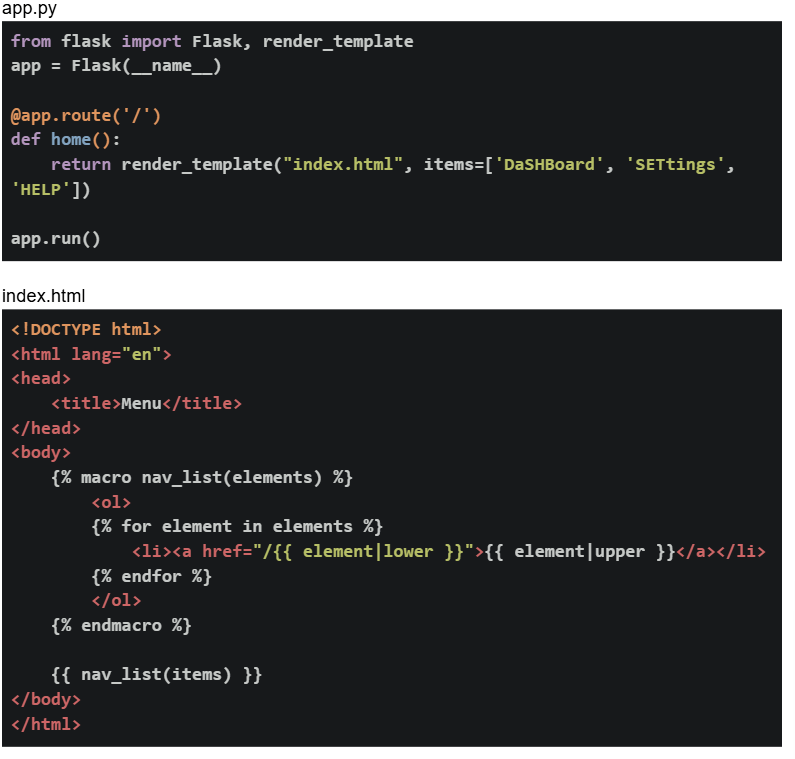 If the flask app is running locally on http://127.0.0.1:5000. What will be the output on the browser for the base URL?
If the flask app is running locally on http://127.0.0.1:5000. What will be the output on the browser for the base URL?Text of the picture (copyable)
app.py
```python
from flask import Flask, render_template
app = Flask(__name__)

@app.route('/')
def home():
    return render_template("index.html", items=['DaShBoard', 'SETtings',
                                                 'HELP'])

app.run()
```

index.html
```html
<!DOCTYPE html>
<html lang="en">
<head>
    <title>Menu</title>
</head>
<body>
    {% macro nav_list(elements) %}
    <ol>
        {% for element in elements %}
        <li><a href="/{{ element|lower }}">{{ element|upper }}</a></li>
        {% endfor %}
    </ol>
    {% endmacro %}

    {{ nav_list(items) }}
</body>
</html>
```
text
1. DaSHBoard
2. SETtings
3. HELP

text
1. dashboard
2. settings
3. help

text
1. DASHBOARD
2. SETTINGS
3. HELP

text
1. DASHBOARD
2. SETTINGS
3. HELP
Comprehension passage for this question
Based on the above data, answer the given subquestions.
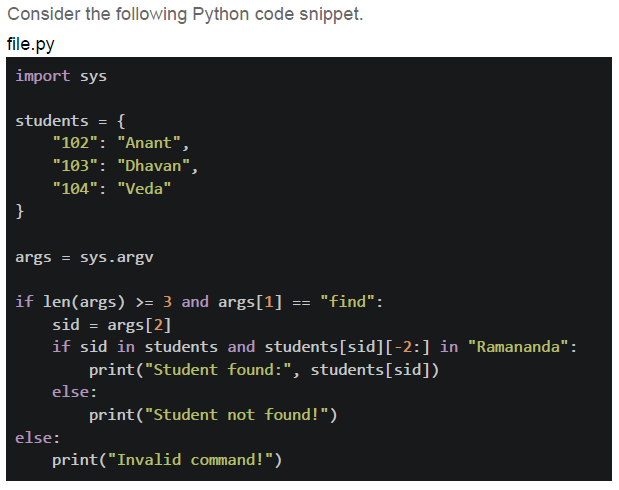
Which of the following statements is/are correct ?
- For the command: python file.py find 103 , the terminal output is:

text
Student not found!
- For the command: python file.py find 103 , the terminal output is:

text
Student found: Dhawan
- For the command: python file.py find 104 sid , the terminal output is:

text
```
IndexError: list index out of range
```
- For the command: python file.py find 102 , the terminal output is:

text
Student found: Anant
- For the command: python file.py find 104 sid , the terminal output is:

text
Student found: Veda
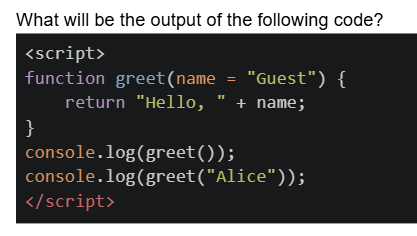
Text of the picture (copyable)
What will be the output of the following code?
```html
<script>
  function greet(name = "Guest") {
    return "Hello, " + name;
  }
  console.log(greet());
  console.log(greet("Alice"));
</script>
```
text
Hello, Guest
Hello, Alice
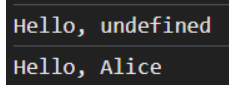
text
```
Hello, undefined
Hello, Alice
```
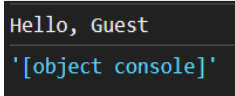
text
```
Hello, Guest
'[object console]'
```
- Error: Missing argument
Which statements about frontend and backend validation are TRUE?
- Frontend validation (HTML5/JavaScript) is sufficient for security
- Frontend validation improves user experience by providing immediate feedback
- Backend validation is mandatory for security because frontend can be bypassed
- Backend validation should validate the same constraints as frontend
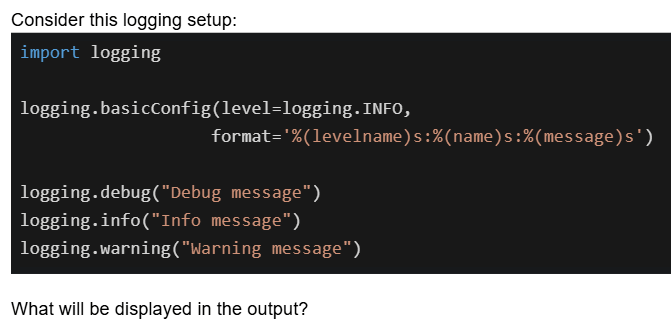
Text of the picture (copyable)
Consider this logging setup:

```python
import logging

logging.basicConfig(level=logging.INFO,
                    format='%(levelname)s:%(name)s:%(message)s')

logging.debug("Debug message")
logging.info("Info message")
logging.warning("Warning message")
```

What will be displayed in the output?- All three messages will be displayed
- Only the info and warning messages will be displayed
- Only the warning message will be displayed
- Only the info and debug messages will be displayed
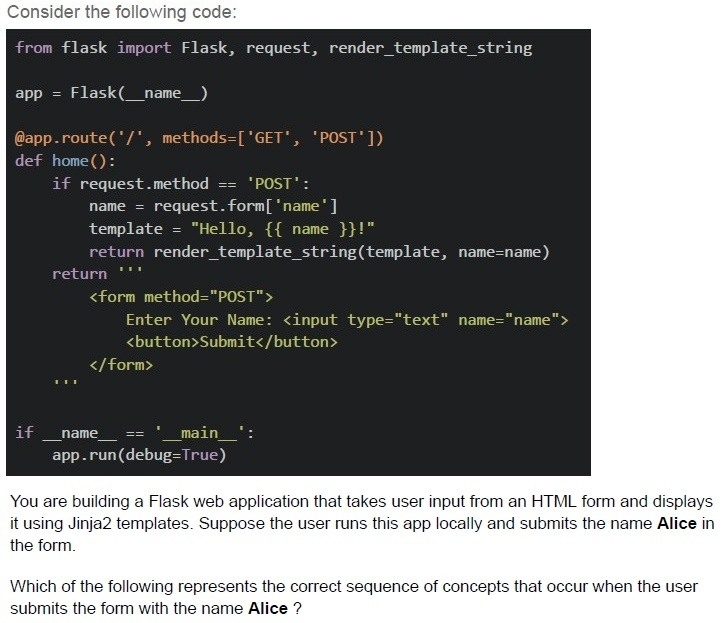
Text of the picture (copyable)
Consider the following code:

```python
from flask import Flask, request, render_template_string

app = Flask(__name__)

@app.route('/', methods=['GET', 'POST'])
def home():
    if request.method == 'POST':
        name = request.form['name']
        template = "Hello, {{ name }}!"
        return render_template_string(template, name=name)
    return '''
        <form method="POST">
            Enter Your Name: <input type="text" name="name">
            <button>Submit</button>
        </form>
    '''

if __name__ == '__main__':
    app.run(debug=True)
```

You are building a Flask web application that takes user input from an HTML form and displays it using Jinja2 templates. Suppose the user runs this app locally and submits the name **Alice** in the form.

Which of the following represents the correct sequence of concepts that occur when the user submits the form with the name **Alice** ?
text
HTML Form Rendering → HTTP 404 Not Found Error → User Submits Form → Flask Routing → Template Rendering

text
User Submits Form (HTTP POST) → Check URL Structure → Network Transfer (Bandwidth & Latency) → Flask Routing

text
User Accesses URL (Form at "/") → User Submits Form (HTTP POST) → Flask Request
Handling (request.form) → Jinja2 Template Rendering

text
Flask Request Handling → Network Round Trip (RTT) → HTML Table Rendering → Jinja2 Template Rendering
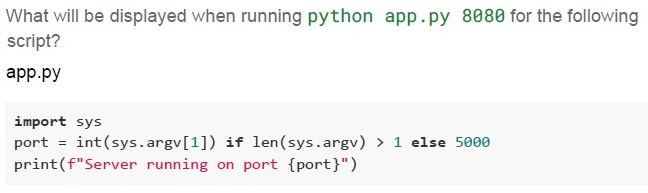
Text of the picture (copyable)
What will be displayed when running `python app.py 8080` for the following script?
app.py

```python
import sys

port = int(sys.argv[1]) if len(sys.argv) > 1 else 5000
print(f"Server running on port {port}")
```
text
Error: sys has no attribute argv

text
Server running on port 8080

text
Server running on port 5000

text
```
IndexError on sys.argv[1]
```
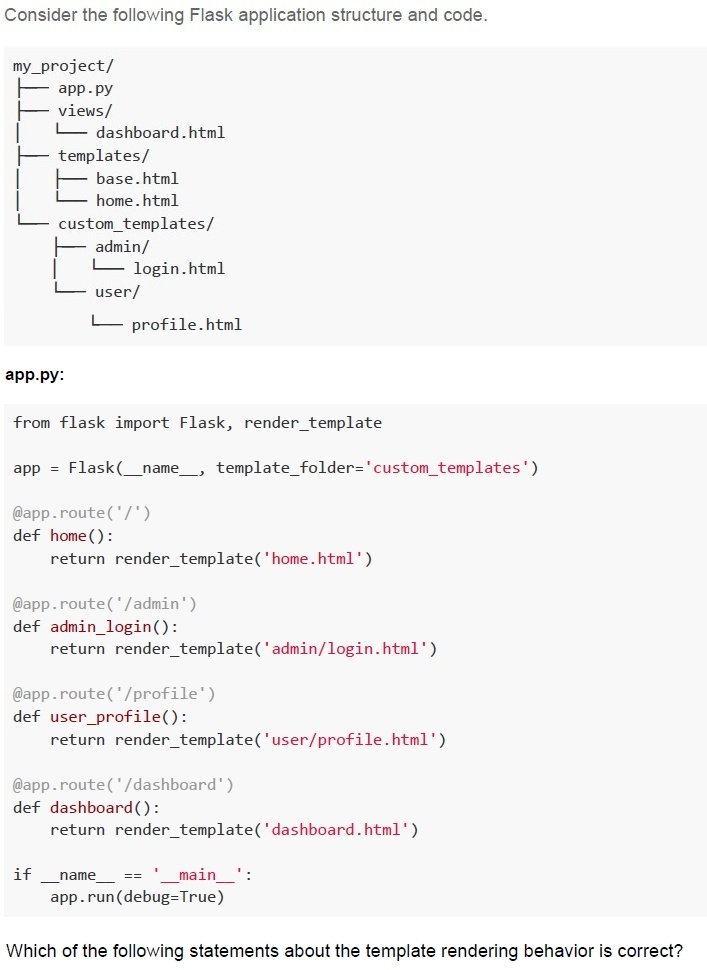
Text of the picture (copyable)
Consider the following Flask application structure and code.

```
my_project/
├── app.py
├── views/
│   └── dashboard.html
├── templates/
│   ├── base.html
│   └── home.html
└── custom_templates/
    ├── admin/
    │   └── login.html
    └── user/
        └── profile.html
```

**app.py:**

```python
from flask import Flask, render_template

app = Flask(__name__, template_folder='custom_templates')

@app.route('/')
def home():
    return render_template('home.html')

@app.route('/admin')
def admin_login():
    return render_template('admin/login.html')

@app.route('/profile')
def user_profile():
    return render_template('user/profile.html')

@app.route('/dashboard')
def dashboard():
    return render_template('dashboard.html')

if __name__ == '__main__':
    app.run(debug=True)
```

Which of the following statements about the template rendering behavior is correct?
text
All routes will work correctly as Flask will automatically search in both
templates/ and custom_templates/ folders

text
Only the /admin and /profile routes will work correctly, while / and /dashboard routes will fail with TemplateNotFound error

text
The / and /dashboard routes will fail with TemplateNotFound error, while
/admin and /profile routes will work correctly

text
All routes will fail because Flask requires the template folder to be named exactly
templates

Text of the picture (copyable)
Examine the following Python code snippet.

File: logger_test.py

```python
import logging
import sys

logging.basicConfig(level=logging.WARNING,
                    format='%(asctime)s - %(levelname)s - %(message)s')

def process_data(num):
    logging.debug("Starting data processing")
    logging.info("Processing number: %d", num)

    if num == 0:
        logging.warning("Zero value detected - potential division by zero")
        return None
    elif num < 0:
        logging.error("Negative number provided: %d", num)
        return None
    else:
        result = 100 / num
        logging.info("Calculation completed successfully")
        return result

try:
    input_num = int(sys.argv[1])
    result = process_data(input_num)
    if result:
        print(f"Result: {result}")
except IndexError:
    logging.critical("No command line argument provided")
except ValueError:
    logging.error("Invalid input - not a number")
```

What will be the output when running the command: python logger_test.py -5 ?
text
```
2024-07-29 10:15:32,123 - DEBUG - Starting data processing 2024-07-29
10:15:32,124 - INFO - Processing number: -5
2024-07-29 10:15:32,125 - ERROR - Negative number provided: -5
```

text
```
2024-07-29 10:15:32,124 - WARNING - Zero value detected - potential
division by zero
2024-07-29 10:15:32,125 - ERROR - Negative number provided: -5
```

text
```
2024-07-29 10:15:32,125 - ERROR - Negative number provided: -5
```

text
```
2024-07-29 10:15:32,124 - INFO - Processing number: -5
2024-07-29 10:15:32,125 - ERROR - Negative number provided: -5
2024-07-29 10:15:32,126 - INFO - Calculation completed successfully
```
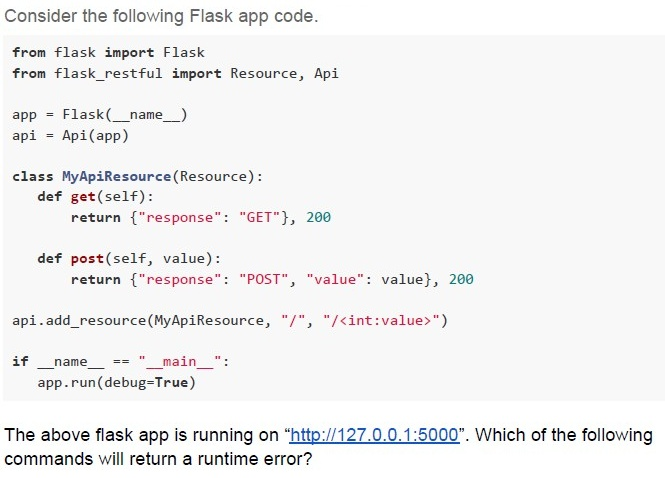
Text of the picture (copyable)
Consider the following Flask app code.

```python
from flask import Flask
from flask_restful import Resource, Api

app = Flask(__name__)
api = Api(app)

class MyApiResource(Resource):
    def get(self):
        return {"response": "GET"}, 200

    def post(self, value):
        return {"response": "POST", "value": value}, 200

api.add_resource(MyApiResource, "/", "/<int:value>")

if __name__ == "__main__":
    app.run(debug=True)
```

The above flask app is running on "http://127.0.0.1:5000". Which of the following commands will return a runtime error?
text
```
curl http://127.0.0.1:5000/1025 -X GET
```

text
```
curl http://127.0.0.1:5000/1025 -X POST
```

text
```
curl http://127.0.0.1:5000/ -X POST
```

text
```
curl http://127.0.0.1:5000/ -x GET
```
You manage a datacenter where each server has a 10 Gigabit per second network connection and the facility’s backbone link is also 10 Gbps. Your application is handling 10,000 requests per second, each with a 50 KB response, which translates to about 4 Gbps of required throughput. So, if each request involves minimal CPU processing, and the existing server has sufficient resources to handle the load. Which of the following scaling strategies is most appropriate to meet this demand?
- Scale up on a single server
- Scale out to multiple servers in the datacenter
- Both will produce similar results
- None of these

Text of the picture (copyable)
Consider the following table "ExamScores" in the SQLite database.

| id | score |
|----|-------|
| 1  | 57    |
| 2  | 98    |
| 3  | 83    |

Which of the following Python statements will print the maximum score value?

text
```python
>>> print(db.session.query.max(ExamScores.score))
```

text
```python
>>> print(db.session.query(func.max(ExamScores.score)).scalar())
```

text
```python
>>> print(db.session.query(func.max(ExamScores.score)))
```

text
```python
>>> print(db.session.query.max(ExamScores.score).scalar())
```
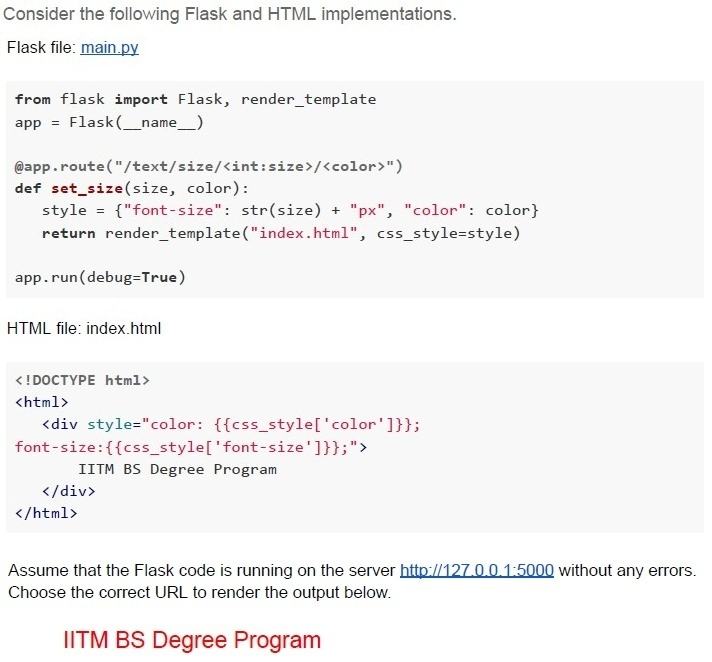
Text of the picture (copyable)
Consider the following Flask and HTML implementations.

Flask file: main.py

```python
from flask import Flask, render_template
app = Flask(__name__)

@app.route("/text/size/<int:size>/<color>")
def set_size(size, color):
    style = {"font-size": str(size) + "px", "color": color}
    return render_template("index.html", css_style=style)

app.run(debug=True)
```

HTML file: index.html

```html
<!DOCTYPE html>
<html>
    <div style="color: {{css_style['color']}};
    font-size:{{css_style['font-size']}};">
        IITM BS Degree Program
    </div>
</html>
```

Assume that the Flask code is running on the server http://127.0.0.1:5000 without any errors.
Choose the correct URL to render the output below.

IITM BS Degree Program
text
http://127.0.0.1:5000?text=red&size=20

text
```
http://127.0.0.1:5000?size=20&text=red
```

text
```
http://127.0.0.1:5000/text/size/red/20
```

text
```
http://127.0.0.1:5000/text/size/20/red
```
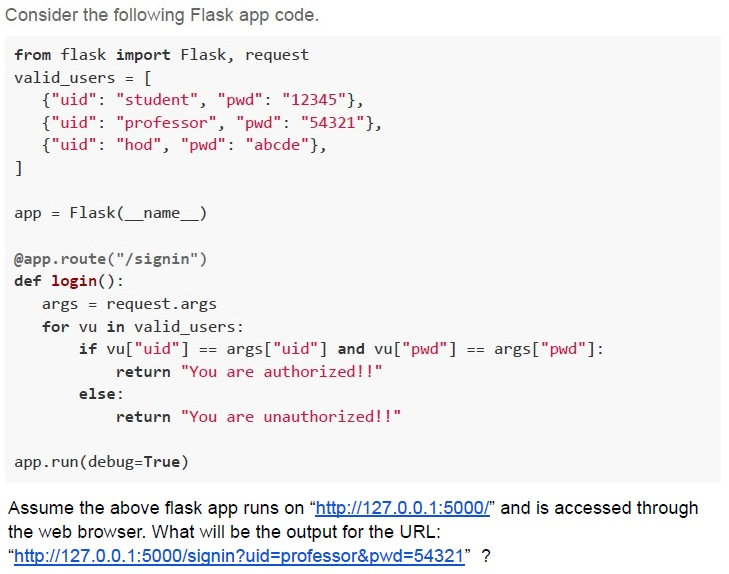
Text of the picture (copyable)
Consider the following Flask app code.

```python
from flask import Flask, request

valid_users = [
    {"uid": "student", "pwd": "12345"},
    {"uid": "professor", "pwd": "54321"},
    {"uid": "hod", "pwd": "abcde"},
]

app = Flask(__name__)

@app.route("/signin")
def login():
    args = request.args
    for vu in valid_users:
        if vu["uid"] == args["uid"] and vu["pwd"] == args["pwd"]:
            return "You are authorized!!"
    else:
        return "You are unauthorized!!"

app.run(debug=True)
```

Assume the above flask app runs on "http://127.0.0.1:5000/" and is accessed through the web browser. What will be the output for the URL: "http://127.0.0.1:5000/signin?uid=professor&pwd=54321" ?- You are authorized!!
- You are unauthorized!!
- Not Found
- Internal Server Error
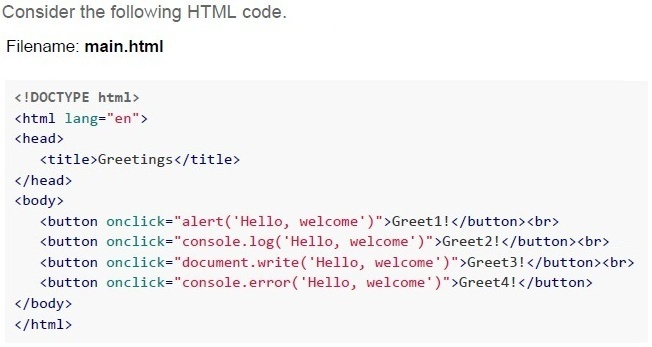

Text of the picture (copyable)
Consider the following HTML code.
Filename: main.html

```html
<!DOCTYPE html>
<html lang="en">
<head>
    <title>Greetings</title>
</head>
<body>

    <button onclick="alert('Hello, welcome')">Greet1!</button><br>
    <button onclick="console.log('Hello, welcome')">Greet2!</button><br>
    <button onclick="document.write('Hello, welcome')">Greet3!</button><br>
    <button onclick="console.error('Hello, welcome')">Greet4!</button>

</body>
</html>
```
Rendered HTML output below:

[Greet1!] (button)
[Greet2!] (button)
[Greet3!] (button)
[Greet4!] (button)

Which of the above “Greet” buttons will print greetings on the dialogue box?- Greet4
- Greet3
- Greet2
- Greet1
Which of the following statements is/are false about caching in REST APIs?
- Caching allows storing server responses in a proxy or frontend so that a clientneed not make requests to the server for the same resources repeatedly.
- Caching degrades the overall quality of service and increases load on theservers.
- Browsers treat all GET and POST requests cacheable by default.
- Caching optimizes the network by increasing the latency.
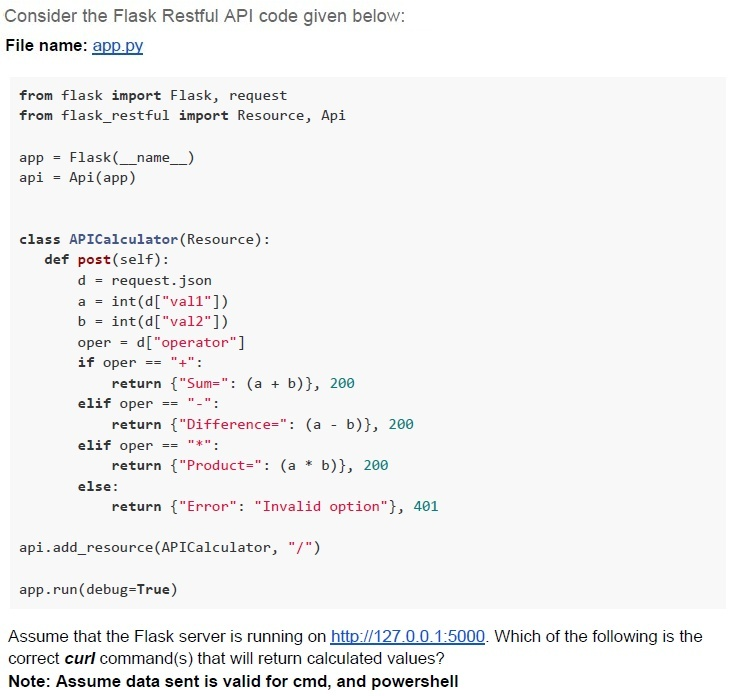
Text of the picture (copyable)
Consider the Flask Restful API code given below:
File name: app.py

```python
from flask import Flask, request
from flask_restful import Resource, Api

app = Flask(__name__)
api = Api(app)

class APICalculator(Resource):
    def post(self):
        d = request.json
        a = int(d["val1"])
        b = int(d["val2"])
        oper = d["operator"]
        if oper == "+":
            return {"Sum": (a + b)}, 200
        elif oper == "-":
            return {"Difference": (a - b)}, 200
        elif oper == "*":
            return {"Product": (a * b)}, 200
        else:
            return {"Error": "Invalid option"}, 401

api.add_resource(APICalculator, "/")

app.run(debug=True)
```

Assume that the Flask server is running on http://127.0.0.1:5000. Which of the following is the correct curl command(s) that will return calculated values?
**Note: Assume data sent is valid for cmd, and powershell**
text
```
curl -X POST "http://127.0.0.1:5000" -H 'Content-Type: application/json' -d '{"val1":27, "val2":3, "operator":"+"}'
```
text
```
curl -X POST "http://127.0.0.1:5000" -H 'Content-Type: application/json' -d
'{"val1":27,"val2":3,"operator":"**"}'
```
text
```
curl -X POST "http://127.0.0.1:5000" -H 'Content-Type: application/json' -d '{"val1":27,"val2":3,"operator":"/"}'
```
text
```
curl -X POST "http://127.0.0.1:5000" -d
'{"val1":27, "val2":3, "operator":"/"}'
```
text
```
curl -X POST "http://127.0.0.1:5000" -H 'Content-Type: application/json' -d '{"val1":27, "val2":3, "operator":"-"}'
```

Text of the picture (copyable)
Consider the following HTML code snippet.

filename: index.html

```html
<!DOCTYPE html>
<html lang="en">
<head>
    <title>CSS Document</title>
    <style>
        .container p.highlight { background-color: red; }
        .content .special { background-color: blue; }
        span.highlight { background-color: green; }
    </style>
</head>
<body>
    <div class="container">
        <p class="highlight">Welcome to our site</p>
        <div class="content">
            <p>This is regular content</p>
            <p class="highlight special">Important information</p>
            <span class="highlight">Notice</span>
        </div>
        <p class="highlight">Footer text</p>
    </div>
    <p class="highlight">Welcome to our site</p>
</body>
</html>
```

Which elements from the above document will have a red background color?
text
All elements with the class "highlight".

text
Only the `<p>` elements that are direct children of `.container` and have the class "highlight"

text
All `<p>` elements with the class "highlight" that are descendants of `.container`

text
Only the first `<p>` element with class "highlight"
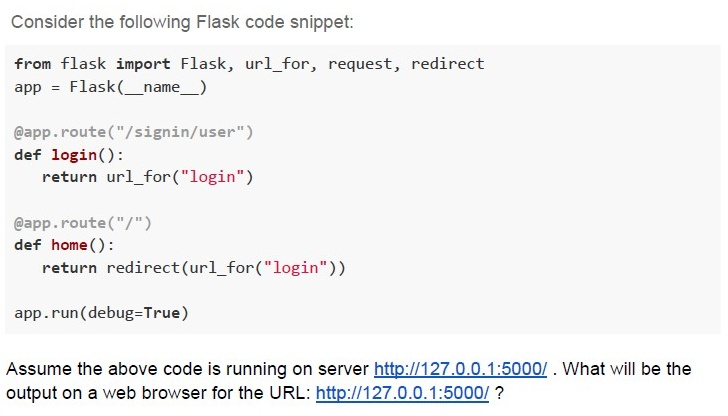
Text of the picture (copyable)
Consider the following Flask code snippet:

```python
from flask import Flask, url_for, request, redirect
app = Flask(__name__)

@app.route("/signin/user")
def login():
    return url_for("login")

@app.route("/")
def home():
    return redirect(url_for("login"))

app.run(debug=True)
```

Assume the above code is running on server http://127.0.0.1:5000/ . What will be the output on a web browser for the URL: http://127.0.0.1:5000/ ?
text
http://127.0.0.1:5000/signin/user

text
/signin/user

text
http://127.0.0.1:5000

text
Not Found
We want to use an online grammar checking tool, which takes each word from the client and sends it to the web server. The available network bandwidth between the client and the server is 2 Gbps. What should be the maximum allowed size(in MBs) of a document containing the word sent from the client to the server per second for the grammar check? (Use: 1KB= 1000Bytes, 1MB=1000KB and so on.)
Text of the picture (copyable)
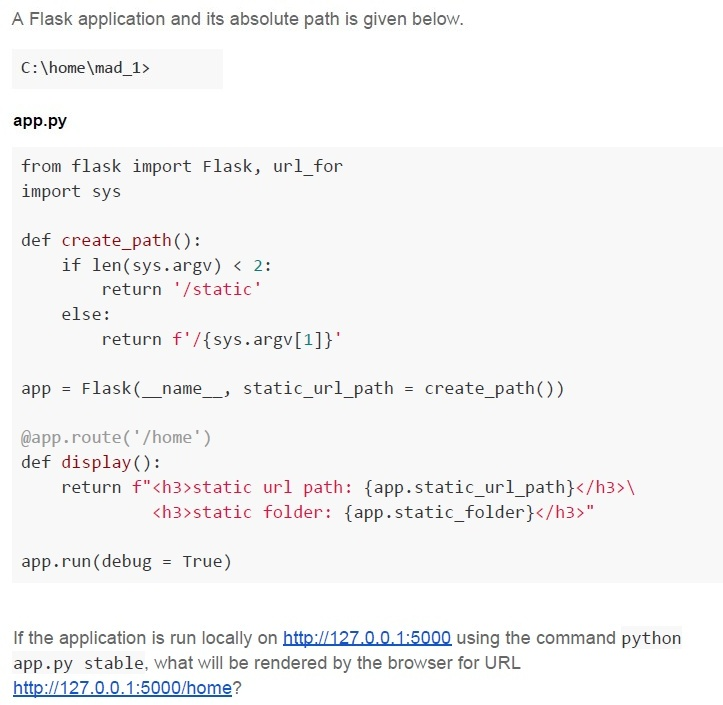
A Flask application and its absolute path is given below.

C:\home\mad_1>

**app.py**

```python
from flask import Flask, url_for
import sys

def create_path():
    if len(sys.argv) < 2:
        return '/static'
    else:
        return f'/{sys.argv[1]}'

app = Flask(__name__, static_url_path = create_path())

@app.route('/home')
def display():
    return f"<h3>static url path: {app.static_url_path}</h3>\
           <h3>static folder: {app.static_folder}</h3>"

app.run(debug = True)
```

If the application is run locally on http://127.0.0.1:5000 using the command python app.py stable, what will be rendered by the browser for URL http://127.0.0.1:5000/home?
text
static url path: C:\home\mad_1\static
static folder: /static

text
static url path: /static
static folder: C:\home\mad_1\static

text
static url path: /stable
static folder: C:\home\mad_1\stable
text
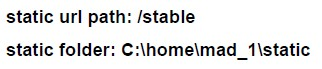
static url path: /stable
static folder: C:\home\mad_1\static
A Server S needs to retrieve data from two datacenters D1 and D2 located at 1500 kilometres and 3000 kilometres respectively. Server S and D1 are connected via medium M1 through which information can be transferred with the speed of 1.5×10⁸ m/sec, and server S and D2 are connected via medium M2. If the server received data from both the data centres at the same time, what must be the speed of information transfer in medium M2(overheads should be ignored)?
(Concept: Performance parameters of a network)

text
1.5 x 10^8 m/sec

text
2 × 10⁸ m/sec

text
2.7 × 10⁸ m/sec

text
3 × 10⁸ m/sec

Text of the picture (copyable)
A mobile server and a client initially 1000 km apart are moving towards each other
in a straight line with the speeds of 180 kmph and 70 kmph respectively. The network
bandwidth is set constant to 3 Mbps. Determine how much data (in Gigabytes) is used
by the client before the client and the server collide. [speed of light in vacuum: 3 x 10⁸
m/sec, 1 MB = 1000 KB and so on.]
- 64.8
- 18
- 5.4
- 22.5
Text of the picture (copyable)
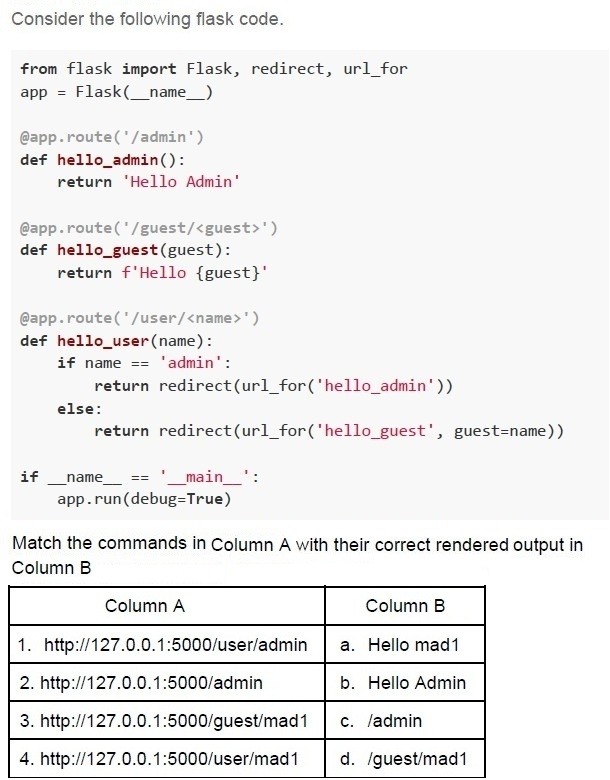
Consider the following flask code.

```python
from flask import Flask, redirect, url_for
app = Flask(__name__)

@app.route('/admin')
def hello_admin():
    return 'Hello Admin'

@app.route('/guest/<guest>')
def hello_guest(guest):
    return f'Hello {guest}'

@app.route('/user/<name>')
def hello_user(name):
    if name == 'admin':
        return redirect(url_for('hello_admin'))
    else:
        return redirect(url_for('hello_guest', guest=name))

if __name__ == '__main__':
    app.run(debug=True)
```

Match the commands in Column A with their correct rendered output in Column B

| Column A | Column B |
|---|---|
| 1. http://127.0.0.1:5000/user/admin | a. Hello mad1 |
| 2. http://127.0.0.1:5000/admin | b. Hello Admin |
| 3. http://127.0.0.1:5000/guest/mad1 | c. /admin |
| 4. http://127.0.0.1:5000/user/mad1 | d. /guest/mad1 |- 1-c, 2-b, 3-a, 4-d
- 1-c, 2-d, 3-a, 4-b
- 1-b, 2-a, 3-b, 4-d
- 1-b, 2-b, 3-a, 4-a
Text of the picture (copyable)
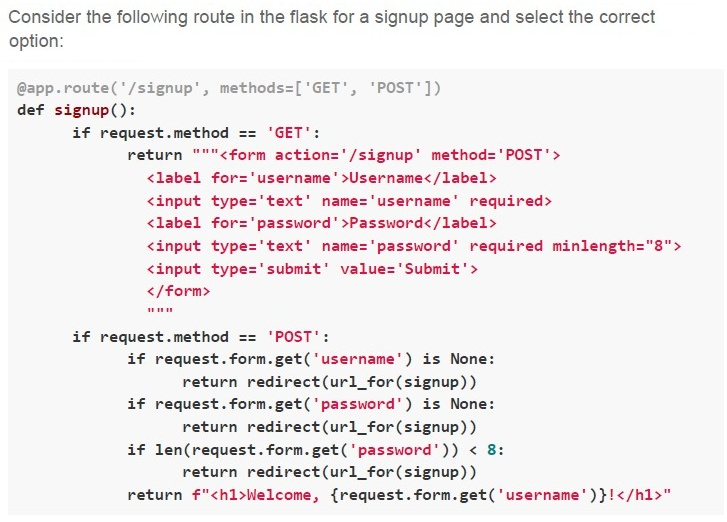
Consider the following route in the flask for a signup page and select the correct option:

```python
@app.route('/signup', methods=['GET', 'POST'])
def signup():
    if request.method == 'GET':
        return """<form action='/signup' method='POST'>
            <label for='username'>Username</label>
            <input type='text' name='username' required>
            <label for='password'>Password</label>
            <input type='text' name='password' required minlength="8">
            <input type='submit' value='Submit'>
        </form>
        """
    if request.method == 'POST':
        if request.form.get('username') is None:
            return redirect(url_for(signup))
        if request.form.get('password') is None:
            return redirect(url_for(signup))
        if len(request.form.get('password')) < 8:
            return redirect(url_for(signup))
        return f"<h1>Welcome, {request.form.get('username')}!</h1>"
```- The signup page is dynamically generated.
- The signup page uses server-side rendering.
- The signup page uses frontend validation.
- The signup page uses backend validation.
Text of the picture (copyable)
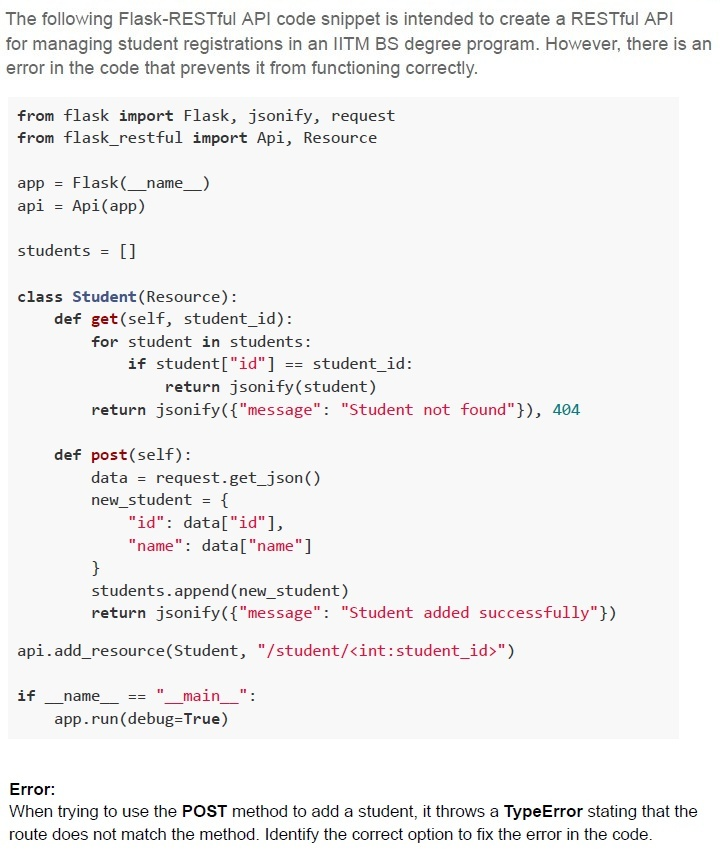
The following Flask-RESTful API code snippet is intended to create a RESTful API for managing student registrations in an IITM BS degree program. However, there is an error in the code that prevents it from functioning correctly.

```python
from flask import Flask, jsonify, request
from flask_restful import Api, Resource

app = Flask(__name__)
api = Api(app)

students = []

class Student(Resource):
    def get(self, student_id):
        for student in students:
            if student["id"] == student_id:
                return jsonify(student)
        return jsonify({"message": "Student not found"}), 404

    def post(self):
        data = request.get_json()
        new_student = {
            "id": data["id"],
            "name": data["name"]
        }
        students.append(new_student)
        return jsonify({"message": "Student added successfully"})

api.add_resource(Student, "/student/<int:student_id>")

if __name__ == "__main__":
    app.run(debug=True)
```

**Error:**
When trying to use the **POST** method to add a student, it throws a **TypeError** stating that the route does not match the method. Identify the correct option to fix the error in the code.
text
Change the api.add_resource(Student, "/student/<int:student_id>") to:
```
api.add_resource(Student, "/student", "/student/<int:student_id>")
```

text
Add the student_id parameter to the **post** method in the Student class as **def**
```
post(self, student_id):
```
text
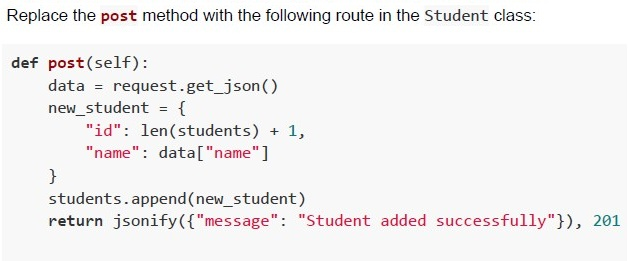
Replace the **post** method with the following route in the Student class:

```python
def post(self):
    data = request.get_json()
    new_student = {
        "id": len(students) + 1,
        "name": data["name"]
    }
    students.append(new_student)
    return jsonify({"message": "Student added successfully"}), 201
```
text
Change the api.add_resource(Student, "/student/<int:student_id>") to:
api.add_resource(Student, "/students")