Home / MAD2 / Week 2 / Real questions
MAD2 week 2 - real exam questions
60 questions pulled from past papers whose wording matches this week's topics, newest first, duplicates removed. Pick your answers, then press Check answers. Figures and answer keys are the originals.
Elapsed 00:00
A startup is building a food delivery app. The customer-facing screen shows live order status updates: "Order Placed → Preparing → Out for Delivery → Delivered". Each stage is triggered by the restaurant or the delivery rider updating the status on their end. The customer's screen should reflect these changes in real time without refreshing the page. Two developers debate about the right technology: Developer A says: "Let's use Server-Sent Events. It's the right fit here." Developer B says: "No, we must use WebSockets. SSE won't work." Who is correct, and why?
- Developer B is correct. SSE cannot transmit JSON data, so structured order status objects cannot be pushed to the browser.
- Developer B is correct. SSE connections do not reconnect automatically when the network is briefly interrupted, making it unreliable for a live tracker.
- Developer A is correct, but only if WebSockets are set up as a mandatory fallback, since SSE requires HTTP/2 to function.
- Developer A is correct. The tracker only requires the server to push status updates to the customer, without the customer sending data back through the same connection. SSE is purpose-built for exactly this one-way server-to-client push scenario.
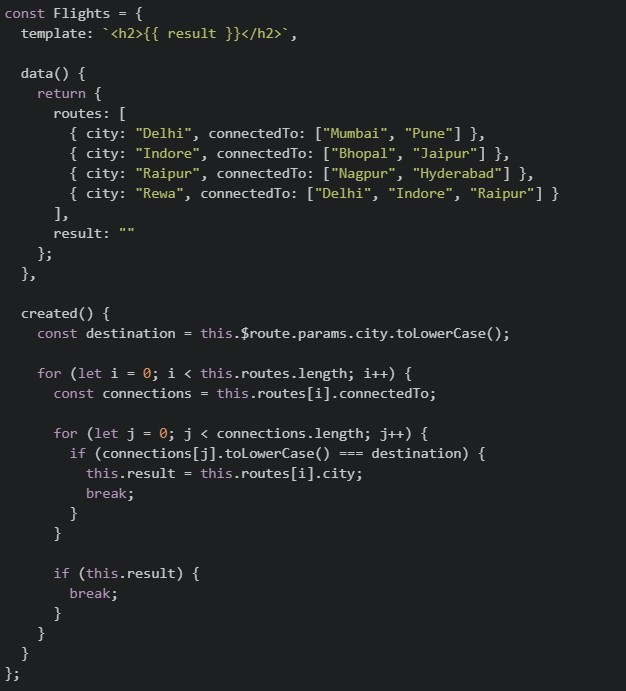
Consider the following  and JavaScript
  for a Vue application: File: index.html
 File: app.js
 Suppose the application is running on
  , and the user visits the URL:
  What will be rendered by the browser? [NOTE: is divided in two images, consider them as one file content.]
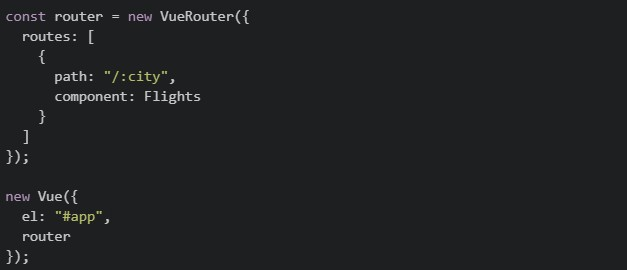
and JavaScript for a Vue application: File: index.html
File: app.js
Suppose the application is running on , and the user visits the URL: What will be rendered by the browser? [NOTE: is divided in two images, consider them as one file content.]
Text of the picture (copyable)
index.html
app.js
```html
<div id="app">
  <router-view></router-view>
</div>
```
```javascript
const Flights = {
  template: `<h2>{{ result }}</h2>`,

  data() {
    return {
      routes: [
        { city: "Delhi", connectedTo: ["Mumbai", "Pune"] },
        { city: "Indore", connectedTo: ["Bhopal", "Jaipur"] },
        { city: "Raipur", connectedTo: ["Nagpur", "Hyderabad"] },
        { city: "Rewa", connectedTo: ["Delhi", "Indore", "Raipur"] }
      ],
      result: ""
    };
  },

  created() {
    const destination = this.$route.params.city.toLowerCase();

    for (let i = 0; i < this.routes.length; i++) {
      const connections = this.routes[i].connectedTo;

      for (let j = 0; j < connections.length; j++) {
        if (connections[j].toLowerCase() === destination) {
          this.result = this.routes[i].city;
          break;
        }
      }

      if (this.result) {
        break;
      }
    }
  }
};
```
```
http://localhost:8080
```
```
http://localhost:8080/#/raipur
```
app.js
```javascript
const router = new VueRouter({
  routes: [
    {
      path: "/:city",
      component: Flights
    }
  ]
});

new Vue({
  el: "#app",
  router
});
```- Delhi
- Indore
- Raipur
- Rewa
Consider the following Vuex store:
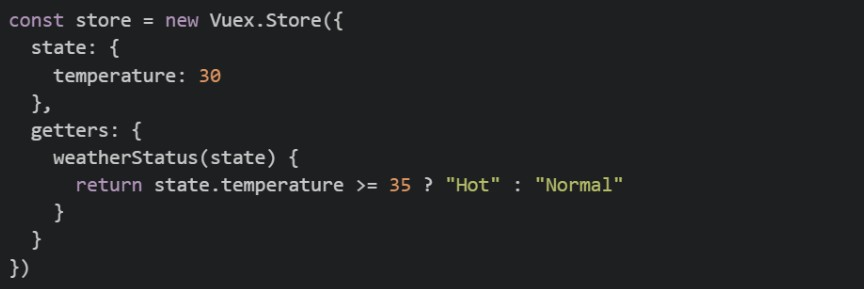 The
The  getter is used in a Vue component as shown below:
 Now suppose the Vuex getter is removed, while the temperature state continues to be updated through Vuex mutations. Which of the following implementations correctly recreates in the component so that it automatically reacts whenever the Vuex
  changes?
The getter is used in a Vue component as shown below:
Now suppose the Vuex getter is removed, while the temperature state continues to be updated through Vuex mutations. Which of the following implementations correctly recreates in the component so that it automatically reacts whenever the Vuex changes?Text of the picture (copyable)
```javascript
const store = new Vuex.Store({
  state: {
    temperature: 30
  },
  getters: {
    weatherStatus(state) {
      return state.temperature >= 35 ? "Hot" : "Normal"
    }
  }
})
```
weatherStatus
```javascript
computed: {
  weatherStatus() {
    return this.$store.getters.weatherStatus
  }
}
```
weatherStatus
weatherStatus
temperature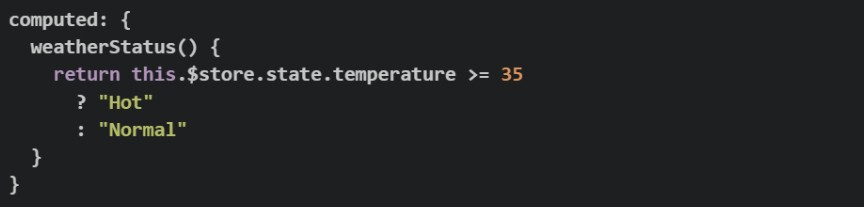
text
```javascript
computed: {
  weatherStatus() {
    return this.$store.state.temperature >= 35
      ? "Hot"
      : "Normal"
  }
}
```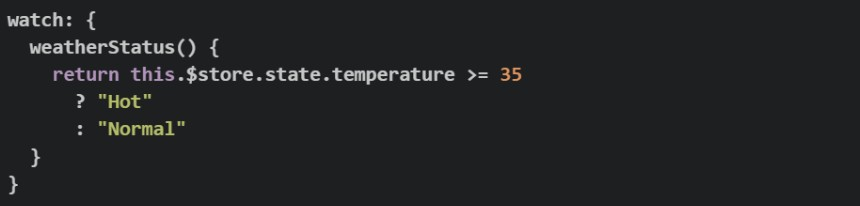
text
```javascript
watch: {
  weatherStatus() {
    return this.$store.state.temperature >= 35
      ? "Hot"
      : "Normal"
  }
}
```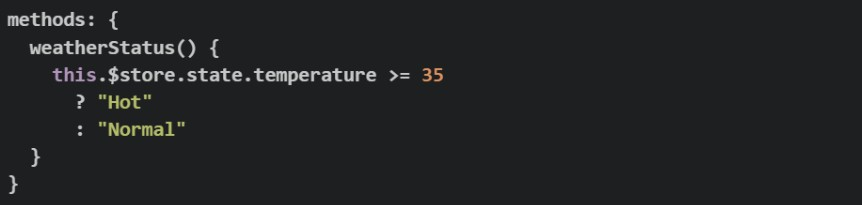
text
```javascript
methods: {
  weatherStatus() {
    this.$store.state.temperature >= 35
      ? "Hot"
      : "Normal"
  }
}
```
text
```javascript
watch: {
  weatherStatus() {
    return this.$store.state.temperature >= 35
  }
}
```
What is logged to the console after running the following code?
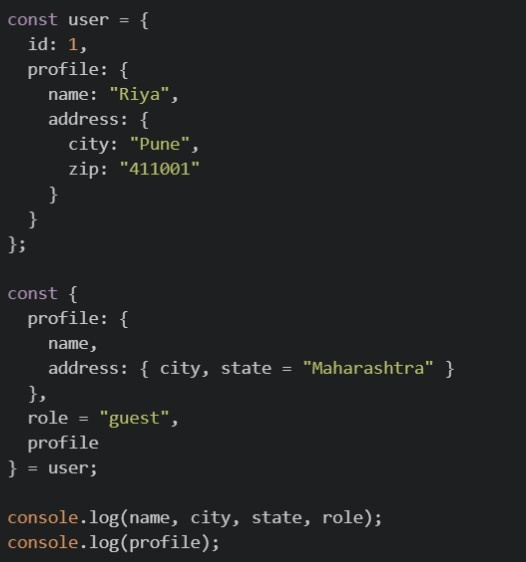
Text of the picture (copyable)
```javascript
const user = {
  id: 1,
  profile: {
    name: "Riya",
    address: {
      city: "Pune",
      zip: "411001"
    }
  }
};

const {
  profile: {
    name,
    address: { city, state = "Maharashtra" }
  },
  role = "guest",
  profile
} = user;

console.log(name, city, state, role);
console.log(profile);
```

text
Riya Pune Maharashtra guest ``` { name: "Riya", address: { city: "Pune", zip: "411001" } } ```-

text
Riya Pune Maharashtra guest
undefined


text
``` undefined undefined Maharashtra guest ``` ```json { "name": "Riya", "address": { ...} } ```- This code throws a
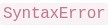 , because you cannot destructure profile into nested variables and also assign it to a plain variable profile in the same statement.
text
SyntaxError
Consider the following JavaScript code:
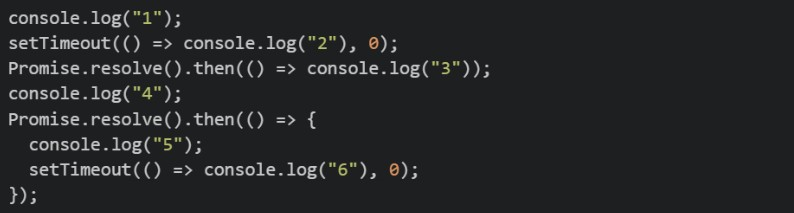 What is the order of console output?
What is the order of console output?Text of the picture (copyable)
```javascript
console.log("1");
setTimeout(() => console.log("2"), 0);
Promise.resolve().then(() => console.log("3"));
console.log("4");
Promise.resolve().then(() => {
  console.log("5");
  setTimeout(() => console.log("6"), 0);
});
```- 1, 4, 3, 5, 2, 6
- 1, 4, 3, 5, 6, 2
- 1, 3, 4, 5, 2, 6
- 1, 4, 2, 3, 5, 6
Given the following code, select all the statements that are TRUE about its execution if the code is run in a browser environment.
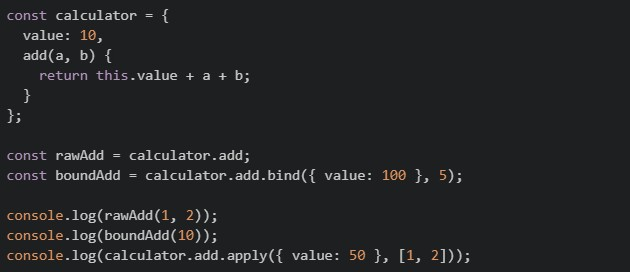
Text of the picture (copyable)
```javascript
const calculator = {
value: 10,
add(a, b) {
return this.value + a + b;
}
};
const rawAdd = calculator.add;
const boundAdd = calculator.add.bind({ value: 100 }, 5);
console.log(rawAdd(1, 2));
console.log(boundAdd(10));
console.log(calculator.add.apply({ value: 50 }, [1, 2]));
```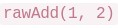 evaluates to
text
```
rawAdd(1, 2)
```
NaN
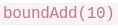 evaluates to
text
```
boundAdd(10)
```
115
 evaluates to
text
``` calculator.add.apply({ value: 50 }, [1, 2]) ``` 53- throws a

text
```
calculator.add.apply({ value: 50 }, [1, 2])
```
TypeError
Consider the following Flask JWT code:
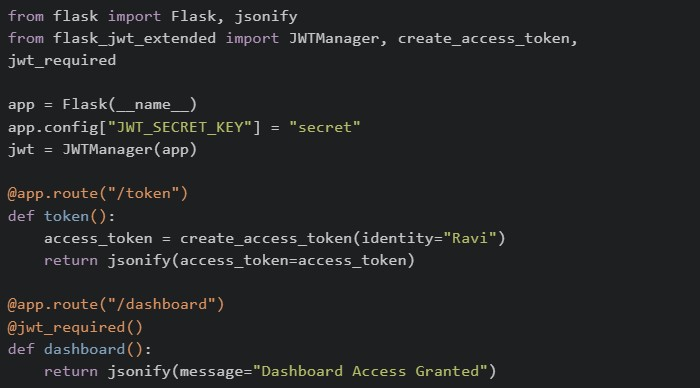 A client first accesses
  and then tries to access
  . Which of the following statements are correct?
A client first accesses and then tries to access . Which of the following statements are correct?Text of the picture (copyable)
```python
from flask import Flask, jsonify
from flask_jwt_extended import JWTManager, create_access_token, \
    jwt_required

app = Flask(__name__)
app.config["JWT_SECRET_KEY"] = "secret"
jwt = JWTManager(app)

@app.route("/token")
def token():
    access_token = create_access_token(identity="Ravi")
    return jsonify(access_token=access_token)

@app.route("/dashboard")
@jwt_required()
def dashboard():
    return jsonify(message="Dashboard Access Granted")
```
/token
/dashboard- can only be accessed if a valid JWT token is sent with the request.
text
/dashboard
- If the JWT token is missing or invalid, Flask-JWT-Extended returns an unauthorized error.
- The JWT token is typically sent in the
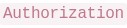 header while accessing protected routes.
text
Authorization
- The token generated by is automatically stored by Flask and reused for future requests.
text
/token
Given the following code running in the browser, select all the statements that are  about its output:
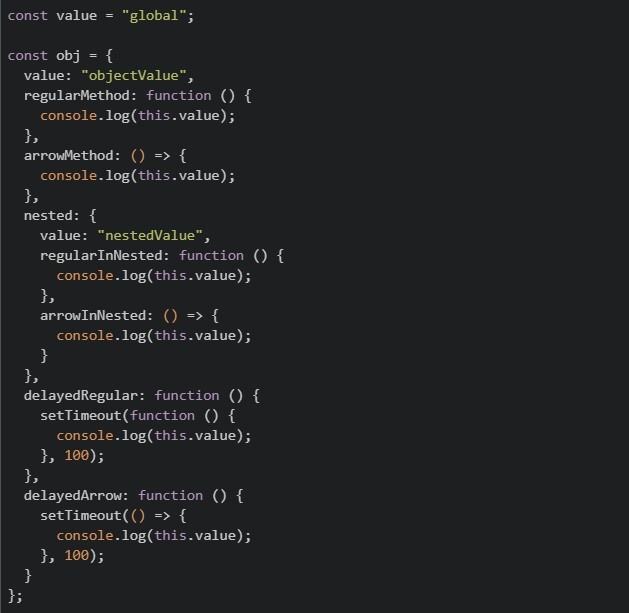
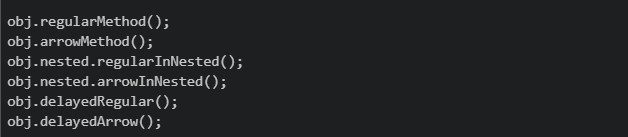
about its output:
Text of the picture (copyable)
TRUE
```javascript
const value = "global";
const obj = {
value: "objectValue",
regularMethod: function () {
console.log(this.value);
},
arrowMethod: () => {
console.log(this.value);
},
nested: {
value: "nestedValue",
regularInNested: function () {
console.log(this.value);
},
arrowInNested: () => {
console.log(this.value);
},
},
delayedRegular: function () {
setTimeout(function () {
console.log(this.value);
}, 100);
},
delayedArrow: function () {
setTimeout(() => {
console.log(this.value);
}, 100);
},
};
```
```javascript
obj.regularMethod();
obj.arrowMethod();
obj.nested.regularInNested();
obj.nested.arrowInNested();
obj.delayedRegular();
obj.delayedArrow();
``` logs "objectValue"
text
```
obj.regularMethod()
```
 logs "objectValue"
text
```
obj.arrowMethod()
```
 logs "nestedValue"
text
```
obj.nested.regularInNested()
```
 logs
logs text
```
obj.nested.arrowInNested()
```
undefined
 logs "objectValue"
text
```
obj.delayedArrow()
```
 logs "objectValue"
text
```
obj.delayedRegular()
```
Comprehension passage for this question
Consider the following JavaScript code:
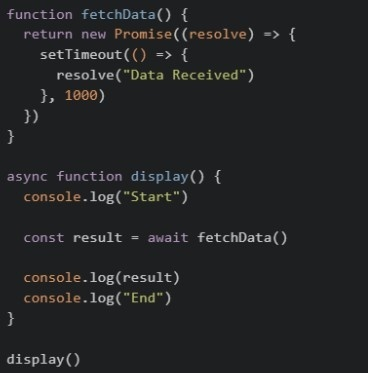 Based on the above data, answer the given subquestions.
Which of the following statements are correct?
 pauses the execution of the
  function until the Promise resolves.
text
await
```
display()
```
 immediately returns the resolved string "Data Received".
text
```
fetchData()
```
 functions cannot return a
  .
.text
async
Promise
- Removing would cause
 to store a object instead of the resolved value.
text
await
result
Promise
Comprehension passage for this question
Read the following code carefully and answer the given subquestions. tasks.py:
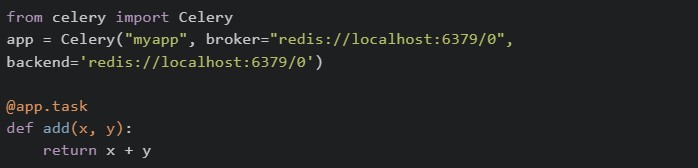 Called from a view/script:
 Checked immediately, right after delay() — worker hasn't processed it yet:
 Called separately, after waiting for the worker to finish the task:

What do the two print statements, print(result) and print(type(result)) in the first code block output?
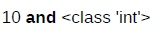
text
10 **and** <class 'int'>

text
A task ID string and <class 'celery.result.AsyncResult'>

text
None and <class 'NoneType'>

text
10 and <class 'celery.result.AsyncResult'>
Comprehension passage for this question
Read the following router and component setup carefully and answer the given sub questions: Router setup:
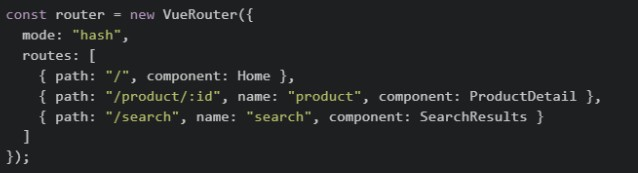 component's method:
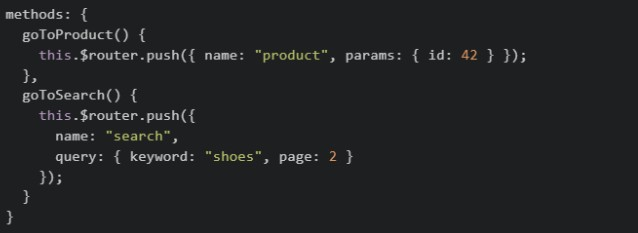
Inside  component, what expression correctly reads the
  value from the URL after navigation?
component, what expression correctly reads the value from the URL after navigation?Text of the picture (copyable)
SearchResults
keyword
- this.$router.query.keyword
- this.$route.query.keyword
- this.query.keyword
- this.$router.params.keyword
Read the following component code carefully. file: script.js
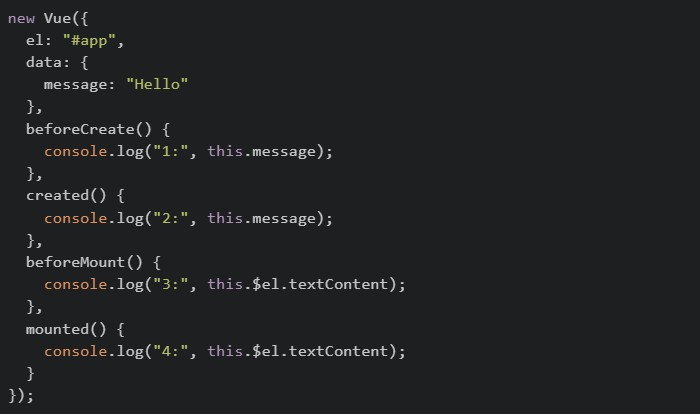 file:index.html
 Select all statements that correctly describe the console output:
file:index.html
Select all statements that correctly describe the console output:Text of the picture (copyable)
```javascript
new Vue({
  el: "#app",
  data: {
    message: "Hello"
  },
  beforeCreate() {
    console.log("1:", this.message);
  },
  created() {
    console.log("2:", this.message);
  },
  beforeMount() {
    console.log("3:", this.$el.textContent);
  },
  mounted() {
    console.log("4:", this.$el.textContent);
  }
});
```
```html
<div id="app">{{ message }}</div>
```- Log 1: prints
text
undefined
- Log 2: prints

text
hello
- Log 3: prints
text
hello
- Log 4: prints
text
hello
- Log 3: throws an error because $el is not yet available
A Vue 2 application fetches a list of courses from an API and wants to display them in the template.
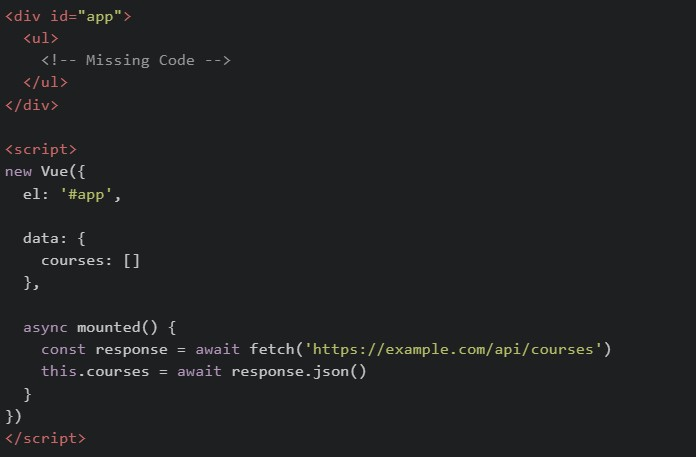 Assume the API returns:
 Complete the missing code so that all course names are rendered correctly. Which of the following code snippets can correctly replace
  ?
?
Assume the API returns:
Complete the missing code so that all course names are rendered correctly. Which of the following code snippets can correctly replace ?Text of the picture (copyable)
```html
<div id="app">
  <ul>
    <!-- Missing Code -->
  </ul>
</div>

<script>
  new Vue({
    el: '#app',

    data: {
      courses: []
    },

    async mounted() {
      const response = await fetch('https://example.com/api/courses')
      this.courses = await response.json()
    }
  })
</script>
```
```json
[
  { "id": 1, "name": "MAD-2" },
  { "id": 2, "name": "DBMS" }
]
```
```html
<!-- Missing Code -->
```
text
```html
<li v-for="course in courses" :key="course.id">
  {{ course.name }}
</li>
```
text
```html
<li v-for="(course, index) in courses" :key="index">
  {{ course.name }}
</li>
```
text
```html
<li v-if="course in courses">
  {{ course.name }}
</li>
```
text
```html
<li v-for="courses in course">
  {{ courses.name }}
</li>
```
Pratham builds a Flask route that generates a PDF report and sends it to the user via email, all inside the route handler without using Celery. A tester notices that the browser takes about 12 seconds to respond, and during that time other users are unable to use the app normally. Which of the following correctly explain this behaviour and what Celery would change?
- Flask handles one request at a time per worker, so the long-running task blocks the entire process until it finishes.
- Other users' requests are queued and only served after the heavy task completes, making the app feel unresponsive.
- Using Celery's
 would make the task run faster by giving it more CPU cores.
text
```
.delay()
```
- With Celery, Flask immediately returns a response to the user while the report generation and email sending happen inside a separate Celery worker process in the background.
What is the value of result after running the following code?
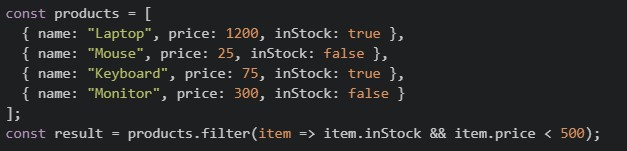
Text of the picture (copyable)
```javascript
const products = [
  { name: "Laptop", price: 1200, inStock: true },
  { name: "Mouse", price: 25, inStock: false },
  { name: "Keyboard", price: 75, inStock: true },
  { name: "Monitor", price: 300, inStock: false }
];

const result = products.filter(item => item.inStock && item.price < 500);
```
text
```json
{ "name": "Keyboard", "price": 75, "inStock": true }
```
text
```
[[{ name: "Laptop", price: 1200, inStock: true }, { name: "Keyboard", price: 75, inStock: true }]]
```
text
```
[[{ name: "Keyboard", price: 75, inStock: true }]]
```
text
```html
<!DOCTYPE html>
<html lang="en">
<head>
    <meta charset="UTF-8">
    <meta name="viewport" content="width=device-width, initial-scale=1.0">
    <title>Document</title>
    <style>
        .box {
            width: 100px;
            height: 100px;
            background-color: lightblue;
            margin: 10px;
            border: 1px solid black;
        }
        .container {
            display: flex;
            flex-direction: row;
            flex-wrap: wrap;
            justify-content: flex-start;
            align-items: flex-start;
            align-content: flex-start;
            height: 300px;
            border: 2px solid red;
        }
    </style>
</head>
<body>
    <div class="container">
        <div class="box">Box 1</div>
        <div class="box">Box 2</div>
        <div class="box">Box 3</div>
        <div class="box">Box 4</div>
        <div class="box">Box 5</div>
        <div class="box">Box 6</div>
    </div>
</body>
</html>
```
Comprehension passage for this question
Consider the following JavaScript code:
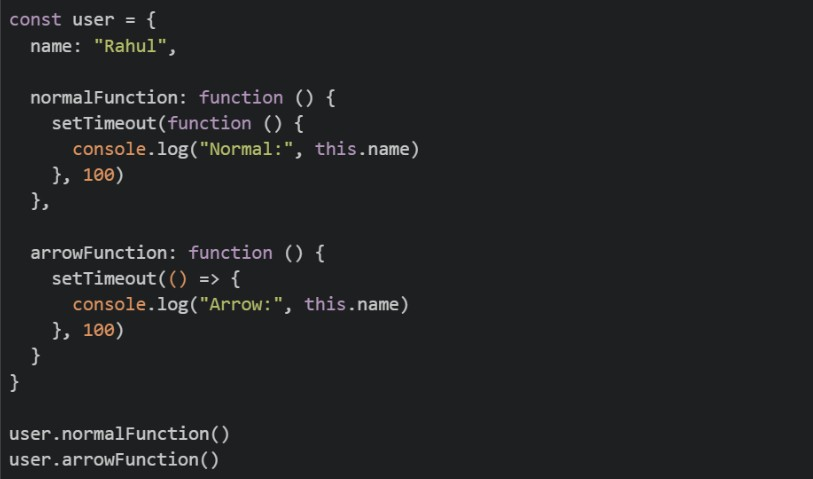 Based on the above data, answer the given subquestions.
Which of the following statements correctly explain the behaviour of the code?
- The callback inside
 gets its own
  binding.
text
```javascript setTimeout(function(){}) ``` this - Arrow functions inherit from the surrounding lexical scope.
text
this
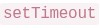 automatically binds to the surrounding object.
text
```
setTimeout
```
this
- If we use an arrow function inside in
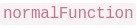 , it will print "Rahul".
text
```
setTimeout
```
```
normalFunction
```
Comprehension passage for this question
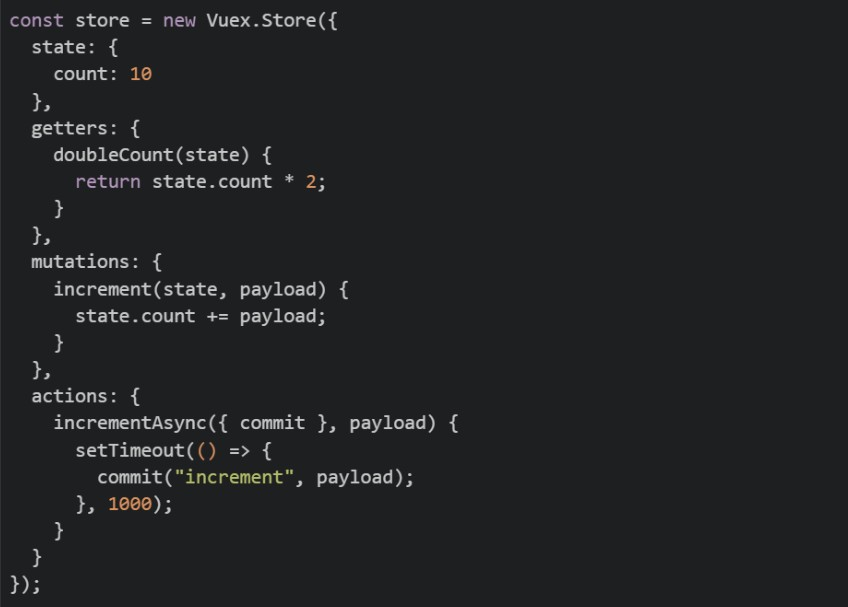
Read the following Vuex setup carefully and answer the given subquestions: store.js
 component
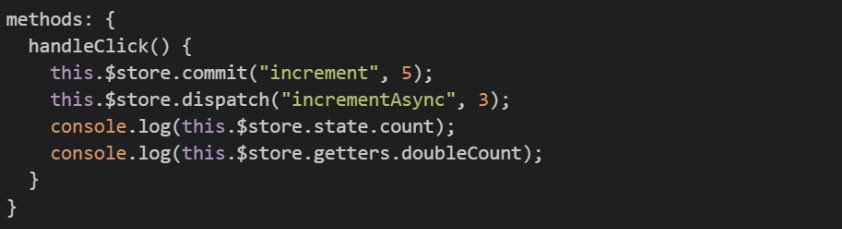
Which statement correctly describes why  is defined as a
  while
while 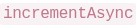 is defined as an
  ?
?
is defined as a while is defined as an ?Text of the picture (copyable)
```
increment
```
mutation
```
incrementAsync
```
action
- Mutations can contain asynchronous code; actions cannot
- Only actions can call commit; mutations cannot
- Mutations must be synchronous; actions can contain async logic and then commit mutations
- There is no real difference; both are interchangeable
A developer opens the Node.js REPL and runs the following line:
 Why does this fail?
Why does this fail?Text of the picture (copyable)
```javascript
const heading = document.querySelector("h1")
```- Node.js cannot execute JavaScript from the terminal.
- The Node.js runtime does not provide browser DOM APIs like

text
document
 works only after using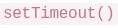
text
```javascript
document.querySelector()
```
```
setTimeout()
```
- V8 can execute only arithmetic expressions, not DOM code.
Point out the error with the following code that is used to display user data?
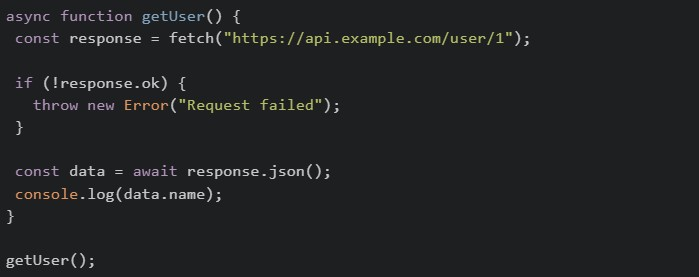
Text of the picture (copyable)
```javascript
async function getUser() {
const response = await fetch("https://api.example.com/user/1");
if (!response.ok) {
throw new Error("Request failed");
}
const data = await response.json();
console.log(data.name);
}
getUser();
``` should use POST method by default, not GET
text
```
fetch()
```
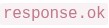 and
and  will throw errors because response is a
 text
response.ok
```
response.json()
```
Promise
 cannot be called on a
  response; use
  instead
text
```
.json()
```
fetch
```
.text()
```
- does not work inside functions
text
```
fetch()
```
async
What is the correct output order for the following code?

Text of the picture (copyable)
```javascript
console.log("A")
setTimeout(() => console.log("B"), 0)
Promise.resolve().then(() => console.log("C"))
console.log("D")
```- A B C D
- C A D B
- A D C B
- A D B C
Consider the following code:
 What happens to
  ?
?
What happens to ?Text of the picture (copyable)
```javascript
const settings = { theme: "light", layout: { sidebar: true } }
const copy = { ...settings }
copy.layout.sidebar = false
```
```
settings.layout.sidebar
```- It remains
 because spread syntax always creates a deep copy.
text
true
- It becomes
 because the nested object is still shared in a shallow copy.
text
false
- It becomes because
 is removed from the original object.
text
undefined
layout
- The code throws an error because nested objects cannot be copied with spread syntax.
Consider the following JavaScript code snippet?
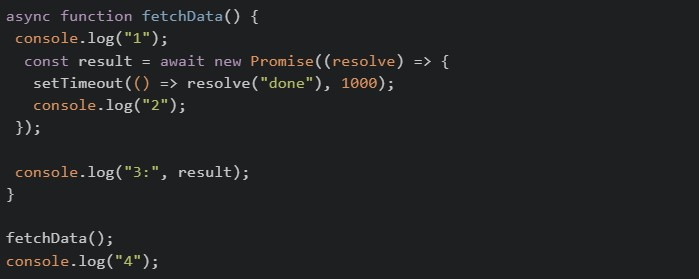 What will be the output of above code on the browser’s console?
What will be the output of above code on the browser’s console?Text of the picture (copyable)
```javascript
async function fetchData() {
  console.log("1");
  const result = await new Promise((resolve) => {
    setTimeout(() => resolve("done"), 1000);
    console.log("2");
  });

  console.log("3:", result);
}

fetchData();
console.log("4");
```- 1 → 2 → 3: done → 4
- 1 → 4 → 2 → 3: done
- 1 → 2 → 4 → 3: done
- 1 → 2 → 4 (3 never prints due to unresolved promise)
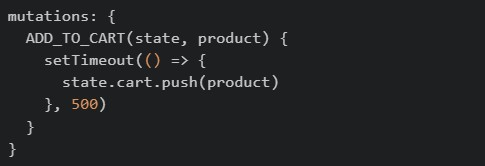
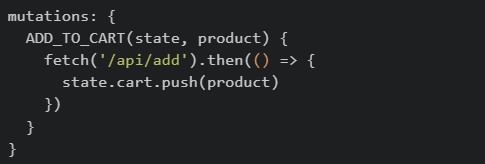
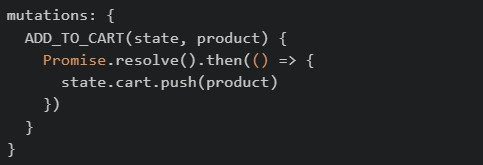
Consider the following Vuex store snippets. Which of the following demonstrates the correct usage of a mutation as per its definition?
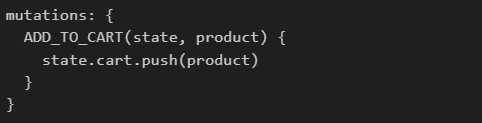
text
```
mutations: {
  ADD_TO_CART(state, product) {
    state.cart.push(product)
  }
}
```
text
```javascript
mutations: {
  ADD_TO_CART(state, product) {
    setTimeout(() => {
      state.cart.push(product)
    }, 500)
  }
}
```
text
```javascript
mutations: {
  ADD_TO_CART(state, product) {
    fetch('/api/add').then(() => {
      state.cart.push(product)
    })
  }
}
```
text
```javascript
mutations: {
  ADD_TO_CART(state, product) {
    Promise.resolve().then(() => {
      state.cart.push(product)
    })
  }
}
```
Suppose the following HTML exists:
 Which of the following statements are correct?
Which of the following statements are correct?Text of the picture (copyable)
```html
<div class="card" data-price="499">
<span id="title">Vue Book</span>
</div>
``` returns
  .
.text
```javascript document.querySelector(".card").dataset.price ``` "499" converts the value to numeric
  .
.text
```javascript Number(document.querySelector(".card").dataset.price) ``` 499 can read the visible text
  .
.text
```javascript document.getElementById("title").innerText ``` "Vue Book" returns a single element, not a collection.
text
```javascript
document.querySelectorAll(".card")
```
A Vue frontend, a mobile app, and another backend service all call the same Flask API deployed on multiple servers. The team chooses JWT authentication. Which of the following statements are correct?
- Each request can carry the token, so any server can validate it without storing a per-user session in memory.
- JWT is API-friendly because clients can send it using the
 header.
text
```
Authorization: Bearer <token>
```
- In Flask-JWT-Extended,
 can read the identity stored in the token.
text
```
get_jwt_identity()
```
- Session-based authentication is usually easier to scale across multiple servers because no shared storage is needed. The team should have chosen this.
In a Vue Router app, a developer uses: •  inside a parent route, •
  , •
, •  inside a method. Which statements are correct?
inside a parent route, • , • inside a method. Which statements are correct?Text of the picture (copyable)
children
```
{ path: '*', component: NotFound }
```
```javascript
this.$router.go(-1)
```- can be used to organize nested routes under a parent route.
text
children
 can act as a fallback for unknown routes.
text
*
- tries to go back one step in browser history.
text
```javascript
this.$router.go(-1)
```
- Vue Router removes the need for route components.
Fill in Code1, inside a mutation handler, which can be used to reduce the price of each of the products in the state by a certain discount. app.js:
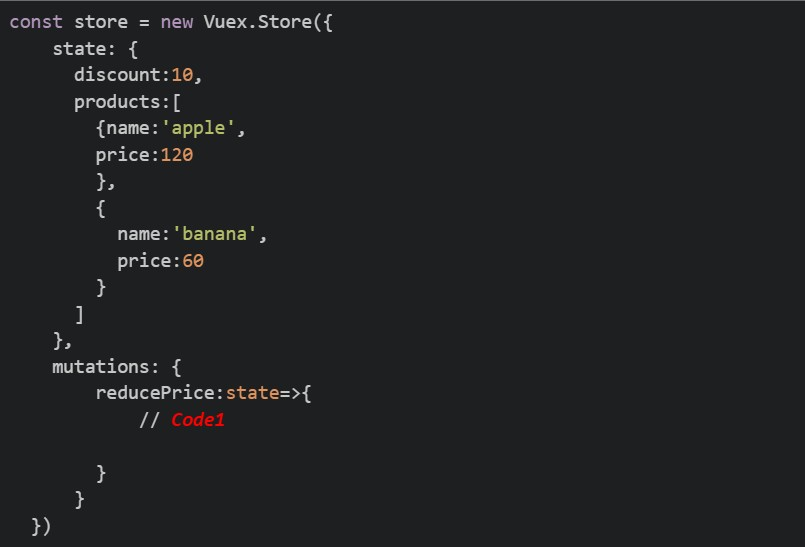
Text of the picture (copyable)
```javascript
const store = new Vuex.Store({
  state: {
    discount: 10,
    products: [
      {name: 'apple',
        price: 120
      },
      {
        name: 'banana',
        price: 60
      }
    ]
  },
  mutations: {
    reducePrice: state=>{
      // Code1
    }
  }
})
```
text
```javascript
this.$store.state.products.forEach(product => { product.price -= (state.discount)/100*product.price; })
```
text
```javascript
state.products.forEach(product => { product.price -= (state.discount)/100*product.price;})
```
text
```javascript
commit.products.forEach(product => { product.price -= (state.discount)/100*product.price;})
```
text
```javascript
dispatch.products.forEach(product => { product.price -= (state.discount)/100*product.price;})
```
Consider the following Vuex store and component code. store.js
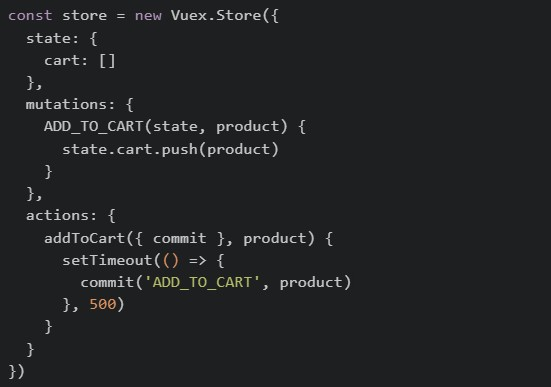 Component.vue
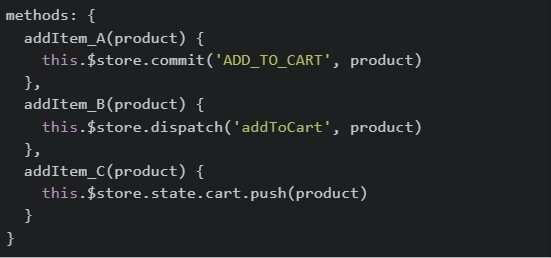 After triggering all three methods (
  ,
,  and
and  ) one by one, which of the following statements is correct?
Component.vue
After triggering all three methods ( , and ) one by one, which of the following statements is correct?Text of the picture (copyable)
```javascript
const store = new Vuex.Store({
  state: {
    cart: []
  },
  mutations: {
    ADD_TO_CART(state, product) {
      state.cart.push(product)
    }
  },
  actions: {
    addToCart({ commit }, product) {
      setTimeout(() => {
        commit('ADD_TO_CART', product)
      }, 500)
    }
  }
})
```
```javascript
methods: {
  addItem_A(product) {
    this.$store.commit('ADD_TO_CART', product)
  },
  addItem_B(product) {
    this.$store.dispatch('addToCart', product)
  },
  addItem_C(product) {
    this.$store.state.cart.push(product)
  }
}
```
addItem_A
addItem_B
addItem_C- All three methods will update the cart and all changes will be visible in Vue DevTools mutation history.
- Only and will appear in Vue DevTools mutation history, but will appear with a delay.
text
addItem_A
addItem_B
addItem_B
- Only will update the cart because mutations cannot be called directly from components.
text
addItem_B
- will throw an error because Vuex prevents direct state modification.
text
addItem_C
Read the following component carefully.
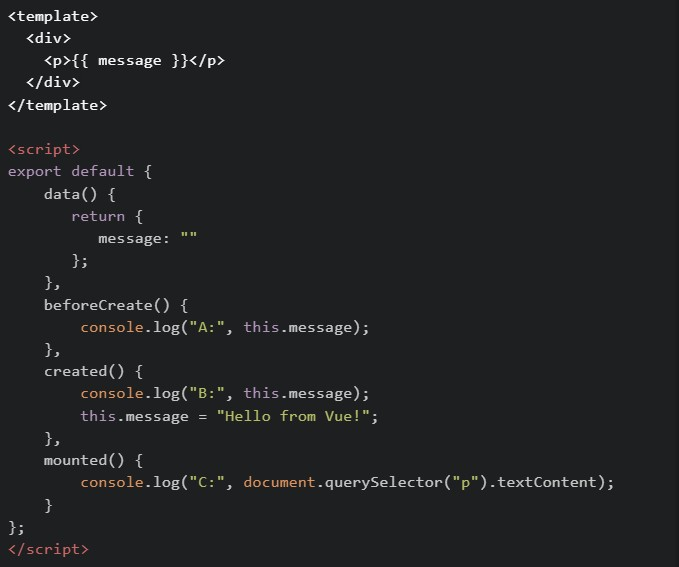 What will be logged in the console when this component first loads?
What will be logged in the console when this component first loads?Text of the picture (copyable)
```html
<template>
  <div>
    <p>{{ message }}</p>
  </div>
</template>

<script>
export default {
  data() {
    return {
      message: ""
    };
  },
  beforeCreate() {
    console.log("A:", this.message);
  },
  created() {
    console.log("B:", this.message);
    this.message = "Hello from Vue!";
  },
  mounted() {
    console.log("C:", document.querySelector("p").textContent);
  }
};
</script>
```
text
A: "" → B: Hello from Vue! → C: Hello from Vue!

text
A: undefined -> B: Hello from Vue! -> C: Hello from Vue!

text
A: undefined → B: "" → C: Hello from Vue!

text
A: undefined → B: undefined → C: Hello from Vue!

text
A: "" -> B: "" -> C: Hello from Vue!
Comprehension passage for this question
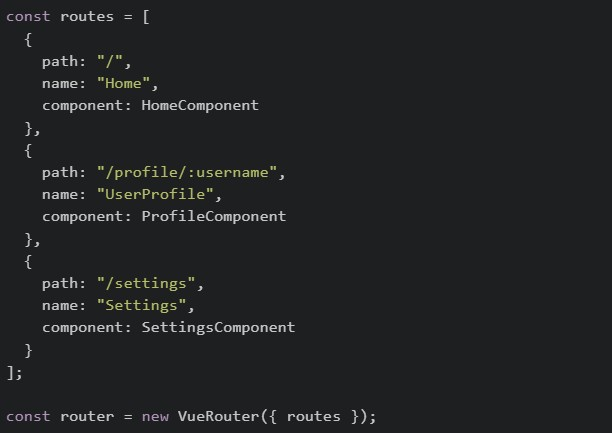
Read the following code carefully and answer the given sub questions: file1: router/index.js
 file2: ProfileComponent.vue
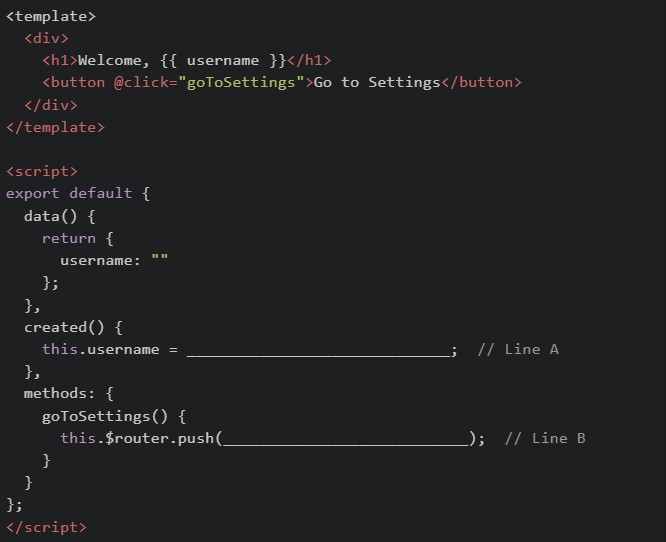
What should be filled in at Line A to correctly read the username from the URL?

text
```
this.$router.params.username
```

text
```
this.$route.params.username
```

text
```
this.$router.query.username
```

text
```
this.$route.query.username
```
Consider running the following in Browser console:
 Which of the following statements are correct?
Which of the following statements are correct?Text of the picture (copyable)
```javascript
console.log(typeof setTimeout)
console.log(typeof document)
```
- The first line prints
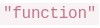 .
.text
"function"
- The second line prints
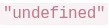 .
.text
"undefined"
- will work in Browser by default because V8 provides the DOM.
text
```javascript
document.querySelector()
```
- Different runtimes (browser, Node.js, etc.) can provide different APIs even if they use the same JavaScript engine.
Which of the following cases is a function being used as a callback?

text
```javascript
items.forEach(item => console.log(item))
```

text
```javascript
setTimeout(showMessage, 1000)
```

text
```javascript
const result = showMessage()
```

text
```javascript
button.addEventListener("click", handleClick)
```
What is the correct output order for the following code?
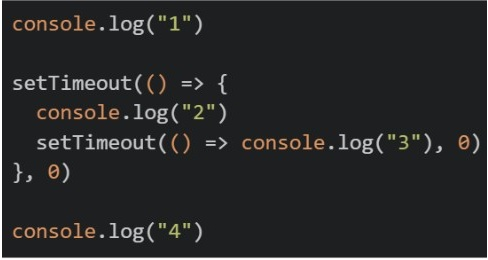
Text of the picture (copyable)
```javascript
console.log("1")

setTimeout(() => {
  console.log("2")
  setTimeout(() => console.log("3"), 0)
}, 0)

console.log("4")
```- 1 2 3 4
- 1 4 2 3
- 2 1 4 3
- 4 1 2 3
Consider the following JavaScript code snippet.
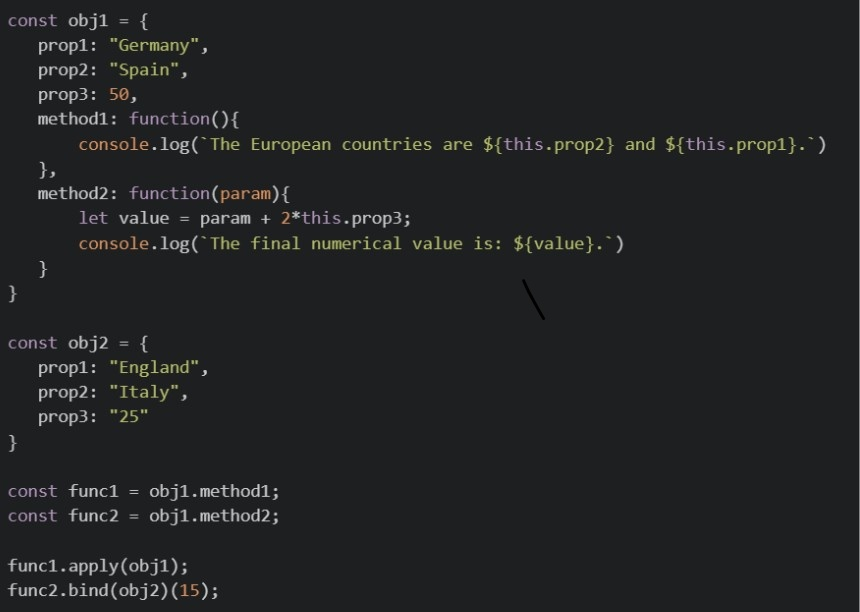 What will be the output of the above code on the browsers’ console?
What will be the output of the above code on the browsers’ console?Text of the picture (copyable)
```javascript
const obj1 = {
    prop1: "Germany",
    prop2: "Spain",
    prop3: 50,
    method1: function(){
        console.log(`The European countries are ${this.prop2} and ${this.prop1}.`)
    },
    method2: function(param){
        let value = param + 2*this.prop3;
        console.log(`The final numerical value is: ${value}.`)
    }
}

const obj2 = {
    prop1: "England",
    prop2: "Italy",
    prop3: "25"
}

const func1 = obj1.method1;
const func2 = obj1.method2;

func1.apply(obj1);
func2.bind(obj2)(15);
```- The European countries are Spain and Germany. The final numerical value is: 115.
- The European countries are Italy and England. The final numerical value is: 65.
- The European countries are Spain and Germany. The final numerical value is: 65.
- The European countries are Italy and England. The final numerical value is: 115.
Given the following parent-child setup in Vue 2:
 and inside the child:
 Which statements are correct?
and inside the child:
Which statements are correct?Text of the picture (copyable)
```html
<child-box :message="parentMsg" @reply="handleReply"></child-box>
```
```javascript
this.$emit('reply', 'ok')
``` flows from parent to child through props.
text
message
 is a custom event sent from child to parent.
text
reply
- The child should directly change to update the parent source of truth.
text
message
- If
 changes in the parent, the child can receive the updated prop value.
text
parentMsg
Identify the issue in the following Vue.js code:
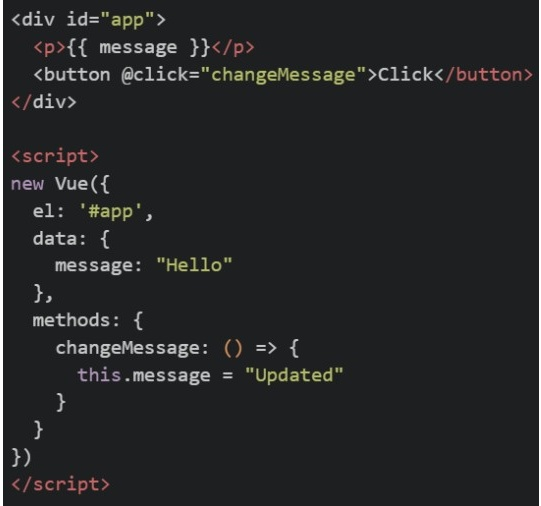 Why does the value not update correctly when the button is clicked?
Why does the value not update correctly when the button is clicked?Text of the picture (copyable)
```html
<div id="app">
<p>{{ message }}</p>
<button @click="changeMessage">Click</button>
</div>
<script>
new Vue({
el: '#app',
data: {
message: "Hello"
},
methods: {
changeMessage: () => {
this.message = "Updated"
}
}
})
</script>
```
message should be used instead of
text
v-on
```
@click
```
- Arrow functions do not bind their own
text
this
 should be a function in all Vue instances
text
data
- Vue.js does not support external methods
Consider the following JavaScript code snippet.
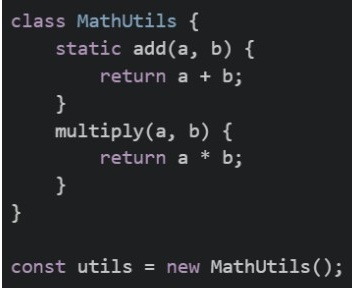 Which of the following statements is/are correct?
Which of the following statements is/are correct?Text of the picture (copyable)
```javascript
class MathUtils {
static add(a, b) {
return a + b;
}
multiply(a, b) {
return a * b;
}
}
const utils = new MathUtils();
``` will work correctly and return 8
text
```
MathUtils.add(5, 3)
```
 will work correctly and return 8
text
```
utils.add(5, 3)
```
 will work correctly and return 15
text
```
utils.multiply(5, 3)
```
 will work correctly and return 15
text
```
MathUtils.multiply(5, 3)
```
Consider the following JavaScript code snippet.
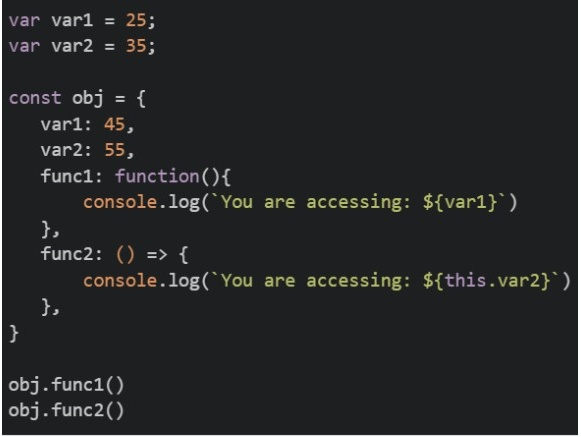 What will be the output of the above code on the browsers’ console?
What will be the output of the above code on the browsers’ console?Text of the picture (copyable)
```javascript
var var1 = 25;
var var2 = 35;

const obj = {
    var1: 45,
    var2: 55,
    func1: function(){
        console.log(`You are accessing: ${var1}`)
    },
    func2: () => {
        console.log(`You are accessing: ${this.var2}`)
    },
}

obj.func1()
obj.func2()
```- You are accessing: 45 You are accessing: 55
- You are accessing: 25 You are accessing: 35
- You are accessing: 25 You are accessing: 55
- You are accessing: 45 You are accessing: 35
Consider the following JavaScript code snippet.
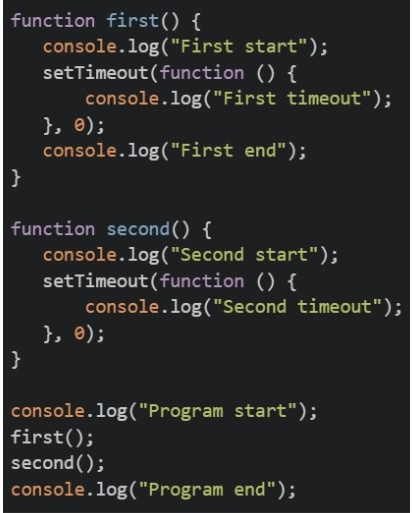 What will be the output of the above code on the browsers’ console?
What will be the output of the above code on the browsers’ console?Text of the picture (copyable)
```javascript
function first() {
  console.log("First start");
  setTimeout(function () {
    console.log("First timeout");
  }, 0);
  console.log("First end");
}

function second() {
  console.log("Second start");
  setTimeout(function () {
    console.log("Second timeout");
  }, 0);
}

console.log("Program start");
first();
second();
console.log("Program end");
```- Program start First start First timeout First end Second start Second timeout Program end
- Program start First start First end First timeout Second start Second timeout Program end
- Program start First timeout First start First end Second timeout Second start Program end
- Program start First start First end Second start Program end First timeout Second timeout
Which of the following statements is true regarding the "this" keyword in JavaScript?
- "this" in an arrow function refers to the global object.
- "this" inside a regular function refers to the object that owns the function.
- Arrow functions do not have their own "this" and inherit it from the surrounding scope.
- "this" always points to the window object in browser environments.
You are building a cricket analytics app. The file battingStats.js contains the following exports:
 In another file app.js, which of the following import statements will correctly import both strikeRate and playerName ? ( Assume both files are in the same directory )
In another file app.js, which of the following import statements will correctly import both strikeRate and playerName ? ( Assume both files are in the same directory )Text of the picture (copyable)
```javascript
export const strikeRate = (runs, balls) => {
  return (runs / balls) * 100;
};

export const playerName = "Virat Kohli";
```
text
```javascript
import strikeRate, playerName from "./battingStats.js";
```

text
```javascript
import { strikeRate, playerName } from "./battingStats.js";
```
text
```javascript
import * as stats from "./battingStats.js";
```

text
```javascript
require("./battingStats.js");
```
Consider the below JavaScript program.
 What will be the output of the above program?
What will be the output of the above program?Text of the picture (copyable)
```javascript
const promise = new Promise((resolve, reject) => {
  resolve('Success!');
  reject('Error!');
});

promise.then(console.log).catch(console.log);
```- Success!
- Error!
- Success! Error!
- Error! Success!
Consider the below Vuex store configuration:
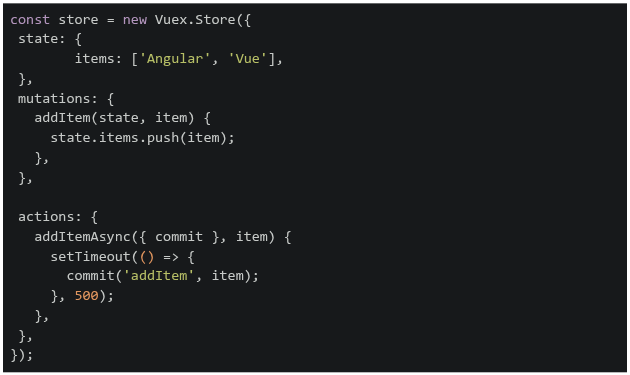 If the addItemAsync action is dispatched with the item 'React', what will be the state of items after 2 seconds?
If the addItemAsync action is dispatched with the item 'React', what will be the state of items after 2 seconds?Text of the picture (copyable)
```javascript
const store = new Vuex.Store({
  state: {
    items: ['Angular', 'Vue'],
  },
  mutations: {
    addItem(state, item) {
      state.items.push(item);
    },
  },

  actions: {
    addItemAsync({ commit }, item) {
      setTimeout(() => {
        commit('addItem', item);
      }, 500);
    },
  },
});
```- ['Angular', 'Vue']
- ['Angular', 'Vue', 'React']
- ['React']
- ['Angular']
Consider the following JavaScript program:
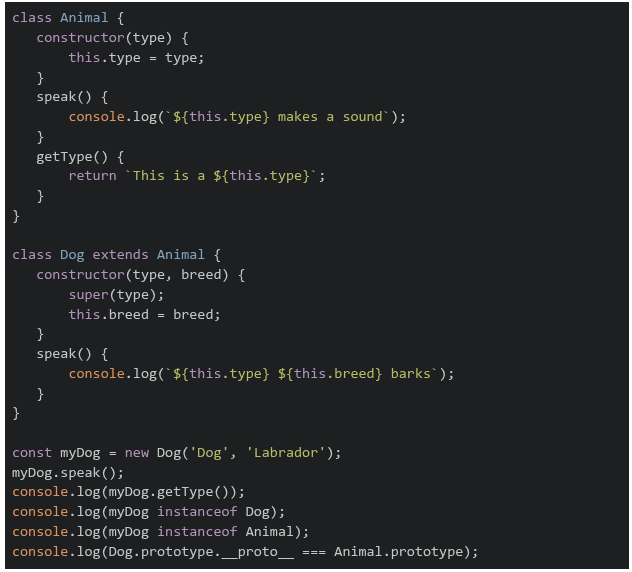 What will be the output of the above program on a browser's console?
What will be the output of the above program on a browser's console?Text of the picture (copyable)
```javascript
class Animal {
  constructor(type) {
    this.type = type;
  }
  speak() {
    console.log(`${this.type} makes a sound`);
  }
  getType() {
    return `This is a ${this.type}`;
  }
}

class Dog extends Animal {
  constructor(type, breed) {
    super(type);
    this.breed = breed;
  }
  speak() {
    console.log(`${this.type} ${this.breed} barks`);
  }
}

const myDog = new Dog('Dog', 'Labrador');
myDog.speak();
console.log(myDog.getType());
console.log(myDog instanceof Dog);
console.log(myDog instanceof Animal);
console.log(Dog.prototype.__proto__ === Animal.prototype);
```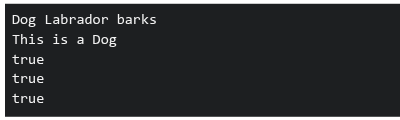
text
```
Dog Labrador barks
This is a Dog
true
true
true
```
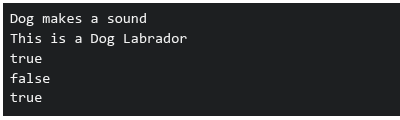
text
```
Dog makes a sound
This is a Dog Labrador
true
false
true
```
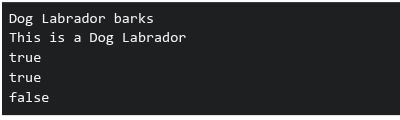
text
```
Dog Labrador barks
This is a Dog Labrador
true
true
false
```
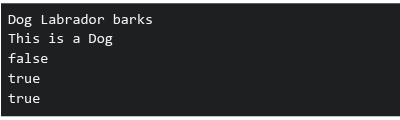
text
```
Dog Labrador barks
This is a Dog
false
true
true
```
What happens when this Flask caching code runs?
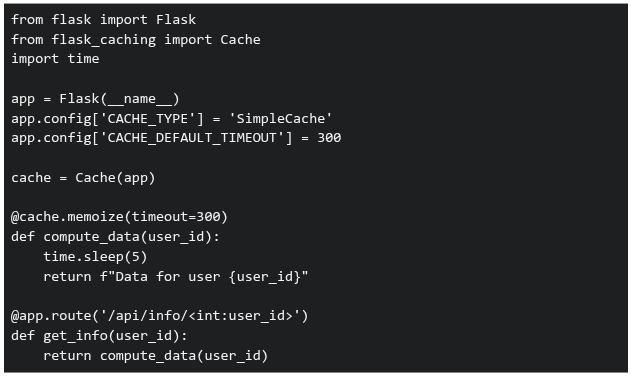 If requests for user IDs 1, 2, 1 are made within 5 minutes, what's the total response time?
If requests for user IDs 1, 2, 1 are made within 5 minutes, what's the total response time?Text of the picture (copyable)
```python
from flask import Flask
from flask_caching import Cache
import time

app = Flask(__name__)
app.config['CACHE_TYPE'] = 'SimpleCache'
app.config['CACHE_DEFAULT_TIMEOUT'] = 300

cache = Cache(app)

@cache.memoize(timeout=300)
def compute_data(user_id):
    time.sleep(5)
    return f"Data for user {user_id}"

@app.route('/api/info/<int:user_id>')
def get_info(user_id):
    return compute_data(user_id)
```- 15 seconds
- 10 seconds
- 5 seconds
- 0 seconds
Consider the following JavaScript program:
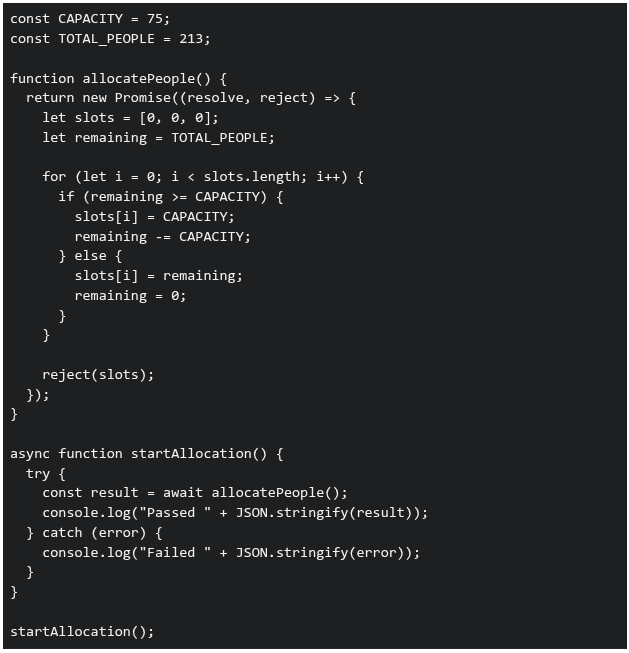 What will be printed in the console when the above code is executed?
What will be printed in the console when the above code is executed?Text of the picture (copyable)
```javascript
const CAPACITY = 75;
const TOTAL_PEOPLE = 213;

function allocatePeople() {
  return new Promise((resolve, reject) => {
    let slots = [0, 0, 0];
    let remaining = TOTAL_PEOPLE;

    for (let i = 0; i < slots.length; i++) {
      if (remaining >= CAPACITY) {
        slots[i] = CAPACITY;
        remaining -= CAPACITY;
      } else {
        slots[i] = remaining;
        remaining = 0;
      }
    }

    reject(slots);
  });
}

async function startAllocation() {
  try {
    const result = await allocatePeople();
    console.log("Passed " + JSON.stringify(result));
  } catch (error) {
    console.log("Failed " + JSON.stringify(error));
  }
}

startAllocation();
```- Passed [75,75,63]
- Failed [0,0,0]
- Failed [75,75,63]
- Passed [0,0,0]
Consider the following Vue application with markup index.html and JavaScript file app.js.
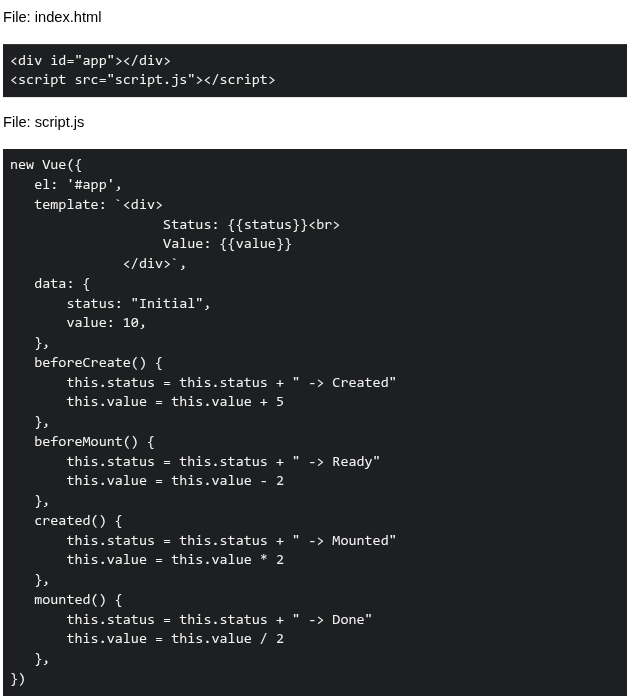 Suppose the application is running on http://127.0.0.1:8080. What will be rendered by the browser?
Suppose the application is running on http://127.0.0.1:8080. What will be rendered by the browser?Text of the picture (copyable)
File: index.html

```html
<div id="app"></div>
<script src="script.js"></script>
```

File: script.js

```javascript
new Vue({
  el: '#app',
  template: `<div>
    Status: {{status}}<br>
    Value: {{value}}
  </div>`,
  data: {
    status: "Initial",
    value: 10,
  },
  beforeCreate() {
    this.status = this.status + " -> Created"
    this.value = this.value + 5
  },
  beforeMount() {
    this.status = this.status + " -> Ready"
    this.value = this.value - 2
  },
  created() {
    this.status = this.status + " -> Mounted"
    this.value = this.value * 2
  },
  mounted() {
    this.status = this.status + " -> Done"
    this.value = this.value / 2
  },
})
```- Status: Initial -> Created -> Ready -> Mounted -> Done Value: 13
- Status: Initial -> Ready -> Mounted -> Done Value: 8
- Status: Initial -> Created -> Mounted -> Ready -> Done Value: 14
- Status: Initial -> Mounted -> Ready -> Done Value: 9
Consider the following endpoints created with a working setup of flask-security and flask-sqlalchemy.
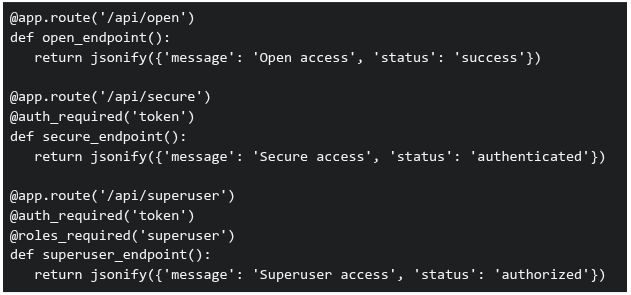 Three requests are made to this application: GET /api/open (no authentication headers)1. GET /api/secure (no authentication headers)2. GET /api/superuser with valid authentication token but user has role 'basic' (not 'superuser')3. What will be the response status codes for these requests, respectively?
Three requests are made to this application: GET /api/open (no authentication headers)1. GET /api/secure (no authentication headers)2. GET /api/superuser with valid authentication token but user has role 'basic' (not 'superuser')3. What will be the response status codes for these requests, respectively?Text of the picture (copyable)
```python
@app.route('/api/open')
def open_endpoint():
    return jsonify({'message': 'Open access', 'status': 'success'})

@app.route('/api/secure')
@auth_required('token')
def secure_endpoint():
    return jsonify({'message': 'Secure access', 'status': 'authenticated'})

@app.route('/api/superuser')
@auth_required('token')
@roles_required('superuser')
def superuser_endpoint():
    return jsonify({'message': 'Superuser access', 'status': 'authorized'})
```- 200, 200, 200
- 200, 401, 403
- 200, 403, 401
- 401, 403, 403
Consider the following code snippet running on a browser. What is the output on the console?
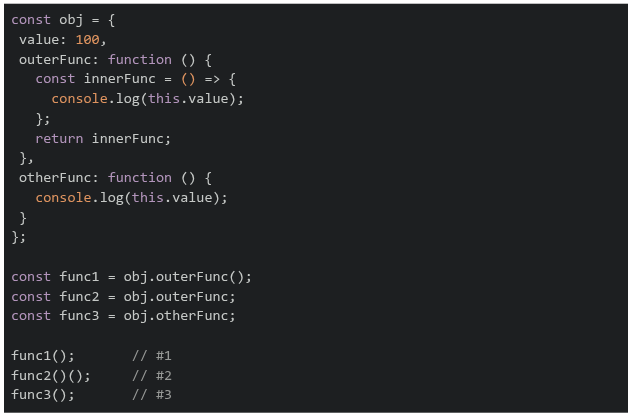
Text of the picture (copyable)
```javascript
const obj = {
  value: 100,
  outerFunc: function () {
    const innerFunc = () => {
      console.log(this.value);
    };
    return innerFunc;
  },
  otherFunc: function () {
    console.log(this.value);
  }
};

const func1 = obj.outerFunc();
const func2 = obj.outerFunc;
const func3 = obj.otherFunc;

func1();     // #1
func2()();   // #2
func3();     // #3
```- 100 100 100
- 100 undefined 100
- undefined undefined undefined
- 100 undefined undefined
Consider the flask application app.py and an HTML file index.html:
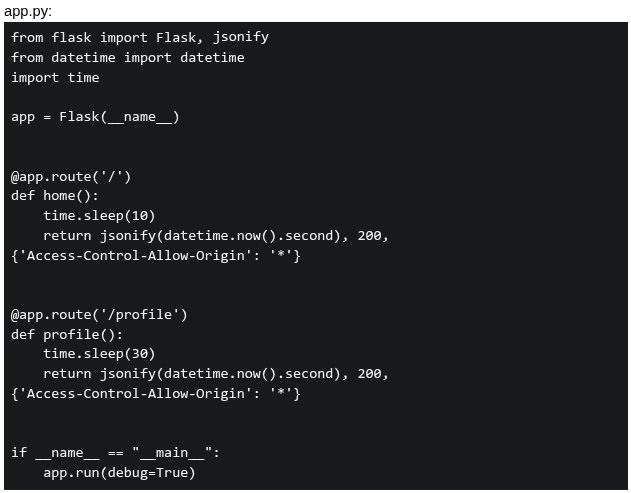 If a user visit index.html at 10:10:10 AM, what will be logged in the console?
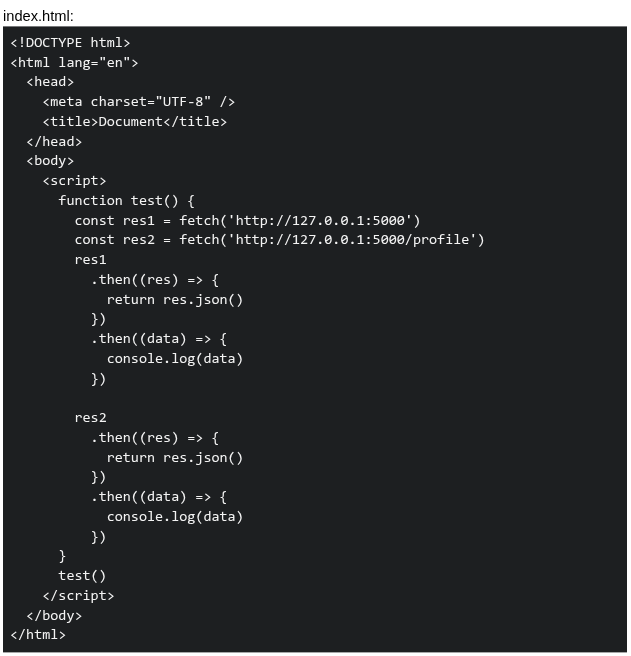
If a user visit index.html at 10:10:10 AM, what will be logged in the console?
Text of the picture (copyable)
app.py:
```python
from flask import Flask, jsonify
from datetime import datetime
import time

app = Flask(__name__)

@app.route('/')
def home():
    time.sleep(10)
    return jsonify(datetime.now().second), 200, \
        {'Access-Control-Allow-Origin': '*'}

@app.route('/profile')
def profile():
    time.sleep(30)
    return jsonify(datetime.now().second), 200, \
        {'Access-Control-Allow-Origin': '*'}

if __name__ == "__main__":
    app.run(debug=True)
```
index.html:
```html
<!DOCTYPE html>
<html lang="en">
<head>
    <meta charset="UTF-8" />
    <title>Document</title>
</head>
<body>
    <script>
        function test() {
            const res1 = fetch('http://127.0.0.1:5000')
            const res2 = fetch('http://127.0.0.1:5000/profile')
            res1
                .then((res) => {
                    return res.json()
                })
                .then((data) => {
                    console.log(data)
                })

            res2
                .then((res) => {
                    return res.json()
                })
                .then((data) => {
                    console.log(data)
                })
        }
        test()
    </script>
</body>
</html>
```- 20, 50
- 20, 40
- 40, 40
- 50, 50
A student is going on a trip and wants to check whether all essential items are packed. The application uses Vue 2 and Vuex to manage the list of packed items.The following Vue application is incomplete. Two lines of code are missing and are marked as Line X and Line Y.
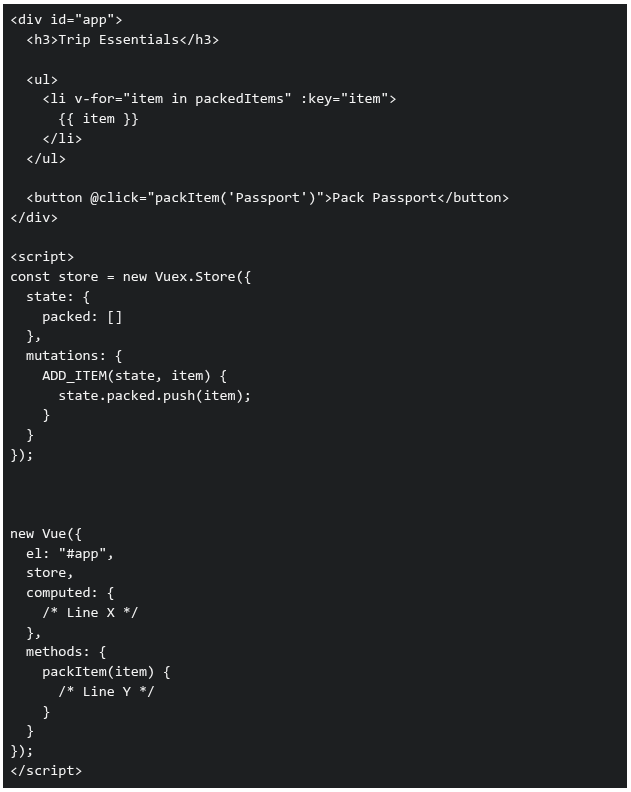 Which of the following options correctly fills Line X and Line Y so that the application works as expected?
Which of the following options correctly fills Line X and Line Y so that the application works as expected?Text of the picture (copyable)
```html
<div id="app">
  <h3>Trip Essentials</h3>

  <ul>
    <li v-for="item in packedItems" :key="item">
      {{ item }}
    </li>
  </ul>

  <button @click="packItem('Passport')">Pack Passport</button>
</div>

<script>
  const store = new Vuex.Store({
    state: {
      packed: []
    },
    mutations: {
      ADD_ITEM(state, item) {
        state.packed.push(item);
      }
    }
  });

  new Vue({
    el: "#app",
    store,
    computed: {
      /* Line X */
    },
    methods: {
      packItem(item) {
        /* Line Y */
      }
    }
  });
</script>
```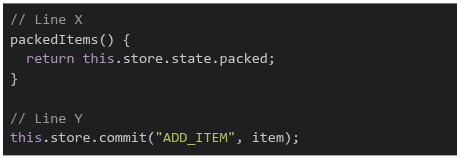
text
```javascript
// Line X
packedItems() {
  return this.store.state.packed;
}

// Line Y
this.store.commit("ADD_ITEM", item);
```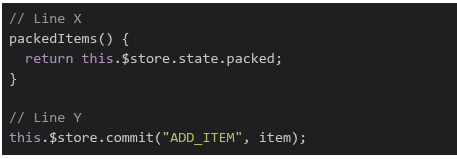
text
```javascript
// Line X
packedItems() {
  return this.$store.state.packed;
}

// Line Y
this.$store.commit("ADD_ITEM", item);
```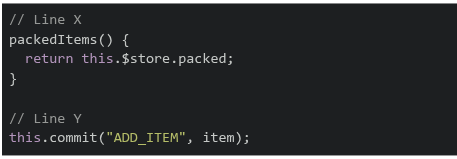
text
```javascript
// Line X
packedItems() {
  return this.$store.packed;
}

// Line Y
this.commit("ADD_ITEM", item);
```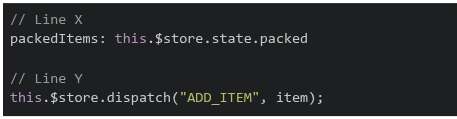
text
```javascript
// Line X
packedItems: this.$store.state.packed

// Line Y
this.$store.dispatch("ADD_ITEM", item);
```
Consider the following code:
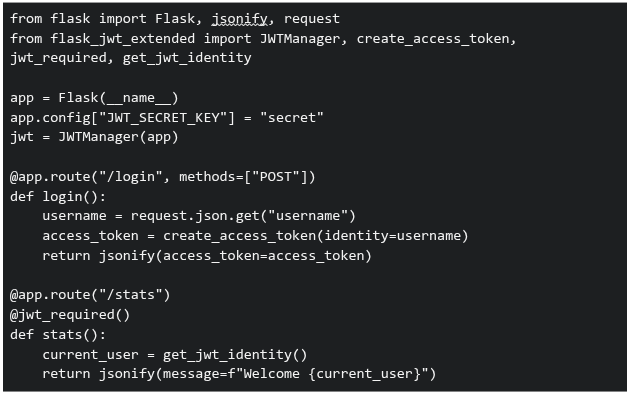 You are developing an analytics platform using Flask and Flask-JWT-Extended. A user sends a POST request to
  with:
with:  . Then tries to access
  . Which of the following statements are correct?
You are developing an analytics platform using Flask and Flask-JWT-Extended. A user sends a POST request to with: . Then tries to access . Which of the following statements are correct?Text of the picture (copyable)
```python
from flask import Flask, jsonify, request
from flask_jwt_extended import JWTManager, create_access_token, \
    jwt_required, get_jwt_identity

app = Flask(__name__)
app.config["JWT_SECRET_KEY"] = "secret"
jwt = JWTManager(app)

@app.route("/login", methods=["POST"])
def login():
    username = request.json.get("username")
    access_token = create_access_token(identity=username)
    return jsonify(access_token=access_token)

@app.route("/stats")
@jwt_required()
def stats():
    current_user = get_jwt_identity()
    return jsonify(message=f"Welcome {current_user}")
```
/login
```json
{ "username": "Jassi" }
```
/stats- The route will return "Welcome Jassi" only if a valid JWT token is sent in the Authorization header
text
/stats
- If no token is sent, accessing will result in an unauthorized error
text
/stats
- The JWT token must be sent as JSON in the request body to access
text
/stats
- None of these
Prerna and Swathy are using a web application built with Vue.js for the BS Degree program. When the page loads, the sidebar content appears instantly• However, when they click on an Assignments link, the main content takes noticeable time to load • A simplified version of the component is shown below:
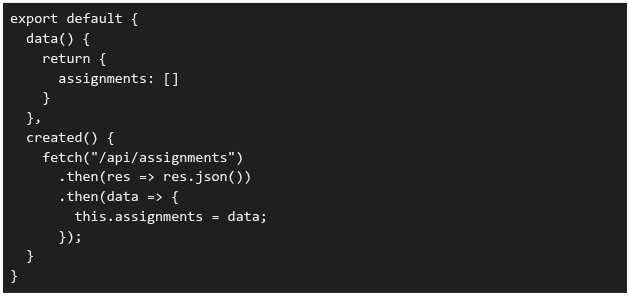 Which of the following statements correctly explain why the Assignments page takes time to load?
Which of the following statements correctly explain why the Assignments page takes time to load?Text of the picture (copyable)
```javascript
export default {
  data() {
    return {
      assignments: []
    }
  },
  created() {
    fetch("/api/assignments")
      .then(res => res.json())
      .then(data => {
        this.assignments = data;
      });
  }
}
```- The sidebar is likely part of a parent component and is already rendered before the API call
- The Assignments component waits for the API response before displaying data
- Vue blocks rendering of all components until API calls complete
- The delay is caused because data is fetched asynchronously after the component is created
Comprehension passage for this question
Consider the following Vue.js application:
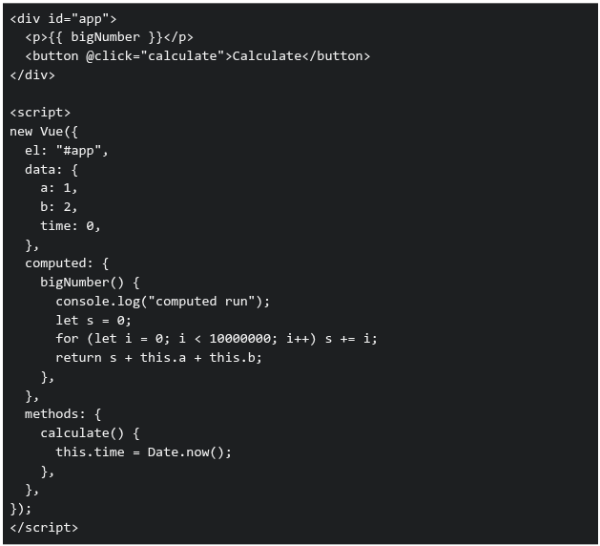 Based on the above data, answer the given subquestions.
If the 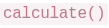 method is modified as follows:
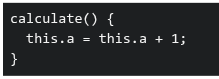 What will happen when the button is clicked?
method is modified as follows:
What will happen when the button is clicked?Text of the picture (copyable)
```
calculate()
```
```
calculate() {
this.a = this.a + 1;
}
```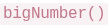 will not run again
text
```
bigNumber()
```
- will run again because a dependency changed
text
```
bigNumber()
```
- Only time will update
- Vue will throw an error
Comprehension passage for this question
Consider the following Vue 2 application:
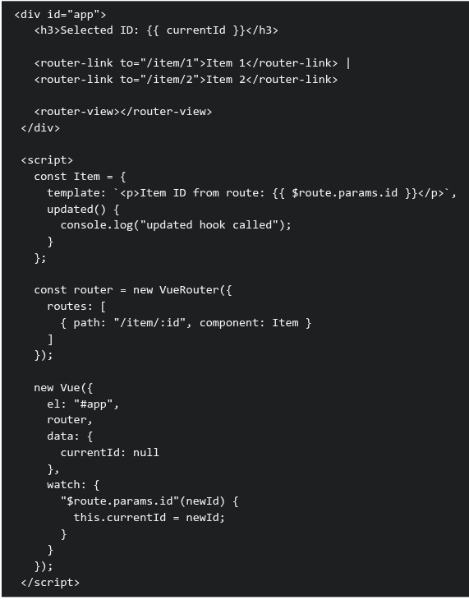 Assume the Vue application is loaded at the url
  . The user then clicks on the Item 2 router link. Based on the above data, answer the given subquestions.
Why is the  lifecycle hook triggered in this scenario?
lifecycle hook triggered in this scenario?Text of the picture (copyable)
```
updated()
```
- Because Vue Router always recreates components on navigation
- Because lifecycle hooks run on every URL change regardless of reactivity
- Because router-view forces a full re-render of the component tree
- Because a watched route parameter updates parent reactive state, triggering a component update
You are building a login feature for a web application. The frontend sends the user’s email and password to the backend API. The backend validates credentials against a database. Which security issues exist in the code given below? Frontend: script.js
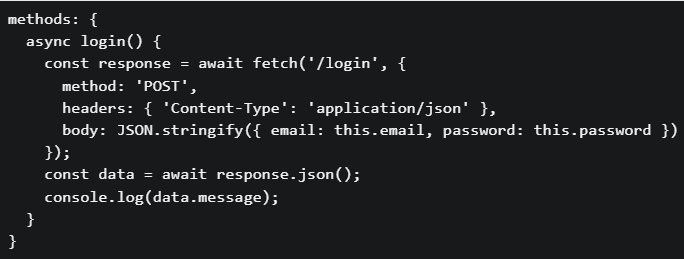 Backend: app.py
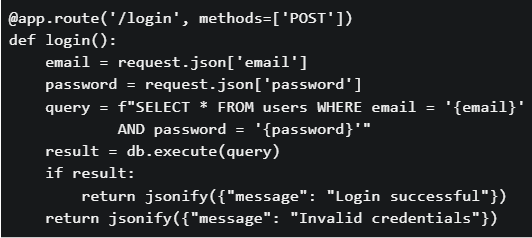
Backend: app.py
Text of the picture (copyable)
```javascript
methods: {
  async login() {
    const response = await fetch('/login', {
      method: 'POST',
      headers: { 'Content-Type': 'application/json' },
      body: JSON.stringify({ email: this.email, password: this.password })
    });
    const data = await response.json();
    console.log(data.message);
  }
}
```
```python
@app.route('/login', methods=['POST'])
def login():
    email = request.json['email']
    password = request.json['password']
    query = f"SELECT * FROM users WHERE email = '{email}'" \
            f" AND password = '{password}'"
    result = db.execute(query)
    if result:
        return jsonify({"message": "Login successful"})
    return jsonify({"message": "Invalid credentials"})
```- The SQL query is vulnerable to SQL injection attacks
- Passwords are stored and compared in plain text
- No authentication token (session/JWT) mechanism is implemented
- All of these.
Consider the following Vue.js code.
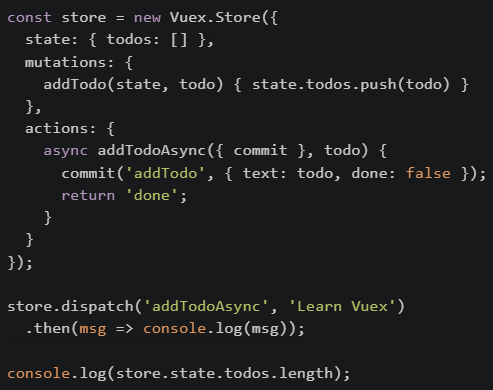 What will be printed on the console first?
What will be printed on the console first?Text of the picture (copyable)
```javascript
const store = new Vuex.Store({
  state: { todos: [] },
  mutations: {
    addTodo(state, todo) { state.todos.push(todo) }
  },
  actions: {
    async addTodoAsync({ commit }, todo) {
      commit('addTodo', { text: todo, done: false });
      return 'done';
    }
  }
});

store.dispatch('addTodoAsync', 'Learn Vuex')
  .then(msg => console.log(msg));

console.log(store.state.todos.length);
```- 0
- done
- 1
- Error
Consider the following Vue.js application with two different route scenarios and a component that uses reactive data binding: Scenario: An e-commerce application where: Product list component displays products filtered by category• Category changes through router parameters: /products/:category• When a user navigates from /products/electronics to /products/books, the product list should update • Component Code:
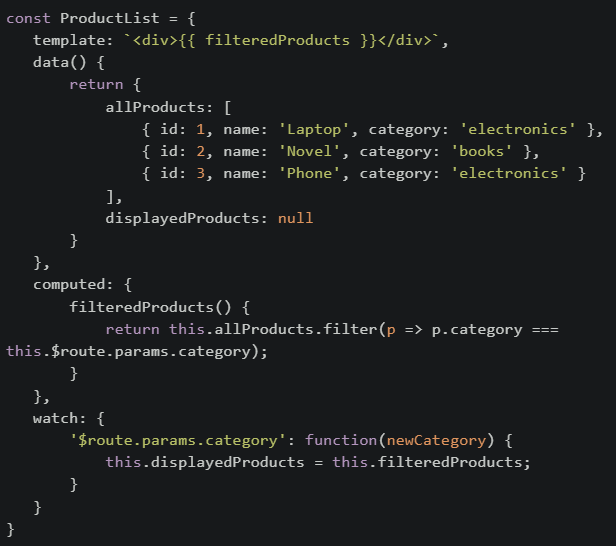 If the developer changed the template to use displayedProducts instead of filteredProducts, What would be the most likely issue?
If the developer changed the template to use displayedProducts instead of filteredProducts, What would be the most likely issue?Text of the picture (copyable)
```javascript
const ProductList = {
  template: `<div>{{ filteredProducts }}</div>`,
  data() {
    return {
      allProducts: [
        { id: 1, name: 'Laptop', category: 'electronics' },
        { id: 2, name: 'Novel', category: 'books' },
        { id: 3, name: 'Phone', category: 'electronics' }
      ],
      displayedProducts: null
    }
  },
  computed: {
    filteredProducts() {
      return this.allProducts.filter(p => p.category ===
        this.$route.params.category);
    }
  },
  watch: {
    '$route.params.category': function(newCategory) {
      this.displayedProducts = this.filteredProducts;
    }
  }
}
```- Performance would improve because computed properties are slower than data
- The initial page load would show an empty list, and only after navigation would data appear correctly
- There would be no difference because both will update at the same time
- The application would crash because displayedProducts is reactive
Consider the following JavaScript code:
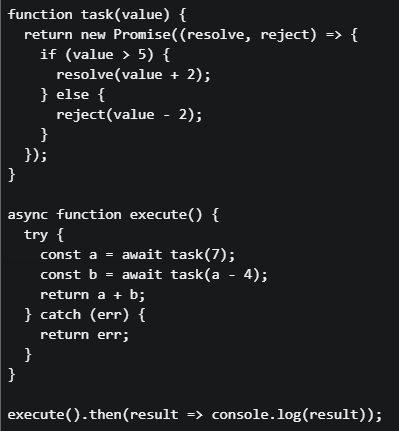 What will be printed to the console?
What will be printed to the console?Text of the picture (copyable)
```javascript
function task(value) {
  return new Promise((resolve, reject) => {
    if (value > 5) {
      resolve(value + 2);
    } else {
      reject(value - 2);
    }
  });
}

async function execute() {
  try {
    const a = await task(7);
    const b = await task(a - 4);
    return a + b;
  } catch (err) {
    return err;
  }
}

execute().then(result => console.log(result));
```- 12
- 10
- 5
- 3
Consider the following Vuex store setup for a user management system:
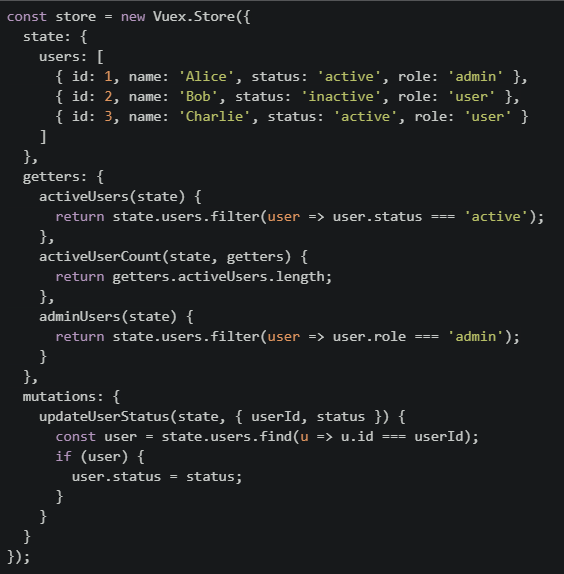 Suppose the following mutation is committed:store.commit("updateUserStatus", { userId: 2, status: "active" });. Which of the following statements is TRUE after this mutation is executed?
Suppose the following mutation is committed:store.commit("updateUserStatus", { userId: 2, status: "active" });. Which of the following statements is TRUE after this mutation is executed?Text of the picture (copyable)
```javascript
const store = new Vuex.Store({
state: {
users: [
{ id: 1, name: 'Alice', status: 'active', role: 'admin' },
{ id: 2, name: 'Bob', status: 'inactive', role: 'user' },
{ id: 3, name: 'Charlie', status: 'active', role: 'user' }
]
},
getters: {
activeUsers(state) {
return state.users.filter(user => user.status === 'active');
},
activeUserCount(state, getters) {
return getters.activeUsers.length;
},
adminUsers(state) {
return state.users.filter(user => user.role === 'admin');
}
},
mutations: {
updateUserStatus(state, { userId, status }) {
const user = state.users.find(u => u.id === userId);
if (user) {
user.status = status;
}
}
}
});
``` will return 3
text
```
activeUserCount
```
 will return two users
text
adminUsers
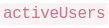 will include only Alice and Charlie
text
activeUsers
- The mutation will not affect any getter output