Home / MAD1 / Week 5 / Real questions
MAD1 week 5 - real exam questions
60 questions pulled from past papers whose wording matches this week's topics, newest first, duplicates removed. Pick your answers, then press Check answers. Figures and answer keys are the originals.
Elapsed 00:00
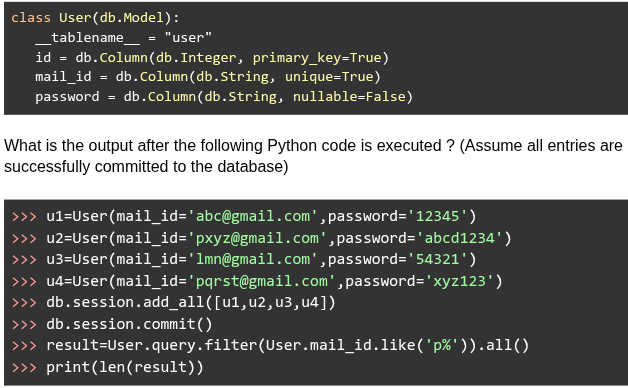
Consider the Flask SQLAlchemy data model.
 What is the output after the following Python code is executed ? (Assume all entries are successfully committed to the database)
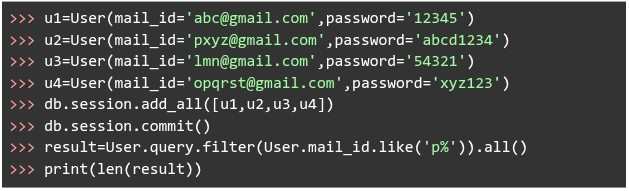
What is the output after the following Python code is executed ? (Assume all entries are successfully committed to the database)
Text of the picture (copyable)
```python
class User(db.Model):
    __tablename__ = "user"
    id = db.Column(db.Integer, primary_key=True)
    mail_id = db.Column(db.String, unique=True)
    password = db.Column(db.String, nullable=False)
```
```python
>>> u1=User(mail_id='abc@gmail.com',password='12345')
>>> u2=User(mail_id='pxyz@gmail.com',password='abcd1234')
>>> u3=User(mail_id='lmn@gmail.com',password='54321')
>>> u4=User(mail_id='opqrst@gmail.com',password='xyz123')
>>> db.session.add_all([u1,u2,u3,u4])
>>> db.session.commit()
>>> result=User.query.filter(User.mail_id.like('p%')).all()
>>> print(len(result))
```- 4
- 3
- 2
- 1
Consider the following Python code. File name: decorator.py
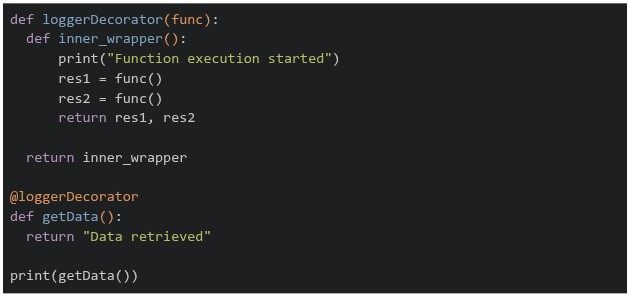 What will be the output, when running the above code using the command "python decorator.py"?
What will be the output, when running the above code using the command "python decorator.py"?Text of the picture (copyable)
```python
def loggerDecorator(func):
    def inner_wrapper():
        print("Function execution started")
        res1 = func()
        res2 = func()
        return res1, res2

    return inner_wrapper

@loggerDecorator
def getData():
    return "Data retrieved"

print(getData())
```
text
```
('Data retrieved', 'Data retrieved')
Function execution started
```
text
```text
Function execution started
Data retrieved
Data retrieved
```

text
```
Function execution started
('Data retrieved', 'Data retrieved')
```
text
```
Data retrieved
Data retrieved
Function execution started
```
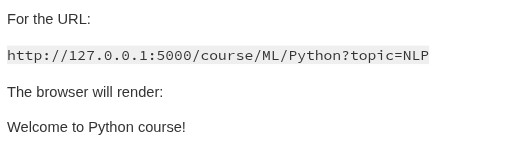
Consider the following flask app.
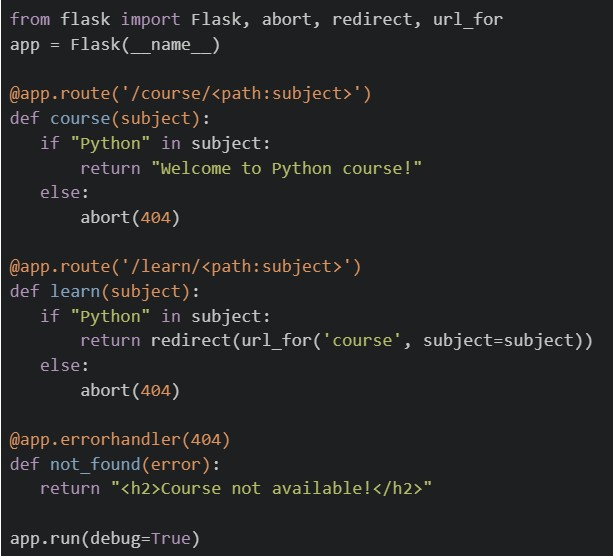 If the application is running locally on http://127.0.0.1:5000, select the correct options.
If the application is running locally on http://127.0.0.1:5000, select the correct options.Text of the picture (copyable)
```python
from flask import Flask, abort, redirect, url_for
app = Flask(__name__)

@app.route('/course/<path:subject>')
def course(subject):
    if "Python" in subject:
        return "Welcome to Python course!"
    else:
        abort(404)

@app.route('/learn/<path:subject>')
def learn(subject):
    if "Python" in subject:
        return redirect(url_for('course', subject=subject))
    else:
        abort(404)

@app.errorhandler(404)
def not_found(error):
    return "<h2>Course not available!</h2>"

app.run(debug=True)
```
text
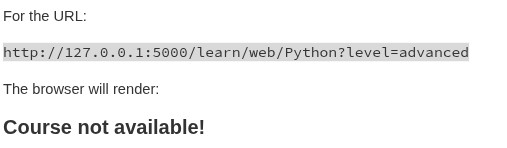
For the URL:

```
http://127.0.0.1:5000/learn/web/Python?level=advanced
```

The browser will render:

**Course not available!**
text
For the URL:

```
http://127.0.0.1:5000/course/ML/Python?topic=NLP
```

The browser will render:

Welcome to Python course!
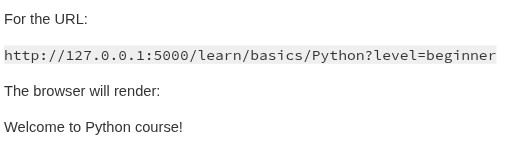
text
For the URL:

```
http://127.0.0.1:5000/learn/basics/Python?level=beginner
```

The browser will render:

Welcome to Python course!
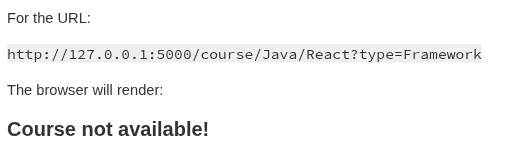
text
For the URL:

```
http://127.0.0.1:5000/course/Java/React?type=Framework
```

The browser will render:

**Course not available!**
Consider the following Flask application structure and code.
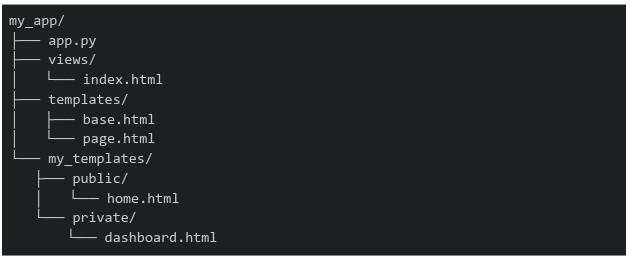 Which of the following statements about the template rendering behavior is correct?
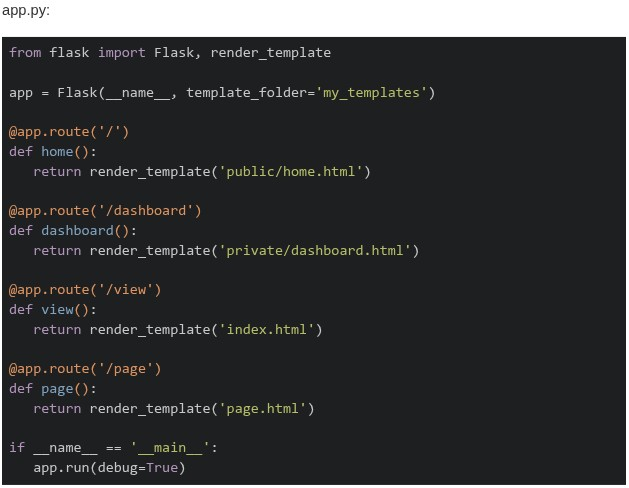
Which of the following statements about the template rendering behavior is correct?
Text of the picture (copyable)
```
my_app/
├── app.py
├── views/
│   └── index.html
├── templates/
│   ├── base.html
│   └── page.html
└── my_templates/
    ├── public/
    │   └── home.html
    └── private/
        └── dashboard.html
```
app.py:
```python
from flask import Flask, render_template

app = Flask(__name__, template_folder='my_templates')

@app.route('/')
def home():
    return render_template('public/home.html')

@app.route('/dashboard')
def dashboard():
    return render_template('private/dashboard.html')

@app.route('/view')
def view():
    return render_template('index.html')

@app.route('/page')
def page():
    return render_template('page.html')

if __name__ == '__main__':
    app.run(debug=True)
```- All routes will work correctly as Flask searches both
 and
and 
text
templates/
```
my_templates/
```
- Only
 and
and  routes work, while
  and
and  routes fail with
  Error
Errortext
/dashboard
/view
The image contains a single, small, blurry, diagonal line. It appears to be a checkmark or a slash, but its exact nature is unclear due to the low resolution.
/page
TemplateNotFound
- The and routes work, while and fail with Error
text
The image contains a single, small, blurry, diagonal line. It appears to be a checkmark or a slash, but its exact nature is unclear due to the low resolution.
/dashboard
/view
/page
TemplateNotFound
- All routes fail because Flask requires templates to be in a default folder
What does the following curl command do? 
Text of the picture (copyable)
```
curl -X PUT -d "status=active&role=admin" https://api/users/update
```
- Sends a PUT request to update data using form format.
- Sends a PUT request using JSON encoding.
- Sends a GET request to retrieve user information.
- Sends a DELETE request to remove user data.
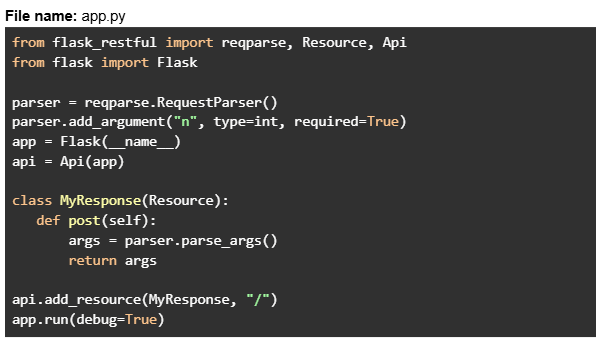
Consider the following Flask RESTful API code.
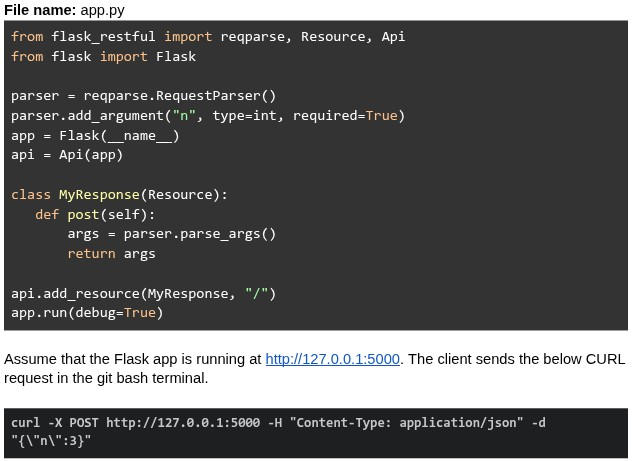 What will be the response?
What will be the response?Text of the picture (copyable)
File name: app.py
```python
from flask_restful import reqparse, Resource, Api
from flask import Flask

parser = reqparse.RequestParser()
parser.add_argument("n", type=int, required=True)
app = Flask(__name__)
api = Api(app)

class MyResponse(Resource):
    def post(self):
        args = parser.parse_args()
        return args

api.add_resource(MyResponse, "/")
app.run(debug=True)
```

Assume that the Flask app is running at http://127.0.0.1:5000. The client sends the below CURL request in the git bash terminal.

```bash
curl -X POST http://127.0.0.1:5000 -H "Content-Type: application/json" -d "{\"n\":3}"
```- {"n": 3}
- Runtime error
- 400 Bad Request
- { }
Consider the following Flask app code.
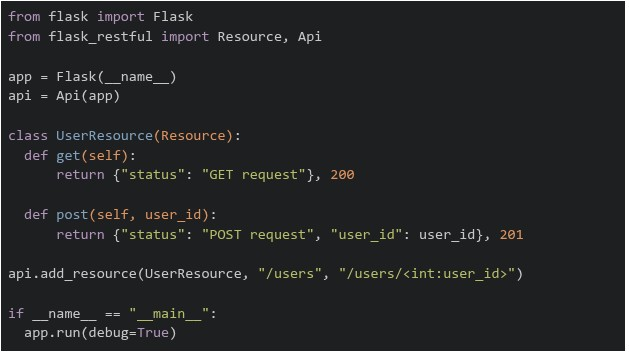 The above flask app is running on "http://127.0.0.1:5000". Which of the following commands will return a runtime error?
The above flask app is running on "http://127.0.0.1:5000". Which of the following commands will return a runtime error?Text of the picture (copyable)
```python
from flask import Flask
from flask_restful import Resource, Api

app = Flask(__name__)
api = Api(app)

class UserResource(Resource):
    def get(self):
        return {"status": "GET request"}, 200

    def post(self, user_id):
        return {"status": "POST request", "user_id": user_id}, 201

api.add_resource(UserResource, "/users", "/users/<int:user_id>")

if __name__ == "__main__":
    app.run(debug=True)
```
text
```
curl http://127.0.0.1:5000/users/5001 -X GET
```

text
```
curl http://127.0.0.1:5000/users/5001 -X POST
```

text
```
curl http://127.0.0.1:5000/users -X POST
```

text
```
curl http://127.0.0.1:5000/users -X GET
```
An e-commerce web application stores user shopping cart information as server-side session state. Each active user session occupies an average of 4 KB of memory. During a flash sale, the application is expected to handle 1.5 million concurrent active sessions, all stored in a centralized Redis cache server. What is the minimum RAM capacity (in GB) required solely to store these session states? (Assume that 1000B=1KB, 1000KB=1MB and so on)
Comprehension passage for this question
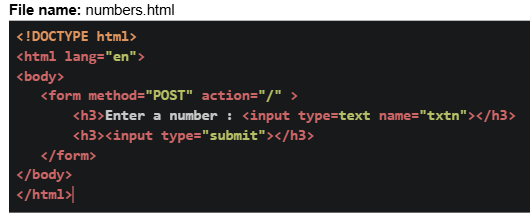
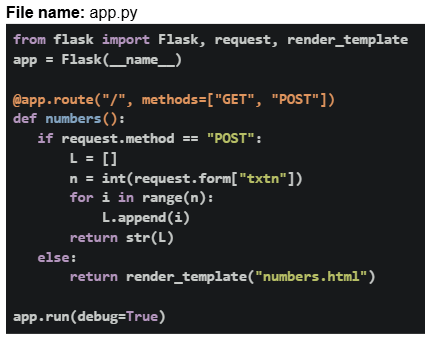
Consider the following HTML and Python flask code.
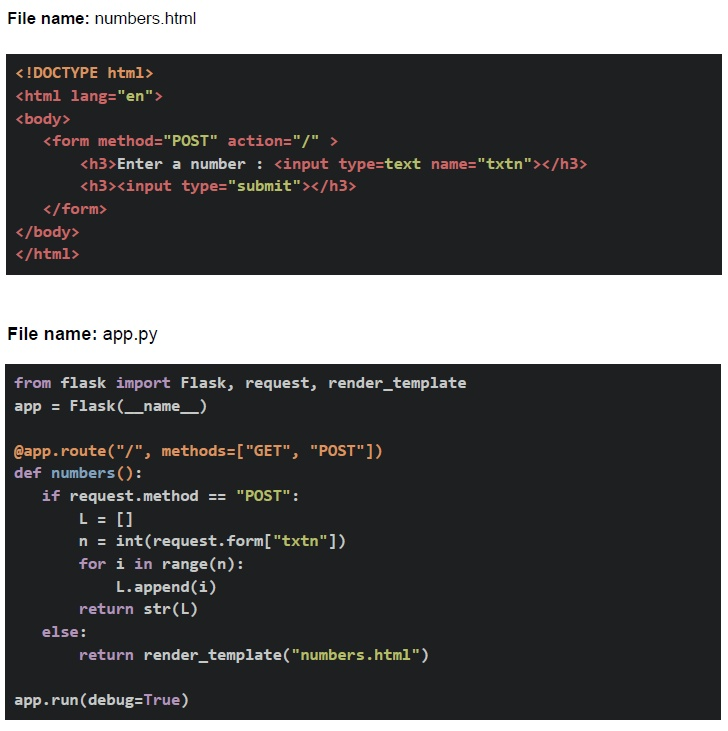 Assume that the Flask app is running at http://127.0.0.1:5000. Based on the above data, answer the given subquestions.
Which of the following statements are correct? Statement 1: Accessing the URL: http://127.0.0.1:5000 directly in the browser makes a GET request. Statement 2: Clicking on the Submit button will invoke the POST request method.
- Both statements are correct
- Both statements are incorrect.
- Statement 1 is incorrect, but statement 2 is correct.
- Statement 2 is incorrect, but statement 1 is correct.
Comprehension passage for this question
Consider the following HTML and Python flask code.
Assume that the Flask app is running at http://127.0.0.1:5000. Based on the above data, answer the given subquestions.What will be the rendered output for the following input in the form?
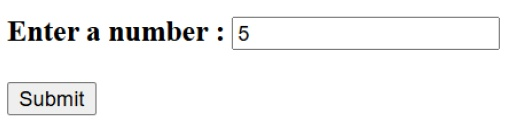
Text of the picture (copyable)
Enter a number :
[text input field with "5" entered]
[Submit button]
- 404 Not Found
- [0, 1, 2, 3, 4]
- [ ]
- [1, 2, 3, 4, 5]
Consider the following Flask code. File name: app.py
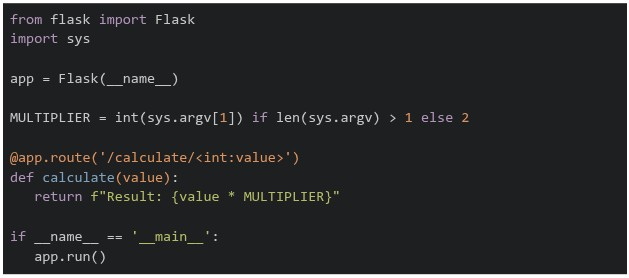 What will be the output when you run the following code in the terminal
  and then access in the browser with the following link
  ?
?
What will be the output when you run the following code in the terminal and then access in the browser with the following link ?Text of the picture (copyable)
```python
from flask import Flask
import sys

app = Flask(__name__)

MULTIPLIER = int(sys.argv[1]) if len(sys.argv) > 1 else 2

@app.route('/calculate/<int:value>')
def calculate(value):
    return f"Result: {value * MULTIPLIER}"

if __name__ == '__main__':
    app.run()
```
```
python app.py 7
```
http://localhost:5000/calculate/6- Result: 42
- Result: 13
- Result: 7
- Result: 12
Consider the following Python flask code.
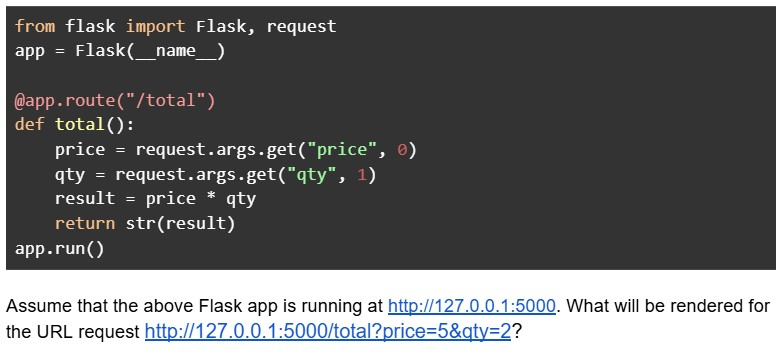
Text of the picture (copyable)
```python
from flask import Flask, request
app = Flask(__name__)

@app.route("/total")
def total():
    price = request.args.get("price", 0)
    qty = request.args.get("qty", 1)
    result = price * qty
    return str(result)

app.run()
```

Assume that the above Flask app is running at http://127.0.0.1:5000. What will be rendered for the URL request http://127.0.0.1:5000/total?price=5&qty=2?- 55
- 52
- 10
- TypeError
Consider the following Python flask code.
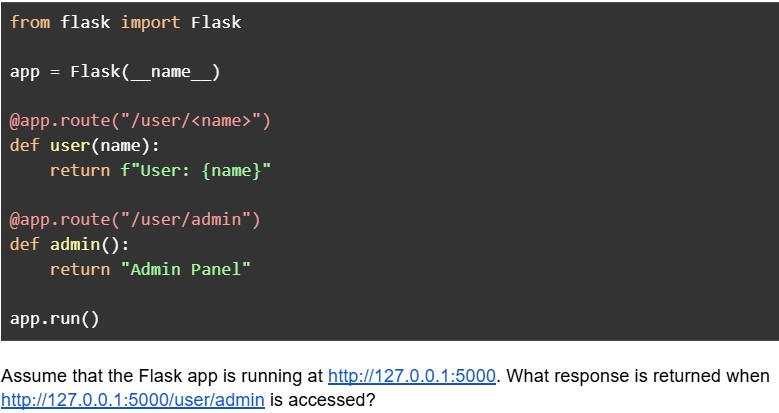
Text of the picture (copyable)
```python
from flask import Flask

app = Flask(__name__)

@app.route("/user/<name>")
def user(name):
    return f"User: {name}"

@app.route("/user/admin")
def admin():
    return "Admin Panel"

app.run()
```

Assume that the Flask app is running at http://127.0.0.1:5000. What response is returned when http://127.0.0.1:5000/user/admin is accessed?- Admin Panel
- User: admin
- 404 Error
- Internal Server Error
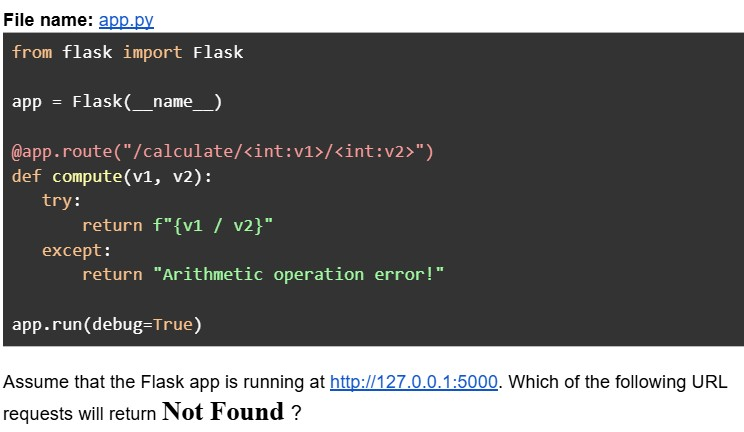
Consider the following Python Flask code.
Text of the picture (copyable)
File name: app.py
```python
from flask import Flask

app = Flask(__name__)

@app.route("/calculate/<int:v1>/<int:v2>")
def compute(v1, v2):
    try:
        return f"{v1 / v2}"
    except:
        return "Arithmetic operation error!"

app.run(debug=True)
```

Assume that the Flask app is running at http://127.0.0.1:5000. Which of the following URL requests will return **Not Found** ?
text
```
http://127.0.0.1:5000/calculate/10/5
```

text
```
http://127.0.0.1:5000/calculate/3/0.2
```

text
```
http://127.0.0.1:5000/calculate/3/2?v1=1
```

text
```
http://127.0.0.1:5000/calculate?v1=5&v2=2
```
Suppose a client machine C is communicating with a data center D located 12,500 km away from C. Assume that the TCP connection has been established and is kept alive. Calculate the RTT (Round trip time) in ms for an HTTP request. (Assume speed of light in cable is 2e8 m/s).
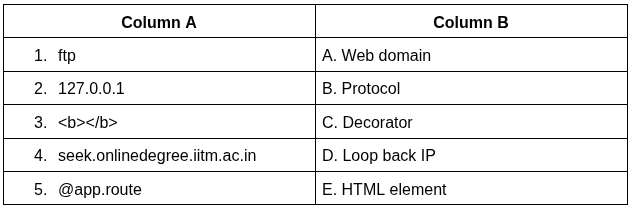
Which of the following is the correct match between Column A and Column B?
Text of the picture (copyable)
| Column A | Column B |
|---|---|
| 1. ftp | A. Web domain |
| 2. 127.0.0.1 | B. Protocol |
| 3. `<b></b>` | C. Decorator |
| 4. seek.onlinedegree.iitm.ac.in | D. Loop back IP |
| 5. @app.route | E. HTML element |
- 1-B, 2-D, 3-E, 4-A, 5-C
- 1-B, 2-A, 3-E, 4-D, 5-C
- 1-A, 2-D, 3-E, 4-B, 5-C
- 1-B, 2-D, 3-C, 4-A, 5-E
Consider the following Python Flask code.
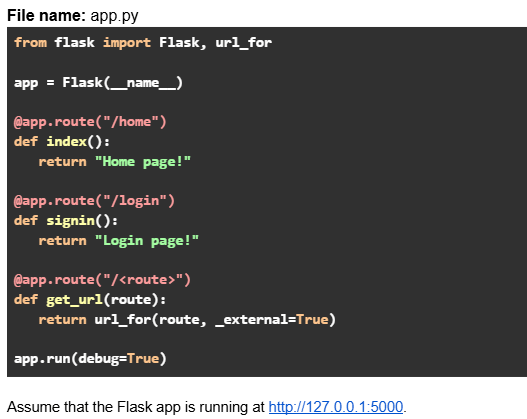 Which of the following options are true?
Which of the following options are true?Text of the picture (copyable)
File name: app.py
```python
from flask import Flask, url_for

app = Flask(__name__)

@app.route("/home")
def index():
    return "Home page!"

@app.route("/login")
def signin():
    return "Login page!"

@app.route("/<route>")
def get_url(route):
    return url_for(route, _external=True)

app.run(debug=True)
```
Assume that the Flask app is running at http://127.0.0.1:5000.- URL request: http://127.0.0.1:5000/signin will return output: http://127.0.0.1:5000/login
- URL request: http://127.0.0.1:5000/login will return output: http://127.0.0.1:5000/login
- URL request: http://127.0.0.1:5000/index will return output: http://127.0.0.1:5000/home
- URL request: http://127.0.0.1:5000/home will return output: http://127.0.0.1:5000/home
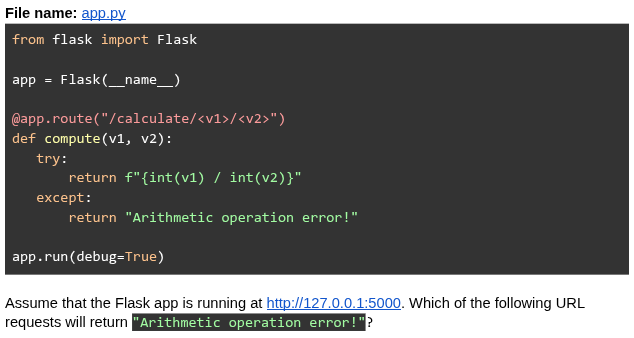
Consider the following Python Flask code.
Text of the picture (copyable)
File name: app.py

```python
from flask import Flask

app = Flask(__name__)

@app.route("/calculate/<v1>/<v2>")
def compute(v1, v2):
    try:
        return f"{int(v1) / int(v2)}"
    except:
        return "Arithmetic operation error!"

app.run(debug=True)
```

Assume that the Flask app is running at http://127.0.0.1:5000. Which of the following URL requests will return "Arithmetic operation error!"?
text
```
http://127.0.0.1:5000/calculate/4/"2"
```

text
http://127.0.0.1:5000/calculate/4/4

text
```
http://127.0.0.1:5000/calculate/4/0.2
```

text
```
http://127.0.0.1:5000/calculate/4/2?v1=1
```

text
```
http://127.0.0.1:5000/calculate/4.0/0.5
```
Consider the Flask SQLAlchemy data model.
Text of the picture (copyable)
```python
class User(db.Model):
    __tablename__ = "user"
    id = db.Column(db.Integer, primary_key=True)
    mail_id = db.Column(db.String, unique=True)
    password = db.Column(db.String, nullable=False)
```

What is the output after the following Python code is executed ? (Assume all entries are successfully committed to the database)

```python
>>> u1=User(mail_id='abc@gmail.com',password='12345')
>>> u2=User(mail_id='pxyz@gmail.com',password='abcd1234')
>>> u3=User(mail_id='lmn@gmail.com',password='54321')
>>> u4=User(mail_id='pqrst@gmail.com',password='xyz123')
>>> db.session.add_all([u1,u2,u3,u4])
>>> db.session.commit()
>>> result=User.query.filter(User.mail_id.like('p%')).all()
>>> print(len(result))
```- 1
- 2
- 3
- 4
Which of the following is the correct flask_login code snippet to register a user as logged in for the current session?
- login_user(user.id)
- login_user(user)
- login_user(user.name)
- login_user(user.name and user.password)
What does the following curl command do?

Text of the picture (copyable)
```
curl -X POST -d "email=user@test.com&password=secret" https://auth/signin
```
- Sends a POST request to retrieve authentication data.
- Sends a POST request to send form data.
- Sends a POST request to send JSON data.
- Sends a POST request to retrieve user credentials.
Comprehension passage for this question
Consider the following HTML and Python flask code.
 Based on the above data, answer the given subquestions.
Which of the following statements are correct for the statements below? Statement 1: Accessing the URL: http://127.0.0.1:5000 directly in the browser makes a POST request. Statement 2: Clicking on the Submit button will invoke the GET request method.
- Both statements are correct.
- Both statements are incorrect.
- Statement 1 is incorrect, but statement 2 is correct.
- Statement 2 is incorrect, but statement 1 is correct.
Comprehension passage for this question
Consider the following HTML and Python flask code.
Based on the above data, answer the given subquestions.
What will be the rendered output for the following input in the form?

Text of the picture (copyable)
UI screenshot:
A web form with a label "Enter a number :", an input field containing "-5", and a "Submit" button.
- 404 Not Found
- [-1, -2, -3, -4, -5]
- [ ]
- None of these
Consider the following Flask RESTful API code.
 Assume that the Flask app is running at http://127.0.0.1:5000. The client sends the below CURL request in the git bash terminal.
 What will be the response?
Assume that the Flask app is running at http://127.0.0.1:5000. The client sends the below CURL request in the git bash terminal.
What will be the response?Text of the picture (copyable)
File name: app.py
```python
from flask_restful import reqparse, Resource, Api
from flask import Flask

parser = reqparse.RequestParser()
parser.add_argument("n", type=int, required=True)
app = Flask(__name__)
api = Api(app)

class MyResponse(Resource):
    def post(self):
        args = parser.parse_args()
        return args

api.add_resource(MyResponse, "/")
app.run(debug=True)
```
```
curl -X POST http://127.0.0.1:5000 -H "Content-Type: application/json" -d '{}'
```- {"n": None}
- Runtime error
- 400 Bad Request
- { }
Consider the following HTML templates and Python Flask code.
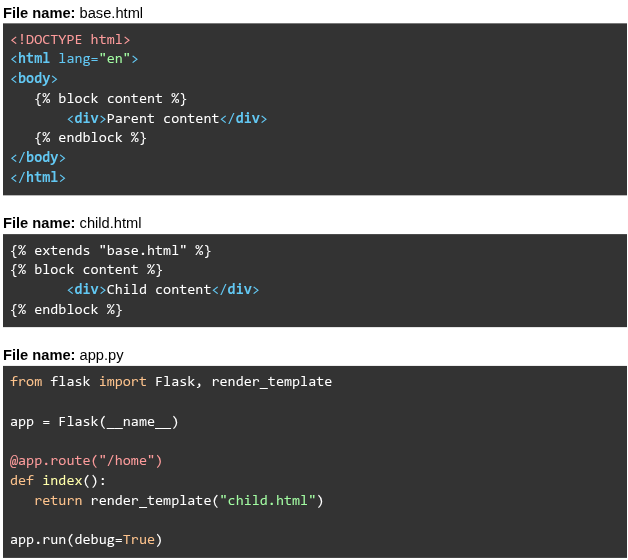 Assume that the Flask app is running at
  . What will be rendered for the URL request
  ?
?
Assume that the Flask app is running at . What will be rendered for the URL request ?Text of the picture (copyable)
File name: base.html
```html
<!DOCTYPE html>
<html lang="en">
<body>
    {% block content %}
    <div>Parent content</div>
    {% endblock %}
</body>
</html>
```

File name: child.html
```html
{% extends "base.html" %}
{% block content %}
    <div>Child content</div>
{% endblock %}
```

File name: app.py
```python
from flask import Flask, render_template

app = Flask(__name__)

@app.route("/home")
def index():
    return render_template("child.html")

app.run(debug=True)
```
http://127.0.0.1:5000
http://127.0.0.1:5000/home- Parent content Child content
- Parent content
- Child content
- Child content Parent content
Consider the following Flask SQLAlchemy models and RESTful API code.
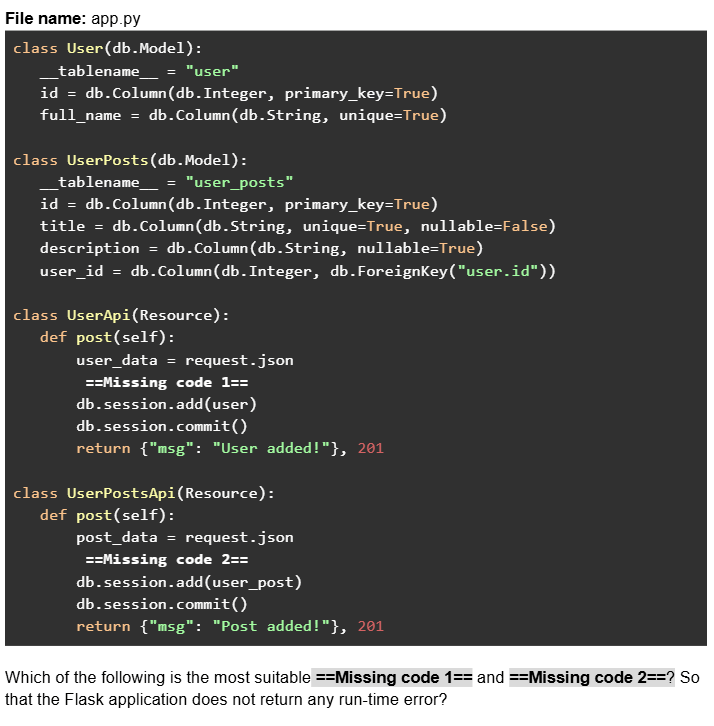
Text of the picture (copyable)
File name: app.py
```python
class User(db.Model):
    __tablename__ = "user"
    id = db.Column(db.Integer, primary_key=True)
    full_name = db.Column(db.String, unique=True)

class UserPosts(db.Model):
    __tablename__ = "user_posts"
    id = db.Column(db.Integer, primary_key=True)
    title = db.Column(db.String, unique=True, nullable=False)
    description = db.Column(db.String, nullable=True)
    user_id = db.Column(db.Integer, db.ForeignKey("user.id"))

class UserApi(Resource):
    def post(self):
        user_data = request.json
        ==Missing code 1==
        db.session.add(user)
        db.session.commit()
        return {"msg": "User added!"}, 201

class UserPostsApi(Resource):
    def post(self):
        post_data = request.json
        ==Missing code 2==
        db.session.add(user_post)
        db.session.commit()
        return {"msg": "Post added!"}, 201
```
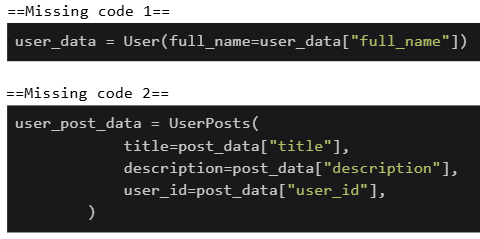
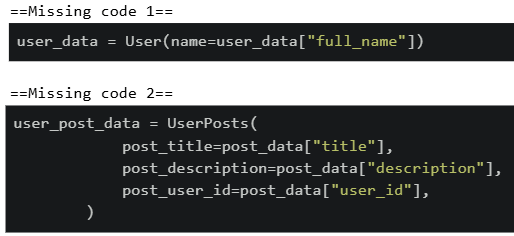
Which of the following is the most suitable ==Missing code 1== and ==Missing code 2==? So that the Flask application does not return any run-time error?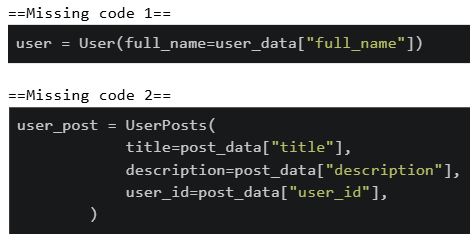
text
==Missing code 1==
```python
user = User(full_name=user_data["full_name"])
```

==Missing code 2==
```python
user_post = UserPosts(
    title=post_data["title"],
    description=post_data["description"],
    user_id=post_data["user_id"],
)
```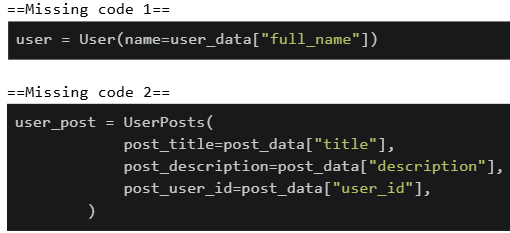
text
```python
==Missing code 1==
user = User(name=user_data["full_name"])

==Missing code 2==
user_post = UserPosts(
    post_title=post_data["title"],
    post_description=post_data["description"],
    post_user_id=post_data["user_id"],
)
```
text
```python
==Missing code 1==
user_data = User(full_name=user_data["full_name"])

==Missing code 2==
user_post_data = UserPosts(
    title=post_data["title"],
    description=post_data["description"],
    user_id=post_data["user_id"],
)
```
text
```
==Missing code 1==
user_data = User(name=user_data["full_name"])

==Missing code 2==
user_post_data = UserPosts(
    post_title=post_data["title"],
    post_description=post_data["description"],
    post_user_id=post_data["user_id"],
)
```
Consider the following flask application "app.py" given below.
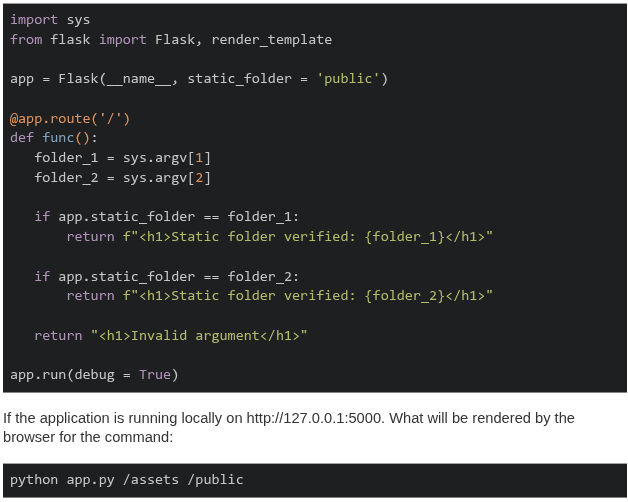
Text of the picture (copyable)
```python
import sys
from flask import Flask, render_template

app = Flask(__name__, static_folder = 'public')

@app.route('/')
def func():
    folder_1 = sys.argv[1]
    folder_2 = sys.argv[2]

    if app.static_folder == folder_1:
        return f"<h1>Static folder verified: {folder_1}</h1>"

    if app.static_folder == folder_2:
        return f"<h1>Static folder verified: {folder_2}</h1>"

    return "<h1>Invalid argument</h1>"

app.run(debug = True)
```

If the application is running locally on http://127.0.0.1:5000. What will be rendered by the browser for the command:

```
python app.py /assets /public
```- Static folder verified: /assets
- Static folder verified: /public
- Invalid argument
- None of these
Consider the following flask app. Given that  allows code to be tested without a server, which of the following statements is correct?
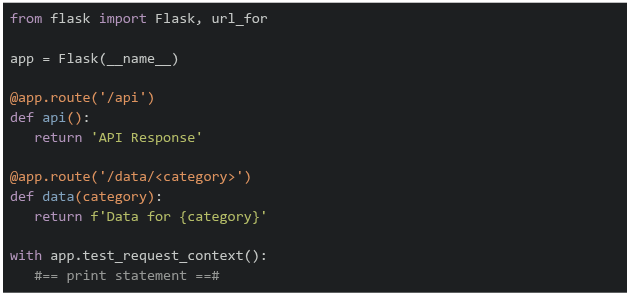
allows code to be tested without a server, which of the following statements is correct?
Text of the picture (copyable)
```
test_request_context()
```
```python
from flask import Flask, url_for

app = Flask(__name__)

@app.route('/api')
def api():
    return 'API Response'

@app.route('/data/<category>')
def data(category):
    return f'Data for {category}'

with app.test_request_context():
    #== print statement ==#
```- If
 is replaced by
  , the output on the terminal will be
text
```python #=== print statement ===# ``` ```python print(url_for('data', category='sales')) ``` ``` /data?category=sales ``` - If is replaced by
 , the output on the terminal will be
text
```python #=== print statement ===# ``` ```python print(url_for('data', category='sales', format='json')) ``` ``` /data/sales/json ``` - If is replaced by
 , the output on the terminal will be
text
```python #=== print statement ===# ``` ```python print(url_for('api', category='sales')) ``` ``` /api?category=sales ``` - If is replaced by
 , the output on the terminal will be
text
```python
#=== print statement ===#
```
```python
print(url_for('api'))
```
/api
Consider the following Flask application.
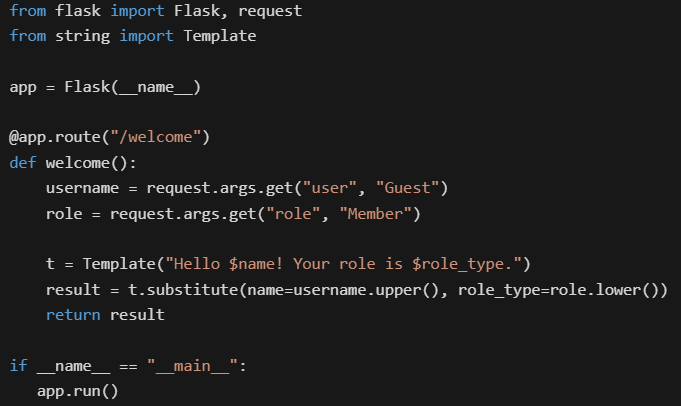

Text of the picture (copyable)
```python
from flask import Flask, request
from string import Template

app = Flask(__name__)

@app.route("/welcome")
def welcome():
    username = request.args.get("user", "Guest")
    role = request.args.get("role", "Member")

    t = Template("Hello $name! Your role is $role_type.")
    result = t.substitute(name=username.upper(), role_type=role.lower())
    return result

if __name__ == "__main__":
    app.run()
```
Assume that the Flask app is running at http://127.0.0.1:5000. What will be the rendered output in the browser for the URL: http://127.0.0.1:5000/welcome?user=Alice&role=ADMIN
text
It raises a KeyError because `$role_type` is missing in the URL.
- Hello Guest! Your role is member.
- Hello Alice! Your role is ADMIN.
- Hello ALICE! Your role is admin.
Which of the following flask routes can take dynamic value in the URL like “/user/55”?

text
```python
@app.route("/user/id")
```
text
```python
@app.route("/user/<int:id>")
```
text
```python
@app.route("/user/<id>")
```
text
```python
@app.route("/user/<float:id>")
```
Consider the following Python Flask code.
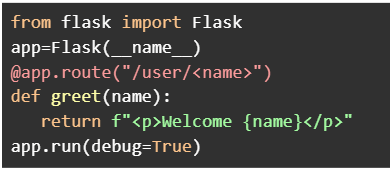

Text of the picture (copyable)
```python
from flask import Flask
app=Flask(__name__)
@app.route("/user/<name>")
def greet(name):
    return f"<p>Welcome {name}</p>"
app.run(debug=True)
```
Assume that the Flask app is running at http://127.0.0.1:5000. Which of the following URL requests will render the output without any errors?- http://127.0.0.1:5000/user/IITM
- http://127.0.0.1:5000/user/101
- http://127.0.0.1:5000/user/10/greet
- http://127.0.0.1:5000/user
- http://127.0.0.1:5000/user/BS?id=101
Consider the following HTML and Python Flask code.
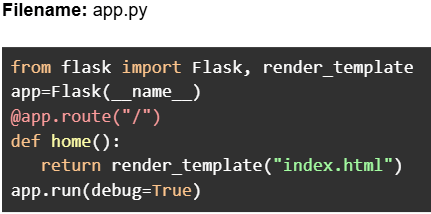
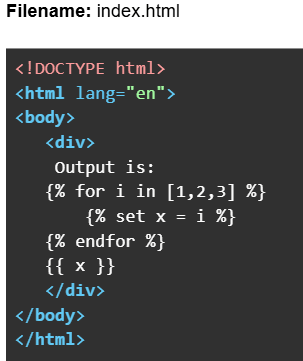

Text of the picture (copyable)
Filename: app.py

```python
from flask import Flask, render_template
app=Flask(__name__)
@app.route("/")
def home():
    return render_template("index.html")
app.run(debug=True)
```
Filename: index.html

```html
<!DOCTYPE html>
<html lang="en">
<body>
    <div>
        Output is:
        {% for i in [1,2,3] %}
            {% set x = i %}
        {% endfor %}
        {{ x }}
    </div>
</body>
</html>
```
Assume that the Flask app is running at http://127.0.0.1:5000. What will be the rendered output
in the browser for the URL: http://127.0.0.1:5000?- Output is: 3
- Output is:
- Output is: 1 2 3
- Output is: 1 2 3 3
Consider the following Python Flask code.
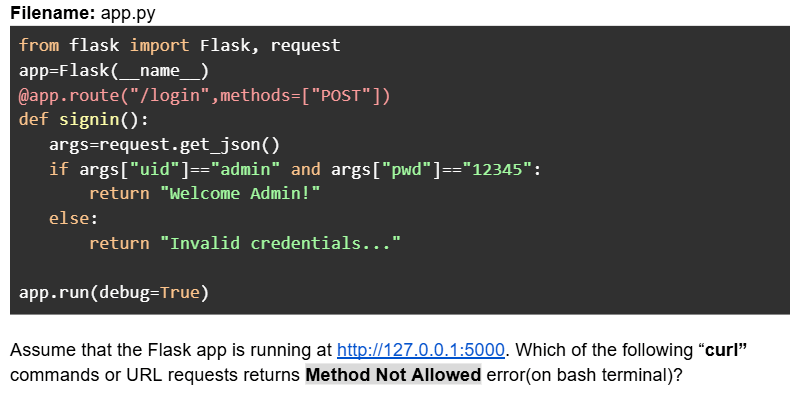
Text of the picture (copyable)
Filename: app.py

```python
from flask import Flask, request
app=Flask(__name__)
@app.route("/login",methods=["POST"])
def signin():
    args=request.get_json()
    if args["uid"]=="admin" and args["pwd"]=="12345":
        return "Welcome Admin!"
    else:
        return "Invalid credentials..."

app.run(debug=True)
```

Assume that the Flask app is running at http://127.0.0.1:5000. Which of the following "curl" commands or URL requests returns Method Not Allowed error(on bash terminal)?- curl -X POST --json '{"uid":"admin","pwd":"xyz"}' http://127.0.0.1:5000/login
- curl -X GET --json '{"uid":"admin","pwd":"xyz"}' http://127.0.0.1:5000/login
- URL request: http://127.0.0.1:5000/login
- curl --json '{"uid":"admin","pwd":"12345"}' http://127.0.0.1:5000/login
- curl -X POST --json '{"uid":"admin","pwd":"12345"}' http://127.0.0.1:5000/login
Consider the following Python Flask RESTful API code.
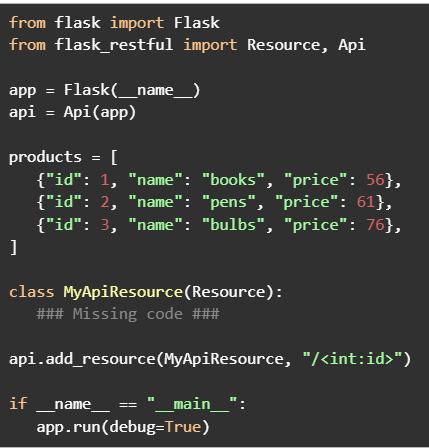

Text of the picture (copyable)
```python
from flask import Flask
from flask_restful import Resource, Api

app = Flask(__name__)
api = Api(app)

products = [
    {"id": 1, "name": "books", "price": 56},
    {"id": 2, "name": "pens", "price": 61},
    {"id": 3, "name": "bulbs", "price": 76},
]

class MyApiResource(Resource):
    ### Missing code ###

api.add_resource(MyApiResource, "/<int:id>")

if __name__ == "__main__":
    app.run(debug=True)
```
Assume that the Flask app is running at http://127.0.0.1:5000. Which of the following codes when placed at ###Missing code ### will work correctly to search a product by id?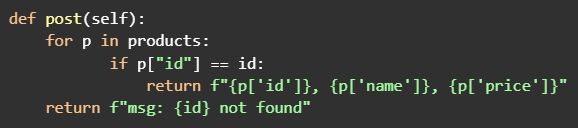
text
```python
def post(self):
    for p in products:
        if p["id"] == id:
            return f"{p['id']}, {p['name']}, {p['price']}"
    return f"msg: {id} not found"
```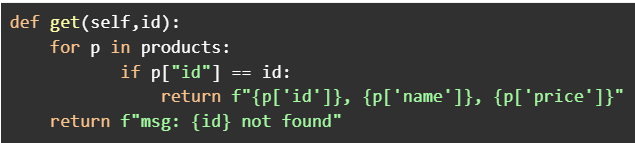
text
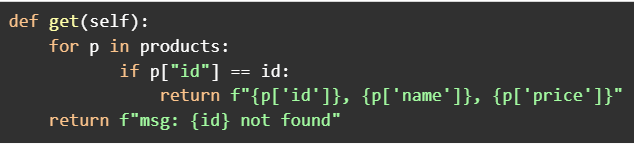
```python
def get(self,id):
    for p in products:
        if p["id"] == id:
            return f"{p['id']}}, {p['name']}}, {p['price']}}"
    return f"msg: {id} not found"
```
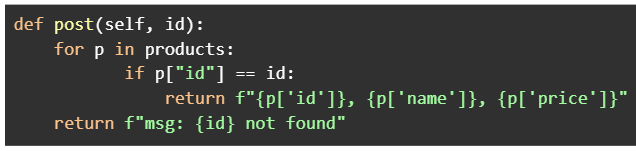
text
```python
def get(self):
    for p in products:
        if p["id"] == id:
            return f"{p['id']}, {p['name']}, {p['price']}"
    return f"msg: {id} not found"
```
text
```python
def post(self, id):
    for p in products:
        if p["id"] == id:
            return f"{p['id']}, {p['name']}, {p['price']}"
    return f"msg: {id} not found"
```
Consider the following flask app.
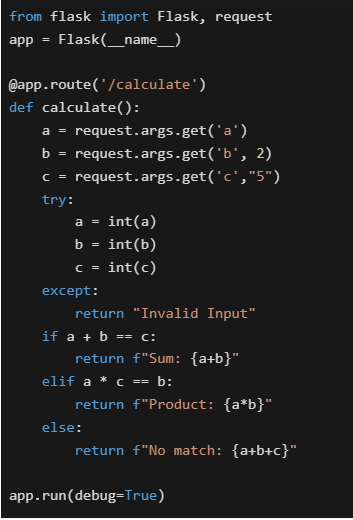 Select the option which correctly matches the URL in column A with the rendered output in column B, if the application is running locally on http://127.0.0.1:5000.
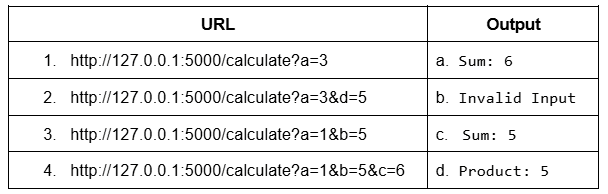
Select the option which correctly matches the URL in column A with the rendered output in column B, if the application is running locally on http://127.0.0.1:5000.
Text of the picture (copyable)
```python
from flask import Flask, request
app = Flask(__name__)

@app.route('/calculate')
def calculate():
    a = request.args.get('a')
    b = request.args.get('b', 2)
    c = request.args.get('c', "5")

    try:
        a = int(a)
        b = int(b)
        c = int(c)
    except:
        return "Invalid Input"

    if a + b == c:
        return f"Sum: {a+b}"
    elif a * c == b:
        return f"Product: {a*b}"
    else:
        return f"No match: {a+b+c}"

app.run(debug=True)
```
| URL | Output |
|---|---|
| 1. http://127.0.0.1:5000/calculate?a=3 | a. Sum: 6 |
| 2. http://127.0.0.1:5000/calculate?a=3&d=5 | b. Invalid Input |
| 3. http://127.0.0.1:5000/calculate?a=1&b=5 | c. Sum: 5 |
| 4. http://127.0.0.1:5000/calculate?a=1&b=5&c=6 | d. Product: 5 |- 1-b, 2-b, 3-a, 4-a
- 1-b, 2-b, 3-d, 4-a
- 1-c, 2-c, 3-d, 4-a
- 1-c, 2-b, 3-d, 4-a
Consider the following code: app.py
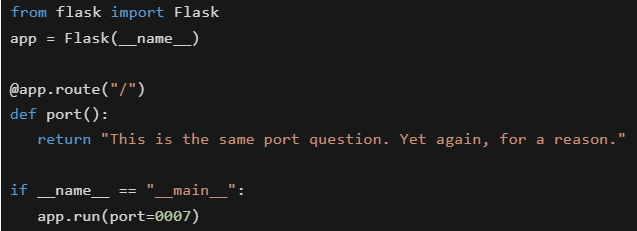 You are running a Flask web application locally using the command: python app.py. On which URL will the application be accessible in the browser?
You are running a Flask web application locally using the command: python app.py. On which URL will the application be accessible in the browser?Text of the picture (copyable)
```python
from flask import Flask
app = Flask(__name__)

@app.route("/")
def port():
    return "This is the same port question. Yet again, for a reason."

if __name__ == "__main__":
    app.run(port=0007)
```- https://127.0.0.1:5000/
- http://localhost:0007/
- http://0.0.0.0:0007/
- None of these
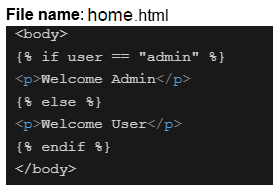
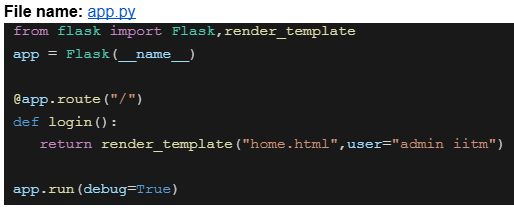
Consider the following HTML and Python flask codes.

Text of the picture (copyable)
File name: home.html

```html
<body>
  {% if user == "admin" %}
  <p>Welcome Admin</p>
  {% else %}
  <p>Welcome User</p>
  {% endif %}
</body>
```
File name: app.py

```python
from flask import Flask,render_template

app = Flask(__name__)

@app.route("/")
def login():
    return render_template("home.html",user="admin iitm")

app.run(debug=True)
```
Assume that the above code is running on http://127.0.0.1:5000. What will be the rendered output for the URL request http://127.0.0.1:5000 ?- Welcome Admin
- Welcome User
- 404 Not Found
- Nothing will be rendered

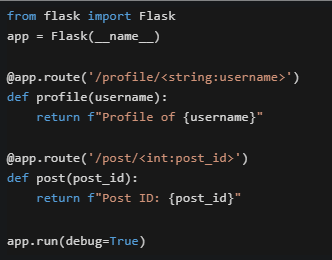

Text of the picture (copyable)
Consider the following Flask application running on http://127.0.0.1:5000.
```python
from flask import Flask
app = Flask(__name__)

@app.route('/profile/<string:username>')
def profile(username):
    return f"Profile of {username}"

@app.route('/post/<int:post_id>')
def post(post_id):
    return f"Post ID: {post_id}"

app.run(debug=True)
```
What will happen when accessing http://127.0.0.1:5000/post/abc123 ?- It will render "Post ID: abc123"
- Flask will return a 404 error because abc123 cannot be converted to integer
- It will render "Profile of abc123"
- The application will crash with a TypeError
Consider the following users list.

Text of the picture (copyable)
```python
users = [[{ "id":1, "name": "user_1", "role": "manager"},
          { "id":2, "name": "user_2", "role": "manager"},
          { "id":3, "name": "user_3", "role": "manager"}]]
```
An ordered HTML list is to be created for users where every list item should have a clickable "name" attribute redirecting to the endpoint "/show_users/<id>" where "id" is the "id" attribute of the same user dictionary. Which of the following is the correct way of doing it with jinja and HTML?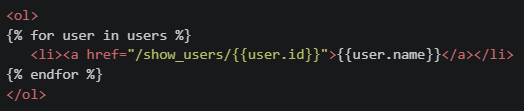
text
```html
<ol>
{% for user in users %}
    <li><a href="/show_users/{{user.id}}">{{user.name}}</a></li>
{% endfor %}
</ol>
```
text
```html
<ol>
{% for user in users %}
    <li><a href="/show_users/{{user['id']}}">{{user['name']}}</a></li>
{% endfor %}
</ol>
```
text
```html
<ol>
    <li><a href="/show_users/{{users[0].id}}">{{users[0].name}}</a></li>
    <li><a href="/show_users/{{users[1].id}}">{{users[1].name}}</a></li>
    <li><a href="/show_users/{{users[2].id}}">{{users[2].name}}</a></li>
</ol>
```
text
```html
<ol>
{% for user in users %}
    <li><a href="/show_users/{{user.name[-1]}}">{{user.name}}</a></li>
{% endfor %}
</ol>
```
Consider the following flask app and Jinja2 template.
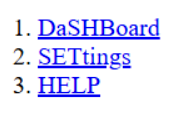
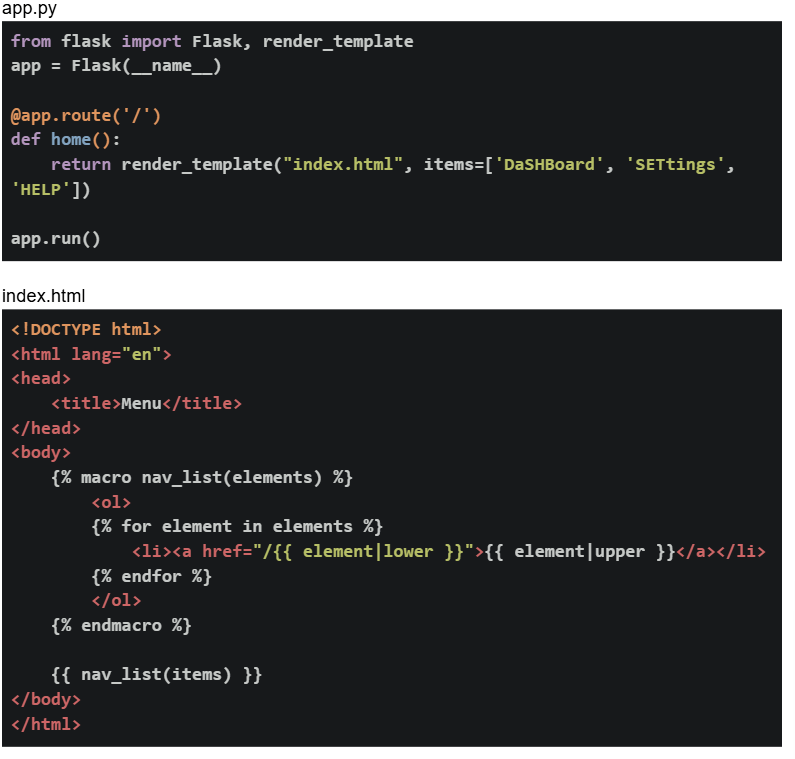 If the flask app is running locally on http://127.0.0.1:5000. What will be the output on the browser for the base URL?
If the flask app is running locally on http://127.0.0.1:5000. What will be the output on the browser for the base URL?Text of the picture (copyable)
app.py
```python
from flask import Flask, render_template
app = Flask(__name__)

@app.route('/')
def home():
    return render_template("index.html", items=['DaShBoard', 'SETtings',
                                                 'HELP'])

app.run()
```

index.html
```html
<!DOCTYPE html>
<html lang="en">
<head>
    <title>Menu</title>
</head>
<body>
    {% macro nav_list(elements) %}
    <ol>
        {% for element in elements %}
        <li><a href="/{{ element|lower }}">{{ element|upper }}</a></li>
        {% endfor %}
    </ol>
    {% endmacro %}

    {{ nav_list(items) }}
</body>
</html>
```
text
1. DaSHBoard
2. SETtings
3. HELP
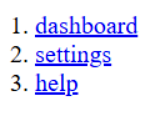
text
1. dashboard
2. settings
3. help
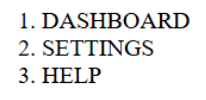
text
1. DASHBOARD
2. SETTINGS
3. HELP
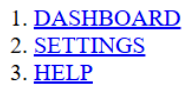
text
1. DASHBOARD
2. SETTINGS
3. HELP
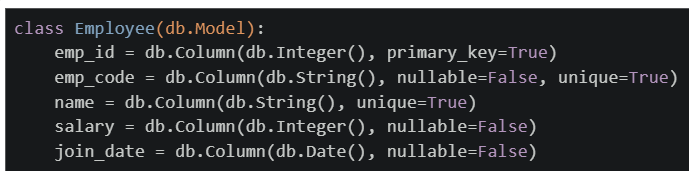
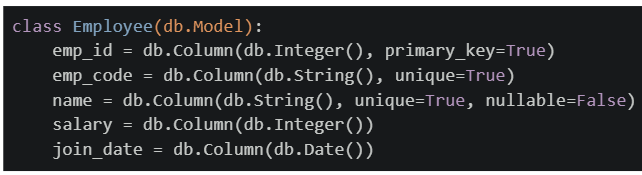
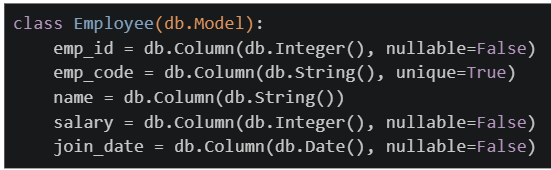
Consider the following SQL create statement.
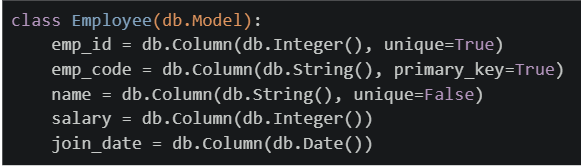
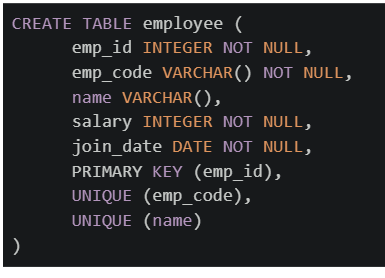 Which of the following flask_sqlalchemy models will create exactly the same table as created by the above SQL command?
Which of the following flask_sqlalchemy models will create exactly the same table as created by the above SQL command?Text of the picture (copyable)
```sql
CREATE TABLE employee (
    emp_id INTEGER NOT NULL,
    emp_code VARCHAR() NOT NULL,
    name VARCHAR(),
    salary INTEGER NOT NULL,
    join_date DATE NOT NULL,
    PRIMARY KEY (emp_id),
    UNIQUE (emp_code),
    UNIQUE (name)
)
```
text
```python
class Employee(db.Model):
    emp_id = db.Column(db.Integer(), unique=True)
    emp_code = db.Column(db.String(), primary_key=True)
    name = db.Column(db.String(), unique=False)
    salary = db.Column(db.Integer())
    join_date = db.Column(db.Date())
```
text
```python
class Employee(db.Model):
    emp_id = db.Column(db.Integer(), primary_key=True)
    emp_code = db.Column(db.String(), nullable=False, unique=True)
    name = db.Column(db.String(), unique=True)
    salary = db.Column(db.Integer(), nullable=False)
    join_date = db.Column(db.Date(), nullable=False)
```
text
```python
class Employee(db.Model):
    emp_id = db.Column(db.Integer(), primary_key=True)
    emp_code = db.Column(db.String(), unique=True)
    name = db.Column(db.String(), unique=True, nullable=False)
    salary = db.Column(db.Integer())
    join_date = db.Column(db.Date())
```
text
```python
class Employee(db.Model):
    emp_id = db.Column(db.Integer(), nullable=False)
    emp_code = db.Column(db.String(), unique=True)
    name = db.Column(db.String())
    salary = db.Column(db.Integer(), nullable=False)
    join_date = db.Column(db.Date(), nullable=False)
```
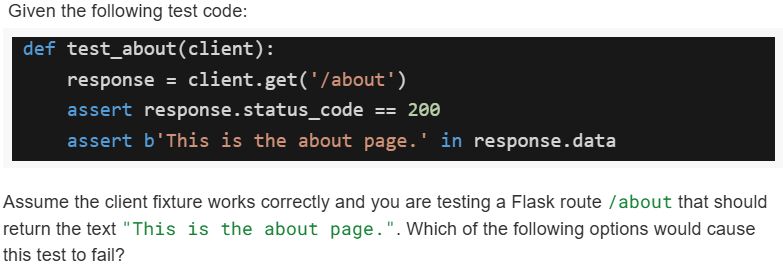
Text of the picture (copyable)
Given the following test code:

```python
def test_about(client):
    response = client.get('/about')
    assert response.status_code == 200
    assert b'This is the about page.' in response.data
```

Assume the client fixture works correctly and you are testing a Flask route `/about` that should return the text "This is the about page.". Which of the following options would cause this test to fail?
text
The route `/about` is missing in `app.py`.

text
The route `/about` exists but returns "About us page" instead.

text
The route `/about` returns `<p>this is the about page.</p>` instead of plain text.
- None of these.
Comprehension passage for this question
A Household Services Application maintains the following three tables:
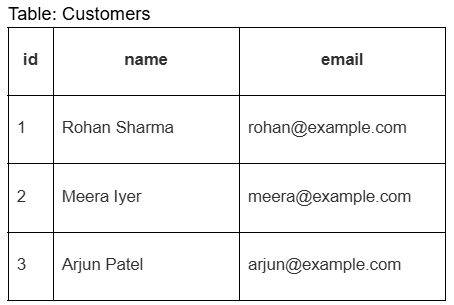 The Requests table represents service bookings made by customers. Based on the above data, answer the given subquestions.
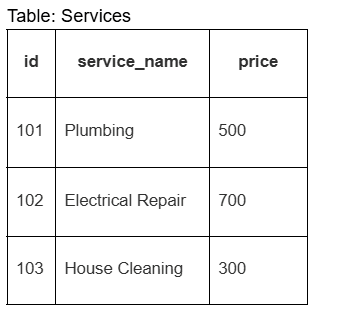
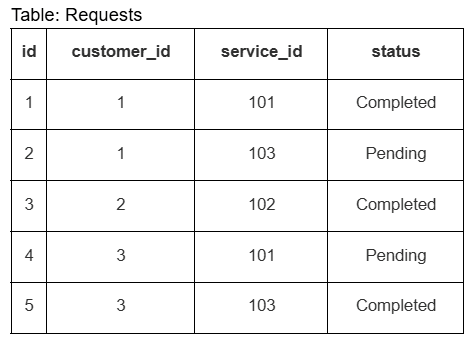
If the given tables are mapped to Flask-SQLAlchemy models (Customer, Service, Request), which query correctly retrieves all services requested by customer with id=1?

text
```python
customer = Customer.query.filter_by(id=1).first()
services = Service.query.all()
```

text
```python
services = Service.query.filter_by(customer_id=1).all()
```

text
```python
customer = Customer.query.get(1)
services = [r.service for r in customer.requests]
```

text
```python
services = Request.query.filter_by(id=1).all()
```
What does the following curl command do?

Text of the picture (copyable)
```
curl -X POST -d "username=student&password=1234" https://student/login
```
- Sends a POST request to retrieve data.
- Sends a POST request to send form data.
- Sends a POST request to send JSON data.
- Sends a POST request to retrieve JSON data.
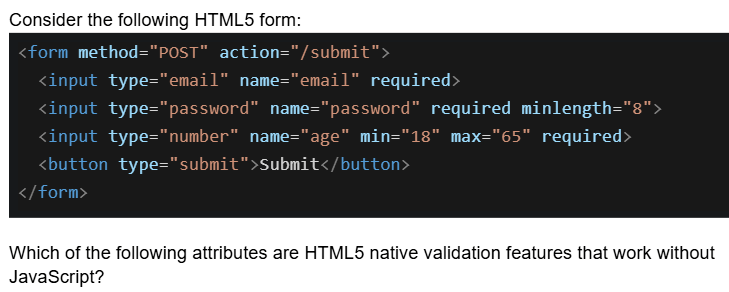
Text of the picture (copyable)
Consider the following HTML5 form:

```html
<form method="POST" action="/submit">
    <input type="email" name="email" required>
    <input type="password" name="password" required minlength="8">
    <input type="number" name="age" min="18" max="65" required>
    <button type="submit">Submit</button>
</form>
```

Which of the following attributes are HTML5 native validation features that work without JavaScript?- required, minlength, and type="email"
- min, max, and minlength
- required, type="password", and action
- type="email", min, max, minlength, and required
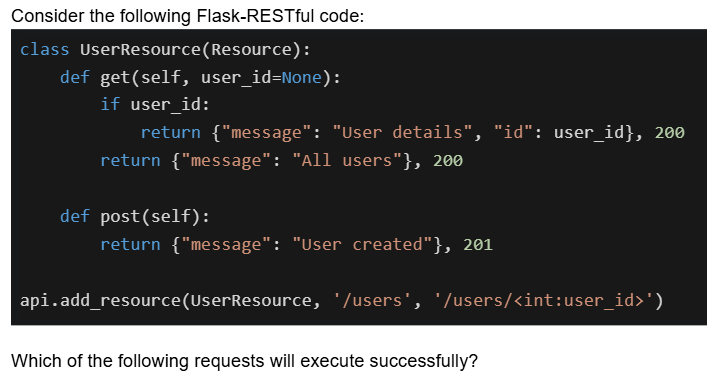
Text of the picture (copyable)
Consider the following Flask-RESTful code:

```python
class UserResource(Resource):
    def get(self, user_id=None):
        if user_id:
            return {"message": "User details", "id": user_id}, 200
        return {"message": "All users"}, 200

    def post(self):
        return {"message": "User created"}, 201

api.add_resource(UserResource, '/users', '/users/<int:user_id>')
```

Which of the following requests will execute successfully?- GET /users - returns 200 with all users
- GET /users/5 - returns 200 with user details for ID 5
- POST /users - returns 201 with user created message
- POST /users/5 - returns 201 with user created message
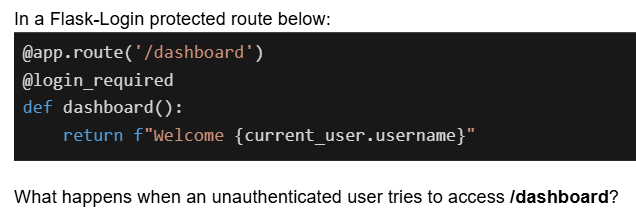
Text of the picture (copyable)
In a Flask-Login protected route below:

```python
@app.route('/dashboard')
@login_required
def dashboard():
    return f"Welcome {current_user.username}"
```

What happens when an unauthenticated user tries to access /dashboard?- Returns a 404 error
- Displays "Welcome None"
- Redirects to the login page
- Returns an error page with HTTP 403
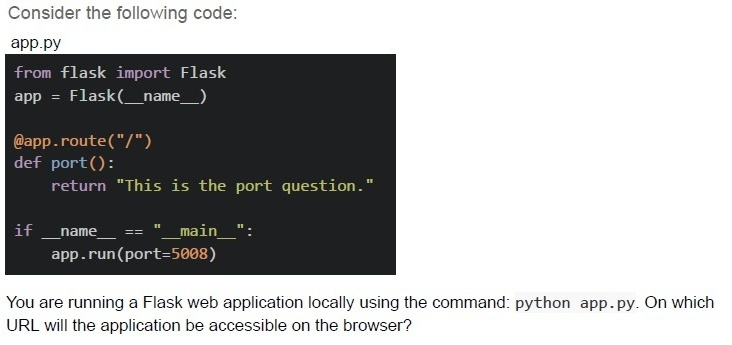
Text of the picture (copyable)
Consider the following code:
app.py

```python
from flask import Flask
app = Flask(__name__)

@app.route("/")
def port():
    return "This is the port question."

if __name__ == "__main__":
    app.run(port=5008)
```

You are running a Flask web application locally using the command: python app.py. On which URL will the application be accessible on the browser?
text
http://127.0.0.1:5000/

text
http://localhost:0000/

text
http://0.0.0.0:5000/

text
http://localhost:5008/

Text of the picture (copyable)
Which of the following Flask view functions will return a 404 error for the URL:
```
http://127.0.0.1:5000/profile/user123/active/2024?
```

text
```python
@app.route('/profile/<username>/<status>/<int:year>')
def profile(username, status, year):
    info = {'username': username, 'status': status, 'year': year}
    return info
```
text
```python
@app.route('/profile/<string:username>/<string:status>/<string:year>')
def profile(username, status, year):
    info = {'username': username, 'status': status, 'year': year}
    return info
```
text
```python
@app.route('/profile/<username>/<status>/<year>')
def profile(username, status, year):
    info = {'username': username, 'status': status, 'year': year}
    return info
```
text
```python
@app.route('/profile/user/<username>/<status>/<year>')
def profile(username, status, year):
    info = {'username': username, 'status': status, 'year': year}
    return info
```

Text of the picture (copyable)
Match the following web development concepts with their correct descriptions:

| Column A | Column B |
|---|---|
| 1. PyHTML | A. Lightweight engine in Python for embedding variables inside strings using `$variable` style |
| 2. Jinja2 | B. A Python library to build HTML structures programmatically using Python functions |
| 3. Template Rendering | C. The process of generating dynamic HTML by combining templates with data |
| 4. String Template Rendering | D. Templating engine used by Flask that supports control structures, filters, and inheritance |
- 1 → B, 2 → C, 3 → D, 4 → A
- 1 → A, 2 → B, 3 → C, 4 → D
- 1 → B, 2 → D, 3 → C, 4 → A
- 1 → C, 2 → D, 3 → A, 4 → B

Text of the picture (copyable)
Which of the following Flask view functions will NOT throw any error for the URL:
`http://127.0.0.1:5000/user?username=mad1&role=admin?`
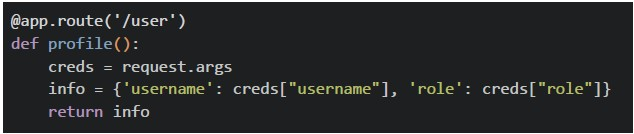
text
```python
@app.route('/user')
def profile():
    creds = request.args
    info = {'username': creds["username"], 'role': creds["role"]}
    return info
```
text
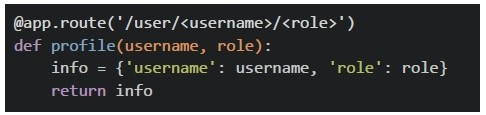
```python
@app.route('/user/<username>/<role>')
def profile(username, role):
    info = {'username': username, 'role': role}
    return info
```
text
```python
@app.route('/user')
def profile():
    return {'message': 'data retrieved successfully'}
```
text
All of these
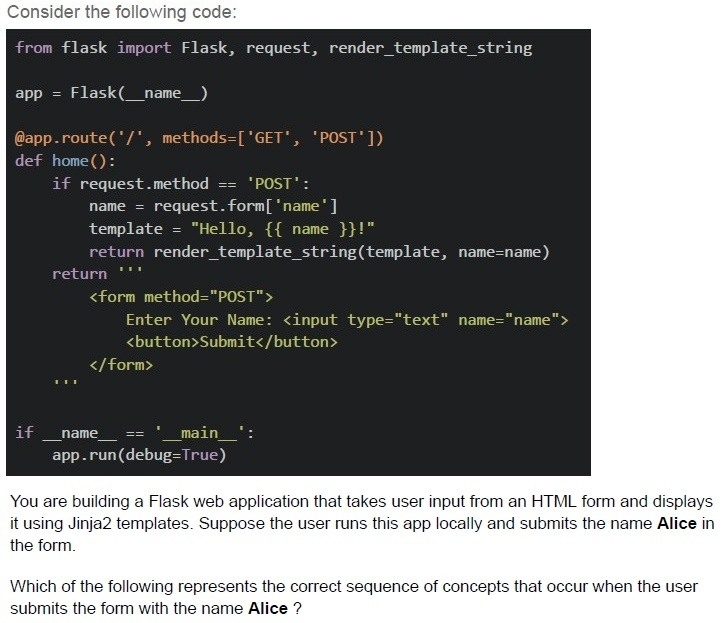
Text of the picture (copyable)
Consider the following code:

```python
from flask import Flask, request, render_template_string

app = Flask(__name__)

@app.route('/', methods=['GET', 'POST'])
def home():
    if request.method == 'POST':
        name = request.form['name']
        template = "Hello, {{ name }}!"
        return render_template_string(template, name=name)
    return '''
        <form method="POST">
            Enter Your Name: <input type="text" name="name">
            <button>Submit</button>
        </form>
    '''

if __name__ == '__main__':
    app.run(debug=True)
```

You are building a Flask web application that takes user input from an HTML form and displays it using Jinja2 templates. Suppose the user runs this app locally and submits the name **Alice** in the form.

Which of the following represents the correct sequence of concepts that occur when the user submits the form with the name **Alice** ?
text
HTML Form Rendering → HTTP 404 Not Found Error → User Submits Form → Flask Routing → Template Rendering

text
User Submits Form (HTTP POST) → Check URL Structure → Network Transfer (Bandwidth & Latency) → Flask Routing

text
User Accesses URL (Form at "/") → User Submits Form (HTTP POST) → Flask Request
Handling (request.form) → Jinja2 Template Rendering

text
Flask Request Handling → Network Round Trip (RTT) → HTML Table Rendering → Jinja2 Template Rendering
Comprehension passage for this question
Based on the above data, answer the given subquestions.
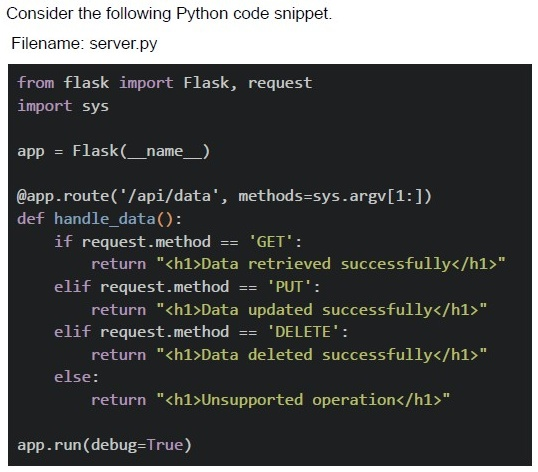
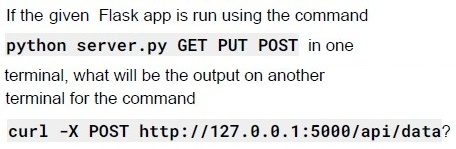
Text of the picture (copyable)
If the given Flask app is run using the command
```
python server.py GET PUT POST
```
in one terminal, what will be the output on another terminal for the command
```
curl -X POST http://127.0.0.1:5000/api/data?
```

text
```html
<h1>Data added successfully</h1>
```

text
```html
<h1>Unsupported operation</h1>
```

text
```html
<h1>Method not Allowed</h1>
```

text
```html
<h1>404 Not Found</h1>
```
Comprehension passage for this question
Based on the above data, answer the given subquestions.
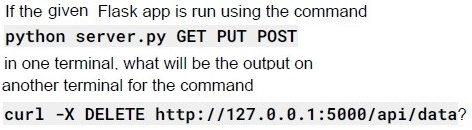
Text of the picture (copyable)
If the given Flask app is run using the command
```
python server.py GET PUT POST
```
in one terminal, what will be the output on
another terminal for the command
```
curl -X DELETE http://127.0.0.1:5000/api/data?
```

text
```html
<h1>Data deleted successfully</h1>
```

text
```html
<h1>Unsupported operation</h1>
```

text
```html
<h1>Method not Allowed</h1>
```

text
```html
<h1>404 Not Found</h1>
```
Comprehension passage for this question
Based on the above data, answer the given subquestions.
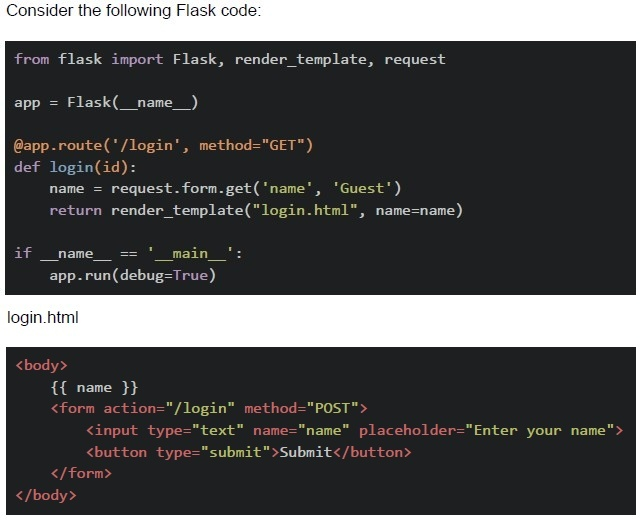
From the given options, select which part of the code (if any) will throw an error first in the terminal and prevent the Flask application from running successfully ?

text
method="GET" is not correct, it should be methods=["GET"]

text
```python
def login(id)
```
can throw error because no id is passed in, /login url

text
name will throw error because no name will be written in the starting of app

text
There is no error, Flask application will run correctly.
Comprehension passage for this question
Based on the above data, answer the given subquestions.
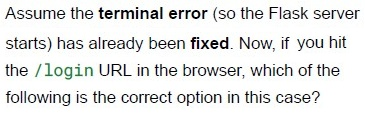
Text of the picture (copyable)
Assume the **terminal error** (so the Flask server
starts) has already been **fixed**. Now, if you hit
the `/login` URL in the browser, which of the
following is the correct option in this case?

text
method="GET" is not correct, it should be methods=["GET"]

text
```python
def login(id) can throw error because no id is passed in /login url
```

text
name will throw error because no name will be written in the starting of app

text
There is no error, Flask application will run correctly.
Why is using the GET method for sensitive data discouraged?
- GET encrypts the URL
- Data becomes part of browser history and URL
- It uses a separate request header
- Flask doesn’t support GET by default
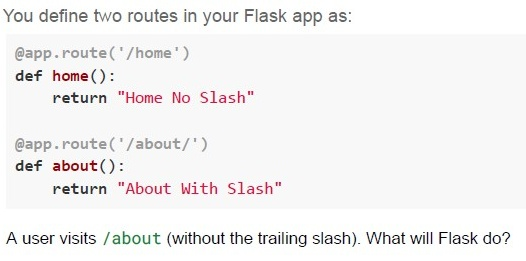
Text of the picture (copyable)
You define two routes in your Flask app as:

```python
@app.route('/home')
def home():
    return "Home No Slash"

@app.route('/about/')
def about():
    return "About With Slash"
```

A user visits /about (without the trailing slash). What will Flask do?
text
Responds with 404 Not Found

text
Automatically redirects to /about/

text
Responds with "About With Slash"

text
Responds with "Home No Slash"
A login form doesn't show any message when users enter wrong credentials. Which Nielsen heuristic is violated?
- Aesthetic and minimalist design
- Visibility of system status
- Error prevention
- Recognition rather than recall
Which of the following are handled by the browser and not the Flask server?
- Parsing HTML
- Auto-filling saved form data
- URL routing
- JavaScript execution