Home / MAD1 / Week 2 / Real questions
MAD1 week 2 - real exam questions
60 questions pulled from past papers whose wording matches this week's topics, newest first, duplicates removed. Pick your answers, then press Check answers. Figures and answer keys are the originals.
Elapsed 00:00
Consider the Flask SQLAlchemy data model.
 What is the output after the following Python code is executed ? (Assume all entries are successfully committed to the database)
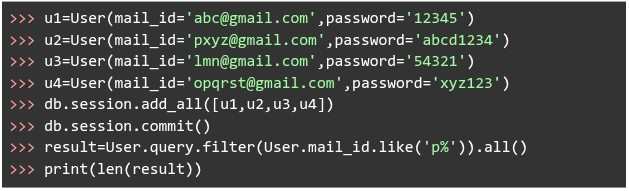
What is the output after the following Python code is executed ? (Assume all entries are successfully committed to the database)
Text of the picture (copyable)
```python
class User(db.Model):
    __tablename__ = "user"
    id = db.Column(db.Integer, primary_key=True)
    mail_id = db.Column(db.String, unique=True)
    password = db.Column(db.String, nullable=False)
```
```python
>>> u1=User(mail_id='abc@gmail.com',password='12345')
>>> u2=User(mail_id='pxyz@gmail.com',password='abcd1234')
>>> u3=User(mail_id='lmn@gmail.com',password='54321')
>>> u4=User(mail_id='opqrst@gmail.com',password='xyz123')
>>> db.session.add_all([u1,u2,u3,u4])
>>> db.session.commit()
>>> result=User.query.filter(User.mail_id.like('p%')).all()
>>> print(len(result))
```- 4
- 3
- 2
- 1
Consider the SQLAlchemy model Order mapped to the table orders.
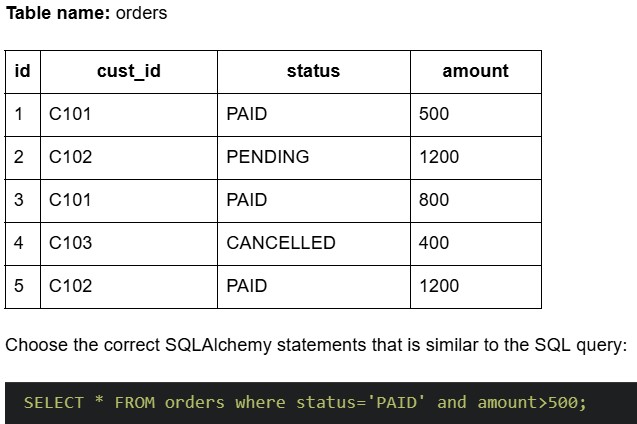
Text of the picture (copyable)
Table name: orders

| id | cust_id | status | amount |
|---|---|---|---|
| 1 | C101 | PAID | 500 |
| 2 | C102 | PENDING | 1200 |
| 3 | C101 | PAID | 800 |
| 4 | C103 | CANCELLED | 400 |
| 5 | C102 | PAID | 1200 |

Choose the correct SQLAlchemy statements that is similar to the SQL query:

```sql
SELECT * FROM orders where status='PAID' and amount>500;
```

text
```python
order_records = db.session.query(Order).filter( \
    Order.status == "PAID" and Order.amount > 500)
```
text
```python
order_records = db.session.query(Order) \
    .filter(Order.status == "PAID") \
    .filter(Order.amount > 500)
```
text
```python
order_records = db.session.query(Order).filter( \
    Order.status == "PAID") and \
db.session.query(Order).filter(Order.amount > 500)
```
text
```python
order_records = db.session.query(Order.status == "PAID" and \
    Order.amount > 500)
```
Consider the following models: Course and Enrollment corresponding to tables course and enrollment in SQLite database.
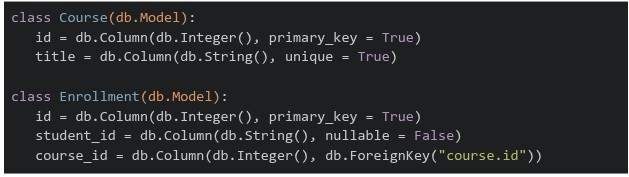 Based on the model schemas, what relationship do the classes Course and Enrollment share?
Based on the model schemas, what relationship do the classes Course and Enrollment share?Text of the picture (copyable)
```python
class Course(db.Model):
    id = db.Column(db.Integer(), primary_key = True)
    title = db.Column(db.String(), unique = True)

class Enrollment(db.Model):
    id = db.Column(db.Integer(), primary_key = True)
    student_id = db.Column(db.String(), nullable = False)
    course_id = db.Column(db.Integer(), db.ForeignKey("course.id"))
```- Many-to-Many
- One-to-Many
- One-to-One
- The tables are not at all related
Which of the following statements is correct? Statement 1: In Server-Side Rendering (SSR), the client's browser receives a nearly empty HTML skeleton and relies heavily on client-side JavaScript execution to fetch data and construct the Document Object Model (DOM). Statement 2: Client-Side Rendering (CSR) reduces the immediate processing load on the web server by offloading UI layout rendering tasks to the user's browser engine.
- Both are incorrect
- Both are correct
- Only Statement 1 is correct
- Only Statement 2 is correct
A recipe webpage needs to display two distinct sections: A list of ingredients where the order does not matter.1. A sequence of cooking steps that must be followed in order.2. Which combination of HTML list container tags is most appropriate for these sections?

text
Ingredients: <ol> | Cooking Steps: <ol>

text
Ingredients: `<ul>` | Cooking Steps: `<ul>`

text
Ingredients: `<d1>` | Cooking Steps: `<u1>`

text
Ingredients: `<ul>` | Cooking Steps: `<ol>`
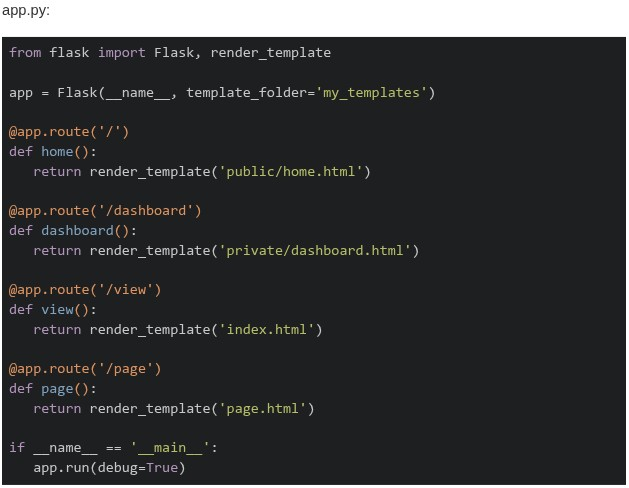
Consider the following Flask application structure and code.
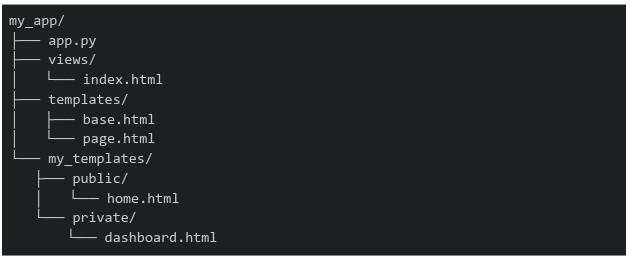 Which of the following statements about the template rendering behavior is correct?
Which of the following statements about the template rendering behavior is correct?
Text of the picture (copyable)
```
my_app/
├── app.py
├── views/
│   └── index.html
├── templates/
│   ├── base.html
│   └── page.html
└── my_templates/
    ├── public/
    │   └── home.html
    └── private/
        └── dashboard.html
```
app.py:
```python
from flask import Flask, render_template

app = Flask(__name__, template_folder='my_templates')

@app.route('/')
def home():
    return render_template('public/home.html')

@app.route('/dashboard')
def dashboard():
    return render_template('private/dashboard.html')

@app.route('/view')
def view():
    return render_template('index.html')

@app.route('/page')
def page():
    return render_template('page.html')

if __name__ == '__main__':
    app.run(debug=True)
```- All routes will work correctly as Flask searches both
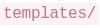 and
and 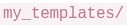
text
templates/
```
my_templates/
```
- Only
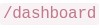 and
and  routes work, while
  and
and  routes fail with
  Error
Errortext
/dashboard
/view
The image contains a single, small, blurry, diagonal line. It appears to be a checkmark or a slash, but its exact nature is unclear due to the low resolution.
/page
TemplateNotFound
- The and routes work, while and fail with Error
text
The image contains a single, small, blurry, diagonal line. It appears to be a checkmark or a slash, but its exact nature is unclear due to the low resolution.
/dashboard
/view
/page
TemplateNotFound
- All routes fail because Flask requires templates to be in a default folder
Consider the following Flask RESTful API code.
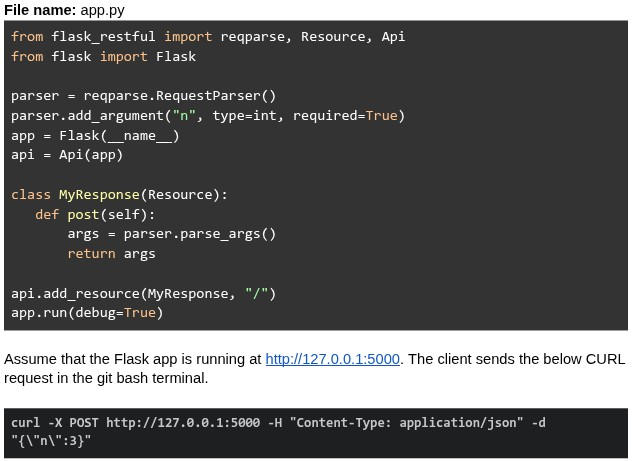 What will be the response?
What will be the response?Text of the picture (copyable)
File name: app.py
```python
from flask_restful import reqparse, Resource, Api
from flask import Flask

parser = reqparse.RequestParser()
parser.add_argument("n", type=int, required=True)
app = Flask(__name__)
api = Api(app)

class MyResponse(Resource):
    def post(self):
        args = parser.parse_args()
        return args

api.add_resource(MyResponse, "/")
app.run(debug=True)
```

Assume that the Flask app is running at http://127.0.0.1:5000. The client sends the below CURL request in the git bash terminal.

```bash
curl -X POST http://127.0.0.1:5000 -H "Content-Type: application/json" -d "{\"n\":3}"
```- {"n": 3}
- Runtime error
- 400 Bad Request
- { }
Consider the following Flask app code.
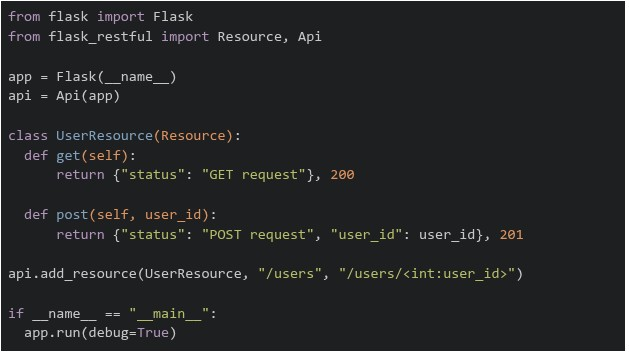 The above flask app is running on "http://127.0.0.1:5000". Which of the following commands will return a runtime error?
The above flask app is running on "http://127.0.0.1:5000". Which of the following commands will return a runtime error?Text of the picture (copyable)
```python
from flask import Flask
from flask_restful import Resource, Api

app = Flask(__name__)
api = Api(app)

class UserResource(Resource):
    def get(self):
        return {"status": "GET request"}, 200

    def post(self, user_id):
        return {"status": "POST request", "user_id": user_id}, 201

api.add_resource(UserResource, "/users", "/users/<int:user_id>")

if __name__ == "__main__":
    app.run(debug=True)
```
text
```
curl http://127.0.0.1:5000/users/5001 -X GET
```

text
```
curl http://127.0.0.1:5000/users/5001 -X POST
```

text
```
curl http://127.0.0.1:5000/users -X POST
```

text
```
curl http://127.0.0.1:5000/users -X GET
```
Consider the following HTML/CSS code.
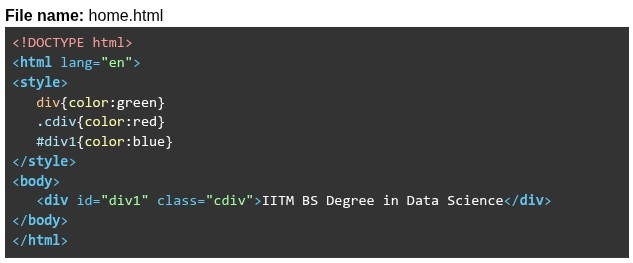 What will be rendered by the browser?
What will be rendered by the browser?Text of the picture (copyable)
File name: home.html

```html
<!DOCTYPE html>
<html lang="en">
<style>
    div{color:green}
    .cdiv{color:red}
    #div1{color:blue}
</style>
<body>
    <div id="div1" class="cdiv">IITM BS Degree in Data Science</div>
</body>
</html>
```
text
IITM BS Degree in Data Science

text
IITM BS Degree in Data Science

text
IITM BS Degree in Data Science

text
1. IITM BS Degree in Data Science
Which of the following pairs correctly identifies one block-level element and one inline element?

text
Block: `<span>` | Inline: `<div>`

text
Block: `<div>` | Inline: `<a>`

text
Block: `<h1>` | Inline: `<p>`

text
Block: `<span>` | Inline: `<h5>`
Consider the following Python code.
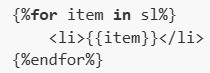
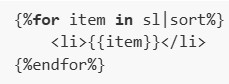
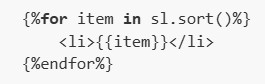
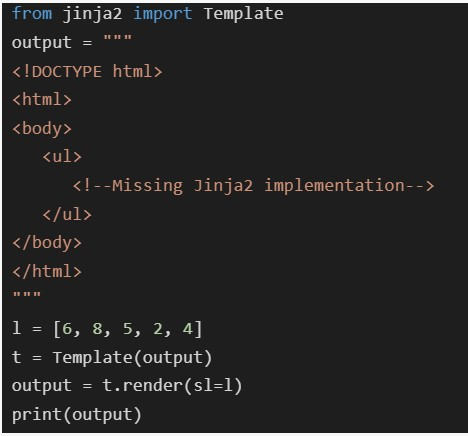 Which of the following code snippets should be placed at
  such that the output generated in the terminal when rendered will be as shown below?
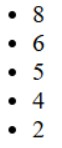
Which of the following code snippets should be placed at such that the output generated in the terminal when rendered will be as shown below?
Text of the picture (copyable)
```python
from jinja2 import Template
output = """
<!DOCTYPE html>
<html>
<body>
    <ul>
        <!--Missing Jinja2 implementation-->
    </ul>
</body>
</html>
"""

l = [6, 8, 5, 2, 4]
t = Template(output)
output = t.render(sl=l)
print(output)
```
```html
<!--Missing Jinja2 implementation-->
```
- 8
- 6
- 5
- 4
- 2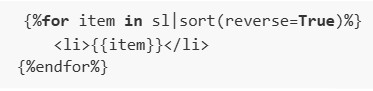
text
```html
{%for item in sl|sort(reverse=True)%}
    <li>{{item}}</li>
{%endfor%}
```
text
```html
{%for item in sl%}
    <li>{{item}}</li>
{%endfor%}
```
text
```html
{%for item in sl|sort%}
    <li>{{item}}</li>
{%endfor%}
```
text
```
{%for item in sl.sort()%}
    <li>{{item}}</li>
{%endfor%}
```
Consider the following HTML and CSS code.
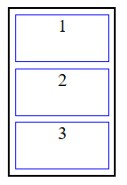
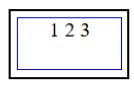
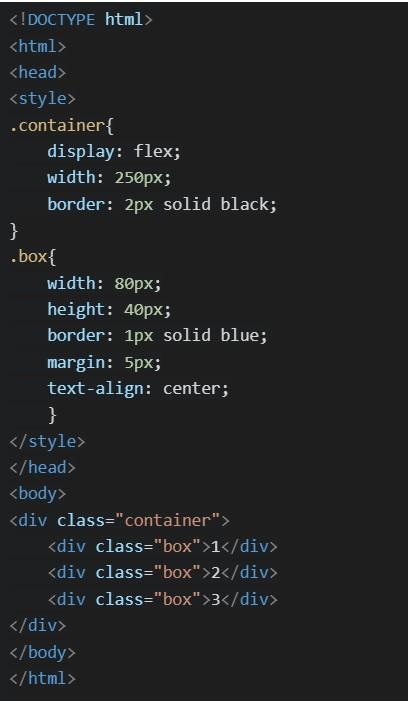 Which of the following will be the correct rendered output ?
Which of the following will be the correct rendered output ?Text of the picture (copyable)
```html
<!DOCTYPE html>
<html>
<head>
<style>
.container{
    display: flex;
    width: 250px;
    border: 2px solid black;
}
.box{
    width: 80px;
    height: 40px;
    border: 1px solid blue;
    margin: 5px;
    text-align: center;
}
</style>
</head>
<body>
<div class="container">
    <div class="box">1</div>
    <div class="box">2</div>
    <div class="box">3</div>
</div>
</body>
</html>
```
text
This is a diagram showing three rectangular boxes stacked vertically within a larger outer rectangle. Each inner box is outlined in blue and contains a single number.
- The top box is labeled "1".
- The middle box is labeled "2".
- The bottom box is labeled "3".
text
This is a diagram of a rectangle with a nested rectangle.
The outer rectangle is black.
The inner rectangle is blue.
Inside the inner rectangle, the text "1 2 3" is displayed.
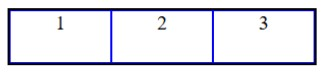
text
This is a diagram of three rectangular boxes arranged horizontally, each containing a number.
- The first box on the left contains the number "1".
- The second box in the middle contains the number "2".
- The third box on the right contains the number "3".
All boxes are outlined with a dark blue border, and the vertical lines separating the boxes are also dark blue.
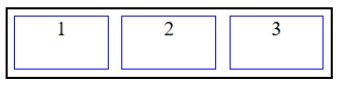
text
The image displays a diagram with a black rectangular outer border. Inside this border, there are three smaller, identical rectangular boxes arranged horizontally. Each of these inner boxes has a blue border. The boxes are labeled with numbers: "1" in the leftmost box, "2" in the middle box, and "3" in the rightmost box. There is a small gap between each of the inner boxes.
Which of the following is the correct match between Column A and Column B?
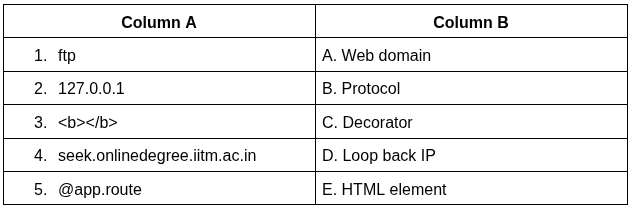
Text of the picture (copyable)
| Column A | Column B |
|---|---|
| 1. ftp | A. Web domain |
| 2. 127.0.0.1 | B. Protocol |
| 3. `<b></b>` | C. Decorator |
| 4. seek.onlinedegree.iitm.ac.in | D. Loop back IP |
| 5. @app.route | E. HTML element |
- 1-B, 2-D, 3-E, 4-A, 5-C
- 1-B, 2-A, 3-E, 4-D, 5-C
- 1-A, 2-D, 3-E, 4-B, 5-C
- 1-B, 2-D, 3-C, 4-A, 5-E
Consider the following SQL Alchemy model  with below data.
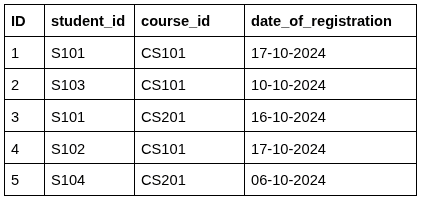 Which of the following SQL Alchemy statements is used to count the number of students registered for
  ?
?
with below data.
Which of the following SQL Alchemy statements is used to count the number of students registered for ?Text of the picture (copyable)
CourseRegistrations
| ID | student_id | course_id | date_of_registration |
|---|---|---|---|
| 1 | S101 | CS101 | 17-10-2024 |
| 2 | S103 | CS101 | 10-10-2024 |
| 3 | S101 | CS201 | 16-10-2024 |
| 4 | S102 | CS101 | 17-10-2024 |
| 5 | S104 | CS201 | 06-10-2024 |
```
course_id="CS101"
```

text
```python
count = db.session.query(CourseRegistrations) \
    .filter(course_id == "CS101") \
    .count()
```
text
```python
count = db.session.query \
    .filter(CourseRegistrations.course_id == "CS101") \
    .count()
```
text
```python
count = db.query(CourseRegistrations) \
    .filter(course_id == "CS101") \
    .count()
```
text
```python
count = db.session.query(CourseRegistrations) \
    .filter(CourseRegistrations.course_id == "CS101") \
    .count()
```
What is the purpose of the primary_key=True attribute in a SQLAlchemy model?
- It allows duplicate values in the column
- It uniquely identifies each row in the table
- It automatically creates foreign key relationships
- It makes the column optional
Consider the following HTML/CSS code.
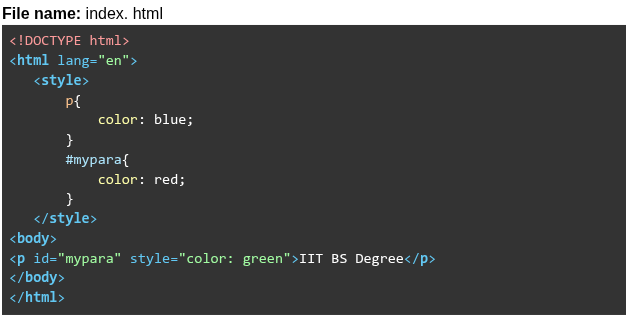 Read the following statements about “index.html” and choose the correct option. Statement 1: Internal element selector blue will be overridden by ID selector red. Statement 2: Internal ID selector red will be overridden by inline styling green.
Read the following statements about “index.html” and choose the correct option. Statement 1: Internal element selector blue will be overridden by ID selector red. Statement 2: Internal ID selector red will be overridden by inline styling green.Text of the picture (copyable)
File name: index. html

```html
<!DOCTYPE html>
<html lang="en">
<style>
    p{
        color: blue;
    }
    #mypara{
        color: red;
    }
</style>
<body>
    <p id="mypara" style="color: green">IIT BS Degree</p>
</body>
</html>
```- Both statements are incorrect.
- Both statements are correct.
- Statement 1 is incorrect, but statement 2 is correct.
- Statement 2 is incorrect, but statement 1 is correct.
Consider the Flask SQLAlchemy data model.
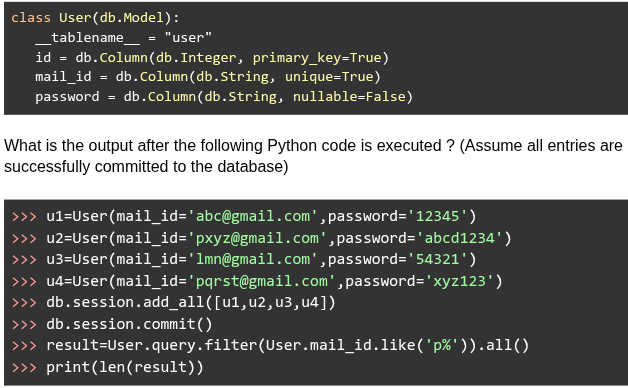
Text of the picture (copyable)
```python
class User(db.Model):
    __tablename__ = "user"
    id = db.Column(db.Integer, primary_key=True)
    mail_id = db.Column(db.String, unique=True)
    password = db.Column(db.String, nullable=False)
```

What is the output after the following Python code is executed ? (Assume all entries are successfully committed to the database)

```python
>>> u1=User(mail_id='abc@gmail.com',password='12345')
>>> u2=User(mail_id='pxyz@gmail.com',password='abcd1234')
>>> u3=User(mail_id='lmn@gmail.com',password='54321')
>>> u4=User(mail_id='pqrst@gmail.com',password='xyz123')
>>> db.session.add_all([u1,u2,u3,u4])
>>> db.session.commit()
>>> result=User.query.filter(User.mail_id.like('p%')).all()
>>> print(len(result))
```- 1
- 2
- 3
- 4
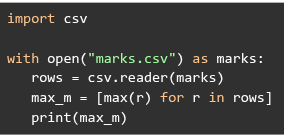
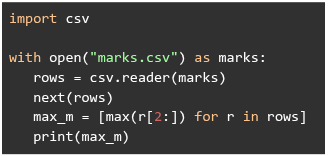
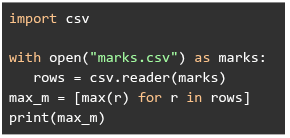
Consider the following csv file.
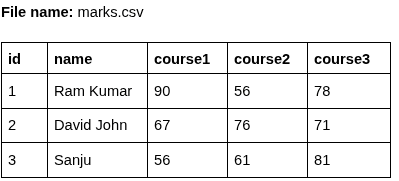 Choose the correct Python code that will print the output: ['90', '76', '81']?
Choose the correct Python code that will print the output: ['90', '76', '81']?Text of the picture (copyable)
File name: marks.csv

| id | name | course1 | course2 | course3 |
|---|---|---|---|---|
| 1 | Ram Kumar | 90 | 56 | 78 |
| 2 | David John | 67 | 76 | 71 |
| 3 | Sanju | 56 | 61 | 81 |
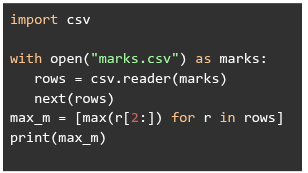
text
```python
import csv

with open("marks.csv") as marks:
    rows = csv.reader(marks)
    next(rows)
    max_m = [max(r[2:]) for r in rows]
    print(max_m)
```
text
```python
import csv

with open("marks.csv") as marks:
    rows = csv.reader(marks)
    max_m = [max(r) for r in rows]
    print(max_m)
```
text
```python
import csv

with open("marks.csv") as marks:
    rows = csv.reader(marks)
    next(rows)
    max_m = [max(r[2:]) for r in rows]
    print(max_m)
```
text
```python
import csv

with open("marks.csv") as marks:
    rows = csv.reader(marks)
    max_m = [max(r) for r in rows]
print(max_m)
```
Which of the following is the correct flask_login code snippet to register a user as logged in for the current session?
- login_user(user.id)
- login_user(user)
- login_user(user.name)
- login_user(user.name and user.password)
Consider the following HTML code snippet (without any CSS styling).
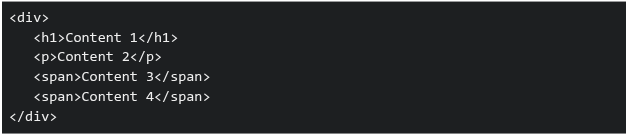 Which of the following statements correctly describes how the elements will be displayed by default in a browser?
Which of the following statements correctly describes how the elements will be displayed by default in a browser?Text of the picture (copyable)
```html
<div>
  <h1>Content 1</h1>
  <p>Content 2</p>
  <span>Content 3</span>
  <span>Content 4</span>
</div>
```
- The content of all elements will appear on the same line as they are inline elements.
- The content of
 ,
,  and
and  tags will start on new lines as they are block elements.
text
`<h1/>`
`<p>`
```html
<span>
```
- The content of and tags will start on new lines, others will display inline.
text
`<h1/>`
`<p>`
- The content of tags will start on new lines, others will display inline.
text
```html
<span>
```
Which of the following statements are true in the context of HTML forms?
 default type is “submit”.
text
```html
<button>
```
- “read-only” inputs are not submitted.
- “disabled” inputs are not submitted.
- “required” works on

text
```html
<input type='hidden'>
```
Which of the following statements are true about DOM?
- Changing the DOM value changes the HTML source file.
- JS can interact with DOM elements.
- DOM is created before the JS is executed.
- DOM is created after the JS is executed.
- HTML and DOM are identical.
Consider the following Flask RESTful API code.
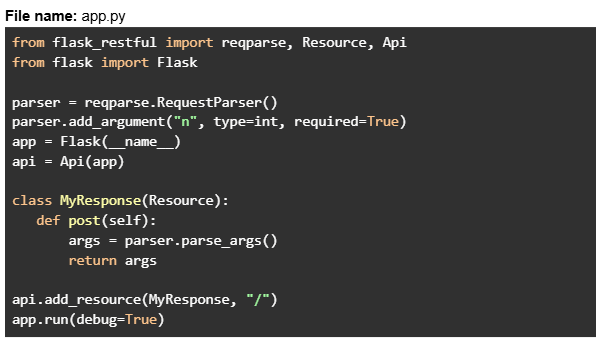 Assume that the Flask app is running at http://127.0.0.1:5000. The client sends the below CURL request in the git bash terminal.
 What will be the response?
Assume that the Flask app is running at http://127.0.0.1:5000. The client sends the below CURL request in the git bash terminal.
What will be the response?Text of the picture (copyable)
File name: app.py
```python
from flask_restful import reqparse, Resource, Api
from flask import Flask

parser = reqparse.RequestParser()
parser.add_argument("n", type=int, required=True)
app = Flask(__name__)
api = Api(app)

class MyResponse(Resource):
    def post(self):
        args = parser.parse_args()
        return args

api.add_resource(MyResponse, "/")
app.run(debug=True)
```
```
curl -X POST http://127.0.0.1:5000 -H "Content-Type: application/json" -d '{}'
```- {"n": None}
- Runtime error
- 400 Bad Request
- { }
Consider the following HTML templates and Python Flask code.
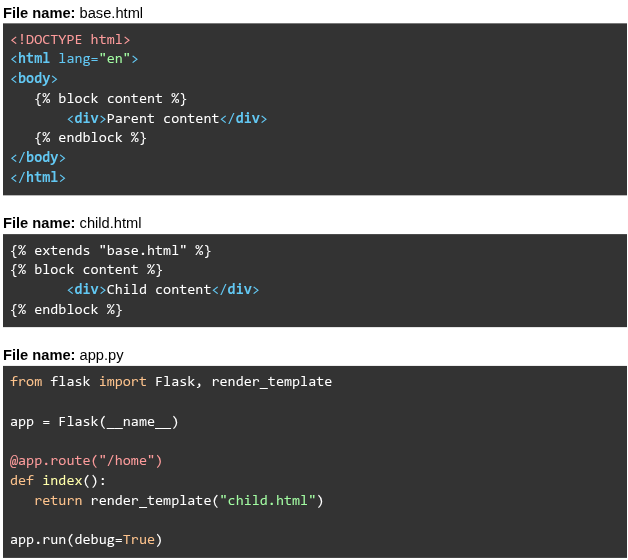 Assume that the Flask app is running at
  . What will be rendered for the URL request
  ?
?
Assume that the Flask app is running at . What will be rendered for the URL request ?Text of the picture (copyable)
File name: base.html
```html
<!DOCTYPE html>
<html lang="en">
<body>
    {% block content %}
    <div>Parent content</div>
    {% endblock %}
</body>
</html>
```

File name: child.html
```html
{% extends "base.html" %}
{% block content %}
    <div>Child content</div>
{% endblock %}
```

File name: app.py
```python
from flask import Flask, render_template

app = Flask(__name__)

@app.route("/home")
def index():
    return render_template("child.html")

app.run(debug=True)
```
http://127.0.0.1:5000
http://127.0.0.1:5000/home- Parent content Child content
- Parent content
- Child content
- Child content Parent content
Consider the following Flask SQLAlchemy models and RESTful API code.
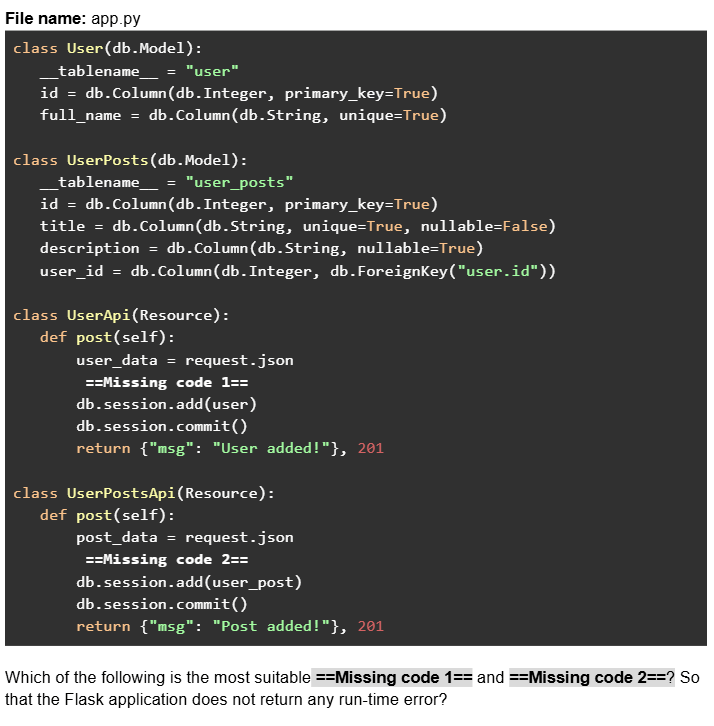
Text of the picture (copyable)
File name: app.py
```python
class User(db.Model):
    __tablename__ = "user"
    id = db.Column(db.Integer, primary_key=True)
    full_name = db.Column(db.String, unique=True)

class UserPosts(db.Model):
    __tablename__ = "user_posts"
    id = db.Column(db.Integer, primary_key=True)
    title = db.Column(db.String, unique=True, nullable=False)
    description = db.Column(db.String, nullable=True)
    user_id = db.Column(db.Integer, db.ForeignKey("user.id"))

class UserApi(Resource):
    def post(self):
        user_data = request.json
        ==Missing code 1==
        db.session.add(user)
        db.session.commit()
        return {"msg": "User added!"}, 201

class UserPostsApi(Resource):
    def post(self):
        post_data = request.json
        ==Missing code 2==
        db.session.add(user_post)
        db.session.commit()
        return {"msg": "Post added!"}, 201
```
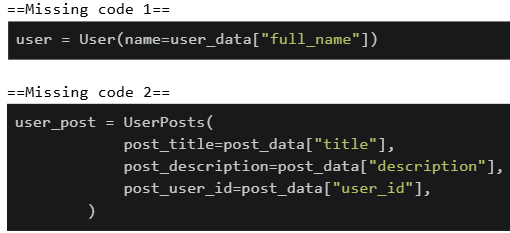
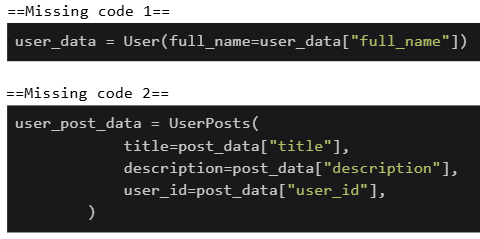
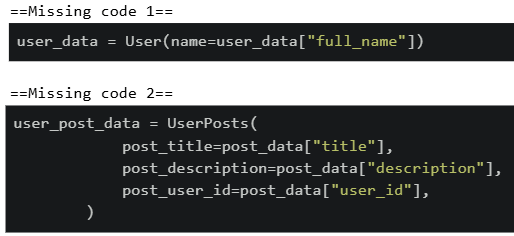
Which of the following is the most suitable ==Missing code 1== and ==Missing code 2==? So that the Flask application does not return any run-time error?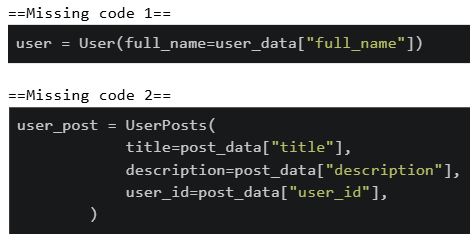
text
==Missing code 1==
```python
user = User(full_name=user_data["full_name"])
```

==Missing code 2==
```python
user_post = UserPosts(
    title=post_data["title"],
    description=post_data["description"],
    user_id=post_data["user_id"],
)
```
text
```python
==Missing code 1==
user = User(name=user_data["full_name"])

==Missing code 2==
user_post = UserPosts(
    post_title=post_data["title"],
    post_description=post_data["description"],
    post_user_id=post_data["user_id"],
)
```
text
```python
==Missing code 1==
user_data = User(full_name=user_data["full_name"])

==Missing code 2==
user_post_data = UserPosts(
    title=post_data["title"],
    description=post_data["description"],
    user_id=post_data["user_id"],
)
```
text
```
==Missing code 1==
user_data = User(name=user_data["full_name"])

==Missing code 2==
user_post_data = UserPosts(
    post_title=post_data["title"],
    post_description=post_data["description"],
    post_user_id=post_data["user_id"],
)
```
Consider the following HTML/JavaScript code.
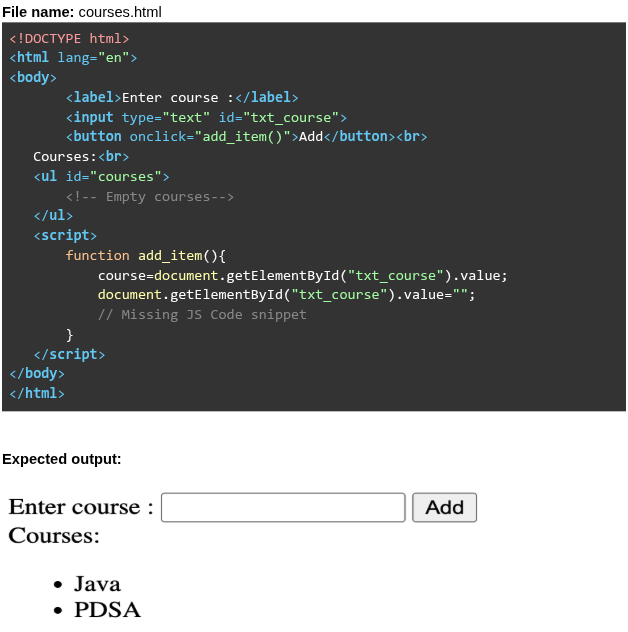 The above code allows courses to be added dynamically to the
  element when the user clicks the “Add” Button. What is the most suitable
  given below?
The above code allows courses to be added dynamically to the element when the user clicks the “Add” Button. What is the most suitable given below?Text of the picture (copyable)
File name: courses.html

```html
<!DOCTYPE html>
<html lang="en">
<body>
    <label>Enter course :</label>
    <input type="text" id="txt_course">
    <button onclick="add_item()">Add</button><br>
    Courses:<br>
    <ul id="courses">
        <!-- Empty courses-->
    </ul>
    <script>
        function add_item(){
            course=document.getElementById("txt_course").value;
            document.getElementById("txt_course").value="";
            // Missing JS Code snippet
        }
    </script>
</body>
</html>
```

Expected output:

Enter course : [text input field] [Add button]
Courses:
* Java
* PDSA
```html
<ul>
```
```javascript
//Missing JS Code snippet
```
text
```javascript
courses=document.getElementById("txt_course");
courses.innerHTML=courses.innerHTML+"<li>"+course+"</li>";
```
text
```javascript
courses=document.getElementById("courses");
courses.innerHTML=courses.innerHTML+"<li>"+course+"</li>";
```
text
```javascript
courses.innerHTML=courses.innerHTML + "<li>"+course+"</li>";
```

text
```javascript
courses.innerHTML = "<li>"+course+"</li>";
```
A server has a 16-core CPU, 64 GB RAM and 1 Gbps network connection. The server is running a single instance of an app that can generate a maximum of 500 HTML pages per second, each of which results in a 100KB image to be downloaded by the client. What is the maximum number of requests per second that can be handled by this setup?
- 10,000
- 1250
- 1000
- 500
Consider the following HTML/CSS code.
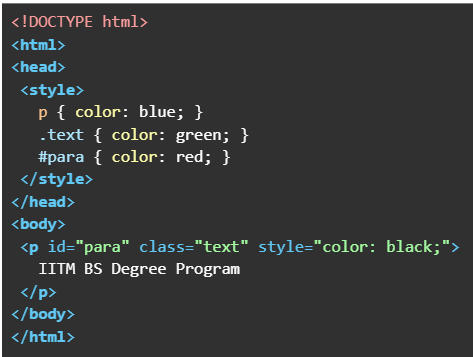 What will be the output when the above HTML file is rendered?
What will be the output when the above HTML file is rendered?Text of the picture (copyable)
```html
<!DOCTYPE html>
<html>
<head>
<style>
    p { color: blue; }
    .text { color: green; }
    #para { color: red; }
</style>
</head>
<body>
<p id="para" class="text" style="color: black;">
    IITM BS Degree Program
</p>
</body>
</html>
```
text
IITM BS Degree Program

text
IITM BS Degree Program

text
IITM BS Degree Program

text
IITM BS Degree Program
Which of the following flask routes can take dynamic value in the URL like “/user/55”?

text
```python
@app.route("/user/id")
```
text
```python
@app.route("/user/<int:id>")
```
text
```python
@app.route("/user/<id>")
```
text
```python
@app.route("/user/<float:id>")
```
Consider the following Python Flask code.
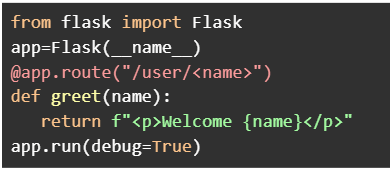

Text of the picture (copyable)
```python
from flask import Flask
app=Flask(__name__)
@app.route("/user/<name>")
def greet(name):
    return f"<p>Welcome {name}</p>"
app.run(debug=True)
```
Assume that the Flask app is running at http://127.0.0.1:5000. Which of the following URL requests will render the output without any errors?- http://127.0.0.1:5000/user/IITM
- http://127.0.0.1:5000/user/101
- http://127.0.0.1:5000/user/10/greet
- http://127.0.0.1:5000/user
- http://127.0.0.1:5000/user/BS?id=101
Consider the following HTML and Python Flask code.
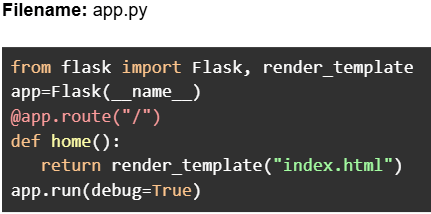
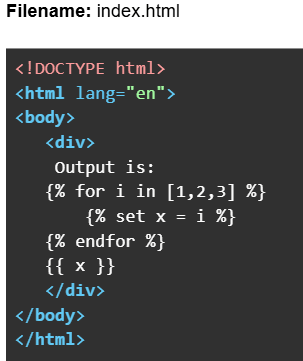

Text of the picture (copyable)
Filename: app.py

```python
from flask import Flask, render_template
app=Flask(__name__)
@app.route("/")
def home():
    return render_template("index.html")
app.run(debug=True)
```
Filename: index.html

```html
<!DOCTYPE html>
<html lang="en">
<body>
    <div>
        Output is:
        {% for i in [1,2,3] %}
            {% set x = i %}
        {% endfor %}
        {{ x }}
    </div>
</body>
</html>
```
Assume that the Flask app is running at http://127.0.0.1:5000. What will be the rendered output
in the browser for the URL: http://127.0.0.1:5000?- Output is: 3
- Output is:
- Output is: 1 2 3
- Output is: 1 2 3 3
Consider the following HTML code.
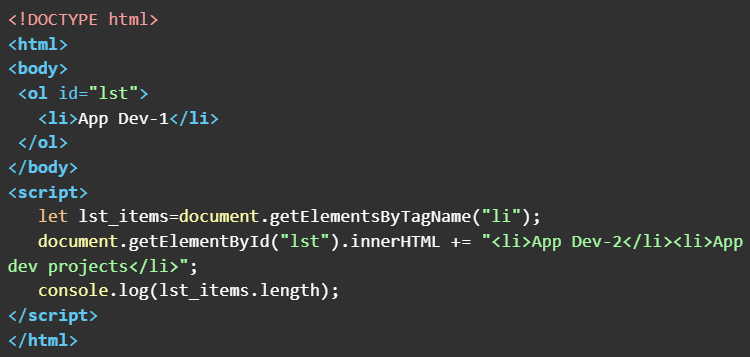 What will be the output in the console window when the above HTML doc is rendered on the browser ?
What will be the output in the console window when the above HTML doc is rendered on the browser ?Text of the picture (copyable)
```html
<!DOCTYPE html>
<html>
<body>
    <ol id="lst">
        <li>App Dev-1</li>
    </ol>
</body>
<script>
    let lst_items=document.getElementsByTagName("li");
    document.getElementById("lst").innerHTML += "<li>App Dev-2</li><li>App dev projects</li>";
    console.log(lst_items.length);
</script>
</html>
```- 1
- 2
- 3
- 4
Consider the following Python Flask RESTful API code.
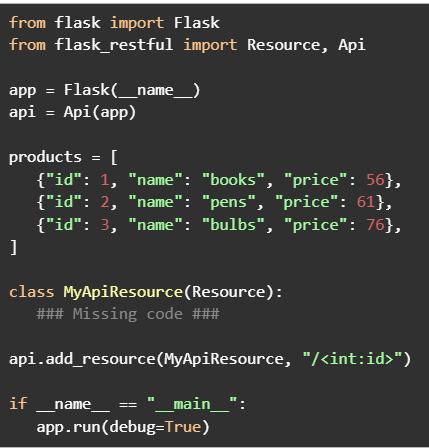

Text of the picture (copyable)
```python
from flask import Flask
from flask_restful import Resource, Api

app = Flask(__name__)
api = Api(app)

products = [
    {"id": 1, "name": "books", "price": 56},
    {"id": 2, "name": "pens", "price": 61},
    {"id": 3, "name": "bulbs", "price": 76},
]

class MyApiResource(Resource):
    ### Missing code ###

api.add_resource(MyApiResource, "/<int:id>")

if __name__ == "__main__":
    app.run(debug=True)
```
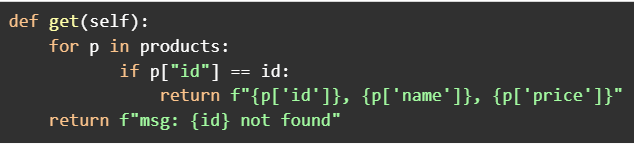
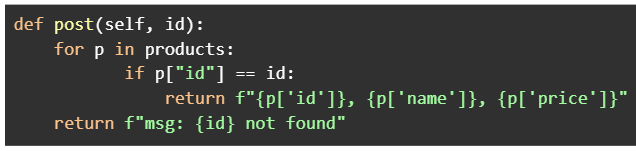
Assume that the Flask app is running at http://127.0.0.1:5000. Which of the following codes when placed at ###Missing code ### will work correctly to search a product by id?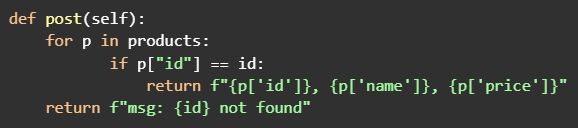
text
```python
def post(self):
    for p in products:
        if p["id"] == id:
            return f"{p['id']}, {p['name']}, {p['price']}"
    return f"msg: {id} not found"
```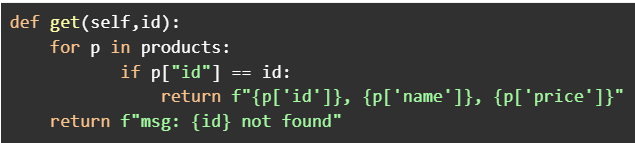
text
```python
def get(self,id):
    for p in products:
        if p["id"] == id:
            return f"{p['id']}}, {p['name']}}, {p['price']}}"
    return f"msg: {id} not found"
```
text
```python
def get(self):
    for p in products:
        if p["id"] == id:
            return f"{p['id']}, {p['name']}, {p['price']}"
    return f"msg: {id} not found"
```
text
```python
def post(self, id):
    for p in products:
        if p["id"] == id:
            return f"{p['id']}, {p['name']}, {p['price']}"
    return f"msg: {id} not found"
```
Comprehension passage for this question
Consider the following SQLAlchemy class models.
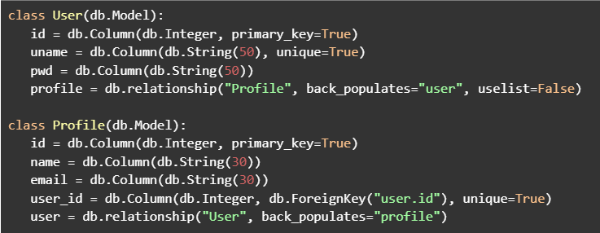 Based on the above data, answer the given subquestions.
What will be the output if the following commands are executed in the python shell.
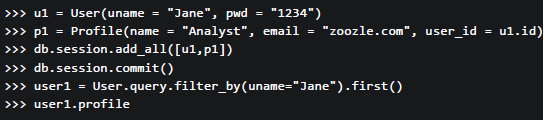
Text of the picture (copyable)
```python
>>> u1 = User(uname = "Jane", pwd = "1234")
>>> p1 = Profile(name = "Analyst", email = "zoozle.com", user_id = u1.id)
>>> db.session.add_all([u1,p1])
>>> db.session.commit()
>>> user1 = User.query.filter_by(uname="Jane").first()
>>> user1.profile
```

text
<User 1>

text
```
[<Profile 1>]
```

text
```html
<Profile 1>
```

text
```
'Analyst'
```
Consider the HTML code below.
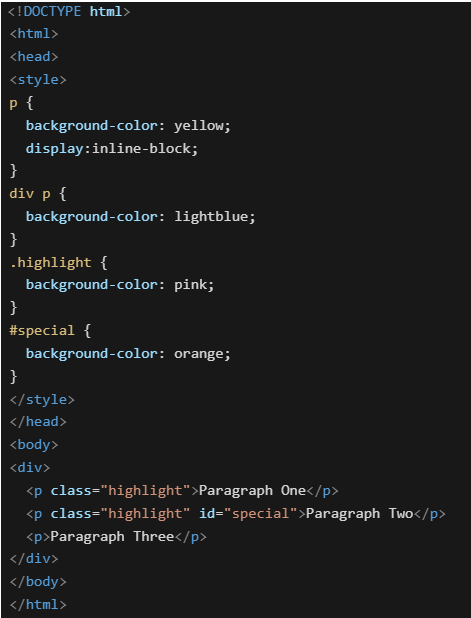 Which of the following will be the rendered output?
Which of the following will be the rendered output?Text of the picture (copyable)
```html
<!DOCTYPE html>
<html>
<head>
<style>
p {
  background-color: yellow;
  display:inline-block;
}

div p {
  background-color: lightblue;
}

.highlight {
  background-color: pink;
}

#special {
  background-color: orange;
}
</style>
</head>
<body>
<div>
  <p class="highlight">Paragraph One</p>
  <p class="highlight" id="special">Paragraph Two</p>
  <p>Paragraph Three</p>
</div>
</body>
</html>
```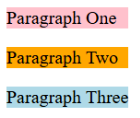
text
Paragraph One
Paragraph Two
Paragraph Three
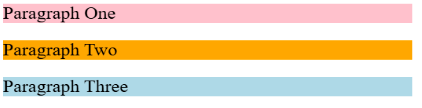
text
Paragraph One
Paragraph Two
Paragraph Three

text
Paragraph One Paragraph Two Paragraph Three

text
Paragraph One Paragraph Two Paragraph Three
Consider the following HTML and Python flask codes.
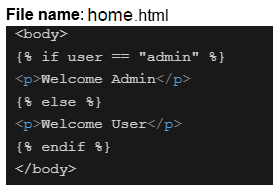
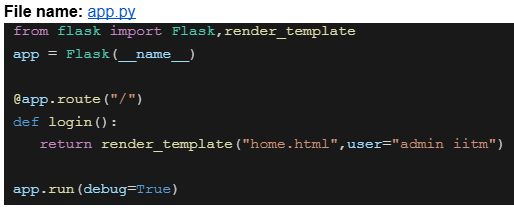

Text of the picture (copyable)
File name: home.html

```html
<body>
  {% if user == "admin" %}
  <p>Welcome Admin</p>
  {% else %}
  <p>Welcome User</p>
  {% endif %}
</body>
```
File name: app.py

```python
from flask import Flask,render_template

app = Flask(__name__)

@app.route("/")
def login():
    return render_template("home.html",user="admin iitm")

app.run(debug=True)
```
Assume that the above code is running on http://127.0.0.1:5000. What will be the rendered output for the URL request http://127.0.0.1:5000 ?- Welcome Admin
- Welcome User
- 404 Not Found
- Nothing will be rendered
Consider the following Jinja2 template:
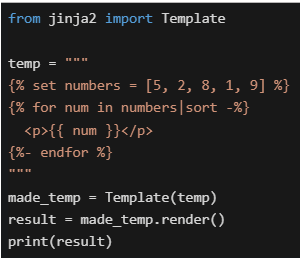 What will be the output in the terminal?
What will be the output in the terminal?Text of the picture (copyable)
```python
from jinja2 import Template

temp = """
{% set numbers = [5, 2, 8, 1, 9] %}
{% for num in numbers|sort -%}
<p>{{ num }}</p>
{%- endfor %}
"""

made_temp = Template(temp)
result = made_temp.render()
print(result)
```
text
```html
<p>5</p><p>2</p><p>8</p><p>1</p><p>9</p>
```

text
```html
<p>1</p><p>2</p><p>5</p><p>8</p><p>9</p>
```

text
```html
<p>9</p><p>8</p><p>5</p><p>2</p><p>1</p>
```

text
```html
<p>12589</p>
```

text
Template will throw an error

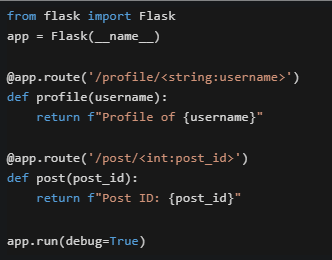

Text of the picture (copyable)
Consider the following Flask application running on http://127.0.0.1:5000.
```python
from flask import Flask
app = Flask(__name__)

@app.route('/profile/<string:username>')
def profile(username):
    return f"Profile of {username}"

@app.route('/post/<int:post_id>')
def post(post_id):
    return f"Post ID: {post_id}"

app.run(debug=True)
```
What will happen when accessing http://127.0.0.1:5000/post/abc123 ?- It will render "Post ID: abc123"
- Flask will return a 404 error because abc123 cannot be converted to integer
- It will render "Profile of abc123"
- The application will crash with a TypeError
Which of the following statements about HTML, CSS, and character encoding is/are true?
- UTF-8 is a variable-length encoding that can represent all Unicode characters.
- In HTML, attribute names are case-insensitive.
- Inline CSS is preferred over external CSS for large-scale projects.
- UTF-32 is a fixed-length encoding where each character takes 4 bytes.
Consider the following users list.
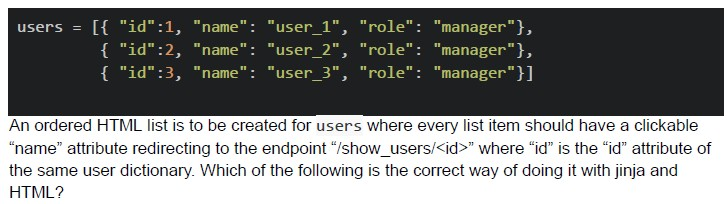
Text of the picture (copyable)
```python
users = [[{ "id":1, "name": "user_1", "role": "manager"},
          { "id":2, "name": "user_2", "role": "manager"},
          { "id":3, "name": "user_3", "role": "manager"}]]
```
An ordered HTML list is to be created for users where every list item should have a clickable "name" attribute redirecting to the endpoint "/show_users/<id>" where "id" is the "id" attribute of the same user dictionary. Which of the following is the correct way of doing it with jinja and HTML?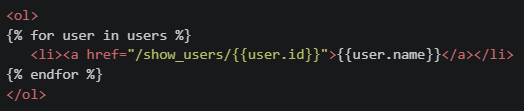
text
```html
<ol>
{% for user in users %}
    <li><a href="/show_users/{{user.id}}">{{user.name}}</a></li>
{% endfor %}
</ol>
```
text
```html
<ol>
{% for user in users %}
    <li><a href="/show_users/{{user['id']}}">{{user['name']}}</a></li>
{% endfor %}
</ol>
```
text
```html
<ol>
    <li><a href="/show_users/{{users[0].id}}">{{users[0].name}}</a></li>
    <li><a href="/show_users/{{users[1].id}}">{{users[1].name}}</a></li>
    <li><a href="/show_users/{{users[2].id}}">{{users[2].name}}</a></li>
</ol>
```
text
```html
<ol>
{% for user in users %}
    <li><a href="/show_users/{{user.name[-1]}}">{{user.name}}</a></li>
{% endfor %}
</ol>
```
Consider the following CSS code:
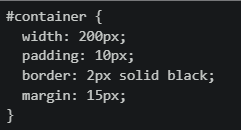 Which of the following statements are TRUE regarding the element's dimensions and spacing?
Which of the following statements are TRUE regarding the element's dimensions and spacing?Text of the picture (copyable)
```css
#container {
  width: 200px;
  padding: 10px;
  border: 2px solid black;
  margin: 15px;
}
```- The total width including padding and border is 224px
- The margin affects the content box width
- The padding adds internal spacing inside the element
- The border contributes to the total width in the standard box model
Which statements about CSS display properties are CORRECT?
- display: block elements always start on a new line and take full width
- display: inline elements can be manipulated with height and width properties
- display: inline-block elements can be placed inline and be manipulated with height and width properties
- display: inline elements can’t be manipulated with height and width properties
Consider the following flask app and Jinja2 template.
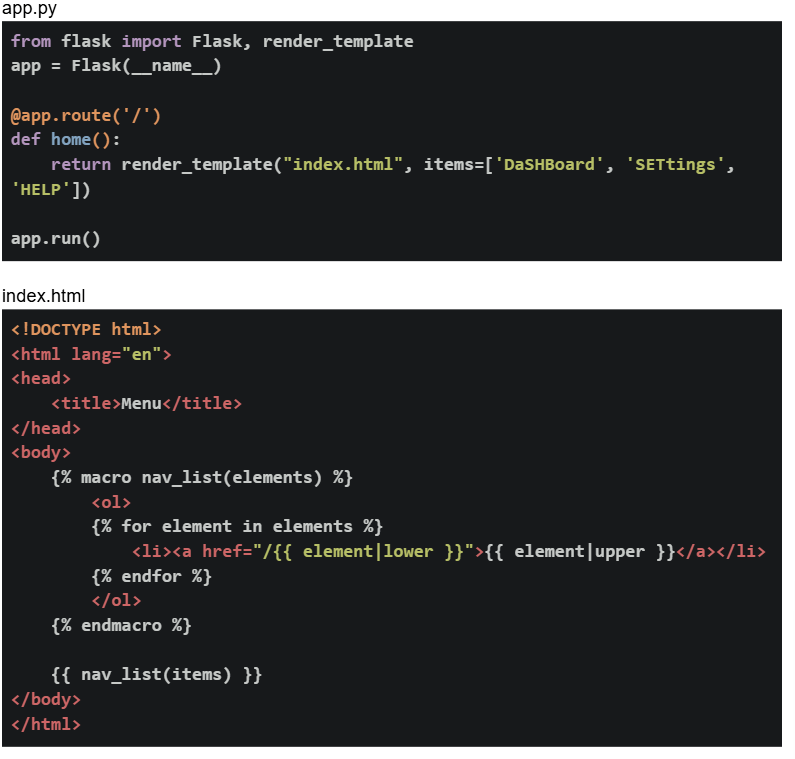 If the flask app is running locally on http://127.0.0.1:5000. What will be the output on the browser for the base URL?
If the flask app is running locally on http://127.0.0.1:5000. What will be the output on the browser for the base URL?Text of the picture (copyable)
app.py
```python
from flask import Flask, render_template
app = Flask(__name__)

@app.route('/')
def home():
    return render_template("index.html", items=['DaShBoard', 'SETtings',
                                                 'HELP'])

app.run()
```

index.html
```html
<!DOCTYPE html>
<html lang="en">
<head>
    <title>Menu</title>
</head>
<body>
    {% macro nav_list(elements) %}
    <ol>
        {% for element in elements %}
        <li><a href="/{{ element|lower }}">{{ element|upper }}</a></li>
        {% endfor %}
    </ol>
    {% endmacro %}

    {{ nav_list(items) }}
</body>
</html>
```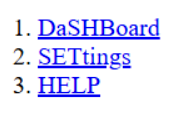
text
1. DaSHBoard
2. SETtings
3. HELP
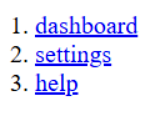
text
1. dashboard
2. settings
3. help
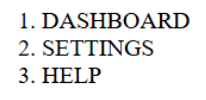
text
1. DASHBOARD
2. SETTINGS
3. HELP
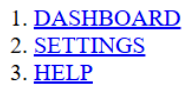
text
1. DASHBOARD
2. SETTINGS
3. HELP
Consider the following SQL create statement.
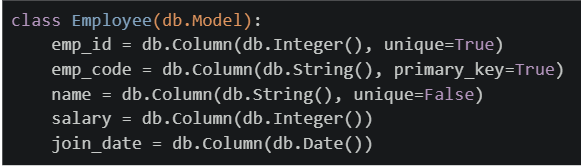
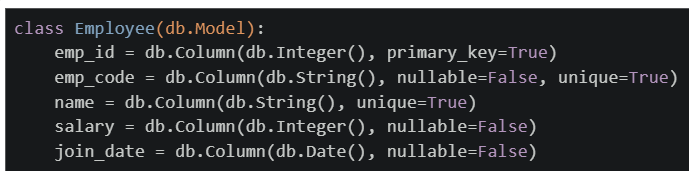
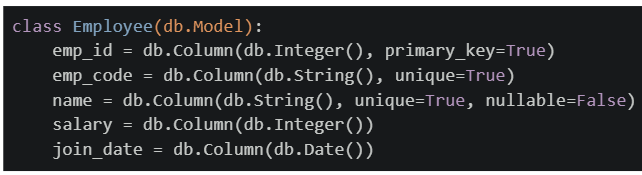
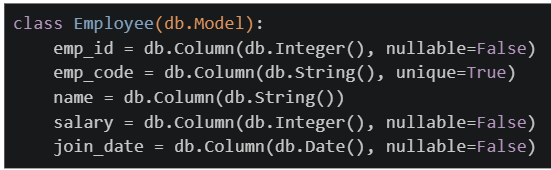
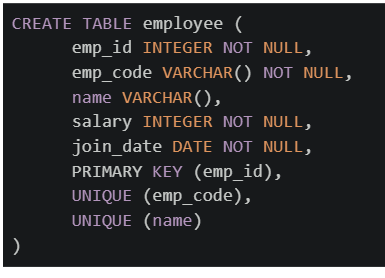 Which of the following flask_sqlalchemy models will create exactly the same table as created by the above SQL command?
Which of the following flask_sqlalchemy models will create exactly the same table as created by the above SQL command?Text of the picture (copyable)
```sql
CREATE TABLE employee (
    emp_id INTEGER NOT NULL,
    emp_code VARCHAR() NOT NULL,
    name VARCHAR(),
    salary INTEGER NOT NULL,
    join_date DATE NOT NULL,
    PRIMARY KEY (emp_id),
    UNIQUE (emp_code),
    UNIQUE (name)
)
```
text
```python
class Employee(db.Model):
    emp_id = db.Column(db.Integer(), unique=True)
    emp_code = db.Column(db.String(), primary_key=True)
    name = db.Column(db.String(), unique=False)
    salary = db.Column(db.Integer())
    join_date = db.Column(db.Date())
```
text
```python
class Employee(db.Model):
    emp_id = db.Column(db.Integer(), primary_key=True)
    emp_code = db.Column(db.String(), nullable=False, unique=True)
    name = db.Column(db.String(), unique=True)
    salary = db.Column(db.Integer(), nullable=False)
    join_date = db.Column(db.Date(), nullable=False)
```
text
```python
class Employee(db.Model):
    emp_id = db.Column(db.Integer(), primary_key=True)
    emp_code = db.Column(db.String(), unique=True)
    name = db.Column(db.String(), unique=True, nullable=False)
    salary = db.Column(db.Integer())
    join_date = db.Column(db.Date())
```
text
```python
class Employee(db.Model):
    emp_id = db.Column(db.Integer(), nullable=False)
    emp_code = db.Column(db.String(), unique=True)
    name = db.Column(db.String())
    salary = db.Column(db.Integer(), nullable=False)
    join_date = db.Column(db.Date(), nullable=False)
```
Comprehension passage for this question
Consider the following flask application and html template. Assume that the Flask app is running at http://127.0.0.1:5000.
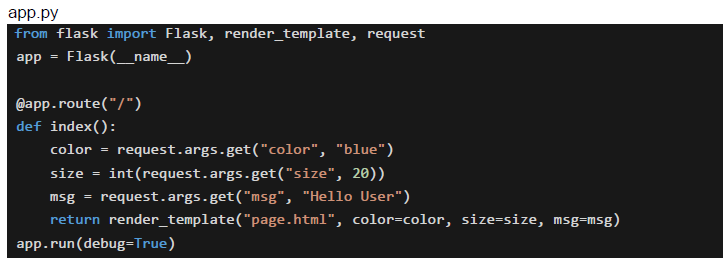 Based on the above data, answer the given subquestions.
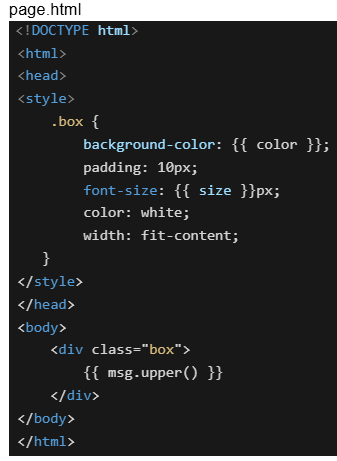
What will be the final styling applied to the element inside the div for the URL: http://127.0.0.1:5000/?color=green&size=30&msg=welcome+user
- background-color: blue, font-size: 20px, padding: 10px, color: white
- background-color: green, font-size: 30px, padding: 20px, color: white
- background-color: blue, font-size: 20px, padding: 30px, color: green
- background-color: green, font-size: 30px, padding: 10px, color: white
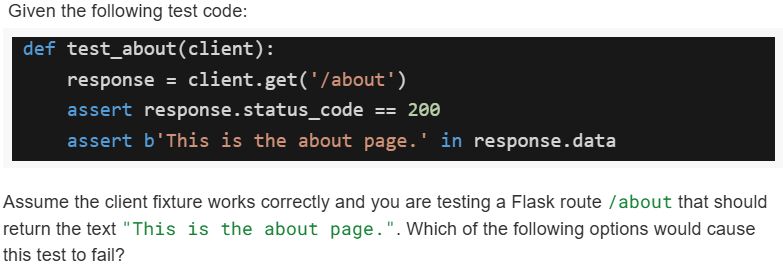
Text of the picture (copyable)
Given the following test code:

```python
def test_about(client):
    response = client.get('/about')
    assert response.status_code == 200
    assert b'This is the about page.' in response.data
```

Assume the client fixture works correctly and you are testing a Flask route `/about` that should return the text "This is the about page.". Which of the following options would cause this test to fail?
text
The route `/about` is missing in `app.py`.

text
The route `/about` exists but returns "About us page" instead.

text
The route `/about` returns `<p>this is the about page.</p>` instead of plain text.
- None of these.
Comprehension passage for this question
A Household Services Application maintains the following three tables:
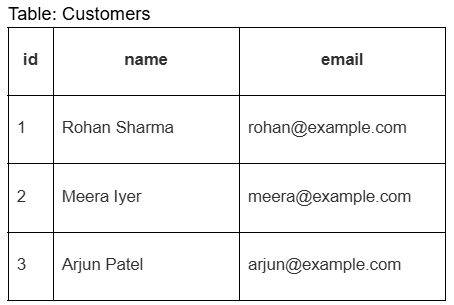 The Requests table represents service bookings made by customers. Based on the above data, answer the given subquestions.
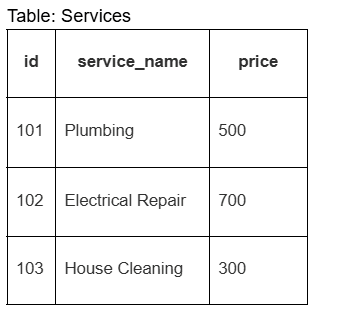
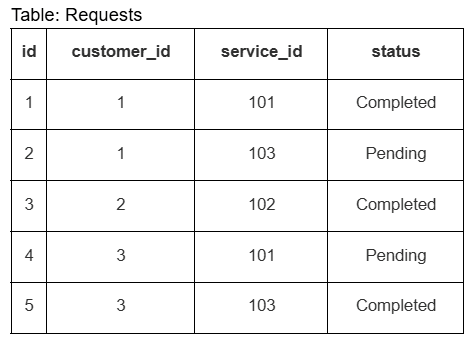
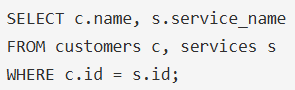
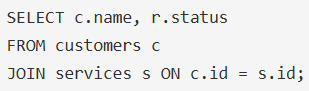
Which SQL query correctly retrieves the customer names and the services they requested?
text
```sql
SELECT c.name, s.service_name
FROM customers c, services s
WHERE c.id = s.id;
```
text
```sql
SELECT c.name, r.status
FROM customers c
JOIN services s ON c.id = s.id;
```
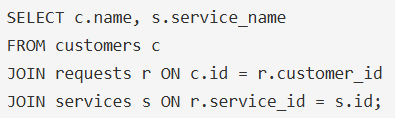
text
```sql
SELECT c.name, s.service_name
FROM customers c
JOIN requests r ON c.id = r.customer_id
JOIN services s ON r.service_id = s.id;
```
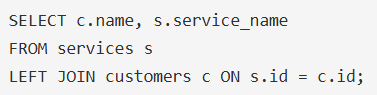
text
```sql
SELECT c.name, s.service_name
FROM services s
LEFT JOIN customers c ON s.id = c.id;
```
Comprehension passage for this question
A Household Services Application maintains the following three tables:
The Requests table represents service bookings made by customers. Based on the above data, answer the given subquestions.
Which query finds the number of service requests made by each customer?

text
```sql
SELECT r.customer_id, COUNT(*) AS total_requests
FROM requests r;
```
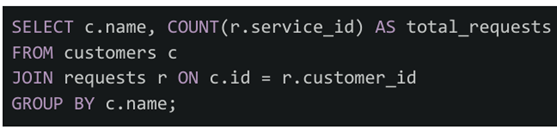
text
```sql
SELECT c.name, COUNT(r.service_id) AS total_requests
FROM customers c
JOIN requests r ON c.id = r.customer_id
GROUP BY c.name;
```
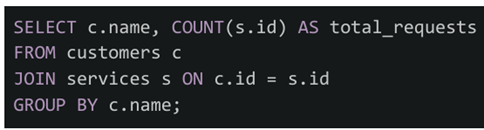
text
```sql
SELECT c.name, COUNT(s.id) AS total_requests
FROM customers c
JOIN services s ON c.id = s.id
GROUP BY c.name;
```
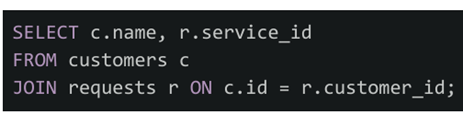
text
```sql
SELECT c.name, r.service_id
FROM customers c
JOIN requests r ON c.id = r.customer_id;
```
Comprehension passage for this question
A Household Services Application maintains the following three tables:
The Requests table represents service bookings made by customers. Based on the above data, answer the given subquestions.
If the given tables are mapped to Flask-SQLAlchemy models (Customer, Service, Request), which query correctly retrieves all services requested by customer with id=1?

text
```python
customer = Customer.query.filter_by(id=1).first()
services = Service.query.all()
```

text
```python
services = Service.query.filter_by(customer_id=1).all()
```

text
```python
customer = Customer.query.get(1)
services = [r.service for r in customer.requests]
```

text
```python
services = Request.query.filter_by(id=1).all()
```
Which of the following is the correct way to add a click event listener to a button with id="myBtn" in JavaScript?

text
```javascript
document.getElementById("myBtn").onclick = function() {alert("Clicked!");
};
```
text
```javascript
document.getElementById("myBtn").addEventListener("click", function() {
    alert("Clicked!");
});
```
text
```html <button onclick="alert('Clicked!')">Click Me</button> ```- All of these
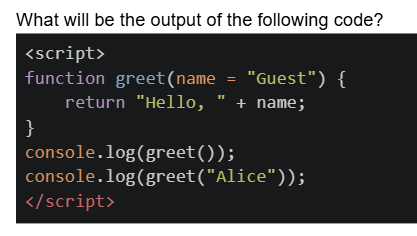
Text of the picture (copyable)
What will be the output of the following code?
```html
<script>
  function greet(name = "Guest") {
    return "Hello, " + name;
  }
  console.log(greet());
  console.log(greet("Alice"));
</script>
```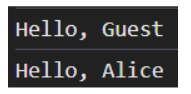
text
Hello, Guest
Hello, Alice
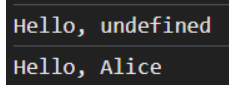
text
```
Hello, undefined
Hello, Alice
```
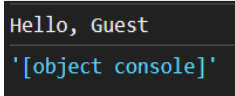
text
```
Hello, Guest
'[object console]'
```
- Error: Missing argument
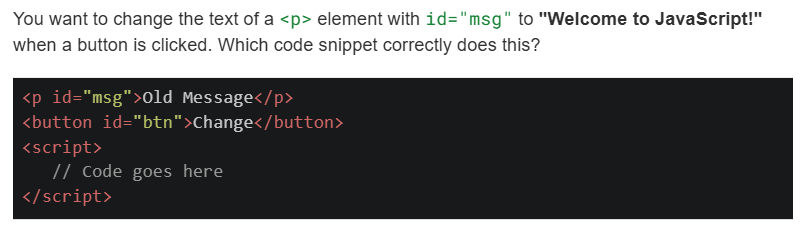
Text of the picture (copyable)
You want to change the text of a `<p>` element with `id="msg"` to "Welcome to JavaScript!" when a button is clicked. Which code snippet correctly does this?

```html
<p id="msg">Old Message</p>
<button id="btn">Change</button>
<script>
    // Code goes here
</script>
```
text
```javascript
document.getElementById("btn").onclick = function() {
    document.getElementById("msg").innerHTML = "Welcome to JavaScript!";
};
```
text
```javascript
document.getElementById("btn").addEventListener("click", function() {
    msg.text = "Welcome to JavaScript!";
});
```
text
```javascript document.querySelector("#btn").addEventListener("click", function() { document.querySelector("#msg").innerText = "Welcome to JavaScript!"; }); ```- Both and
text
```javascript
document.getElementById("btn").onclick = function() {
    document.getElementById("msg").innerHTML = "Welcome to JavaScript!";
};
```
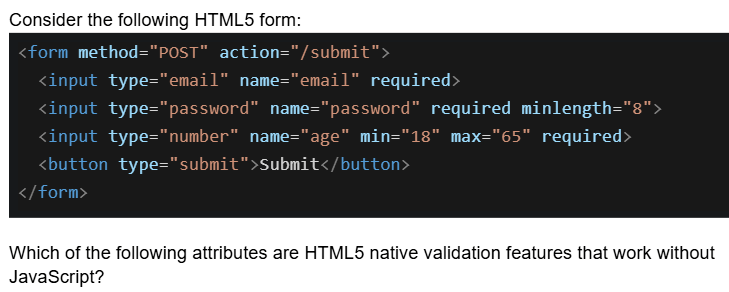
Text of the picture (copyable)
Consider the following HTML5 form:

```html
<form method="POST" action="/submit">
    <input type="email" name="email" required>
    <input type="password" name="password" required minlength="8">
    <input type="number" name="age" min="18" max="65" required>
    <button type="submit">Submit</button>
</form>
```

Which of the following attributes are HTML5 native validation features that work without JavaScript?- required, minlength, and type="email"
- min, max, and minlength
- required, type="password", and action
- type="email", min, max, minlength, and required
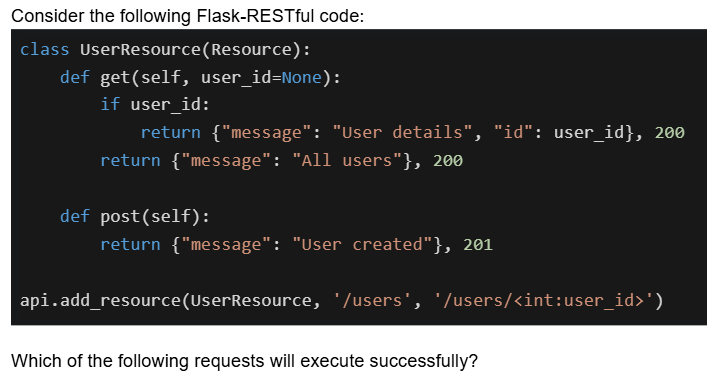
Text of the picture (copyable)
Consider the following Flask-RESTful code:

```python
class UserResource(Resource):
    def get(self, user_id=None):
        if user_id:
            return {"message": "User details", "id": user_id}, 200
        return {"message": "All users"}, 200

    def post(self):
        return {"message": "User created"}, 201

api.add_resource(UserResource, '/users', '/users/<int:user_id>')
```

Which of the following requests will execute successfully?- GET /users - returns 200 with all users
- GET /users/5 - returns 200 with user details for ID 5
- POST /users - returns 201 with user created message
- POST /users/5 - returns 201 with user created message
Which statements about frontend and backend validation are TRUE?
- Frontend validation (HTML5/JavaScript) is sufficient for security
- Frontend validation improves user experience by providing immediate feedback
- Backend validation is mandatory for security because frontend can be bypassed
- Backend validation should validate the same constraints as frontend
Which of the following is the correct syntax to display the total number of courses in a Jinja2 template?

text
```
{{ courses | len }}
```
text
```jinja
{{ courses | length }}
```
text
```html
{{ len(courses) }}
```
text
None of these
Text of the picture (copyable)
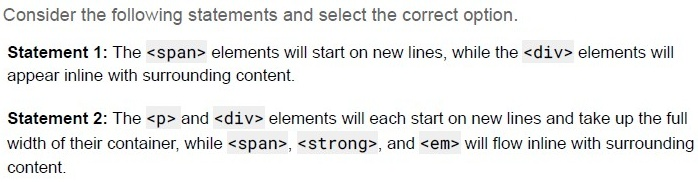
Consider the following statements and select the correct option.

Statement 1: The `<span>` elements will start on new lines, while the `<div>` elements will appear inline with surrounding content.

Statement 2: The `<p>` and `<div>` elements will each start on new lines and take up the full width of their container, while `<span>`, `<strong>`, and `<em>` will flow inline with surrounding content.
- Statement 1 is correct, but statement 2 is incorrect.
- Statement 2 is correct, but statement 1 is incorrect.
- Both statements 1 and 2 are correct
- Both statements 1 and 2 are incorrect
Text of the picture (copyable)
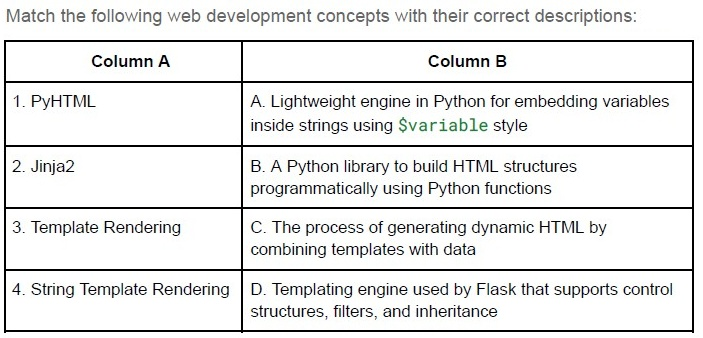
Match the following web development concepts with their correct descriptions:

| Column A | Column B |
|---|---|
| 1. PyHTML | A. Lightweight engine in Python for embedding variables inside strings using `$variable` style |
| 2. Jinja2 | B. A Python library to build HTML structures programmatically using Python functions |
| 3. Template Rendering | C. The process of generating dynamic HTML by combining templates with data |
| 4. String Template Rendering | D. Templating engine used by Flask that supports control structures, filters, and inheritance |
- 1 → B, 2 → C, 3 → D, 4 → A
- 1 → A, 2 → B, 3 → C, 4 → D
- 1 → B, 2 → D, 3 → C, 4 → A
- 1 → C, 2 → D, 3 → A, 4 → B
Text of the picture (copyable)
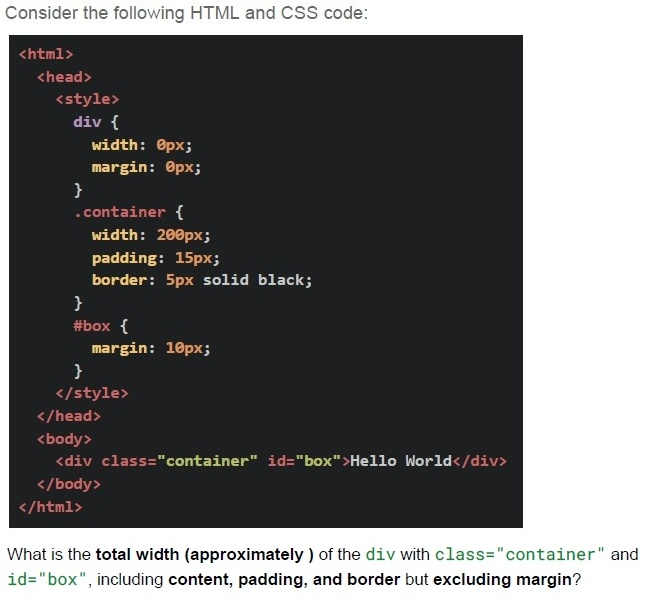
Consider the following HTML and CSS code:

```html
<html>
  <head>
    <style>
      div {
        width: 0px;
        margin: 0px;
      }
      .container {
        width: 200px;
        padding: 15px;
        border: 5px solid black;
      }
      #box {
        margin: 10px;
      }
    </style>
  </head>
  <body>
    <div class="container" id="box">Hello World</div>
  </body>
</html>
```

What is the **total width (approximately)** of the `div` with `class="container"` and `id="box"`, including **content, padding, and border** but excluding margin?- 200 px
- 230 px
- 240 px
- 250 px
Text of the picture (copyable)
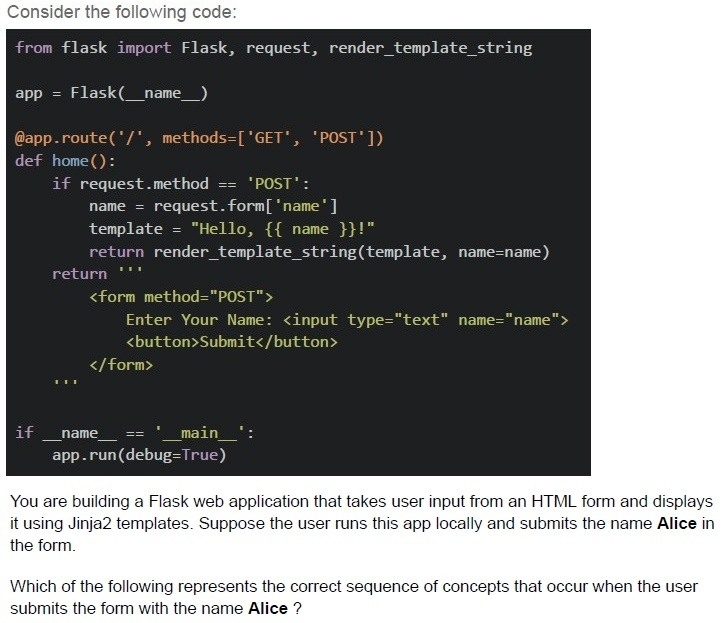
Consider the following code:

```python
from flask import Flask, request, render_template_string

app = Flask(__name__)

@app.route('/', methods=['GET', 'POST'])
def home():
    if request.method == 'POST':
        name = request.form['name']
        template = "Hello, {{ name }}!"
        return render_template_string(template, name=name)
    return '''
        <form method="POST">
            Enter Your Name: <input type="text" name="name">
            <button>Submit</button>
        </form>
    '''

if __name__ == '__main__':
    app.run(debug=True)
```

You are building a Flask web application that takes user input from an HTML form and displays it using Jinja2 templates. Suppose the user runs this app locally and submits the name **Alice** in the form.

Which of the following represents the correct sequence of concepts that occur when the user submits the form with the name **Alice** ?
text
HTML Form Rendering → HTTP 404 Not Found Error → User Submits Form → Flask Routing → Template Rendering

text
User Submits Form (HTTP POST) → Check URL Structure → Network Transfer (Bandwidth & Latency) → Flask Routing

text
User Accesses URL (Form at "/") → User Submits Form (HTTP POST) → Flask Request
Handling (request.form) → Jinja2 Template Rendering

text
Flask Request Handling → Network Round Trip (RTT) → HTML Table Rendering → Jinja2 Template Rendering