Home / Past papers / MAD2 Quiz 2 / this paper
IIT M DIPLOMA AN EXAM QDD3 24 Mar 2024 - 24 Mar 2024
Elapsed 00:00
Consider the below javascript program.
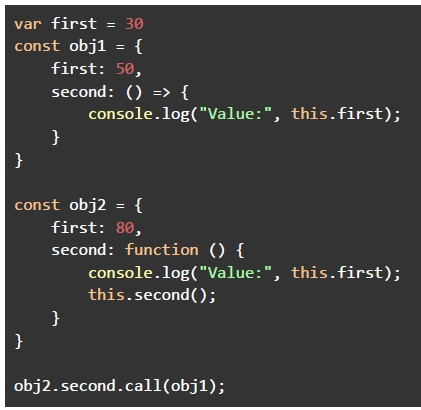 Consider the below javascript program. What will be the output of the program, if executed in a REPL environment?
Consider the below javascript program. What will be the output of the program, if executed in a REPL environment?Text of the picture (copyable)
```javascript
var first = 30
const obj1 = {
    first: 50,
    second: () => {
        console.log("Value:", this.first);
    }
}

const obj2 = {
    first: 80,
    second: function () {
        console.log("Value:", this.first);
        this.second();
    }
}

obj2.second.call(obj1);
```
text
Value: 80
Value: 50

text
Value: 80
Value: 30

text
Value: 50
Value: 50

text
Value: 50
Value: 30

text
Value: 30
Value: 30
Consider the below JavaScript code.
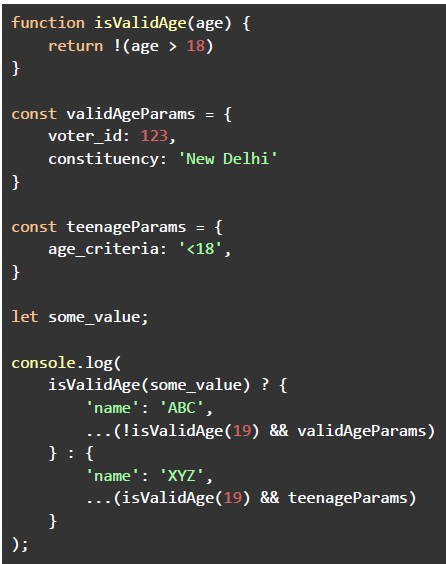 Consider the below JavaScript code. What will be the output of the above program, assuming the value of the variable “some_value” is less than 18?
Consider the below JavaScript code. What will be the output of the above program, assuming the value of the variable “some_value” is less than 18?Text of the picture (copyable)
```javascript
function isValidAge(age) {
  return !(age > 18)
}

const validAgeParams = {
  voter_id: 123,
  constituency: 'New Delhi'
}

const teenageParams = {
  age_criteria: '<18',
}

let some_value;

console.log(
  isValidAge(some_value) ? {
    'name': 'ABC',
    ...(!isValidAge(19) && validAgeParams)
  } : {
    'name': 'XYZ',
    ...(isValidAge(19) && teenageParams)
  }
);
```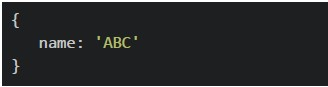
text
```
{
  name: 'ABC'
}
```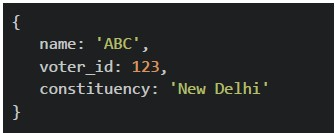
text
```json
{
    "name": "ABC",
    "voter_id": 123,
    "constituency": "New Delhi"
}
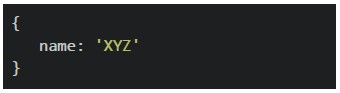
```
text
```
{
  name: 'XYZ'
}
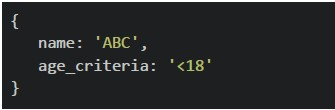
```
text
```
{
    name: 'ABC',
    age_criteria: '<18'
}
```
Consider the below JavaScript program.
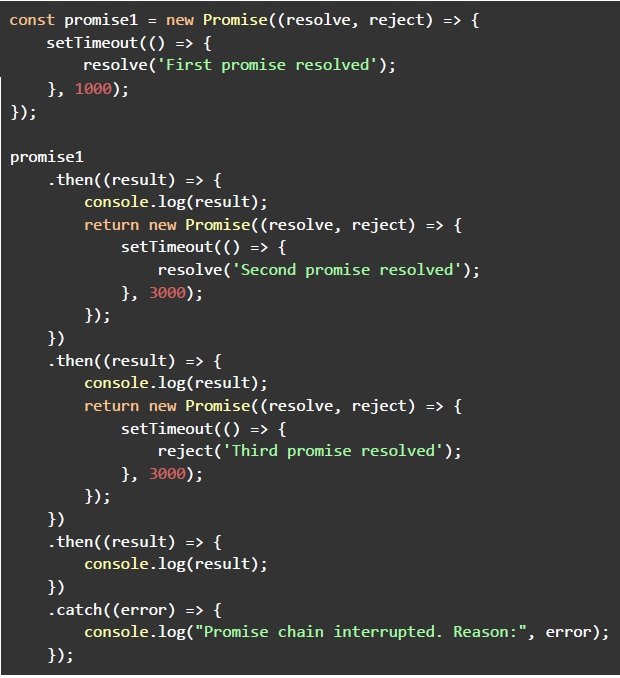 Consider the below JavaScript program. What will be the output of the above program, if executed?
Consider the below JavaScript program. What will be the output of the above program, if executed?Text of the picture (copyable)
```javascript
const promise1 = new Promise((resolve, reject) => {
  setTimeout(() => {
    resolve('First promise resolved');
  }, 1000);
});

promise1
  .then((result) => {
    console.log(result);
    return new Promise((resolve, reject) => {
      setTimeout(() => {
        resolve('Second promise resolved');
      }, 3000);
    });
  })
  .then((result) => {
    console.log(result);
    return new Promise((resolve, reject) => {
      setTimeout(() => {
        reject('Third promise resolved');
      }, 3000);
    });
  })
  .then((result) => {
    console.log(result);
  })
  .catch((error) => {
    console.log("Promise chain interrupted. Reason:", error);
  });
```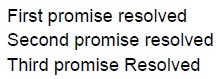
text
First promise resolved
Second promise resolved
Third promise Resolved

text
The program will crash without showing any output

text
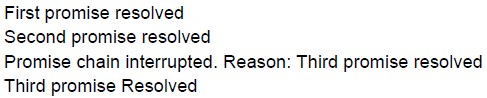
First promise resolved
Second promise resolved
Promise chain interrupted. Reason: Third promise resolved
text
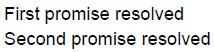
First promise resolved
Second promise resolved
Promise chain interrupted. Reason: Third promise resolved
Third promise Resolved
text
First promise resolved
Second promise resolved
Consider the following Script embedded in an HTML document.
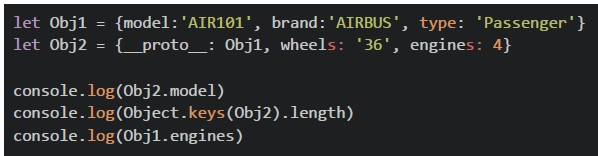 Consider the following Script embedded in an HTML document. What will be the output on console, if the HTML document is rendered using a browser?
Consider the following Script embedded in an HTML document. What will be the output on console, if the HTML document is rendered using a browser?Text of the picture (copyable)
```javascript
let Obj1 = {model: 'AIR101', brand: 'AIRBUS', type: 'Passenger'}
let Obj2 = {__proto__: Obj1, wheels: '36', engines: 4}

console.log(Obj2.model)
console.log(Object.keys(Obj2).length)
console.log(Obj1.engines)
```
text
```
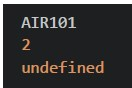
AIR101
2
undefined
```
text
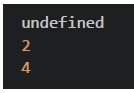
```
undefined
2
4
```
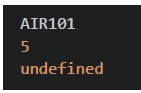
text
```
AIR101
5
undefined
```
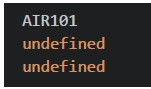
text
```
AIR101
undefined
undefined
```
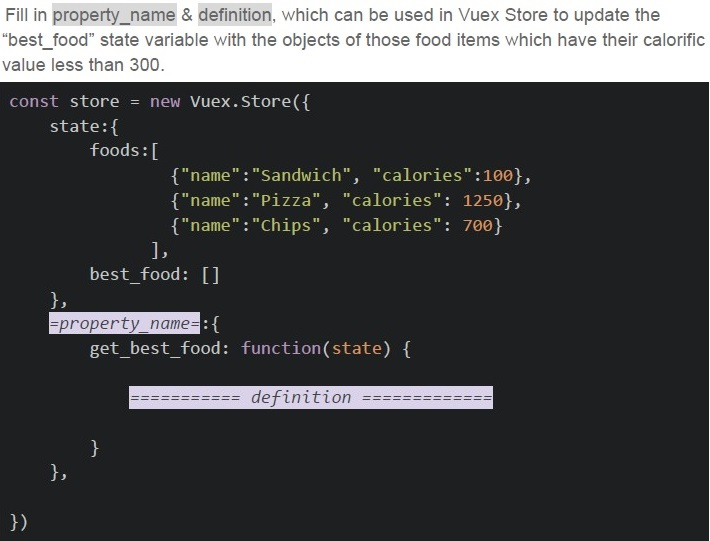
Text of the picture (copyable)
Fill in property_name & definition, which can be used in Vuex Store to update the "best_food" state variable with the objects of those food items which have their calorific value less than 300.

```javascript
const store = new Vuex.Store({
  state: {
    foods: [
      { "name": "Sandwich", "calories": 100 },
      { "name": "Pizza", "calories": 1250 },
      { "name": "Chips", "calories": 700 }
    ],
    best_food: []
  },
  =property_name=: {
    get_best_food: function(state) {
      ======== definition ========
    }
  }
})
```
text
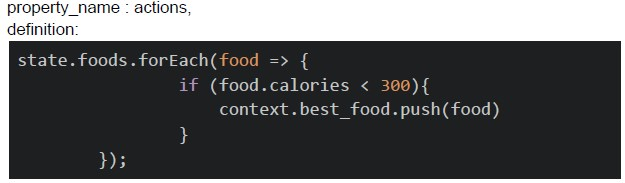
property_name : actions,
definition:

```
state.foods.forEach(food => {
    if (food.calories < 300){
        context.best_food.push(food)
    }
});
```
text
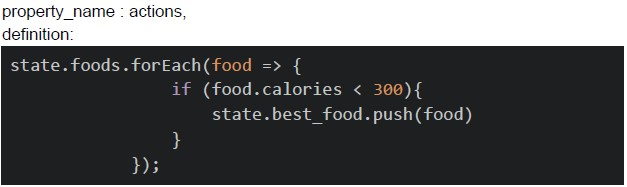
property_name : actions,
definition:

```javascript
state.foods.forEach(food => {
    if (food.calories < 300){
        state.best_food.push(food)
    }
});
```
text
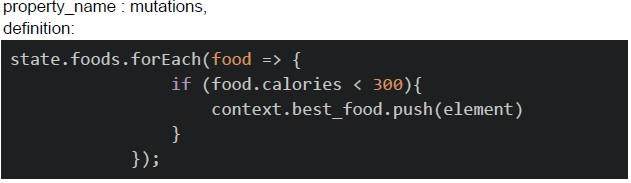
property_name : mutations,
definition:

```javascript
state.foods.forEach(food => {
    if (food.calories < 300){
        context.best_food.push(element)
    }
});
```
text
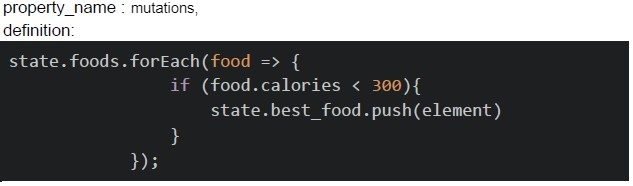
property_name : mutations,
definition:

```javascript
state.foods.forEach(food => {
    if (food.calories < 300){
        state.best_food.push(element)
    }
});
```
Consider the following JavaScript code snippet.
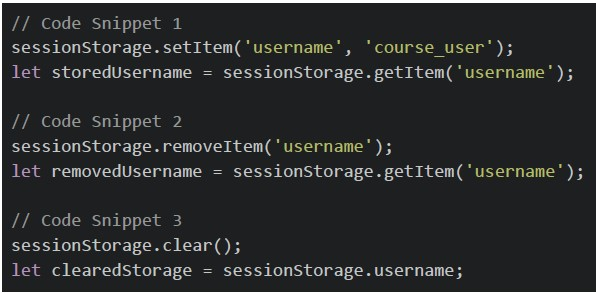 Consider the following JavaScript code snippet. What will be the values of 'storedUsername', 'removedUsername', and 'clearedStorage' after the execution of the above code snippets?
Consider the following JavaScript code snippet. What will be the values of 'storedUsername', 'removedUsername', and 'clearedStorage' after the execution of the above code snippets?Text of the picture (copyable)
```javascript
// Code Snippet 1
sessionStorage.setItem('username', 'course_user');
let storedUsername = sessionStorage.getItem('username');

// Code Snippet 2
sessionStorage.removeItem('username');
let removedUsername = sessionStorage.getItem('username');

// Code Snippet 3
sessionStorage.clear();
let clearedStorage = sessionStorage.username;
```
text
```
storedUsername: 'course_user', removedUsername: null, clearedStorage: null
```

text
```
storedUsername: 'course_user', removedUsername: null, clearedStorage:
undefined
```

text
```
storedUsername: 'course_user', removedUsername: undefined, clearedStorage:
null
```

text
```
storedUsername: 'course_user', removedUsername: undefined, clearedStorage:
undefined
```
Consider the below JavaScript program.
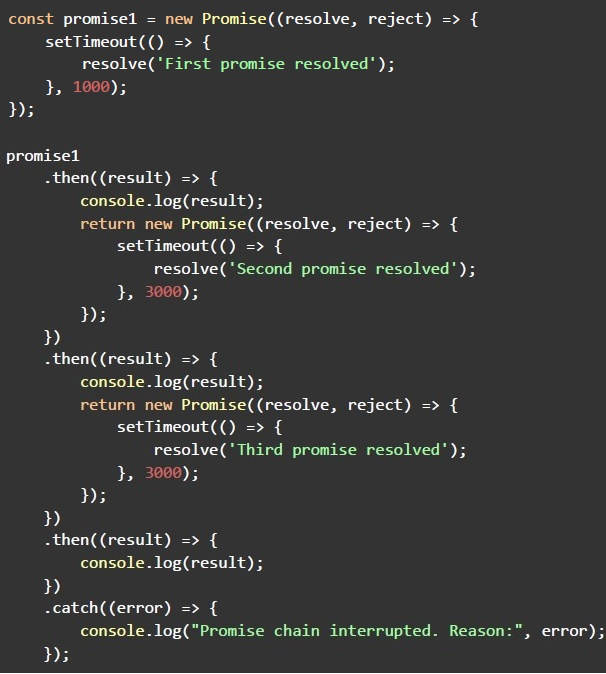 Consider the below JavaScript program. Considering the asynchronous nature of promises in the above JavaScript program, what is the minimum time (in seconds) it will take for the entire execution to complete?
Consider the below JavaScript program. Considering the asynchronous nature of promises in the above JavaScript program, what is the minimum time (in seconds) it will take for the entire execution to complete? Text of the picture (copyable)
```javascript
const promise1 = new Promise((resolve, reject) => {
  setTimeout(() => {
    resolve('First promise resolved');
  }, 1000);
});

promise1
  .then((result) => {
    console.log(result);
    return new Promise((resolve, reject) => {
      setTimeout(() => {
        resolve('Second promise resolved');
      }, 3000);
    });
  })
  .then((result) => {
    console.log(result);
    return new Promise((resolve, reject) => {
      setTimeout(() => {
        resolve('Third promise resolved');
      }, 3000);
    });
  })
  .then((result) => {
    console.log(result);
  })
  .catch((error) => {
    console.log("Promise chain interrupted. Reason:", error);
  });
```- The program will never end
- 0 second
- 1 second
- 7 seconds
- 9 seconds
Consider the following Vue application with markup “index.html” and JavaScript file “app.js”.
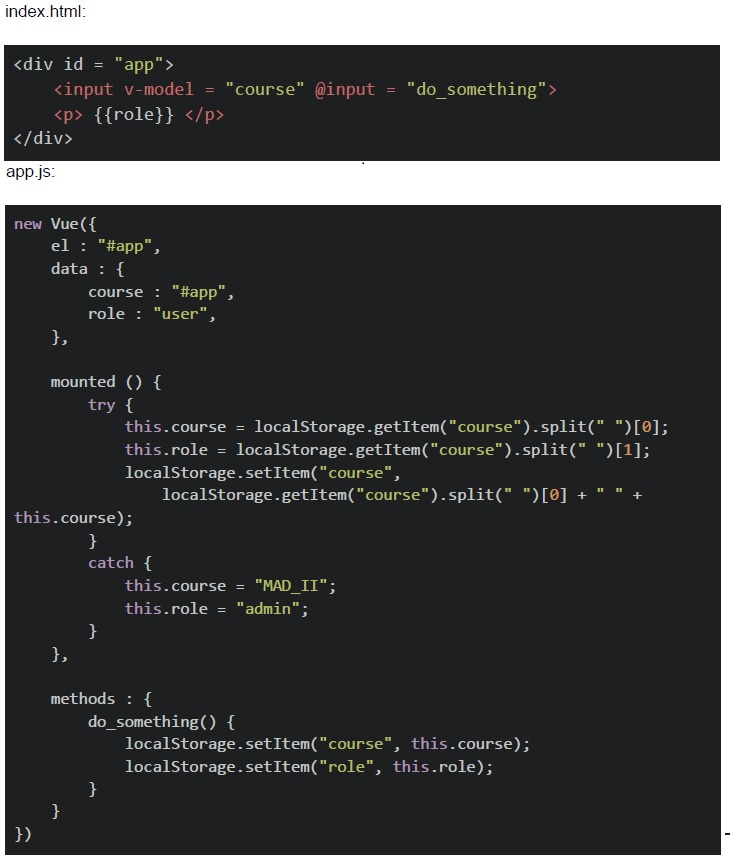 Consider the following Vue application with markup “index.html” and JavaScript file “app.js”. Suppose you open “index.html” file in a browser, and type the text “App Dev” in the text box shown (after removing the previous text, if any), and hard refresh the page twice, without clicking anywhere. What will be the value shown in the text box, and the “age” placeholder, respectively?
Consider the following Vue application with markup “index.html” and JavaScript file “app.js”. Suppose you open “index.html” file in a browser, and type the text “App Dev” in the text box shown (after removing the previous text, if any), and hard refresh the page twice, without clicking anywhere. What will be the value shown in the text box, and the “age” placeholder, respectively?Text of the picture (copyable)
index.html:
```html
<div id = "app">
    <input v-model = "course" @input = "do_something">
    <p> {{role}} </p>
</div>
```
app.js:
```javascript
new Vue({
    el : "#app",
    data : {
        course : "#app",
        role : "user",
    },

    mounted () {
        try {
            this.course = localStorage.getItem("course").split(" ")[0];
            this.role = localStorage.getItem("course").split(" ")[1];
            localStorage.setItem("course",
                localStorage.getItem("course").split(" ")[0] + " " +
                this.course);
        }
        catch {
            this.course = "MAD_II";
            this.role = "admin";
        }
    },

    methods : {
        do_something() {
            localStorage.setItem("course", this.course);
            localStorage.setItem("role", this.role);
        }
    }
})
```- MAD_II, admin
- App, Dev
- App, App
- Dev, App
Which of the following statement(s) is/are correct regarding web storage APIs?
- Web Storage APIs provide a way to store key-value pairs persistently on theclient side.
- Web Storage APIs include “localStorage” and “sessionStorage”.
- Data stored in “localStorage” is automatically cleared when the browsersession ends.
- The “sessionStorage” allows data to persist across browser sessions.
Which of the following is a valid function signature for an action function in Vuex?

text
```javascript
async actionFunction ( context ) {}
```
text
```javascript
async actionFunction ( { state, commit }, payload ) { }
```
text
```javascript
async actionFunction ( context, payload1, payload2 ) { }
```
text
```javascript
async actionFunction ( {context, commit} ) {}
```
Select the statements that incorrectly describe characteristics or practices related to RESTful APIs.
- Stateless communication
- Use of SOAP for data exchange
- Emphasis on nouns (resources) in URIs
- Strict requirement for XML as the data format
- Utilization of standard HTTP methods
Which of the following statement(s) is/are true regarding Single Page Applications (SPA) and Progressive Web Apps (PWA)?
- SPAs load entire web pages from the server for each user interaction.
- PWAs can be installed on a user's device and accessed from the home screen.
- SPAs often rely on client-side routing to update the content dynamically.
- PWAs always require an internet connection to function.
- SPAs may result in faster user experiences as they avoid full-page reloads.
- PWAs use service workers to enable offline capabilities.
Identify the correct statement(s) about the behavior of promise chains in JavaScript.
- A "finally" block always comes at the end of the promise chain.
- Every "catch" block must always be preceded by a "then" block.
- A promise chain may consist of a number of "then" blocks.
- The "finally" block always gets executed, irrespective of the promise outcome.
Consider the below Vue class binding.
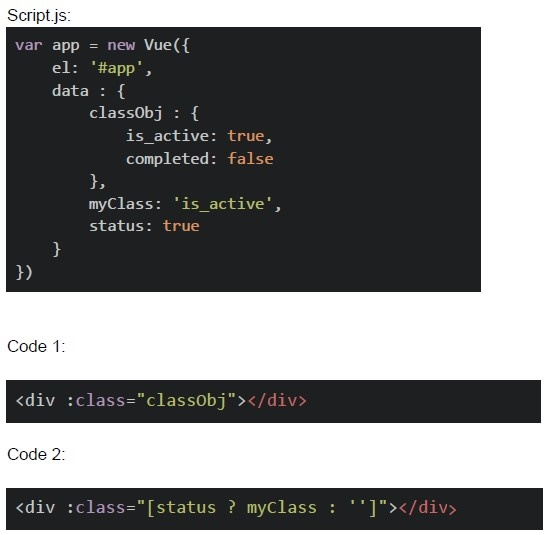 Consider the below Vue class binding. Which of the following statements is/are true, assuming both code 1 and code 2 are part of app object?
Consider the below Vue class binding. Which of the following statements is/are true, assuming both code 1 and code 2 are part of app object? Text of the picture (copyable)
Script.js:
```javascript
var app = new Vue({
  el: '#app',
  data: {
    classObj: {
      is_active: true,
      completed: false
    },
    myClass: 'is_active',
    status: true
  }
})
```

Code 1:
```html
<div :class="classObj"></div>
```

Code 2:
```html
<div :class="[status ? myClass : '']"></div>
```- The code snippet 1 will render the div element with class “completed”, if the“completed” property of “classObj” is set to true.
- The code snippet 2 will render the div element with class “completed”, if thedata variable “status” is set to true.
- Both the code snippets will render same HTML
- Both the code snippets will render different HTML
Consider the below Vue component template and script definitions that use Vue router.
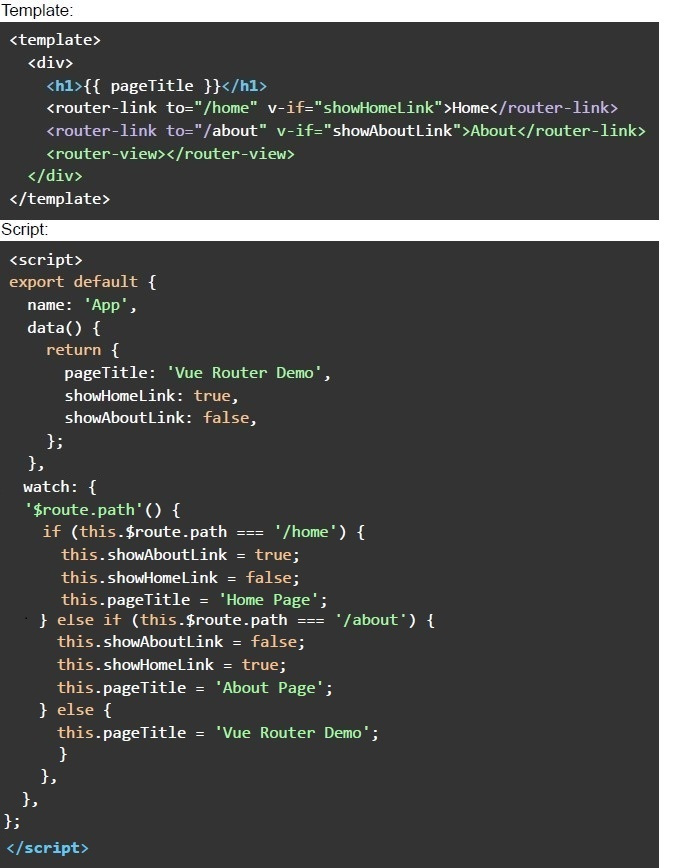 Consider the below Vue component template and script definitions that use Vue router. Assuming that the corresponding routes are properly configured, what does this component structure accomplish?
Consider the below Vue component template and script definitions that use Vue router. Assuming that the corresponding routes are properly configured, what does this component structure accomplish?Text of the picture (copyable)
Template:
```html
<template>
  <div>
    <h1>{{ pageTitle }}</h1>
    <router-link to="/home" v-if="showHomeLink">Home</router-link>
    <router-link to="/about" v-if="showAboutLink">About</router-link>
    <router-view></router-view>
  </div>
</template>
```

Script:
```html
<script>
export default {
  name: 'App',
  data() {
    return {
      pageTitle: 'Vue Router Demo',
      showHomeLink: true,
      showAboutLink: false,
    };
  },
  watch: {
    '$route.path'() {
      if (this.$route.path === '/home') {
        this.showAboutLink = true;
        this.showHomeLink = false;
        this.pageTitle = 'Home Page';
      } else if (this.$route.path === '/about') {
        this.showAboutLink = false;
        this.showHomeLink = true;
        this.pageTitle = 'About Page';
      } else {
        this.pageTitle = 'Vue Router Demo';
      }
    },
  },
};
</script>
```
text
It displays a web page with a heading title "Vue Router Demo" and two
navigation links to "Home" and "About."

text
It dynamically updates the heading title based on the route and conditionally
shows navigation links to "Home" and "About."

text
It has a bug and will throw a runtime error.

text
The heading title is populated with the value "Vue Router Demo" when the user opens the app for the first time.
Consider the below application with markup “index.html” and JavaScript file “app.js”.
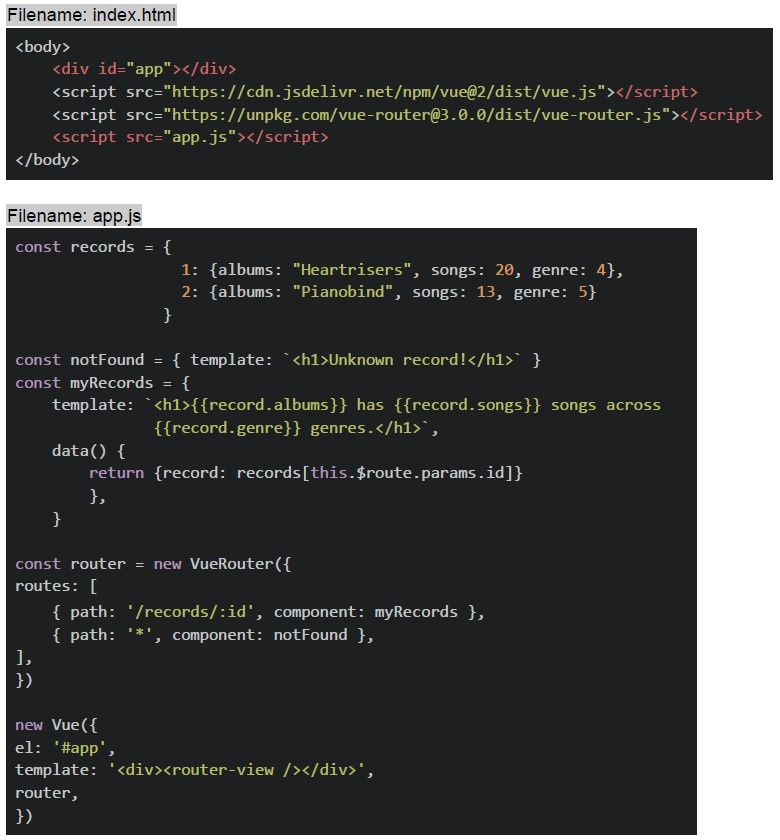 Consider the below application with markup “index.html” and JavaScript file “app.js”. Suppose the application is running on “http://127.0.0.1:8080”, select the correct option(s)?
Consider the below application with markup “index.html” and JavaScript file “app.js”. Suppose the application is running on “http://127.0.0.1:8080”, select the correct option(s)?Text of the picture (copyable)
Filename: index.html
```html
<body>
    <div id="app"></div>
    <script src="https://cdn.jsdelivr.net/npm/vue@2/dist/vue.js"></script>
    <script src="https://unpkg.com/vue-router@3.0.0/dist/vue-router.js"></script>
    <script src="app.js"></script>
</body>
```

Filename: app.js
```javascript
const records = {
    1: {albums: "Heartrisers", songs: 20, genre: 4},
    2: {albums: "Pianobind", songs: 13, genre: 5}
}

const notFound = { template: `<h1>Unknown record!</h1>` }
const myRecords = {
    template: `<h1>{{record.albums}} has {{record.songs}} songs across
    {{record.genre}} genres.</h1>`,

    data() {
        return {record: records[this.$route.params.id]}
    },
}

const router = new VueRouter({
    routes: [
        { path: '/records/:id', component: myRecords },
        { path: '*', component: notFound },
    ],
})

new Vue({
    el: '#app',
    template: '<div><router-view /></router-view></div>',
    router,
})
```
text
For the endpoint, http://127.0.0.1:8080/records/1, The browser will render:
**Heartrisers has 20 songs across 4 genres.**

text
For the endpoint, http://127.0.0.1:8080/#/records/2, The browser will render:
**Pianobind has 13 songs across 5 genres.**

text
For the endpoint, http://127.0.0.1:8080/#/records, The browser will render:
**Unknown record!**

text
For the endpoint, http://127.0.0.1:8080/#/records/3, The browser will render:
**Unknown record!**
Answer key
- Q1 (MCQ, 3 marks): D
- Q2 (MCQ, 3 marks): B
- Q3 (MCQ, 3 marks): C
- Q4 (MCQ, 3 marks): A
- Q5 (MCQ, 3 marks): D
- Q6 (MCQ, 2 marks): B
- Q7 (MCQ, 4.5 marks): D
- Q8 (MCQ, 4.5 marks): C
- Q9 (MSQ, 2 marks): A, B
- Q10 (MSQ, 2 marks): A, B
- Q11 (MSQ, 2 marks): B, D
- Q12 (MSQ, 3 marks): B, C, E, F
- Q13 (MSQ, 3 marks): C, D
- Q14 (MSQ, 3 marks): A, C
- Q15 (MSQ, 4.5 marks): B, D
- Q16 (MSQ, 4.5 marks): B, C