Home / Past papers / MAD2 Quiz 2 / this paper
IIT M FOUNDATION AN EXAM QDF3 03 Aug - 03 Aug 2025
Elapsed 00:00
Text of the picture (copyable)
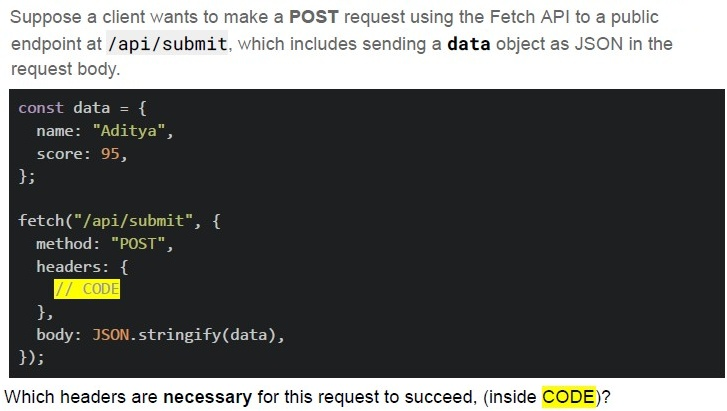
Suppose a client wants to make a **POST** request using the Fetch API to a public endpoint at **/api/submit**, which includes sending a **data** object as JSON in the request body.

```javascript
const data = {
  name: "Aditya",
  score: 95,
};

fetch("/api/submit", {
  method: "POST",
  headers: {
    // CODE
  },
  body: JSON.stringify(data),
});
```

Which headers are necessary for this request to succeed, (inside CODE)?
text
```
'Content-Type': 'application/json'
```

text
```
'Content-Type': 'multipart/form-data'
```

text
```
'Content-Type': 'application/text'
```

text
```
'Accept': '*/*'
```
Which of the following statements are true?

text
JavaScript can directly import and execute .vue files without any preprocessing

text
.vue files typically contain template, script, and style sections

text
.vue files must be compiled (e.g., via Vue CLI or Vite) before they can run in the browser

text
You can load a .vue file directly in a `<script>` tag in plain HTML
Which of the following statement(s) about Web Storage APIs is/are correct?

text
The `localStorage` object stores data with no expiration date, even after the browser is closed.

text
The `sessionStorage` object keeps data only for the duration of the page session.

text
Both `localStorage` and `sessionStorage` can store data in key-value pair format.

text
Data stored in `sessionStorage` is available across different browser tabs.
Which of the following statement(s) is/are true regarding Single Page Applications (SPA) and Progressive Web Apps (PWA)?
- SPAs use client-side routing to dynamically update content without full pagereloads.
- PWAs can work offline using service workers.
- SPAs always require a server-side language to handle routing.
- PWAs can be added to a device’s home screen like native apps.
Text of the picture (copyable)
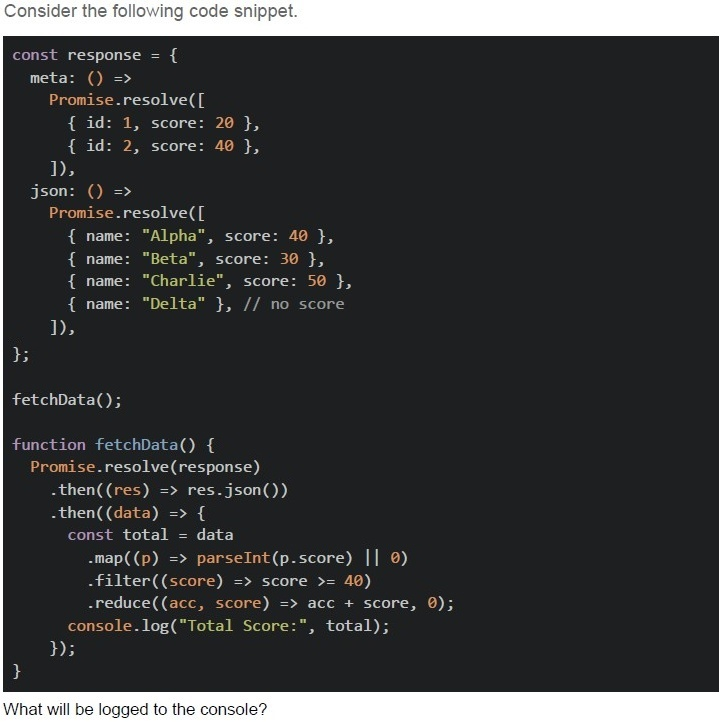
Consider the following code snippet.

```javascript
const response = {
  meta: () =>
    Promise.resolve([
      { id: 1, score: 20 },
      { id: 2, score: 40 },
    ]),
  json: () =>
    Promise.resolve([
      { name: "Alpha", score: 40 },
      { name: "Beta", score: 30 },
      { name: "Charlie", score: 50 },
      { name: "Delta" }, // no score
    ]),
};

fetchData();

function fetchData() {
  Promise.resolve(response)
    .then((res) => res.json())
    .then((data) => {
      const total = data
        .map((p) => parseInt(p.score) || 0)
        .filter((score) => score >= 40)
        .reduce((acc, score) => acc + score, 0);
      console.log("Total Score:", total);
    });
}
```

What will be logged to the console?- Total Score: 80
- Total Score: 90
- Total Score: 120
- Total Score: NaN
Text of the picture (copyable)
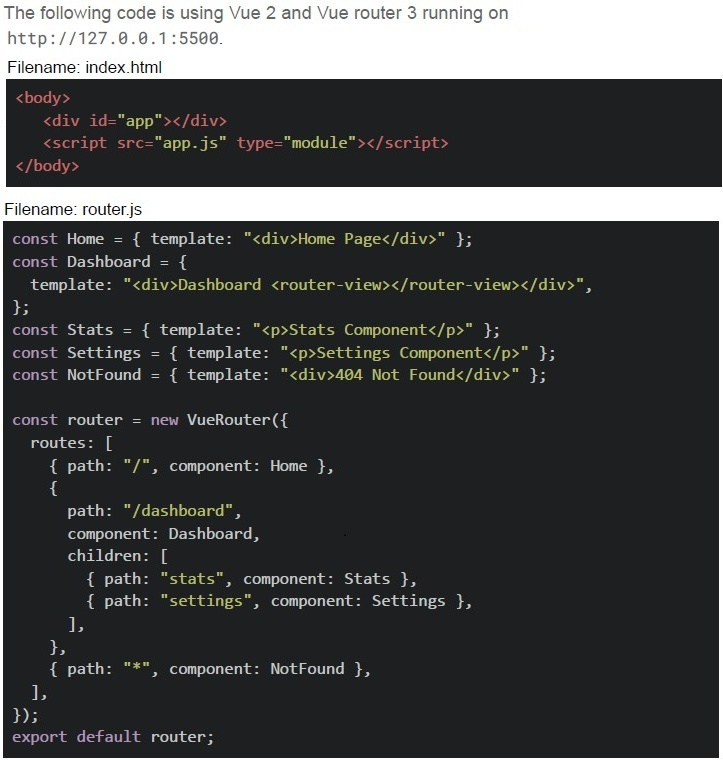
The following code is using Vue 2 and Vue router 3 running on
http://127.0.0.1:5500.

Filename: index.html
```html
<body>
    <div id="app"></div>
    <script src="app.js" type="module"></script>
</body>
```

Filename: router.js
```javascript
const Home = { template: "<div>Home Page</div>" };
const Dashboard = {
    template: "<div>Dashboard <router-view></router-view></div>",
};
const Stats = { template: "<p>Stats Component</p>" };
const Settings = { template: "<p>Settings Component</p>" };
const NotFound = { template: "<div>404 Not Found</div>" };

const router = new VueRouter({
    routes: [
        { path: "/", component: Home },
        {
            path: "/dashboard",
            component: Dashboard,
            children: [
                { path: "stats", component: Stats },
                { path: "settings", component: Settings },
            ],
        },
        { path: "**", component: NotFound },
    ],
});

export default router;
```
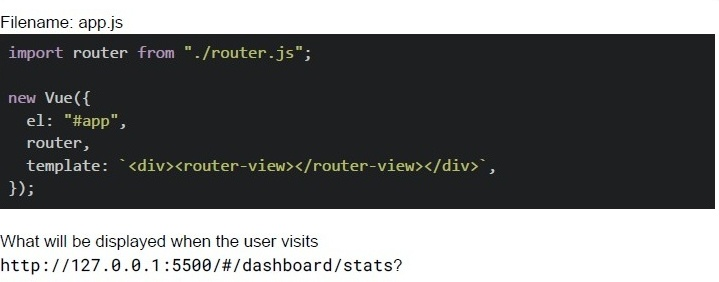
Filename: app.js

```javascript
import router from "./router.js";

new Vue({
  el: "#app",
  router,
  template: `<div><router-view></router-view></div>`,
});
```

What will be displayed when the user visits
http://127.0.0.1:5500/#/dashboard/stats?- Dashboard only
- Stats Component only
- DashboardStats Component
- 404 Not Found
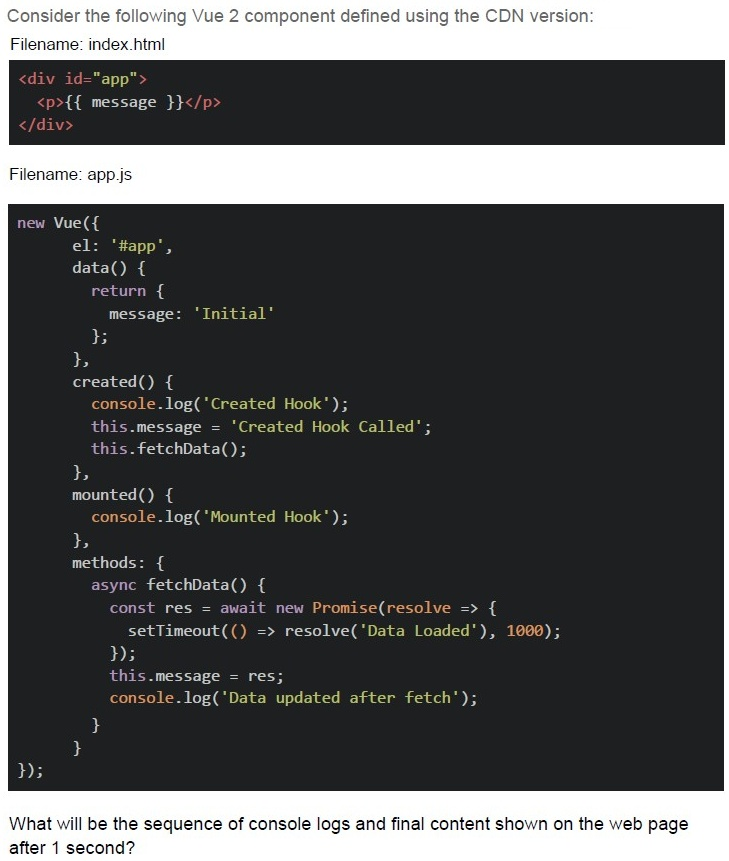
Text of the picture (copyable)
Consider the following Vue 2 component defined using the CDN version:
Filename: index.html

```html
<div id="app">
  <p>{{ message }}</p>
</div>
```

Filename: app.js

```javascript
new Vue({
  el: '#app',
  data() {
    return {
      message: 'Initial'
    };
  },
  created() {
    console.log('Created Hook');
    this.message = 'Created Hook Called';
    this.fetchData();
  },
  mounted() {
    console.log('Mounted Hook');
  },
  methods: {
    async fetchData() {
      const res = await new Promise(resolve => {
        setTimeout(() => resolve('Data Loaded'), 1000);
      });
      this.message = res;
      console.log('Data updated after fetch');
    }
  }
});
```

What will be the sequence of console logs and final content shown on the web page after 1 second?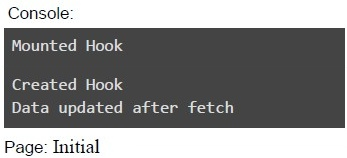
text
Console:
Mounted Hook
Created Hook
Data updated after fetch

Page: Initial
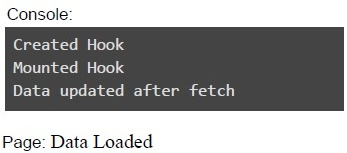
text
Console:
```
Created Hook
Mounted Hook
Data updated after fetch
```
Page: Data Loaded
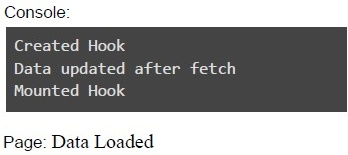
text
Console:
```
Created Hook
Data updated after fetch
Mounted Hook
```
Page: Data Loaded
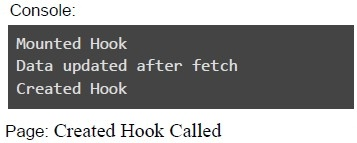
text
Console:
Mounted Hook
Data updated after fetch
Created Hook

Page: Created Hook Called
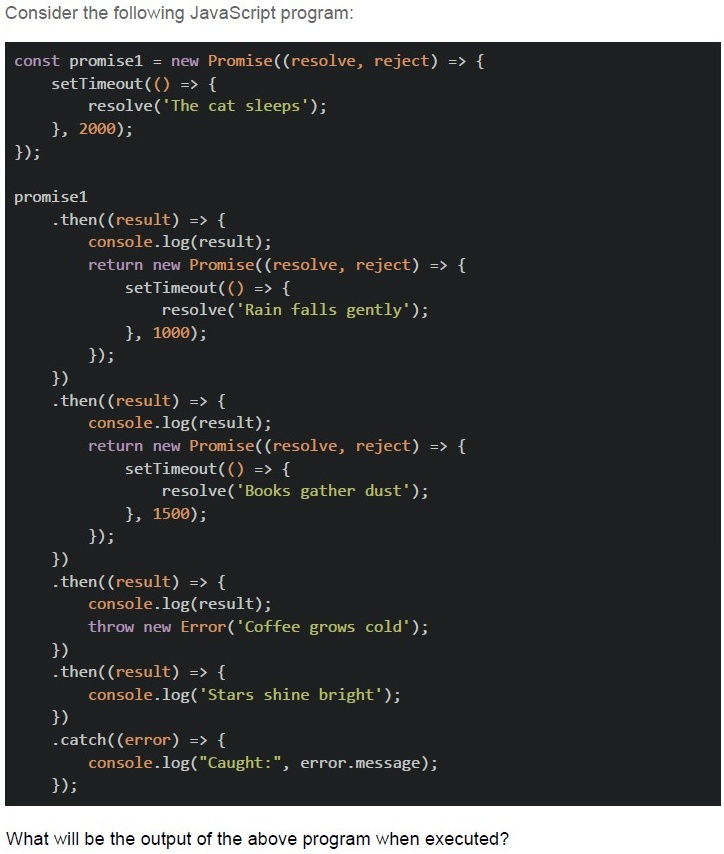
Text of the picture (copyable)
Consider the following JavaScript program:

```javascript
const promise1 = new Promise((resolve, reject) => {
  setTimeout(() => {
    resolve('The cat sleeps');
  }, 2000);
});

promise1
  .then((result) => {
    console.log(result);
    return new Promise((resolve, reject) => {
      setTimeout(() => {
        resolve('Rain falls gently');
      }, 1000);
    });
  })
  .then((result) => {
    console.log(result);
    return new Promise((resolve, reject) => {
      setTimeout(() => {
        resolve('Books gather dust');
      }, 1500);
    });
  })
  .then((result) => {
    console.log(result);
    throw new Error('Coffee grows cold');
  })
  .then((result) => {
    console.log('Stars shine bright');
  })
  .catch((error) => {
    console.log("Caught:", error.message);
  });
```

What will be the output of the above program when executed?
text
The cat sleeps
Rain falls gently
Books gather dust
Stars shine bright

text
The cat sleeps
Rain falls gently
Books gather dust
Caught: Coffee grows cold

text
The cat sleeps
Rain falls gently
Caught: Coffee grows cold

text
The program will crash without showing any output
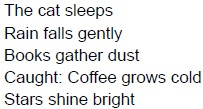
text
The cat sleeps
Rain falls gently
Books gather dust
Caught: Coffee grows cold
Stars shine bright
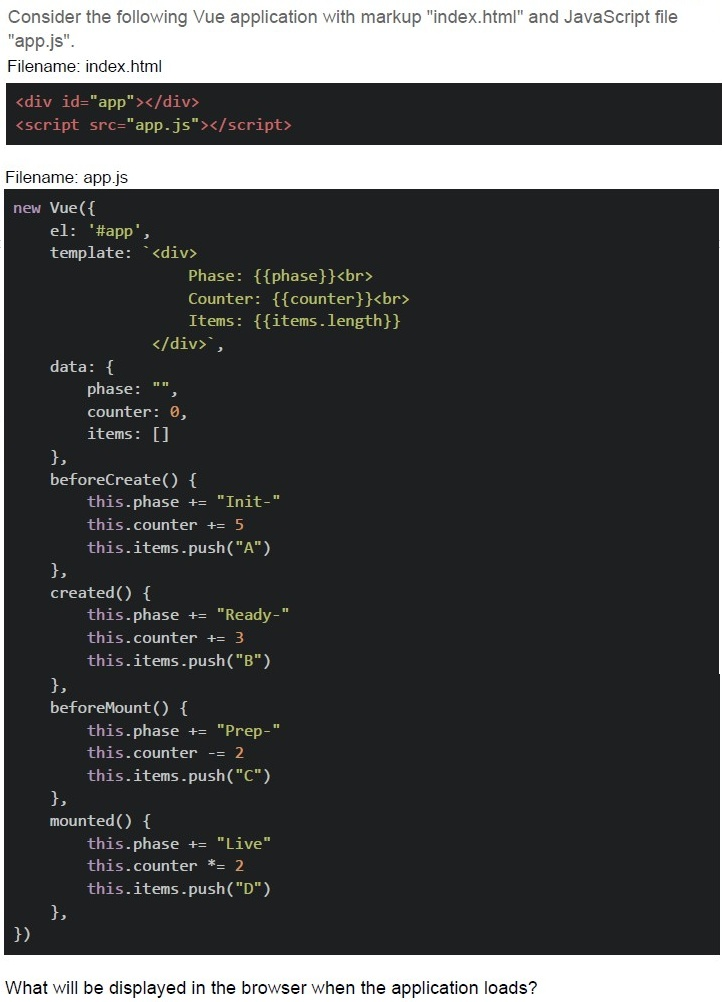
Text of the picture (copyable)
Consider the following Vue application with markup "index.html" and JavaScript file "app.js".
Filename: index.html
```html
<div id="app"></div>
<script src="app.js"></script>
```
Filename: app.js
```javascript
new Vue({
  el: '#app',
  template: `<div>
    Phase: {{phase}}<br>
    Counter: {{counter}}<br>
    Items: {{items.length}}
  </div>`,

  data: {
    phase: "",
    counter: 0,
    items: []
  },

  beforeCreate() {
    this.phase += "Init-"
    this.counter += 5
    this.items.push("A")
  },

  created() {
    this.phase += "Ready-"
    this.counter += 3
    this.items.push("B")
  },

  beforeMount() {
    this.phase += "Prep-"
    this.counter -= 2
    this.items.push("C")
  },

  mounted() {
    this.phase += "Live"
    this.counter *= 2
    this.items.push("D")
  }
})
```
What will be displayed in the browser when the application loads?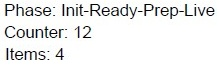
text
Phase: Init-Ready-Prep-Live
Counter: 12
Items: 4
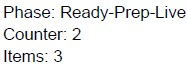
text
Phase: Ready-Prep-Live
Counter: 2
Items: 3
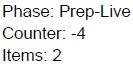
text
Phase: Prep-Live
Counter: -4
Items: 2

text
Phase: Live
Counter: 0
Items: 1
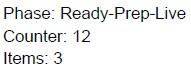
text
Phase: Ready-Prep-Live
Counter: 12
Items: 3
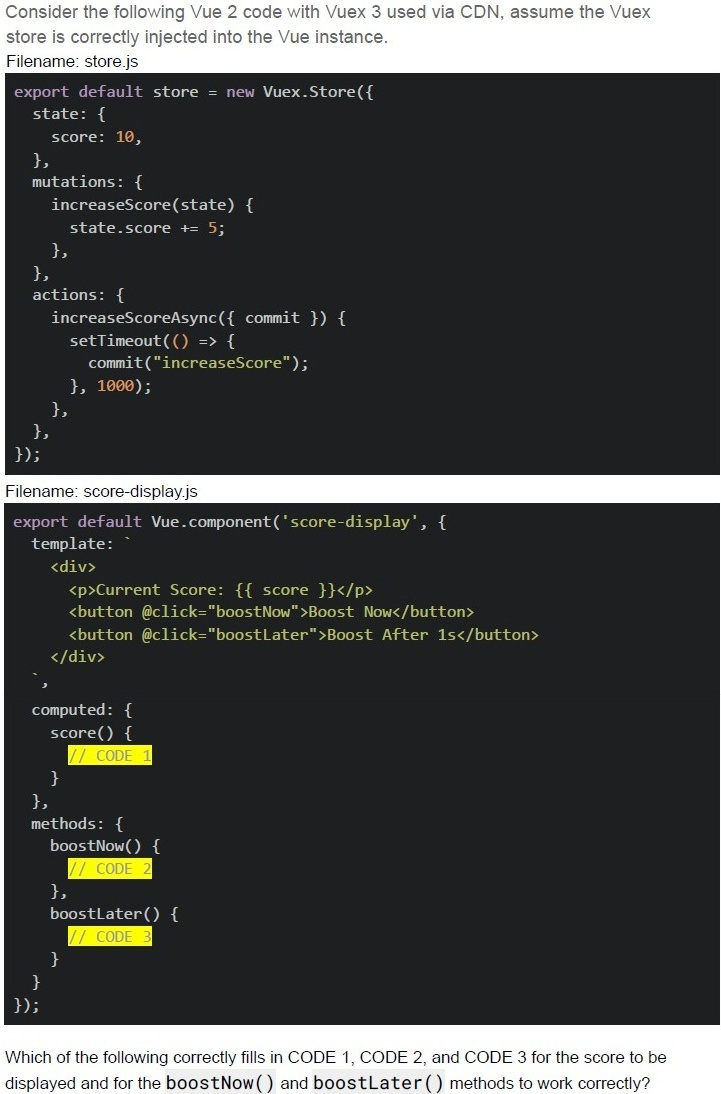
Text of the picture (copyable)
Consider the following Vue 2 code with Vuex 3 used via CDN, assume the Vuex
store is correctly injected into the Vue instance.
Filename: store.js
```javascript
export default store = new Vuex.Store({
  state: {
    score: 10,
  },
  mutations: {
    increaseScore(state) {
      state.score += 5;
    },
  },
  actions: {
    increaseScoreAsync({ commit }) {
      setTimeout(() => {
        commit("increaseScore");
      }, 1000);
    },
  },
});
```
Filename: score-display.js
```javascript
export default Vue.component('score-display', {
  template: `
    <div>
      <p>Current Score: {{ score }}</p>
      <button @click="boostNow">Boost Now</button>
      <button @click="boostLater">Boost After 1s</button>
    </div>
  `,
  computed: {
    score() {
      // CODE 1
    }
  },
  methods: {
    boostNow() {
      // CODE 2
    },
    boostLater() {
      // CODE 3
    }
  }
});
```
Which of the following correctly fills in CODE 1, CODE 2, and CODE 3 for the score to be
displayed and for the **boostNow()** and **boostLater()** methods to work correctly?
text
CODE 1:
```
return this.$store.state.score;
```

text
CODE 2:
```
this.$store.commit('increaseScore');
```
text
```
CODE 2: this.increaseScore() ;
```

text
CODE 3:
```
this.$store.dispatch('increaseScoreAsync');
```
text
CODE 3:
```
this.$store.increaseScoreAsync();
```
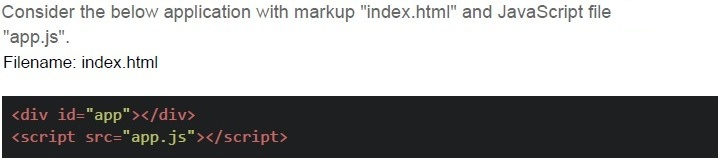
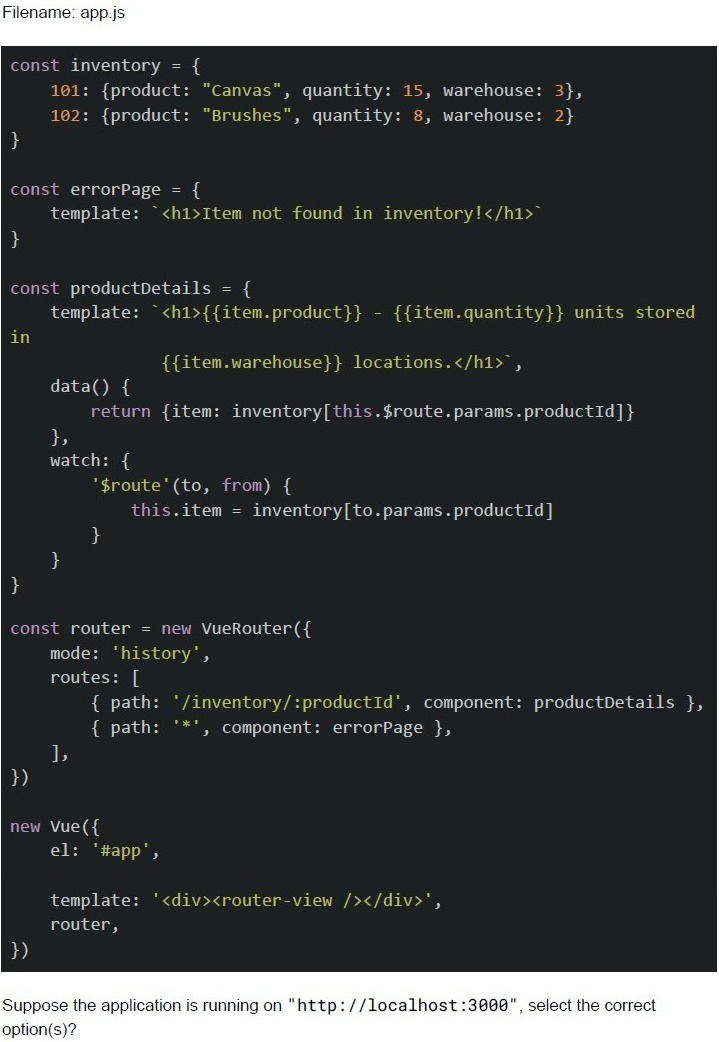
Text of the picture (copyable)
Consider the below application with markup "index.html" and JavaScript file
"app.js".
Filename: index.html

```html
<div id="app"></div>
<script src="app.js"></script>
```
Filename: app.js

```javascript
const inventory = {
  101: {product: "Canvas", quantity: 15, warehouse: 3},
  102: {product: "Brushes", quantity: 8, warehouse: 2}
}

const errorPage = {
  template: `<h1>Item not found in inventory!</h1>`
}

const productDetails = {
  template: `<h1>{{item.product}} - {{item.quantity}} units stored
  in
  {{item.warehouse}} locations.</h1>`,

  data() {
    return {item: inventory[this.$route.params.productId]}
  },
  watch: {
    '$route'(to, from) {
      this.item = inventory[to.params.productId]
    }
  }
}

const router = new VueRouter({
  mode: 'history',
  routes: [
    { path: '/inventory/:productId', component: productDetails },
    { path: '*', component: errorPage },
  ],
})

new Vue({
  el: '#app',

  template: '<div><router-view /></router-view></div>',
  router,
})
```

Suppose the application is running on "http://localhost:3000", select the correct option(s)?
text
For the endpoint, http://localhost:3000/inventory/101, The browser will render:
Canvas - 15 units stored in 3 locations.

text
For the endpoint, http://localhost:3000/#/inventory/102, The browser will render:
Brushes - 8 units stored in 2 locations.

text
For the endpoint, http://localhost:3000/inventory. The browser will render:
item not found in inventory!

text
For the endpoint, http://localhost:3000/inventory/103, The browser will render:
Item not found in inventory!

text
For the endpoint, http://localhost:3000/products/101, The browser will render:
Item not found in inventory!
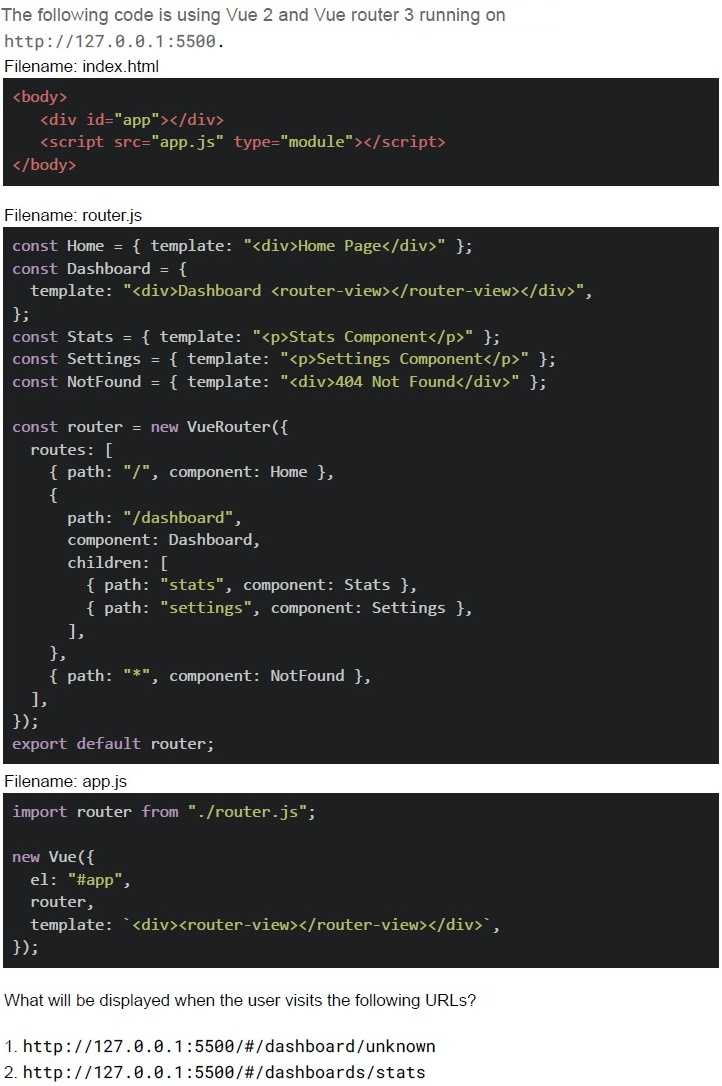
Text of the picture (copyable)
The following code is using Vue 2 and Vue router 3 running on
http://127.0.0.1:5500.

Filename: index.html
```html
<body>
    <div id="app"></div>
    <script src="app.js" type="module"></script>
</body>
```

Filename: router.js
```javascript
const Home = { template: "<div>Home Page</div>" };
const Dashboard = {
    template: "<div>Dashboard <router-view></router-view></div>",
};
const Stats = { template: "<p>Stats Component</p>" };
const Settings = { template: "<p>Settings Component</p>" };
const NotFound = { template: "<div>404 Not Found</div>" };

const router = new VueRouter({
    routes: [
        { path: "/", component: Home },
        {
            path: "/dashboard",
            component: Dashboard,
            children: [
                { path: "stats", component: Stats },
                { path: "settings", component: Settings },
            ],
        },
        { path: "*", component: NotFound },
    ],
});
export default router;
```

Filename: app.js
```javascript
import router from "./router.js";

new Vue({
    el: "#app",
    router,
    template: `<div><router-view></router-view></div>`,
});
```

What will be displayed when the user visits the following URLs?

1. http://127.0.0.1:5500/#/dashboard/unknown
2. http://127.0.0.1:5500/#/dashboards/stats- Both will show Dashboard
- 1: Dashboard, 2: 404 Not Found
- 1: Dashboard, 2: Stats Component
- Both will show 404 Not Found
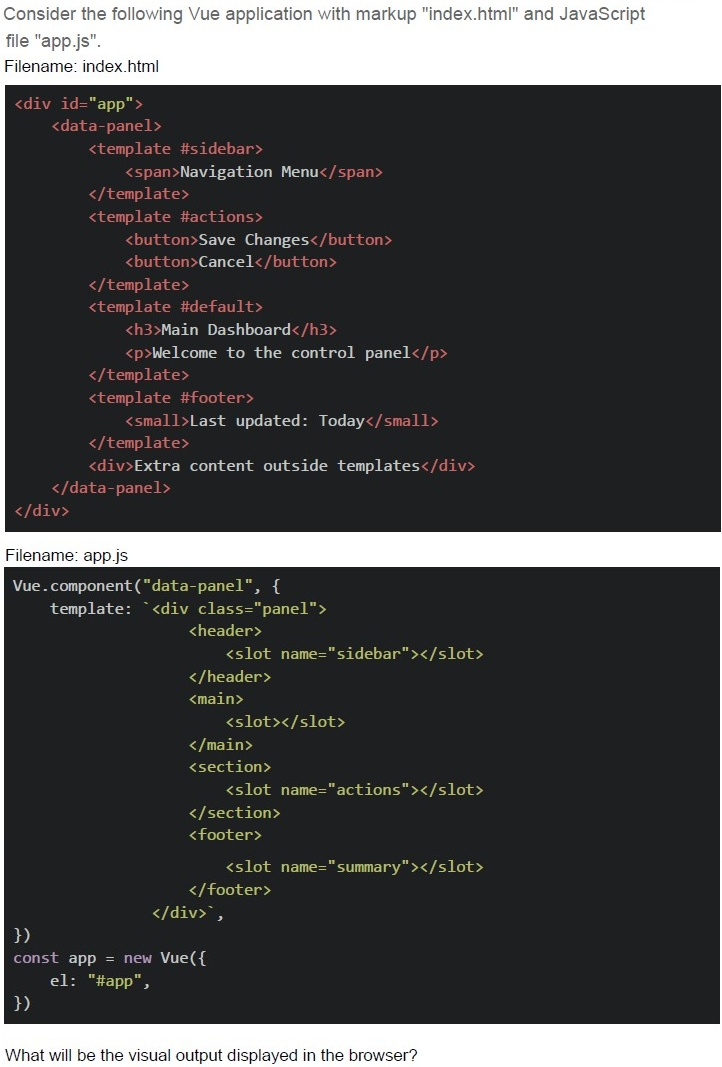
Text of the picture (copyable)
Consider the following Vue application with markup "index.html" and JavaScript file "app.js".

Filename: index.html

```html
<div id="app">
  <data-panel>
    <template #sidebar>
      <span>Navigation Menu</span>
    </template>
    <template #actions>
      <button>Save Changes</button>
      <button>Cancel</button>
    </template>
    <template #default>
      <h3>Main Dashboard</h3>
      <p>Welcome to the control panel</p>
    </template>
    <template #footer>
      <small>Last updated: Today</small>
    </template>
    <div>Extra content outside templates</div>
  </data-panel>
</div>
```

Filename: app.js

```javascript
Vue.component("data-panel", {
  template: `<div class="panel">
    <header>
      <slot name="sidebar"></slot>
    </header>
    <main>
      <slot></slot>
    </main>
    <section>
      <slot name="actions"></slot>
    </section>
    <footer>
      <slot name="summary"></slot>
    </footer>
  </div>`,
});
const app = new Vue({
  el: "#app",
});
```

What will be the visual output displayed in the browser?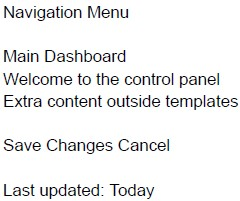
text
Navigation Menu

Main Dashboard
Welcome to the control panel
Extra content outside templates

Save Changes Cancel

Last updated: Today
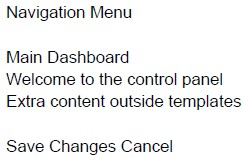
text
Navigation Menu

Main Dashboard
Welcome to the control panel
Extra content outside templates

Save Changes Cancel
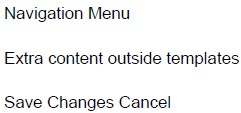
text
Navigation Menu
Extra content outside templates
Save Changes Cancel
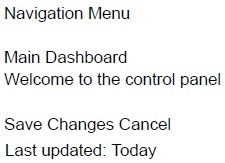
text
Navigation Menu

Main Dashboard
Welcome to the control panel

Save Changes Cancel
Last updated: Today
Text of the picture (copyable)
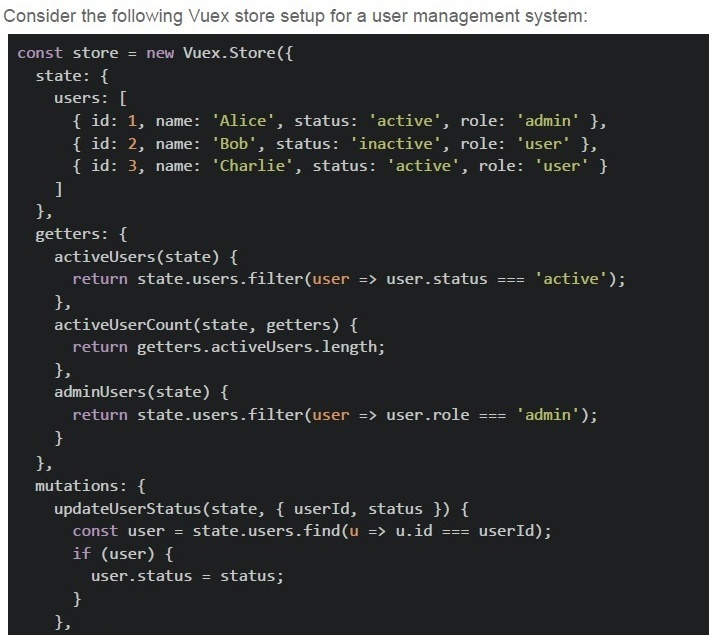
Consider the following Vuex store setup for a user management system:

```javascript
const store = new Vuex.Store({
  state: {
    users: [
      { id: 1, name: 'Alice', status: 'active', role: 'admin' },
      { id: 2, name: 'Bob', status: 'inactive', role: 'user' },
      { id: 3, name: 'Charlie', status: 'active', role: 'user' }
    ]
  },
  getters: {
    activeUsers(state) {
      return state.users.filter(user => user.status === 'active');
    },
    activeUserCount(state, getters) {
      return getters.activeUsers.length;
    },
    adminUsers(state) {
      return state.users.filter(user => user.role === 'admin');
    }
  },
  mutations: {
    updateUserStatus(state, { userId, status }) {
      const user = state.users.find(u => u.id === userId);
      if (user) {
        user.status = status;
      }
    }
  }
});
```
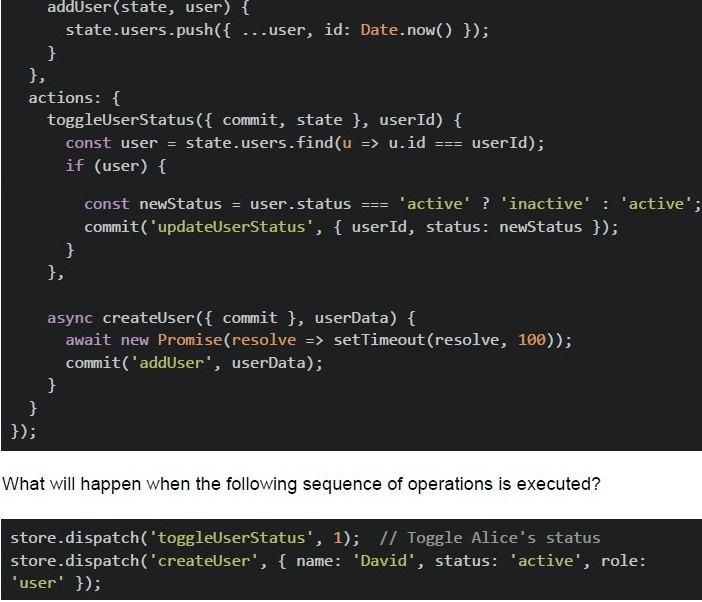
```javascript
addUser(state, user) {
  state.users.push({ ...user, id: Date.now() });
},
actions: {
  toggleUserStatus({ commit, state }, userId) {
    const user = state.users.find(u => u.id === userId);
    if (user) {
      const newStatus = user.status === 'active' ? 'inactive' : 'active';
      commit('updateUserStatus', { userId, status: newStatus });
    }
  },
  async createUser({ commit }, userData) {
    await new Promise(resolve => setTimeout(resolve, 100));
    commit('addUser', userData);
  }
}
```

What will happen when the following sequence of operations is executed?

```javascript
store.dispatch('toggleUserStatus', 1); // Toggle Alice's status
store.dispatch('createUser', { name: 'David', status: 'active', role: 'user' });
```
text
The activeUserCount will become 1 immediately after the first dispatch, and remain 1 after the second dispatch completes.

text
The activeUserCount will become 1 after the first dispatch, and become 2 after the second dispatch completes.

text
The activeUserCount will remain 2 after the first dispatch, and become 3 after the second dispatch completes.

text
The activeUserCount will become 3 immediately after both dispatches, since both operations run synchronously.
Comprehension passage - the questions below it refer to this
You are given the following HTML and JavaScript code that uses Vue 2 via CDN along with Vue Router. Read the code carefully and answer the given subquestions.
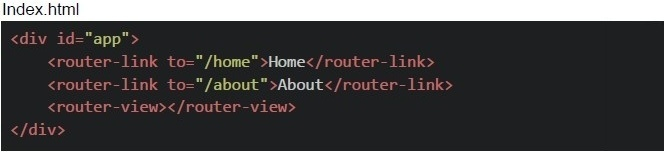 You are given the following HTML and JavaScript code that uses Vue 2 via CDN along with Vue Router. Read the code carefully and answer the given subquestions.
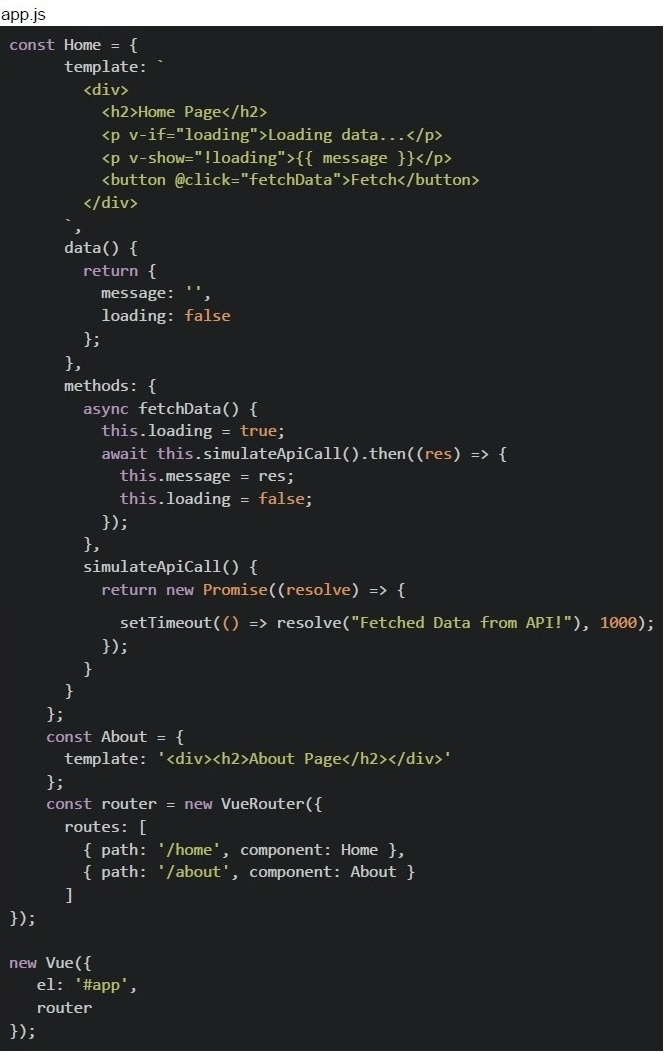 You are given the following HTML and JavaScript code that uses Vue 2 via CDN along with Vue Router. Read the code carefully and answer the given subquestions.
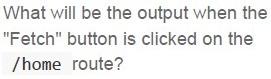
Text of the picture (copyable)
What will be the output when the
"Fetch" button is clicked on the
/home route?

text
The page immediately shows "Fetched Data from API!" with no delay.
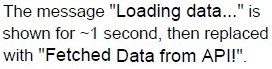
text
The message "**Loading data...**" is
shown for ~1 second, then replaced
with "**Fetched Data from API!!**".

text
Both "Loading data..." and "Fetched
Data from API!" appear together.

text
Nothing happens because v-show and
v-if cannot work together.
Suppose the button is clicked multiple times quickly, the message area flickers unexpectedly. How can you improve the code to ensure proper async behavior and prevent overlapping fetches?

text
Add v-else after v-if instead of v-show.

text
Replace
```javascript
await this.simulateApiCall().then(...);
```
with
```javascript
const res = await this.simulateApiCall(); this.message = res;
```

text
Add a check to disable the button while loading;
```html
<button @click="fetchData" :disabled="loading">Fetch</button>
```

text
Use v-html instead of v-show for message rendering.
Answer key
- Q1 (MCQ, 2 marks): A
- Q2 (MSQ, 2 marks): B, C
- Q3 (MSQ, 2 marks): A, B, C
- Q4 (MSQ, 2 marks): A, B, D
- Q5 (MCQ, 3 marks): B
- Q6 (MCQ, 3 marks): C
- Q7 (MCQ, 3 marks): B
- Q8 (MCQ, 3 marks): B
- Q9 (MCQ, 3 marks): B
- Q10 (MSQ, 3 marks): A, C, D
- Q11 (MSQ, 3 marks): A, C, E
- Q12 (MCQ, 4.5 marks): D
- Q13 (MCQ, 4.5 marks): B
- Q14 (MCQ, 4.5 marks): B
- Q15 (MCQ, 4.5 marks): B
- Q16 (MCQ, 3 marks): C
Concepts this paper tests
Auto-generated summary from the source site. Handy as a checklist; the lessons above explain each idea from scratch.
Summary of Core Topics, Concepts, Principles, and Equations
1. JavaScript and Fetch API
- Fetch API: Used for making HTTP requests.
Headers: Essential for specifying the content type, especially for JSON data.
Content-Type: application/json
- Promise Handling: Understanding
.then()and.catch()for handling asynchronous operations.
2. Vue.js
Vue Files: Structure and compilation of
.vuefiles.- Template, script, and style sections.
- Compilation using Vue CLI or Vite.
Lifecycle Hooks: Understanding the lifecycle of a Vue instance.
beforeCreate,created,beforeMount,mounted.
Vue Router: Handling client-side routing.
- Dynamic routing, nested routes, and route guards.
Vuex: State management in Vue.js.
- State, getters, mutations, and actions.
Slots: Using slots for component composition.
- Named slots and default slots.
3. Web Storage APIs
- localStorage: Stores data with no expiration date.
- sessionStorage: Stores data for the duration of the page session.
- Key-Value Pair Format: Both
localStorageandsessionStorageuse this format.
4. Single Page Applications (SPA) and Progressive Web Apps (PWA)
- SPA: Uses client-side routing to dynamically update content.
- PWA: Can work offline using service workers and can be added to a device’s home screen.
5. Asynchronous JavaScript
Promises: Handling asynchronous operations.
Promise.resolve(),Promise.reject(),.then(),.catch().
Async/Await: Simplifying asynchronous code.
asyncfunctions andawaitexpressions.
6. Vue Components and Templates
Component Structure: Understanding the structure of Vue components.
- Template, data, methods, computed properties, and lifecycle hooks.
- Conditional Rendering: Using
v-if,v-show, andv-else. - Event Handling: Using
@clickfor event handling.
7. Vue Router and Dynamic Components
- Dynamic Components: Using
<component :is="dynamicComponent"></component>. - Route Parameters: Handling dynamic segments in routes.
- Nested Routes: Using nested routes for complex applications.
8. Vuex Store
State Management: Managing state in a Vuex store.
- State, getters, mutations, and actions.
Asynchronous Actions: Handling asynchronous operations in Vuex.
- Using
dispatchandcommit.
- Using