Home / Past papers / MAD2 End Term / this paper
IIT M FOUNDATION DIPLOMA FN EXAM - 01 Sep 2024
- To encrypt the user's session
- To validate that the request comes from the authenticated user
- To store the user's password securely
- To compress the HTTP request

text
https://api.example.com

text
http://example.com/api

text
https://example.com:8080

text
https://example.com/subdir
- State → Dispatch an action → Commit a mutation → State change
- Dispatch an action → Commit a mutation → State change
- Commit a mutation → Dispatch an action → State change
- State change → Commit a mutation → Dispatch an action
- II, I, III
- III, I, II
- III, II, I
- I, II, III
- Redis is a relational database that uses SQL for querying data.
- Redis is an in-memory data structure store, commonly used as a database,cache, and message broker.
- Redis can only store string data types and does not support complex datastructures like lists or sets.
- Redis cannot handle numerous operations per second.
- A user receives an email containing a link to a phishing site that asks for theirlogin credentials.
- A user clicks on a malicious link while logged into their bank account, andwithout their knowledge, a money transfer request is sent to the bank's server using the user'sauthenticated session.
- A hacker uses a brute-force attack to guess the password of a user's onlineaccount.
- A user is tricked into downloading and installing malware that steals theirsensitive information.
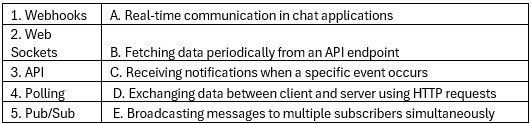 Match the following technologies with their typical use cases:
 Text of the picture (copyable)
| | |
|---|---|
| 1. Webhooks | A. Real-time communication in chat applications |
| 2. Web Sockets | B. Fetching data periodically from an API endpoint |
| 3. API | C. Receiving notifications when a specific event occurs |
| 4. Polling | D. Exchanging data between client and server using HTTP requests |
| 5. Pub/Sub | E. Broadcasting messages to multiple subscribers simultaneously |
- 1 - C, 2 - A, 3 - D, 4 - B, 5 - E
- 1 - D, 2 - E, 3 - A, 4 - C, 5 - B
- 1 - C, 2 - C, 3 - E, 4 - A, 5 - D
- 1 - D, 2 - A, 3 - C, 4 - D, 5 - B
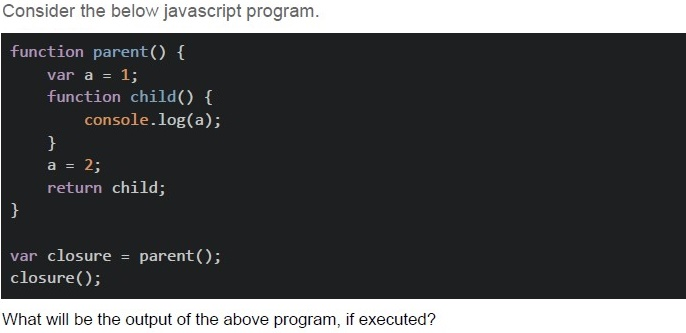
Text of the picture (copyable)
Consider the below javascript program.

```javascript
function parent() {
    var a = 1;
    function child() {
        console.log(a);
    }
    a = 2;
    return child;
}

var closure = parent();
closure();
```

What will be the output of the above program, if executed?- 2
- 1
- undefined
- Error
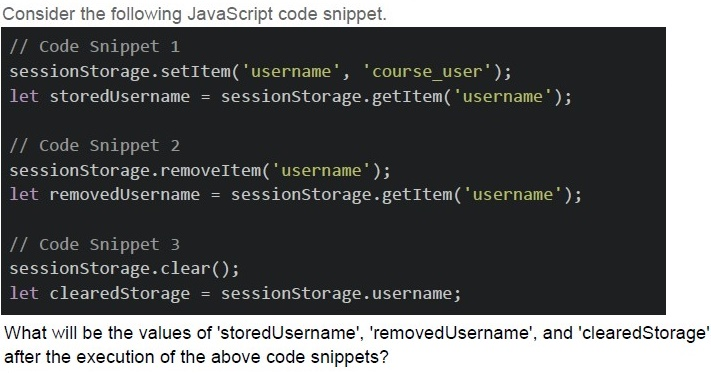
Text of the picture (copyable)
Consider the following JavaScript code snippet.

```javascript
// Code Snippet 1
sessionStorage.setItem('username', 'course_user');
let storedUsername = sessionStorage.getItem('username');

// Code Snippet 2
sessionStorage.removeItem('username');
let removedUsername = sessionStorage.getItem('username');

// Code Snippet 3
sessionStorage.clear();
let clearedStorage = sessionStorage.username;
```

What will be the values of 'storedUsername', 'removedUsername', and 'clearedStorage' after the execution of the above code snippets?- storedUsername: 'course_user', removedUsername: null, clearedStorage: null
- storedUsername: 'course_user', removedUsername: undefined,clearedStorage: null
- storedUsername: 'course_user', removedUsername: null, clearedStorage:undefined
- storedUsername: 'course_user', removedUsername: undefined,clearedStorage: undefined
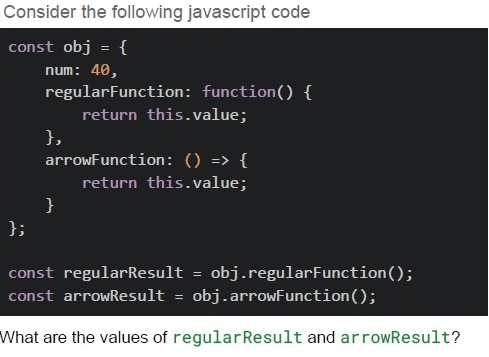
Text of the picture (copyable)
Consider the following javascript code

```javascript
const obj = {
  num: 40,
  regularFunction: function() {
    return this.value;
  },
  arrowFunction: () => {
    return this.value;
  }
};

const regularResult = obj.regularFunction();
const arrowResult = obj.arrowFunction();
```

What are the values of regularResult and arrowResult?- regularResult = 40, arrowResult = 40
- regularResult = undefined, arrowResult = undefined
- regularResult = 40, arrowResult = undefined
- regularResult = undefined, arrowResult = 40
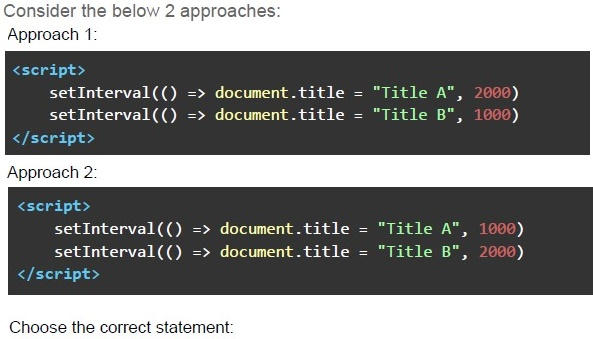
Text of the picture (copyable)
Consider the below 2 approaches:
Approach 1:

```html
<script>
    setInterval(() => document.title = "Title A", 2000)
    setInterval(() => document.title = "Title B", 1000)
</script>
```

Approach 2:

```html
<script>
    setInterval(() => document.title = "Title A", 1000)
    setInterval(() => document.title = "Title B", 2000)
</script>
```

Choose the correct statement:- The approach 1 will toggle the page title between “Title A” and “Title B” afterevery 1 second (approx).
- The approach 2 will toggle the page title between “Title A” and “Title B” afterevery 1 second (approx).
- None of the approaches will toggle the page title after every 1 second.
- None of these
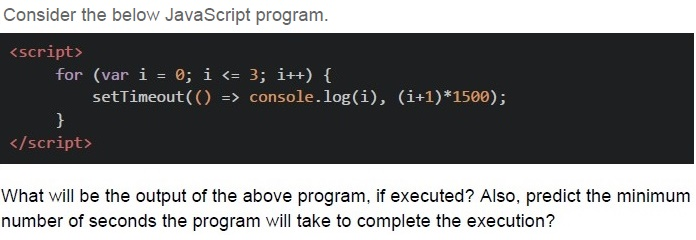
Text of the picture (copyable)
Consider the below JavaScript program.

```html
<script>
    for (var i = 0; i <= 3; i++) {
        setTimeout(() => console.log(i), (i+1)*1500);
    }
</script>
```

What will be the output of the above program, if executed? Also, predict the minimum number of seconds the program will take to complete the execution?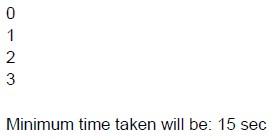
text
0
1
2
3

Minimum time taken will be: 15 sec
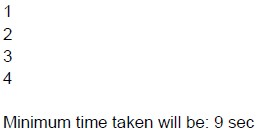
text
1
2
3
4

Minimum time taken will be: 9 sec
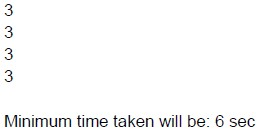
text
3
3
3
3

Minimum time taken will be: 6 sec
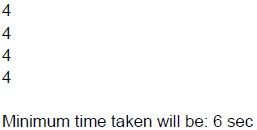
text
4
4
4
4

Minimum time taken will be: 6 sec
- Webhooks use HTTP requests to communicate events from one service toanother.
- Webhooks require the recipient service to periodically poll the sender forupdates.
- Webhooks are typically implemented using HTTP POST requests.
- Webhooks guarantee that events will be delivered in order and exactly once.
- Function declarations are hoisted along with their definitions.
- Variable declarations with var are hoisted with their initializations.
- let and const declarations are hoisted to the top of their block but remainuninitialized until execution reaches the declaration.
- Only function declarations are hoisted, not function definition.
- Handling real-time user interactions on a website.
- Sending out periodic email notifications to users.
- Generating and displaying dynamic content on a web page.
- Performing long-running data processing tasks in the background.
- Webhooks are typically used for server-to-server communication, while SSE isused for server-to-client communication.
- Webhooks require the client to maintain an open connection to receiveupdates, while SSE does not.
- Webhooks are initiated by the server, while SSE connections are initiated bythe client.
- SSE supports bidirectional communication, whereas webhooks do not.

text
```html
<div :class="[isActive ? 'activeClass' : 'errorClass']"></div>
```

text
```html
<div :class="[{ isActive : 'activeClass' }, 'errorClass']"></div>
```
text
```html
<div :class="[activeClass ? 'isActive' : '', 'errorClass']"></div>
```

text
```html
<div :class="[{'activeClass': isActive }, 'errorClass']"></div>
```
- SSE connections are established using HTTP.
- SSE supports bidirectional communication between client and server.
- SSE automatically switches to web socket if the connection is successful.
- SSE is suitable for sending updates to multiple clients simultaneously.
- Cache-Control
- Expires
- Bearer
- Content-Type
- A webhook is the same as short polling.
- The short polling can be used to know the state of an asynchronous task, andtrigger an action if the task gets completed.
- The long polling cannot be achieved using HTTP protocol.
- Long Polling can be used to achieve real time communication.
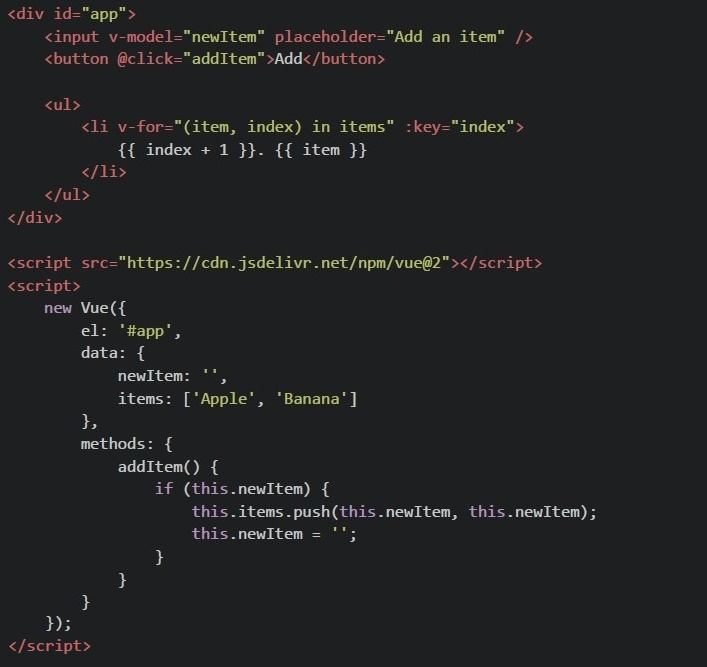 Consider the following Vue.js 2 component using CDN. After entering "Orange" in the input box and clicking the "Add" button, what will be seen in the browser?
Text of the picture (copyable)
```html
<div id="app">
  <input v-model="newItem" placeholder="Add an item" />
  <button @click="addItem">Add</button>

  <ul>
    <li v-for="(item, index) in items" :key="index">
      {{ index + 1 }}. {{ item }}
    </li>
  </ul>
</div>

<script src="https://cdn.jsdelivr.net/npm/vue@2"></script>
<script>
  new Vue({
    el: '#app',
    data: {
      newItem: '',
      items: ['Apple', 'Banana']
    },
    methods: {
      addItem() {
        if (this.newItem) {
          this.items.push(this.newItem, this.newItem);
          this.newItem = '';
        }
      }
    }
  });
</script>
```- 1. Apple2. Banana 3. Orange 4. Orange
- 1. Apple2. Banana 3. Orange
- 1. Apple2. Banana 3. Orange 3. Orange
- 1. Apple2. Banana
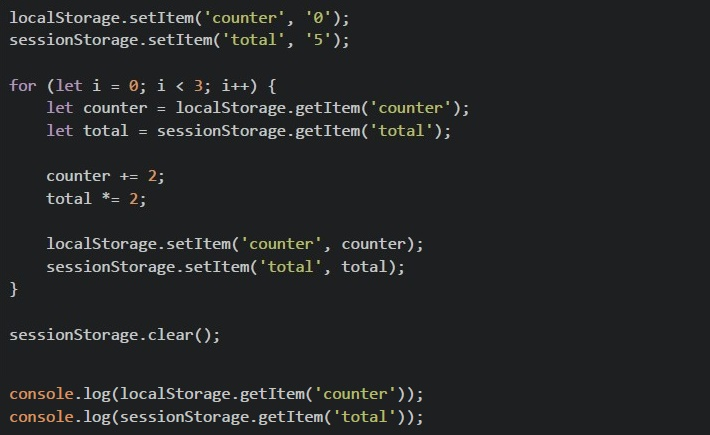 Consider the following javascript code running on browser What will be the output in the browser console?
Text of the picture (copyable)
```javascript
localStorage.setItem('counter', '0');
sessionStorage.setItem('total', '5');

for (let i = 0; i < 3; i++) {
    let counter = localStorage.getItem('counter');
    let total = sessionStorage.getItem('total');

    counter += 2;
    total *= 2;

    localStorage.setItem('counter', counter);
    sessionStorage.setItem('total', total);
}

sessionStorage.clear();

console.log(localStorage.getItem('counter'));
console.log(sessionStorage.getItem('total'));
```- 640
- null40
- 6null
- 0222null
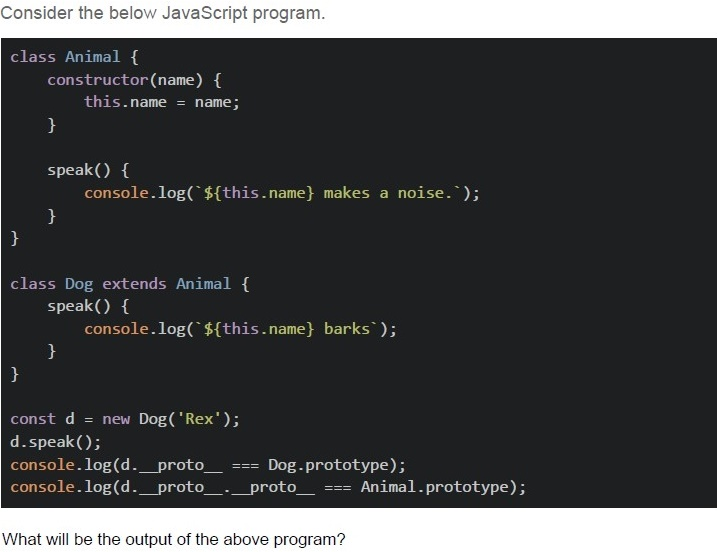
Text of the picture (copyable)
Consider the below JavaScript program.

```javascript
class Animal {
  constructor(name) {
    this.name = name;
  }

  speak() {
    console.log(`${this.name} makes a noise.`);
  }
}

class Dog extends Animal {
  speak() {
    console.log(`${this.name} barks`);
  }
}

const d = new Dog('Rex');
d.speak();
console.log(d.__proto__ === Dog.prototype);
console.log(d.__proto__.__proto__ === Animal.prototype);
```

What will be the output of the above program?- Rex barkstrue true
- Rex barksfalse true
- Rex barks.true false
- Rex barks.false false
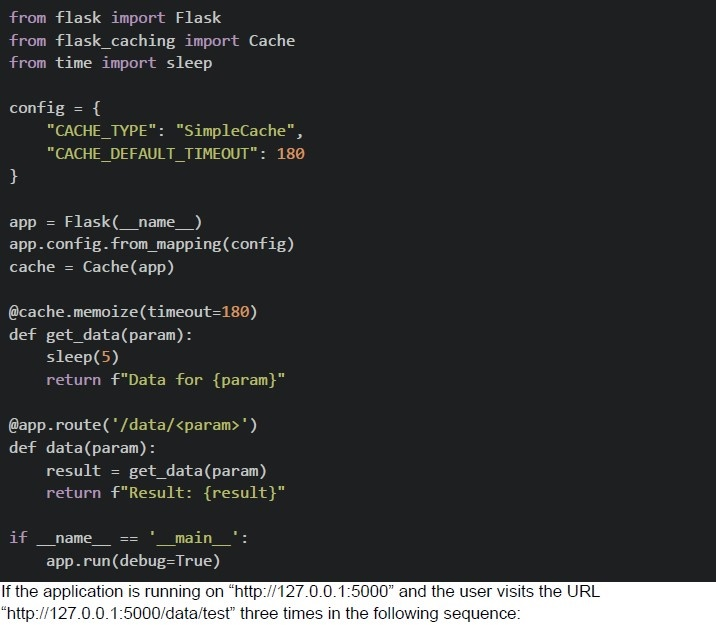 Consider the below flask application. 1. First visit 2. Second visit after 2 minutes and 30 seconds 3. Third visit after 1 minute from the second visit What will be the approximate difference in response times between the first and third requests?
Text of the picture (copyable)
```python
from flask import Flask
from flask_caching import Cache
from time import sleep

config = {
    "CACHE_TYPE": "SimpleCache",
    "CACHE_DEFAULT_TIMEOUT": 180
}

app = Flask(__name__)
app.config.from_mapping(config)
cache = Cache(app)

@cache.memoize(timeout=180)
def get_data(param):
    sleep(5)
    return f"Data for {param}"

@app.route('/data/<param>')
def data(param):
    result = get_data(param)
    return f"Result: {result}"

if __name__ == '__main__':
    app.run(debug=True)
```
If the application is running on "http://127.0.0.1:5000" and the user visits the URL "http://127.0.0.1:5000/data/test" three times in the following sequence:- 5 seconds
- 0 seconds
- 10 seconds
- 180 seconds
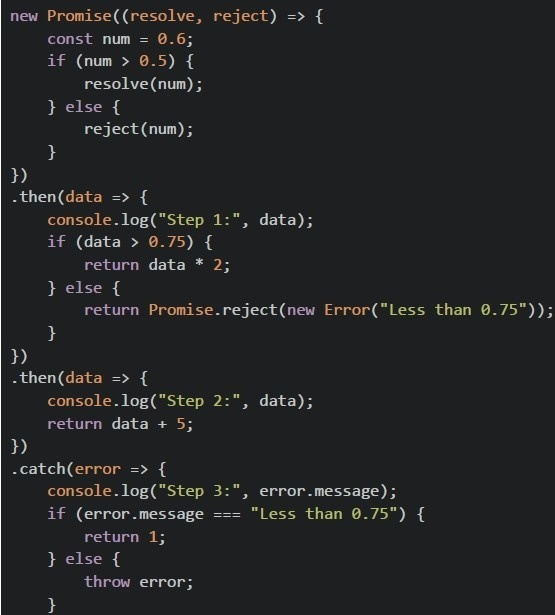 Consider the below JavaScript program.
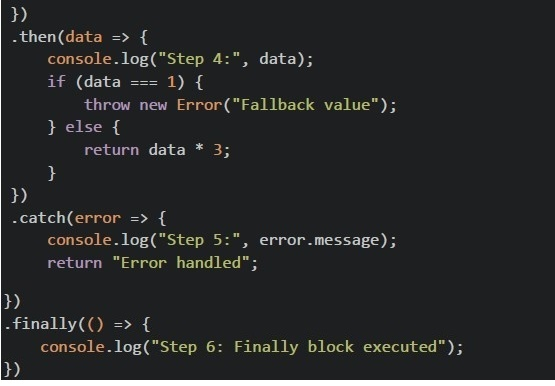 Consider the below JavaScript program. What will be the output of the above program?
Text of the picture (copyable)
```javascript
new Promise((resolve, reject) => {
  const num = 0.6;
  if (num > 0.5) {
    resolve(num);
  } else {
    reject(num);
  }
})
  .then(data => {
    console.log("Step 1:", data);
    if (data > 0.75) {
      return data * 2;
    } else {
      return Promise.reject(new Error("Less than 0.75"));
    }
  })
  .then(data => {
    console.log("Step 2:", data);
    return data + 5;
  })
  .catch(error => {
    console.log("Step 3:", error.message);
    if (error.message === "Less than 0.75") {
      return 1;
    } else {
      throw error;
    }
  });
```
```javascript
})
.then(data => {
    console.log("Step 4:", data);
    if (data === 1) {
        throw new Error("Fallback value");
    } else {
        return data * 3;
    }
})
.catch(error => {
    console.log("Step 5:", error.message);
    return "Error handled";
})
.finally(() => {
    console.log("Step 6: Finally block executed");
})
```- Step 1: 0.6Step 2: 1.2 Step 4: 6.2 Step 6: Finally block executed
- Step 1: 0.6Step 3: Less than 0.75 Step 4: 1 Step 5: Fallback value Step 6: Finally block executed
- Step 1: 0.6Step 2: 1.2 Step 3: Error Step 4: 1 Step 5: Fallback value Step 6: Finally block executed
- Step 1: 0.6Step 3: Less than 0.75 Step 4: 1 Step 6: Finally block executed
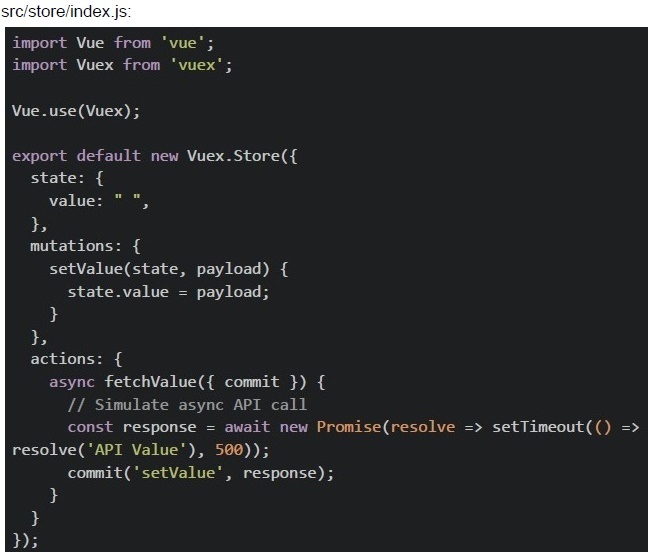 In a Vue CLI project with Vuex, you have the following configuration:
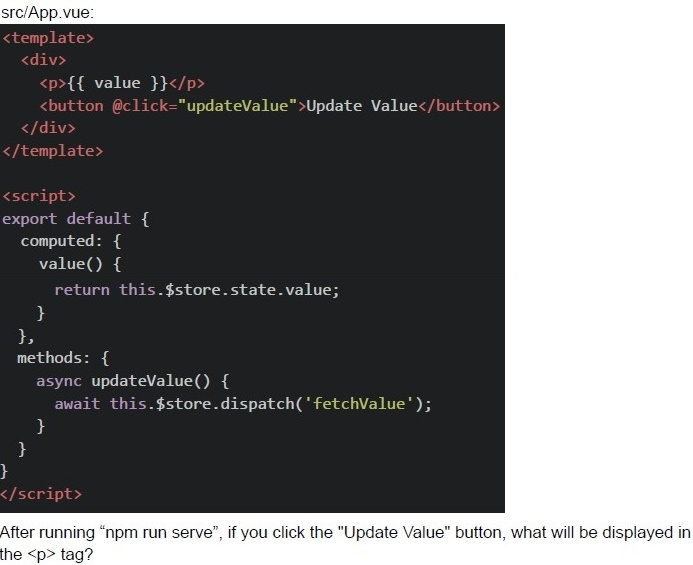 In a Vue CLI project with Vuex, you have the following configuration:
 Text of the picture (copyable)
src/store/index.js:
```javascript
import Vue from 'vue';
import Vuex from 'vuex';

Vue.use(Vuex);

export default new Vuex.Store({
  state: {
    value: "",
  },
  mutations: {
    setValue(state, payload) {
      state.value = payload;
    }
  },
  actions: {
    async fetchValue({ commit }) {
      // Simulate async API call
      const response = await new Promise(resolve => setTimeout(() =>
        resolve('API Value'), 500));
      commit('setValue', response);
    }
  }
});
```
src/App.vue:
```html
<template>
  <div>
    <p>{{ value }}</p>
    <button @click="updateValue">Update Value</button>
  </div>
</template>

<script>
export default {
  computed: {
    value() {
      return this.$store.state.value;
    },
  },
  methods: {
    async updateValue() {
      await this.$store.dispatch('fetchValue');
    },
  },
};
</script>
```
After running "npm run serve", if you click the "Update Value" button, what will be displayed in the `<p>` tag?
text
API Value

text
"" ""

text
undefined

text
null
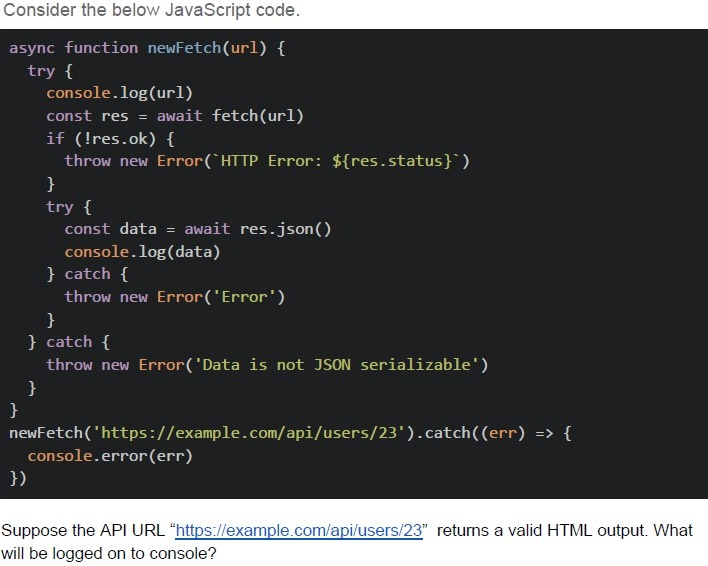
Text of the picture (copyable)
Consider the below JavaScript code.

```javascript
async function newFetch(url) {
  try {
    console.log(url)
    const res = await fetch(url)
    if (!res.ok) {
      throw new Error(`HTTP Error: ${res.status}`)
    }
    try {
      const data = await res.json()
      console.log(data)
    } catch {
      throw new Error('Error')
    }
  } catch {
    throw new Error('Data is not JSON serializable')
  }
}

newFetch('https://example.com/api/users/23').catch((err) => {
  console.error(err)
})
```

Suppose the API URL "https://example.com/api/users/23" returns a valid HTML output. What will be logged on to console?- “Network Error”
- “HTTP Error: 404”
- “Data is not JSON serializable”
- Data returned by the API
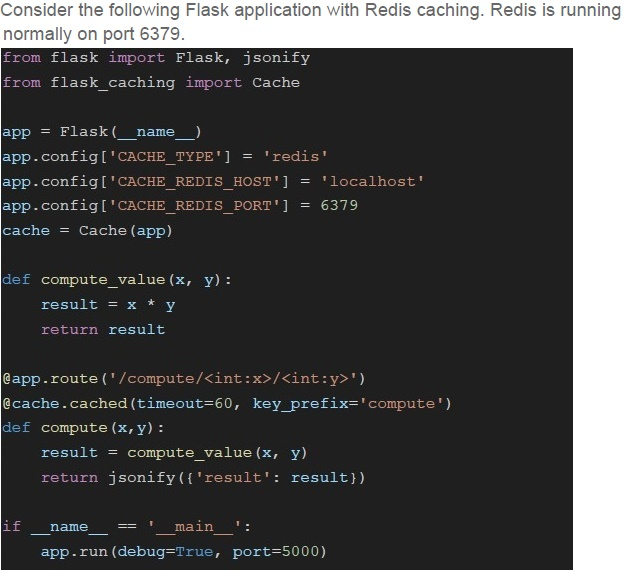
Text of the picture (copyable)
Consider the following Flask application with Redis caching. Redis is running
normally on port 6379.

```python
from flask import Flask, jsonify
from flask_caching import Cache

app = Flask(__name__)
app.config['CACHE_TYPE'] = 'redis'
app.config['CACHE_REDIS_HOST'] = 'localhost'
app.config['CACHE_REDIS_PORT'] = 6379
cache = Cache(app)

def compute_value(x, y):
    result = x * y
    return result

@app.route('/compute/<int:x>/<int:y>')
@cache.cached(timeout=60, key_prefix='compute')
def compute(x, y):
    result = compute_value(x, y)
    return jsonify({'result': result})

if __name__ == '__main__':
    app.run(debug=True, port=5000)
```- {“result” : 200} and {“result”: 50}
- {“result” : 50} and {“result”: 200}
- {“result”: 100} and {“result” : 100}
- {“result”: 200} and {“result”: 200}
 Options:
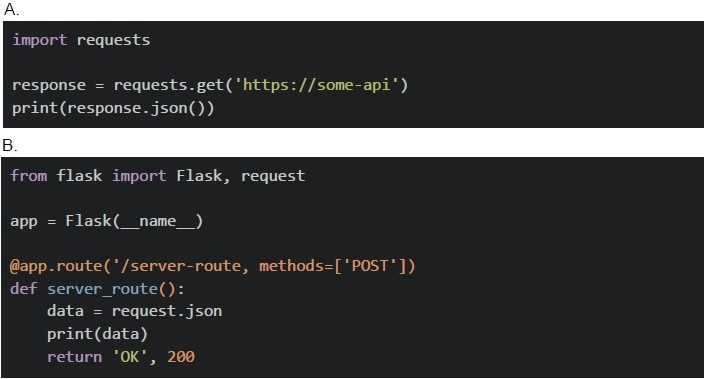 Options: Based on the above data, answer the given subquestions.
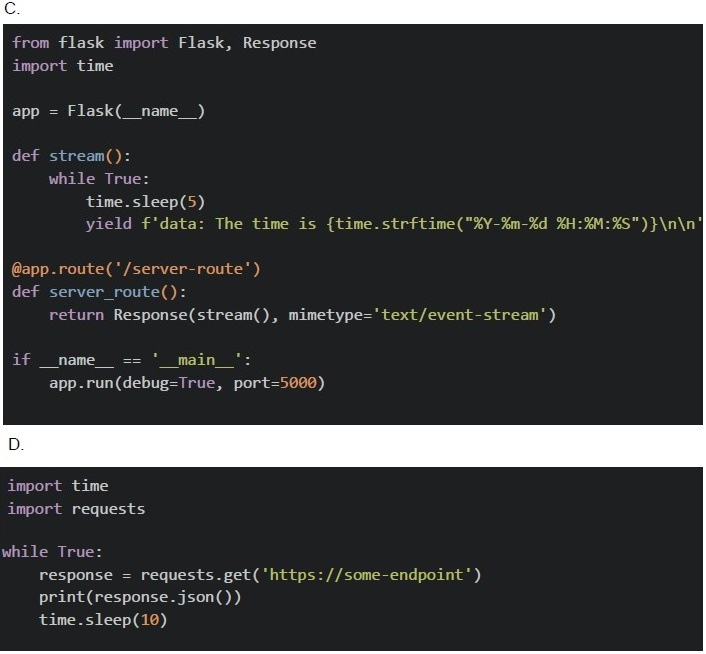
- A
- B
- C
- D
- A
- B
- C
- D
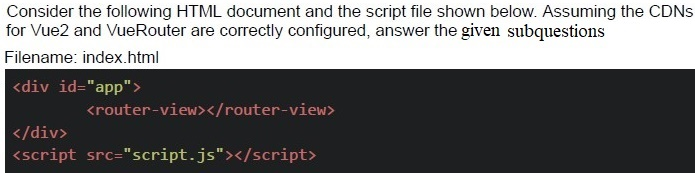
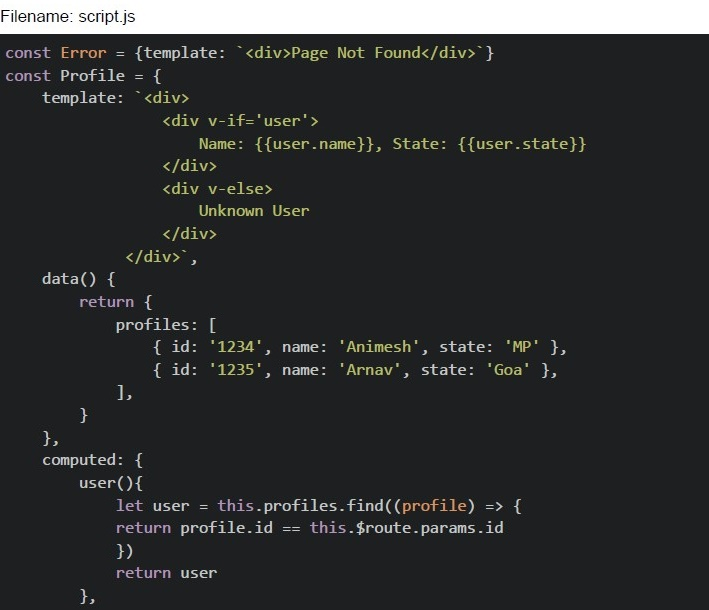
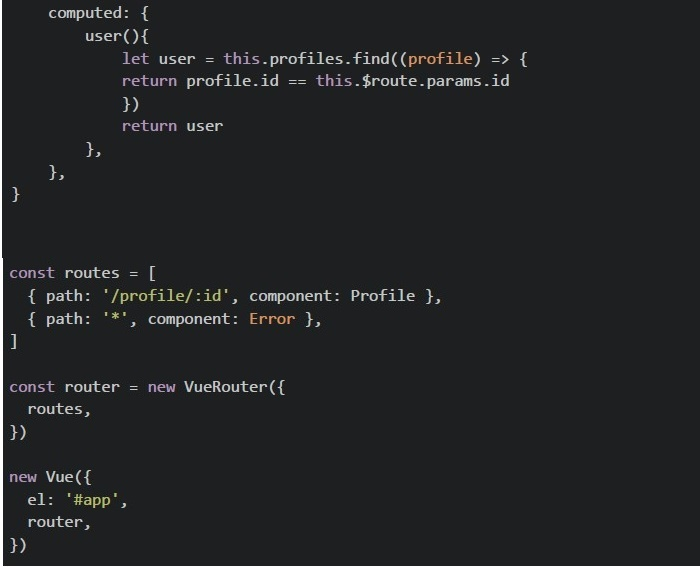
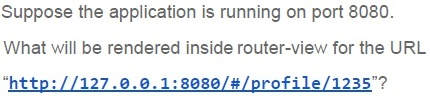
Text of the picture (copyable)
Suppose the application is running on port 8080.

What will be rendered inside router-view for the URL
"http://127.0.0.1:8080/#/profile/1235"?
- Page Not Found
- Unknown User
- Name: Animesh, State: MP
- Name: Arnav, State: Goa
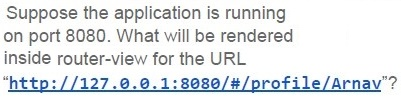
Text of the picture (copyable)
Suppose the application is running
on port 8080. What will be rendered
inside router-view for the URL
"http://127.0.0.1:8080/#/profile/Arnav"?
- Page Not Found
- Name: Animesh, State: MP
- Name: Arnav, State: Goa
- Unknown User
Answer key
- Q1 (MCQ, 2 marks): B
- Q2 (MCQ, 2 marks): D
- Q3 (MCQ, 2 marks): B
- Q4 (MCQ, 3 marks): B
- Q5 (MCQ, 3 marks): B
- Q6 (MCQ, 3 marks): B
- Q7 (MCQ, 3 marks): A
- Q8 (MCQ, 3 marks): A
- Q9 (MCQ, 3 marks): C
- Q10 (MCQ, 3 marks): C
- Q11 (MCQ, 3 marks): C
- Q12 (MCQ, 3 marks): D
- Q13 (MSQ, 3 marks): A, C
- Q14 (MSQ, 3 marks): A, C
- Q15 (MSQ, 3 marks): B, D
- Q16 (MSQ, 3 marks): A, C
- Q17 (MSQ, 3 marks): A, D
- Q18 (MSQ, 2 marks): A, D
- Q19 (MSQ, 2 marks): A, B
- Q20 (MSQ, 2 marks): B, D
- Q21 (MCQ, 4.5 marks): A
- Q22 (MCQ, 4.5 marks): D
- Q23 (MCQ, 4.5 marks): A
- Q24 (MCQ, 4.5 marks): B
- Q25 (MCQ, 4.5 marks): B
- Q26 (MCQ, 4.5 marks): A
- Q27 (MCQ, 4.5 marks): C
- Q28 (MCQ, 4.5 marks): D
- Q29 (MCQ, 3 marks): B
- Q30 (MCQ, 2 marks): C
- Q31 (MCQ, 3 marks): D
- Q32 (MCQ, 2 marks): D
Concepts this paper tests
Auto-generated summary from the source site. Handy as a checklist; the lessons above explain each idea from scratch.
Here’s a structured summary of core topics, concepts, and principles essential for the "Modern Application Development II" exam, along with a Mermaid knowledge graph to visualize relationships.
Core Topics & Key Concepts
1. Web Security
CSRF (Cross-Site Request Forgery)
- Objective: Validate that requests originate from authenticated users.
- Mechanism: CSRF tokens are embedded in forms/headers and validated server-side.
- Attack Example: Malicious link exploits an authenticated session (e.g., unauthorized bank transfer).
- Mitigation: Use tokens,
SameSitecookies, or double-submit cookies.
CORS (Cross-Origin Resource Sharing)
- Default Behavior: Browsers block fetch calls to origins differing from the parent page (scheme + domain + port).
Allowed Origins:
- Same origin (e.g.,
https://example.com→https://example.com/subdir). - Explicitly permitted via
Access-Control-Allow-Originheader.
- Same origin (e.g.,
- Preflight Requests:
OPTIONSrequest for non-simple methods (e.g.,PUT, custom headers).
Same-Origin Policy (SOP)
- Restricts scripts from one origin accessing resources from another.
- Exceptions: CORS headers, JSONP (legacy), or proxy servers.
2. State Management (Vuex)
Core Flow:
Dispatch Action → Commit Mutation → State Change → Reactivity- Actions: Handle async operations (e.g., API calls). Dispatch with
store.dispatch(). - Mutations: Synchronous state updates. Commit with
store.commit(). - State: Single source of truth. Access via
store.state. - Getters: Computed properties for derived state.
- Actions: Handle async operations (e.g., API calls). Dispatch with
Async Workflow Example:
actions: {
  async fetchData({ commit }) {
    const response = await api.call();
    commit('SET_DATA', response); // Mutation updates state
  }
}
3. Asynchronous Patterns
Job Queues (Scalability)
Order for Async Tasks:
Queue Job → Process Job → Save Result → Callback/Notification- Tools: Celery (Python), Bull (Node.js), Redis/RabbitMQ as brokers.
- Polling vs. Webhooks vs. SSE | Technique | Use Case | Pros | Cons | |----------------------|---------------------------------------|------------------------------------|------------------------------------| | Short Polling | Periodic status checks (e.g., task completion) | Simple to implement | Inefficient (high latency) | | Long Polling | Near-real-time updates (e.g., chat) | Lower latency than short polling | Server resource-intensive | | Webhooks | Event-driven notifications (e.g., GitHub pushes) | Real-time, efficient | Requires public endpoint | | Server-Sent Events (SSE) | Server→client updates (e.g., live scores) | Low latency, HTTP-based | Unidirectional (server→client) | | WebSockets | Bidirectional real-time (e.g., gaming) | Full-duplex communication | Complex setup, stateful |
Celery Use Cases:
- Background tasks (e.g., sending emails, data processing).
- Scheduled tasks (e.g., cron jobs).
4. JavaScript Core Concepts
Closures
- Inner functions retain access to outer scope variables.
Example:
function outer() {
  let x = 10;
  return function inner() { console.log(x); }; // Logs 10
}
Hoisting
- Function Declarations: Hoisted with definitions.
var: Hoisted withundefined; initialization stays in place.let/const: Hoisted but uninitialized (Temporal Dead Zone).
thisBinding- Regular Functions:
thisdepends on call context. - Arrow Functions: Lexical
this(inherits from parent scope). Example:
const obj = {
  val: 42,
  regular: function() { return this.val; }, // 42
  arrow: () => this.val // undefined (global/window)
};
- Regular Functions:
Event Loop & Timers
setTimeout/setIntervaldelays are minimum guarantees (not exact).Example:
for (var i = 0; i < 3; i++) { setTimeout(() => console.log(i), 1000); // Logs 3, 3, 3 (closure over `i`) }- Fix: Use
letor IIFE to captureiper iteration.
Promises & Async/Await
- Promise States: Pending → Fulfilled/Rejected.
- Chaining:
.then()for success,.catch()for errors. Async/Await: Syntactic sugar for promises.
async function fetchData() {
  try {
    const data = await api.call();
    console.log(data);
  } catch (err) {
    console.error(err);
  }
}
5. Caching
- Client-Side Storage | API | Scope | Persistence | Size Limit | |-------------------|-----------------|------------------------|----------------| |
localStorage| Per-origin | Persists across sessions | ~5MB | |sessionStorage| Per-tab | Cleared on tab close | ~5MB | |IndexedDB| Per-origin | Persists | ~50MB+ |
Server-Side Caching
Redis: In-memory key-value store (supports strings, lists, sets, hashes).
- Use cases: Caching, session storage, rate limiting.
Flask-Caching:
- Decorators:
@cache.cached(timeout=60)(caches response). - Backends: SimpleMemory, Redis, Memcached.
Example:
@app.route('/data')
@cache.cached(timeout=50, key_prefix='data')
def get_data():
    return expensive_computation()
- Decorators:
- HTTP Caching Headers | Header | Purpose | |------------------|------------------------------------------| |
Cache-Control| Directives (e.g.,max-age=3600,no-store) | |Expires| Absolute expiry time (legacy) | |ETag| Version identifier for validation |
6. Frontend Frameworks (Vue.js)
Reactivity
v-model: Two-way binding (e.g.,<input v-model="msg">).v-for: Render lists (:keyrequired for efficiency).- Computed Properties: Cached derived data.
Vuex Binding in Templates
Dynamic class binding:
<div :class="['errorClass', isActive ? 'activeClass' : '']"></div>
Vue Router
- Dynamic segments (e.g.,
/profile/:id). Example:
const routes = [
  { path: '/profile/:id', component: Profile },
  { path: '*', component: NotFound }
];
- Dynamic segments (e.g.,
7. APIs & Real-Time Communication
- REST vs. Webhooks vs. SSE vs. WebSockets | Feature | REST | Webhooks | SSE | WebSockets | |-------------------|----------------|----------------|-----------------|----------------| | Direction | Client→Server | Server→Client | Server→Client | Bidirectional | | Protocol | HTTP | HTTP (POST) | HTTP (Streaming)| WS/WSS | | Real-Time | No (Polling) | Yes | Yes | Yes | | Use Case | CRUD ops | Event alerts | Live updates | Chat/Gaming |
Pub/Sub Model
- Redis Pub/Sub: Publish to channels, subscribers receive messages.
Example:
# Publisher
redis.publish("channel", "message")
# Subscriber pubsub = redis.pubsub() pubsub.subscribe("channel") for message in pubsub.listen(): print(message) ```
8. Error Handling
Promise Error Propagation
- Uncaught errors in
.then()propagate to.catch(). Example:
fetch(url)
  .then(res => res.json())
  .catch(err => console.error("Failed:", err));
- Uncaught errors in
Async/Await Errors
Use
try/catch:async function loadData() { try { const data = await fetchData(); } catch (err) { console.error(err); } }
Key Equations/Code Snippets
- Vuex State Update Flow: ``
plaintext Dispatch Action → Commit Mutation → State Change``
- Asynchronous Job Queue: ``
plaintext Queue Job → Process Job → Save Result → Invoke Callback``
- Closure in Loops (Fixed): ``
javascript for (let i = 0; i < 3; i++) { setTimeout(() => console.log(i), 1000); // Logs 0, 1, 2 }``
- Redis Caching in Flask: ``
python @app.route('/data') @cache.cached(timeout=60, key_prefix='data') def get_data(): return expensive_computation()``
- CSRF Token Validation (Flask-WTF): ``
python from flask_wtf.csrf import CSRFProtect app = Flask(__name__) CSRFProtect(app)``
- SSE Implementation (Flask): ``
python @app.route('/stream') def stream(): def generate(): while True: yield f"data: {datetime.now()}\n\n" time.sleep(1) return Response(generate(), mimetype='text/event-stream')``
- Webhook Receiver (Flask): ``
python @app.route('/webhook', methods=['POST']) def webhook(): data = request.json print("Received:", data) return 'OK', 200``
Graph 2: State Management & Asynchronous Patterns
Graph 3: Caching & Performance
Graph 4: JavaScript Core Concepts
Exam Tips
- CSRF: Focus on token validation and SameSite cookies.
- CORS: Remember same-origin policy and preflight requests.
- Vuex: Master the action → mutation → state flow.
- Asynchronous JS: Understand closures in loops and promise chaining.
- Caching: Know HTTP headers (
Cache-Control,ETag) and Redis basics. - Real-Time: Differentiate Webhooks (server→server) vs SSE (server→client).
- Error Handling: Practice try/catch in async/await and
.catch()in promises.