Home / Past papers / MAD2 Quiz 1 / this paper
IIT M DIPLOMA AN3 EXAM QPD3 29 Oct 2023 - 29 Oct 2023
Elapsed 00:00
Which of the following statements is true regarding, var, let & const?
- A variable created using “var” is always added as a property to the global object.
- A variable created using “let” is never added as a property to the global object.
- A variable created using “const” is not hoisted.
- All of these
Which of the following is not a valid IIFE (Immediately Invoked Function Expression)?
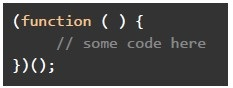
text
```javascript
(function () {
    // some code here
})();
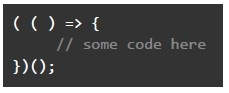
```
text
```
(() => {
  // some code here
})();
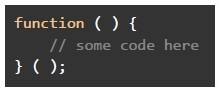
```
text
```javascript
function () {
  // some code here
}()
;
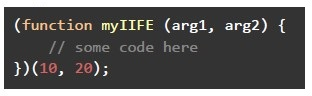
```
text
```javascript
(function myIIFE (arg1, arg2) {
    // some code here
})(10, 20);
```
Which of the following is not an example of application or UI (ephemeral) state?
- User Preferences & Recommendations
- Loading Icons
- Dashboard Displays
- User Database of NPTEL
Which of the following statements are correct regarding a variable declared using var keyword?
- Variable is always globally scoped.
- Variable declared inside the function can be accessed outside the function.
- Variable declared inside a function can only be accessed inside the function.
- None of these
Which of the following is/are correct definition(s) of an arrow function that accepts 2 numbers and return the addition of their squares?
- let func = (num1, num2) => return num1*num1 + num2*num2;
- let func = (num1, num2) => num1*num1 + num2*num2;
- let func = (num1, num2) => { return num1*num1 + num2*num2; }
- let func = (num1, num2) => { num1*num1 + num2*num2; }
Which of the following statement(s) is/are true regarding event loop in javascript?
- The event loop makes sure that each function is processed (or executed)completely before any other function is executed.
- The event loop takes the function from the callback queue, and sends thefunction to the call stack for execution.
- The event loop can stop any function in running state to allow some otherfunction to run on priority.
- All of these
Which of the following shows the correct output for the below javascript program?
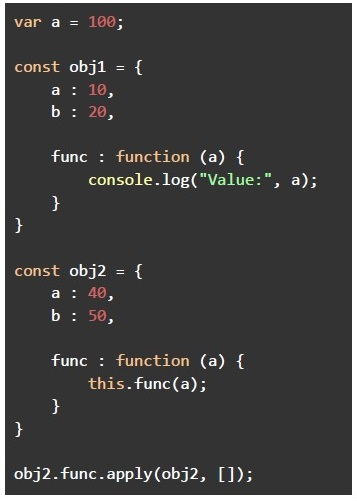 Which of the following shows the correct output for the below javascript program?
Which of the following shows the correct output for the below javascript program? Text of the picture (copyable)
```javascript
var a = 100;

const obj1 = {
    a : 10,
    b : 20,

    func : function (a) {
        console.log("Value:", a);
    }
}

const obj2 = {
    a : 40,
    b : 50,

    func : function (a) {
        this.func(a);
    }
}

obj2.func.apply(obj2, []);
```- Value: 100
- The program will crash due to repeated function calls
- Value: 40
- Value: 10
Consider the following JavaScript program.
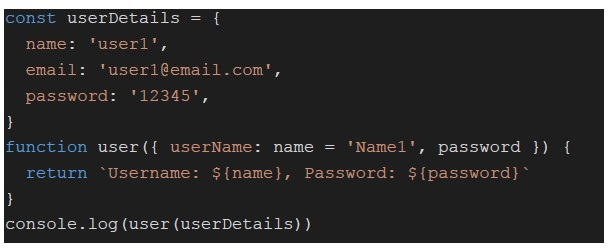 Consider the following JavaScript program. What will be logged on to the console?
Consider the following JavaScript program. What will be logged on to the console?Text of the picture (copyable)
```javascript
const userDetails = {
  name: 'user1',
  email: 'user1@email.com',
  password: '12345',
}

function user({ userName: name = 'Name1', password }) {
  return `Username: ${name}, Password: ${password}`
}
console.log(user(userDetails))
```- Username: Name1, Password: 12345
- Username: user1, Password: 12345
- Username: Name1, Password: undefined
- Username: user1, Password: undefined
Consider the following JavaScript code.
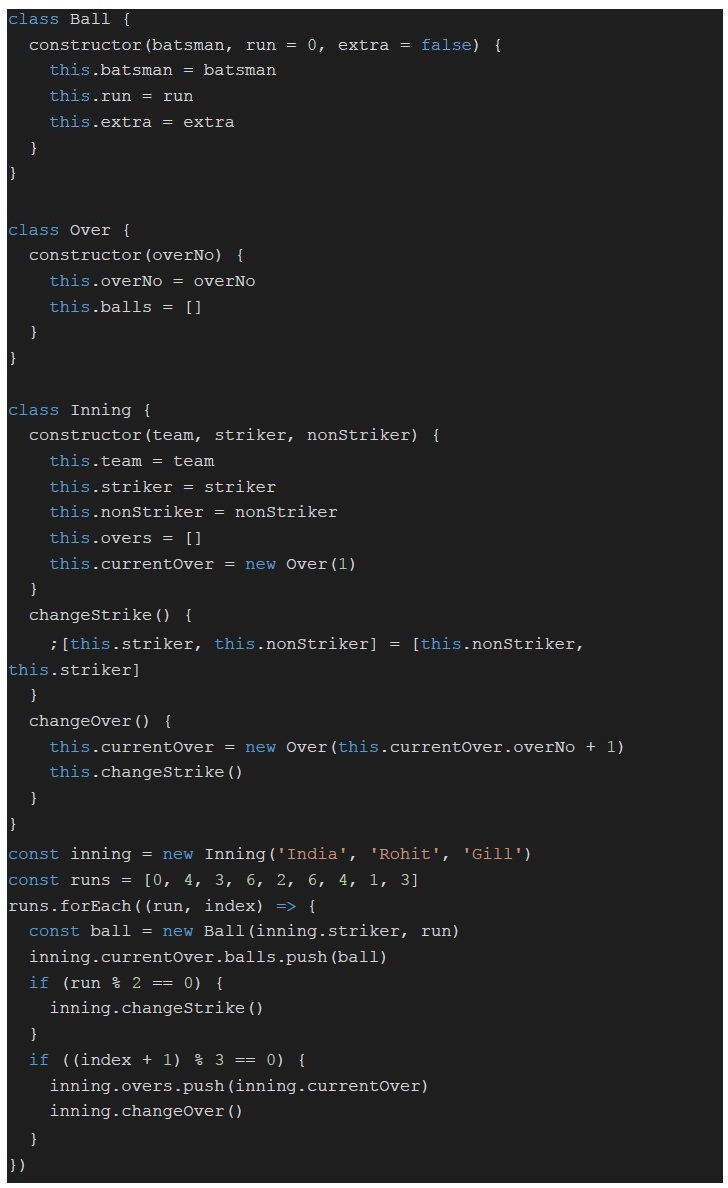 Consider the following JavaScript code. What will be logged on to the console for the statement "console.log(inning.overs[0].balls[2].batsman)"?
Consider the following JavaScript code. What will be logged on to the console for the statement "console.log(inning.overs[0].balls[2].batsman)"?Text of the picture (copyable)
```javascript
class Ball {
  constructor(batsman, run = 0, extra = false) {
    this.batsman = batsman
    this.run = run
    this.extra = extra
  }
}

class Over {
  constructor(overNo) {
    this.overNo = overNo
    this.balls = []
  }
}

class Inning {
  constructor(team, striker, nonStriker) {
    this.team = team
    this.striker = striker
    this.nonStriker = nonStriker
    this.overs = []
    this.currentOver = new Over(1)
  }

  changeStrike() {
    ;[this.striker, this.nonStriker] = [this.nonStriker, this.striker]
  }

  changeOver() {
    this.currentOver = new Over(this.currentOver.overNo + 1)
    this.changeStrike()
  }
}

const inning = new Inning('India', 'Rohit', 'Gill')
const runs = [0, 4, 3, 6, 2, 6, 4, 1, 3]
runs.forEach((run, index) => {
  const ball = new Ball(inning.striker, run)
  inning.currentOver.balls.push(ball)
  if (run % 2 == 0) {
    inning.changeStrike()
  }
  if ((index + 1) % 3 == 0) {
    inning.overs.push(inning.currentOver)
    inning.changeOver()
  }
})
```- Rohit
- Gill
- Virat
- None of these
Consider the following JavaScript code.
Consider the following JavaScript code. What will be logged on to the console for the statement "console.log(inning.currentOver.overNo)"?
Consider the following JavaScript code. What will be logged on to the console for the statement "console.log(inning.currentOver.overNo)"?Text of the picture (copyable)
```javascript
class Ball {
  constructor(batsman, run = 0, extra = false) {
    this.batsman = batsman
    this.run = run
    this.extra = extra
  }
}

class Over {
  constructor(overNo) {
    this.overNo = overNo
    this.balls = []
  }
}

class Inning {
  constructor(team, striker, nonStriker) {
    this.team = team
    this.striker = striker
    this.nonStriker = nonStriker
    this.overs = []
    this.currentOver = new Over(1)
  }

  changeStrike() {
    ;[this.striker, this.nonStriker] = [this.nonStriker, this.striker]
  }

  changeOver() {
    this.currentOver = new Over(this.currentOver.overNo + 1)
    this.changeStrike()
  }
}

const inning = new Inning('India', 'Rohit', 'Gill')
const runs = [0, 4, 3, 6, 2, 6, 4, 1, 3]
runs.forEach((run, index) => {
  const ball = new Ball(inning.striker, run)
  inning.currentOver.balls.push(ball)
  if (run % 2 == 0) {
    inning.changeStrike()
  }
  if ((index + 1) % 3 == 0) {
    inning.overs.push(inning.currentOver)
    inning.changeOver()
  }
})
```- 1
- 2
- 3
- 4
Which of the following is not a correct way to destructure (or unpack) an array?
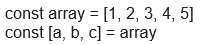
text
```javascript
const array = [1, 2, 3, 4, 5]
const [a, b, c] = array
```
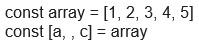
text
```javascript
const array = [1, 2, 3, 4, 5]
const [a, , c] = array
```

text
```javascript
const array = [1, 2, 3, 4, 5]
const [a, ...remaining, c] = array
```

text
```javascript
const array = [1, 2, 3, 4, 5]
const [a, b, ...remaining] = array
```
Consider the following Vue application with markup index.html and javascript file app.js.
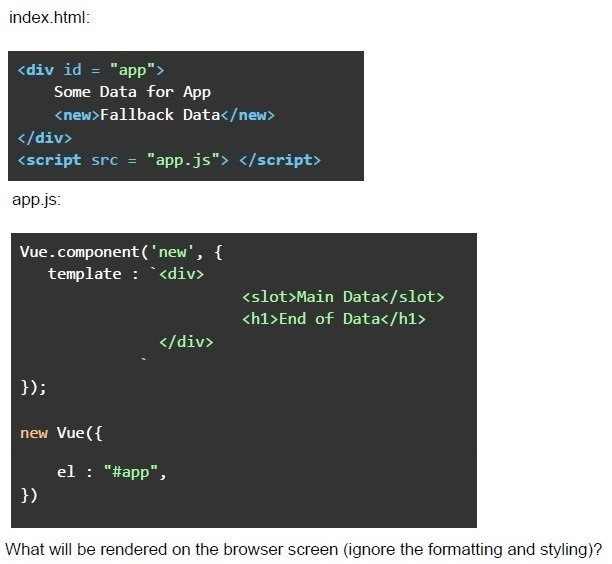 Consider the following Vue application with markup index.html and javascript file app.js.
Consider the following Vue application with markup index.html and javascript file app.js. Text of the picture (copyable)
index.html:

```html
<div id = "app">
    Some Data for App
    <new>Fallback Data</new>
</div>
<script src = "app.js"> </script>
```

app.js:

```javascript
Vue.component('new', {
    template : `<div>
        <slot>Main Data</slot>
        <h1>End of Data</h1>
    </div>`
});

new Vue({
    el : "#app",
})
```

What will be rendered on the browser screen (ignore the formatting and styling)?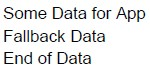
text
Some Data for App
Fallback Data
End of Data
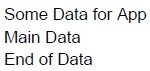
text
Some Data for App
Main Data
End of Data
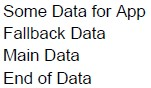
text
Some Data for App
Fallback Data
Main Data
End of Data
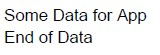
text
Some Data for App
End of Data

text
A warning will be issue for using an undefined tag, i.e., new
Consider the following JavaScript code.
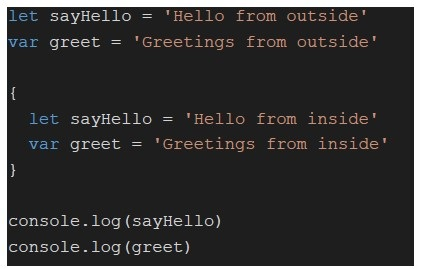 Consider the following JavaScript code. What will be logged on the console?
Consider the following JavaScript code. What will be logged on the console?Text of the picture (copyable)
```javascript
let sayHello = 'Hello from outside'
var greet = 'Greetings from outside'

{
    let sayHello = 'Hello from inside'
    var greet = 'Greetings from inside'
}

console.log(sayHello)
console.log(greet)
```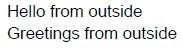
text
Hello from outside
Greetings from outside

text
Hello from inside
Greetings from inside

text
Hello from outside
Greetings from inside
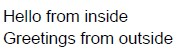
text
Hello from inside
Greetings from outside
Consider the following JavaScript code.
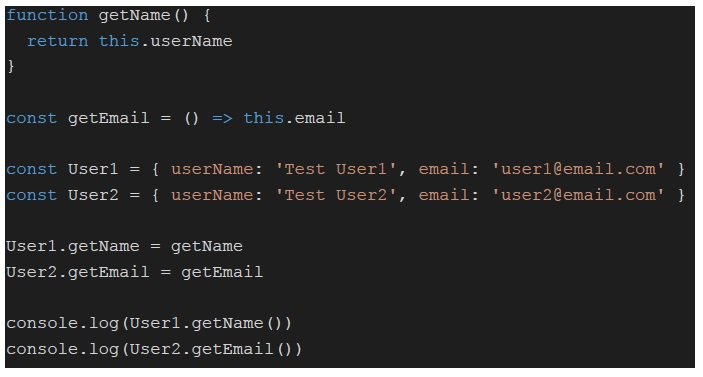 Consider the following JavaScript code. What will be logged on to the console?
Consider the following JavaScript code. What will be logged on to the console?Text of the picture (copyable)
```javascript
function getName () {
  return this.userName
}

const getEmail = () => this.email

const User1 = { userName: 'Test User1', email: 'user1@email.com' }
const User2 = { userName: 'Test User2', email: 'user2@email.com' }

User1.getName = getName
User2.getEmail = getEmail

console.log(User1.getName())
console.log(User2.getEmail())
```
text
Test User1
Undefined
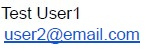
text
Test User1
user2@email.com

text
Test User1
Test User2
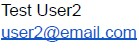
text
Test User2
user2@email.com
Consider the following Vue application with markup index.html and JavaScript app.js
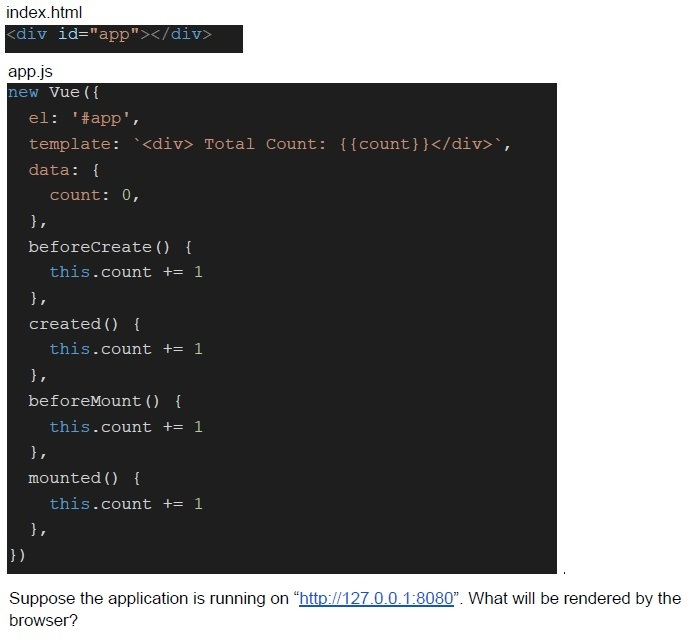 Consider the following Vue application with markup index.html and JavaScript app.js
Consider the following Vue application with markup index.html and JavaScript app.js Text of the picture (copyable)
index.html
```html
<div id="app"></div>
```
app.js
```javascript
new Vue({
  el: '#app',
  template: `<div> Total Count: {{count}}</div>`,
  data: {
    count: 0,
  },
  beforeCreate() {
    this.count += 1
  },
  created() {
    this.count += 1
  },
  beforeMount() {
    this.count += 1
  },
  mounted() {
    this.count += 1
  },
})
```
Suppose the application is running on “http://127.0.0.1:8080”. What will be rendered by the browser?- Total Count: 2
- Total Count: 3
- Total Count: 4
- Total Count: 5
Consider the following Vue application with markup index.html and JavaScript app.js
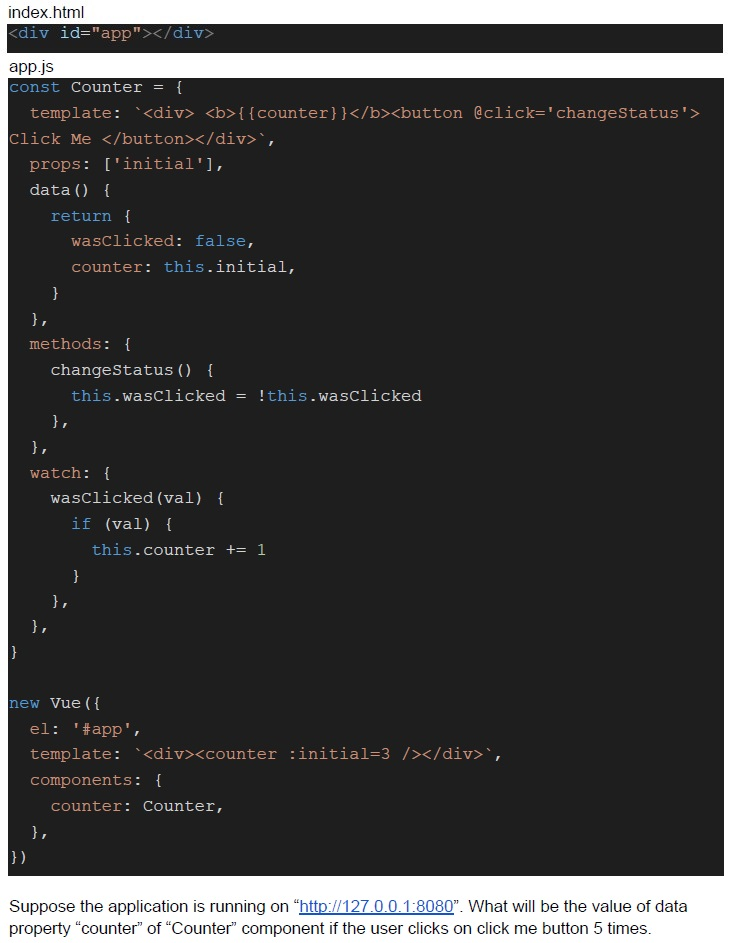 Consider the following Vue application with markup index.html and JavaScript app.js
Consider the following Vue application with markup index.html and JavaScript app.js Text of the picture (copyable)
index.html
```html
<div id="app"></div>
```

app.js
```javascript
const Counter = {
  template: `<div><b>{{counter}}</b><button @click='changeStatus'>
Click Me </button></div>`,
  props: ['initial'],
  data() {
    return {
      wasClicked: false,
      counter: this.initial,
    }
  },
  methods: {
    changeStatus() {
      this.wasClicked = !this.wasClicked
    },
  },
  watch: {
    wasClicked(val) {
      if (val) {
        this.counter += 1
      }
    },
  }
}

new Vue({
  el: '#app',
  template: `<div><counter :initial=3 /></div >`,
  components: {
    counter: Counter,
  },
})
```

Suppose the application is running on "http://127.0.0.1:8080". What will be the value of data property "counter" of "Counter" component if the user clicks on click me button 5 times.- 0
- 5
- 6
- 8
Answer key
- Q1 (MCQ, 2 marks): B
- Q2 (MCQ, 2 marks): C
- Q3 (MCQ, 2 marks): D
- Q4 (MCQ, 2 marks): C
- Q5 (MSQ, 3 marks): B, C
- Q6 (MSQ, 3 marks): A, B
- Q7 (MCQ, 4.5 marks): B
- Q8 (MCQ, 4.5 marks): A
- Q9 (MCQ, 4.5 marks): A
- Q10 (MCQ, 4.5 marks): D
- Q11 (MCQ, 3 marks): C
- Q12 (MCQ, 3 marks): A
- Q13 (MCQ, 3 marks): C
- Q14 (MCQ, 3 marks): A
- Q15 (MCQ, 3 marks): B
- Q16 (MCQ, 3 marks): C
Concepts this paper tests
Auto-generated summary from the source site. Handy as a checklist; the lessons above explain each idea from scratch.
Summary of Core Topics and Concepts
JavaScript Fundamentals
Variable Declarations
var,let, andconst- Scoping rules and hoisting
- Global object properties
Functions
- Immediately Invoked Function Expressions (IIFE)
- Arrow functions
- Function hoisting and execution context
Event Loop
- Call stack and callback queue
- Execution order of functions
Object-Oriented Programming
- Classes and objects
- Constructors and methods
thiskeyword and its binding
Destructuring
- Array and object destructuring
- Default values and rest patterns
Vue.js Fundamentals
Component Lifecycle
- Lifecycle hooks:
beforeCreate,created,beforeMount,mounted - Data initialization and reactivity
- Lifecycle hooks:
Components and Props
- Component registration and usage
- Props and data properties
- Watchers and methods
Templates and Slots
- Template syntax
- Slot usage and fallback content
Core Equations and Concepts
JavaScript
Variable Declarations
var: Function-scoped, hoisted, can be redeclaredlet: Block-scoped, hoisted but not initialized, cannot be redeclaredconst: Block-scoped, hoisted but not initialized, cannot be reassigned
Arrow Functions
- Syntax:
(params) => expression - No binding of
this,arguments,super, ornew.target
- Syntax:
Event Loop
- Call stack: LIFO structure for function execution
- Callback queue: FIFO structure for asynchronous callbacks
- Event loop: Moves callbacks from the queue to the stack when the stack is empty
Destructuring
- Array destructuring:
const [a, b, ...rest] = array; - Object destructuring:
const { name, age } = object;
- Array destructuring:
Vue.js
Lifecycle Hooks
beforeCreate: Called before the instance is initializedcreated: Called after the instance is createdbeforeMount: Called before the template is renderedmounted: Called after the template is rendered
Component Communication
- Props: Pass data from parent to child
- Events: Emit events from child to parent
- Slots: Distribute content from parent to child
JavaScript Fundamentals
Vue.js Fundamentals
These graphs provide a visual representation of the relationships between the core topics in JavaScript and Vue.js, helping to understand the structure and flow of concepts.