Home / Past papers / MAD2 End Term / this paper
IIT M DIPLOMA FN1 EXAM ETD1 11 Dec 2022 - 11 Dec 2022
Text of the picture (copyable)
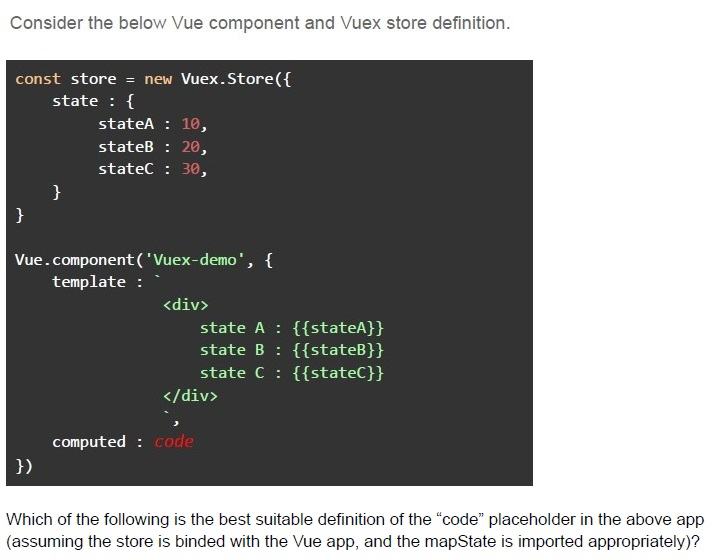
Consider the below Vue component and Vuex store definition.

```javascript
const store = new Vuex.Store({
  state: {
    stateA: 10,
    stateB: 20,
    stateC: 30,
  }
})

Vue.component('Vuex-demo', {
  template: `
    <div>
      state A : {{stateA}}
      state B : {{stateB}}
      state C : {{stateC}}
    </div>
  `,
  computed: code
})
```

Which of the following is the best suitable definition of the "code" placeholder in the above app (assuming the store is binded with the Vue app, and the mapState is imported appropriately)?- …mapState(['state_1', 'state_2', 'state_3'])
- mapState(['state_1', 'state_2', 'state_3'])
- Both …mapState(['state_1', 'state_2', 'state_3']) and mapState(['state_1','state_2', 'state_3'])
- A Vue component cannot access Vuex store state.
- I, III, II
- III, I, II
- I, II, III
- The polling will be a better design.
- The CSRF protection is enforced by the flask framework, by default.
- The data stored in local storage is synchronized across the devices for a givenuser.
- A flask application returns CORS headers for cross domain javascript requests,by default.
- None of these
- Local Storage
- Session Storage
- Cookie
- Any of these can be used

Text of the picture (copyable)
Suppose an application is being loaded from the origin http://origin1.com. Which of the following origins the browser will allow while making a fetch call, by default?

text
http://origin2.com

text
http://api.origin2.com

text
http://origin1.com/api/
text
All of these
- They get deleted once the user closes the browser’s window.
- They will be sent to the origin server with each request, by default.
- They will not be sent to the origin server with each request, by default.
- All of these.

Text of the picture (copyable)
Which of the following shows the correct output, if the below program is executed?

```javascript
for (var i=1; i<4; i+=2)
    setTimeout(() => console.log(i), 0)
```- 13
- 123
- 55
- 555
Text of the picture (copyable)
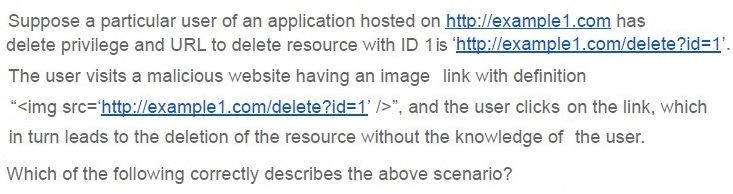
Suppose a particular user of an application hosted on http://example1.com has
delete privilege and URL to delete resource with ID 1 is 'http://example1.com/delete?id=1'.
The user visits a malicious website having an image link with definition
```html
"<img src='http://example1.com/delete?id=1' />",
```
and the user clicks on the link, which
in turn leads to the deletion of the resource without the knowledge of the user.

Which of the following correctly describes the above scenario?
- Cross Site Scripting
- Cross Site Request Forgery
- Session Hijacking
- None of these
Text of the picture (copyable)
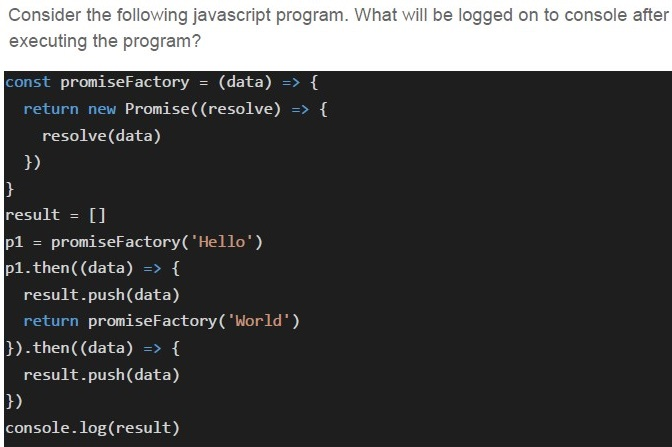
Consider the following javascript program. What will be logged on to console after executing the program?

```javascript
const promiseFactory = (data) => {
  return new Promise(((resolve) => {
    resolve(data)
  }))
}

result = []
p1 = promiseFactory('Hello')
p1.then((data) => {
  result.push(data)
  return promiseFactory('World')
}).then((data) => {
  result.push(data)
})

console.log(result)
```- []
- [‘Hello’, ‘World’]
- [‘World’, ‘Hello’]
- [‘Hello’]
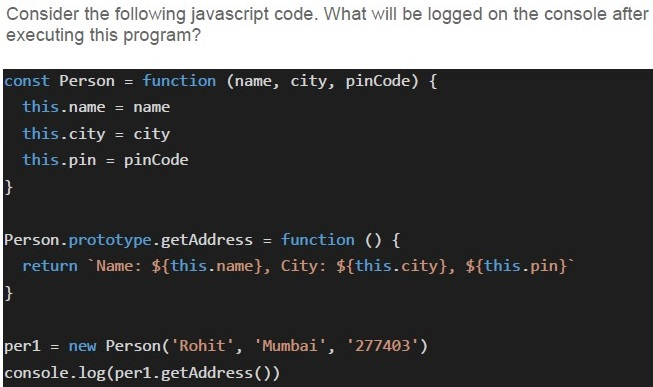
Text of the picture (copyable)
Consider the following javascript code. What will be logged on the console after executing this program?

```javascript
const Person = function (name, city, pinCode) {
  this.name = name
  this.city = city
  this.pin = pinCode
}

Person.prototype.getAddress = function () {
  return `Name: ${this.name}, City: ${this.city}, ${this.pin}`
}

per1 = new Person('Rohit', 'Mumbai', '277403')
console.log(per1.getAddress())
```- Name: , City: , Pin:
- Name: Rohit, City: Mumbai, Pin: 277403
- Name: Rohit, City: Mumbai, 277403
- None of these
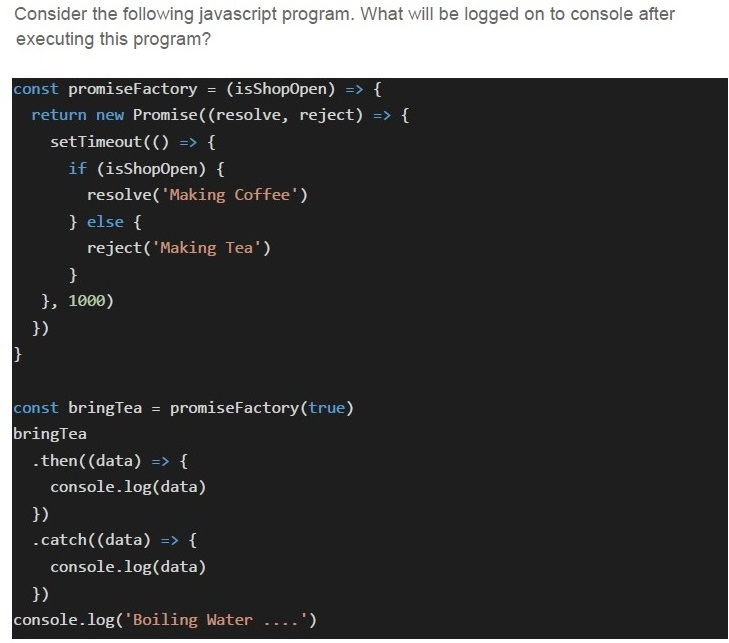
Text of the picture (copyable)
Consider the following javascript program. What will be logged on to console after executing this program?

```javascript
const promiseFactory = (isShopOpen) => {
  return new Promise((resolve, reject) => {
    setTimeout(() => {
      if (isShopOpen) {
        resolve('Making Coffee')
      } else {
        reject('Making Tea')
      }
    }, 1000)
  })
}

const bringTea = promiseFactory(true)
bringTea
  .then((data) => {
    console.log(data)
  })
  .catch((data) => {
    console.log(data)
  })
console.log('Boiling Water ....')
```- Boiling Water ….
- Boiling Water ….Making Coffee
- Boiling Water ….Making Tea
- Making CoffeeBoiling Water ….
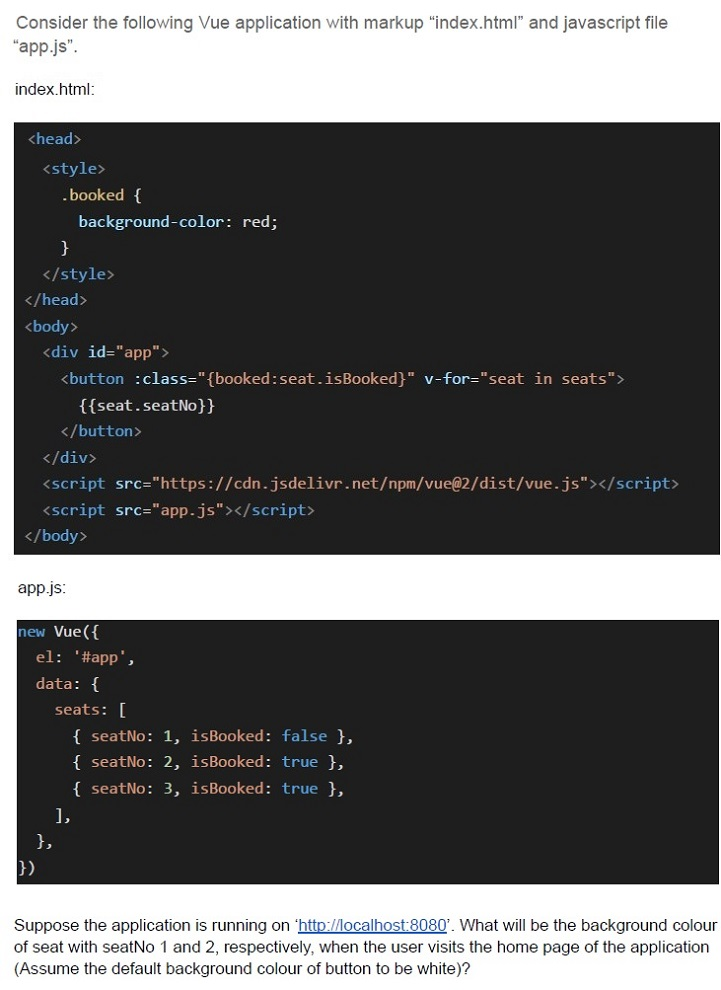
Text of the picture (copyable)
Consider the following Vue application with markup "index.html" and javascript file "app.js".

index.html:

```html
<head>
  <style>
    .booked {
      background-color: red;
    }
  </style>
</head>
<body>
  <div id="app">
    <button :class="{booked:seat.isBooked}" v-for="seat in seats">
      {{seat.seatNo}}
    </button>
  </div>
  <script src="https://cdn.jsdelivr.net/npm/vue@2/dist/vue.js"></script>
  <script src="app.js"></script>
</body>
```

app.js:

```javascript
new Vue({
  el: '#app',
  data: {
    seats: [
      { seatNo: 1, isBooked: false },
      { seatNo: 2, isBooked: true },
      { seatNo: 3, isBooked: true },
    ],
  },
})
```

Suppose the application is running on 'http://localhost:8080'. What will be the background colour of seat with seatNo 1 and 2, respectively, when the user visits the home page of the application (Assume the default background colour of button to be white)?- Red, Red
- Red, White
- White, White
- White, Red
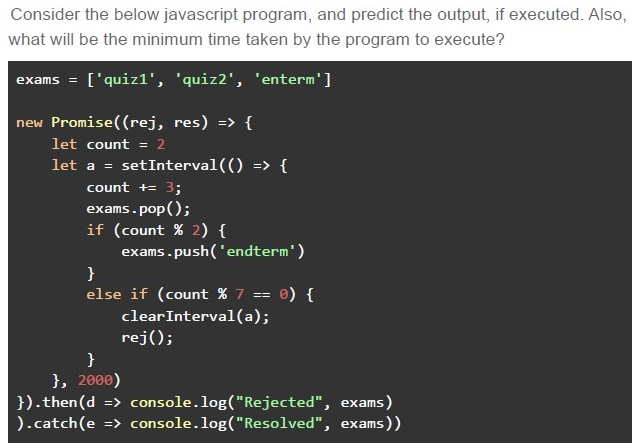
Text of the picture (copyable)
Consider the below javascript program, and predict the output, if executed. Also, what will be the minimum time taken by the program to execute?

```javascript
exams = ['quiz1', 'quiz2', 'enterm']

new Promise((rej, res) => {
    let count = 2
    let a = setInterval(() => {
        count += 3;
        exams.pop();
        if (count % 2) {
            exams.push('endterm')
        }
        else if (count % 7 == 0) {
            clearInterval(a);
            rej();
        }
    }, 2000)
}).then(d => console.log("Rejected", exams))
  .catch(e => console.log("Resolved", exams))
```- Rejected [‘quiz1]Minimum Time taken: 10 seconds
- Rejected [‘quiz1]Minimum Time taken: 8 seconds
- Resolved [‘quiz1]Minimum Time taken: 8 seconds
- Resolved [‘quiz1]Minimum Time taken: 10 seconds
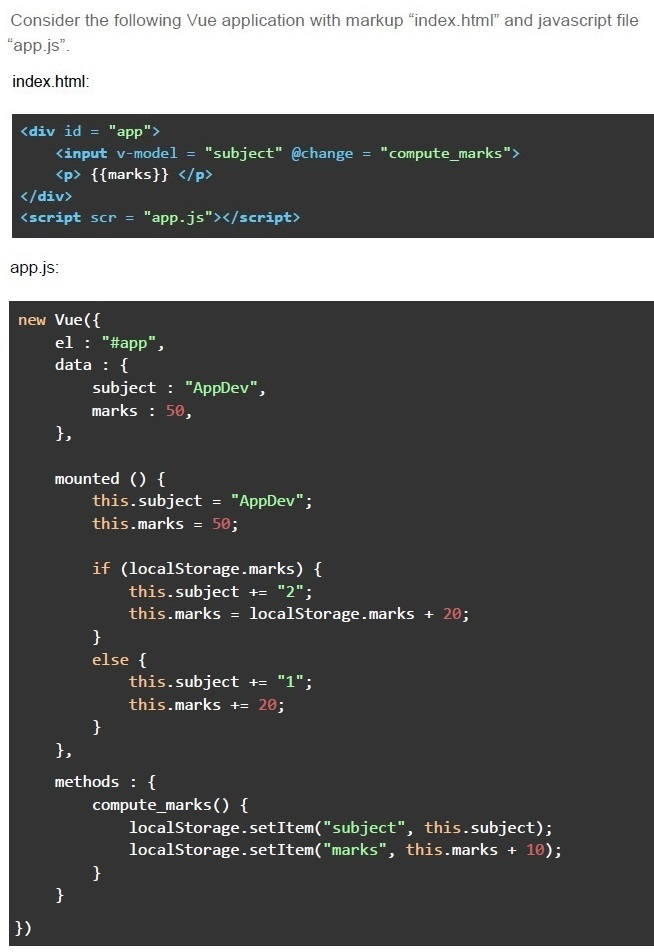
Text of the picture (copyable)
Consider the following Vue application with markup "index.html" and javascript file "app.js".

index.html:

```html
<div id = "app">
    <input v-model = "subject" @change = "compute_marks">
    <p> {{marks}} </p>
</div>
<script scr = "app.js"></script>
```

app.js:

```javascript
new Vue({
    el : "#app",
    data : {
        subject : "AppDev",
        marks : 50,
    },

    mounted () {
        this.subject = "AppDev";
        this.marks = 50;

        if (localStorage.marks) {
            this.subject += "2";
            this.marks = localStorage.marks + 20;
        }
        else {
            this.subject += "1";
            this.marks += 20;
        }
    },
    methods : {
        compute_marks() {
            localStorage.setItem("subject", this.subject);
            localStorage.setItem("marks", this.marks + 10);
        }
    }
})
```- AppDev1, 80
- AppDev2, 80
- AppDev1, 70
- AppDev2, 70
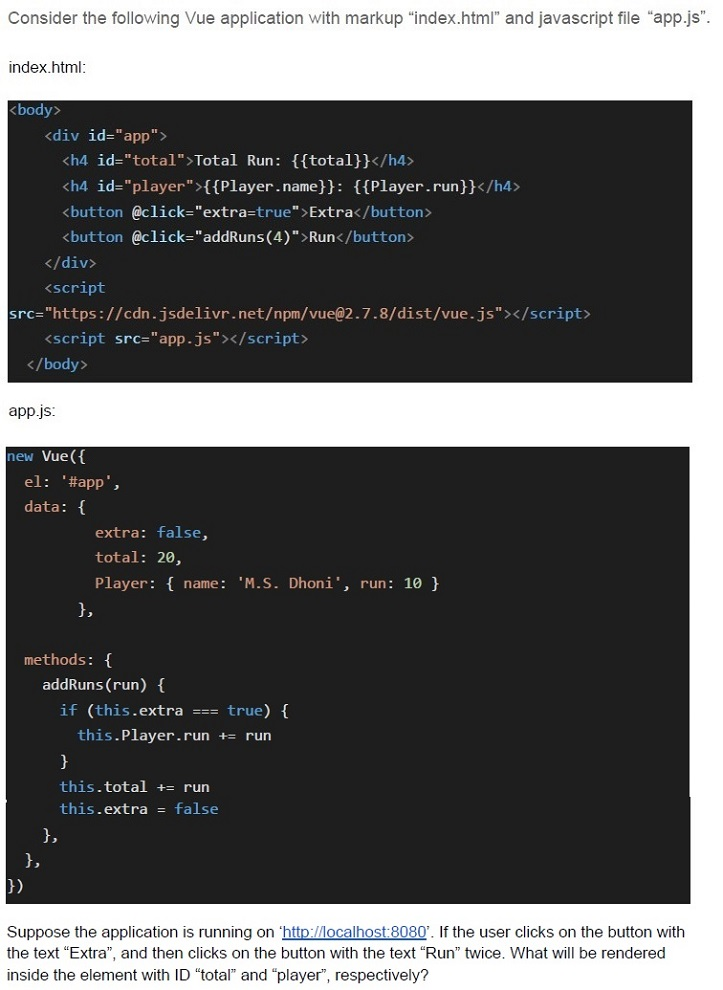
Text of the picture (copyable)
Consider the following Vue application with markup "index.html" and javascript file "app.js".

index.html:

```html
<body>
    <div id="app">
        <h4 id="total">Total Run: {{total}}</h4>
        <h4 id="player">{{Player.name}}: {{Player.run}}</h4>
        <button @click="extra=true">Extra</button>
        <button @click="addRuns(4)">Run</button>
    </div>
    <script
        src="https://cdn.jsdelivr.net/npm/vue@2.7.8/dist/vue.js"></script>
    <script src="app.js"></script>
</body>
```

app.js:

```javascript
new Vue({
    el: '#app',
    data: {
        extra: false,
        total: 20,
        Player: { name: 'M.S. Dhoni', run: 10 }
    },

    methods: {
        addRuns(run) {
            if (this.extra === true) {
                this.Player.run += run
            }
            this.total += run
            this.extra = false
        },
    },
})
```

Suppose the application is running on 'http://localhost:8080'. If the user clicks on the button with the text "Extra", and then clicks on the button with the text "Run" twice. What will be rendered inside the element with ID "total" and "player", respectively?- Total Run: 24, M.S. Dhoni: 14
- Total Run: 28, M.S. Dhoni: 14
- Total Run: 24, M.S. Dhoni: 18
- Total Run: 28, M.S. Dhoni: 18
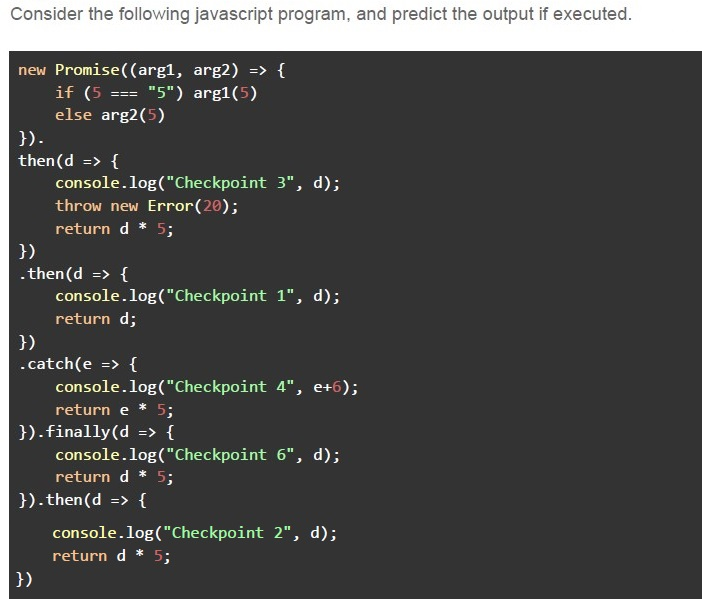
Text of the picture (copyable)
Consider the following javascript program, and predict the output if executed.

```javascript
new Promise((arg1, arg2) => {
  if (5 === "5") arg1(5)
  else arg2(5)
}).
then(d => {
  console.log("Checkpoint 3", d);
  throw new Error(20);
  return d * 5;
}).
then(d => {
  console.log("Checkpoint 1", d);
  return d;
}).
catch(e => {
  console.log("Checkpoint 4", e + 6);
  return e * 5;
}).finally(d => {
  console.log("Checkpoint 6", d);
  return d * 5;
}).then(d => {
  console.log("Checkpoint 2", d);
  return d * 5;
})
```- Checkpoint 4 11Checkpoint 6 undefinedCheckpoint 2 25
- Checkpoint 4 11Checkpoint 6 25Checkpoint 2 125
- Checkpoint 3 5Checkpoint 4 ErrorCheckpoint 6 undefinedCheckpoint 2 NaN
- Checkpoint 3 5Checkpoint 4 ErrorCheckpoint 6 NaNCheckpoint 2 NaN
- In point-to-point communication, the number of connections grow with theorder of O(nlogn).
- If a central message broker is used, the number of connections grow with theorder of O(logn).
- If a central message broker is used, the number of connections grow with theorder of O(n).
- A message broker makes the network more scalable, if compared with point-to-point communication.
- A shared cache is generally suitable for storing the personalized responses.
- A private cache is usually tied to a specific client.
- The caching helps in improving the performance of a web application.
- All of these
- JavaScript is a high level programming language.
- JavaScript moves the declaration of all the arrow functions to the top of theirscope.
- The language does not allow the global declaration of user defined functions.
- A function can be invoked inside another function in the language.

Text of the picture (copyable)
Consider the below Vue class binding and select the most appropriate option(s).

```html
<div v-bind:class="[isClassA ? classA : '', classB]"></div>
```
- The classes, namely “classA” and “classB” will always be applied to the divelement.
- The class, namely “classB” will always be applied to the div element.
- The class, namely “classA” will only be applied to the div element, if the variable“isClassA” evaluates to true.
- The class, namely “classB” will only be applied to the div element, if no variablewith name “isClassA” exists.
- All the progress will always be lost on the force reload of the page.
- All the progress may not necessarily be lost on the force reload of the page.
- The application will not allow force reload of the page.
- The progress made in a machine can be accessed on another machine.
- Scaling out is always a preferred choice when the network traffic is growing.
- The horizontal scaling will typically clone the application as many times asrequired, and add a load balancer to maintain uniform traffic across the servers.
- The horizontal partitioning splits a given table into multiple tables, with eachtable having the same structure.
- The diagonal scaling refers to cloning the application first, and then scaling upthe different servers to meet the requirements.
- A flask application runs in a threaded mode by default.
- A fetch API call always returns a promise.
- The promise returned by fetch API resolves to an HTTP response status 500,with the “ok” property of the response set to true.
- A headless CMS aims to manage both the content and frontend via APIs.
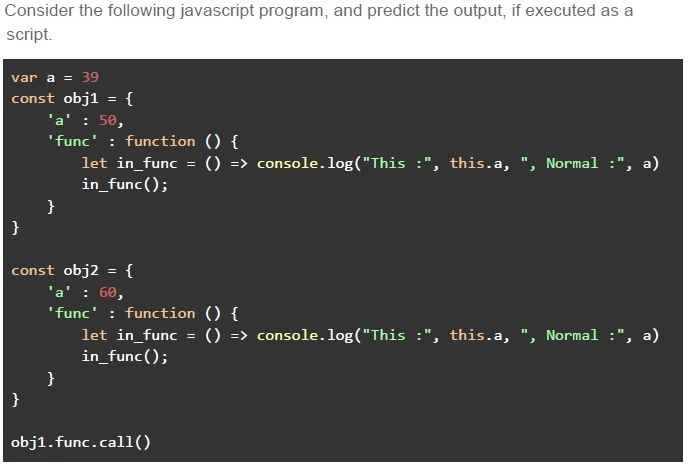
Text of the picture (copyable)
Consider the following javascript program, and predict the output, if executed as a script.

```javascript
var a = 39
const obj1 = {
    'a' : 50,
    'func' : function () {
        let in_func = () => console.log("This :", this.a, ", Normal :", a)
        in_func();
    }
}

const obj2 = {
    'a' : 60,
    'func' : function () {
        let in_func = () => console.log("This :", this.a, ", Normal :", a)
        in_func();
    }
}

obj1.func.call()
```- This : 39 , Normal : 39
- This : undefined , Normal : 39
- This : undefined , Normal : 50
- This : 39 , Normal : 50
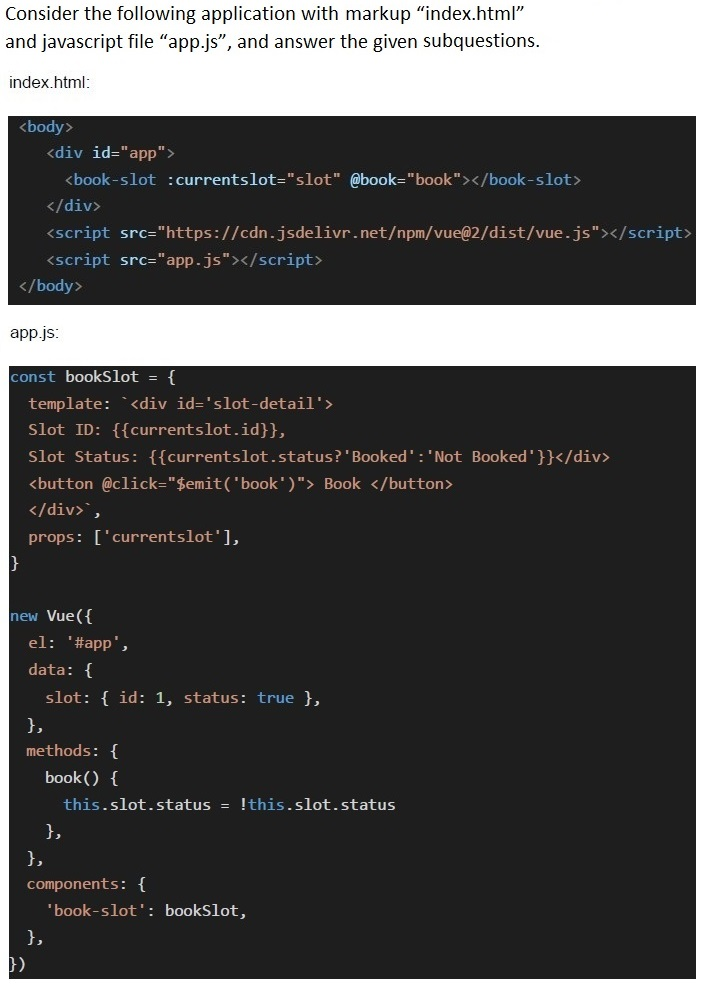
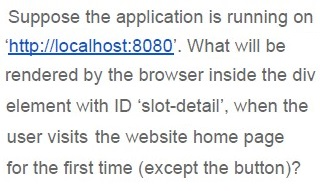
Text of the picture (copyable)
Suppose the application is running on 'http://localhost:8080'. What will be rendered by the browser inside the div element with ID 'slot-detail', when the user visits the website home page for the first time (except the button)?
- Slot ID: 1, Slot Status: Booked
- Slot ID: 1, Slot Status: Not Booked
- Slot ID: 1
- Slot Status: Booked
- Slot ID: 1, Slot Status: Booked
- Slot ID: 1, Slot Status: Not Booked
- Slot ID: 1
- Slot Status: Booked
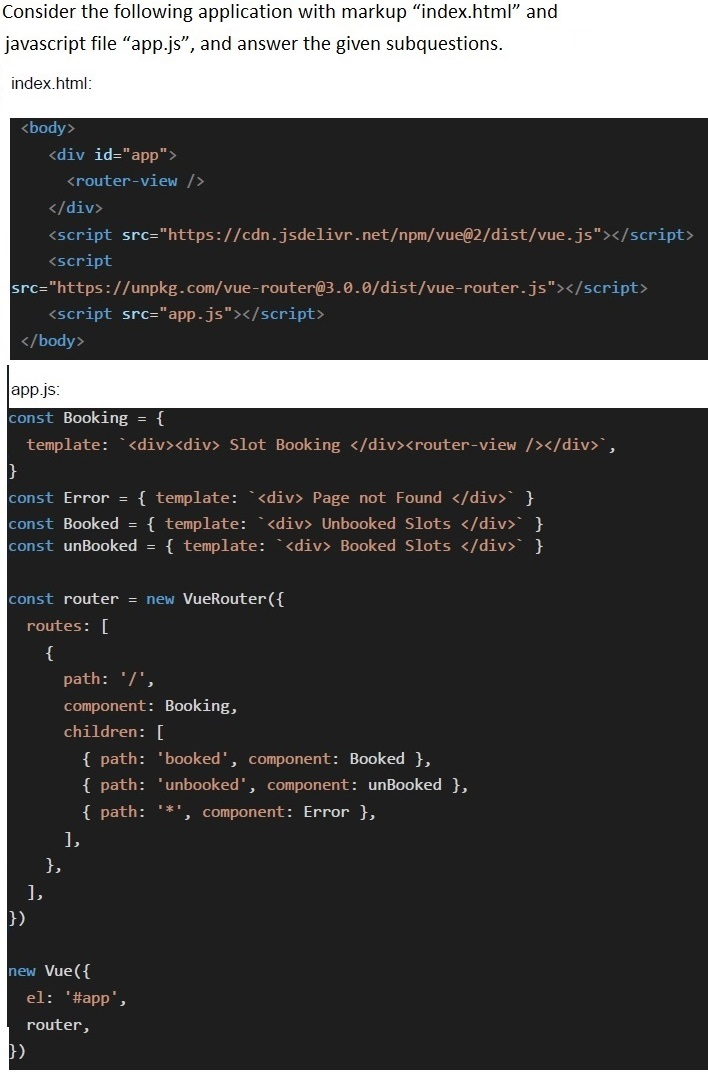
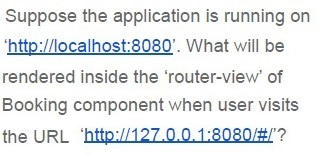
Text of the picture (copyable)
Suppose the application is running on
‘http://localhost:8080’. What will be
rendered inside the ‘router-view’ of
Booking component when user visits
the URL ‘http://127.0.0.1:8080/#/'?
- Page not Found
- Booked Slots
- Unbooked Slots
- None of these
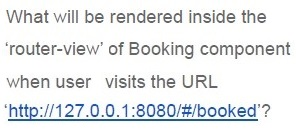
Text of the picture (copyable)
What will be rendered inside the
'router-view' of Booking component
when user visits the URL
'http://127.0.0.1:8080/#/booked'?
- Page not Found
- Booked Slots
- Unbooked Slots
- None of these
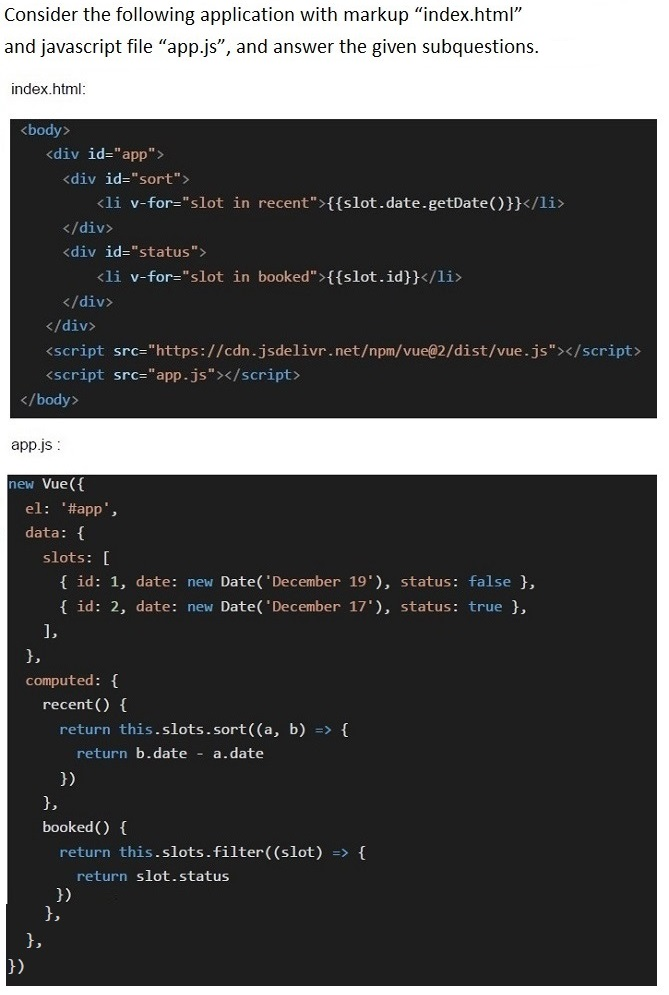
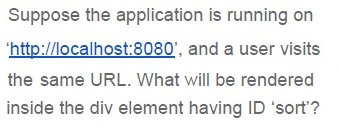
Text of the picture (copyable)
Suppose the application is running on
'http://localhost:8080', and a user visits
the same URL. What will be rendered
inside the div element having ID 'sort'?
- 1917
- 19
- 17
- 1719
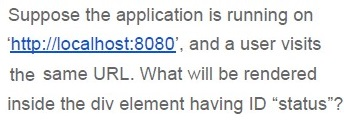
Text of the picture (copyable)
Suppose the application is running on
'http://localhost:8080', and a user visits
the same URL. What will be rendered
inside the div element having ID "status"?
- 12
- 1
- 2
- None of these
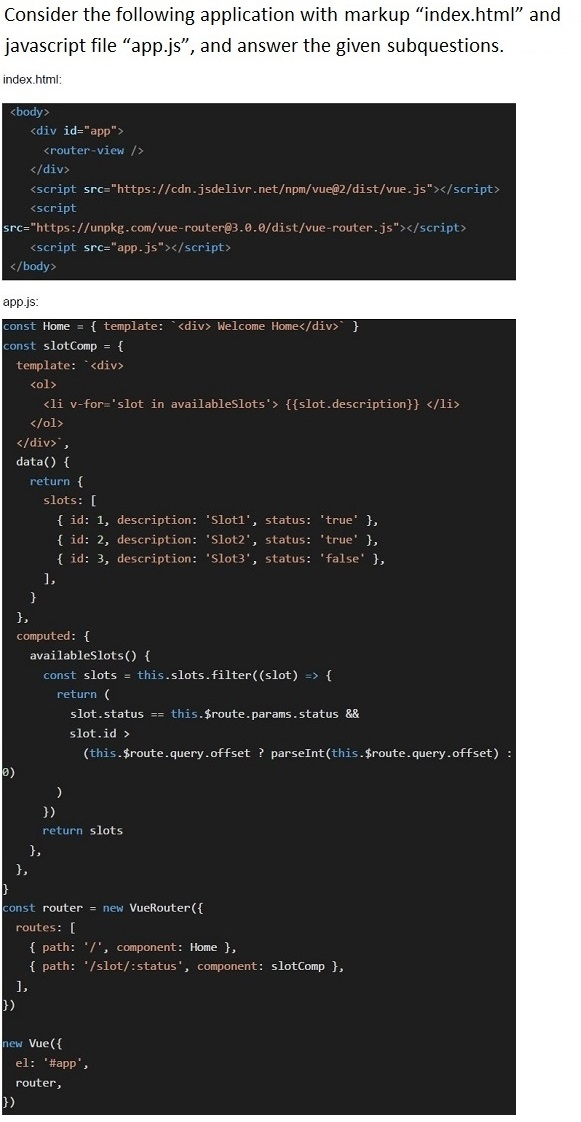
Text of the picture (copyable)
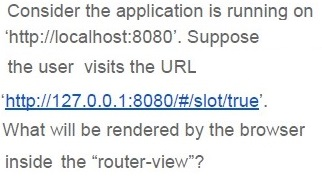
Consider the application is running on 'http://localhost:8080'. Suppose the user visits the URL 'http://127.0.0.1:8080/#/slot/true'. What will be rendered by the browser inside the "router-view"?
- 1. Slot12. Slot2
- 1. Slot22. Slot3
- 1. Slot1
- 1. Slot2
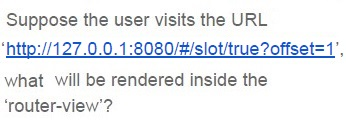
Text of the picture (copyable)
Suppose the user visits the URL
'http://127.0.0.1:8080/#/slot/true?offset=1',
what will be rendered inside the
'router-view'?
- 1. Slot12. Slot2
- 1. Slot22. Slot3
- 1. Slot1
- 1. Slot2
Answer key
- Q1 (MCQ, 2 marks): A
- Q2 (MCQ, 2 marks): B
- Q3 (MCQ, 2 marks): D
- Q4 (MCQ, 2 marks): C
- Q5 (MCQ, 2 marks): C
- Q6 (MCQ, 2 marks): B
- Q7 (MCQ, 3 marks): C
- Q8 (MCQ, 3 marks): B
- Q9 (MCQ, 3 marks): A
- Q10 (MCQ, 3 marks): C
- Q11 (MCQ, 3 marks): B
- Q12 (MCQ, 3 marks): D
- Q13 (MCQ, 4.5 marks): B
- Q14 (MCQ, 4.5 marks): C
- Q15 (MCQ, 4.5 marks): B
- Q16 (MCQ, 4.5 marks): A
- Q17 (MSQ, 2 marks): C, D
- Q18 (MSQ, 2 marks): B, C
- Q19 (MSQ, 3 marks): A, D
- Q20 (MSQ, 3 marks): B, C
- Q21 (MSQ, 3 marks): A, C, D
- Q22 (MSQ, 3 marks): A, D
- Q23 (MSQ, 3 marks): C, D
- Q24 (MSQ, 4.5 marks): B
- Q25 (MCQ, 3 marks): A
- Q26 (MCQ, 3 marks): B
- Q27 (MCQ, 3 marks): A
- Q28 (MCQ, 3 marks): C
- Q29 (MCQ, 4.5 marks): A
- Q30 (MCQ, 3 marks): C
- Q31 (MCQ, 4.5 marks): A
- Q32 (MCQ, 4.5 marks): D
Concepts this paper tests
Auto-generated summary from the source site. Handy as a checklist; the lessons above explain each idea from scratch.
Here’s a structured summary of the core topics, concepts, principles, and equations essential for the "Modern Application Development 2" exam, along with a Mermaid knowledge graph to visualize relationships.
Core Topics & Concepts Summary
1. Vue.js & Vuex
- Vue Component Lifecycle:
created,mounted,updated,destroyed. Vuex State Management:
state: Centralized data store.getters: Computed properties for state.mutations: Synchronous state updates.actions: Asynchronous operations (commit mutations).mapState: Helper to map store state to component computed properties.computed: { ...mapState(['stateA', 'stateB']) // Maps stateA and stateB to computed properties. }
Vue Directives:
v-for,v-if,v-bind,v-on,v-model(two-way binding).- Class binding:
:class="{ active: isActive }".
Vue Router:
- Dynamic routing with
router-viewand nested routes. - Route parameters (
$route.params) and query strings ($route.query). Example:
const router = new VueRouter({ routes: [ { path: '/user/:id', component: User }, { path: '/search', component: Search, props: (route) => ({ query: route.query.q }) } ] });
- Dynamic routing with
2. JavaScript (ES6+)
Asynchronous JavaScript:
Promises:
.then(),.catch(),.finally().new Promise((resolve, reject) => { if (condition) resolve("Success"); else reject("Error"); }).then(data => console.log(data)).catch(err => console.error(err));Async/Await: Syntactic sugar for promises.
async function fetchData() { const data = await apiCall(); console.log(data); }- Event Loop: Microtasks (Promises) vs. Macrotasks (
setTimeout,setInterval). Closures &
thisBinding:- Arrow functions inherit
thisfrom the parent scope. call(),apply(),bind()for explicitthisbinding.
- Arrow functions inherit
Error Handling:
try/catchfor synchronous code..catch()for promises.
- Hoisting:
varvs.let/const.
3. Web Security
Same-Origin Policy (SOP):
- Restricts cross-origin requests unless CORS headers are present.
- Origins must match:
protocol://domain:port.
Cross-Origin Resource Sharing (CORS):
- Server must include
Access-Control-Allow-Originheader.
- Server must include
Cross-Site Request Forgery (CSRF):
- Attack tricks users into submitting unauthorized requests.
- Mitigation: CSRF tokens,
SameSitecookies.
Cross-Site Scripting (XSS):
- Injection of malicious scripts.
- Mitigation: Sanitize inputs, use
Content Security Policy (CSP).
Cookies:
Sessionvs.Persistentcookies.- Attributes:
Secure,HttpOnly,SameSite. - Session cookies are deleted when the browser closes (but not by default; they are deleted when the session ends).
- Key Point: Cookies are sent to the server with every request by default.
4. Client-Side Storage
| Mechanism | Persistence | Scope | Sent to Server | Use Case |
|---|---|---|---|---|
| Cookies | Configurable | Domain-wide | Yes | Session management, tracking. |
| Local Storage | Persistent | Origin | No | Offline data, user preferences. |
| Session Storage | Session-only | Tab-specific | No | Temporary data (e.g., form drafts). |
Local Storage vs. Session Storage:
- Local Storage: Persists across sessions.
- Session Storage: Cleared when the tab closes.
5. Backend & Scalability
Flask Defaults:
- Not threaded by default (unless using a production server like Gunicorn).
- No built-in CSRF protection (requires
flask_wtf.csrf). - No CORS headers by default (requires
flask_cors).
Scaling Strategies:
- Horizontal Scaling (Scale Out): Add more servers + load balancer.
- Vertical Scaling (Scale Up): Increase server resources (CPU/RAM).
- Diagonal Scaling: Combine horizontal and vertical scaling.
Database Partitioning:
- Horizontal Partitioning (Sharding): Split rows across tables.
- Vertical Partitioning: Split columns into separate tables.
Message Brokers (e.g., RabbitMQ, Kafka):
- Reduce point-to-point connections from
O(n²)toO(n). - Improve scalability and decoupling.
- Reduce point-to-point connections from
6. Caching
| Cache Type | Scope | Use Case |
|---|---|---|
| Private Cache | Client-specific | Personalized data (e.g., user sessions). |
| Shared Cache | Shared across users | Static assets (e.g., images, CSS). |
- Benefits: Reduce latency, offload server load.
7. REST & APIs
Fetch API:
- Always returns a
Promise. Response
okproperty:truefor status codes200-299.falsefor404,500, etc.
- Always returns a
Webhooks vs. Polling:
- Webhooks: Server pushes data to client (event-driven).
- Polling: Client repeatedly checks for updates (inefficient).
8. Modern JavaScript Frameworks
Vue.js:
- Reactive data binding (
{{ data }}). - Component-based architecture.
- Reactive data binding (
Reactivity in Vue:
data()properties are reactive.- Computed properties cache results.
9. Design Patterns
- Observer Pattern: Used in Vue’s reactivity system.
- Factory Pattern: Promise factories for async operations.
- Singleton Pattern: Vuex store (single source of truth).
Key Equations & Code Snippets
1. Vuex mapState
computed: {
  ...mapState(['stateA', 'stateB']) // Maps stateA and stateB to computed properties.
}2. Promise Chaining
promiseFactory(data)
  .then(result => {
    console.log(result);
    return anotherPromise();
  })
  .catch(error => console.error(error));
3. Async/Await
async function fetchData() {
  try {
    const data = await apiCall();
    console.log(data);
  } catch (error) {
    console.error(error);
  }
}
4. Vue Class Binding
<div :class="{ active: isActive, 'text-danger': hasError }"></div>5. Fetch API
fetch('https://api.example.com/data')
  .then(response => {
    if (!response.ok) throw new Error('Network error');
    return response.json();
  })
  .then(data => console.log(data))
  .catch(error => console.error(error));
6. Vue Router Dynamic Routes
const router = new VueRouter({
  routes: [
    { path: '/user/:id', component: User, props: true }
  ]
});
7. Event Loop Example
console.log('Start');
setTimeout(() => console.log('Timeout'), 0);
Promise.resolve().then(() => console.log('Promise'));
console.log('End');
// Output: Start → End → Promise → Timeout
8. CSRF Protection (Flask)
from flask_wtf.csrf import CSRFProtect
app = Flask(__name__)
csrf = CSRFProtect(app)
9. CORS in Flask
from flask_cors import CORS
app = Flask(__name__)
CORS(app)  # Enable CORS for all routes
10. Local Storage
localStorage.setItem('key', 'value');
const data = localStorage.getItem('key');