Home / Past papers / MAD2 Quiz 2 / this paper
IIT M DIPLOMA AN4 EXAM QDD4 03 Dec 2023 - 03 Dec 2023
Elapsed 00:00
Consider the following JavaScript code.
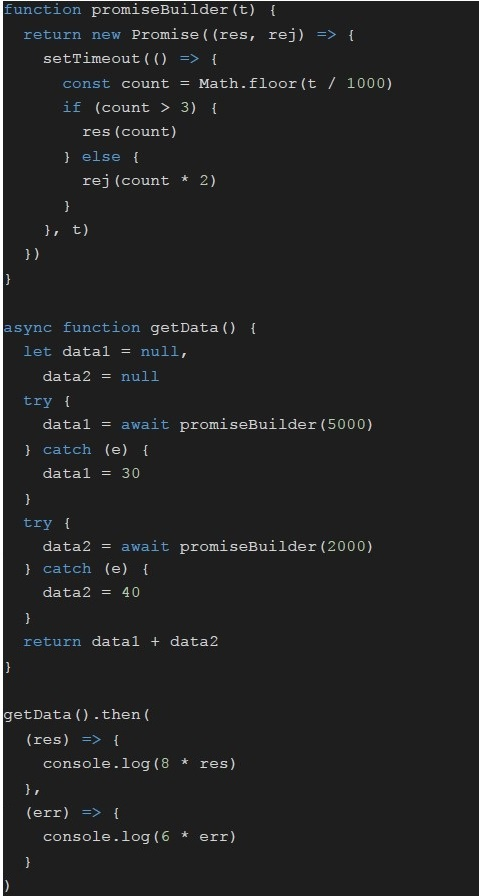 Consider the following JavaScript code. What will be logged on to the console?
Consider the following JavaScript code. What will be logged on to the console?Text of the picture (copyable)
```javascript
function promiseBuilder(t) {
  return new Promise((res, rej) => {
    setTimeout(() => {
      const count = Math.floor(t / 1000)
      if (count > 3) {
        res(count)
      } else {
        rej(count * 2)
      }
    }, t)
  })
}

async function getData() {
  let data1 = null,
    data2 = null

  try {
    data1 = await promiseBuilder(5000)
  } catch (e) {
    data1 = 30
  }

  try {
    data2 = await promiseBuilder(2000)
  } catch (e) {
    data2 = 40
  }

  return data1 + data2
}

getData().then(
  (res) => {
    console.log(8 * res)
  },
  (err) => {
    console.log(6 * err)
  }
)
```- 56
- 272
- 360
- 560
Consider the Vue application with markup index.html and JavaScript app.js
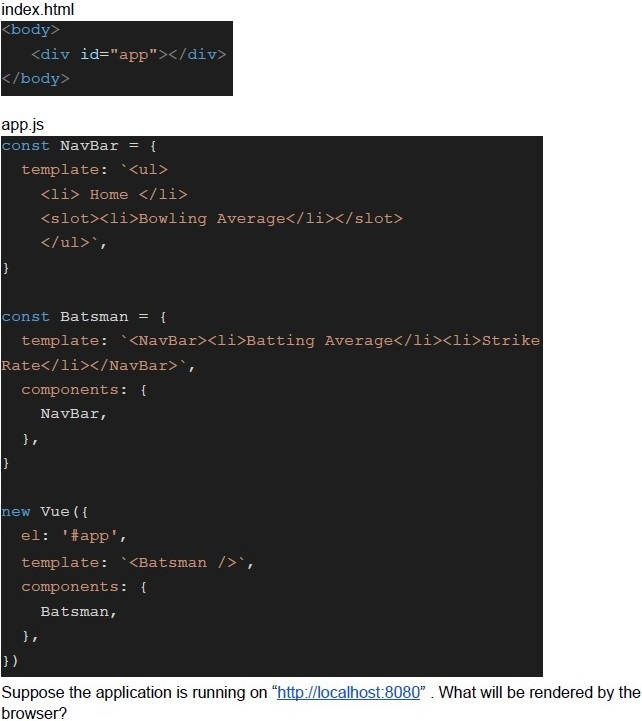 Consider the Vue application with markup index.html and JavaScript app.js
Consider the Vue application with markup index.html and JavaScript app.js Text of the picture (copyable)
index.html
```html
<body>
    <div id="app"></div>
</body>
```

app.js
```javascript
const NavBar = {
    template: `<ul>
        <li> Home </li>
        <slot><li>Bowling Average</li></slot>
    </ul>`,
}

const Batsman = {
    template: `<NavBar><li>Batting Average</li><li>Strike Rate</li></NavBar>`,
    components: {
        NavBar,
    },
}

new Vue({
    el: '#app',
    template: `<Batsman />`,
    components: {
        Batsman,
    },
})
```

Suppose the application is running on "http://localhost:8080". What will be rendered by the browser?- ● Home● Bowling Average
- ● Home● Bowling Average● Batting Average
- ● Home● Batting Average● Strike Rate
- ● Bowling Average● Batting Average
Consider the following Vue app with markup index.html and JavaScript app.js.
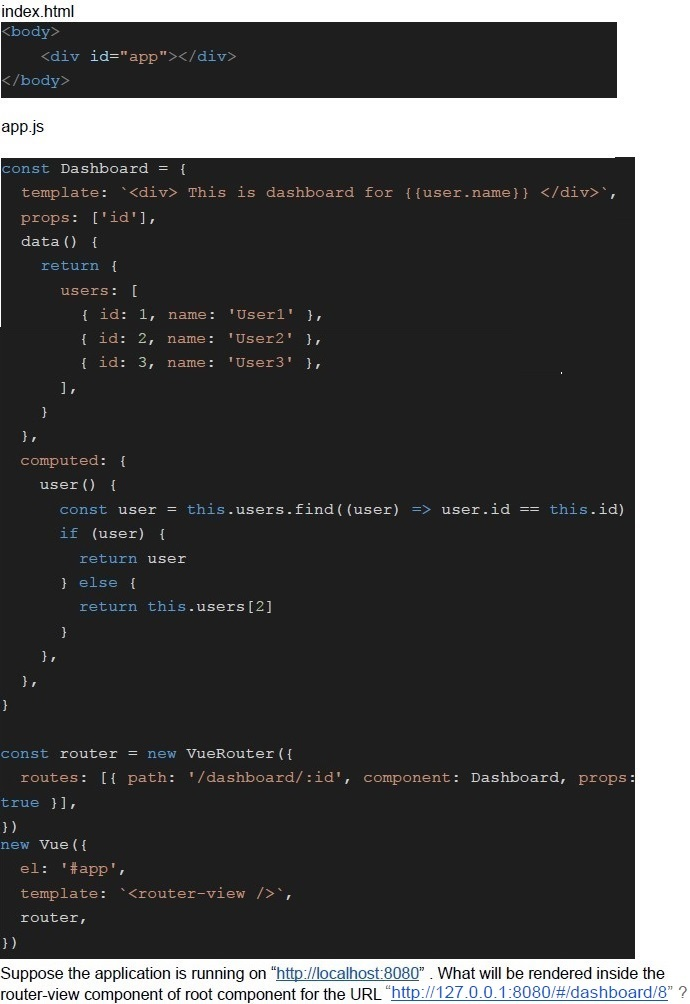 Consider the following Vue app with markup index.html and JavaScript app.js.
Consider the following Vue app with markup index.html and JavaScript app.js. Text of the picture (copyable)
index.html
```html
<body>
    <div id="app"></div>
</body>
```

app.js
```javascript
const Dashboard = {
    template: `<div> This is dashboard for {{ user.name }} </div>`,
    props: ['id'],
    data() {
        return {
            users: [
                { id: 1, name: 'User1' },
                { id: 2, name: 'User2' },
                { id: 3, name: 'User3' },
            ],
        }
    },
    computed: {
        user() {
            const user = this.users.find((user) => user.id == this.id)
            if (user) {
                return user
            } else {
                return this.users[2]
            }
        },
    },
}

const router = new VueRouter({
    routes: [{ path: '/dashboard/:id', component: Dashboard, props: true }],
})

new Vue({
    el: '#app',
    template: `<router-view />`,
    router,
})
```

Suppose the application is running on "http://localhost:8080". What will be rendered inside the router-view component of root component for the URL "http://127.0.0.1:8080/#/dashboard/8" ?- This is dashboard for User1
- This is dashboard for User2
- This is dashboard for User3
- None of these
Consider the following Vue application with JavaScript app.js and markup index.html
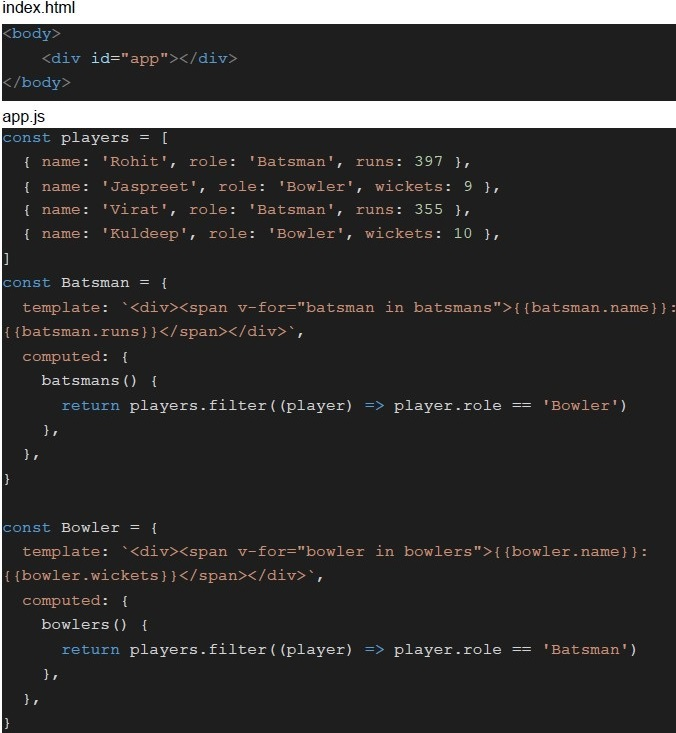 Consider the following Vue application with JavaScript app.js and markup index.html
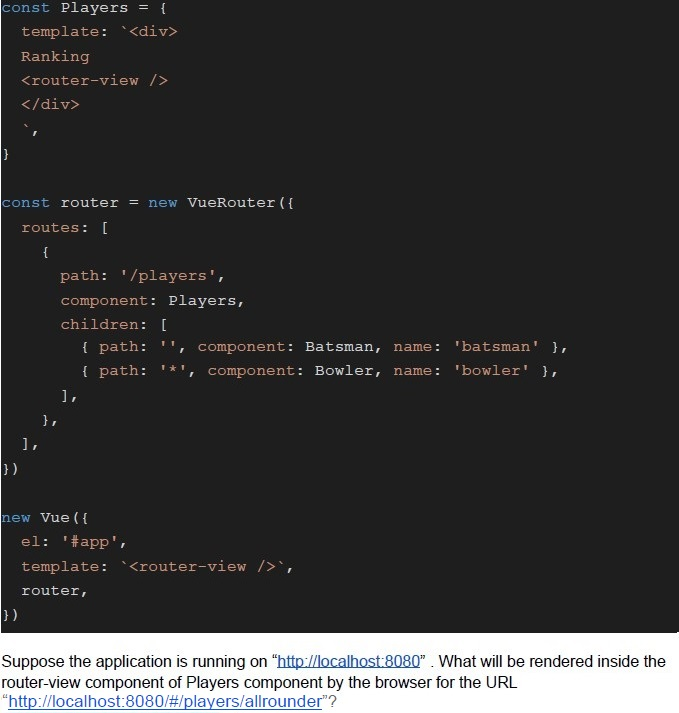 Consider the following Vue application with JavaScript app.js and markup index.html
Consider the following Vue application with JavaScript app.js and markup index.html
Consider the following Vue application with JavaScript app.js and markup index.html Text of the picture (copyable)
```html
index.html
<body>
    <div id="app"></div>
</body>

app.js
const players = [
  { name: 'Rohit', role: 'Batsman', runs: 397 },
  { name: 'Jaspreet', role: 'Bowler', wickets: 9 },
  { name: 'Virat', role: 'Batsman', runs: 355 },
  { name: 'Kuldeep', role: 'Bowler', wickets: 10 },
]

const Batsman = {
  template: `<div><span v-for="batsman in batsmans">{{batsman.name}}:
{{batsman.runs}}</span></div>`,
  computed: {
    batsmans() {
      return players.filter((player) => player.role == 'Bowler')
    },
  },
}

const Bowler = {
  template: `<div><span v-for="bowler in bowlers">{{bowler.name}}:
{{bowler.wickets}}</span></div>`,
  computed: {
    bowlers() {
      return players.filter((player) => player.role == 'Batsman')
    },
  },
}
```
```javascript
const Players = {
  template: `<div>
    Ranking
    <router-view />
  </div>`,
};

const router = new VueRouter({
  routes: [
    {
      path: '/players',
      component: Players,
      children: [
        { path: '', component: Batsman, name: 'batsman' },
        { path: '*', component: Bowler, name: 'bowler' },
      ],
    },
  ],
});

new Vue({
  el: '#app',
  template: `<router-view />`,
  router,
});
```

Suppose the application is running on "http://localhost:8080". What will be rendered inside the router-view component of Players component by the browser for the URL "http://localhost:8080/#/players/allrounder"?- Jaspreet: Kuldeep:
- Jaspreet: 9 Kuldeep: 10
- Rohit: Virat:
- Rohit:397 Virat:355
Consider the following Vue application with markup “index.html” and javascript file “app.js”.
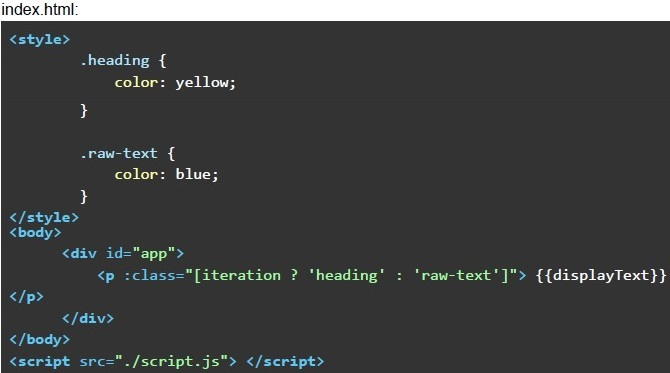 Consider the following Vue application with markup “index.html” and javascript file “app.js”.
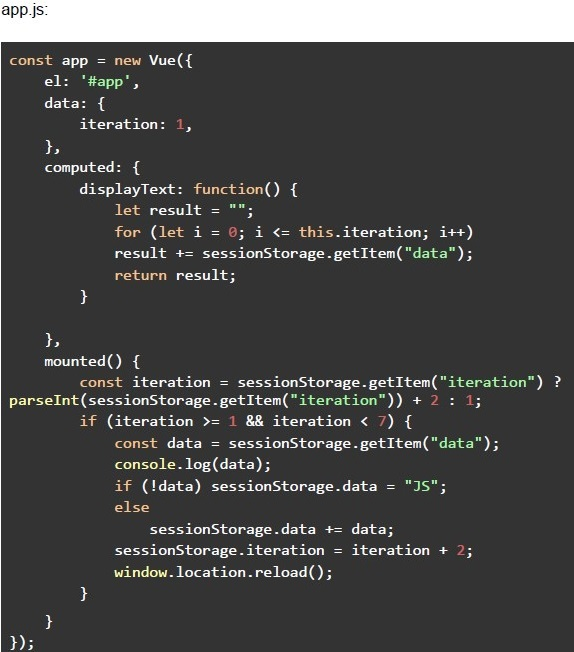 Consider the following Vue application with markup “index.html” and javascript file “app.js”. If you open the 'index.html' file in a browser, what content will be displayed on the browser screen after the automatic reloading of the browser tab stops?
Consider the following Vue application with markup “index.html” and javascript file “app.js”.
Consider the following Vue application with markup “index.html” and javascript file “app.js”. If you open the 'index.html' file in a browser, what content will be displayed on the browser screen after the automatic reloading of the browser tab stops?Text of the picture (copyable)
index.html:
```html
<style>
    .heading {
        color: yellow;
    }

    .raw-text {
        color: blue;
    }
</style>
<body>
    <div id="app">
        <p :class="[iteration ? 'heading' : 'raw-text']">{{displayText}}</p>
    </div>
</body>
<script src="./script.js"></script>
```
app.js:
```javascript
const app = new Vue({
    el: '#app',
    data: {
        iteration: 1,
    },
    computed: {
        displayText: function() {
            let result = "";
            for (let i = 0; i <= this.iteration; i++)
                result += sessionStorage.getItem("data");
            return result;
        }
    },
    mounted() {
        const iteration = sessionStorage.getItem("iteration") ?
            parseInt(sessionStorage.getItem("iteration")) + 2 : 1;
        if (iteration >= 1 && iteration < 7) {
            const data = sessionStorage.getItem("data");
            console.log(data);
            if (!data) sessionStorage.data = "JS";
            else
                sessionStorage.data += data;
            sessionStorage.iteration = iteration + 2;
            window.location.reload();
        }
    }
});
```- Black
- Blue
- Yellow
- None of these
Consider the below javascript program, and predict the output assuming the variable “random_num” always has a value greater than 8.
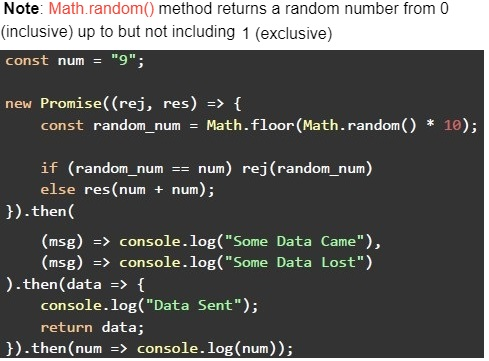 Consider the below javascript program, and predict the output assuming the variable “random_num” always has a value greater than 8.
Consider the below javascript program, and predict the output assuming the variable “random_num” always has a value greater than 8. Text of the picture (copyable)
Note: `Math.random()` method returns a random number from 0 (inclusive) up to but not including 1 (exclusive)

```javascript
const num = "9";

new Promise((rej, res) => {
  const random_num = Math.floor(Math.random() * 10);

  if (random_num == num) rej(random_num)
  else res(num + num);
}).then(
  (msg) => console.log("Some Data Came"),
  (msg) => console.log("Some Data Lost")
).then(data => {
  console.log("Data Sent");
  return data;
}).then(num => console.log(num));
```- Some Data CameSome Data LostSome Data Lost
- Some Data CameData SentData Sent
- Some Data CameData Sentundefined
- Some Data LostData Sentundefined
- Some Data LostundefinedData Sent
Consider the below javascript program, and predict the output if executed.
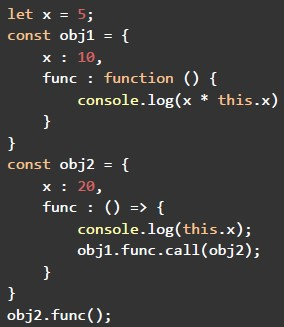 Consider the below javascript program, and predict the output if executed.
Consider the below javascript program, and predict the output if executed. Text of the picture (copyable)
```javascript
let x = 5;
const obj1 = {
  x : 10,
  func : function () {
    console.log(x * this.x)
  }
}
const obj2 = {
  x : 20,
  func : () => {
    console.log(this.x);
    obj1.func.call(obj2);
  }
}
obj2.func();
```- 20100
- 5NaN
- 20NaN
- 550
- undefined100
- undefined50
Consider the Vue app with markup index.html and script app.js
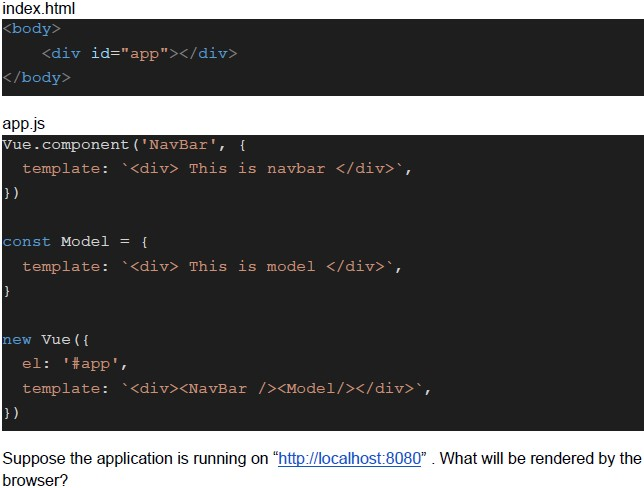 Consider the Vue app with markup index.html and script app.js
Consider the Vue app with markup index.html and script app.js Text of the picture (copyable)
index.html
```html
<body>
    <div id="app"></div>
</body>
```

app.js
```javascript
Vue.component('NavBar', {
    template: '<div> This is navbar </div>',
})

const Model = {
    template: '<div> This is model </div>',
}

new Vue({
    el: '#app',
    template: '<div><NavBar /><Model/></div>',
})
```

Suppose the application is running on "http://localhost:8080". What will be rendered by the browser?- This is navbar
- This is model
- This is navbarThis is model
- None of these
Which of the following statements is false regarding promise in javascript?
- A promise has 3 states - pending, fulfilled & rejected.
- The promises can be chained to perform dependent tasks.
- Promises can have only two states, Fulfilled and Rejected.
- A promise constructor accepts an executor function, which in itself received 2parameters for resolve and reject functions.
Consider the following Vue app with markup index.html and JavaScript app.js.
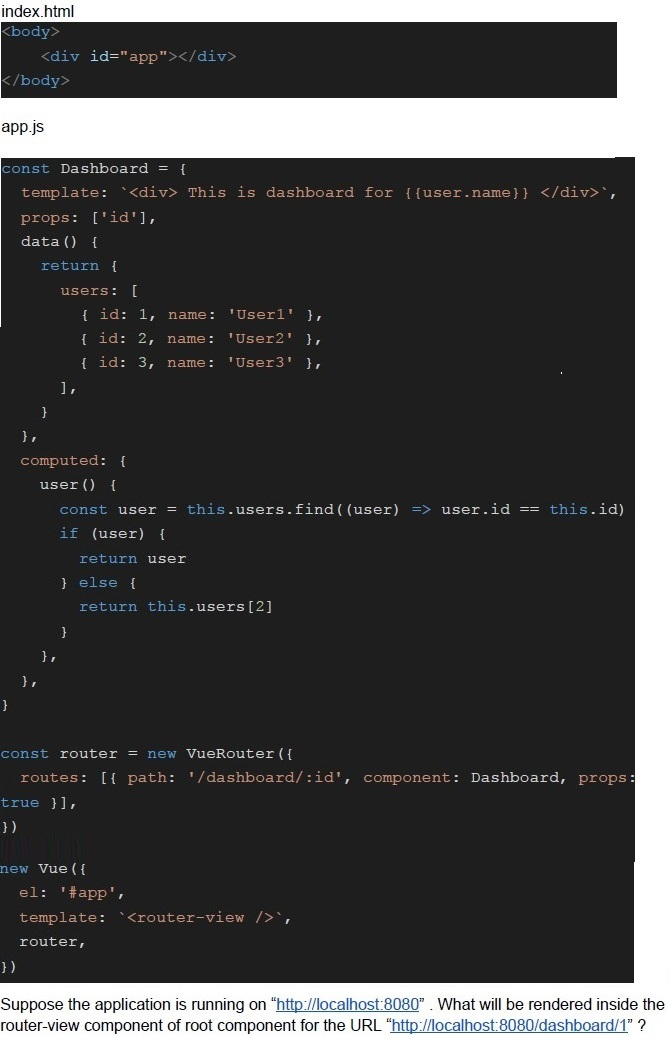 Consider the following Vue app with markup index.html and JavaScript app.js.
Consider the following Vue app with markup index.html and JavaScript app.js. Text of the picture (copyable)
index.html
```html
<body>
    <div id="app"></div>
</body>
```
app.js
```javascript
const Dashboard = {
    template: `<div> This is dashboard for {{user.name}} </div>`,
    props: ['id'],
    data() {
        return {
            users: [
                { id: 1, name: 'User1' },
                { id: 2, name: 'User2' },
                { id: 3, name: 'User3' },
            ],
        }
    },
    computed: {
        user() {
            const user = this.users.find((user) => user.id == this.id)
            if (user) {
                return user
            } else {
                return this.users[2]
            }
        },
    },
}

const router = new VueRouter({
    routes: [{ path: '/dashboard/:id', component: Dashboard, props: true }],
})

new Vue({
    el: '#app',
    template: `<router-view />`,
    router,
})
```
Suppose the application is running on "http://localhost:8080". What will be rendered inside the router-view component of root component for the URL "http://localhost:8080/dashboard/1" ?- This is dashboard for User1
- This is dashboard for User2
- This is dashboard for User3
- None of these
Consider the following Vue application with JavaScript app.js and markup index.html
Consider the following Vue application with JavaScript app.js and markup index.html
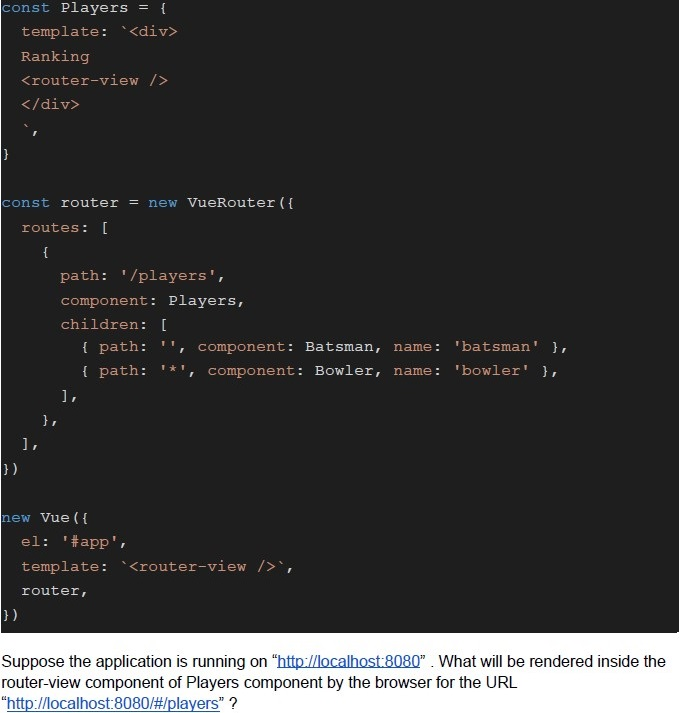 Consider the following Vue application with JavaScript app.js and markup index.html
Consider the following Vue application with JavaScript app.js and markup index.html
Consider the following Vue application with JavaScript app.js and markup index.html Text of the picture (copyable)
```html
index.html
<body>
    <div id="app"></div>
</body>

app.js
const players = [
  { name: 'Rohit', role: 'Batsman', runs: 397 },
  { name: 'Jaspreet', role: 'Bowler', wickets: 9 },
  { name: 'Virat', role: 'Batsman', runs: 355 },
  { name: 'Kuldeep', role: 'Bowler', wickets: 10 },
]

const Batsman = {
  template: `<div><span v-for="batsman in batsmans">{{batsman.name}}:
{{batsman.runs}}</span></div>`,
  computed: {
    batsmans() {
      return players.filter((player) => player.role == 'Bowler')
    },
  },
}

const Bowler = {
  template: `<div><span v-for="bowler in bowlers">{{bowler.name}}:
{{bowler.wickets}}</span></div>`,
  computed: {
    bowlers() {
      return players.filter((player) => player.role == 'Batsman')
    },
  },
}
```
```javascript
const Players = {
  template: `<div>
    Ranking
    <router-view />
  </div>`,
};

const router = new VueRouter({
  routes: [
    {
      path: '/players',
      component: Players,
      children: [
        { path: '', component: Batsman, name: 'batsman' },
        { path: '*', component: Bowler, name: 'bowler' },
      ],
    },
  ],
});

new Vue({
  el: '#app',
  template: `<router-view />`,
  router,
});
```

Suppose the application is running on "http://localhost:8080". What will be rendered inside the router-view component of Players component by the browser for the URL "http://localhost:8080/#/players" ?- Jaspreet: Kuldeep:
- Jaspreet: 9 Kuldeep: 10
- Rohit: Virat:
- Rohit:397 Virat:355
Consider the following Vue application with markup “index.html” and javascript file “app.js”.
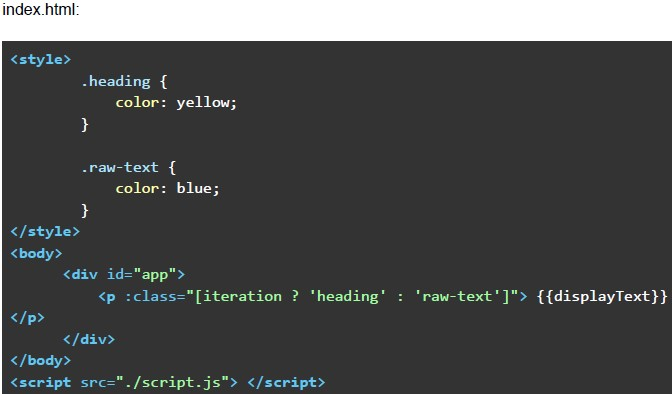 Consider the following Vue application with markup “index.html” and javascript file “app.js”.
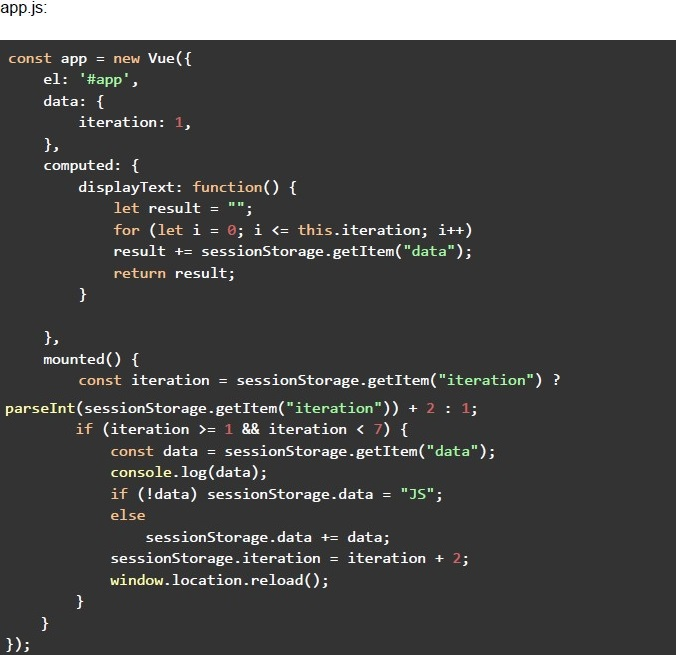 Consider the following Vue application with markup “index.html” and javascript file “app.js”. Suppose you open the file “index.html” in a browser, what will be shown on the browser screen post which browser tab will not be reloaded programmatically? If you open the 'index.html' file in a browser, what content will be displayed on the browser screen after the automatic reloading of the browser tab stops?
Consider the following Vue application with markup “index.html” and javascript file “app.js”.
Consider the following Vue application with markup “index.html” and javascript file “app.js”. Suppose you open the file “index.html” in a browser, what will be shown on the browser screen post which browser tab will not be reloaded programmatically? If you open the 'index.html' file in a browser, what content will be displayed on the browser screen after the automatic reloading of the browser tab stops?Text of the picture (copyable)
index.html:

```html
<style>
    .heading {
        color: yellow;
    }

    .raw-text {
        color: blue;
    }
</style>
<body>
    <div id="app">
        <p :class="[iteration ? 'heading' : 'raw-text']">{{displayText}}</p>
    </div>
</body>
<script src="./script.js"></script>
```
app.js:

```javascript
const app = new Vue({
  el: '#app',
  data: {
    iteration: 1,
  },
  computed: {
    displayText: function() {
      let result = "";
      for (let i = 0; i <= this.iteration; i++)
        result += sessionStorage.getItem("data");
      return result;
    }
  },
  mounted() {
    const iteration = sessionStorage.getItem("iteration") ?
      parseInt(sessionStorage.getItem("iteration")) + 2 : 1;
    if (iteration >= 1 && iteration < 7) {
      const data = sessionStorage.getItem("data");
      console.log(data);
      if (!data) sessionStorage.data = "JS";
      else
        sessionStorage.data += data;
      sessionStorage.iteration = iteration + 2;
      window.location.reload();
    }
  }
});
```- JSJS
- JSJSJS
- JSJSJSJS
- NaNNaNNaN
- NaNNaN
- NaNNaNNaNNaN
- None of these
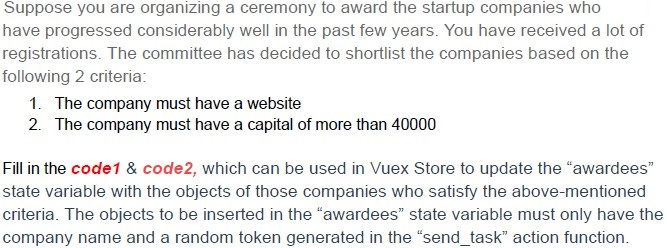
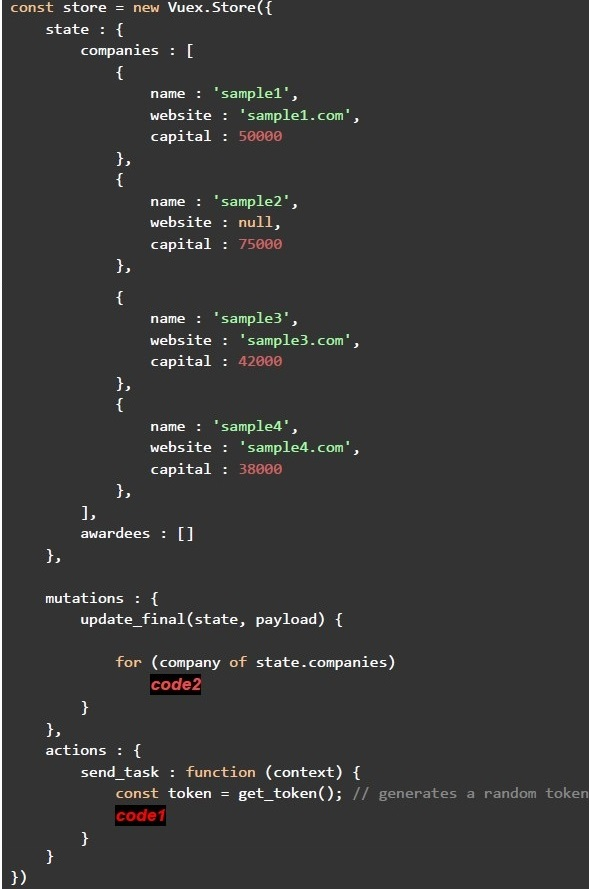
Text of the picture (copyable)
Suppose you are organizing a ceremony to award the startup companies who have progressed considerably well in the past few years. You have received a lot of registrations. The committee has decided to shortlist the companies based on the following 2 criteria:

1. The company must have a website
2. The company must have a capital of more than 40000

Fill in the code1 & code2, which can be used in Vuex Store to update the "awardees" state variable with the objects of those companies who satisfy the above-mentioned criteria. The objects to be inserted in the "awardees" state variable must only have the company name and a random token generated in the "send_task" action function.
```javascript
const store = new Vuex.Store({
  state: {
    companies: [
      {
        name: 'sample1',
        website: 'sample1.com',
        capital: 50000
      },
      {
        name: 'sample2',
        website: null,
        capital: 75000
      },
      {
        name: 'sample3',
        website: 'sample3.com',
        capital: 42000
      },
      {
        name: 'sample4',
        website: 'sample4.com',
        capital: 38000
      }
    ],
    awardees: []
  },

  mutations: {
    update_final(state, payload) {
      for (company of state.companies)
        code2
    }
  },
  actions: {
    send_task: function (context) {
      const token = get_token(); // generates a random token
      code1
    }
  }
})
```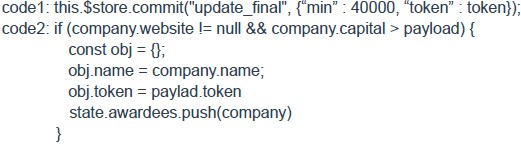
text
```
code1: this.$store.commit("update_final", {"min": 40000, "token": token});
code2: if (company.website != null && company.capital > payload) {
    const obj = {};
    obj.name = company.name;
    obj.token = paylad.token
    state.awardees.push(company)
}
```
text
```
code1: context.commit("update_final", 40000, token);
code2: if (company.website != null && capital > payload)
           awardees.push(company)
```
text
```
code1: this.$store.commit("update_final", 40000, token);
code2: if (company.website != null && capital > payload.min)
    awardees.push(company)
```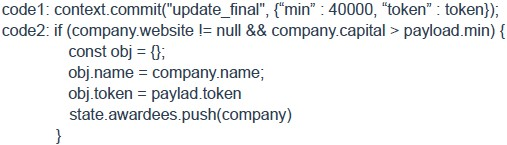
text
```javascript
code1: context.commit("update_final", {"min": 40000, "token": token});
code2: if (company.website != null && company.capital > payload.min) {
    const obj = {};
    obj.name = company.name;
    obj.token = paylad.token
    state.awardees.push(company)
}
```
Which of the following is/are true regarding JSON Web Tokens?
- Each token has three components, header, payload and signature
- Each token has two components, payload and signature.
- Each component of the token is encoded using Base-64.
- Components of the token are joined using period.
Which of the following statement(s) is/are true, regarding REST and GraphQL?
- GraphQL helps to fetch exactly the same data which is needed, and avoidsover fetching as well as under fetching
- In general, a GraphQL response always returns 200 status code, with the“error” field containing the errors (if any).
- A REST API provides multiple endpoints to access multiple resources.
- None of these.
Which of the following statement(s) is/are correct using Vuex?
- Vuex is a state management library for Vue.js applications.
- Using Vuex always becomes difficult when an application scales.
- Vuex provides actions for performing asynchronous operations.
- The Vuex getters are not reactive.
Answer key
- Q1 (MCQ, 3 marks): C
- Q2 (MCQ, 3 marks): C
- Q3 (MCQ, 3 marks): C
- Q4 (MCQ, 3 marks): C
- Q5 (MCQ, 3 marks): C
- Q6 (MCQ, 3 marks): C
- Q7 (MCQ, 3 marks): E
- Q8 (MCQ, 2 marks): A
- Q9 (MCQ, 2 marks): C
- Q10 (MCQ, 4.5 marks): A
- Q11 (MCQ, 4.5 marks): A
- Q12 (MCQ, 4.5 marks): C
- Q13 (MCQ, 4.5 marks): D
- Q14 (MSQ, 2 marks): A, C, D
- Q15 (MSQ, 2 marks): A, B, C
- Q16 (MSQ, 3 marks): A, C